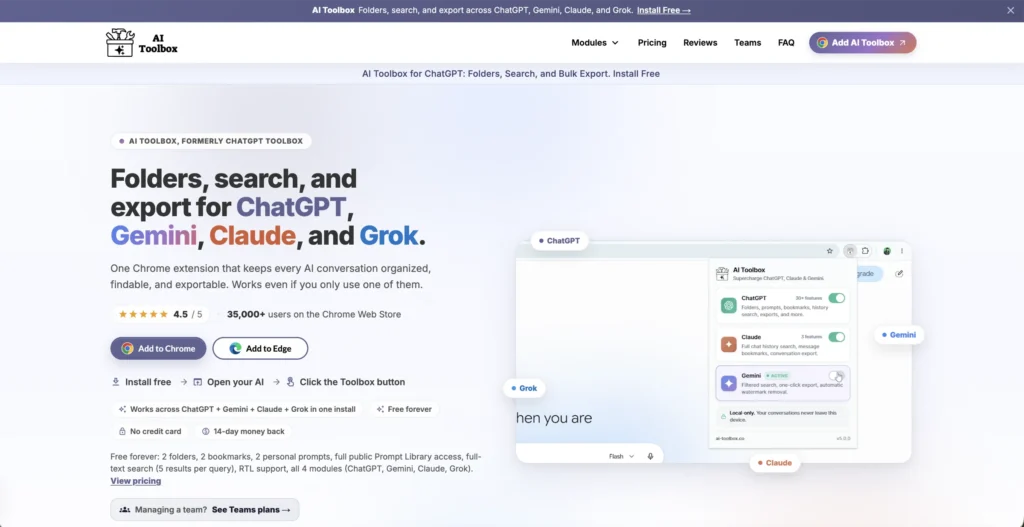
AI Toolbox is a Chrome extension that brings folders, search, bookmarks, and prompt libraries to ChatGPT, Gemini, Claude, and Grok. If you use multiple AI platforms and struggle with messy, unsearchable chat histories, AI Toolbox turns those fragmented interfaces into organized, productive workspaces.
Key Features of AI Toolbox
- Folder Organization – Create unlimited nested folders to organize your conversations across ChatGPT, Gemini, Claude, and Grok. Keep projects, clients, and topics neatly separated.
- Full-Text Search – Search across all your conversations by keyword, date, or role. Find that one coding solution or research thread instantly instead of scrolling through hundreds of chats.
- Smart Auto-Tagging – Conversations are automatically categorized into tags like Coding, Writing, Research, and more. Tagging runs entirely on your device with no data sent to external servers.
- Prompt Library with Chaining – Save your best prompts and chain up to 10 steps together for repeatable workflows. Teams can share prompt libraries across members.
- Message Bookmarks – Save important responses with color-coded labels so you can return to key answers without digging through long threads.
- Multi-Format Export – Export conversations as TXT, Markdown, JSON, or PDF. Bulk export is available for moving or archiving multiple chats at once.
- Context Mentions – Reference past conversations in new prompts, pulling relevant context across siloed chats without copy-pasting.
- Platform-Specific Extras – Gemini gets automatic watermark removal from generated images. Claude gets an artifact vault for code and documents. Grok gets inline sidebar folders on both grok.com and x.com.
How AI Toolbox Works
- Install the Extension – Download AI Toolbox from the Chrome Web Store. It works on Chrome, Edge, Brave, Opera, and Arc.
- Open Your AI Platform – Visit ChatGPT, Gemini, Claude, or Grok. A new sidebar panel appears automatically on each platform.
- Organize Your Chats – Search for conversations and add them to folders. Apply bookmarks, tags, and labels to keep everything structured.
- Build Your Prompt Library – Save prompts you use often, chain them into multi-step sequences, and share them with your team if needed.
- Sync Across Devices – Your folders, prompts, and tags sync encrypted across devices. Conversation content itself stays in your browser and never leaves your machine.
The Core Benefits of Using AI Toolbox
- One Tool for All Platforms – Manage ChatGPT, Gemini, Claude, and Grok from a single extension instead of dealing with each platform’s limited native organization.
- Privacy-First Design – Conversation content never leaves your browser. Only user-created elements like folders and prompts sync, and that data is encrypted at rest.
- Massive Time Savings – Full-text search and smart tagging mean you stop wasting time scrolling through old chats looking for that one answer you know is buried somewhere.
- Team Collaboration – Shared prompt libraries, admin dashboards, and centralized billing make AI Toolbox practical for teams, not just individual users.
- Future-Proof – The All Access plan includes any new AI platforms added in the future at no extra cost.
AI Toolbox Pricing and Plans
- Free Plan – Includes a limited number of folders, bookmarks, prompts, and search results per query. TXT export only. Good for trying out the core features.
- Premium Monthly – Unlocks unlimited folders, prompts, search results, multi-format export, bulk operations, and audio voices. Annual billing offers significant savings.
- Premium Lifetime – A one-time payment per platform that includes all premium features permanently with no recurring charges.
- All Access Lifetime – A single one-time payment covering all features across ChatGPT, Gemini, Claude, Grok, and any future platforms added to the extension.
- Teams Plan – Per-seat pricing with shared prompt libraries, admin controls, and centralized billing for organizations.
All plans come with a 14-day money-back guarantee. For current pricing details, visiting the AI Toolbox website is recommended.
An Honest Review of AI Toolbox
AI Toolbox solves a real and growing problem. As more people use multiple AI platforms daily, the lack of built-in organization tools becomes increasingly painful. This extension fills that gap cleanly.
What works well: The cross-platform coverage is the biggest strength. Having one consistent system for folders, search, and prompts across four major AI platforms saves real time. The privacy-first approach, where conversation content stays local and only metadata syncs encrypted, is a genuine differentiator. Smart auto-tagging that runs on-device is a thoughtful touch.
Where it could improve: It only works on Chromium-based browsers, so Firefox and Safari users are out. The free plan is quite restrictive, which may frustrate users who want to evaluate it properly before paying. Folder organization uses a search-to-add flow rather than drag-and-drop, which takes some getting used to.
Who is it best for: AI Toolbox is ideal for developers, researchers, marketers, and consultants who use multiple AI platforms daily and need a way to keep their conversations, prompts, and outputs organized without compromising privacy.
Final Thoughts on AI Toolbox
AI Toolbox is a practical, privacy-focused extension that brings much-needed organization to the scattered world of AI chat platforms. If you regularly use ChatGPT, Gemini, Claude, or Grok and want searchable, folder-organized workspaces across all of them, AI Toolbox is well worth installing.