Kivo

How Kivo turns visual references into fully styled presentation decks you can edit like you would in Figma.

Visit Kivo kivo.art

Reviewed by the AI Parabellum team · Updated October 18, 2026

kivo.art
Kivo
01

Overview

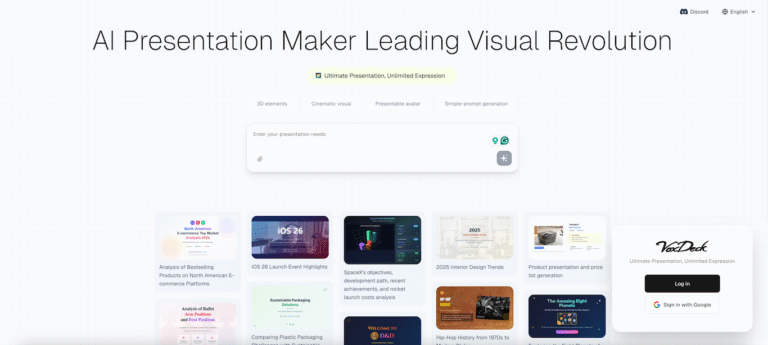
Kivo is a design-focused AI presentation maker that turns your content and visual references into editable slide decks. You explore eight design variations, choose one look for the full deck, and then customize text, colors, and layout in an editor that works much like Figma. A free Starter plan makes it easy to try before committing to a paid tier.

02

Key Features of Kivo

  • Reference-Based Generation Start from a visual reference in Kivo’s gallery instead of a blank template, and the AI applies that style to your content.
  • Eight Looks per Reference Each reference produces eight design variations already filled with your content, so you can compare options before committing to one.
  • Consistent Styling Across Slides The look you choose carries through every slide, keeping fonts, colors, and layout cohesive across the whole deck.
  • Figma-Style Editor Adjust text font, weight, size, and alignment, change fill and stroke colors, and set position, rotation, and dimensions with precise controls.
  • Shapes and Asset Library Add rectangles, ellipses, polygons, and stars, or pull visuals from the built-in asset library to customize slides further.
  • AI Image Generation Generate images directly inside Kivo to fill slides with visuals that match the deck’s style.
  • Curated Style Gallery Browse references covering themes like product packaging, residential design, film festivals, still life, and startup onboarding.
  • Flexible Export Download finished decks as PPTX, PDF, or image files on every plan, including the free one.
03

How Kivo Works

  1. Choose a Reference – Browse the gallery and pick a visual style that fits the tone of your presentation.
  2. Add Your Content – Provide the text and ideas you want in the deck.
  3. Pick One of Eight Looks – Kivo generates eight variations of the reference populated with your content. Select the one you like best.
  4. Generate the Full Deck – Kivo builds every slide in the chosen look, keeping the design consistent throughout.
  5. Edit and Export – Refine words, colors, and layout in the editor, add slides as needed, then export to PPTX, PDF, or images.
04

The Core Benefits of Using Kivo

  • Distinctive Design Starting from curated visual references produces decks that stand out from the familiar look of standard presentation templates.
  • Full Creative Control The Figma-style editor means you are never stuck with what the AI generates. Every element can be adjusted by hand.
  • Faster Deck Creation Generating a styled, content-filled deck in minutes saves the hours normally spent on layout and formatting.
  • Works with Existing Tools PPTX export lets you continue editing in PowerPoint, Keynote, or Google Slides, while PDF works for sharing and printing.
  • Fair Credit Policy Unused credits roll over without limits, and credits spent on failed generations are restored automatically.
05

Kivo Pricing and Plans

Kivo uses a credit-based model with a free plan and two paid tiers:

  • Starter A free plan with a small monthly credit allowance, enough for a limited number of slides. Your first deck is free, and AI image generation plus PPTX, PDF, and image export are included.
  • Plus The recommended paid plan, with a larger monthly credit allowance suited to regular presentation work.
  • Pro The top tier with the biggest monthly credit pool for heavy users and frequent deck creation.

Unused credits roll over with no time or quantity limit, and credit top-ups are available. Upgrades are prorated, and a full refund is offered if you cancel within 7 days of payment without using credits. Enterprise and API pricing is available on request. For current pricing, visiting the Kivo website directly is recommended.

06

An Honest Review of Kivo

Kivo takes a different route from most AI presentation tools by putting visual design first, and that focus shows in the results.

What works well: Generating eight looks from a single reference is a smart approach, letting you compare real design directions with your own content instead of guessing from empty templates. The Figma-style editor gives designers and detail-oriented users the precise control that many AI slide tools lack. Exporting to PPTX on every plan, including free, is generous and keeps your work portable. The rollover credit policy and automatic refunds for failed generations are user-friendly.

Where it could improve: The free plan’s credit allowance covers only a small number of slides, so regular users will need a paid plan quickly. Kivo does not list integrations with other tools on its website. Its style gallery leans toward creative and design-oriented aesthetics, which may feel less suited to conservative corporate or data-heavy presentations. Team plans are mentioned but not detailed on the pricing page.

Who is it best for: Kivo is ideal for designers, creative agencies, startups, freelancers, and brands that want presentation decks with a strong, distinctive visual identity without building every slide from scratch.


07

Final Thoughts on Kivo

Kivo turns visual references into fully styled presentation decks, combining AI generation with a Figma-style editor for complete control. If you want decks that look custom-designed rather than template-based, Kivo is a strong choice, and its free Starter plan makes it easy to try.

Similar Presentation tools

See all

Newsletter

New AI tools in your inbox

The best new tools and the AI news that matters, in one short email. Unsubscribe any time.

Free instant check before you pay. Takes a few seconds.

Scroll to Top