You type “a cat wearing sunglasses on a beach,” wait a few seconds, and there it is. A cat. Sunglasses. Beach. The first time I tried one of these tools, I sat there wondering who was actually drawing this stuff. Turns out, nobody is. And the way it really works is stranger than you’d guess.
So What Are AI Image Generators, Really?
AI image generators are tools that create new images from a text description, which people call a prompt. You’ve probably heard the big names already: DALL-E 2, Midjourney, Stable Diffusion. They all do roughly the same trick with their own flavor.
Here’s the thing most people get wrong. These tools aren’t searching the web for a matching photo and handing it to you. Every single pixel is generated fresh, based on patterns the model picked up during training.
How AI Image Generators Work Under the Hood
The engine behind all of this is a neural network. It’s a system loosely modeled on how neurons fire in your brain, and it learns from examples rather than following rules someone programmed by hand. Millions and millions of examples.
It All Starts With Training
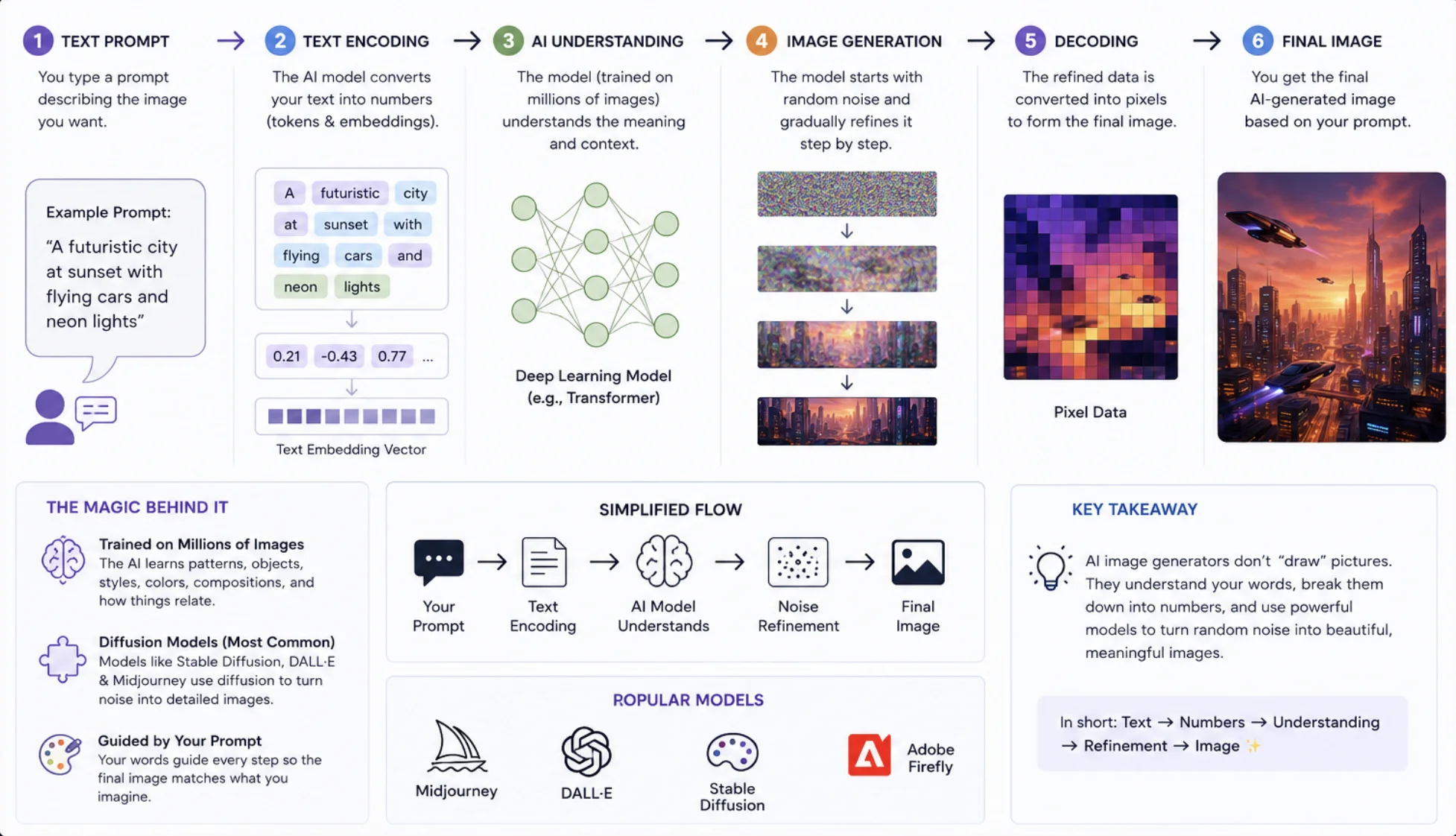
Before the model can draw a single cat, it has to learn what cats look like. The training process involves feeding it huge datasets of images paired with captions. Show it enough dogs labeled “dog,” and it starts connecting the word to floppy ears and wagging tails.
The model isn’t memorizing photos, though. It’s building a kind of mathematical intuition for concepts, styles, and colors. That’s why it can draw a cat astronaut even if it never saw one during training.
Making Sense of Your Prompt
When you hit generate, the tool first has to figure out what you mean. It uses natural language processing to turn your sentence into numbers the model can actually work with. Meaning becomes math, basically.
This also explains why vague prompts give you vague results. There’s an old programmer’s saying that fits perfectly here: “Garbage in, garbage out.”
Diffusion: From Static to Picture
Most of today’s generators use something called diffusion, and honestly, it sounds backwards when you first hear it. The model starts with pure random noise, like static on an old TV. Then it cleans that noise up, little by little, until an image appears.
Why does that work? During training, the model watched clean images get buried in noise, over and over. So it learned to run the damage in reverse, with your prompt steering every step.
- The canvas starts as random static.
- Your prompt nudges the shapes and colors toward what you asked for.
- Each pass sharpens the details a bit more.
- A few dozen steps later, you’ve got your picture.
And What About GANs?
Before diffusion took over, the popular approach was generative adversarial networks, or GANs. A GAN is basically two networks locked in a contest. One forges images, the other plays detective and calls out the fakes.
The forger keeps improving until the detective can’t tell anymore. GANs still show up today in face generators and photo enhancement apps, so they’re far from dead.
The Main Image Generation Methods Compared
Not every tool works the same way. Here’s a quick side-by-side of the methods you’ll run into.
| Method | How It Works | Where It Shines |
|---|---|---|
| Diffusion Models | Refines random noise into an image, step by step | Creative text-to-image art |
| GANs | Two networks compete, one creating and one critiquing | Realistic faces, photo enhancement |
| VAEs | Compresses images into compact code, then rebuilds them | Fast generation and variations |
Why AI Images Get Weird Sometimes
We’ve all seen the six-fingered hands. Or text in an image that looks like an alien alphabet. This happens because the model understands patterns, not physical reality. It knows hands go at the ends of arms, but nobody ever taught it that five fingers is the rule.
The usual trouble spots:
- Hands, fingers, and teeth
- Any text or lettering inside the image
- Reflections and shadows
- Faces in busy backgrounds
To be fair, newer models mess these up far less than they did even a year ago. The improvement curve is steep.
Getting Better Results From AI Image Generators
Once you understand how the model thinks, prompting gets a lot easier. A few habits go a long way.
- Spell out the subject, the setting, and the mood.
- Name a style, like watercolor, film photo, or pixel art.
- Throw in lighting cues such as “golden hour” or “soft studio light.”
- Generate a batch and keep the best one. Nobody nails it on the first try.
The designer Paul Rand once said, “Design is thinking made visual.” Your prompt is the thinking. The AI just handles the visual part.
Conclusion
Strip away the mystery and AI image generators come down to three things: a neural network trained on millions of captioned images, a language system that translates your words into math, and a diffusion process that sculpts random noise into a finished picture. It’s not magic, but it’s close enough that I still catch myself grinning when a good one comes out. Now go write some prompts and see what you can get away with.