Timedora

How Timedora uses AI to turn your notes, slides, and lectures into study guides, quizzes, and flashcards.

Visit Timedora timedora.com

Reviewed by the AI Parabellum team · Updated October 16, 2026

timedora.com
Timedora
01

Overview

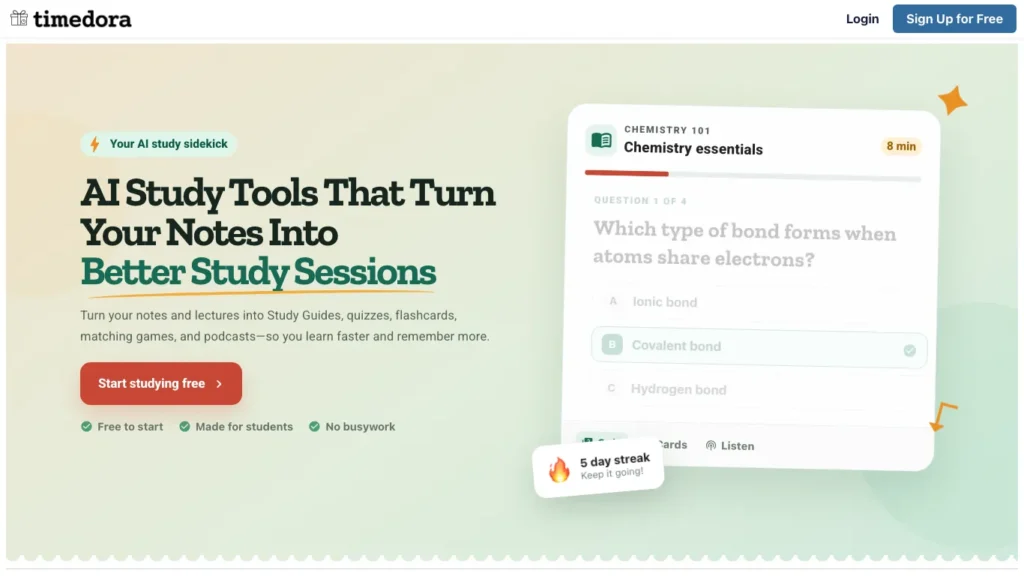
Timedora is an AI study platform that turns class materials into interactive study tools. Upload your notes, slides, or PDFs, or record a live lecture, and Timedora generates study guides, quizzes, flashcards, matching games, and even audio podcasts from your content so you can learn faster and retain more.

02

Key Features of Timedora

  • AI Study Guide Generator Upload your notes or slides and Timedora creates a structured study guide covering the key topics, concepts, and details from your materials.
  • Quiz Generator Automatically generate practice quizzes from your uploaded content to test your understanding and identify knowledge gaps before exams.
  • Flashcard Creator Turn your notes into digital flashcards for quick review sessions, with content pulled directly from your course materials.
  • Matching Games Study through interactive matching games that pair terms with definitions, concepts with examples, or questions with answers from your uploads.
  • AI Podcast Generator Convert your study materials into audio podcasts you can listen to while commuting, exercising, or doing other activities.
  • Lecture Recorder Record live lectures directly in the platform and get a searchable transcript along with auto-generated notes and study activities.
  • Study Streak Tracking Track your daily study consistency with streak counters that motivate you to maintain a regular study habit.
  • Teacher Tools Teachers can build study activities from notes, slides, or a topic, edit questions before sharing, and distribute a single link to an entire class.
03

How Timedora Works

  1. Upload Your Materials – Add your notes, slides (PPTX), PDFs, or other course documents to the platform, or record a live lecture using the built-in recorder.
  2. Choose Your Study Tool – Select which study activity you want to generate from your materials, whether that is a study guide, quiz, flashcards, matching game, or podcast.
  3. AI Generates Your Content – Timedora’s AI analyzes your materials and creates study tools focused on the topics, concepts, and details in your uploads.
  4. Study and Practice – Work through your generated materials by reading guides, answering quiz questions, flipping flashcards, playing matching games, or listening to podcasts.
  5. Track Your Progress – Monitor your study streaks and revisit materials as needed to reinforce learning before exams.
04

The Core Benefits of Using Timedora

  • Saves Hours of Prep Work Instead of manually creating flashcards or study guides, Timedora generates them in seconds from the materials you already have.
  • Multiple Learning Modes Study the same content through reading, quizzing, matching, and listening, which reinforces learning through varied repetition.
  • Works with What You Have Upload whatever format your notes come in, whether that is typed notes, lecture slides, PDFs, or a recorded lecture, and Timedora handles the rest.
  • Free to Start Create an account and start building study tools without entering any payment details, making it accessible to students on any budget.
  • Teacher-Friendly Sharing Teachers can generate activities and share them with an entire class through a single link, simplifying content distribution.
05

Timedora Pricing and Plans

Timedora is free to start with no credit card required. Users can create an account and build study packs from their materials at no cost. The platform does not prominently list paid tier details on its website, suggesting that core study tool generation is accessible through the free plan. For information on any premium features or usage limits, visiting the Timedora website directly is recommended.

06

An Honest Review of Timedora

Timedora takes a straightforward approach to AI-powered studying by focusing on one thing: turning your existing materials into study tools you can actually use.

What works well: The variety of output formats is the strongest feature. Getting a study guide, quiz, flashcards, matching game, and podcast from the same set of notes means you can study the same material in multiple ways without any extra effort. The lecture recorder with automatic transcription is particularly useful for students who want searchable, study-ready notes from live classes. The teacher tools are a thoughtful addition, giving educators a simple way to create and distribute interactive content from their existing lesson materials. The free entry point with no credit card requirement removes the barrier for students who need study tools but have limited budgets.

Where it could improve: Pricing information beyond the free tier is not clearly communicated on the website, making it unclear what limits exist on free accounts or what additional features a paid plan might unlock. The platform does not mention integrations with learning management systems like Canvas or Google Classroom, which would make it more convenient for students and teachers already working within those ecosystems. There is no mention of collaboration features, so students cannot share or co-create study materials with classmates directly on the platform.

Who is it best for: Timedora is ideal for college and high school students preparing for exams, students studying for professional certifications like NCLEX or NREMT, and teachers who want to quickly turn lesson materials into interactive study activities for their classes.

07

Final Thoughts on Timedora

Timedora converts your notes, slides, and lectures into study guides, quizzes, flashcards, matching games, and podcasts with minimal effort. If you want to spend less time creating study materials and more time actually studying, Timedora offers a practical, free-to-start platform that works with the content you already have.

Similar Education tools

See all

Newsletter

New AI tools in your inbox

The best new tools and the AI news that matters, in one short email. Unsubscribe any time.

Free instant check before you pay. Takes a few seconds.

Scroll to Top