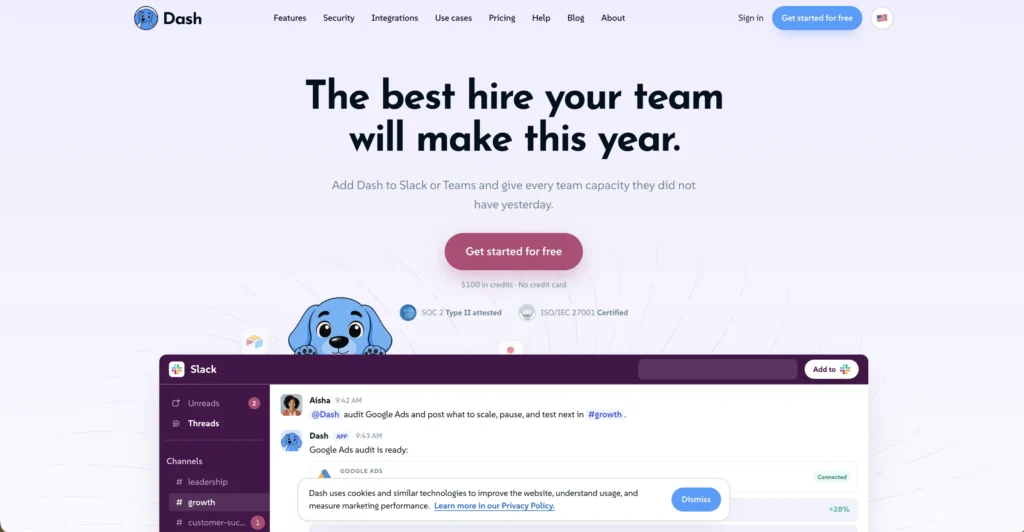
Dash is an AI teammate that lives inside Slack or Microsoft Teams and automates business workflows across 50+ connected tools. Instead of switching between apps to pull reports, draft content, or update records, you tag @Dash in a channel and it handles the work, asking for approval before taking any action.
Key Features of Dash
- 50+ App Integrations – Connect tools like HubSpot, Google Ads, Zendesk, GitHub, Shopify, QuickBooks, and dozens more through one-click OAuth with no API keys required.
- Natural Language Requests – Ask Dash to complete tasks in plain English directly in your Slack or Teams channels, just like messaging a coworker.
- Approval Gates – Dash asks for permission before sending emails, posting content, writing to databases, or spending money, keeping humans in control of every action.
- Automated Reports – Generate business updates including pipeline metrics, billing summaries, task lists, and performance reports on demand or on a schedule.
- Content Drafting – Create product descriptions, email replies, documentation, and marketing copy without leaving your messaging platform.
- Team-Based Workflows – Work happens in shared channels where the whole team can see, build on, and learn from what Dash produces.
- 3,000+ Integrations – Beyond the core 50+ deep integrations, Dash connects to over 3,000 apps for broader workflow coverage.
- Enterprise Security – SOC 2 Type II and ISO 27001 certified with workspace-isolated data, encrypted credential storage, and no model training on user data.
How Dash Works
- Install in Your Workspace – Add Dash to your Slack or Microsoft Teams workspace with a single click. No API keys or technical setup needed.
- Connect Your Tools – Authorize the specific apps Dash needs access to, like your CRM, ad platform, support desk, or accounting software.
- Tag @Dash with a Request – Mention Dash in any channel or direct message with a plain English description of what you need done.
- Review and Approve – Dash completes the work and presents the results. For any action that sends, posts, writes, or spends, it asks for your approval first.
- Share with Your Team – Results appear in the channel where everyone can see them, build on the output, or kick off follow-up tasks.
The Core Benefits of Using Dash
- No App Switching – Handle tasks across multiple business tools without leaving Slack or Teams, keeping your workflow in one place.
- Human-in-the-Loop – Approval gates ensure Dash never takes consequential actions without explicit permission, reducing the risk of mistakes.
- No Per-Seat Pricing – The Team plan includes unlimited team members, so you pay for the workspace, not for each person who uses Dash.
- Accessible to Non-Technical Users – Anyone who can type a message can use Dash. No coding, no configuration, no learning curve beyond writing a request.
- Transparent Credit Usage – Credits meter actual work, so you can see exactly what each task costs and control spending predictably.
Dash Pricing and Plans
- Free Plan – Includes $100 in free credits with full access to all features and all 3,000+ integrations. No credit card required and no feature locks.
- Team Plan – A monthly subscription starting with 20,000 credits per month, scaling up with usage. Includes unlimited team members, channel introductions, workflow discovery, email support, and rolling unused credits. No per-seat fees.
- Enterprise Plan – Custom pricing with a custom credit pool, SSO/SCIM, custom data controls, custom approval policies, a dedicated customer success manager, and security review support.
Credits are consumed based on task complexity: quick tasks like summaries use a few hundred credits, multi-step workflows use more, and substantial projects with deliverables use the most. For current pricing, visiting the Dash website directly is recommended.
An Honest Review of Dash
Dash takes a practical approach to AI automation by meeting teams where they already work, inside Slack or Teams, rather than asking them to adopt a new interface.
What works well: The approval gate system is the most important feature. Unlike automation tools that run unsupervised, Dash explicitly asks before taking any action that could have real consequences, which builds trust and prevents costly mistakes. The breadth of integrations is impressive, covering CRM, ads, support, e-commerce, finance, and development tools from one assistant. The no-per-seat pricing on the Team plan makes it genuinely affordable for larger teams. The credit-based model with rolling unused credits is fair and transparent.
Where it could improve: The credit consumption model requires some learning to understand how much different tasks cost, which can make budgeting tricky initially. Dash works exclusively within Slack or Teams, so teams using other communication platforms cannot use it. The depth of what Dash can do within each integration depends on the specific app, so some connected tools may have more limited functionality than others.
Who is it best for: Dash is ideal for business operators, founders, marketing and sales teams, and agencies who already live in Slack or Teams and want to automate cross-tool workflows without hiring additional staff or learning new software.

Final Thoughts on Dash
Dash brings AI-powered workflow automation directly into Slack and Teams with 50+ integrations, approval gates, and transparent credit-based pricing. If your team already works in Slack or Teams and you want an AI assistant that can handle real business tasks across your connected tools, Dash is a practical and secure solution.