Kane CLI

Freemium

Kane CLI

Writing and maintaining end-to-end browser tests has long been one of the most tedious parts of software development. Brittle selectors, flaky scripts, and constant maintenance make it a task most teams dread. Kane CLI offers a fundamentally different approach.

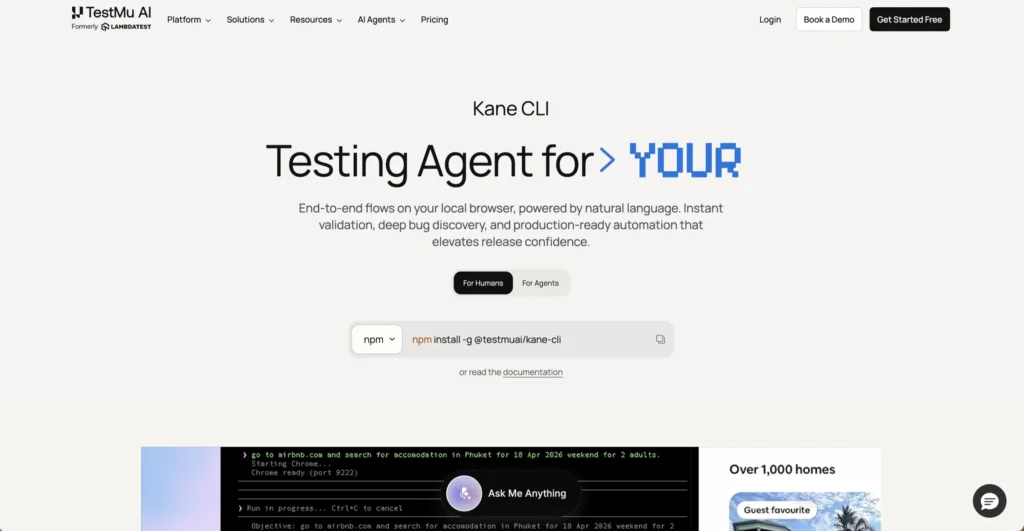
Kane CLI is an AI-driven browser automation and testing tool that runs directly from your terminal. Instead of writing complex test scripts with selectors and custom code, you describe what you want in plain English — and Kane CLI drives a real Chrome browser to execute it. Whether you need to validate a checkout flow before opening a pull request, discover bugs across environments, or generate production-ready end-to-end tests, Kane CLI handles it with natural language commands. It is built for developers, QA engineers, and AI coding agents that need reliable browser automation without the overhead of traditional testing frameworks.

Key Features of Kane CLI

  • Natural Language Test Authoring — Write tests in plain English instead of maintaining Playwright or Selenium scripts. No selectors, no brittle code, no custom domain-specific language required.
  • Real Browser Execution — Kane CLI drives an actual Chrome browser, giving you real-world validation rather than simulated results.
  • Auto-Heal and Smart Waiting — Tests automatically adapt to UI changes with built-in auto-healing, dynamic querying, and intelligent wait logic, making them resilient and repeatable.
  • Headless or Visible Mode — Debug with a visible browser to see exactly what Kane CLI does, then switch to headless mode for CI runs without changing any configuration.
  • Multi-Environment Support — Run the same flow against staging and production by simply changing the URL. No duplicate scripts needed.
  • Secure and Parameterized Flows — Use secrets and variables to create dynamic tests that handle sensitive data safely.
  • Native Playwright Exports — Export your flows into native Playwright scripts for full manual control when you need it.
  • Test.md Framework — Capture any session as replayable markdown with imports, variables, and replay support, making tests shareable and version-controllable.
  • Agent-Native Design — Built to work with AI coding agents like Cursor, Codex, and others, allowing them to drive real browsers as part of larger automated workflows.
  • Shareable Test Evidence — Get persistent, shareable links to test evidence including screenshots and step-by-step logs for team collaboration.

How Kane CLI Works: A Step-by-Step Guide

  1. Install via npm — Get started by installing Kane CLI globally through npm. The setup takes under two minutes with no complex configuration required.
  2. Authenticate Your Account — Kane CLI connects to your TestMu AI account so that runs, screenshots, and test cases sync with the dashboard and your team workspace.
  3. Describe Your Test Flow — Write what you want to test in natural language. For example, “log in as an admin, open the billing page, and verify the plan shows Enterprise.”
  4. Run from Your Terminal — Execute the command and Kane CLI launches a real browser to carry out the flow. You get a pass or fail result, typically in under two minutes.
  5. Review and Iterate — Check the step-by-step logs, screenshots, and shareable evidence links. Refine your flows or export them as native Playwright scripts for further customization.
  6. Integrate into CI — Add Kane CLI to your continuous integration pipeline using headless mode for automated browser checks on every deploy.

The Core Benefits of Using Kane CLI

  • Eliminates Script Maintenance — No more updating selectors every time the UI changes. Natural language tests with auto-healing stay resilient through redesigns.
  • Faster Validation Cycles — Run a full browser flow from your terminal before every PR. Catch issues locally instead of discovering them in production.
  • Accessible to Non-Technical Users — Anyone who can describe a workflow in plain English can create and run browser tests, lowering the barrier for QA participation.
  • Works with AI Agents — Kane CLI is agent-native from day one. Point your AI coding agent to it and let it drive real browsers as part of automated development workflows.
  • One Flow, Multiple Environments — Test against staging and production with the same command, eliminating duplicated test scripts across environments.
  • Full Control When Needed — Playwright exports and the Test.md framework give developers an escape hatch to customize and extend generated tests without limits.

Kane CLI Pricing and Plans

Kane CLI offers a tiered pricing model based on credits that scale with usage:

  • Free Plan — Includes a set number of monthly credits that reset each billing cycle. Covers local test authoring, auto-heal and vision capabilities, and access to the test manager UI. Ideal for trying out the tool and small-scale personal use.
  • Starter Plan — A paid tier with significantly more monthly credits, suited for individual developers and small teams with regular testing needs. A launch bonus currently offers extra credits for the first few months.
  • Pro Plan — The most popular tier, offering a larger credit allocation for teams with heavier testing workloads. Also includes a launch bonus with additional credits during the introductory period.
  • Enterprise Plan — Custom pricing with enterprise-grade security, privacy, compliance, multiple seats, and tailored credit allocation for larger organizations.

The CLI itself is free to install. Execution credits are tied to your TestMu AI account. For the latest pricing details and current promotional offers, visiting the Kane CLI page directly is recommended.

An Honest Review of Kane CLI

Kane CLI tackles one of the most persistent pain points in web development — the fragility and complexity of browser testing. The natural language approach is its biggest strength. Being able to type a plain-English description and have a real browser execute the flow feels like a genuine leap forward from writing and debugging selector-based scripts.

What works well: The auto-heal functionality is a standout. UI changes that would break traditional test suites are handled gracefully. The agent-native design is forward-thinking, making Kane CLI a natural fit for the growing ecosystem of AI coding assistants. Playwright exports are a smart addition — they give power users full control without locking anyone into a proprietary format.

Where it could improve: Kane CLI requires a TestMu AI account even for local usage, which adds a dependency some developers may not want. The credit-based pricing model means heavy users need to monitor consumption carefully. As a newer tool, the community and ecosystem around it are still growing compared to established frameworks like Cypress or Playwright.

Who is it best for: Kane CLI is ideal for developers who want fast, low-maintenance browser tests before every deploy, QA engineers looking to replace brittle test suites, and teams already using AI coding agents that need a reliable way to validate web applications from the terminal.

Conclusion: Final Thoughts on Kane CLI

Kane CLI brings AI-powered simplicity to browser testing without sacrificing the depth that professional teams need. Natural language commands, auto-healing tests, real browser execution, and seamless CI integration make it a practical tool for modern development workflows. If you are tired of maintaining fragile test scripts and want browser validation that keeps pace with rapid development, Kane CLI is a tool worth adding to your workflow.

Visit Site
Scroll to Top
00