Linkly AI

Freemium

Linkly AI

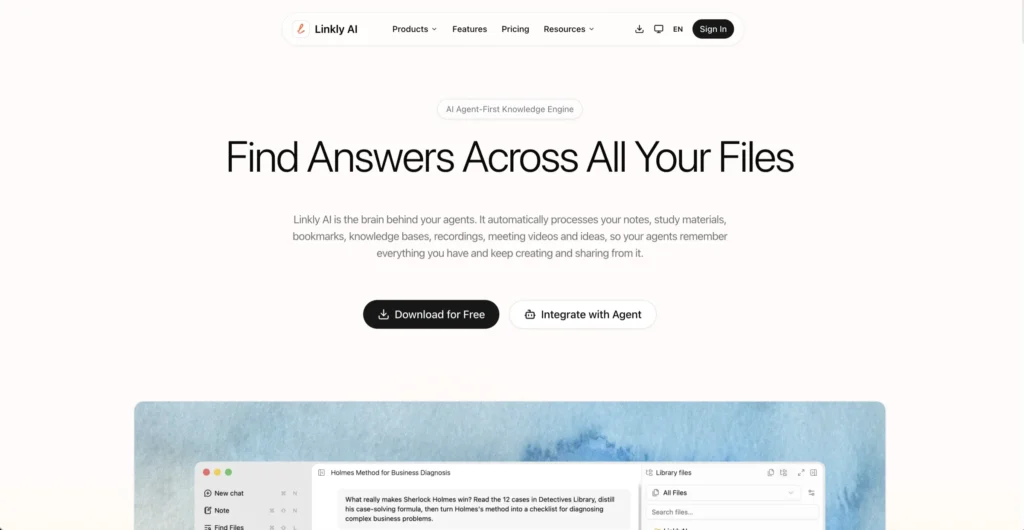
Linkly AI is a local document search engine that indexes your files and makes them searchable by AI assistants like Claude, ChatGPT, and GitHub Copilot. Instead of manually uploading documents to different AI tools, Linkly AI builds a private, searchable knowledge layer from your local files that any connected AI agent can query instantly.

Key Features of Linkly AI

  • Multi-Format File Indexing – Index PDFs, Markdown, images (JPG, PNG), videos (MOV, MP4), audio (WAV, MP3), ebooks (EPUB), presentations (PPTX), documents (DOCX), HTML, and text files from one interface.
  • AI Agent Integration – Connect your indexed library to Claude, ChatGPT, GitHub Copilot, Cursor, and 15+ other AI tools through CLI, MCP, and Skills integration methods.
  • Local-First Privacy – All data stays on your machine. Files are processed and indexed locally without being uploaded to external servers.
  • Outline Indexing – Linkly AI builds structured outline indexes of your documents, enabling AI agents to read them purposefully rather than scanning entire files.
  • Cross-Language Semantic Search – Search across documents in hundreds of languages using multilingual semantic models powered locally.
  • Fast Indexing and Retrieval – Indexing completes in as fast as five minutes, with search queries returning results in under half a second.
  • Shareable Libraries – Create public library links to share your indexed knowledge with others. Connected AI agents can search shared libraries directly.
  • Browser Extension – Access your indexed documents and search results directly from your browser.

How Linkly AI Works

  1. Install the App – Download Linkly AI for macOS (Intel or Apple Silicon), Windows, or Linux and install it on your machine.
  2. Add Your Files – Point Linkly AI to your local folders or drag files in. The tool supports PDFs, images, videos, audio, presentations, documents, and more.
  3. Indexing Runs Locally – Linkly AI processes your files on your machine, building searchable indexes and structured outlines without sending data to external servers.
  4. Connect Your AI Tools – Link your indexed library to AI assistants like Claude, ChatGPT, or Cursor through MCP, CLI, or Skills integrations.
  5. Search and Query – Use full-text or semantic search to find information across all your documents, or let your connected AI agents query your library directly.

The Core Benefits of Using Linkly AI

  • One Search Across Everything – Instead of hunting through scattered folders, search all your documents, images, videos, and audio files from a single interface.
  • AI Agents With Context – Connected AI tools can access your personal knowledge base, making their responses far more relevant to your specific work.
  • Privacy by Design – Files never leave your device. The local-first approach means sensitive documents stay private.
  • No Manual Curation – Point Linkly AI at your folders and let it index automatically. No need to tag, organize, or manually upload files one by one.
  • Cross-Platform Support – Available on macOS, Windows, and Linux, so it fits into any desktop workflow.

Linkly AI Pricing and Plans

  • Free Plan – Free forever with offline use, local file parsing (PDF, images, PPTX), full-text and semantic search, outline indexing, MCP and CLI access, AI agent integration, and browser extension. Includes limited basic AI models and restricted cloud library usage.
  • Pro Plan – An annual subscription that adds access to frontier AI models, MCP Tunnel for cloud document access, higher cloud library quotas, fine-grained visibility controls, and upcoming features like cloud-based document parsing and audio/video transcription. Early bird pricing is currently available at a significant discount.

A 7-day full refund guarantee is included with the Pro plan. For current pricing, visiting the Linkly AI website directly is recommended.

An Honest Review of Linkly AI

Linkly AI addresses a real gap in how people work with AI assistants: giving them access to your actual files without uploading everything to the cloud.

What works well: The local-first approach is the biggest differentiator. In a space where most tools require cloud uploads, Linkly AI keeps everything on your machine, which is a significant advantage for anyone working with sensitive or proprietary documents. The breadth of supported file formats is impressive, covering not just documents but also images, video, and audio. The MCP integration with tools like Claude and Cursor is particularly well-executed, letting AI agents pull context from your library seamlessly. The speed of indexing and retrieval makes it practical for daily use.

Where it could improve: Some Pro features like cloud-based parsing and audio/video transcription are listed as coming soon, so the paid tier is not yet fully realized. There is no team plan available, which limits its usefulness for collaborative workflows. The free tier’s restrictions on cloud library usage and AI models may push users toward the Pro plan sooner than expected.

Who is it best for: Linkly AI is ideal for researchers, students, legal professionals, and content creators who work with large collections of local files and want their AI assistants to have context-aware access to that knowledge.

Final Thoughts on Linkly AI

Linkly AI turns your local files into a searchable, AI-accessible knowledge base without sacrificing privacy or requiring cloud uploads. If you want your AI tools to actually understand the documents you work with every day, Linkly AI is a practical and privacy-first solution.

Visit Site
Scroll to Top