Flova AI

How Flova AI plans, storyboards, generates, and edits complete videos through one conversational AI agent.

Visit Flova AI flova.ai

Listed on AI Parabellum · Updated November 25, 2026

flova.ai
Flova AI
01

Overview

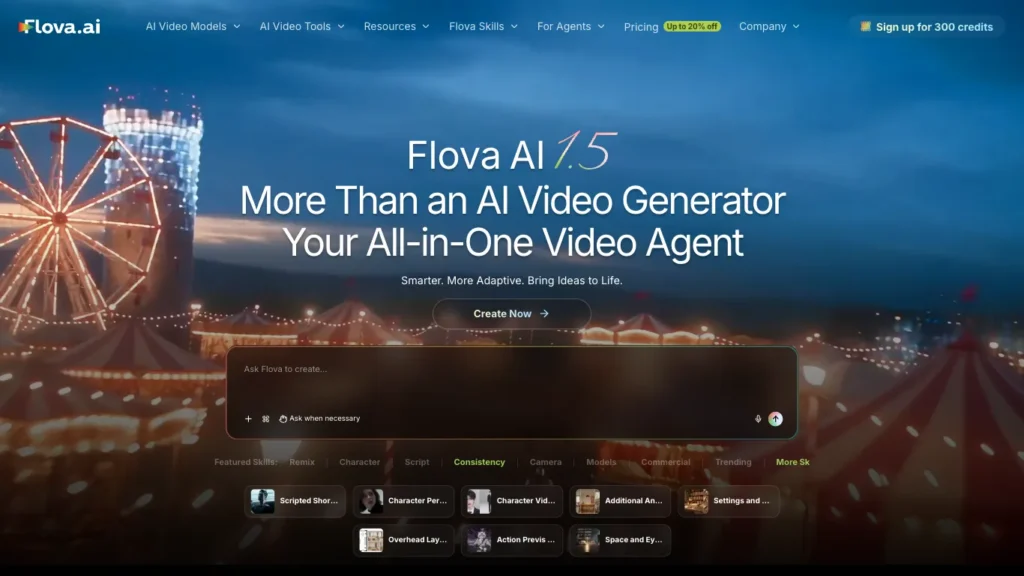
Flova AI is an AI video creation agent that takes a project from idea to finished cut inside one workspace. Instead of generating single clips, it plans the video, builds storyboards, creates assets, generates scenes, and assembles them on a timeline, all guided by natural-language chat. It is built for ads, music videos, anime, short dramas, and social content.

02

Key Features of Flova AI

  • Conversational Video Agent Describe what you want in plain language and the agent breaks the request into tasks, from script and storyboard to final edit.
  • Multiple AI Models in One Plan Access video models such as Seedance and Kling alongside image, music, and audio models without separate subscriptions.
  • Flova Skills Start from reusable creative workflows for tasks like scripted shorts, character consistency, camera moves, and commercials, with a public skills library.
  • Asset Library Save characters, scenes, voices, and creative methods, then reuse them across projects for consistent results.
  • Comment-Based Revisions Leave a comment on a specific storyboard, shot, or element to revise just that part instead of regenerating everything.
  • Multiple Timelines and Views Manage episodes or ad versions on separate timelines, and switch between list, grid, and canvas views of your project.
  • Built-In Video Tools Upscale footage, extend clips, remove objects or subtitles, and apply color grading in the same workspace.
  • Agent Integrations Flova CLI and Flova MCP let coding agents such as Claude Code and Codex drive video creation.
03

How Flova AI Works

  1. Sign Up – Create an account and receive starter credits to try the platform.
  2. Pick a Skill – Choose a Flova Skill that matches your project, or start from a blank chat.
  3. Chat with the Agent – Describe your idea. The agent drafts a plan, storyboards, and prompts you can review before anything is generated.
  4. Generate and Revise – Flova creates the assets and scenes. Comment on any shot to refine it.
  5. Assemble and Export – Arrange scenes on the timeline and export the finished video.
04

The Core Benefits of Using Flova AI

  • End-to-End Workflow Planning, generation, and editing happen in one place, removing the need to move files between several tools.
  • Review Before You Spend Seeing storyboards and prompts before generation helps avoid wasting credits on the wrong direction.
  • Consistent Characters and Style The asset library keeps characters, voices, and scenes the same across shots and projects.
  • Beginner Friendly Chat-based creation and ready-made skills make professional-style videos possible without editing experience.
  • Team Ready Paid plans support multiple authorized users, and a Team plan is available for studios and marketing teams.
05

Flova AI Pricing and Plans

Flova AI offers free sign-up credits and several paid plans:

  • Free Access New users get bonus credits to try the core creation workflow, including images, 720p video, music, and voiceovers, with limits on models, resolution, and advanced features.
  • Starter and Basic Entry paid plans with a monthly credit allowance, watermark-free export, commercial use, HD enhancement, and subtitle removal.
  • Plus and Pro Higher tiers with more credits, more concurrent generations, more authorized users, and realistic-style generation.
  • Team Plan Billed per seat for studios and marketing teams.

Plans are available monthly, quarterly, or yearly, and extra credits can be purchased. Subscription credits are valid for 30 days, and a full refund is available within 7 days if no generation features were used. For current pricing, visiting the Flova AI website directly is recommended.

06

An Honest Review of Flova AI

Flova AI stands out by acting as a video production agent rather than a simple clip generator.

What works well: The agent approach is the main strength. Being able to plan, storyboard, generate, and edit in one conversation makes longer and more structured videos far easier than stitching clips together by hand. Comment-based revisions are a smart way to fix one shot without starting over, and the asset library solves the common problem of characters changing between scenes. Access to several leading models under one plan adds real flexibility.

Where it could improve: The credit system can be hard to predict, since usage varies by model, duration, and resolution. Free credits are limited and restricted to lower resolution. Subscription credits expire after 30 days, so unused credits do not carry over. Export formats and resolutions are not clearly listed on the website.

Who is it best for: Flova AI is ideal for content creators, freelancers, marketers, and brands that want to produce complete videos such as ads, music videos, and short series without a full production team.

07

Final Thoughts on Flova AI

Flova AI turns video creation into a guided conversation, handling planning, storyboarding, generation, and editing in one workspace with access to multiple AI models. If you want to produce complete videos rather than single clips, Flova AI is a capable option, and its free sign-up credits make it easy to try.

Similar Video Generation tools

See all

Newsletter

New AI tools in your inbox

The best new tools and the AI news that matters, in one short email. Unsubscribe any time.

Free · No spam · Unsubscribe any time

✓ Looks like you’re subscribed

Loading Google’s sign-up form…

Looks like you’re already subscribed

Thanks for reading! New AI tools and the AI news that matters will land in your inbox.

Not subscribed yet? Refresh the page to load the sign-up form.

The sign-up form couldn’t load. If you use an ad or content blocker, allow news.google.com and reload the page.

Free instant check before you pay. Takes a few seconds.

Scroll to Top