Scientific Agent Skills is a free library of 177 research skills that you can load into Claude Code, so Claude follows proven steps for biology, chemistry, statistics and more. It is one of the biggest skill collections on GitHub, with more than 56,000 stars, so we wanted to know what a researcher really gets when they load it. We loaded it into a throwaway project, listed every skill, and ran two of them on a small made-up mouse study: a sample size check and a randomization plan.
This guide is part of our Claude Code tutorials. Find more add-ons in our skills directory.
Tested with Claude Code v2.1.318 on November 8, 2026, using scientific-agent-skills 2.72.0 from K-Dense-AI/scientific-agent-skills at commit a25cf9e.
Scientific Agent Skills for Claude: Quick Summary
| Question | Answer |
|---|---|
| What is it? | A repository of 177 skills, each a folder with a SKILL.md file and, for many, helper scripts |
| Who makes it? | K-Dense Inc., MIT license |
| Does it load in Claude Code? | Yes. /skills listed all 177 in our test |
| What did we run? | The statistical power skill and the experimental design skill |
| Does it need an account? | Not for the two skills we ran. Some skills use outside services and keys, which we did not test |
| Does it install Python packages? | No. You build the Python environment yourself |
| Our verdict | Useful for researchers if you install only the skills you need |
What Scientific Agent Skills Is and Why It Exists
A skill is a folder of instructions that Claude reads when a task matches it. If you are new to the idea, our guide to the Agent Skills standard explains how skills work across tools. This library applies that idea to science.
Instead of one general helper, you get a set of specialists. There are skills for packages such as RDKit, Scanpy, Biopython and scikit-learn, skills for databases such as PubChem and ClinicalTrials.gov, and skills for writing, peer review and literature work. The README groups them by field, from proteomics and neuroscience to materials science, astronomy and lab automation.
The point is consistency. A good skill tells Claude which method to pick, which checks to run and which mistakes to avoid. That is more reliable than hoping Claude remembers the right recipe from memory.
A skill does not make Claude smarter. It gives Claude a checklist written by someone who knows the field.
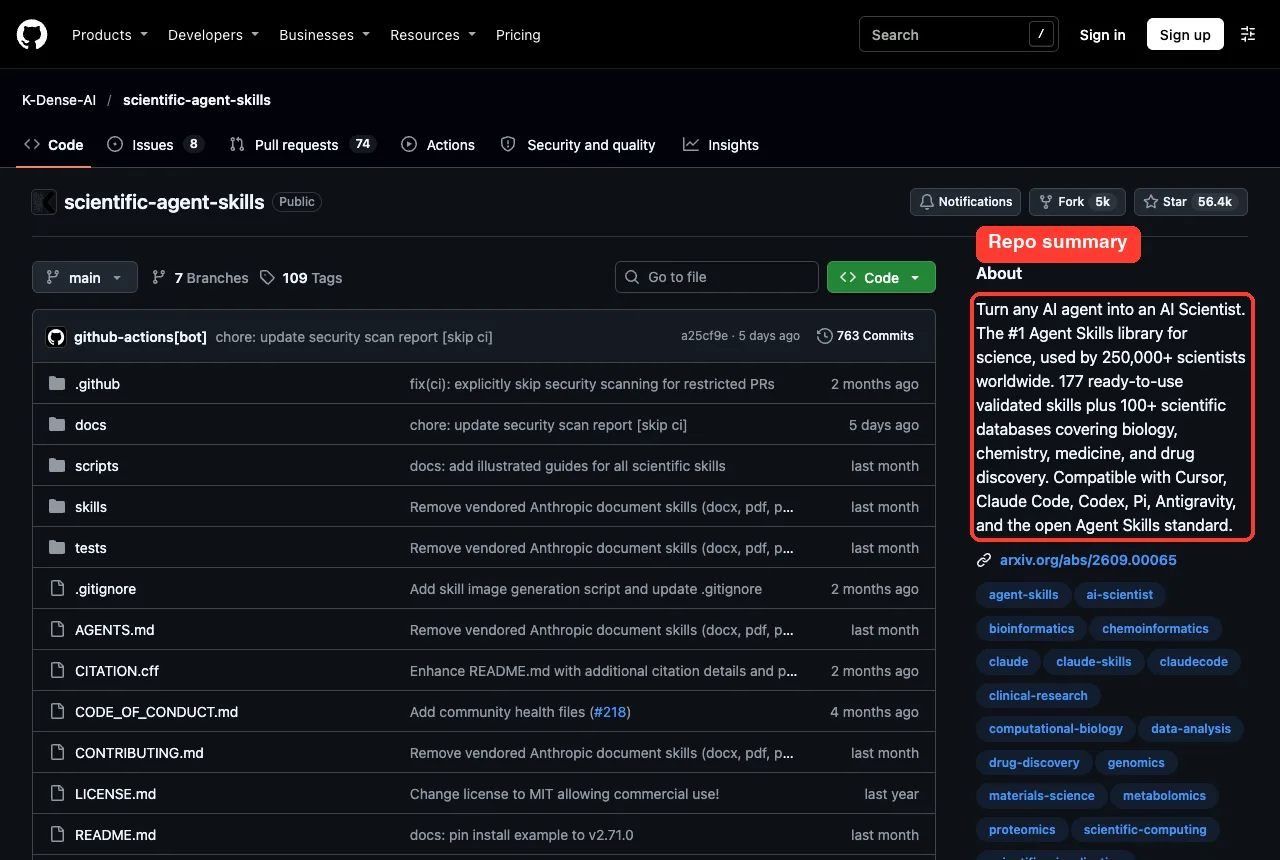
What Is Inside the Repository
The repo has a skills folder with 177 subfolders, plus a plugin.json, tests and security notes. Version 2.72.0 was the current release when we cloned it, and the latest commit was dated November 2, 2026. The README says the collection grew from a Claude-only project into a general Agent Skills library.
The README sorts the content into four groups:
- More than 100 scientific and financial databases, documented mostly through a Database Lookup skill
- More than 70 Python package skills, such as RDKit, Scanpy, PyTorch Lightning and scikit-learn
- 9 integration skills for tools such as Benchling, DNAnexus and Opentrons
- 30 or more analysis and communication skills, such as literature review, scientific writing and slides
We counted the folders ourselves and got 177, which matches the README. We did not check the database counts, because that would mean calling dozens of outside services.
How to Load Scientific Agent Skills Safely in Claude Code
The README offers several install routes, including npx skills add K-Dense-AI/scientific-agent-skills and gh skill install. We did not use them, because both write into your own setup. We took the safer route that Claude Code supports for testing.
First we cloned the repository into a throwaway folder. Then we started Claude Code in an empty demo project and pointed it at the clone for that one session. Nothing was installed into the ~/.claude folder.
git clone --depth 1 https://github.com/K-Dense-AI/scientific-agent-skills
cd my-demo-project
claude --plugin-dir ../scientific-agent-skills --setting-sources project
The --plugin-dir flag loads a plugin folder for the current session only. The --setting-sources project flag tells Claude Code to read only the project settings, so your personal settings stay out of the test. The official plugin discovery guide and the plugins overview explain the normal install route and what a plugin adds to your sessions.
One detail surprised us. The repo ships a root plugin.json for the open Agent Plugins format, not the usual .claude-plugin folder. Claude Code still found and loaded every skill from the skills folder.
Check the Code Before You Trust It
Skills can run code on your computer, so read before you load. The README says the same thing in its own security warning, and it tells you to install only what you need.
We looked for hooks and found no hooks configuration in the repo. We read the opening sections of both skills we ran and searched their scripts for network calls, shell commands and dynamic code, and found none. We did not read all 177 skills, and this guide does not claim they are all safe.
The repo also publishes its own scan report. It was generated on November 2, 2026 with the maintainers’ scanning tool. It lists 177 skills scanned, 159 marked safe and 18 not marked safe, split evenly between 9 critical and 9 high ratings.
Two things are worth knowing. First, this is the maintainers’ own report, so treat it as a useful signal and not an audit by an outside party. Second, the two skills we ran were not among the 18: the power skill had one low finding and the design skill had none.
Step 1: List the 177 Skills
After the folder trust prompt, we typed /skills. Claude Code showed a list of 177 skills, each with a token cost. The visible rows ranged from about 80 to about 350 tokens.
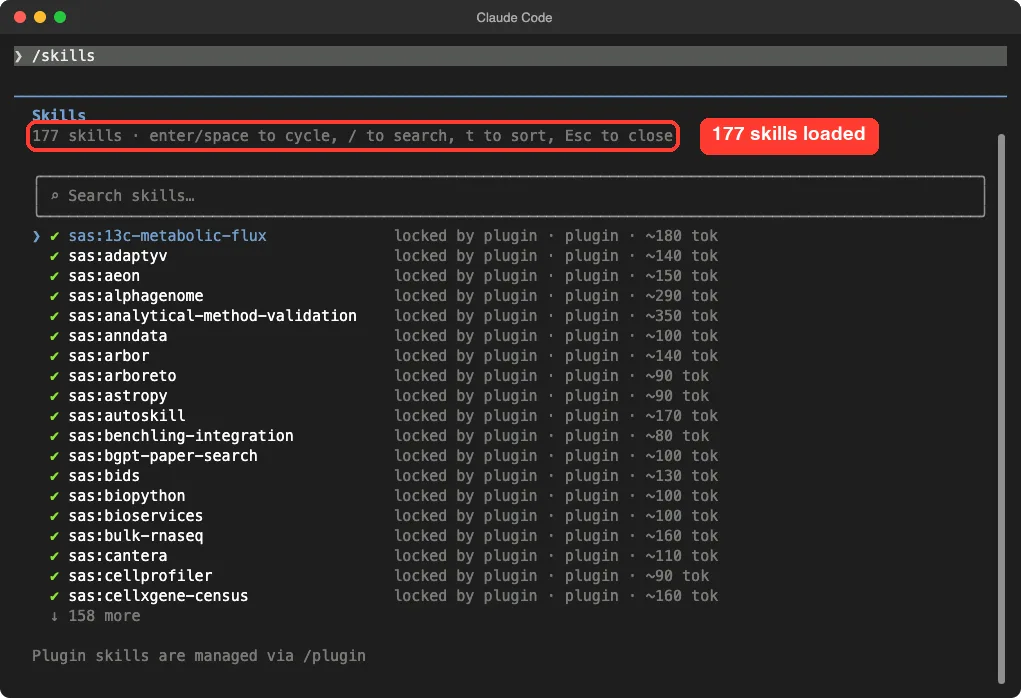
/skills screen shows 177 plugin skills; the sas: prefix matched the name of the folder we cloned intoThe Claude Code docs explain that the name and description of each skill sit in Claude’s context on every turn, even in sessions where you never use it. If the average were near 150 tokens, 177 skills would add up to roughly 25,000 tokens. That figure is our own estimate from the rows on screen, not a measured total.
This is why the README advises against installing everything. If you only do statistics, load only the statistics skills.
Step 2: Ask a Real Research Question
We created a tiny project with one file, study-brief.md, describing a made-up mouse diet study. It says the pilot suggested an effect of about 0.8 standard deviations and that we have 40 cages. Then we asked Claude to use the statistical power skill.
Read study-brief.md. Then use the statistical-power skill, running Python as ./.venv/bin/python, to tell me how many mice per group I need for 80% power at alpha 0.05. Keep the answer short.Claude read the file and called the skill by name. Claude Code then paused and asked whether it may use the skill, and showed the skill description so we could see what we were agreeing to.
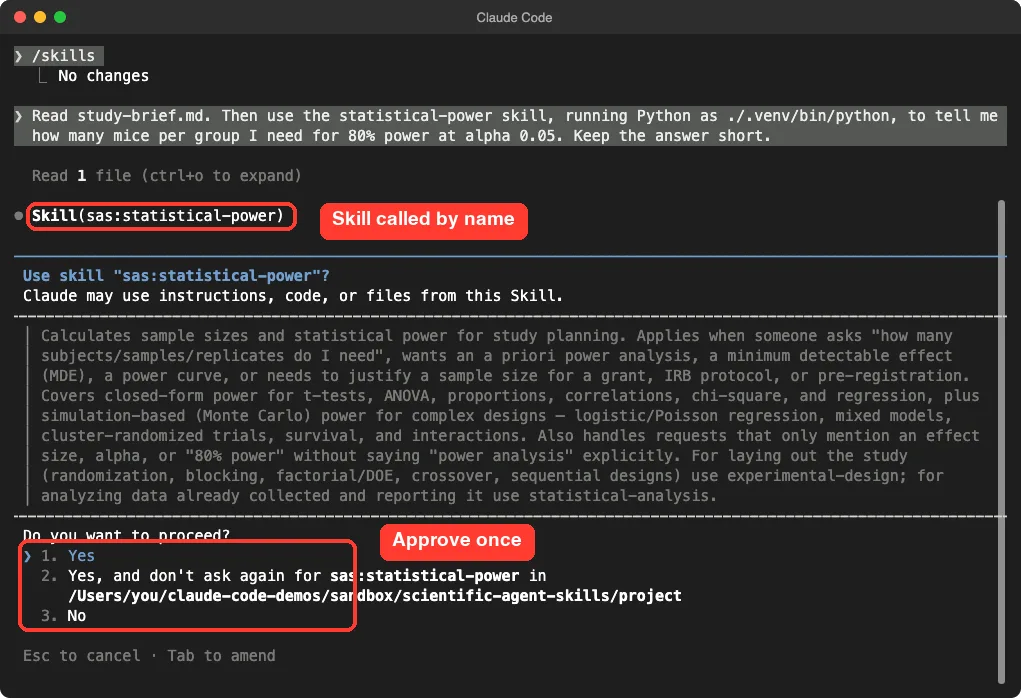
We chose Yes for this one use. The second option would have stopped the question for this skill in this folder, which is fine for a skill you have read.
Step 3: Read the Sample Size Answer
The answer came back in about 20 seconds. Claude ran the skill’s Python helper and reported that we need 26 mice per group, 52 in total, for 80 percent power at a significance level of 0.05. That matches the standard result for a medium-to-large effect of 0.8 in a two-group comparison.
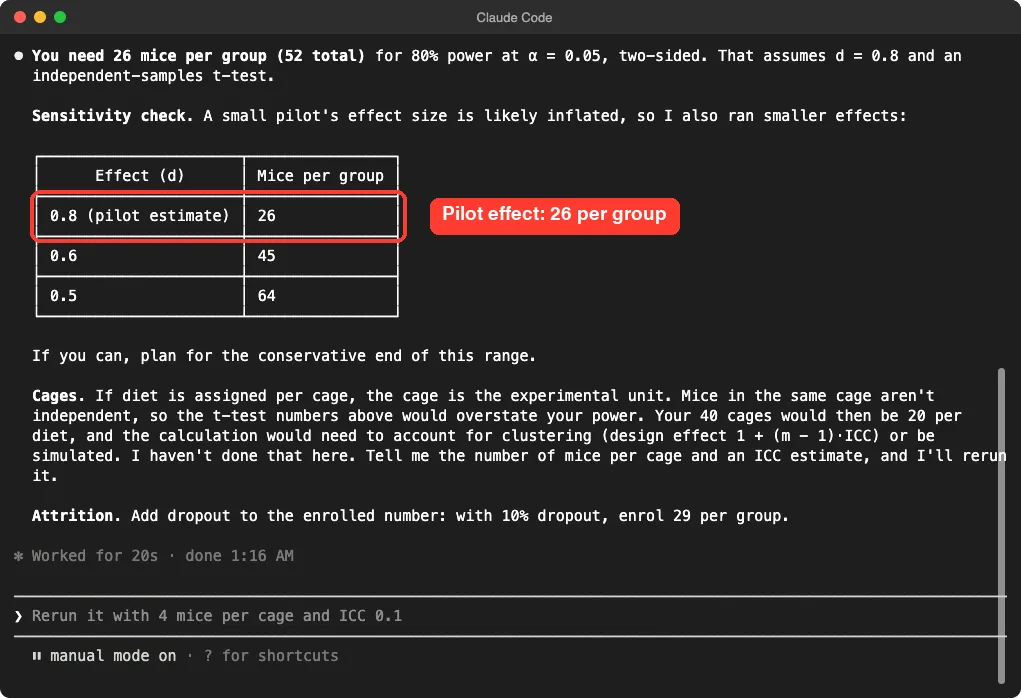
What impressed us was the extra care. Claude warned that a small pilot often overstates an effect, and it added a sensitivity table: 45 per group at an effect of 0.6 and 64 per group at 0.5. It also added attrition: with 10 percent dropout, enroll 29 per group.
The biggest catch was the cages. If the diet is given per cage, the cage is the true unit, and mice in one cage are not independent. Claude said the simple test would overstate our power and asked for the mice per cage and an intracluster correlation estimate before running a clustered version.
That behavior comes from the skill text itself, which tells the reader not to invent an effect size and to run a sensitivity check. The power skill file contains those rules in its section on effect sizes.
Step 4: Randomize the Cages With the Design Skill
Next we asked for a layout. We wanted 40 cages split between the two diets, balanced across four weekly blocks, with a fixed seed so the result can be repeated.
Now use the experimental-design skill to randomize 40 cages into the 2 diets, balanced in 4 weekly blocks, seed 42, and save it as assignments.csv. Use ./.venv/bin/python. Keep the reply short.Claude used the skill’s randomization script and wrote assignments.csv. The first run gave week 3 a 6 to 4 split, which is not balanced. Claude noticed, explained that the default block size left a partial block, and reran with a block size of 10.
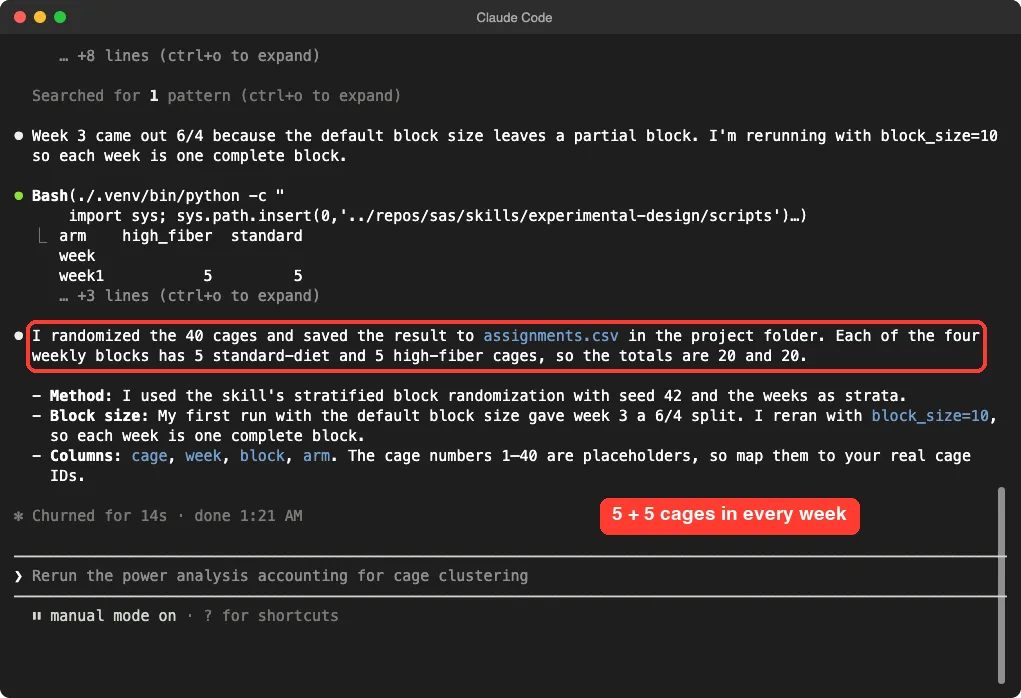
We then checked the file ourselves with a short Python count. It has 40 rows, 20 cages per diet, and exactly 5 and 5 in each of the four weeks. The cage numbers are placeholders, so map them to your real cage IDs.
How the Skills Work Behind the Scenes
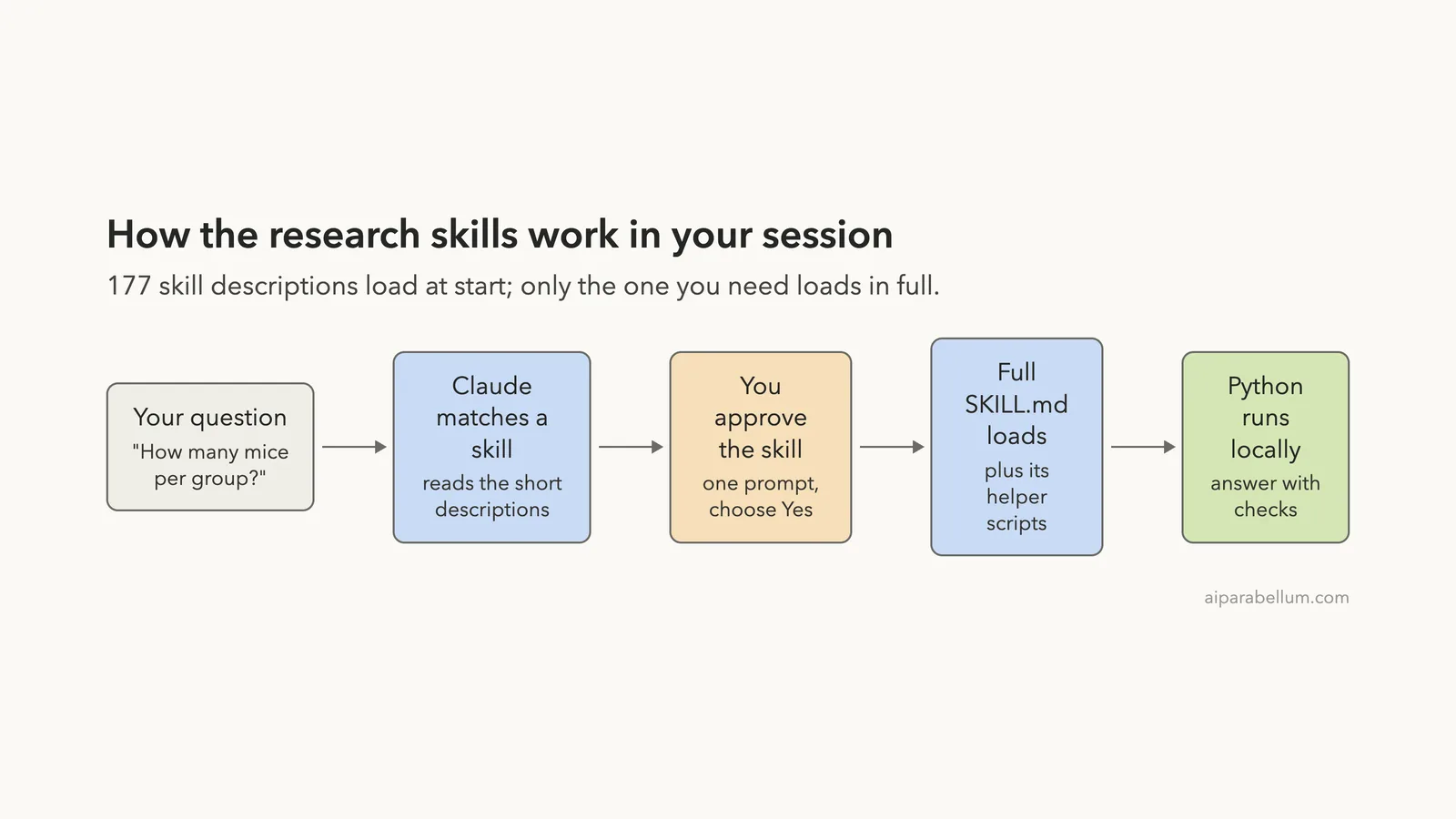
The flow is simple, and the diagram below shows it. Claude Code loads only the short descriptions at the start. When your question matches one, Claude asks to load the full instructions and the helper scripts.
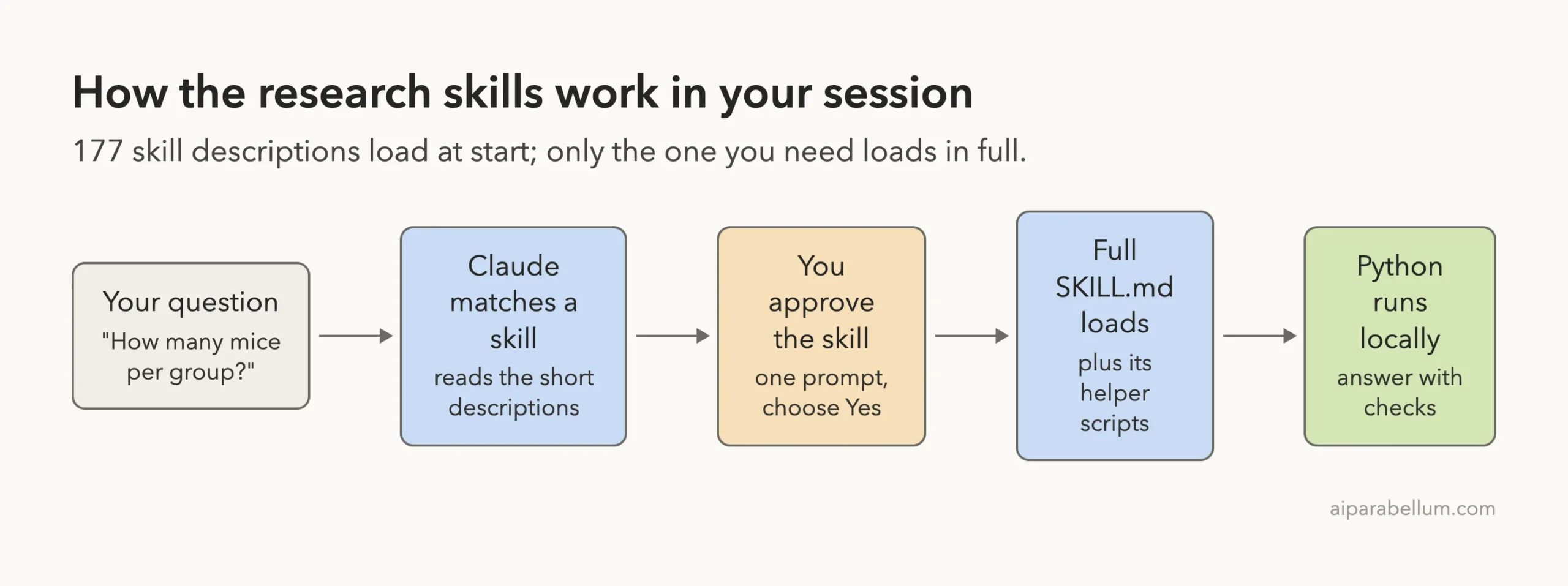
This design keeps your context small until a skill is needed. It also means the real work happens in ordinary Python scripts on your machine, using packages you installed. If you want to see how permission prompts work in general, our guide on permission prompts covers the options.
Set Up Python for These Skills
Installing the skill files does not install any packages. The README says so directly. You need a Python environment with the right libraries.
The two skills we used list Python 3.12 or newer as the requirement, and the power skill was checked by its authors on 3.13. The README recommends the uv tool. We did not have it installed, so we used the standard venv and pip instead:
python3 -m venv .venv
.venv/bin/pip install statsmodels scipy numpy pandas matplotlib pydoe
That gave us Python 3.14.7, statsmodels 0.15.0 and SciPy 1.18.1, which match the skill’s listed versions, plus NumPy 2.5.4 and pandas 3.1.1, which are newer than the pins in the skill. Everything we ran worked. If you need exact reproducibility, follow the pins in each skill file.
The skill’s own advice is to use a separate environment for each workflow, because packages from different fields can clash.
What We Did Not Test
Being clear about limits matters here, because this collection is large. We ran two skills out of 177.
| Area | Status | Why |
|---|---|---|
| Skill list and loading | Tested | All 177 appeared in /skills |
| Statistical power | Tested | Sample sizes and a sensitivity table |
| Experimental design | Tested | Blocked randomization saved to a file |
| Database and literature skills | Not tested | They call outside services, and some need keys |
| Lab and cloud integrations | Not tested | They need accounts we do not have |
| Heavy packages such as deep learning | Not tested | They need large installs and special hardware |
The README also says that each skill records its own validation scope, and that tests, live-service checks and examples cover different things. Read that note in any skill you depend on.
Who Should Install It
Our verdict is positive, with conditions. The two skills we ran behaved the way a careful colleague would: they asked for the effect size basis, warned about the cage problem and fixed an unbalanced split without being told.
- Install it if you are a researcher, student or analyst who plans studies, runs statistics or works with common scientific Python packages.
- Install only the skills you need, not all 177, to keep your context lean and your review manageable.
- Skip it if you only want general coding help, because most of the library is specialist material.
- Do not use the output as a substitute for a statistician when the stakes are high, such as a grant, an ethics submission or a clinical decision.
For a wider view of how plugin collections work, see our explainer on plugin marketplaces. The Claude page on our site, Claude AI, covers the model behind Claude Code.
Try It Yourself
Practice on a made-up study, not your real data. Create a new folder with a one-paragraph study brief, set up a Python environment, and start Claude Code with the library loaded as shown above. Then paste a prompt like this one:
Read study-brief.md. Use the statistical-power skill and ./.venv/bin/python to find the sample size for a two-group comparison. Show me how the answer changes if the effect is smaller than my pilot suggests.Compare the answer with the skill’s own recipe file. Then try the design skill on the same brief and check the saved file by hand.
Common Mistakes
- Installing all 177 skills when you need three, which wastes context on every turn.
- Forgetting the Python environment. The skill files do not install packages for you.
- Trusting a pilot effect size without a sensitivity check.
- Treating mice in one cage, or samples from one patient, as independent when they are not.
- Skipping the review of a skill before approving it, especially skills that run scripts or call outside services.
- Cloning the repo into your real
~/.claudefolder when you only want to test it.
Pro Tips
- Name the skill in your prompt. It makes the match certain.
- Give the Python path in your prompt, such as
./.venv/bin/python, so Claude uses your environment. - Always fix a random seed and save the output file so the layout can be repeated.
- Pin the repo to a release tag or commit, so a later update cannot change your results without you noticing.
- Use
/skillsto check what is loaded and what each skill costs in tokens.
Cheat Sheet
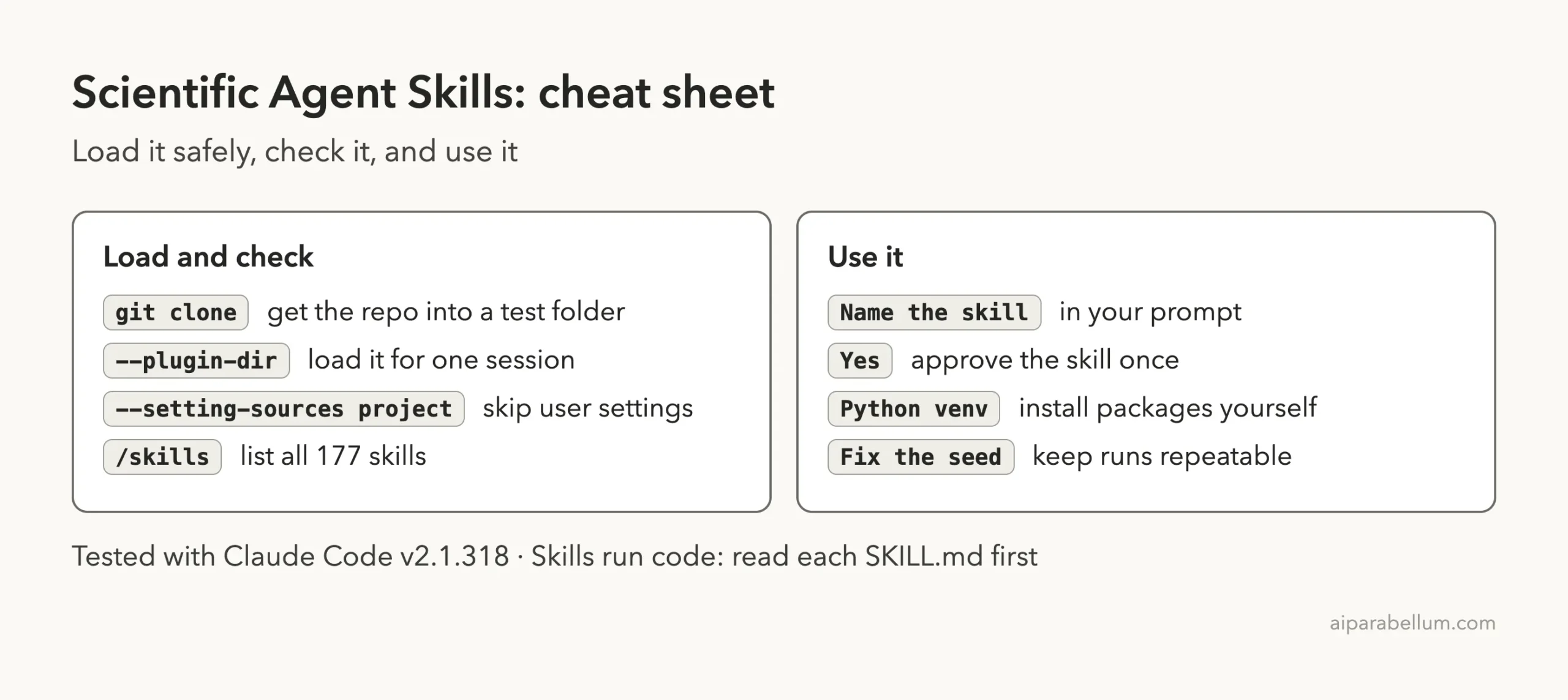
Frequently Asked Questions
Is Scientific Agent Skills only for Claude Code?
No. The README says it works with any agent that supports the open Agent Skills standard, including Cursor, Codex and Gemini CLI. We only tested it in Claude Code.
Is Scientific Agent Skills free?
The repository uses the MIT license, so you can use it freely. Some skills connect to outside services that may need accounts, keys or paid access.
Does it install the scientific Python packages for me?
No. The README states that installing the skill files does not install their dependencies. Check the requirements in each skill and build your own environment.
Will 177 skills slow Claude Code down?
The skill descriptions use context on every turn, so a large set takes up room. We saw about 80 to 350 tokens per skill in the rows we could see. Loading a smaller subset keeps that cost low.
Is it safe to install?
The maintainers warn that skills can run code and ask you to review what you install. Their scan report marks 159 of 177 skills safe. Read any skill before you approve it, and try it in a throwaway project first.
Conclusion
Scientific Agent Skills turned Claude Code into a careful research helper in our test: it gave a sample size, challenged our assumptions and produced a balanced randomization file we could verify. The library is large, so load only the skills you need, read them first and build your Python environment yourself. If you want to read the full skill list, see the official repository for the full skill list.