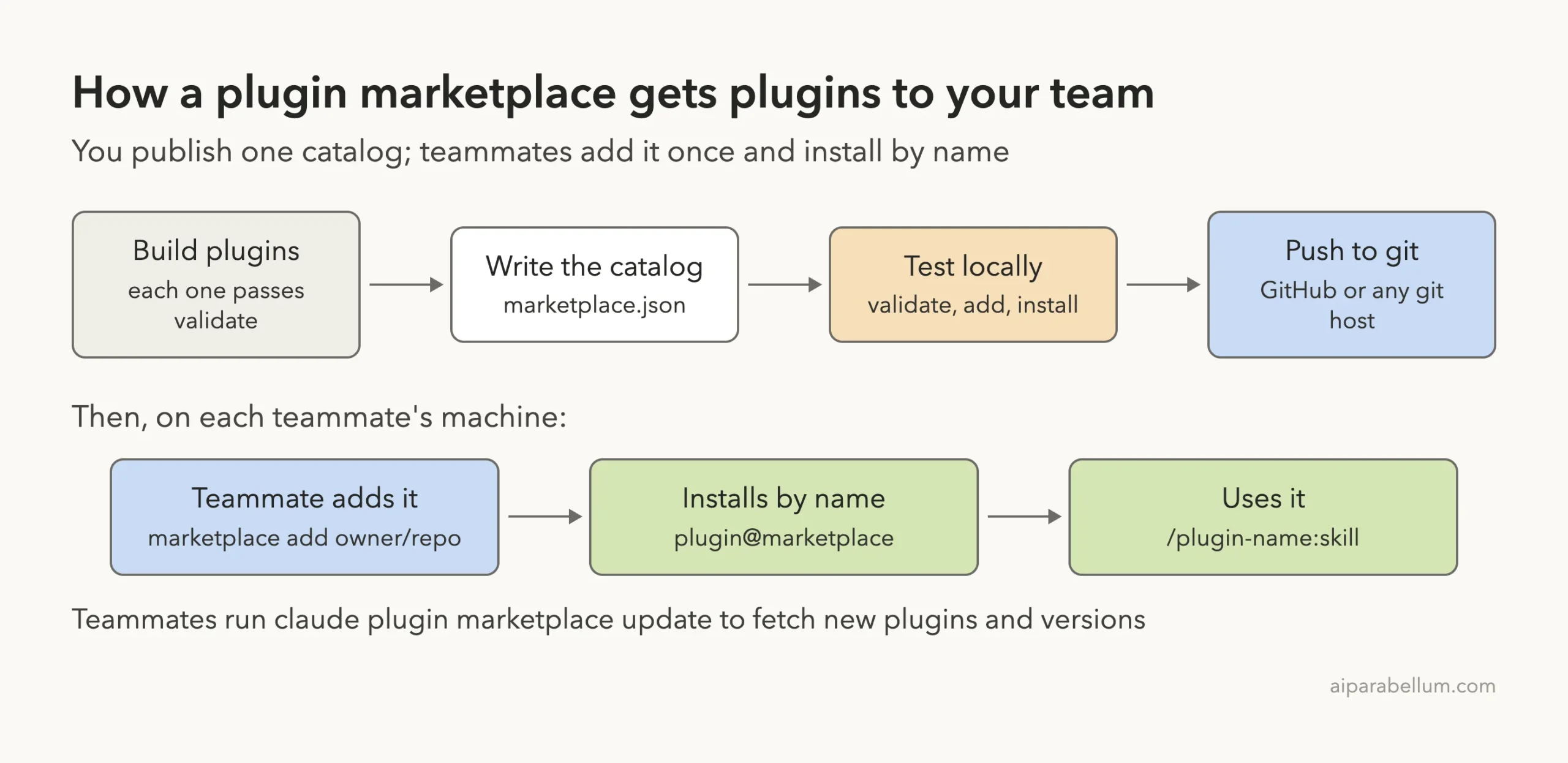
A Claude Code plugin marketplace is a catalog of plugins that lives in a folder or a git repository. You add the catalog to Claude Code once, and then you can install any plugin in it by name. Anthropic runs a few marketplaces for you, and you can build your own for your team in about ten minutes.
In this guide you will learn which marketplaces Anthropic publishes, how the marketplace.json file works, and how to build, test and share a small marketplace of your own. We built a real one called team-tools with two plugins, broke it on purpose, fixed it, installed from it and then removed it again.
This is Part 34 of 53 in our Claude Code tutorials series. In the previous part you learned how to build your own plugin; today you learn how to share plugins through a catalog people can install from.
Tested with Claude Code v2.1.310 on October 25, 2026, on macOS, inside a small throwaway demo folder.
Quick Summary: Claude Code Plugin Marketplaces at a Glance
| Question | Short answer |
|---|---|
| What is a marketplace? | A folder or repo with .claude-plugin/marketplace.json listing plugins |
| Which one do I get by default? | claude-plugins-official, added when you first start an interactive session |
| How do I add another one? | /plugin marketplace add owner/repo |
| How do I install from it? | /plugin install plugin-name@marketplace-name |
| Which fields are required? | name, owner and plugins (each entry needs name and source) |
| How do I check my file? | claude plugin validate ./my-marketplace |
| How do I share it with a project? | Add it with –scope project so it lands in .claude/settings.json |
| How do I remove it? | claude plugin marketplace remove name (this also uninstalls its plugins) |
What Is a Claude Code Plugin Marketplace?
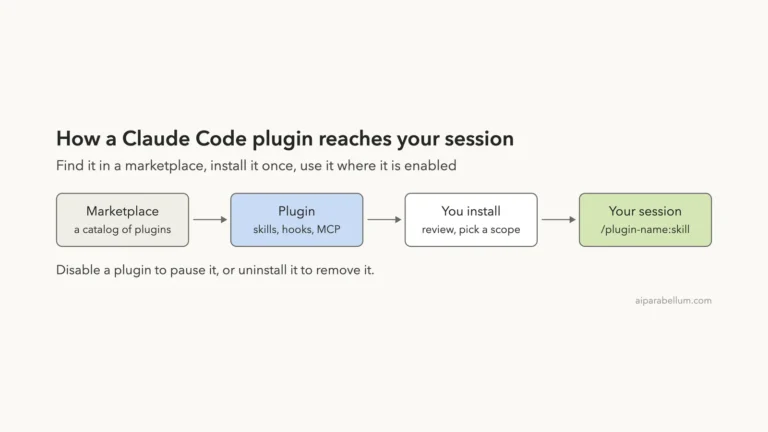
Think of a marketplace as an app store catalog without the store. It is a single JSON file, .claude-plugin/marketplace.json, that names the catalog, says who owns it and lists each plugin with the place Claude Code should fetch it from.
The plugins themselves are normal Claude Code plugins. A marketplace does not change what a plugin can do. It only answers two questions: which plugins exist, and where their files live.
Why does this layer exist at all? Because sending a folder or a zip file works for one or two people, but it breaks down fast. A marketplace gives a team one place to discover plugins, one command to install them, and a way to keep receiving updates from a catalog you control.
A marketplace is a list, not a container: it points at plugins, and Claude Code fetches each one when you install it.
The plugin marketplace vs the plugin itself
Each plugin has its own manifest called plugin.json, which you met in Part 33. The marketplace has its own manifest called marketplace.json. The two files have different jobs, and mixing them up is the most common source of confusion.
| File | Lives in | What it describes |
|---|---|---|
| plugin.json | each plugin’s .claude-plugin/ folder | One plugin: its name, version, description |
| marketplace.json | the marketplace’s .claude-plugin/ folder | The catalog: its name, owner and the list of plugins |
Anthropic’s Official, Community and Demo Marketplaces
Anthropic publishes three general-purpose marketplaces, each in its own GitHub repository. When you install a plugin, you type the marketplace name after the @ sign, so it helps to know the exact names.
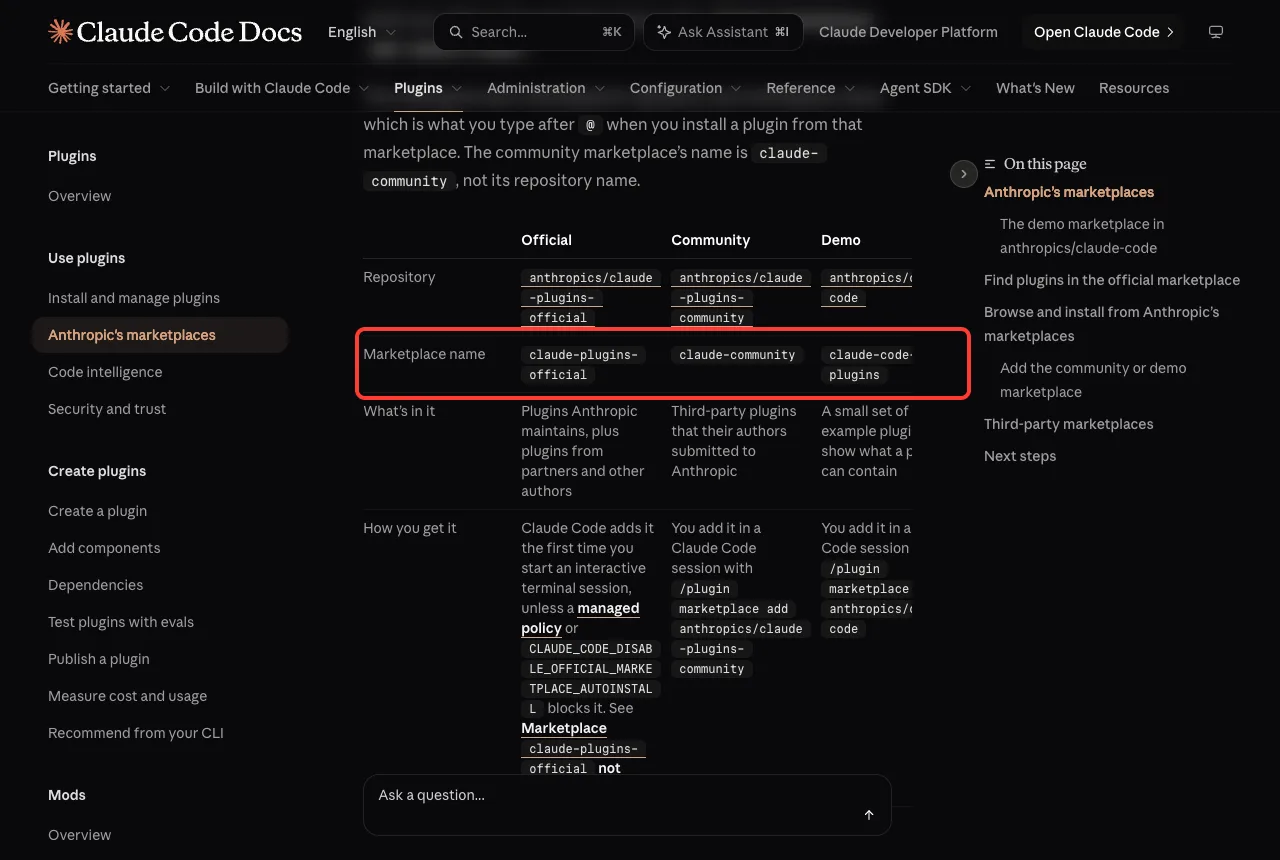
| Marketplace | Name to type after @ | What is in it | How you get it |
|---|---|---|---|
| Official | claude-plugins-official | Anthropic’s own plugins plus plugins from partners and other authors | Added for you the first time you start an interactive terminal session |
| Community | claude-community | Third-party plugins their authors submitted to Anthropic | /plugin marketplace add anthropics/claude-plugins-community |
| Demo | claude-code-plugins | A small set of example plugins | /plugin marketplace add anthropics/claude-code |
Notice that the community marketplace’s name is claude-community, not its repository name. Also, if an older tutorial tells you to add anthropics/claude-code, that gives you the demo marketplace, not the official one. The docs suggest installing plugins like commit-commands and code-review from claude-plugins-official so you do not end up with two copies.
Many popular plugins live in their authors’ own marketplaces instead. Anthropic does not review those, so read the official plugin security page before you add one.
Browse the marketplaces you already have
Type /plugin in a session and open the Marketplaces tab. You see every catalog Claude Code knows about, how many plugins each one offers and when it was last updated. The Discover tab next to it lets you search across all of them.
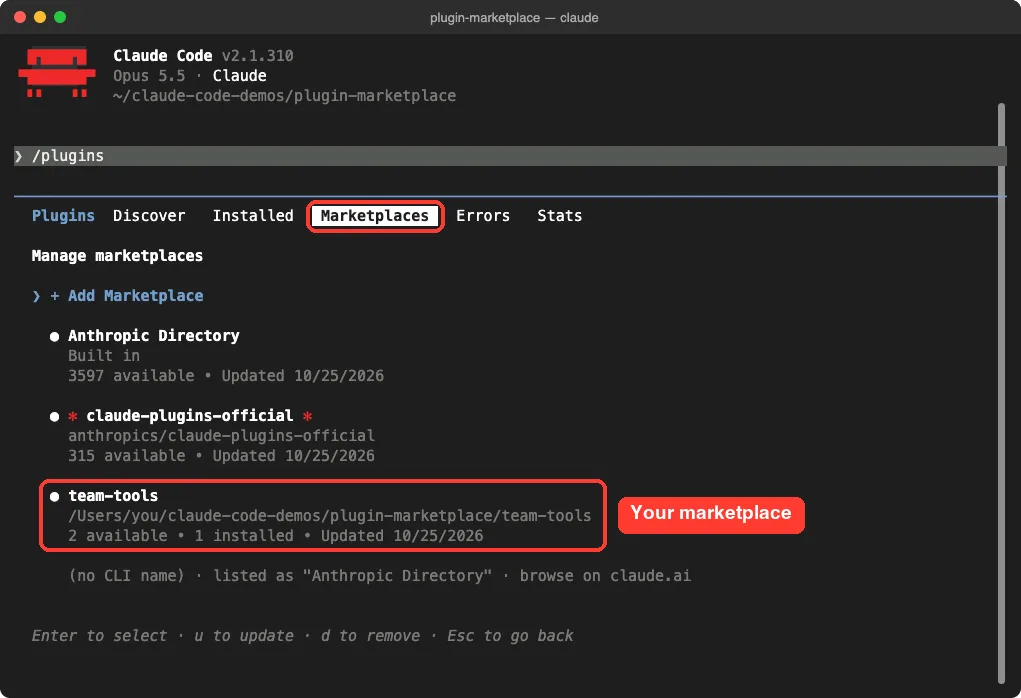
You can also see the same list from your shell with claude plugin marketplace list. That is handy in scripts or when you want to copy a source path.
How to Create a Claude Code Plugin Marketplace
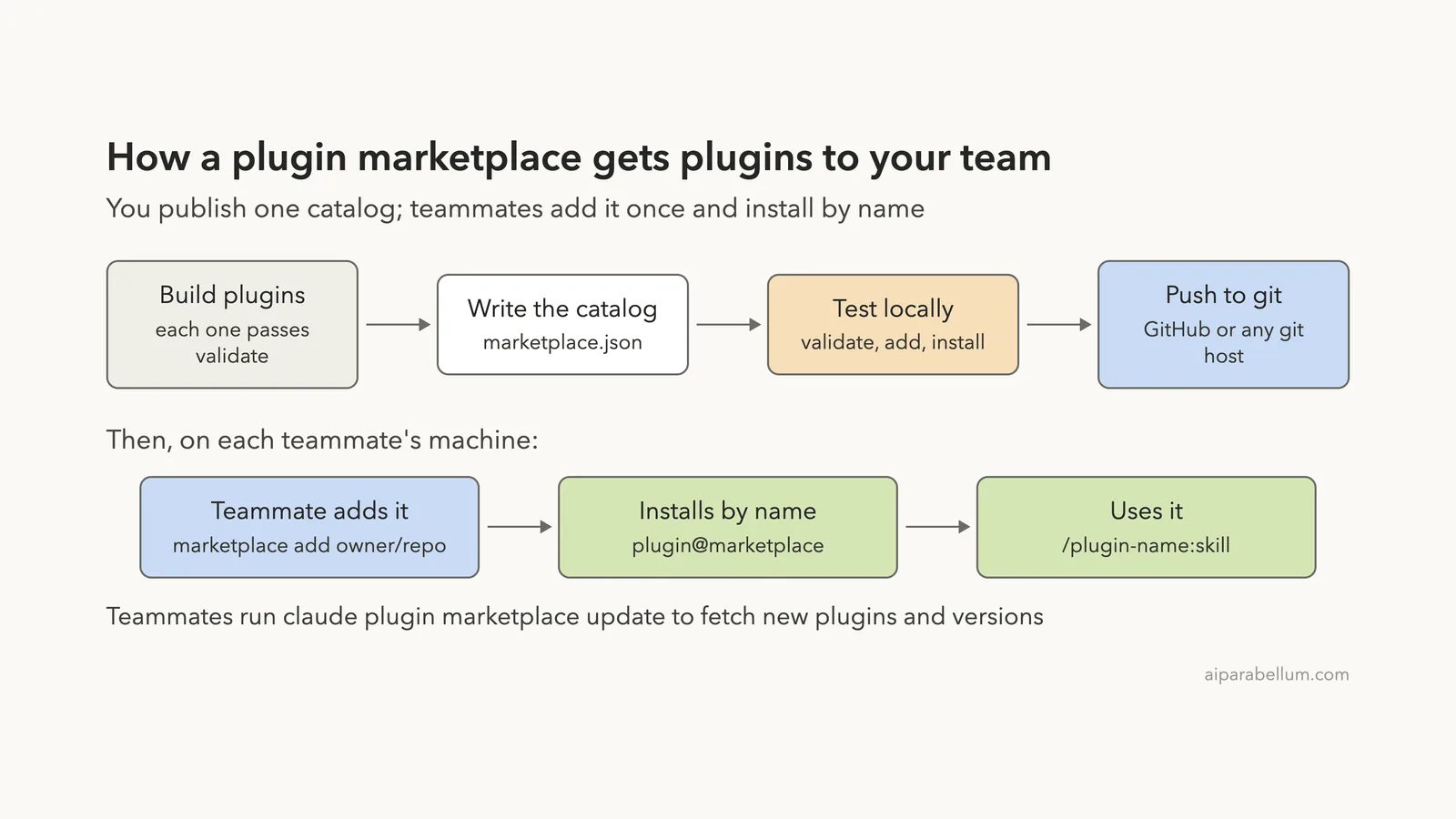
Now let’s build one. We follow the same loop the official marketplace creation guide describes: set up the folder, write the catalog, validate it, add it, install from it and confirm it loaded.
Step 1: Set up the marketplace folder
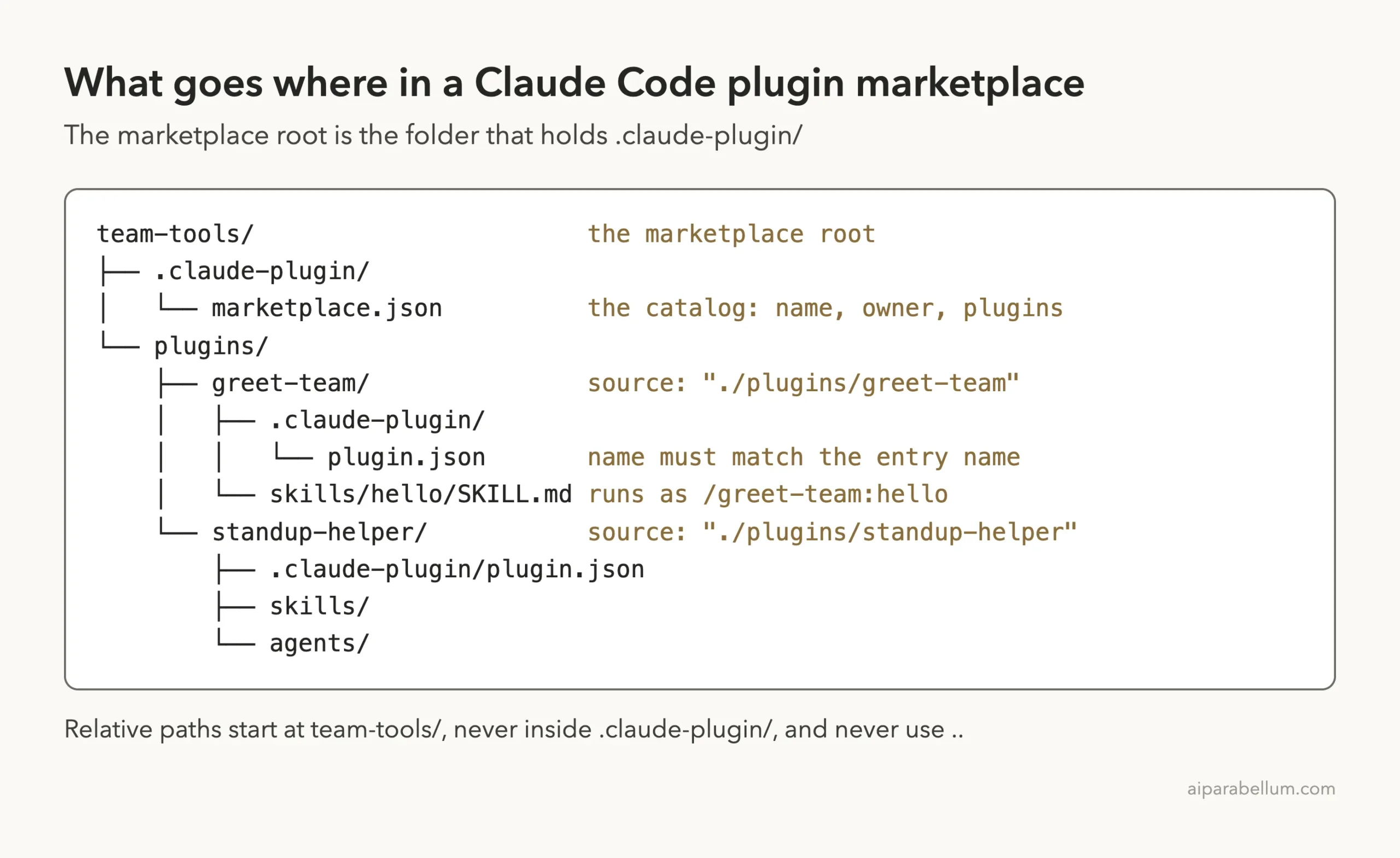
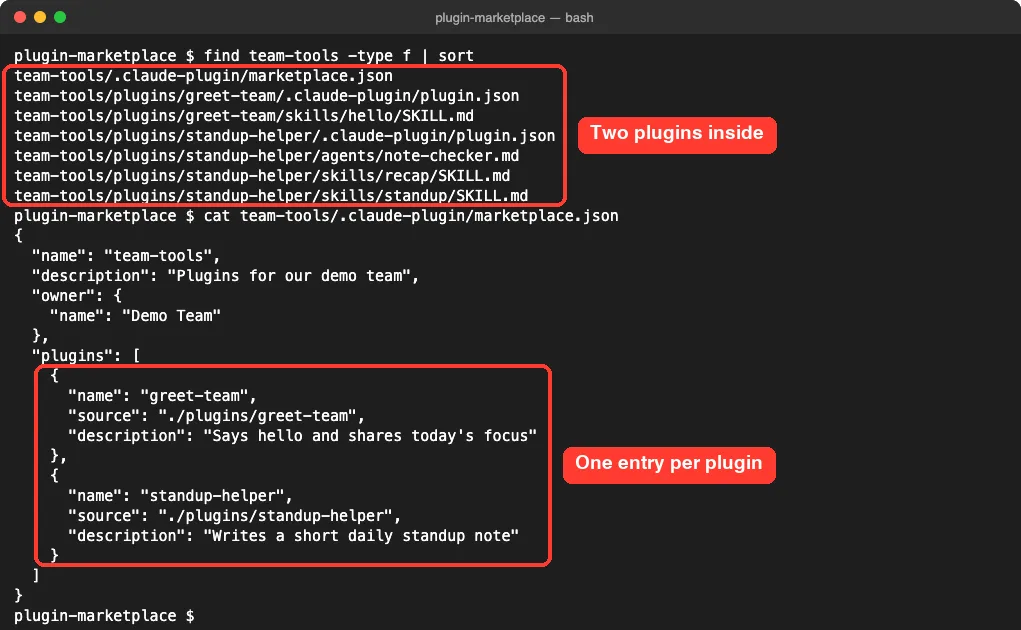
A marketplace is a folder with a .claude-plugin/ folder inside it, plus the plugins it lists. We made a folder called team-tools and copied two plugins under plugins/: greet-team, with one skill called hello, and the standup-helper plugin from Part 33.
mkdir -p team-tools/.claude-plugin team-tools/plugins
cp -r greet-team standup-helper team-tools/plugins/
claude plugin validate ./team-tools/plugins/greet-team
Validating each plugin first is a good habit. If something fails later, you know the problem is in the catalog, not in the plugin.
Step 2: Write marketplace.json
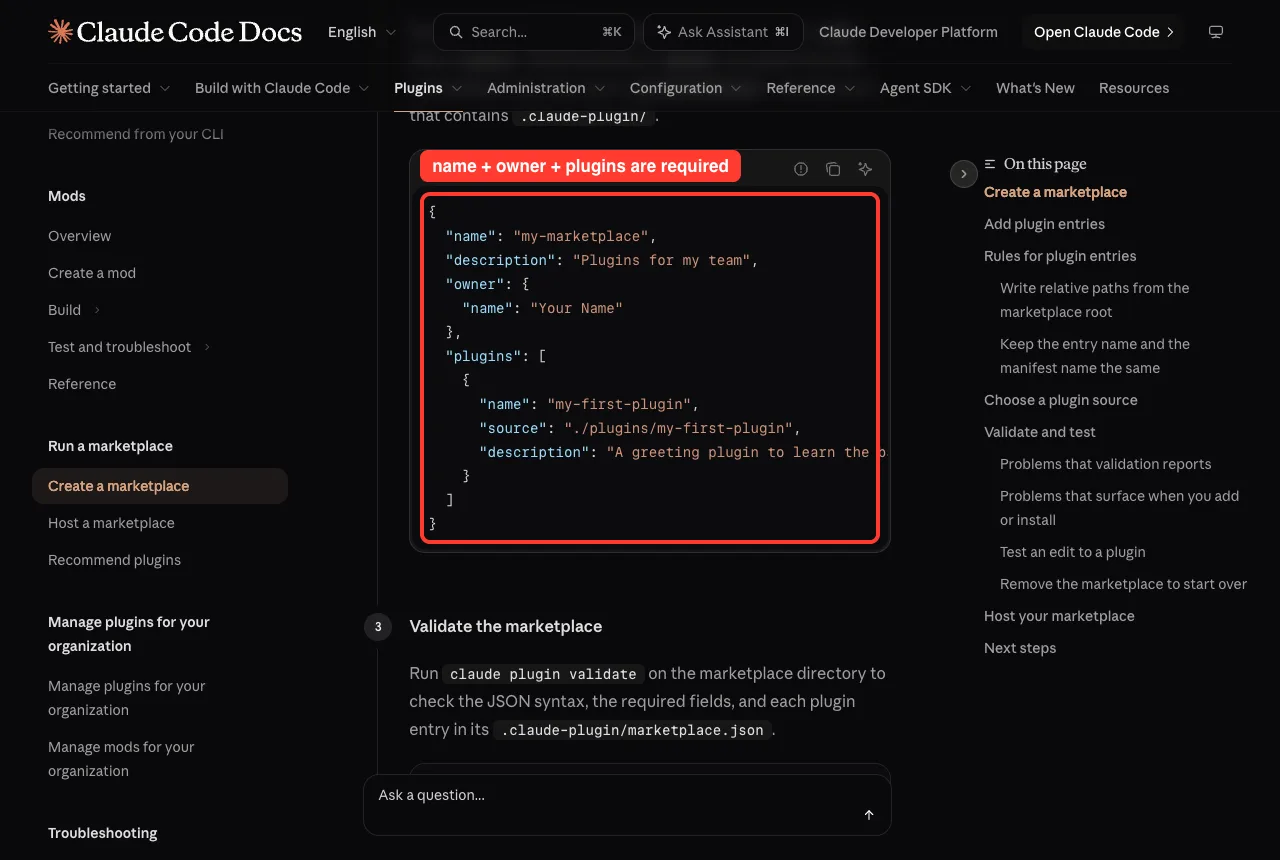
The file needs three things at the top: a name, an owner and a plugins array. Each entry in plugins needs a name and a source. A description is optional but worth adding, because people see it when they browse your catalog in /plugin.
{
  "name": "team-tools",
  "description": "Plugins for our demo team",
  "owner": { "name": "Demo Team" },
  "plugins": [
    {
      "name": "greet-team",
      "source": "./plugins/greet-team",
      "description": "Says hello and shares today's focus"
    },
    {
      "name": "standup-helper",
      "source": "./plugins/standup-helper",
      "description": "Writes a short daily standup note"
    }
  ]
}
Step 3: Validate the marketplace (and see it fail)
To show what the validator catches, we also made a broken copy. It had no owner field, and its source used ./../plugins/greet-team, a path that steps out of the folder with two dots.
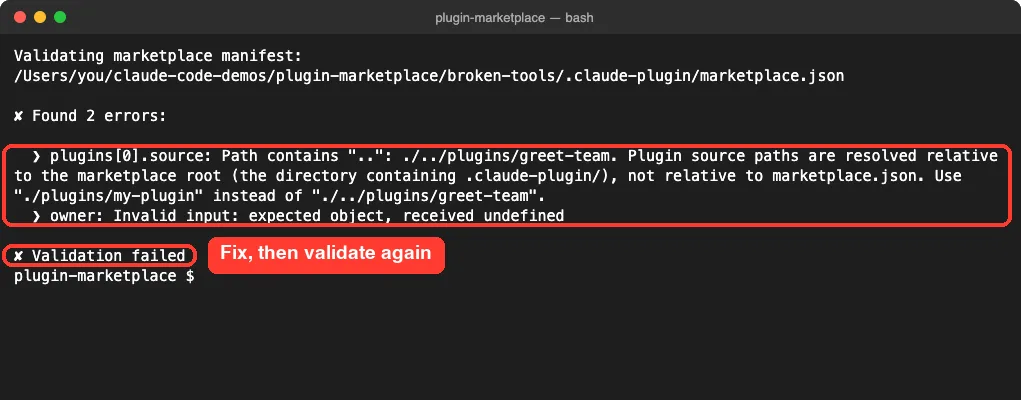
The fix is simple: add the owner block and write the path from the marketplace root as ./plugins/greet-team. Running claude plugin validate ./team-tools on the fixed folder ended with the line Validation passed.
Step 4: Add the marketplace and install a plugin
Next, register the folder as a marketplace and install one plugin from it. The install id is the entry name, an @ sign and the marketplace name. We used –scope project so both settings were written to the demo project, not to our personal settings.
claude plugin marketplace add ./team-tools --scope project
claude plugin install greet-team@team-tools --scope project
claude plugin list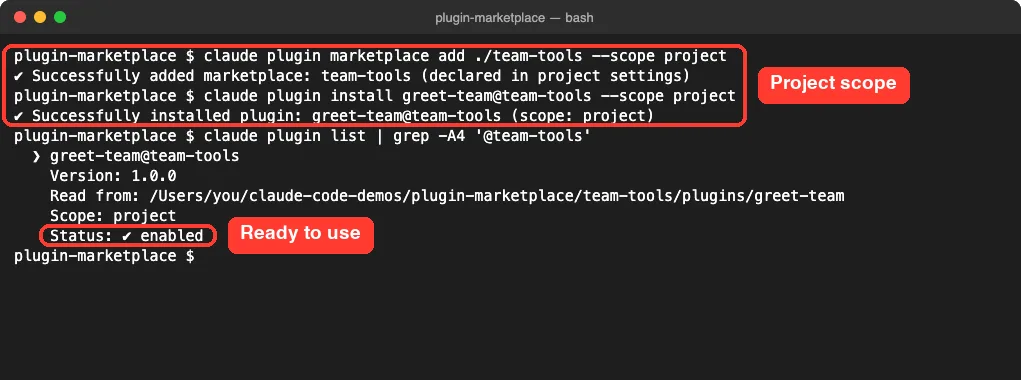
Inside a session, /plugin marketplace add ./team-tools does the same job. The difference is that /plugin install opens the plugin’s details in the panel, and you confirm the install there.
Step 5: Confirm it loaded and try it
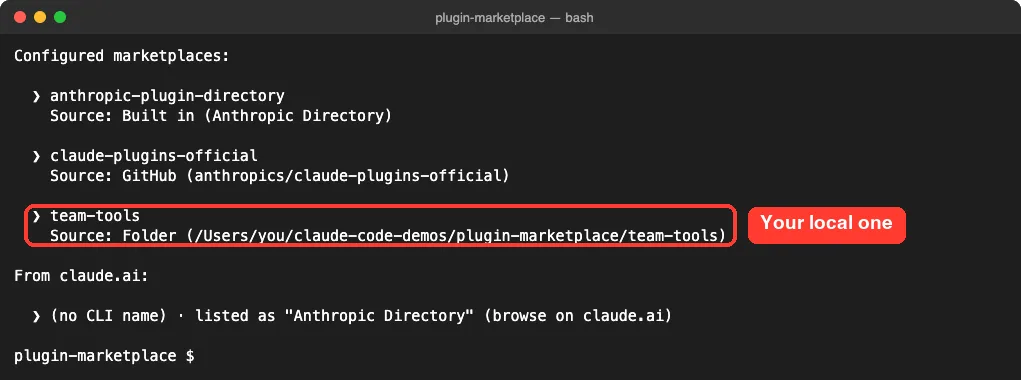
claude plugin marketplace list now shows team-tools with a Folder source, next to Anthropic’s catalogs. claude plugin details greet-team shows where the plugin came from and what it adds.
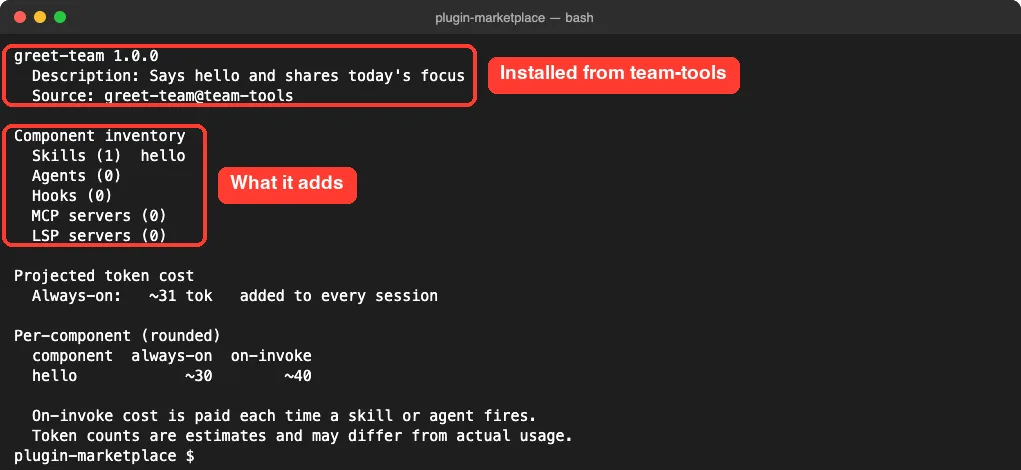
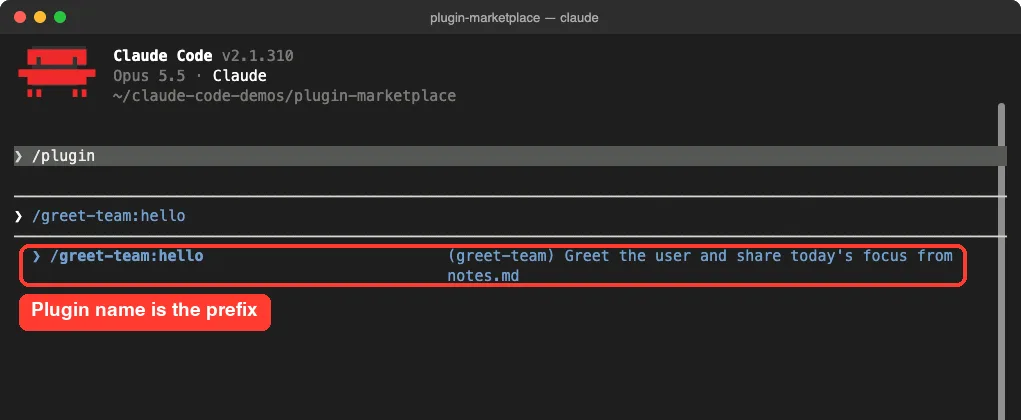
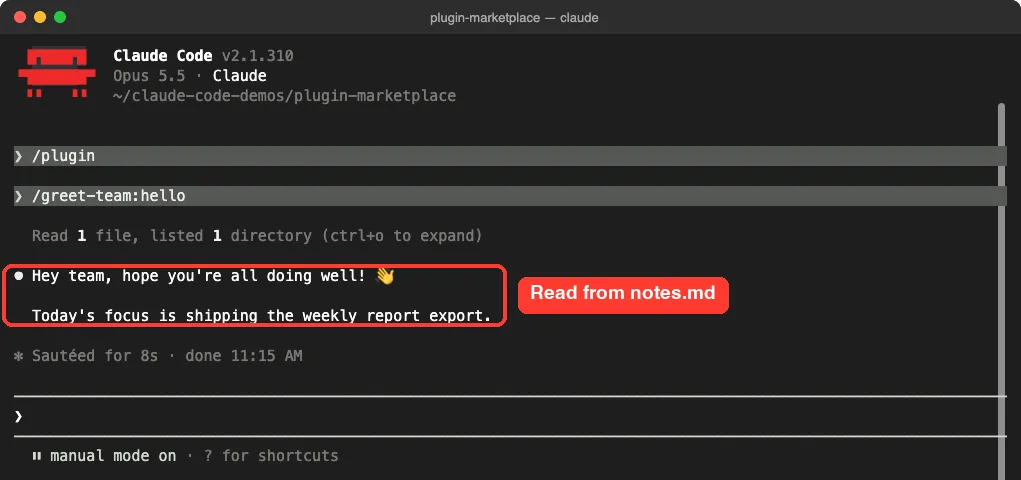
Then we started a session in the demo folder and typed the skill name. Like every plugin skill, it carries the plugin name as a prefix, so it runs as /greet-team:hello.
What Project Scope Writes to Your Settings
Because we used –scope project, Claude Code wrote two keys into .claude/settings.json in the demo folder. extraKnownMarketplaces records where the catalog lives, and enabledPlugins turns greet-team on for this project.
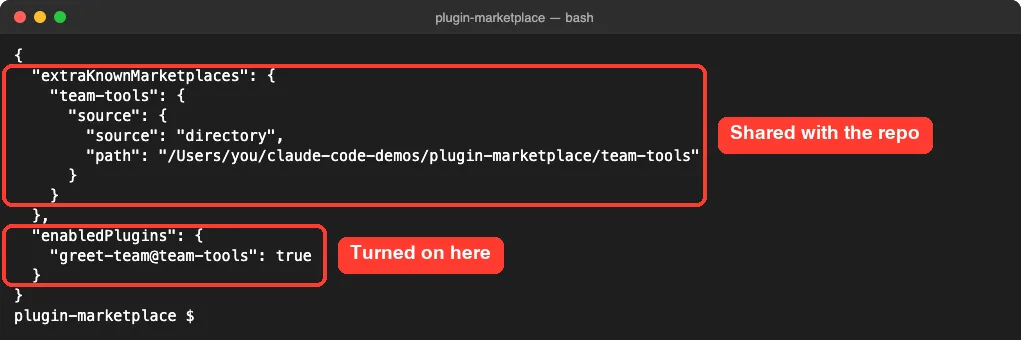
Commit that file and teammates who open the repo get the same setup. For a hosted marketplace, use the owner/repo form instead of a local path, since a folder path on your Mac will not exist on their machines. The settings files guide explains how user, project and local scopes stack.
Choose a Plugin Source for Each Entry
Every entry has a source that tells Claude Code where to fetch that one plugin. Pick it based on where the plugin’s files are stored.
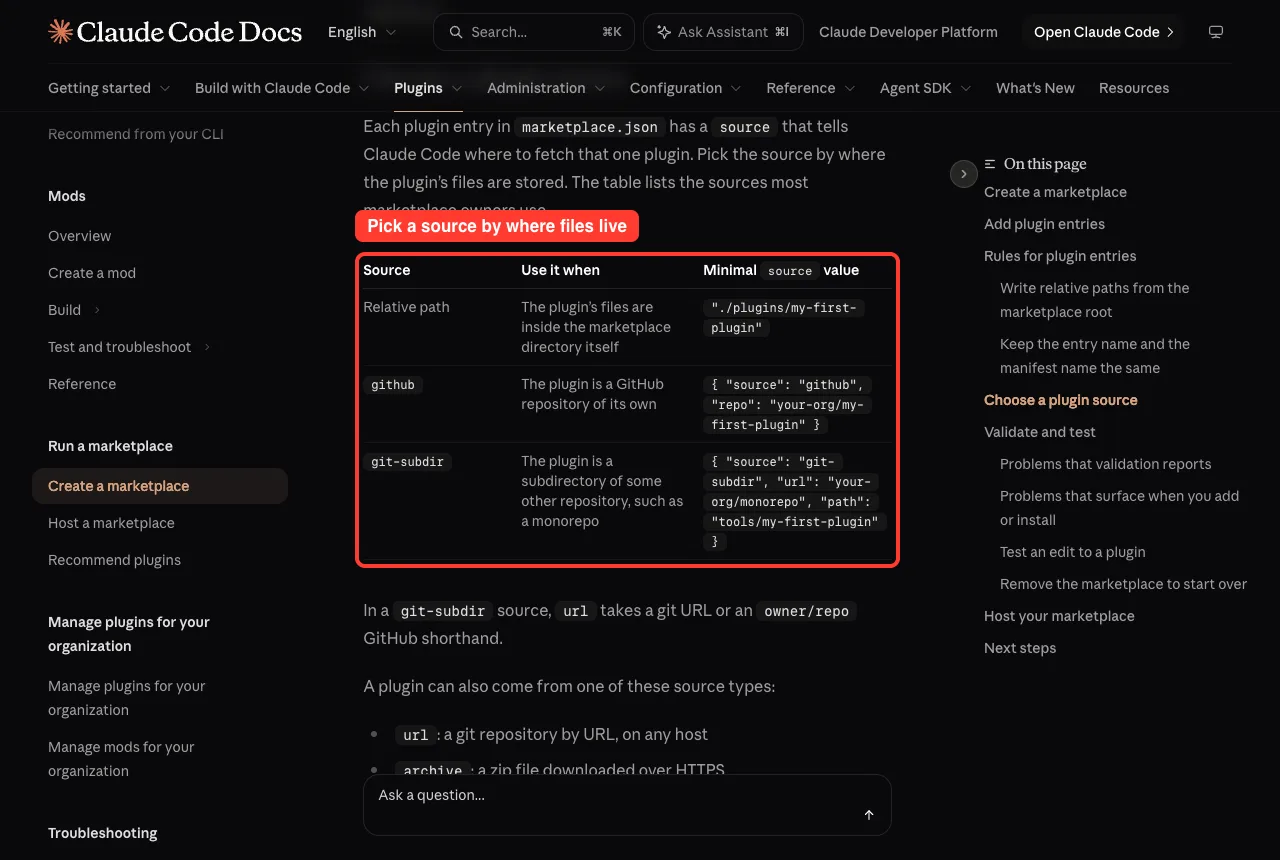
| Source | Use it when | Example value |
|---|---|---|
| Relative path | The plugin sits inside the marketplace folder | “./plugins/greet-team” |
| github | The plugin is its own GitHub repo | { “source”: “github”, “repo”: “your-org/greet-team” } |
| git-subdir | The plugin is a folder inside another repo | { “source”: “git-subdir”, “url”: “your-org/monorepo”, “path”: “tools/greet-team” } |
The docs also list url, archive, npm and command sources for less common setups. The marketplace reference covers every field, including pinning a git source to a ref or sha.
Real Examples of When to Use a Marketplace
- A team of five wants the same review skill, standup skill and formatting hooks on every laptop. One private repo with one marketplace.json does it.
- A company has plugins spread across several repos. A single catalog with github and git-subdir sources pulls them together.
- You maintain an open source plugin. Your repo can be its own marketplace, and anyone can add it with /plugin marketplace add owner/repo.
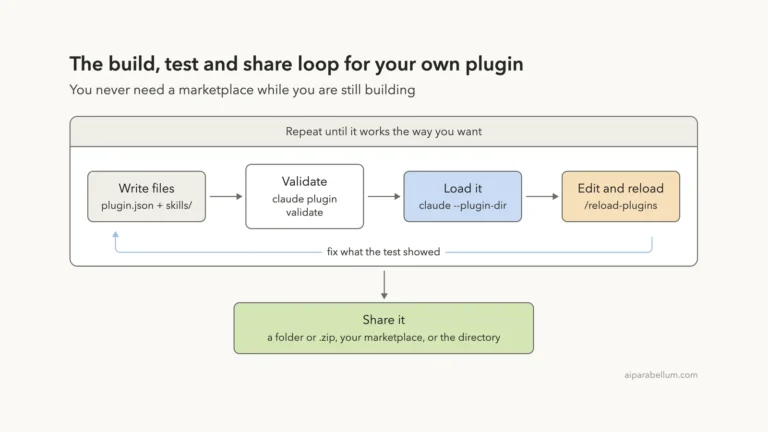
- You are still building a plugin for yourself. Skip the marketplace and load it with –plugin-dir, as shown in Part 33.
Try It Yourself
Make an empty practice folder, open Claude Code in it, and paste this prompt. It keeps the job small, and you stay in control of every file it creates.
Create a plugin marketplace folder called practice-tools in this directory.
Put .claude-plugin/marketplace.json in it with name "practice-tools",
an owner name "Me", and one plugin entry named "say-hi" whose source is
"./plugins/say-hi". Create that plugin with a plugin.json named "say-hi"
and one skill at skills/hi/SKILL.md that replies with a one-line greeting.
Then run claude plugin validate ./practice-tools and show me the result.
When it passes, run claude plugin marketplace add ./practice-tools –scope project, install say-hi@practice-tools, and run /say-hi:hi in a new session. Remove it afterward with claude plugin marketplace remove practice-tools.
Common Mistakes
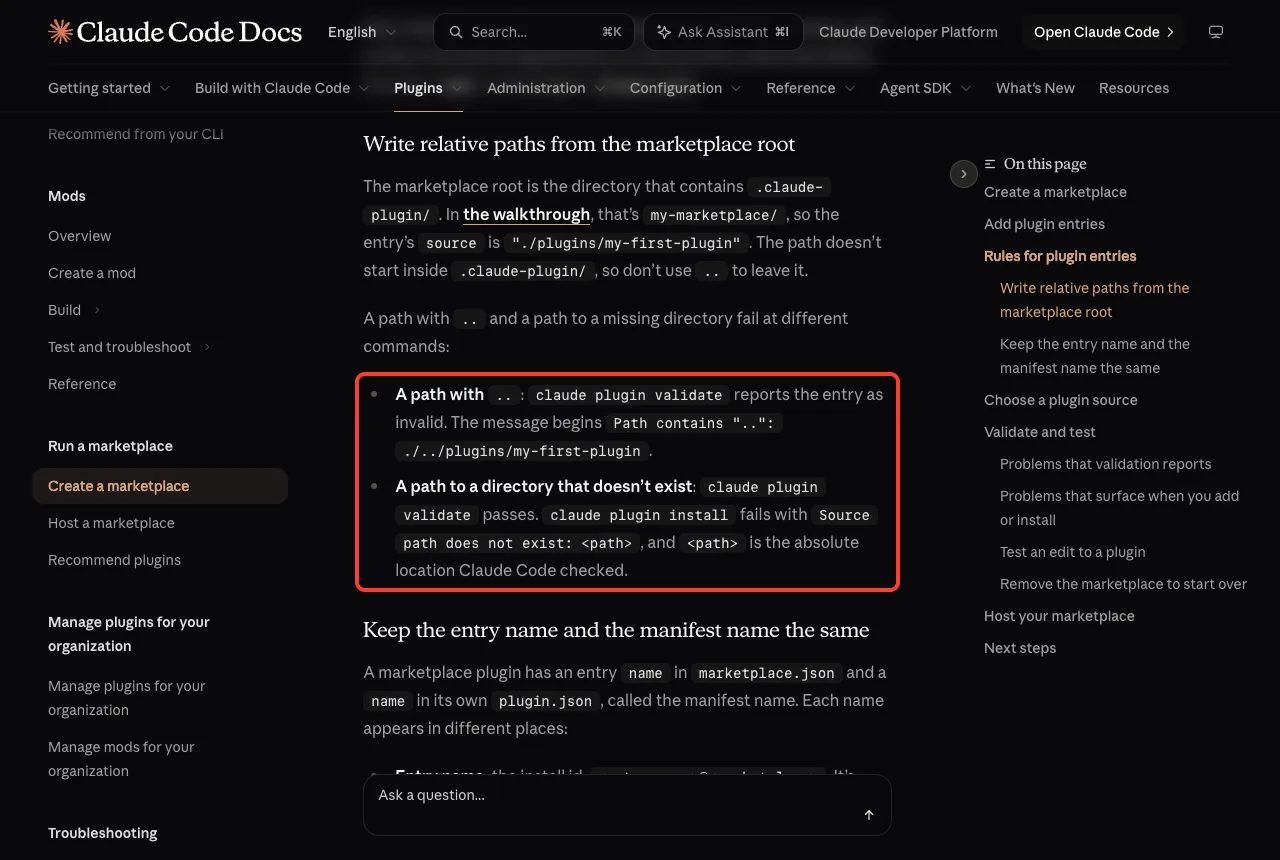
- Writing paths from inside .claude-plugin/. Relative sources start at the marketplace root, so a path with .. fails validation.
- Pointing at a folder that does not exist. Validation passes, but the install fails with Source path does not exist.
- Giving an entry a different name from its plugin.json. Installing by the manifest name then reports that the plugin was not found in the marketplace.
- Using a reserved name such as claude-plugins-official. It passes validation, but Claude Code refuses it when you add the marketplace.
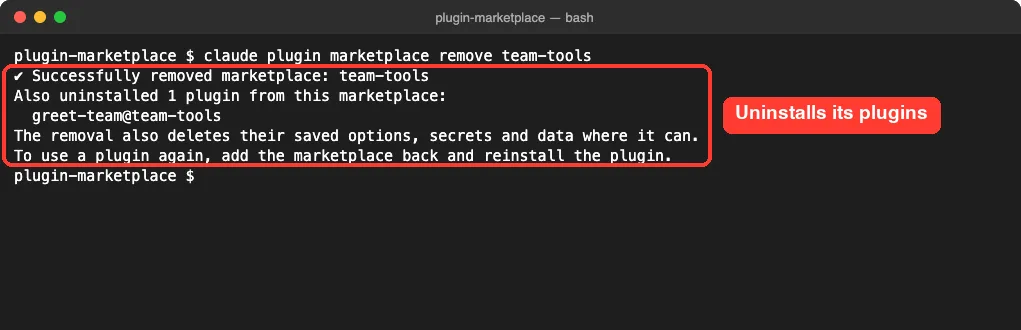
- Expecting remove to keep your plugins. Removing a marketplace from its last scope also uninstalls every plugin you installed from it.
Pro Tips
- Run claude plugin validate after every edit to marketplace.json. Then install on your own machine before you share, because validation and installation catch different problems.
- With a local folder and a relative path, edits to a plugin apply at the next session start or when you run /reload-plugins, with no version bump needed.
- Use –scope project when the marketplace belongs to a repo, and the default user scope when it is just for you.
- Add the –json flag to marketplace commands in CI scripts so you get one machine-readable result line.
- Run claude plugin marketplace update to refresh a catalog without losing its installed plugins.
To start over cleanly, remove the marketplace. Here is what that looked like at the end of our test.
Claude Code Plugin Marketplace Cheat Sheet
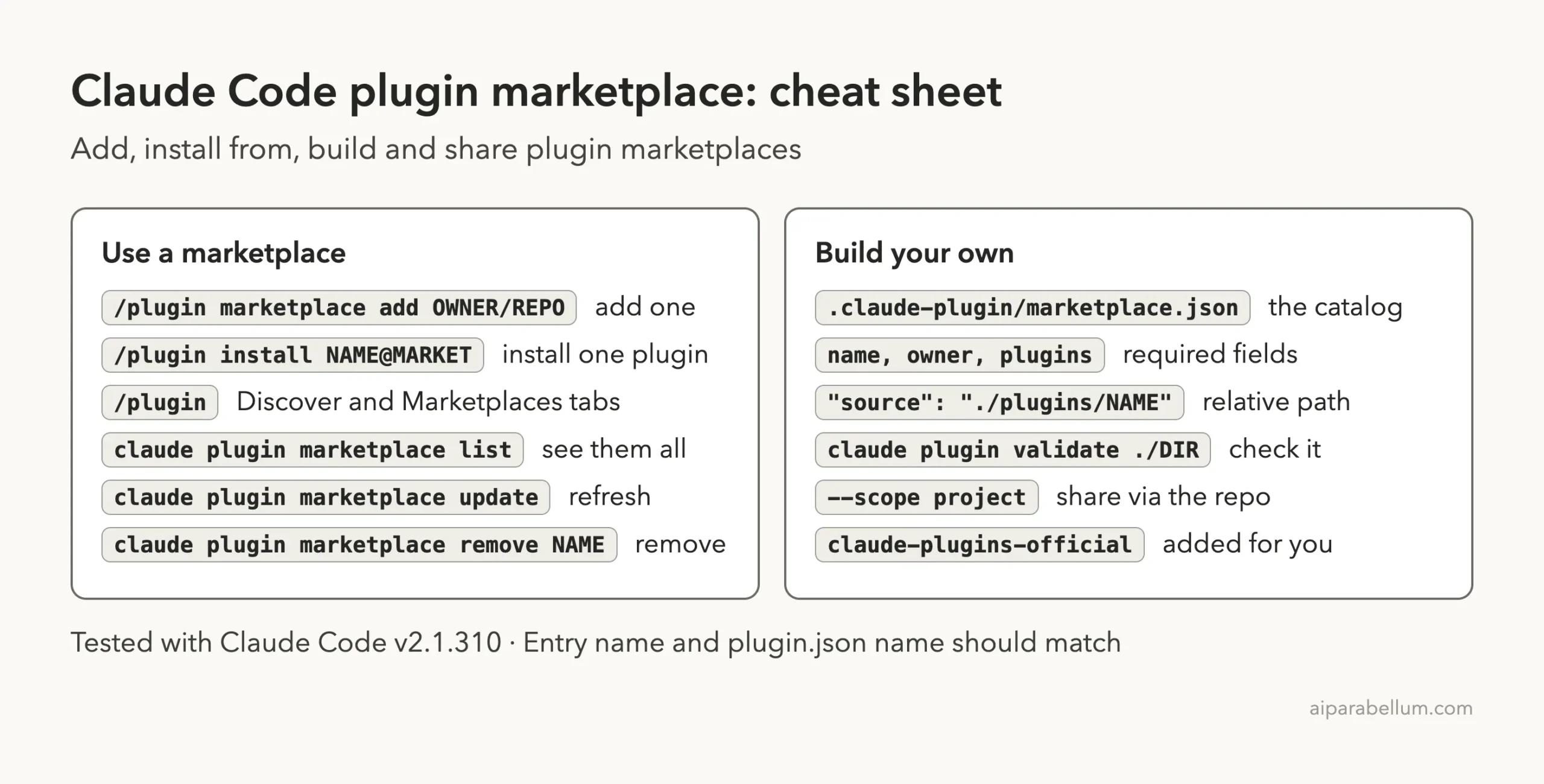
For every flag on these commands, see the official plugin commands reference. For more background on Claude itself, our Claude AI overview is a good start.
Frequently Asked Questions
Do I need a marketplace to use my own plugin?
No. For your own use, load the plugin with –plugin-dir. A marketplace makes sense when you want other people to install and update your plugins from one catalog.
Can a plugin marketplace be a private repository?
Yes. The docs say the repository can be private and can list as many plugins as you like. Anyone with access adds it with claude plugin marketplace add owner/repo.
What is the difference between the official and community marketplaces?
The official one, claude-plugins-official, is added for you and holds Anthropic’s plugins plus partner plugins. The community one, claude-community, holds third-party plugins their authors submitted, and you add it yourself.
How do teammates get updates to my marketplace?
Push changes to the repo. They can run claude plugin marketplace update to fetch new plugins and versions from it.
Is it safe to add any third-party marketplace?
Anthropic does not review third-party marketplaces, and plugins can run code on your machine. Add only catalogs you trust, and read a plugin’s files before you install it, just as you would with MCP servers.
Conclusion
A Claude Code plugin marketplace is just a marketplace.json file that lists plugins and where to find them, yet it turns scattered folders into a catalog your whole team can install from by name. You now know Anthropic’s three marketplaces and their exact names, how to write and validate your own catalog, how to add it at project scope, how to pick a source for each plugin, and how to remove it cleanly, so the next step is to try the practice task and build a small catalog of your own.
Previous in the series: Part 33, How to Create Your Own Claude Code Plugin
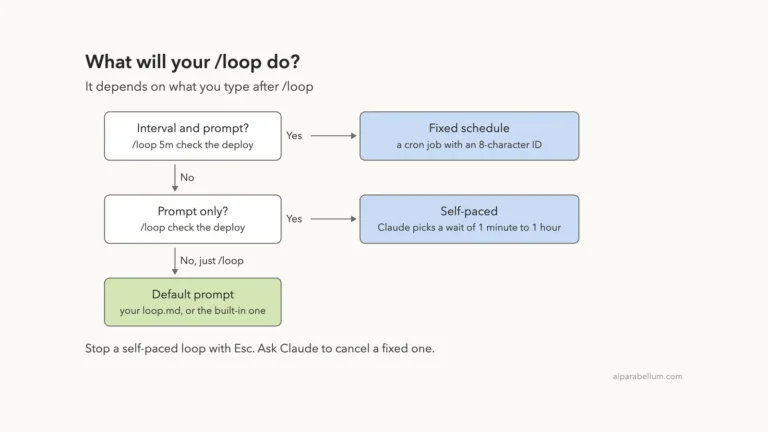
Next in the series: Part 35: Run Prompts on a Schedule With /loop in Claude Code.