Book to skill for Claude Code is a simple idea: you point a tool at a PDF, and it builds a skill that Claude can use to answer questions from that book. Book-to-Skill is a free open source project that does exactly that. We ran it for real on a small PDF guide to sourdough baking, then asked the new skill two questions, and this post shows every step and where it surprised us.
This guide is part of our Claude Code tutorials. Find more add-ons in our skills directory.
Tested with Claude Code v2.1.318 on November 8, 2026, using book-to-skill 1.4.0 from virgiliojr94/book-to-skill at commit e7bb659. The demo book is a four-page PDF we wrote ourselves, so no copyrighted text was used.
Book to Skill for Claude Code: Quick Summary
| Question | Answer |
|---|---|
| What is it? | A skill that converts a book or document into a new skill with chapter files |
| Command | /book-to-skill books/pocket-sourdough.pdf pocket-sourdough |
| Formats | PDF, EPUB, DOCX, Markdown, HTML, RTF, TXT and more, according to the README |
| License | MIT |
| Does it need an account? | No, it runs locally. Publishing the result to GitHub is optional |
| How long did our run take? | About 39 seconds to write the skill after we answered its questions |
| Our verdict | Works well, but check where it saves files before you run it |
What Book-to-Skill Is and Why It Exists
You read a good book once and forget most of it. You could ask Claude about the book, but Claude only knows what is in the conversation, and pasting a whole PDF into a chat wastes a lot of space. Book-to-Skill fixes that by turning the book into structured files that Claude reads on demand.
A skill is a folder with a SKILL.md file that Claude loads when a task matches it. If skills are new to you, our guide to the Agent Skills standard explains the basics, and the official skills documentation covers the file format.
Book-to-Skill is itself a skill. It has two parts: a Python script that pulls clean text out of your file, and instructions that tell Claude how to turn that text into frameworks, rules, anti-patterns and one file per chapter. The README says it keeps structure rather than writing a summary.
The README also claims it uses 24 to 51 times fewer tokens than dumping a book into context. We did not measure that, because our demo book is only about 470 words. The claim makes sense for long books, since Claude opens one small chapter file instead of the whole PDF.
How the Conversion Works
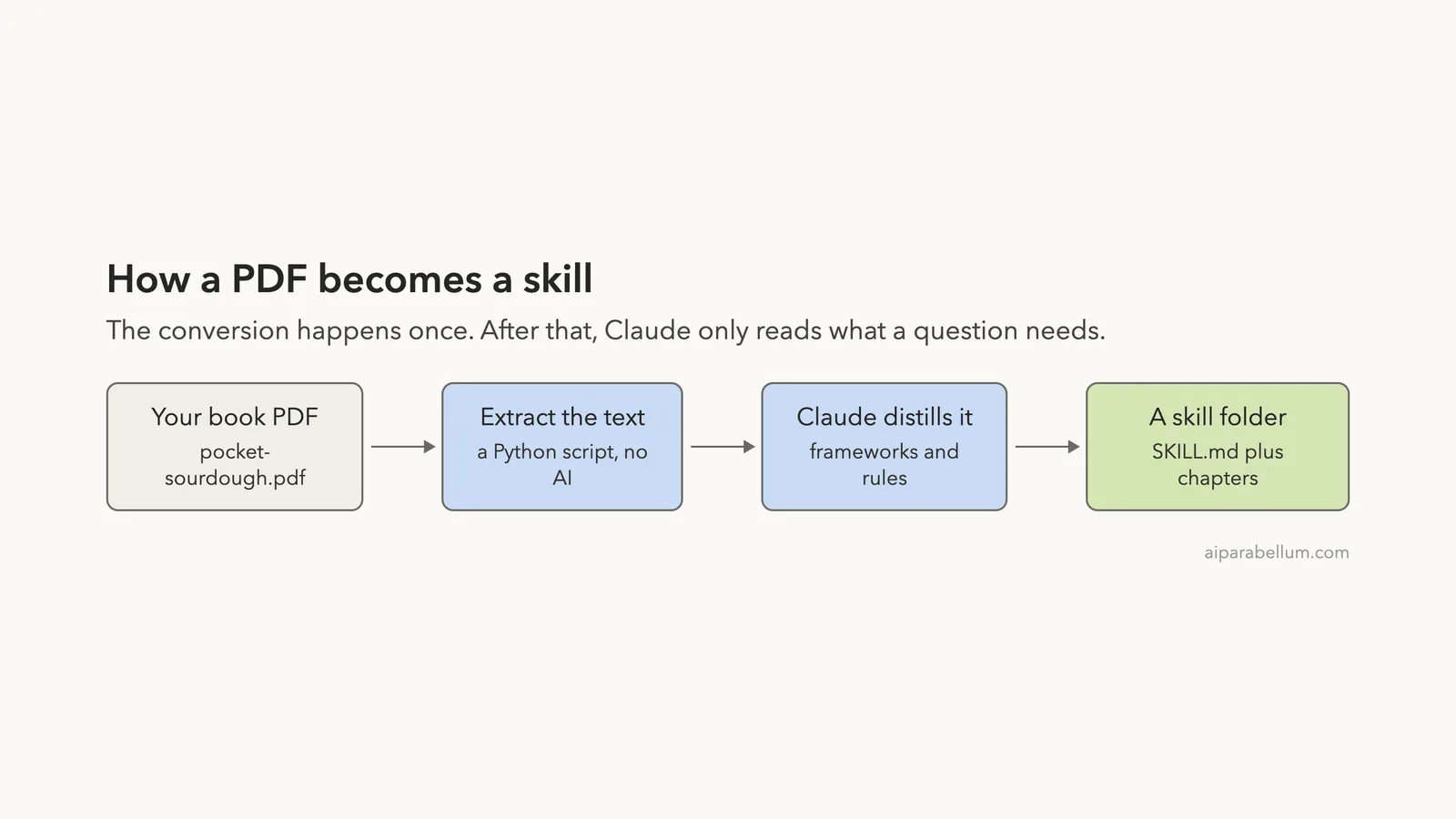
The flow has four steps. Your PDF goes in, a script extracts the text, Claude distills it, and a skill folder comes out.
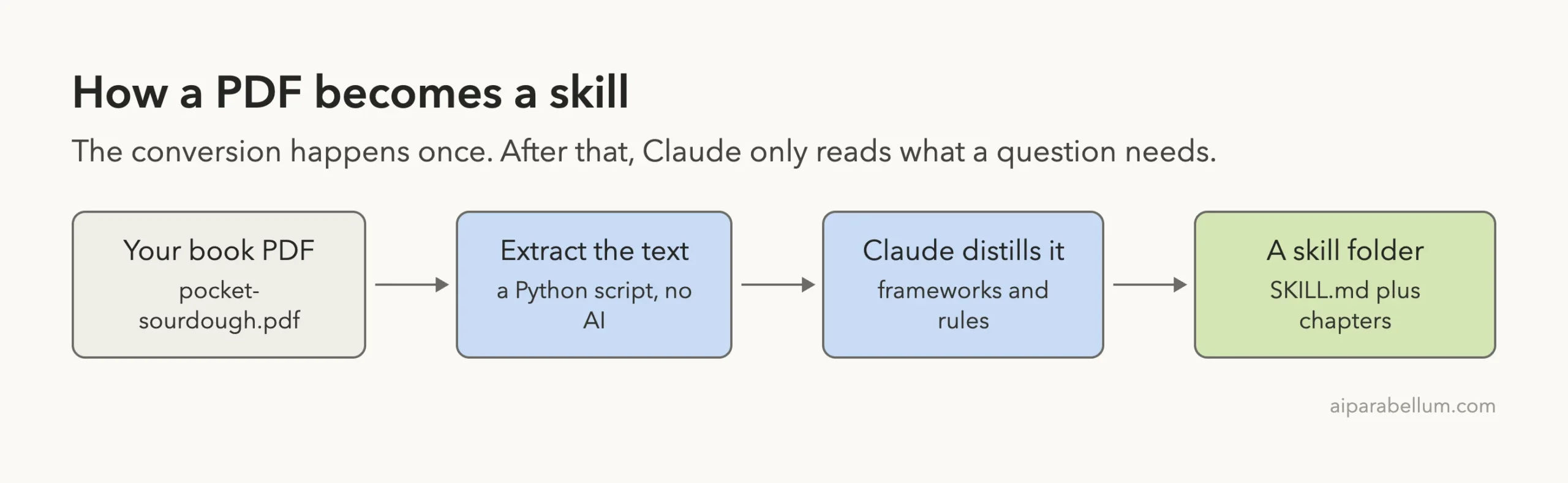
The extraction step does not use AI. It is a plain script, so the text that reaches Claude is exactly what was in your file. That matters because it means the skill is built from your real words and not from a guess.
Step 1: Set Up a Safe Place to Try It
Do not install a skill you have not read, and try new ones in a throwaway folder. Before running anything, we read the repository’s scripts and checked what they do. The Python code only runs local tools to read documents, and we found no network calls in the extractor.
The repository also contains a security notice that is worth knowing about. It warns that a copy named Leutenegger/book-to-skill is a malicious re-upload that is not affiliated with the project. Only use the official virgiliojr94/book-to-skill repository.
We cloned the official repo into a sandbox, copied the skill into a demo project at .claude/skills/book-to-skill, and created a small Python environment with the pypdf package. We wrote the demo book ourselves with three short chapters: feeding a starter, mixing the dough and baking the loaf.
Step 2: Run the Command
Start Claude Code in your project folder and type the command with the path to your file and a name for the new skill. The name becomes the slash command you will use later.
/book-to-skill books/pocket-sourdough.pdf pocket-sourdough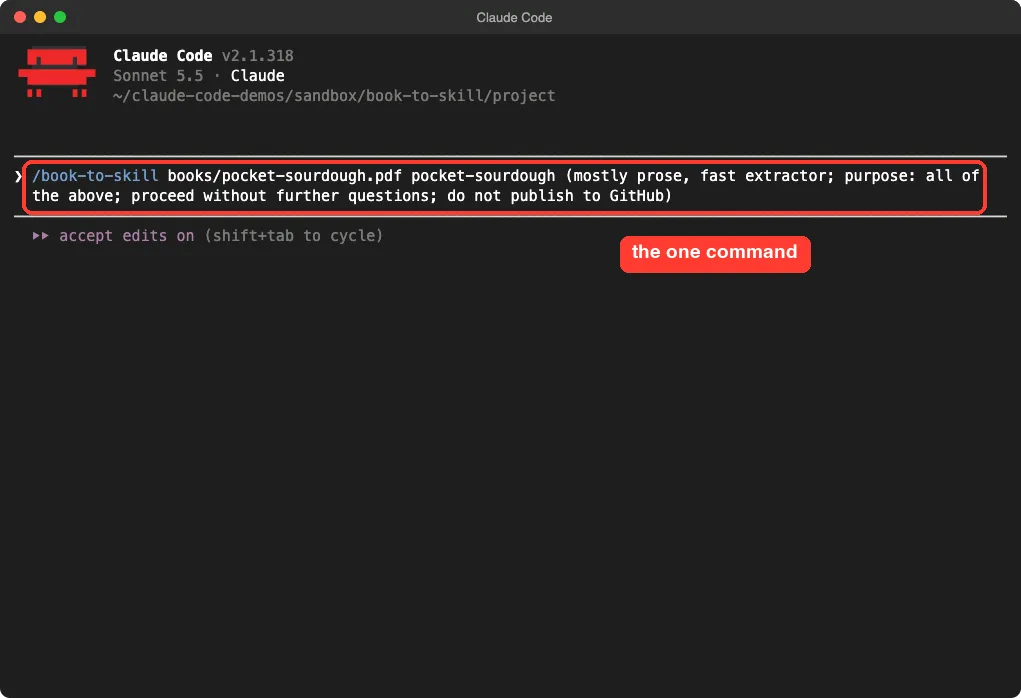
You can also pass a folder, a list of files or a glob pattern, and the tool will merge them into one skill. The README says this works for internal docs, brand guides and research papers too. In our run we added a short note after the path saying the book is mostly prose, so Claude would not need to ask about it.
Step 3: Answer the Questions
Before it writes anything, Book-to-Skill asks what kind of content the file has and what you want the skill to help with. In our first runs it asked about the content type as a menu: text-heavy, technical or not sure. Later runs asked about the purpose of the skill instead.
The questions were not identical from run to run, because Claude is following written instructions and not a fixed program. Expect a short back and forth of one to three questions. The purpose menu lets you pick how deep the chapter files go.
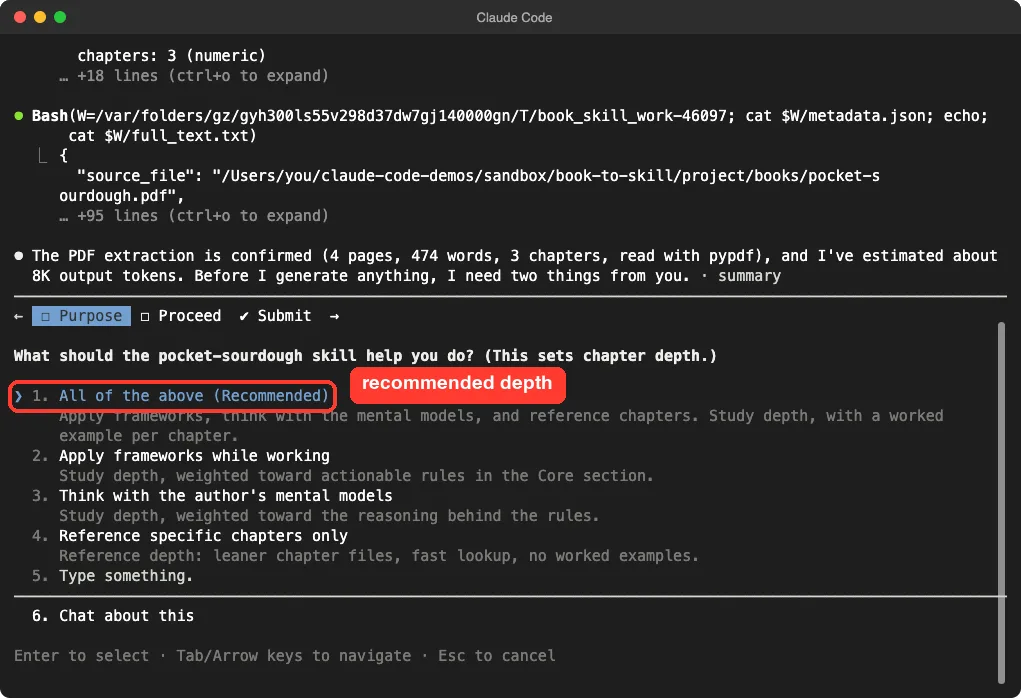
We picked the recommended option, which gives each chapter a worked example. The other choices lean toward rules you can apply while working, the reasoning behind the rules, or lean files for quick lookups. Pick based on how you plan to use the book.
Step 4: See What Claude Built
The extraction worked on the first try. Claude reported four pages, 474 words and three chapters, read with pypdf. The README prefers a tool called pdftotext, but it was not installed on our machine, so the tool fell back to pypdf and the text still came out clean.
After about 39 seconds of writing, the run finished with a summary. It listed a core file, three chapter files, a glossary, a patterns file and a cheat sheet. It also said a security scan of the generated skill passed with no findings.
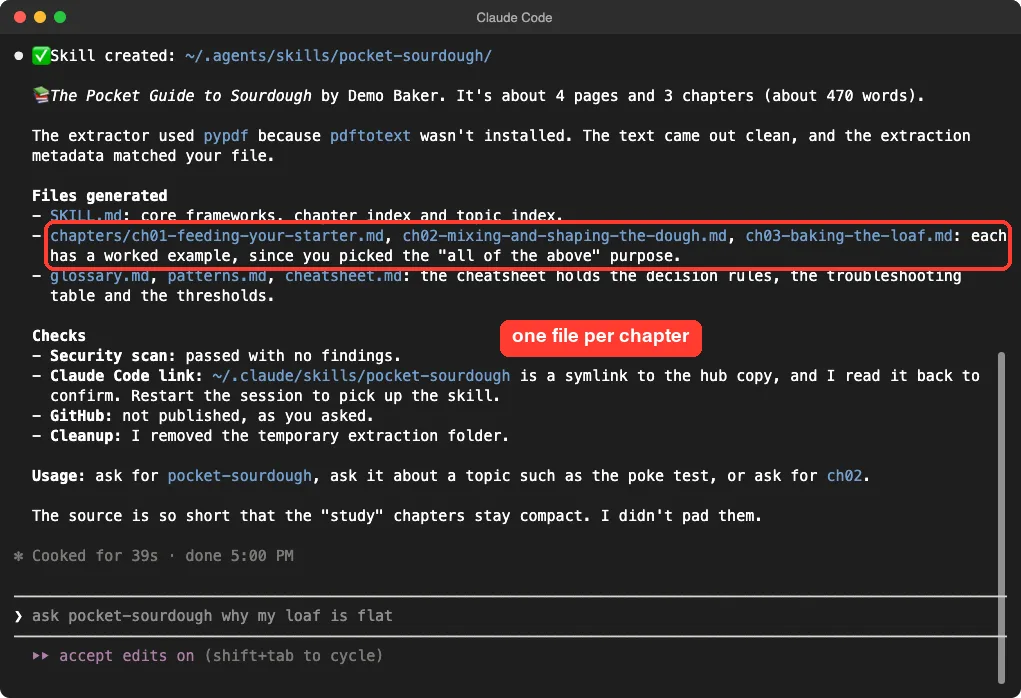
Here is the layout of the finished skill. The main file is small, and each chapter sits in its own file that Claude opens only when needed.
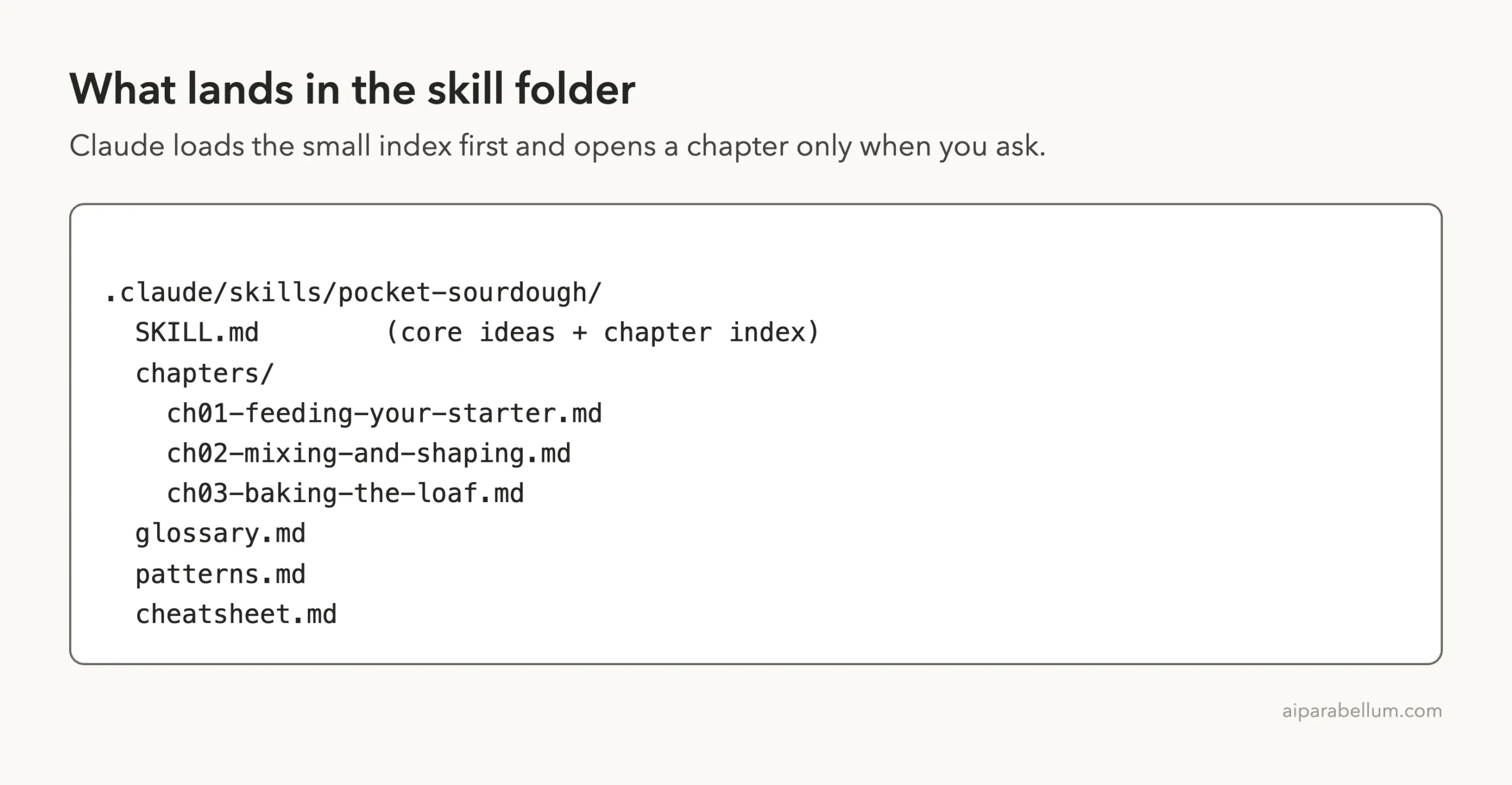
What is inside the main file
The generated SKILL.md was about 450 words. It holds the core ideas from all three chapters, a chapter index table and a topic index that points each topic to a chapter. For example, the poke test points to chapter 2 and the Dutch oven method points to chapter 3.
We compared it against our source PDF. The facts matched: 20 grams each of starter, flour and water for the 1-1-1 rule, 70 percent hydration, a 245 degree pot and a one hour cooling rule. We did not find invented numbers.
The Surprise: Where the Files Were Saved
This is the part you need to watch. We started Claude Code with BOOK_TO_SKILL_SCOPE=project, which the project documentation says keeps the skill inside the current project. The summary still said the skill was created in ~/.agents/skills/pocket-sourdough/ and linked into ~/.claude/skills/pocket-sourdough.
In other words, it wrote to our global skill folders, which every Claude Code project can see. That is the documented default, and in our run the setting did not change it. We cannot say whether this is a bug or a mistake in how we passed the setting, only that it happened.
We moved the generated folder into the demo project, removed the link from ~/.claude/skills and confirmed that both global folders were back to their earlier contents. If you want a skill to stay in one project, check the path in the summary right after the run and move it if needed.
Step 5: Use Your New Skill
Restart Claude Code so it picks up the new skill. Type a slash and the name, and your skill shows up in the list with its description.
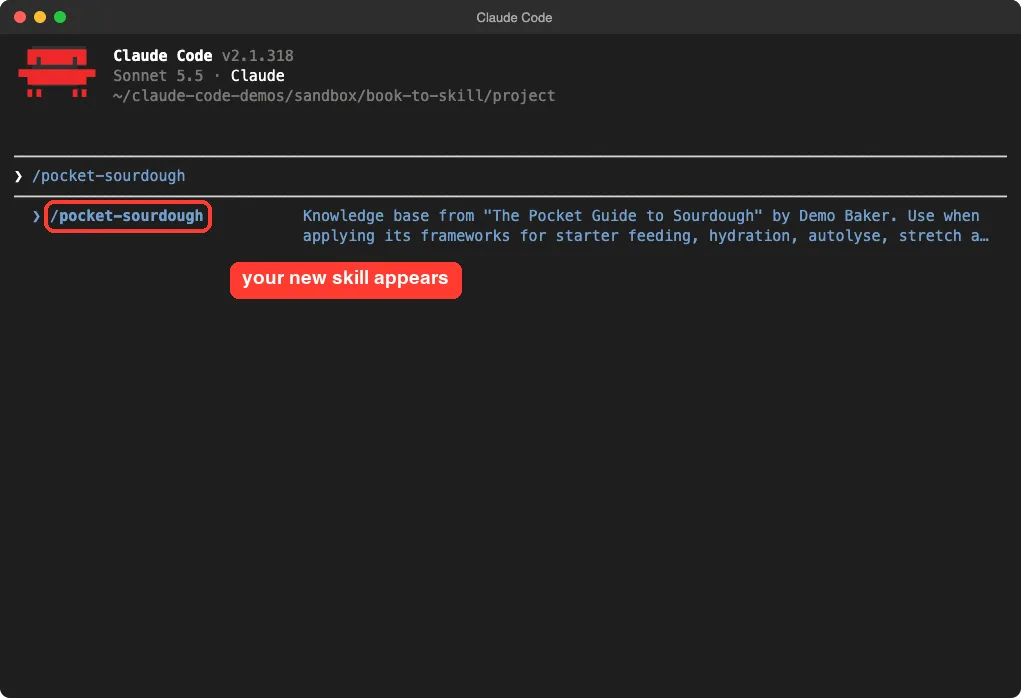
Then ask a question after the command. The skill can answer a topic, open a chapter such as ch02, or list its chapters. We tried two questions.
Question 1: a topic from the book
We typed /pocket-sourdough poke test - how do I know my dough is ready?. Claude read the chapter and answered with a small table: a slow spring-back means ready, a fast spring-back means wait, and no spring-back means bake right away. It also added the worked example with 1000 grams of flour and 700 grams of water.
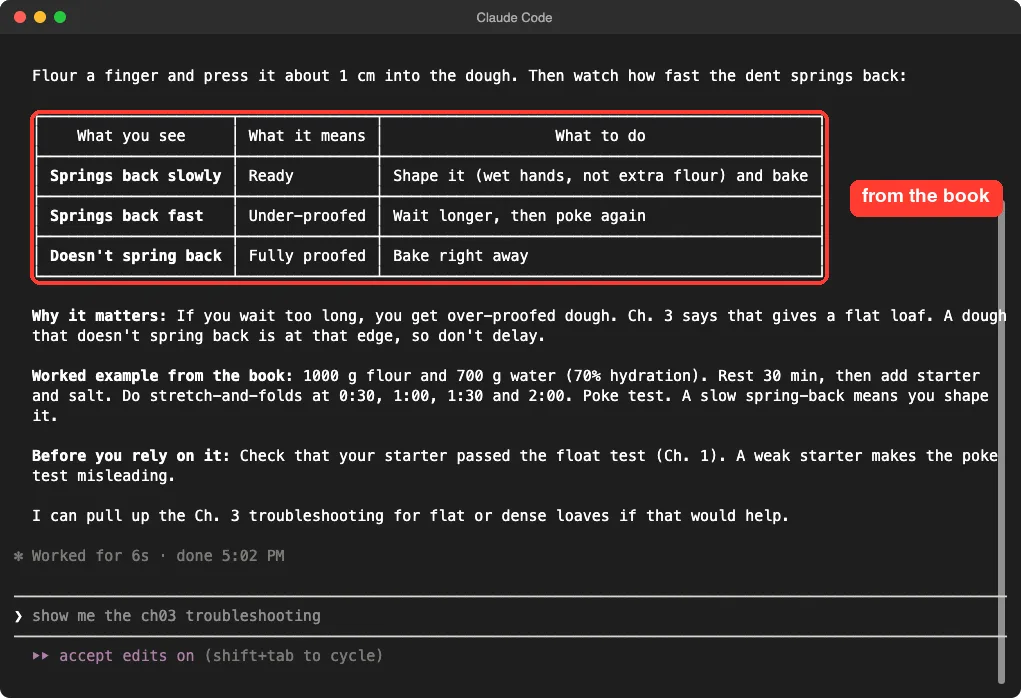
One detail is worth a note. The table labeled the no-spring-back row as fully proofed, which is Claude’s own wording and not a phrase from our book. The advice matched the book, but this shows why you should read the chapters you rely on.
Question 2: a problem that spans chapters
Next we typed /pocket-sourdough my loaf came out flat, what went wrong?. Claude answered that a flat loaf most likely means over-proofed dough, cited the chapter 3 troubleshooting table, and sent us back to the poke test from chapter 2.
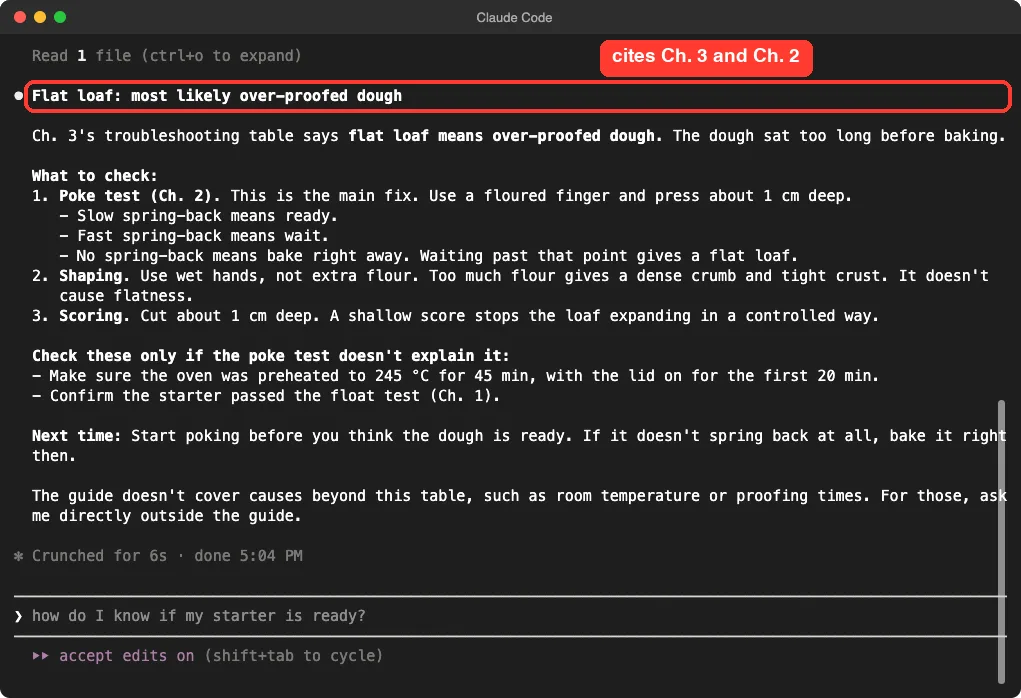
It ended with a useful line: the guide does not cover room temperature or proofing times, so those need a direct question outside the guide. A skill that admits its limits is easier to trust.
Our Verdict
A PDF became a clean, accurate skill in under a minute, but check where the files were saved.
Book-to-Skill did what it promises. A PDF became a clean, accurate skill in under a minute, and the answers cited real chapters. For long technical books, the chapter-by-chapter layout should help more than it did on our tiny demo.
It has three things to keep in mind. The question flow changes between runs, the output location may not follow the project setting, and the quality depends on your source file. A scanned PDF with no text layer will not work, and the repository mentions an early abort for that case.
| What worked | What to watch |
|---|---|
| Accurate numbers and rules from the source | Saved to global skill folders despite the project setting |
| One file per chapter, loaded on demand | Questions vary from run to run |
| Built-in security scan of the result | We could not test long books or scanned files |
| Clear limits stated in answers | Wording can drift from the book |
Try It Yourself
Pick a short document you own, such as a handbook, a policy or a guide you wrote. Put it in a throwaway project folder, load the skill from the official repository, and run this prompt.
/book-to-skill docs/my-guide.pdf my-guideWhen it finishes, read the path in the summary, restart Claude Code and ask the new skill one question you already know the answer to. If the answer matches your document, the skill is working.
Common Mistakes
- Installing a copy from the wrong account. Use only
virgiliojr94/book-to-skill. - Skipping the path check. Read where the summary says the skill was saved.
- Forgetting to restart. A new skill appears in the slash menu after a new session.
- Using a scanned PDF. The script needs real text in the file.
- Publishing a skill made from a copyrighted book. The README says those skills must stay private.
Pro Tips
- Use a folder or glob to merge several papers into one skill, then add new material later with the update mode in the README.
- Choose the lean reference purpose for large books you only look things up in.
- Read the generated
cheatsheet.mdfirst, because it holds the rules in short form. - Find other add-ons for your setup in our plugin marketplace guide, and see how to cut interruptions in our guide to permission prompts.
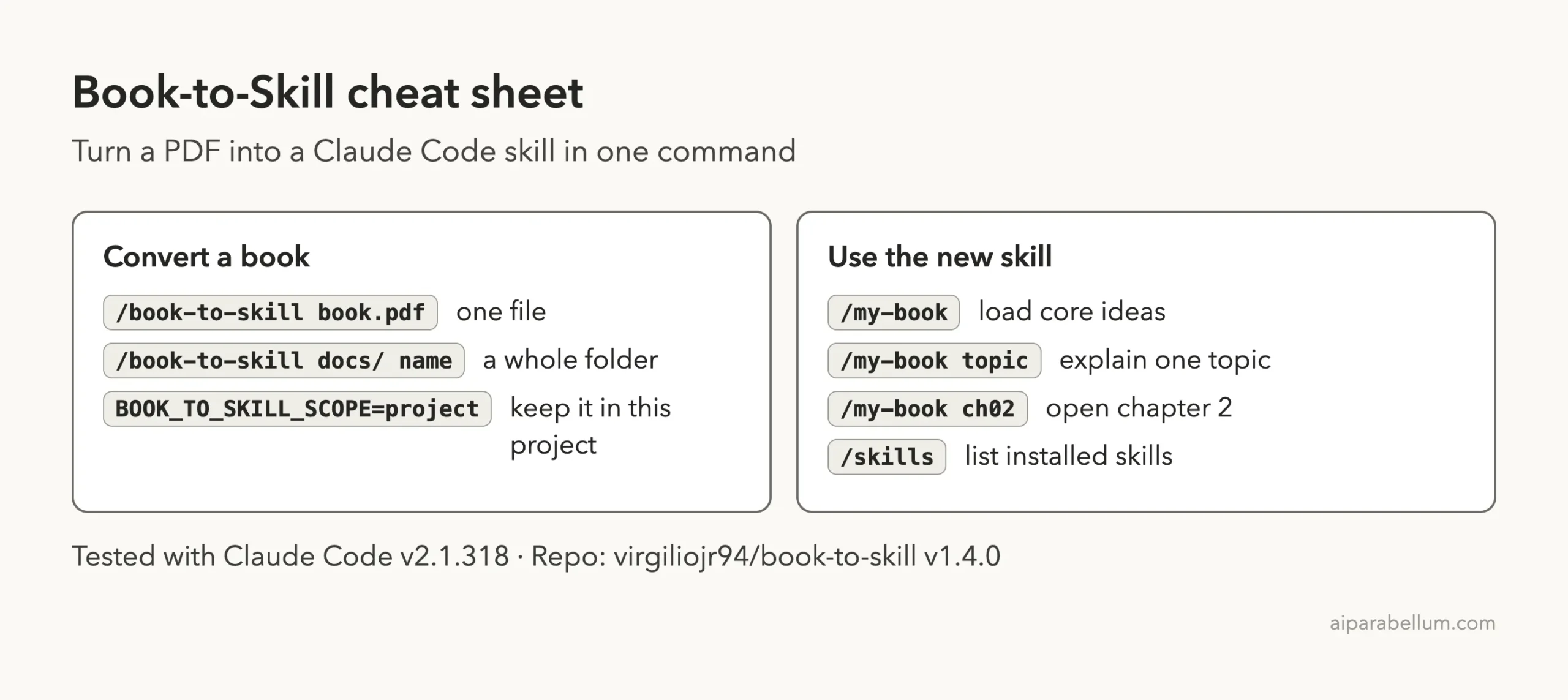
Cheat Sheet
Frequently Asked Questions
What does Book-to-Skill do?
It converts a book or document into a skill with a core file, chapter files, a glossary, a patterns file and a cheat sheet. Claude then reads only the parts a question needs.
Does it work with Claude Code only?
No. The README lists several tools that read the same skill format, including Copilot CLI, Codex and OpenCode. We only tested it in Claude Code.
Do I need an API key or an account?
No account was needed in our run. Claude Code does the writing, and the extraction runs on your machine. Publishing to GitHub is optional and we declined it.
Which file types can it read?
The README lists PDF, EPUB, DOCX, Markdown, HTML, RTF, plain text and Kindle formats with extra tools. We tested only a text PDF.
Can I share a skill built from a book I bought?
The README says skills made from third-party copyrighted books must stay private. Chapter files are written from the source material, so share only skills built from content you have the right to share.
Conclusion
Book-to-Skill is a practical way to give Claude Code a reference library from your own documents. It turned our demo PDF into an accurate, chapter-based skill in under a minute, and the answers pointed to the right chapters. Read the code before you run it, check where it saves files, and try it on a short document first, using the official repository and our Claude guide if you want to learn more.