A few years ago, creating a polished video or a professional-looking image meant cameras, software licenses and hours of editing. Today, you can describe an idea in a sentence and watch an AI model turn it into a picture or a short clip with sound. For beginners, the challenge is no longer access to AI. It’s knowing which tool to open, which model to choose and how to get results that actually look good.
This guide explains what Animx AI is, how it works, how to get started, what it does well, where it falls short and how to use it safely, whether you’re a curious beginner, a small business owner or a creator looking for a faster workflow.
Key takeaways:
- Animx AI brings more than 40 video and image models into one workspace and one subscription.
- Its tools cover video generation, image generation, photo editing, image to video, ad creatives and upscaling.
- Everything runs on credits, and you see the cost of each generation before you click generate.
- New accounts get 200 free credits with no card needed, so you can test before you pay.
- You own what you create and paid plans include commercial rights, but human review and responsible use still matter.
Understanding Animx AI (Not Just Another AI Generator)
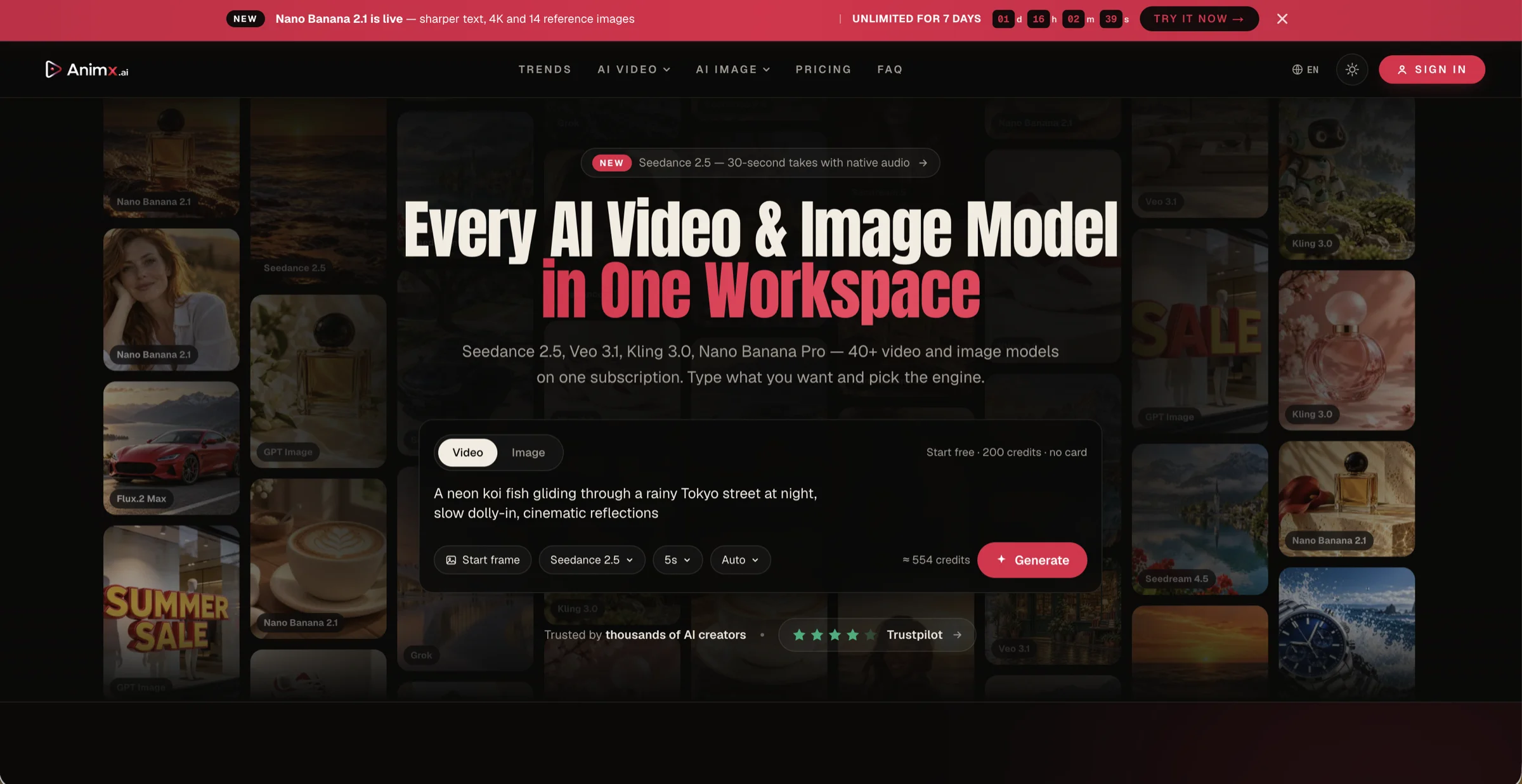
Animx AI is a browser-based creative studio that brings more than 40 video and image models into one workspace and one subscription. Instead of signing up for a different app for every model, you type what you want, choose the engine and generate, all in the same place.
The lineup includes some of the best-known names in generative AI. On the video side, you’ll find models such as Seedance 2.5, Veo 3.1, Kling 3.0, Sora 2 and Wan, including Wan 3.0, Alibaba’s newest video model. On the image side, there are Nano Banana models, GPT Image, Flux.2, Seedream and more. Because everything runs on one credit balance, you can move between models and pick the right engine for each task.
How AI Creative Tools Have Evolved (From Single Apps to All-in-One Studios)
The first wave of AI image and video tools was built around single models. If you wanted the photoreal look of one model and the typography of another, you needed separate accounts, separate subscriptions and separate learning curves. Early video models added another frustration: clips lasted only a few seconds, had no sound and rarely kept a character consistent.
Two things have changed since then. First, the models have improved quickly. Video generation has moved to longer takes with sound, with Seedance 2.5 producing up to 30 seconds in one take, while image models now render readable text and output at up to 4K. Second, new versions arrive constantly. On Animx alone, you can see several generations side by side, such as Seedance 2.0 and 2.5, Wan 2.7 and 3.0, or Seedream 4 through Seedream 5. All-in-one studios emerged to keep up with that pace: when a platform adds a new model, you can try it without signing up somewhere else.
How Animx AI Works in Simple Terms
Using Animx comes down to three steps:
- Choose what you want to make. Pick a tool, such as video generation, image generation, image editing or image to video.
- Describe it and choose an engine. Type a prompt, upload an image if needed and select the model that suits the job.
- Review, refine and move on. Keep the result, edit it or carry it into another tool, for example by turning a finished image into a video.
Think of Animx as a production studio with many specialists on call. You write the brief, choose the specialist and decide what makes the final cut.
How to Get Started With Animx AI
Getting started takes only a few minutes:
- Create a free account. Every new account gets 200 free credits at sign-up, with no card needed and no expiry. According to Animx, that’s enough to test every image model and render a couple of short videos.
- Explore the tools. Start with an image, then try turning it into a video or generating a short clip from text.
- Watch the credit cost. The cost of each generation is shown before you click generate. Images cost much less than video, and higher resolutions and longer clips cost more.
- Choose a plan when you’re ready. Paid plans add monthly credits, and your tier also sets your maximum output quality and how many generations can run at once. You can pay monthly or annually, and annual billing costs less.
- Write clear prompts. Specific descriptions of subject, style and lighting, plus motion and sound for video, give far better results than vague requests.
Key Features of Animx AI in 2026
- AI Video Generator: Seedance, Veo, Kling, Wan and other models, with takes of up to 30 seconds with sound on Seedance 2.5.
- AI Image Generator: models such as Nano Banana, GPT Image, Flux and Seedream. Nano Banana 2.1 is built for prompt-true images with readable text at up to 4K.
- Image to Image: upload a photo and describe the change, from a new background to a complete restyle.
- Image to Video: bring any photo to life as a short clip.
- AI Image Editor: edit, restyle and sharpen your results.
- AI Ad Generator: create ad creatives for different channels.
- AI Video Upscaler: sharpen and upscale your clips.
- One credit balance: every model and tool draws from the same credits.
- Ownership: you own what you create, and paid plans include commercial rights.
Working With Text, Images and Video
Animx accepts much more than a text prompt. You can:
- Start from text: describe a scene, product, character or mood from scratch.
- Start from a photo: upload an image to edit it, restyle it or use it as the first frame of a video.
- Guide the result with references: Seedream accepts up to 10 reference images for image work, while Seedance 2.5 accepts up to 9 for video, called in the prompt as @Image1 to @Image9.
- Control the ending: with Seedance 2.5, add an optional last frame so a clip finishes exactly where you want it to.
- Get sound with your video: models such as Seedance 2.5 generate ambience, effects and music together with the picture.
Examples:
- Turn a product photo into a lifestyle image, then into a short clip.
- Restyle an illustration as a watercolor painting.
- Keep a mascot consistent across a set of images with reference uploads.
- Animate a landscape photo with drifting clouds and a gentle breeze.
Making AI Visuals Look Natural (Not “Obviously AI”)
Writers polish AI-generated text so it sounds more human, and creators do the same with AI visuals. A few habits make a big difference:
- Start from real photos when accuracy matters. Image-to-image editing keeps your real product, person or place recognizable.
- Describe real-world light. Phrases like “soft window light,” “overcast afternoon” or “golden hour” look more believable than “beautiful lighting.”
- Avoid over-styling. Too many effects, extreme colors or heavy glow quickly look artificial.
- Keep motion simple. In video, one clear action and one camera move usually look more natural than several at once.
- Check the giveaways. Hands, text, reflections and the edges of edited areas are where AI visuals most often slip.
- Sharpen the final version. Use the AI Image Editor or AI Video Upscaler on your best result before publishing.
- Be transparent when it matters. Label AI-generated or AI-edited visuals where platforms, clients or local rules require it.
Using Animx AI for Everyday Tasks
You don’t need to be a designer to get value from Animx. Everyday uses include:
- Short birthday or anniversary video greetings
- Party invitations with the date and place in readable text
- A family or pet photo restyled as a painting for a gift
- Custom phone and desktop wallpapers
- Holiday photos turned into short clips with sound
- Room, garden or outfit ideas visualized before you buy anything
Animx AI for Businesses and Marketing
For small businesses, marketers and agencies, Animx can take over many routine creative tasks:
- Ad creatives: generate ads for different channels with the AI Ad Generator.
- Product visuals: place real product photos in clean or lifestyle settings with image-to-image editing.
- Product videos: turn a hero image into a short clip, or create a reveal that ends on a packshot using a last frame.
- Social content: produce images and vertical videos in the right formats for each platform.
- Older assets, refreshed: sharpen and upscale existing clips with the AI Video Upscaler.
- More throughput: higher tiers allow more generations to run at the same time.
You own your outputs, paid plans include commercial rights and Animx says it claims no license over what you create. For product listings and ads, always keep visuals true to the real item.
Animx AI for Developers and Technical Teams
Developers can use Animx in two ways. The browser workspace is a fast sandbox for testing prompts and comparing models before building anything. Beyond that, Animx’s FAQ mentions programmatic access through a REST API, with webhooks, dedicated throughput and priority queueing for enterprise customers, plus SDKs for Python, Node and Go in its documentation.
Typical ideas include generating product imagery from catalog data, producing ad variations inside a marketing pipeline or adding video generation to an app. API access is tied to specific tiers, so check the current documentation and plan details before planning an integration.
Understanding How Credits Work
Credits are the currency of Animx, and understanding them helps you avoid surprises:
- Different jobs cost different amounts. Images cost much less than video, and longer or higher-resolution clips cost more. For example, Animx estimates about 554 credits for a 5-second 720p Seedance 2.5 clip.
- You always see the price first. The dashboard shows the cost before you generate.
- Subscription credits refresh on your billing date.
- Top-up credits never expire. You can top up mid-cycle on any plan, top-ups apply immediately and subscription credits are used first.
Here’s how the paid plans compare on credits and capacity:
| Plan | Monthly credits | Videos at once | Images at once |
| Basic | 700 | Up to 2 | Up to 2 |
| Plus | 10,000 | Up to 6 | Up to 8 |
| Ultra | 30,000 | Up to 8 | Up to 8 |
Plans and allowances change, so check the current pricing page. A smart habit is to draft at lower settings and render only your best ideas at full quality.
Animx AI’s Limitations and Common Mistakes
AI creation is powerful, but it isn’t perfect. Keep these points in mind:
- Vague prompts give generic results. “A nice video of a city” rarely produces something special.
- Rendering drafts at maximum quality. Test ideas at lower settings first to save credits.
- Sticking with one model. Different models suit different jobs, so compare two or three.
- Expecting perfection on the first try. Refine the prompt or edit the result instead of starting over.
- Forgetting that video is made shot by shot. Models like Seedance 2.5 generate one continuous take per clip, so longer stories need several clips and some editing.
- Skipping the details. Hands, faces, small text and fast motion can still glitch.
- Ignoring rights and ethics. Don’t upload photos of people without permission, create misleading content about real people or copy trademarked characters, logos or brands.
- Assuming today’s best model stays the best. New versions arrive often, so revisit your favorites from time to time.
Privacy and Security When Using Animx AI
Before you upload anything, it’s worth knowing how your data is handled. According to Animx’s privacy policy:
- Your prompts and uploads are processed to deliver and improve the service, and anonymized usage data may be used to improve AI systems unless an enterprise or private plan states otherwise.
- Payments are handled by processors such as Stripe, Paddle or PayPal, and full card details aren’t stored on Animx’s servers.
- People in the EEA, UK and Switzerland have GDPR rights, such as access, correction and deletion.
- You can request deletion of uploads and generated content, subject to legal and operational requirements.
- The service isn’t meant for children under 13.
Best practices: keep confidential files, client material under NDA and sensitive personal photos out of any AI tool, and protect your account with a strong, unique password.
Two Prompts to Try (For Beginners & Businesses)
Prompt 1: From image to video (for beginners)
Start in the image generator:
“A tiny ceramic cottage on a mossy rock in a misty forest at dawn, warm light glowing in one window, soft-focus background, photorealistic, 16:9.”
Then open Image to Video with your favorite result and describe the motion: “Mist drifts slowly between the trees, the window light flickers gently, birdsong and a soft breeze.”
Prompt 2: A social ad image (for businesses)
“Square social ad for a neighborhood bakery. Headline ‘FRESH CROISSANTS FROM 7AM’ in bold cream letters across the top. Below, a basket of golden croissants on a rustic wooden counter, morning sunlight, plenty of clear space around the text.”
Try it with an image model built for readable text, such as Nano Banana 2.1 or GPT Image 2, check every word and turn the best version into a short vertical clip for stories.
Final Thoughts: What Is Animx AI?
Animx AI is a beginner-friendly way to explore more than 40 of today’s leading video and image models from one browser workspace. You can generate images, edit your own photos, create videos with sound, make ad creatives and upscale results, all on one credit balance. Like any AI tool, it works best with clear prompts, sensible use of credits and a human eye for quality and responsibility. Start with your free credits, try the two prompts above and see how quickly an idea becomes a finished visual.