Most people know the big Anthropic Claude Code plugins, like code review or the LSP add-ons. But the official marketplace also holds a few odd ones that solve very narrow jobs: competition math, private MCP servers, a pocket hardware kit and a shareable project status page.
We loaded five of these Anthropic Claude Code plugins in one real session and ran what we safely could. This guide shows what each one does, what we ran, and what needs an account or a gadget.
This guide is part of our Claude Code tutorials. Find more add-ons in our Skills Directory.
Tested with Claude Code v2.1.319 on 2026-11-09 (macOS). We used the official marketplace repo anthropics/claude-plugins-official at commit 0412be7. The cwc-makers manifest says version 1.0.0; the other four manifests list no version.
What We Ran and What Came From the Docs
These plugins are not all the same kind of tool. Two are pure skills that run on your computer, one needs Docker and a Console role, one needs a claude.ai login, and one needs a small piece of hardware. So this is a roundup, not a full hands-on test of every feature.
We never created accounts, signed in or flashed any device. Here is the honest split.
| Plugin | Maker | What it does | Account or gear needed | What we ran |
|---|---|---|---|---|
math-olympiad | Anthropic | Solves competition math with a fresh-context verifier | No | Solved one easy problem for real |
math-proof | Anthropic | Works hard problems and ends with a proof.md | No (but it is costly to run) | Loaded, two commands listed |
mcp-tunnels | Anthropic | Connects Claude to a private MCP server through a tunnel | Yes (Docker, Console role) | Ran the command up to the first Console step |
cwc-makers | Anthropic | Sets up the Code-with-Claude Makers Cardputer kit | Yes (the Cardputer-Adv device) | Loaded, three entries listed |
project-artifact | Anthropic | Publishes a living project status page | Yes (claude.ai login) | Loaded, skill listed |
The install pattern is the same for all five: /plugin install math-olympiad@claude-plugins-official, and the same with math-proof, mcp-tunnels, cwc-makers and project-artifact. We did not run those installs, because that would change a real setup.
Which Anthropic Claude Code Plugins Do You Need?
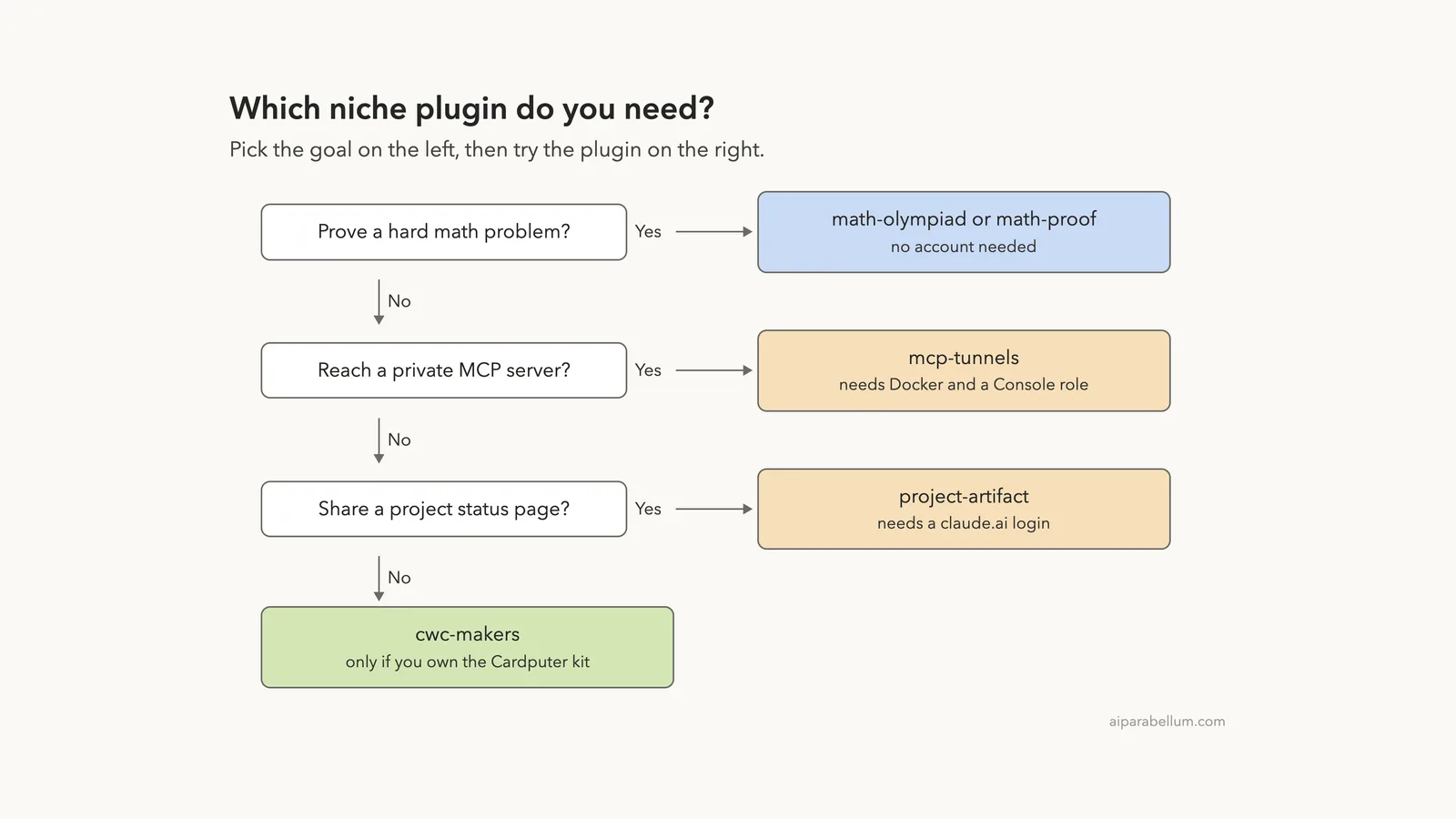
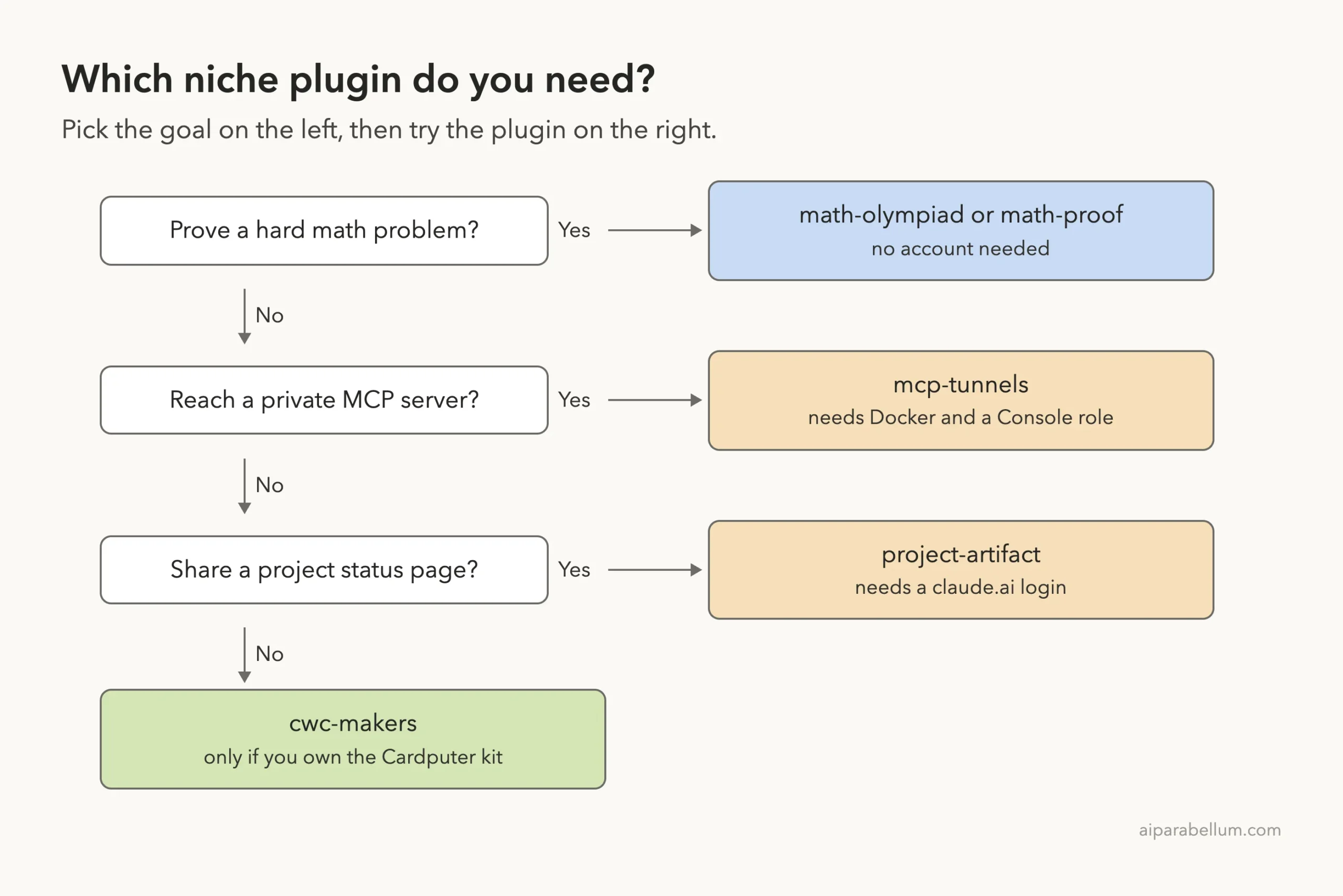
Start with your goal, not with the plugin list. The diagram below sends you to the right one in four questions.
Loading Five Plugins Without Installing Them
You do not have to install a plugin to look at it. The --plugin-dir flag loads a plugin folder for one session only, and you can repeat it. Per the plugins docs, that is the way to test a plugin while you build it, and it works just as well for trying one.
We cloned the marketplace repo into a throwaway sandbox, read each manifest and command file, and checked for hooks. None of these five plugins ships a hook. Then we started Claude Code with one flag per plugin.
git clone --depth 1 https://github.com/anthropics/claude-plugins-official
claude --setting-sources project \
  --plugin-dir ./claude-plugins-official/plugins/math-olympiad \
  --plugin-dir ./claude-plugins-official/plugins/math-proof \
  --plugin-dir ./claude-plugins-official/plugins/mcp-tunnels \
  --plugin-dir ./claude-plugins-official/plugins/cwc-makers \
  --plugin-dir ./claude-plugins-official/plugins/project-artifact
Inside the session, /skills showed six skills from the five plugins. Each one has a small token cost, because the name and description of every skill sit in Claude’s context on each turn. Ours added up to about 1,100 tokens in total.
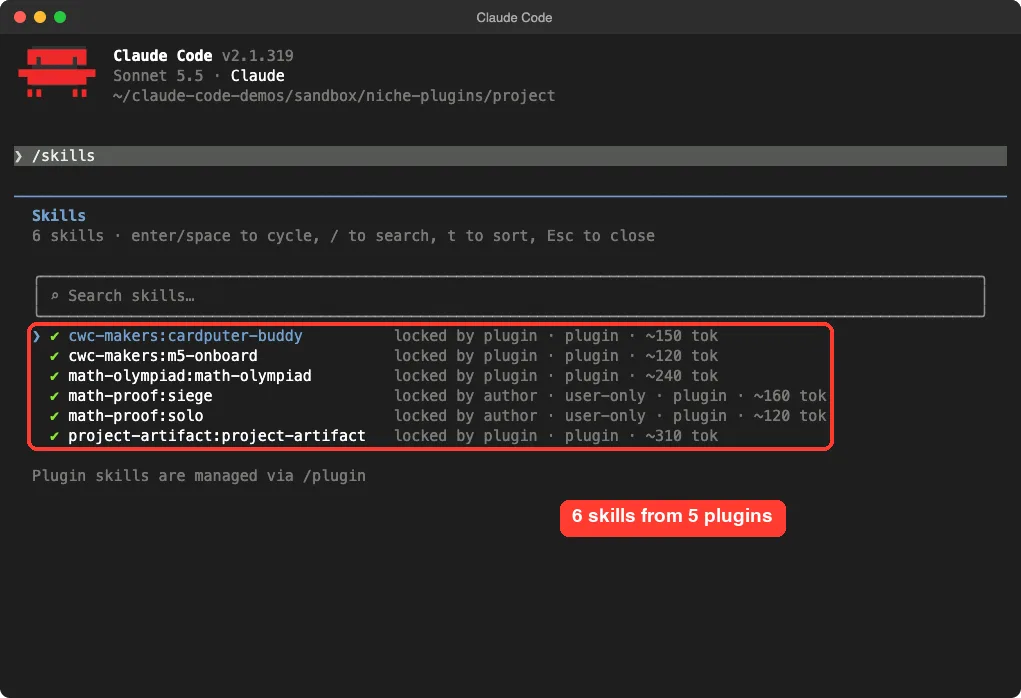
Notice that math-proof:solo and math-proof:siege are marked user-only. That means Claude will not start them on its own. You have to type the command yourself, which is a good thing for a job that can run for hours.
math-olympiad: Competition Math With a Fresh Verifier
A checker that reads the reasoning tends to agree with it, so this plugin hides the reasoning from the checker.
The math-olympiad plugin targets IMO, Putnam, USAMO and similar problems. Its README explains the idea in plain terms: a verifier that sees the reasoning leans toward agreeing with it. So the skill solves the problem with pure reasoning, then hands only the clean proof to a fresh verifier that has no tools.
The README also says the verifier attacks the proof with specific failure patterns, and that the skill would rather answer “no confident solution” than bluff. If LaTeX is installed, it can make a PDF after the proof passes.
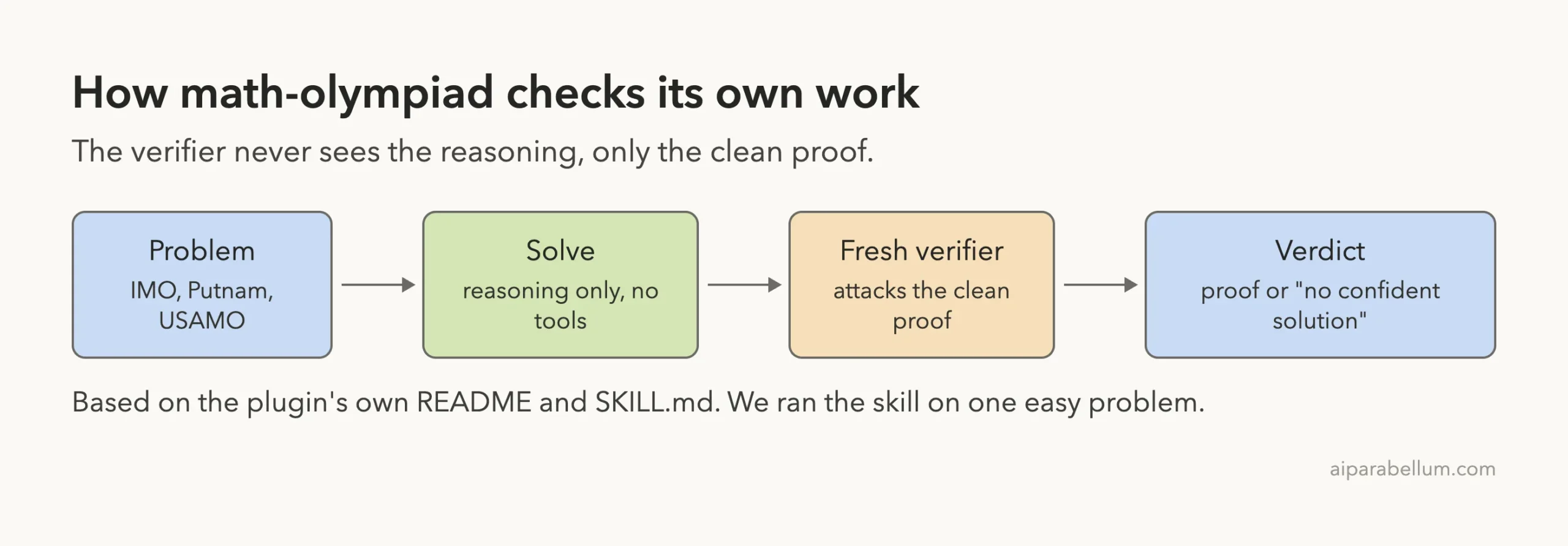
The README also makes a claim about results: 17 of 18 IMO and Putnam 2025 problems solved, with no false positives. That number comes from the plugin’s own docs. We did not measure it, and one easy problem cannot confirm it.
Our Real Run on One Easy Problem
We gave it a short, classic task and asked for no PDF.
Using the math-olympiad skill, solve this: Prove that for every positive integer n,
the number n^5 - n is divisible by 30. Keep it short, skip any PDF, and show the verifier verdict.
Claude wrote a three-line proof: it factored n^5 - n into n(n-1)(n+1)(n^2+1), then showed that 2, 3 and 5 each divide it. A verifier agent called “Adversarial proof verification” finished in 2 seconds with the verdict HOLDS. The whole turn took 14 seconds.
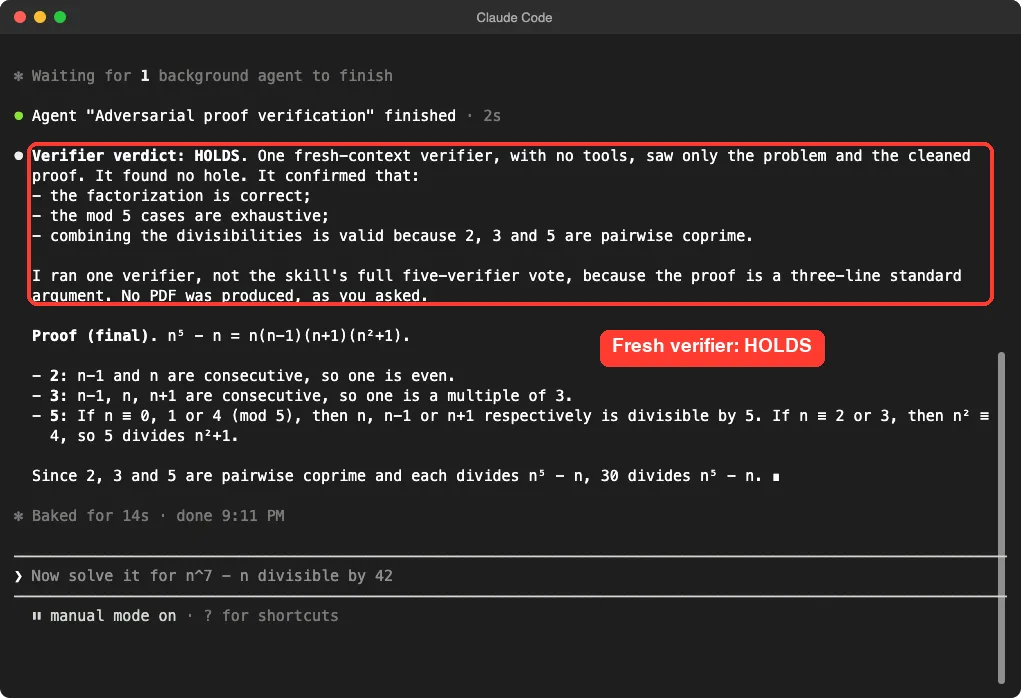
Claude told us it ran one verifier, not the skill’s full five-verifier vote, because the proof was a short standard argument. So on easy problems the skill scales its checking down.
We did not test a hard problem, so we cannot say how it behaves there.
math-proof: Solo and Siege for Research-Level Problems
The math-proof plugin is the heavy cousin. It gives you two commands, and each ends with a self-contained proof.md file. Both switch Claude Code’s web tools off for the run, and both keep everything in a run folder.
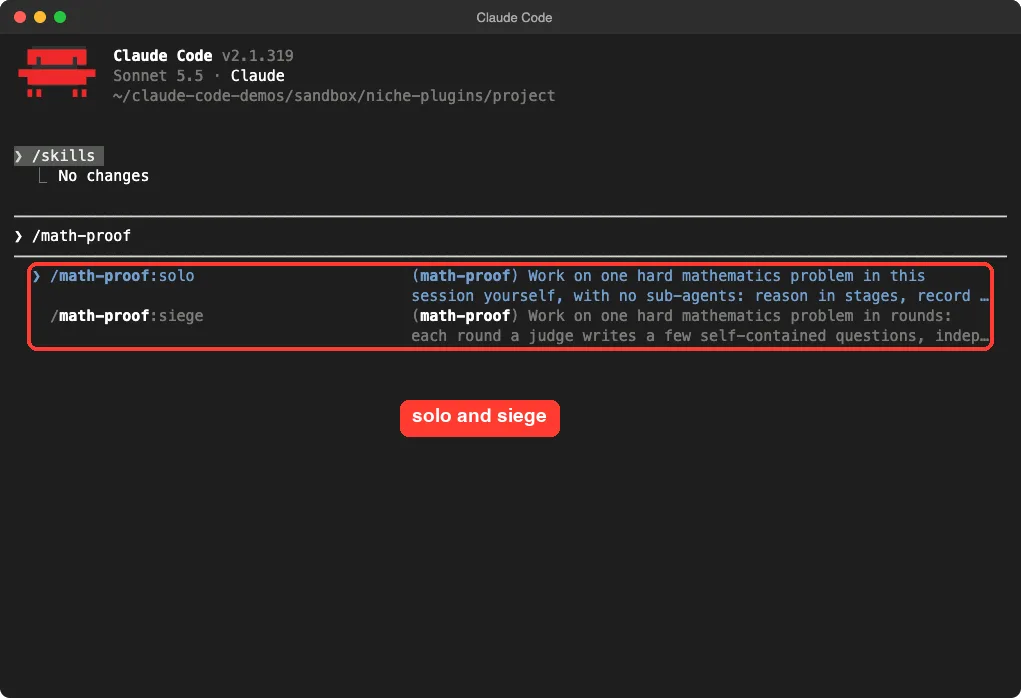
/math-proof and both commands appear.| Command | How it works | Run folder | Cost |
|---|---|---|---|
/math-proof:solo | Your session works the problem itself in one long turn and writes notes as it goes | ./math-proof-solo/ | The lighter of the two |
/math-proof:siege | Rounds of judge and worker sub-agents keep a ledger of what is proved, refuted and open | ./math-proof-run/ | Hours, dozens of sub-agent runs |
The README is clear about the cost. A full siege can pass a hundred sub-agent runs if all fourteen rounds run, and it suggests checking /usage first or capping spend with --max-budget-usd on an API key. It also needs Claude Code 2.1.280 or later, and Python 3.7 or later for the siege ledger script.
There is one setup step to know about. The README asks you to add an env block to a settings file with three values: CLAUDE_CODE_MAX_OUTPUT_TOKENS, CLAUDE_CODE_DISABLE_BACKGROUND_TASKS and CLAUDE_ASYNC_AGENT_STALL_TIMEOUT_MS. Those affect every session that reads the file, so use the project-level file and remove them when you are done.
We did not run either command, because a siege is a multi-hour job. What we ran is the loading step. Our advice, which also matches the README, is to try solo first.
The README adds one more warning that is easy to miss: the proof.md file is the model’s own account, and any result it quotes from the literature comes from memory. Read it as a draft to check, not as a finished paper.
mcp-tunnels: A Private MCP Server Without Open Ports
Normally, to let a hosted service reach an MCP server, you would expose it to the internet. The mcp-tunnels plugin takes a different route. It connects Claude to an MCP server inside your own network through an Anthropic MCP tunnel, using an outbound-only connection, so no inbound ports are opened.
If MCP is new to you, read our MCP guide first. This plugin is for the step after that, when your server is private.
The plugin has one command, /mcp-tunnels:create-docker-mcp-tunnel. It follows the quickstart from start to finish using Docker Compose, in these steps from the README:
- Preflight checks for Docker, Docker Compose, OpenSSL and outbound access.
- You create the tunnel in the Claude Console and copy the domain.
- It generates a certificate authority and a server certificate with OpenSSL.
- You upload the CA certificate in the Console.
- It sets up a sample FastMCP server, or wires in your own.
- It writes the proxy config and the Compose file.
- It starts the stack and checks the logs.
- It shows how to call the server from Managed Agents and the Messages API.
The README labels the feature a research preview that depends on a third-party transport provider, Cloudflare. It says to review the security model before you send anything sensitive.
What Happened When We Ran It
We ran the command in a demo folder. Claude announced the preflight step and ran one shell command that checks the Docker version, the Compose version, OpenSSL and a connection to the Anthropic API. On our Mac it reported Docker 29.1.3, Docker Compose v2.40.3 and OpenSSL 3.6.4, and then said all checks passed.
Next it stopped and asked for the tunnel domain from the Console. It also asked us not to paste the token into the chat, because the token belongs in a local .env file. That is the point where the command needs a Console account, so we stopped there and picked nothing.
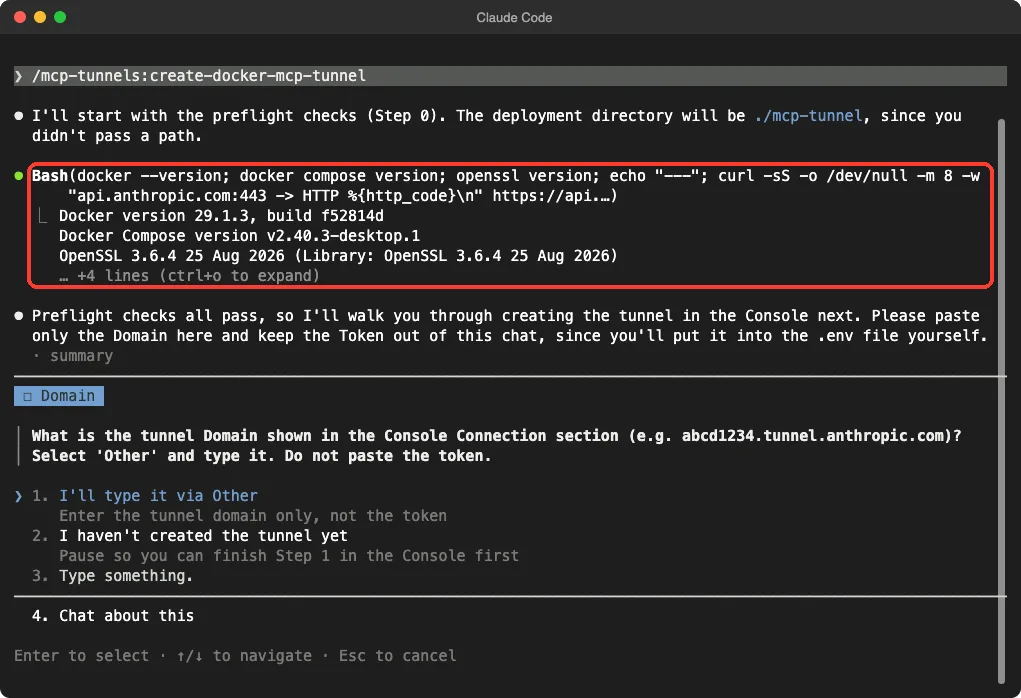
So we can say the command starts, runs its checks and asks the right question. We cannot say the tunnel works, because we never made one. Everything after the domain question comes from the plugin’s README.
cwc-makers: A Pocket Computer Setup in One Command
This is the oddest plugin of the group. The cwc-makers plugin is for the Code-with-Claude Makers Cardputer kit, which is an M5Stack Cardputer-Adv. You plug it into USB-C and type /maker-setup.
According to the README, Claude then downloads the moremas/build-with-claude repo, finds the device, flashes UIFlow 2.0 firmware and installs three apps: Claude Buddy, Hello and Snake. It also walks you through one physical step, pressing the download-mode button on the back.
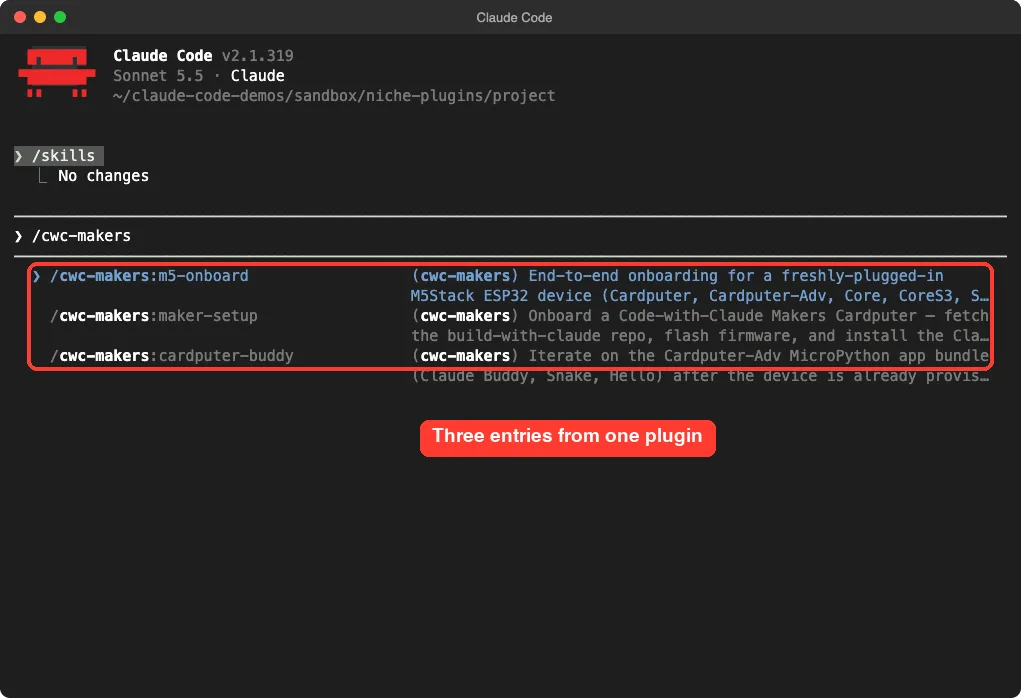
| Entry | Type | Job |
|---|---|---|
/cwc-makers:maker-setup | Command | Download the repo and start onboarding |
/cwc-makers:m5-onboard | Skill | Detect, flash and install, with every known gotcha |
/cwc-makers:cardputer-buddy | Skill | Push changed files, tail logs and use the REPL later |
You need Python 3.10 or later. Git is optional, because the command falls back to a download with curl and tar. The scripts install esptool on first run.
We did not run it, because it downloads a repo and flashes a physical device. Everything here comes from the README and the command file. After setup, the README says you can ask Claude for new apps, such as a magic 8-ball, and it will write the MicroPython and push it without a re-flash.
project-artifact: A Living Status Page
The last plugin is for people who run projects that are too big for one update. The project-artifact skill builds a tabbed status page with an overview, a workstream sequence and a strip of next steps. It adds tabs for background, plan, risks and decisions only when they earn a place.
The page is published with Claude Code’s built-in Artifact tool to a private claude.ai page that you can share. The clever part is the refresh. Say “refresh the artifact” in a later session and the plugin re-gathers the live state, updates the same URL and reports only what changed.
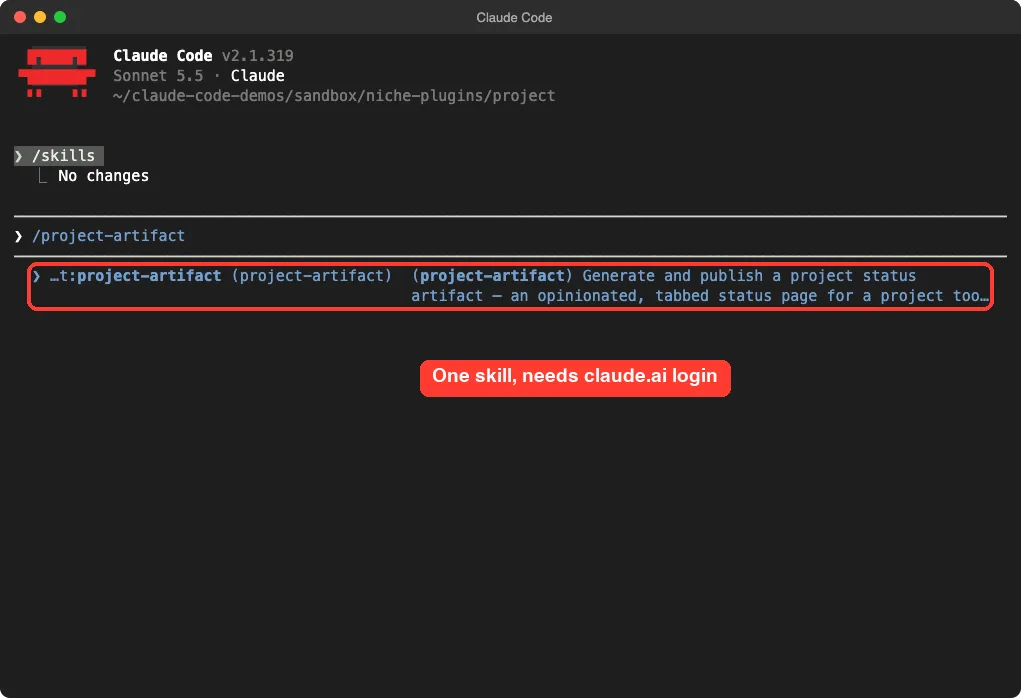
/project-artifact after loading.For projects where each workstream is a pull request, it numbers the PR sequence and pulls live state with the gh command line tool. The README lists three limits:
- It needs the built-in Artifact tool, which needs a claude.ai login. Sessions on an API key, Bedrock or Vertex do not have it.
- Claude Code Artifacts are in beta on Team and Enterprise plans.
- Publishing needs an interactive session, because headless runs do not have the tool.
We loaded the skill but did not publish a page, since publishing needs a claude.ai login.
Anthropic Claude Code Plugins: Cost and Requirements
Only the math plugins run fully on your own machine. They need no account, but they do spend model usage, and the siege can spend a lot. The other three each lean on something outside Claude Code.
| Plugin | Needs outside | Our advice |
|---|---|---|
math-olympiad | Nothing | Try it on a short problem first |
math-proof | Nothing, but plan for usage | Start with solo, check /usage |
mcp-tunnels | Docker, Console role, Cloudflare transport | Read the security model before you start |
cwc-makers | A Cardputer-Adv device | Skip it if you do not own the kit |
project-artifact | claude.ai login, Artifact tool | Good for team projects on a supported plan |
For a wider look at how plugins work, see our guide to plugins guide. The official discover plugins page covers the install steps and scopes, and the MCP docs explain how Claude Code talks to servers.
Common Mistakes
- Starting a siege without checking cost. Dozens of sub-agent runs add up.
- Leaving the three
envvalues from themath-proofREADME in a global settings file after you finish. - Pasting the tunnel token into the chat. The command asks you to keep it in the
.envfile. - Trusting a
proof.mdwithout reading it. Quoted results come from memory. - Installing every plugin at once. Each skill adds a little context cost on every turn.
Pro Tips
- Try one plugin at a time with
--plugin-dirbefore you install it. - Run
/skillsto see what a plugin added and what each skill costs. - Use an empty folder for each math problem, one run at a time.
- Read the command file before you run it. It is plain text and takes a minute.
Try It Yourself
Here is a practice task that needs no account. Load the math plugin from a cloned folder and give it a short problem.
claude --plugin-dir ./claude-plugins-official/plugins/math-olympiad

Using the math-olympiad skill, prove that for every positive integer n, n^3 - n is divisible by 6. Keep it short and skip any PDF.
Then compare how many verifiers it uses with what the skill file says, so you learn how to read a skill.
Cheat Sheet
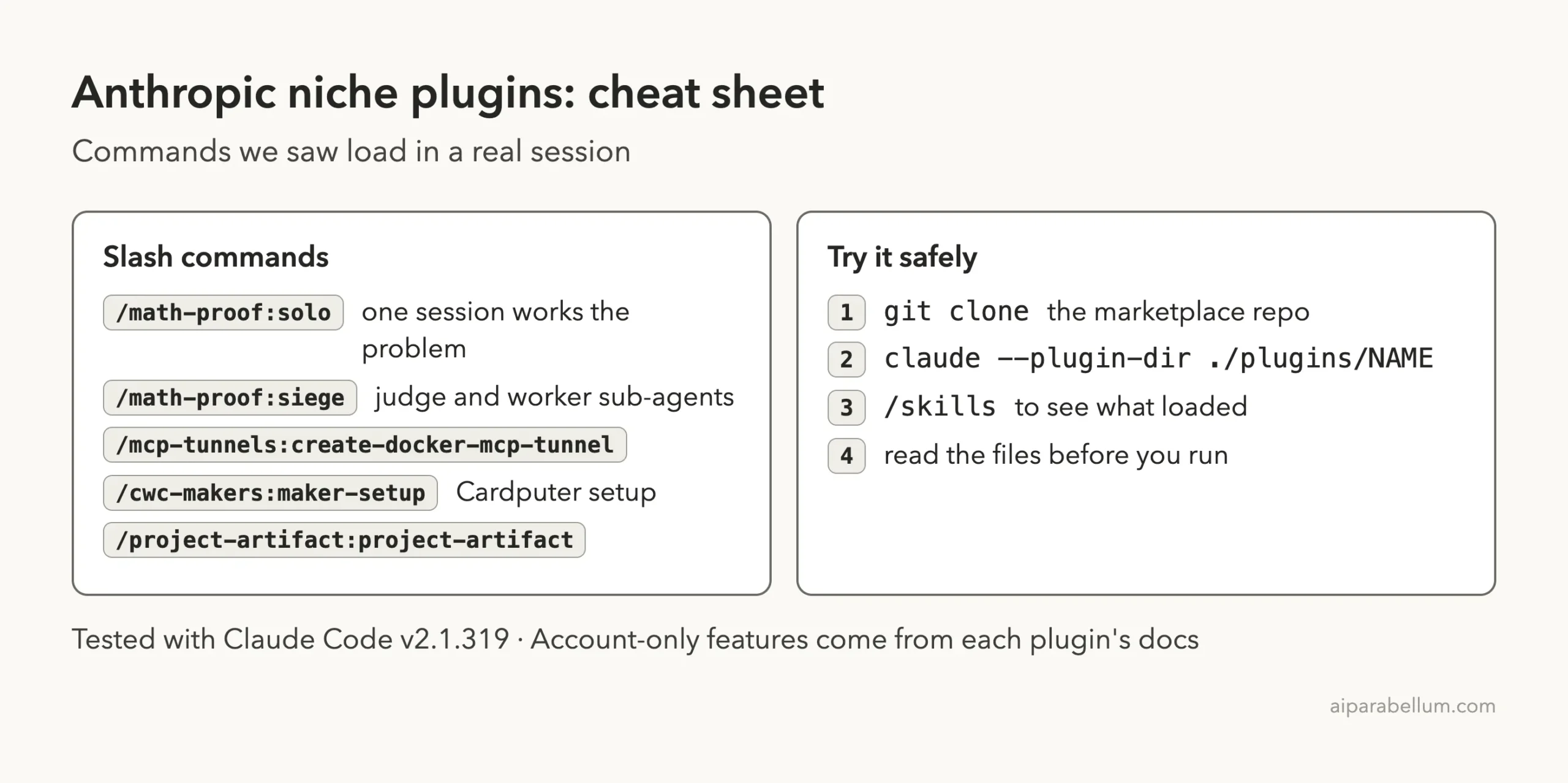
Frequently Asked Questions
Are these Anthropic Claude Code plugins free?
The plugins are free to load. What you pay for is usage, plus whatever each one needs, such as Docker, a Console role, a claude.ai plan or a Cardputer device.
Do I need to install these plugins to try them?
No. The --plugin-dir flag loads a plugin folder for one session. Installing with /plugin install adds it to your setup.
Is math-olympiad only for competition math?
It is built for olympiad-style proofs, and its description lists words like IMO, Putnam and USAMO as triggers. We only ran it on one easy divisibility proof, so we cannot judge other kinds of math.
Can mcp-tunnels expose my server to the public internet?
The README says traffic flows over an outbound-only connection with no inbound ports and no public exposure. It also calls the feature a research preview, so read the security model before sending sensitive data.
Where can I read more about the models behind these tools?
Our Claude AI page gives background on the models that power Claude Code.
Conclusion
Anthropic’s niche Claude Code plugins cover four very different jobs: checked competition math, private MCP tunnels, a Cardputer starter kit and a living status page. We loaded all five in one sandboxed session, solved a real problem with math-olympiad and a fresh verifier, and ran the tunnel command through its passing preflight checks. The rest, including full siege runs, tunnels, device flashing and page publishing, comes from each plugin’s own README. Pick the one that matches a job you already have, try it with --plugin-dir, and skip the rest.