The Azure Cosmos DB plugin for Claude Code promises expert advice on data models, partition keys and queries without any setup. We loaded it in a throwaway project, pointed it at a small shop service that we wrote with deliberate mistakes, and asked for a review, a partition key recommendation and a modeling plan. This post shows what it caught, what it said, and what did not work as the README describes.
This guide is part of our Claude Code tutorials. Find more add-ons in our skills directory.
Tested with Claude Code v2.1.322 on November 11, 2026, using the plugin azure-cosmos-db-assistant version 1.0.0 from the repo AzureCosmosDB/cosmosdb-claude-code-plugin at commit f1e0498 (April 28, 2026). We tested on macOS; the Windows and Linux steps follow Anthropic’s official instructions.
| Question | Short answer |
|---|---|
| What is it? | A plugin with one skill (73 Cosmos DB rules), one expert agent and three commands |
| Who makes it? | The Azure Cosmos DB team, under the MIT license |
| Do you need an Azure account? | No, not for the skill, the agent or the review command |
| What did we run? | The review command, a plain partition key question and the expert agent |
| What did we not run? | The optional live database connection and the rule sync command |
| Did it work? | Yes. It flagged the planted mistakes and gave sensible fixes |
| What did not match the docs? | The README’s /agents cosmosdb-expert step no longer works in this Claude Code version |
What the Azure Cosmos DB plugin for Claude Code is
Azure Cosmos DB is Microsoft’s managed NoSQL database. It stores JSON documents, and you pay in request units, or RUs, for every read and write. Small design choices, like which field splits your data into partitions, decide whether it stays cheap and fast or turns slow and expensive.
The plugin packs the team’s advice into a form Claude Code can use. It is built on the same rules as their cosmosdb-agent-kit project. If you want a refresher on how add-ons work in general, our guide to Claude Code skills explains the idea.
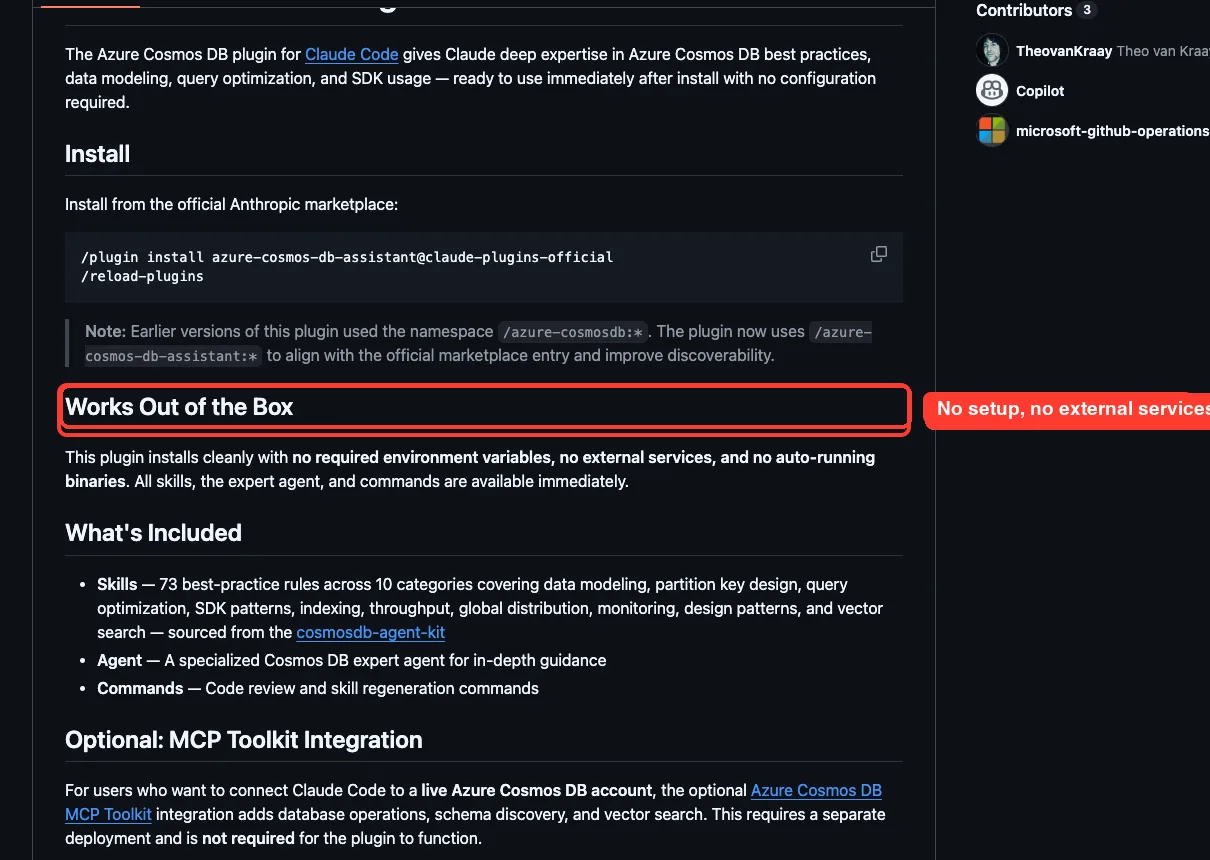
Our earlier Azure plugins roundup covered this plugin briefly. This post is the hands-on version.
What is inside the plugin
We counted the files in the repo ourselves. The skill folder holds 73 rule files plus a short index. Each file covers one rule, with a bad example, a good example and an impact rating.
| Category | Rules | Impact in the index |
|---|---|---|
| Data modeling | 11 | Critical |
| Partition key design | 7 | Critical |
| Query optimization | 6 | High |
| SDK best practices | 19 | High |
| Indexing strategies | 5 | Medium-high |
| Throughput and scaling | 5 | Medium |
| Global distribution | 6 | Medium |
| Monitoring and diagnostics | 5 | Low-medium |
| Design patterns | 3 | See the repo index |
| Vector search | 6 | See the repo index |
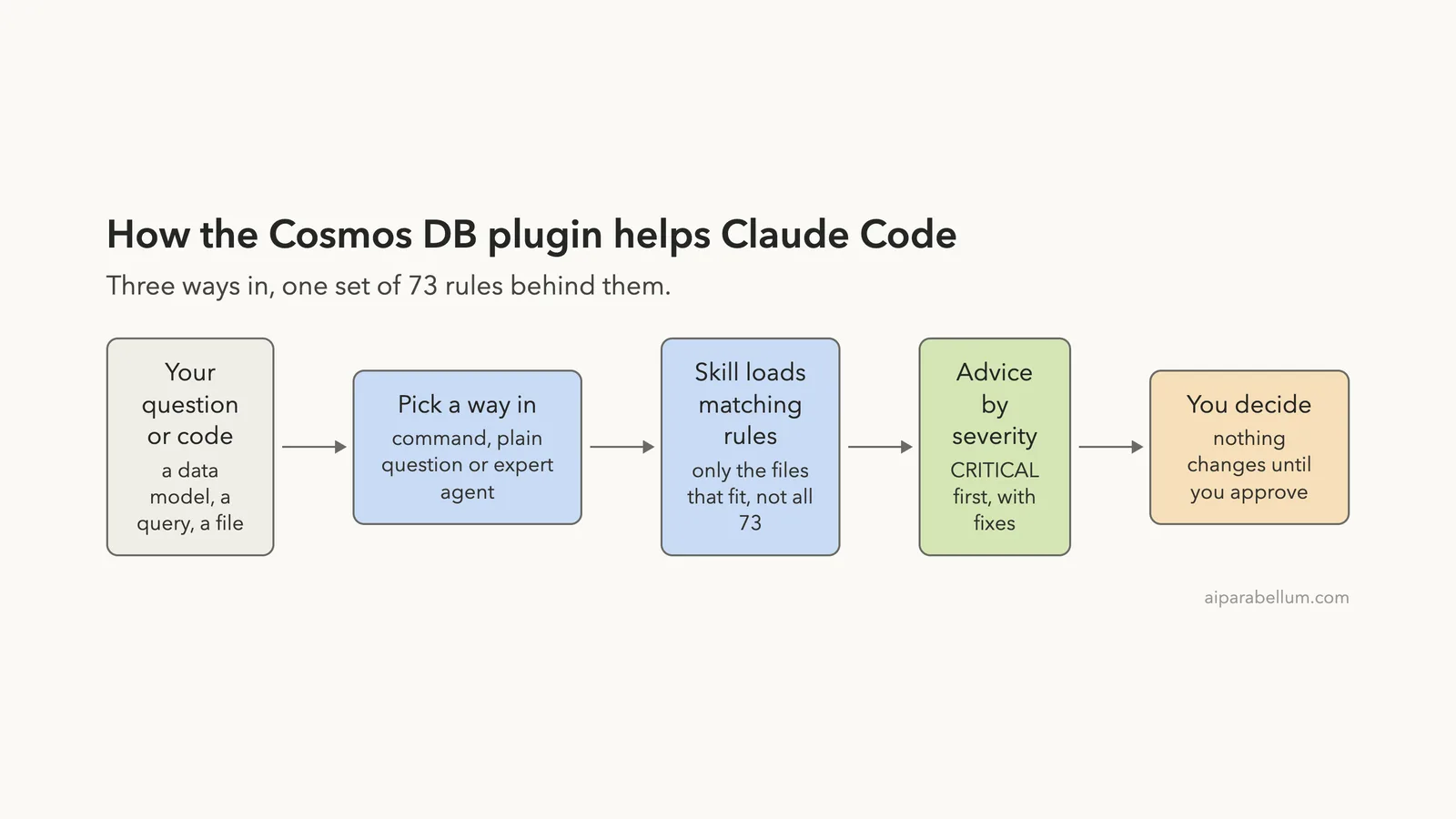
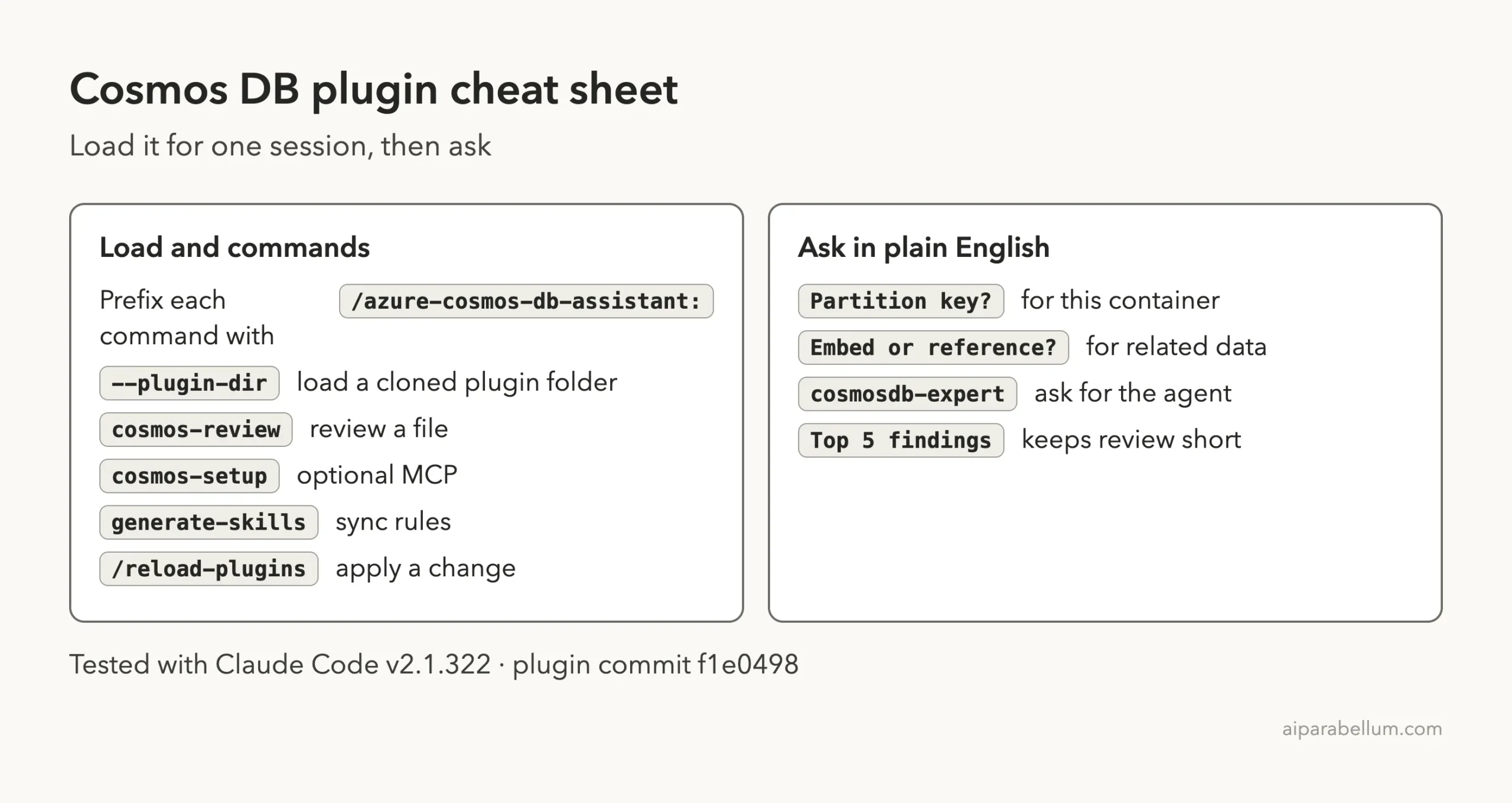
Besides the skill, the plugin ships three commands: cosmos-review, cosmos-setup and generate-skills. It also ships an agent called cosmosdb-expert. The skill index tells Claude to load only the rule files that fit the question, not all 73 at once, which keeps the context small.
How we installed the Cosmos DB plugin for Claude Code safely
The official route is /plugin install azure-cosmos-db-assistant@claude-plugins-official, followed by /reload-plugins. We did not use it, because that writes into our real Claude Code setup. Instead we cloned the repo into a sandbox folder and loaded it for one session with the --plugin-dir flag.
Before running anything we read the repo. It has no hooks and no shell scripts. It has Markdown files, a manifest, a logo and an example .mcp.example.json that stays inactive unless you rename it.
The README says the plugin has no auto-running binaries, and what we found matched that.
git clone https://github.com/AzureCosmosDB/cosmosdb-claude-code-plugin
cd my-demo-project
claude --plugin-dir ../cosmosdb-claude-code-plugin --setting-sources project
The --setting-sources project flag keeps your personal settings out of the test, so only the plugin and the project folder affect the session. The official plugin guide explains the normal marketplace install and the plugins overview explains what an enabled plugin adds to a session.
The demo project with planted mistakes
Our demo is a tiny Python service for an online shop. It has three functions and four problems we put there on purpose, so we know what a good review should find.
- The container is partitioned by
/status, and every new order starts as “pending”. - A new
CosmosClientis created inside every function. - Queries are built by gluing strings together.
- Queries use
SELECT *and enable cross-partition scans, with no paging.
def get_orders_by_status(status):
    client = CosmosClient(ENDPOINT, KEY)
    container = client.get_database_client("shop").get_container_client("orders")
    query = "SELECT * FROM c WHERE c.status = '" + status + "'"
    return list(container.query_items(query=query, enable_cross_partition_query=True))
The key in the file is a fake placeholder, and nothing in the test connected to a real Cosmos DB account. The plugin reviews code and design, so it did not need one.
Step 1: Check that the plugin loaded
After starting Claude Code, we typed /azure-cosmos to see what the plugin added. The menu listed the three commands and the skill, all labeled with “Azure Cosmos DB” in front of the description.
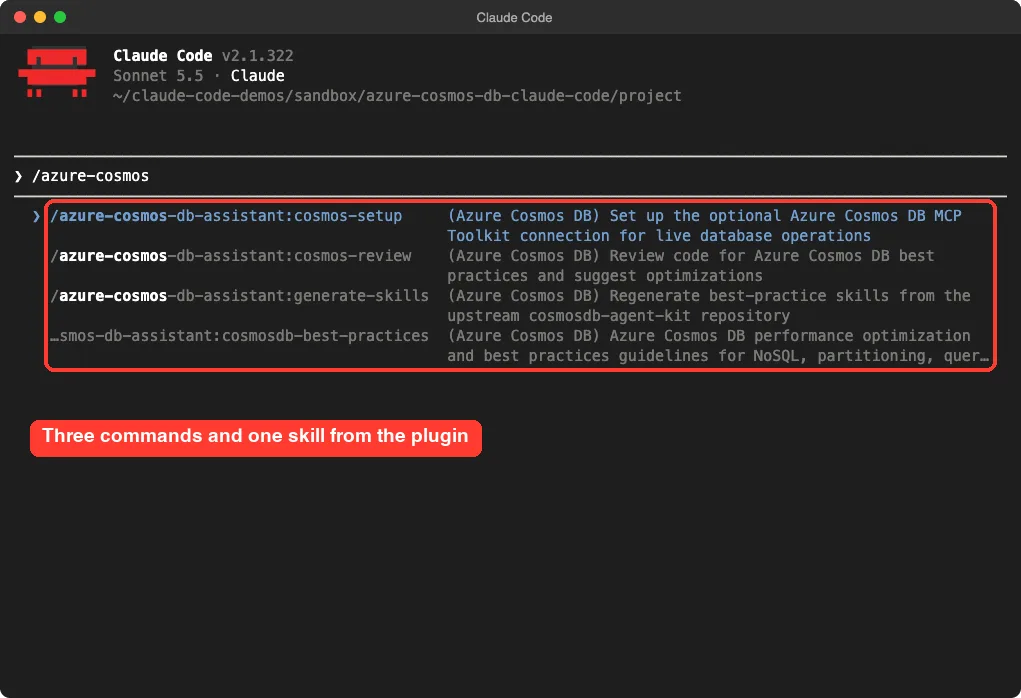
Notice the long prefix. Plugin commands are namespaced, so the review command is /azure-cosmos-db-assistant:cosmos-review. The README says older versions used /azure-cosmosdb:*, so old tutorials may show the wrong name.
Step 2: Review the code with the cosmos-review command
The review command is a short prompt file. It tells Claude to check your code against the skill, in priority order, and to report each finding with the rule, severity, current code, the issue and a fix. We ran it on our file.
/azure-cosmos-db-assistant:cosmos-review orders_service.pyThe first run came back in about 20 seconds with a long report, six or more findings, each with the rule names and a code fix. It was too long to fit on one screen, so we ran it again and asked for the five most important findings, one or two lines each, no code.
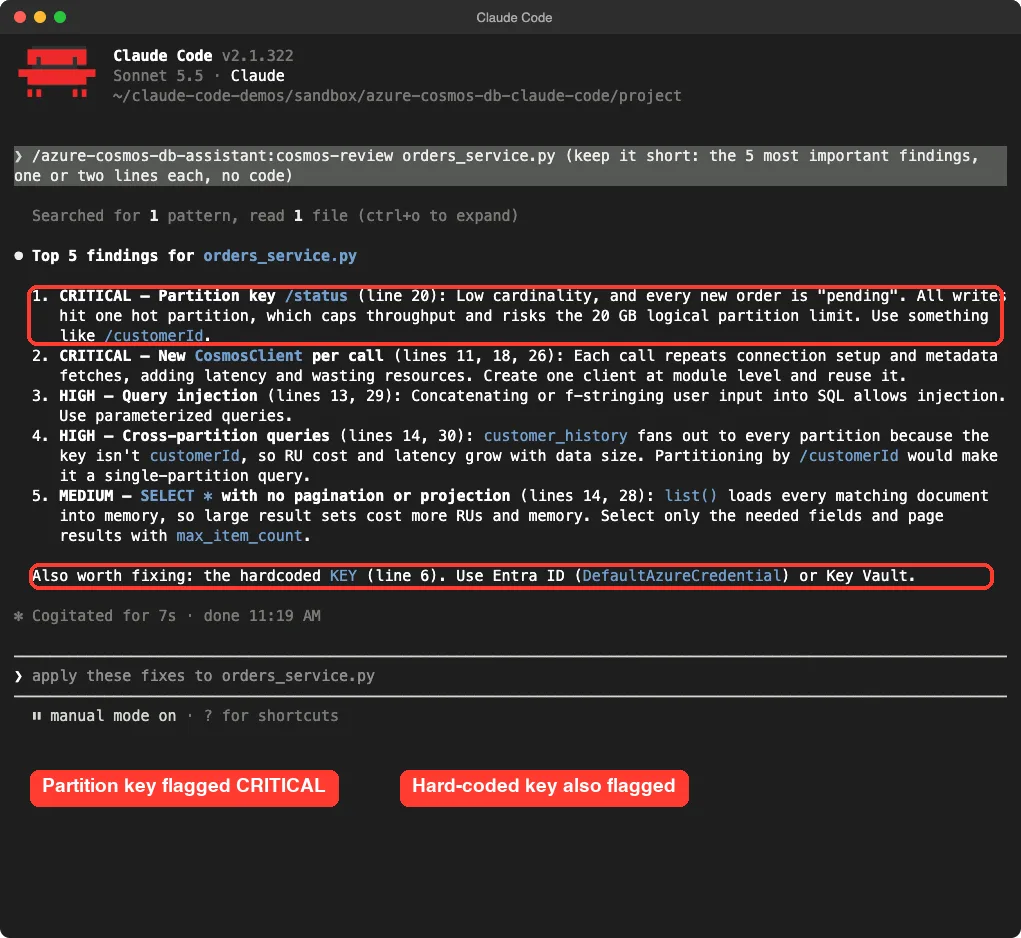
It found every problem we planted. It rated the partition key and the per-call client as CRITICAL, the string-built queries and cross-partition queries as HIGH, and the unbounded SELECT * as MEDIUM. It also added one we did not plant on purpose: the hard-coded key, with a suggestion to use Entra ID or Key Vault.
Same command, different answers
The two runs did not produce identical lists. The long run split some items differently and added points about retries, response diagnostics and ETags for later status updates. That is normal for a language model, so treat each review as a strong second opinion rather than a fixed checklist.
The command never changed our file. Claude offered to apply the fixes, and we did not accept. The file was the same size afterward.
Step 3: Ask a plain question and let the skill step in
You do not have to use a command. The skill’s description says to use it when you design data models or choose partition keys, so Claude can pick it up on its own. We asked a plain question with no slash command.
What partition key should the orders container use, and why? Answer in about 6 short lines.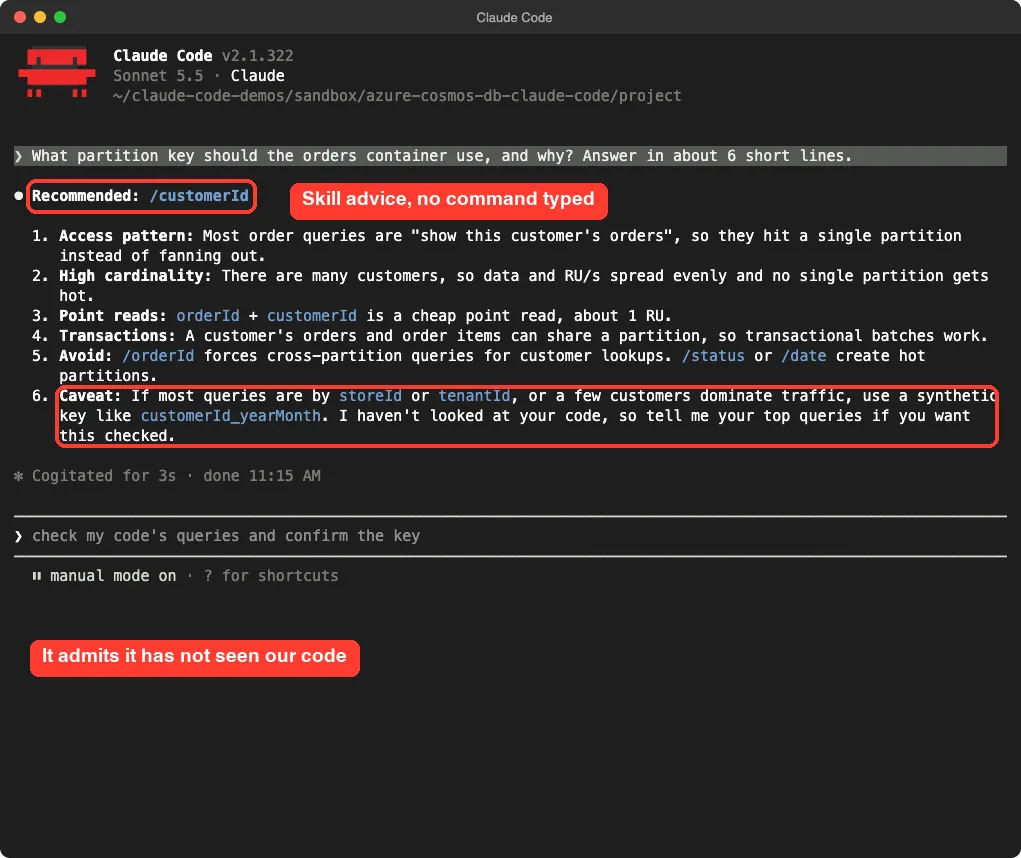
Claude recommended /customerId. Its reasons were the usual access pattern of “show this customer’s orders”, many distinct customers so load spreads evenly, cheap point reads and transactions inside one customer. It warned that /status and a date field create hot partitions.
We liked the last line. It said it had not looked at our code and asked for our top queries before confirming. That is the right habit for a database design question, because the best key depends on how you read the data.
What a hot partition means
Cosmos DB spreads your data across physical partitions based on the key value. If most requests carry the same key value, like “pending”, one partition takes all the traffic while others sit idle. You then pay for capacity you cannot use and still get throttled.
Step 4: Use the cosmosdb-expert agent
The plugin also includes an agent file. An agent is a helper with its own instructions that Claude can hand a task to. The README says to start it with /agents cosmosdb-expert, so we tried that first.
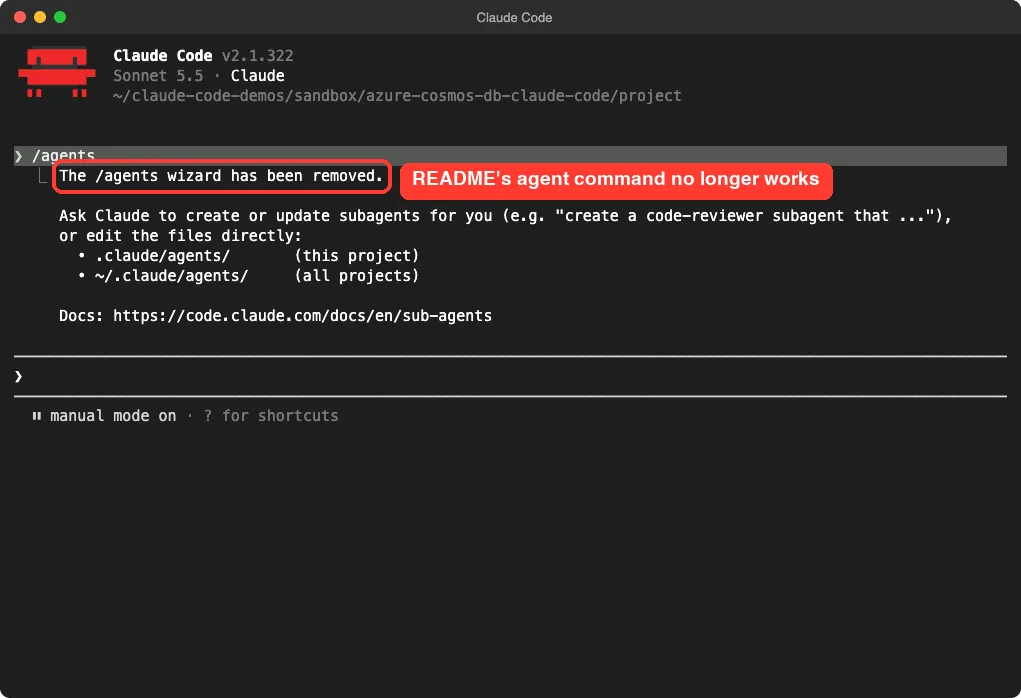
In our version, /agents printed a notice that the wizard has been removed and pointed us to the sub-agents docs. So that README step is out of date for this Claude Code release. The agent itself still works, and you simply ask for it in plain English.
Use the cosmosdb-expert agent to say in 3 lines how I should model a customer with many orders in Cosmos DB.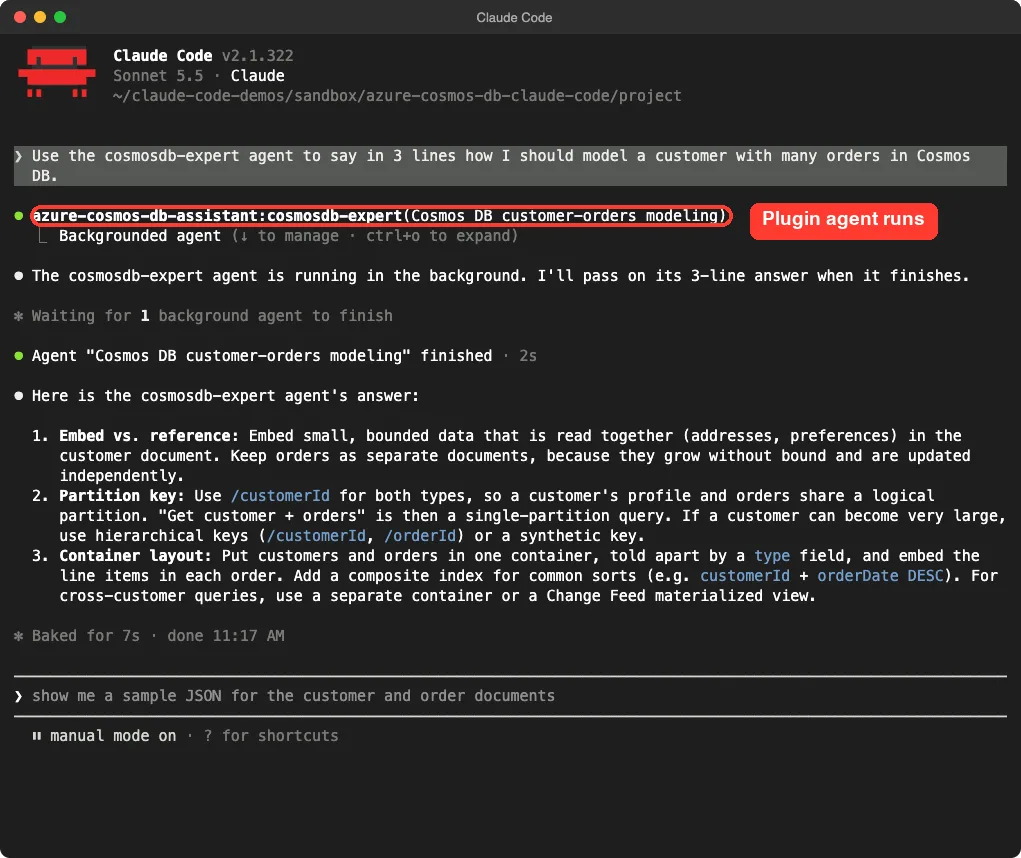
Claude started the agent under the name azure-cosmos-db-assistant:cosmosdb-expert, and it finished in about two seconds.
Its answer was concrete. Embed small data that you read together, like addresses. Keep orders as separate documents because they grow without limit.
It then said to use /customerId for both types, and consider a hierarchical key if one customer can get very large.
It also suggested one container with a type field to tell customers from orders, and a composite index for common sorts. That lines up with the repo’s rules on type discriminators and composite indexes, which we checked in the rule files.
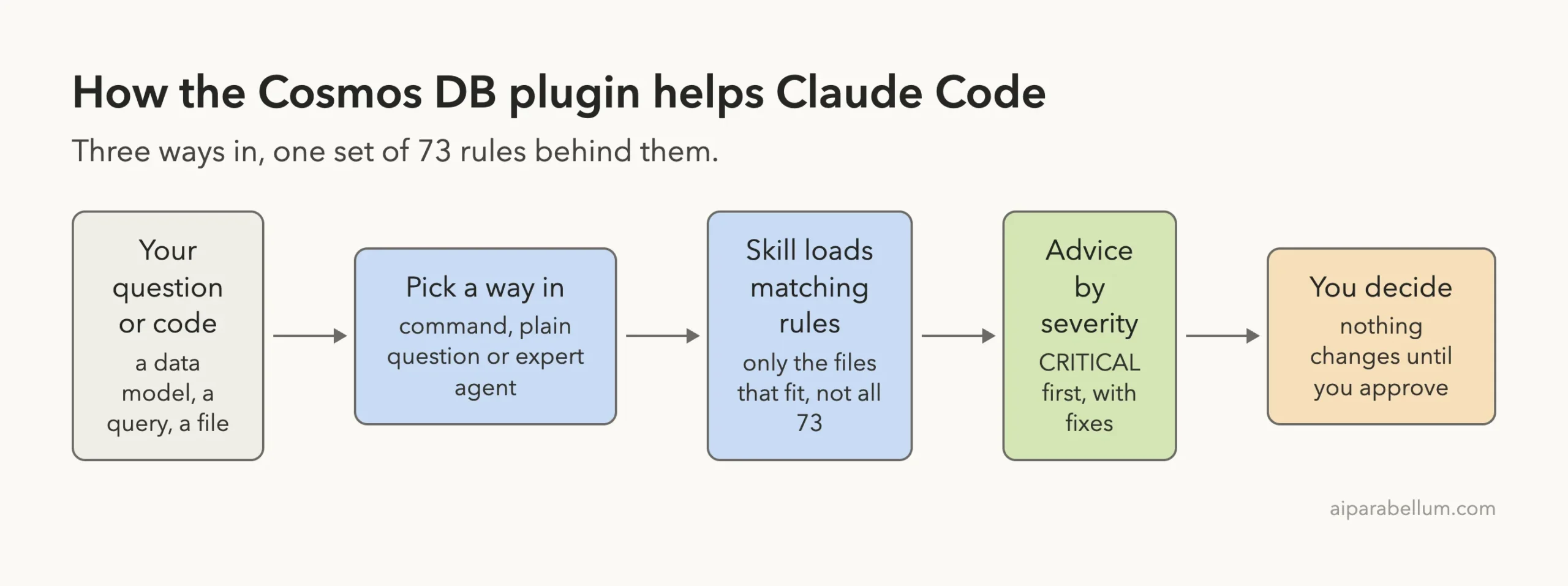
How it all fits together
All three ways in lead to the same rule set. The command gives you a structured review, the plain question gives you quick advice, and the agent gives you a longer design answer. Nothing changes in your files until you approve it.
What we did not test
We keep the line clear between what we ran and what we read.
- The
cosmos-setupcommand and the optional MCP Toolkit. These connect Claude to a live Cosmos DB account and need a deployed toolkit, an Azure login and a token. We did not create accounts, so this part comes from the repo’sSETUP.mdonly. - The
generate-skillscommand. It downloads the latest rule files from GitHub and overwrites the local ones, so we left it alone. - Applying the fixes. We never let Claude edit the demo file, so we cannot say how clean its rewrite would be.
- Real RU numbers. Claude said a point read costs about 1 RU, but we measured nothing against a live database.
Treat the plugin as a strong second opinion on your Cosmos DB design, not a final verdict.
Is the plugin worth installing?
Here is our honest verdict from this one demo. It is worth installing if you write Cosmos DB code, because the rules are specific and the review caught every planted mistake. It is free, needs no account, and has no scripts that run on their own.
It is not a replacement for measuring your real workload. It cannot see your RU charges or your real traffic unless you connect the optional toolkit. Also expect the README to lag behind Claude Code, as the /agents step shows.
| Good fit | Poor fit |
|---|---|
| Developers new to Cosmos DB who want a second opinion | Teams that need tuning from real production metrics |
| Code reviews before a launch | Anyone who needs a guaranteed identical checklist each run |
| Quick questions about keys, embedding and indexes | Projects on other databases |
Try it yourself
Make a small test folder, add a file that talks to Cosmos DB with a few mistakes, and load the plugin for one session. Then paste this prompt.
/azure-cosmos-db-assistant:cosmos-review my_file.py (keep it short: the 5 most important findings, one or two lines each, no code)Then ask a design question about your own data, and see whether the answer asks about your queries before it commits to a key.
Common mistakes
- Typing the short command name. Use the full
/azure-cosmos-db-assistant:prefix. - Following the README’s
/agentsstep. Ask for the agent in plain English instead. - Accepting the suggested fixes without reading them. Claude offered to edit our file, and you should read the changes first.
- Running
generate-skillsin your only copy of the plugin. It overwrites the local rule files. - Treating the advice as final. A partition key depends on your real queries.
Pro tips
- Ask for the top five findings when you want a review that fits on one screen.
- Tell Claude your top queries and expected data size. Better inputs give a firmer partition key answer.
- Test with
--plugin-dirfirst, then install from the marketplace if it earns a place. - Check the repo’s rule file for any finding you plan to act on. Each one explains the reason with examples.
Frequently Asked Questions
Does the Cosmos DB plugin for Claude Code need an Azure account?
Not for the skill, the agent or the review command. Only the optional live connection needs a deployed toolkit and an Azure login.
How do I install the Azure Cosmos DB plugin for Claude Code?
The README gives /plugin install azure-cosmos-db-assistant@claude-plugins-official and then /reload-plugins. We loaded it with --plugin-dir instead, to keep our own setup unchanged.
Which commands does it add?
Three: cosmos-review, cosmos-setup and generate-skills, all behind the /azure-cosmos-db-assistant: prefix.
Can it pick the right partition key for me?
It gives a reasoned recommendation, and in our test it asked for our top queries before confirming. Check the choice against your real access patterns.
Does it change my code automatically?
No. In our test it only offered to apply fixes, and the file stayed unchanged because we did not accept.
Conclusion
The Azure Cosmos DB plugin turned Claude Code into a careful Cosmos DB reviewer with no setup. It caught the partition key, client and query mistakes we planted, answered a key question with a sensible caveat, and ran its expert agent on request. The one stumble was a README step that no longer works in current Claude Code. For more add-ons, see our Claude page and the plugin repo on GitHub.