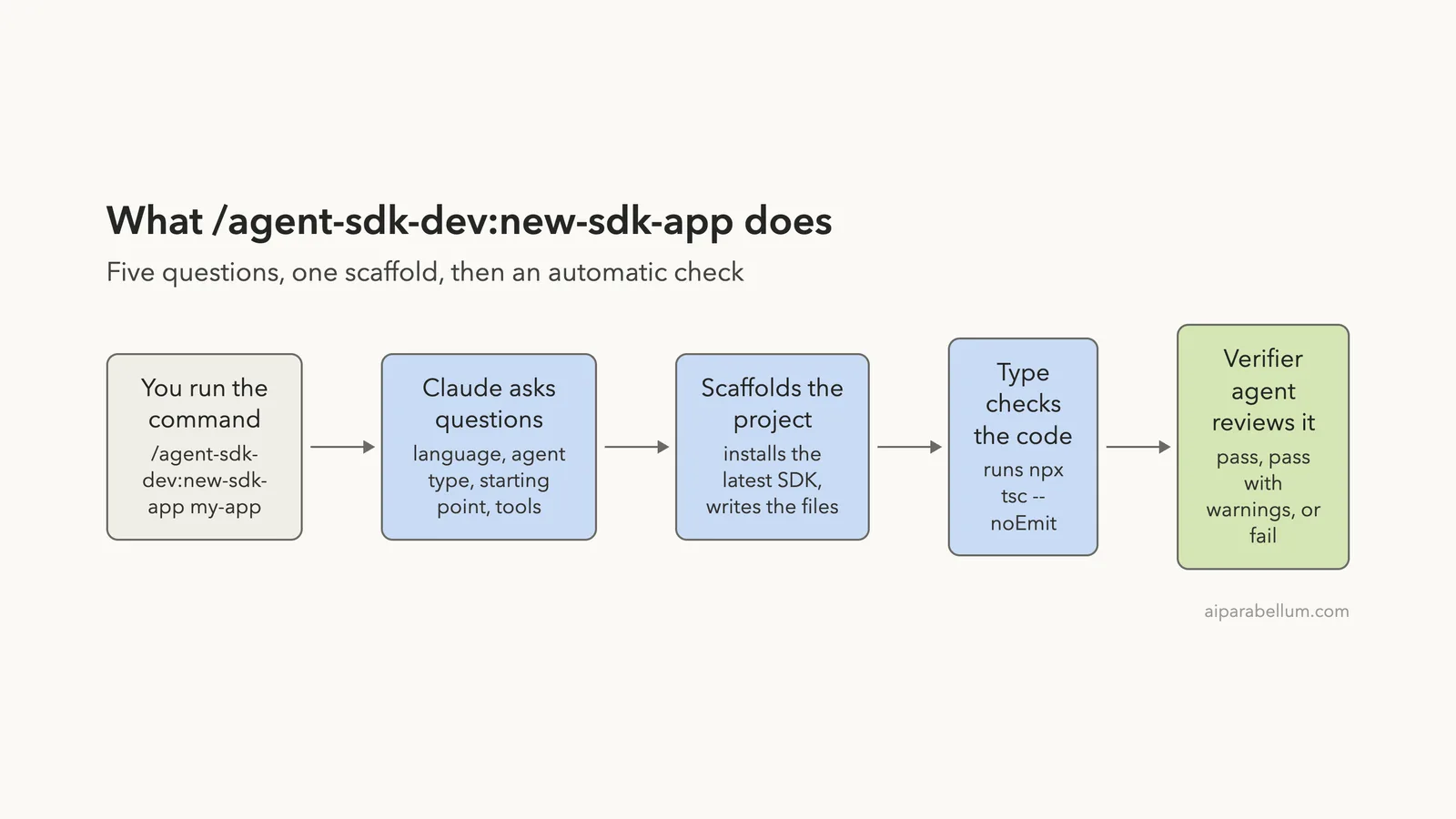
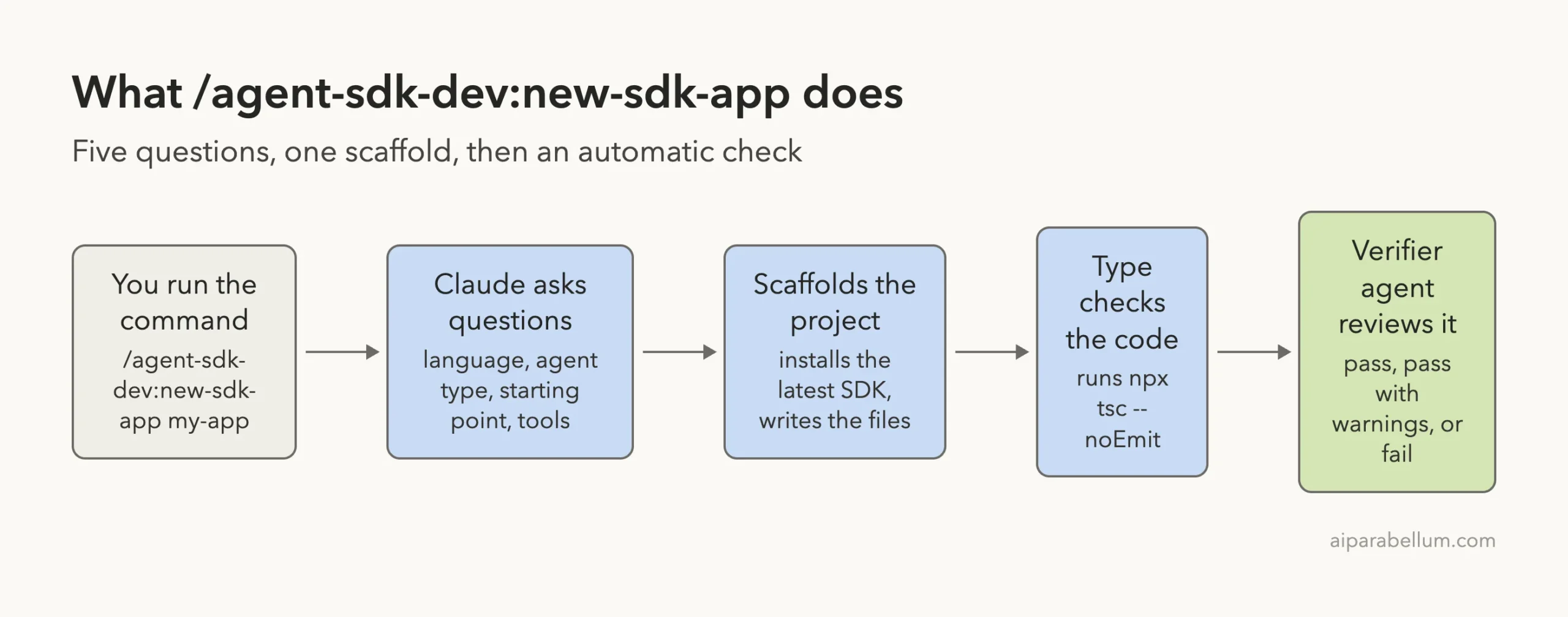
The Claude Code agent SDK dev plugin is an official add-on from Anthropic that builds a starter Agent SDK project for you and then checks it. You answer a few questions, and Claude Code creates the files, installs the SDK, runs the type checker, and hands the result to a reviewer agent. We loaded it, built a real TypeScript app with it, and then asked the reviewer to find problems in that app.
This guide is part of our Claude Code tutorials. Find more add-ons in our Skills Directory.
Tested with Claude Code v2.1.318 on November 8, 2026, using agent-sdk-dev 1.0.1 from the anthropics/claude-plugins-public repository (commit 0412be7).
Quick Summary
| Item | What we found |
|---|---|
| What it is | An official plugin with one slash command and two reviewer agents |
| Command | /agent-sdk-dev:new-sdk-app (note the plugin name before the colon) |
| Agents | agent-sdk-verifier-ts and agent-sdk-verifier-py |
| Languages | TypeScript and Python |
| Account needed | None to scaffold and check; an API key (or a Claude login) only to run the finished agent |
| What we ran | TypeScript, minimal Hello World, npm, then a report-only review |
| Hooks or scripts | None; the plugin is plain prompt files |
What the Agent SDK Dev Plugin Is
The Claude Agent SDK lets you build your own agents in code, using the same tools and loop that power Claude Code. Starting a project from scratch means picking a language, installing the right package, writing a first call, and setting up environment files. The agent SDK dev plugin does those chores for you.
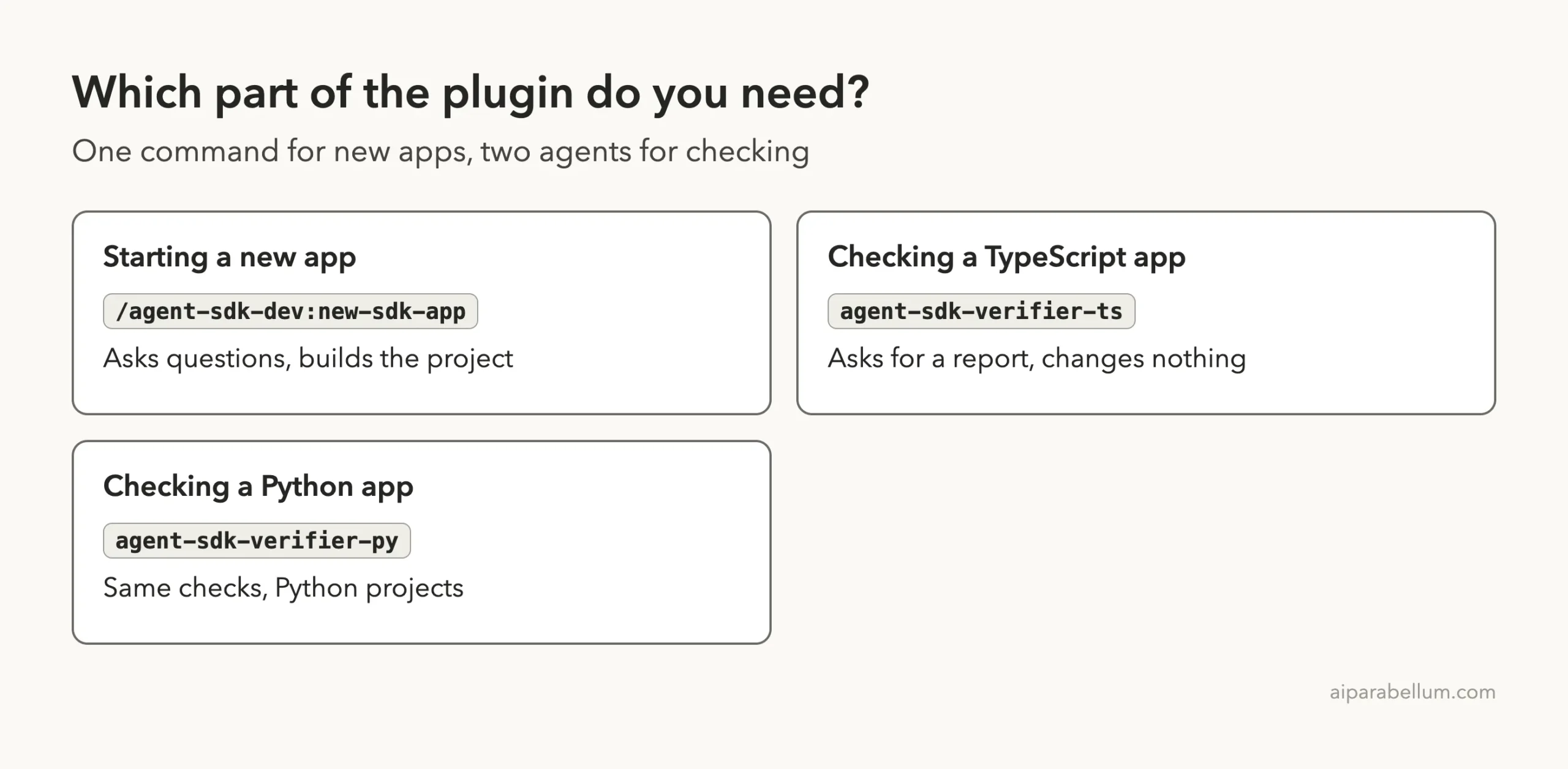
The plugin has three parts. A slash command called new-sdk-app runs the guided setup.
Two agents, one for TypeScript and one for Python, review an app and report what is wrong. You can read every file in the plugin, because they are short Markdown prompts.
If you are new to plugins in general, read our guide to Claude Code plugins first. It explains how marketplaces, installs and scopes work.
How We Tested the Agent SDK Dev Plugin Safely
We did not install the plugin into our everyday setup. We cloned the repository into a throwaway folder and read every file first. The plugin has no hooks and no shell scripts, only a command prompt and two agent prompts.
Then we started Claude Code with the plugin folder loaded for that one session. The --plugin-dir flag loads a plugin from a local folder, and --setting-sources project keeps your user settings out of the run.
git clone --depth 1 https://github.com/anthropics/claude-plugins-public.git
mkdir demo-project && cd demo-project
claude --plugin-dir ../claude-plugins-public/plugins/agent-sdk-dev --setting-sources project
When you want it permanently, the official marketplace route is the install command /plugin install agent-sdk-dev@claude-plugins-official. We did not run that one, so we only describe it from the directory listing and the plugin discovery docs.
Step 1: Find the Command
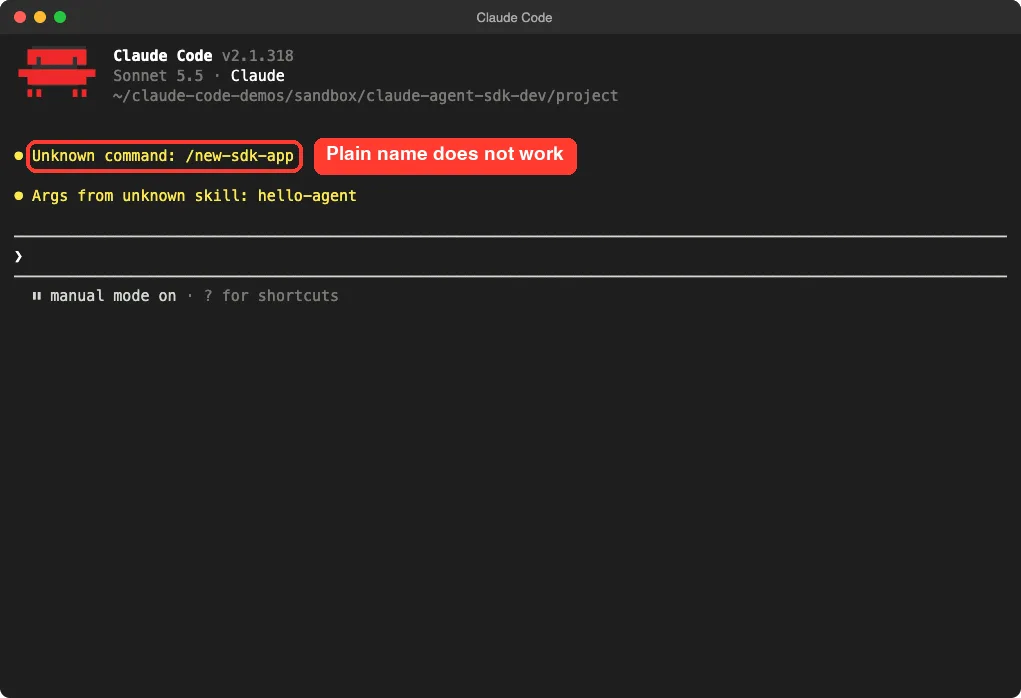
Our first try was /new-sdk-app hello-agent, which is what the plugin README shows. Claude Code answered with an unknown command message. Plugin commands are namespaced, so the plugin name comes first.
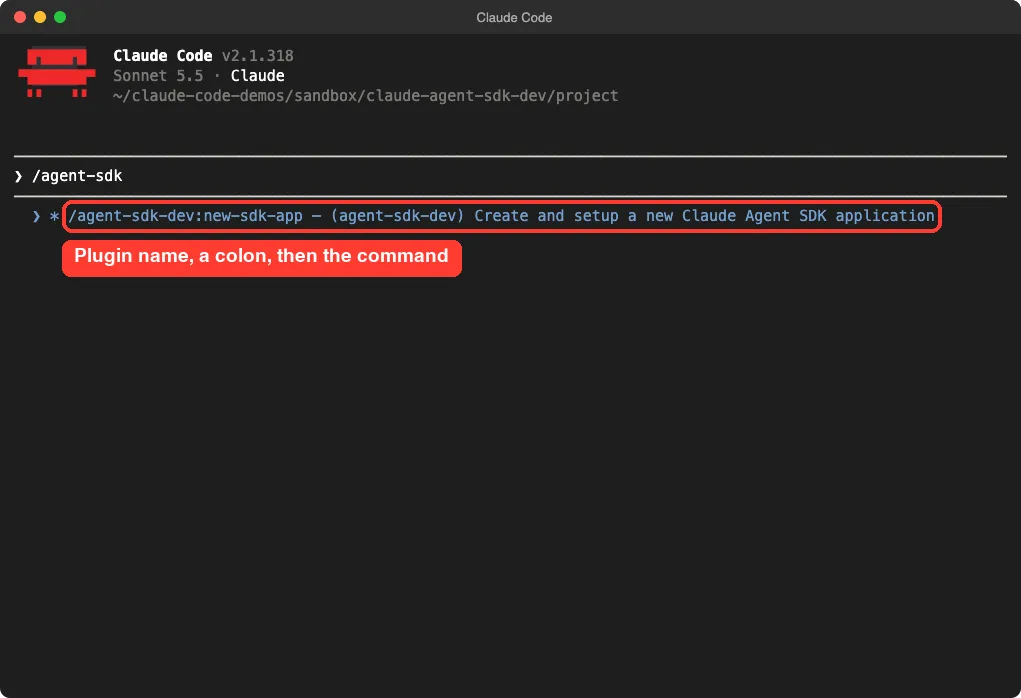
Typing /agent-sdk shows the full name in the suggestion list: /agent-sdk-dev:new-sdk-app. You can also pass a project name after it.
Step 2: Answer the Questions
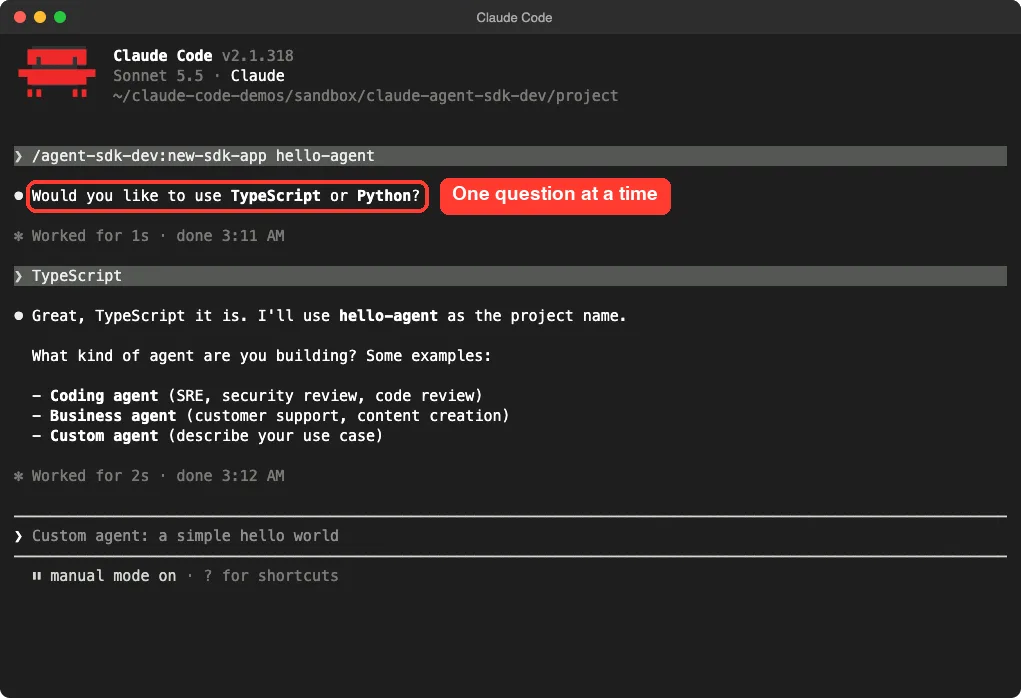
The command asks one question at a time. It started with the language, and then asked what kind of agent we wanted. We answered TypeScript and chose a coding agent that reviews code.
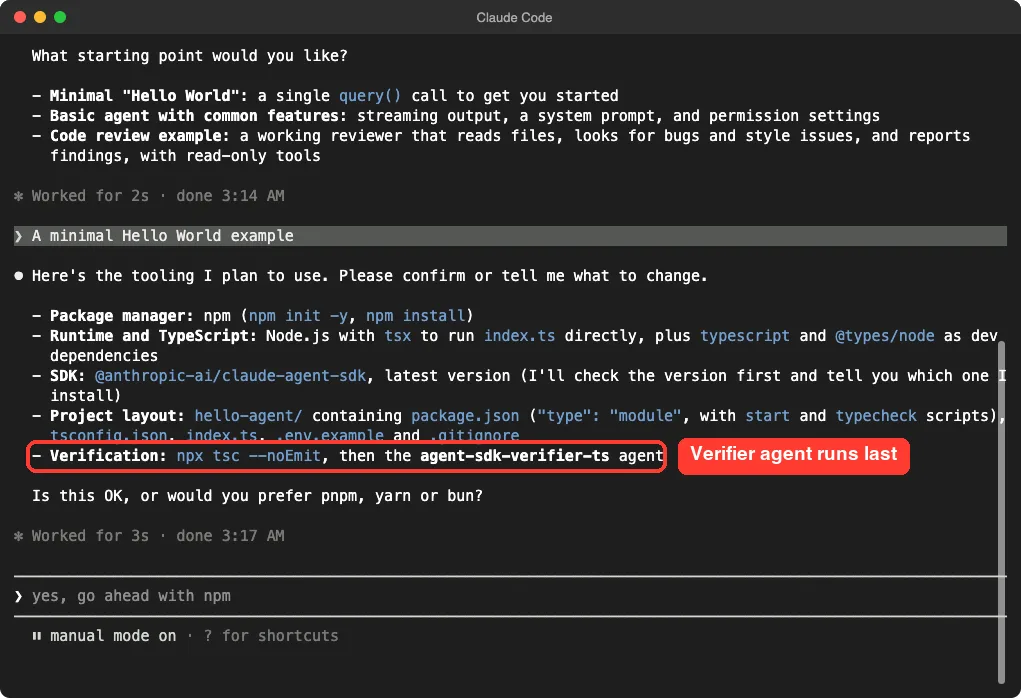
Next it offered three starting points: a minimal Hello World, a basic agent with common features, or a code review example. We picked the Hello World to keep the run small.
Before doing anything, it listed its plan and asked us to confirm the tools. It proposed npm, tsx to run the file, and a final check by the TypeScript verifier agent. This is the plugin asking permission to use your preferred package manager, so say so if you want pnpm or bun.
Step 3: Watch It Scaffold the Project
After we confirmed, Claude Code checked the current SDK version and told us it was 0.3.319. It then created the folder, ran npm init, and installed the SDK from npm.
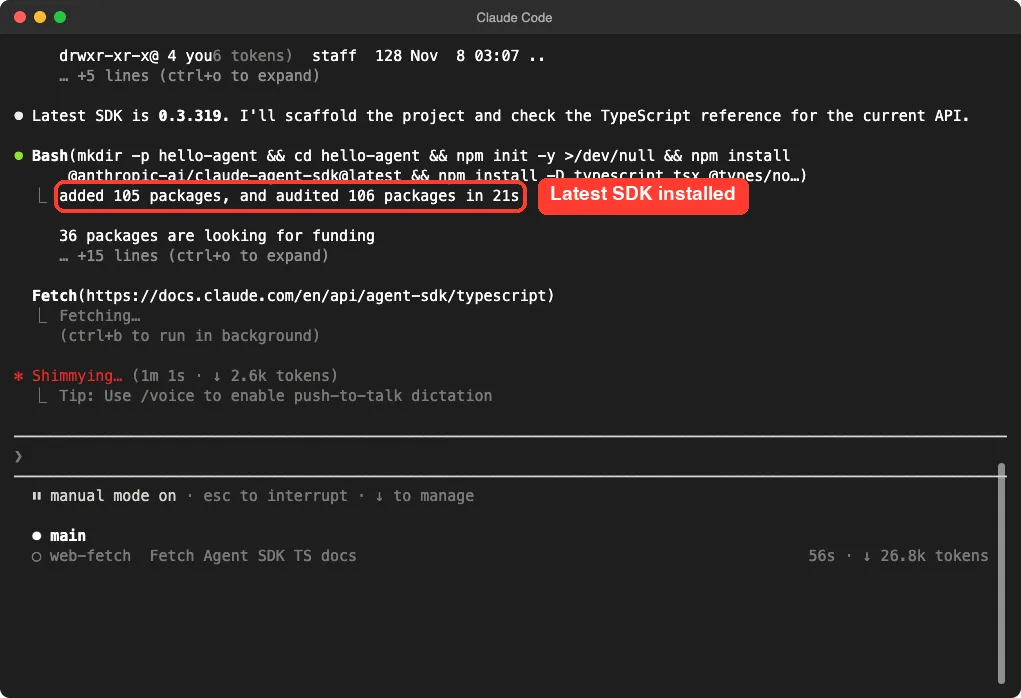
The command also fetched the official TypeScript reference page with a background helper. That is why the run took a few minutes: it reads the docs before it writes code.
When it finished, the project folder held these files:
package.jsonwithstartandtypecheckscriptstsconfig.jsonfor the TypeScript settingsindex.tswith onequery()call.env.examplewith a placeholder forANTHROPIC_API_KEY.gitignorethat excludes.envandnode_modules/
The generated code
The starter file is short and commented. It sends one prompt, loops over the streamed messages, prints the text, and prints the cost at the end.
import { query } from "@anthropic-ai/claude-agent-sdk";

async function main(): Promise<void> {
  for await (const message of query({
    prompt: "Say hello and tell me in one sentence what you can help with as a code reviewer.",
    options: {
      systemPrompt: "You are a friendly, concise code review assistant.",
      maxTurns: 1,
    },
  })) {
    if (message.type === "assistant") {
      for (const block of message.message.content) {
        if (block.type === "text") console.log(block.text);
      }
    } else if (message.type === "result") {
      if (message.subtype === "success") {
        console.log(`\n[done] cost: ${message.total_cost_usd.toFixed(4)}`);
      } else {
        console.error(`\n[error] ${message.subtype}`);
        process.exitCode = 1;
      }
    }
  }
}
We trimmed the file a little for this page, such as the API key warning and the final error handler. The real file also type checked cleanly with npx tsc --noEmit before Claude Code moved on.
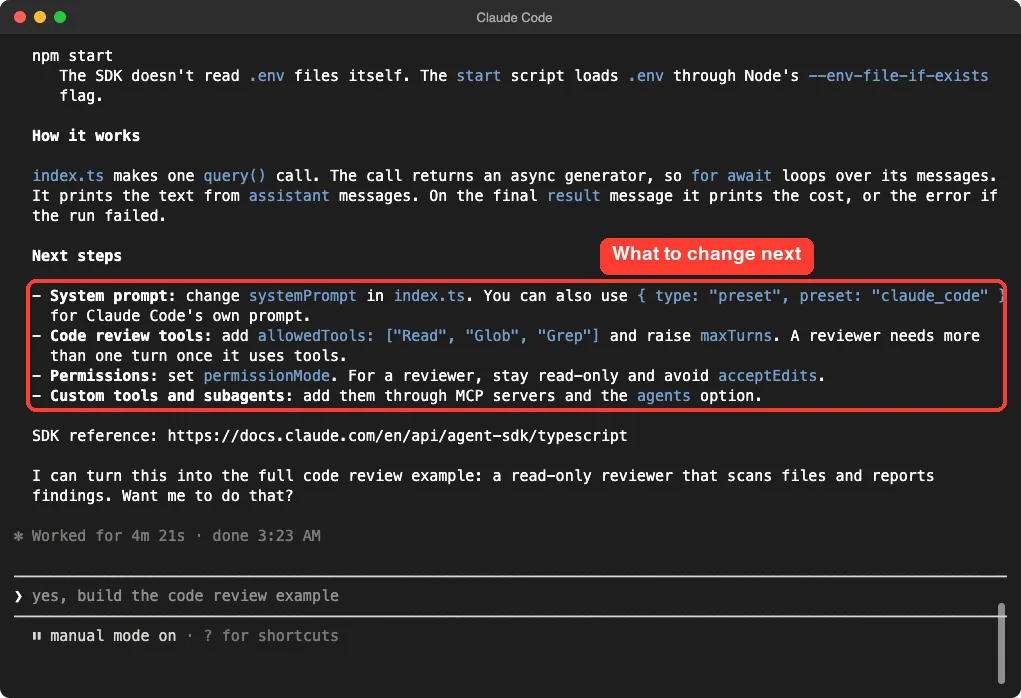
One honest note: we did not run the agent itself. That needs an API key or a Claude login for the SDK, and we only tested the scaffold and the check.
Step 4: Run the Verifier Agent on Its Own
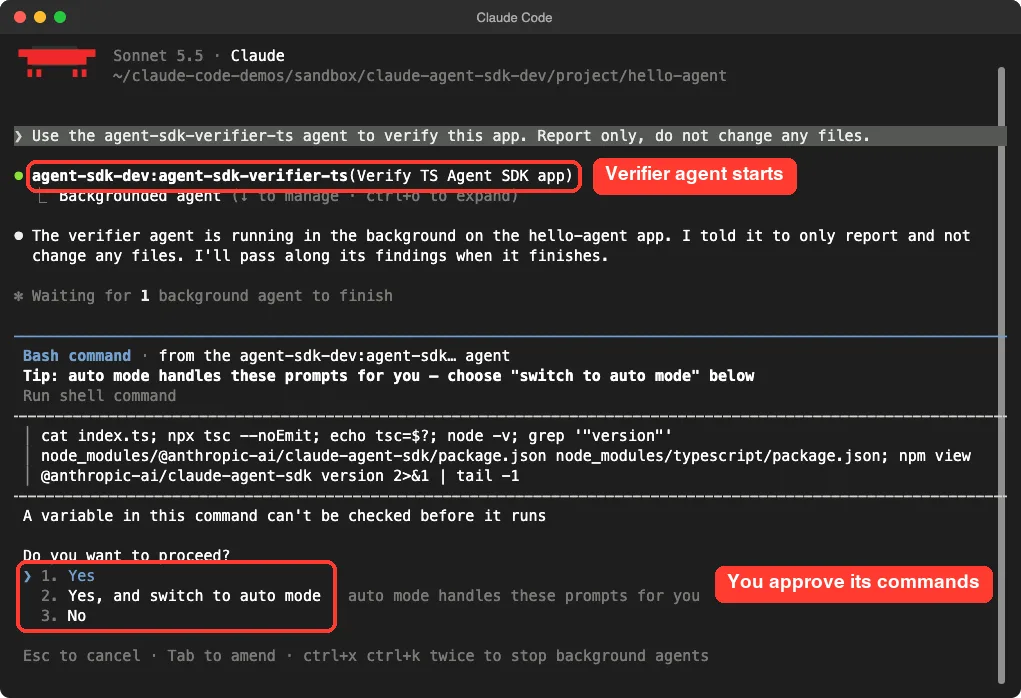
The verifier ran automatically at the end of setup, and it reported pass with warnings. It also worked when we called it directly, so we used that to see what it catches.
To make the test real, we deleted the .gitignore file from the finished project. Then we started a new session and asked for a report only, so nothing would change.
Use the agent-sdk-verifier-ts agent to verify this app. Report only, do not change any files.Claude Code started the agent in the background. The agent then asked permission to run its own shell commands, such as the type check and a version lookup. You approve those like any other command.
The report came back after about a minute. It confirmed the good parts: the SDK is installed, query() is used correctly, there are no hardcoded secrets, and the example env file has the right key name. Then it listed six warnings.
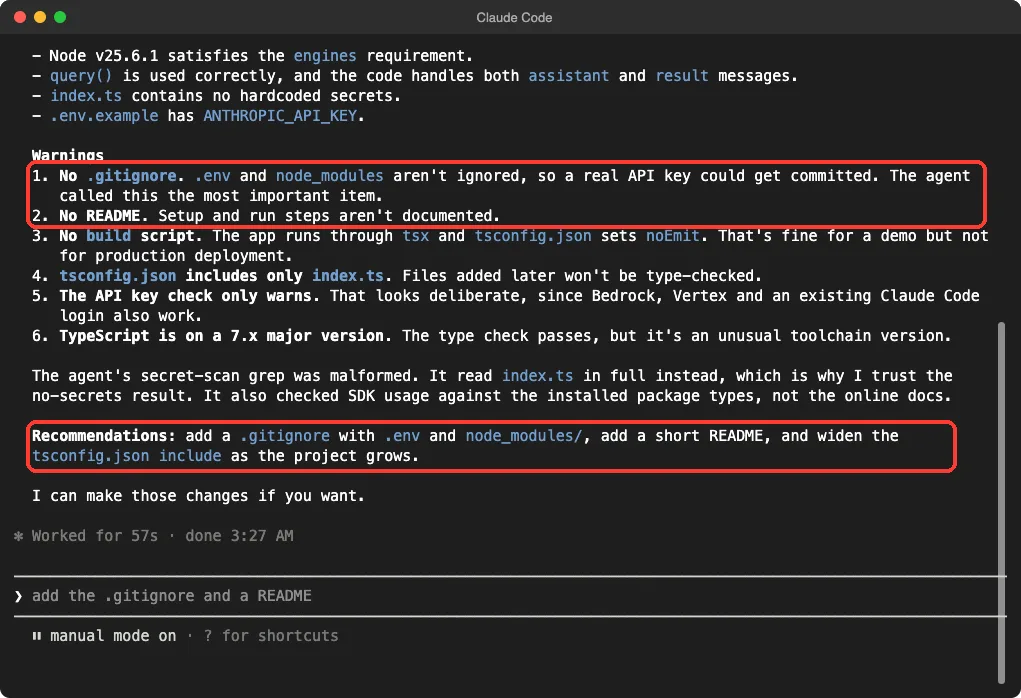
The first warning was the one we planted: .env and node_modules were not ignored, so a real key could be committed. It called this the most important item. It also noted there was no README, no build script, and a narrow tsconfig.json include list.
Two details are worth knowing. The agent said its own secret search command was malformed, so it read index.ts directly instead. And it checked SDK usage against the installed package, not against the online docs.
What the Claude Code Agent SDK Dev Plugin Does Well
- It asks the right questions in a sensible order, one at a time.
- It installs the latest SDK instead of an old version from memory.
- It type checks before it says it is done.
- The verifier caught a real security problem on the first try.
- It has no hooks, so it is easy to audit.
Where It Falls Short
- The README shows
/new-sdk-app, but the working name is/agent-sdk-dev:new-sdk-app. - The setup takes a few minutes and several permission prompts.
- It only covers a first scaffold. You still design the agent yourself.
- The verifier warnings mix real risks with nice-to-haves, such as the README note.
Who Should Install the Agent SDK Dev Plugin
Install it if you are starting your first Agent SDK project and want a working base with checks. It also helps teams that want the same starting layout every time. If you already have a polished project template, the verifier agents are still useful as a second pair of eyes before you deploy.
If you are building an app with an AI feature, our guide on how to build an app shows a different path that uses the API directly.
The verifier caught a missing .gitignore that could have leaked an API key.
Try It Yourself
Practice on a throwaway folder, never inside a real project. Start Claude Code with the plugin loaded, then paste this prompt.
/agent-sdk-dev:new-sdk-app practice-agentPick Python if you prefer it, and pick the starting point that matches your goal. When it finishes, remove one safety file, such as .gitignore, and ask the matching verifier agent for a report only. Watch whether it notices.
Common Mistakes
- Typing
/new-sdk-appwithout the plugin name. Use/agent-sdk-dev:new-sdk-app. - Expecting the agent to run right away. Copy
.env.exampleto.envand add credentials first. - Committing the
.envfile. Keep it in.gitignore. - Running the plugin inside an important project. Use a new folder.
- Asking for a verification without saying report only, when you do not want edits.
Pro Tips
- Pass the project name after the command so Claude skips that question.
- Say your package manager at the plan step if it is not npm.
- Run the verifier again after every big change, not only after setup.
- Pick the code review starting point if your agent needs to read files, since it uses read-only tools.
- Read the plugin files once. They are short and teach you how commands and agents are written.
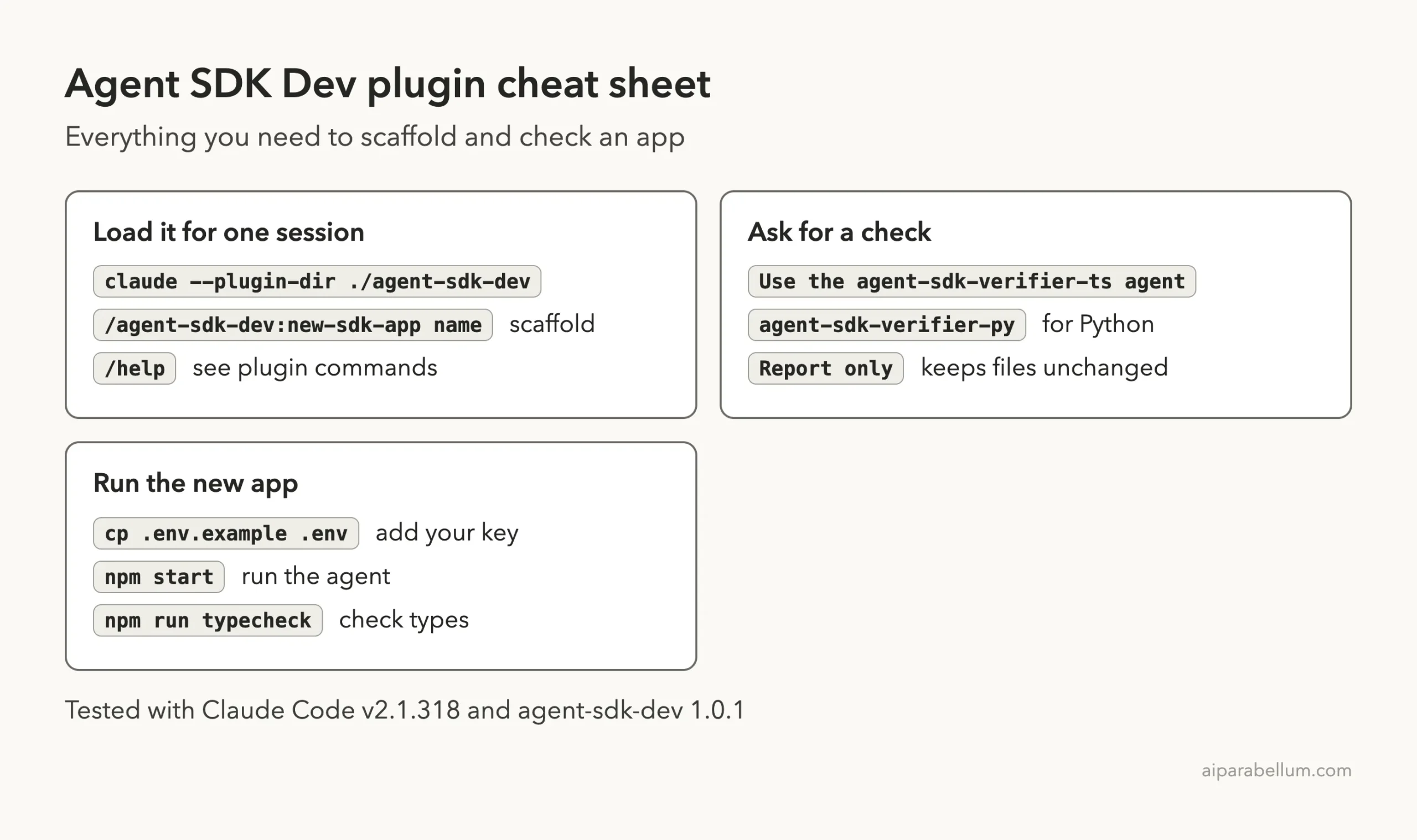
Cheat Sheet
Frequently Asked Questions
Do I need an API key to use the agent SDK dev plugin?
No, you do not need one to scaffold and verify an app. You need credentials only when you run the finished agent. The generated code simply prints a warning when the key is missing.
Does it support Python?
Yes. The command asks for TypeScript or Python, and there is a separate agent-sdk-verifier-py agent. We only tested the TypeScript path.
Why does the command say unknown?
Plugin commands carry the plugin name. Use /agent-sdk-dev:new-sdk-app, or type /agent-sdk and pick it from the list.
Will the verifier change my files?
Not if you ask for a report only. In our test it listed problems and offered to fix them, but it did not touch the project.
How do I install it permanently?
The directory lists /plugin install agent-sdk-dev@claude-plugins-official. See the plugins docs for how installs and scopes work. We loaded it only for one session.
Conclusion
The Claude Code agent SDK dev plugin is a small, safe and useful starter. It scaffolded a type-checked TypeScript project in a few minutes, and its verifier agent caught a missing .gitignore that could have leaked an API key. It will not design your agent for you, but it gives you a clean base and a reviewer. For more add-ons, browse our Claude guide and the skills directory linked above.