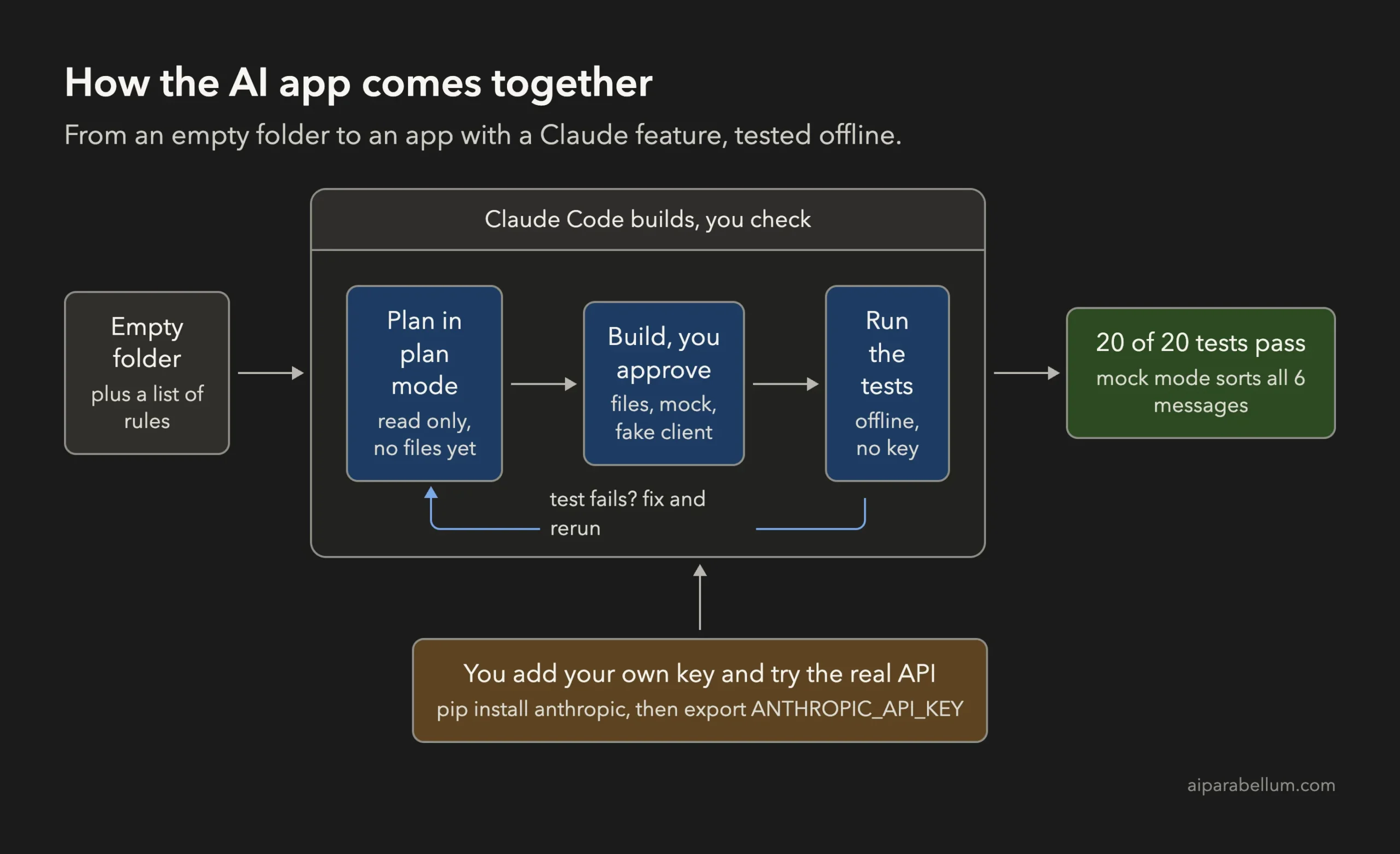
Adding an AI feature to an app sounds like a big job, but you can build an AI app with Claude Code in one sitting if you keep the AI part small. In this project we started with an empty folder and ended with a working feedback sorter. It reads customer messages and labels each one as a bug, a feature request, a question or praise, with a one-line summary.
This is Project 20 of 20 in our Build with Claude Code series, part of our Claude Code tutorials. In Project 19 we learned how to upgrade a framework with a plan and a safety net of tests. We use the same habits for this last project.
Tested with Claude Code v2.1.310 on October 27, 2026, on macOS. We tested on macOS; the Windows and Linux steps follow Anthropic’s official instructions.
One honest note before we start. We made no calls to the real Claude API, because that needs your own account and key.
The app has a mock mode that runs with no key, and the real Claude path is tested only with a fake client. We say clearly below what you must add yourself.
What We Built
An AI feature is just one small function that sends text to a model and checks the answer. Keep that function in one place, and the rest of your app can be built and tested without ever touching the network.
| Item | Details |
|---|---|
| Project | A command line tool that sorts customer feedback with Claude |
| Input | A text file with one message per line (6 made-up messages) |
| Output | One line per message: the category and a short summary |
| Tools | Python 3, the built-in unittest module, and the official anthropic SDK for the real mode |
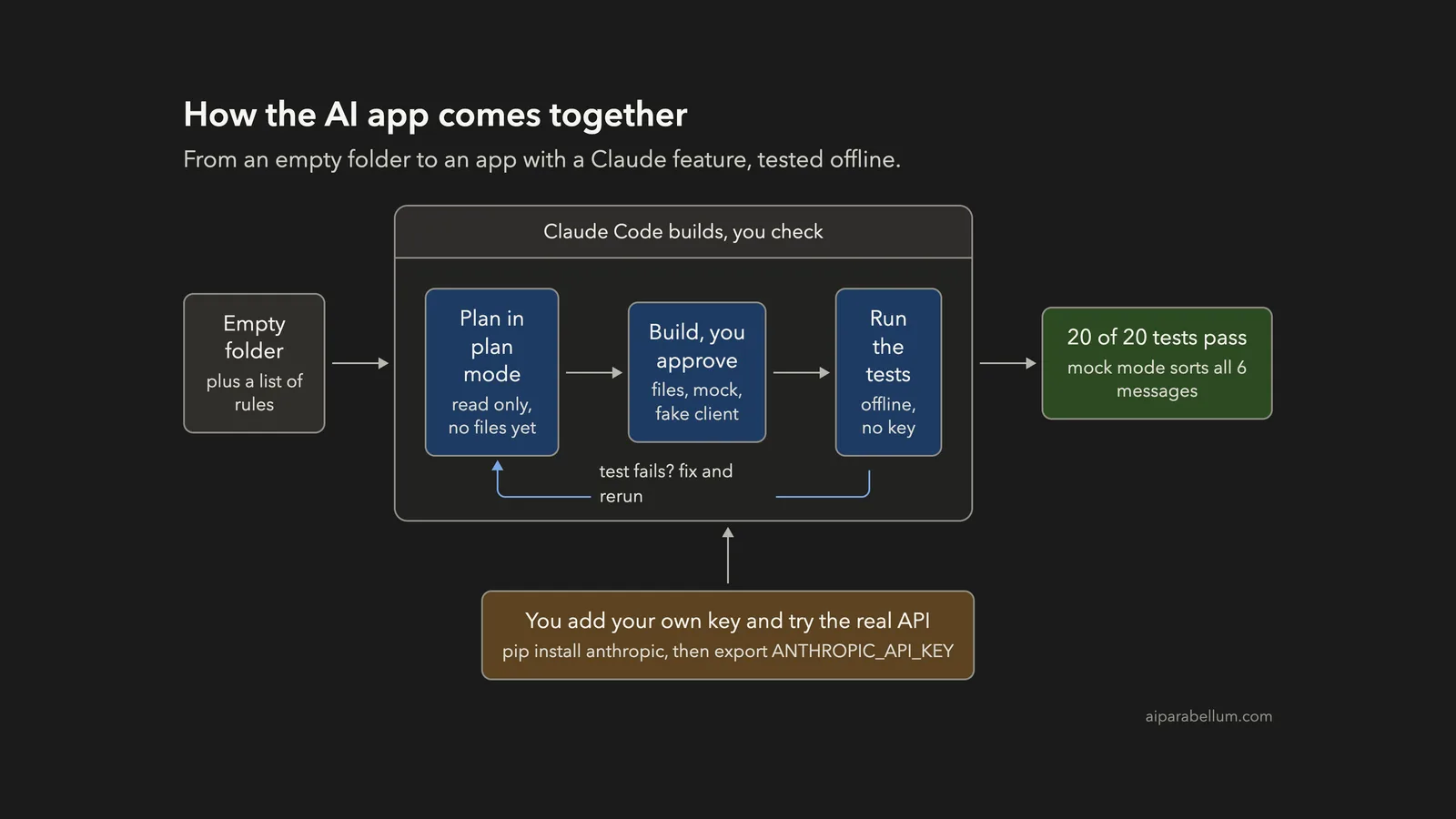
| Result | 20 of 20 tests pass offline; mock mode sorts all 6 messages |
| Prompts used | 3 prompts, one of them in plan mode |
| Not done by us | No real API call. You add your own key to try it |
Why Build an AI Feature With Claude Code?
Claude Code is good at the part of this job that is tedious: setting up files, wiring the pieces together and writing tests. The AI feature itself is only one call to the Claude API. Everything around it is normal code.
The Claude API is how your own program talks to Claude. You send a message and a model name, and you get an answer back. Anthropic’s quickstart shows the whole idea in a few lines of Python.
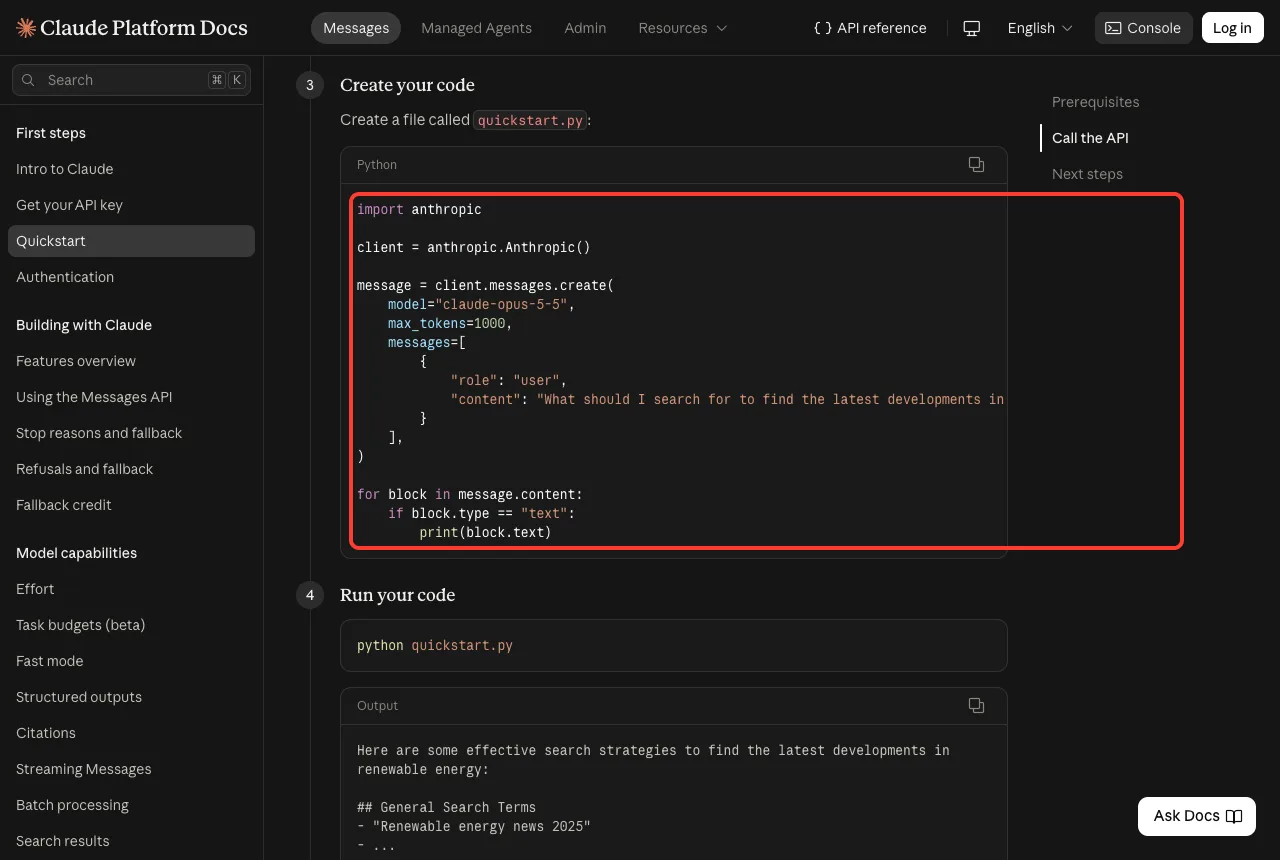
Our app uses exactly that call, with a short system prompt that says how to answer. You can read the full steps in Anthropic’s get started guide.
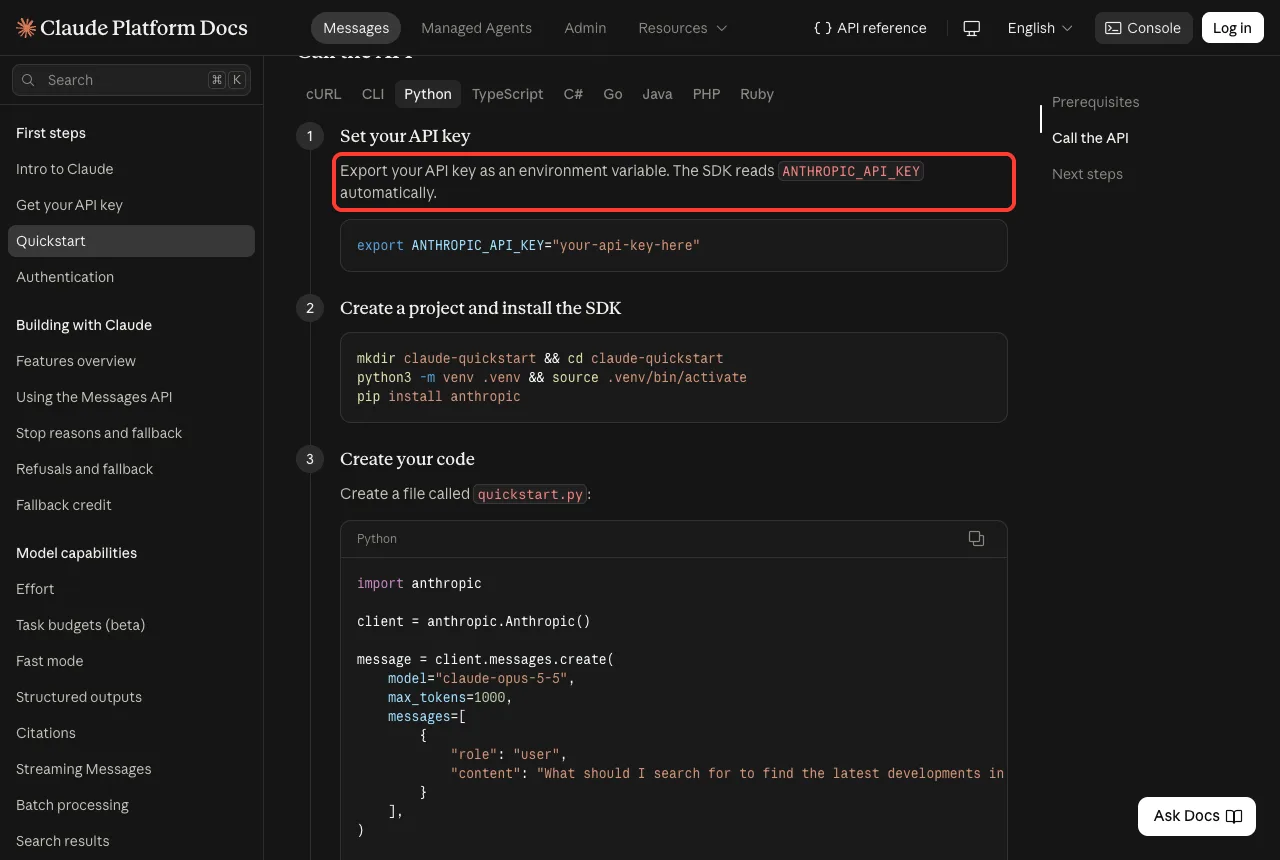
There is one rule from that guide that shapes our whole design. The key must come from an environment variable and never from a file in your project.
The Rules We Gave Claude
Before any code, we wrote down the rules. Good rules in your first prompt save many fixes later. We used four.
- The API key comes only from the ANTHROPIC_API_KEY environment variable, never from a file.
- The app needs a mock mode that works with no key and no anthropic package.
- Tests must never touch the network.
- The AI call must live in one place, so the rest of the app does not know about Claude.
Notice that none of these rules say how to write the code. They say what must be true when it is finished. That is a good way to talk to Claude Code, and you can check each rule yourself at the end.
Step 1: Plan the App in Plan Mode
We started Claude Code in plan mode, so it could read and think but not create files. The common workflows page in the Claude Code docs describes plan mode as a way to review changes before they touch your disk.
claude --permission-mode planOur first prompt described the app and the four rules, and ended by asking for a short plan.
This folder is empty. I want a small Python app that sorts customer feedback messages into bug, feature request, question or praise, and writes a one-line summary of each. The AI part should call the Claude API with the official anthropic Python SDK (client.messages.create). Rules: the API key comes only from the ANTHROPIC_API_KEY environment variable, never from a file; the app also needs a mock mode that works with no key and no anthropic package; tests must never touch the network. Do not create any file yet. Give me a short plan: files, how the AI call is isolated, and how we test it.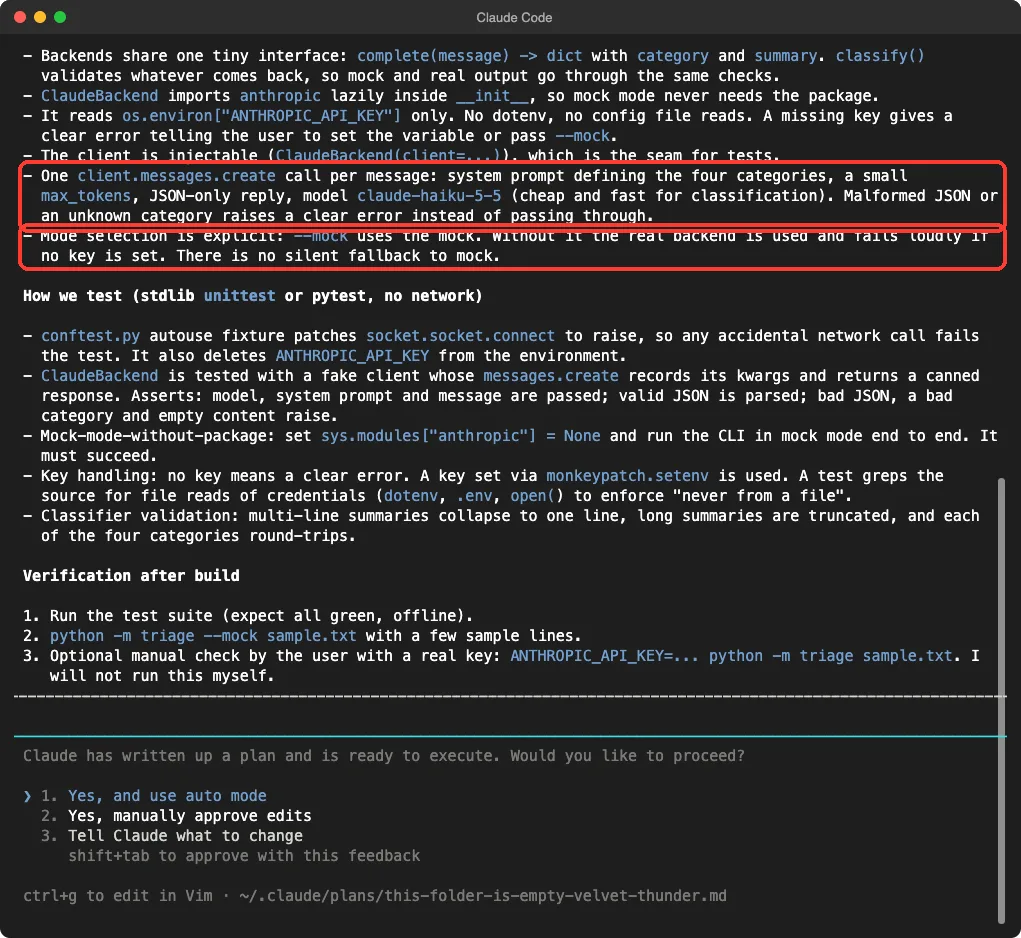
Read the plan before you approve it. Two lines mattered to us.
The first said there is one messages.create call per message, with a small token limit and a reply in JSON only. The second said that without the mock flag the app uses the real backend and fails loudly if there is no key.
That second line is a good sign. A silent fallback to the mock would hide a missing key, and you could think you were using Claude when you were not.
The plan also listed the tests. A fake client would stand in for the real SDK, so we could check the request and the answer handling without any network call.
Step 2: Let Claude Build It, and Approve Each Step
Next we continued the same conversation in the normal permission mode, so Claude had to ask before it ran a command or wrote a file. Our second prompt was short, because the plan already held the details.
Build the plan you proposed. Do not install any package and do not make any network or API call. Create a sample_feedback.txt with 6 made-up messages, then run the tests with python3 -m unittest.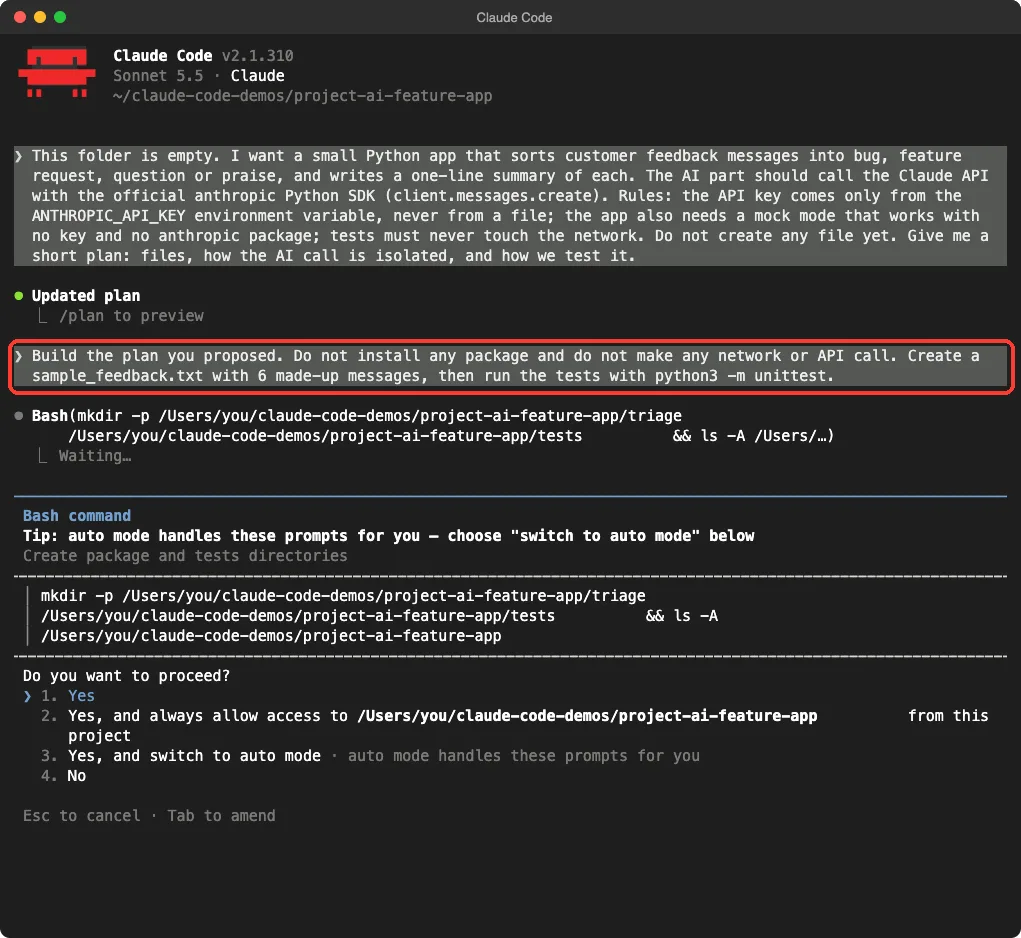
Claude asked first to make two folders, then wrote the files one at a time. Each write showed the lines it was adding, and we read them and said yes.
The prompt also told Claude what it must not do: no package installs and no API calls.
When it finished, the project had this shape. The AI call lives in one file, and everything else works without it.
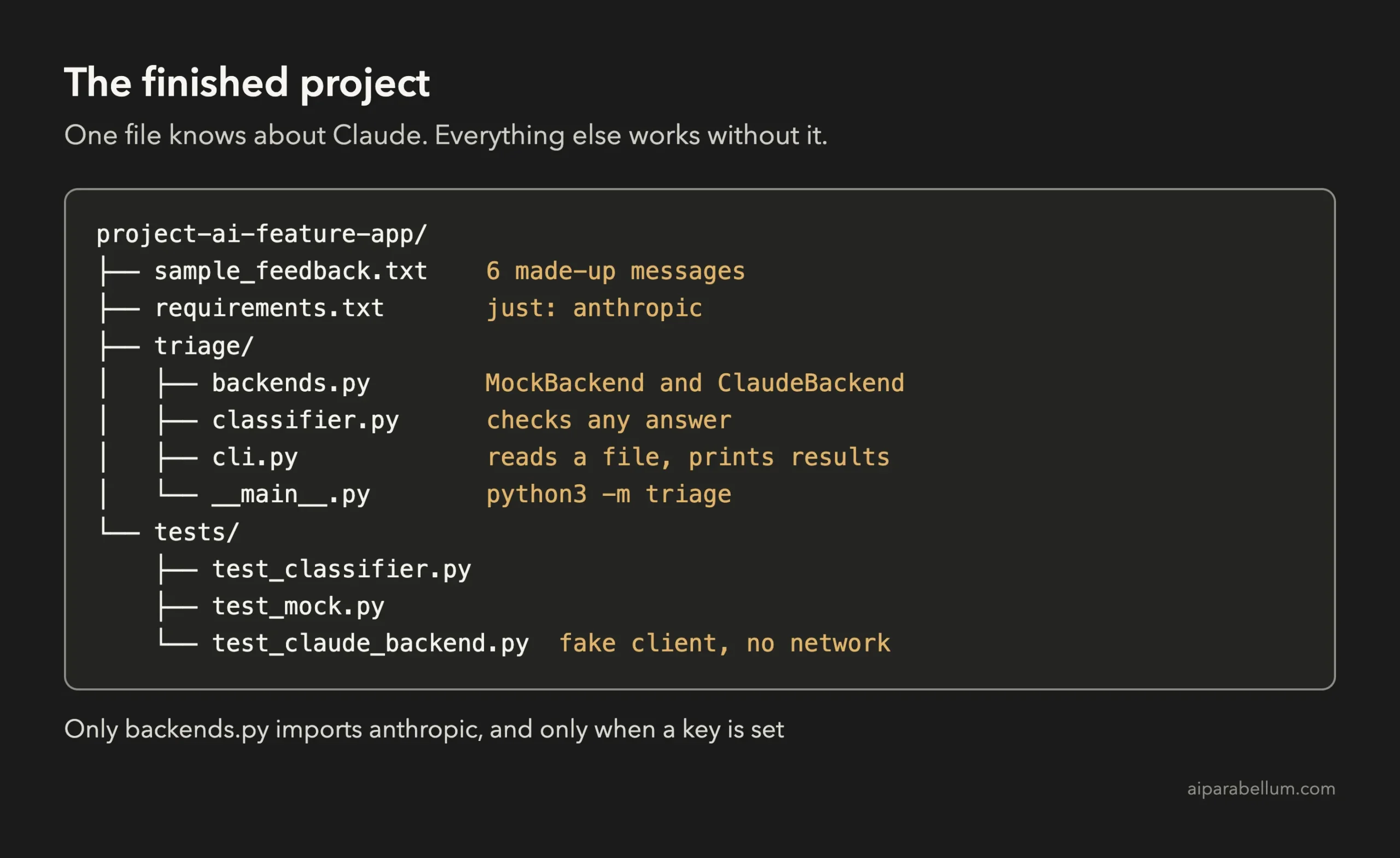
The Key Code: One File Knows About Claude
Here is the heart of the project, trimmed from triage/backends.py. We left out the mock rules and a small helper, but the Claude part is complete.
DEFAULT_MODEL = "claude-haiku-5-5"

SYSTEM_PROMPT = (
    "You triage customer feedback. Classify the message into exactly one category: "
    + ", ".join(CATEGORIES)
    + ". Also write a one-line summary (max 100 characters) of what the customer said. "
    'Reply with only a JSON object: {"category": "...", "summary": "..."}.'
)

class ClaudeBackend:
    """Classifies via client.messages.create. The key comes only from ANTHROPIC_API_KEY."""

    def __init__(self, client=None, model=DEFAULT_MODEL):
        if client is None:
            api_key = os.environ.get("ANTHROPIC_API_KEY")
            if not api_key:
                raise BackendError(
                    "ANTHROPIC_API_KEY is not set. Export it in your shell, or use --mock."
                )
            try:
                import anthropic
            except ImportError:
                raise BackendError(
                    "The anthropic package is not installed. Install it, or use --mock."
                ) from None
            client = anthropic.Anthropic(api_key=api_key)
        self.client = client
        self.model = model

    def complete(self, message):
        response = self.client.messages.create(
            model=self.model,
            max_tokens=200,
            system=SYSTEM_PROMPT,
            messages=[{"role": "user", "content": message}],
        )
        text = response.content[0].text
        return _parse_json_object(text)
Three ideas are worth a second look.
First, the anthropic package is imported inside the constructor, so mock mode never needs it. Second, the constructor accepts a client, which is the doorway for our fake test client. Third, the model name is a plain constant, so you can change it in one place.
We kept the real file’s error handling out of the listing to save space, but it is there. A reply that is not valid JSON, or has an unknown category, raises a clear error instead of passing through.
The second file, triage/classifier.py, checks every answer from any backend. It allows only the four categories, collapses the summary to one line and caps its length. Because the mock and the real backend both go through it, they follow the same rules.
CATEGORIES = ("bug", "feature request", "question", "praise")

def classify(message, backend):
    raw = backend.complete(message)
    category = str(raw.get("category", "")).strip().lower()
    if category not in CATEGORIES:
        raise BackendError(f"unknown category: {raw.get('category')!r}")
    summary = one_line(raw.get("summary", ""))
    if not summary:
        raise BackendError("backend returned an empty summary")
    return Result(category, summary)
This check matters more than it looks. A model is not a function that always returns perfect data, so you treat its answer like any other outside input and validate it.
Step 3: A Test Fails and Claude Fixes It
Our first test run found a real problem. We started a new session with the continue option and asked Claude to run the tests, and to tell us whether the test or the app was wrong if one failed.
Run python3 -m unittest. If a test fails, tell me whether the test or the app is wrong, fix it, and run the tests again. Then run python3 -m triage --mock sample_feedback.txt.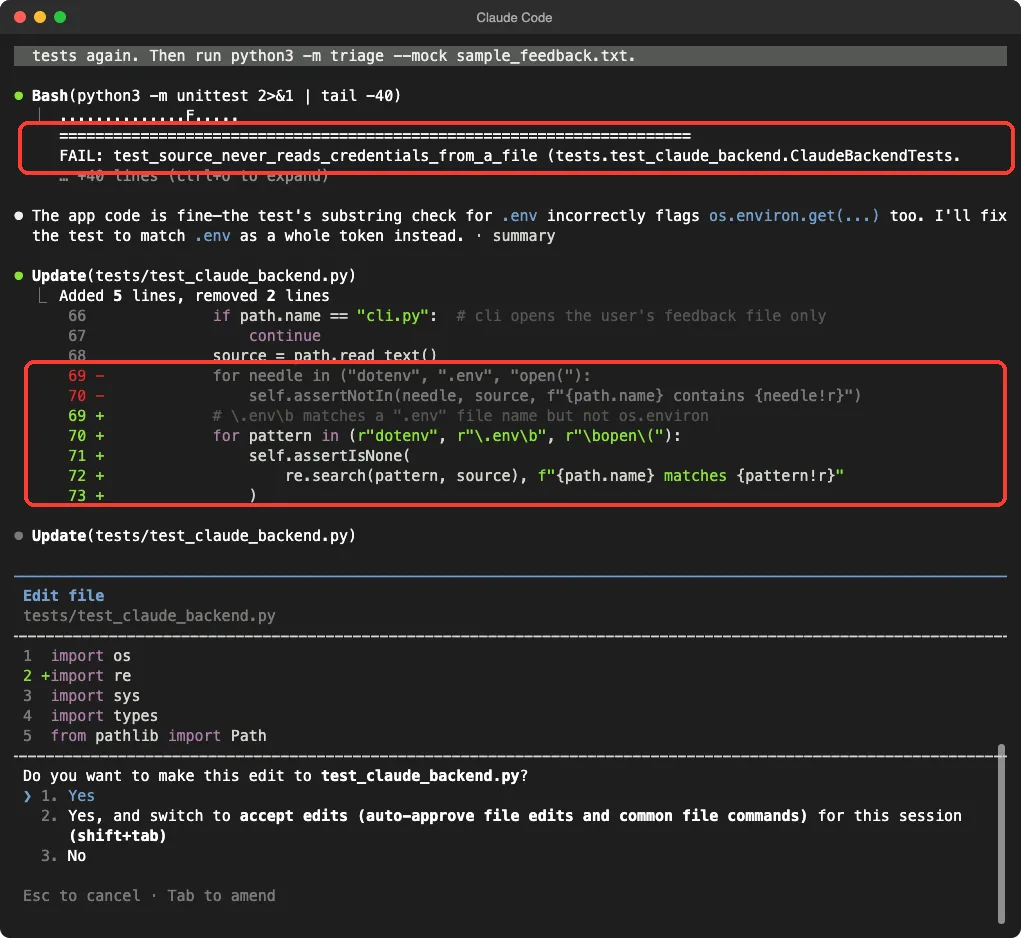
One of the 20 tests failed. That test exists to enforce our rule about keys, and it searched the source code for the text “.env”. But that text also appears inside os.environ.get, which is exactly how the app is supposed to read the key.
Claude said the app was fine and the test was too crude. It rewrote the check to match “.env” only as a whole word, so a real .env file would still be caught but os.environ would not. We approved the edit, and the tests were run again.
This is worth noticing. We asked a clear question, test or app, and got a clear answer with a reason. We still read the new check ourselves before agreeing, because loosening a test is the kind of change you never want to accept blindly.
Step 4: Check the Result Yourself
Claude finished with a summary. It reported that all 20 tests pass offline, showed the mock output for all six messages, and said plainly what it had not done.
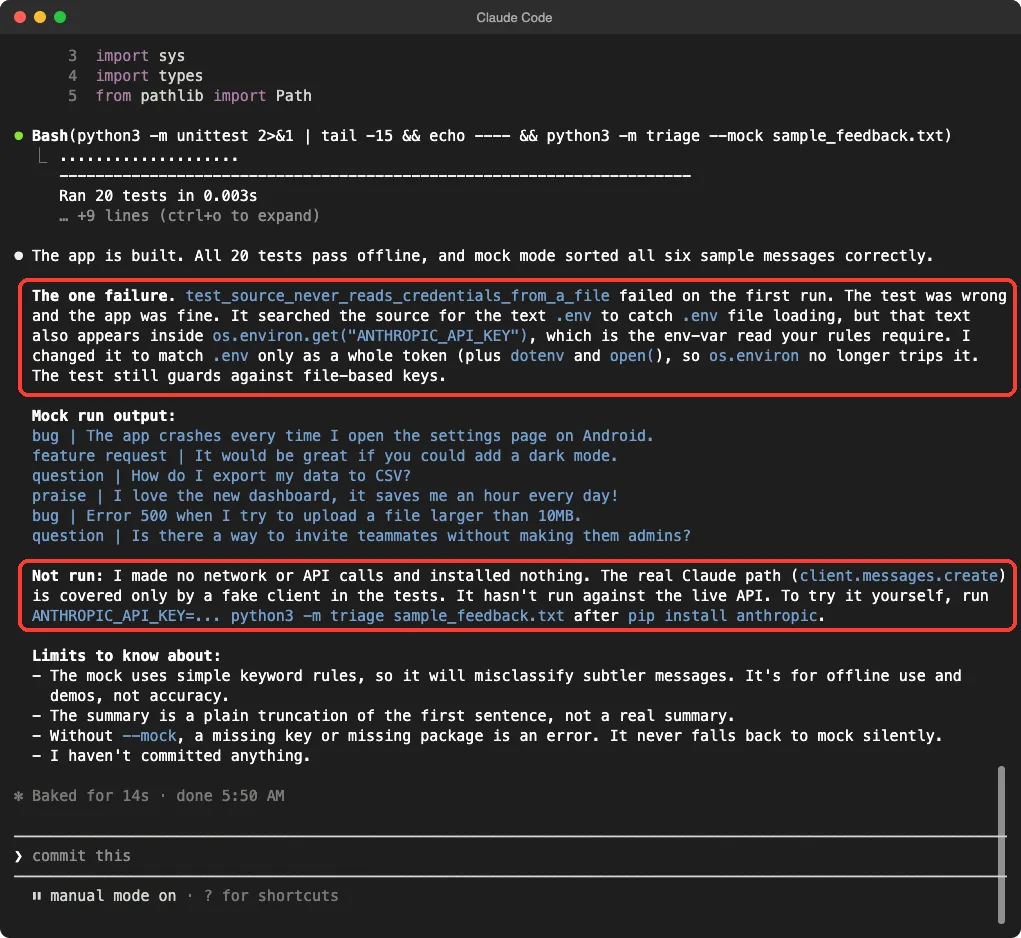
The Not run paragraph is the one to read twice. Claude said it made no network or API calls and that the real path is covered only by a fake client. It did not claim the app works with the live API.
We then ran our own checks in a plain terminal: the tests, the mock run and the run with no key. The lines are shortened here to fit the window.
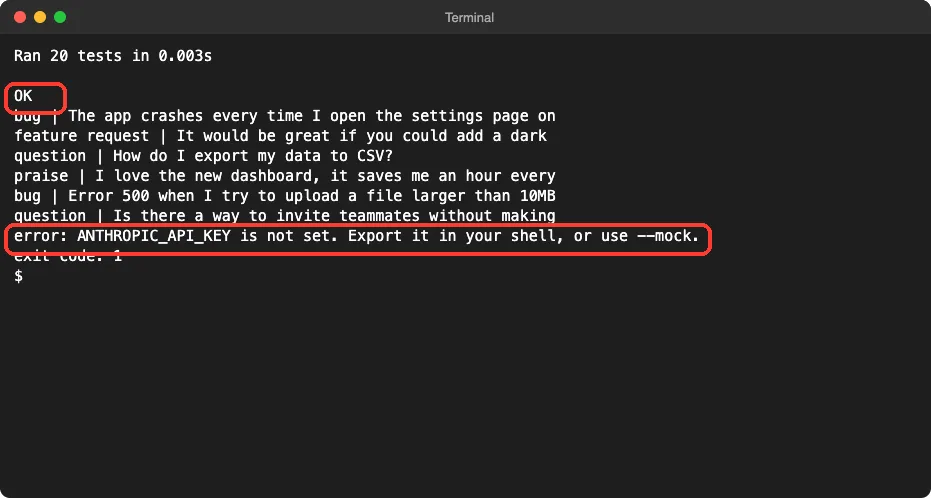
The last two lines show the design working. Without the mock flag and without a key, the app stops with a clear message and a non-zero exit code. It does not quietly pretend.
| Message | Sorted as |
|---|---|
| The app crashes every time I open the settings page | bug |
| It would be great if you could add a dark mode | feature request |
| How do I export my data to CSV? | question |
| I love the new dashboard | praise |
| Error 500 when I try to upload a large file | bug |
| Is there a way to invite teammates without making them admins? | question |
Keep one limit in mind. Mock mode uses simple keyword rules and takes the first sentence as the summary.
It is for offline tests and demos, not for accuracy. Real summaries and better sorting come from Claude once you add a key.
What You Must Add Yourself
To try the real thing, you need three steps that we did not do for you. You need a Claude Console account and an API key, as the quickstart explains. You need the SDK, and you need to set the key in your own shell.
pip install anthropic
export ANTHROPIC_API_KEY="your-api-key-here"
python3 -m triage sample_feedback.txt
Use your own key, keep it out of your project files and out of git, and watch your usage in the Console, because API calls are billed separately from a Claude chat plan. Start with the six sample lines, since each message is one small call.
If the real output looks wrong, the system prompt in backends.py is the first thing to adjust. Ask Claude Code to tighten it, run the tests again, and test a few of your own messages by hand.
Try It Yourself
You can repeat this with any small idea that has one AI step. Make an empty folder and put it in git. Then start in plan mode with your own task and the same four rules.
This folder is empty. I want a small Python app that [your idea]. The AI part should call the Claude API with the official anthropic Python SDK (client.messages.create). Rules: the API key comes only from the ANTHROPIC_API_KEY environment variable, never from a file; the app also needs a mock mode that works with no key and no anthropic package; tests must never touch the network. Do not create any file yet. Give me a short plan: files, how the AI call is isolated, and how we test it.When the plan looks right, approve it with a build prompt.
Build the plan you proposed. Do not install any package and do not make any network or API call. Then run the tests.Here are some ideas to try next.
- A tool that writes a one-line title for each note in a folder.
- A tool that turns rough meeting notes into a list of action items.
- A tool that checks if a support email sounds angry and flags it.
- A small web page with a text box that calls the same classify function.
- A rule in your CLAUDE.md file such as “never read API keys from files”.
Common Mistakes
- Putting the API key in a file or in the code. Use an environment variable, and keep any test keys out of git.
- Calling the API in your tests. They get slow and cost money, and they fail when your internet does. Use a fake client.
- Letting the app fall back to mock mode silently. You may believe real Claude answers are coming when they are not.
- Trusting the model’s answer without checking it. Validate the format and the allowed values.
- Spreading API calls all over your code. Keep them in one file so they are easy to test and change.
- Loosening a failing test without reading why. Ask whether the test or the app is wrong, as we did.
Pro Tips
- Pick a small, fast model for simple jobs like sorting. Keep the model name in one constant.
- Set a small max_tokens value for short answers, so a mistake cannot run up your bill.
- Ask for JSON only in your system prompt, and still handle the case where the reply is not valid JSON.
- Keep the mock simple and deterministic. Its job is to let your app run and be tested anywhere.
- Do not send real customer data to the API while you are testing. Use made-up messages, and read our page on privacy and security for how your data is handled.
- Learn more about the model behind the API on our Claude AI page.
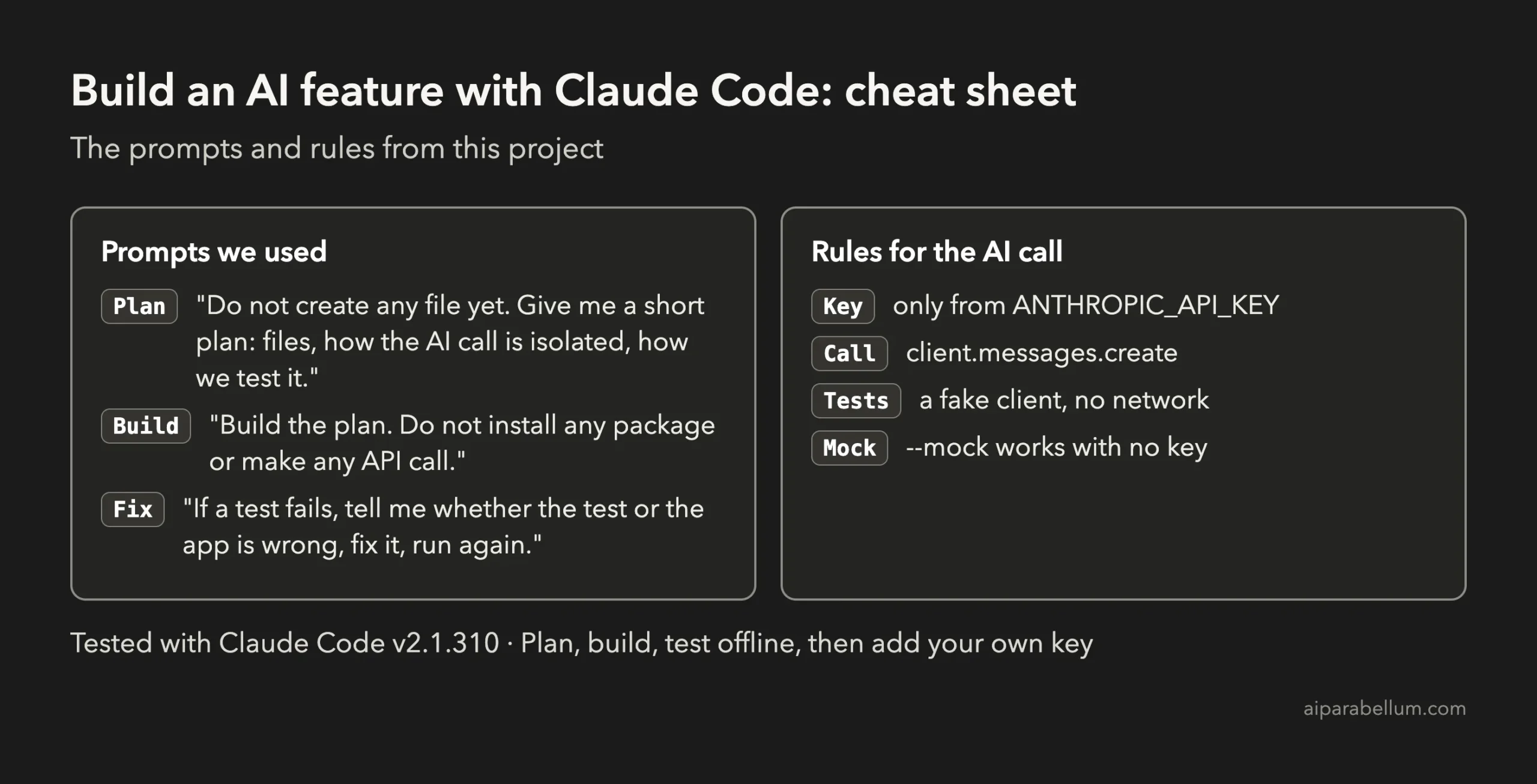
Cheat Sheet
Frequently Asked Questions
Can Claude Code build an app that uses the Claude API?
Yes. Claude Code can write the code that calls the API, the tests and the setup files.
In our project it built a feedback sorter with 20 tests. You still provide your own API key and check the result.
Do I need an API key to follow this project?
No. The app has a mock mode that needs no key and no anthropic package, and the tests use a fake client. You need a key only when you want real Claude answers.
Is a Claude Code subscription the same as an API key?
No, they are separate.
The key you put in ANTHROPIC_API_KEY comes from the Claude Console and is billed for API usage. Check Anthropic’s pricing pages for the current details.
Where should I store my Claude API key?
Put it in an environment variable, as the official quickstart does. Do not write it in your code or commit it to git. If a key is ever exposed, create a new one and delete the old one.
Why test with a fake client instead of the real API?
A fake client makes tests fast, free and repeatable. You can check what your code sends and how it handles good and bad answers, with no network. Then you do a few real tries by hand.
Conclusion
You just saw how to build an AI app with Claude Code: write four clear rules, plan in plan mode, approve each step, keep the Claude call in one file, and test everything offline with a mock and a fake client. One test failed on the first run, Claude explained why and fixed it, and we ended with 20 of 20 tests passing. Now add your own key, try the real API on a few messages, and take what you learned across this series to your own ideas. Browse all our Claude Code tutorials to keep going.
Previous in the series: Project 19: Upgrade a Project to a New Framework Version With Claude Code