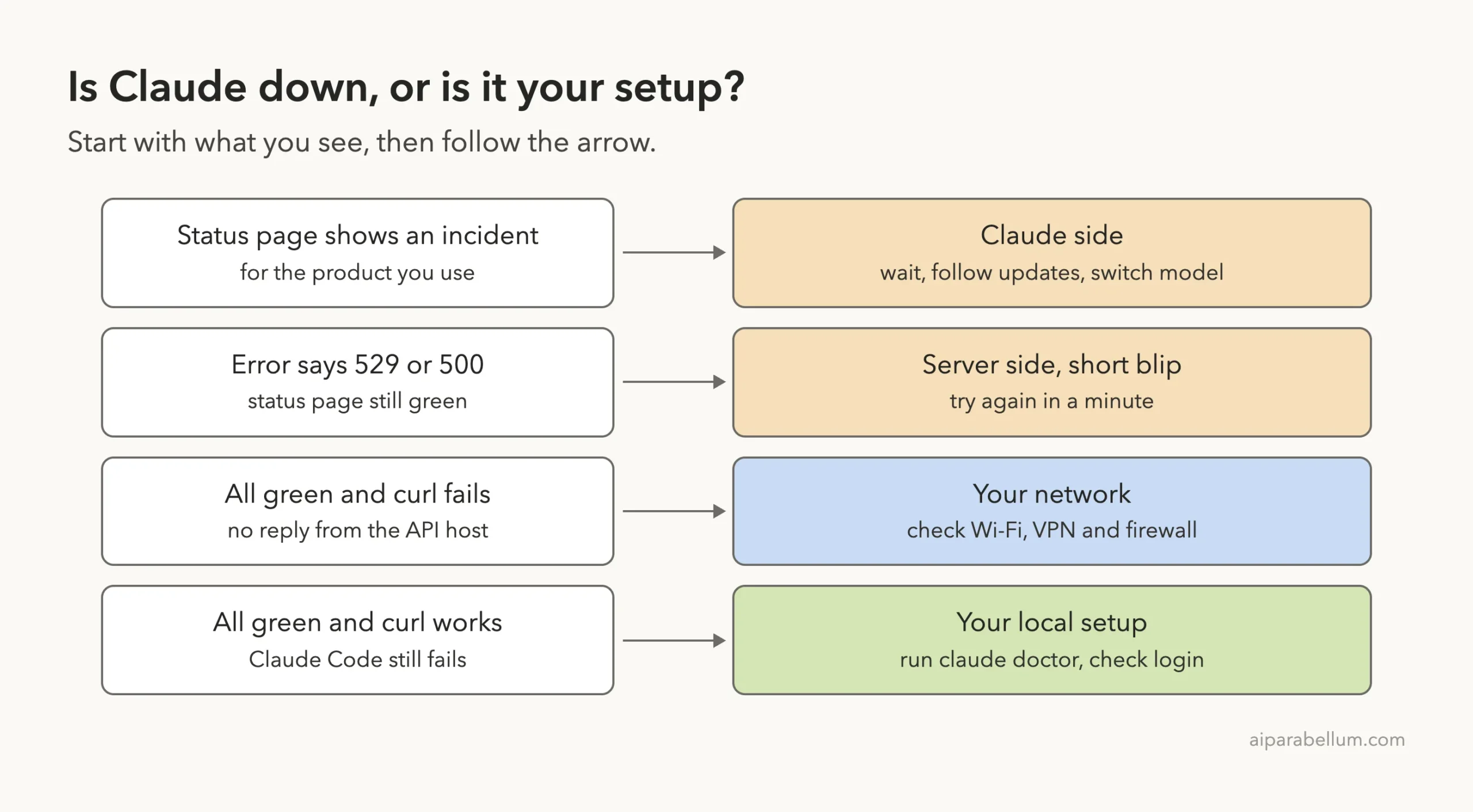
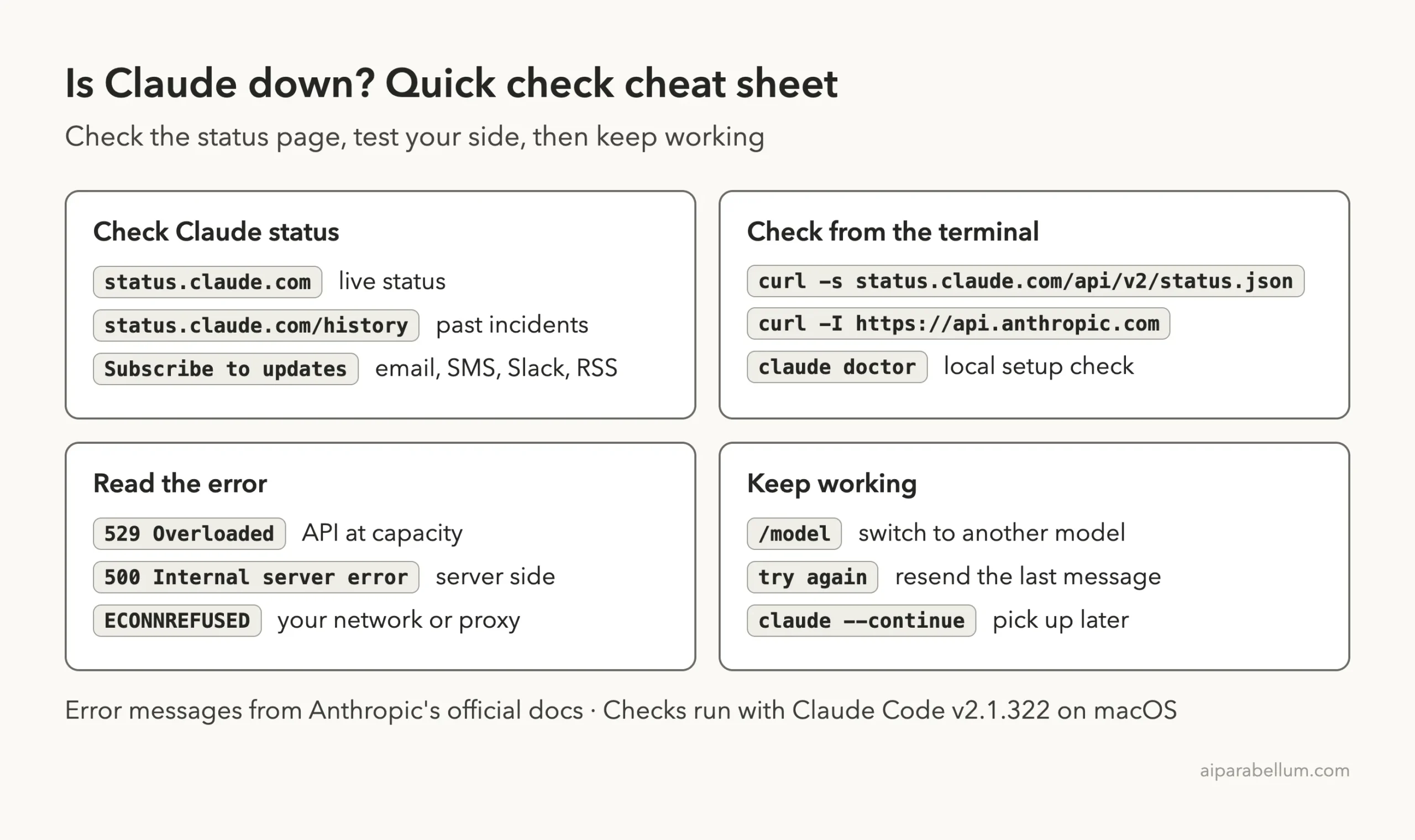
If you are asking “is Claude down” right now, the fastest answer is on Anthropic’s official status page at status.claude.com. It lists every Claude product, shows a colored status next to each one, and puts any open incident in a banner at the top. If the row for the product you use says Operational and there is no banner, Claude is up and the problem is probably on your side.
To check your side, run curl -I https://api.anthropic.com in your terminal. Any HTTP status line in the reply means your network can reach Claude. If that works but Claude Code still fails, run claude doctor to check your local setup.
Inside Claude Code, the error text is also a clue. A message with 529 or 500 is a server-side problem, and the message itself points you to the status page. A message with ECONNREFUSED or ENOTFOUND means the request never left your network.
This guide is part of our help series. Browse all our Claude Code tutorials for more fixes and how-tos.
Tested with Claude Code v2.1.322 on macOS on November 14, 2026. We ran every terminal check in this guide on a Mac in a throwaway folder, and the status page screenshots show the live page on that date. We did not trigger an outage ourselves, so the 529 and 500 messages come from Anthropic’s official error reference.
Is Claude Down? Quick Summary
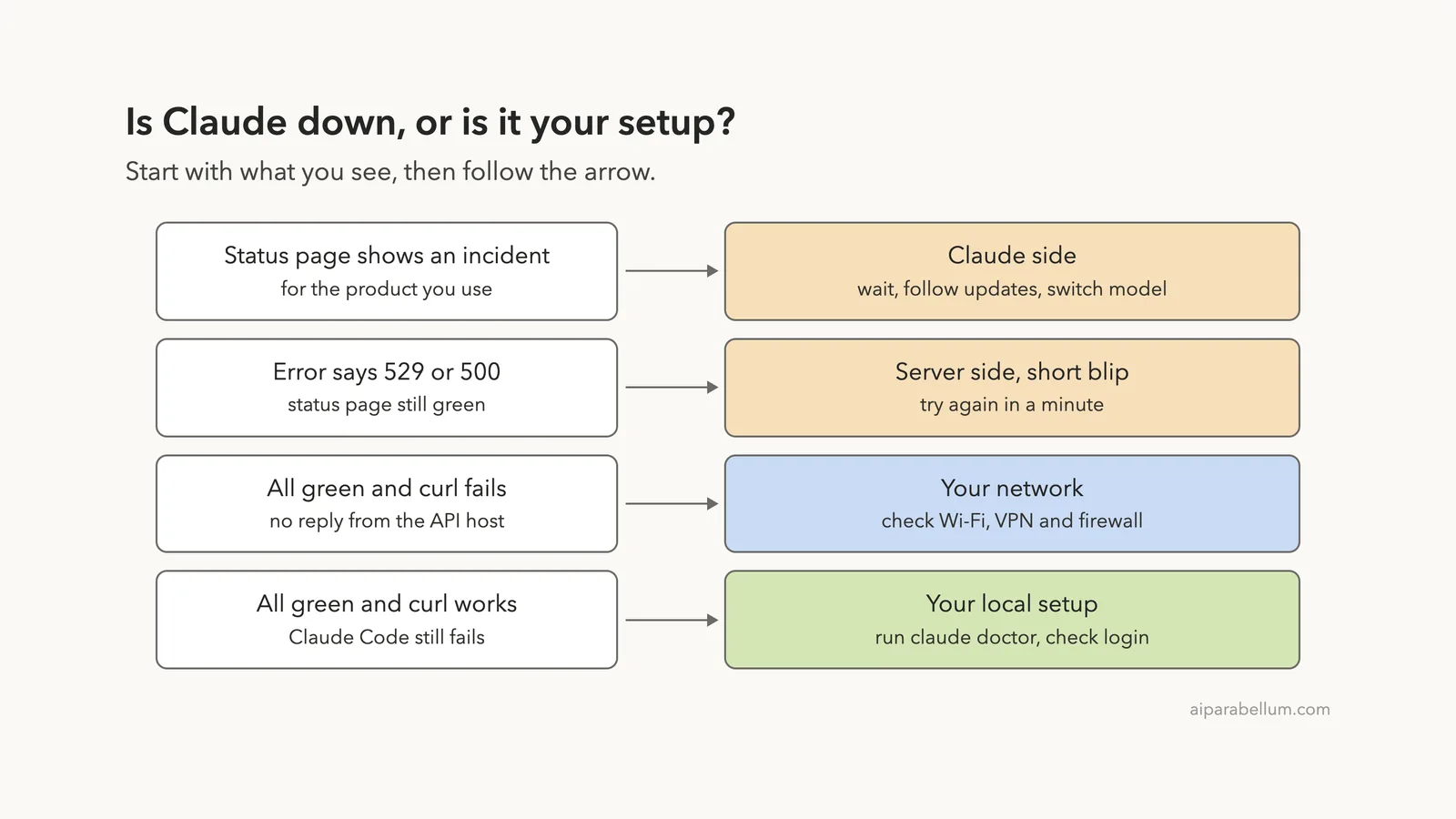
Match what you see to a row. The first column is the symptom, the last column is the first thing to do.
| What you see | What it means | What to do |
|---|---|---|
| Banner on the status page for your product | Anthropic has confirmed an incident | Wait, follow the updates, try another model |
API Error: Repeated 529 Overloaded errors | The API is at capacity for everyone | Try again in a few minutes or use /model |
API Error: 500 Internal server error | An unexpected failure inside the API | Wait a minute, then type try again |
Status page all green, curl fails | Your network cannot reach Claude | Check Wi-Fi, VPN and firewall |
Status page all green, curl works | Something in your local setup | Run claude doctor and check your login |
How to Check Claude Status on the Official Page
Type status.claude.com into any browser. You do not need to sign in. The page has three parts worth knowing: the banner, the product list and the incident log.
The Banner at the Top
When an incident is open, it sits in a colored box above everything else. The box gives the incident name, the latest update and the time in UTC. When nothing is open, there is no incident box.
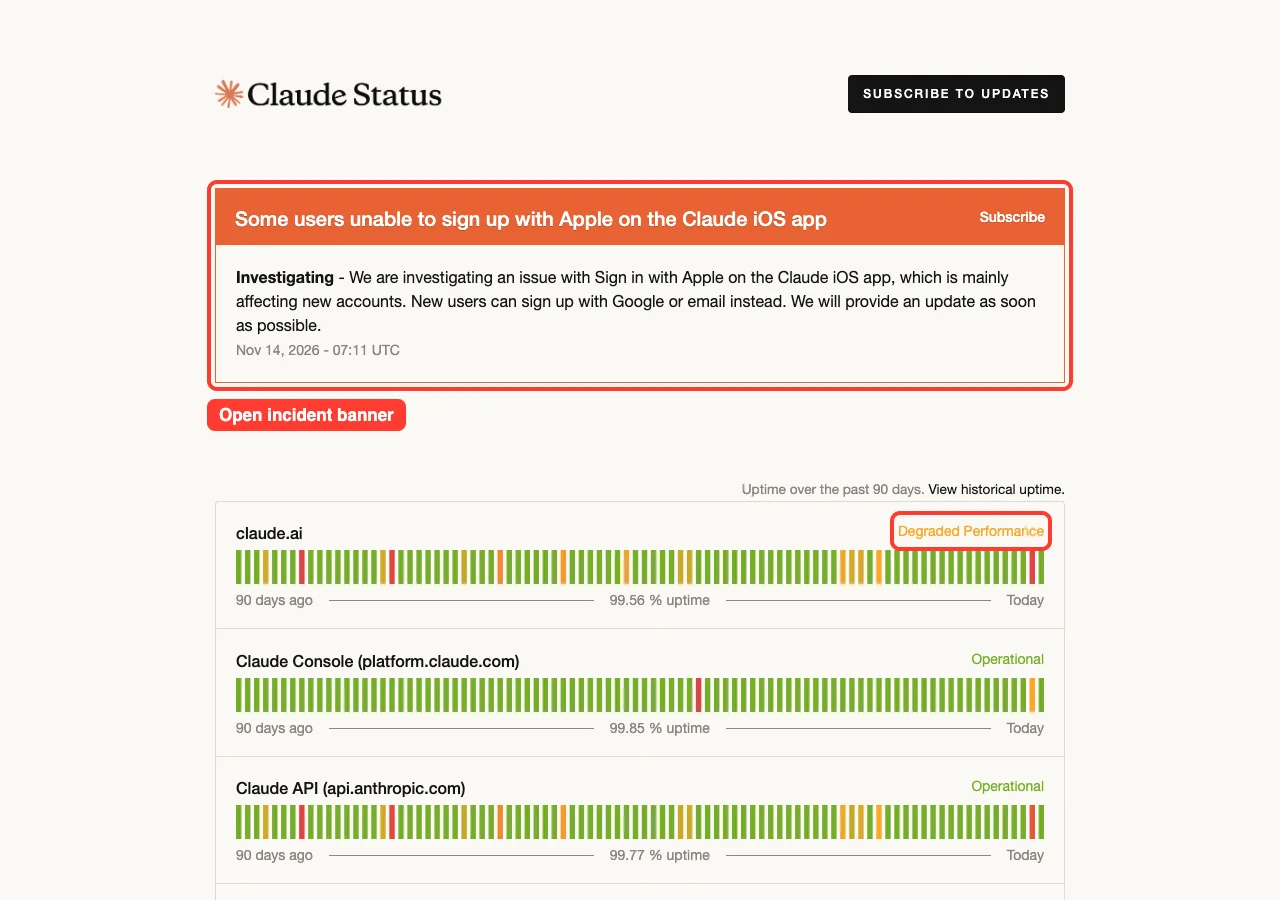
Read the banner text before you worry. On the day we checked, the open incident was about Sign in with Apple on the iOS app for new accounts. Claude Code and the API were not part of it, and our own Claude Code session worked normally.
An open incident does not mean everything is down. Check which product it names.
The Product List
Below the banner, each Claude product has its own row with a status on the right. These are the rows we saw:
- claude.ai, the chat app on the web and in the mobile and desktop apps
- Claude Console at platform.claude.com
- Claude API at api.anthropic.com
- Claude Code
- Claude Cowork
- Claude for Government
- Claude on Cloud Platforms, a group you can expand
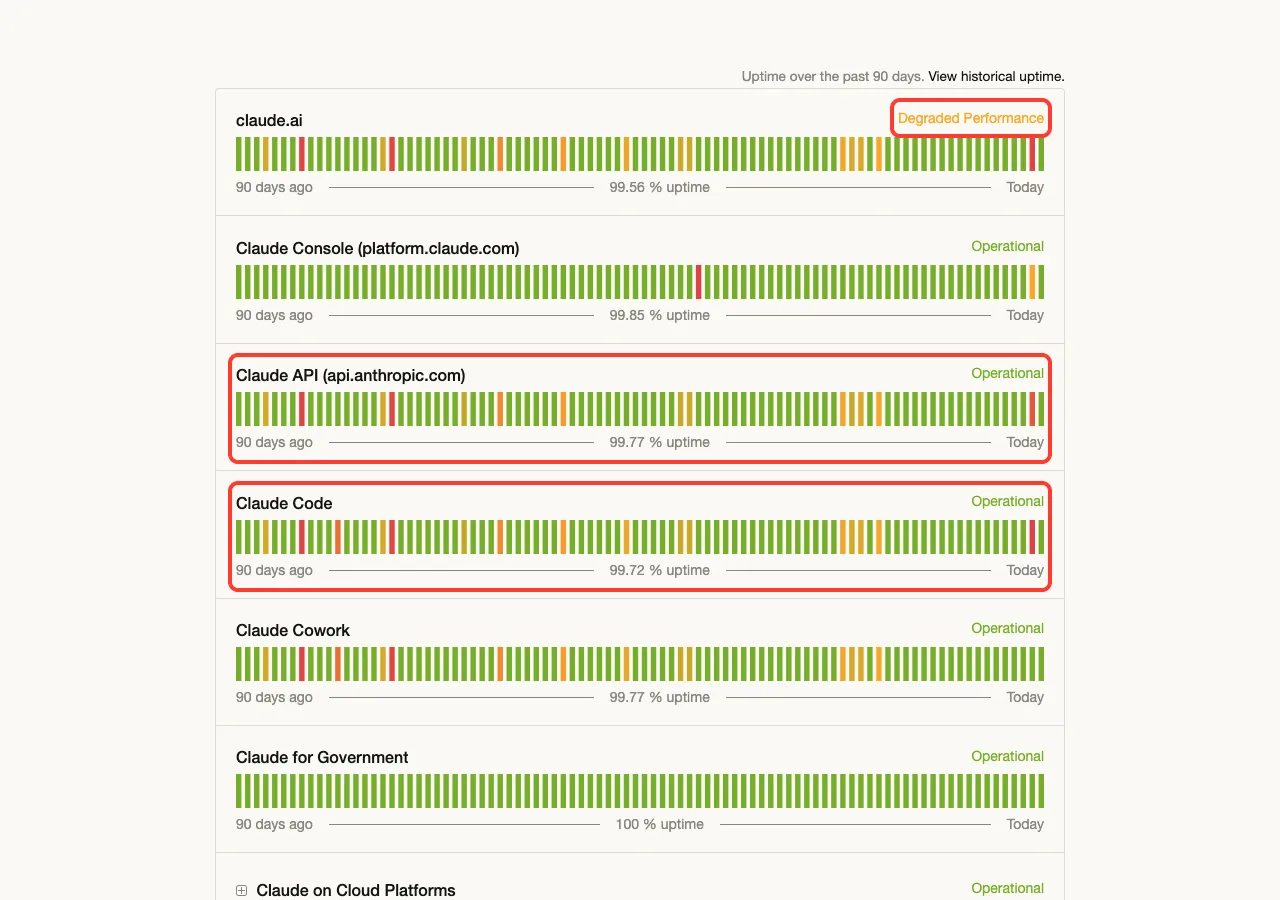
If you use Claude Code, check two rows: Claude Code and Claude API. Many past incidents list both, because Claude Code sends its requests to the API.
Each row also has a bar of 90 small blocks, one per day, and an uptime figure. On the day we checked, the page showed 99.72 percent for Claude Code and 99.77 percent for the Claude API over the past 90 days. Those numbers change daily, so treat them as a snapshot.
What the Status Words Mean
The status on each row uses a small set of labels. Here is how to read them.
| Status | Plain meaning |
|---|---|
| Operational | Working normally |
| Degraded Performance | Working, but slower or with some errors |
| Partial Outage | Part of the product is not working |
| Major Outage | The product is not working for most people |
| Under Maintenance | Planned work is in progress |
How to Read an Incident Report
Scroll down the home page to Past Incidents. It lists recent days in order, with each incident’s name and every update Anthropic posted.
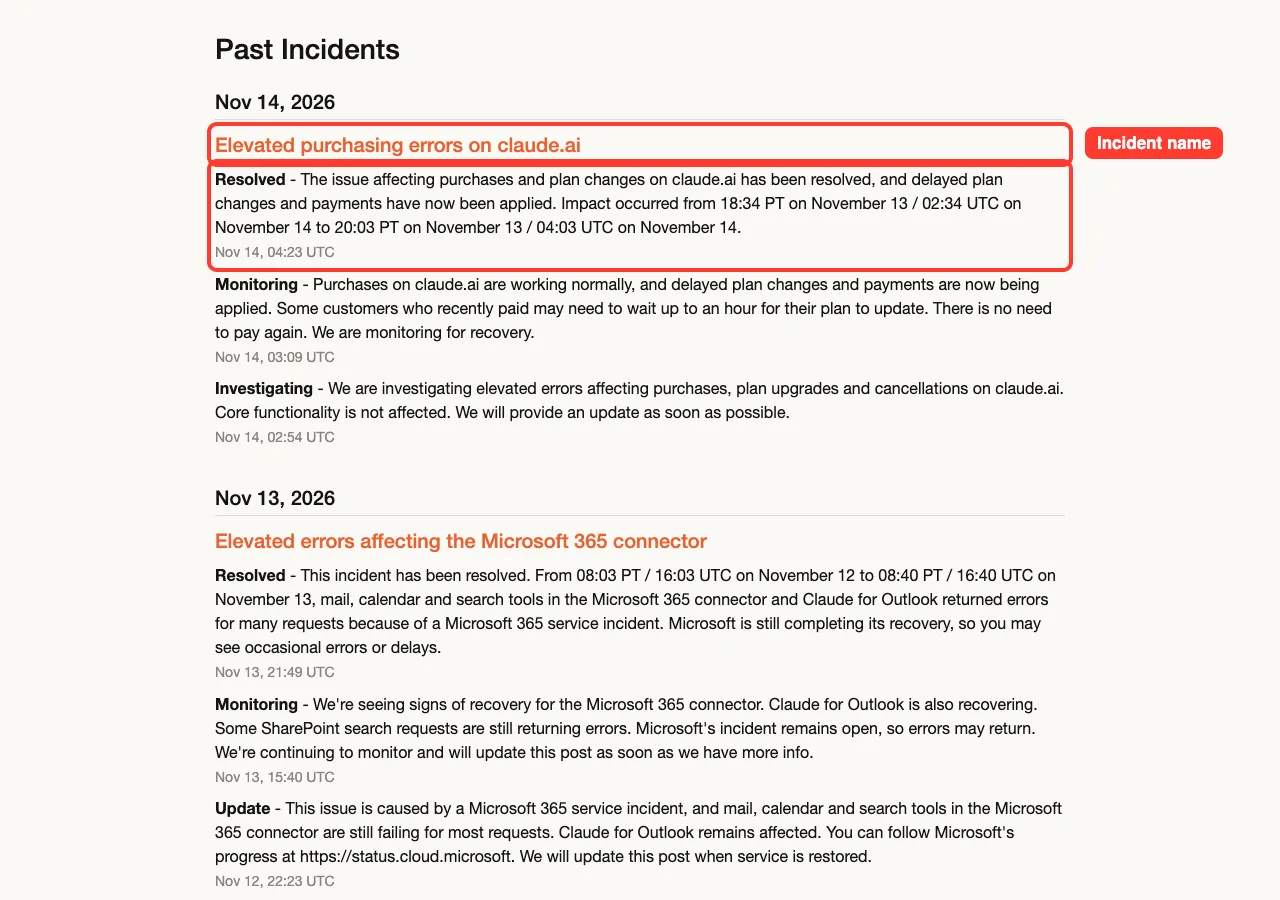
Click an incident name to open its full report. Each update starts with a word that tells you how far along the fix is.
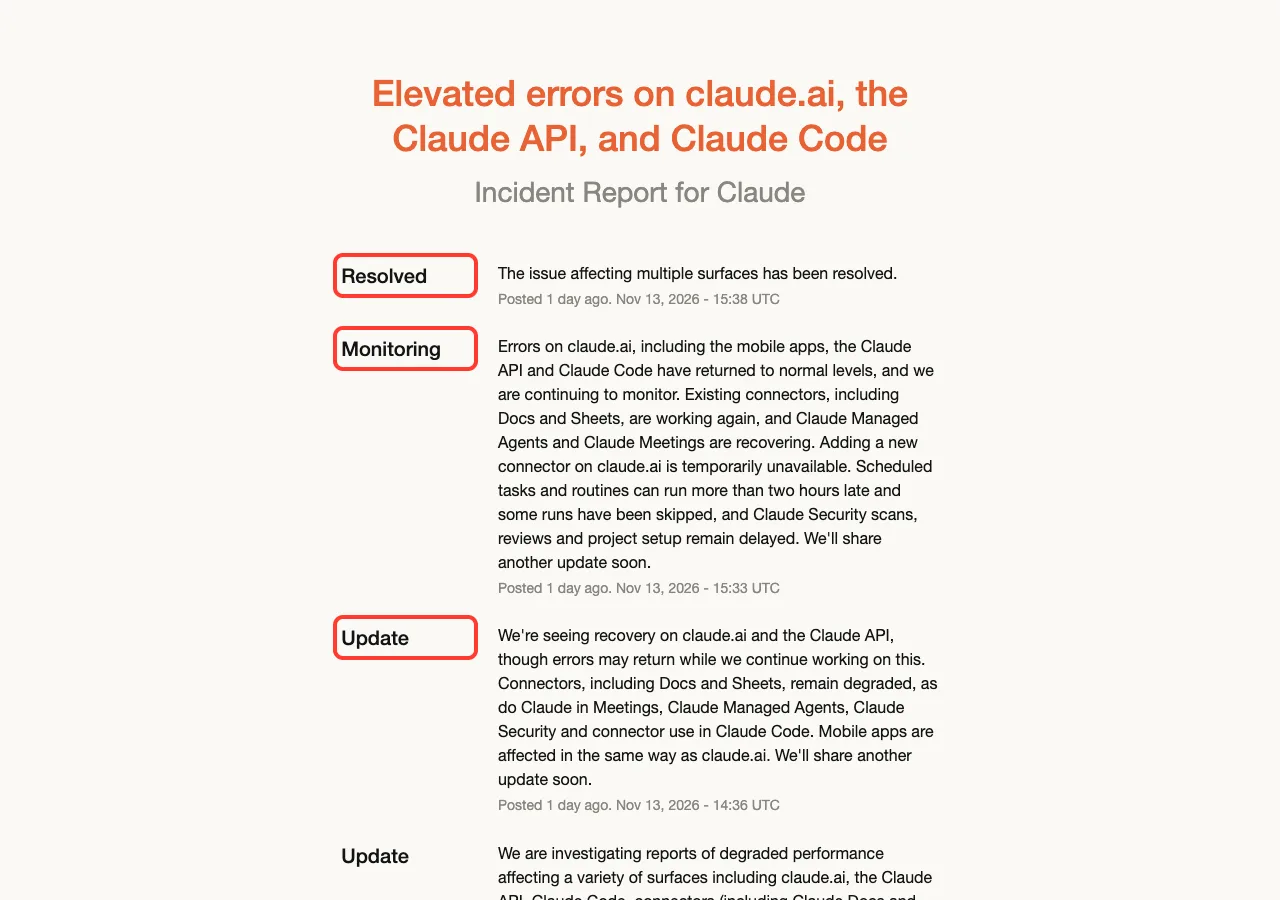
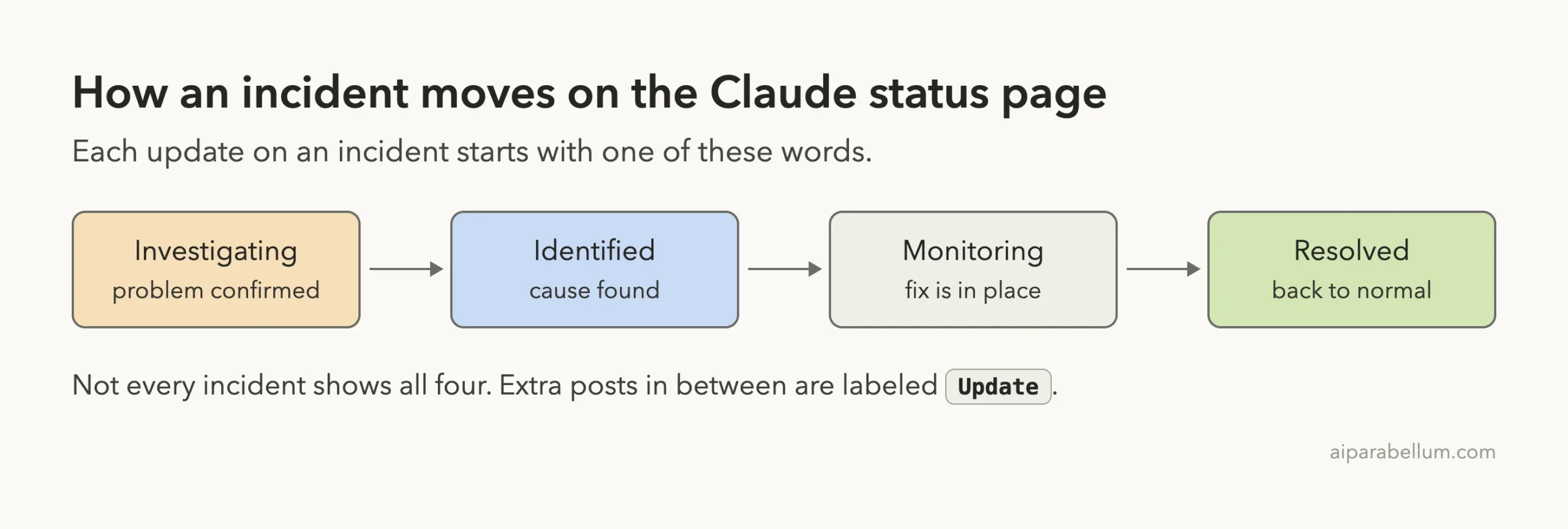
Monitoring is the stage people misread most. It means a fix is in place and Anthropic is watching, so things should be working again for you. If you still see errors at that stage, wait a few minutes and retry before changing anything on your machine.
Real Examples From the Status Page
These three incidents are taken straight from the status page. They show how different one incident can be from the next.
| Date | Incident name | What the page said |
|---|---|---|
| November 13, 2026 | Elevated errors on claude.ai, the Claude API, and Claude Code | First post at 13:09 UTC, marked Resolved at 15:38 UTC. Connectors recovered later than the main products. |
| November 8, 2026 | Degraded performance for Claude Fable 5.1 | Affected one model. The page gives the impact window as 08:18 to 08:32 UTC. |
| September 29, 2026 | Elevated errors on claude.ai, Claude Code, Claude Cowork and the Claude API | The page gives the impact window as 14:00 to 14:59 UTC. Sign-in was affected, and one update asked signed-in users not to sign out. |
Two lessons come out of these. Some incidents hit a single model, so switching models gets you moving again. And during a sign-in incident, stay signed in, because signing out can lock you out until it is fixed.
Browse the Full History
For older incidents, open status.claude.com/history. It groups incidents by month and has a Filter Components button, so you can show only Claude Code or only the API.
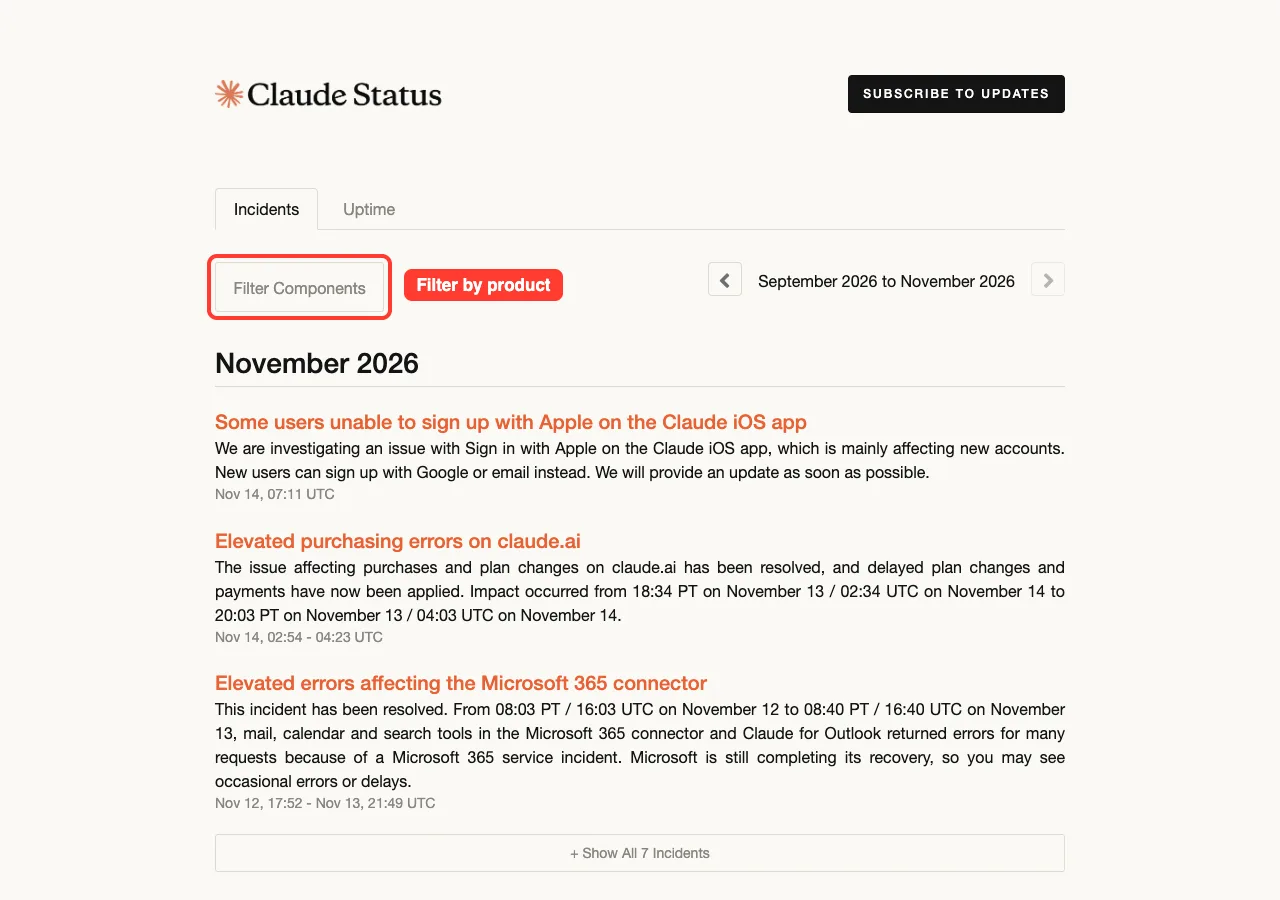
The Uptime tab next to it shows the same data as a calendar. It is useful when you want to know whether a bad afternoon last week was a real incident.
Get Alerts Instead of Refreshing the Page
Click Subscribe to Updates at the top right of the status page. A small panel opens with a row of icons, one for each way to get notified.
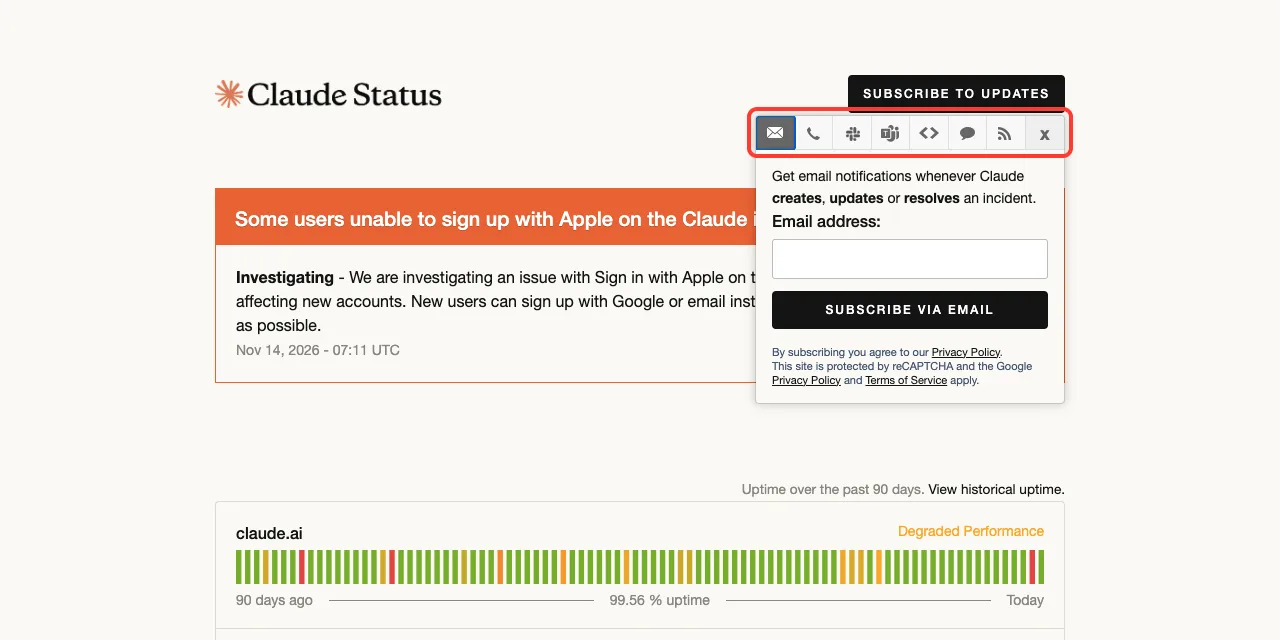
Email is the default and sends a message whenever an incident is created, updated or resolved. If your team lives in Slack or Teams, the matching icon posts updates into a channel instead. The RSS option works with any feed reader.
You can also subscribe to a single incident. Each open incident has its own Subscribe link in the banner, which is handy when you only want to know when this one is over.
Check Claude Status From Your Terminal
If you work in a terminal all day, you do not have to open a browser. The status page has a public JSON feed, and curl can read it. We ran these three commands on a Mac, using jq to tidy the output.
curl -s https://status.claude.com/api/v2/status.json | jq .status
curl -s https://status.claude.com/api/v2/components.json | jq -r '.components[] | "\(.status)  \(.name)"'
curl -s https://status.claude.com/api/v2/incidents/unresolved.json | jq -r '.incidents[] | "\(.status): \(.name)"'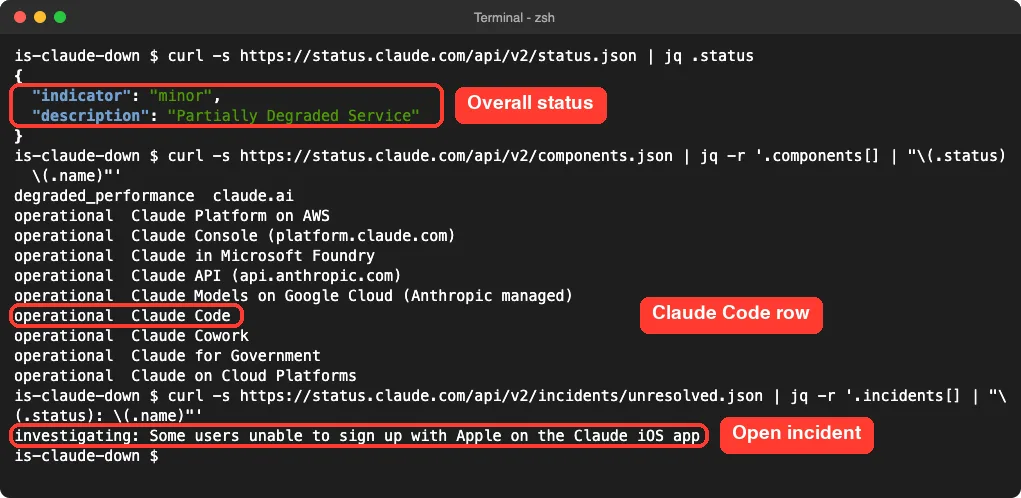
The first command gives the overall status in one line. The second prints every product with its status, and the third lists only incidents that are still open. If the third command prints nothing, there is no open incident.
Without jq, the commands still work. You just get the raw JSON on one long line.
How to Tell an Outage From a Local Problem
The status page says Operational, yet Claude still does not answer. Now the question changes from “is Claude down” to “what is wrong on my side”. Three quick checks answer it.
Check 1: Can Your Network Reach Claude?
Run this in the same terminal where you use Claude Code. It is the first step in Anthropic’s own connection troubleshooting.
curl -sSI https://api.anthropic.com | head -1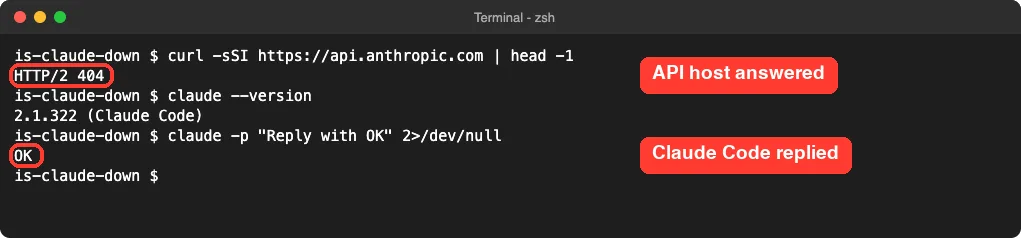
Any HTTP status line means the host answered. The 404 in our screenshot is a good result, because you are testing whether the server is reachable, not asking for a real page.
If curl prints an error instead, your network is the problem. Try another website, turn your VPN off and on, and check whether a company firewall blocks the host. Our guide to the unable to connect error walks through every case.
Check 2: Does a Tiny Prompt Work?
Send the smallest possible request. The -p flag runs one prompt and exits, as covered in our headless mode guide.
claude -p "Reply with OK"If you get OK back, Claude Code, your login and the API are all working. The trouble is then in one long session or one project, not in Claude itself.
Check 3: Run claude doctor
The built-in checkup looks at your install. Run claude doctor from your shell, or /doctor inside a session.
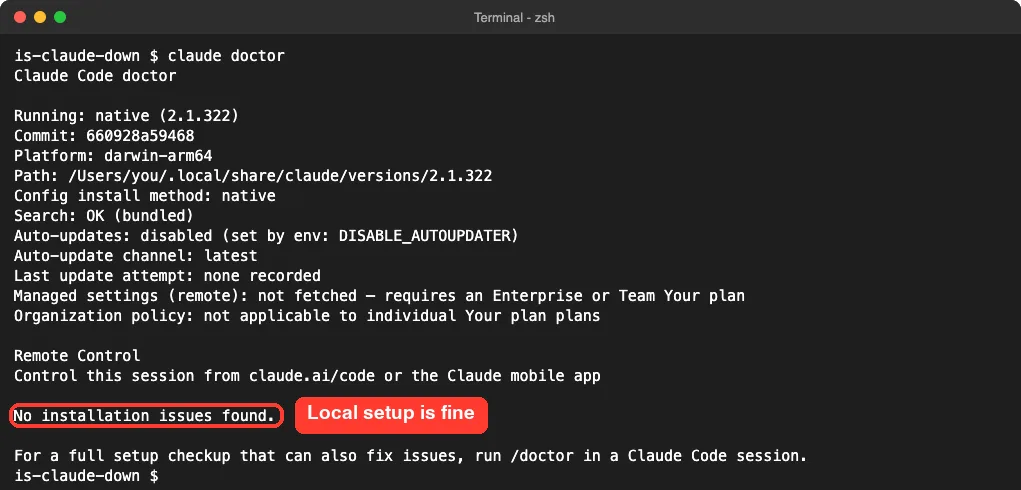
A clean result rules out a broken install. For what each line means, see our doctor walkthrough.
Check 4: Try Another Device or App
Open the chat app on your phone using mobile data instead of Wi-Fi. If it works there and not on your computer, the issue is your computer or your network, not Claude.
The reverse is useful too. If the chat app fails but Claude Code works, look at the claude.ai row on the status page, because the two products have separate rows and can have separate problems.
What Claude Code Shows During an Outage
Claude Code does not fail on the first bad response. The official error reference says it retries transient failures up to 10 times with growing pauses, and shows a countdown with the attempt number while it does.
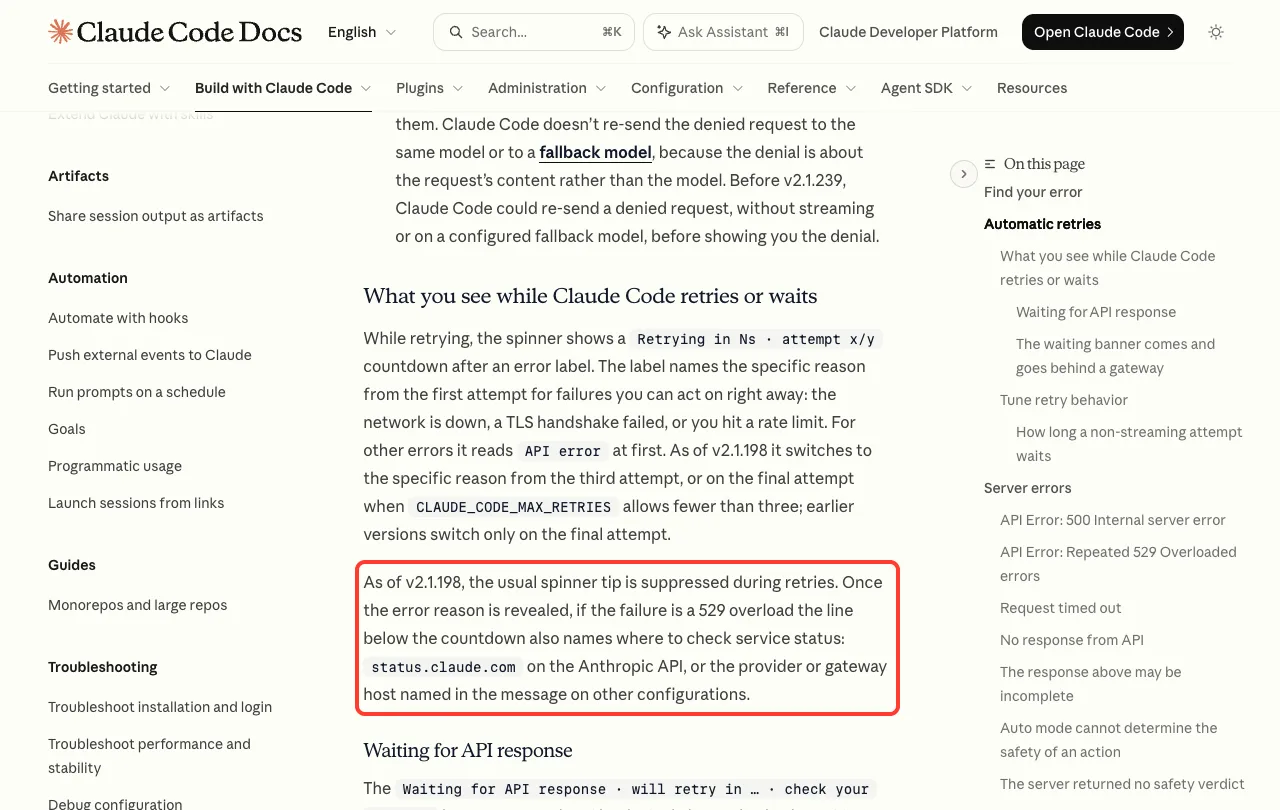
So a long pause with a retry countdown is often the first sign of trouble on the server side. If the retries run out, you get one of two messages.
529 Overloaded
The docs give this exact text:
API Error: Repeated 529 Overloaded errors. The API is at capacity — this is usually temporary. Try again in a moment. If it persists, check https://status.claude.com.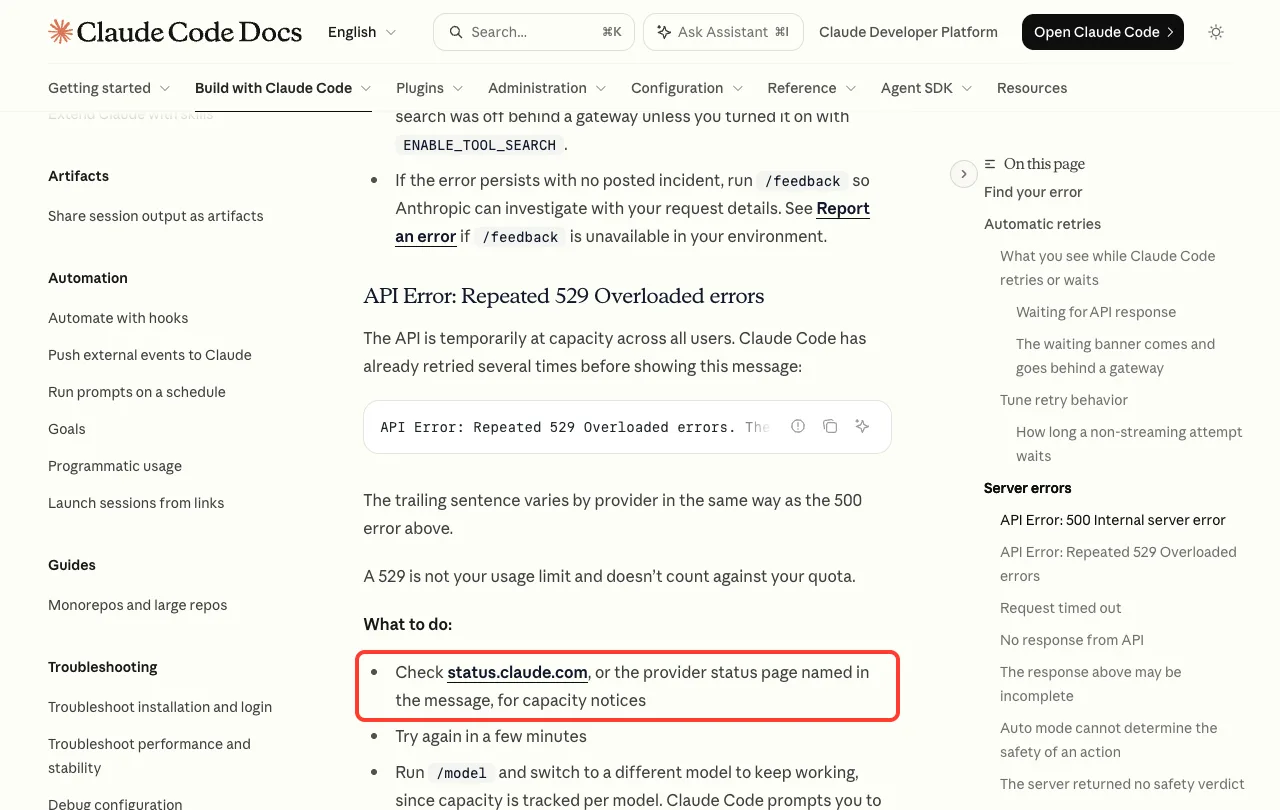
A 529 means the API is at capacity across all users. It is not about your plan, and the docs state it does not count against your quota. Our error 529 guide covers it in depth.
500 Internal Server Error
The second message reads API Error: 500 Internal server error and also ends by pointing to the status page. The docs are clear about whose fault it is.
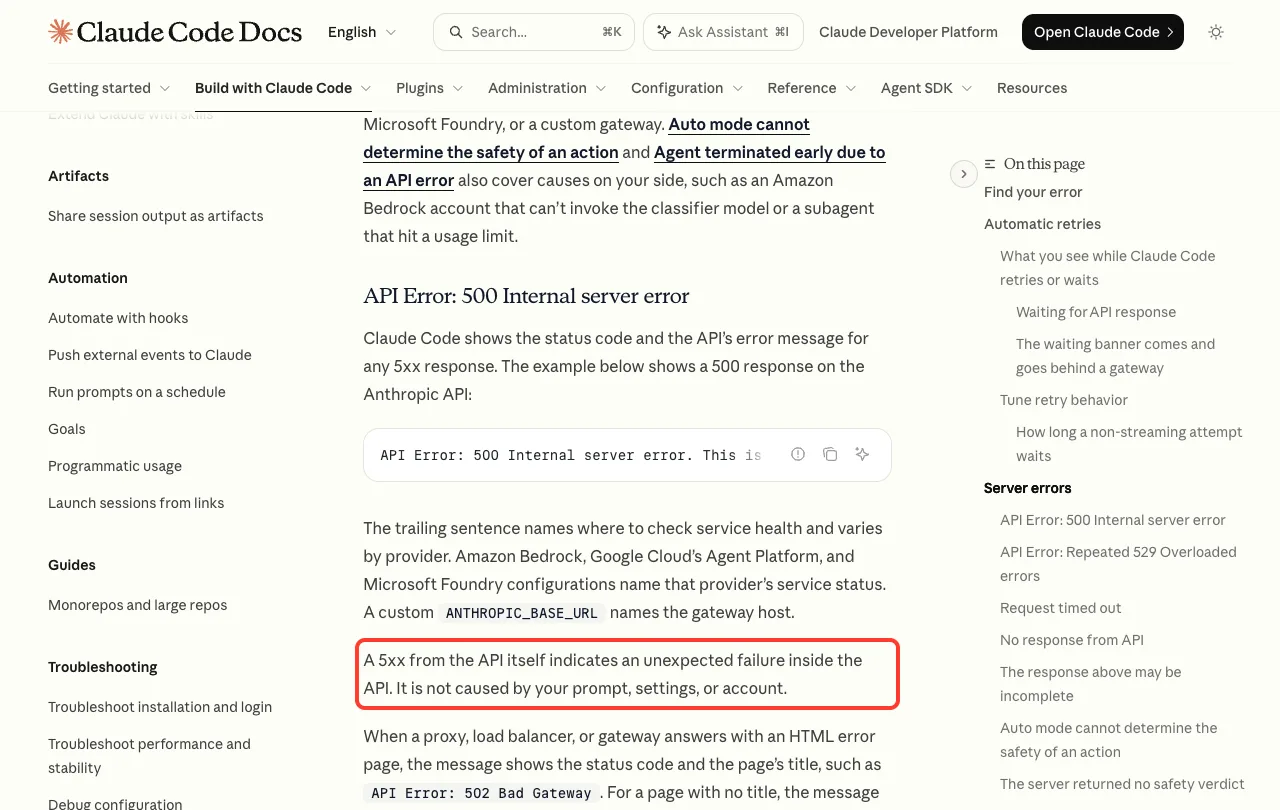
One detail from the docs matters if you use a cloud provider. On Amazon Bedrock, Google Cloud or Microsoft Foundry, the message names that provider’s status page instead, and with a custom ANTHROPIC_BASE_URL it names your gateway host. Check the page the message names, not just Anthropic’s.
Errors That Are Not an Outage
Several messages look like downtime but are not. Knowing them saves you from waiting for a fix that will never come.
- A session or weekly limit message is your plan’s usage limit. See our guide to the usage limit message.
- A
429is a rate limit on your key or project. See the error 429 guide. - A sign-in prompt that keeps coming back is a login problem. See how to fix the login loop.
- For everything else, our list of common errors matches each message to a fix.
How to Keep Working While Claude Is Down
An incident rarely means you have to stop. These steps come from the official docs and from what the status page itself shows.
- Switch models. The docs say capacity is tracked per model, so run
/modeland pick a different one. Our guide on how to choose a model shows the menu. - Resend without retyping. The docs note that your original message stays in the conversation, so you can type
try againinstead of pasting a long prompt. - Stay signed in. During the September 29 incident, Anthropic asked signed-in users not to sign out while sign-in was affected.
- Do the work that needs no model. Your files, your editor, your tests and Git all run on your machine and are not affected.
- Come back to the same conversation. Close the session and later run
claude --continueto pick up where you stopped. See our guide to resume sessions. - Use the other surface. If only claude.ai is listed in the incident, Claude Code may be fine, and the other way around.
If the error keeps coming back and the status page shows nothing, the docs suggest running /feedback so Anthropic can look at your request details.
Try It Yourself
Run this one-minute health check now, while everything works, so you know what normal looks like. Paste the three lines into your terminal.
curl -s https://status.claude.com/api/v2/status.json | jq .status
curl -sSI https://api.anthropic.com | head -1
claude -p "Reply with OK"
On a good day you get an overall status, an HTTP line and OK. The next time something feels wrong, run the same three lines and see which one changed.
Common Mistakes
- Reading only the banner. An open incident may be about a product you are not using.
- Checking only the Claude Code row. Look at the Claude API row as well.
- Treating a usage limit as an outage. A limit message names a reset time, and waiting for a fix will not help.
- Signing out and back in during an incident. If sign-in is affected, you may not get back in.
- Reinstalling Claude Code because of a 529 or 500. Those errors come from the server, and a reinstall changes nothing.
- Forgetting that times on the status page are in UTC, not your local time.
Pro Tips
- Subscribe to the status page by email or RSS once, and you will know about an incident before you hit it.
- Bookmark
status.claude.com/historywith the Claude Code filter on. It answers “was that an outage?” in seconds. - Save the terminal check as a shell alias, so one short word prints the current status.
- If your company runs Claude Code through a cloud provider, bookmark that provider’s status page too. Our guide to using Bedrock, Vertex or Foundry as cloud providers explains those setups.
- Keep Claude Code current with
claude update. The docs list several retry improvements in recent versions.
Frequently Asked Questions
How do I know if Claude is down for everyone or just me?
Open status.claude.com and look for a banner and the row for your product. If the page shows an incident, it is not just you. If everything is Operational, run curl -I https://api.anthropic.com to test your own connection.
Does Claude Code have its own status?
Yes, Claude Code has its own row on the status page, separate from claude.ai and the Claude API. Because Claude Code sends requests to the API, check both rows.
Is a 529 error the same as Claude being down?
Not quite. A 529 means the API is at capacity, and the docs call it usually temporary. Claude Code has already retried before showing it, so wait a few minutes or switch models with /model.
Why does the status page say Operational when Claude is not working for me?
Either the problem is local, such as your network, VPN or login, or it is very new and not posted yet. Run the three checks in this guide. If they pass and errors continue, check the page again after a few minutes.
Do I lose my work if Claude goes down in the middle of a task?
Files that Claude Code already changed stay on your disk, and the docs say your last message stays in the conversation. When service returns, type try again, or reopen the session later with claude --continue. You can read more about the assistant itself on our Claude AI page.
Conclusion
When you wonder whether Claude is down, start at status.claude.com: read the banner, then the rows for Claude Code and the Claude API. If the page is green, test your own side with curl -I https://api.anthropic.com, a one-line claude -p prompt and claude doctor. During a real incident, switch models with /model, stay signed in, type try again once service returns, and subscribe to updates so you hear about the fix without refreshing. For the exact wording of every server message, see the official error reference and the troubleshooting page.