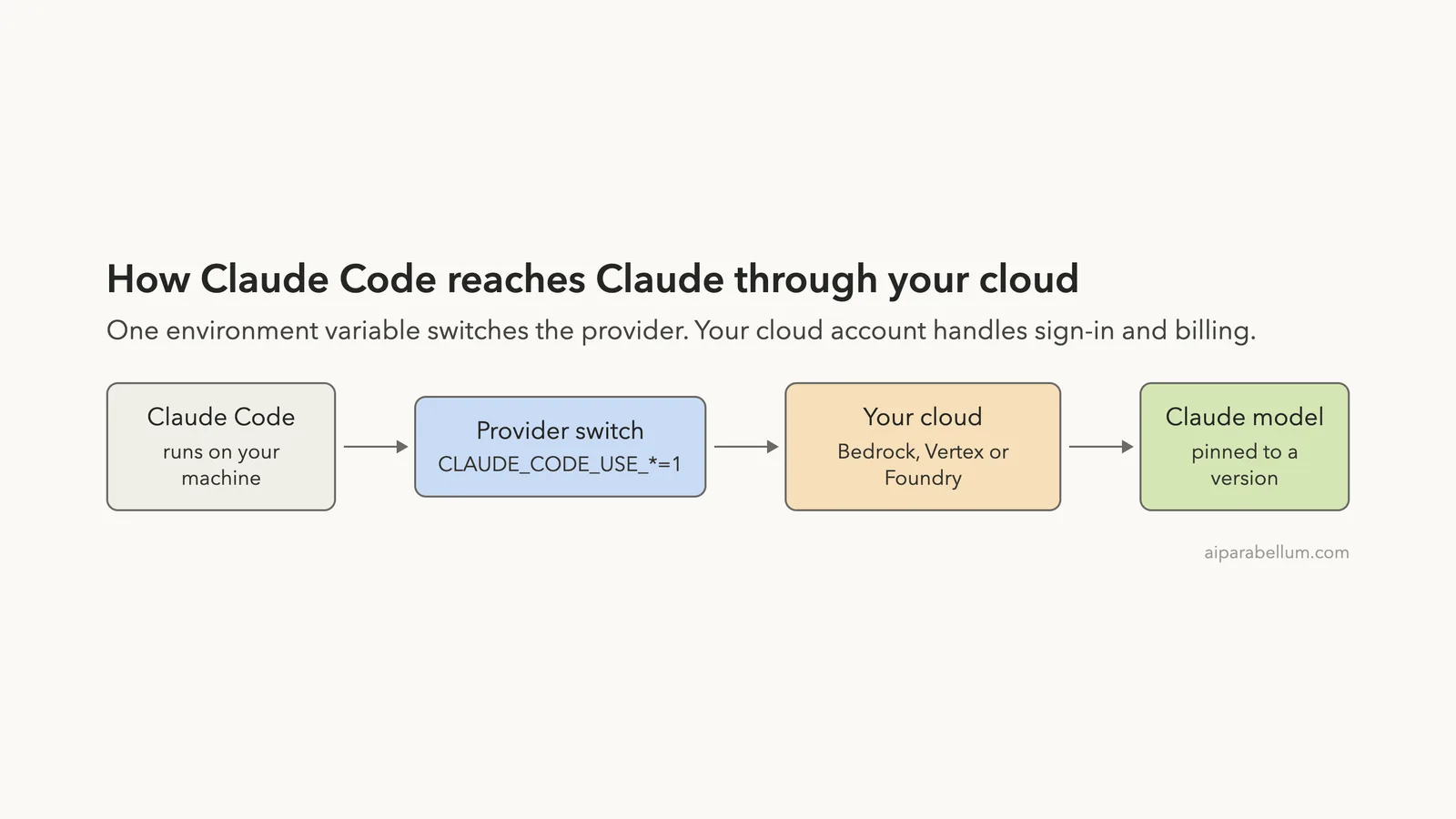
Does your company already pay for a big cloud, and you wonder if you can run Claude Code through it? You can. Claude Code Bedrock support, plus Google Vertex AI and Microsoft Foundry support, lets Claude Code send its requests through your own cloud account instead of a direct Anthropic sign-in.
In this guide you will learn what changes with each cloud, the exact environment variables to set, how to pin model versions so a rollout never breaks, and how to fix the most common errors.
This is Part 10 of 10 in our Advanced Claude Code series, part of our Claude Code tutorials. Last time we covered devcontainer safety.
Tested with Claude Code v2.1.312 on November 1, 2026.
We did not sign in to AWS, Google Cloud or Azure, because that needs a paid cloud account. Everything below follows Anthropic’s official documentation, shown with highlighted screenshots of the docs pages. The steps are the same on macOS, Windows and Linux, since they are environment variables and cloud console clicks.
Quick Summary: Claude Code on Your Own Cloud
The cloud changes where sign-in and billing happen. It does not change how you use Claude Code day to day.
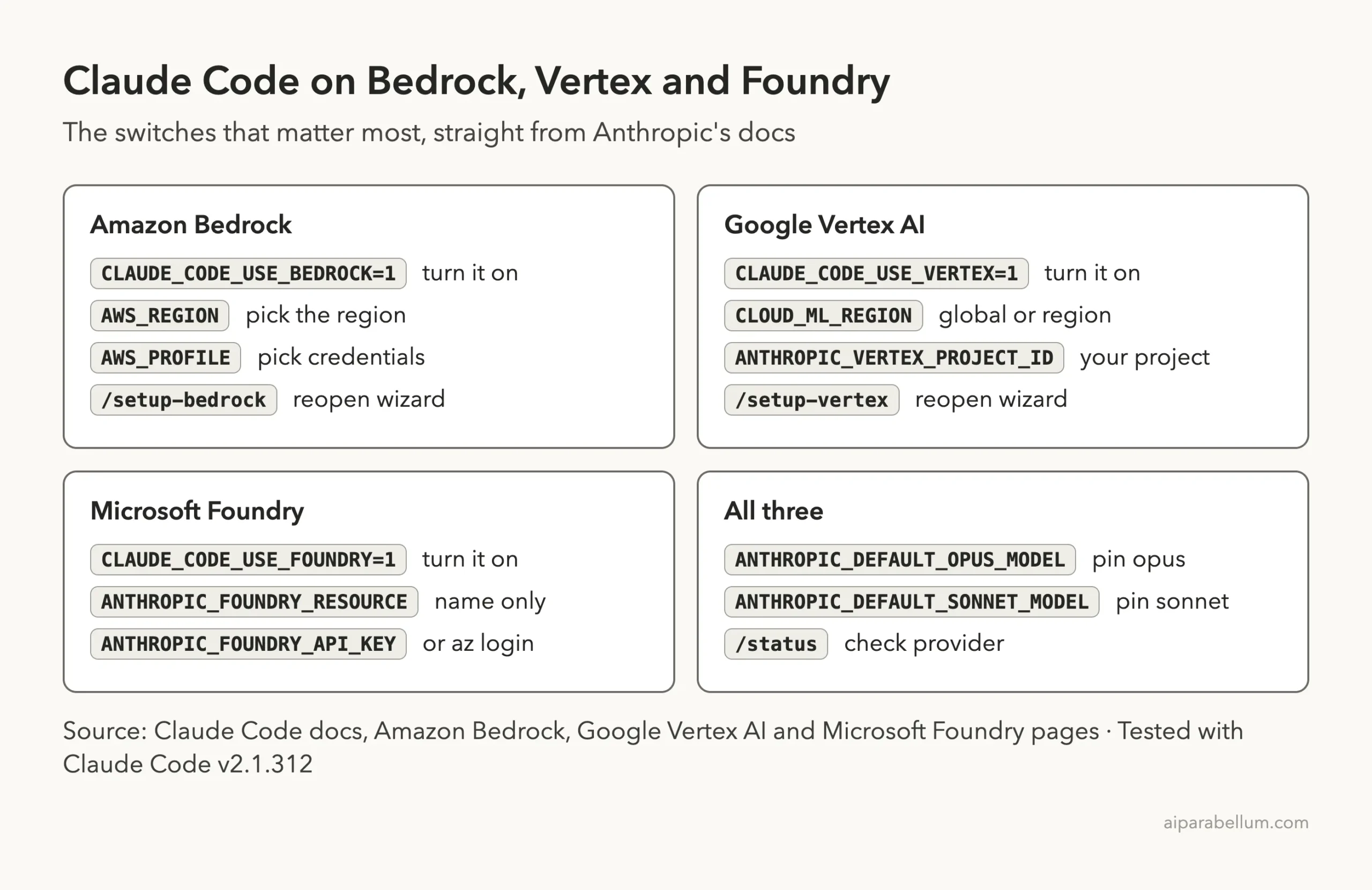
| Question | Amazon Bedrock | Google Vertex AI | Microsoft Foundry |
|---|---|---|---|
| Turn it on | CLAUDE_CODE_USE_BEDROCK=1 | CLAUDE_CODE_USE_VERTEX=1 | CLAUDE_CODE_USE_FOUNDRY=1 |
| Where you point it | AWS_REGION | CLOUD_ML_REGION and ANTHROPIC_VERTEX_PROJECT_ID | ANTHROPIC_FOUNDRY_RESOURCE |
| Login wizard | Yes, /setup-bedrock | Yes, /setup-vertex | No |
| Sign-in method | AWS credential chain or a Bedrock API key | Google Application Default Credentials | API key, Microsoft Entra ID or bearer token |
| Permission you need | Bedrock invoke actions in IAM | roles/aiplatform.user | Azure AI User or Cognitive Services User |
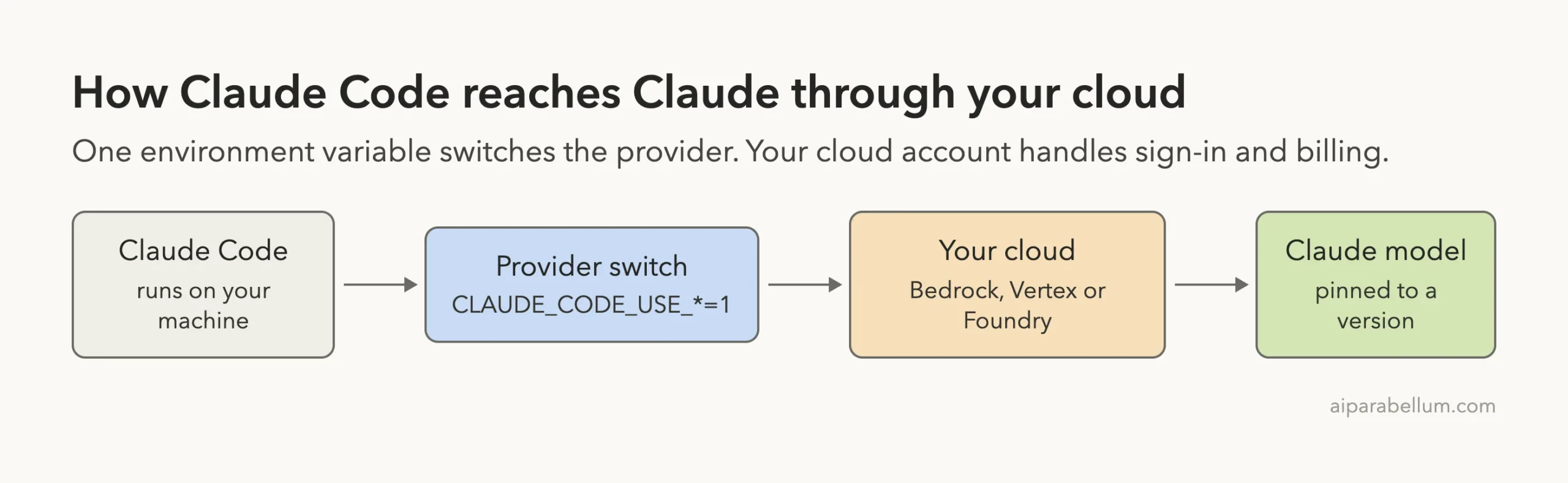
Why Run Claude Code Through Bedrock, Vertex or Foundry
Most people sign in to Claude Code with a Claude account. Teams that already buy cloud services often prefer to keep things in one place. Their security rules, billing and access controls already live in AWS, Google Cloud or Azure.
Anthropic’s docs list each of these as a supported way to configure Claude Code. Once you switch, the /logout command is unavailable on all three, because sign-in is handled by your cloud credentials. That is normal and not a bug.
If you are new to Claude Code itself, start with our install guide first, then come back here.
Which Cloud Should You Pick?
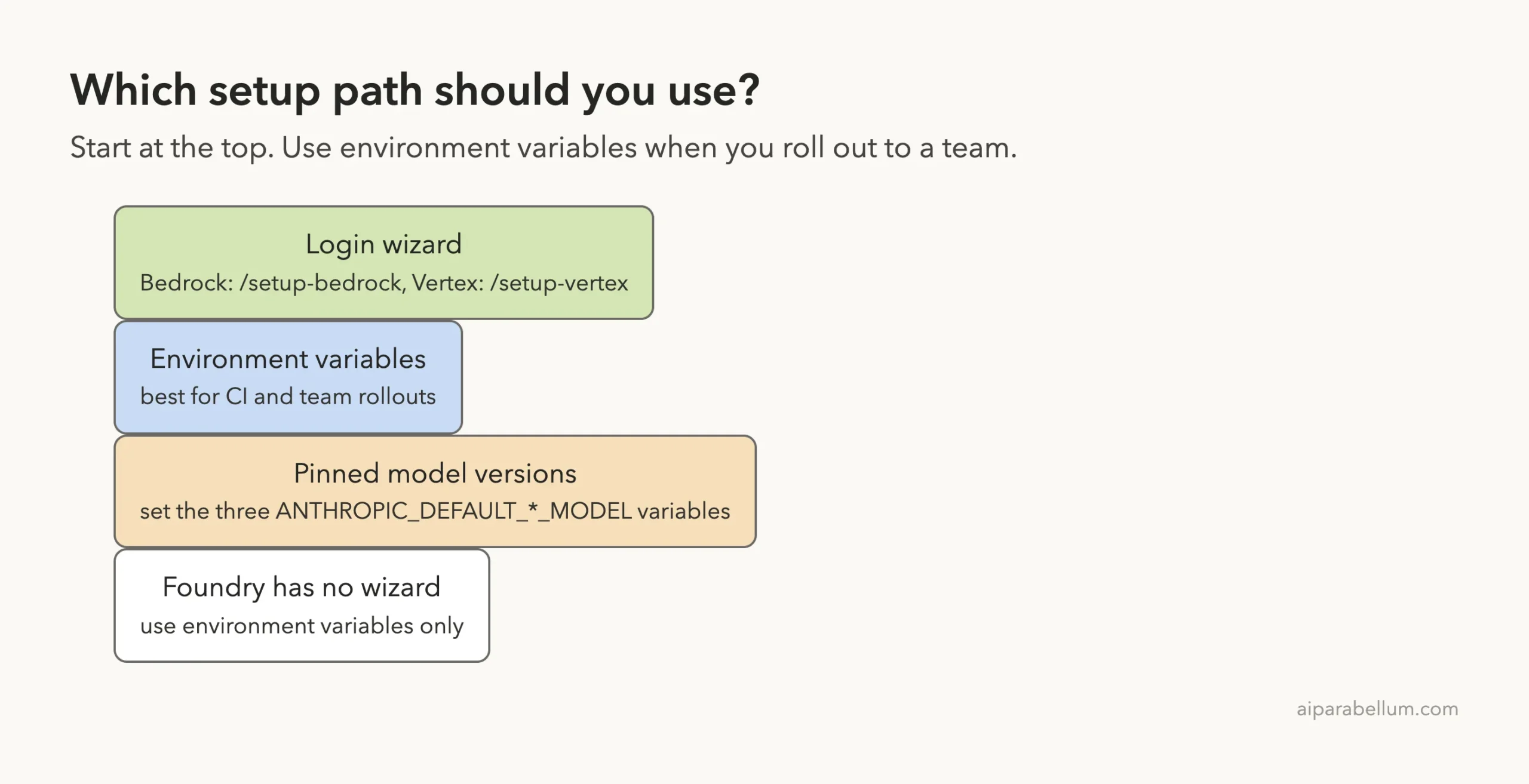
Pick the cloud your company already uses. The docs do not rank them. What differs is the setup: Bedrock and Vertex have a guided wizard, and Foundry is environment variables only.
Amazon Bedrock Setup Step by Step
Before you start, you need an AWS account with Amazon Bedrock access, access to the Claude models you want, and the right IAM permissions. The AWS CLI is optional and only needed if you have no other way to get credentials.
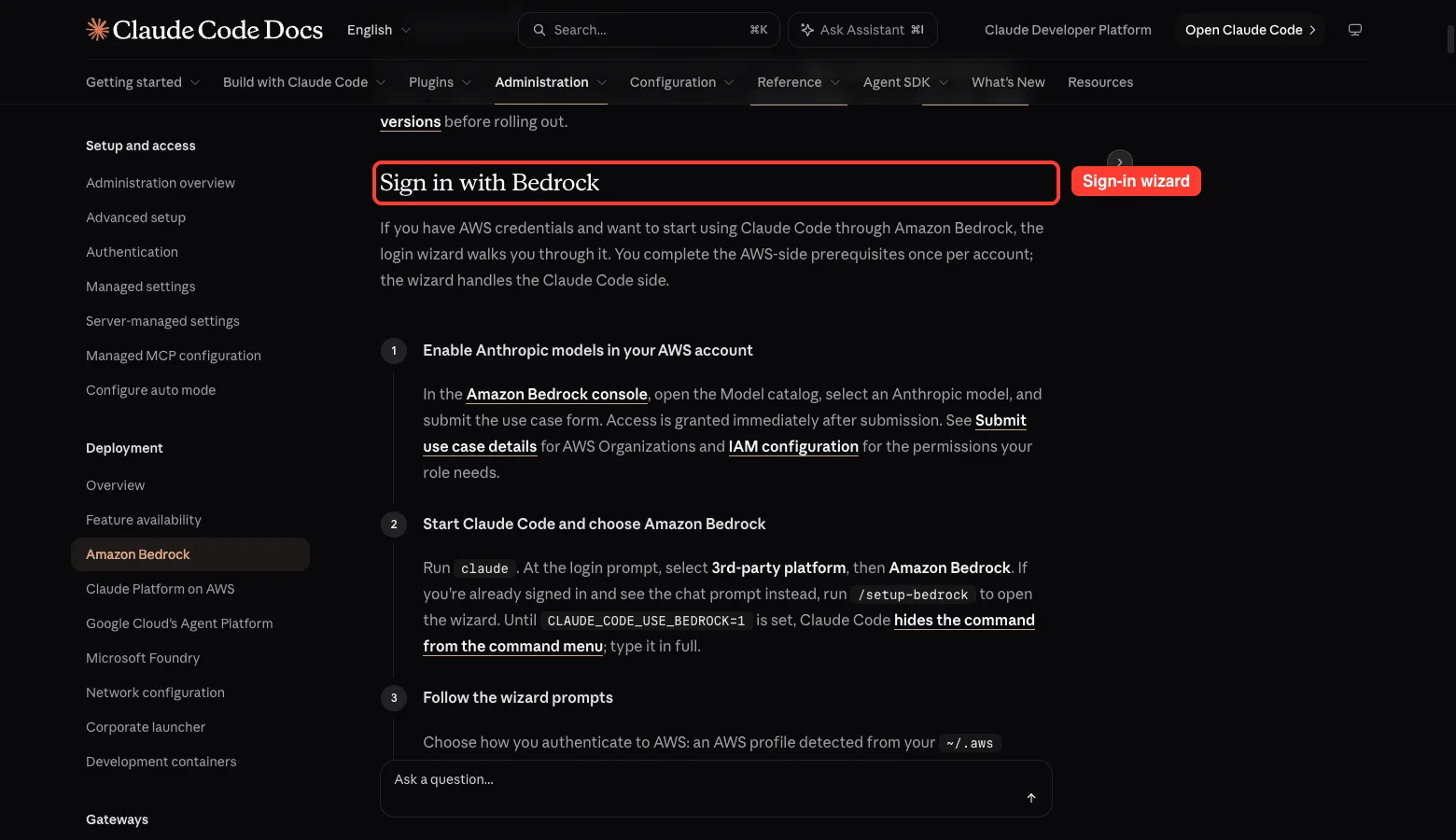
The Easy Way: The Sign-In Wizard
Anthropic describes three steps. First, in the Amazon Bedrock console, open the Model catalog, pick an Anthropic model and submit the use case form. The docs say access is granted immediately after you submit it.
Second, run claude. At the login prompt choose 3rd-party platform, then Amazon Bedrock.
If you are already signed in and see the chat prompt, type /setup-bedrock in full. Until CLAUDE_CODE_USE_BEDROCK=1 is set, the command is hidden from the command menu.
Third, follow the wizard. You choose how to sign in to AWS: a profile found in your ~/.aws folder, a Bedrock API key, an access key and secret, or credentials already in your environment. The wizard asks for a region, checks which Claude models your account can use, lets you pin them, and saves everything to your user settings file.
The Manual Way: Environment Variables
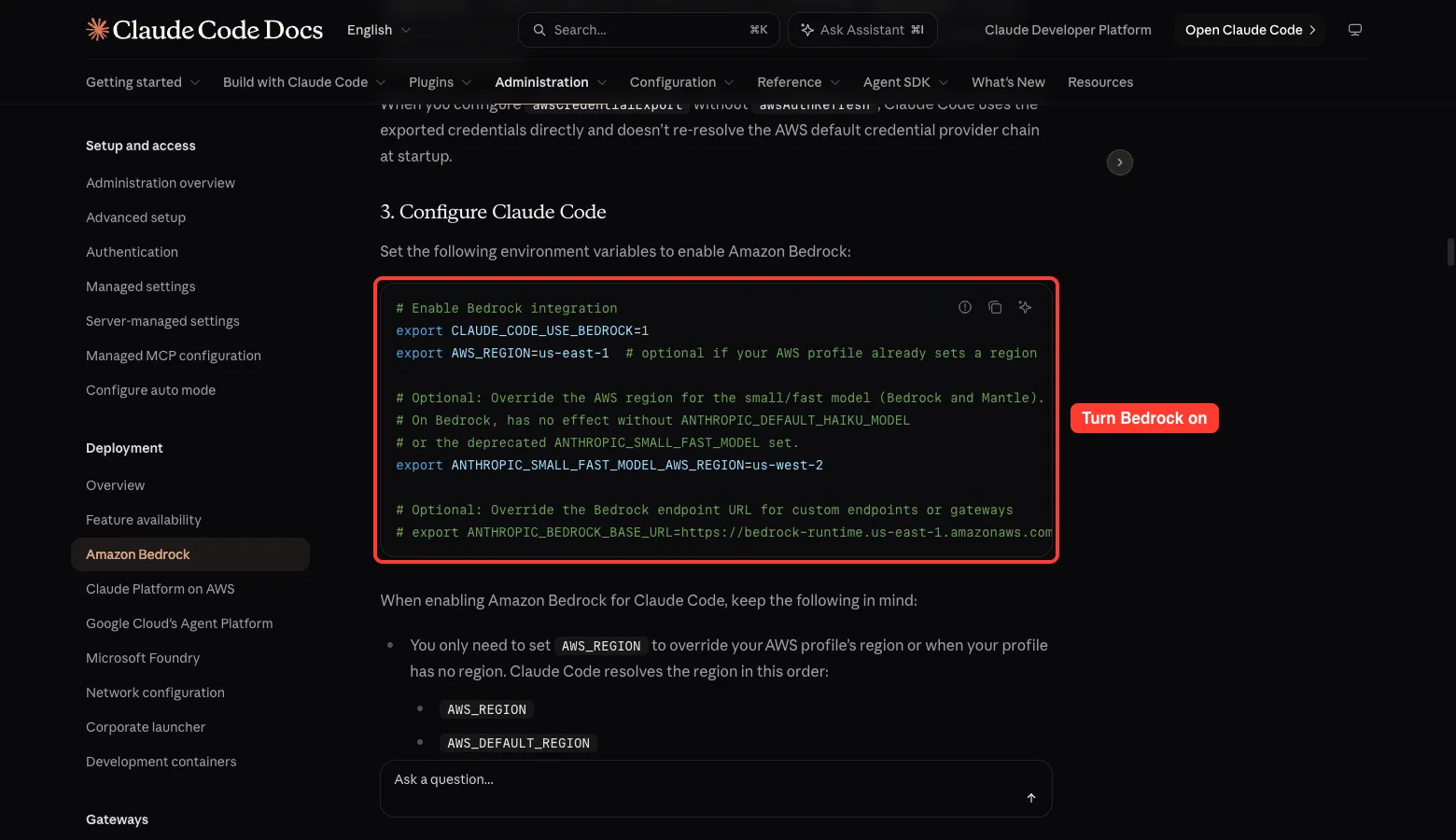
Use this path for CI or a scripted team rollout. Claude Code uses the default AWS SDK credential chain, so if your machine already supplies credentials, such as an EC2 instance profile, you can skip straight to the Claude Code settings.
The docs list several ways to provide credentials:
aws configuresaves an IAM user key in your~/.awsfolder.- Access key variables set a key, or temporary credentials with a session token, in the current shell only.
- An SSO profile signs you in through IAM Identity Center, using
aws sso loginandAWS_PROFILE. aws loginsigns you in with your console credentials. It needs AWS CLI 2.32.0 or later and lasts up to 12 hours.- A Bedrock API key goes in
AWS_BEARER_TOKEN_BEDROCK. When it is set, Claude Code uses it and skips the credential chain.
AWS itself warns against long-lived IAM user access keys for real work, and the docs repeat that warning. Prefer SSO or short-term credentials when you can.
Then switch Bedrock on:
export CLAUDE_CODE_USE_BEDROCK=1
export AWS_REGION=us-east-1
You only need AWS_REGION when your profile has no region or you want to override it. Claude Code checks AWS_REGION, then AWS_DEFAULT_REGION, then your profile region, then falls back to us-east-1. Run /status to see the region it chose.
The IAM Permissions You Need
The docs give a policy that allows bedrock:InvokeModel, bedrock:InvokeModelWithResponseStream, bedrock:ListInferenceProfiles and bedrock:GetInferenceProfile on inference profiles and foundation models. It also includes a Marketplace subscription statement. For tighter control you can limit the resources to specific inference profile ARNs.
Anthropic also suggests a dedicated AWS account for Claude Code. That makes cost tracking and access control simpler.
Google Vertex AI Setup Step by Step
The docs now call this service Google Cloud’s Agent Platform, formerly Vertex AI. The login prompt still says Google Vertex AI, and so do the environment variables. You need a Google Cloud account with billing, a project with the API enabled, access to the Claude models, the gcloud tool and quota in your region.
Wizard or Manual
The wizard works like the Bedrock one. Run claude, pick 3rd-party platform, then Google Vertex AI. Later, /setup-vertex reopens it to change credentials, project, region or model pins.
For the manual route, enable the API and request model access in the Model Garden. The docs say approval may take 24 to 48 hours, so do this first.
gcloud config set project YOUR-PROJECT-ID
gcloud services enable aiplatform.googleapis.com
Sign in with standard Google Cloud authentication, for example gcloud auth application-default login. Then set the variables:
export CLAUDE_CODE_USE_VERTEX=1
export CLOUD_ML_REGION=global
export ANTHROPIC_VERTEX_PROJECT_ID=YOUR-PROJECT-ID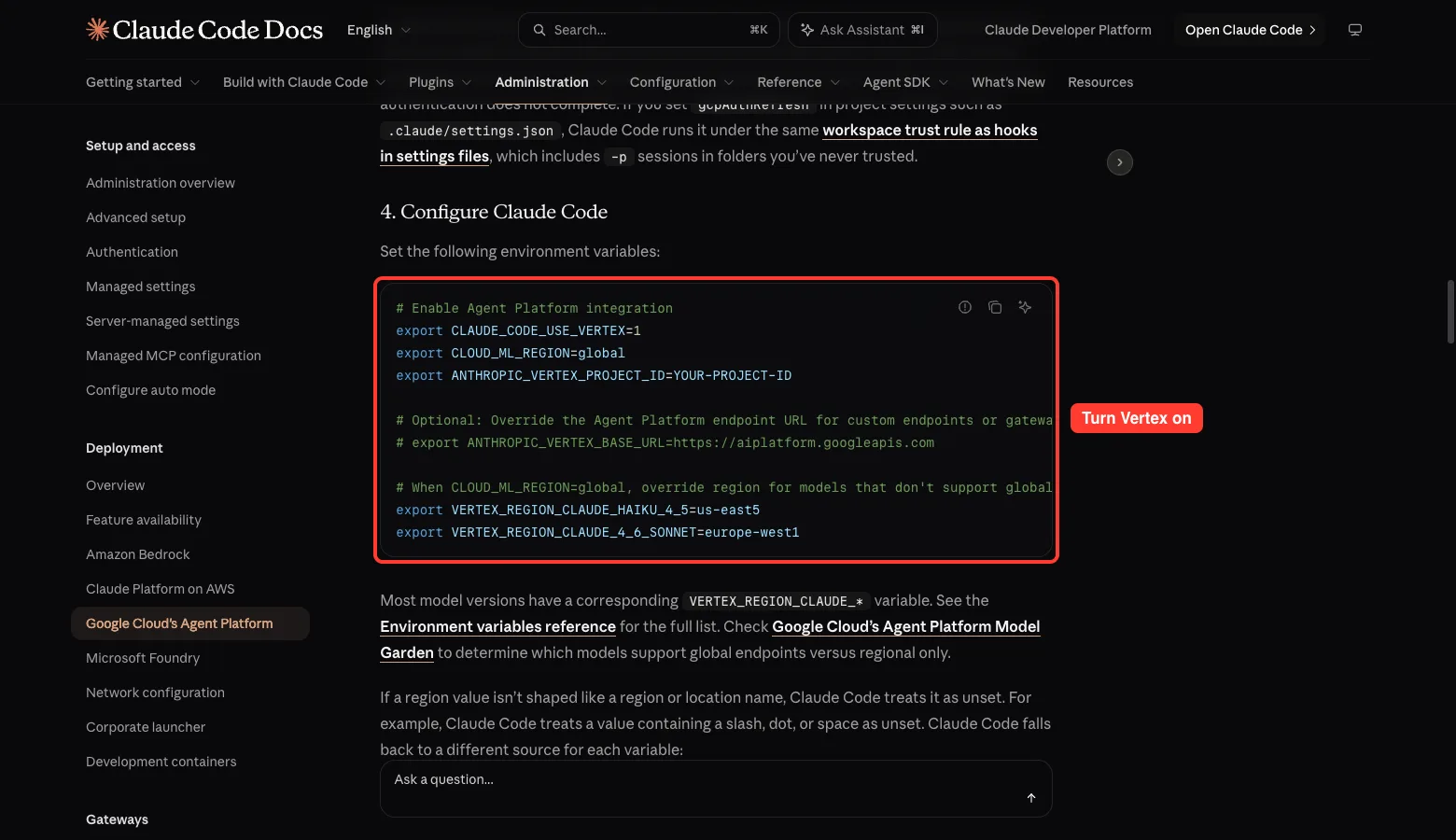
Regions on Vertex
Set CLOUD_ML_REGION to global, a multi-region such as eu or us, or one region like us-east5. If you leave it out, Claude Code falls back to us-east5.
Not every model is available on every endpoint type. When you use global, some models need their own region, set through variables such as VERTEX_REGION_CLAUDE_HAIKU_4_5. The docs say most model versions have a matching VERTEX_REGION_CLAUDE_* variable.
The One Role You Need
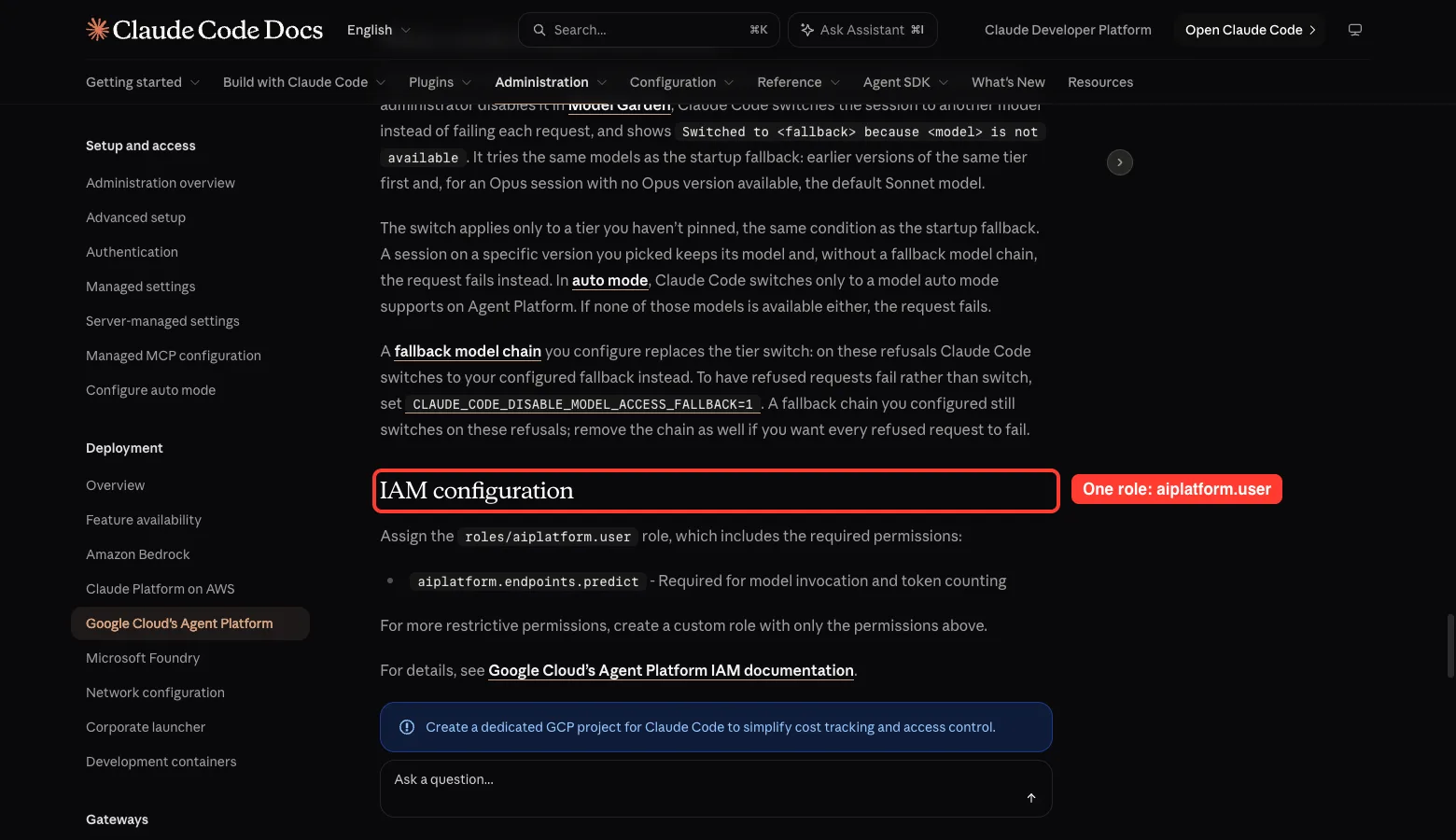
Give your account the roles/aiplatform.user role. It includes aiplatform.endpoints.predict, which is needed to call the model and count tokens. Anthropic also recommends a dedicated GCP project for Claude Code.
Microsoft Foundry Setup Step by Step
Foundry is the simplest page, and also the only one without a wizard. The docs say plainly that the environment variables are the only configuration path. You need an Azure subscription with Foundry access and rights to create resources and deployments.
Create the Resource and Deployments
In the Microsoft Foundry portal, create a resource and note its name. Then create deployments for the Claude models you want, such as Opus, Sonnet and Haiku, and note each deployment name. You also pick a hosting option per deployment, which decides whether inference runs on Azure or on Anthropic infrastructure.
Pick a Sign-In Method
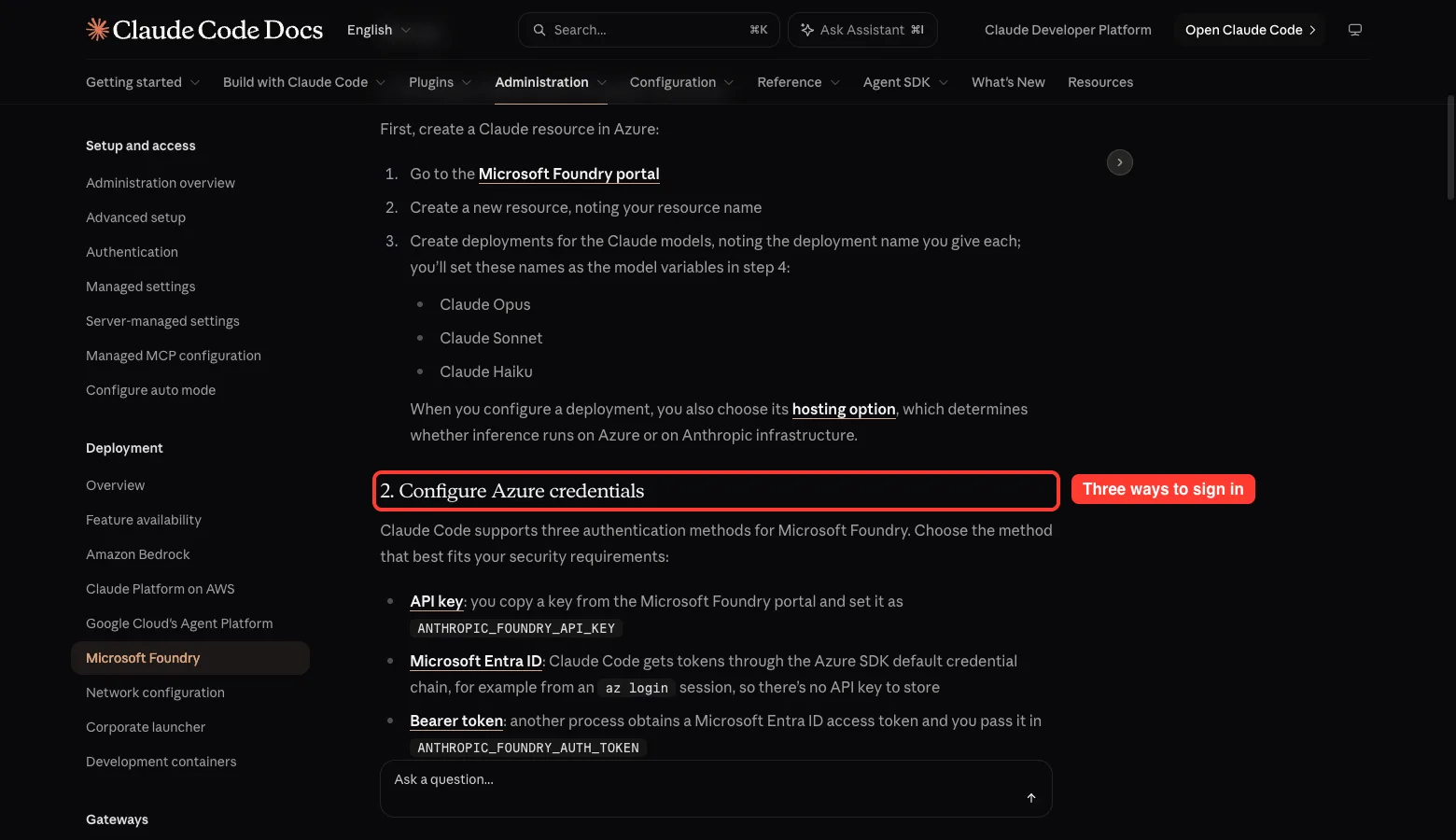
Claude Code supports three methods on Foundry:
- An API key, copied from the Endpoints and keys section of your resource and set as
ANTHROPIC_FOUNDRY_API_KEY. - Microsoft Entra ID, where you leave the key variables unset and sign in with
az login. Claude Code then uses the Azure SDK default credential chain. - A bearer token in
ANTHROPIC_FOUNDRY_AUTH_TOKEN, for when another process already fetched an Entra access token.
The bearer token wins over the API key and the default credential chain, so keep that in mind if two methods are set at once.
Turn Foundry On
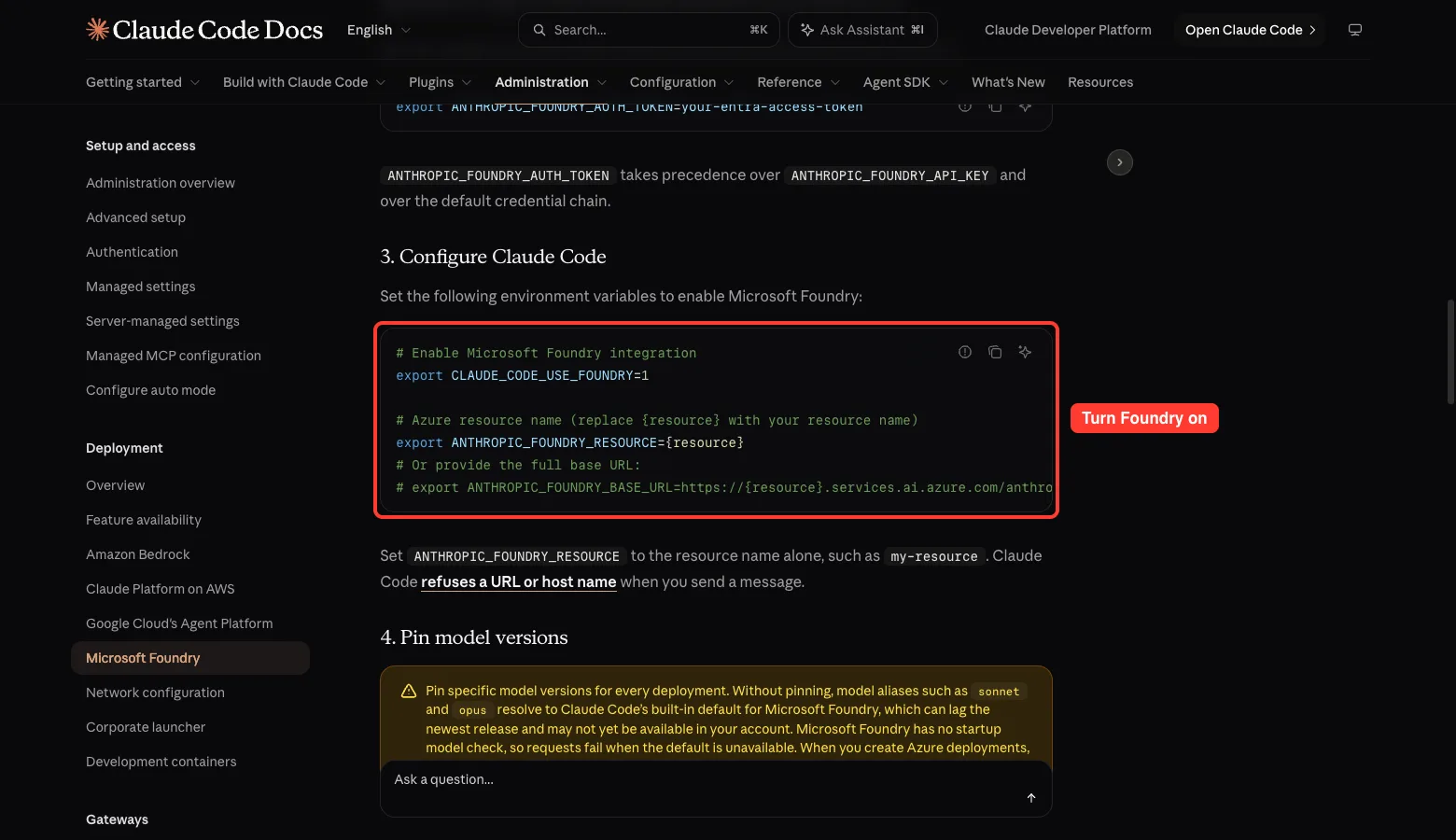
export CLAUDE_CODE_USE_FOUNDRY=1
export ANTHROPIC_FOUNDRY_RESOURCE=my-resource
Use the resource name alone, such as my-resource. Claude Code refuses a full URL or host name when you send a message. If you need a full address, use ANTHROPIC_FOUNDRY_BASE_URL instead.
Anthropic lists two default roles that cover everything: Azure AI User and Cognitive Services User. For tighter access you can build a custom role with the Microsoft.CognitiveServices/accounts/providers/* data action.
Pin Your Model Versions Before You Roll Out
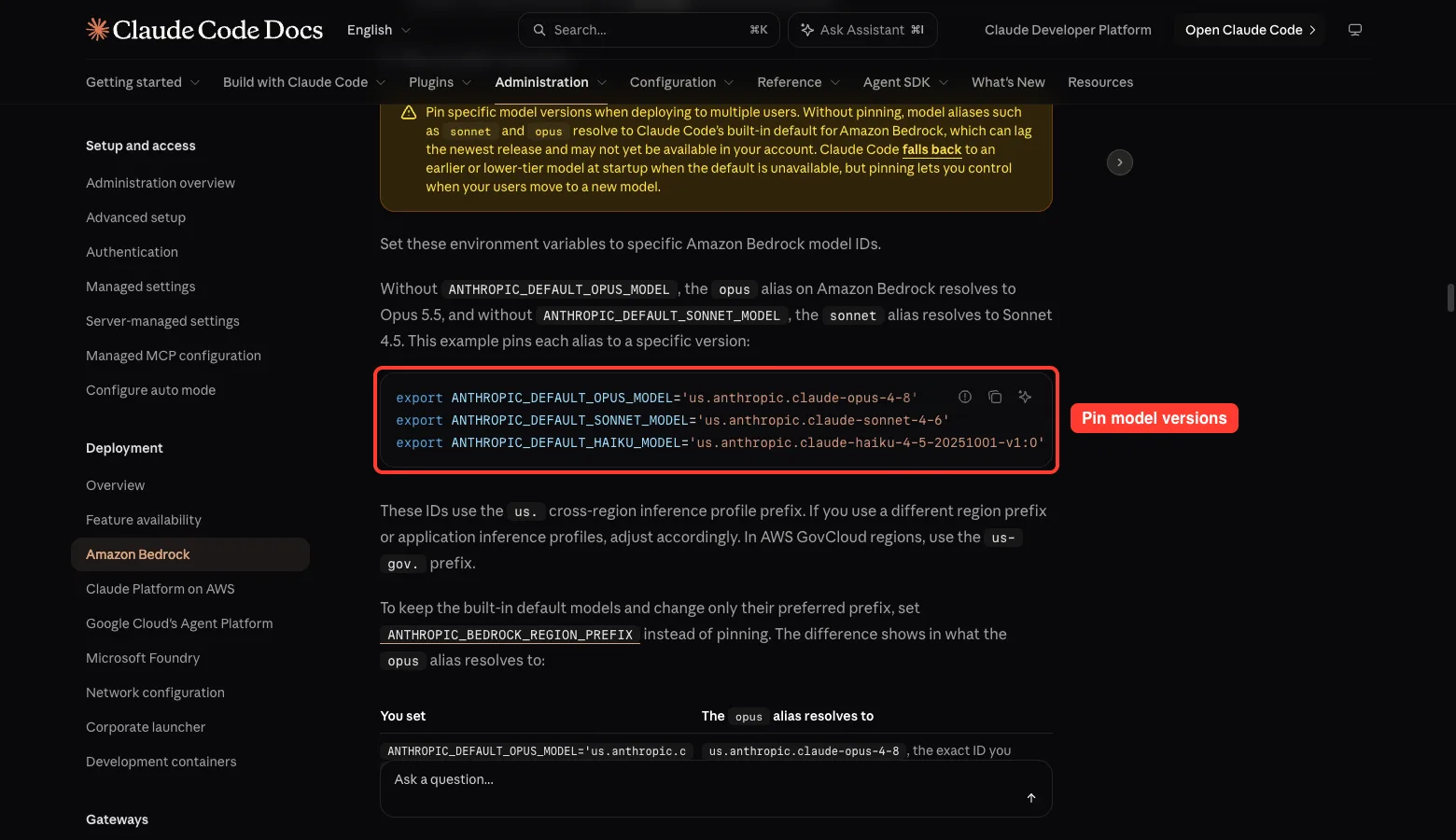
This is the step people skip, and the docs warn about it on all three pages. Names like sonnet and opus are aliases. Without pinning they resolve to Claude Code’s built-in default for your cloud, which can lag the newest release or may not be enabled in your account yet.
On Bedrock, the docs say the built-in defaults are Opus 5.5 for the primary model and Sonnet 4.5 for the small and fast model. Pinning lets you decide when your whole team moves to a new model. Here is the Bedrock example from the docs:
export ANTHROPIC_DEFAULT_OPUS_MODEL='us.anthropic.claude-opus-4-8'
export ANTHROPIC_DEFAULT_SONNET_MODEL='us.anthropic.claude-sonnet-4-6'
export ANTHROPIC_DEFAULT_HAIKU_MODEL='us.anthropic.claude-haiku-4-5-20251001-v1:0'
The us. part is a cross-region inference profile prefix.
The docs map each AWS region group to a prefix:
| AWS region | Prefix |
|---|---|
us-gov-* | us-gov. |
us-* | us. |
eu-* | eu. |
ap-* | apac. |
| All other regions | global. |
To keep the built-in models but change the prefix, set ANTHROPIC_BEDROCK_REGION_PREFIX, which needs Claude Code v2.1.224 or later.
Watch Out for Opus Pricing
The docs warn that Opus models cost more per token than Sonnet models. If you do not pin a primary model, you are billed at the Opus rate. To use Sonnet as your primary model, set ANTHROPIC_MODEL to its full model ID.
Foundry Has No Startup Check
On Vertex and Bedrock, Claude Code checks at startup that your account can use its chosen models, and falls back to an earlier or lower-tier model with a notice if not. The Foundry page says it has no startup model check, so requests fail when the default is unavailable. Pinning matters even more there, and the docs suggest selecting a specific model version rather than auto-update when you create deployments.
For the full list of pinning variables, see Anthropic’s model configuration page, and our own model guide.
Verify the Setup With /status
Start Claude Code and run /status. The provider line should name your cloud.
On Vertex it reads Google Vertex AI and also shows the project, region and model. On Foundry it reads Microsoft Foundry with your resource name or base URL.
If the provider line is missing on Vertex, the docs say your variables are not reaching the process. Check that they are exported in the same shell where you started claude, or put them in the env block of your settings file. Our settings guide shows where that file lives.
Features That Work Differently on a Cloud
A few details from the docs are worth knowing before you roll out.
- The WebSearch tool is not available on Amazon Bedrock.
- Prompt caching is on automatically. Set
ENABLE_PROMPT_CACHING_1H=1to ask for a 1-hour cache lifetime, which is billed at a higher rate than the 5-minute default. Our prompt caching guide explains the trade-off. - On Bedrock, cache counts staying at zero can mean prompt caching is not available in your region.
- Bedrock service tiers are set with
ANTHROPIC_BEDROCK_SERVICE_TIERtodefault,flexorpriority, depending on model and region. - Bedrock Guardrails are added with custom headers in your settings file.
- Newer models such as Sonnet 5 and Opus 4.7 and later run with a 1M token context window by default on Bedrock, with no suffix. Set
CLAUDE_CODE_DISABLE_1M_CONTEXT=1to keep a 200K window.
Keeping Credentials Fresh
Claude Code supports automatic credential refresh.
On AWS, the awsAuthRefresh setting runs a command such as aws sso login --profile myprofile when your credentials expire. On Google Cloud, gcpAuthRefresh does the same with gcloud auth application-default login. Both show the command output, but neither can take interactive input.
Troubleshooting Common Errors
| Problem | Cloud | What the docs suggest |
|---|---|---|
| Model not available in your region | Bedrock | Run aws bedrock list-inference-profiles for your region, switch region or use an inference profile ID |
| 400 error after setting a prefix | Bedrock | Your account may not have profiles with that prefix enabled, so check ANTHROPIC_BEDROCK_REGION_PREFIX |
| Streaming errors behind a gateway | Bedrock | Check your gateway or proxy settings |
| Quota or model errors | Vertex | Check quotas in the Cloud Console and confirm the model exists in your chosen location |
| Region not supported for a model | Vertex | Set the model’s VERTEX_REGION_CLAUDE_* variable, or try CLOUD_ML_REGION=global |
| Token provider error from the credential chain | Foundry | Configure Entra ID, for example with az login, or set ANTHROPIC_FOUNDRY_API_KEY |
| Repeated connection errors on the first prompt | Foundry | Make sure ANTHROPIC_FOUNDRY_RESOURCE is your real resource name and not a placeholder |
For SSO loops behind corporate proxies and certificate errors behind a TLS-inspecting proxy, the Bedrock page has dedicated troubleshooting sections. Those cover how proxy settings affect the credential check.
Try It Yourself
You do not need to touch a real cloud to practice the important habit, which is writing down your setup. Copy this prompt into Claude Code in a throwaway folder and fill in the blanks for your own cloud.
Create a file named cloud-setup-checklist.md for my team.
Cloud: [Bedrock / Vertex / Foundry]
Include: the provider switch variable, the region or resource variable,
the three model pin variables, the permission a new user needs,
and the first three things to check if Claude Code cannot connect.
Keep it under 30 lines and use only these facts: [paste the steps from this guide].
Hand the result to your cloud admin and ask them to confirm each line before the rollout.
Common Mistakes
- Skipping model pinning, then finding a default that your account cannot use.
- Putting a full URL in
ANTHROPIC_FOUNDRY_RESOURCEinstead of just the name. - Forgetting that Vertex model access can take 24 to 48 hours to be approved.
- Leaving the primary model unpinned and being billed at the Opus rate.
- Exporting variables in one terminal and starting
claudein another. - Expecting
/logoutto work. On all three clouds, sign-in is handled by cloud credentials. - Expecting the WebSearch tool on Bedrock.
Pro Tips
- Use a settings file for variables like
AWS_PROFILEthat you do not want leaking to other processes. - Create a dedicated AWS account or GCP project for Claude Code so costs and access stay easy to track.
- Use SSO or short-term credentials instead of long-lived access keys.
- For a team, combine pinned models with the allowlist settings from the docs, and review our permissions guide and cost monitoring guide.
- Use a pinned Haiku model for background tasks if it is enabled in your account. Otherwise Claude Code uses the default Sonnet model on Bedrock and Vertex.
Cheat Sheet
Frequently Asked Questions
Do I need a Claude subscription to use Claude Code on Bedrock?
The docs describe signing in with your cloud credentials instead. You need an account with that cloud and access to the Claude models there. Billing goes through the cloud.
What is the difference between Bedrock, Vertex and Foundry for Claude Code?
The cloud is the main difference. Setup also differs: Bedrock and Vertex have a login wizard, and Foundry is environment variables only. Sign-in methods and the permissions you need are different too.
Why does Claude Code say a model is not available?
Your account or region may not have the model enabled. Check the model catalog or Model Garden, switch region, or pin a model you know works.
Can I use more than one cloud?
The docs describe one provider switch per setup. If you want to try another cloud, set that cloud’s variables in a separate shell or settings file. We did not test switching between clouds.
Does the WebSearch tool work on Bedrock?
No. The Bedrock docs state that the WebSearch tool is not available on Amazon Bedrock.
Conclusion
Running Claude Code Bedrock, Vertex or Foundry style comes down to three things: one provider switch, one place to point it, and pinned model versions. Use the wizard on Bedrock or Vertex when you are alone, use environment variables for a team, and always confirm with /status. Read the official pages for your cloud before a rollout, and explore more in our Claude AI overview. That completes our Advanced Claude Code series.
Previous in the series: Part 9: Run Claude Code Safely in a Devcontainer
For the official steps, see Anthropic’s pages for Amazon Bedrock, Google Vertex AI and Microsoft Foundry.