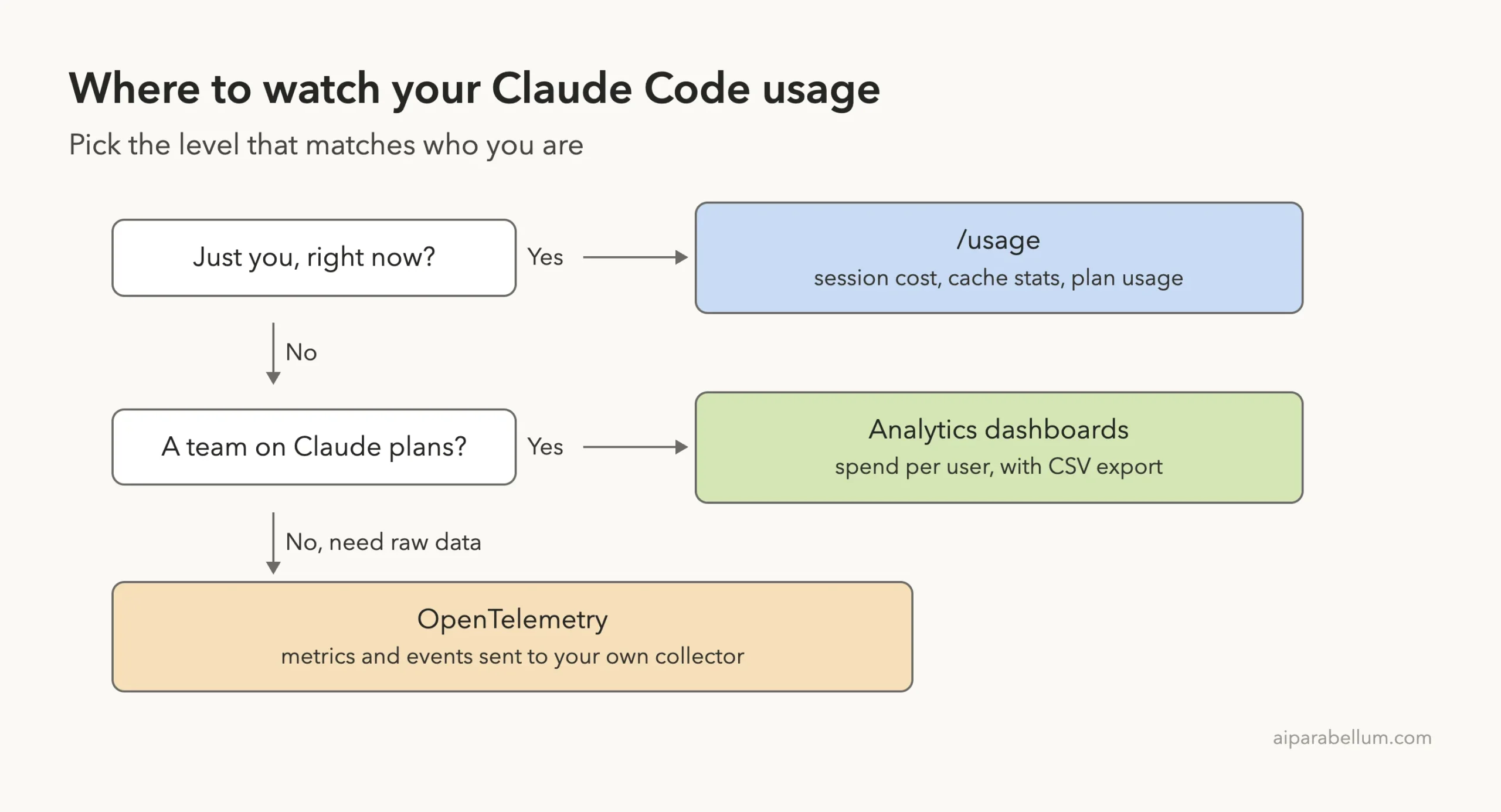
Claude Code usage monitoring comes down to three tools: the /usage command for a quick check, analytics dashboards for teams, and OpenTelemetry for raw numbers you send to your own system. Each one answers a different question, so you rarely need all three.
This guide shows you how to read each one, what the numbers mean, and how to turn on a real metrics feed in under a minute. We read the official usage and cost docs, then ran a real test with the OpenTelemetry console exporter and show its actual output below.
This is Part 8 of 10 in our Advanced Claude Code series, part of our Claude Code tutorials. Last time, we covered prompt caching.
Tested with Claude Code v2.1.312 on October 31, 2026. We tested on macOS; the Windows and Linux steps follow Anthropic’s official instructions.
Quick Summary: Three Ways to Monitor Claude Code
| Tool | Best for | What you get |
|---|---|---|
/usage | One person, right now | Session cost, token totals, cache stats and plan usage |
| Analytics dashboards | Teams on Claude plans or the Console | Spend and activity per user, with CSV export |
| OpenTelemetry | Admins who want raw data | Metrics and events sent to your own collector |
Why Claude Code Usage Monitoring Matters
Claude Code sends your whole conversation with every request. So a long session costs more per message than a fresh one, even when your question is short.
The official costs page gives a rough yardstick. Across enterprise deployments, the average is around $13 per developer per active day and $150 to $250 per developer per month, and 90 percent of users stay under $30 per active day.
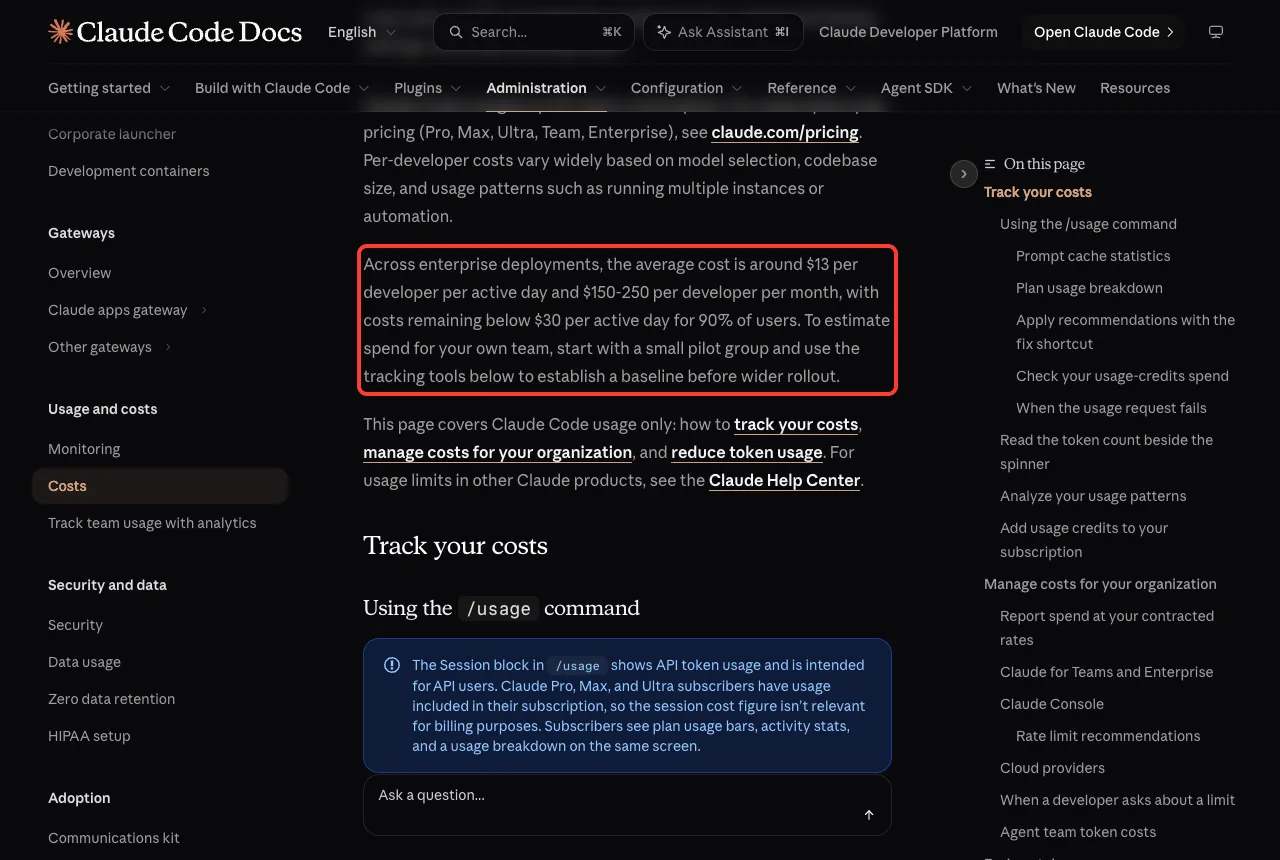
Your numbers will differ. The docs say costs vary with model choice, codebase size and habits like running several instances at once. Measuring beats guessing.
Option 1: Check Your Own Usage With /usage
Type /usage inside Claude Code. The top of the screen is the Session block, which shows the cost and token totals for the current session.
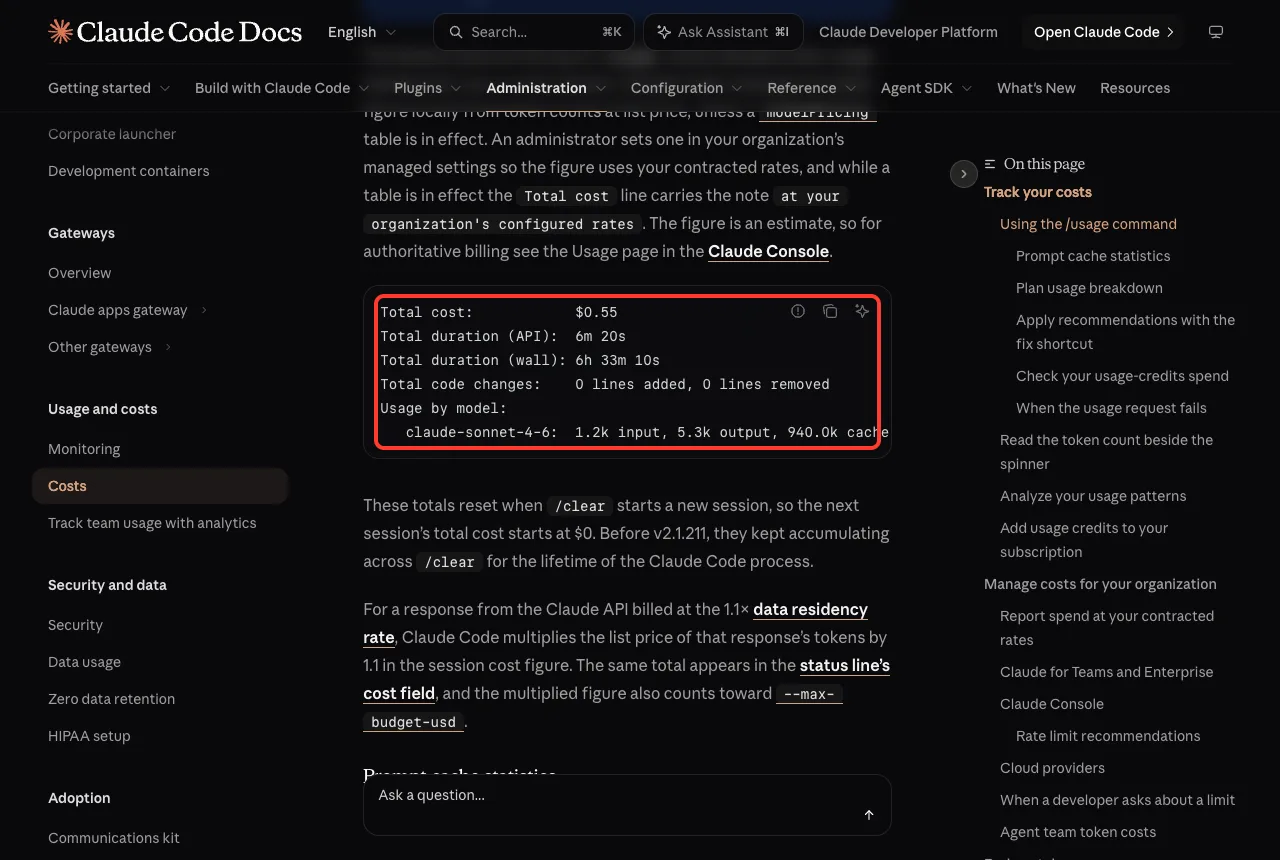
According to the docs, Claude Code works out the dollar figure on your machine from token counts at list price. It is an estimate. For authoritative billing, look at the Usage page in the Claude Console.
The totals reset when /clear starts a new session, so the next session starts at $0. Before v2.1.211 they kept adding up across /clear.
A Note for Subscribers
If you are on Pro, Max or Ultra, usage is included in your subscription. The docs say the session cost figure is not relevant for billing in that case. You will see plan usage bars and a breakdown instead.
We chose not to screenshot our own /usage screen, because it lists account details. The screenshots here come from the official docs instead.
Prompt Cache Line
After the first response, the Session block also adds a Prompt cache (main) line. It shows the request count, the share of input tokens served from cache, cache misses, and whether the cache is warm. The docs say it needs v2.1.251 or later and covers the main conversation only, not subagents.
A high cache share is good news, because cached tokens are cheaper. Our prompt caching guide explains why a miss makes the next message cost more.
Plan Usage Breakdown and the Fix Shortcut
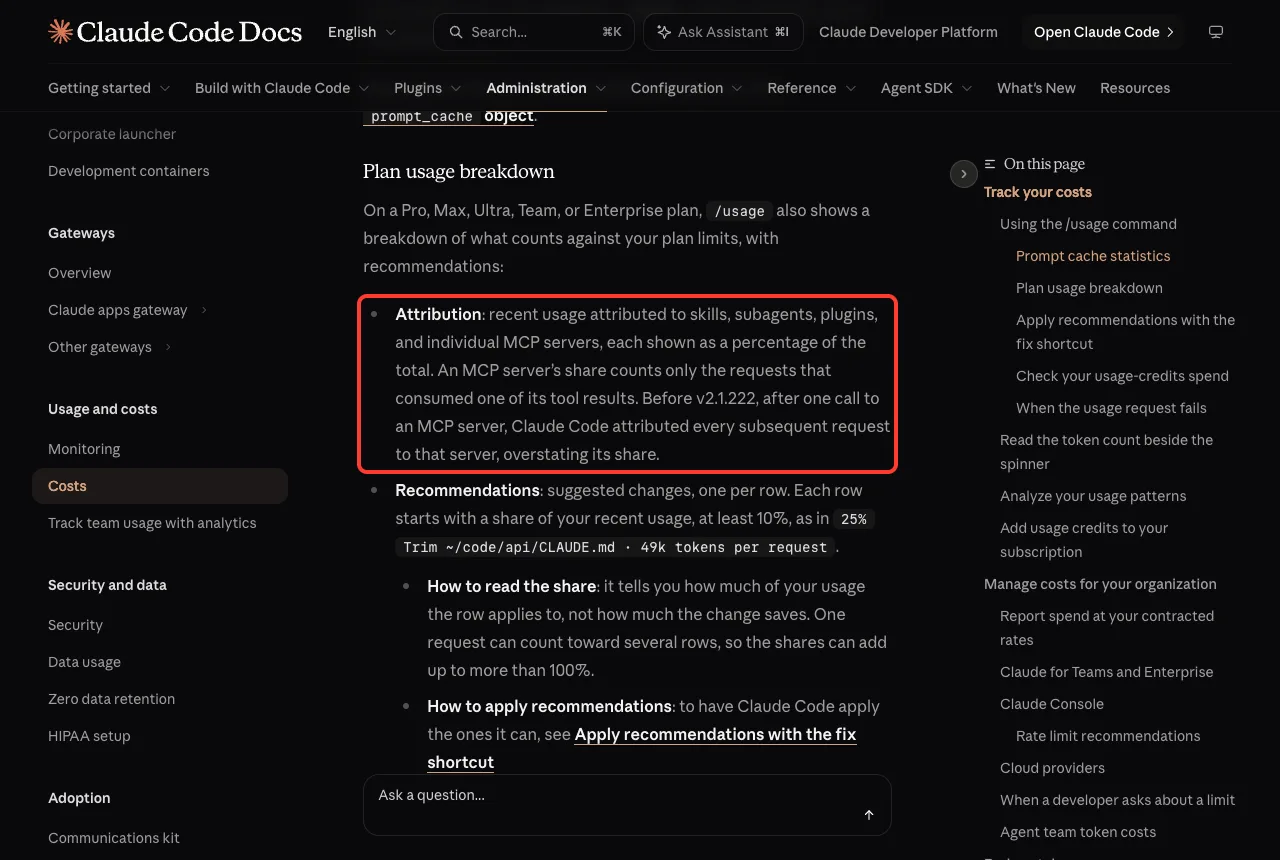
On a plan, /usage also shows what counts against your limits. The docs describe three parts:
- Attribution, which splits recent usage across skills, subagents, plugins and individual MCP servers as percentages.
- Recommendations, one per row, each with a share of at least 10 percent of your recent usage.
- Loops, a row for each heavy
/loopor other scheduled task (v2.1.242 or later).
Press d or w to switch between the last 24 hours and the last 7 days. The figures are approximate and come from local session history, so usage from other devices or claude.ai is not included.
When the footer says something like f to fix 2 of 3, press f (v2.1.305 or later). Claude Code runs any /effort command shown in a row and asks Claude to walk you through the other fixes, showing each change before it makes it. Rows that end in run /compact are left for you to run yourself.
If /usage Fails to Load
Sometimes the plan limits request fails, usually because the endpoint is rate limited. The docs say /usage then shows the last bars it loaded within the past 60 minutes, plus a note saying how old they are. Press r to retry.
A message like “rate limited until 3:14am” means Claude Code cannot fetch your plan limits until then. It does not mean your work with Claude is blocked.
The Token Count Beside the Spinner
While Claude works, the spinner line can end with something like (10m 27s · ↓ 5.5k tokens). That is a live, approximate count of the output the current turn has produced. It leaves out your prompt and history, and it resets at the start of each turn, so it will not match the session totals.
Look at Habits With /insights
The /insights command answers a different question. It writes an HTML report about how you work: what you build, where friction shows up, and tips. The docs say it saves the latest report at ~/.claude/usage-data/report.html and analyzes up to 200 new sessions per run.
Option 2: Team Dashboards and Spend Limits
If you manage a team, the same costs page splits the options by plan. On Team and Enterprise, the spend report in org analytics shows estimated spend per user and per model, with CSV export, updated daily. A separate dashboard shows daily active users and sessions.
You can cap spend by turning on usage credits and setting limits at the organization, group or member level. On the Console, the dashboard shows spend and accepted lines per member, and an Analytics API returns the same daily numbers.
One catch is worth knowing. On Amazon Bedrock, Google Cloud and Microsoft Foundry, Claude Code is billed through your cloud account, and Anthropic’s dashboards do not cover that usage. For per-user numbers there, the docs point to OpenTelemetry, a Claude apps gateway or an LLM gateway.
Option 3: Export Real Metrics With OpenTelemetry
OpenTelemetry (OTel) is a standard way to export metrics. The monitoring page says Claude Code exports metrics as time series, events through the logs protocol, and optional traces in beta.
The quick start uses environment variables. Only CLAUDE_CODE_ENABLE_TELEMETRY=1 is required to switch it on, and you then pick where the data goes.
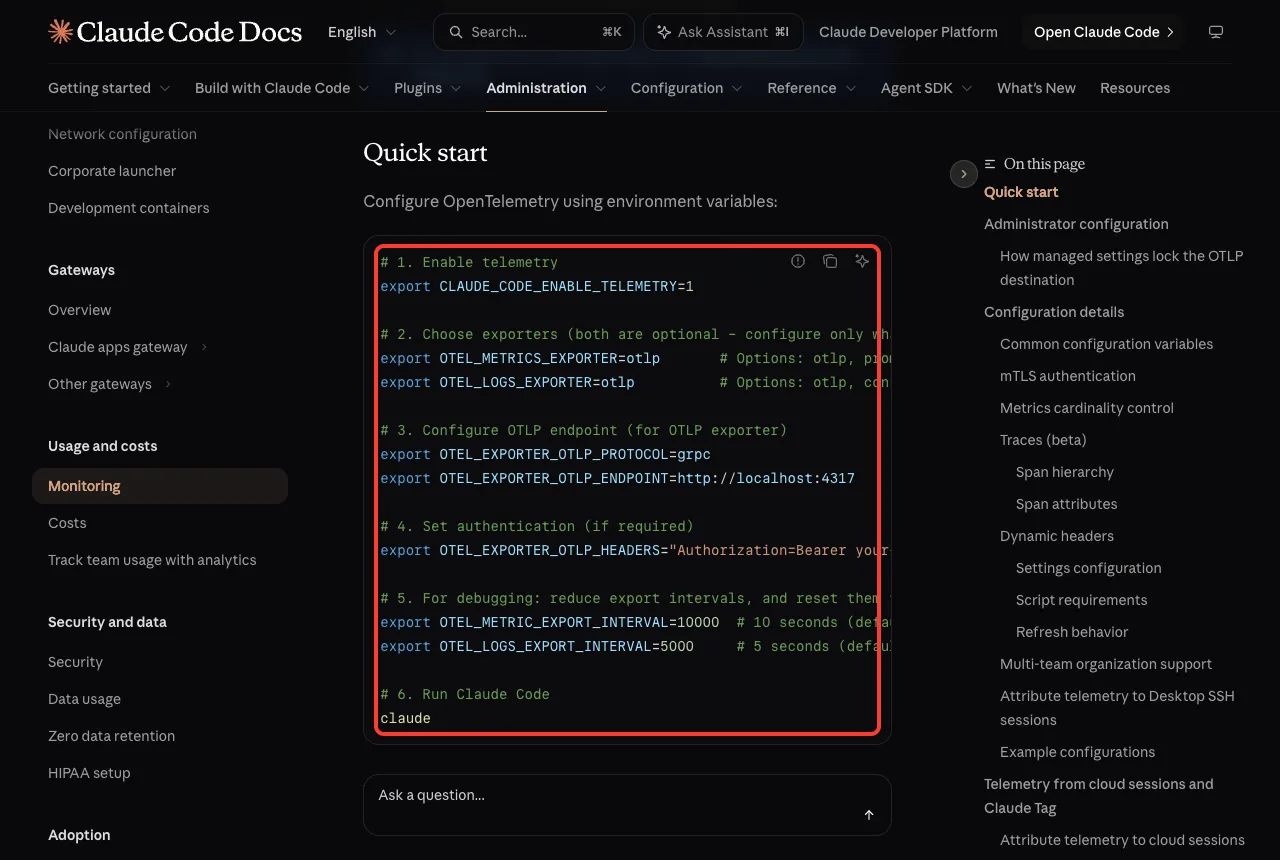
| Variable | What it does |
|---|---|
CLAUDE_CODE_ENABLE_TELEMETRY | Turns telemetry on. Required |
OTEL_METRICS_EXPORTER | Where metrics go: otlp, prometheus, console or none |
OTEL_LOGS_EXPORTER | Where events go: otlp, console or none |
OTEL_METRIC_EXPORT_INTERVAL | Export interval in milliseconds. The default is 60000 |
OTEL_EXPORTER_OTLP_ENDPOINT | The collector address, such as http://localhost:4317 |
Try It Without a Collector: The Console Exporter
You do not need any server to see the data. The docs show a console setup for debugging with a one-second export interval.
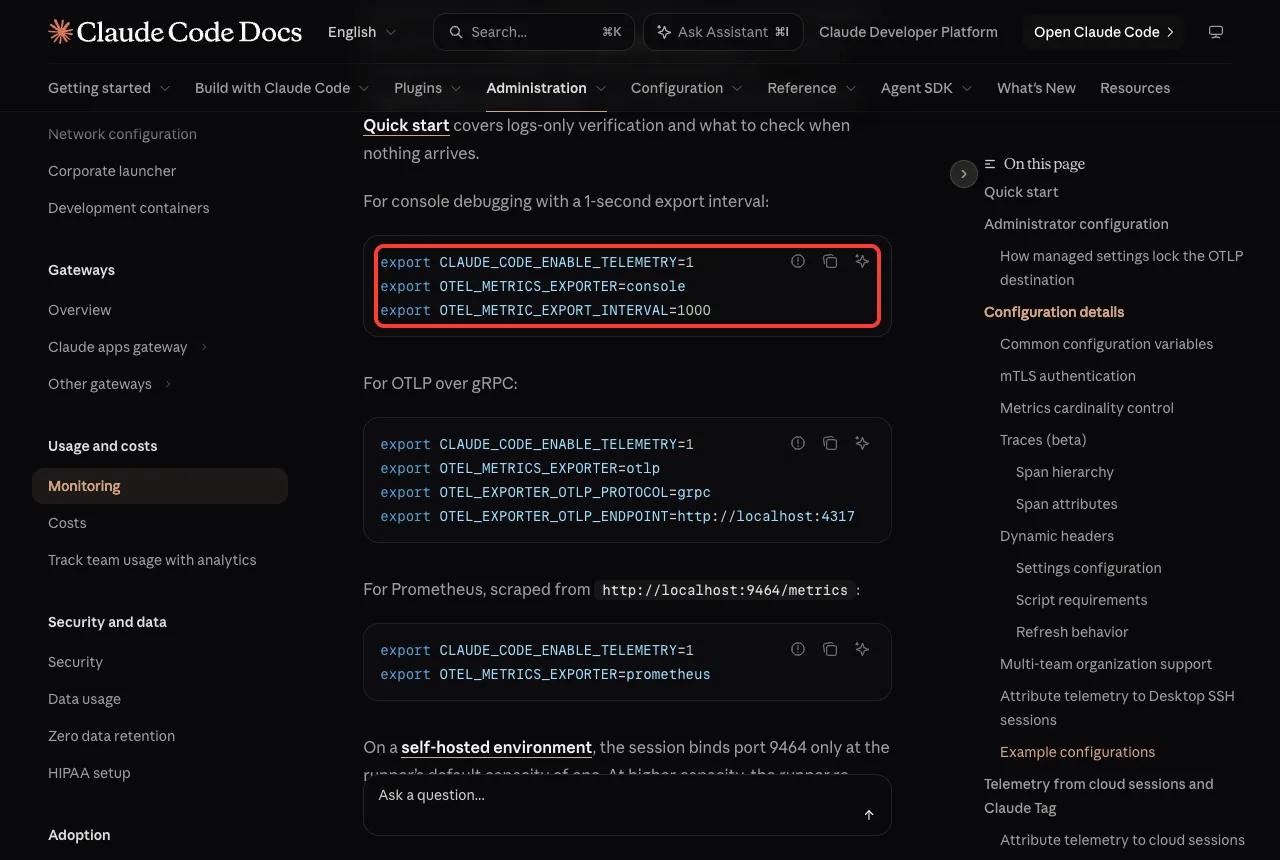
export CLAUDE_CODE_ENABLE_TELEMETRY=1
export OTEL_METRICS_EXPORTER=console
export OTEL_METRIC_EXPORT_INTERVAL=1000
claude -p "Reply with the single word hi"
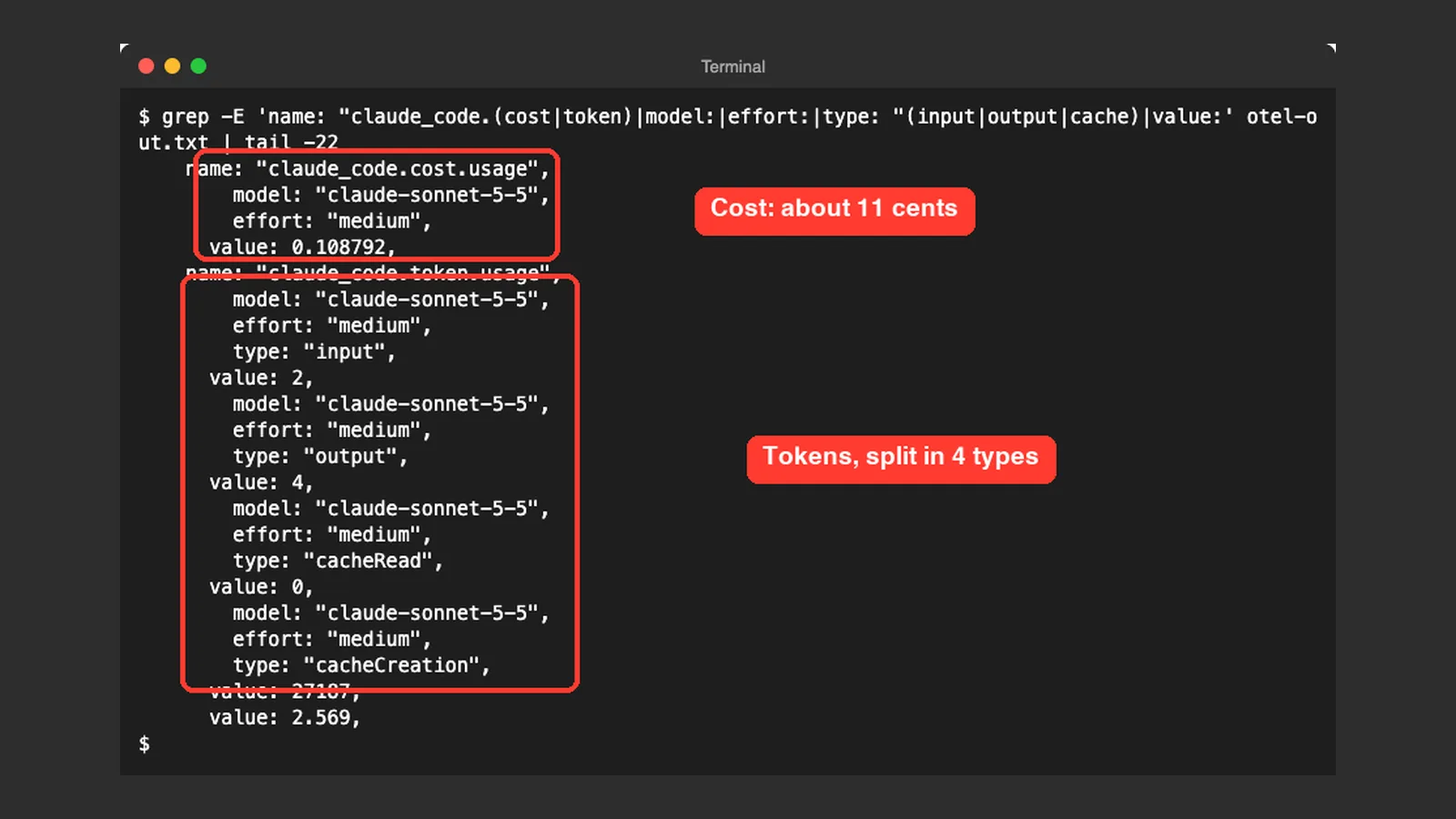
We ran exactly that in a throwaway demo folder. The reply was one word, followed by a block of metrics. Four metrics appeared: a session count, a cost, a token count and an active time.
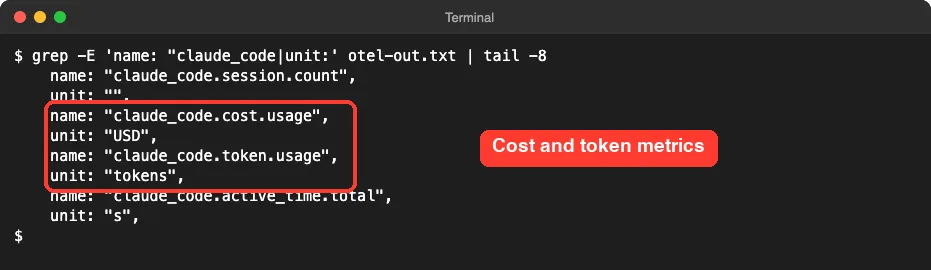
Next we looked at the values. The cost metric reported 0.108792 USD for that one tiny prompt, about 11 cents. The token metric split into four types: input 2, output 4, cacheRead 0 and cacheCreation 27187.
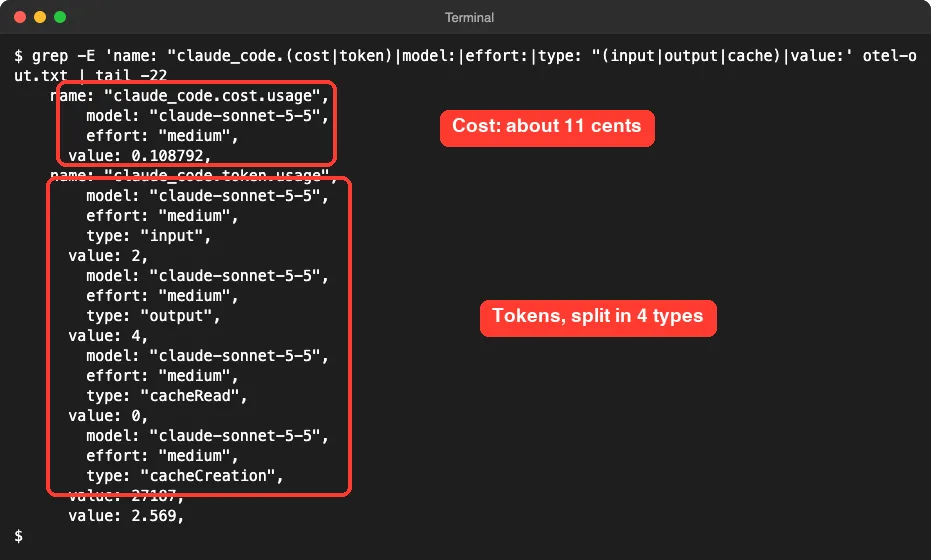
This shows something useful. Even a one-word answer carries a large starting context, so a short prompt is not free. Our run is one demo on one day, so treat the exact numbers as an example, not a benchmark.
Another point: the raw console output also contained identity attributes such as a user id and account details. We filtered those out of the screenshots with grep. Treat telemetry output as sensitive before you paste it anywhere.
The Metrics You Get
The docs list eight metrics. Here is what each one counts.
| Metric | What it counts | Unit |
|---|---|---|
claude_code.session.count | CLI sessions started | none |
claude_code.lines_of_code.count | Lines of code modified | none |
claude_code.pull_request.count | Pull requests created | none |
claude_code.commit.count | Git commits created | none |
claude_code.cost.usage | Cost of the session | USD |
claude_code.token.usage | Tokens used | tokens |
claude_code.code_edit_tool.decision | Permission decisions on code edits | none |
claude_code.active_time.total | Total active time | s |
For cost work, the docs suggest breaking claude_code.token.usage down by token type, user, team, model, skill, plugin or agent. They also warn that cost metrics are approximations, so official billing data lives with your API provider.
Send It to a Real Backend
When you are ready, switch the exporter to otlp and set a protocol and endpoint. Claude Code has no default protocol, so the docs say to set OTEL_EXPORTER_OTLP_PROTOCOL to grpc, http/json or http/protobuf.
export CLAUDE_CODE_ENABLE_TELEMETRY=1
export OTEL_METRICS_EXPORTER=otlp
export OTEL_EXPORTER_OTLP_PROTOCOL=grpc
export OTEL_EXPORTER_OTLP_ENDPOINT=http://localhost:4317
To confirm it works, check your backend for claude_code.session.count, which Claude Code emits when a session starts. If nothing arrives, start Claude Code with claude --debug-file <path> and look for lines marked [3P telemetry].
Admins can set these variables for everyone in the managed settings file. The docs also say Claude Code ignores the OTel exporter variables in a repository’s .claude/settings.json, so a project cannot switch telemetry on by itself.
What Stays Private by Default
Prompt text is redacted unless you set OTEL_LOG_USER_PROMPTS=1. Tool details and raw API bodies are also off by default, each behind its own variable. Turn those on only when you have a clear reason and a secure backend.
How to Keep Costs Down Once You Can See Them
Monitoring only helps if you act on it. The costs page lists the habits that matter most:
- Use
/clearbetween unrelated tasks, since stale context is re-sent with every message. - Match the model to the job instead of leaving the biggest one as the default.
- Disable MCP servers you are not using. Our MCP guide shows how.
- Use plan mode for complex work, so Claude does not build the wrong thing first.
- Keep agent teams small, because each teammate has its own context window.
The docs also explain why usage climbs in a long session. Scheduled tasks fire even while the session is idle, and your first message after a long break misses the cache. Our guide to the context window covers how to keep that history small.
Try It Yourself
Run this in a throwaway folder, never a real project. It prints real metrics to your terminal without any collector.
mkdir ~/usage-test
cd ~/usage-test
export CLAUDE_CODE_ENABLE_TELEMETRY=1
export OTEL_METRICS_EXPORTER=console
export OTEL_METRIC_EXPORT_INTERVAL=1000
claude -p "Reply with the single word hi" > out.txt 2>&1
grep -E 'name: "claude_code|value:' out.txt
Do not paste out.txt anywhere before you read it, because it holds account identifiers. Then open Claude Code normally and run /usage to compare the session view with the metrics.
Common Mistakes
- Trusting the session cost for billing. The docs call it an estimate, and subscribers should ignore it for billing.
- Forgetting the protocol. Claude Code has no default OTLP protocol, so an
otlpexporter without one will not work. - Putting telemetry variables in a repo’s
.claude/settings.json. Claude Code ignores them there. - Leaving a one-second export interval on in production. The docs say to reset it, and the default is 60 seconds.
- Pasting raw telemetry into a ticket or chat. It can include user and account identifiers.
- Expecting the dashboards to cover Bedrock, Vertex or Foundry usage. They do not.
Pro Tips
- Press
win/usageto see a week at a time, anddto compare it with today. - Press
fwhen the footer offers fixes, and read each change before you accept it. - Watch the Loops rows. A scheduled task that fires every few minutes sends your full context each time.
- Run a small pilot first, as the docs advise, before you set team budgets.
- Our status line guide shows how to keep the session cost visible all day.
Check yourself with /usage, check your team with dashboards, and export the raw numbers with OpenTelemetry.
Cheat Sheet
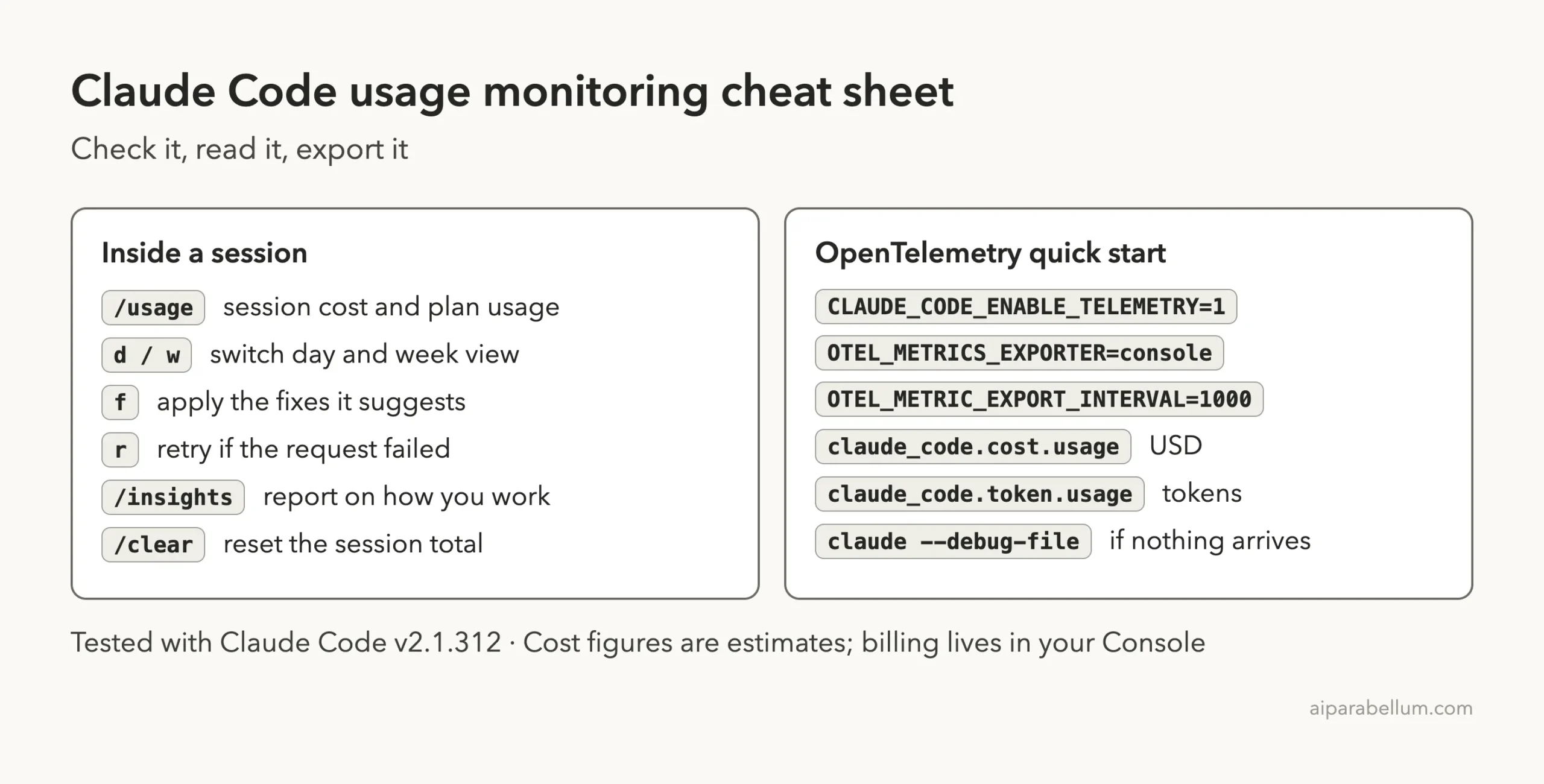
Frequently Asked Questions
How do I check my Claude Code usage?
Type /usage inside a session. It shows the session cost and tokens, and on a plan it adds usage bars and a breakdown by skill, subagent, plugin and MCP server.
How much does Claude Code cost per day?
The docs say the average across enterprise deployments is around $13 per developer per active day. 90 percent of users stay below $30 per active day. Your own cost depends on model, codebase and habits.
Is the cost shown in /usage my real bill?
No. Claude Code computes it locally from token counts at list price, so it is an estimate. Check the Usage page in the Claude Console for authoritative billing.
How do I enable OpenTelemetry in Claude Code?
Set CLAUDE_CODE_ENABLE_TELEMETRY=1, choose an exporter such as OTEL_METRICS_EXPORTER=console, and run claude. For a real collector, also set the protocol and endpoint.
Does Claude Code send my prompts in telemetry?
Not by default. The docs say prompt content is redacted unless you set OTEL_LOG_USER_PROMPTS=1.
Conclusion
Good Claude Code usage monitoring starts small: run /usage to see your session, use the analytics dashboards if you manage a team, and turn on OpenTelemetry when you need raw numbers in your own tools. Our test showed a single one-word prompt costing about 11 cents, mostly from a large cache write, which is a good reminder to clear context between tasks. Treat every dollar figure as an estimate and remember that telemetry output can hold account details. For more background, see our Claude AI overview.
Previous in the series: Part 7: Save Money With Prompt Caching in Claude Code
Next in the series: Part 9: Run Claude Code Safely in a Devcontainer.