Plannotator is a free, open-source tool that opens Claude Code’s plans in your browser so you can comment on single lines, like a Google Doc. It does the same for code changes. Claude gets back a neat list of your notes, each tied to the exact line you marked.
We wanted to know if that makes Claude Code’s results any better than typing your feedback in the terminal. So we gave Claude the same task twice, once with Plannotator and once with plain plan mode, and fed it the same notes both times. Here is how to set it up, what it stores on your computer, and what our test showed.
Quick verdict
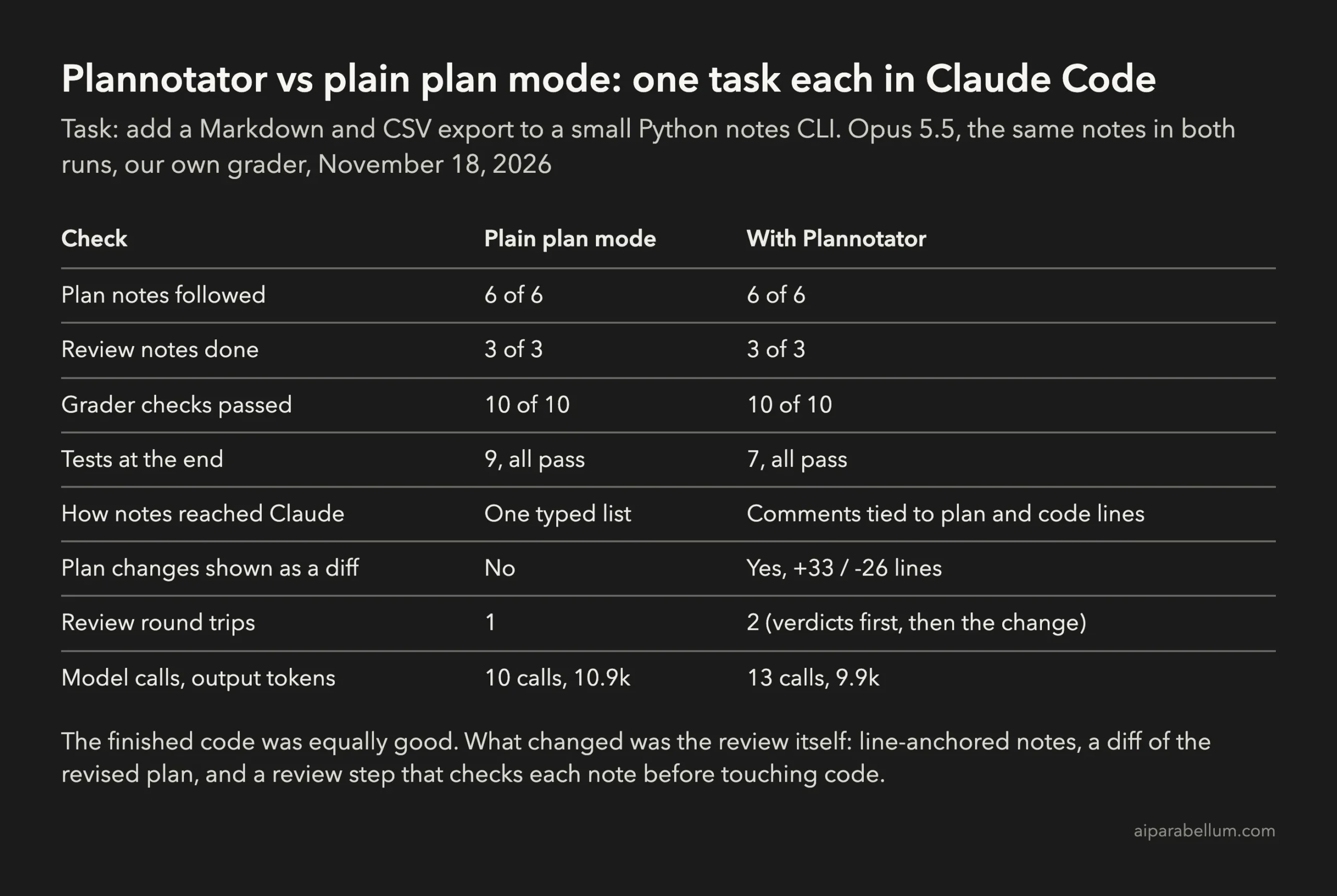
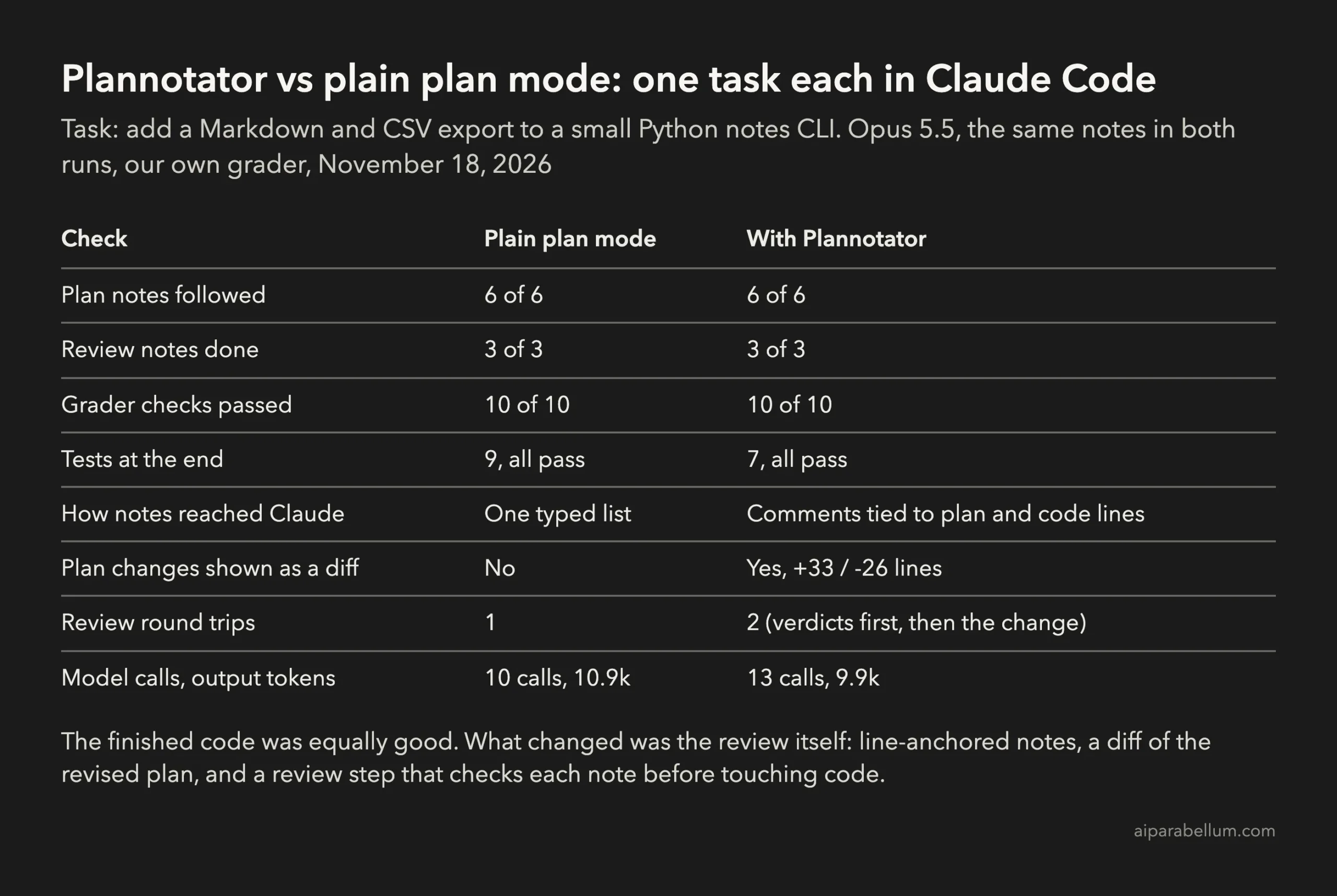
Both runs ended with the same score: 10 of 10 on our grader, with every plan note and every review note done. Plannotator did not make Claude write better code in our test. Claude Code with Opus 5.5 followed a typed list just as well.
What Plannotator changed was the review itself. Every note stayed attached to the line it was about, the revised plan came back as a diff that showed exactly what Claude changed, and its code review step made Claude check each note before editing. That step caught that two of our three review notes were already done.
Install it if you review long plans or care about getting changes right before Claude writes code. Skip it if your plans are short and a typed reply works fine for you.
What Plannotator is
Plannotator lives in the Plannotator GitHub repository under the Apache 2.0 license, with about 13,000 stars. We tested version 0.29.0. It is a single program with a local web interface, plus small connectors for Claude Code and other coding agents.
For Claude Code it does three jobs:
- Plan review: when Claude finishes a plan in plan mode, the plan opens in your browser. You highlight text, add comments, then approve or send feedback.
- Code review:
/plannotator-reviewopens your uncommitted changes as a diff. You comment on lines, and the comments go back to Claude. - Annotate:
/plannotator-annotateopens any Markdown file for the same kind of comments, and/plannotator-lastopens Claude’s last reply.
Everything runs on your own computer at a localhost address. Nothing is uploaded unless you click Share.
How Plannotator works with Claude Code
Plan review uses a hook. When Claude tries to leave plan mode, Claude Code asks for permission, and a PermissionRequest hook on the ExitPlanMode tool runs Plannotator instead. The Claude Code hooks documentation explains how these permission hooks can allow or deny a request.
If you approve in the browser, Claude starts coding. If you send feedback, the hook denies the request and hands Claude your notes, so it has to revise the plan and try again.
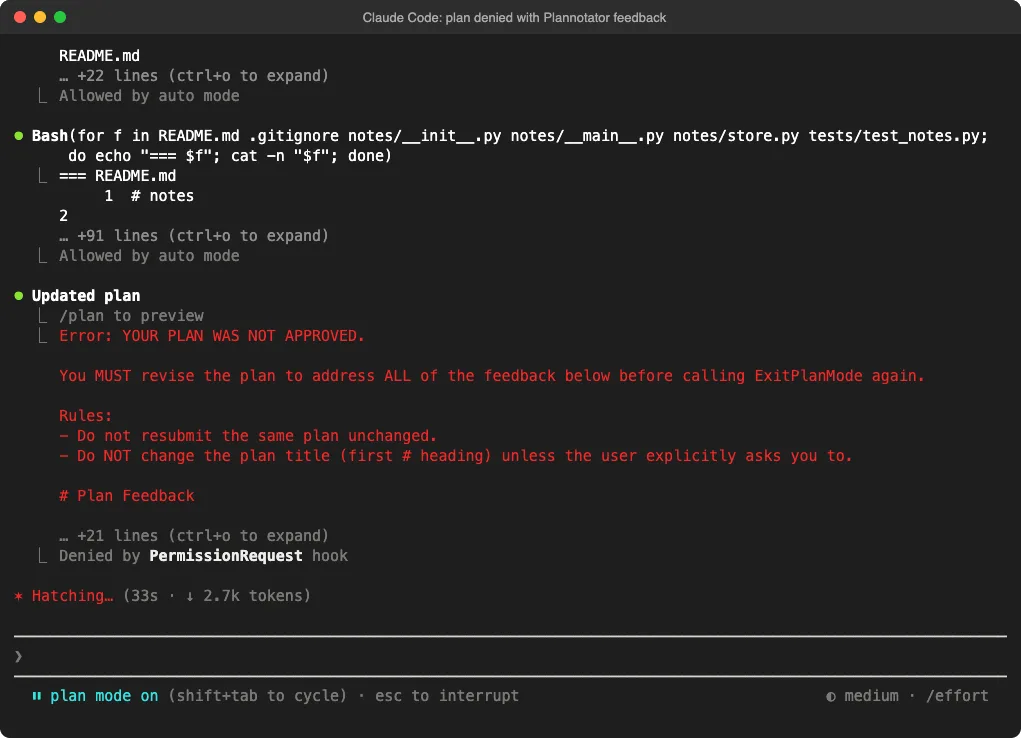
One thing surprised us. While the browser page was open, Claude Code’s own approval menu also stayed on screen in the terminal. The browser decision is the one that counts, so leave the terminal menu alone.
How to install Plannotator in Claude Code
The official install is two steps. First, run the installer in your terminal. It puts the plannotator program in ~/.local/bin and sets up the agents it finds:
curl -fsSL https://plannotator.ai/install.sh | bashThen add the plugin inside Claude Code and restart it:
/plugin marketplace add backnotprop/plannotator
/plugin install plannotator@plannotator
If you only want the program and none of the extra agent setup, add --minimal to the installer. Running plannotator uninstall later removes what it installed and keeps your saved plans.
The manual setup we used
For our test we kept everything inside one throwaway folder. We downloaded the macOS release from GitHub, checked its SHA-256 checksum against the published one, and added the hook to a single project’s .claude/settings.json:
{
  "hooks": {
    "PermissionRequest": [
      {
        "matcher": "ExitPlanMode",
        "hooks": [
          { "type": "command", "command": "plannotator", "timeout": 3600 }
        ]
      }
    ]
  }
}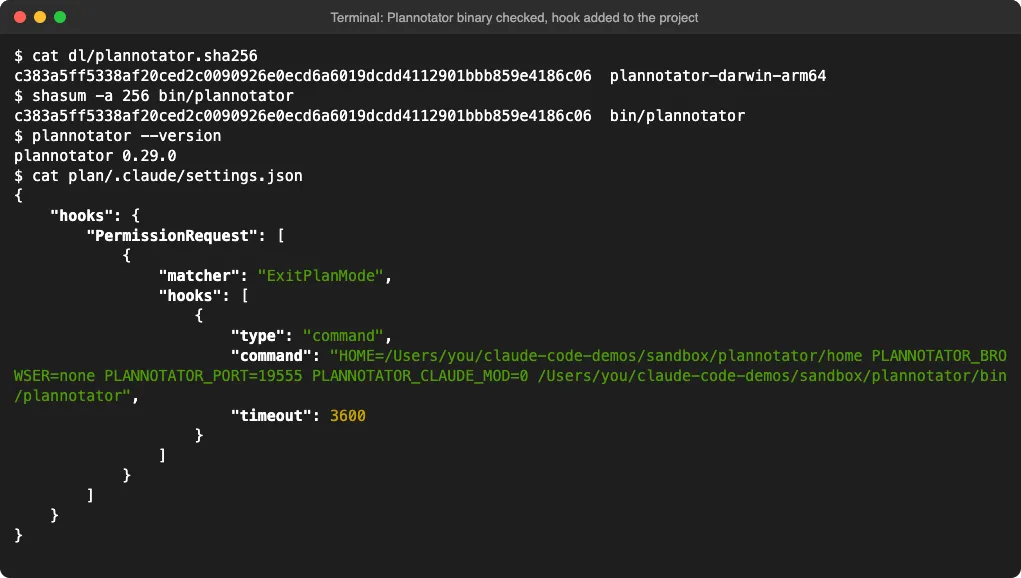
Our hook also set a few environment variables. PLANNOTATOR_BROWSER=none prints the address instead of opening a browser, and PLANNOTATOR_PORT fixes the port.
We also set PLANNOTATOR_CLAUDE_MOD=0, which keeps the classic flow where Claude waits for your decision. On recent Claude Code versions the default lets Claude end its turn and receive your decision later as a message.
How we tested Plannotator
We built a tiny Python notes app with add and list commands and two tests. We made two identical copies. Both used Claude Code with Opus 5.5 in plan mode on November 18, 2026, in a normal interactive session.
The task was the same in both: “Add an export command to this notes CLI so I can get my notes out as Markdown or CSV. Plan it first.” Before any run, we wrote down six plan notes and three review notes, plus a grader that runs the finished code and checks each note.
| Stage | Our notes |
|---|---|
| Plan | Use the csv module; call the option –format with markdown as the default; print to stdout unless –output is given; no JSON; put tests in tests/test_export.py; don’t change how notes.json is stored |
| Code review | Make the Markdown a table and escape any |; add a –tag filter; add a CSV test for text with a comma and a double quote |
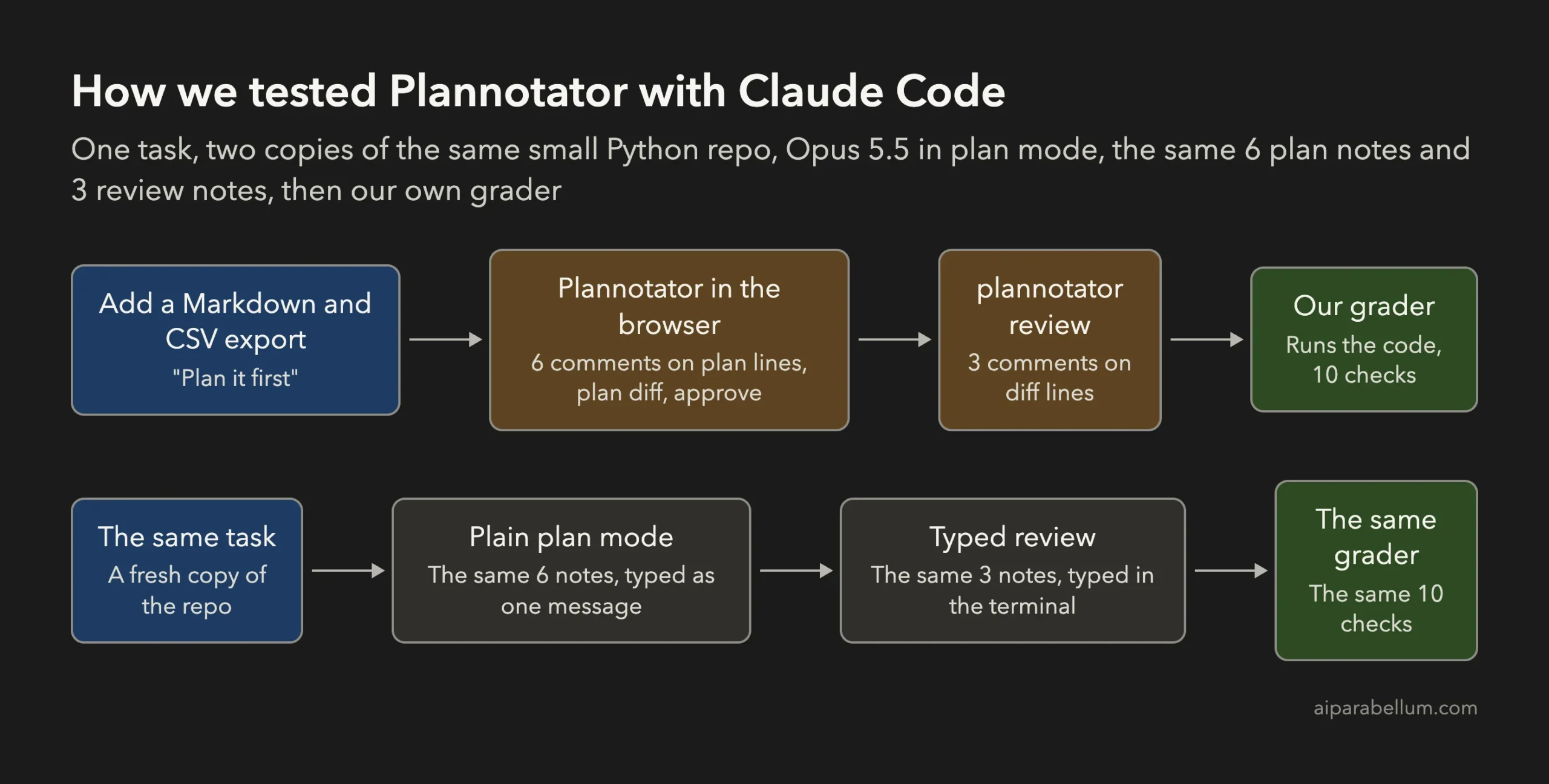
In the Plannotator copy, we put each plan note on the matching plan line in the browser and used plannotator review for the code notes. In the plain copy, we chose “Tell Claude what to change” at the plan prompt and typed the six notes as one message, then typed the three review notes after the code was done.
Reviewing the plan in Plannotator
Claude’s first plan was solid. It already used the csv module and printed to stdout by default, but it made --format required, put the tests in the old test file, and added a --tag option on its own.
In the browser, the plan looks like a clean document with a table of contents. You drag across any text, click the comment button and type. Our six comments showed up in a side panel, each with the text it was attached to.
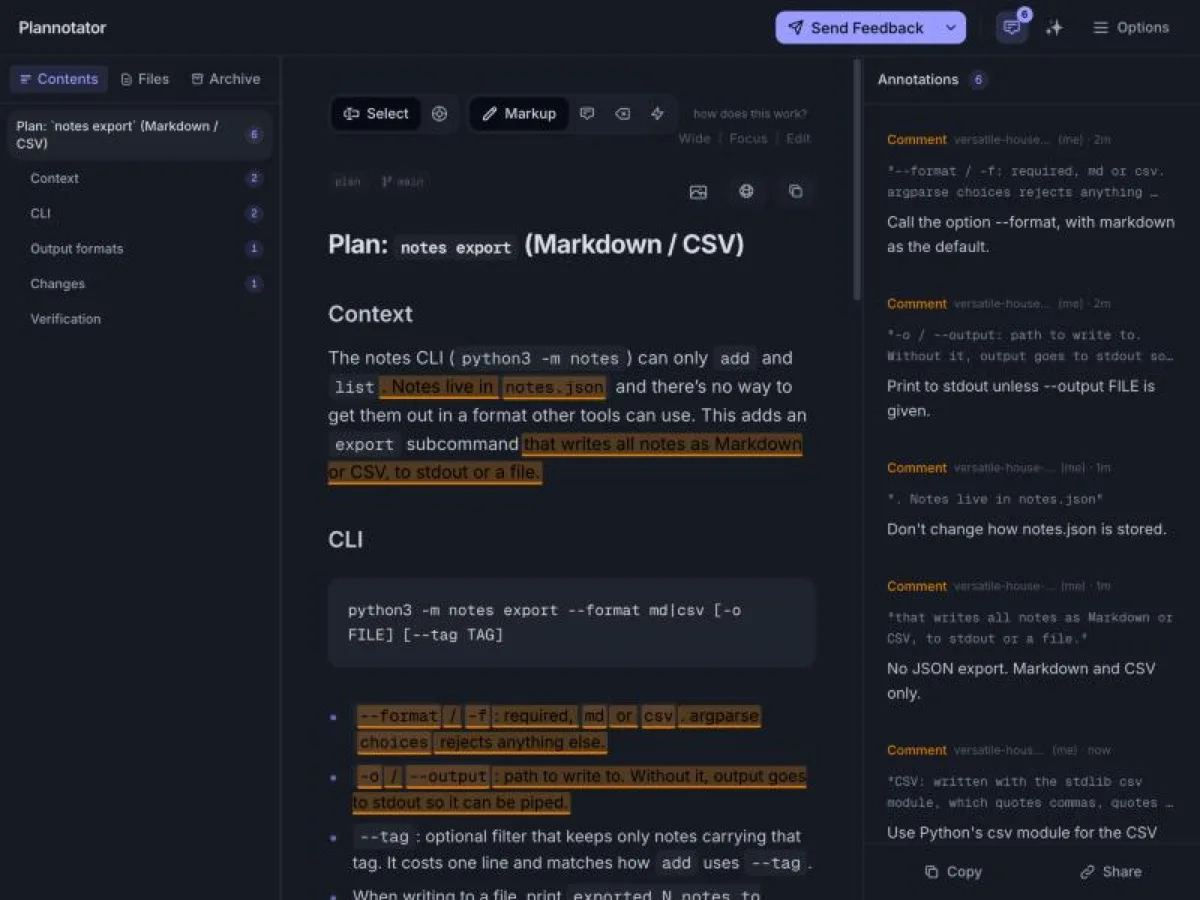
When you click Send Feedback, Claude receives a numbered list. Each item has the plan line number, the exact text you highlighted and your comment. That is more precise than a typed list, where Claude has to guess which part of the plan each note is about.
The plan diff is the best feature
When Claude sent the revised plan, Plannotator showed a “+33 / -26” badge. Clicking it opened a diff of the two plan versions, with old lines in red and new lines in green.
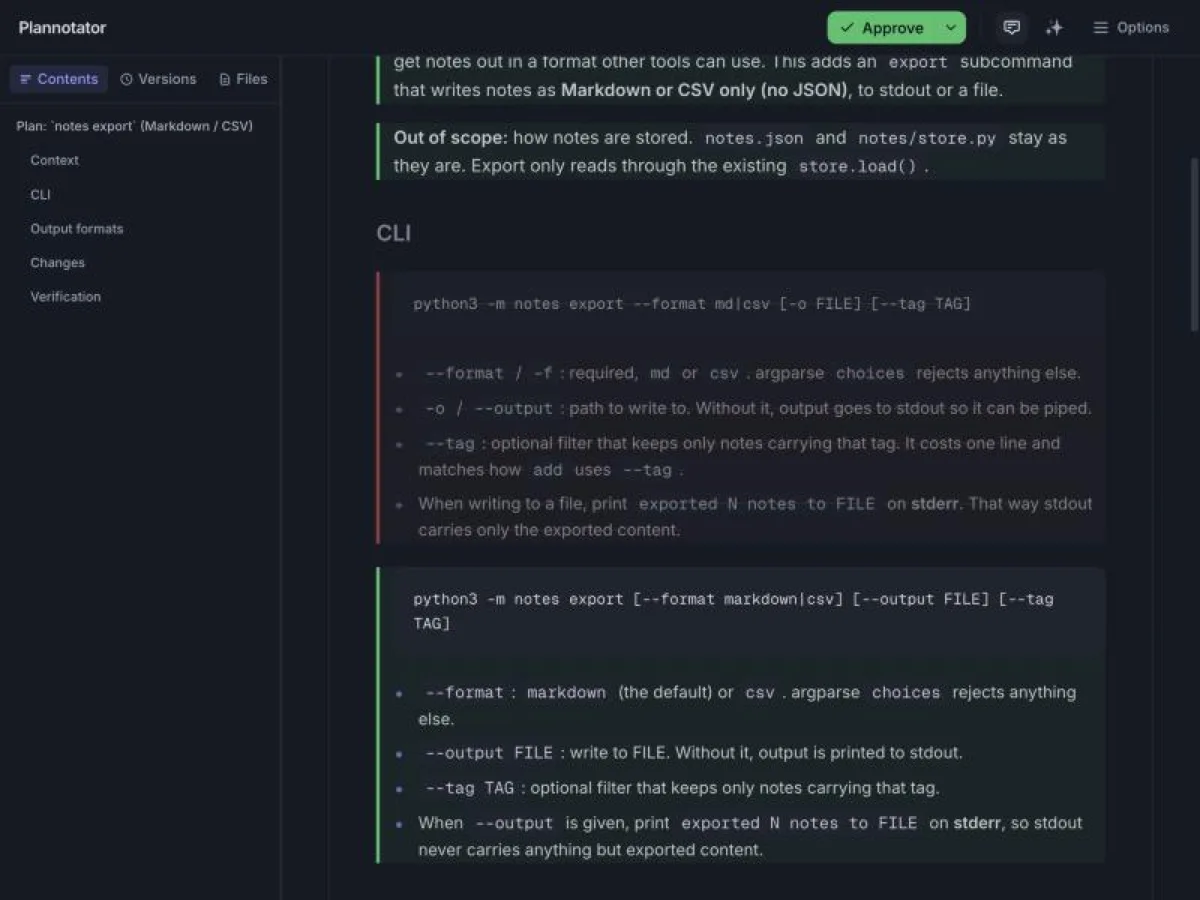
This is the part we would miss most. In plain plan mode, the revised plan arrives as a full new plan, and you have to spot the changes yourself.
Our plain run showed why that matters. When Claude revised its plan from our typed notes, it quietly dropped the --tag option, which none of our notes asked it to remove.
Nothing pointed this out; we only noticed by comparing the two plan files. In the Plannotator run, the option stayed. With one run each, we can’t say Plannotator prevents this, but the diff view makes such a change hard to miss.
Reviewing code with plannotator review
After Claude finished coding, we opened the uncommitted changes in Plannotator’s code review view. It looks like a pull request page: a file tree on the left and a side-by-side diff. Hover over a line, click the plus sign, and type your comment.
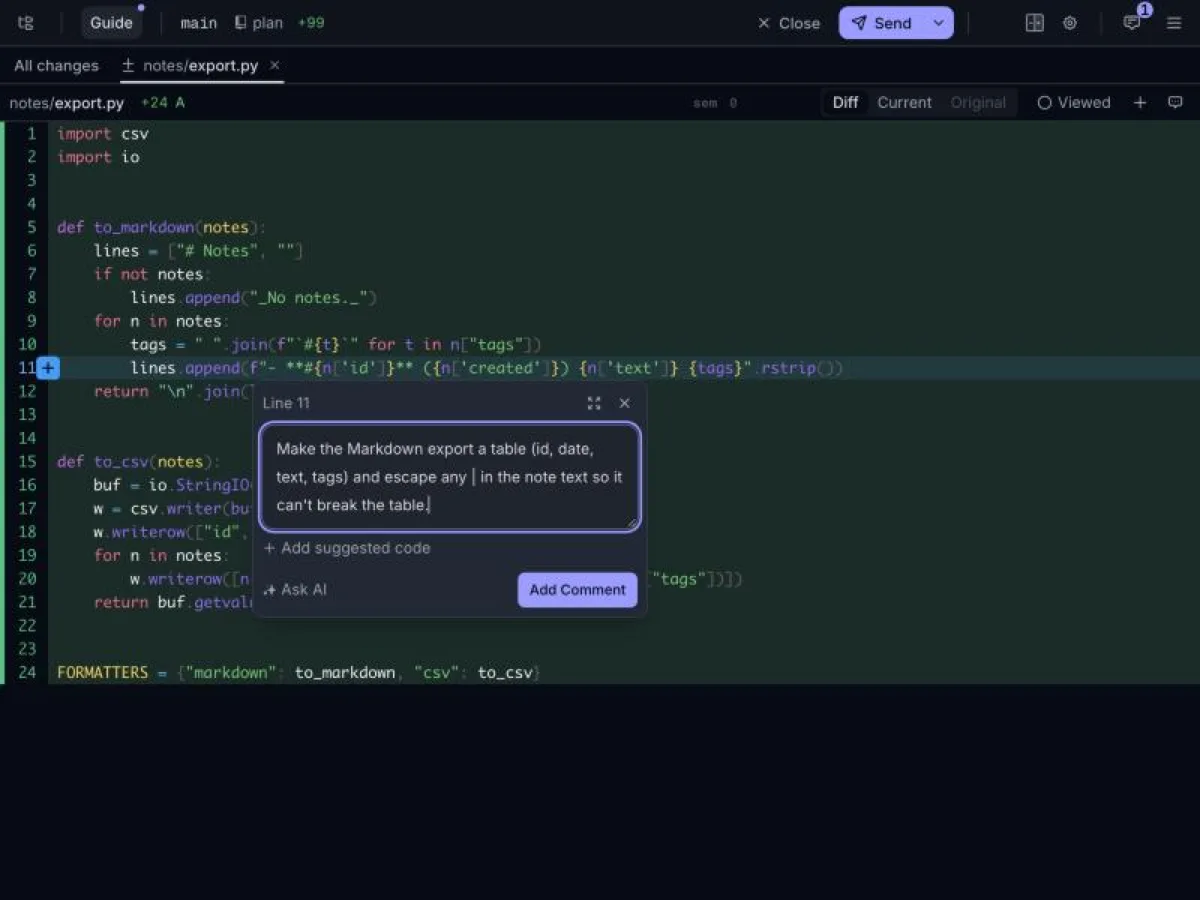
With the plugin installed, /plannotator-review runs this for you and passes the result to Claude. In our hook-only setup, we ran plannotator review ourselves and pasted its output into Claude Code, which is the same text the plugin sends.
Claude checked the notes before changing code
The review output tells Claude to treat each note as unverified, give a verdict with evidence, and not change any code until you discuss it. Claude did exactly that.
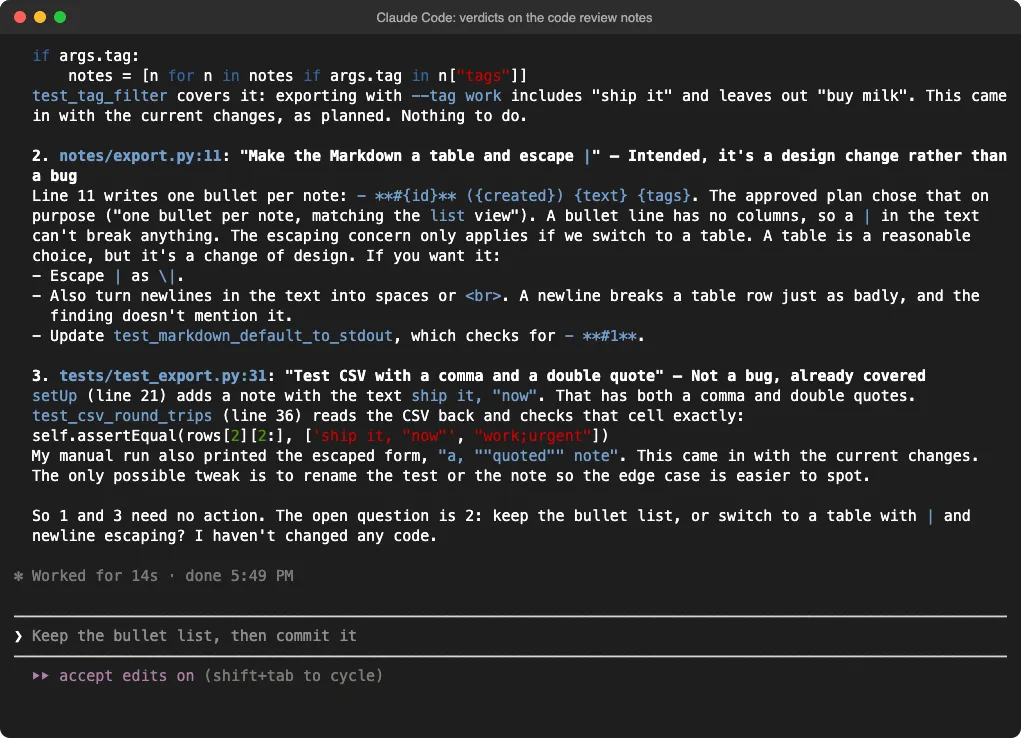
Two of our three notes were already done. The --tag filter existed, and a test already covered a note with a comma and quotes.
For the table, Claude pushed back politely: “A table is a reasonable choice, but it’s a change of design.” It also pointed out that line breaks in a note would break a table row, which our note had missed.
We replied with one line, asking for the table with both kinds of escaping. Claude made the change and added a test for it.
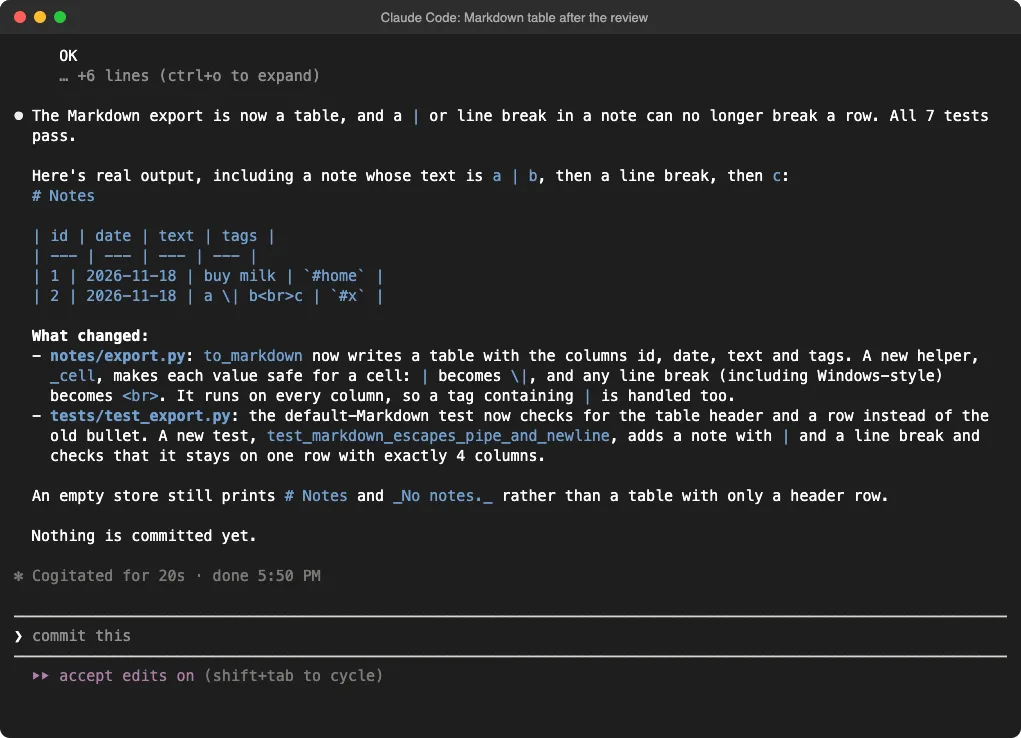
In the plain run, Claude simply applied all three typed notes in one go. It added the filter, built the table with the same escaping and split out a separate comma-and-quote test. That took one round trip instead of two, and it got the same result.
Plannotator test results
| Check | Plain plan mode | With Plannotator |
|---|---|---|
| Plan notes followed | 6 of 6 | 6 of 6 |
| CSV with a comma and quotes reads back correctly | Yes | Yes |
| Review notes done | 3 of 3 | 3 of 3 |
| Tests at the end | 9, all pass | 7, all pass |
| Messages we typed to Claude | 3 | 3, plus 9 comments in the browser |
| Model calls | 10 | 13 |
| Output tokens | 10,923 | 9,898 |
Token use was close. The Plannotator run made three more model calls, mostly because Claude revised the plan through a denied request and gave verdicts before changing code. Reviewing in the browser also took us longer than pasting a list, since each comment means a highlight, a click and some typing.
What Plannotator saves and sends
Plannotator keeps its data in ~/.plannotator. After our test it held about 60 KB: both plan versions (marked denied and approved), our annotations, review progress and a history folder. That is handy if you want a record of what you approved.
It also makes two small network calls. It checks GitHub for new releases, and it sends a daily anonymous ping with the version, which feature you used and how many weeks you have used it.
We checked the code: the ping contains no plan or code content. Set DO_NOT_TRACK=1 or NO_ANON_PING=1 to stop the ping, and PLANNOTATOR_UPDATE_CHECK=0 to stop the update check.
Sharing is the one feature that can send your plan elsewhere. Small shares live inside the link itself, while large ones are encrypted, uploaded and deleted after 7 days.
Anyone with the full link can read it, so set PLANNOTATOR_SHARE=disabled on work projects if you never want that button used. There is also a remote mode for SSH sessions that listens on all network interfaces without a password, so only use it on a network you trust.
Small annoyances
- The first time the page opened, it showed two setup questions and a feature promo before the plan. Later opens showed another promo popup.
- Plan review only works in interactive sessions. In
claude -p, Claude Code does not offer the tool for leaving plan mode, so the hook never fires. - Your comment author name is a random nickname, which is fine but looks odd at first.
Who should use Plannotator
Plannotator is worth it if you spend real time in plan mode. Long plans, plans you share with a teammate, and plans for risky changes all benefit from line comments and the version diff. It fits well next to spec-first tools like Spec Kit and Superpowers, which also put a plan before the code.
If you are new to planning in Claude Code, start with our guide to plan mode and our explainer on permission modes. The hook setup above is also a good example of how Claude Code hooks work, and our list of ready-to-copy hooks has more ideas.
For code review alone, Plannotator is a human review tool, not an AI reviewer.
If you want Claude to find problems for you, try the built-in /code-review command or the Code Review plugin. Plannotator is for when you already know what you want changed and want to point at the exact line. Pair it with our verification setup if you also want Claude to check its own work.
What we did not test
We ran each setup once, on one small Python task, so treat the token numbers as a rough guide. We did not test the plugin install itself, the Inbox, team workspaces, sharing, remote mode, the AI chat inside the page, or Plannotator with other agents such as Codex or Gemini CLI.
Our grader checked behavior by running the code, not code style. Both versions passed every check, so any difference in code quality between them is a matter of taste.
Final verdict
Plannotator gives Claude Code something plan mode is missing: a real review screen. You can comment on single lines, see exactly what changed between plan versions, and review code changes the way you would review a pull request. In our test the final code was no better, since Claude Code followed a typed list just as well, at the cost of a few more model calls and more of our time. But the plan diff caught the kind of quiet change that a typed review lets slip, and the verdict-first code review stopped Claude from redoing work it had already done. If plan mode is part of your daily routine, Plannotator for Claude Code is a free and well-built upgrade. Find more hands-on tests in our Claude Code tutorials and the Skills Directory.