GitHub’s Spec Kit is one of the fastest-growing repos on GitHub right now. It makes your coding agent write a spec, a plan and a task list before it writes any code.
We wanted to know if that extra paperwork pays off. So we installed Spec Kit, built a small app with Claude Code through every step, then built the same app with plain Claude Code to compare.
Here’s how to set up Spec Kit in Claude Code, what each step produced, what it cost, and where it beat plain Claude Code and where it didn’t.
What Is GitHub Spec Kit?
Spec Kit is a free, open source toolkit from GitHub under the MIT license. Its README says it “gives AI coding agents structured processes, reusable templates, and documented outcomes.”
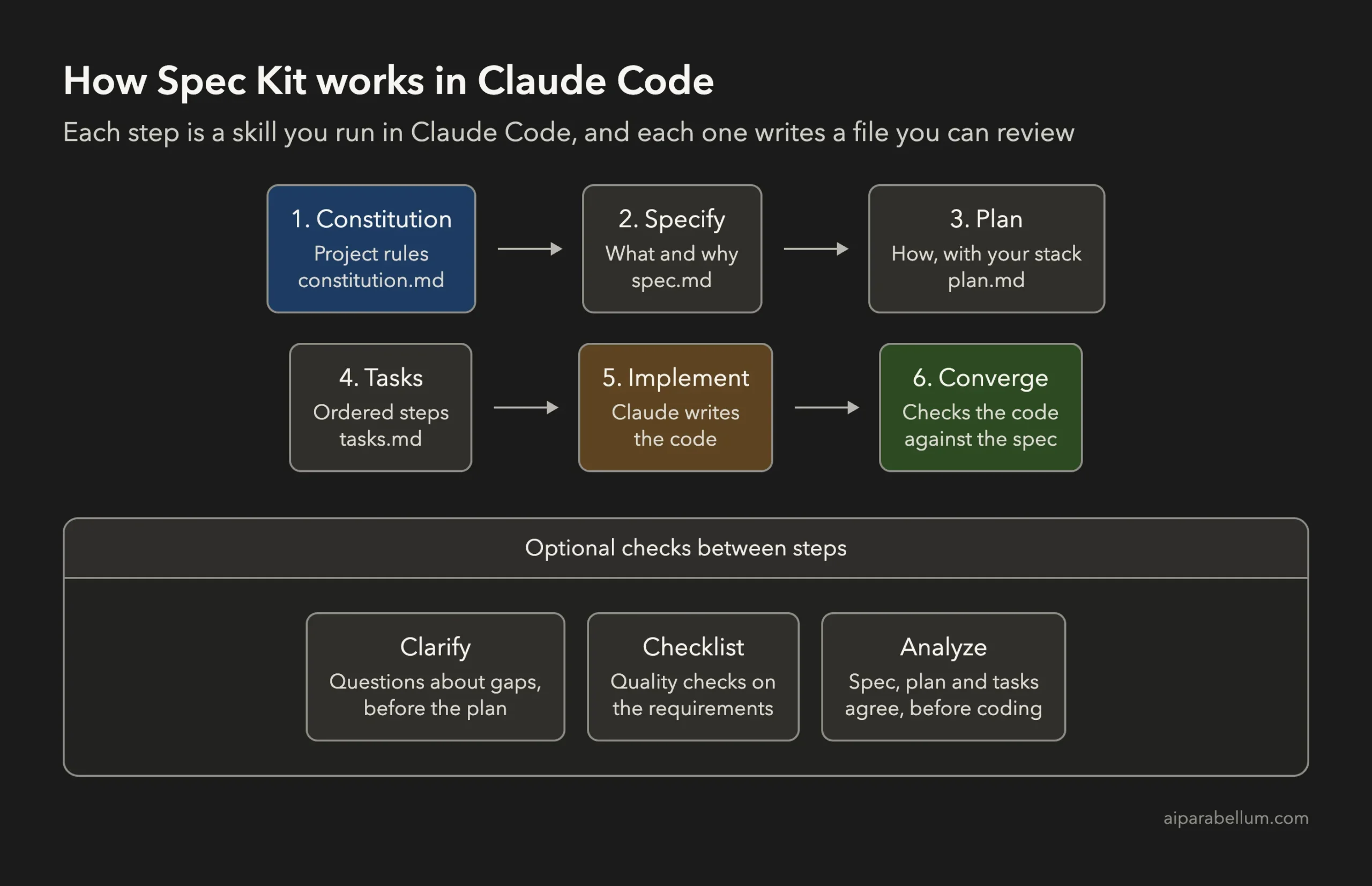
The main process is spec-driven development. You describe what to build, and the agent turns that into a spec, then a technical plan, then a task list, and only then the code.
Spec Kit works with many coding agents. For Claude Code, it installs its steps as skills in your project’s .claude/skills folder, so you run them like any other slash command.
How to Install Spec Kit for Claude Code
You need Claude Code first. If you’re new, start with our guide to install Claude Code. Then check these:
| You need | Why |
|---|---|
| Python 3.11 or newer | Runs the Specify CLI |
| uv | Installs the Specify CLI as a tool |
| Claude Code | Runs the Spec Kit skills |
| Git | Optional; our test worked without a repository |
Install the CLI and create a project with the Claude integration:
uv tool install specify-cli
specify init my-project --integration claude
cd my-project
claude
We used Spec Kit 1.3.0 with Claude Code 2.1.318. In a script, add --non-interactive so specify init doesn’t stop to ask questions.
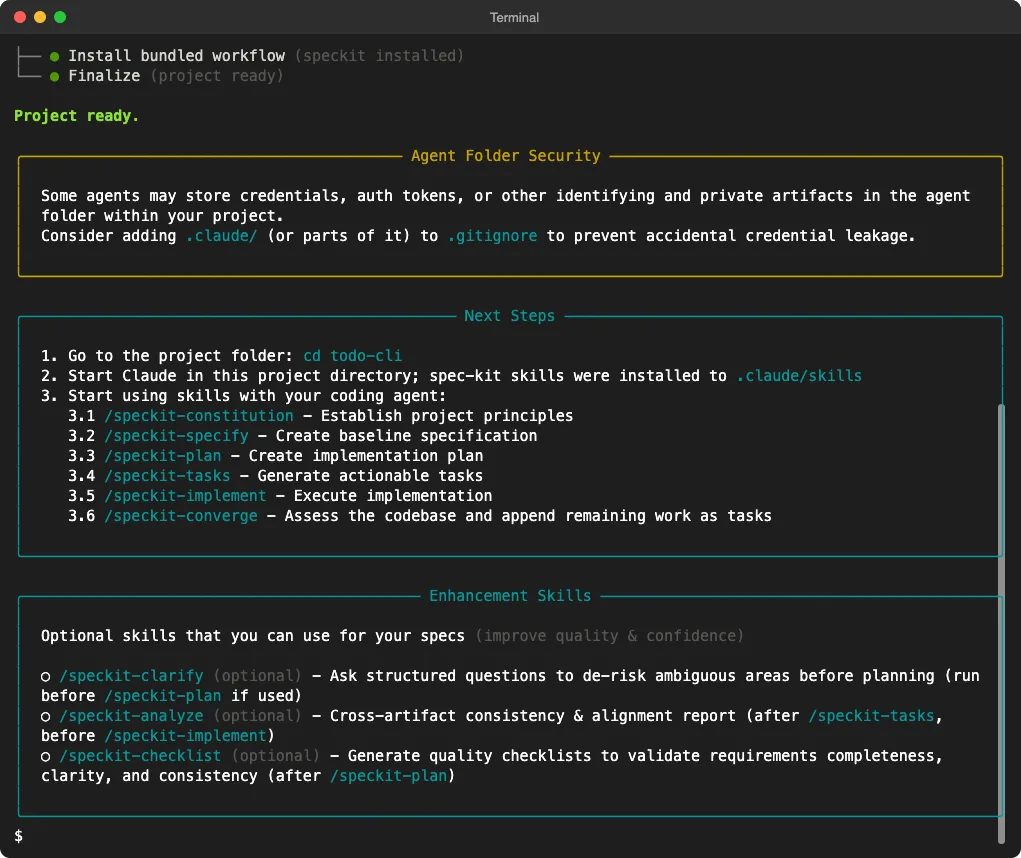
It installed nine skills into the project, not into your global Claude Code setup. Six are the main steps, and three are optional checks.

The setup also shows an Agent Folder Security note. It suggests adding .claude/, or parts of it, to .gitignore, since some agents keep private files there.
Running the Spec Kit Workflow in Claude Code
Our test app was a command-line to-do list in Python. It’s small, but it has real edge cases, like a broken save file or a task ID that doesn’t exist.
We ran each step in Claude Code, one at a time, in the same session. Here’s what each one did.
Step 1: Constitution
We ran /speckit-constitution with three rules: standard library only, pytest for tests, and simple, readable code. Claude wrote four principles into .specify/memory/constitution.md in 24 seconds.
Step 2: Specify
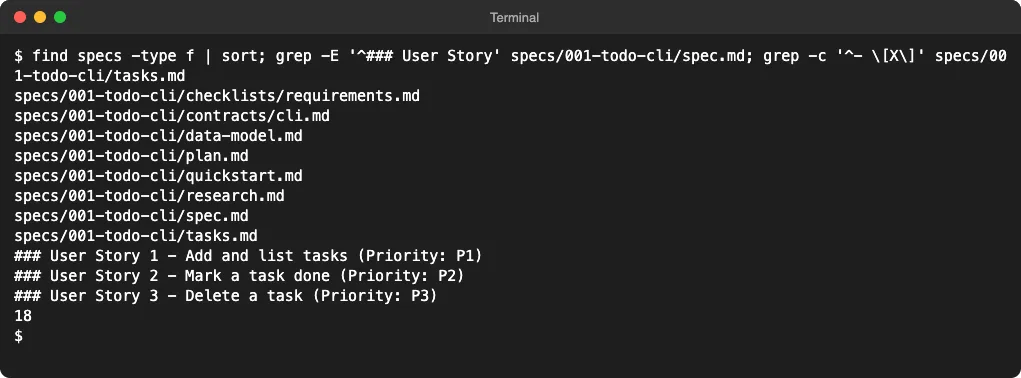
Next, /speckit-specify with the feature in plain words: add, list, mark done and delete tasks, saved in a JSON file. Claude turned that into a spec with three user stories, ten requirements and a list of edge cases.
The edge cases are the interesting part. The spec says a corrupted save file must give a clear error and must not be overwritten, and that task IDs are never reused after a delete.
Step 3: Plan
With /speckit-plan, we gave our stack: Python 3, argparse and json in one todo.py file, with pytest tests. Claude wrote the plan plus a research note, a data model, a command contract and a quickstart.
Step 4: Tasks
/speckit-tasks broke the plan into 18 ordered tasks, grouped by user story. Each test task came before the code it tests.
Step 5: Implement
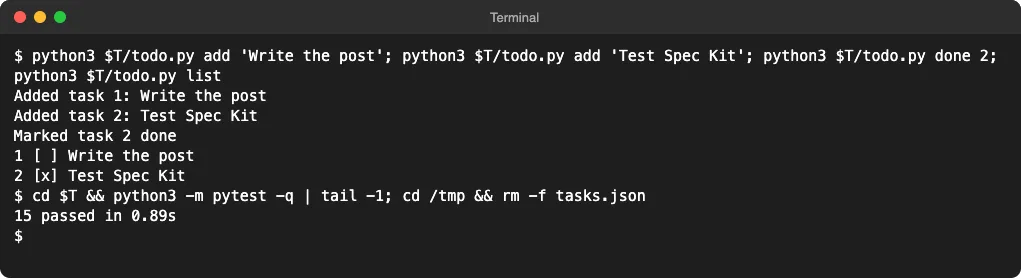
/speckit-implement wrote a 109-line todo.py and 14 tests, and all 14 passed. It ticked off 17 of the 18 tasks in about a minute.
It wasn’t perfect. Claude said it wrote the tests alongside the code instead of watching them fail first, which skipped the test-first order in the task list. The one open task was a manual walkthrough, which the test suite already covered.
Step 6: Converge
This is where Spec Kit earned its keep. /speckit-converge checked the code against the spec and found a real gap: a save file with a broken task entry crashed the app with a Python error instead of the clean error the spec asked for.
We reproduced the crash ourselves, so it wasn’t a false alarm. Converge added it as a new task, and the README says to repeat implement and converge until it reports converged.
So we ran one more round. This time, implement wrote the failing test first, then fixed the code, and all 15 tests passed. The second converge reported “Converged” with nothing left to add.
Here’s the full run, from Claude Code’s own numbers:
| Step | Time | Turns |
|---|---|---|
| Constitution | 24 seconds | 3 |
| Specify | 29 seconds | 3 |
| Plan | 48 seconds | 8 |
| Tasks | 31 seconds | 3 |
| Implement | 65 seconds | 10 |
| Converge | 27 seconds | 4 |
| Implement, round 2 | 21 seconds | 6 |
| Converge, round 2 | 17 seconds | 3 |
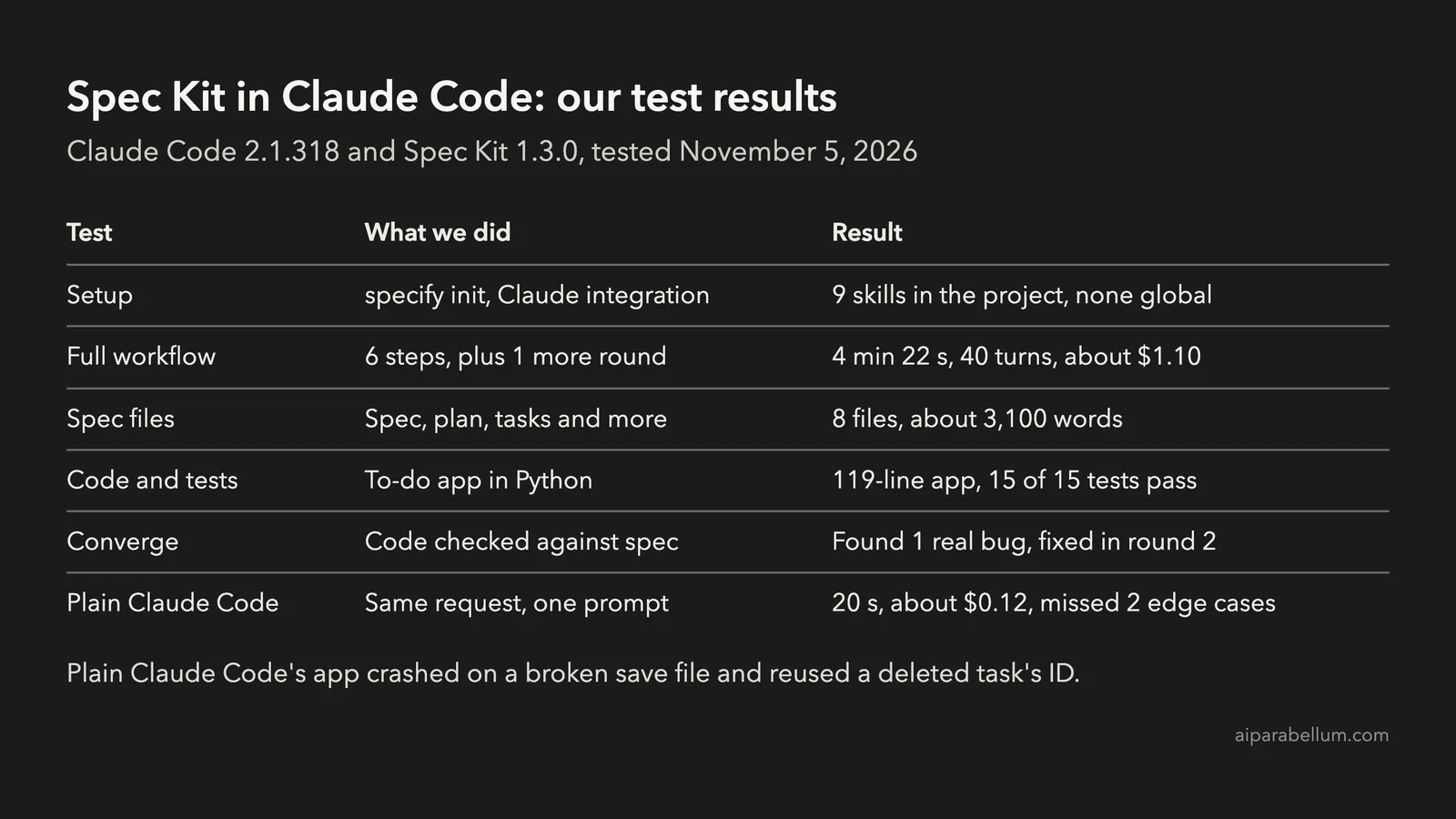
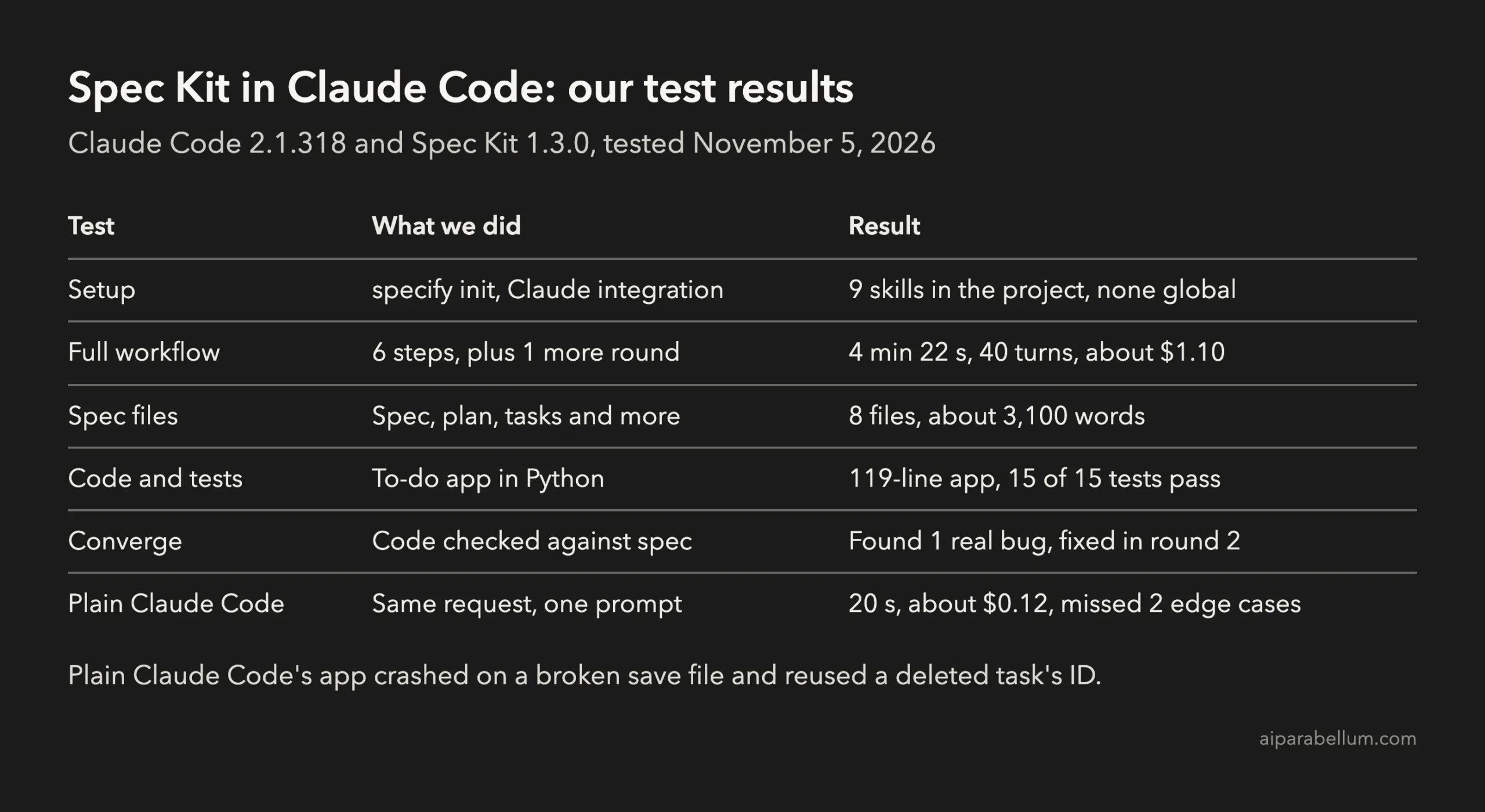
That’s 4 minutes and 22 seconds and 40 turns in all. Claude Code estimated the whole session at about $1.10 on its default model.
Spec Kit vs Plain Claude Code: Same App, Same Request
To be fair to both, we gave plain Claude Code the same feature, the same stack and the same rules in one prompt, in a fresh folder. It finished in 20 seconds with a 101-line app and 8 passing tests.
| Spec Kit in Claude Code | Plain Claude Code | |
|---|---|---|
| Time | 4 minutes 22 seconds | 20 seconds |
| Estimated cost | About $1.10 | About $0.12 |
| Tests | 15, all passing | 8, all passing |
| Broken save file | Clear error, file left alone | Crashes with a Python error |
| Task ID after deleting the newest task | Never reused | Reused |
| Docs you can review | 8 files, about 3,100 words | None |
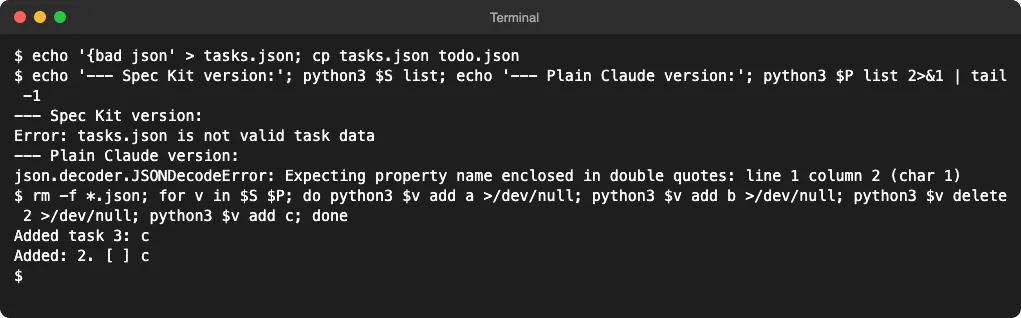
Both apps do the basic job. The difference is in the edges, and that’s exactly what the spec forced Claude to think about before coding.
To be clear, this is one small app and one run each. A plain prompt that listed the same edge cases would likely have closed the gap, but you’d have to think of them yourself.
What to Watch Out For
- It’s a lot of paperwork for small jobs. About 3,100 words of specs for a 119-line app is heavy, and you’re meant to read each file.
- It costs more. Our run cost about nine times as much as plain Claude Code and took about 13 times as long, because every step adds to the session’s context.
- The README says to review each result before running the next step. We ran them back to back for this test, but in real work, the review is the point.
- Steps don’t always follow their own tasks. The first implement skipped the test-first order until converge caught a gap.
- In our headless runs with a short allow list, a few chained shell commands were blocked, and Claude found other ways. In a normal session, Claude Code would just ask you.
To keep an eye on cost while you try it, see our guide on token usage in Claude Code.
Is Spec Kit Worth It in Claude Code?
For a feature with real rules, edge cases or more than one person involved, yes. The spec and converge steps caught problems that plain Claude Code missed, and you end up with documents that explain why the code works the way it does.
For quick fixes and small scripts, it’s overkill. Claude Code’s built-in plan mode or a clear prompt with your edge cases listed gets you most of the way for a fraction of the cost.
If you like the idea of a structured workflow, our guides to test-driven development and Superpowers for Claude Code cover two other ways to get there.
FAQ
Is Spec Kit free?
Yes. Spec Kit is open source under the MIT license. You only pay for the Claude Code usage it causes.
Does Spec Kit work with Claude Code?
Yes. Run specify init with --integration claude, and it installs its steps as Claude Code skills in your project, like /speckit-specify and /speckit-plan.
Do I need Git for Spec Kit?
No. Our project wasn’t a Git repository, and every step still worked. Spec Kit kept track of the current feature in a small file in its .specify folder.
Does Spec Kit change my global Claude Code settings?
No. In our test, its skills went into the project’s own .claude/skills folder. To learn more about how these work, see our guides to Claude Code skills and Claude Code plugins.
Conclusion
Spec Kit in Claude Code takes two commands to set up and adds six steps that turn a feature into a spec, a plan, tasks and tested code. In our test, it cost about nine times as much as plain Claude Code and took about 13 times as long, but its spec covered edge cases that plain Claude Code missed, and its converge step caught and closed a real bug. Use it for features where the details matter, skip it for quick fixes, and find the full command reference in the Spec Kit repository and Spec Kit documentation.