The Claude Code configuration file corrupted error means Claude Code tried to read ~/.claude.json and couldn’t parse it as JSON. That file holds your account details, your personal MCP servers and per-project state such as folder trust, so Claude Code refuses to guess. The message starts with “Claude configuration file at” plus the path and the words “is corrupted”.
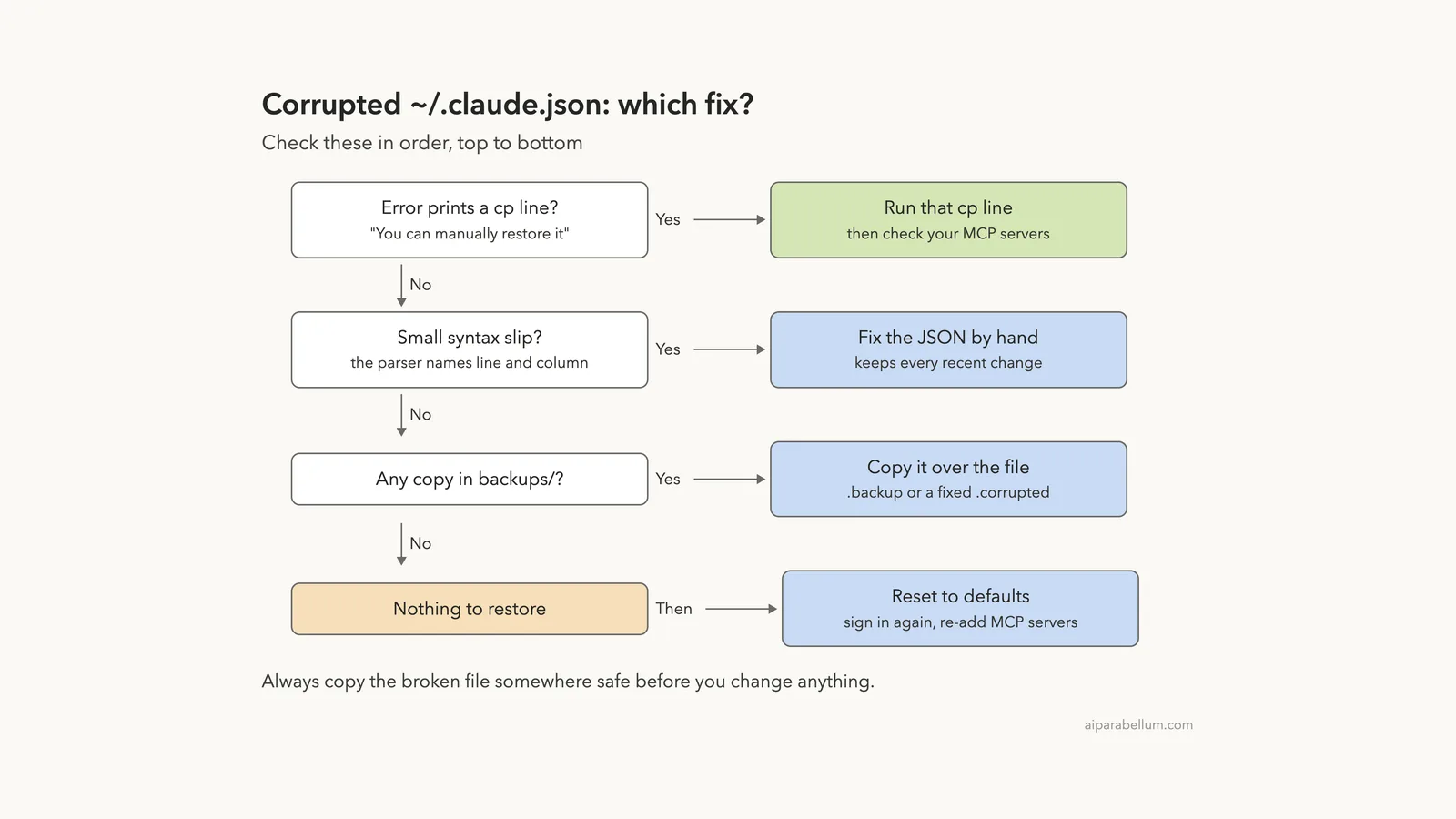
The fastest fix is already in the error: when Claude Code finds a backup, it prints a line that starts with “You can manually restore it by running”. Run that exact cp -f line, then start Claude Code again. If there is no cp line, fix the JSON by hand or copy a file from ~/.claude/backups/ over it.
Before you do anything, know one thing we saw in our own test: the backup can be older than your last change. Our restored copy was valid, but an MCP server we had added was missing, so check your servers after restoring.
Browse all our Claude Code tutorials for more fixes and how-tos.
Tested with Claude Code v2.1.328 on macOS on November 21, 2026. We broke a throwaway config on purpose, inside a demo folder with its own CLAUDE_CONFIG_DIR, so the real ~/.claude.json on our test Mac was never touched. Every terminal capture below is real output.
We tested on macOS; the Windows and Linux steps follow Anthropic’s official instructions.
Quick Summary
| Question | Short answer |
|---|---|
| Exact message | Claude configuration file at <path> is corrupted: JSON Parse error |
| Which file | ~/.claude.json (or the one inside CLAUDE_CONFIG_DIR) |
| Fastest fix | Run the cp -f line the error prints |
| Where backups live | ~/.claude/backups/ |
| Broken copy saved as | .claude.json.corrupted.<timestamp> |
Scripts with claude -p | Exit with code 1, no dialog |
Interactive claude | Offers Exit and fix manually, or Reset to default configuration |
| What a reset loses | Personal MCP servers, folder trust, and you may need to sign in again |
What “Configuration File Is Corrupted” Means
Claude Code keeps two kinds of files. Your settings live in ~/.claude/settings.json and project files, while ~/.claude.json is a separate file Claude Code writes for itself. Anthropic’s settings docs say you don’t need to edit it.
It holds your account details, MCP servers you added in the user or local scope, trust decisions for each project folder and global config options. When this one file can’t be parsed, Claude Code can’t safely load any of that.
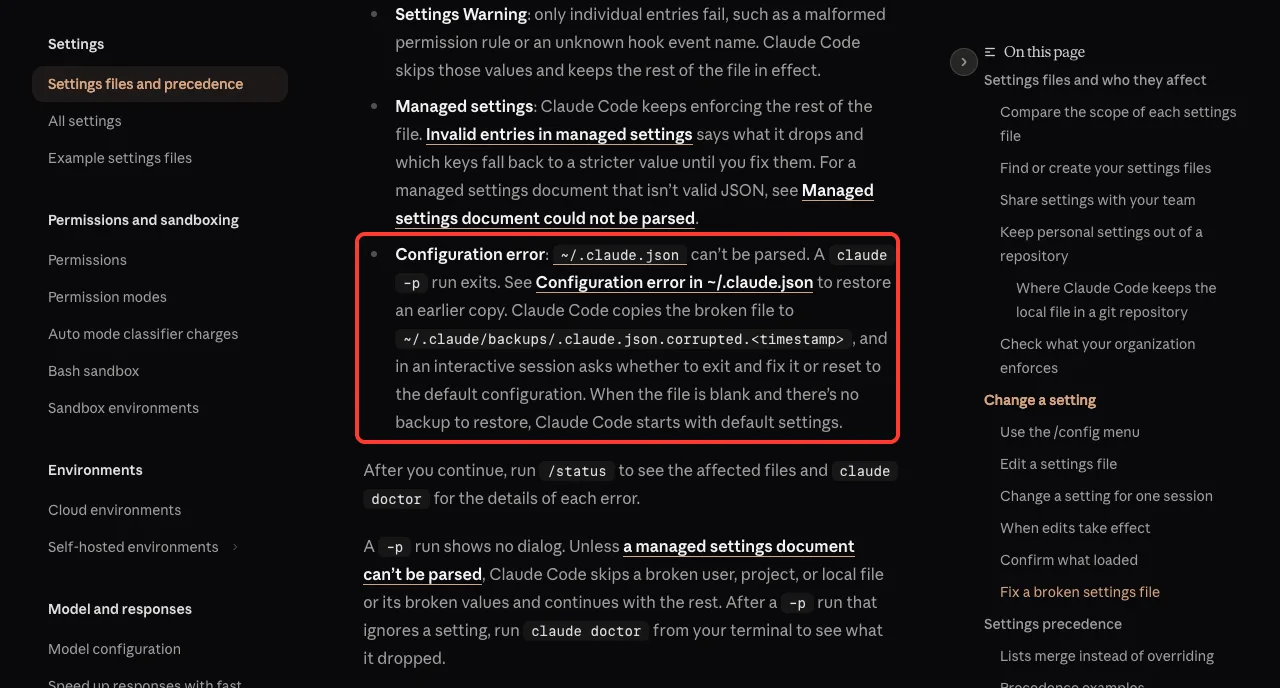
That split matters. A broken settings.json gives you a “Settings Error” dialog instead, and Claude Code can skip that file and carry on. A broken ~/.claude.json stops a claude -p run cold.
~/.claude.json is Claude Code’s own memory of you. When it breaks, restore it rather than rebuild it.
We Reproduced the Corrupted Config Error
We set CLAUDE_CONFIG_DIR to a demo folder, let Claude Code create a fresh .claude.json there, and added a test MCP server named notes-demo with claude mcp add --scope user. Then we broke the file the way a bad hand edit would: we removed the final closing brace and left a stray comma.
The error in a script or claude -p run
Here is what a non-interactive run printed. The paths show our demo folder; on a normal setup they point to your home folder.
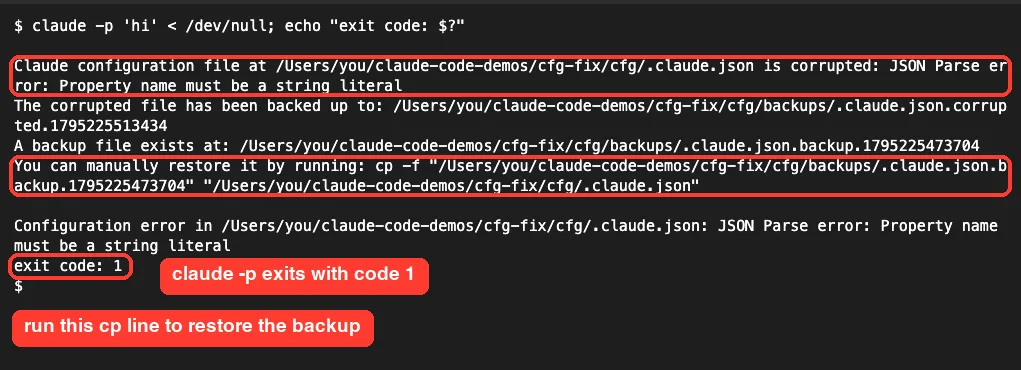
The output has four useful parts:
- The parser’s message, here “JSON Parse error: Property name must be a string literal”.
- Where Claude Code saved the broken file:
backups/.claude.json.corrupted.<timestamp>. - The newest good backup it found, a
.claude.json.backup.<timestamp>file. - A ready-made
cp -fcommand that copies that backup over the broken file.
The run exited with code 1, so a CI job or script fails loudly instead of running with half a config. Anthropic’s error reference shows the same message format.
The dialog in an interactive session
Starting plain claude with the same broken file printed the same notice, then opened a “Configuration error” dialog. It says the file “isn’t valid JSON” and offers two choices.
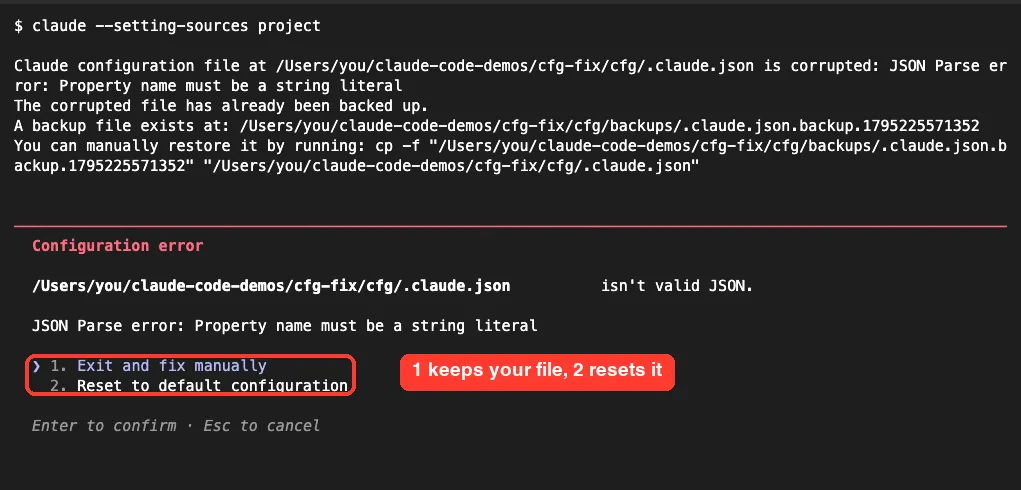
Notice the second line: “The corrupted file has already been backed up.” Claude Code had saved this exact broken version on the earlier run, so it didn’t make a duplicate.
What Claude Code Does When ~/.claude.json Breaks
Putting our test and the docs together, the recovery flow is predictable. Claude Code never silently throws your file away.
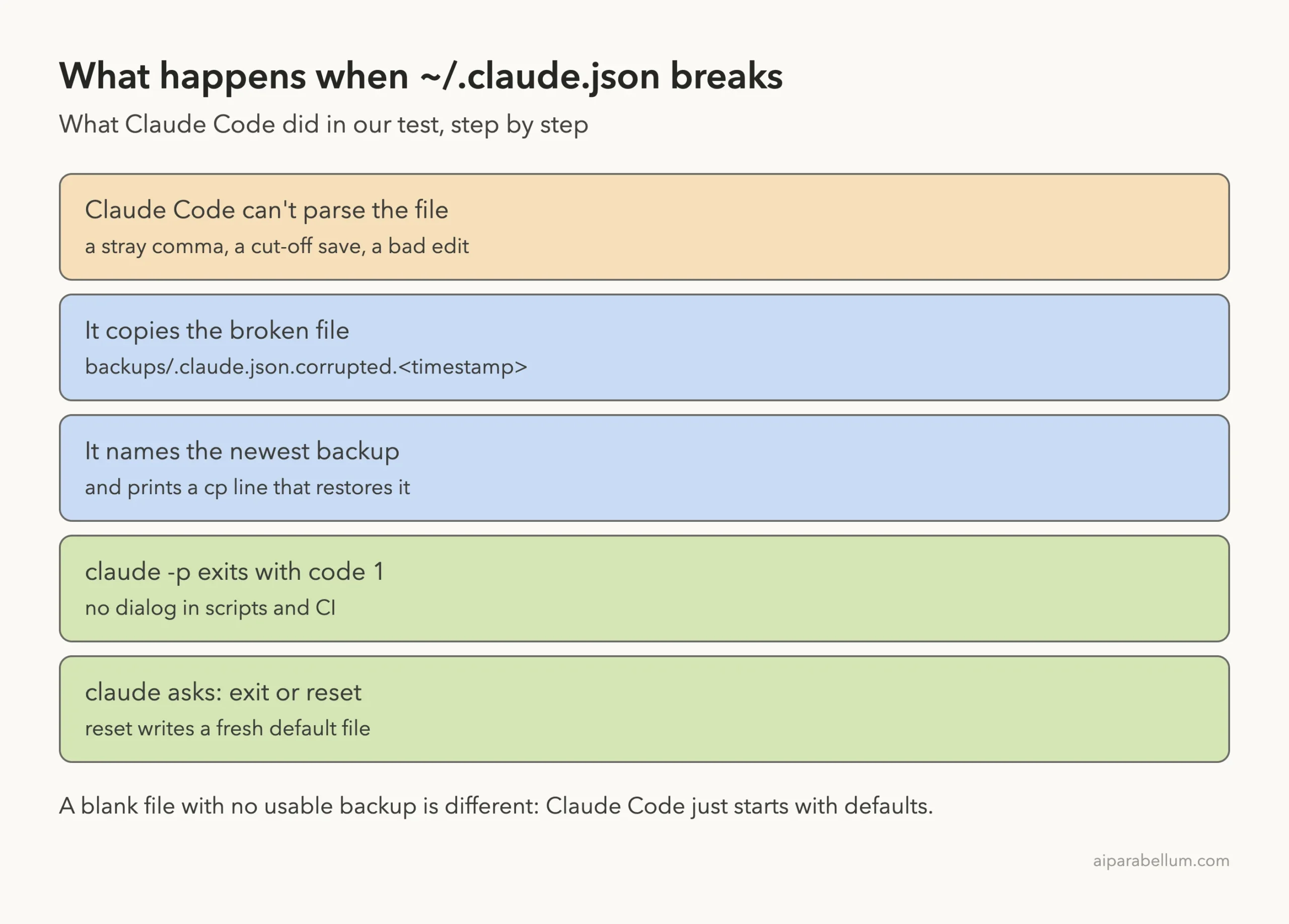
The backups come from normal use. According to the .claude directory docs, Claude Code copies earlier versions of ~/.claude.json into backups/ when it rewrites the file, keeps the five newest copies, and also keeps a copy of any version it couldn’t parse.
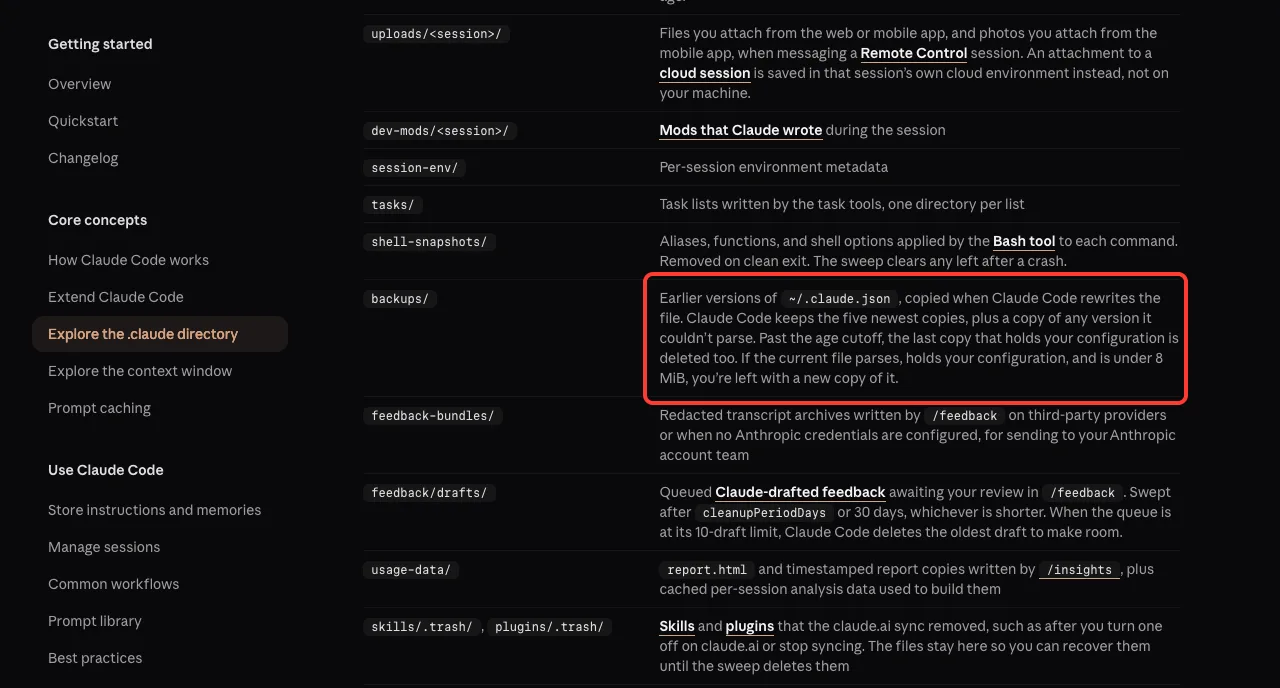
~/.claude/backups/: five newest copies plus any version it couldn’t parse.Why it happens
The docs focus on the fix rather than the cause, but a JSON file only breaks in a few ways. These are the usual suspects:
- A hand edit with a trailing comma, a missing quote or a missing brace.
- A save that got cut off, for example when a machine lost power or ran out of disk space.
- Another tool, sync service or script that rewrote the file.
- Settings pasted into the wrong file. The docs warn that
permissions,hooksandenvbelong in~/.claude/settings.json, not in~/.claude.json.
How to Fix a Corrupted Claude Code Configuration File
Work through these fixes from top to bottom. Most people are done after the first one.
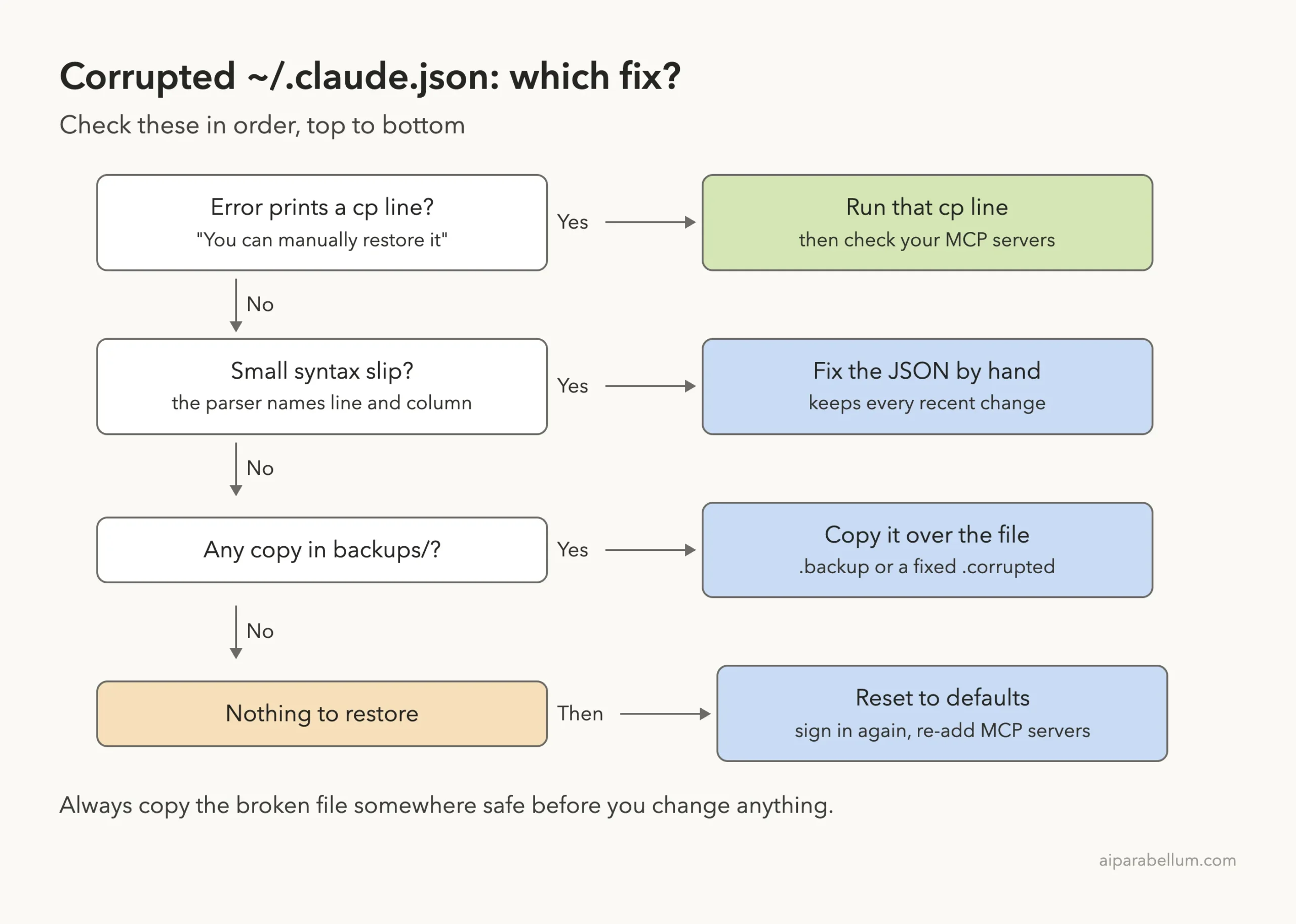
Step 0: Save a copy of the broken file
Claude Code already stores one, but a second copy costs nothing. Run this before you change anything:
cp ~/.claude.json ~/claude-json-broken.json
ls -1A ~/.claude/backups/
The ls shows what you have to work with. In our test it listed one .backup file and one .corrupted file.
Fix 1: Run the cp line from the error
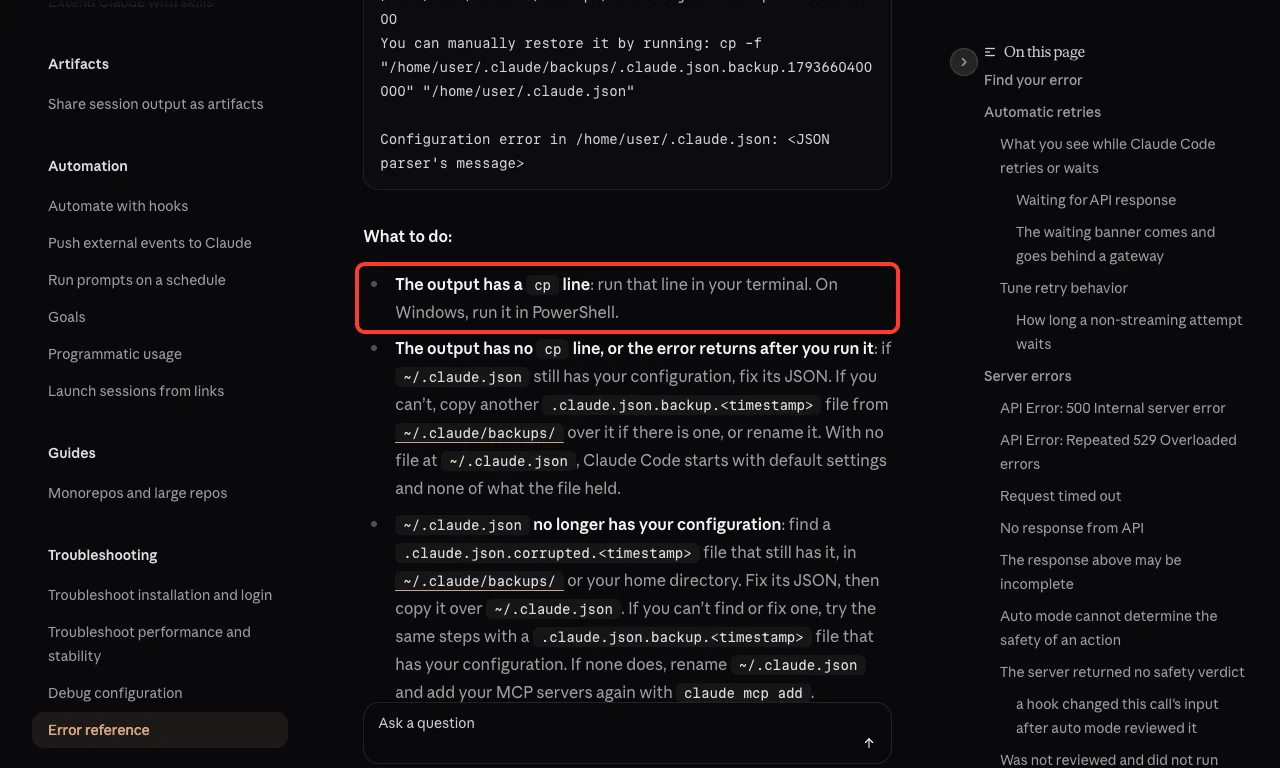
If the output has a “You can manually restore it by running” line, copy it exactly and run it. The docs say to run it in PowerShell on Windows.
cp -f "/Users/you/.claude/backups/.claude.json.backup.<timestamp>" "/Users/you/.claude.json"Use the full line from your own error, since the timestamp is unique. Then check the file and your MCP servers:
python3 -m json.tool ~/.claude.json > /dev/null && echo 'valid JSON'
claude mcp list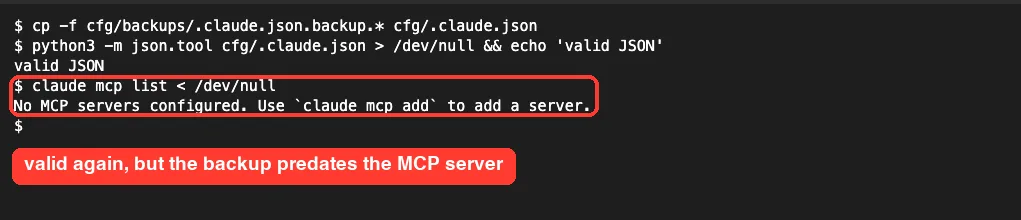
This was the most useful lesson from our test. The file was valid again, yet claude mcp list reported “No MCP servers configured”. The backup simply predated our change.
If that happens to you, either re-add the missing servers with claude mcp add or use Fix 2 to rescue the newer, broken copy instead.
Fix 2: Repair the JSON by hand
When the damage is a small syntax slip, fixing it keeps every recent change. Python’s built-in checker tells you exactly where the file breaks:
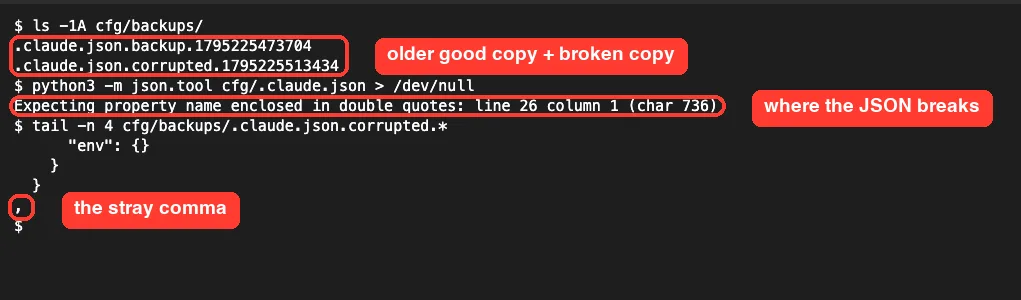
Open the file in any plain-text editor, go to that line and fix the slip. Common ones are a comma after the last item, a missing closing brace, or quotes that don’t match.
The docs suggest the same approach when ~/.claude.json no longer has your configuration: take a .claude.json.corrupted.<timestamp> file that still has it, fix its JSON, then copy it over ~/.claude.json. That is what we did:
cp ~/.claude/backups/.claude.json.corrupted.<timestamp> ~/fixed.json
# edit ~/fixed.json and fix the syntax error
python3 -m json.tool ~/fixed.json > /dev/null && echo 'valid JSON'
cp -f ~/fixed.json ~/.claude.json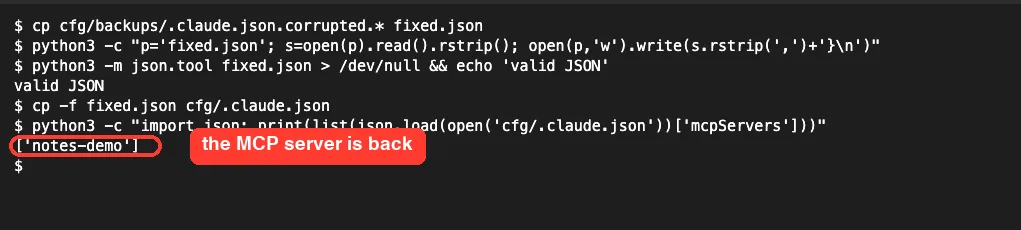
In the demo we fixed the comma with a one-line Python command so the step was repeatable. In real life, an editor is easier and safer.
Fix 3: Copy another backup over it
No cp line, or the error came back after you ran it? The docs say to copy another .claude.json.backup.<timestamp> file from ~/.claude/backups/ over the broken file. Try the newest one first and work backward.
Fix 4: Reset to the default configuration
Use this only when nothing can be restored. Pick “Reset to default configuration” in the dialog, or rename ~/.claude.json so Claude Code starts without it.
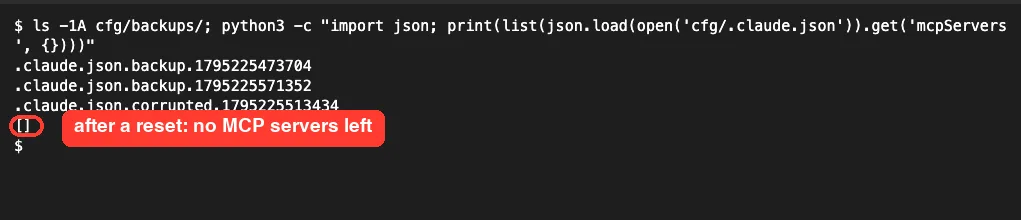
In our run, the reset wrote a fresh default file and returned us to the shell prompt. The notes-demo server was gone. The docs say that with no file at ~/.claude.json, Claude Code starts with default settings and none of what the file held, so expect to sign in again if asked and re-add MCP servers.
If you want a deeper cleanup after that, our guide to reset Claude Code covers settings, login and cache too.
Related Messages You Might See
A few nearby messages look similar but mean something different. Here is how to tell them apart.
Configuration file was empty and no backup holds anything
A blank ~/.claude.json is not treated as corrupted anymore. We created an empty file in a fresh config folder, and Claude Code printed a notice and moved on.
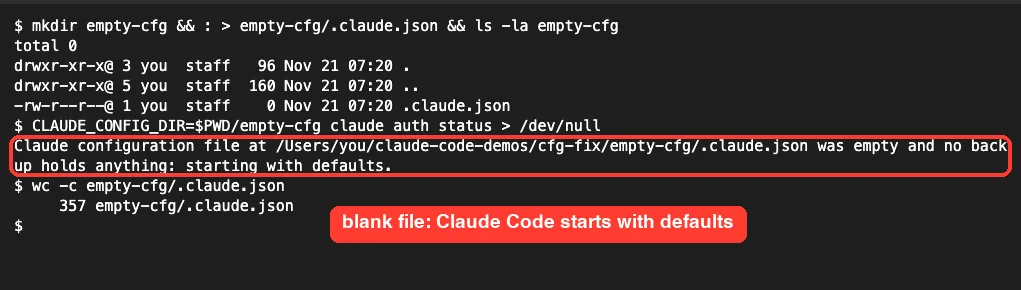
The docs note that before v2.1.318, a blank file with no backup was reported as corrupted. If you see this notice, set up your MCP servers again and sign in if asked.
Other config messages
| Message | What it means | What to do |
|---|---|---|
| Could not read Claude Code config | claude import hit an unreadable ~/.claude.json | Run claude with no arguments to recover, then rerun the import |
| Two Claude Code config files exist | An older .config.json is in use instead of .claude.json | Find the one with your setup and move the other aside |
| Make this change again later | A change couldn’t be saved to ~/.claude.json | Repeat the change, such as /login, in a later session |
| Settings Error | A settings.json file is broken, not ~/.claude.json | Fix that file; see our settings.json locations guide |
For a wider list of messages and fixes, see our roundup of common Claude Code errors.
Try It Yourself Safely
You can practice this recovery without risking your real setup. Point Claude Code at a throwaway folder, break the file, and restore it. Run these in an empty folder:
mkdir -p ~/cc-practice && cd ~/cc-practice
export CLAUDE_CONFIG_DIR=$PWD/cfg
claude auth status > /dev/null
claude mcp add --scope user practice-demo -- echo hello
# now open cfg/.claude.json and delete the last closing brace
claude -p 'hi'; echo "exit code: $?"
unset CLAUDE_CONFIG_DIR
Follow the fixes above on the copy in cfg/. When you finish, run unset CLAUDE_CONFIG_DIR so your normal config is back in charge.
Prefer to let Claude Code help? In a session that works, you can paste this prompt with your own file path:
The file ~/claude-json-broken.json is invalid JSON. Find the syntax error,
explain it in one sentence, and write a fixed copy to ~/fixed.json.
Don't change any values and don't touch ~/.claude.json itself.
Common Mistakes
- Deleting
~/.claude.jsonfirst. The docs warn not to delete it, since it holds your account details. Rename or copy it instead. - Choosing Reset right away. It throws away your MCP servers and folder trust when a one-line fix would have kept them.
- Assuming the backup is current. Ours was older than our last change, so always run
claude mcp listafter restoring. - Fixing the wrong file. With
CLAUDE_CONFIG_DIRset, the file lives in that folder, not in your home folder. - Putting
permissions,hooksorenvinto~/.claude.json. They belong in~/.claude/settings.json; our settings.json examples show the right shape.
Pro Tips
- Add MCP servers with
claude mcp addinstead of editing~/.claude.jsonby hand. Our guide to user-scope MCP servers explains the scopes. - Keep team servers in a project
.mcp.json, which lives in the repo and survives a reset. See where the MCP config file lives. - Validate any hand edit with
python3 -m json.tool ~/.claude.jsonbefore you start Claude Code. - After any recovery, run
/doctorin a session; our /doctor walkthrough shows what it checks. - If sign-in fails after a reset, our fix for the not logged in error covers the next step.
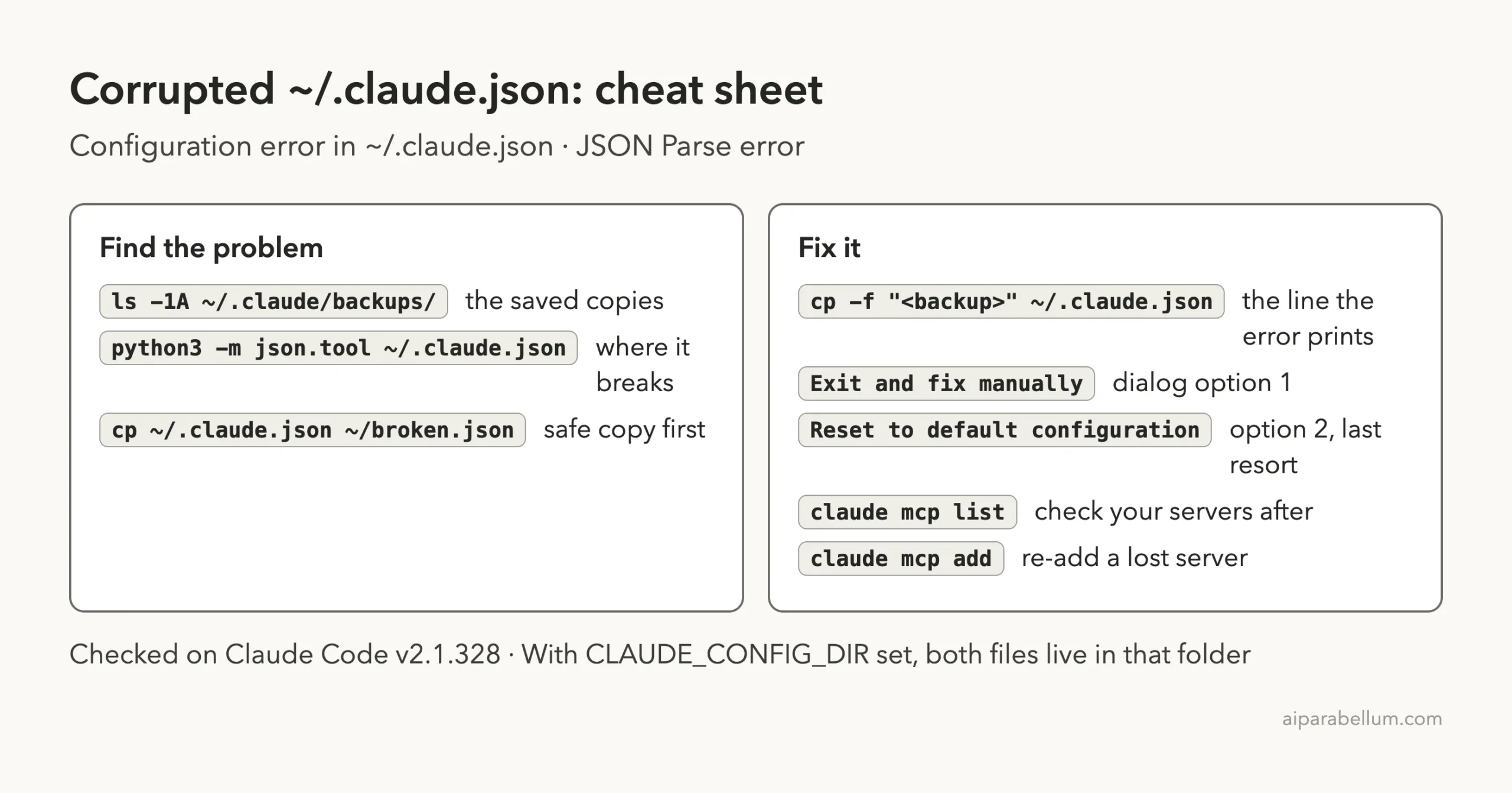
Cheat Sheet
Frequently Asked Questions
Where is the Claude Code configuration file?
It is ~/.claude.json in your home folder, or %USERPROFILE%\.claude.json on Windows. If you set CLAUDE_CONFIG_DIR, it lives inside that folder instead.
Is it safe to delete ~/.claude.json?
The docs say not to delete it, because it holds your account details and personal MCP servers. Rename or copy it if you need it out of the way.
Where does Claude Code keep backups of .claude.json?
In ~/.claude/backups/. Good copies are named .claude.json.backup.<timestamp>, and broken ones are saved as .claude.json.corrupted.<timestamp>.
Will I lose my login or MCP servers?
Not if you restore a backup or fix the JSON. A reset, or a backup that predates your changes, can drop MCP servers and you may need to sign in again.
Why does claude -p fail but the app asks me what to do?
A non-interactive claude -p run can’t show a dialog, so it prints the restore hint and exits with code 1. An interactive session offers to exit or reset.
Conclusion
A Claude Code configuration file corrupted error looks scary, but Claude Code does most of the recovery work for you: it saves the broken file, names a backup and prints the exact cp command to restore it. In our test, that command fixed the error in one step, though the backup was older than our last change and a test MCP server went missing, while repairing the saved corrupted copy brought everything back. Save a copy first, run the cp line, check claude mcp list, and keep Reset as the last resort. To learn more about the model behind the tool, see our overview of Claude AI.