The Claude Code not logged in error, shown as “Not logged in · Please run /login”, means Claude Code found no credential it can use for this session. There is no saved sign-in in the config folder it is reading, no exported API key, and no token or helper script. The usual fix is simple: run /login inside Claude Code, or claude auth login in your shell, and sign in with the account you pay with.
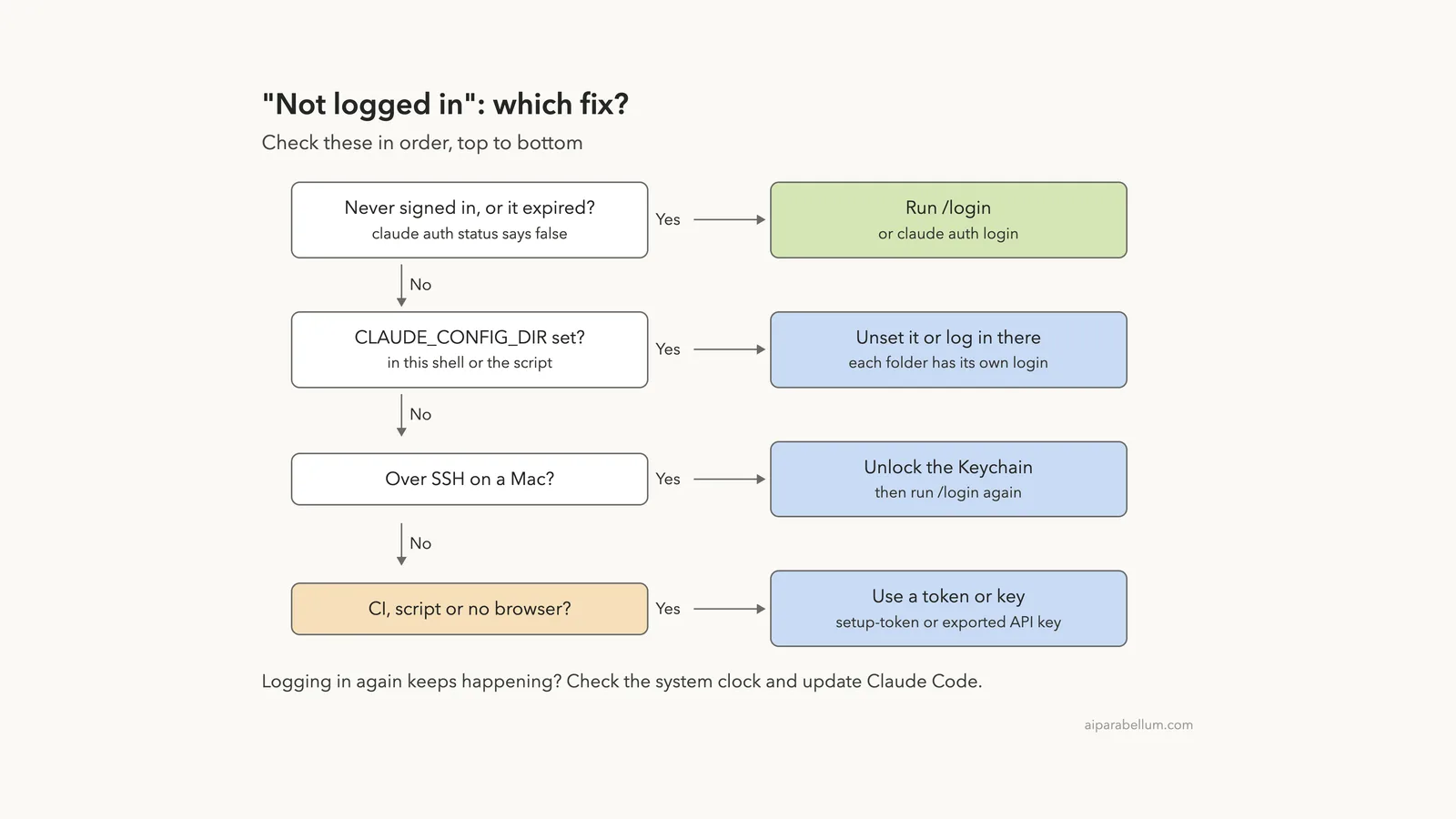
If you are sure you already signed in, the message almost always points to one of four hidden causes. Your sign-in expired, CLAUDE_CONFIG_DIR points Claude Code at a different folder, an API key is set but not exported, or the macOS Keychain was locked when you signed in over SSH. Run claude auth status first: if it says "loggedIn": false, you know Claude Code really can’t see a login in that shell.
For scripts and CI, where nobody can open a browser, use a long-lived token from claude setup-token or an exported Console API key instead of a browser login.
Browse all our Claude Code tutorials for more fixes and how-tos.
Tested with Claude Code v2.1.328 on macOS on November 20, 2026. We reproduced the error in a small demo folder using a throwaway CLAUDE_CONFIG_DIR with no saved login, so the real setup on our test Mac was never touched. All terminal captures below are genuine.
Steps we could not safely trigger, such as a locked Keychain or an expired token, come from Anthropic’s official docs, and we say so where they appear.
Quick Summary
| Question | Short answer |
|---|---|
| Exact message | Not logged in · Please run /login |
| What it means | No usable credential for this session |
| Fastest fix | Run /login, or claude auth login in your shell |
| How to check | claude auth status shows "loggedIn": false |
| Signed in but still see it | Check CLAUDE_CONFIG_DIR, an unexported key, or the Keychain |
| Over SSH on a Mac | Unlock the login Keychain, then sign in again |
| Scripts and CI | claude setup-token or an exported ANTHROPIC_API_KEY |
| Keeps coming back | Check the system clock and update Claude Code |
What “Not Logged In · Please Run /login” Means
Every request Claude Code sends needs a credential. Anthropic’s error reference describes this message in one line: no valid credential is available for this session.
That wording matters. It doesn’t say your account is broken or your plan ran out. It says that in this shell, with these settings, Claude Code looked in every place it knows and found nothing.
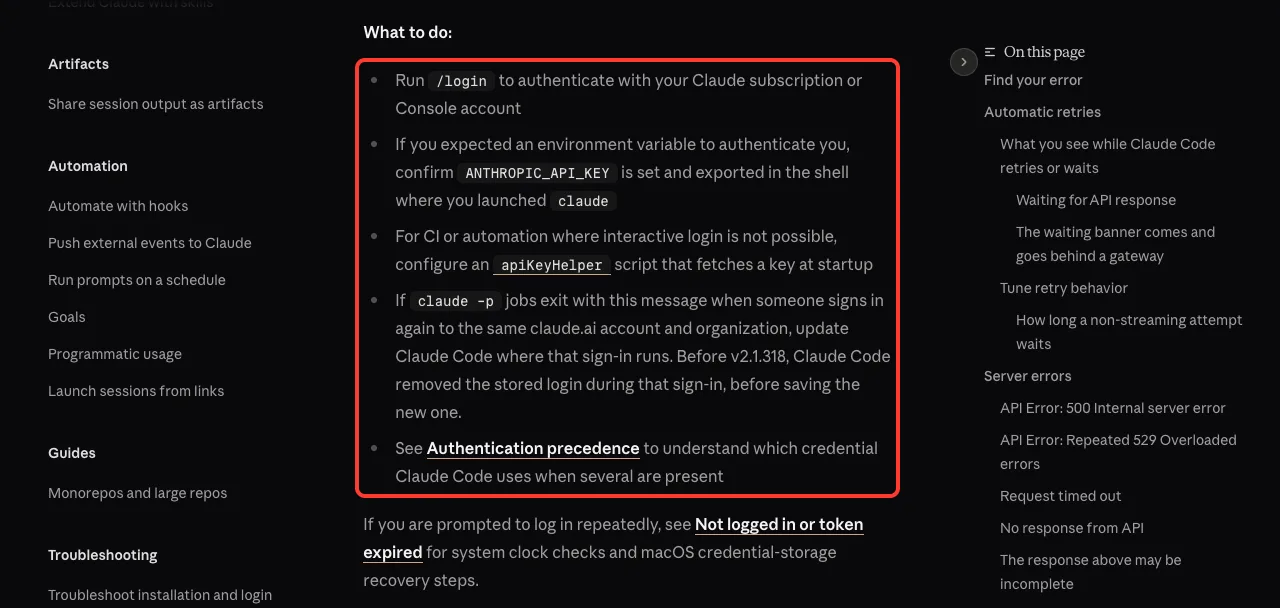
If you use the Claude desktop app, the same problem shows different text. The docs say sessions in the app’s Code tab or Cowork read “Authentication required · Sign in again to continue”, and you sign in again from the app itself.
“Not logged in” is about where Claude Code looked, not about your account. Fix where it looks, and the message goes away.
We Reproduced It: The Exact Error in a Fresh Config
To see the message without logging out of anything real, we pointed Claude Code at an empty config folder. A new CLAUDE_CONFIG_DIR has no saved login, which is exactly what a brand-new install looks like.
export CLAUDE_CONFIG_DIR=$PWD/fresh-config
claude -p 'Reply with one word: ok'
echo "exit code: $?"
claude auth status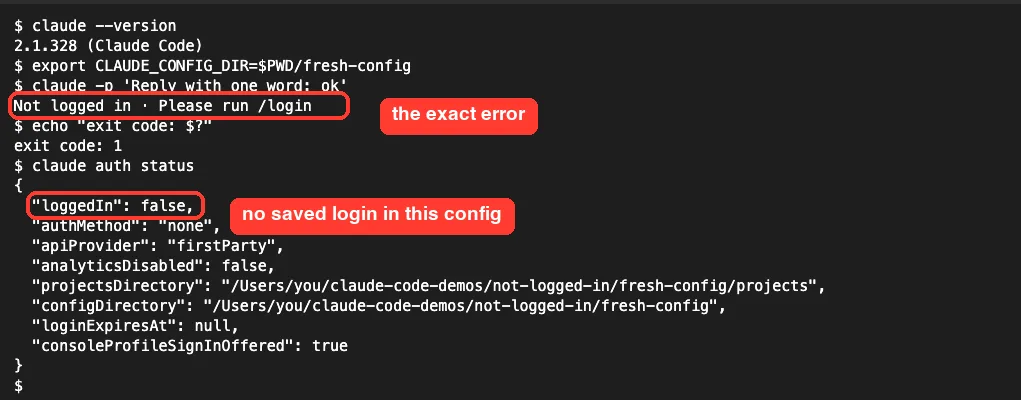
The claude -p call stopped right away with “Not logged in · Please run /login”. It exited with code 1, so a script can detect it.
Then claude auth status printed "loggedIn": false and "authMethod": "none", along with the config folder it was reading.
That last detail is the most useful one. The configDirectory line tells you which folder Claude Code is reading, so you can spot a mix-up at a glance.
Why Claude Code Says You’re Not Logged In
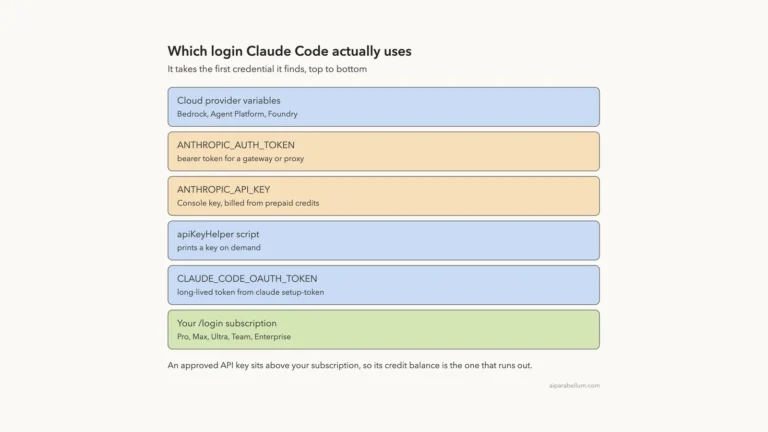
Claude Code checks a short list of places for a credential. The authentication docs list them in a fixed order, and the saved /login sign-in is the one most people use.
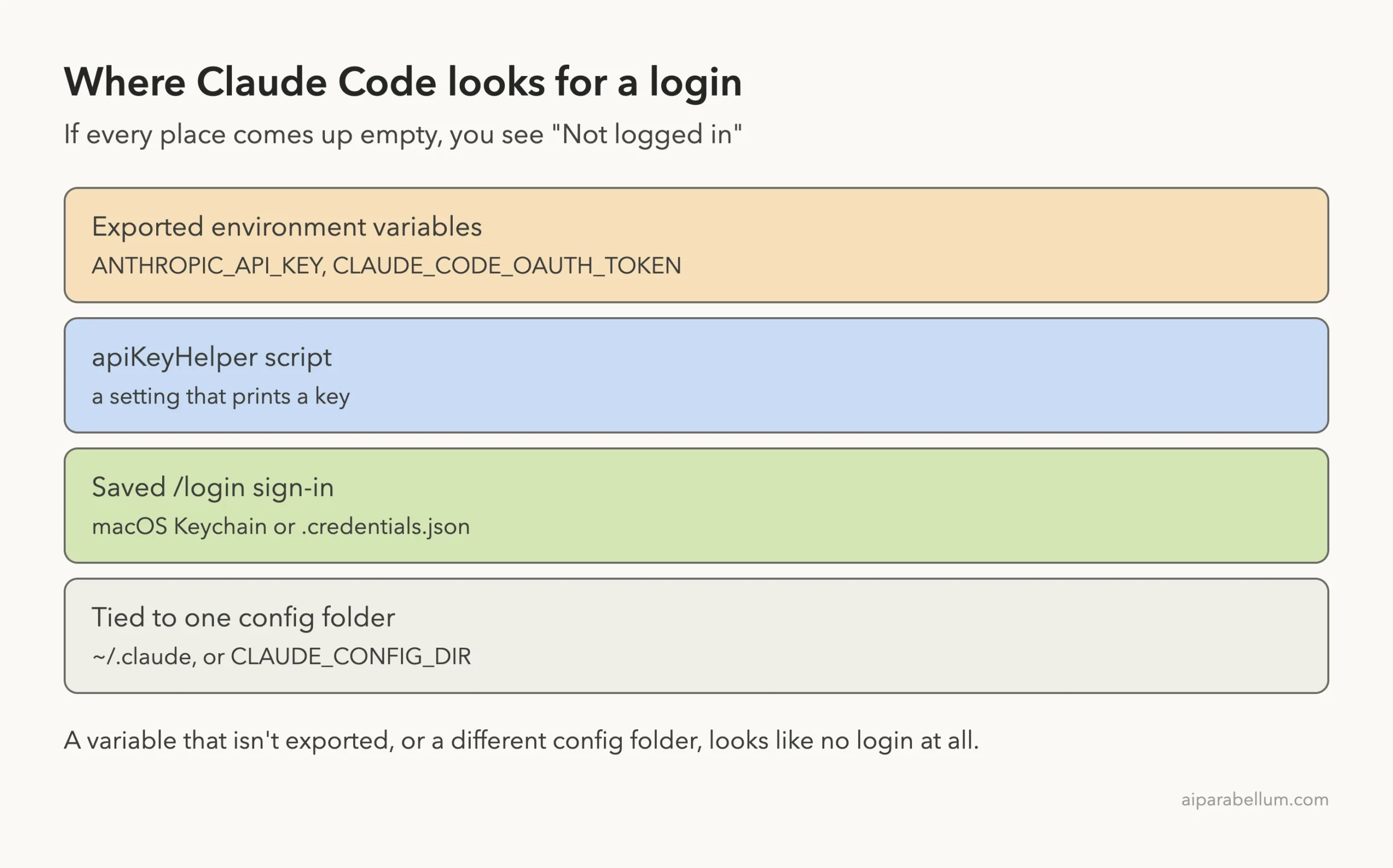
Here are the real-world reasons each place comes up empty:
- You never signed in on this machine, or in this config folder.
- Your saved sign-in expired and Claude Code couldn’t refresh it.
CLAUDE_CONFIG_DIRpoints to a different folder than the one you signed in with.- You set
ANTHROPIC_API_KEYin your shell but didn’t export it. - You signed in over SSH on a Mac while the Keychain was locked, and the login didn’t save where you expected.
- A script or CI job runs where no one ever signed in.
The docs list one more case for teams: if someone signs in again to the same claude.ai account and organization, older versions removed the stored login during that sign-in. Anthropic says to update Claude Code where that sign-in runs, since versions before v2.1.318 had this problem.
How to Fix “Not Logged In · Please Run /login”
Work through these fixes in order. Most people only need the first one.
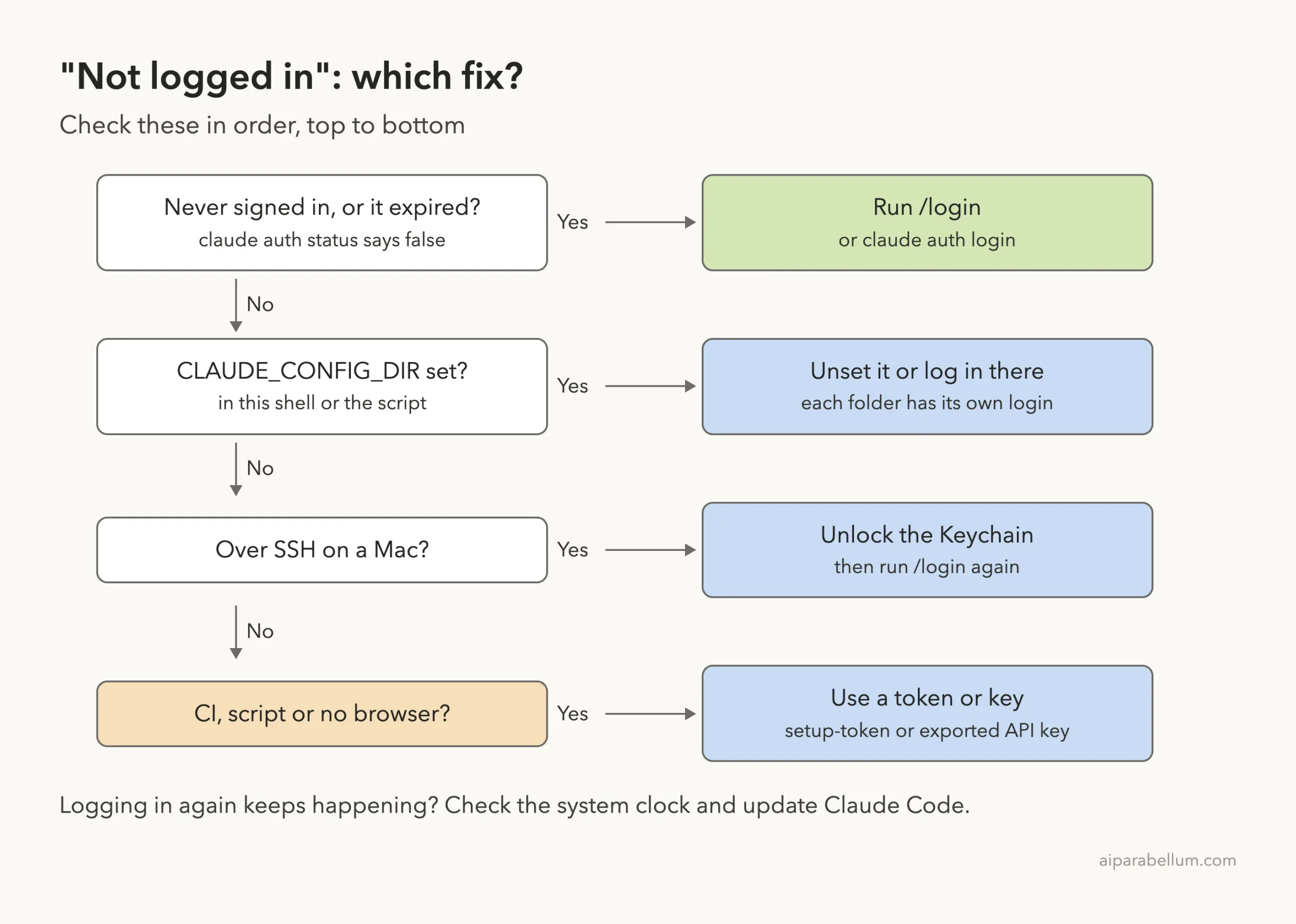
Fix 1: Run /login or claude auth login
If you are in an interactive session, type /login and press Enter. From your shell, run claude auth login instead. Both open the same browser sign-in.
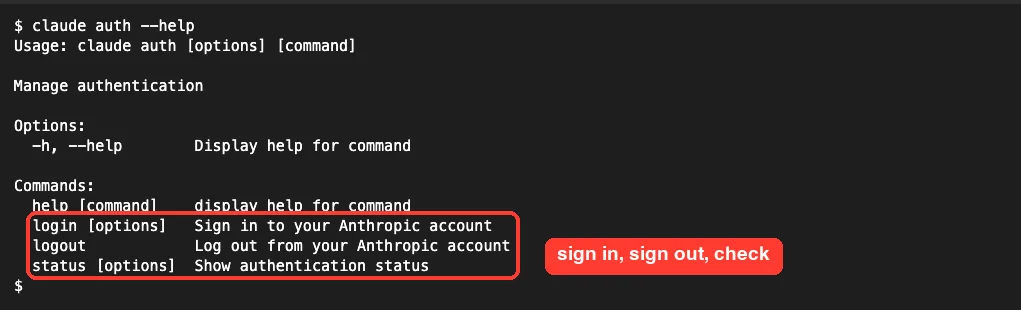
The claude auth command has three subcommands you will use for this error: login, logout and status.
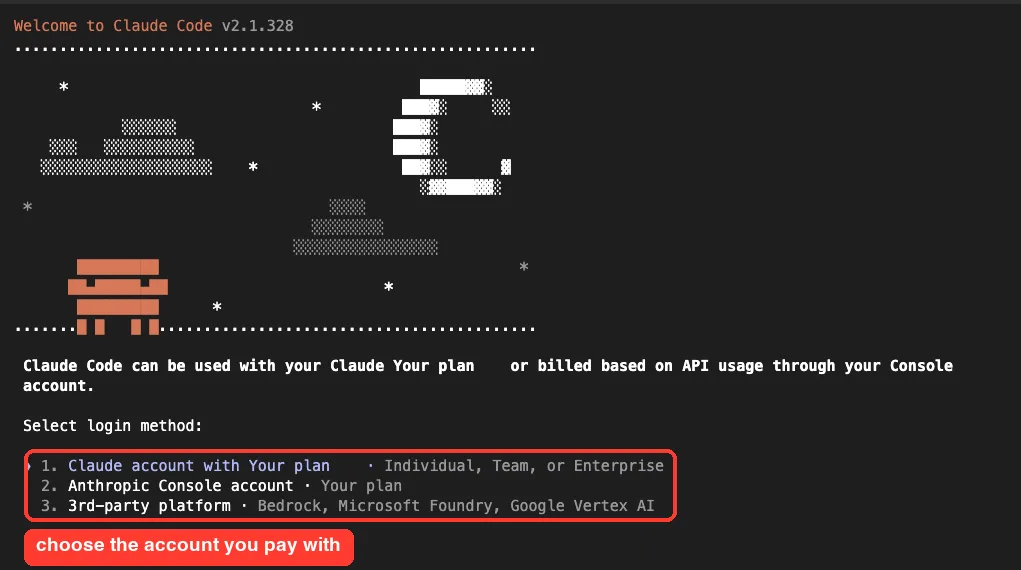
When Claude Code asks how you want to log in, pick the account type you actually pay with. A Claude subscription (Pro, Max, Ultra, Team or Enterprise) is the first option. Choose the Anthropic Console account only if you pay per token through the Console.
The claude auth login command also takes --claudeai (the default), --console, --sso and --email. Check them yourself with claude auth login --help.
Fix 2: Do a clean reset of your login
If /login doesn’t stick, Anthropic’s login troubleshooting guide recommends a clean re-authentication. Run /logout, close Claude Code, then start claude again and sign in.
Be aware that the docs say logging out removes all stored credentials, including saved MCP server logins and plugin secrets. Expect to re-authorize those afterward.
Fix 3: Check CLAUDE_CONFIG_DIR
This is the cause people miss most often. Your login is tied to one config folder, which is ~/.claude unless you set CLAUDE_CONFIG_DIR. The docs say that on macOS even the Keychain entry is keyed to that folder, so a session with a different CLAUDE_CONFIG_DIR reads a different entry.
We proved it in one terminal. With the variable unset, claude -p answered “ok” using the normal saved sign-in. With CLAUDE_CONFIG_DIR pointed at our empty folder, the very same command said “Not logged in”.
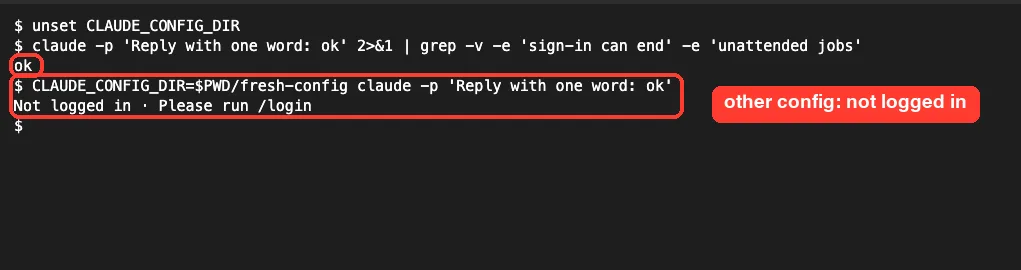
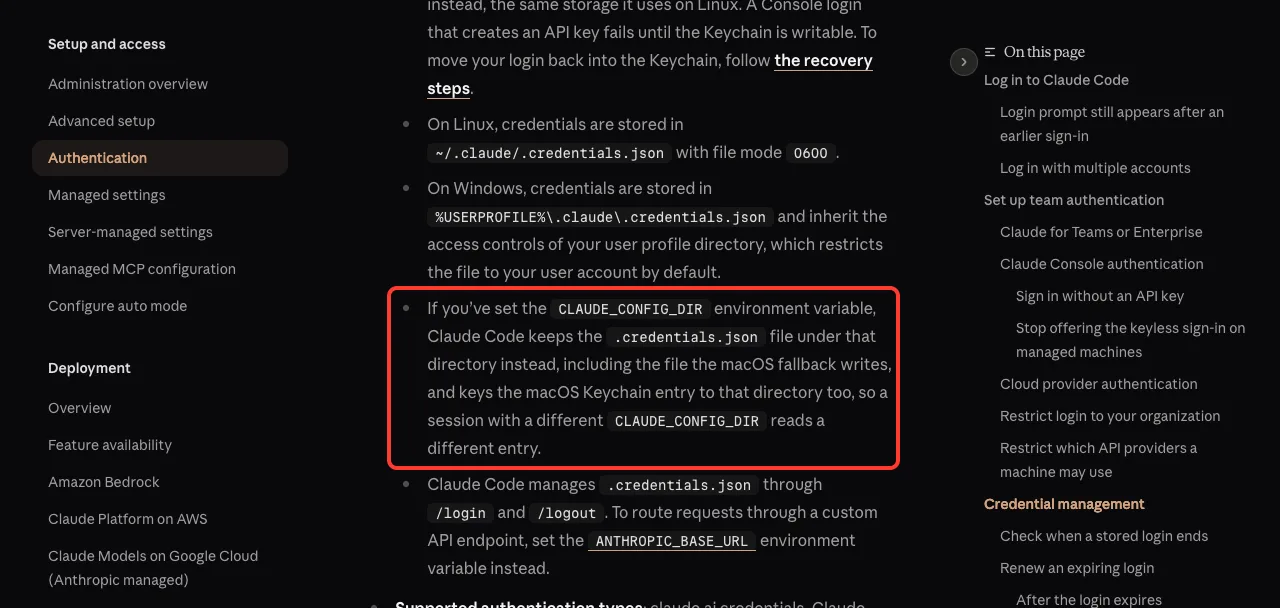
To check, run echo $CLAUDE_CONFIG_DIR. If it prints a path you didn’t expect, either unset CLAUDE_CONFIG_DIR or run claude auth login once in that setup so the folder gets its own login.
Also look for the variable in your shell profile, a project .env file or a script. Our guide to Claude Code environment variables covers where these usually hide.
Fix 4: Export your API key properly
If you meant to use a Console API key, the docs say to confirm ANTHROPIC_API_KEY “is set and exported in the shell where you launched claude”. The word exported is the trap.
In our test, a key set with a plain ANTHROPIC_API_KEY=... line was invisible to Claude Code, and we still got “Not logged in”.
After export ANTHROPIC_API_KEY, Claude Code picked the key up at once. Our demo key was fake, so the next error was “Invalid API key”, which proves Claude Code was now reading it.
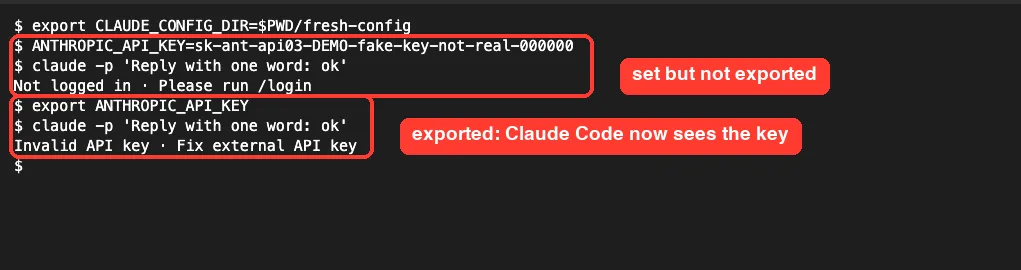
Use export ANTHROPIC_API_KEY=your-key in one line, and launch Claude Code from that same terminal. If you have a subscription, you probably don’t want a key at all; our credit balance guide explains how a stray key can take over your plan.
Fix 5: Unlock the macOS Keychain (SSH sessions)
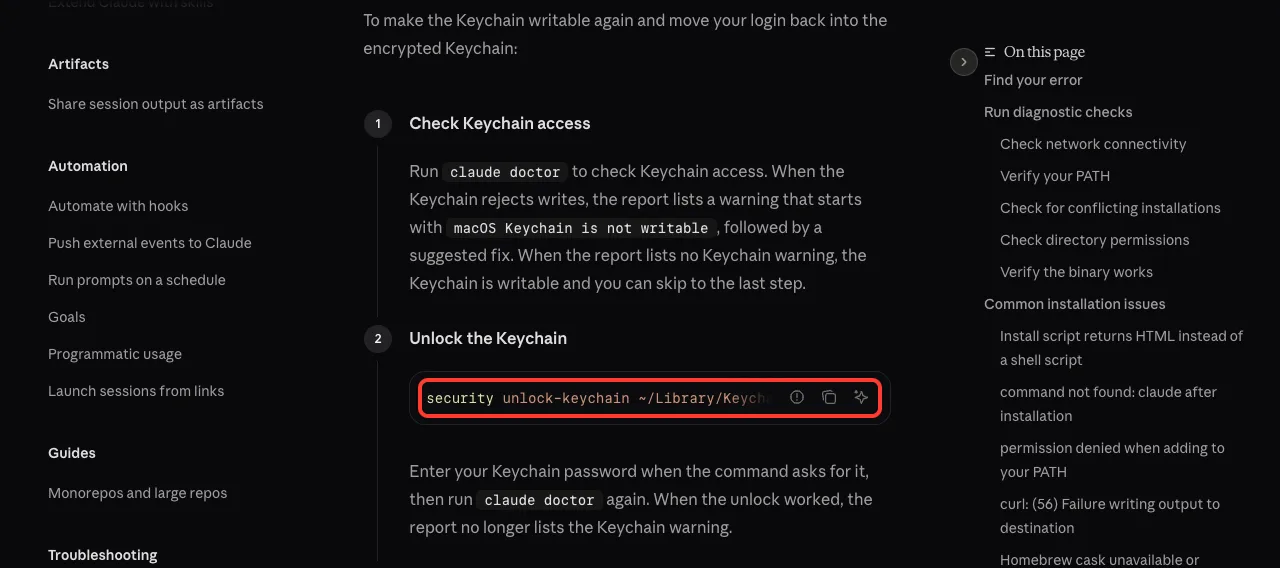
On a Mac, Claude Code saves your login in the encrypted macOS Keychain. The docs explain that when the Keychain rejects the write, for example when it’s locked in an SSH session, Claude Code falls back to the plaintext ~/.claude/.credentials.json file. Mixed setups like this are a common reason a login seems to vanish between sessions.
Start with claude doctor. Anthropic says that when the Keychain rejects writes, the report shows a warning starting with “macOS Keychain is not writable”. On our test Mac, doctor showed no Keychain warning and correctly reported that the fresh config was not signed in.
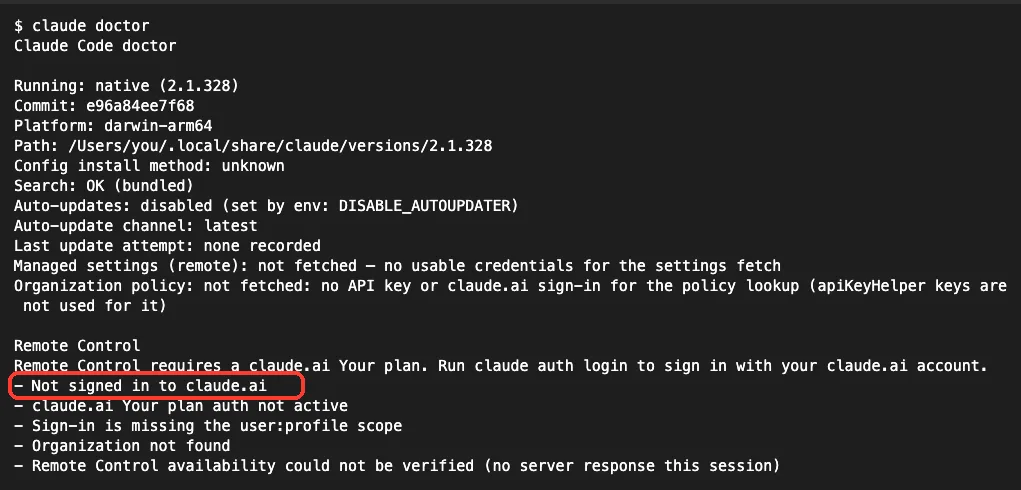
If you do see the warning, the docs give these steps, which we did not run because our Keychain was fine:
- Unlock it:
security unlock-keychain ~/Library/Keychains/login.keychain-db, then runclaude doctoragain. - If unlocking doesn’t help, open Keychain Access, select the login keychain and choose Edit, then Change Password for Keychain “login” to resync it with your account password.
- Once the warning is gone, run
/logoutand then/loginto move your login back into the Keychain.
Fix 6: Sign in without a browser (SSH, WSL2, containers)
Sometimes no browser opens, or the browser signs you in and then shows a localhost error. You don’t need to fix either one. The docs say to use the separate login URL the terminal shows above its paste prompt.
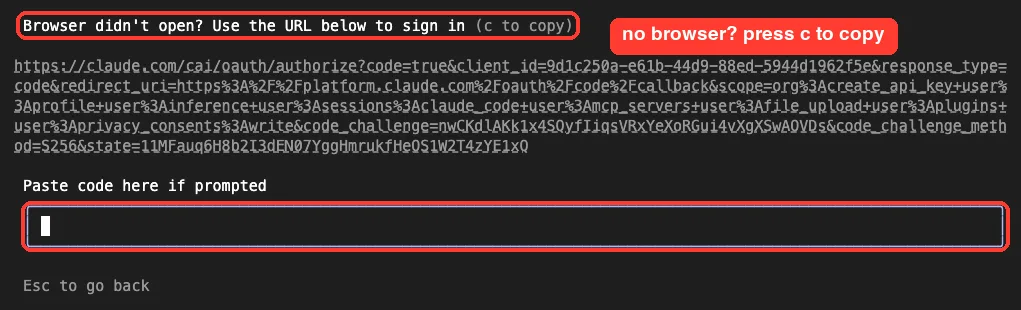
- Press
cat the login prompt to copy the URL, or copy the URL thatclaude auth loginprints. - Open it in a browser on your own computer and sign in. The browser then shows a code.
- Paste that code at the “Paste code here” prompt. Copy all of it, including the
#in the middle.
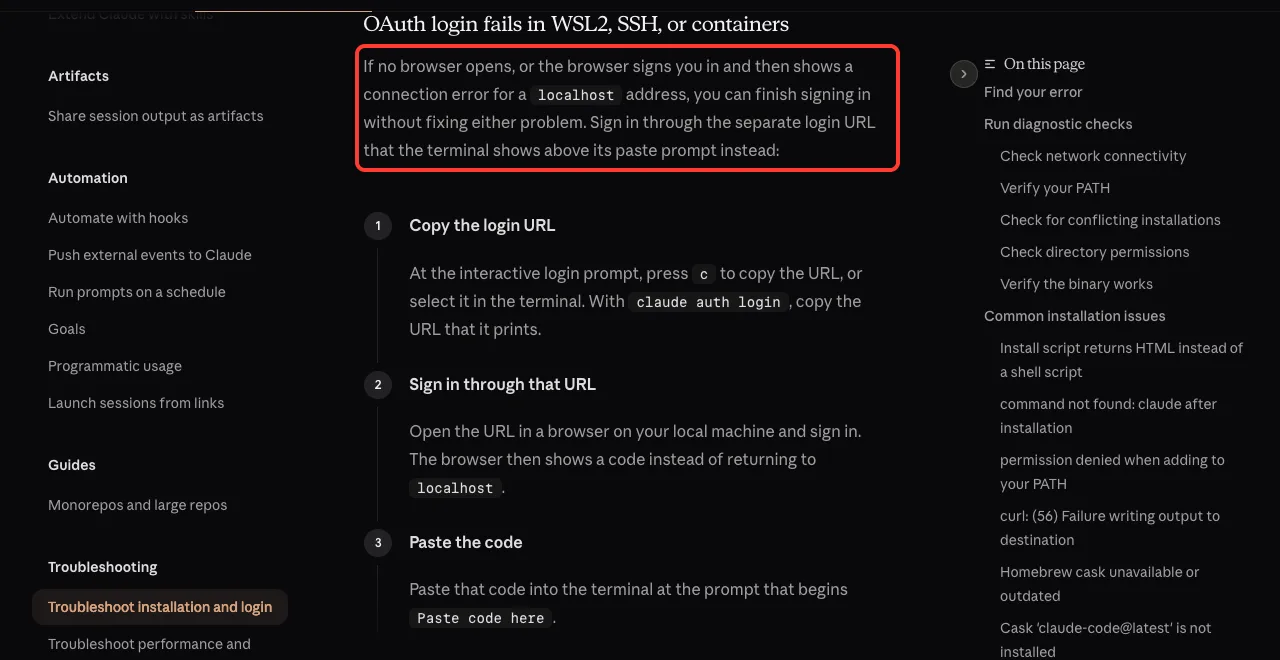
If pasting into the interactive prompt does nothing, the docs suggest claude auth login, which reads the pasted code from standard input. We tested on macOS; the Windows and Linux steps follow Anthropic’s official instructions.
Fix 7: Use a token or key for scripts and CI
A CI runner can’t click through a browser. For these jobs, the docs suggest two options.
If you have a Claude subscription, run claude setup-token on a machine where sign-in works. It prints a one-year OAuth token that you set as CLAUDE_CODE_OAUTH_TOKEN on the runner.
Otherwise, export ANTHROPIC_API_KEY with a key from the Claude Console, or configure an apiKeyHelper script that fetches a key at startup. Two catches from the docs: the setup token can only make model requests, and bare mode (--bare) ignores CLAUDE_CODE_OAUTH_TOKEN.
Our guide to headless authentication walks through both options for unattended jobs.
How to Check Your Login Status Before It Breaks
claude auth status prints JSON, which is handy in scripts. Add --text for a plain-English version. In our not-logged-in config it said “Not logged in. Run claude auth login to authenticate.”

When you are signed in with a claude.ai account, the docs say this command (v2.1.318 or later) shows a “Sign-in ends” line with a date range. Sign in again before the earlier date. Using Claude Code does not extend the login, so a busy week doesn’t buy you extra time.
Claude Code also warns you ahead of time. According to the docs, it shows a startup warning like “Your login expires in 3 days · run /login to renew”, and /status shows a Login row reading “Expired — log in again” once it lapses. If the error keeps returning after you sign in, check that your system clock is correct, since token checks depend on accurate timestamps.
Not Logged In vs Other Login Errors
Several sign-in messages look alike. This table helps you match the text on your screen to the right fix.
| Message | What it means | What to do |
|---|---|---|
| Not logged in · Please run /login | No credential found at all | Sign in, or fix the config folder or export |
| Login expired | A saved sign-in ran out | Run /login again |
| API Error: 401 Invalid authentication credentials | A credential exists but was rejected | See our 401 error guide |
| Invalid API key · Fix external API key | An exported key is wrong or revoked | Fix or unset ANTHROPIC_API_KEY |
| That doesn’t look like the full code | The pasted login code was cut off | Copy the whole code, including the # |
If you are asked to sign in again every day or every session, that’s a different problem. Our guide on why Claude Code keeps logging out covers login loops, and the wider list of login problems handles OAuth and browser issues.
Try It Yourself
You can safely see this error without touching your real login. The empty config folder below is created just for the test, so your normal sign-in stays as it is:
mkdir -p ~/claude-login-test && cd ~/claude-login-test
CLAUDE_CONFIG_DIR=$PWD/fresh-config claude -p 'Reply with one word: ok'
CLAUDE_CONFIG_DIR=$PWD/fresh-config claude auth status
claude auth status
The first two commands should show “Not logged in” and "loggedIn": false. The last one, without the variable, should show your real login. Don’t run claude interactively in the test folder, because the first-run screens will start a real browser sign-in.
Common Mistakes
- Signing in again and again while
CLAUDE_CONFIG_DIRstill points somewhere else. - Setting
ANTHROPIC_API_KEY=...withoutexport, then wondering why Claude Code ignores it. - Picking the Anthropic Console account at the login screen when you pay for a Claude subscription.
- Signing in over SSH on a Mac with a locked Keychain and assuming the login saved normally.
- Expecting a browser login to work inside a CI job instead of using a token or key.
- Running an old version. Several login bugs in the docs were fixed in recent releases, so run
claude update.
Pro Tips
- Make
claude auth statusthe first line of any script that usesclaude -p, and stop early ifloggedInis false. - Use separate
CLAUDE_CONFIG_DIRfolders on purpose if you keep a work and a personal account, and sign in once in each. - Check
claude auth status --textfor the “Sign-in ends” date before a long unattended run. - Prefer
claude setup-tokenover a personal browser login for CI, and keep the token in your CI secrets. - If everything is tangled, our guide to reset Claude Code walks through a full cleanup.
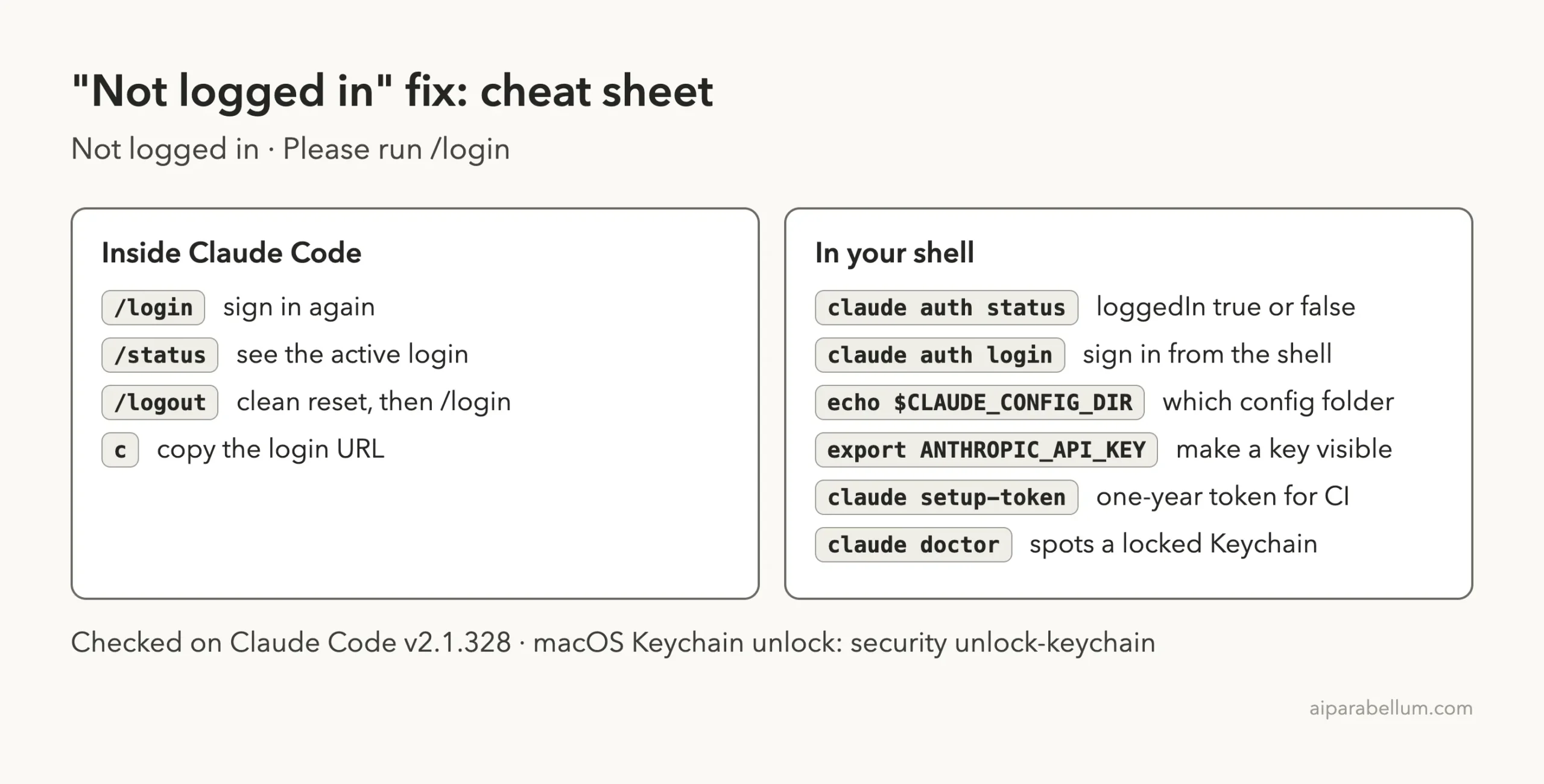
Cheat Sheet
Frequently Asked Questions
Why does Claude Code say not logged in when I already signed in?
Claude Code is probably reading a different place than the one you signed in to. Check echo $CLAUDE_CONFIG_DIR, make sure any API key is exported, and on a Mac over SSH, check the Keychain with claude doctor.
How do I check if Claude Code is logged in?
Run claude auth status in your shell. It prints "loggedIn": true or false and the config folder it read. Add --text for a readable summary.
Can I log in to Claude Code without a browser?
Yes. Press c to copy the login URL, sign in on any browser, and paste the code back. For automation, use claude setup-token or an exported Console API key.
Why do my claude -p scripts fail with not logged in?
The script runs in an environment with no saved login, or a different config folder. The docs say to run claude in the same environment, complete /login, and rerun, or use a token or key for unattended jobs.
Does logging out fix the not logged in error?
A clean /logout followed by /login fixes many stuck logins. It also removes saved MCP logins and plugin secrets, so try a plain /login first.
Conclusion
The Claude Code not logged in message means Claude Code found no usable credential in the shell and config folder it is reading, so the fix is either to sign in with /login or claude auth login, or to point Claude Code back at the login you already have. In our tests, an empty CLAUDE_CONFIG_DIR and an unexported API key each produced the exact error while the normal sign-in kept working, which shows how often this is a “where” problem rather than an account problem. Check claude auth status, confirm the config folder and exports, unlock the Keychain on a Mac over SSH, and use a setup token or API key for scripts. To learn more about the plans behind it, see our overview of Claude AI.