The Claude Code selected model error, “There’s an issue with the selected model”, means the model name Claude Code tried to use was not accepted. It almost always comes from a typo, an old model ID saved somewhere, or a model your account or provider doesn’t offer. Your files and your session are fine, and Claude just needs a model name it can actually use.
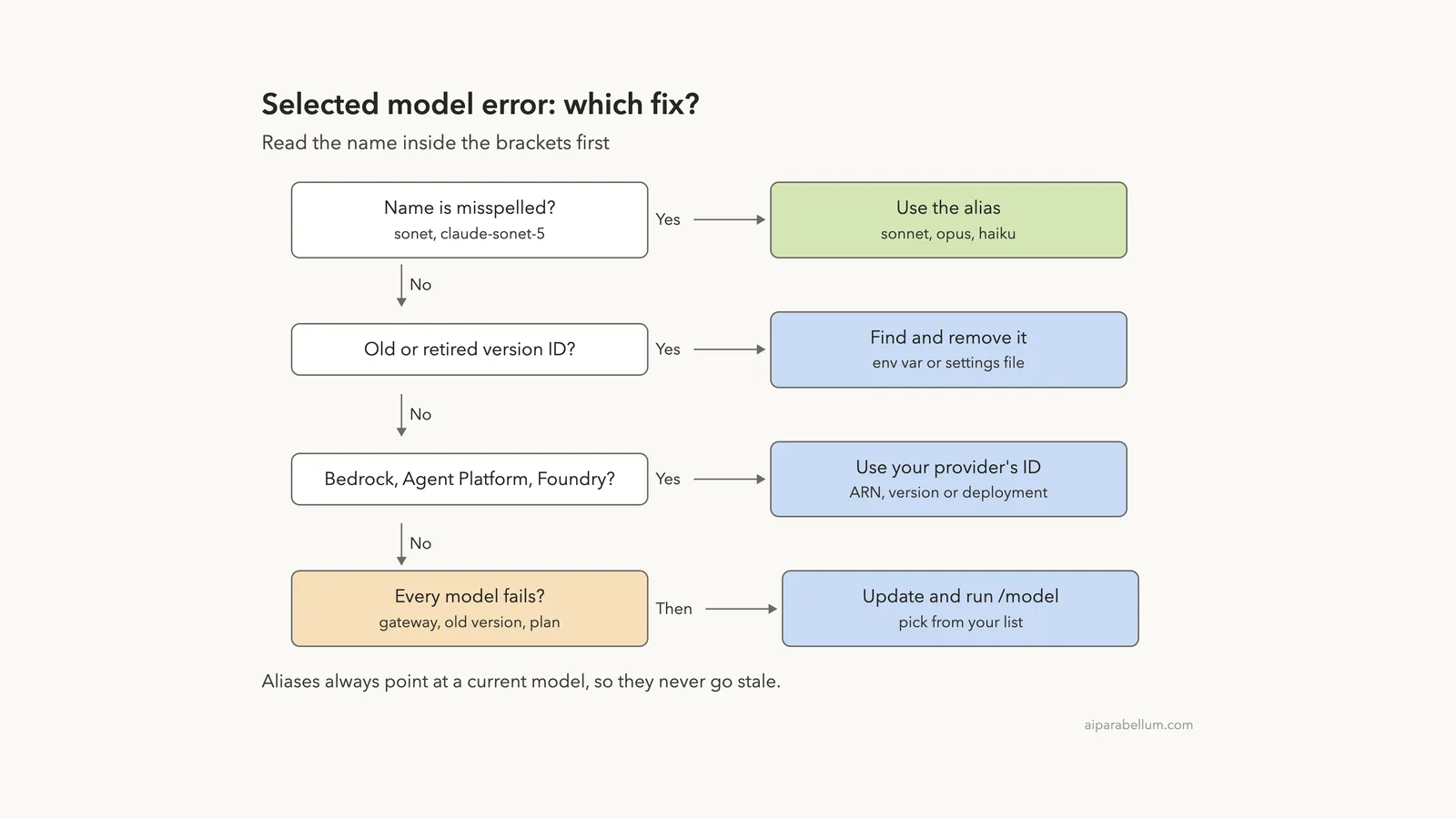
The name inside the brackets is the clue. Whatever you see there is the exact value Claude Code sent, so you can search for it in your shell and settings files and replace it.
Here is the short fix list:
- In an interactive session, run
/modeland pick a model from the list. The list only shows models available to your account. - In a script with
claude -p, pass a valid alias such as--model sonnet, or fix theANTHROPIC_MODELenvironment variable. - Use aliases like
sonnet,opusorhaikuinstead of full version IDs, so the name never goes stale. - If the error keeps coming back, find the stale ID in your environment variables or in a
modelline in a settings file, and remove it. - On Amazon Bedrock, Google Cloud’s Agent Platform or Microsoft Foundry, use your provider’s own model ID, not the Anthropic one.
This guide is part of our help series. Browse all our Claude Code tutorials for more fixes and how-tos.
Tested with Claude Code v2.1.328 on macOS on November 20, 2026. We set a fake model ID, a misspelled alias, a retired-looking ID in ANTHROPIC_MODEL and a stale ID in a project settings file, all inside a throwaway demo folder, and triggered the error each time. All terminal captures below are genuine.
Quick Summary
| Question | Short answer |
|---|---|
| Exact message | There’s an issue with the selected model (name). It may not exist or you may not have access to it. |
| What it means | The model name is wrong, retired, or not available to your account or provider |
| When it appears | On the first request, not at startup, when the name came from --model, ANTHROPIC_MODEL or a model setting |
| Fastest fix | Run /model and pick from the list, or launch with claude --model sonnet |
| Lasting fix | Remove the stale ID from your shell or settings file and use an alias |
| Cloud providers | Bedrock, Agent Platform and Foundry need their own model IDs |
| Data lost? | No. Nothing was sent to a model, so nothing ran |
What the “Selected Model” Error Means
Claude Code always runs on one model, such as Opus, Sonnet or Haiku. You can choose it in several places, and Claude Code doesn’t check every name the moment you type it. According to the official model configuration docs, a mistyped value set with the --model flag, the ANTHROPIC_MODEL variable or the model setting isn’t rejected up front.
So the session opens normally. When you send your first message, the request goes out with the bad name, the API refuses it, and you see the error.
This explains a common confusion: Claude Code starts fine, shows the welcome screen, and only fails once you type something.
Claude Code starting fine tells you nothing about the model name. Only the first request proves it works.
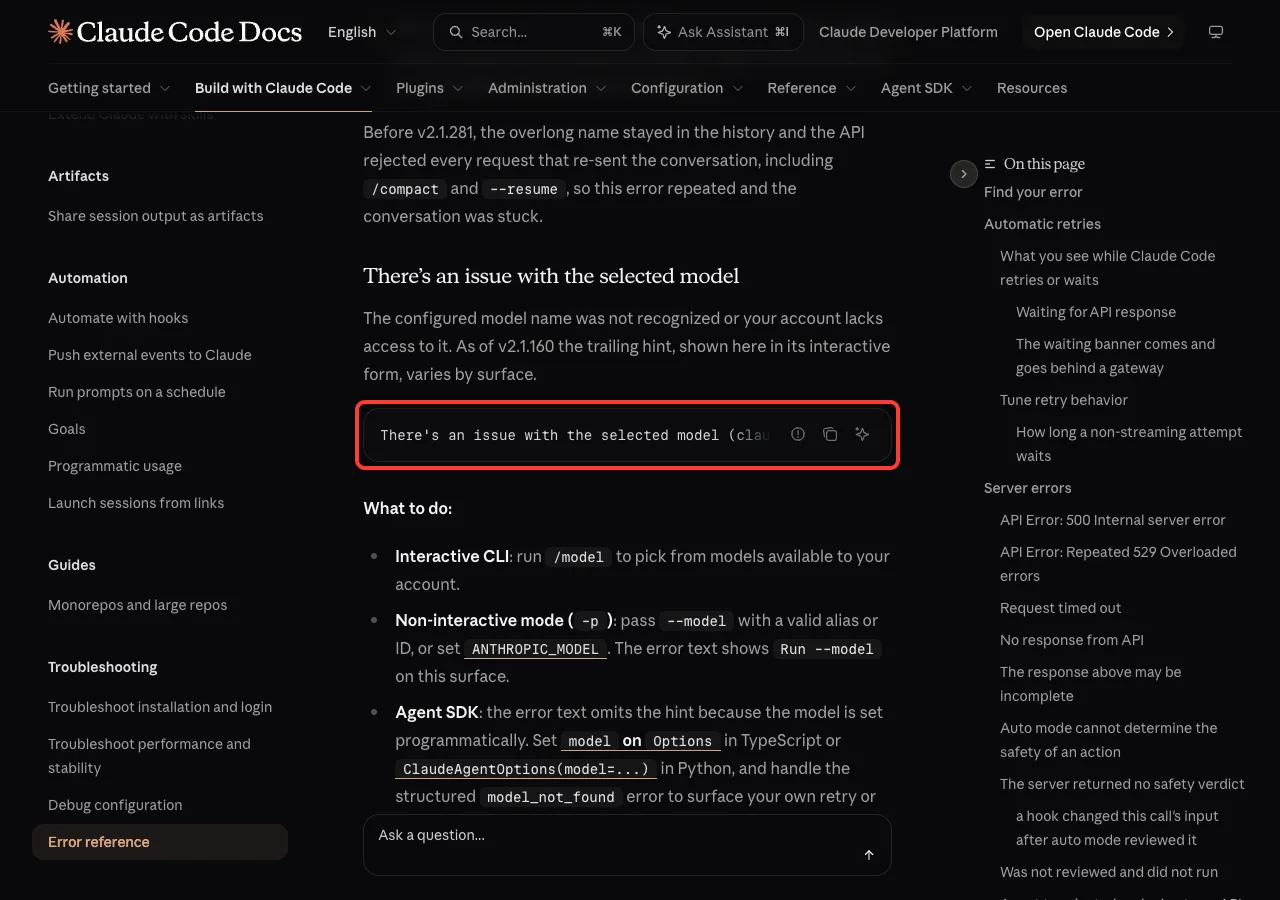
The official error reference lists two causes: the configured model name was not recognized, or your account lacks access to it. The last part of the message also changes with where you run Claude Code. In the interactive terminal it says “Run /model to pick a different model”, in -p mode it says “Run –model”, and in the Agent SDK the hint is left out.
If you are new to model choices, our guide to the Claude Code model settings explains what each model is good at before you pick one.
Reproducing the Error Step by Step
We reproduced the error four different ways in a small demo folder. Each one points to a different place where a bad model name can hide, which is useful when you need to track down your own.
A model ID that doesn’t exist
First we asked for a model that has never existed, claude-sonnet-9, in non-interactive mode. Claude Code first warned that it didn’t recognize the model and would assume a 1 million token context window. Then the request failed with the exact error, naming the model in brackets.
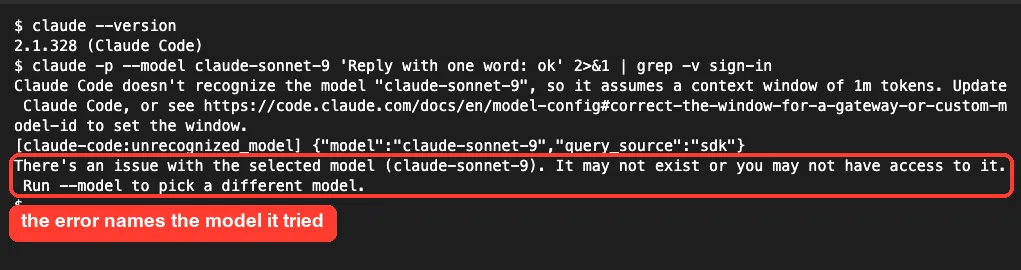
We piped the output through grep -v sign-in only to hide an unrelated login reminder line. The [claude-code:unrecognized_model] line is a diagnostic note Claude Code prints for unknown IDs.
A misspelled alias
Next we typed sonet instead of sonnet. This time Claude Code helped: it printed “Did you mean “sonnet”?” before the request failed. The docs say this spelling hint appears on the Anthropic API when the value nearly spells a model name or alias and doesn’t start with claude-.
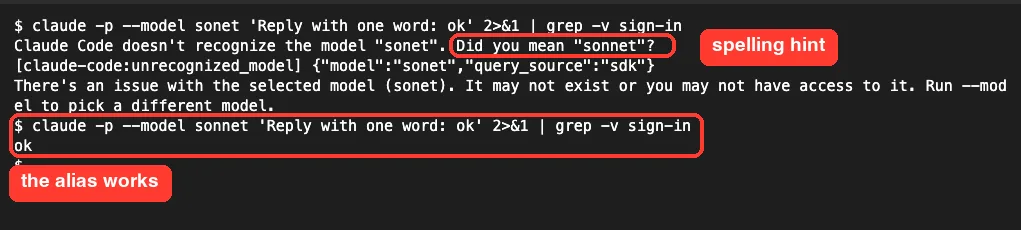
Running the same command with the correct alias, --model sonnet, worked at once and replied “ok”. That is the whole fix for a typo.
A stale ID in ANTHROPIC_MODEL
Environment variables are the sneakiest cause, because you set them once in a shell profile and forget them. We exported ANTHROPIC_MODEL=claude-opus-3-retired and ran Claude Code with no --model flag at all. It still failed, because the variable applies to every launch from that shell.
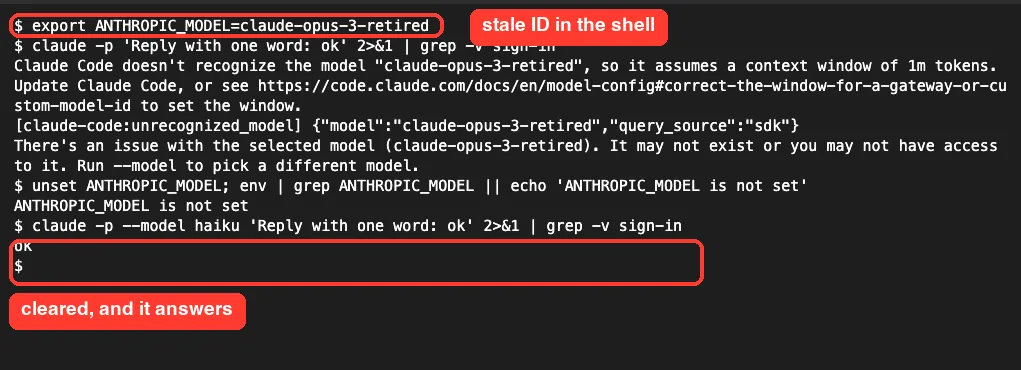
After unset ANTHROPIC_MODEL, the next run answered normally. If you set the variable in ~/.zshrc or ~/.bashrc, also delete the line there, or it comes back in every new terminal. Our list of environment variables shows the other model variables you might have set.
A stale ID in a settings file
Finally we put "model": "claude-sonnet-4-0-old" in the demo project’s .claude/settings.json and opened an interactive session. The startup screen already gave two clues: a warning that the model wasn’t recognized, and a line saying “Using claude-sonnet-4-0-old (from .claude/settings.json)”.
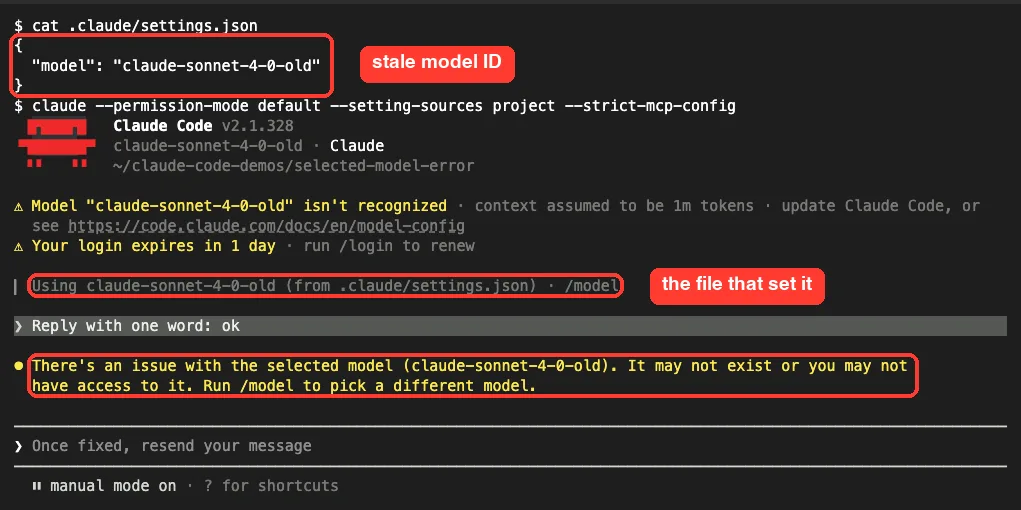
As soon as we sent a short prompt, the error appeared in yellow, and Claude Code waited with “Once fixed, resend your message”. The docs confirm that when project or managed settings set the model, the startup header names the file. That one line saves a lot of searching.
How Claude Code Picks a Model
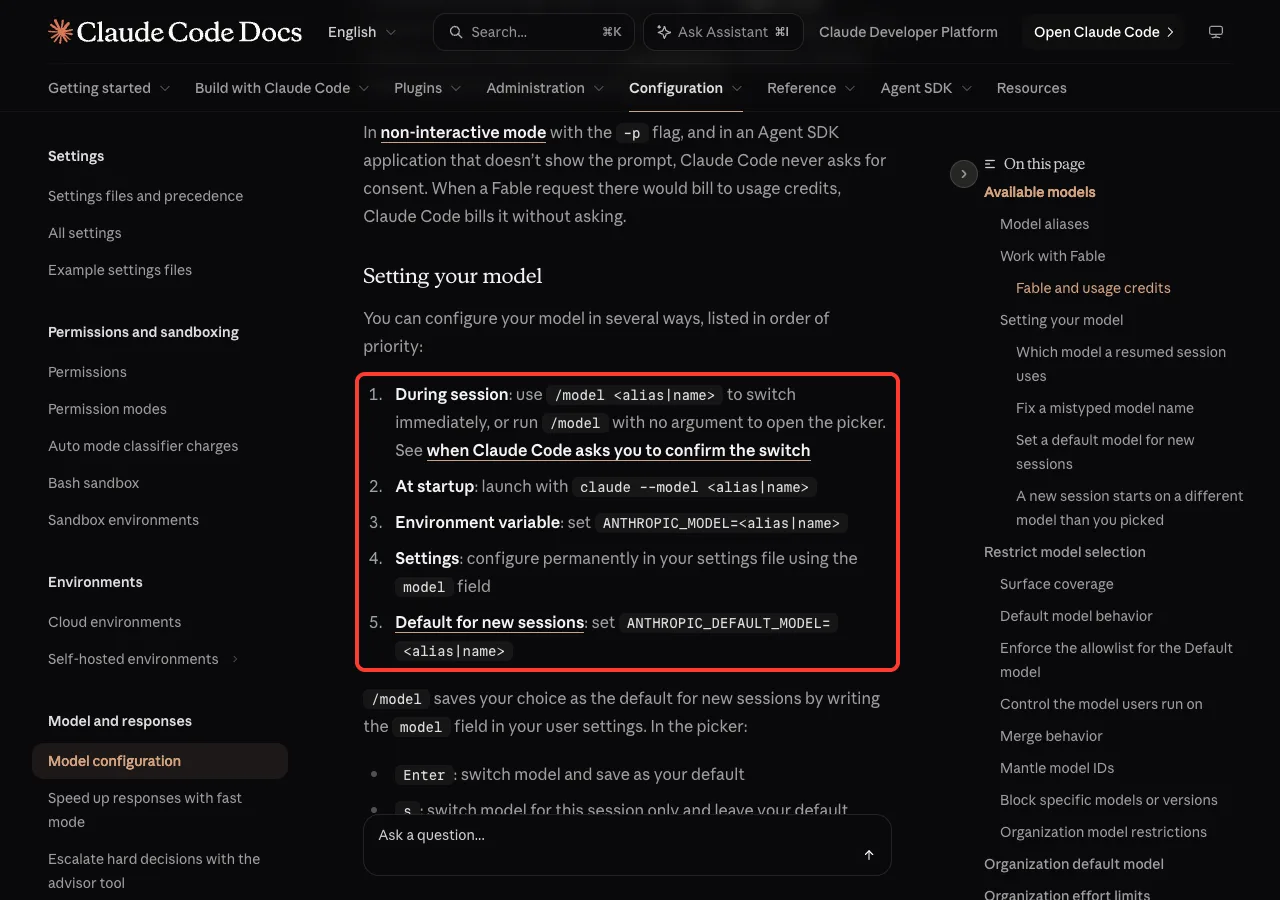
To fix the error for good, you need to know which setting wins. The docs list the places in priority order: /model during a session, then claude --model at startup, then the ANTHROPIC_MODEL variable, then the model field in a settings file, and finally ANTHROPIC_DEFAULT_MODEL, which applies only when nothing else sets a model.
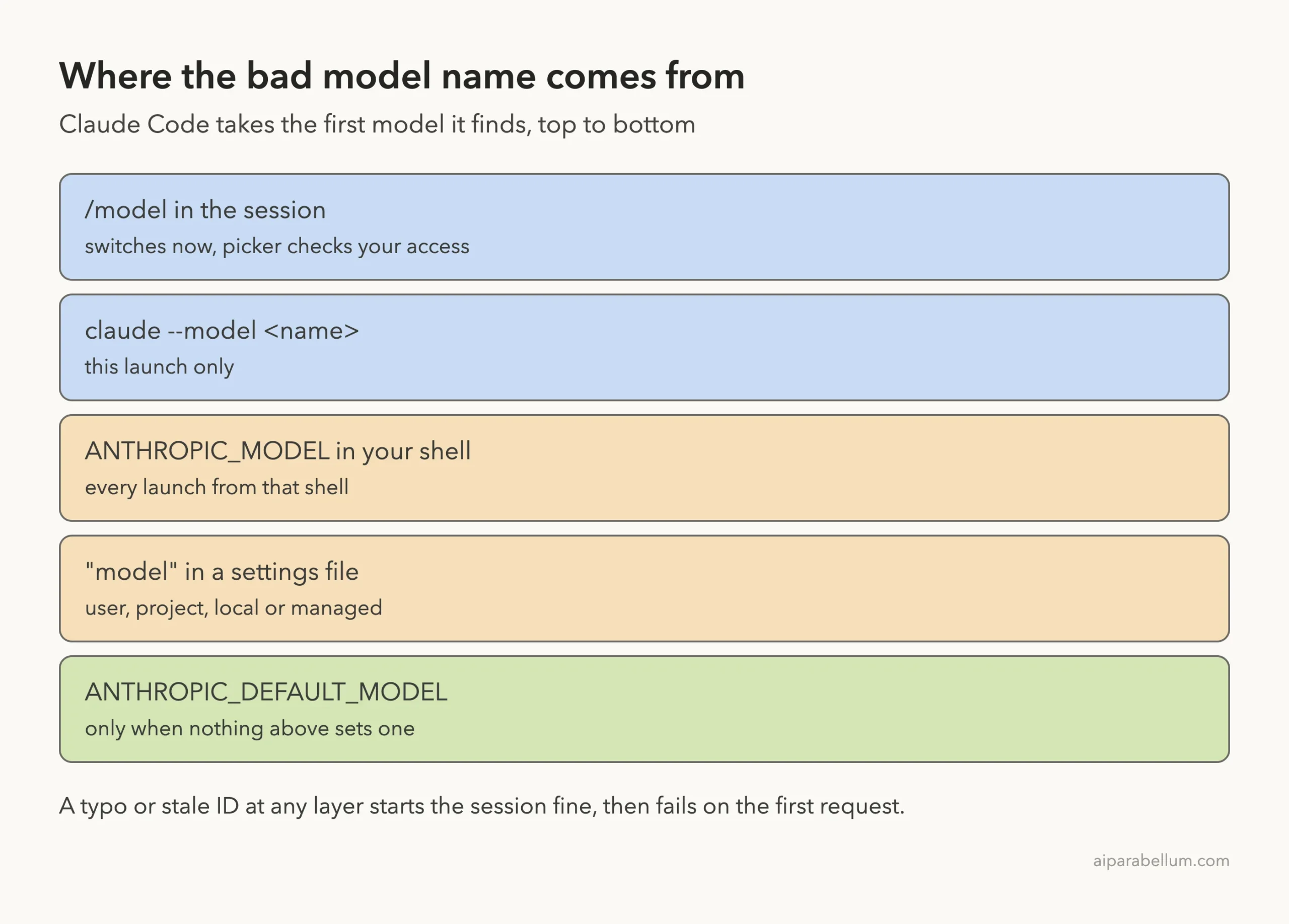
This order matters. If ANTHROPIC_MODEL holds a bad ID, fixing your settings file does nothing, because the variable outranks it. And if a project settings file sets a bad model, every session started in that folder fails, even though your own setup is fine.
Settings files come in several scopes: user (~/.claude/settings.json), project (.claude/settings.json), local (.claude/settings.local.json) and managed settings from your organization. Our guide on where settings.json lives shows each path.
How to Fix “There’s an Issue With the Selected Model”
Work through these fixes in order. Fixes 1 to 4 we ran ourselves in the demo; fixes 5 and 6 come from Anthropic’s official docs, since they need a cloud provider or gateway.
Fix 1: Pick a model with /model
Inside the session, type /model and press Enter. The picker lists the models your account can use, such as Default, Opus, Sonnet and Haiku. Our bad ID showed up at the bottom as a “Custom model”, which is a handy sign of what was set.
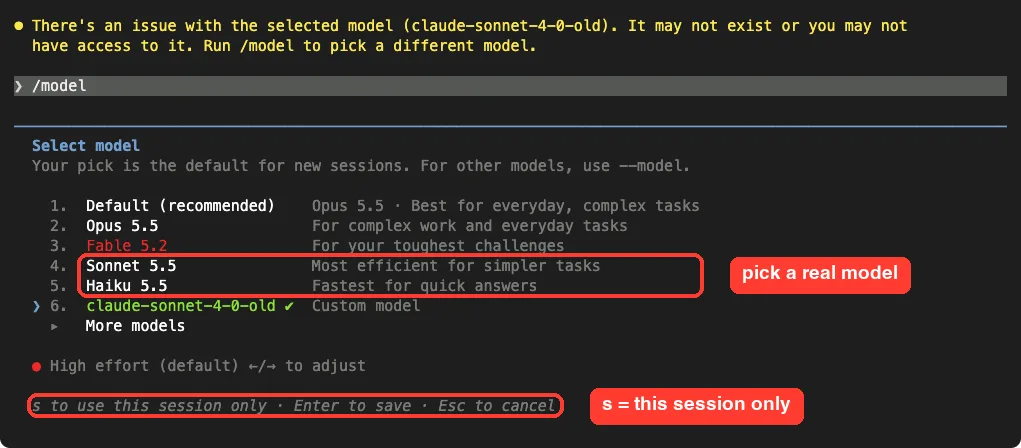
Choose a model and press Enter to switch and save it as your default. Press s instead to switch only for this session.
One catch: /model saves to your user settings, so if a project setting, managed setting or ANTHROPIC_MODEL sets the model, the bad name comes back in the next session. That is why fixes 3 and 4 exist.
Fix 2: Use an alias instead of a full ID
Aliases such as sonnet, opus, haiku and fable always point to a current model for your provider. The docs recommend them because they don’t go stale when a version is retired. Use them anywhere you set a model:
claude --model sonnet
claude -p --model haiku "Summarize notes.md"
export ANTHROPIC_MODEL=opus
Only pin a full ID, such as claude-opus-5-5, when you truly need one exact version. If you do, double-check it against the model list in the docs.
Fix 3: Clear a stale ANTHROPIC_MODEL
Check whether the variable is set, then clear it:
echo $ANTHROPIC_MODEL
unset ANTHROPIC_MODEL
grep -n ANTHROPIC_MODEL ~/.zshrc ~/.bashrc ~/.profile
If the last command finds a line, delete or update it and open a new terminal. Also check ANTHROPIC_DEFAULT_MODEL, which sets the starting model for new sessions.
Fix 4: Remove the stale model from a settings file
Look for a model key in each settings file. The startup line often tells you which file to open. In our demo we replaced the old ID with an alias, relaunched, and Claude answered right away on Haiku 5.5.
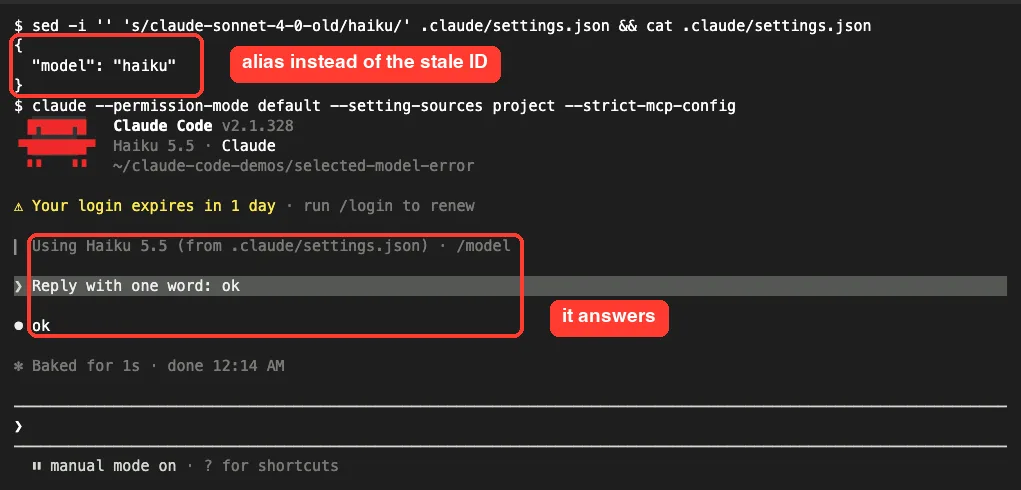
A settings file can also set an env block, so search for ANTHROPIC_MODEL inside settings files too. If a managed setting from your company sets the model, ask your admin to change it rather than editing it yourself. Our settings guide covers how the scopes override each other.
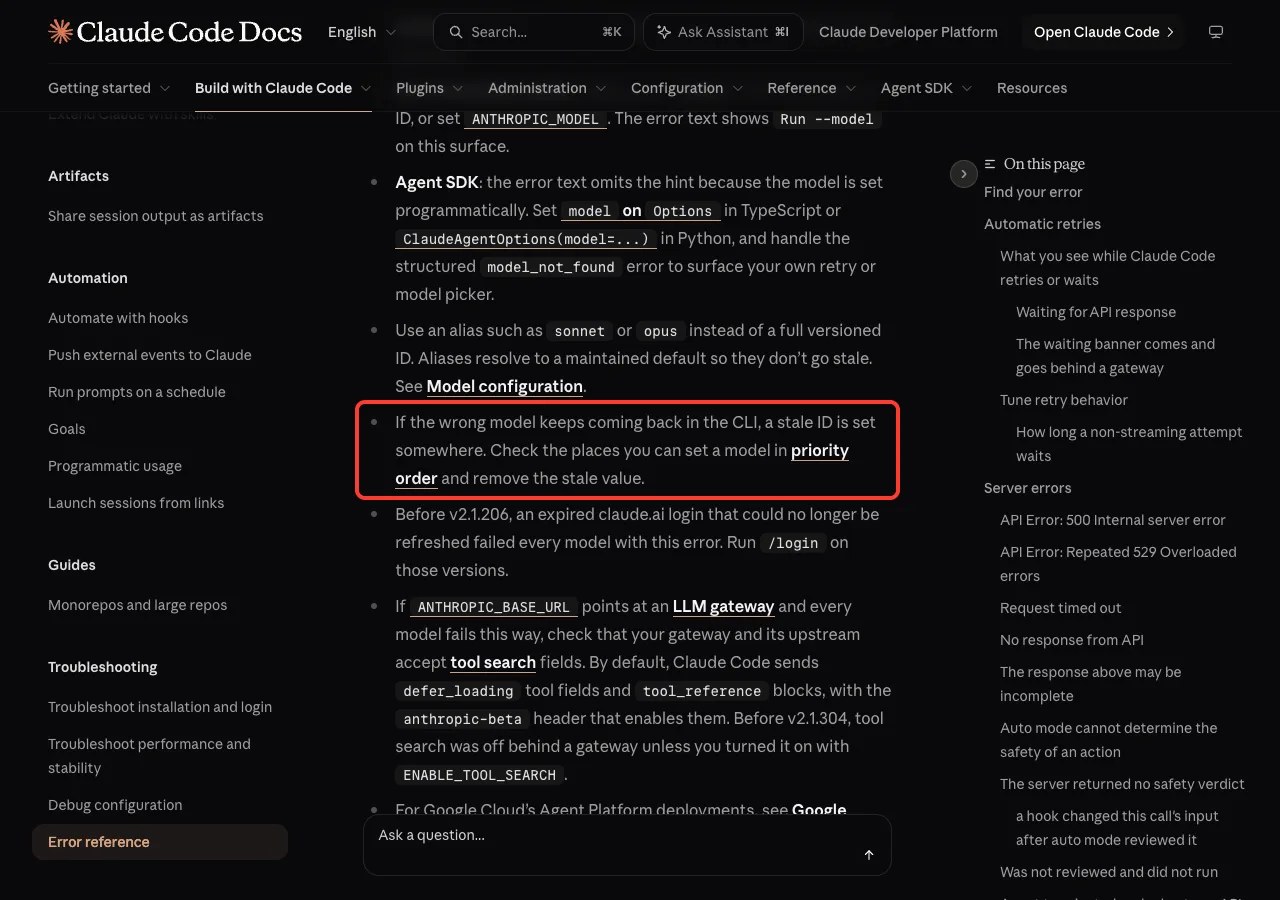
Fix 5: Use your provider’s model ID on Bedrock, Agent Platform or Foundry
Third-party providers don’t use the plain Anthropic names. The docs say Amazon Bedrock expects an inference profile ARN, Microsoft Foundry expects a deployment name, and Google Cloud’s Agent Platform expects a version name. If you copied an Anthropic ID like claude-sonnet-5 into a Bedrock setup, expect this error.
Aliases also resolve to older models on some providers. For example, the docs show sonnet resolving to Sonnet 4.5 on Bedrock and Agent Platform. Also confirm the model is enabled for your account and region in the provider console; see the official Amazon Bedrock setup and Agent Platform setup pages.
Fix 6: Update Claude Code or check your gateway when every model fails
If even sonnet and haiku fail, the name isn’t the problem. Run claude update first.
The docs note that newer models need newer versions, for example Opus 5.5 requires v2.1.280 or later and Sonnet 5.5 requires v2.1.284 or later. On versions before v2.1.206, an expired claude.ai login could also fail every model with this error, and /login fixed it.
If you send traffic through an LLM gateway with ANTHROPIC_BASE_URL and every model fails, the docs say to check that the gateway accepts tool search fields. Gateway problems often show up as other errors too, which our API error guide covers.
Which Fix Should You Use?
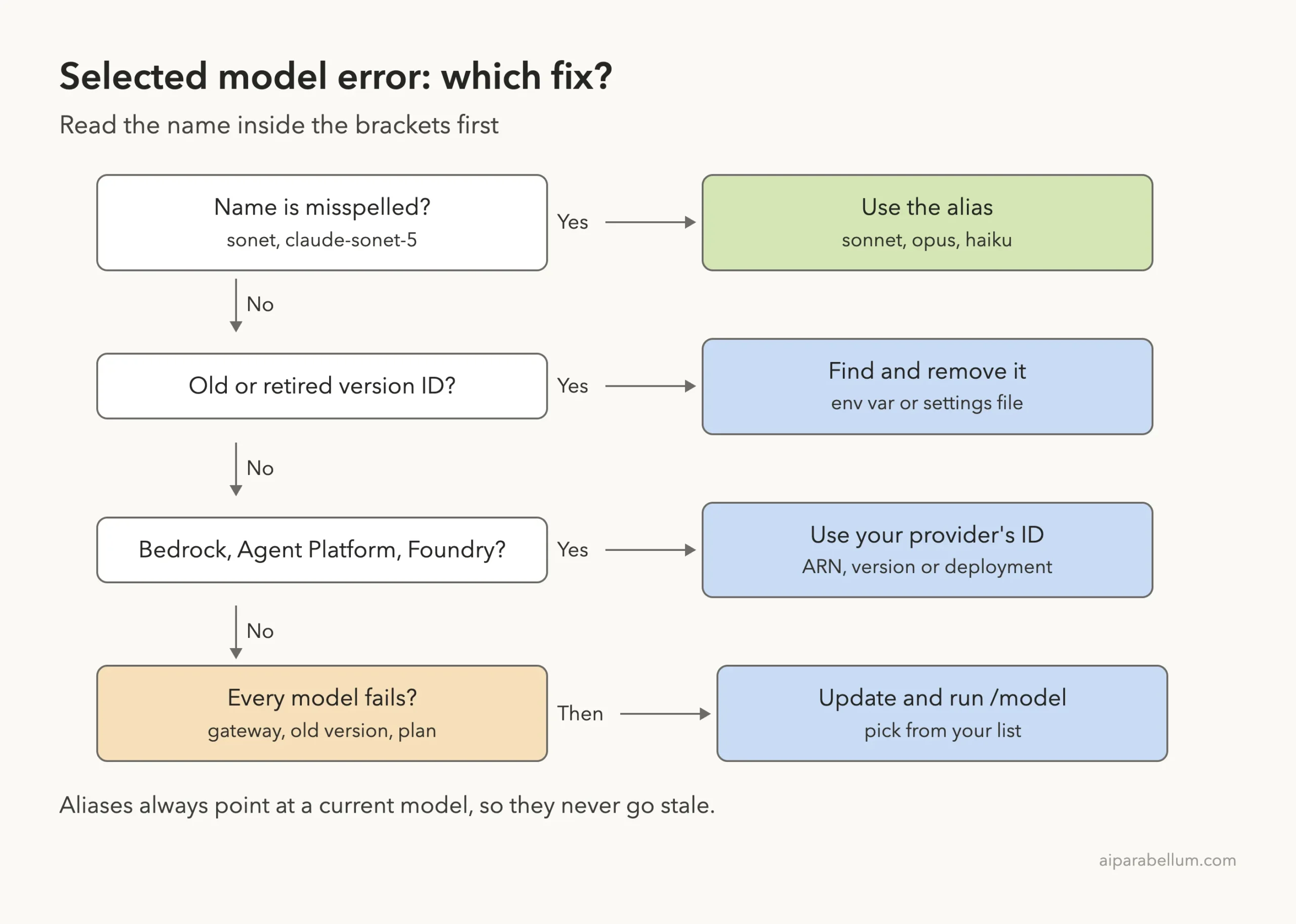
Start with the name in the brackets. A typo needs an alias, an old ID needs to be found and removed, a cloud provider needs its own ID format, and a failure on every model points to your version or gateway.
Related Model Errors
A few messages look similar but mean something slightly different. Knowing them helps you avoid the wrong fix.
| Message | What it means | Fix |
|---|---|---|
| Model “X” is not a recognized model id | An app, the Agent SDK or Remote Control sent a string that can’t be a model ID; the switch is refused | Run /model and use the alias shown |
| Model ‘X’ not found | You switched by name and your endpoint couldn’t confirm that model exists | Check the ID against your provider’s catalog |
| Claude Code doesn’t recognize the model “X” | A warning only; the ID is unknown to this version | Fix the spelling, or run claude update |
| Claude Code does not support this model | Your version is older than the model requires | claude update |
If your organization restricts models with availableModels, a blocked model behaves differently: the docs say a blocked --model, ANTHROPIC_MODEL or model value is replaced at startup with a warning, and the session starts on the default model. For a broader list, see our roundup of common errors.
Try It Yourself
You can safely see this error in a throwaway folder without touching your real setup. Make an empty folder, then run a fake model in print mode:
mkdir model-test && cd model-test
claude -p --model claude-sonnet-9 "Reply with one word: ok"
claude -p --model sonnet "Reply with one word: ok"
The first command shows the error; the second shows the fix. Then try a project setting: create .claude/settings.json with {"model": "sonet"}, start claude, and read the startup line that names the file. Delete the folder when you are done.
Common Mistakes
- Fixing the settings file while
ANTHROPIC_MODELis still set. The variable wins, so the error stays. - Using
/modeland expecting it to stick when a project or managed setting sets the model. Your pick is saved, but it is outranked in new sessions. - Typing display names like “Sonnet 5.5” with spaces. Use the alias
sonnetor the IDclaude-sonnet-5-5. - Copying Anthropic model IDs into Bedrock, Agent Platform or Foundry setups, which need provider IDs.
- Resuming an old session and wondering why it uses an old model. The docs say
claude --resumeusually keeps the model the session was saved on; pass--modelto override it.
Pro Tips
- Read the startup header. It shows the active model and, for project or managed settings, the file that set it.
- Use
/statusto see the current model in a session, or set up a status line that shows it all the time. - In scripts, always pass
--modelwith an alias, so a stray variable on the machine can’t break the job. - Prefer
ANTHROPIC_DEFAULT_MODELoverANTHROPIC_MODELfor a personal default, because a/modelchoice can still override it. - If you run different models for helpers, our guide to subagent models shows where those names live, so a stale one there is easy to spot.
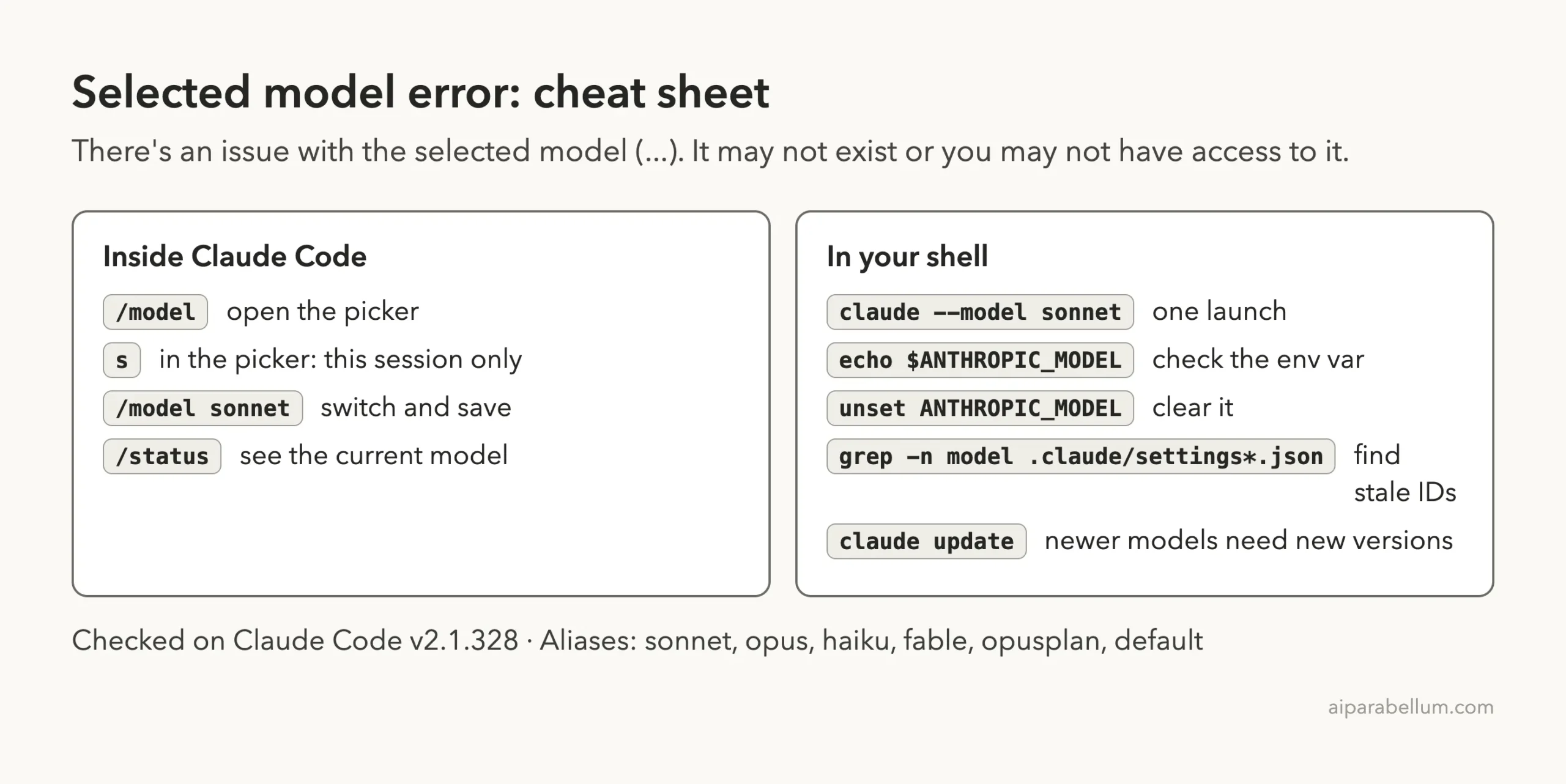
Cheat Sheet
Frequently Asked Questions
Why does Claude Code start fine and then show this error?
Names set with --model, ANTHROPIC_MODEL or the model setting are not checked at startup. The session opens, and the first request fails when the API refuses the name.
Does this error mean my plan doesn’t include the model?
It can. The message covers both a name that doesn’t exist and a model your account can’t use. Run /model: the picker lists only the models available to you.
How do I find where the bad model name is set?
Copy the name from the brackets. Run echo $ANTHROPIC_MODEL, check your shell profile, and look for a model key in your user, project and local settings files. The startup header names the file when project or managed settings set it.
Will /model fix it permanently?
It saves your pick to your user settings, which fixes it unless something with higher priority, such as ANTHROPIC_MODEL, a project setting or a managed setting, sets another model.
Is any work lost when this error appears?
No. The request never reached a model, so nothing ran and no files changed. Fix the model and resend your message.
Conclusion
The “There’s an issue with the selected model” error means Claude Code sent a model name the API wouldn’t accept, and in our tests a fake ID, a typo, a stale ANTHROPIC_MODEL and an old ID in a project settings file all triggered it on the first request. The fix is to pick a model with /model, switch to an alias like sonnet, and then remove the stale name from your shell or settings so it can’t come back, using your provider’s own IDs on Bedrock, Agent Platform or Foundry. To learn more about the models behind Claude Code, see our overview of Claude AI.