Claude Code environment variables are named values you set before or around a session to change how Claude Code behaves: which model it starts with, how long commands may run, whether it updates itself, and what secrets its commands can see. Most people never touch them, and that is fine. But a handful of them solve real problems, from slow networks to keeping a password out of reach of a shell command.
In this guide we set a few variables in a small demo project and watched a real Claude Code session react. You will see a shell variable pick the model, a settings file beat the shell, a scrub switch hide a fake password, and claude doctor catch a value that was too large.
This is Part 24 of 53 in our Claude Code tutorials series. In the previous part we covered the settings files, and one of their keys, env, is the second way to set the variables in this guide.
Tested with Claude Code v2.1.310 on October 25, 2026, on macOS. We used two short prompts on the small Haiku model in a throwaway folder. We tested on macOS; the Windows and Linux steps follow Anthropic’s official instructions.
Quick Summary: Claude Code Environment Variables at a Glance
| Question | Short answer |
|---|---|
| What are they? | Named values such as ANTHROPIC_MODEL that Claude Code reads to change its behavior |
| Where do I set them? | In your shell with export, or under the env key in a settings.json file |
| Which wins if both set one? | The settings file value, in most sessions |
| Do changes apply right away? | Shell changes need a relaunch; saved settings files reach a running session |
| How do I turn a switch on? | Use 1, true, yes or on; turn it off with 0, false, no or off |
| How do I spot a bad value? | Run claude doctor and read its Environment variables section |
What Environment Variables Do in Claude Code
An environment variable is a name and a value that a program can read when it starts. Your terminal already has dozens of them, such as HOME and PATH. Claude Code reads its own list, and Anthropic’s environment variables reference documents every one of them.
Many of these behaviors can also be set another way, through a settings key, a launch flag, or a command like /model. Variables exist because they are handy in places where those other options are awkward.
- Scripts and CI jobs, where nobody is around to type a slash command
- Company machines, where an admin wants the same value for everyone
- One-off tests, where you want a change for a single launch only
- Network setups, such as proxies and slow connections, that need tuning before Claude Code even starts
You don’t need to learn hundreds of variables. You need to know where to set them and a short list of useful ones.
How to Set Claude Code Environment Variables
There are two places to put a variable. Which one you pick decides how long it lasts and who it applies to.
Option 1: Set Them in Your Shell
Set the variable, then launch claude from the same terminal. On macOS, Linux and WSL, that looks like this:
export API_TIMEOUT_MS="1200000"
claude
This lasts only for that terminal window. To keep it for every new terminal, add the export line to ~/.zshrc, ~/.bashrc or your shell’s profile file. Our terminal setup guide covers those files in more detail.
On Windows, the official docs give two shells. In PowerShell, use $env:API_TIMEOUT_MS = “1200000”, and in CMD, use set API_TIMEOUT_MS=1200000 or setx to keep it for future terminals.
To check a value, print it in the same shell, for example echo $API_TIMEOUT_MS on macOS.
Option 2: Set Them in a Settings File
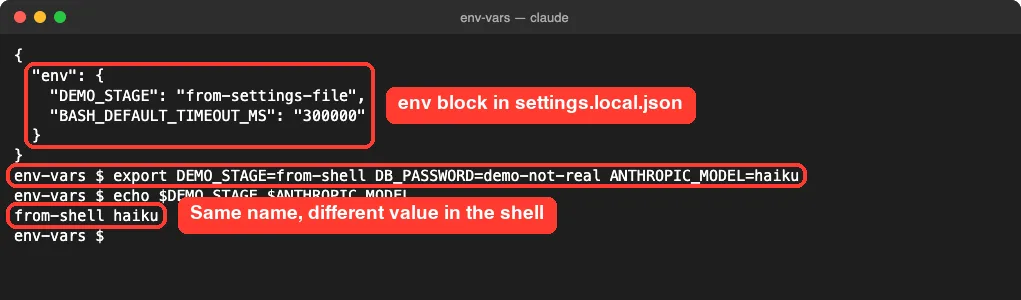
Add an env block to any settings.json file. Claude Code reads the file directly, so the values apply no matter how claude was launched. Here is the env block from our demo project’s .claude/settings.local.json file:
{
  "env": {
    "DEMO_STAGE": "from-settings-file",
    "BASH_DEFAULT_TIMEOUT_MS": "300000"
  }
}
DEMO_STAGE is a made-up variable we used only to test which value wins. BASH_DEFAULT_TIMEOUT_MS is real: it gives commands five minutes instead of the default two.
The file you pick decides who gets the value. These are the same files you met in our .claude folder guide:
| File | Applies to |
|---|---|
| ~/.claude/settings.json | You, in every project |
| .claude/settings.json | Everyone in the project, committed to git |
| .claude/settings.local.json | You, in this project only |
| Managed settings | Everyone in your organization, set by an admin |
One catch: no shell reads these values, so ~ and $HOME stay as typed. For a variable that takes a path, write the full absolute path.
Step by Step: Watching Environment Variables Work
We made a throwaway folder with the settings file above, then exported three variables in the shell before launching Claude Code. One of them, DEMO_STAGE, used the same name as the settings file but a different value.
Step 1: Pick the Model With ANTHROPIC_MODEL
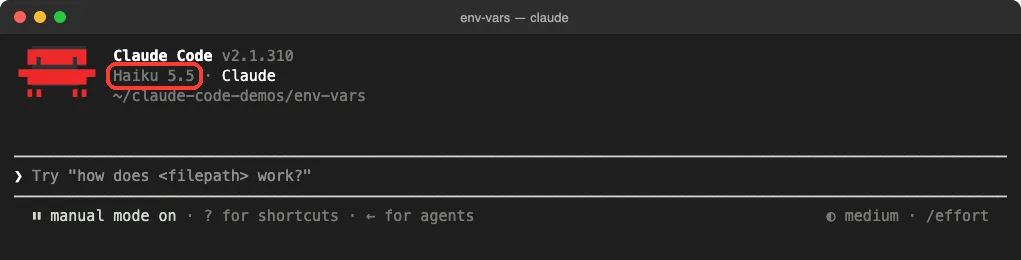
We exported ANTHROPIC_MODEL=haiku and launched claude. The startup header named Haiku 5.5 right away, with no /model command and no flag.
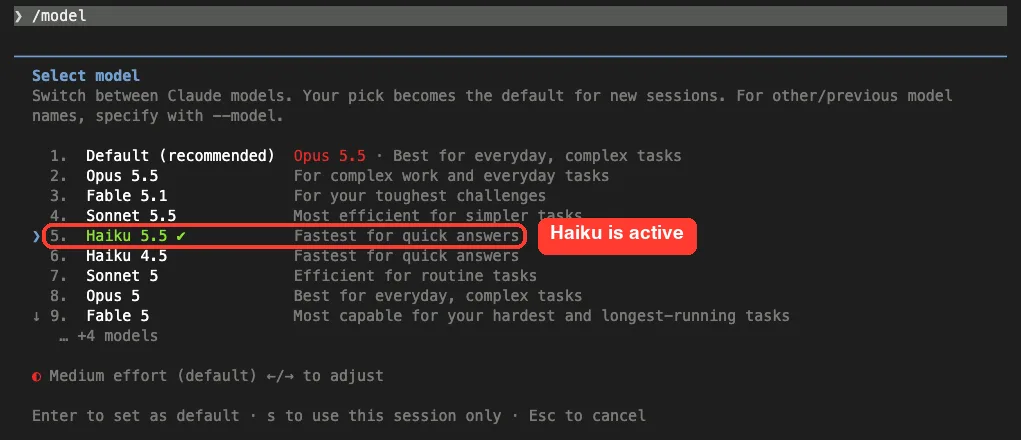
Opening /model confirmed it, with a check mark next to Haiku 5.5. The variable only sets a starting point. Per the docs, –model and /model override ANTHROPIC_MODEL, and our model guide explains the aliases.
Step 2: See Which Value Wins
Next we asked Claude to run one command that prints DEMO_STAGE and our fake DB_PASSWORD. Because the command uses variables, Claude Code paused and asked first, saying it couldn’t check the variable before it ran.
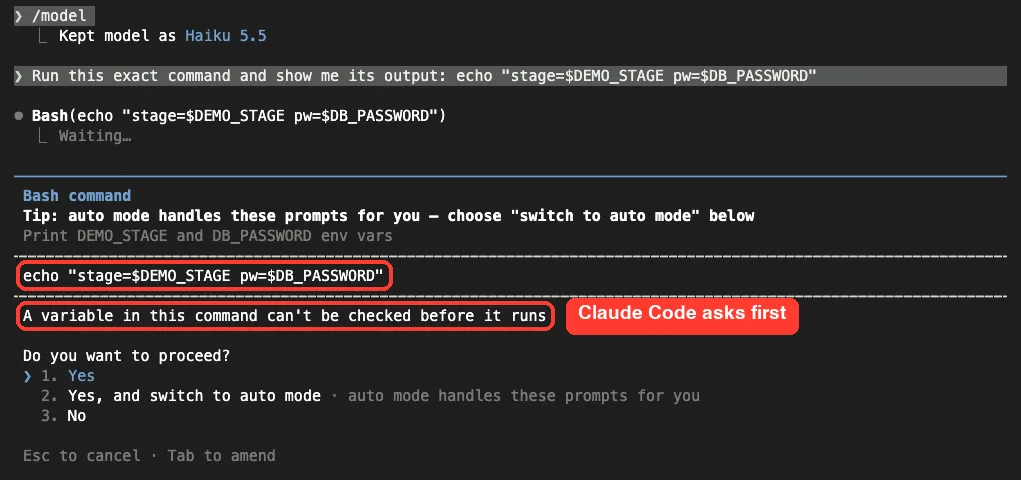
That prompt is your permission mode doing its job. We picked Yes, and the output settled the question.
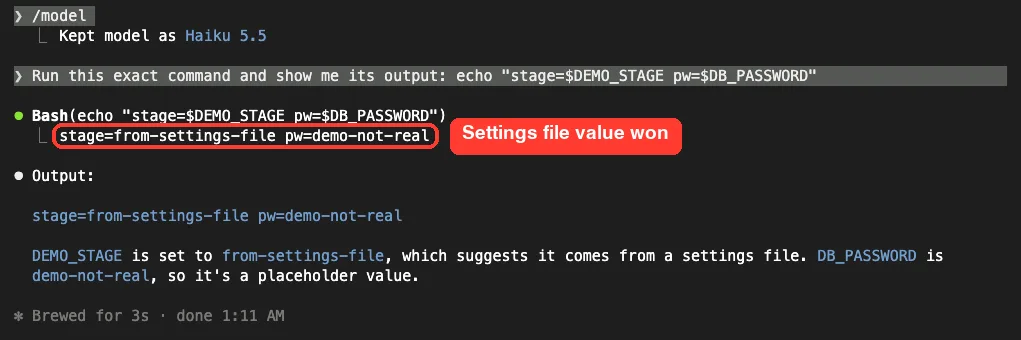
The shell said from-shell, but the command saw from-settings-file. That matches the docs: Claude Code writes each env entry into its own environment, replacing the value it inherited from the shell. The fake password, set only in the shell, came through unchanged.
Step 3: Hide Secrets With the Subprocess Scrub
Now we exited, exported CLAUDE_CODE_SUBPROCESS_ENV_SCRUB=1, relaunched and asked for the same command. This time the password was empty.
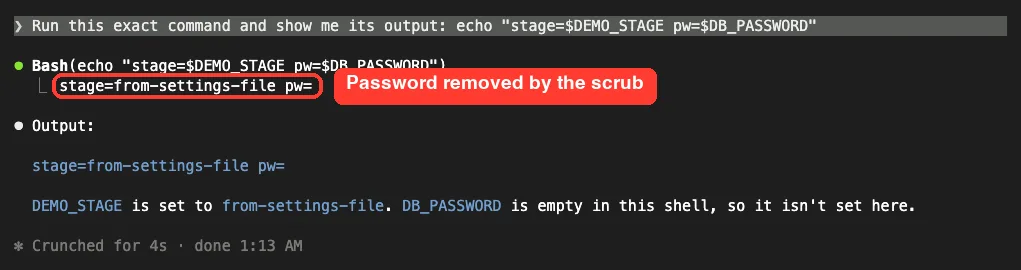
The scrub removes credentials from the environment of the commands, hooks and local MCP servers that Claude Code starts. It spots them by name, like DB_PASSWORD, or by a value that looks like a secret. Claude Code itself keeps its own keys, so it still works normally.
Step 4: Check Your Values With claude doctor
Last, we ran claude doctor with two variables set for that one command: DISABLE_AUTOUPDATER=1 and BASH_MAX_OUTPUT_LENGTH=999999. The report named the variable that turned auto-updates off.
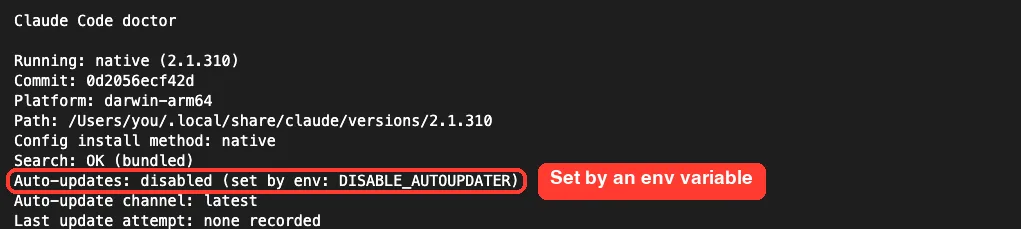
Further down, an Environment variables section caught our oversized output limit. The docs list 150000 characters as the maximum, and claude doctor reported it had capped our value to exactly that.

How Claude Code Picks Up a Variable
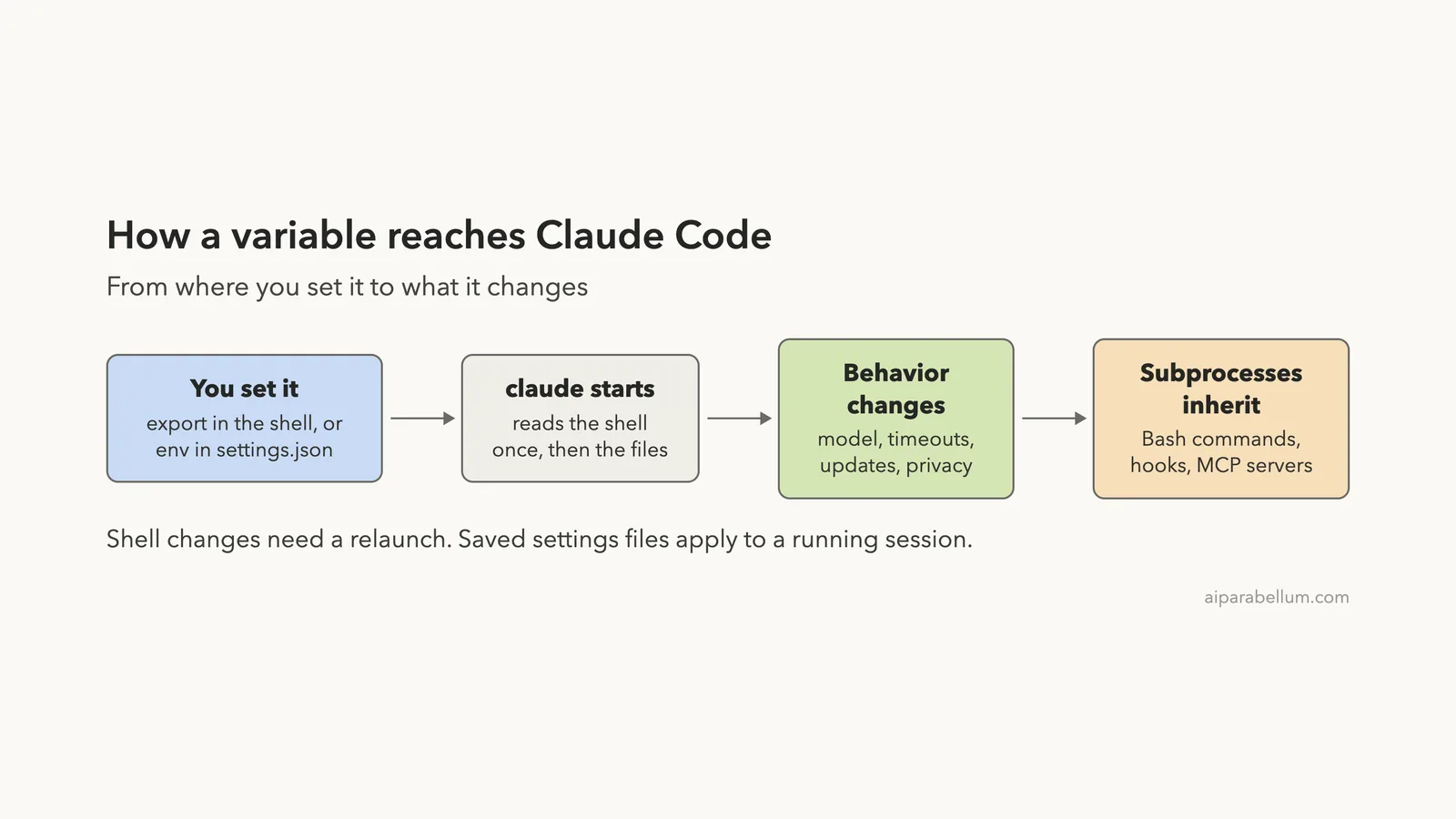
Here is the whole path in one picture. Notice the timing note: Claude Code reads shell variables at startup, while a saved settings file also reaches a session that is already running.
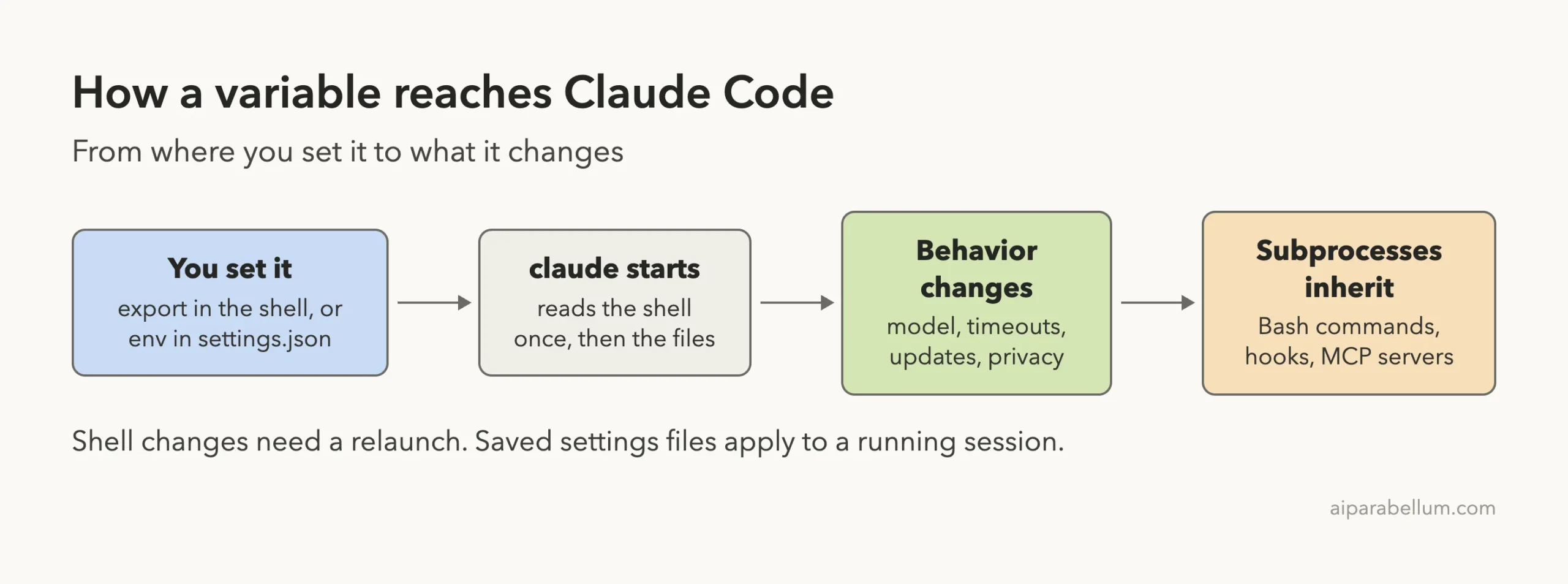
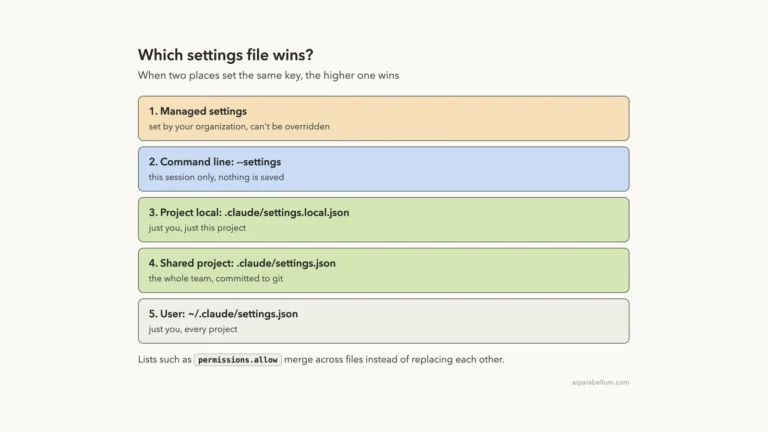
When the same name shows up in more than one place, this stack decides. Managed settings from an admin override user and project files, and a settings file usually beats your shell.
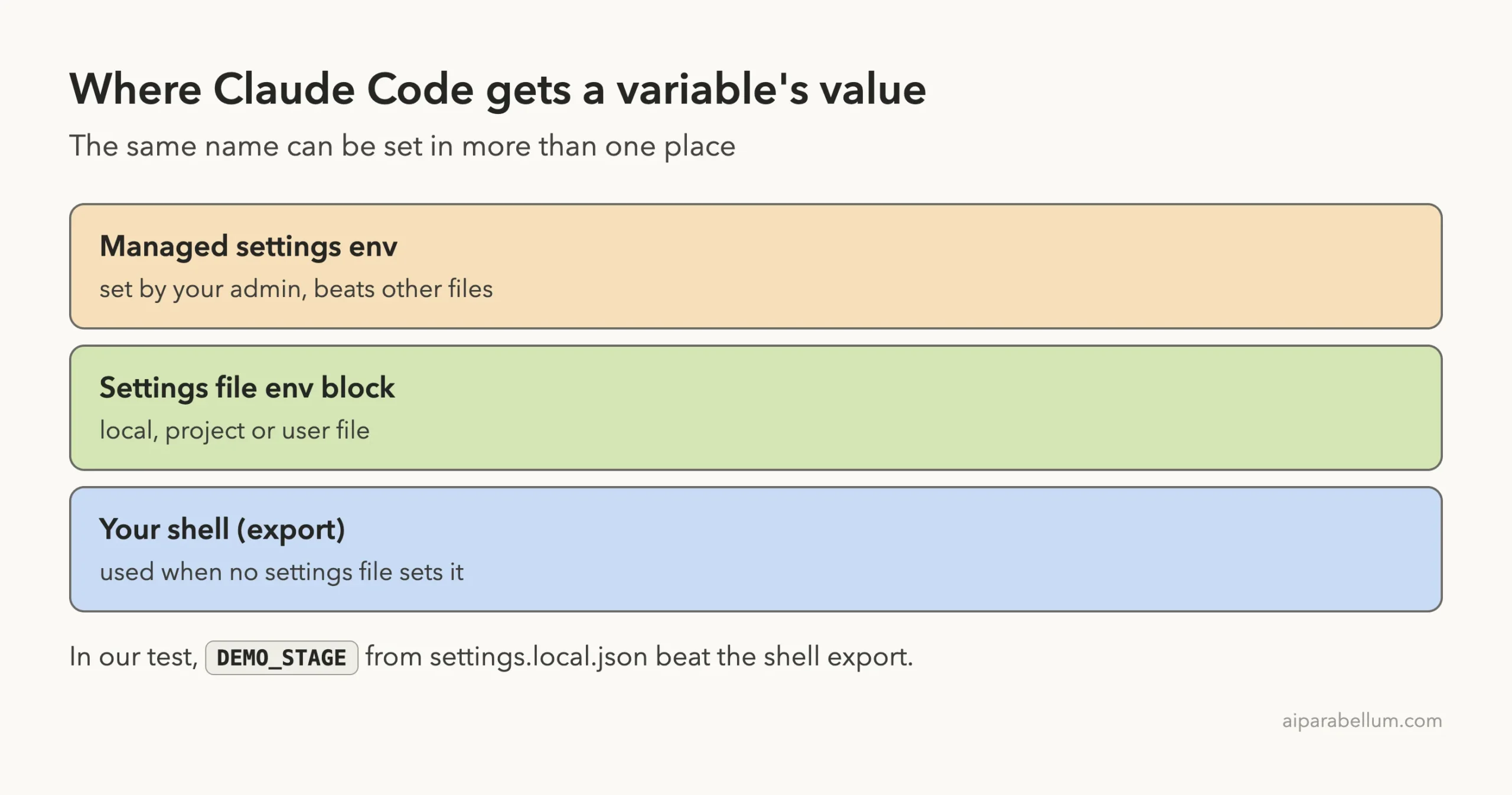
A few more rules from the docs are worth knowing:
- Removing a variable from a settings file doesn’t unset it in a running session; that waits for the next launch.
- Features that read their values once at startup, such as OpenTelemetry monitoring, keep the old values until you relaunch.
- Project and local settings can’t set a few variables, such as CLAUDE_CONFIG_DIR.
- Some variables override flags instead of the other way around: CLAUDE_CODE_EFFORT_LEVEL beats –effort and /effort.
Claude Code Environment Variables Worth Knowing
The full reference is long. These are the ones most people will actually reach for, with the defaults the docs give.
| Variable | What it does | Default or tip |
|---|---|---|
| ANTHROPIC_MODEL | Sets the model a session starts with | –model and /model override it |
| CLAUDE_CODE_EFFORT_LEVEL | Sets effort: low, medium, high, xhigh, max or auto | Overrides –effort and /effort |
| API_TIMEOUT_MS | Time each API request has to start responding | 600000 (10 minutes); raise it on slow networks |
| BASH_DEFAULT_TIMEOUT_MS | Default time limit for a command | 120000 (2 minutes) |
| BASH_MAX_TIMEOUT_MS | Longest time limit Claude may ask for | 600000 (10 minutes) |
| BASH_MAX_OUTPUT_LENGTH | Characters of command output read back | 30000; maximum 150000 |
| MCP_TIMEOUT | Time an MCP server has to start | 30000 (30 seconds) |
| DISABLE_AUTOUPDATER | Stops background updates | claude update still works by hand |
| CLAUDE_CONFIG_DIR | Moves the config folder | Default ~/.claude |
| CLAUDE_CODE_SUBPROCESS_ENV_SCRUB | Strips credentials from commands, hooks and MCP servers | Leaves GitHub tokens and proxy settings |
| ANTHROPIC_API_KEY | Uses an API key instead of your subscription | Unset it to go back to your plan |
| HTTPS_PROXY | Sends traffic through a proxy server | For company networks |
Privacy and Network Switches
Three variables control what Claude Code sends home. DISABLE_TELEMETRY opts out of telemetry, and DISABLE_ERROR_REPORTING opts out of error reports. CLAUDE_CODE_DISABLE_NONESSENTIAL_TRAFFIC goes further and also stops auto-updates, release notes and the /feedback command.
Watch out for one odd rule. Those three read only whether you set them at all, so even a value of 0 turns them on. To turn them off again, unset the variable or set it to an empty value.
There is also a trade-off. Turning telemetry or nonessential traffic off also stops Claude Code from fetching its feature flags, and the docs list features that then stop working, including Remote Control.
The API Key Trap
If ANTHROPIC_API_KEY is set, Claude Code uses that key instead of your Pro, Max, Team or Enterprise subscription. In an interactive session it asks you once before the key takes over, but with -p it always uses the key. That can mean surprise API charges, which our plans guide explains.
Real Examples You Can Copy
Give Slow Builds More Time
If your test suite takes four minutes, the two-minute default will cut it off. Put this in your project’s shared settings so the whole team gets it:
{
  "env": {
    "BASH_DEFAULT_TIMEOUT_MS": "300000"
  }
}
Run a Second Claude Code Setup Side by Side
The docs suggest an alias that points a separate command at its own config folder. Add it to your shell profile:
alias claude-work='CLAUDE_CONFIG_DIR=~/.claude-work claude'Now claude-work keeps its own settings, session history and plugins, apart from your normal setup. The ~ works here because your shell expands it.
Cancel a Stale Variable You Can’t Remove
Say a shell profile you don’t control exports CLAUDE_CODE_USE_VERTEX. A settings file can’t delete a variable, but it can blank it, and Claude Code treats the empty value as unset for choosing a provider:
{
  "env": {
    "CLAUDE_CODE_USE_VERTEX": ""
  }
}
Try It Yourself
Make an empty practice folder, add a .claude/settings.local.json with an env block that sets PRACTICE_NOTE to “from-settings”, then run export PRACTICE_NOTE=from-shell in your terminal. Launch claude in that folder and paste this prompt:
Run this exact command and show me its output: echo "note=$PRACTICE_NOTE"You should see note=from-settings. Then exit, run claude doctor with BASH_MAX_OUTPUT_LENGTH=999999 in front of it, and look for the Environment variables section.
Common Mistakes
- Exporting a variable in one terminal tab and launching claude from another. The new tab never saw it.
- Changing a shell variable while Claude Code is running and expecting it to apply. Relaunch claude.
- Writing ~/ or $HOME inside a settings file value. Use the full path instead.
- Setting DISABLE_TELEMETRY=0 to turn telemetry back on. Any value, even 0, keeps it off; unset it.
- Leaving ANTHROPIC_API_KEY exported from an old project and wondering why usage shows up on your API bill.
- Putting secret keys in .claude/settings.json, which gets committed. Keep secrets out of shared files.
Pro Tips
- Use the settings file env block for anything a team needs, and the shell for quick personal tests.
- Numbers accept friendly spellings: the docs say 2e3 reads as 2000 and 64_000 as 64000.
- Set a variable for one command only by writing it before the command, like DISABLE_AUTOUPDATER=1 claude doctor.
- Turn on the subprocess scrub when Claude works near real credentials, and pair it with tight permission rules.
- Run claude doctor after any change. It names variables that changed behavior and values it had to cap.
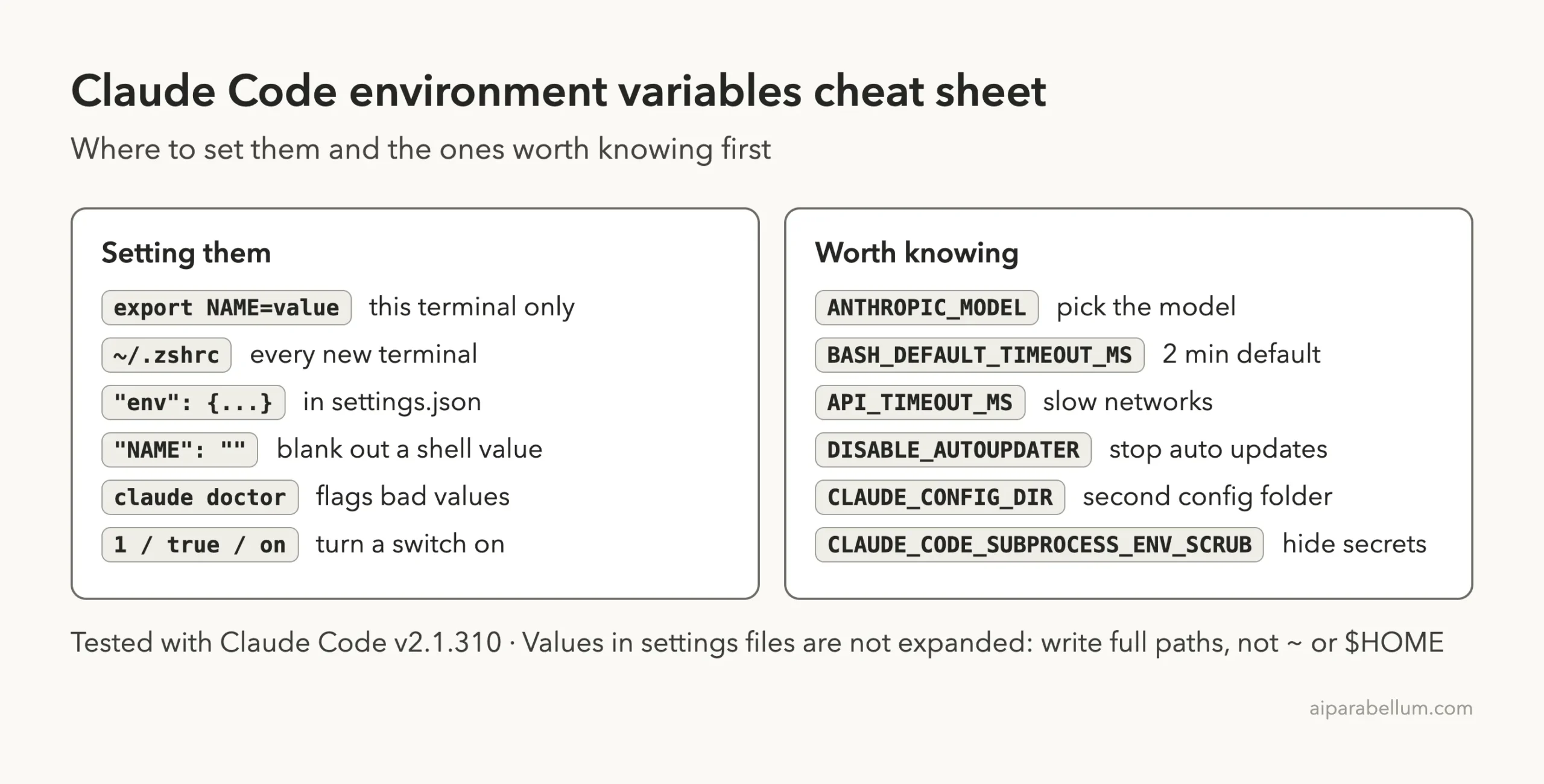
Claude Code Environment Variables Cheat Sheet
Frequently Asked Questions
Where do I set Claude Code environment variables?
Either export them in your shell before you run claude, or add them under the env key in a settings.json file. The settings file works no matter how claude starts.
Does a settings file override my shell variable?
In most sessions, yes. In our test the settings.local.json value replaced the shell value. Managed settings from an admin beat both.
Do I need to restart Claude Code after changing a variable?
For shell variables, yes. For a settings file, saved changes reach a running session, except features that read values only at startup.
How do I see every variable Claude Code supports?
Anthropic keeps the full list on its environment variables reference page. Model-related ones are also explained in the model configuration docs.
How do I turn off Claude Code auto-updates?
Set DISABLE_AUTOUPDATER=1. Manual claude update still works. To block both, the docs point to DISABLE_UPDATES, and our install guide covers updating.
Conclusion
Claude Code environment variables boil down to two places and a short list. Set them with export for a quick test or in a settings file env block for something lasting, and remember that a settings file usually wins. In our real session, ANTHROPIC_MODEL picked Haiku, the settings file beat the shell, the scrub hid a fake password, and claude doctor caught an oversized value. Start with the few in the cheat sheet, check your work with claude doctor, and if you are new to Claude itself, our Claude AI overview is a good first stop.
Previous in the series: Part 23, Claude Code Settings Files: User, Project and Local
Next in the series: Part 25: Claude Code Output Styles: Change How Claude Responds.