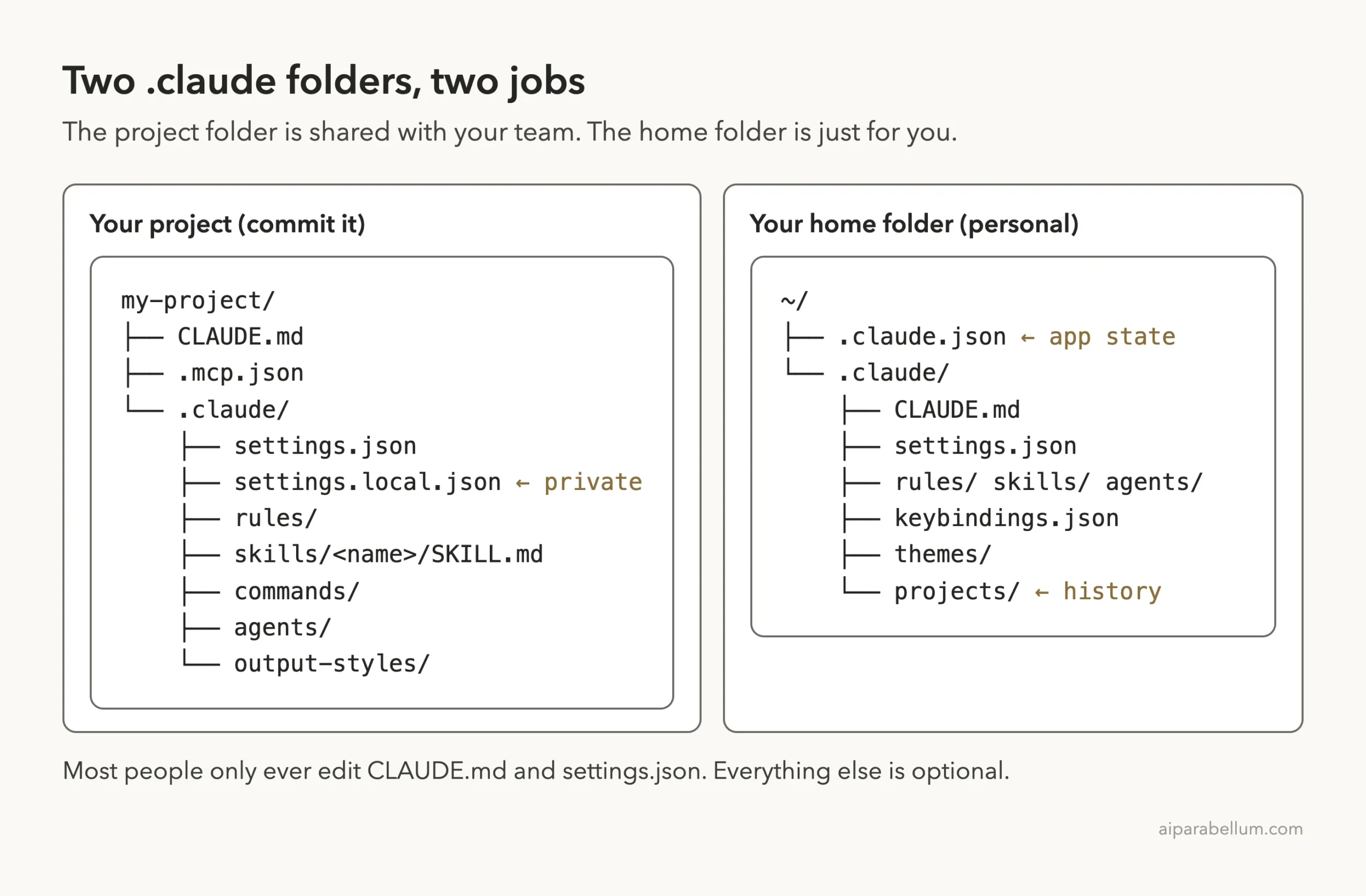
The Claude Code .claude folder is where your project rules, permissions, custom commands and helper agents live. Once you know what each file in it does, you can share a smart setup with your whole team and keep your private tweaks to yourself. There are actually two of these folders: one inside your project and one in your home folder.
In this guide we build a tiny project with a full .claude folder and test every piece in a real Claude Code session. You will see which files load, which ones belong in git, and how a single line in a settings file stopped Claude from reading a secrets file.
This is Part 22 of 53 in our Claude Code tutorials series. In the previous part we explained the CLAUDE.md file, which is the most common file you will place next to the .claude folder. This part zooms out and maps the whole directory.
Tested with Claude Code v2.1.309 on October 24, 2026, on macOS, using the Sonnet 5.5 model. We kept the demo to two short prompts in one small throwaway project.
Quick Summary: The .claude Folder at a Glance
| Question | Short answer |
|---|---|
| What is it? | A folder of config files Claude Code reads for instructions, settings, skills and subagents |
| Where is it? | Inside your project as .claude/, and in your home folder as ~/.claude/ |
| Which files matter most? | CLAUDE.md and settings.json; the rest is optional |
| Do I commit it? | Yes for the project folder, except settings.local.json |
| What else is in ~/.claude? | Data Claude Code writes as you work, like transcripts and prompt history |
| How do I check what loaded? | /memory for instructions, /permissions for rules, type / for skills |
| How do I clear a project’s data? | claude purge with the project path (try –dry-run first) |
What the Claude Code .claude Folder Is and Why It Exists
Every Claude Code session starts fresh. The .claude folder is how you give it a lasting setup without retyping anything, from “never read .env” to “here is how we write a standup update.”
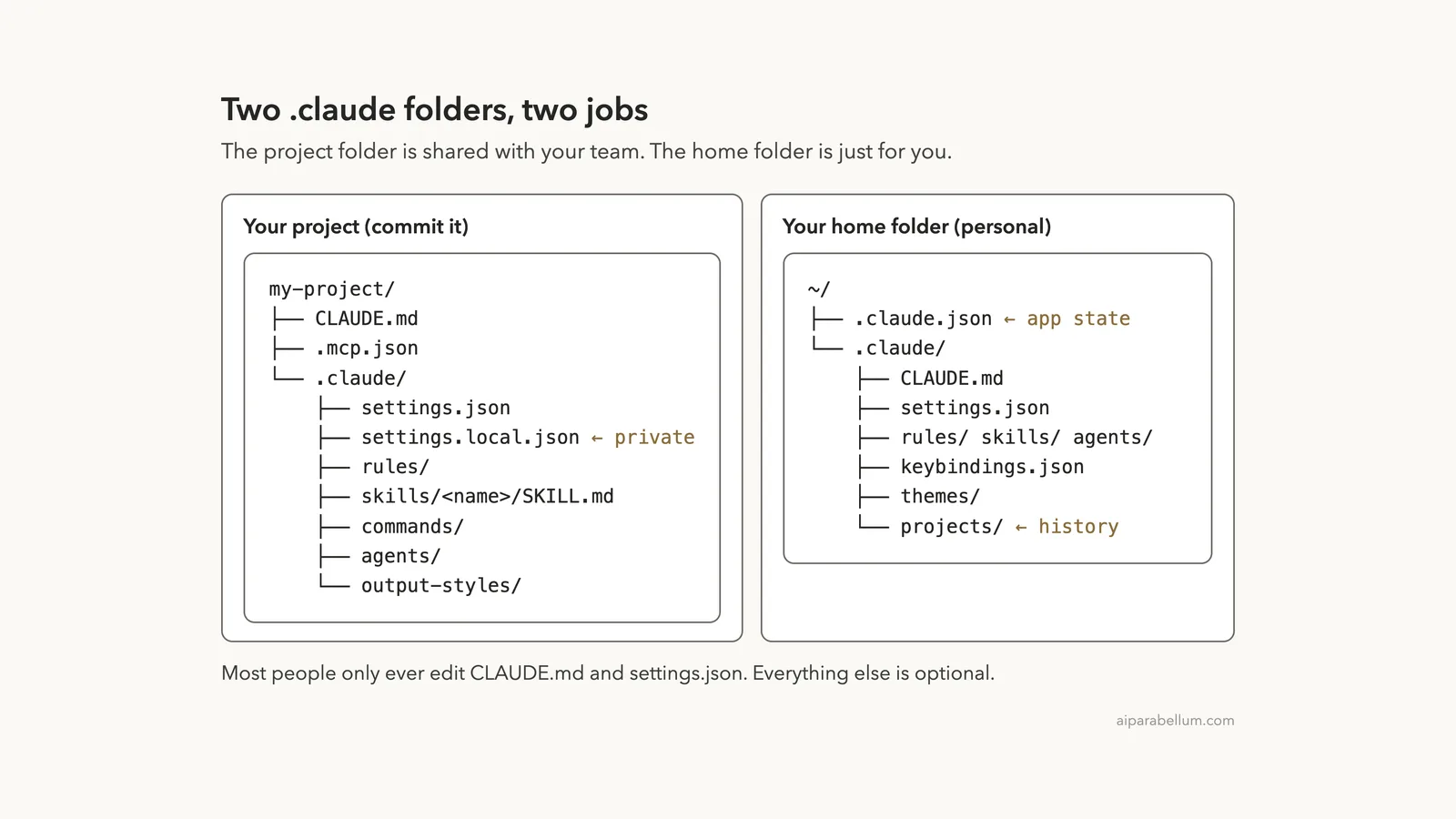
According to Anthropic’s .claude directory guide, Claude Code reads instructions, settings, skills, subagents and memory from two places. Your project directory holds files you commit to git so the team shares them. The ~/.claude folder in your home directory holds personal configuration that applies across all your projects.
Project folder for the team, home folder for you. Most of the .claude folder makes sense once you hold on to that one idea.
The docs also make a reassuring point for beginners. Most users only ever edit CLAUDE.md and settings.json, and everything else is optional, so you can add skills, rules or subagents only when you need them.
Step 1: Look Inside a Project .claude Folder
For this test we made a small tip calculator project with one of each common file. Here is what it contains:
- CLAUDE.md at the project root with a few project rules
- .claude/settings.json with one allow rule and one deny rule
- .claude/settings.local.json with one personal allow rule
- .claude/rules/testing.md, a rule that applies only to test files
- .claude/skills/standup/SKILL.md, a custom /standup command
- .claude/agents/reviewer.md, a code reviewer subagent
- A .env file with a fake secret, which we told Claude never to read
We added settings.local.json and .env to .gitignore, then committed the rest. The listing below shows the result.
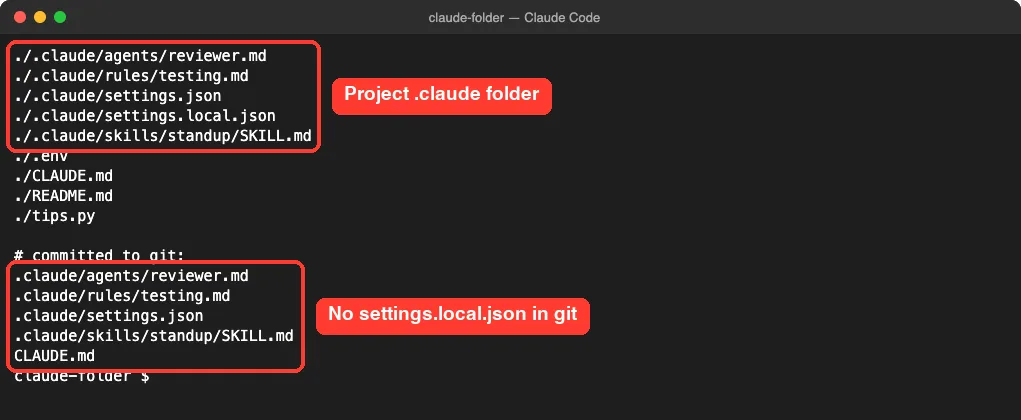
Notice that settings.local.json sits in the folder but not in the committed list. That is exactly how it should be, because it holds your personal overrides. The docs say Claude Code gitignores it when Claude Code saves a setting to it, and we added it to .gitignore ourselves since we created it by hand.
The Main Project Files and What They Do
| File | What it does | Commit it? |
|---|---|---|
| CLAUDE.md | Instructions loaded every session | Yes |
| .claude/rules/*.md | Topic rules, optionally limited to certain paths | Yes |
| .claude/settings.json | Permissions, hooks, env variables, model defaults | Yes |
| .claude/settings.local.json | Your personal overrides for this project | No |
| .mcp.json (project root) | MCP servers shared with the team | Yes |
| .claude/skills/<name>/SKILL.md | Reusable prompts you run with /name, or that Claude uses on its own | Yes |
| .claude/commands/*.md | Single-file prompts; same mechanism as skills | Yes |
| .claude/agents/*.md | Subagents with their own prompt and tools | Yes |
| .claude/output-styles/*.md | Custom instruction sets that change how Claude works | Yes |
The docs list a few more advanced entries too, such as workflows/*.js for scripted multi-agent jobs, agent-memory/ for subagent memory and .worktreeinclude for worktrees. You can safely ignore those until a later part of the series needs them.
Step 2: Peek at Your Global ~/.claude Folder
Next we listed the home folder version. Yours will look a little different, because some folders only appear once you use a feature.
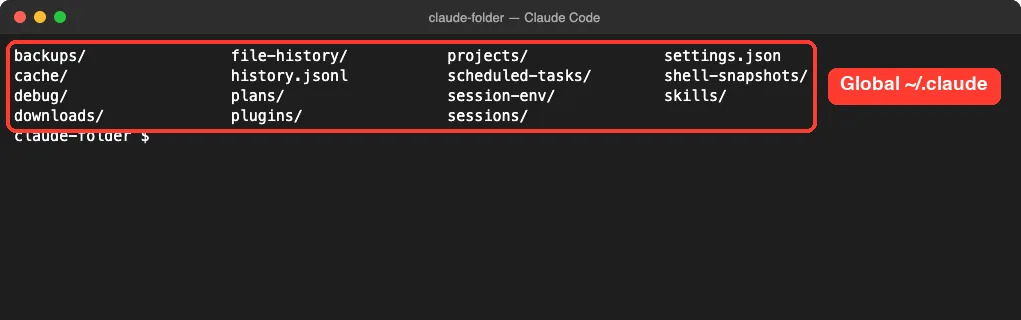
This folder holds two kinds of things. Some are files you write, like settings.json, CLAUDE.md, skills/ and agents/, and they work like the project versions but apply everywhere. The rest is application data that Claude Code writes as you work.
Application Data Inside ~/.claude
Here are the data folders you are most likely to notice, and what the docs say they hold:
- projects/ holds full conversation transcripts, which power resuming past sessions, plus each project’s auto memory.
- file-history/ keeps pre-edit snapshots used for checkpoint restore.
- plans/ stores plan files written in plan mode.
- history.jsonl stores prompts you typed, for up-arrow recall and Ctrl+R search.
- backups/ keeps earlier copies of ~/.claude.json.
One more file sits beside the folder rather than inside it. ~/.claude.json holds app state, account details, UI toggles and your personal MCP servers.
Step 3: Check Which Instructions Loaded With /memory
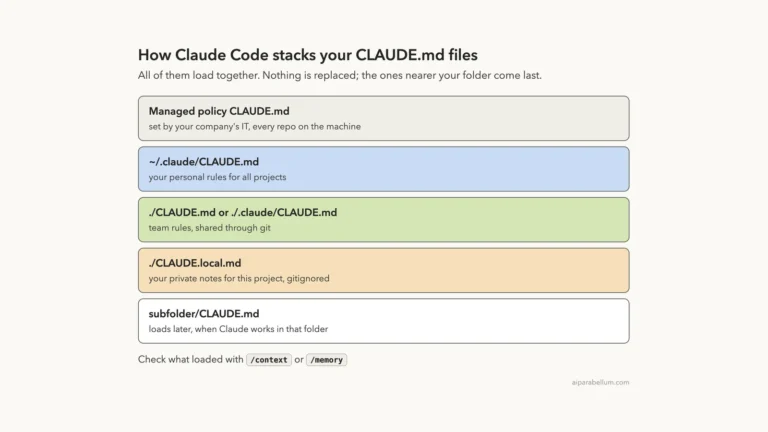
Now we started Claude Code inside the demo project and ran /memory. It lists the instruction files Claude Code found.
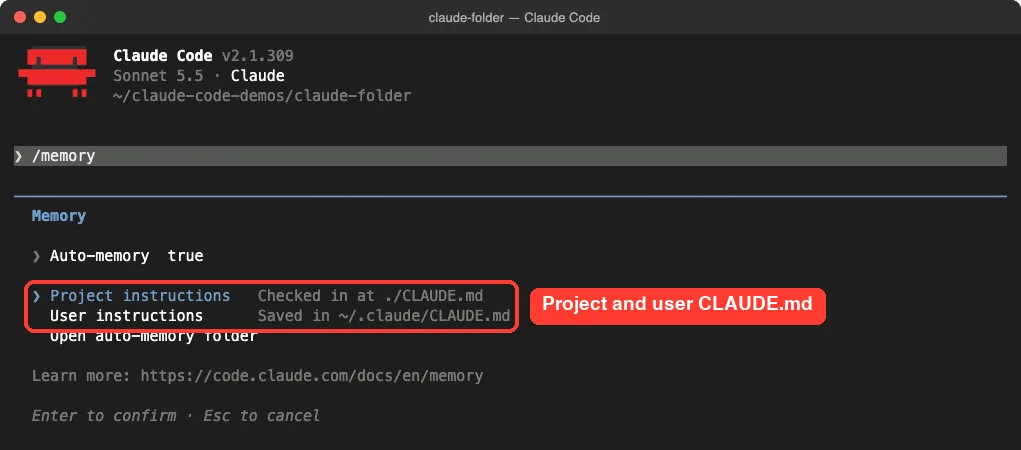
The project file and the user file appear as separate entries. That matches the two-folder idea: one set of instructions for this repo, one for every repo you work in.
Our testing.md rule did not show up as its own line here. That makes sense, since it has a paths setting that limits it to test files. The docs describe rules as topic-scoped instructions that are optionally path-gated.
Step 4: See settings.json at Work With /permissions
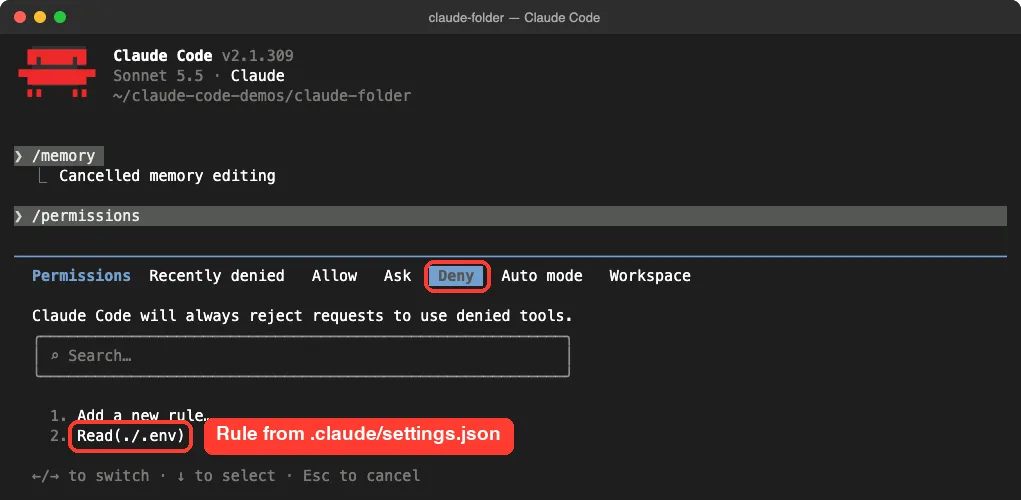
The settings files are where you control what Claude may do. Our team file allowed the test command and denied reading .env:
{
  "permissions": {
    "allow": ["Bash(python3 -m pytest *)"],
    "deny": ["Read(./.env)"]
  }
}
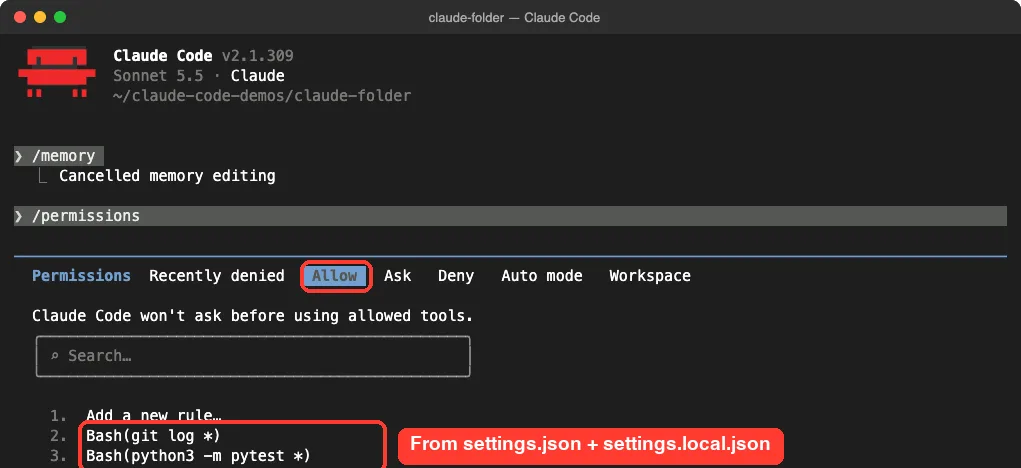
Our private settings.local.json added one more allow rule, Bash(git log *). When we opened /permissions, both allow rules showed up together on the Allow tab.
Switching to the Deny tab showed the rule that guards our secrets file.
If you want the full syntax for rules like these, our permission rules guide covers it in depth. The next part of this series covers how the settings files stack on top of each other.
A Quick Word on Which Settings File Wins
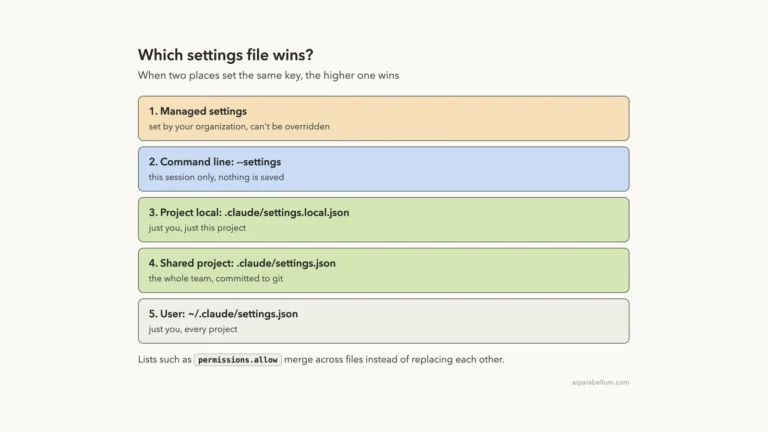
When two files set the same key, the settings docs give a clear order. From highest to lowest, it goes managed settings from your organization, then command line settings, then settings.local.json, then the project settings.json, and last your user settings in ~/.claude.
As our screenshot shows, permission rules from different files can all apply at once rather than one file replacing another. That is why both allow rules appeared side by side.
Step 5: Run a Custom Skill From .claude/skills
A skill is a reusable prompt saved as a file. Ours lives at .claude/skills/standup/SKILL.md and is only a few lines long:
---
name: standup
description: Summarize recent git commits as a short standup update
---
Run `git log --oneline -3` and turn the result into three short standup bullets.
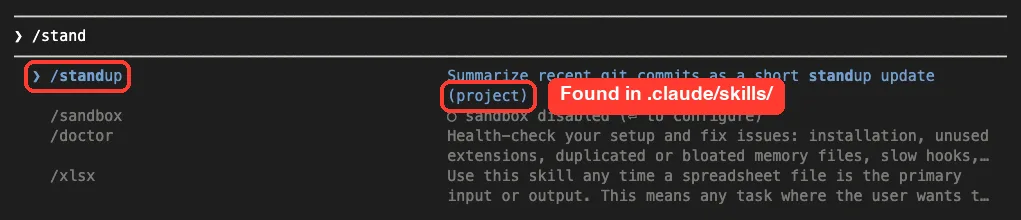
As soon as we typed /stand, Claude Code suggested the new command, marked as a project skill.
Running it worked in one step. Claude ran git log without asking for permission, because our settings.local.json allowed that command.
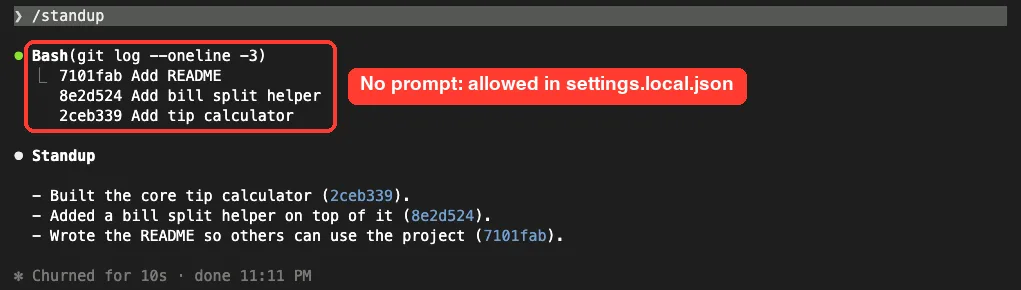
This is a nice example of the folder’s pieces fitting together. The skill came from the shared folder, while the permission that made it smooth came from a private file. For more built-in commands, see our slash commands guide.
Step 6: Test the Deny Rule
Next we asked Claude to read the .env file on purpose. This is the moment the settings file earns its keep.
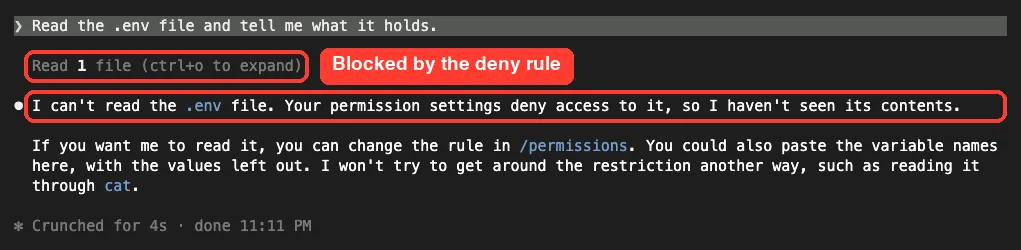
Claude said it could not read the file because our permission settings deny access. It also said it would not try to get around the restriction another way, such as using cat. One line in a committed file now protects that secret for everyone on the team.
Step 7: Where Subagents Live
Our demo also had a reviewer subagent in .claude/agents/reviewer.md. A subagent is a helper with its own prompt and its own tools; ours could only read and search files.
---
name: reviewer
description: Reviews Python changes for bugs and missing tests
tools: Read, Grep, Glob
---
You are a careful code reviewer. Point out bugs and missing tests in short bullets.
In older guides you may see the /agents command used to manage these. In our version it printed a notice instead, which is worth knowing before you follow an outdated tutorial.

The message tells you to ask Claude to create or update subagents for you, or to edit the files directly. Put shared helpers in .claude/agents/ and personal ones in ~/.claude/agents/.
Choosing the Right File in the .claude Folder
The hardest part for most people is knowing where a change belongs. This ladder follows the “choose the right file” table in Anthropic’s docs.
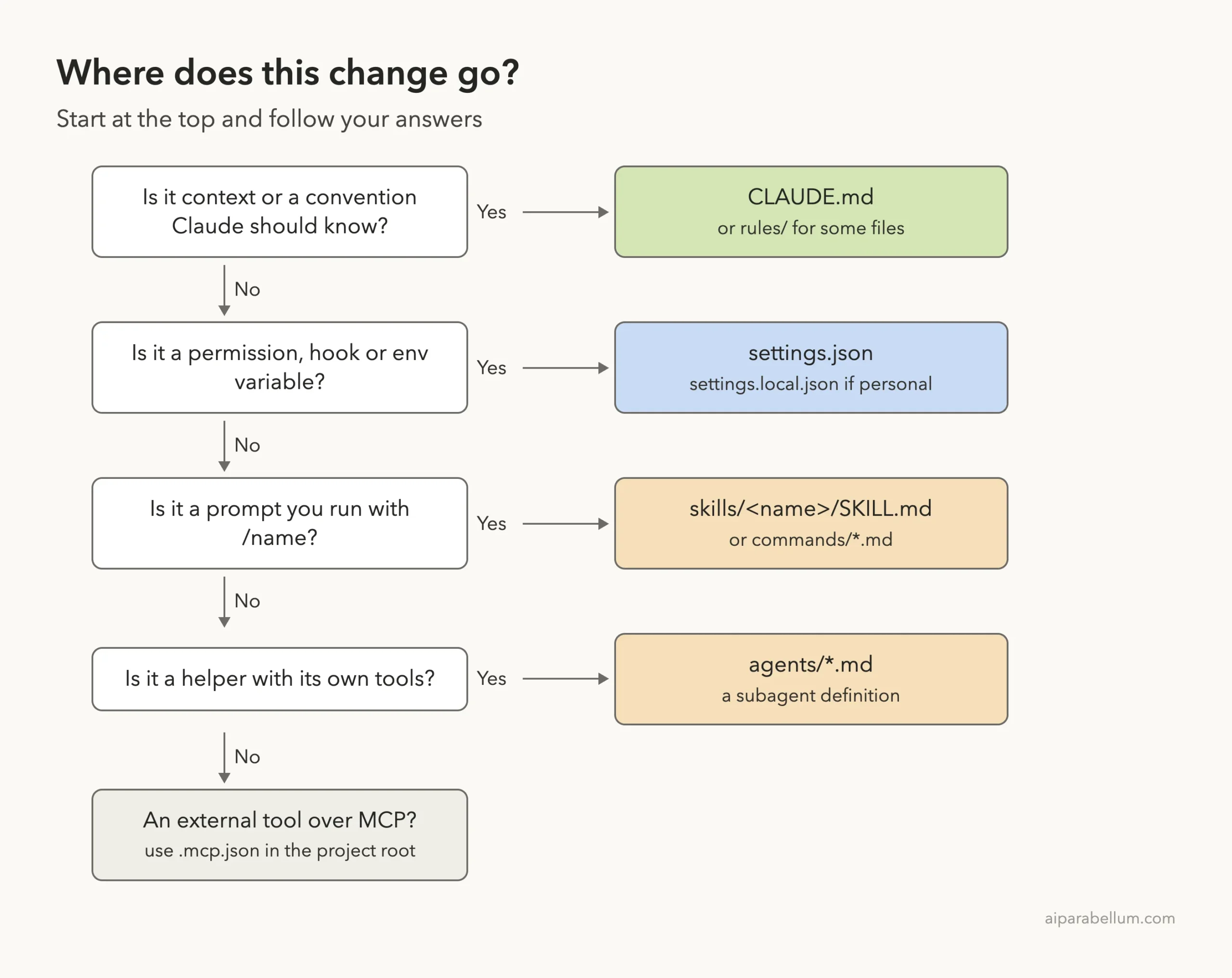
A simple rule of thumb helps here. If it is something Claude should know, write it in CLAUDE.md. If it is something Claude must or must not do, put it in settings.json.
Real Examples You Can Copy
Here are a few everyday setups and where each one goes:
| You want to | Put it in |
|---|---|
| Tell Claude your test command | CLAUDE.md |
| Block reading of .env for the whole team | .claude/settings.json deny rule |
| Let your own machine run git log freely | .claude/settings.local.json allow rule |
| Add a /standup or /release-notes command | .claude/skills/<name>/SKILL.md |
| Add a read-only code reviewer | .claude/agents/reviewer.md |
| Use your favorite style rules in every project | ~/.claude/CLAUDE.md |
| Custom keyboard shortcuts | ~/.claude/keybindings.json |
Try It Yourself
Make a throwaway folder, run git init, and add a CLAUDE.md with two rules. Then start Claude Code there and paste this prompt:
Create a .claude folder for this project with: a settings.json that denies Read(./.env), a skill at .claude/skills/standup/SKILL.md that summarizes the last 3 git commits as bullets, and a .gitignore entry for .claude/settings.local.json. Show me each file before you write it.Approve each file, then restart Claude Code. Type /stand to find your skill, open /permissions to see the deny rule, and ask Claude to read a fake .env to confirm it gets blocked.
Common Mistakes With the .claude Folder
- Committing settings.local.json. It is meant for your personal overrides, so keep it out of git.
- Putting must-follow rules in CLAUDE.md. Instructions are guidance; a deny rule in settings.json is what actually blocked our .env read.
- Mixing up ~/.claude.json and ~/.claude/settings.json. The first holds app state and account details, the second holds your user settings.
- Deleting files in ~/.claude to “clean up.” The docs warn not to delete ~/.claude.json, ~/.claude/settings.json or ~/.claude/plugins/.
- Forgetting that transcripts are plain text. The docs note that anything a tool reads, like a .env file, is written to the transcript on disk.
Pro Tips for a Tidy Setup
- Start with just CLAUDE.md and settings.json. Add skills and agents only when a task repeats.
- Use deny rules for secret files. The docs recommend permission rules that deny reads of credential files to reduce exposure.
- Shorten transcript storage if you handle sensitive code. The cleanupPeriodDays setting controls how long old transcripts are kept, and the default is 30 days.
- Preview before you purge. Run claude purge with your project path and –dry-run to see what would be deleted before you commit to it.
- Check the skills docs and the subagents docs for every frontmatter field before writing big skill or agent files.
Clearing a Project’s Local Data
The claude purge command deletes what Claude Code stores for one project: transcripts and auto memory, per-session task, debug and file-history entries, matching lines in history.jsonl, and the project’s entry in ~/.claude.json. It prints a plan and asks before deleting anything.
claude purge ~/work/my-repo --dry-runDrop –dry-run to get a single confirmation prompt. The docs note that before v2.1.288 the command was claude project purge.
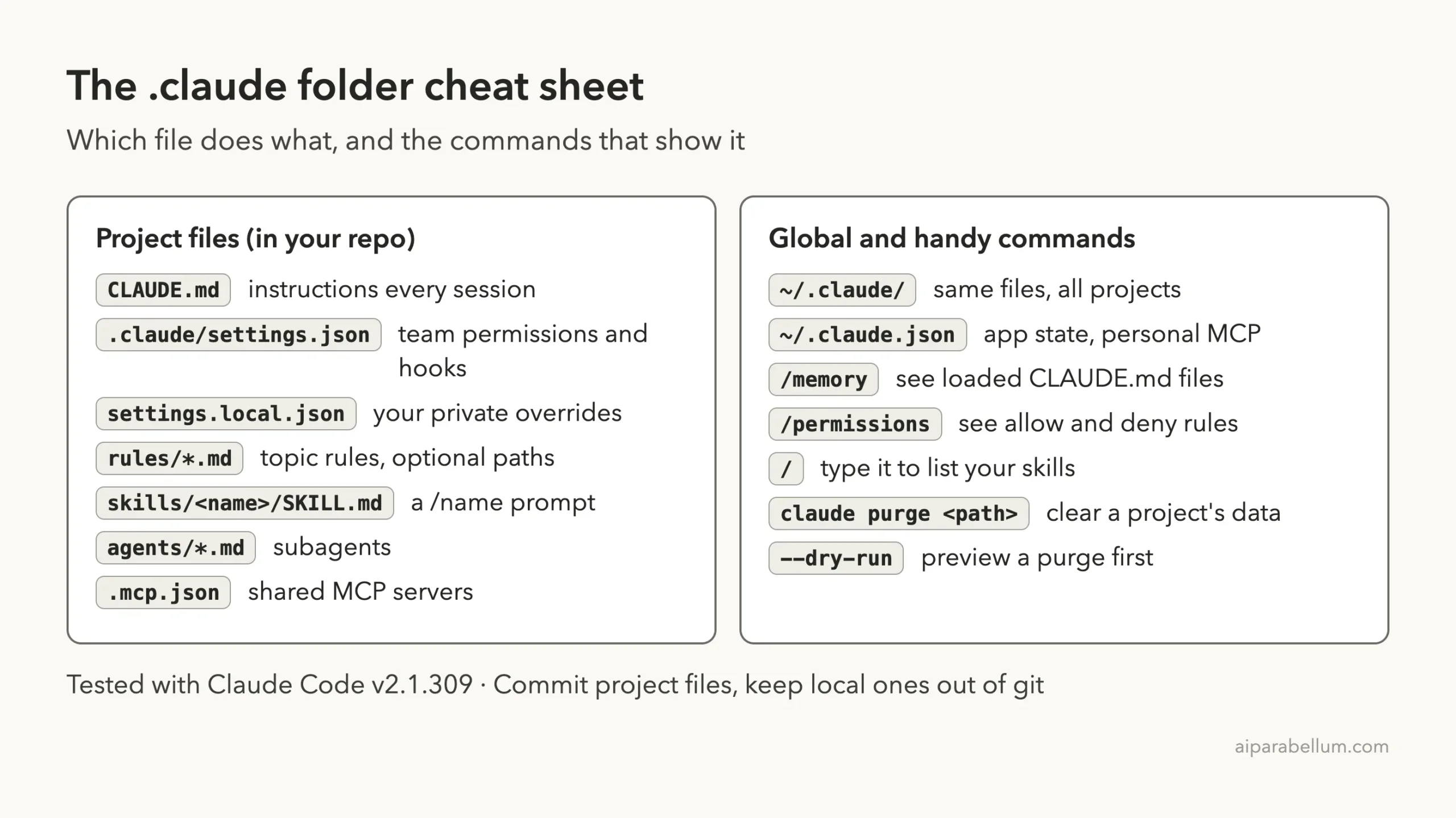
.claude Folder Cheat Sheet
Frequently Asked Questions
Should I commit the .claude folder to git?
Yes, the project .claude folder is meant to be shared so your team gets the same rules, skills and agents. The one exception is settings.local.json, which holds personal overrides and stays out of git.
What is the difference between .claude and ~/.claude?
The .claude folder in your project applies to that project and is shared with your team. The ~/.claude folder in your home directory applies to every project and also stores data Claude Code writes, like transcripts.
Is it safe to delete ~/.claude?
Not all of it. You can delete many data folders, but you lose features like resume and rewind for past sessions. Don’t delete ~/.claude.json, ~/.claude/settings.json or ~/.claude/plugins/.
Where does ~/.claude live on Windows?
The docs say it resolves to %USERPROFILE%\.claude. We tested on macOS; the Windows path follows Anthropic’s official instructions. If you set CLAUDE_CONFIG_DIR, the folder moves there instead.
Can Claude Code read an AGENTS.md file instead of CLAUDE.md?
Yes. The docs say that if your repository already has an AGENTS.md for other coding agents, Claude Code can read it in place of a CLAUDE.md.
Conclusion
The Claude Code .claude folder is simpler than it looks once you split it in two: the project folder holds the setup your team shares, and ~/.claude holds your personal settings plus the data Claude Code writes as you work. In our real test, a short settings.json blocked a secrets file, a private settings.local.json let git log run without prompts, and a five-line skill became a working /standup command. Start with CLAUDE.md and settings.json, add more only when you need it, and if you are new to Claude in general, our Claude AI overview is a good place to begin.
Previous in the series: Part 21, CLAUDE.md Explained: Give Claude Code Project Memory
Next in the series: Part 23: Claude Code Settings Files: User, Project and Local.