Claude Code permissions decide what Claude can do on your computer without asking you first. With a few short rules, you can let it run your test script freely, make it ask before risky commands and block it from reading your secrets. Once you set them up, you spend less time clicking “Yes” and more time getting work done.
In this tutorial we build a small set of allow, ask and deny rules and watch Claude Code follow them in a real session. You will learn the rule syntax, where the rules are saved, and the mistakes that make a rule do less than you think.
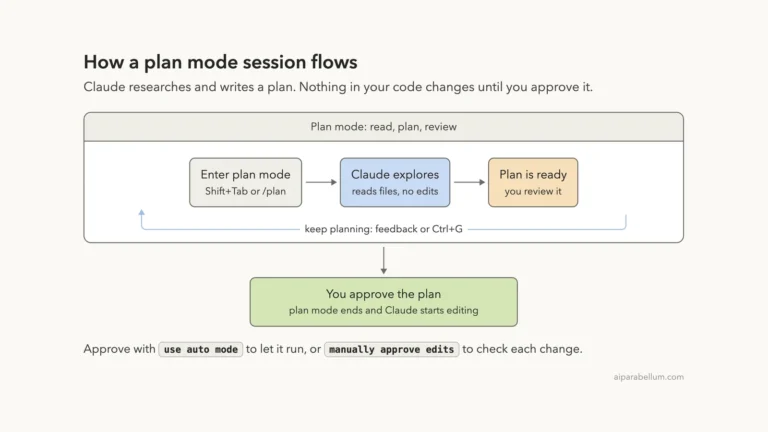
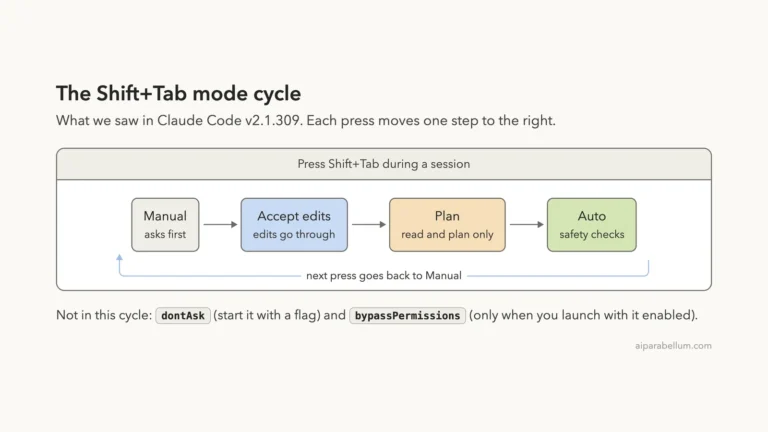
This is Part 12 of 53 in our Claude Code tutorials series. In the previous part we covered plan mode, and in Part 10 we compared the permission modes. Rules are the fine-grained layer that sits on top of those modes.
Tested with Claude Code v2.1.309 on October 24, 2026, on macOS, inside a throwaway demo folder with two tiny Python scripts. Your screens can look a little different depending on your version and organization settings.
Quick Summary: Claude Code Permissions at a Glance
| Rule type | What it does | Example |
|---|---|---|
| Allow | Runs the tool with no prompt | Bash(npm run *) |
| Ask | Always asks you first | Bash(git push *) |
| Deny | Blocks the tool call | Read(./.env) |
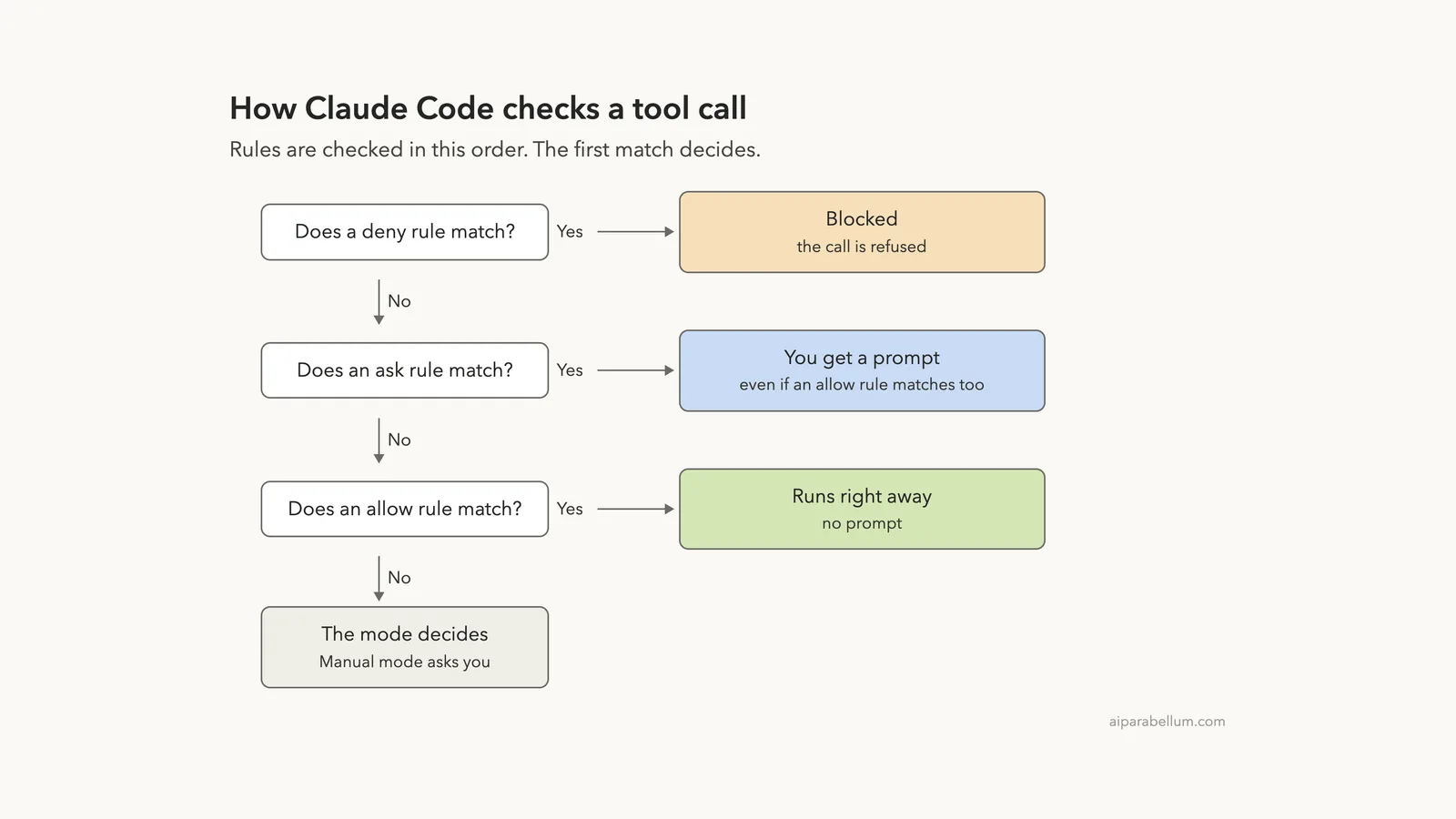
| Check order | Deny, then ask, then allow | First match wins |
| Where to manage | /permissions or settings files | .claude/settings.json |
What Are Permission Rules in Claude Code?
Every time Claude wants to use a tool, such as running a shell command, editing a file or fetching a web page, Claude Code checks whether it needs your approval. Out of the box, reading files in your project is free, while shell commands and file edits ask you first. Permission rules let you change that answer for specific tools, commands and paths.
There are three kinds of rules:
- Allow rules let Claude use a tool without asking.
- Ask rules make Claude Code prompt you every time, even in modes that normally would not.
- Deny rules stop Claude from using a tool or touching a path.
One detail matters a lot here. The rules are enforced by Claude Code itself, not by the model. Writing “never read .env” in your CLAUDE.md file shapes what Claude tries, but only a rule actually stops it.
A prompt is a request. A deny rule is a lock.
Why rules exist alongside permission modes
A permission mode, like Manual or acceptEdits, is one broad setting for the whole session. Rules are precise. You can stay in Manual mode and still let one safe script run freely, or use a faster mode and still force a prompt before every push.
If you are new to the tool, our first session guide shows what a normal permission prompt looks like before you start writing rules.
Step 1: Write Your First Allow, Ask and Deny Rules
Rules live in a settings file under a “permissions” key. For our demo, we created a project file at .claude/settings.json with one rule of each kind:
{
  "permissions": {
    "allow": [
      "Bash(python3 greet.py *)"
    ],
    "ask": [
      "Bash(python3 greet.py --shout *)"
    ],
    "deny": [
      "Read(./.env)",
      "Bash(git push *)"
    ]
  }
}
In plain English, Claude may run greet.py freely, must ask before the shouting version, can never read the .env file and can never start a command with git push. Each rule follows the same shape: a tool name, plus an optional specifier in parentheses.
The trust dialog shows your allow rules first
Allow rules in a project file grant power, so Claude Code does not apply them until you trust the folder. When we started Claude Code in the demo folder, the workspace trust dialog listed the allow rule it found and warned that it would apply without asking.
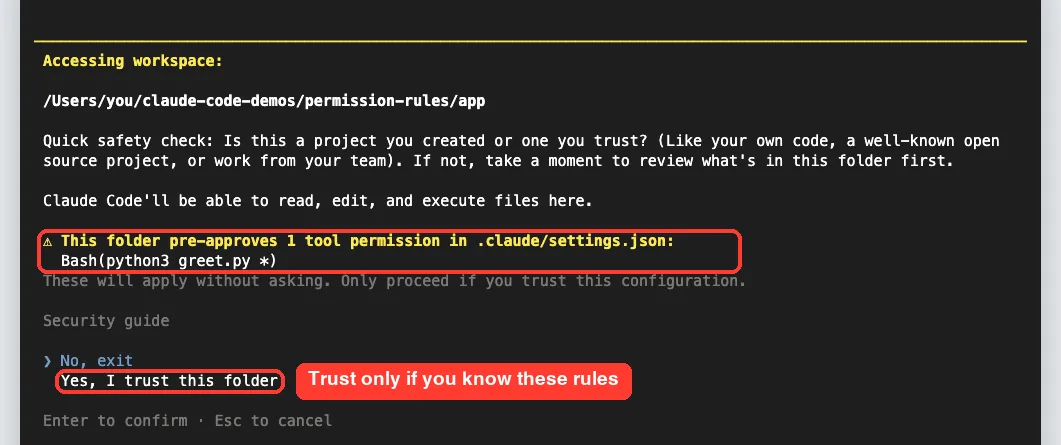
This is a good safety net. If you clone a repository from someone else, read this list before you pick “Yes, I trust this folder.” Deny and ask rules do not need trust, because they only make things stricter.
Step 2: Manage Claude Code Permissions With /permissions
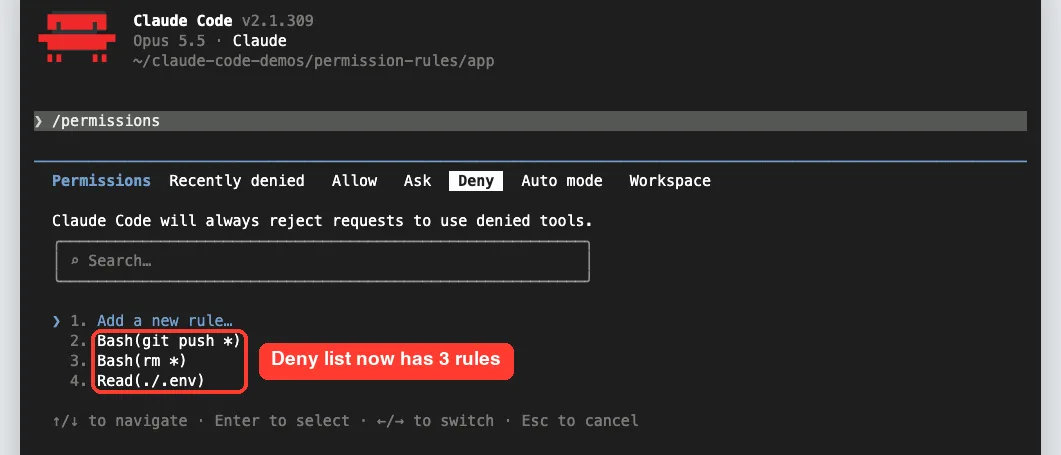
Type /permissions inside a session to open the rules dialog. It has tabs for Recently denied, Allow, Ask, Deny, Workspace and, when auto mode is available to you, Auto mode. Use the left and right arrow keys to switch tabs, and type to filter a long list.
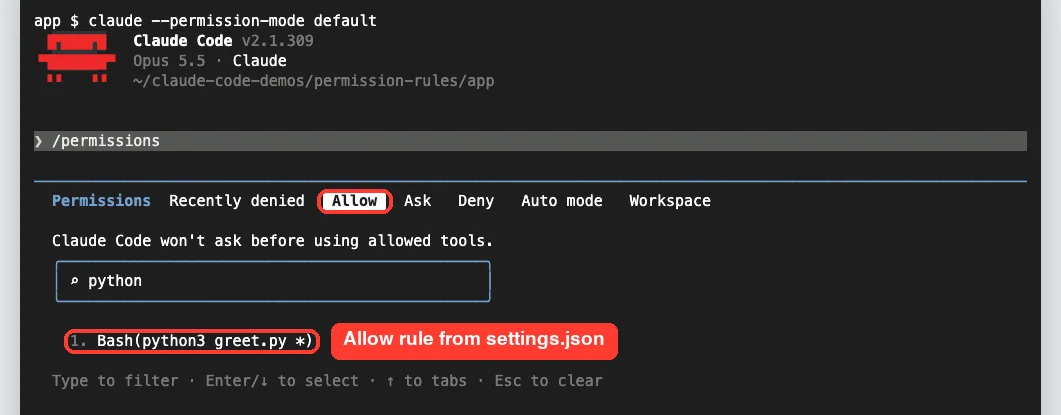
Our list also held rules from other settings files, which is why the search box helps. The docs say the dialog lists all your rules along with the settings file each one comes from. You can learn more about the dialog in our guide to slash commands.
Add a rule without editing JSON
You do not have to edit files by hand. On the Deny tab we moved down to “Add a new rule…” and pressed Enter, and Claude Code opened a box for the rule text.
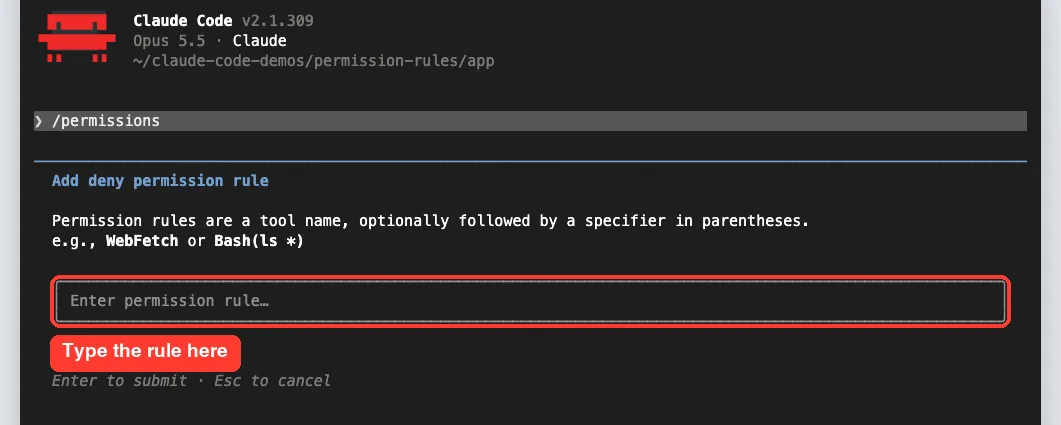
We typed Bash(rm *) and pressed Enter. Claude Code described the rule as “Any Bash command starting with rm” and asked where to save it.
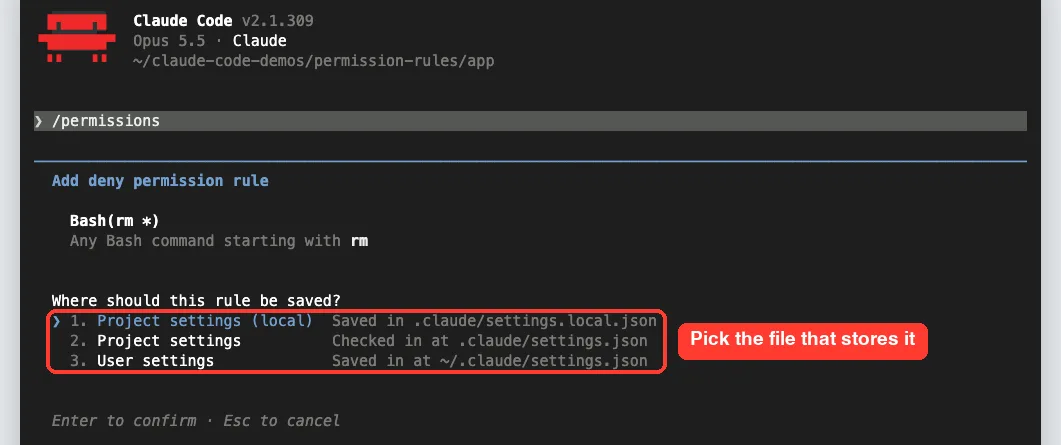
We kept the first option, Project settings (local). The rule showed up in the Deny list right away, next to the two rules from the shared file.
Step 3: Watch the Rules Work in a Real Session
Next we sent four short prompts in Manual mode, where Claude Code normally asks before any shell command. Each prompt hit a different rule.
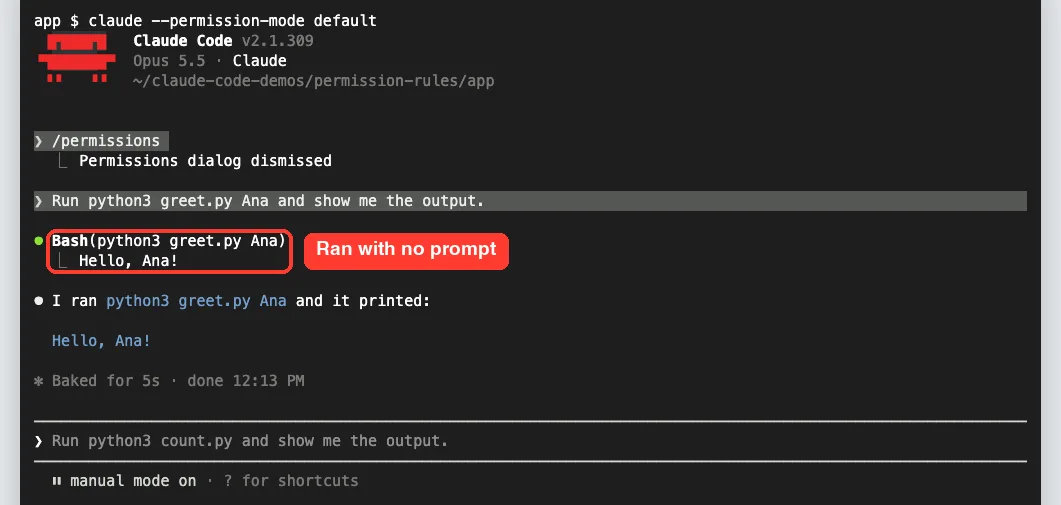
An allow rule runs with no prompt
We asked Claude to run python3 greet.py Ana. Because it matched Bash(python3 greet.py *), the command ran straight away and printed “Hello, Ana!” with no question at all.
A deny rule blocks the read
Then we asked Claude to show the .env file. The read was refused, and Claude explained that our permission settings block it and suggested running the command ourselves if we really needed it.
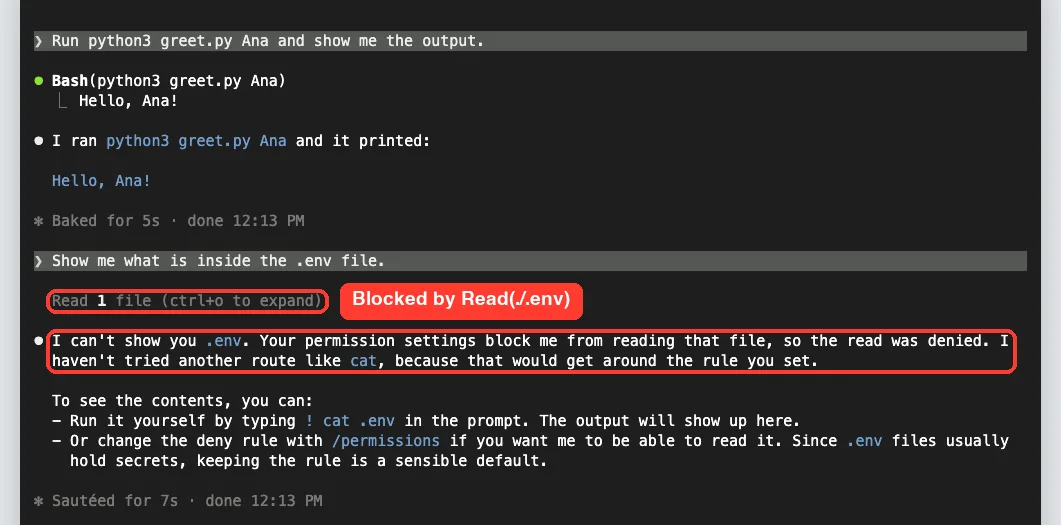
According to the docs, a Read deny rule also covers file commands Claude Code recognizes in Bash, such as cat, head and tail. It also blocks the Edit and Write tools on that same path.
An ask rule beats an allow rule
Our –shout command matched both the allow rule and the ask rule. Because ask is checked before allow, Claude Code stopped and named the exact rule that required confirmation.
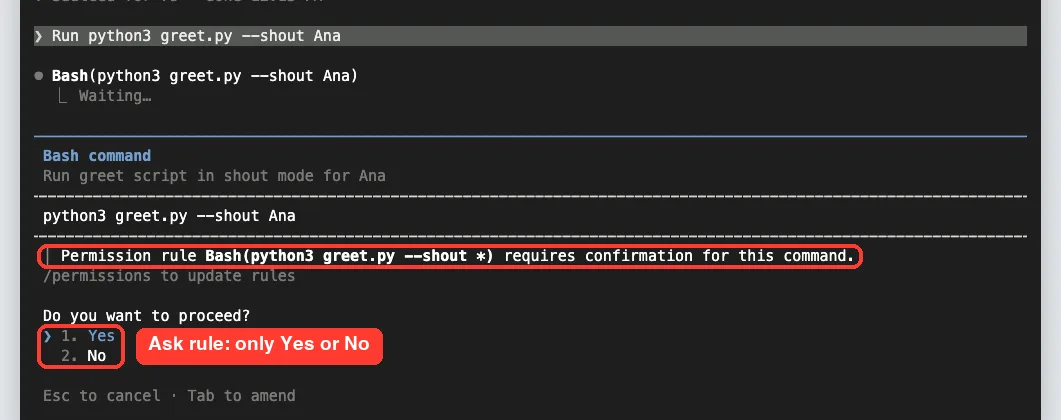
Notice there is no “don’t ask again” option here. That makes sense, because saving an allow rule could not override the ask rule anyway.
“Yes, and don’t ask again” saves a rule for you
Last, we asked Claude to run python3 count.py. No rule matched, so Manual mode asked as usual, and the second option offered to stop asking for “python3 *”.
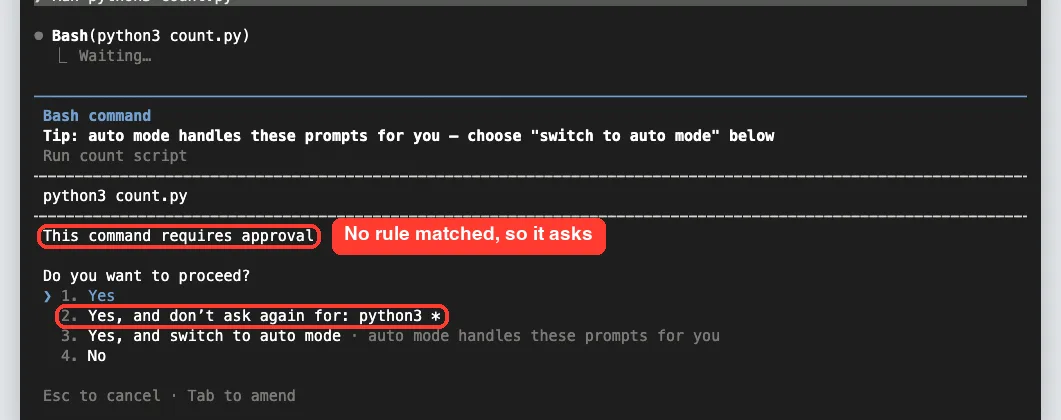
We picked option 2, and the script ran. Afterward, the local settings file held a new allow rule, Bash(python3 *), next to the rm deny rule we added earlier.
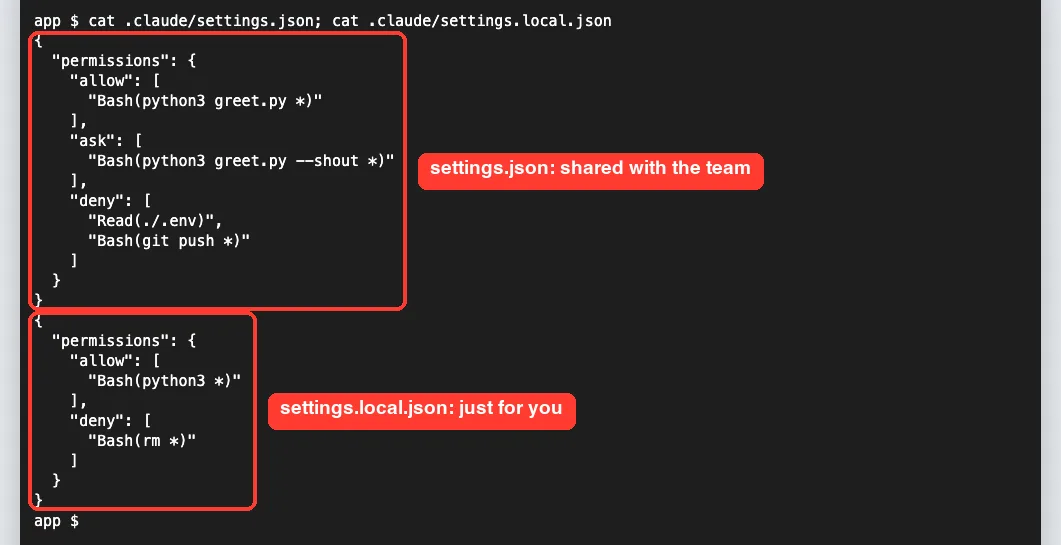
Here is the lesson. That saved rule is broader than our one command, because it now covers any python3 command in this project. Our shout rule still asks, since ask wins, but always check what “don’t ask again” will cover.
How Claude Code Checks a Tool Call
The order is simple and strict. Claude Code checks deny rules first, then ask rules, then allow rules, and the first match decides. A more specific rule does not jump the queue.
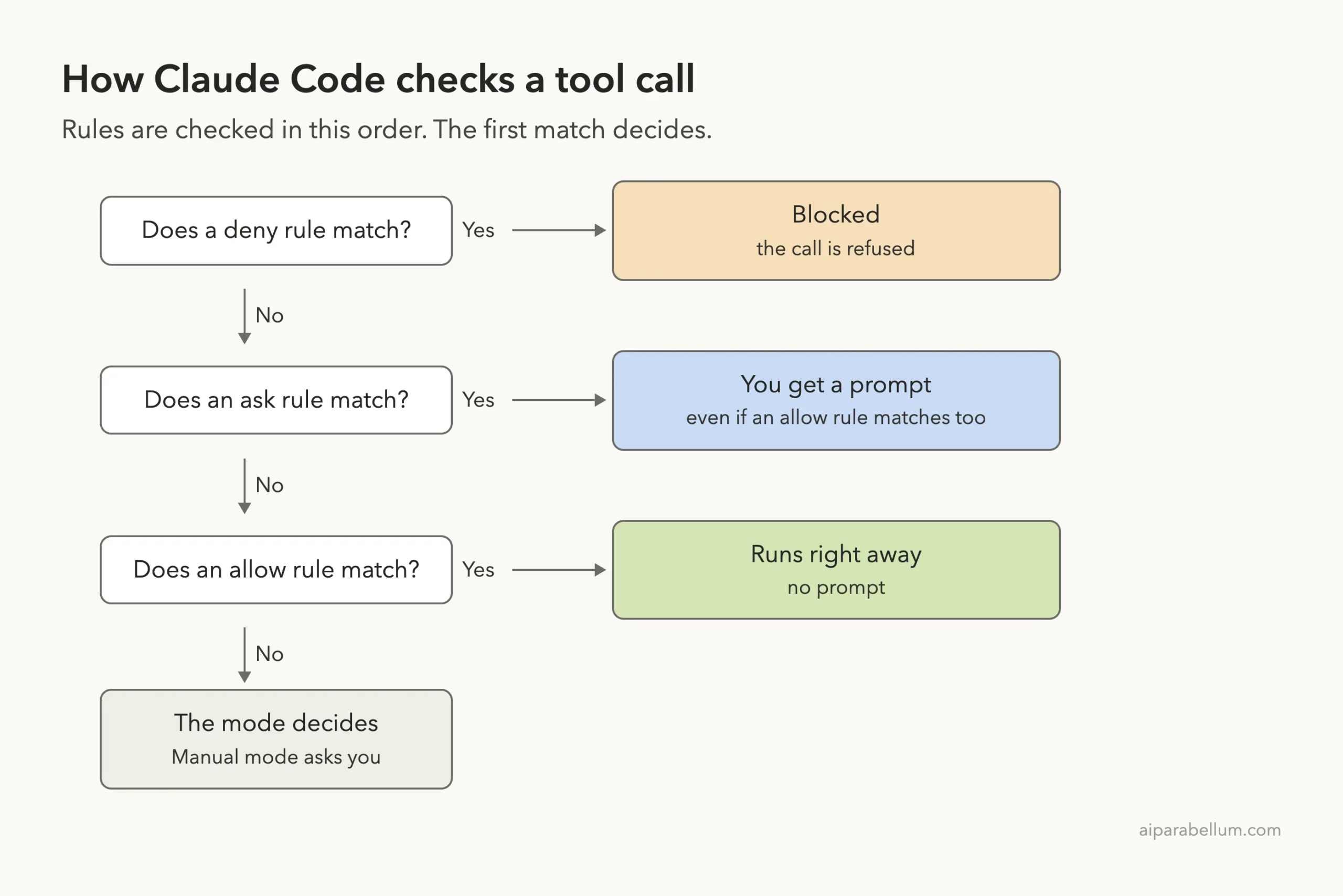
So a broad deny like Bash(aws *) blocks Bash(aws s3 ls) even if you also allowed it. An allow rule can never carve an exception out of a deny rule.
Where permission rules are saved
Rules can live in several files, and Claude Code combines them. Higher levels win when settings clash, and managed settings from your organization sit at the top where nothing can override them.
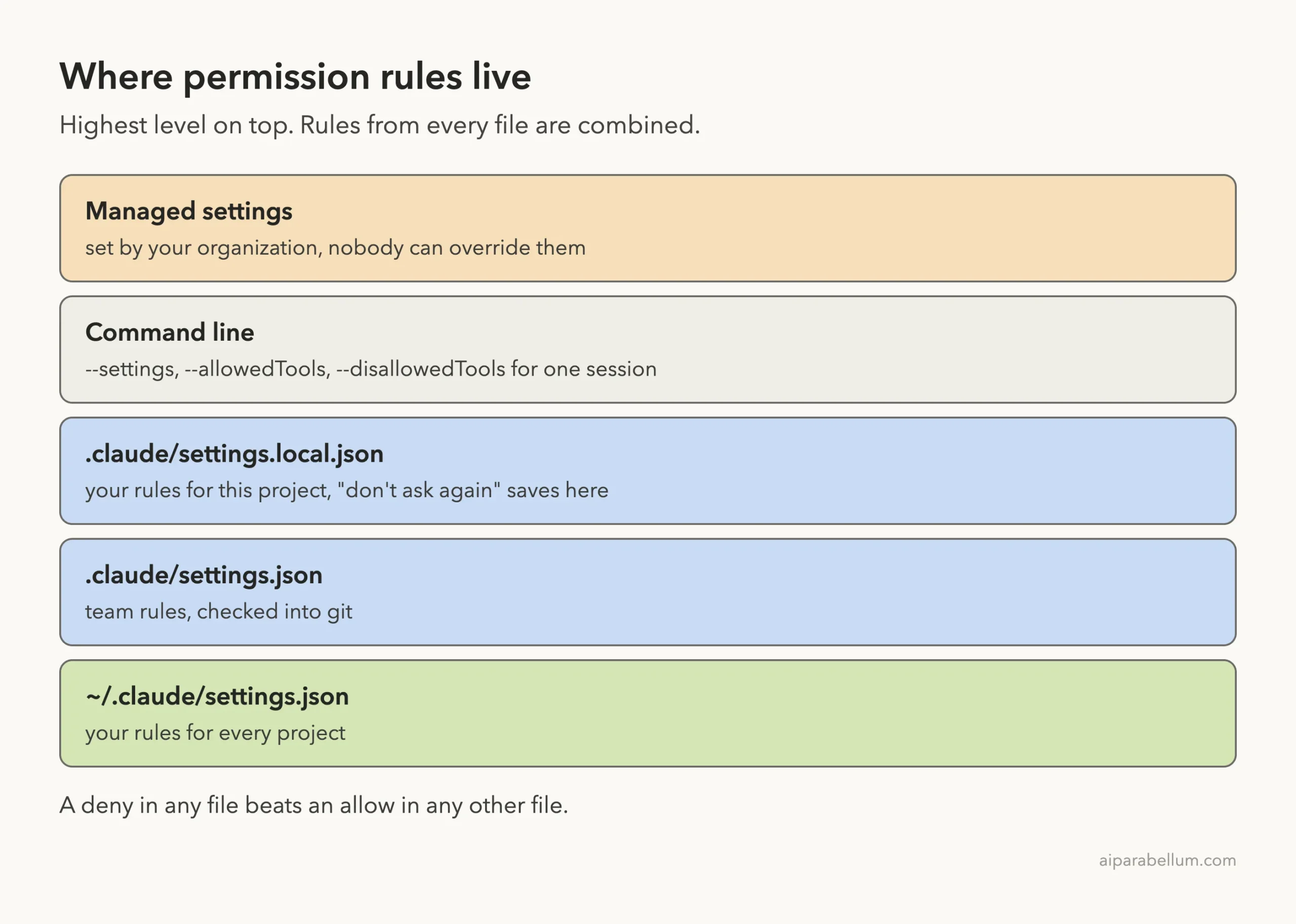
| File | Who it is for | Shared in git? |
|---|---|---|
| ~/.claude/settings.json | You, in every project | No |
| .claude/settings.json | Your whole team | Yes |
| .claude/settings.local.json | You, in this project | No |
| Managed settings | Your organization | Set by admins |
Because deny rules from any file are checked before allow rules, a deny in your user file blocks an allow in the project file, and the reverse is true too. The full order is in the official settings documentation.
Claude Code Permission Rule Syntax With Real Examples
The format is always Tool or Tool(specifier). A bare tool name like Bash matches every use of that tool, and as a deny rule it removes the tool from Claude’s view entirely.
Bash wildcards
A * stands in for any text. Put it after the subcommand, because the words before the first * are what limit the rule.
| You write | Matches | Does not match |
|---|---|---|
| Bash(npm run build) | npm run build | npm run build –watch |
| Bash(npm run *) | npm run test, npm run | npm install |
| Bash(ls *) | ls -la, ls | lsof |
| Bash(ls*) | ls -la, lsof | nothing nearby |
Claude Code also understands shell operators. A rule like Bash(safe-cmd *) does not approve safe-cmd && other-cmd, because each part must match on its own.
File, web and tool rules
- Read(./.env) blocks one file, and Read(./secrets/**) blocks a whole folder.
- Edit(/docs/**) covers the docs folder in your project. Use // for a true absolute path, like Edit(//tmp/scratch.txt).
- WebFetch(domain:example.com) covers one site. Add WebFetch(domain:*.example.com) for its subdomains.
- mcp__github__* covers every tool from one MCP server.
- Agent(Explore) in deny turns off the Explore subagent.
Use Edit rules for anything that changes files. The docs note that path rules written for Write, NotebookEdit or Glob are accepted but never match, so Edit(docs/**) is the right form. For the bigger picture of how tools fit together, see our guide on Claude Code internals.
Real Examples You Can Copy
Here are three small setups that fit common situations. Each one goes inside the “permissions” key of a settings file.
| Goal | Rules to add |
|---|---|
| Fewer prompts for tests and commits | allow: Bash(npm run *), Bash(git commit *) |
| Protect secrets | deny: Read(./.env), Read(./secrets/**) |
| Always review pushes | ask: Bash(git push *) |
You can also add rules for a single run from the command line. For example, claude –disallowedTools “Bash(rm *)” adds that deny for one session only. Our advanced commands guide covers more launch flags.
Try It Yourself
Make a throwaway folder with one small script and a fake .env file holding a dummy value. Add an allow rule for the script and a deny rule for the .env file, start Claude Code in Manual mode and paste this prompt:
Run my script once and show me the output. Then show me what is inside the .env file. Tell me which steps needed my approval and which were blocked.You should see the script run with no prompt and the .env read refused. Then open /permissions and look at the Allow and Deny tabs to confirm where each rule came from.
Common Mistakes With Claude Code Permissions
- Putting the * too early. Bash(git *) allows every git command, including push. Write Bash(git log *) instead.
- Trusting a deny rule as a full security wall. The docs show Bash(rm *) does not stop /bin/rm or bash -c ‘rm …’. Use sandboxing when the limit must hold.
- Expecting an allow rule to beat a deny rule. It never does, no matter how specific it is.
- Clicking “don’t ask again” without reading it. In our test, it saved python3 *, which is much wider than one script.
- Using a single slash for an absolute path. /Users/you/file is relative to the settings file. Use //Users/you/file.
- Relying on a .claudeignore file. The docs say it has no effect, so move those entries into Read deny rules.
Pro Tips
- Put team rules in .claude/settings.json so everyone gets the same guardrails, and keep personal shortcuts in settings.local.json.
- Use ask rules for anything you can’t undo easily, like pushes or deploys. They prompt even in auto mode.
- Add rules mid-task. The docs say a change in /permissions applies from Claude’s next tool call in the same turn.
- For complex checks, a PreToolUse hook can inspect the full command. Deny and ask rules still apply even when a hook says allow.
- Pair rules with the right permission mode. A strict deny list makes faster modes feel much safer.
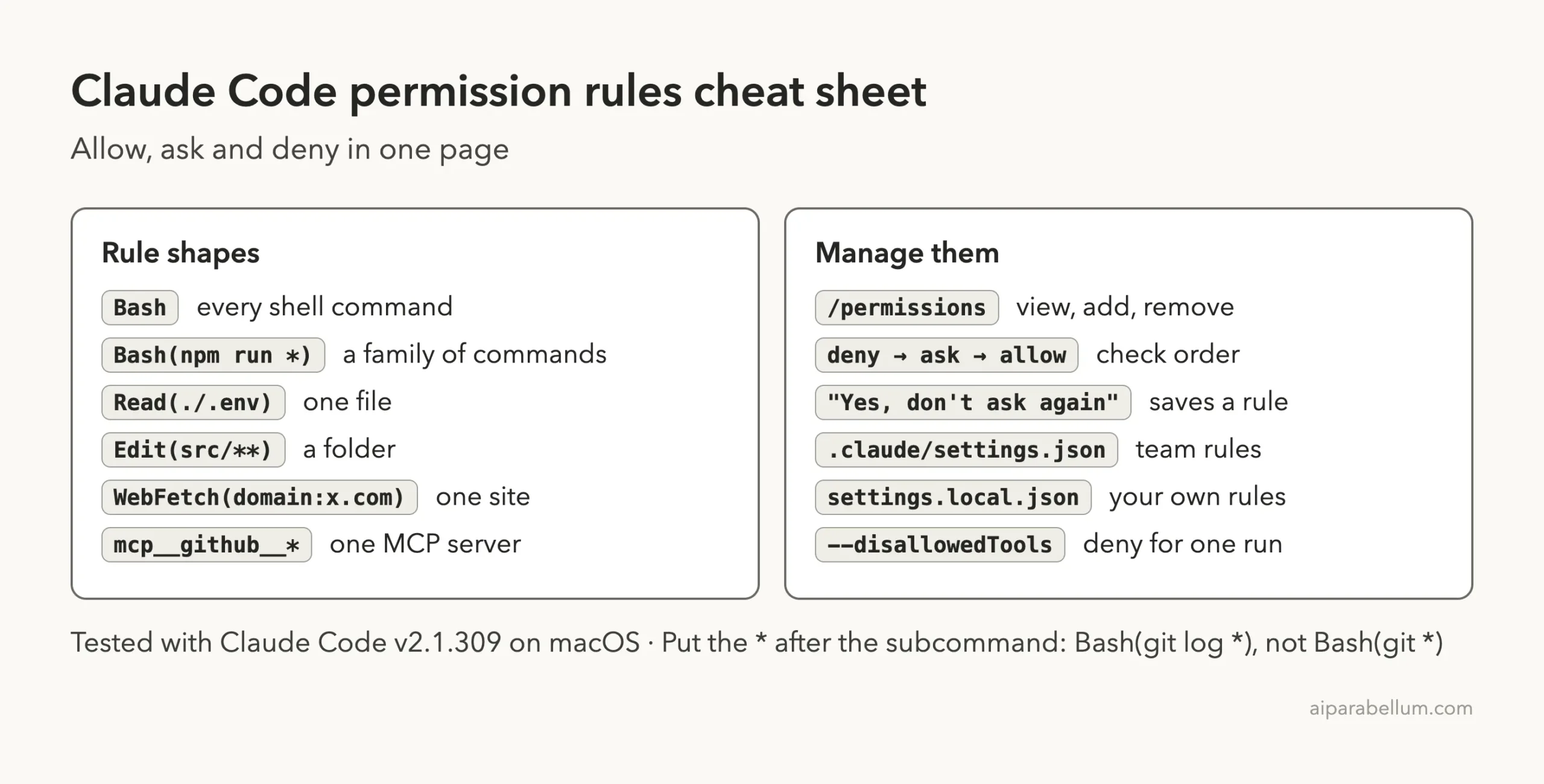
Claude Code Permissions Cheat Sheet
Frequently Asked Questions
What is the difference between ask and deny in Claude Code?
An ask rule pauses and lets you decide each time. A deny rule refuses the call with no prompt, so Claude can’t use that tool or path at all.
Can an allow rule override a deny rule?
No. Claude Code checks deny rules first, so a matching deny always wins, even against a more specific allow rule in another file.
Where does “Yes, and don’t ask again” save the rule?
For Bash commands and web domains, it saves the rule to .claude/settings.local.json at the root of your git repository. File edit approvals are not saved and last only until the session ends.
Why didn’t my project allow rules work?
Allow rules in a project’s .claude/settings.json only apply after you accept the workspace trust dialog for that folder. Deny and ask rules apply without trust.
Do permission rules work in every mode?
Deny and ask rules apply across modes, including auto mode. The bypassPermissions mode skips prompts, so use it only in an isolated container or virtual machine.
Conclusion
Claude Code permissions turn the constant “Do you want to proceed?” into a setup that fits how you work. Allow the safe, boring commands, ask before anything risky and deny access to secrets, then remember the order: deny, then ask, then allow. Start with two or three rules in /permissions, check them on the Allow and Deny tabs, and grow your list as you learn what Claude needs, using the official permissions guide and our Claude AI overview when you want to go deeper.
Previous in the series: Part 11, How to Use Plan Mode in Claude Code
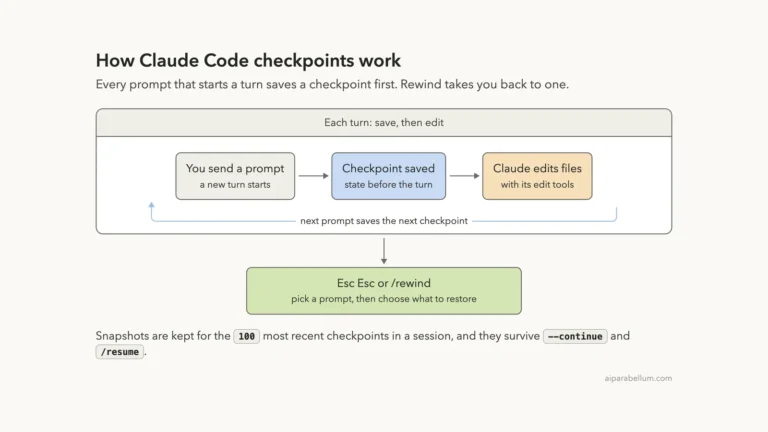
Next in the series: Part 13: Claude Code Checkpoints: How to Undo and Rewind Changes.