A CLAUDE.md file is the simplest way to give Claude Code a memory of your project. Every session starts with a fresh context window, so without it you end up repeating the same build commands, style rules and warnings again and again. Write them down once in a CLAUDE.md file, and Claude reads them at the start of every session.
In this guide we build a small project with several instruction files and test them in a real Claude Code session. You will see where each file lives, how /init drafts one for you, how to check what loaded, and how to write rules that Claude actually follows.
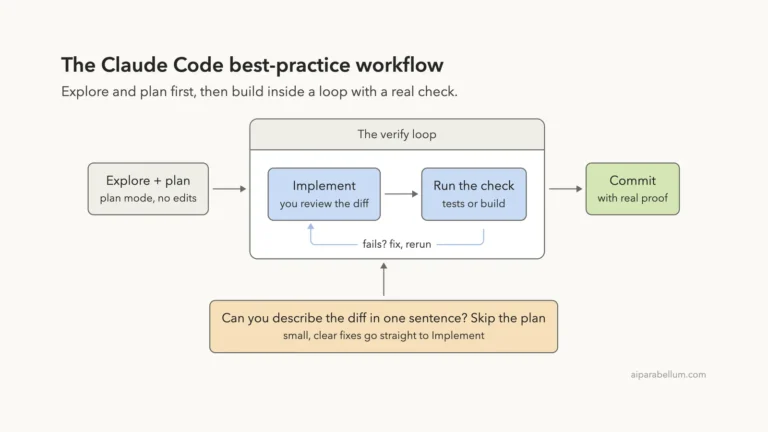
This is Part 21 of 53 in our Claude Code tutorials series. In the previous part we covered Claude Code best practices, and a short CLAUDE.md was one of the habits we recommended there. This part goes deep on that file.
Tested with Claude Code v2.1.309 on October 24, 2026, on macOS, using the Sonnet 5.5 model. We kept the demo to four short prompts plus one /init run in two small throwaway projects.
Quick Summary: The CLAUDE.md File at a Glance
| Question | Short answer |
|---|---|
| What is it? | A plain markdown file of instructions Claude reads at the start of every session |
| Who writes it? | You (or Claude, when you ask it to) |
| Where does it go? | ./CLAUDE.md or ./.claude/CLAUDE.md for the team, CLAUDE.local.md for you |
| How do I start one? | Run /init and let Claude draft it from your code |
| How do I check it loaded? | Run /context or /memory |
| How long should it be? | Under 200 lines per file, per Anthropic’s docs |
| Is it enforced? | No. It is context, not configuration; use hooks or permission rules to enforce |
What Is a CLAUDE.md File and Why It Exists
Claude Code has two ways to carry knowledge from one session to the next. The first is CLAUDE.md files, which you write. The second is auto memory, which is a set of notes Claude writes for itself based on your corrections and preferences.
This tutorial is about the first one. A CLAUDE.md file holds the facts Claude should know every time: how to run tests, which style rules apply, where things live, and “always do X” rules. Anthropic’s memory docs describe it as the place to write down what you would otherwise re-explain.
The docs suggest adding to it when any of these happen:
- Claude makes the same mistake a second time
- A code review catches something Claude should have known about the codebase
- You type the same correction you typed last session
- A new teammate would need the same context to get started
If you have explained it twice, it belongs in CLAUDE.md.
CLAUDE.md vs auto memory
| CLAUDE.md files | Auto memory | |
|---|---|---|
| Who writes it | You | Claude |
| What it holds | Instructions and rules | Learnings and patterns |
| Scope | Project, user or organization | Per repository, on your machine |
| Loaded | Every session, in full | Every session, first 200 lines or 25KB of MEMORY.md |
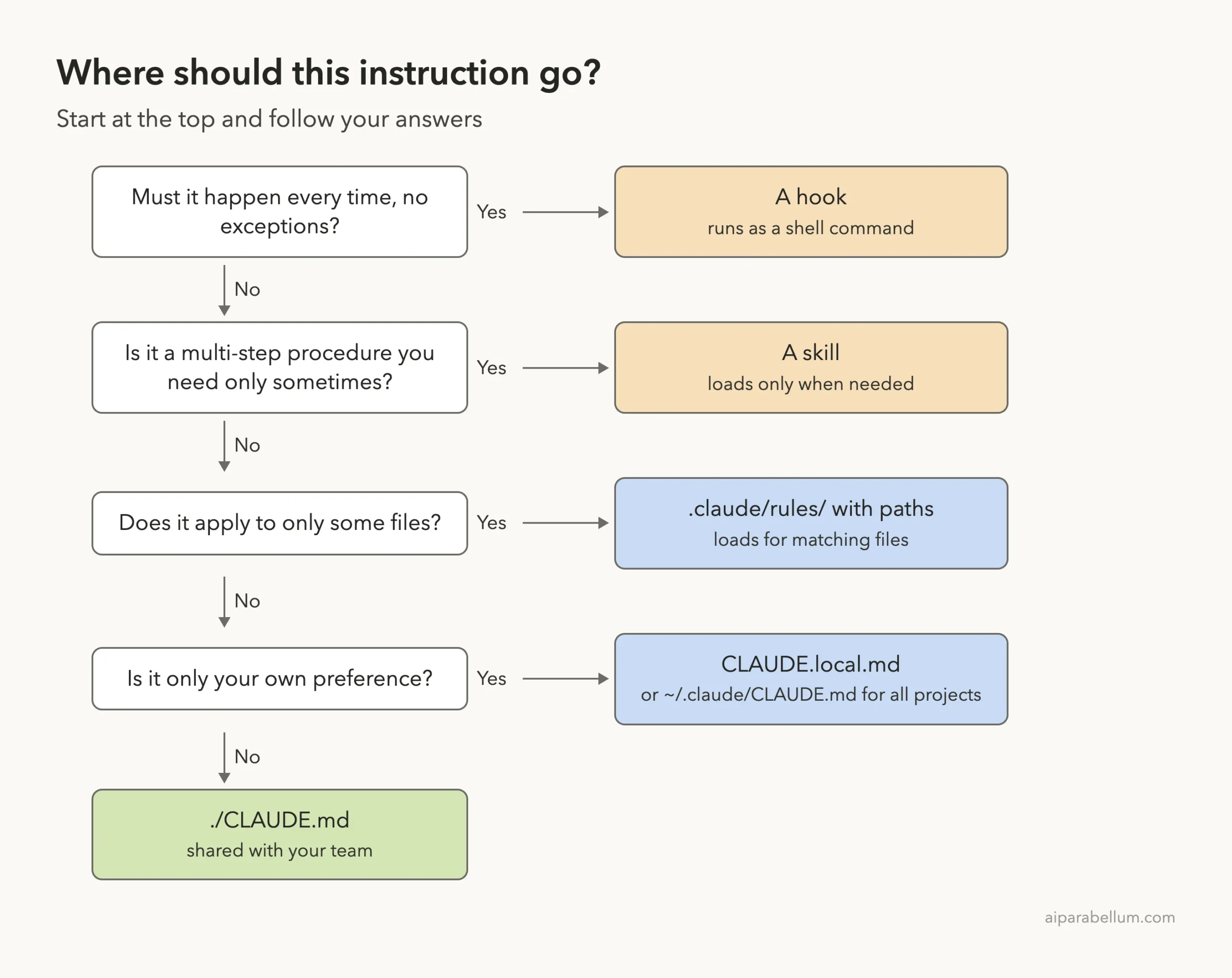
One detail matters a lot. Claude treats CLAUDE.md as context, not enforced configuration. If something must be blocked no matter what, use deny rules or a hook instead.
Where to Put CLAUDE.md Files
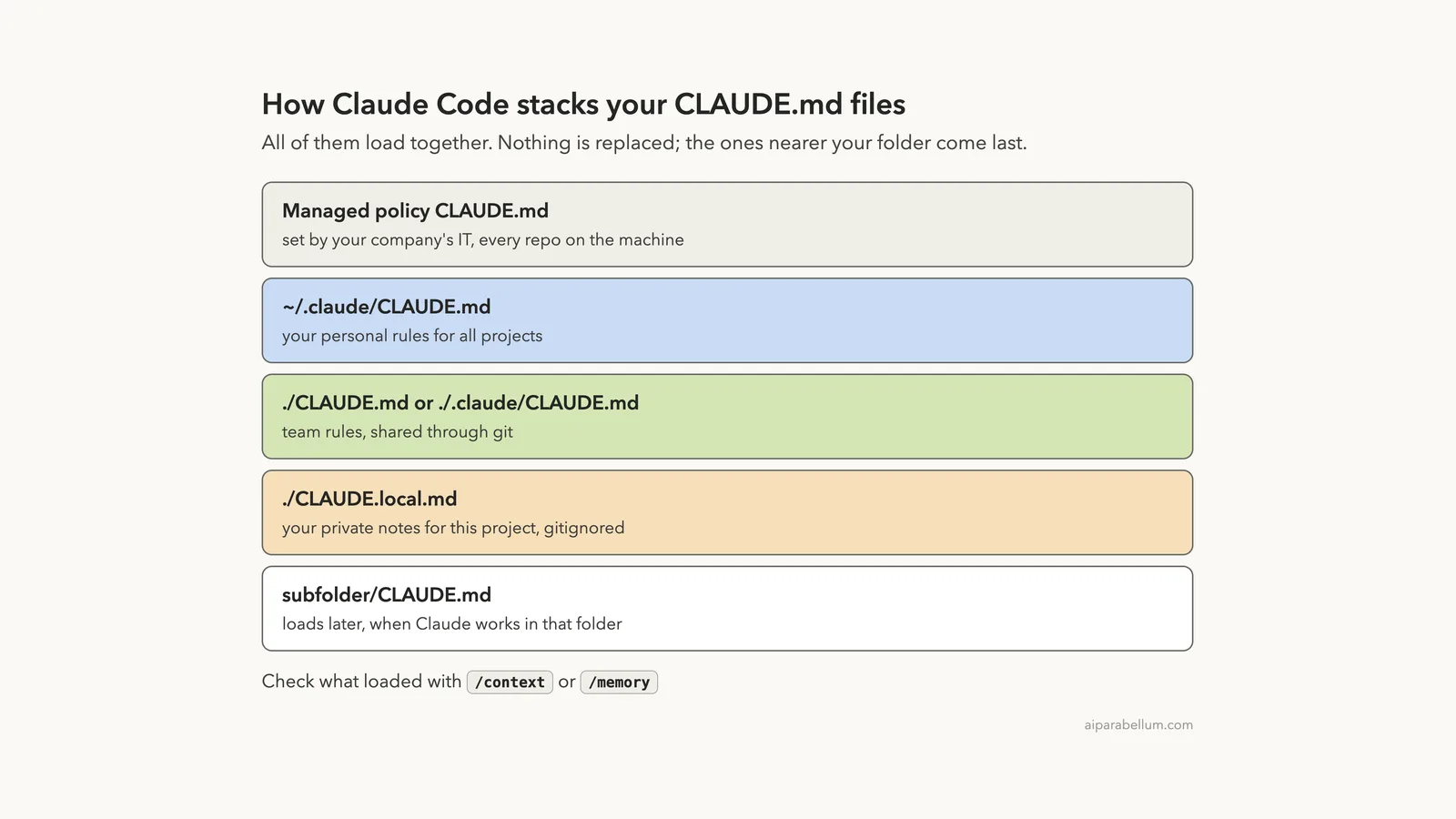
CLAUDE.md files can live in several places, and each one has a different reach. Claude Code loads all of them together. Nothing overrides anything else; the files are joined into one block of context.
| Scope | Location | Shared with |
|---|---|---|
| Managed policy | /Library/Application Support/ClaudeCode/CLAUDE.md on macOS, /etc/claude-code/CLAUDE.md on Linux and WSL | Everyone on the machine |
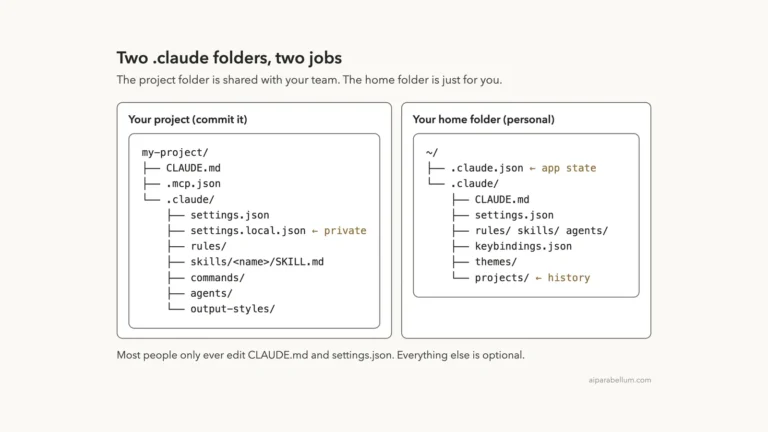
| User | ~/.claude/CLAUDE.md | Only you, all projects |
| Project | ./CLAUDE.md or ./.claude/CLAUDE.md | Your team, through git |
| Local | ./CLAUDE.local.md (add it to .gitignore) | Only you, this project |
On Windows, the managed file sits at C:\Program Files\ClaudeCode\CLAUDE.md. We tested on macOS; the Windows and Linux steps follow Anthropic’s official instructions.
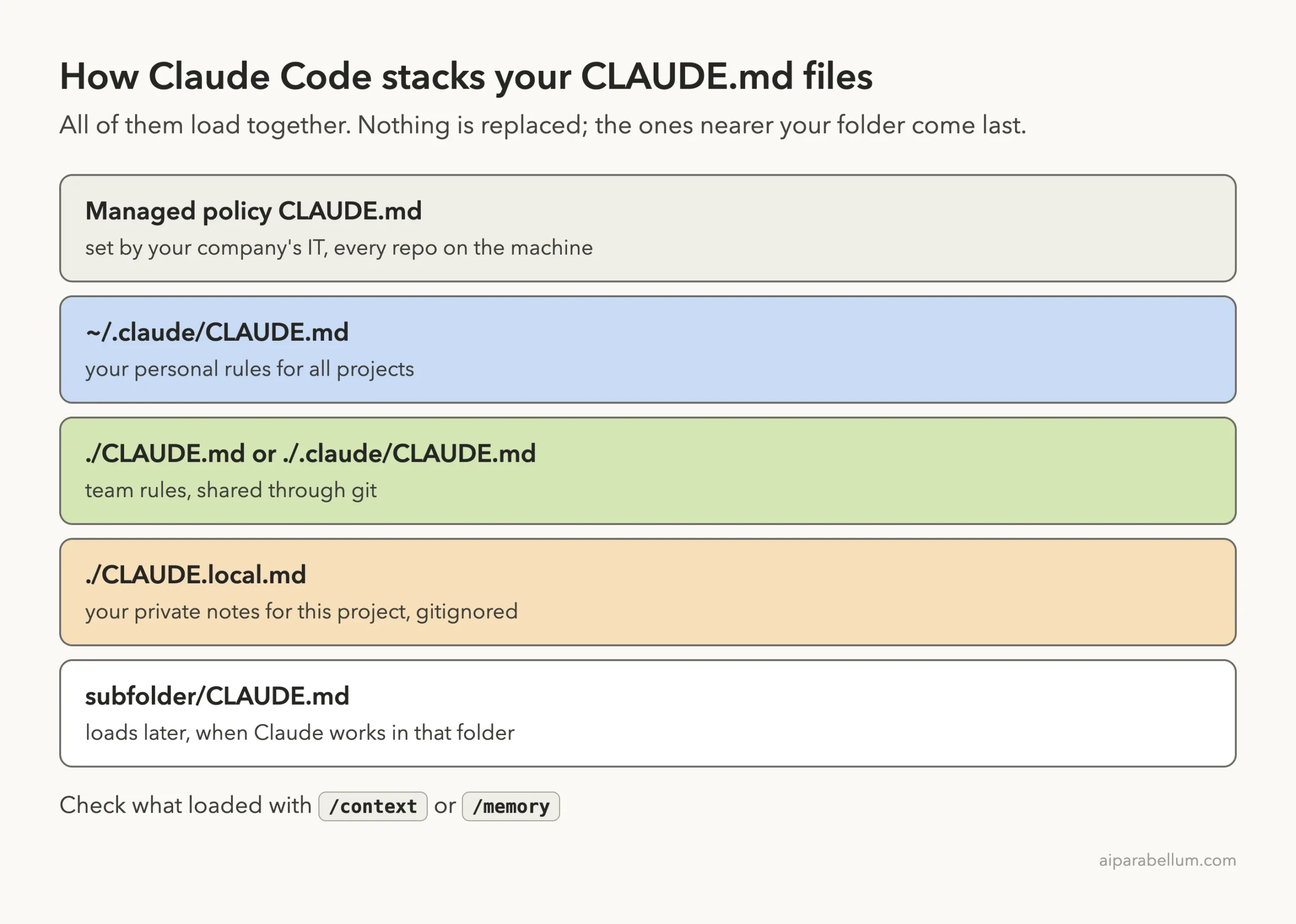
How the files load
When you launch Claude Code, it reads CLAUDE.md and CLAUDE.local.md from your working folder and every folder above it. Content runs from the top of the file system down to your folder, so the instructions nearest to you come last. In each folder, CLAUDE.local.md comes right after CLAUDE.md.
Files in subfolders are different. A CLAUDE.md inside, say, tests/ only loads when Claude reads, writes or edits a file in that folder. That keeps context small until the rules are actually needed.
Step 1: Create Your First CLAUDE.md File
For our demo we built a tiny Python “tip splitter” with two functions and a test file. Then we wrote a short project CLAUDE.md with three sections: commands, code style and money rules. We also added a private CLAUDE.local.md, a CLAUDE.md inside tests/, and one rules file.
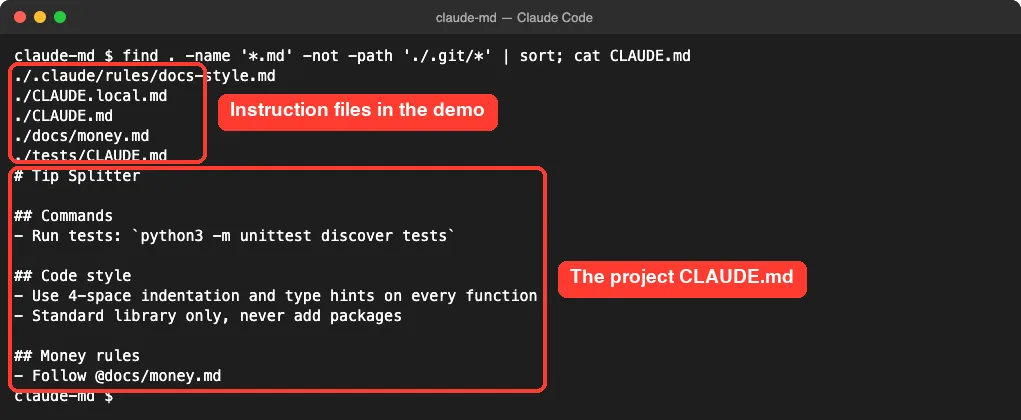
Notice the last line: Follow @docs/money.md. That is an import, and we will come back to it. Here is the full file so you can copy the shape:
# Tip Splitter

## Commands
- Run tests: `python3 -m unittest discover tests`

## Code style
- Use 4-space indentation and type hints on every function
- Standard library only, never add packages

## Money rules
- Follow @docs/money.md
Let /init write the first draft
You do not have to start from a blank page. Run /init in a project and Claude looks through your code, then drafts a CLAUDE.md with build commands, test steps and conventions it finds. If a CLAUDE.md already exists, /init suggests improvements instead of overwriting it.
We tried it in a second copy of the project that had no CLAUDE.md. Claude read the code and the README, then proposed a 14-line file and asked before writing it.
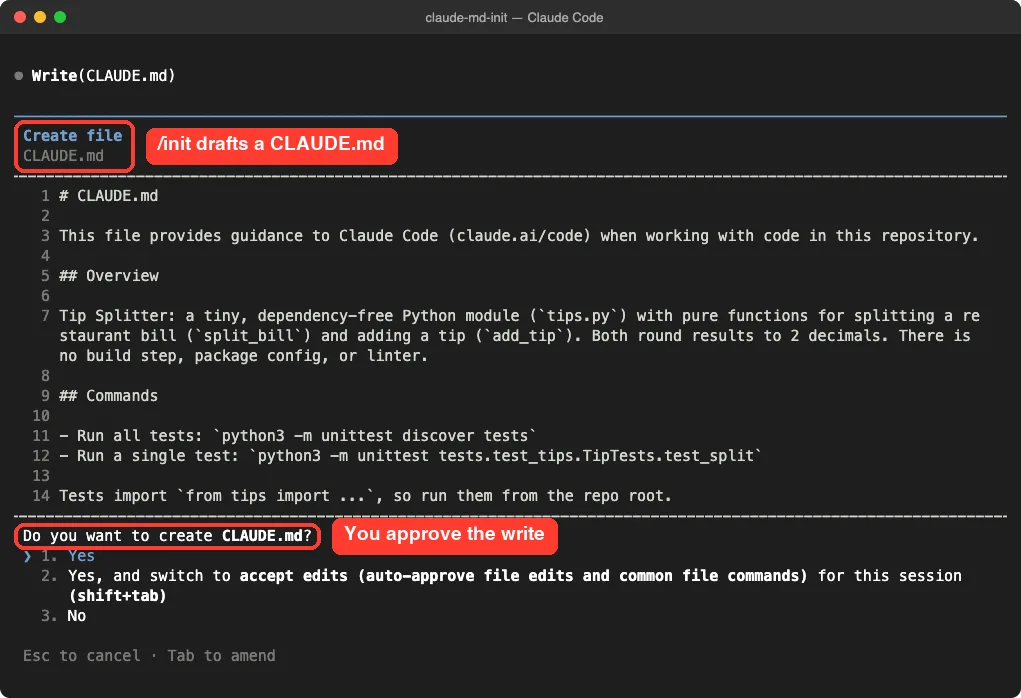
The draft was accurate, and it even added a tip we had not written: run tests from the repo root. Treat it as a start, then add the things Claude could not discover on its own, like team habits or past mistakes. If you set the CLAUDE_CODE_NEW_INIT environment variable to 1, /init switches to an interactive flow that can also set up skills and hooks.
Step 2: Check Which Files Loaded
A CLAUDE.md only helps if Claude can see it. There are two quick ways to check, and both are covered in our slash commands guide.
Use /memory
The /memory command lists your instruction files across user and project scopes. You can pick any file to open it in your editor, toggle auto memory, or open the auto memory folder.
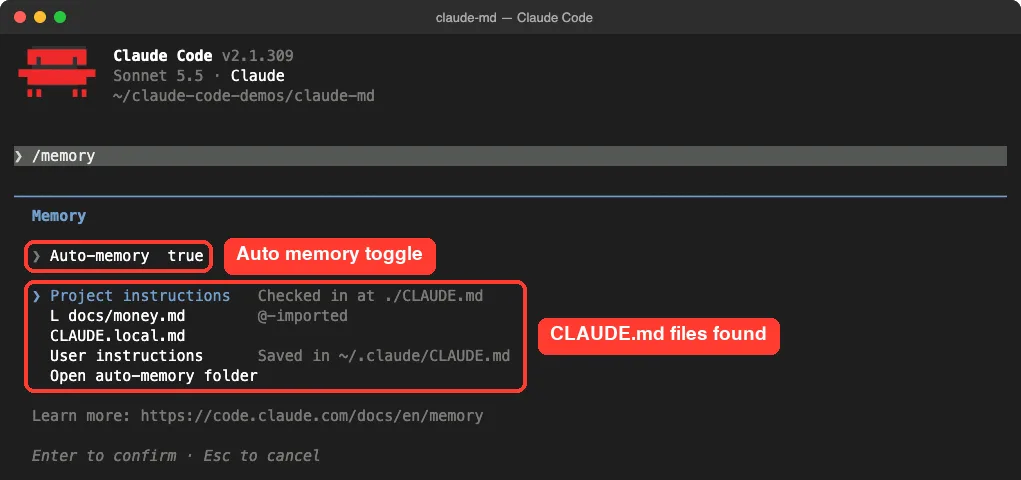
Our imported docs/money.md shows up under the project file with an “@-imported” tag. The user file is listed too, even though we never created one. Selecting a file that does not exist yet creates it.
Use /context
The /context command shows everything in Claude’s context window. Scroll to the Memory files section to see each file and its token cost. We cover the rest of this screen in our context window guide.
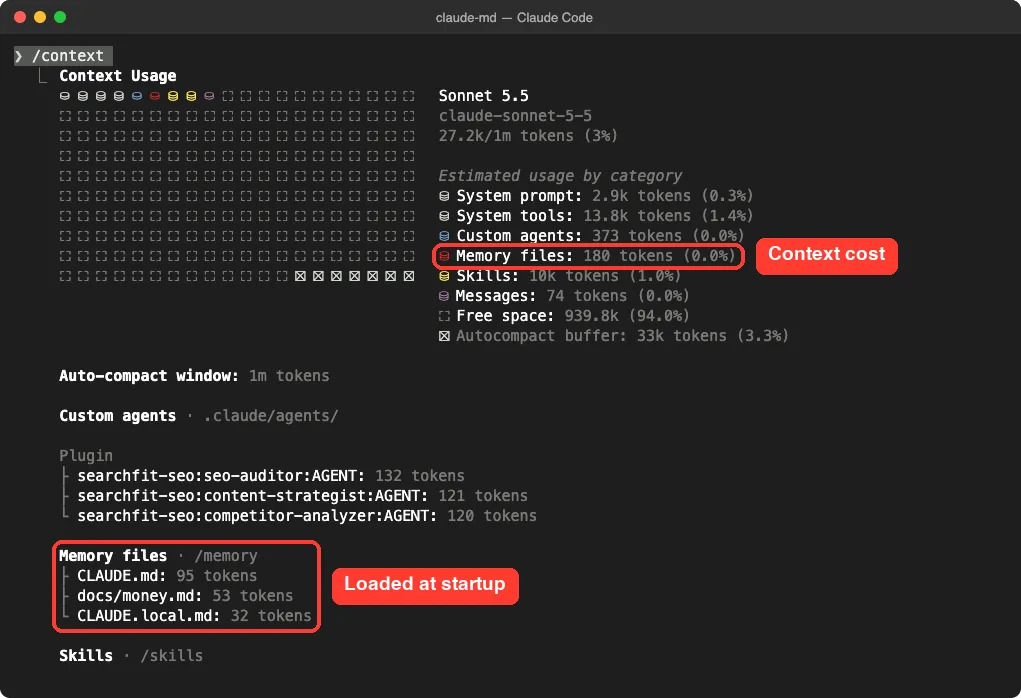
All three files together cost 180 tokens here. Note that tests/CLAUDE.md is not on the list yet. It is a subfolder file, so it waits until Claude works in tests/.
Step 3: See Claude Follow Your CLAUDE.md
Seeing a file in a list is one thing. We wanted proof that Claude uses it, so we asked a simple question without letting it read any files.
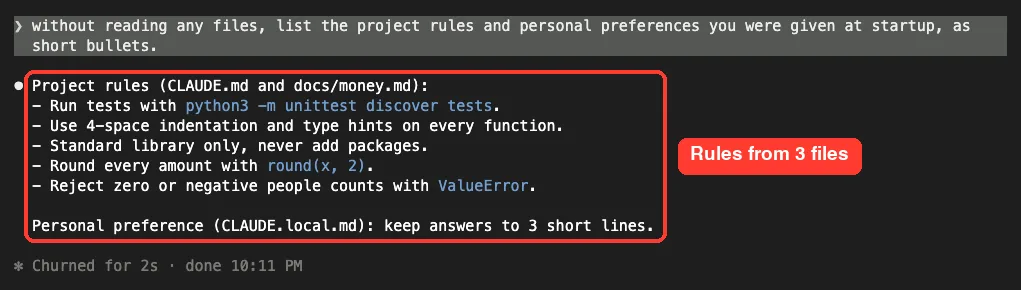
Claude listed every rule from CLAUDE.md, both rules from the imported money file, and our personal preference from CLAUDE.local.md. Then we gave it a real task: add a split_with_tip function, add tests, and run them.
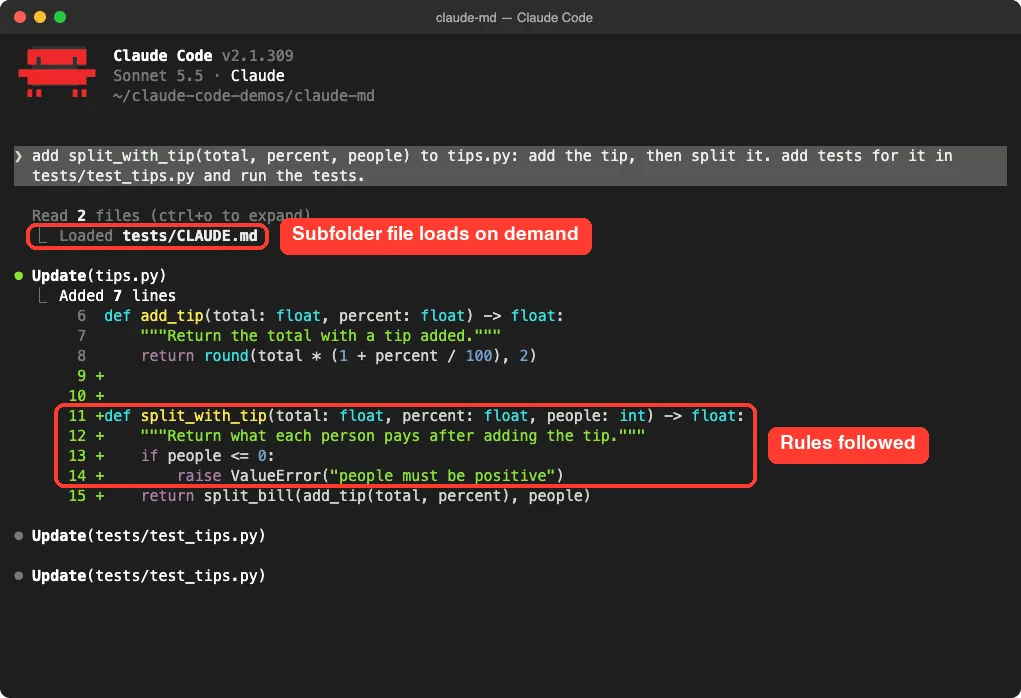
Two things happened here. First, a “Loaded tests/CLAUDE.md” line appeared as soon as Claude read a file in tests/.
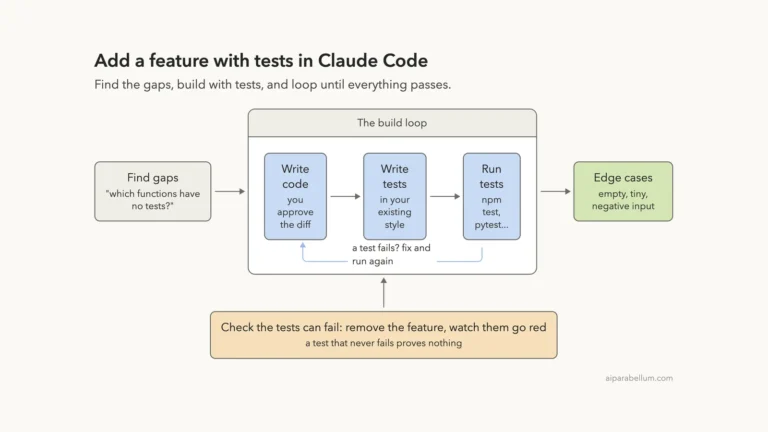
Second, the new function used type hints and raised ValueError for zero or negative people, just as our files asked. Claude then ran the exact test command from CLAUDE.md, and all six tests passed.
Step 4: Update CLAUDE.md as You Go
The best CLAUDE.md grows from real sessions. When you notice a rule you keep repeating, you can edit the file yourself through /memory, or simply ask Claude to add it.
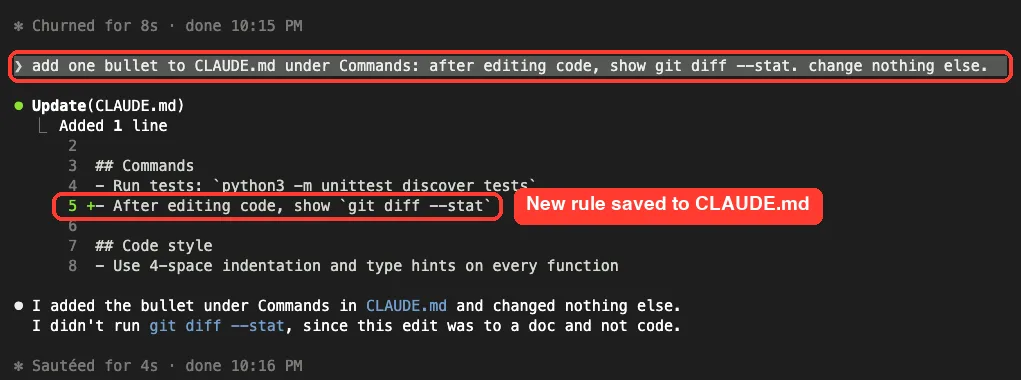
Wording matters here. The docs explain that “add this to CLAUDE.md” puts a rule in the file, while “remember that…” sends it to auto memory instead. Pick the one that fits who needs the rule.
Write a CLAUDE.md File That Works
Because CLAUDE.md is context and not a hard setting, how you write it changes how well Claude follows it. Anthropic’s guidance comes down to three ideas: specific, short and consistent.
| Vague | Specific |
|---|---|
| Format code properly | Use 2-space indentation |
| Test your changes | Run npm test before committing |
| Keep files organized | API handlers live in src/api/handlers/ |
- Size: aim for under 200 lines per file. Longer files use more context and lower adherence.
- Structure: group rules under markdown headings and bullets, not long paragraphs.
- Consistency: if two rules conflict, Claude may pick one at random, so review your files now and then.
Newer versions can also audit your files for you. Run /doctor prompt-audit to get a report of outdated or conflicting instructions with proposed edits; the docs say it needs v2.1.283 or later.
Imports with @path
Write @path/to/file anywhere in a CLAUDE.md to pull another file into context. Relative paths start from the file that has the import, and imports can nest up to four levels deep. Imports keep a long file tidy, but they do not save context, because the imported file loads along with it.
Rules for some files only
For bigger projects, put topic files in .claude/rules/. A rule with a paths field in its YAML frontmatter only loads when Claude works with matching files:
---
paths:
  - "src/api/**/*.ts"
---
# API rules
- All API endpoints must include input validation
Rules without paths load at launch, just like the project CLAUDE.md. Personal rules can live in ~/.claude/rules/ and apply to every project.
Real Examples of CLAUDE.md Rules
Here are a few kinds of lines that tend to earn their place, based on the docs’ advice to keep facts Claude needs every session:
- Commands: “Run tests with python3 -m unittest discover tests”
- Layout: “API handlers live in src/api/handlers/”
- Pitfalls: “Never edit generated files in build/”
- Workflow: “Use plan mode for changes under src/billing/” (pairs well with our plan mode guide)
- Personal, in CLAUDE.local.md: “Keep answers to 3 short lines”
If your repository already has an AGENTS.md for other coding tools, Claude Code can read it directly when there is no CLAUDE.md, starting from v2.1.277. You can also put @AGENTS.md at the top of a CLAUDE.md so both tools share one file.
Try It Yourself
Open any small practice project, not production code, and start Claude Code there. If you are new to sessions, our first session guide walks you through it. Then try this:
- Run /init and review the draft before you approve it.
- Add one rule of your own, like a naming or test rule.
- Run /context and find the Memory files section.
- Paste the prompt below and check that Claude names your rule.
Without reading any files, list the project rules and personal preferences you were given at startup, as short bullets.If your new rule is missing from the answer, check that the file is in a location that loads and that you saved it.
Common Mistakes
- Writing a huge file. Past 200 lines, adherence drops and every session pays the token cost.
- Using CLAUDE.md as a lock. It guides Claude but does not enforce anything; use hooks or deny rules for must-never-happen actions.
- Vague rules like “write clean code”. Claude cannot check those, so it cannot follow them well.
- Committing personal notes. Put them in CLAUDE.local.md and add it to .gitignore.
- Conflicting rules across files. Claude may follow either one.
- Expecting imports to save space. Imported files load in full with the file that imports them.
Pro Tips
- Leave notes for humans in block-level HTML comments like <!– why we do this –>. They are stripped before Claude sees the file, so they cost no tokens.
- Test a new subfolder CLAUDE.md by creating it from your shell, then asking Claude to read a file in that folder. Watch for the “Loaded” line.
- The project-root CLAUDE.md survives /compact: Claude re-reads it from disk afterward. Rules you only typed in chat do not, so move lasting ones into the file.
- In a large monorepo, skip other teams’ files with the claudeMdExcludes setting in .claude/settings.local.json.
- Auto memory is a separate feature that Claude manages; /memory is where you can browse its notes or switch it off.
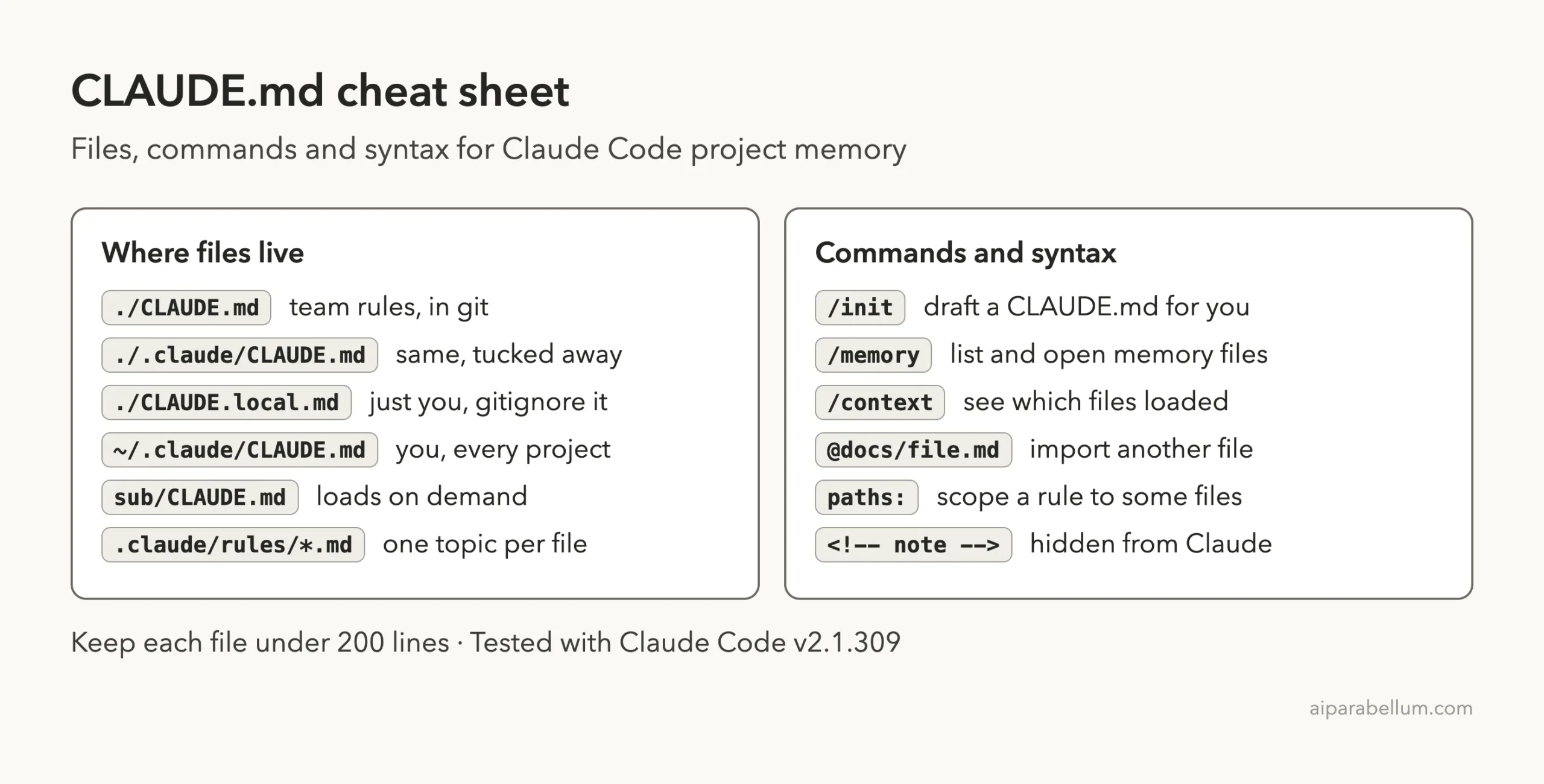
CLAUDE.md Cheat Sheet
Frequently Asked Questions
Can I have more than one CLAUDE.md file?
Yes. You can have a user file, a project file, a local file and files in subfolders. Claude Code loads them all together instead of picking one, and subfolder files load when Claude works in that folder.
Should I commit CLAUDE.md to git?
Yes, for the project file. It holds team rules, so sharing it through version control is the point. Keep personal notes in CLAUDE.local.md and add that file to .gitignore.
Why is Claude ignoring my CLAUDE.md?
First run /context and confirm the file appears under Memory files. If it does, make the rule more specific, look for conflicting rules in other files, and trim the file if it is long.
Does CLAUDE.md go into the system prompt?
No. The docs say its content is delivered as a user message after the system prompt. For true system-prompt instructions in scripts, use the –append-system-prompt flag at launch.
What is the difference between CLAUDE.md and CLAUDE.local.md?
Both load the same way. CLAUDE.md is shared with your team, while CLAUDE.local.md holds your own preferences for one project and should stay out of git.
Conclusion
A CLAUDE.md file turns the things you keep re-explaining into lasting project memory that Claude Code reads at the start of every session. Start with /init, keep the file short and specific, use CLAUDE.local.md for personal notes, and check what loaded with /context or /memory. In our real test, Claude recalled rules from three files, loaded a subfolder file the moment it was needed, and wrote code that followed every rule. If you are still getting to know Claude in general, our Claude AI overview is a good next read.
Previous in the series: Part 20, Claude Code Best Practices for Better Results
Next in the series: Part 22: The .claude Folder Explained: Where Claude Code Keeps Its Setup.