Following a few Claude Code best practices is the fastest way to get better code with less back and forth. Most of them come down to one idea: give Claude Code a clear goal, the right context, and a way to check its own work. The habits are simple, and once you build them, every session goes smoother.
In this guide we walk through the habits Anthropic recommends and try the most useful ones in a real session. You will see how to explore before you code, how to write prompts that include proof, how to keep your context clean, and how to get a second opinion on a change.
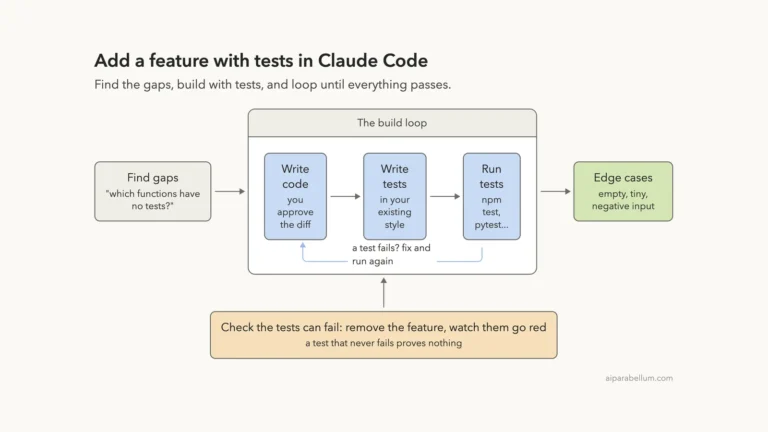
This is Part 20 of 53 in our Claude Code tutorials series. In the previous part we showed how to write tests alongside a new feature, and this part turns those lessons into habits you can use on any task.
Tested with Claude Code v2.1.309 on October 24, 2026, on macOS, using the Sonnet 5.5 model. We kept the demo to five short prompts in a small throwaway project.
Quick Summary: Claude Code Best Practices
| Habit | What you do | Why it helps |
|---|---|---|
| Give it a check | Ask it to run tests or a build and show the output | Claude keeps going until the check passes |
| Explore, then plan | Use plan mode to read code before any edits | Avoids solving the wrong problem |
| Be specific | Name files, cases, patterns and what “fixed” means | Fewer corrections later |
| Set up once | Short CLAUDE.md, allow rules, hooks, skills | Every session starts with the right context |
| Manage context | /clear between tasks, /btw for side questions | Claude stays sharp in long sessions |
| Get a second opinion | A subagent or a fresh session reviews the diff | The reviewer isn’t grading its own work |
| Automate | claude -p for scripts, pipes and CI | Repeatable jobs without a chat window |
Why Claude Code Best Practices Matter
Claude Code is not a chatbot that answers and waits. It reads files, runs commands and makes changes on its own, as we covered in the agent loop part. That freedom is powerful, but it works best when you steer it well.
Anthropic’s best practices guide says most tips come from one limit. The context window holds your whole conversation, every file Claude reads and every command output, and performance drops as it fills up. So many of these habits are really about keeping that space clean and useful.
Treat context like a desk. The less clutter on it, the better the work that happens there.
Our Demo Project
To test the habits for real, we made a tiny Node.js project called signup-form. It has one validator, validateUsername, two tests, a three-line CLAUDE.md and a project settings file that pre-approves npm test.
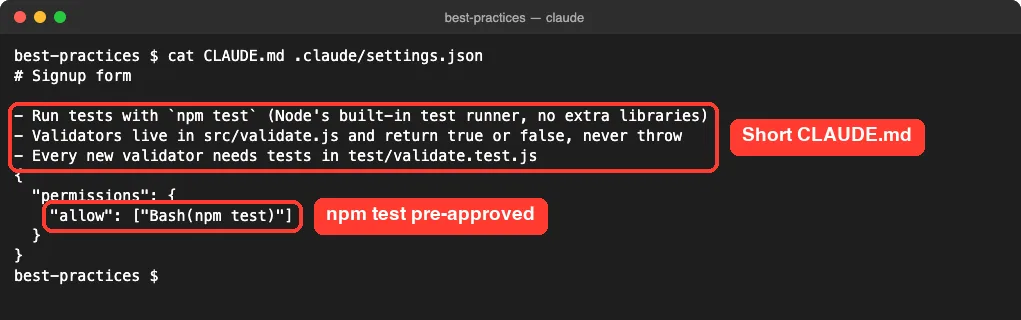
That small setup already follows two best practices. The CLAUDE.md only holds things Claude can’t guess, and the allow rule means the test command never stops for approval.
Habit 1: Explore First, Then Plan, Then Code
The docs recommend four phases: explore, plan, implement and commit. Letting Claude jump straight into code can produce a fix for the wrong problem, so the first step is only about reading.
We pressed Shift+Tab twice to reach plan mode, where Claude reads files and answers questions without changing anything. Then we used @ to point at the two files instead of describing where the code lives.
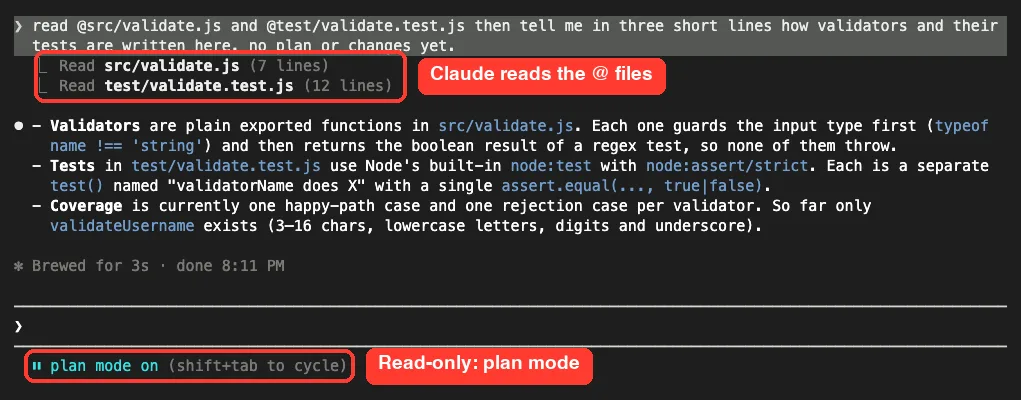
It read the 7-line source file and the 12-line test file, then explained the style in three bullets. Each validator checks the input type first and returns a regex result, and each test uses one assert.equal call. That took about three seconds.
For bigger work, you would ask for a plan next and press Ctrl+G to edit it in your text editor. Our plan mode guide covers that part in depth.
When to Skip the Plan
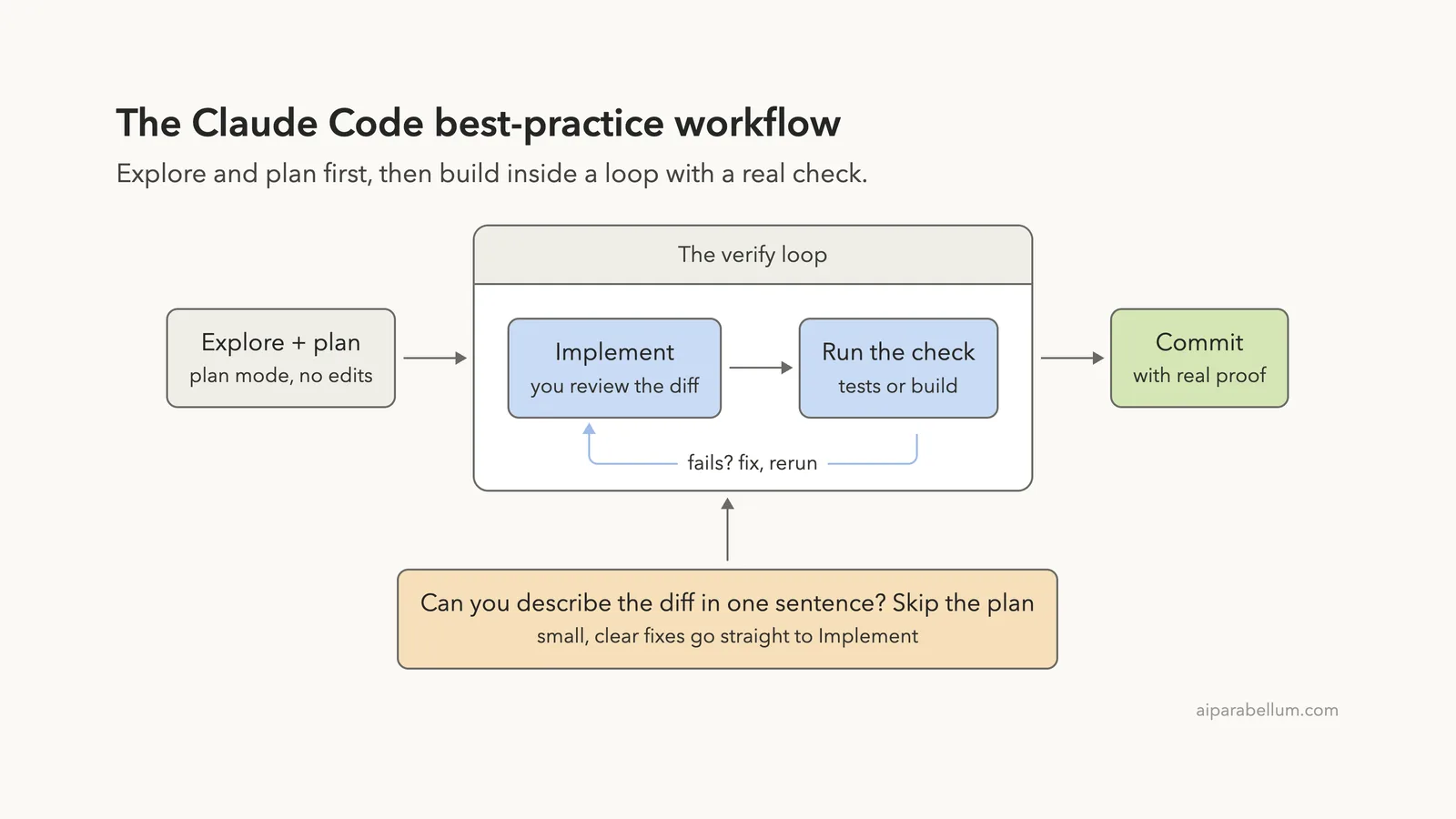
Planning adds overhead, so the docs say to skip it for small, clear changes like a typo or a renamed variable. Their rule of thumb is simple: if you could describe the diff in one sentence, skip the plan.
How the Best-Practice Workflow Fits Together
Here is the whole flow in one picture. Exploring and planning come first, then the real work happens inside a loop that only ends when a check passes.
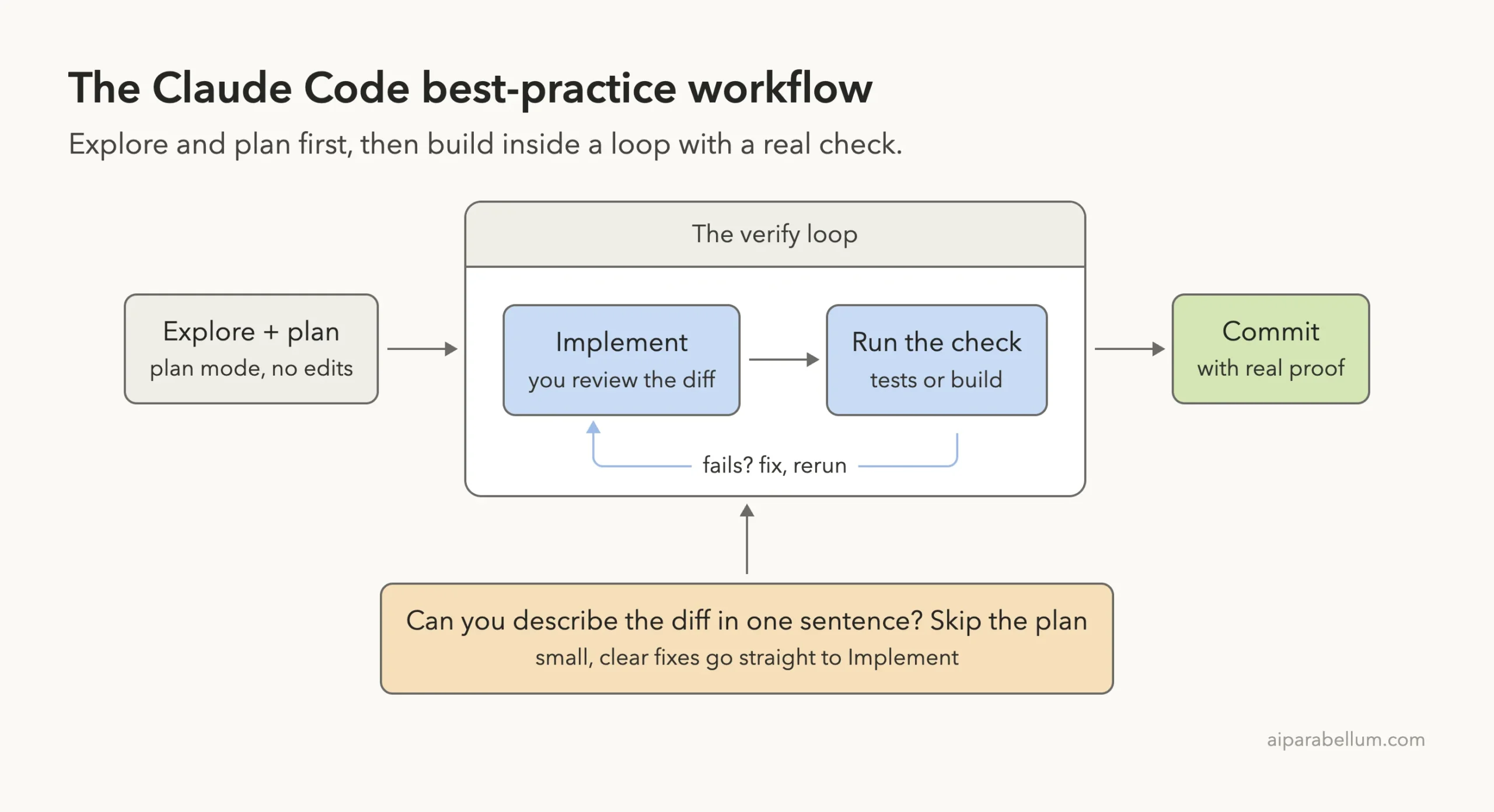
Habit 2: Give Claude Code a Way to Verify Its Work
This is the habit Anthropic calls out first. Claude stops when the work looks done, and without a check it can run, looking done is the only signal it has. A test, a build or a linter gives it a real pass or fail.
We picked up the same session with claude –continue, which reloads the last conversation in that folder. Then we sent a prompt modeled on the docs’ own validateEmail example, with sample cases and a request for proof.
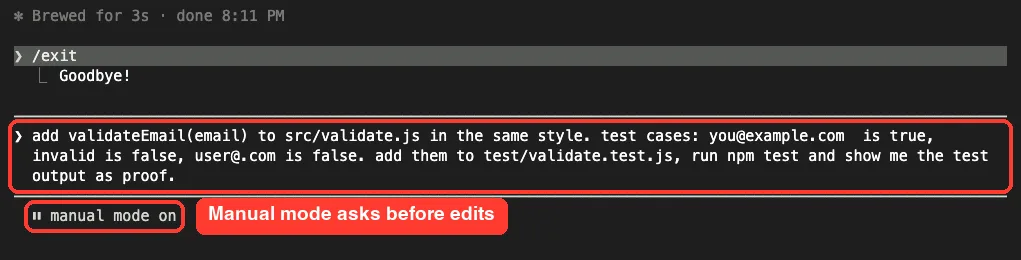
Look at what the prompt includes. It names the file, points to an existing pattern with “in the same style,” gives three expected results and asks to see the npm test output.
Review the Diff Before It Lands
Because we started in manual mode, Claude Code showed the edit as a diff and asked first. The new function copies the validateUsername style exactly: a type check, then a regex test.
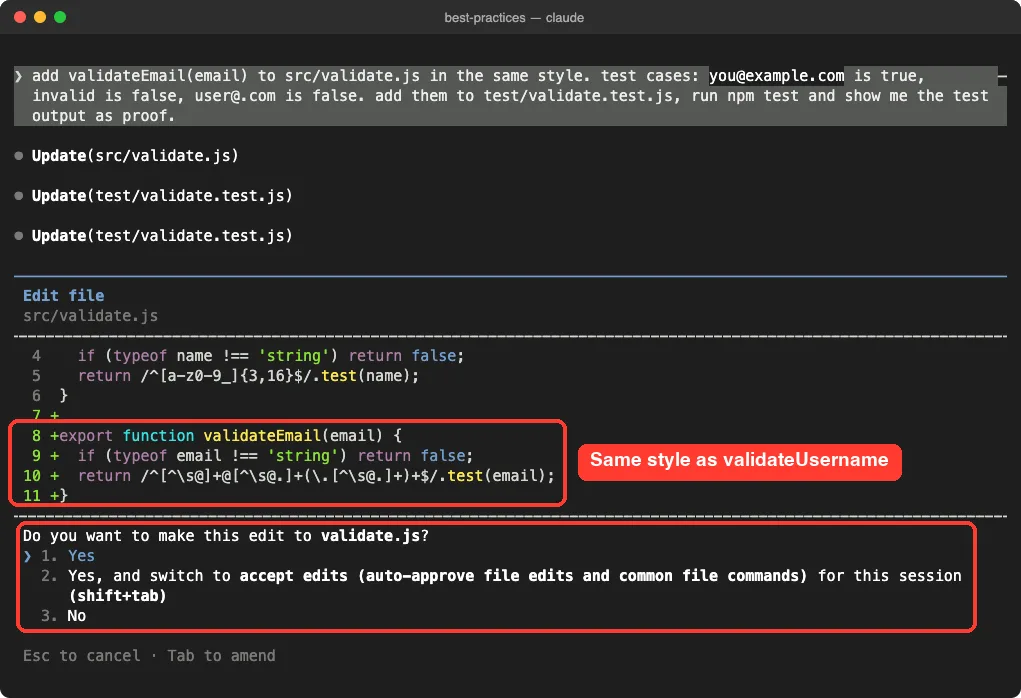
We chose option 2, which switches the session to accept edits mode for the rest of the demo. The npm test run then went through without another prompt, since our allow rule had already approved it.
Ask for Evidence, Not a Claim
The docs suggest having Claude show evidence instead of just saying it worked. That is why our prompt asked for the test output, and Claude pasted the real run into its answer.
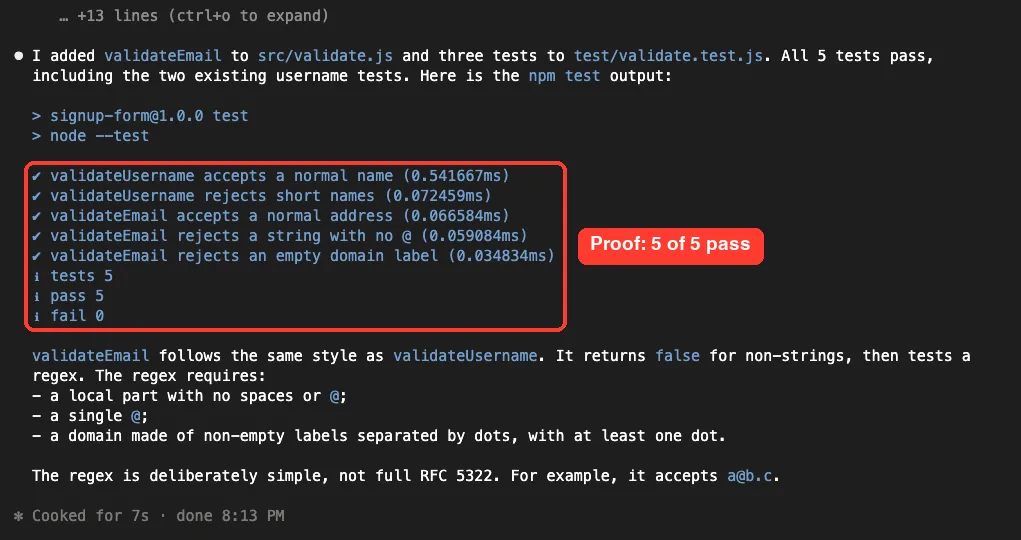
It also told us the regex is deliberately simple and not a full email standard. That kind of honest note is easy to miss, and it is exactly what you want to read before you ship.
Reviewing evidence is faster than re-running the check yourself. Ask for the output every time.
Stronger Ways to Gate the Finish
A prompt like ours works on any task today. For unattended runs, the docs list firmer options: a /goal condition that is re-checked after every turn, a Stop hook that blocks the turn from ending until a script passes, or a review subagent that tries to refute the result.
Habit 3: Write Specific Prompts With Rich Context
Claude can infer intent, but it can’t read your mind. The official guide shows how small changes to a prompt save whole rounds of corrections.
| Strategy | Vague | Specific |
|---|---|---|
| Scope the task | add tests for foo.py | write a test for foo.py covering the edge case where the user is logged out. avoid mocks. |
| Point to sources | why does ExecutionFactory have such a weird api? | look through ExecutionFactory’s git history and summarize how its api came to be |
| Reference patterns | add a calendar widget | look at how existing widgets are implemented and follow the pattern |
| Describe the symptom | fix the login bug | login fails after session timeout. check the auth flow in src/auth/, write a failing test, then fix it |
You can also feed Claude rich content directly. Use @ to reference files, paste screenshots, give documentation URLs, or pipe data in from the shell. The prompt library adds two more patterns: state a measurable target, and say how you want the answer formatted.
Let Claude Interview You for Big Features
For larger features, the docs suggest a short prompt asking Claude to interview you with its AskUserQuestion tool, then write a spec to SPEC.md. After that, start a fresh session to build from the spec with clean context.
Habit 4: Set Up Your Environment Once
A few setup steps pay off in every session. Here is what the guide recommends and when each one fits.
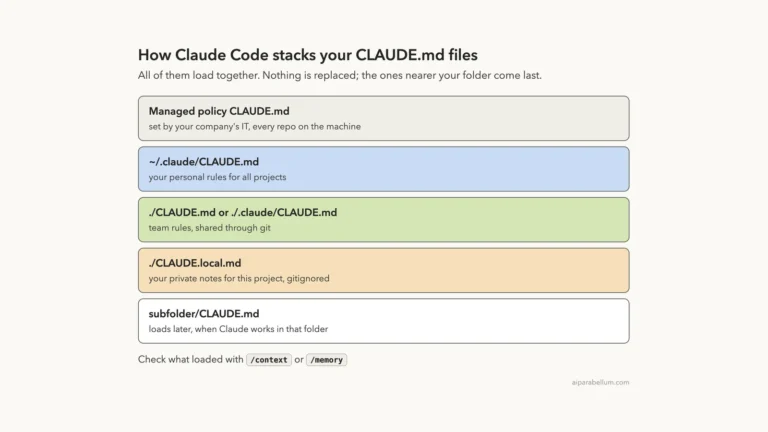
- CLAUDE.md: run /init for a starter file, then keep only commands, style rules and gotchas Claude can’t guess. For each line, ask whether removing it would cause mistakes.
- Permissions: pre-approve safe tools with /permissions, like our npm test rule, and use /sandbox to let commands run inside OS-level limits. Our guide to permission rules shows the syntax.
- CLI tools: tell Claude to use tools like gh, which is more context-efficient than raw API calls.
- Hooks: use them for actions that must happen every time, since CLAUDE.md is advice but hooks always run.
- Skills and subagents: put reusable workflows in .claude/skills/ and specialist helpers in .claude/agents/.
The docs warn that a bloated CLAUDE.md makes Claude ignore your real rules. If you keep repeating a correction, the file is probably too long, not too short.
Habit 5: Manage Your Session and Context
The best results come from tight feedback loops. Correct Claude as soon as it drifts, and keep the conversation focused on one job.
Sometimes you just want a quick fact without adding it to the conversation. That is what /btw is for, so we tried it right after the tests passed.
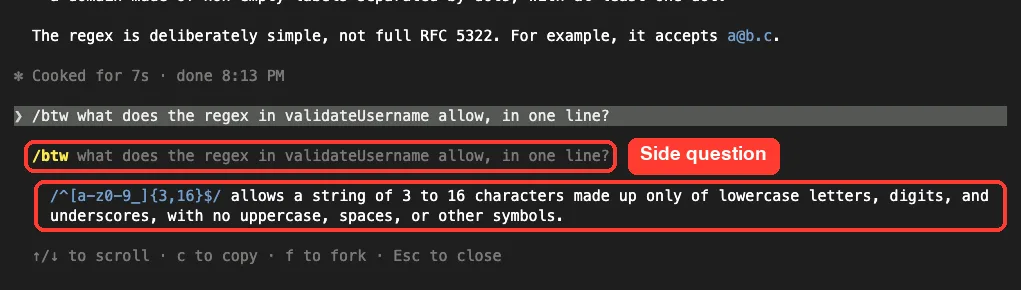
The answer came back in one line, and pressing Esc closed the panel. According to the docs, that answer never enters the conversation history, so your context does not grow.
Which Reset Tool Should You Use?
Knowing when to stop, rewind or clear is a big part of working well. This ladder sums up the advice from the docs.
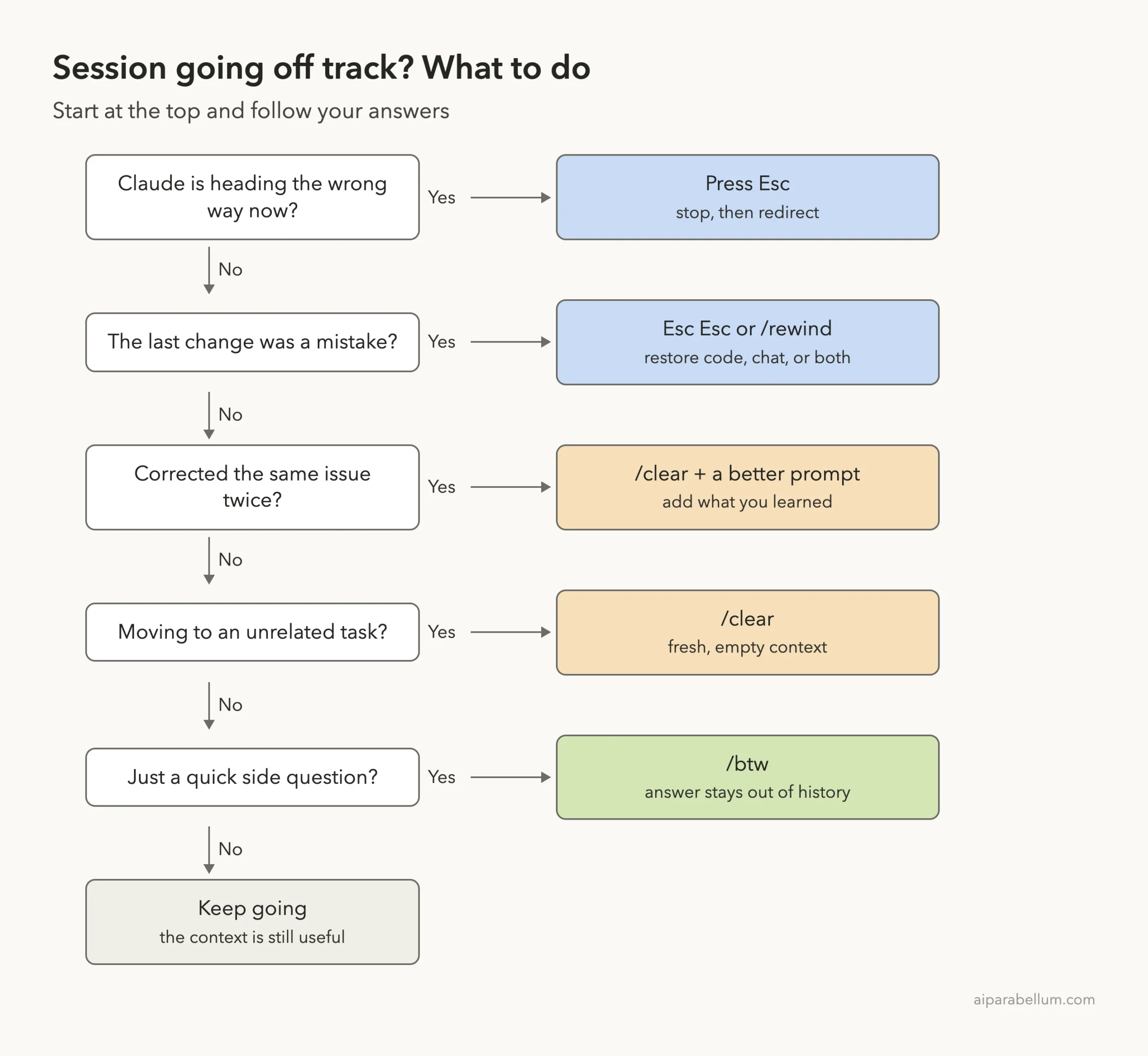
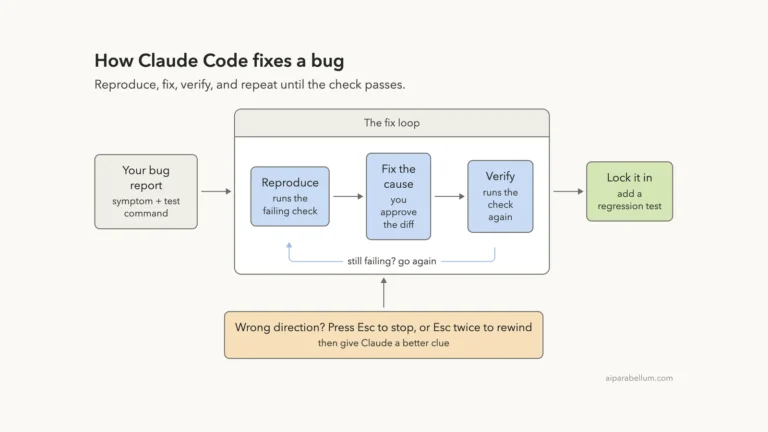
One rule stands out: if you have corrected Claude more than twice on the same issue, the context is full of failed attempts. Run /clear and start again with a better prompt that includes what you learned. Our guides on checkpoints and rewind and the context window go deeper.
Name and Resume Sessions
Claude Code saves conversations locally. Use claude –continue to pick up the last one, as we did, or claude –resume to choose from a list. Name sessions with /rename so they work like branches, as our sessions guide explains.
Habit 6: Get a Second Opinion on the Diff
The docs recommend an adversarial review step before you call a task done. A subagent runs in a fresh context and sees only the diff and your criteria, not the reasoning that produced the change.
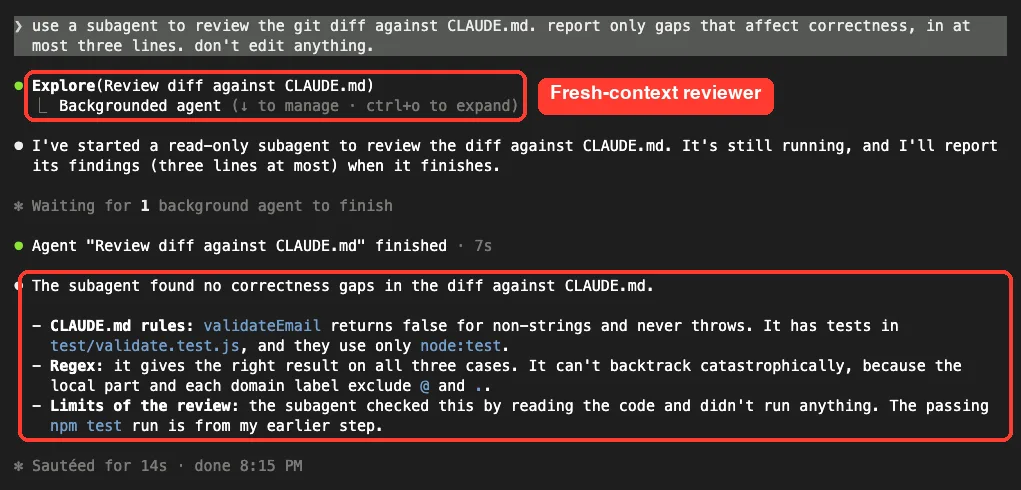
Claude started a read-only Explore subagent in the background. It found no correctness gaps, and it was clear about its limits: it only read the code and did not run anything.
We asked for gaps that affect correctness only, on purpose. The guide notes that a reviewer told to find problems will usually report some, and chasing every one leads to over-engineering. For a ready-made bug check, the bundled /code-review skill reviews the current diff in a fresh subagent.
Habit 7: Automate With Non-Interactive Mode
Once a prompt works, you can run it without a chat window. claude -p sends one prompt, prints the answer and exits, so it fits scripts, pre-commit hooks and CI.
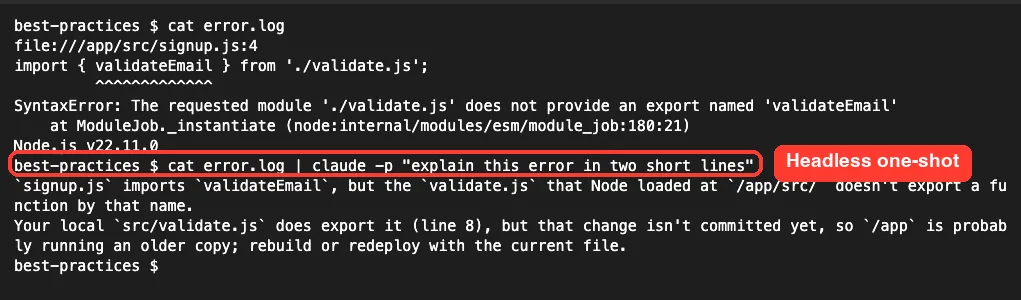
We piped a sample error log into Claude with the docs’ own pattern. It explained the missing export and even noticed that our local validate.js already had the function but the change was not committed yet. One demo is one demo, but it shows Claude still looks at the project when you run it this way.
For scripts, add –output-format json for one JSON object or stream-json for live events. The docs also show a loop that calls claude -p once per file, with –allowedTools to pre-approve only what the job needs.
Real Examples You Can Reuse
| Goal | Example prompt from the docs |
|---|---|
| Explore code | read /src/auth and understand how we handle sessions and login |
| Fix a build | the build fails with this error: [paste error]. fix it and verify the build succeeds. address the root cause |
| Check UI work | [paste screenshot] implement this design. take a screenshot of the result and compare it to the original |
| Delegate research | use subagents to investigate how our authentication system handles token refresh |
| Set a target | get the bundle size under 200KB and show me what you removed |
Try It Yourself
Make a small practice folder with one function and one test file. Start Claude Code there, press Shift+Tab until plan mode is on, and ask it to explain the code. Then switch back to manual mode and paste this prompt.
add a validatePhone(phone) function to src/validate.js in the same
style as the other validators. test cases: "555-123-4567" is true,
"12" is false, "abc-def-ghij" is false. add the tests to
test/validate.test.js, run npm test and show me the output as proof.
When it finishes, ask a subagent to review the diff for correctness gaps only. Then run /clear before you start anything new.
Common Mistakes to Avoid
- The kitchen sink session: mixing unrelated tasks in one chat. Use /clear between them.
- Correcting over and over: after two failed fixes, clear and write a better first prompt.
- An over-stuffed CLAUDE.md: important rules get lost, so prune it often.
- Trusting without checking: a plausible answer can miss edge cases, so always give it a test or script.
- Endless exploring: an unscoped “investigate this” can read hundreds of files. Narrow it or use a subagent.
Pro Tips for Better Results
- Add “When compacting, always preserve the list of modified files and test commands” to CLAUDE.md so key details survive a summary.
- Use a writer and reviewer setup: one session builds, a fresh one reviews, since it isn’t biased toward its own code.
- Check your context with a custom status line so you notice before it fills up.
- Keep “IMPORTANT” for one rule only. If many lines shout, none stands out.
- Try something risky when you have checkpoints. If it fails, rewind, but remember checkpoints don’t replace git.
- Pay attention to what works. Notice the prompt, context and mode behind your best results and repeat them. Our Claude tips list has more ideas for everyday use.
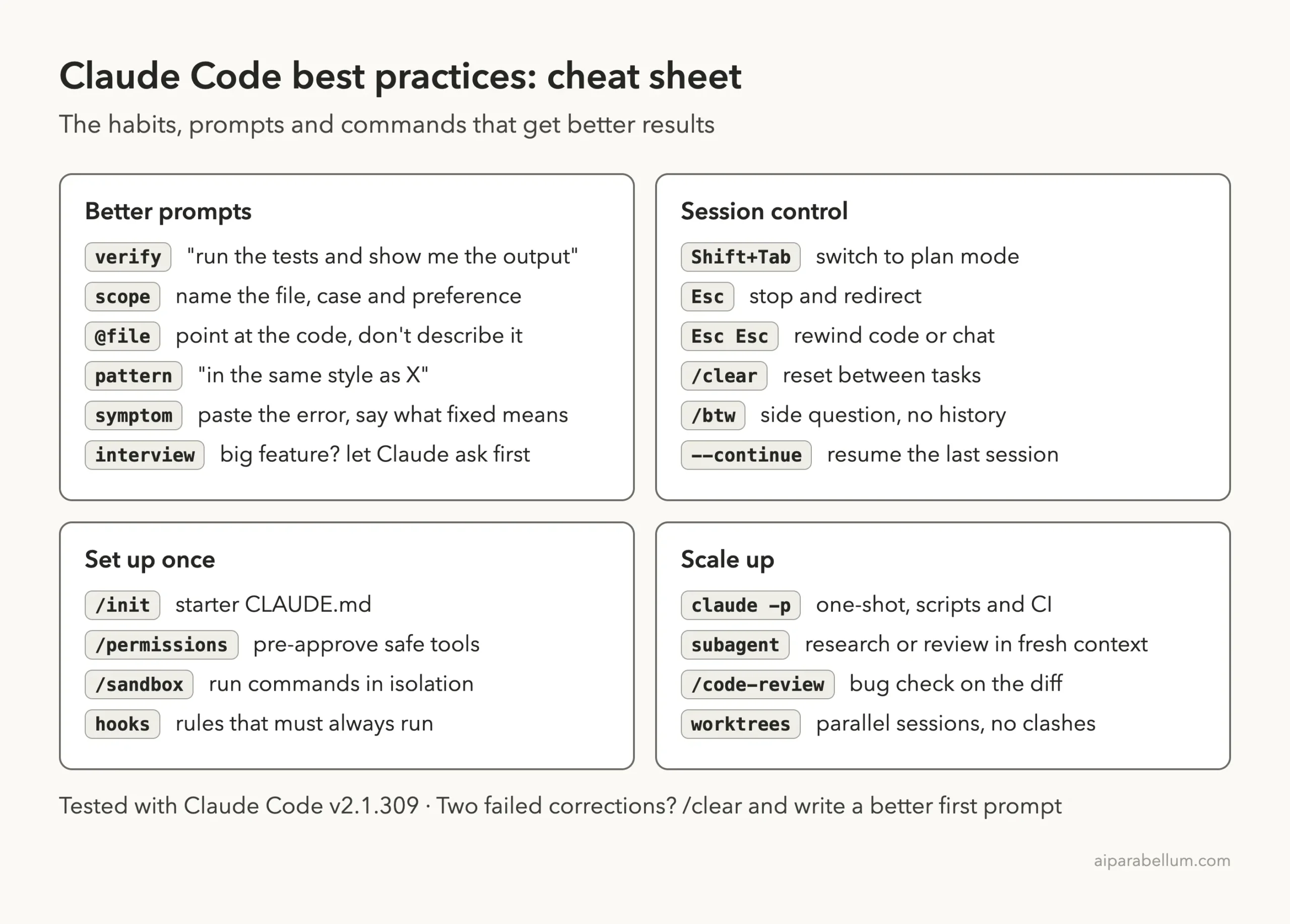
Claude Code Best Practices Cheat Sheet
Frequently Asked Questions
What is the single most important Claude Code best practice?
Give Claude a way to verify its work. A test suite, a build or a script lets it run the check, read the result and keep going until it passes, instead of stopping when the work only looks done.
Should I always use plan mode first?
No. Plan mode helps when you are unsure of the approach, the change touches many files, or the code is new to you. For a small fix you can describe in one sentence, just ask for it directly.
How long should my CLAUDE.md be?
Short. The docs have no fixed length, but they say to keep only what Claude can’t figure out from the code. If Claude keeps ignoring a rule, the file is probably too long.
When should I use /clear?
Use it between unrelated tasks, and after two failed corrections on the same issue. A clean session with a better prompt usually beats a long one full of old attempts.
Is claude -p safe to run in scripts?
It follows your permission settings. The docs pair it with –allowedTools to pre-approve only the needed tools, and –permission-mode dontAsk to deny anything else when no one is watching.
Conclusion
The Claude Code best practices that matter most are easy to start today: explore before you edit, give every task a real check and ask for proof, write specific prompts with files and examples, keep your context clean with /clear and /btw, and let a fresh subagent review the diff. In our real session those habits took a two-test project to five passing tests in a few short prompts, with every result on screen. Build them into your routine, and if you are still new to Claude in general, our Claude AI overview is a good place to start.
Previous in the series: Part 19, Add a Feature and Write Tests With Claude Code
Next in the series: Part 21: CLAUDE.md Explained: Give Claude Code Project Memory.