When you ask Claude Code to write tests, you get more than a few green checkmarks. You get a feature that proves it works, plus a safety net that warns you the day someone breaks it. The best part is that you can build the feature and its tests in one short conversation.
In this guide we add a brand-new function to a tiny blog project, let Claude Code write the tests for it, and then push it to cover edge cases. Every screenshot comes from a real session on our Mac, and we even check that the new tests can actually fail.
This is Part 19 of 53 in our Claude Code tutorials series. In the previous part we showed how to fix a bug with a failing test, and this part builds the tests right alongside a brand-new feature.
Tested with Claude Code v2.1.309 on October 24, 2026, on macOS, using the Sonnet 5.5 model. We started in default permission mode and kept the whole demo to three short prompts.
Quick Summary: Writing Tests With Claude Code
| Step | What you type | What Claude Code does |
|---|---|---|
| 1. Find gaps | “Find functions that are not covered by tests” | Reads your code and test files and lists untested functions |
| 2. Build with tests | The feature, where the tests go, and “run the tests” | Writes the code, writes matching tests, runs them |
| 3. Cover edge cases | “Add test cases for edge conditions” | Adds tests for empty, boundary and odd inputs |
| 4. Fix failures | “Run the tests and fix any failures” | Loops until the suite passes |
| 5. Check the tests | Remove the feature once and run the tests yourself | Nothing: this one is your job |
Why Tests Matter When Claude Code Writes Code
Claude Code is an agent that edits files and runs commands on its own, as we explained in the agent loop part. That makes it fast, but it also means it needs a clear way to know when a job is truly done.
Anthropic’s best practices guide makes this point directly. Claude stops when the work looks done, and without a check it can run, “looks done” is the only signal it has. A test suite gives it a real pass or fail, so it can run the check, read the result and keep going until it passes.
Tests turn “I think it works” into “here is the proof.” Ask Claude Code for both the feature and the proof.
The official common workflows page has a short testing recipe. Find untested code, generate test scaffolding, add meaningful edge cases, then run the new tests and fix any failures. We follow that same path below, but we add a brand-new feature in the middle.
Claude Code Matches Your Test Style
One detail from the docs is easy to miss. Claude examines your existing test files to match the style, frameworks and assertion patterns already in use. So the tests it writes should look like tests your team already writes, not like a random tutorial.
Our Demo Project: A Tiny Blog Helper
We built a throwaway Node.js project called tiny-blog. It has one source file, src/text.js, with two functions: slugify turns a title into a URL slug, and readingTime estimates minutes to read. The test file uses Node’s built-in test runner, so npm test just runs node –test.
Here is the starting point. Only two tests exist, and both are for slugify.
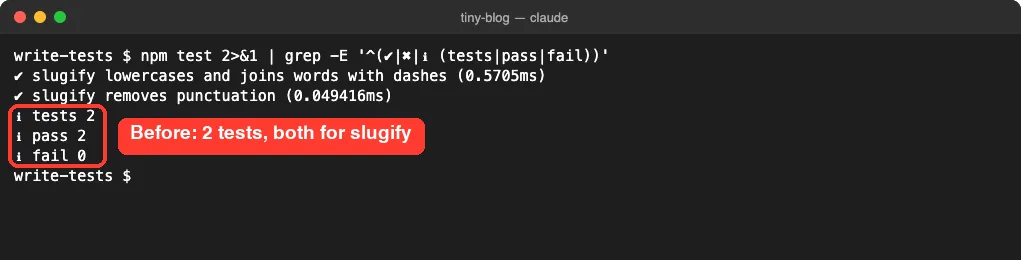
Our goal was to add a third function, truncate, and get solid tests for it. Along the way we wanted readingTime covered too.
Step 1: Ask Claude Code to Find Untested Code
We started Claude Code in the project folder and asked a simple question, adapted from the docs’ first testing step. We also told it not to edit anything, because this first step is only about looking.
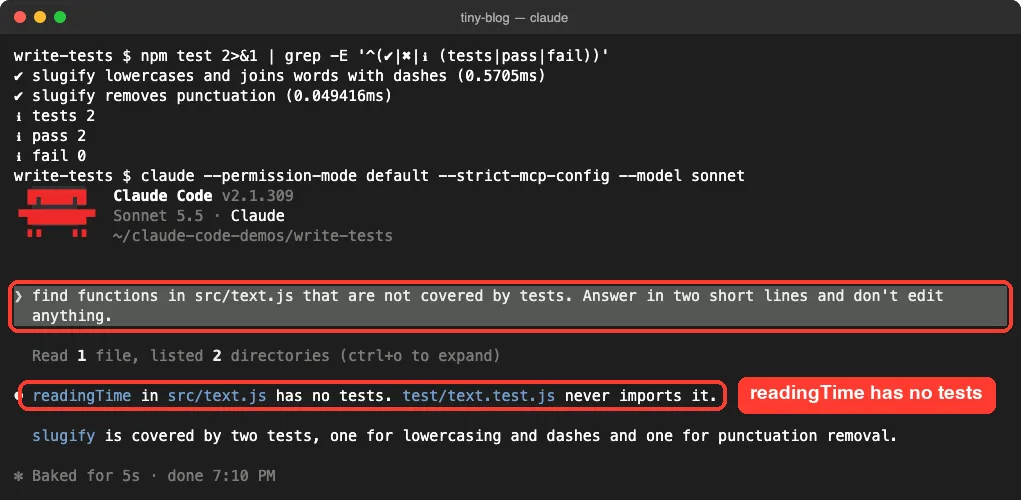
It read one file, listed two folders and gave a two-line answer. readingTime has no tests at all, because the test file never even imports it. That took five seconds and needed no permission, since reading files in your project is allowed in default mode.
On a real project, this question is a great way to find risky spots. You can narrow it to one file, like the docs do with “find functions in NotificationsService.swift that are not covered by tests.”
Step 2: Describe the Feature and Its Tests in One Prompt
Now the main event. We asked for the new function and its tests in the same prompt, with four clear parts: what the function does, where the tests go, which style to follow, and the command to run.
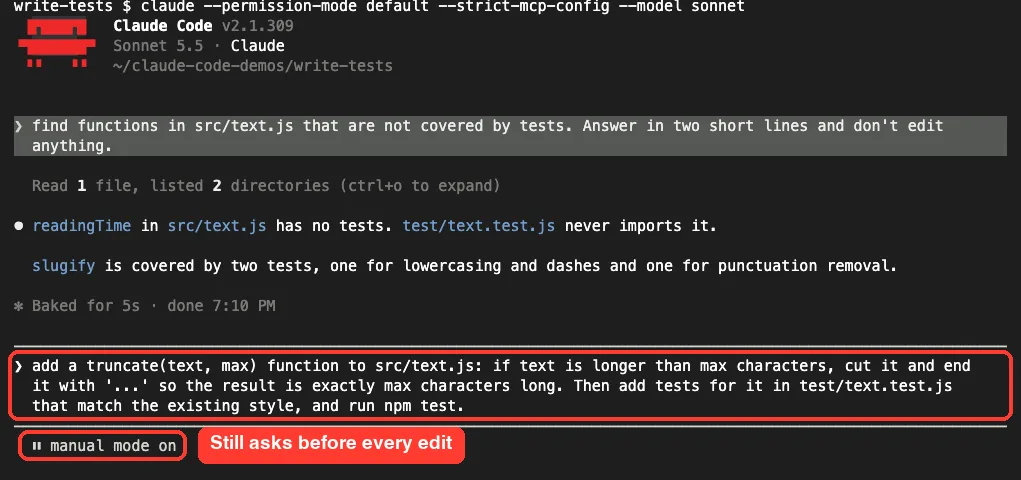
Notice the status line says manual mode is on. That is default mode, where Claude Code asks before every file edit and most shell commands. If you want to review each change, this is the mode to stay in, as our permission modes guide explains.
Review the Feature Diff
Claude Code planned several steps at once: update src/text.js, update the test file, and then run a command. The first stop was a diff for the new truncate function.
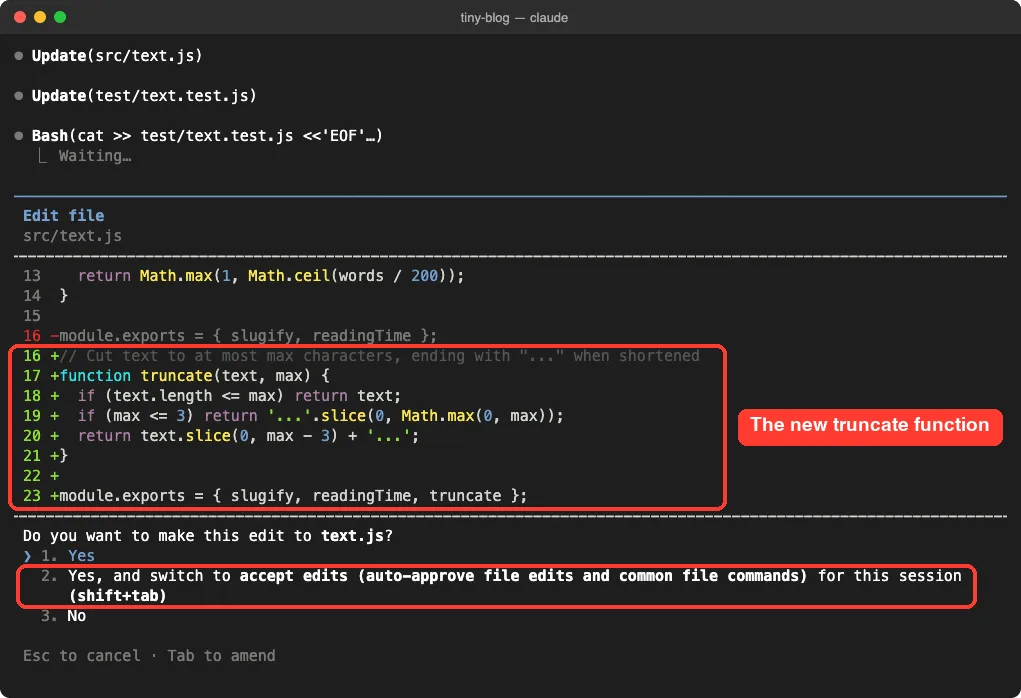
The code is short and readable. If the text already fits, it comes back unchanged. Otherwise it is cut so the result, including the three dots, is exactly max characters long.
We picked option 2 here, which switches the session to accept edits mode so later file edits don’t stop for approval. That is handy for a small demo. On real code, option 1 lets you review every single edit.
Review the New Tests
Next, Claude Code wanted to append three tests to the test file and run npm test in one shell command. It flagged the command for a closer look because of quote characters inside braces, so it asked first.
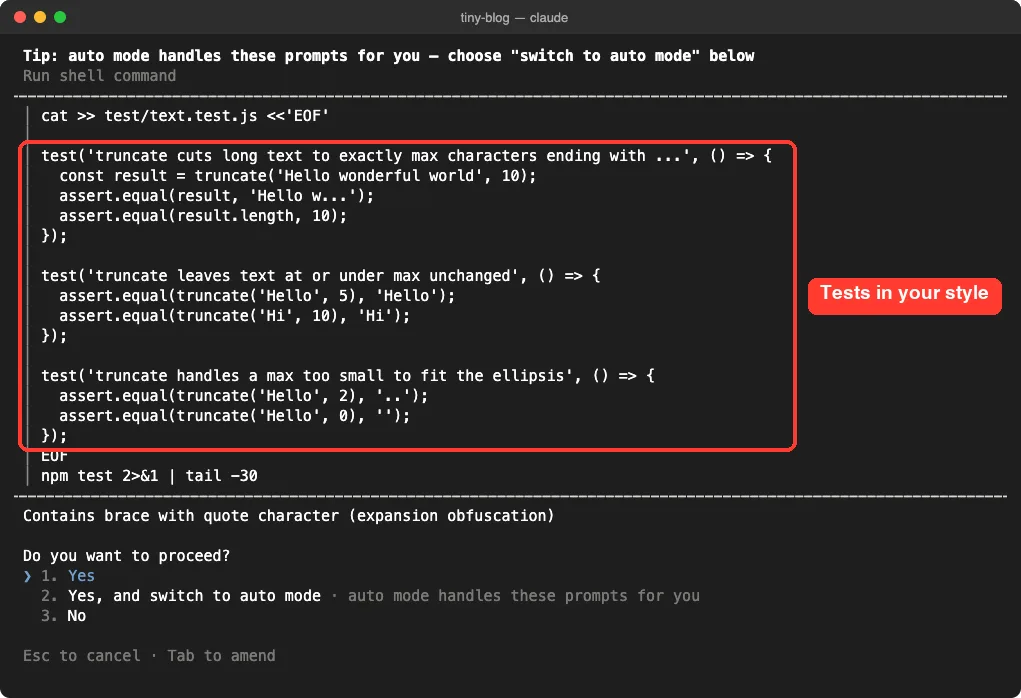
Look at how closely they match our original file. Same require lines, same test() calls and same assert.equal checks. That is the style-matching behavior the docs describe.
In our run we chose option 2 on this prompt too. That switched the session to auto mode, where a classifier approves routine actions for you, so the next prompt ran without stops. Choose option 1 instead if you’d rather keep approving each command yourself.
Read the Result, Not Just the Claim
A few seconds later, Claude Code reported back with real test output behind it.
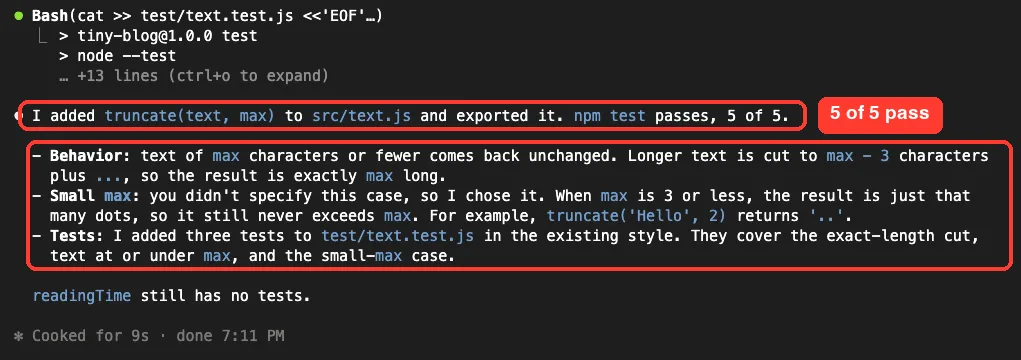
The summary includes one very useful line. Our prompt never said what to do when max is 3 or less, so Claude Code picked a behavior: return just that many dots. It told us, which is good, but it is still a guess you should accept or change.
If you don’t define a behavior, Claude Code will. Put tricky cases in your prompt so the tests check what you want.
How the Feature-With-Tests Loop Works
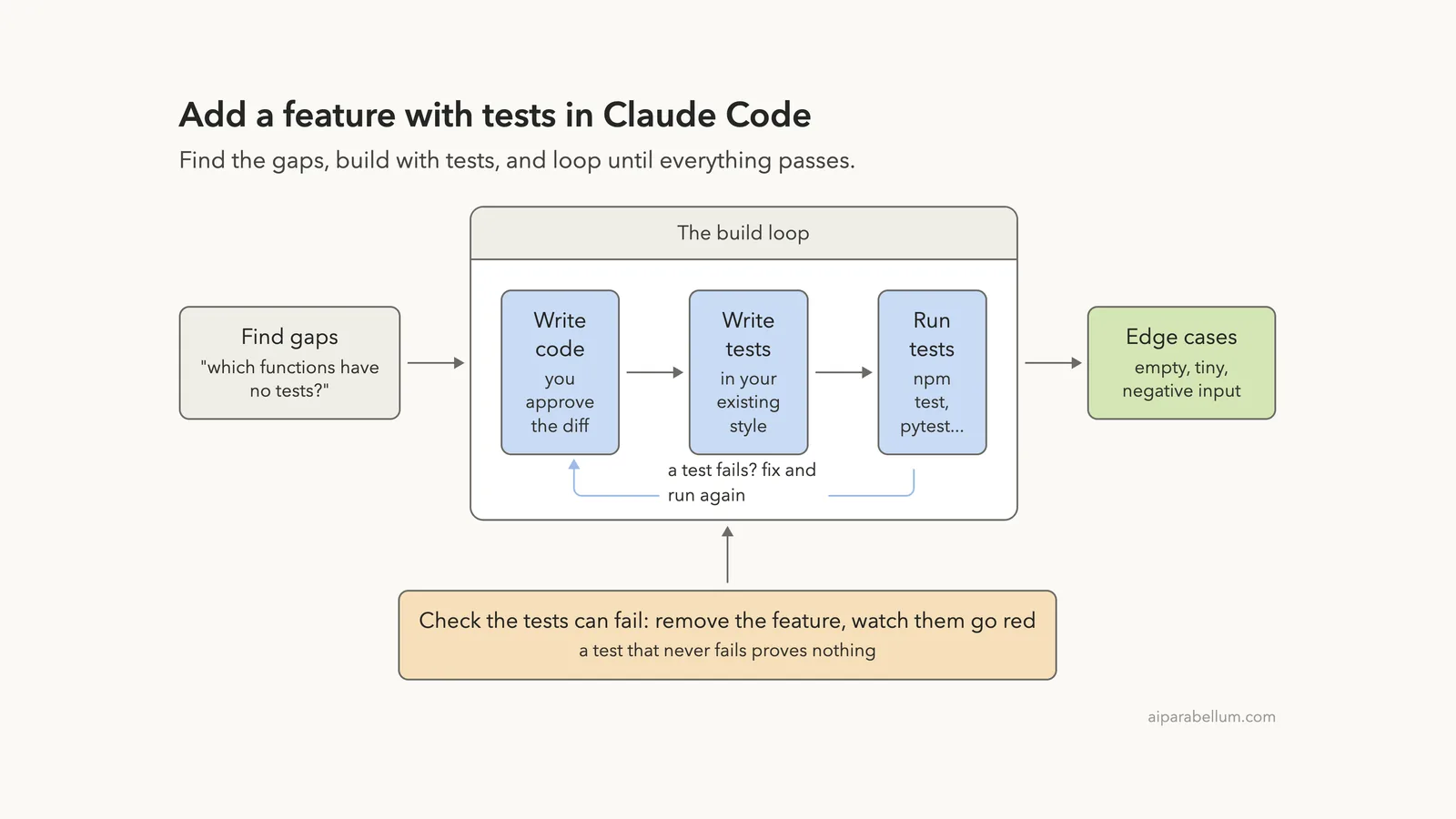
Here is the whole flow in one picture. The core is a loop of writing code, writing tests and running them, which repeats until every test passes.
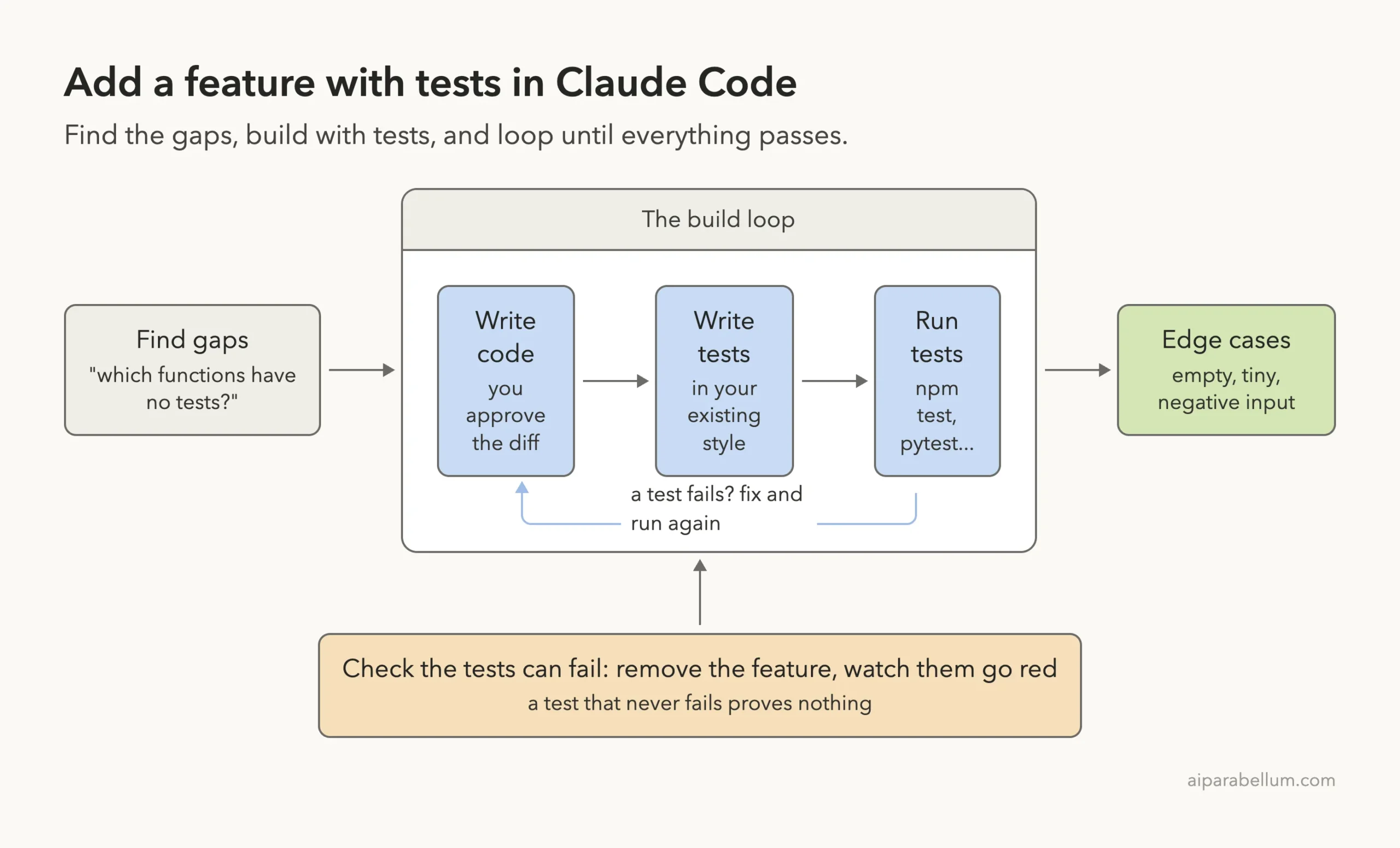
The orange box at the bottom is the step people skip. We cover it in Step 4.
Step 3: Ask Claude Code for Edge Case Tests
The docs suggest asking Claude to find edge cases you might have missed, such as error conditions, boundary values and unexpected inputs. So our third prompt asked for edge-case tests for both truncate and readingTime, then a test run with fixes for any failures.
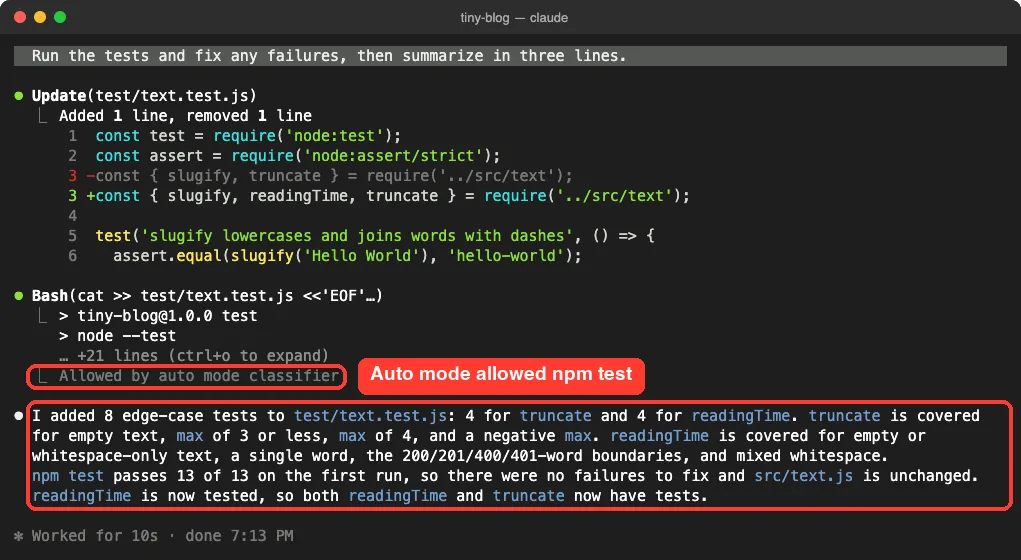
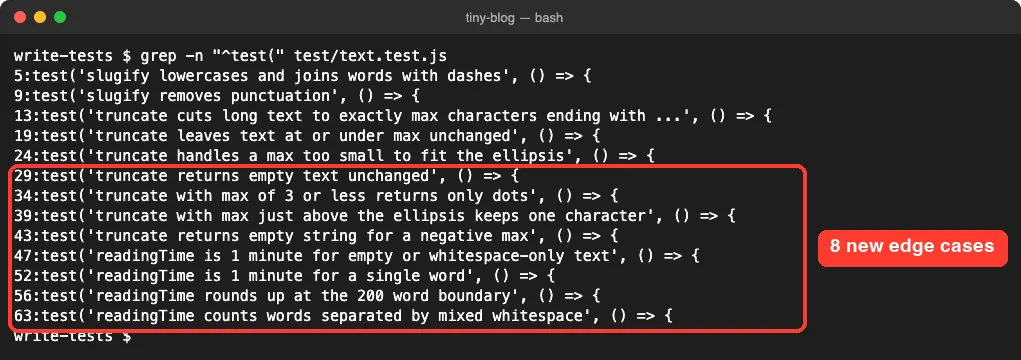
Claude Code added four tests for each function. For truncate it covered empty text, a max of 3 or less, a max of 4 and a negative max. For readingTime it covered empty text, a single word, the 200-word boundary and mixed whitespace.
The line “Allowed by auto mode classifier” shows the auto mode switch from earlier at work. All 13 tests passed on the first run, so there was nothing to fix, and src/text.js stayed unchanged.
Here is the full list of test names in the file afterward.
Step 4: Prove the New Tests Can Fail
A passing test only matters if it would fail when the code breaks. So after we exited Claude Code, we ran a quick check ourselves. We used git stash to put src/text.js back to its old version, ran the tests, then restored the new version and ran them again.
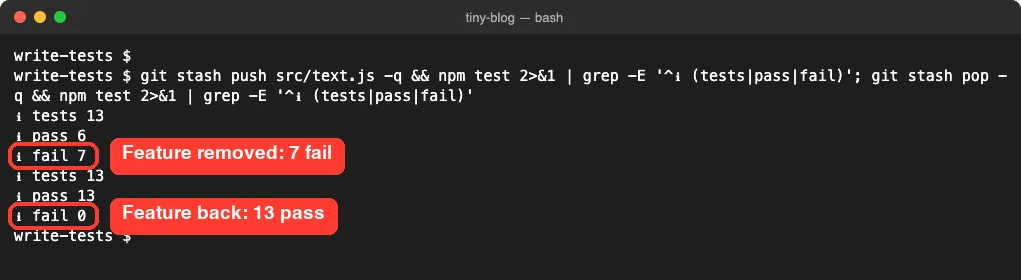
Without truncate, all seven truncate tests failed while the six others still passed. With the feature back, everything turned green again. That is real proof that the new tests check the new code.
A final git diff –stat showed 2 files changed: 9 lines in src/text.js and 57 in the test file. Most of the work went into tests, which is often a healthy sign.
What to Put in a Test Prompt
Our prompts worked because each one gave Claude Code fewer things to guess. This stack sums up what a strong test prompt can include.
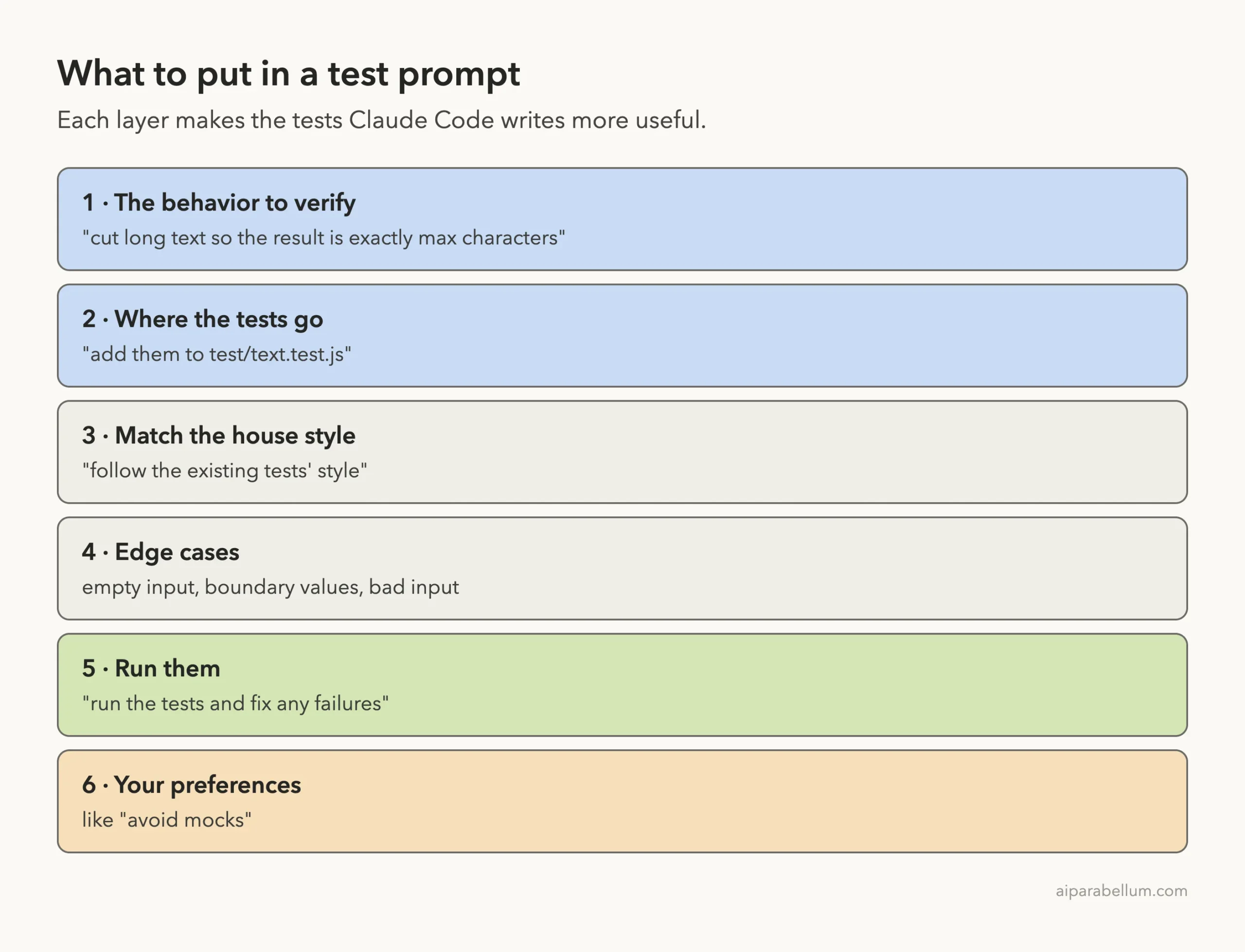
The best practices docs give a nice example of the last layer. Instead of “add tests for foo.py,” say “write a test for foo.py covering the edge case where the user is logged out. avoid mocks.”
Real Examples of Test Prompts
Here are prompt patterns you can adapt. The first four come straight from the steps in the official docs.
| Goal | Example prompt |
|---|---|
| Find untested code | find functions in NotificationsService.swift that are not covered by tests |
| Scaffold tests | add tests for the notification service |
| Cover edge cases | add test cases for edge conditions in the notification service |
| Run and repair | run the new tests and fix any failures |
| Feature with tests | write a validateEmail function. example test cases: [email protected] is true, invalid is false. run the tests after implementing |
| Focused test | write a test for foo.py covering the edge case where the user is logged out. avoid mocks. |
The validateEmail example comes from the best practices page, where Anthropic lists example inputs and the expected result for each. Giving sample cases like that is one of the fastest ways to get the behavior you actually want.
Test-First With Two Sessions
The docs also mention a writer and reviewer pattern for tests. One Claude session writes the tests, and another writes code to pass them. Because the second session didn’t write the tests, it can’t quietly shape them around its own code.
Try It Yourself
Make a small folder with one function and one test file, like our tiny-blog demo. Start Claude Code there, never in an important project for your first try, and paste this prompt.
find functions in src/ that are not covered by tests, in two lines.
Then add a truncate(text, max) function to src/text.js that cuts long
text so the result is exactly max characters and ends with "...".
If max is 3 or less, return an empty string. Add tests that match the
existing test style, including edge cases, and run the tests.
Watch the diffs as they come in. When it finishes, remove the feature once with git stash and run the tests yourself to make sure they fail, then bring it back.
Common Mistakes When Writing Tests With Claude Code
- Asking for tests without a behavior. “Add tests” alone gets generic checks; say what the code must do.
- Leaving edge cases undefined. As our demo showed, Claude Code will pick a behavior for unclear cases.
- Not asking it to run the tests. Without a run, you only have tests that look right.
- Trusting a green suite blindly. Tests that never fail prove nothing, so break the code once and check.
- Switching to auto mode by accident. Read the options on each prompt; option 2 can change your permission mode.
- Letting tests be weakened. If Claude edits a test to make it pass, ask why before you accept it.
Pro Tips for Better Tests
- Use @ to point at files, like @src/text.js and @test/text.test.js, so Claude reads them right away.
- Add your test command and preferred runner to CLAUDE.md. The docs list testing instructions as a good fit for that file.
- Ask for single test runs on big projects. The docs’ example CLAUDE.md prefers single tests over the whole suite for speed.
- Start a new session with /clear before the next feature so old test talk doesn’t crowd the context window.
- For bigger features, plan first. Plan mode lets you agree on the test list before any code is written.
- If a run goes wrong, you can roll back with checkpoints instead of fixing by hand.
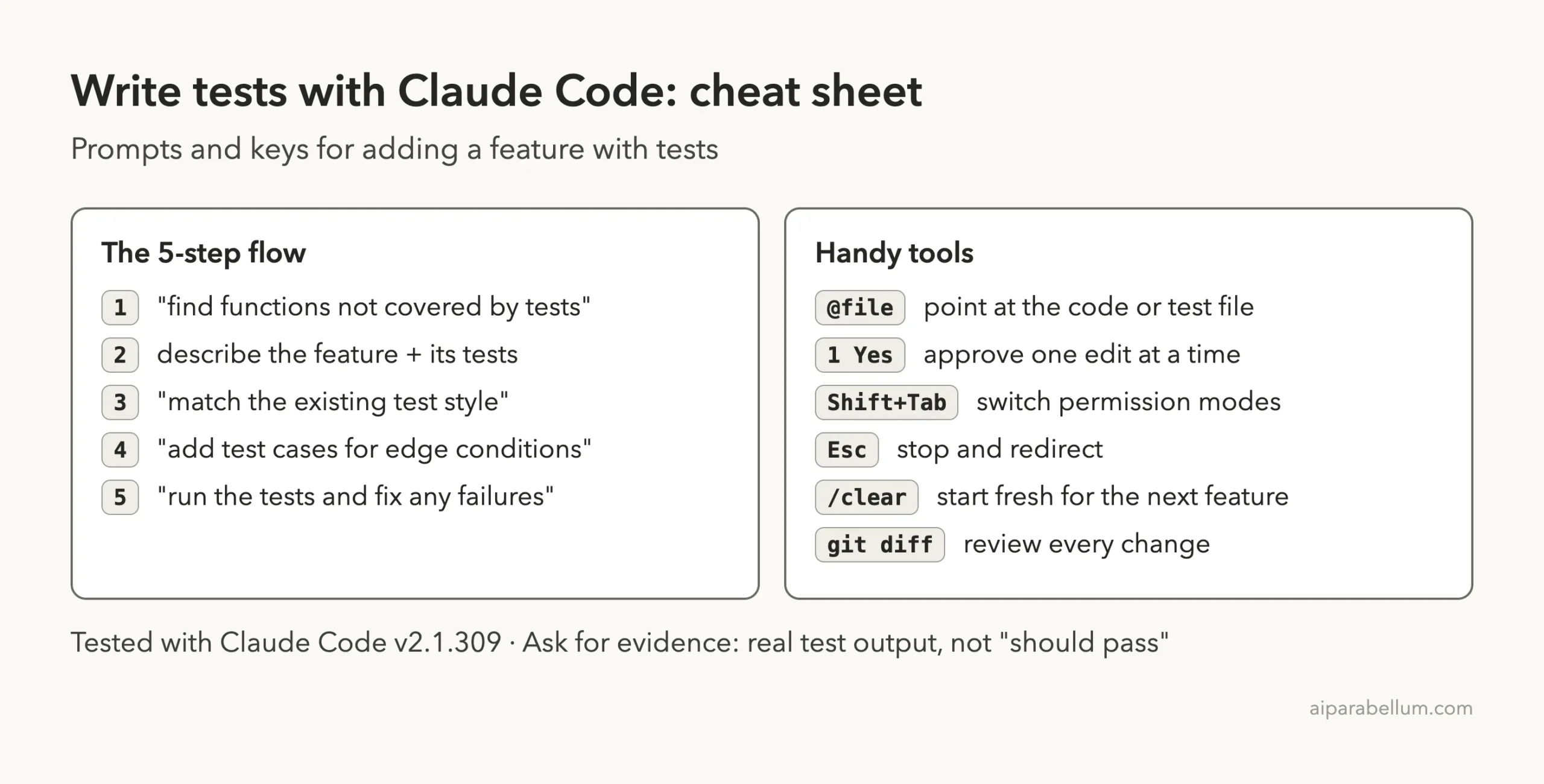
Claude Code Test Writing Cheat Sheet
Frequently Asked Questions
Can Claude Code write tests for any language?
The docs’ own examples include Swift, TypeScript and Python, and Claude matches whatever framework your existing tests use. We tested with JavaScript and Node’s built-in runner. If you have no tests yet, tell it which framework you want.
Does Claude Code run the tests by itself?
Yes, if you ask. Our prompts ended with “run npm test” or “run the tests and fix any failures,” and Claude ran them and read the output. In default mode, it asks before running the command.
Should I write tests first or the feature first?
Both work. For a small function, asking for the feature and its tests together is quick, as our demo shows. For tricky logic, writing the tests first, or using a second session to write them, keeps the tests honest.
How do I know Claude’s tests are any good?
Read them, then break the code once and confirm they fail, like our git stash check. Also look for clear names and real edge cases, not just repeats of the happy path.
Will Claude Code change my existing tests?
It can, so watch the diffs. In our demo it only changed the require line and added new tests. If a diff edits an old assertion, ask why before you approve it.
Conclusion
Adding a feature with tests in Claude Code comes down to a clear loop: find what is untested, describe the feature and where its tests go, make Claude run them, push for edge cases, and then prove the tests can fail. In our real session that took three short prompts and grew a two-test project into thirteen passing tests, with every result shown on screen. Spell out tricky behaviors yourself, keep an eye on each permission prompt, and if you are new to Claude in general, our Claude AI overview is a good place to start.
Previous in the series: Part 18, How to Fix a Bug With Claude Code
Next in the series: Part 20: Claude Code Best Practices for Better Results.