Before Claude Code can read a single file, it needs to know who you are and who pays for the work. That choice comes down to Claude Code plans and login options: a personal subscription, a team seat, a Console account billed by usage, or your company’s cloud provider. This guide walks through each one, shows the real login screen, and helps you pick the right path without guessing.
Picking the wrong login is one of the most common early mix-ups. People pay for a plan and then get billed for API use anyway, or they can’t sign in on a remote server. We will clear up all of that in plain steps.
This is Part 5 of 53 in our Claude Code tutorials series. In the last part we looked at the agent loop and the tools Claude Code uses behind the scenes.
Tested with Claude Code v2.1.309 on October 24, 2026, on a Mac, in the terminal. We used a throwaway config folder so the real login on our test machine was never touched.
Claude Code Plans and Logins at a Glance
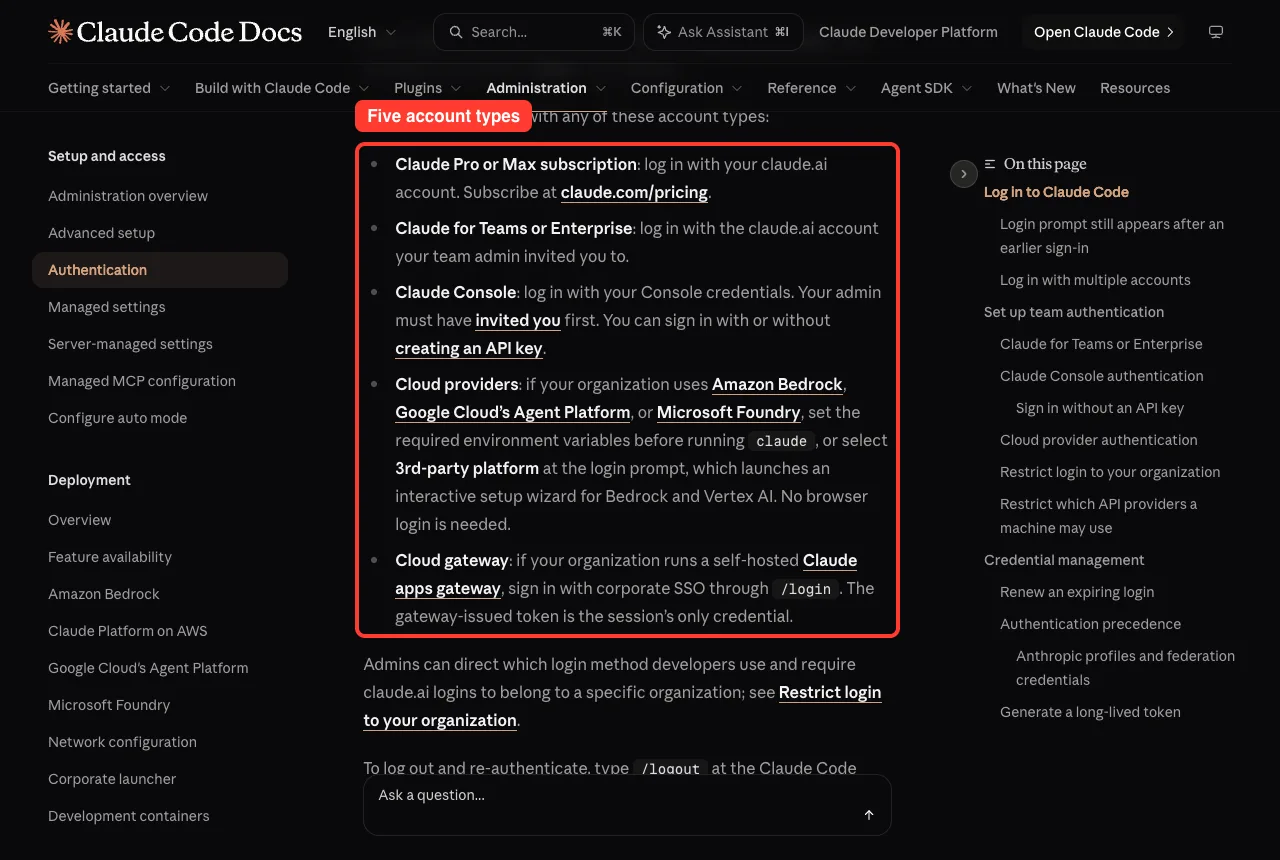
Here is the whole picture in one table. Each row is a way to sign in, based on Anthropic’s authentication docs.
| Login option | Who it fits | How you pay | How you sign in |
|---|---|---|---|
| Claude Pro or Max | Individual developers | Your Claude subscription | claude.ai account in the browser |
| Claude for Teams or Enterprise | Companies and teams | Central team billing | The claude.ai account your admin invited |
| Claude Console | People who want pay-per-use | API usage with pre-paid credits | Console account, with or without an API key |
| Amazon Bedrock, Google Cloud’s Agent Platform, Microsoft Foundry | Companies already on those clouds | Through your cloud account | Environment variables, no browser login |
| Claude apps gateway | Companies running a self-hosted gateway | Set by your company | Corporate SSO through /login |
What Claude Code Plans Are and Why Login Matters
Claude Code is a tool, not a plan by itself. It runs on Claude models, and somebody has to pay for every request it sends. Your login tells Claude Code which account to charge and which features you can use.
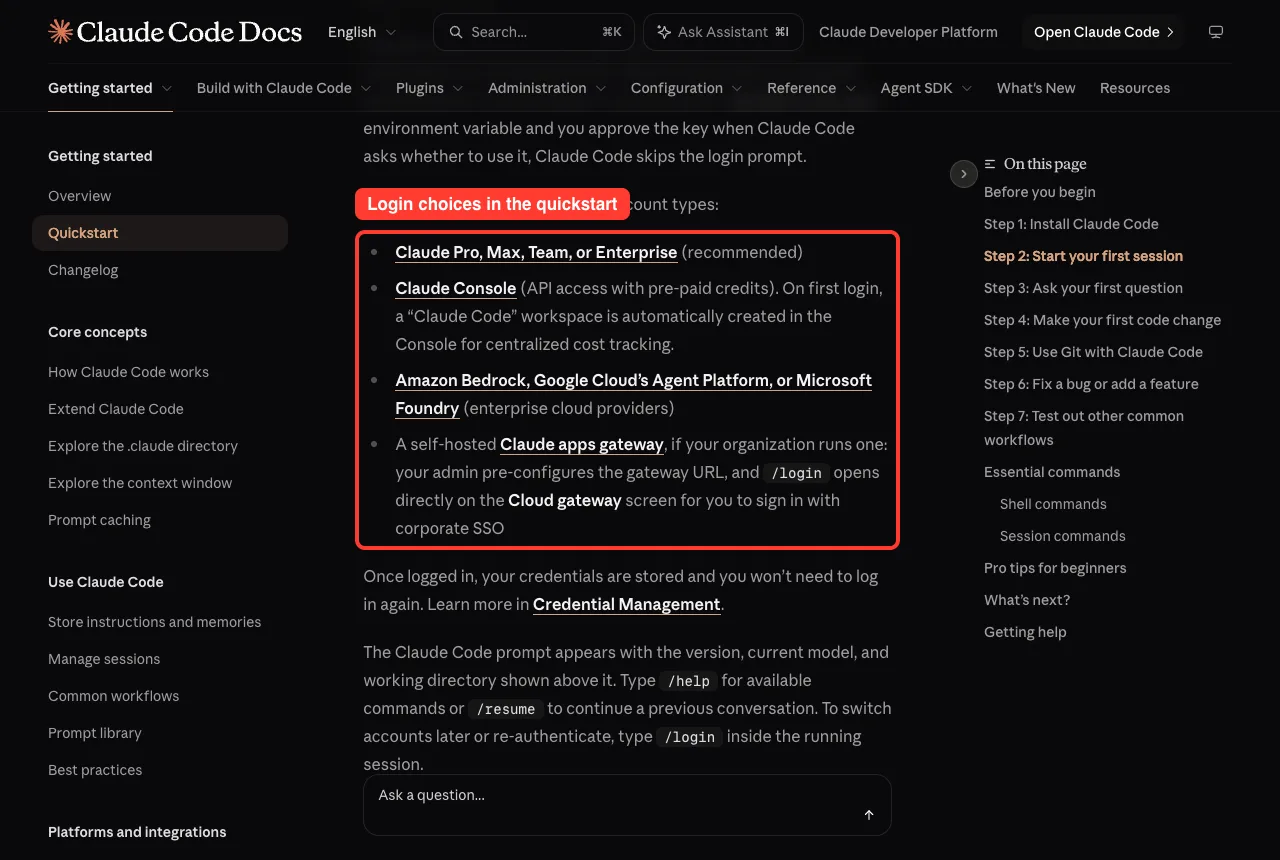
The quickstart lists three main groups you can bring: a Claude subscription (Pro, Max, Team or Enterprise), a Claude Console account, or access through a supported cloud provider. Anthropic marks the subscription route as recommended for most people.
Your login decides two things: who pays for each request, and which Claude Code features you can use.
If you are still deciding whether Claude Code is right for you, our beginner guide covers the basics first.
Step by Step: Logging In to Claude Code the First Time
Once you have installed Claude Code, open a terminal in your project folder and type claude. On a fresh setup, it asks you to pick a text style first, then shows the login screen.
Step 1: Pick your login method
The welcome screen offers three choices. Use the arrow keys to move and press Enter to pick one.
- Claude account with a subscription, for Pro, Max, Team or Enterprise
- Anthropic Console account, billed by API usage
- 3rd-party platform, for Amazon Bedrock, Microsoft Foundry or Google Vertex AI
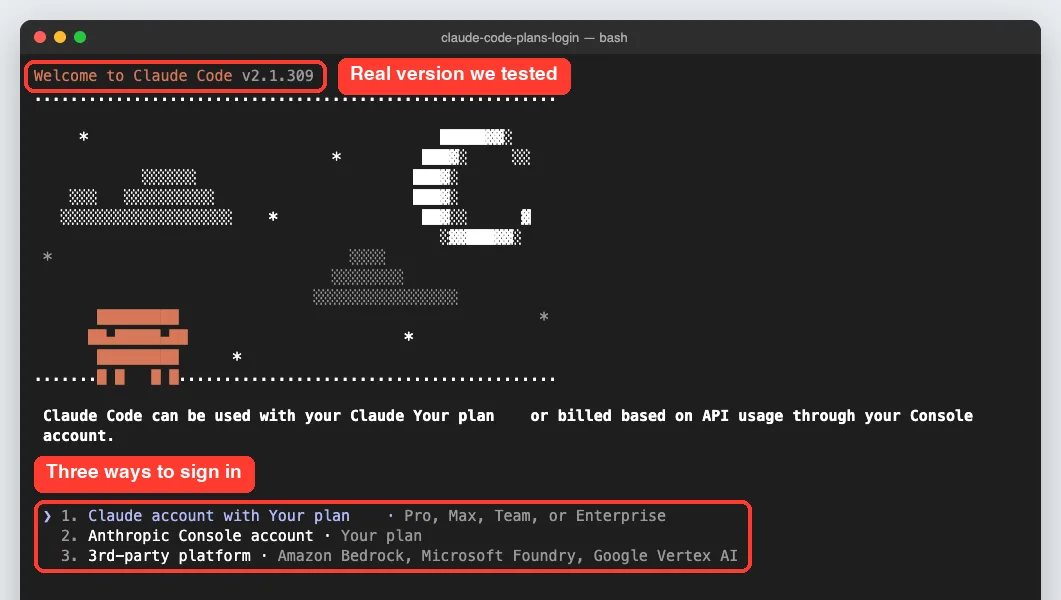
A quick note on this screenshot: our capture tool masks plan names and billing types so no account details leak. That is why some words read “Your plan”. On your screen, the first option mentions your subscription and the second says the Console is billed by API usage.
Step 2: Finish the sign-in in your browser
For subscription and Console accounts, Claude Code opens a browser window so you can sign in. When it works, the terminal shows a success message and asks you to press Enter.
If the browser does not open, press c to copy the login link, then paste it into any browser. If the browser shows a code instead of sending you back, paste that code at the prompt in the terminal.
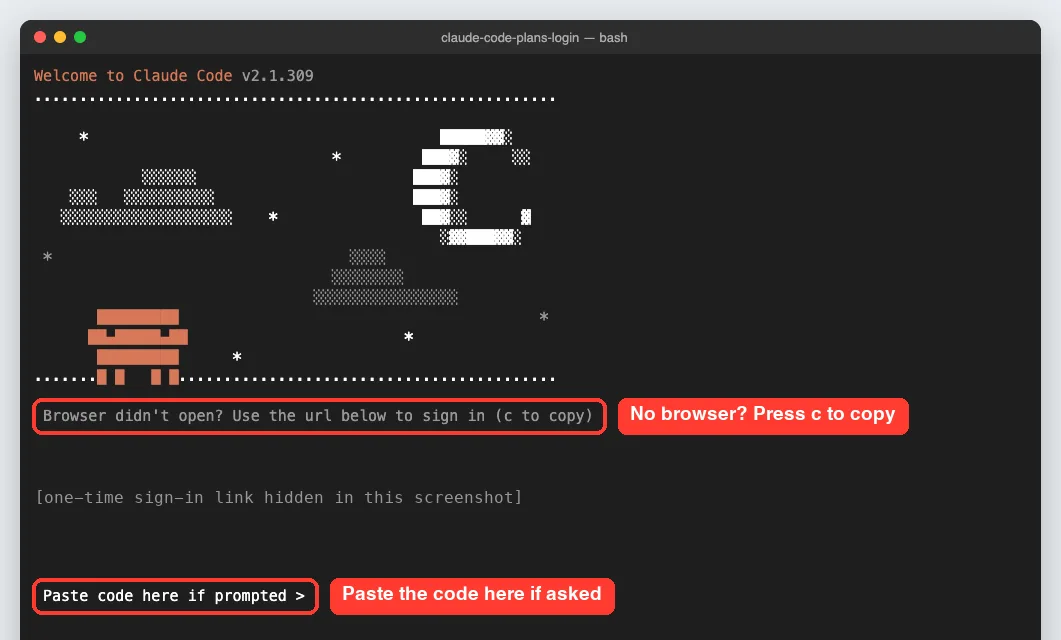
The docs say the paste-code step is common in WSL2, SSH sessions and containers. In those places the browser can’t reach the small local server that Claude Code uses to finish the login.
Step 3: Check that you are signed in
You don’t have to open a session to check your login. The claude auth command has three subcommands that work right from your shell.
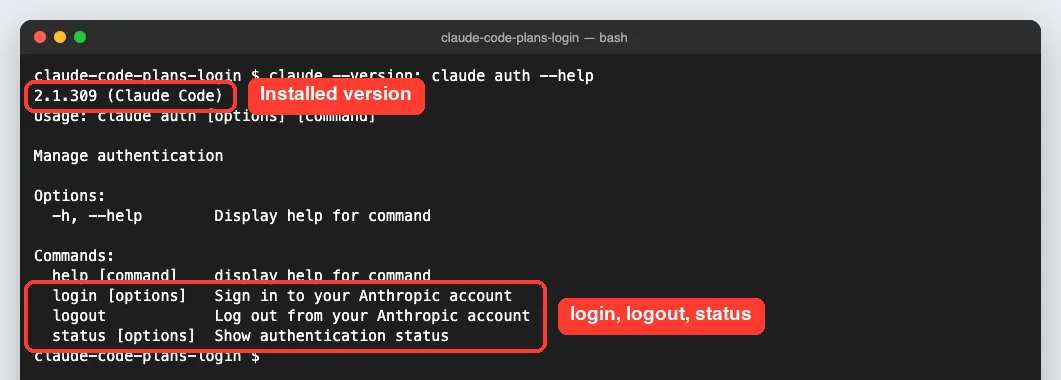
We ran claude auth status against our empty test folder. It reported that nobody was logged in, with the auth method set to none, which is exactly what you would expect before the first sign-in.
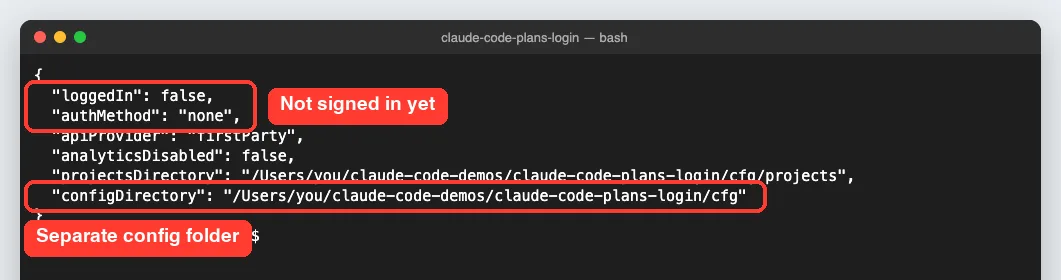
Inside a running session, /status shows which login is active. If you have both a login and an API key, it marks the one that is not being used.
Which Claude Code Plan Should You Choose?
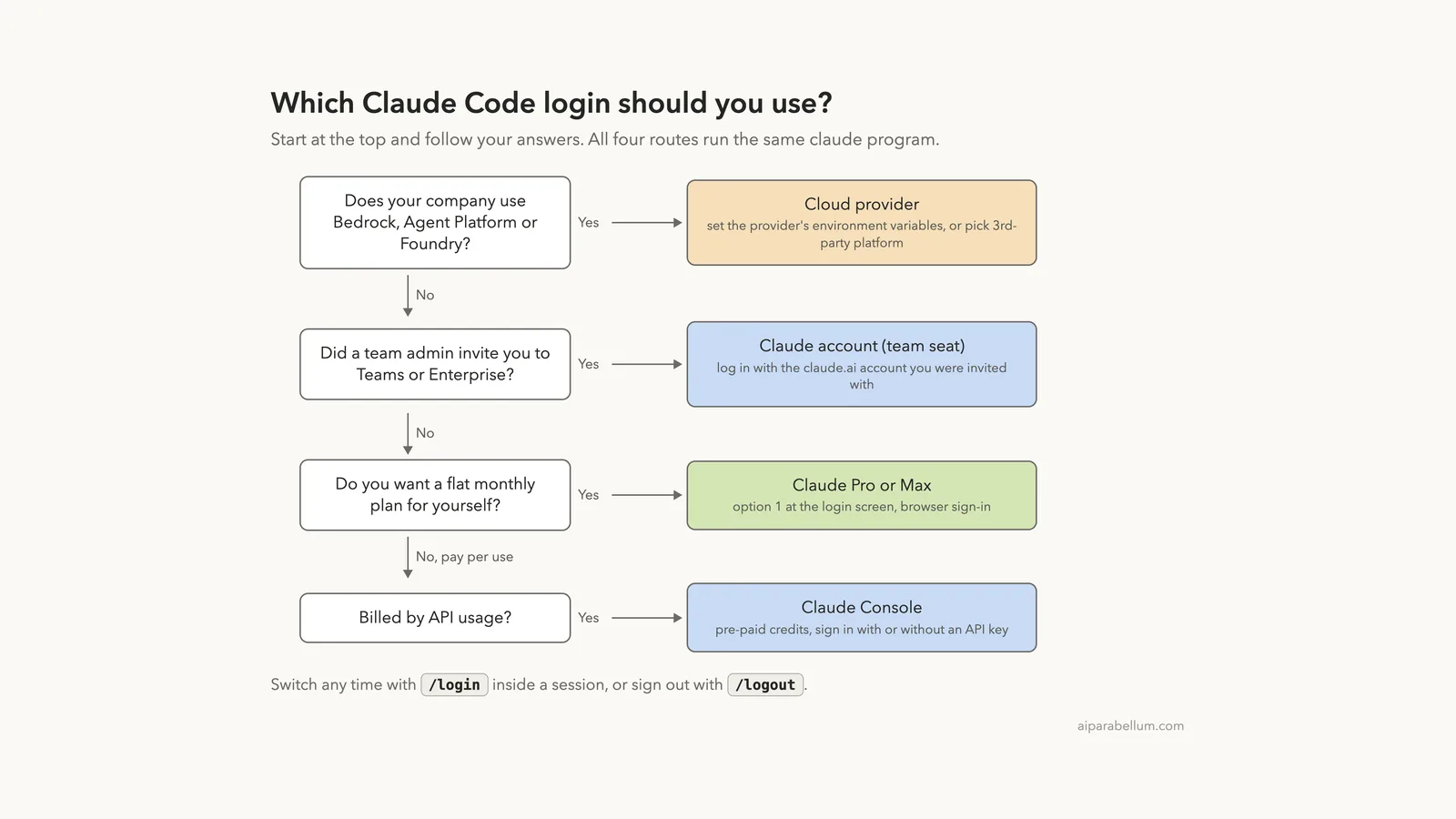
Most readers fit one clear path. Follow the questions from top to bottom in this diagram.
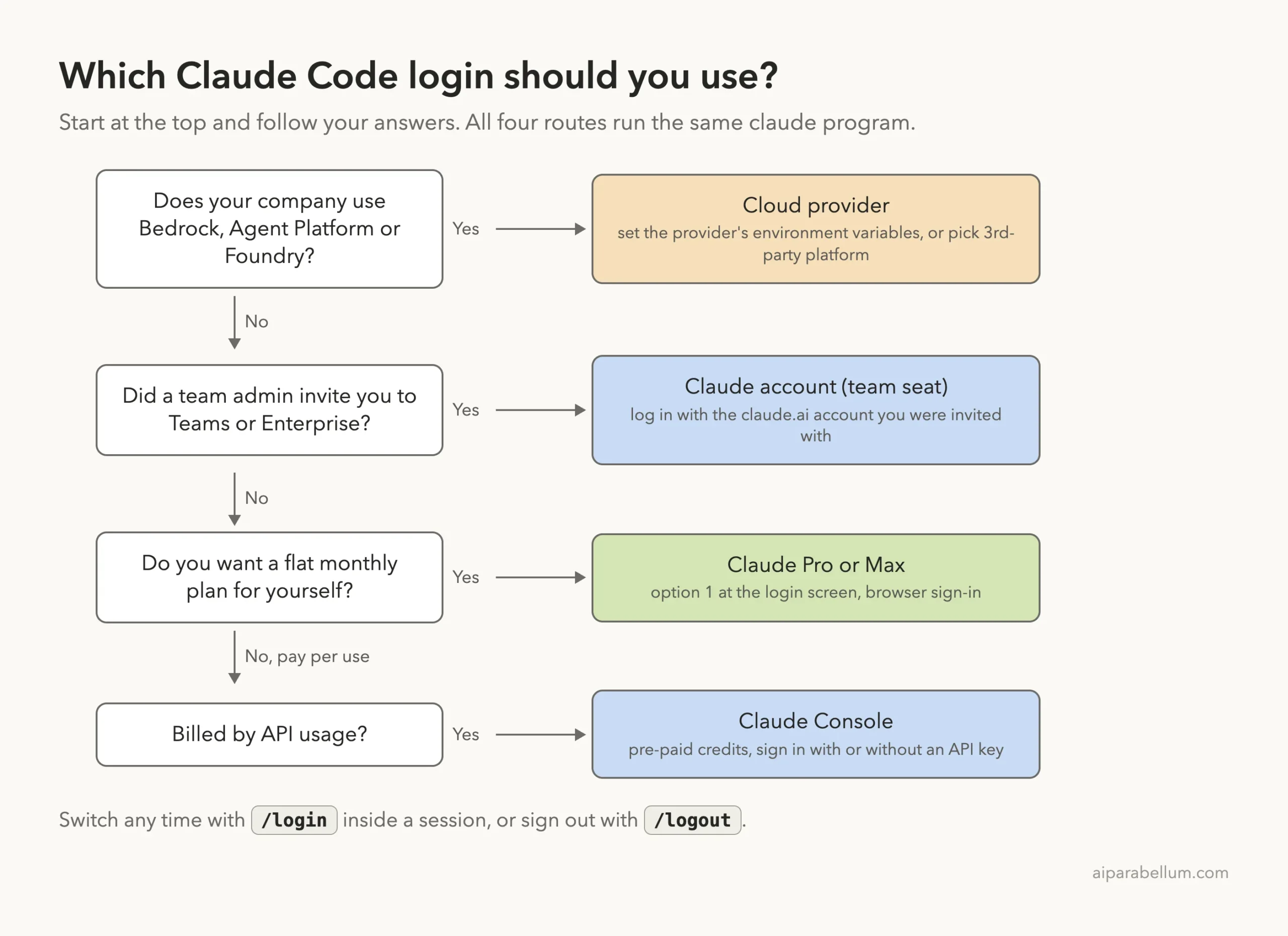
Claude Pro or Max for individual developers
If you code on your own, a Pro or Max subscription is the simplest route. You log in with your claude.ai account, and the same account works for Claude on the web. The docs send you to the Claude pricing page to subscribe, so check there for current prices and limits.
Want to try Claude itself before paying? Our free Claude guide explains what the free chat app offers. Note that the Claude Code docs list Pro, Max, Team and Enterprise as the subscription plans that work with it.
Claude for Teams or Enterprise for companies
Anthropic says Teams and Enterprise give organizations the best experience. Members get both Claude Code and Claude on the web, with central billing and team management.
- Claude for Teams: self-service, with admin tools, SSO, billing management and server-managed settings. Best for smaller teams.
- Claude for Enterprise: adds domain capture, role-based permissions and the compliance API. Best for larger companies.
Setup takes three moves: subscribe, invite team members from the admin dashboard, and have everyone install Claude Code and log in with their claude.ai account.
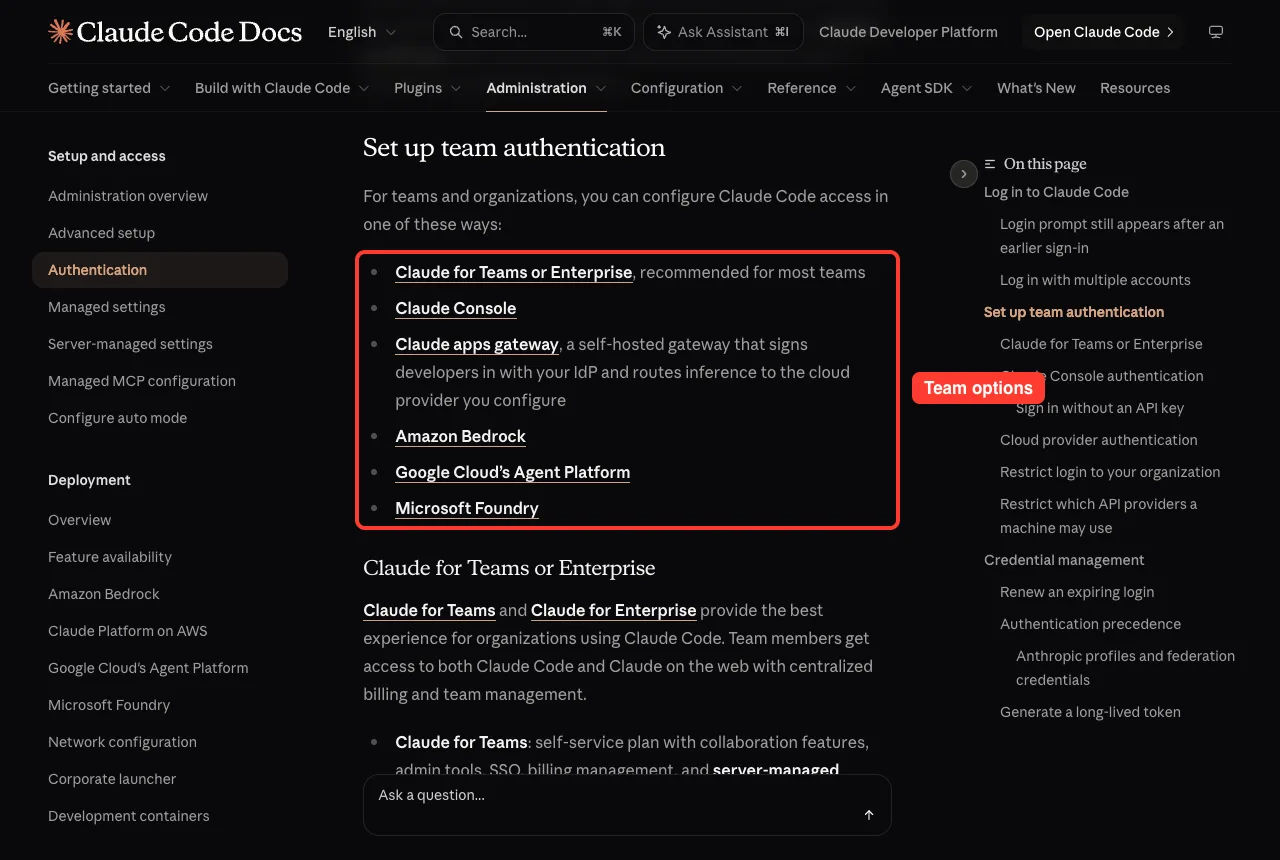
Claude Console for pay-per-use billing
The Console route bills by API usage with pre-paid credits. On your first Console login, a workspace named “Claude Code” is created for you so costs are easy to track.
Teams using the Console need an admin to invite them first. Admins pick one of two roles: the Claude Code role can only create Claude Code API keys, while the Developer role can create any kind of key.
Since v2.1.242, you can sign in to Console without creating an API key at all. After you choose the Console account at the login prompt, Claude Code asks how you want to sign in.
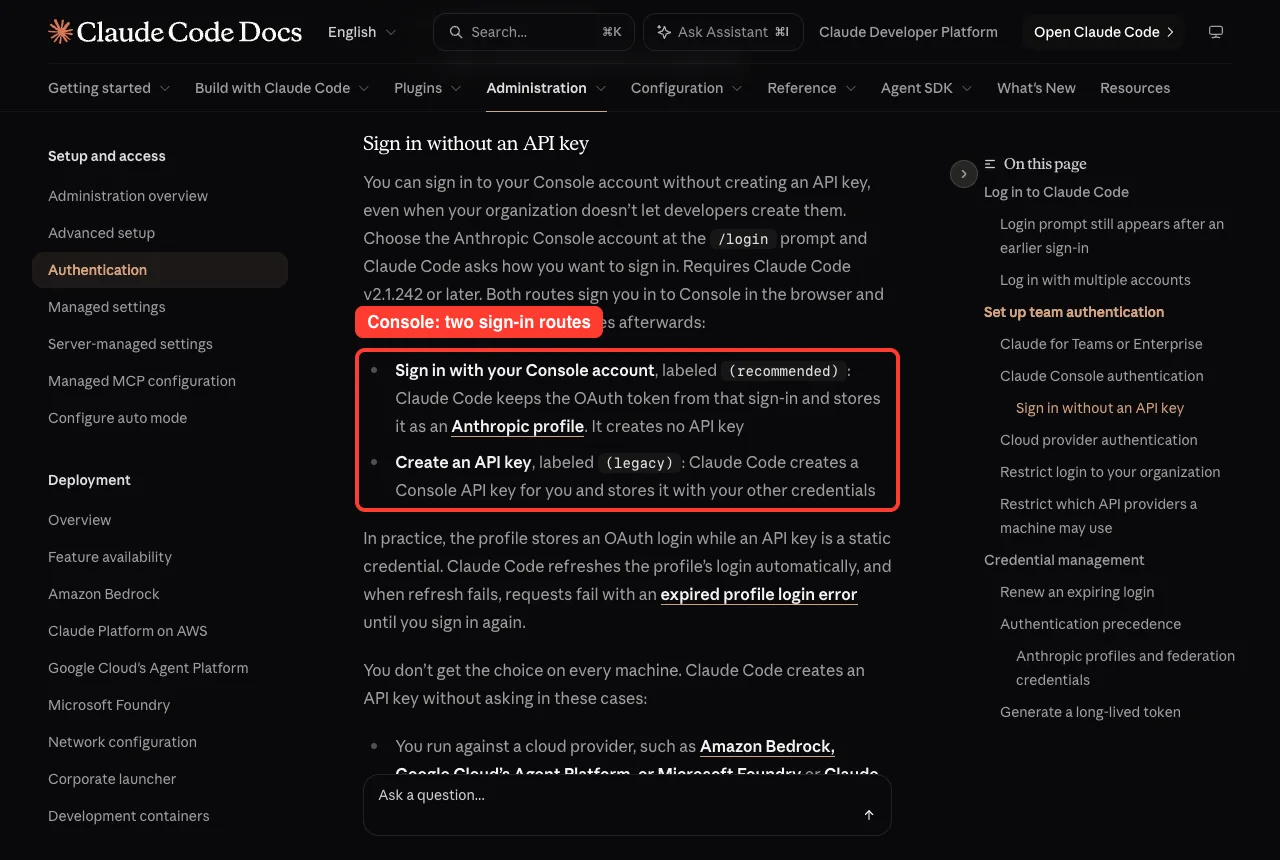
| Console route | Label | What Claude Code stores |
|---|---|---|
| Sign in with your Console account | recommended | An OAuth login saved as an Anthropic profile, refreshed automatically |
| Create an API key | legacy | A static Console API key stored with your other credentials |
Cloud providers for companies on AWS, Google Cloud or Azure
If your company already uses Amazon Bedrock, Google Cloud’s Agent Platform or Microsoft Foundry, you can run Claude Code through that account. You set the required environment variables before starting claude, or pick 3rd-party platform at the login screen.
That option opens a setup wizard for Bedrock and Vertex AI. No browser login is needed, and your cloud provider’s access rules apply.
How Claude Code Picks a Login When You Have Two
Many developers have more than one credential on their machine. Maybe you set an API key months ago for a script, and now you also have a Pro plan. Claude Code follows a fixed order and uses the first match.
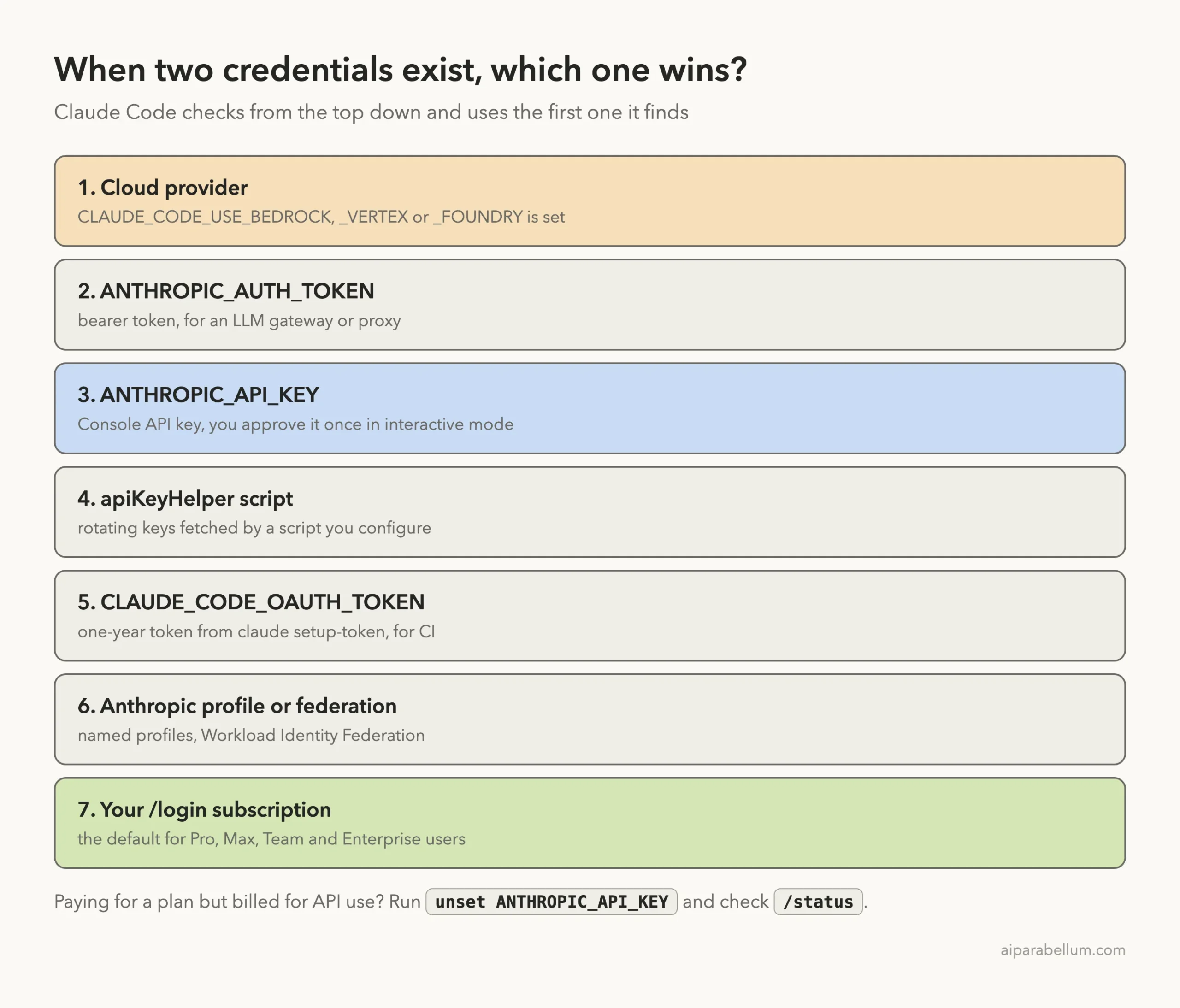
The key detail is that your /login subscription sits at the very bottom. An ANTHROPIC_API_KEY in your shell ranks above it, so Claude Code will use that key once you approve it.
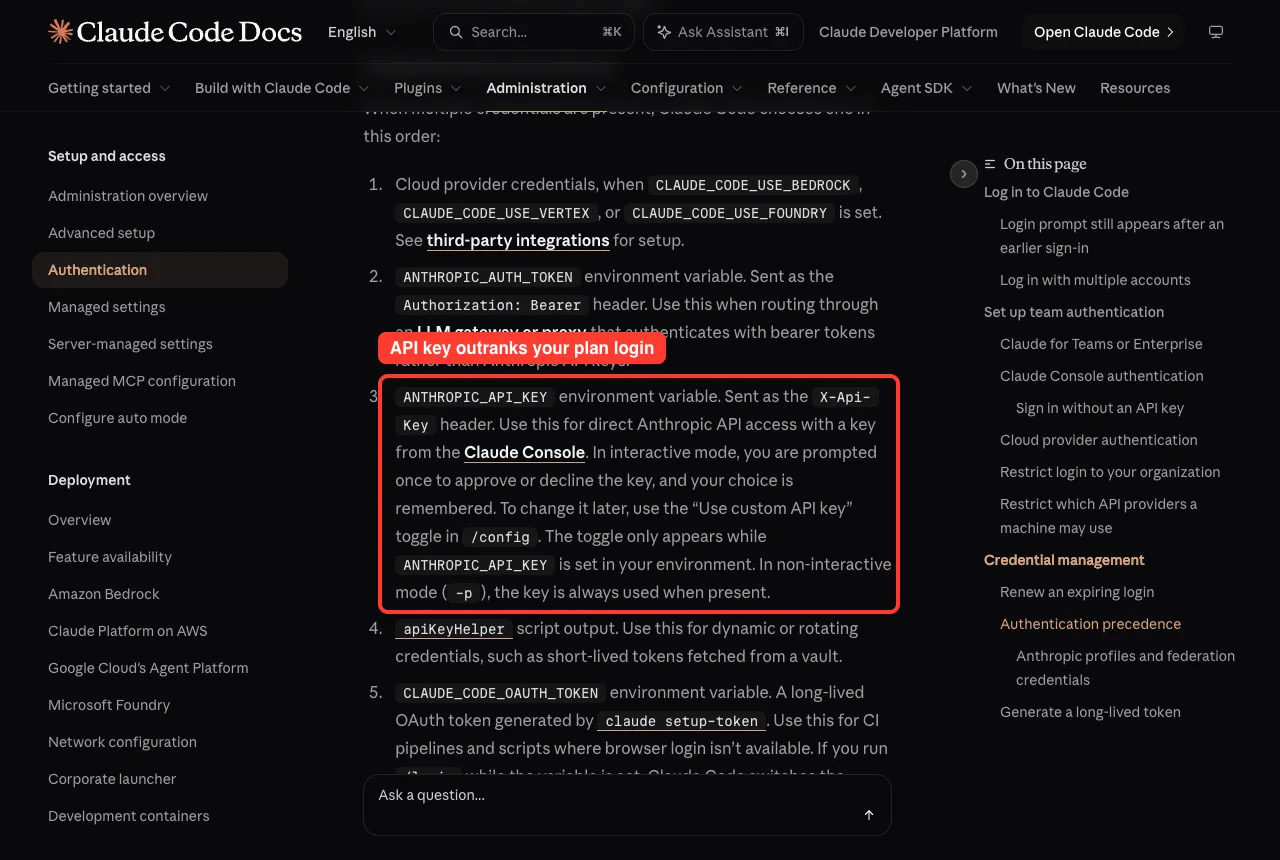
In interactive mode, Claude Code asks once whether to use the key and remembers your answer. You can flip it later with the “Use custom API key” toggle in /config. In non-interactive mode with -p, the key is always used when present.
Real Examples of Login Setups
Here are a few setups the docs cover, put into everyday situations.
Example 1: A personal and a work account on one laptop
You can stay signed in to two accounts by giving each one its own config folder. The docs suggest an alias like this in your ~/.zshrc or ~/.bashrc:
alias claude-work='CLAUDE_CONFIG_DIR=~/.claude-work claude'Now claude uses your personal login and claude-work uses your work login. Each folder keeps its own settings, history and credentials. We used the same idea for our screenshots, which is why our test showed a separate config folder.
Example 2: Running Claude Code in a CI pipeline
A build server can’t open a browser. For that case, run claude setup-token on your own machine. It opens the normal browser sign-in and then prints a one-year token.
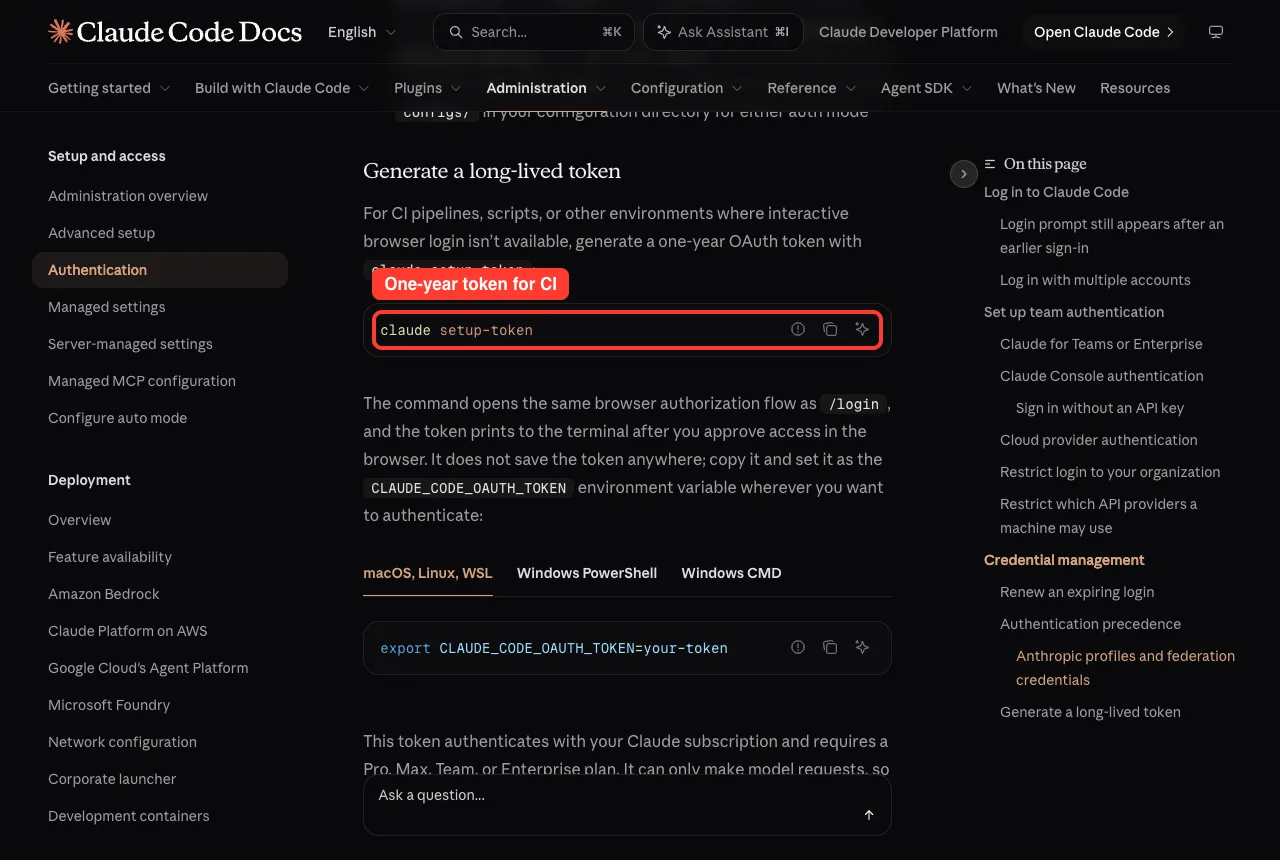
Copy the token and set it as CLAUDE_CODE_OAUTH_TOKEN wherever you need it. The token uses your subscription and needs a Pro, Max, Team or Enterprise plan. It can only make model requests, so it can’t start Remote Control sessions or load claude.ai connectors.
Example 3: Signing in on a remote server over SSH
On a remote machine, the browser often can’t call back to Claude Code. Press c to copy the login link, open it on your laptop, and paste the code you get back at the terminal prompt.
Try It Yourself
Here is a safe practice task. You will check your current login without changing anything, then ask Claude Code to explain what it finds.
- Run claude auth status in your terminal and look at the loggedIn and authMethod lines.
- Run echo $ANTHROPIC_API_KEY to see whether a key is set. An empty line means none is set, which is fine.
- Start claude in a small practice folder and type /status to see which login is active.
Then paste this prompt into your session:
Explain in simple terms which login method this session is using and
whether any API key in my environment could override my subscription.
Do not change any files or settings.
If you followed our guide to your first session, use the same practice folder so no real project is involved.
Common Mistakes With Claude Code Logins
- Leaving an old ANTHROPIC_API_KEY in your shell profile. You pay for a plan, but Claude Code uses the key instead. Run unset ANTHROPIC_API_KEY and check /status.
- Using a key from a disabled or expired organization. The docs warn this causes authentication failures even when your subscription is fine.
- Expecting a login to last forever. When a /login sign-in is three days from expiring, Claude Code shows a warning at startup. Run /login to renew.
- Thinking /logout only signs you out. It also resets first-launch setup, so the next start walks you through setup again.
- Forgetting that two Console sign-ins without API keys can’t be kept apart by separate config folders, because that kind of login is stored outside the config folder.
Pro Tips for Managing Your Login
- Renew early if you run long background or Remote Control sessions. Once the login expires, those sessions stop making progress until you sign in again.
- Use claude auth status in scripts to check a login before starting a long job.
- On macOS, credentials live in the encrypted Keychain. On Linux they sit in ~/.claude/.credentials.json with locked-down file permissions.
- Cloud sessions on the web always use your subscription, even if you set an API key in that environment.
- If you are an admin, settings named forceLoginMethod and forceLoginOrgUUID in managed settings can require logins from your organization.
For more everyday habits, our Claude tips list pairs well with this guide. You can also read the full authentication docs and the official Claude Code quickstart.
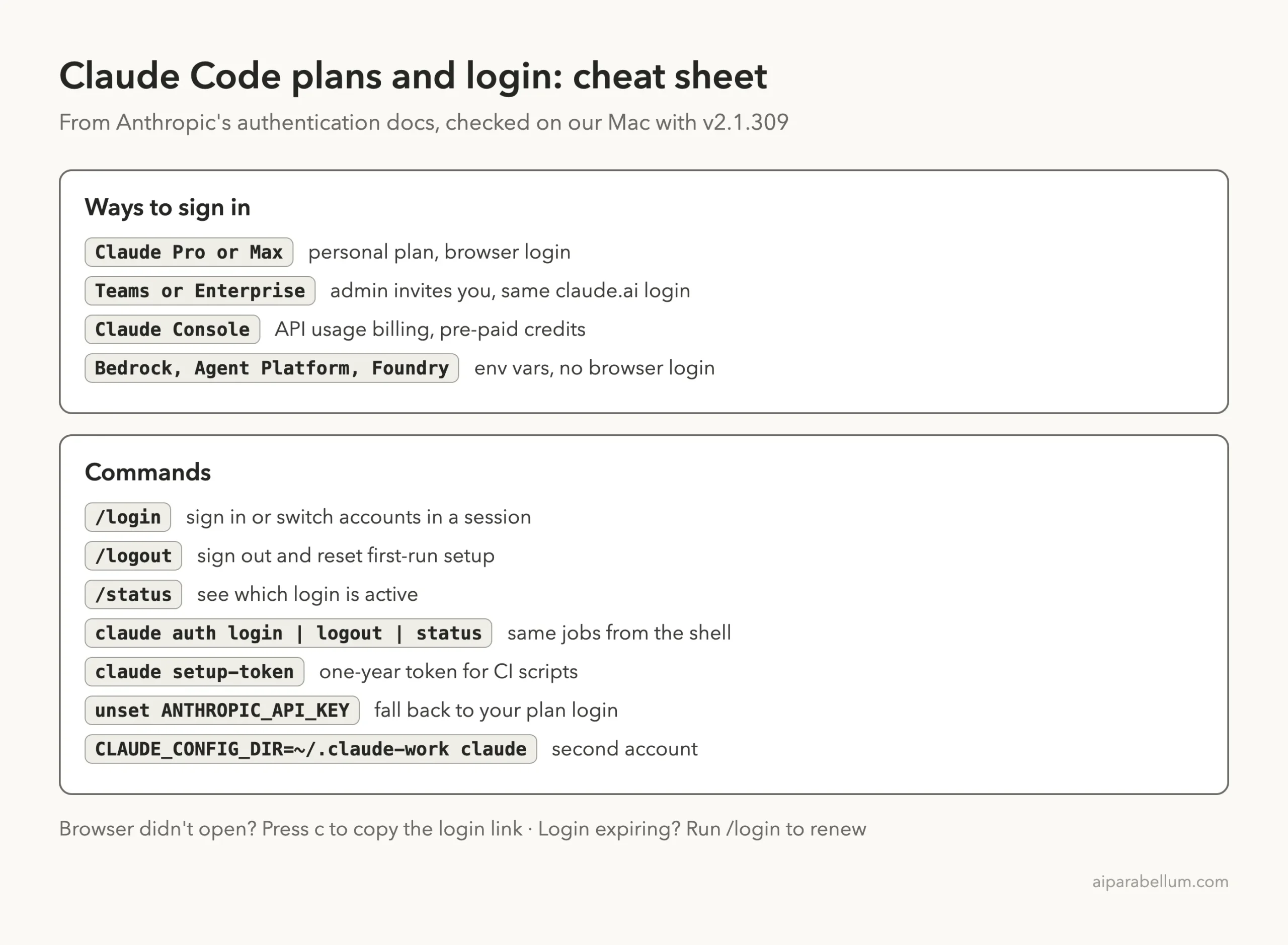
Claude Code Login Cheat Sheet
Save this card for the next time you set up a new machine or switch accounts.
Frequently Asked Questions
Which Claude plans work with Claude Code?
The docs list Claude Pro, Max, Team and Enterprise subscriptions. You can also use a Claude Console account billed by usage, or a supported cloud provider.
Can I use Claude Code with just an API key?
Yes. Set ANTHROPIC_API_KEY and approve it when Claude Code asks, and it skips the login prompt. Usage is billed to the Console account that owns the key.
How do I switch accounts in Claude Code?
Type /login inside a running session to sign in with a different account. To sign out completely, use /logout.
Why am I being billed for API use when I have a subscription?
An ANTHROPIC_API_KEY in your environment ranks above your subscription login. Unset it and confirm with /status that your subscription is active.
Do I need to log in every time I start Claude Code?
No. Once you log in, your credentials are stored and reused. You only sign in again when the login expires, when you log out, or when you switch accounts.
Conclusion
Claude Code plans and login options boil down to one question: who pays for the work? Individual developers usually pick Pro or Max, teams get the smoothest setup with Teams or Enterprise, pay-per-use fans choose the Console, and companies on AWS, Google Cloud or Azure can go through their cloud provider. Pick your route with the decision diagram, finish the browser sign-in, and check the result with claude auth status or /status. Watch out for stray API keys that quietly outrank your subscription, and renew your login when the three-day warning appears. To learn more about the models behind it all, visit our Claude AI page, or see how it stacks up in our Cursor comparison.
Previous in the series: Part 4: How Claude Code Works: The Agent Loop and Built-In Tools
Next in the series: Part 6: How to Set Up Your Terminal for Claude Code.