Few things stall a good coding session like a red message you don’t understand. The good news is that most Claude Code errors fall into a handful of families, and each family has a short, well-known fix. This guide walks you through the messages people hit most, what each one really means, and the exact steps to get working again.
This is Part 47 of 53 in our Claude Code tutorials series. In the previous part we used the /doctor checkup to clean up a messy setup; this part covers the errors that show up while you work.
Tested with Claude Code v2.1.310 on October 26, 2026, on macOS. We reproduced three errors for real in a throwaway demo folder, and the rest come straight from Anthropic’s official error reference.
Claude Code Errors at a Glance
Here is the short version. Find the words in your message, then jump to the matching section below.
| If the message says… | It usually means | Try this first |
|---|---|---|
| API Error: 500 or 529 Overloaded | A problem on the server side | Wait a minute, check status.claude.com, or switch with /model |
| Request timed out | No reply before the deadline | Retry, then check your network or proxy |
| The response above may be incomplete | The reply was cut off midway | Type continue |
| You’ve hit your session limit | Your plan’s allowance ran out | Run /usage and wait for the reset |
| Not logged in, Login expired, 401 | No valid credential | Run /status, then /login |
| Credit balance is too low | A Console API key is in use | Check for a stray ANTHROPIC_API_KEY |
| Unable to connect to API, SSL certificate | Network, proxy or certificate trouble | Run curl -I against the API, set your proxy or CA bundle |
| Prompt is too long, Request too large | The conversation is too big | Run /compact or /clear |
| There’s an issue with the selected model | A wrong or stale model name | Run /model or use an alias like sonnet |
Why Claude Code Shows Errors (and What It Does First)
Claude Code talks to Anthropic’s API over the internet, so anything along that path can fail. The server can be busy, your login can expire, your network can block the connection, or your conversation can grow too big to send. Each of these produces a different message.
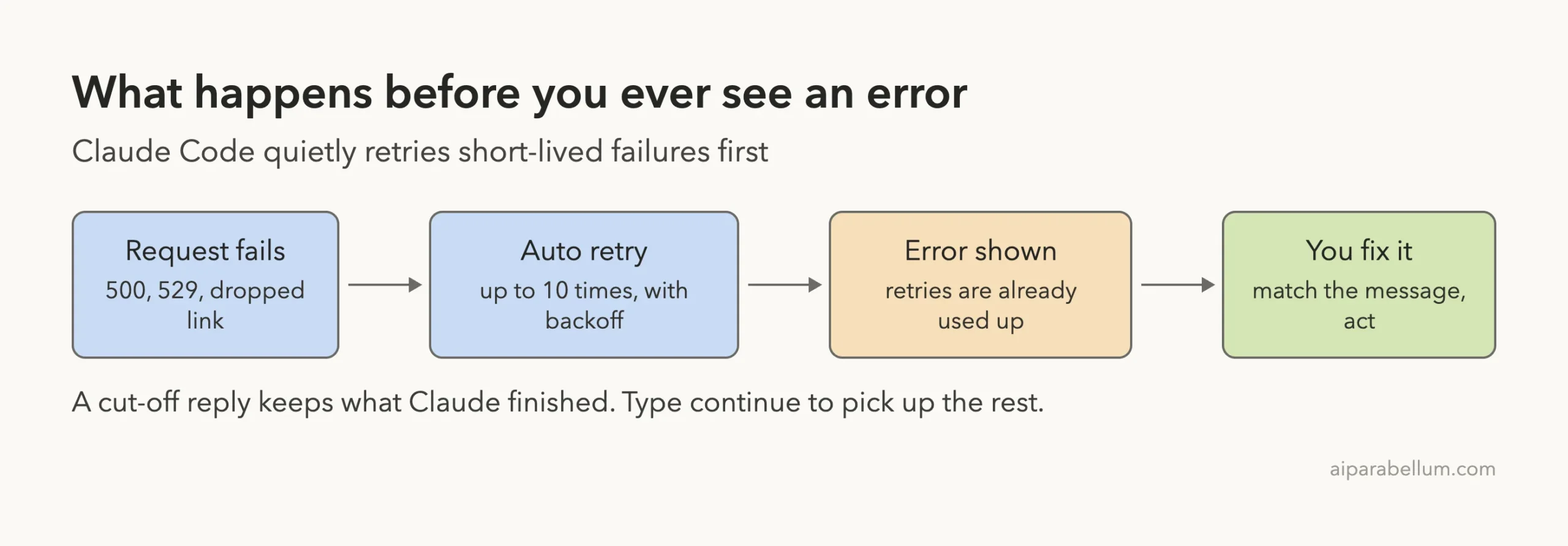
Before you ever see one of them, Claude Code tries to fix things on its own. According to the official docs, it retries short-lived failures up to 10 times, waiting a little longer between each attempt. While that happens, the spinner shows a “Retrying in” countdown with the attempt number.
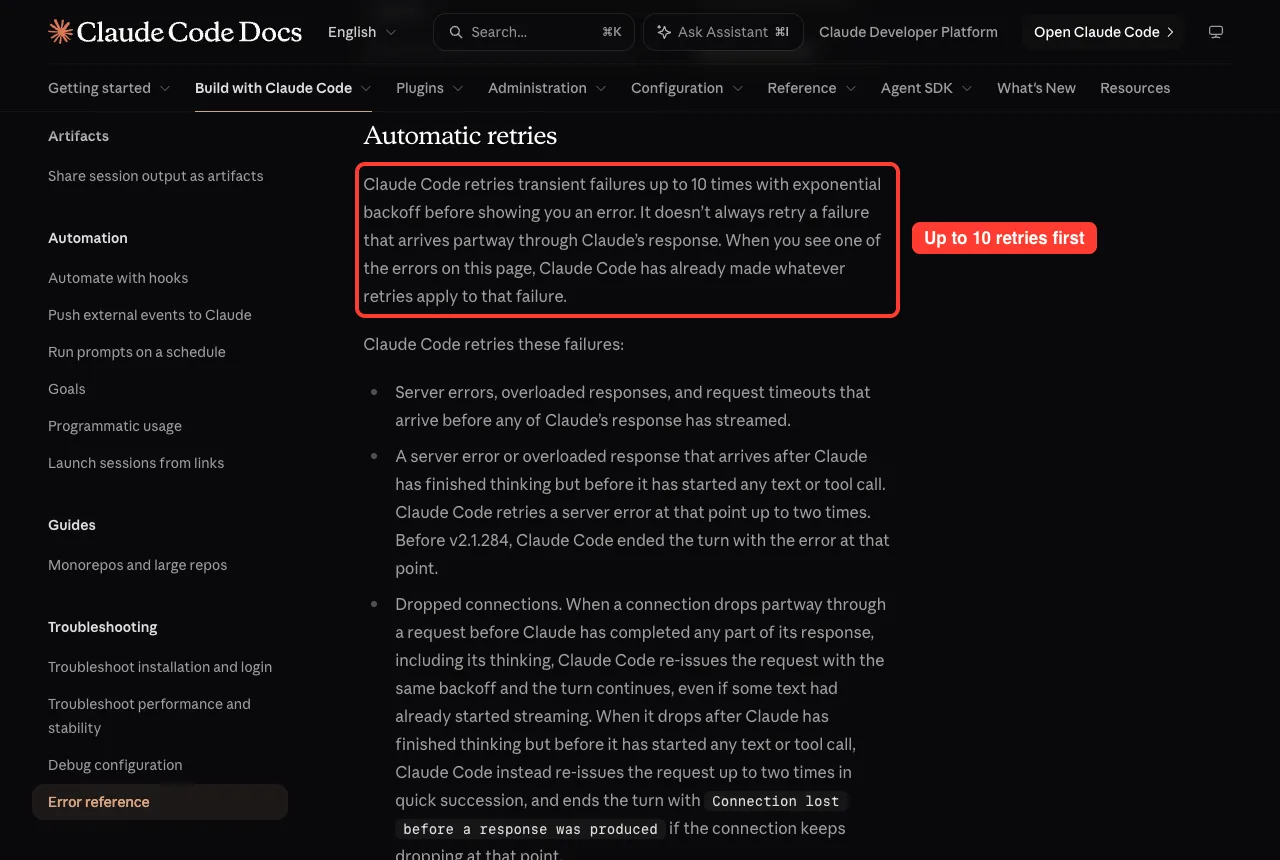
That has a simple meaning for you. When an error does reach your screen, the quick automatic fixes are already used up, so it’s your turn to act.
Read the whole message before you act. The words after “API Error:” almost always tell you which family you’re dealing with.
How to Look Up Any Claude Code Error
Anthropic keeps one page with every runtime message: the official error reference. It opens with a “Find your error” table that maps each message to its section.
- Copy the first line of your error, such as “API Error: Repeated 529 Overloaded errors”.
- Open the error reference and press Cmd+F (or Ctrl+F) to search for those words.
- Follow the “What to do” list in that section, top to bottom.
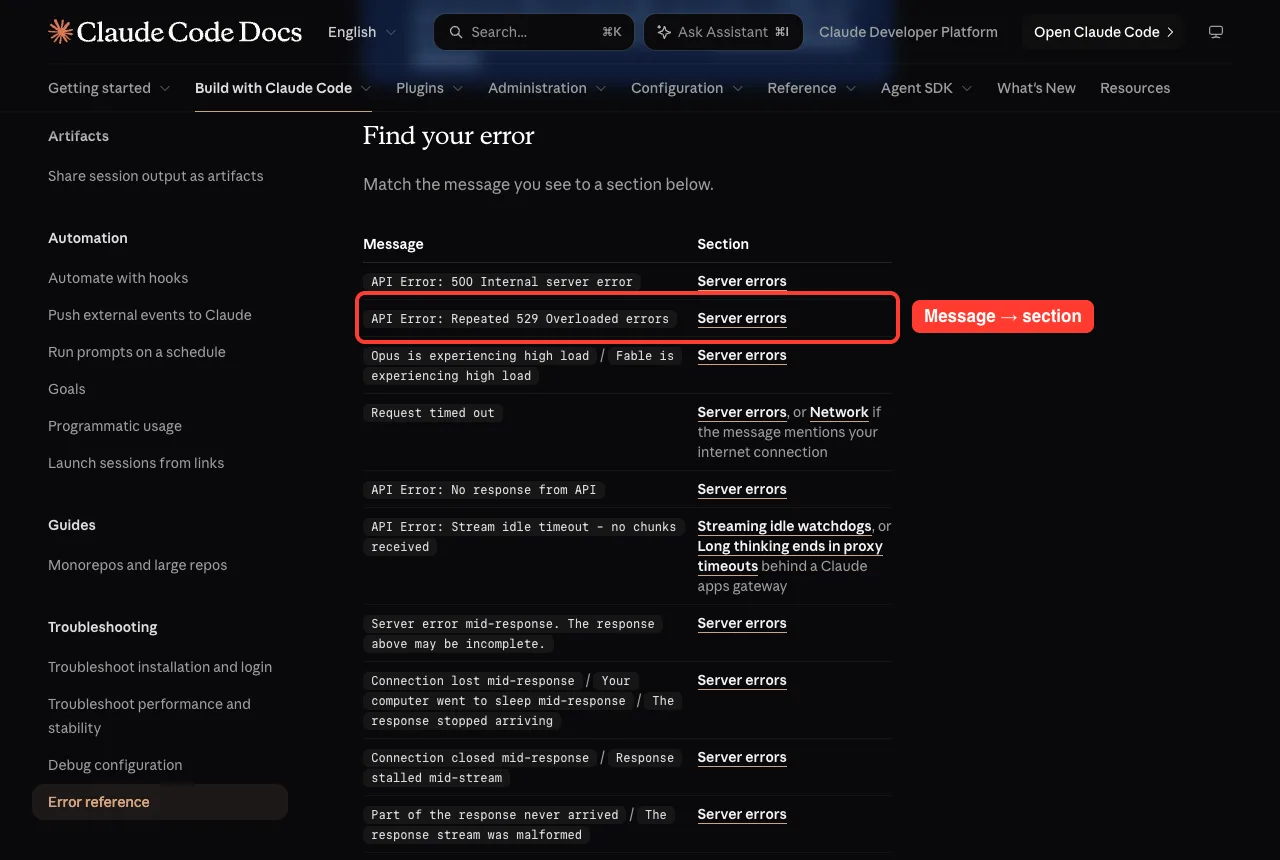
If you only remember one thing from this guide, make it this lookup habit. The sections below cover the messages you are most likely to meet.
Server Errors: 500, 529 Overloaded and Timeouts
API Error: 500 Internal server error
A 5xx error means something failed inside the API itself. The docs are clear that it is not caused by your prompt, settings or account.
- Check status.claude.com for an active incident.
- Wait a minute and send your message again. Your original message is still in the conversation, so for a long prompt you can simply type try again.
- If it keeps happening with no posted incident, run /feedback so Anthropic can investigate.
API Error: Repeated 529 Overloaded errors
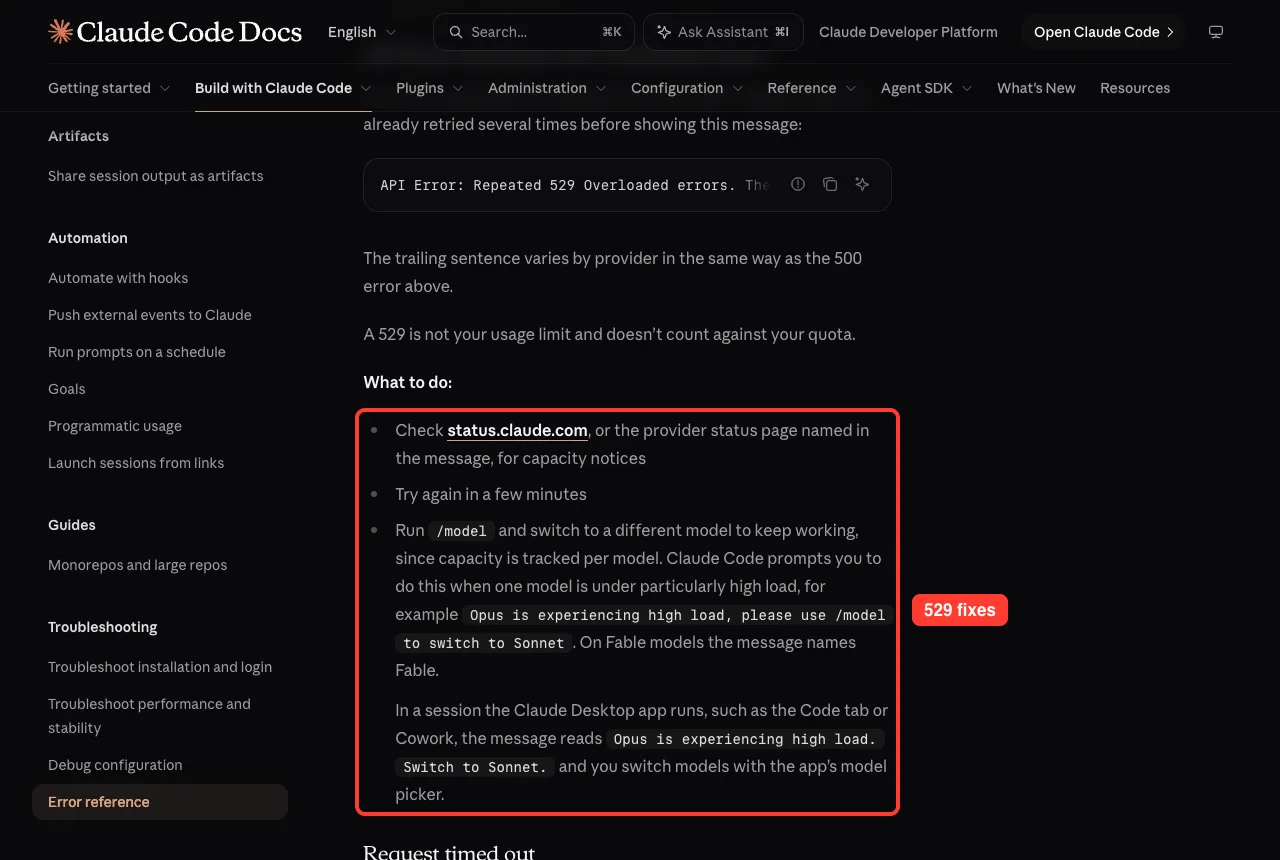
A 529 means the API is at capacity for everyone right now. It is not your usage limit and doesn’t count against your quota.
Because capacity is tracked per model, switching models is the fastest way to keep working. Run /model and pick another one; Claude Code may even suggest this with a message like “Opus is experiencing high load”.
Request timed out
This means the API didn’t respond before the connection deadline, which is 10 minutes by default. Retry first. If a slow network or company proxy is the cause, raise the API_TIMEOUT_MS environment variable, which is covered in our guide to environment variables.
The response above may be incomplete
Sometimes the connection breaks after Claude has already written part of its answer. Instead of throwing that work away, Claude Code keeps what Claude finished and adds this notice.
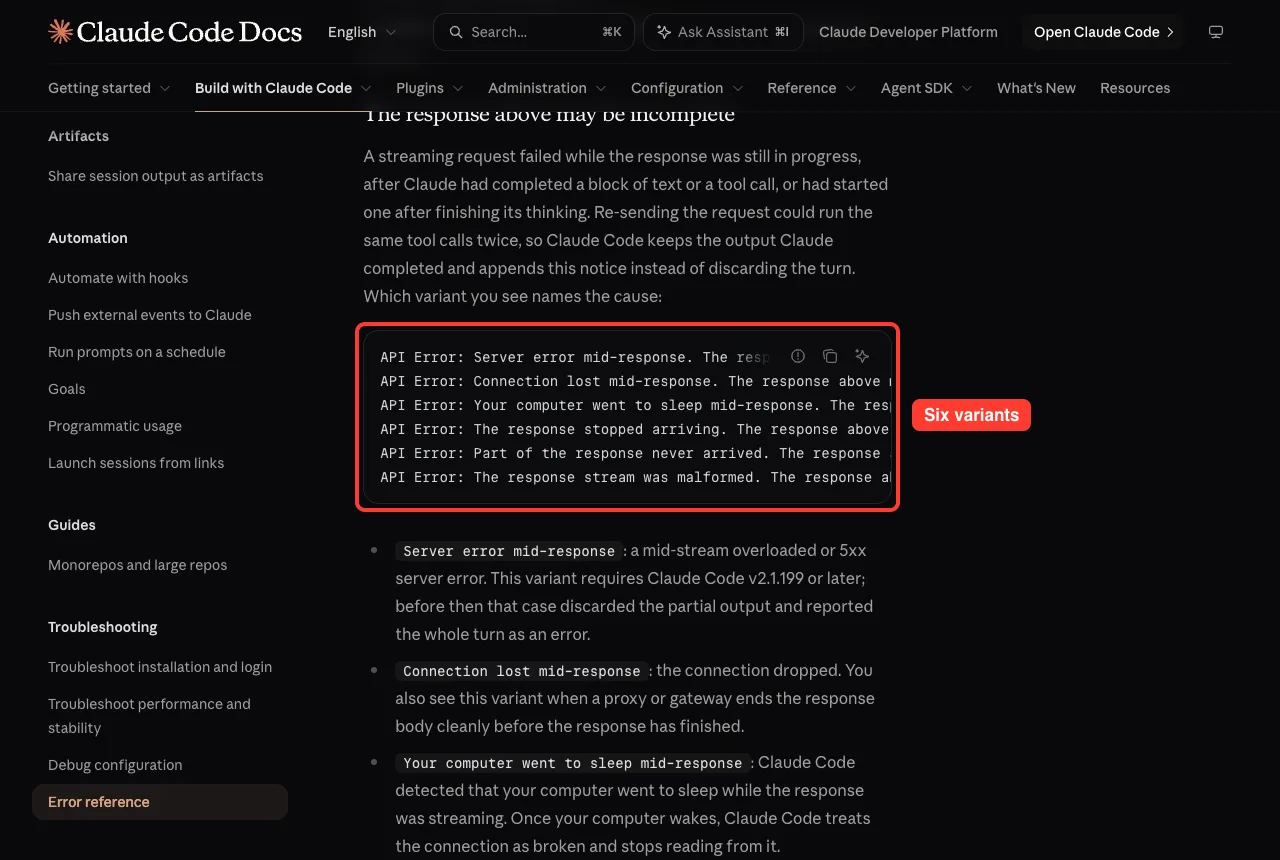
The fix is easy. In an interactive session, reply with continue and Claude picks up from its last completed block. If your laptop went to sleep, the notice says so, which is a hint to keep it awake during long tasks.
Usage Limits and Billing Errors
You’ve hit your session limit
Subscription plans come with a rolling usage allowance. When it runs out, you see a message such as “You’ve hit your session limit” or “You’ve hit your weekly limit”, each with a reset time.
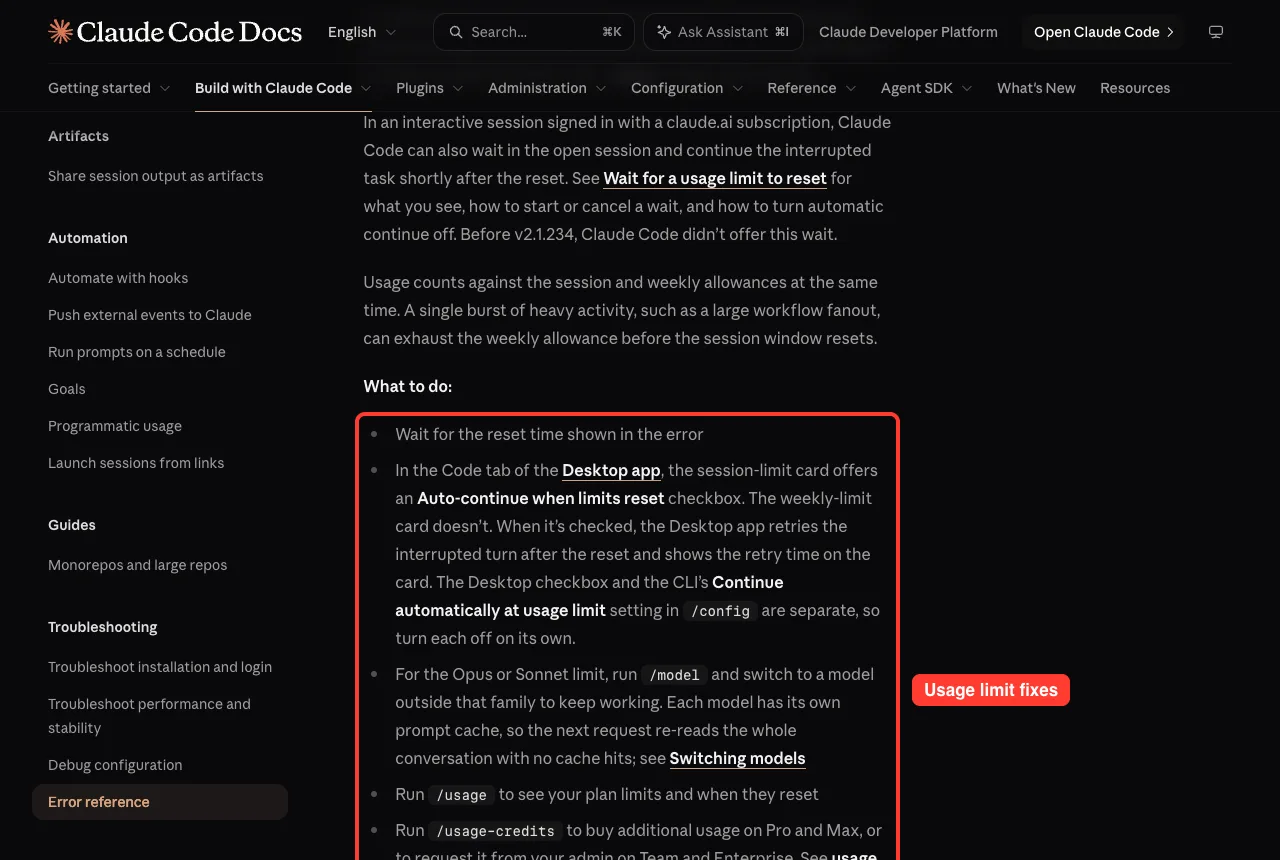
- Wait for the reset time shown in the message.
- Run /usage to see your plan limits and when they reset.
- For an Opus or Sonnet limit only, run /model and switch to a model outside that family. The session and weekly limits are shared across all models, so switching won’t help there.
Credit balance is too low
This one surprises many subscribers. It means Claude Code is sending your requests with a Console API key, and that key’s prepaid credits ran out.
If you pay for Pro, Max, Team or Enterprise, run /status and look for an API key row. A leftover ANTHROPIC_API_KEY in your shell can override your subscription, so unset it, remove it from your shell profile, and relaunch claude.
Request rejected (429)
A 429 means you hit the rate limit for your API key or cloud project. Check /status to confirm the active credential, and avoid running many parallel subagents at once. Our model guide also helps if you want a lighter model for big scripted runs.
Login and Authentication Errors
Login problems all start with the same question: which credential is Claude Code actually using? Run /status first, because the fix changes depending on the answer.
| Message | What happened | Fix |
|---|---|---|
| Not logged in · Please run /login | No valid credential for this session | Run /login |
| Login expired · Please run /login | Your saved login couldn’t be renewed | Run /login; retrying alone won’t help |
| Invalid API key · Fix external API key | The key in ANTHROPIC_API_KEY was rejected | Check for typos, or unset it and use /login |
| API Error: 401 Invalid authentication credentials | The account or key behind it was revoked or disabled | Run /status, then /login or rotate the key |
A quick way to spot a stale key is to run env | grep ANTHROPIC in the same shell. The docs warn that tools like direnv and IDE terminals can quietly load an old key from a .env file. For install and first sign-in problems, see our guide to login problems.
Network and Connection Errors
Unable to connect to API
This means the connection to the API failed or never finished. The message often names the cause in plain words, such as “Connection refused” or “Can’t reach the API server”.
Start with the test the docs recommend: run curl -I https://api.anthropic.com from the same shell. We ran it on our Mac, and any HTTP reply, even a 404 like ours, proves the network can reach the API host.
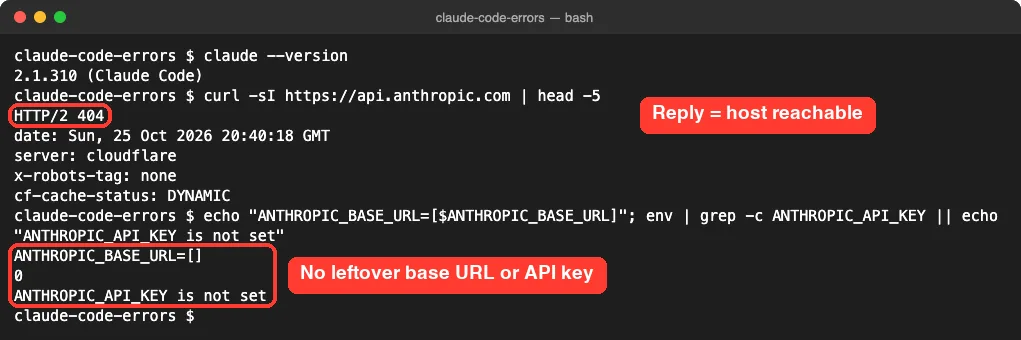
If curl works but Claude Code still fails, check for a leftover ANTHROPIC_BASE_URL. When it points at a local proxy or gateway that is no longer running, you get “Connection refused” even though curl reaches the API. Behind a company proxy, set HTTPS_PROXY before launching Claude Code.
SSL certificate errors
Many workplaces inspect secure traffic with their own certificate, and Claude Code doesn’t trust it by default. You’ll see codes like UNABLE_TO_GET_ISSUER_CERT_LOCALLY or SELF_SIGNED_CERT_IN_CHAIN.
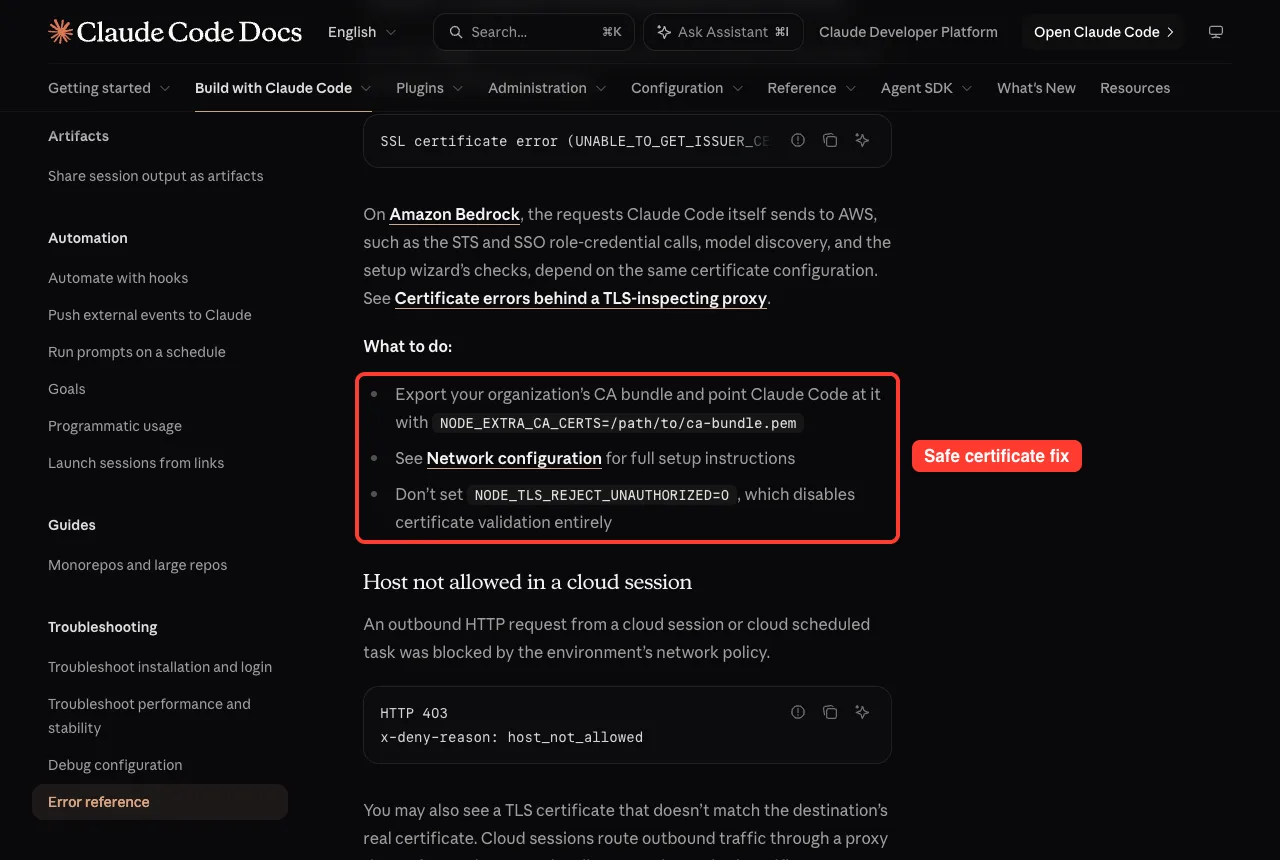
Ask IT for your organization’s CA bundle and point Claude Code at it with NODE_EXTRA_CA_CERTS=/path/to/ca-bundle.pem. The network configuration guide has the full setup. Never set NODE_TLS_REJECT_UNAUTHORIZED=0, because it turns off certificate checks completely.
Request Errors: Prompt Too Long, Request Too Large and Model Problems
Prompt is too long
This means your conversation plus attached files no longer fit in the model’s context window. In an interactive session it reads “Context limit reached · /compact or /clear to continue”.
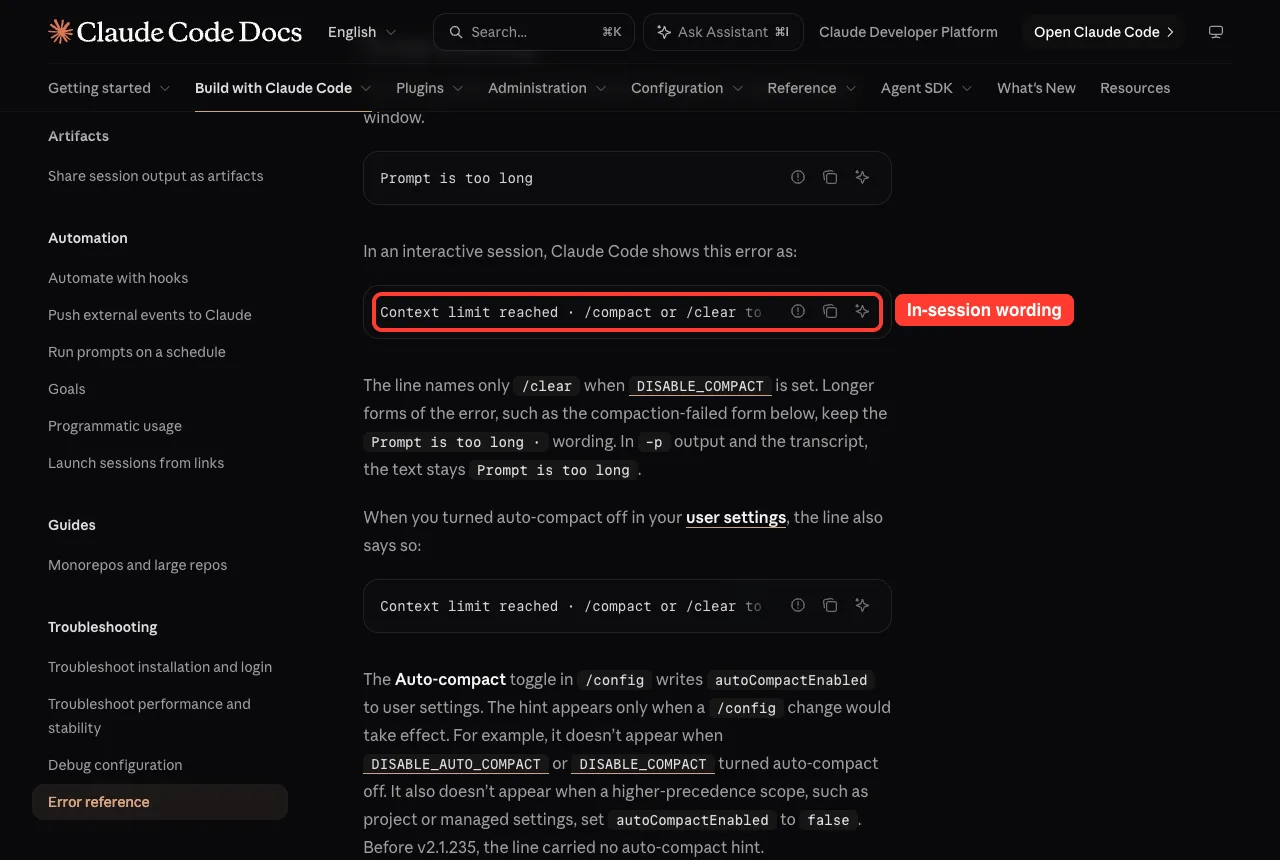
- Run /compact to summarize earlier turns, or /clear to start fresh.
- Run /context to see what fills the window.
- Turn off MCP servers you don’t use with /mcp disable followed by the server name.
- Trim a bloated CLAUDE.md file.
Auto-compact is on by default and normally prevents this error, so check that you didn’t turn it off. Our context window guide explains /context and /compact in depth.
Request too large and Image was too large
“Request too large” means the raw request passed the API’s 32MB limit, usually from big pastes or many images. Run /compact, which drops accumulated images and attachments, and reference big files by path instead of pasting them.
For images, the API accepts up to 8000 pixels on the longest edge for a single image, or 3000 pixels when more than 20 images are in context. A tighter screenshot usually solves it.
There’s an issue with the selected model
This appears when the model name isn’t recognized or your account can’t use it. We triggered it on purpose with a made-up model ID in headless mode.
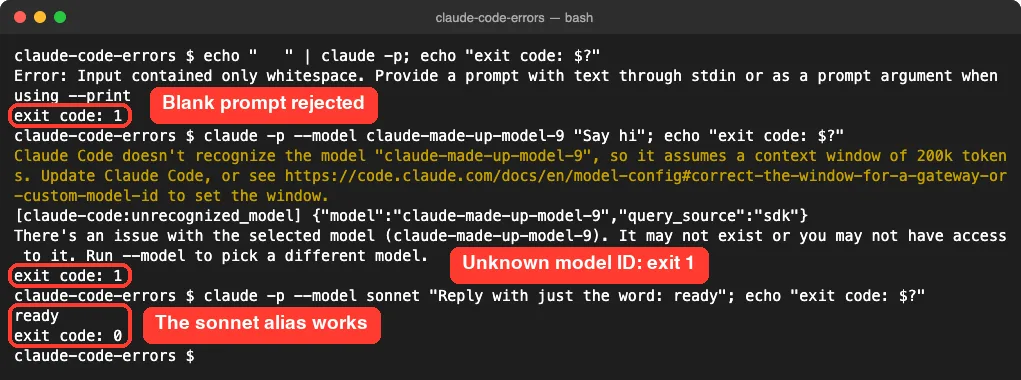
As the docs describe, the hint changes by surface: in a -p run it says “Run –model”, while an interactive session says “Run /model”.
The fix in our test was simple. Swapping the made-up ID for the alias sonnet worked right away, because aliases always point to a current model. You can learn more in Anthropic’s model configuration docs.
Response exceeded the output token maximum
Claude’s reply hit the largest output size the request allowed and got cut off. Reply continue to get the rest, or ask for big outputs in smaller pieces, such as one file per reply.
Small Errors You Can Fix in Seconds
Not every error is scary. Some are just Claude Code catching a slip before anything is sent.
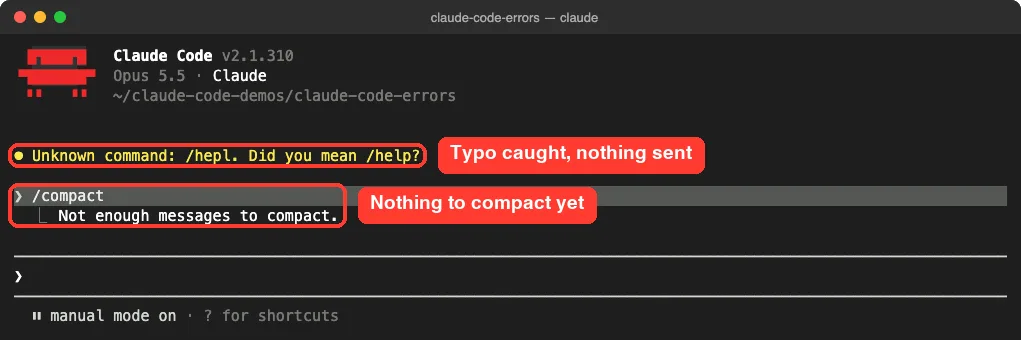
- Unknown command: /hepl. Did you mean /help? You mistyped a slash command. Run the suggested name instead.
- Not enough messages to compact. The conversation is too short to summarize. Use /clear if you want a fresh start.
- Error: Input contained only whitespace. A script passed an empty prompt to claude -p. Check that the variable or file feeding the prompt isn’t empty.
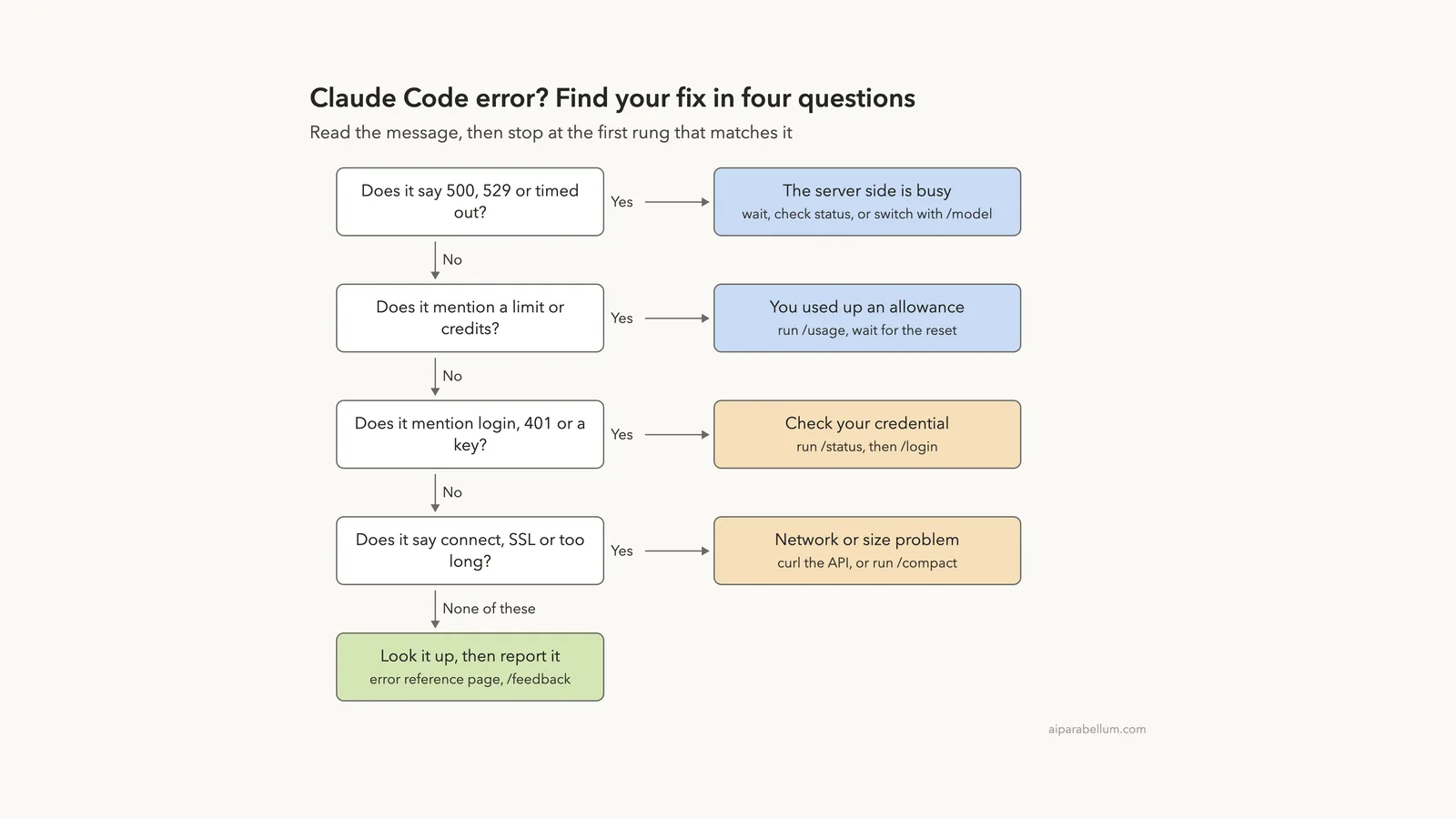
Which Fix Should You Try First?
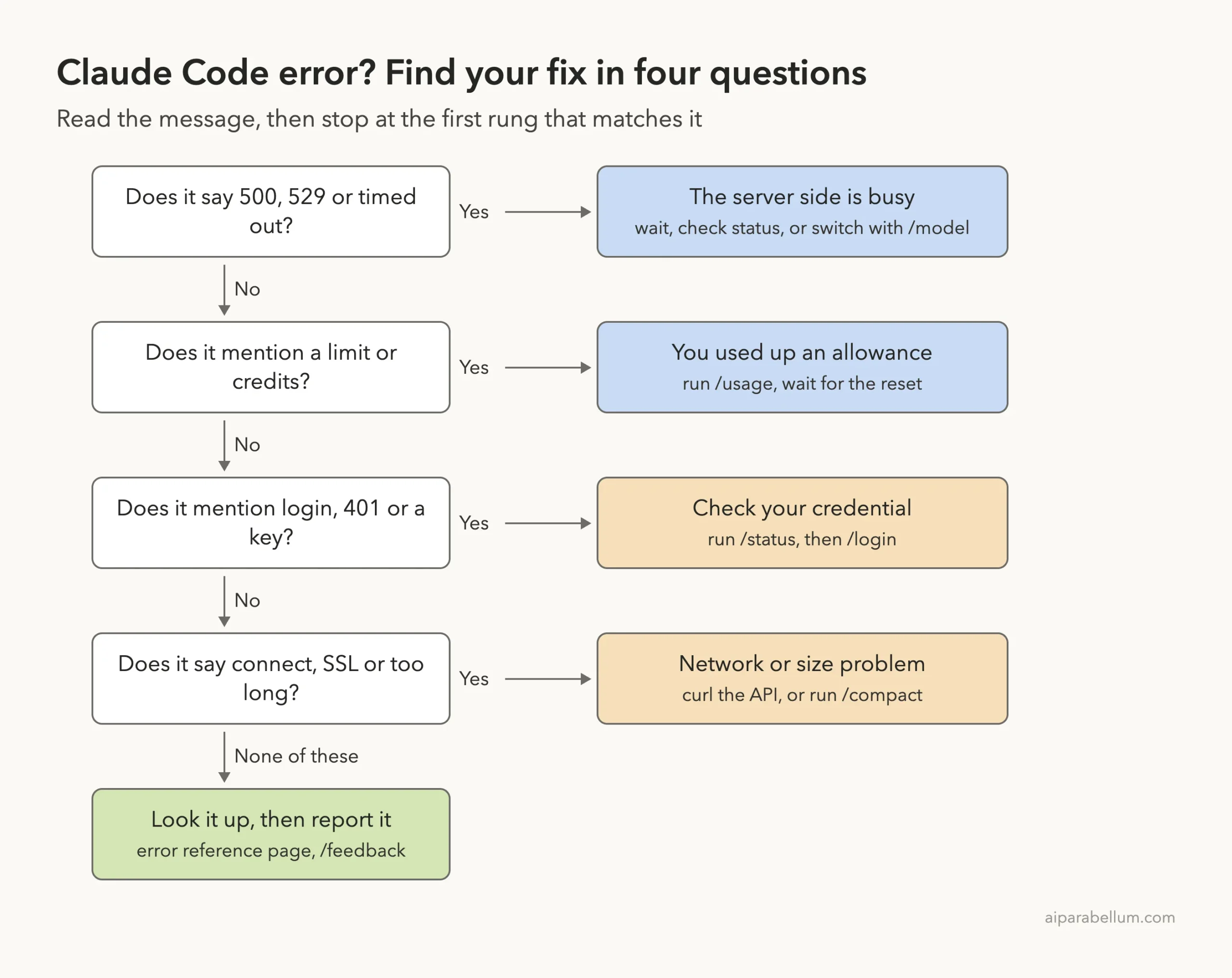
When you’re stuck, walk down this ladder. Most Claude Code errors stop at the first or second rung.
Real Examples From Our Test Session
Here is what we actually saw on our Mac with Claude Code v2.1.310. Each case took under a minute to resolve.
| What we did | Message we got | What fixed it |
|---|---|---|
| Piped a blank line into claude -p | Error: Input contained only whitespace | Sending a real prompt |
| Passed –model claude-made-up-model-9 | There’s an issue with the selected model | Using –model sonnet |
| Typed /hepl in a session | Unknown command: /hepl. Did you mean /help? | Typing the right command |
| Ran /compact in a fresh session | Not enough messages to compact. | Nothing needed; it’s expected |
Notice that both failing headless runs ended with exit code 1, while the working run ended with 0. That makes these errors easy to catch in scripts.
Try It Yourself
Practice reading errors safely in a throwaway folder. Create an empty folder, open a terminal there, and run these commands one at a time.
claude --version
curl -I https://api.anthropic.com
echo "   " | claude -p; echo "exit code: $?"
claude -p --model sonnet "Reply with just the word: ready"; echo "exit code: $?"
Then start claude in the same folder and paste this prompt to see how Claude explains an error in plain English:
I got "API Error: Repeated 529 Overloaded errors" in Claude Code. In three short bullet points, explain what it means and what I should do. Do not run any commands.Common Mistakes
- Retrying a login error over and over. “Login expired” repeats on every request until you run /login.
- Switching models for a session or weekly limit. Those limits are shared across all models.
- Forgetting an old ANTHROPIC_API_KEY. It can override your subscription and cause “Credit balance is too low”.
- Turning off certificate checks with NODE_TLS_REJECT_UNAUTHORIZED=0 instead of setting NODE_EXTRA_CA_CERTS.
- Replying with long corrections after a bad turn. The docs suggest rewinding with Esc twice and rephrasing instead.
Pro Tips
- Use model aliases such as sonnet or opus instead of full version IDs, so your settings never go stale.
- Run /status whenever an auth or billing error looks strange; it shows the credential actually in use.
- Keep long conversations healthy with /compact at natural breaks, before the window fills up.
- If a turn goes wrong, press Esc twice or run /rewind to step back. Our rewind guide shows how checkpoints work.
- Run claude doctor from your shell when you suspect the install itself, then use /feedback for anything still unexplained.
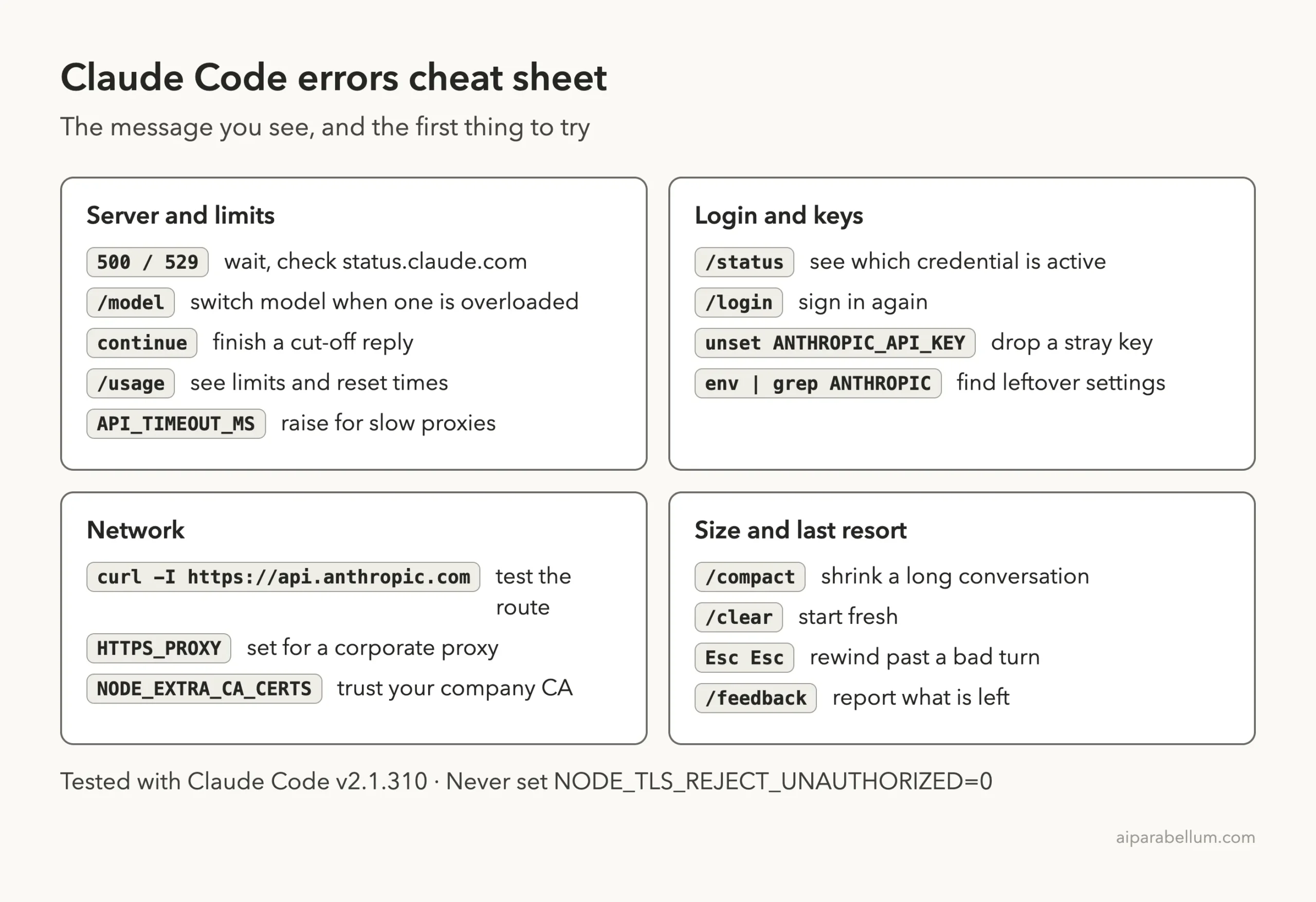
Claude Code Errors Cheat Sheet
When Nothing on This List Works
Some errors are rare or brand new. The docs list a few last-resort steps for those cases.
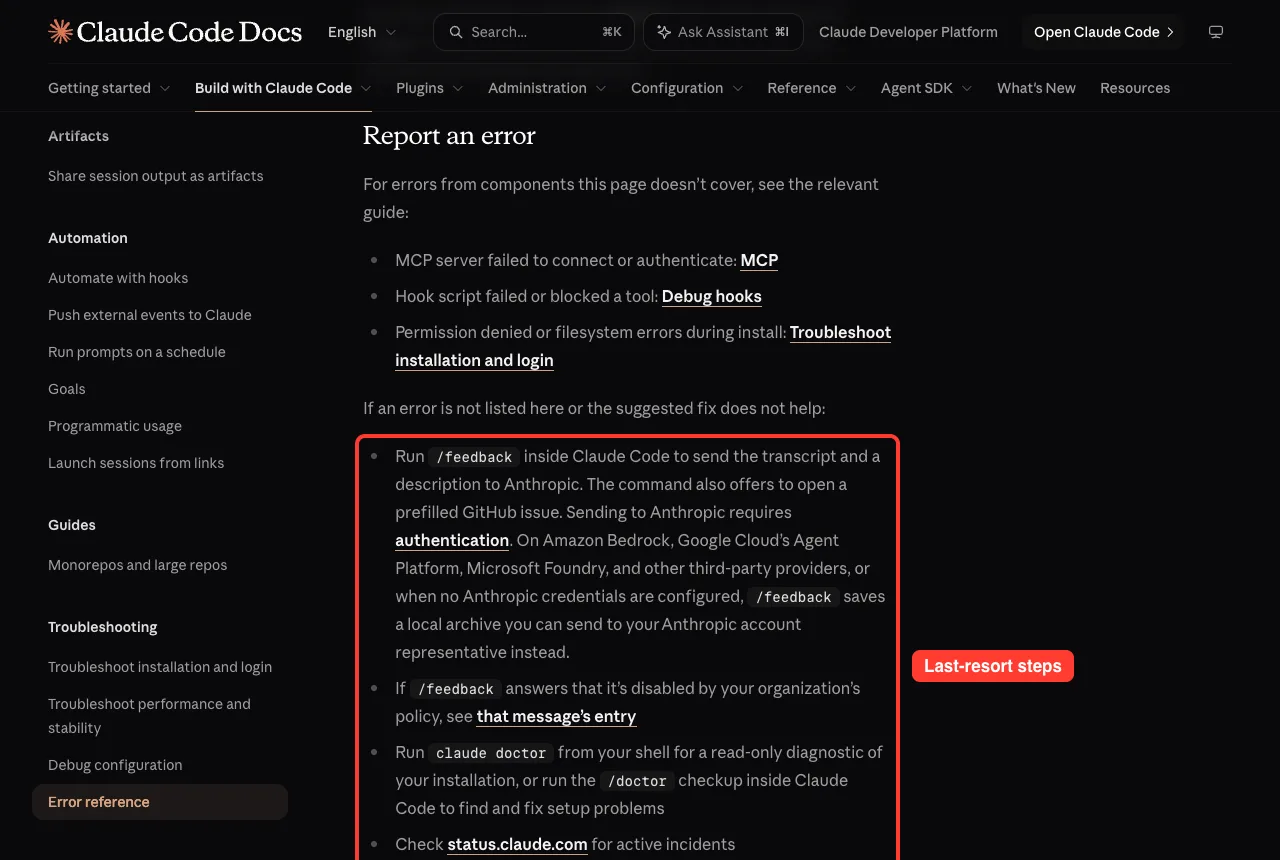
- Run /feedback inside Claude Code to send the transcript and a description to Anthropic.
- Run claude doctor from your shell for a read-only check of your installation.
- Check status.claude.com for active incidents.
- Search the existing issues on GitHub for your exact message.
If you are new to Anthropic’s tools in general, our Claude AI overview is a good starting point.
Frequently Asked Questions
Does a 529 Overloaded error use up my plan limit?
No. The official docs say a 529 is not your usage limit and doesn’t count against your quota. It just means the API is busy right now.
Why do I see “Credit balance is too low” when I pay for a subscription?
An ANTHROPIC_API_KEY in your environment is probably overriding your subscription. Run /status, unset the key, remove it from your shell profile, and relaunch claude.
Will I lose Claude’s work if the connection drops mid-reply?
Usually not. Claude Code keeps every block Claude completed and shows “The response above may be incomplete”. Type continue to pick up the rest.
Is it safe to set NODE_TLS_REJECT_UNAUTHORIZED=0 to fix SSL errors?
No. The docs warn against it because it disables certificate validation entirely. Set NODE_EXTRA_CA_CERTS to your company’s CA bundle instead.
How do I fix “Prompt is too long” quickly?
Run /compact to summarize earlier turns, or /clear to start over. Then use /context to find what is filling the window, such as unused MCP servers.
Conclusion
Claude Code errors look alarming, but they follow a clear pattern: Claude Code retries quietly first, then shows a message that names its own family. Server errors mean wait or switch models, limits mean check /usage, login trouble starts with /status, network trouble starts with curl, and size problems end with /compact. Keep the official error reference and our cheat sheet nearby, and most errors become a one-minute fix instead of a lost afternoon.
Previous in the series: Part 46, Debug Your Claude Code Configuration With /doctor
Next in the series: Part 48: How to Manage Claude Code Costs and Usage.