Claude Code costs can creep up quietly. A long session, a big model left on by default, or a pile of tools you forgot about can all make each message more expensive than it looks. This guide shows you how to see exactly what you are spending, why usage climbs, and the handful of habits that keep your bill or plan limits under control.
This is Part 48 of 53 in our Claude Code tutorials series. In the previous part we walked through common error messages, including the usage-limit ones; this part shows you how to avoid hitting those limits in the first place.
Tested with Claude Code v2.1.310 on October 26, 2026, on macOS. Every screenshot below comes from a real session in a small throwaway demo folder, and every dollar figure is the estimate Claude Code itself showed us.
Claude Code Costs at a Glance
Here is the quick version before we dig in. Each row is a tool you can use today.
| What you want | Command or setting | What it does |
|---|---|---|
| See this session’s cost | /usage | Shows estimated cost, tokens per model and cache use |
| Watch cost all the time | Status line with cost.total_cost_usd | Puts a live cost figure under the prompt |
| Start fresh for free | /clear | Empties the conversation and resets the session total to $0 |
| Shrink a long chat | /compact with a focus | Summarizes history so later messages carry less |
| Use a cheaper model | /model sonnet or –model | Sonnet costs less than Opus and handles most coding jobs |
| Think less on easy work | /effort | Lower effort means fewer thinking tokens |
| Cap a script | claude -p –max-budget-usd | Stops a print-mode run once its estimated spend hits the cap |
Why Claude Code Usage Adds Up
Claude Code charges by API token use. If you are on a subscription plan, those tokens count against your plan’s usage limits instead of showing up as a dollar bill. Either way, the same rule applies: more context means more tokens.
The key thing most people miss is that Claude Code sends your full conversation with every request. Each time Claude uses a tool, it sends another request with that tool’s results too. So a one-line question in a session that has been open all day still draws usage for the whole history.
Prompt caching softens this a lot. Repeated content like the system prompt is read from cache at a lower rate, which Anthropic’s prompt caching guide explains in detail. But the cache has a lifetime, and your first message after a long break can miss it and reprocess everything.
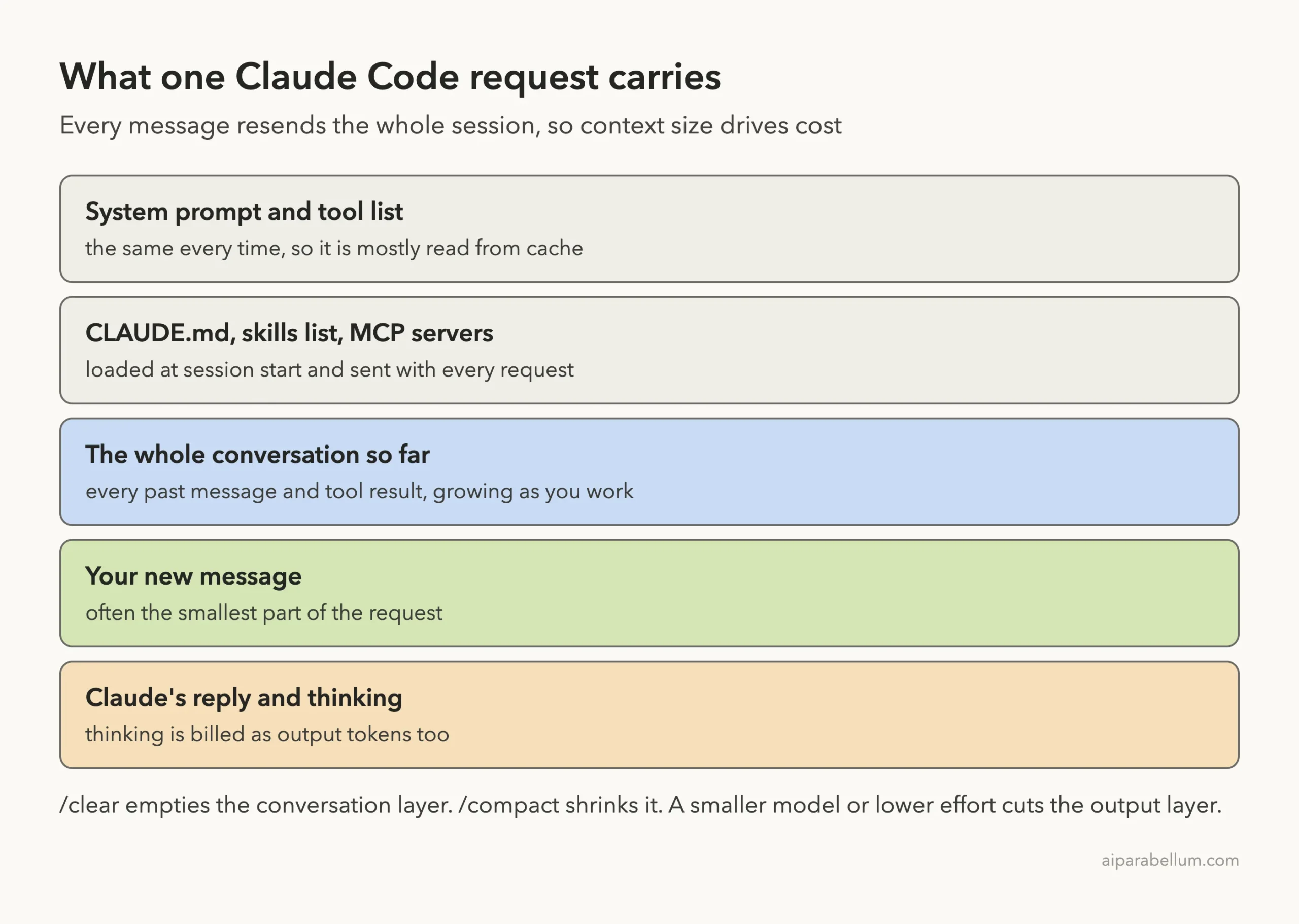
For a sense of scale, Anthropic’s official costs page says enterprise users average around $13 per developer per active day. It adds that 90% of users stay below $30 per active day. Your own numbers depend on your model, your codebase and how you work.
The cheapest token is the one you never resend. Most cost savings come from keeping context small, not from typing shorter prompts.
Step 1: Check Your Claude Code Costs With /usage
Start by looking at real numbers. Type /usage at the Claude Code prompt and press Enter. The Session block at the top is the part that matters for cost.
In our demo we asked one tiny question about a 10-line Python file. Then we opened /usage to see what that single question cost.
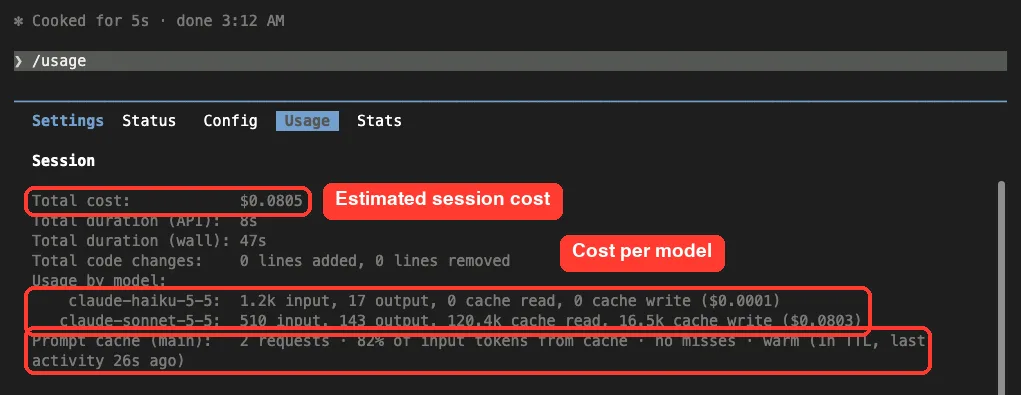
Here is how to read each line:
- Total cost is an estimate Claude Code calculates locally at list price. For your real bill, check the Claude Console usage page or your plan settings.
- Usage by model splits input, output, cache reads and cache writes per model. Our one question cost about $0.08, almost all of it on Sonnet.
- Prompt cache (main) shows requests, the share of input served from cache, misses, and whether the cache is still warm. Ours read 82% of input from cache.
Why did one small question read 120,000 cached tokens? Our test machine has many plugins, skills and MCP tools installed, and all of that rides along with every request. That is a perfect example of hidden overhead, and we will trim it later.
Read the Plan Breakdown and Press f to Fix
If you sign in with a Pro, Max, Team or Enterprise plan, /usage also shows plan usage bars and a breakdown of what is eating your limits. Each recommendation row starts with the share of recent usage it applies to.

The share tells you how much usage the row applies to, not how much the fix saves. Rows can overlap, so they may add up to more than 100%.
When the footer shows a hint like “f to fix 1 of 3,” pressing f lets Claude Code apply the fixes it can, and you handle the rest. Press d or w to switch between the last day and the last week.
Step 2: Watch Cost Live in the Status Line
Opening /usage over and over gets old. A better habit is to put the cost right under the prompt with a custom status line. We covered the basics in our status line guide, so here is just the cost version.
We saved this small script as .claude/cost-line.sh in the demo project and made it executable with chmod +x:
#!/bin/bash
input=$(cat)
MODEL=$(echo "$input" | jq -r '.model.display_name')
COST=$(echo "$input" | jq -r '.cost.total_cost_usd // 0')
CTX=$(echo "$input" | jq -r '.context_window.used_percentage // 0')
printf '[%s] cost $%.4f | context %s%%\n' "$MODEL" "$COST" "$CTX"
Then we pointed the project’s .claude/settings.json at it:
{
  "statusLine": {
    "type": "command",
    "command": "./.claude/cost-line.sh"
  }
}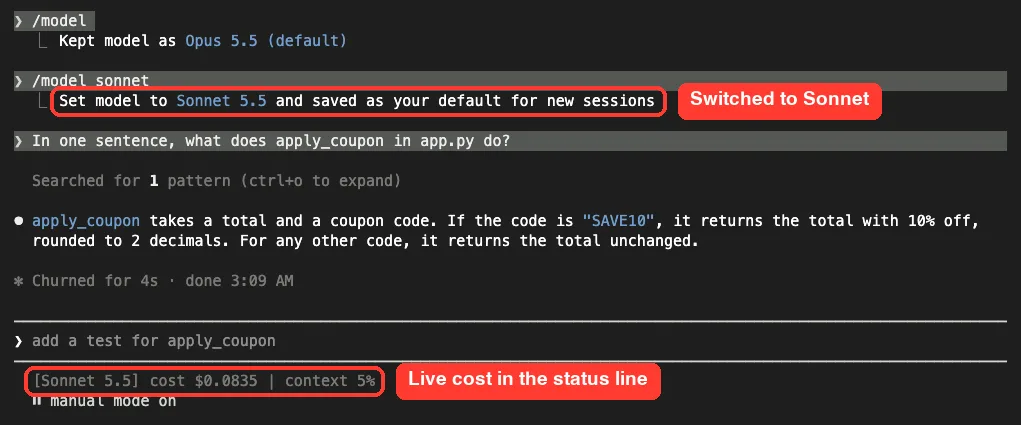
The cost.total_cost_usd field is the same estimate /usage shows, and it resets to $0 when /clear starts a new session. The status line docs list every field you can use.
Step 3: Pick the Right Model and Effort
Model choice is one of the biggest cost levers you have. Sonnet handles most coding tasks well and costs less than Opus, so the docs suggest saving Opus for complex architecture work or multi-step reasoning. Our model selection guide goes deeper on the options.
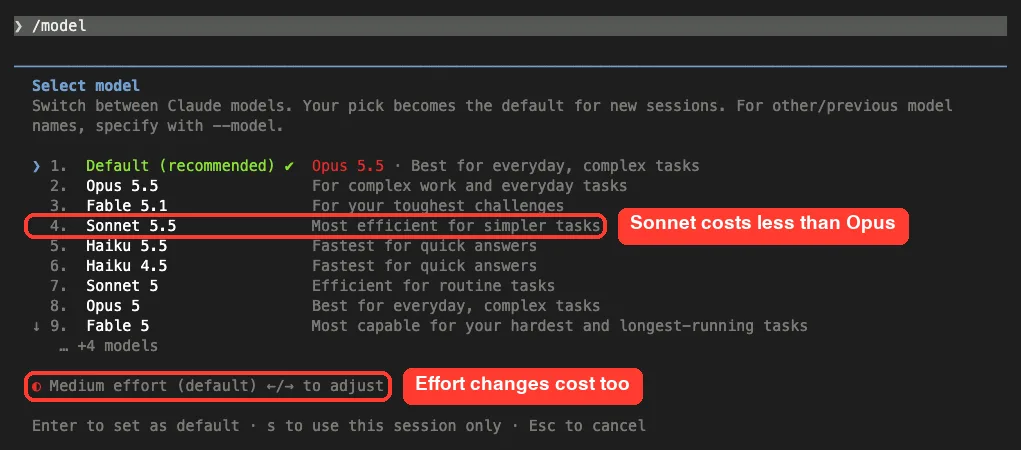
One catch we hit in our own test: typing /model sonnet saved Sonnet as the default for new sessions too. If you only want a cheaper model for one session, press s in the picker, or start with claude –model sonnet instead.
Lower Effort for Simple Jobs
Extended thinking is on by default because it helps a lot with planning and hard problems. But thinking tokens are billed as output tokens, and the budget can reach tens of thousands of tokens per request. For simple tasks, lower the effort level.
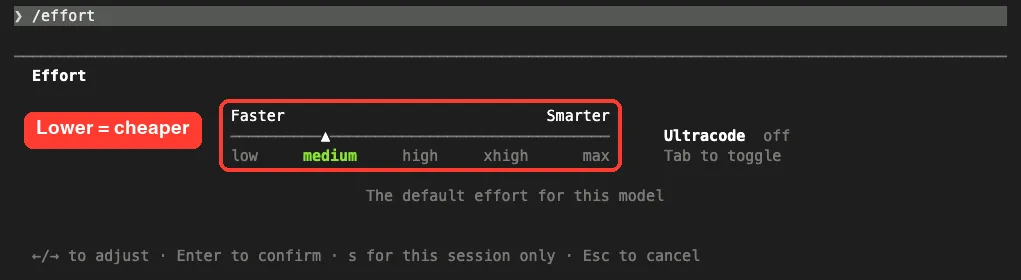
Run /effort and move the slider with the arrow keys. Press s to keep the change for this session only. Note that some newer models always use extended thinking, so lowering effort is the main control there, as the model configuration docs explain.
Step 4: Clear and Compact to Keep Context Small
Stale context wastes tokens on every message that follows. When you switch to unrelated work, run /clear. It costs nothing and resets the session totals, as our demo shows.
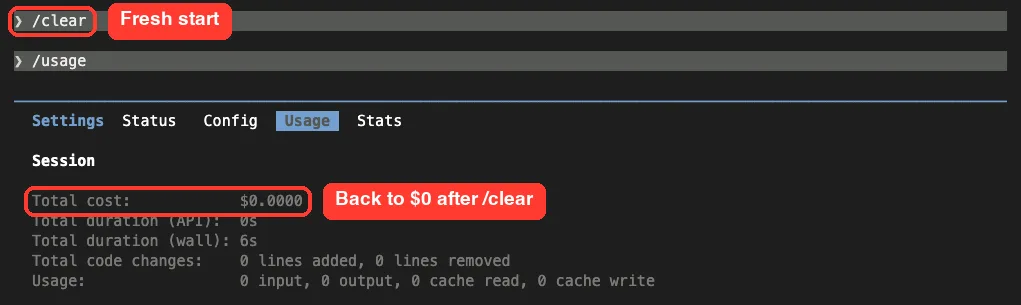
Want to come back to that work later? Run /rename first so you can find the session, then /resume it when you need it. Our sessions guide shows how.
When you still need the conversation, use /compact with a focus instead. For example, /compact Focus on code samples and API usage tells Claude what to keep in the summary.
Just remember that compacting reads the whole conversation, so compacting a huge context is itself a large request. Our context window guide covers /context and /compact in detail.
You can also add standing compaction instructions to your CLAUDE.md file:
# Compact instructions

When you are using compact, please focus on test output and code changes
Step 5: Cap Spending in Scripts With –max-budget-usd
If you run Claude Code from scripts, you can set a hard stop. The –max-budget-usd flag works in print mode only and stops the run once estimated spend reaches the amount you set. Our headless mode guide covers claude -p itself.
We tried two runs. The first used Haiku with a $0.25 cap and JSON output, so we could read the real cost. The second set a tiny $0.001 cap to see what happens when you go over.
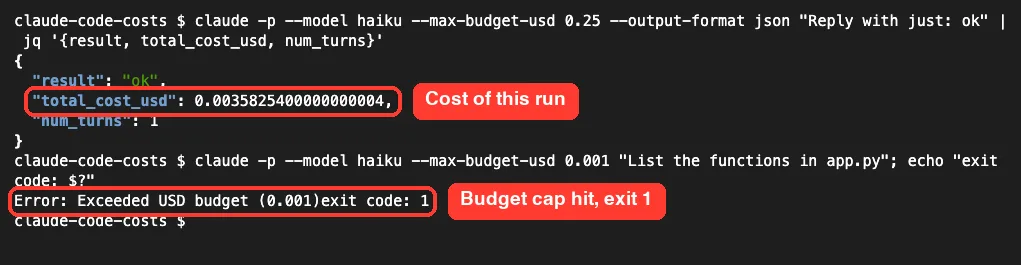
The quick Haiku reply cost about a third of a cent. The second run stopped with “Exceeded USD budget” and exit code 1, which a script can check. The CLI reference warns that spend can pass the cap, so leave some headroom.
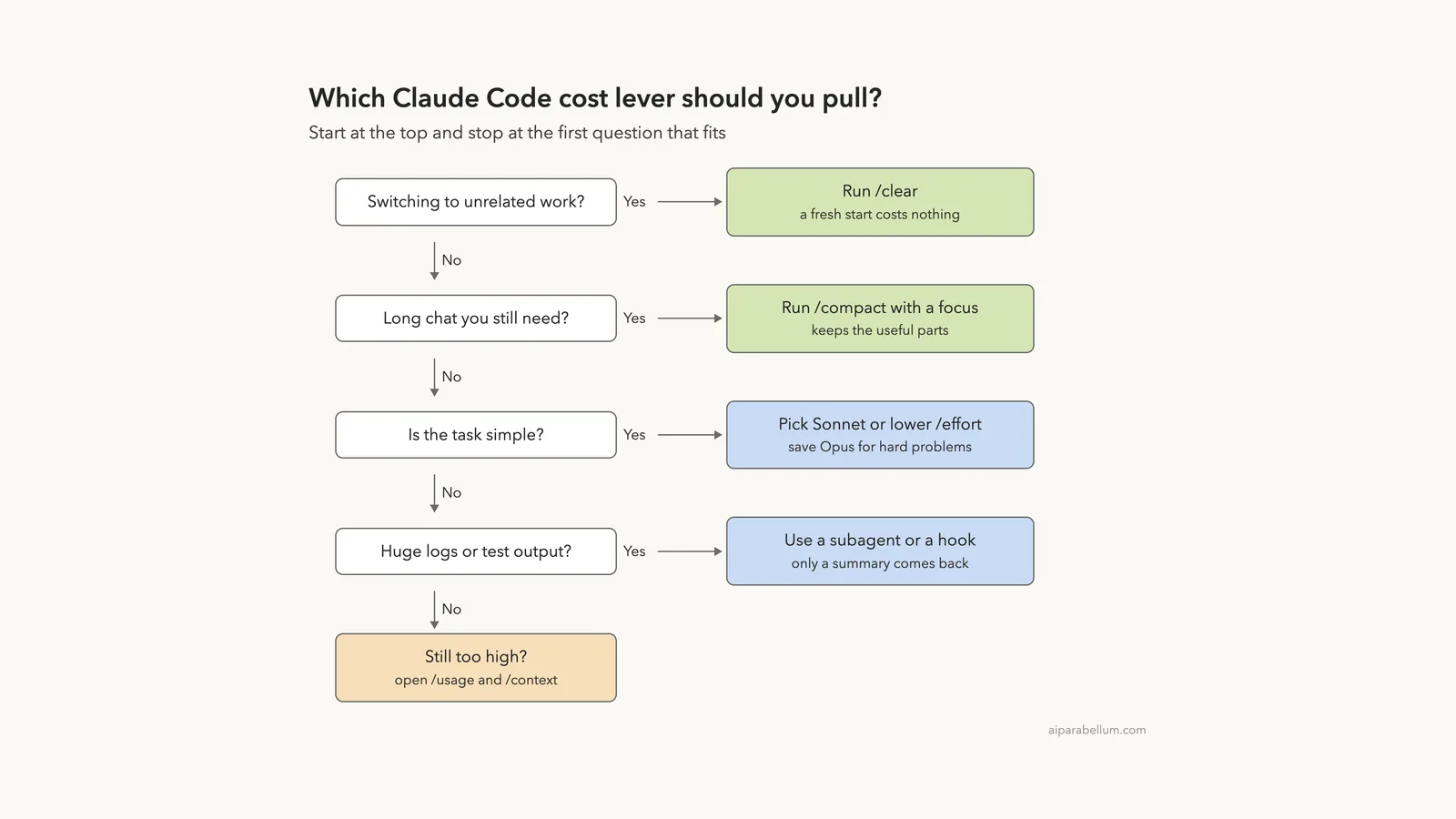
Which Claude Code Cost Lever Should You Use?
You do not need every trick at once. Walk down this ladder and stop at the first question that fits your situation.
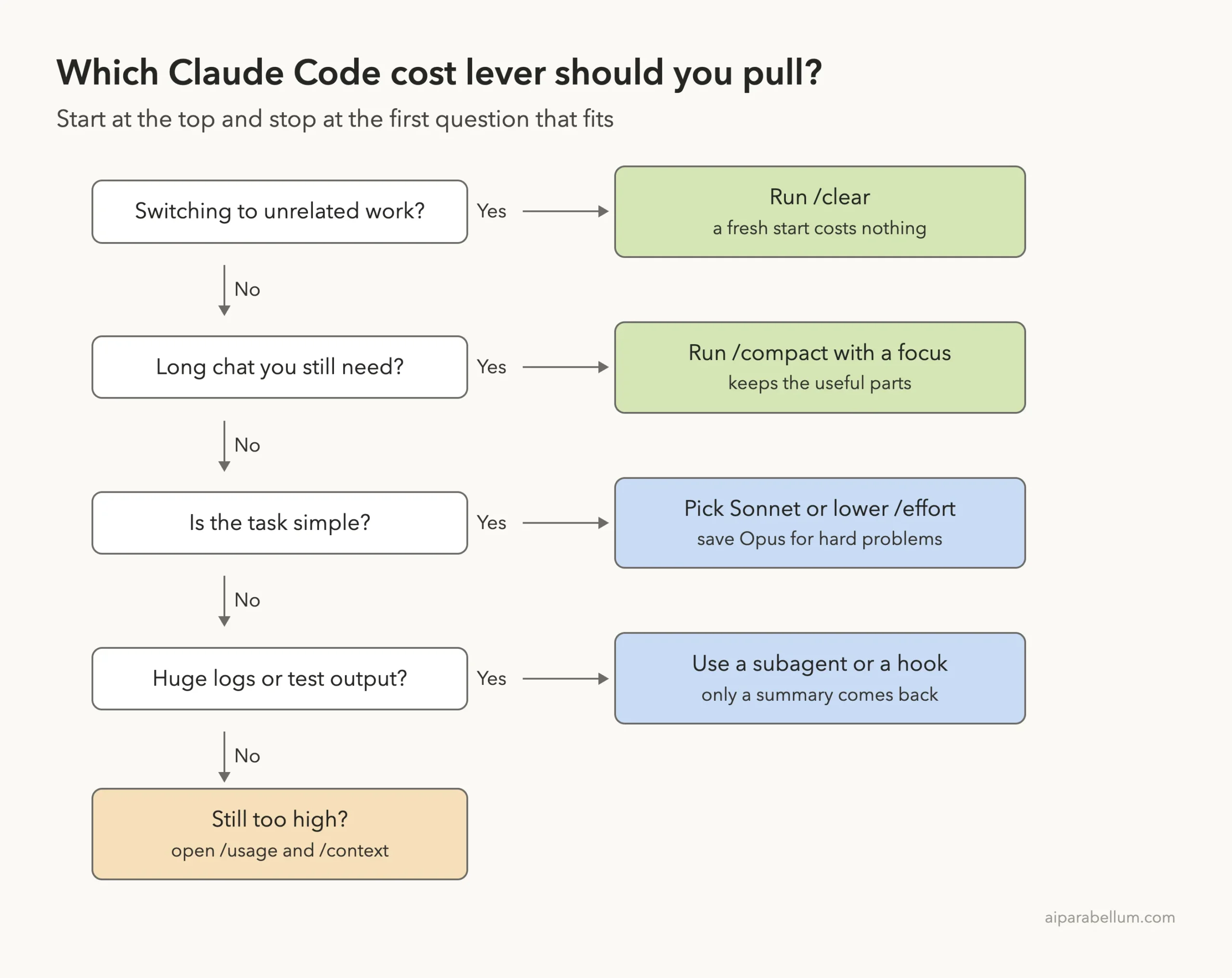
Other Ways to Trim Token Use
The official docs list several more habits that add up over a week:
- Turn off unused MCP servers with /mcp. Command line tools like gh are often more context-efficient. Our MCP guide shows how to manage servers.
- Move long workflow instructions from CLAUDE.md into skills, which load only when needed. The docs suggest keeping CLAUDE.md under 200 lines.
- Send noisy work like test runs and log digging to custom subagents, so only a summary returns. You can set model: haiku for simple subagents.
- Use tool hooks to filter output, such as showing only failing tests instead of a full log.
- Write specific prompts. “Add input validation to the login function in auth.ts” costs far less than “improve this codebase.”
- Use plan mode for big tasks, and press Escape early when Claude heads the wrong way.
Watch Out for Background Usage
Some usage happens even when you are not typing. The docs say background jobs, like summarizing past conversations for claude –resume, typically cost under $0.04 per session. Scheduled /loop tasks, idle goal check-ins and cross-session messages can also start new turns that send your full context.
Agent teams are the biggest multiplier. The docs say they use about 7 times more tokens than a normal session when teammates run in plan mode, so keep agent teams small and shut teammates down when they finish.
Managing Costs for a Team
If you run Claude Code for a company, your controls depend on how people sign in. Here is how the official docs map it out.
| Your setup | See spend | Cap spend |
|---|---|---|
| Claude for Teams or Enterprise | Spend report in org analytics | Spend limits in admin settings |
| Claude Console (API) | Console usage page | Workspace spend limits |
| Amazon Bedrock, Google Cloud or Microsoft Foundry | Your cloud billing console | Your cloud’s budget controls |
OpenTelemetry export works on every setup and streams per-user token and cost metrics into your own monitoring tools. If your company pays contracted rates, an admin can set the modelPricing managed setting so the figures in /usage match your rates instead of list price.
Try It Yourself
Make a small folder with one short code file, start Claude Code, and run this practice loop. It takes about five minutes and only a couple of cents.
- Run /usage and note the Total cost line.
- Ask one short question, then run /usage again and compare.
- Run /clear, then /usage, and confirm the total is back at $0.
- Try the same question with claude –model sonnet and compare the cost.
Here is a cheap question to paste in:
In one sentence, what does the main function in this folder do? Do not edit any files.Common Mistakes
- Keeping one session open all day for unrelated tasks. Every new message carries the old history.
- Leaving Opus on as the default for simple edits. The docs name this as a top cause of surprise spend.
- Treating /usage dollars as a bill. They are estimates at list price unless your admin set custom rates.
- Typing /model sonnet and forgetting it also changed your default for new sessions.
- Mixing up a context warning with a usage limit. A context warning just means the conversation is close to auto-compaction.
- Setting –max-budget-usd right at the edge. Spend can pass the cap, so leave headroom.
Pro Tips
- Add cost to your status line once and you will notice expensive habits right away.
- Run /rename before /clear so you can /resume the old thread later at no extra cost.
- Open /usage weekly and press w to see your seven-day patterns.
- Run /insights for a report on how you work and where requests go sideways.
- Check /context after installing new plugins or MCP servers, since they add to every request.
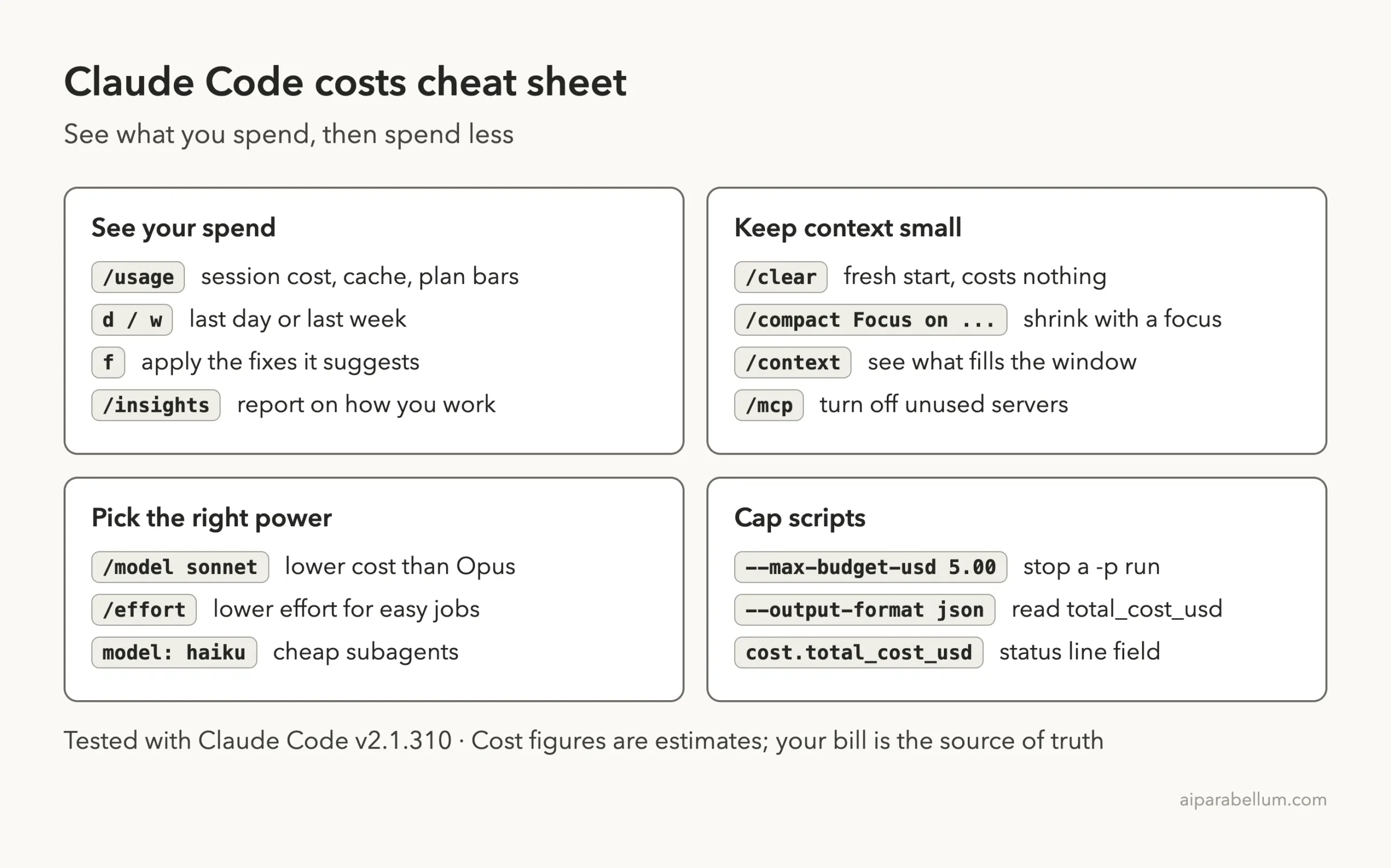
Claude Code Costs Cheat Sheet
Frequently Asked Questions
Is the cost in /usage my real bill?
No. It is an estimate Claude Code calculates locally from token counts at list price. Check the Claude Console usage page or your plan settings for the real figure.
Do Pro and Max subscribers need to watch the dollar figure?
Not for billing. Usage is included in the subscription, so the plan usage bars and the breakdown in /usage matter more. The habits in this guide still help you stay under your limits.
Does /clear cost anything?
No. The docs say /clear costs nothing, and it resets the session totals to $0. /compact, on the other hand, reads the conversation it summarizes.
Why does my first message after lunch use so much?
The prompt cache has a lifetime. After a long break, your next message can miss the cache and reprocess your full context. Clearing between tasks keeps that hit small.
Can I set a hard spending limit?
In scripts, use claude -p with –max-budget-usd. Teams set spend limits in admin settings or Console workspaces, and cloud users rely on their provider’s budget controls.
Conclusion
Managing Claude Code costs comes down to two moves: see what you spend, then keep context small. Use /usage and a cost status line to watch the numbers, /clear between tasks, /compact when you need history, Sonnet and lower effort for simple work, and –max-budget-usd in scripts. Our one-question test showed how much hidden context rides along with every request, so trim tools you do not use and the savings follow. For more on the models behind it all, see our Claude AI overview.
Previous in the series: Part 47, Common Claude Code Errors and How to Fix Them
Next in the series: Part 49: Claude Code Data Usage, Privacy and Security Explained.