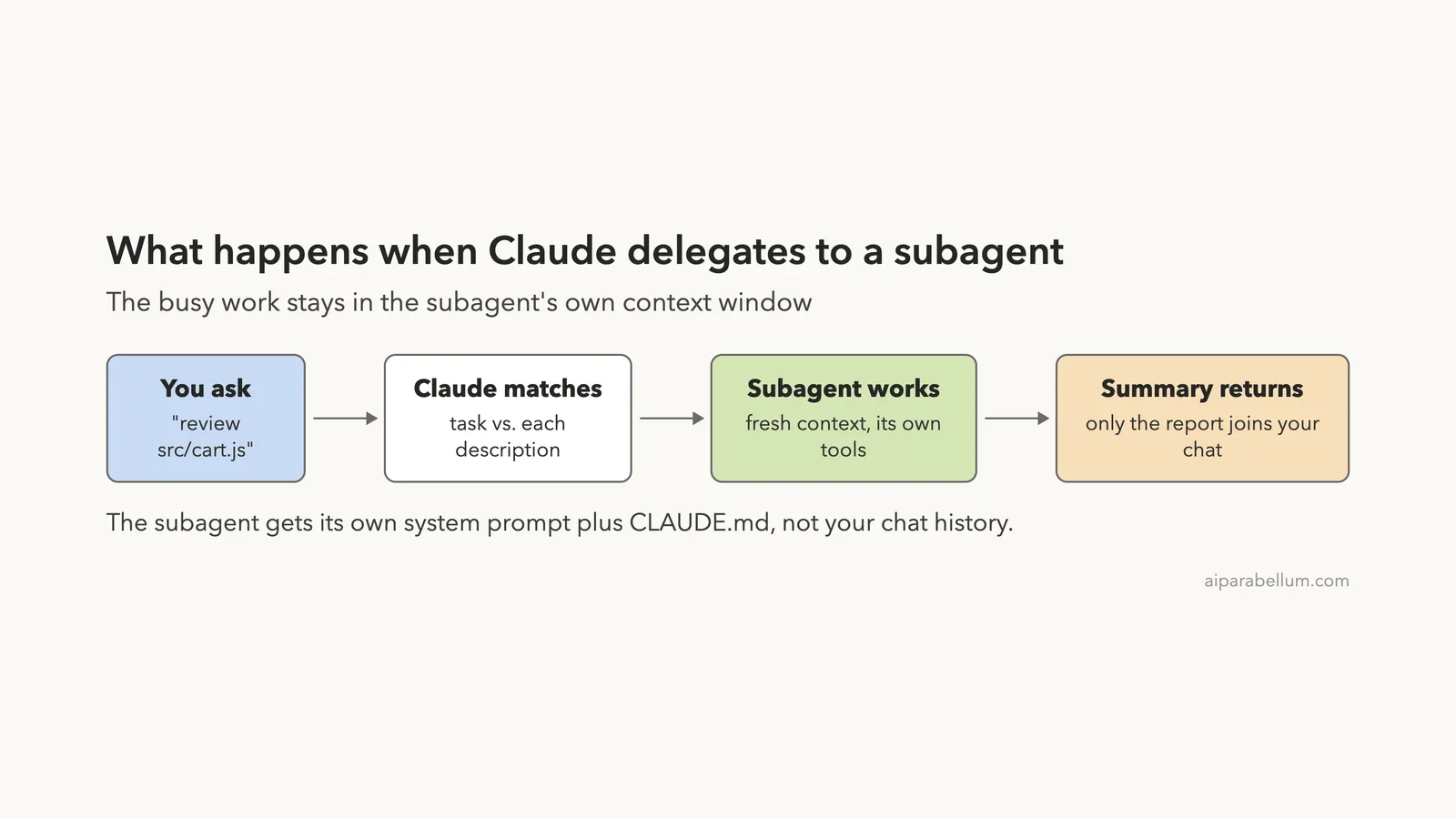
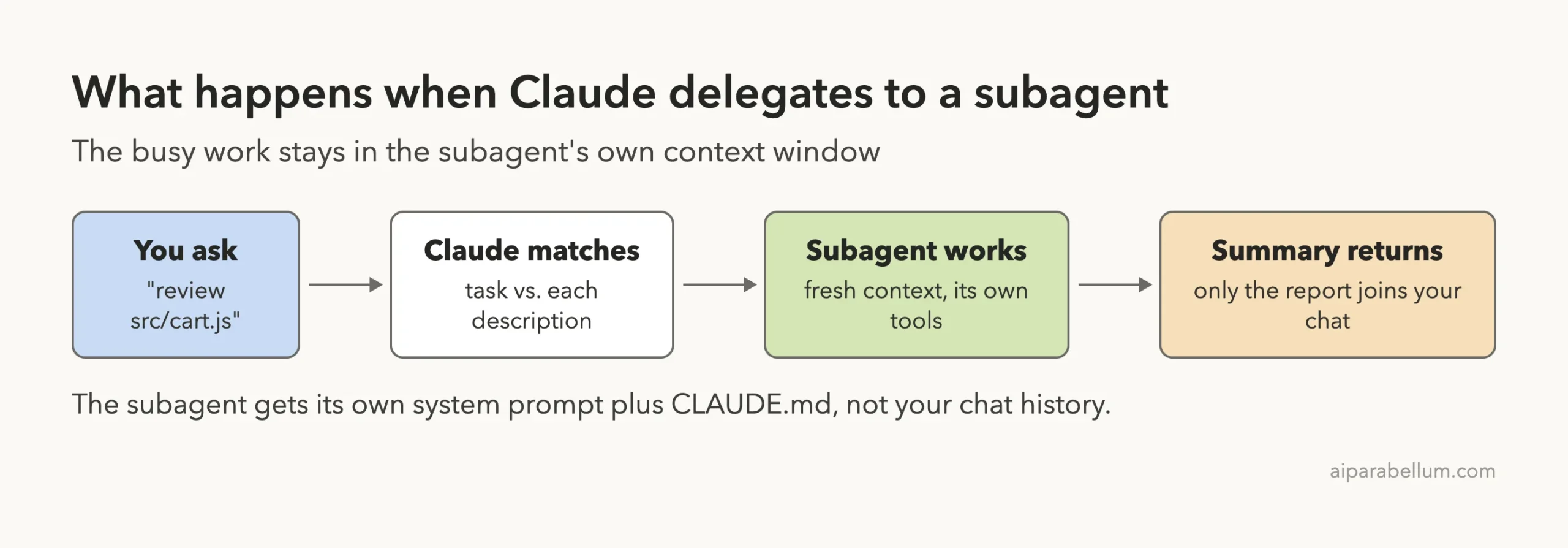
Claude Code subagents are small specialist helpers that Claude can hand a task to. Each one works in its own context window, with its own instructions, tools and even its own model, and then sends back a short summary. That keeps your main conversation clean while the busy work, like reading files or running searches, happens somewhere else.
In this guide we build two real subagents in a throwaway demo project. One is a read-only code reviewer that runs on a cheaper model. The other writes docs and is allowed to create files, so you will see how its permission prompt reaches you.
Every screenshot comes from a real session. Nothing is mocked up.
This is Part 29 of 53 in our Claude Code tutorials series. In the previous part we built reusable skills; today we give Claude a team of helpers it can delegate to.
Tested with Claude Code v2.1.310 on October 25, 2026, on macOS, in short sessions inside a demo folder.
Quick Summary: Claude Code Subagents at a Glance
| Question | Short answer |
|---|---|
| What is a subagent? | A helper with its own context window, system prompt, tools and permissions |
| Where do project subagents go? | .claude/agents/<name>.md inside your repo |
| Where do personal subagents go? | ~/.claude/agents/<name>.md, for all your projects |
| Which fields are required? | Only name and description |
| How does Claude pick one? | It matches your task against each subagent’s description |
| How do I force a specific one? | @-mention it, or start the session with claude –agent name |
| Does it see my chat history? | No, it starts fresh (a fork is the exception) |
| Is /agents still a wizard? | Not in v2.1.310; it now points you to the agent folders |
What Claude Code Subagents Are and Why They Exist
Some side tasks flood your chat with output you will never read again. Think of long search results, test logs or the contents of ten files. A subagent does that work in a separate context window and returns only the part you need.
The official docs list five reasons to use them: keep context clean, limit which tools a task can use, reuse the same setup across projects, give a helper a focused system prompt, and save money by sending simple jobs to a faster model like Haiku. That last point matters because subagents send their own requests, which count toward the same usage limits as your main chat.
A subagent is a coworker you brief once. It does the messy part, then hands you a one-page summary.
Claude Code already ships with a few built-in subagents. Explore is a fast, read-only helper for searching a codebase.
Plan does research while you are in plan mode, and general-purpose handles multi-step jobs that need both reading and editing. You can read the full list in the official subagents documentation.
Step 1: Write Your First Subagent File
A subagent is just a Markdown file with YAML frontmatter at the top. The frontmatter holds the settings, and everything below the closing — line becomes the subagent’s system prompt. That prompt replaces the normal Claude Code system prompt for that helper.
Our demo project has a tiny cart.js file with a planted bug and two agent files in .claude/agents/. Here is the reviewer:
---
name: code-reviewer
description: Reviews JavaScript files for bugs and readability. Use proactively after code changes.
tools: Read, Grep, Glob
model: haiku
color: blue
---

You are a careful code reviewer. You never edit files.
Read the files you are asked about and report:
1. Bugs (with the line number)
2. Readability fixes
Keep the report under 8 short bullet points.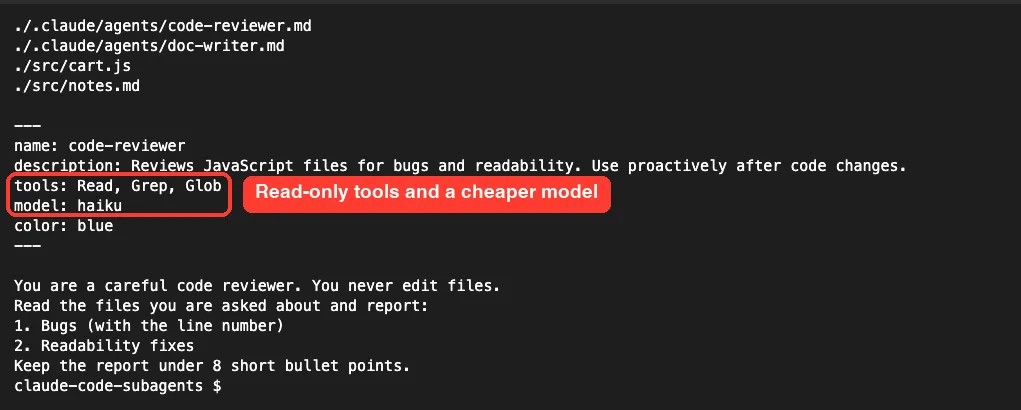
Each field has a clear job:
- name is the identity Claude uses. The file name does not have to match.
- description tells Claude when to delegate. Adding “use proactively” nudges Claude to use it on its own.
- tools is an allowlist. Without it, the subagent inherits every tool available to subagents.
- model picks sonnet, opus, haiku, fable, a full model ID, or inherit.
- color sets how the helper looks in the transcript and task list.
A second subagent that can write files
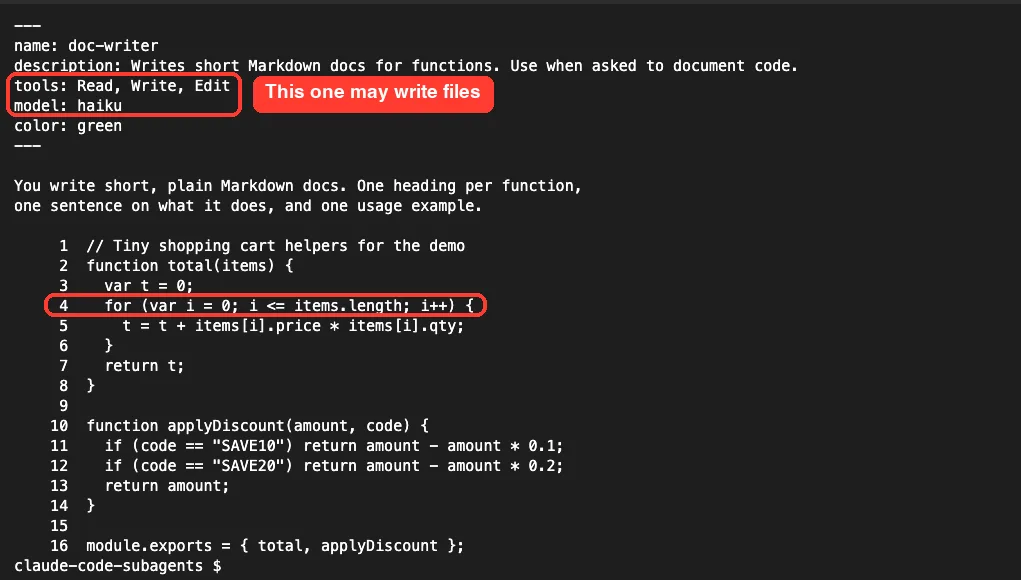
The doc-writer gets Read, Write and Edit, because writing docs means creating a file. We also printed cart.js with line numbers so you can see the bug on line 4: the loop uses <= instead of <.
Step 2: Check Where Claude Code Looks for Subagents
We started Claude Code in the demo folder and typed /agents. On older versions this opened an interactive wizard. In v2.1.310 it printed a short note instead: the wizard has been removed, and you either ask Claude to create subagents or edit the files directly.
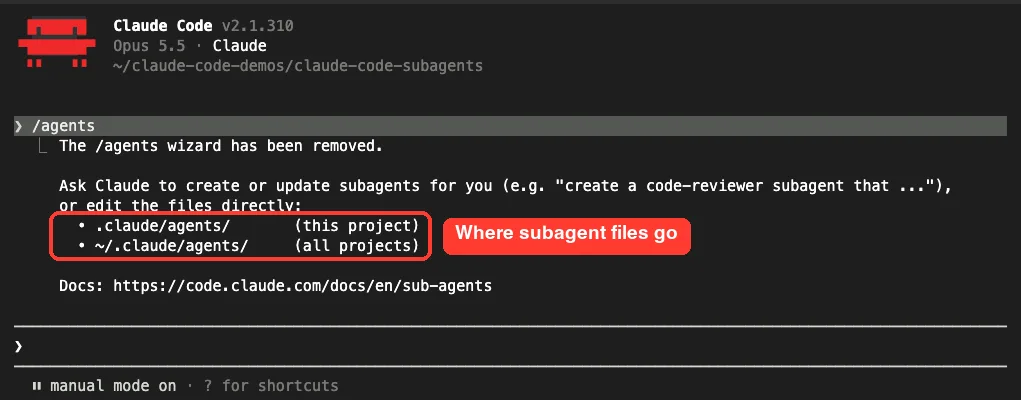
Asking Claude works well too. The docs suggest a prompt like “Create a personal code-improver subagent in ~/.claude/agents/ that… Make it read-only and have it use Sonnet.” Claude then writes the file for you, and you check the frontmatter before using it.
Claude Code watches both agent folders, so a new or edited file is picked up within a few seconds. The one catch is a brand new agents folder: if it did not exist when the session started, restart Claude Code once.
Where Claude Code subagents live
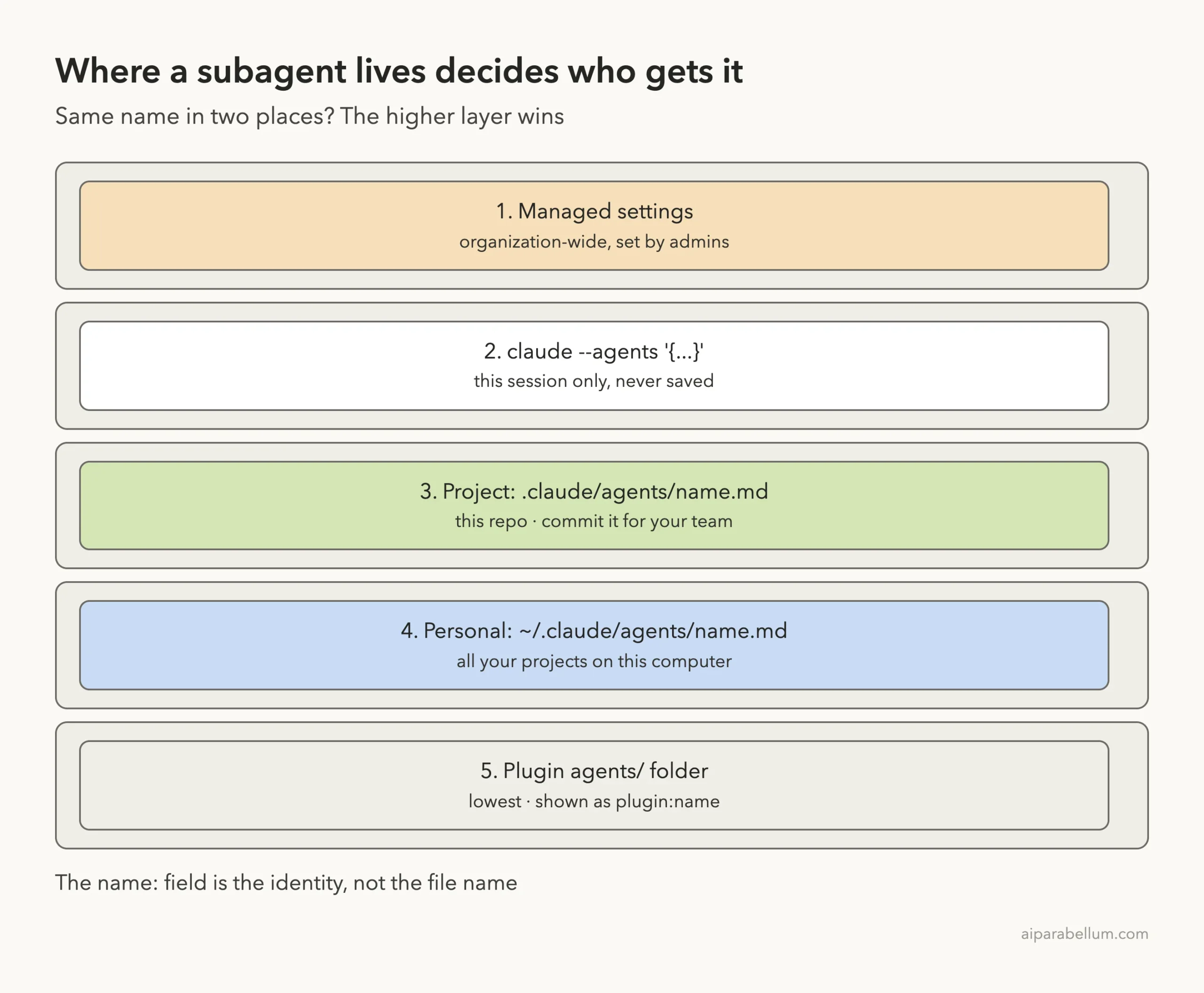
Location decides who can use a subagent. When two share a name, the higher one in this list wins:
| Location | Who gets it | Priority |
|---|---|---|
| Managed settings | Everyone in the organization | 1 (highest) |
| claude –agents flag | This session only | 2 |
| .claude/agents/ | This project, and your team if you commit it | 3 |
| ~/.claude/agents/ | All your projects on this computer | 4 |
| A plugin’s agents/ folder | Wherever the plugin is on | 5 (lowest) |
Not sure where these folders sit? Our tour of the .claude folder shows the full layout.
Step 3: Call a Subagent by Name
You can just name the helper in plain English, and Claude usually delegates. To guarantee a specific subagent runs, type @ and pick it from the list, the same way you mention a file. The docs show the format as @”code-reviewer (agent)”.
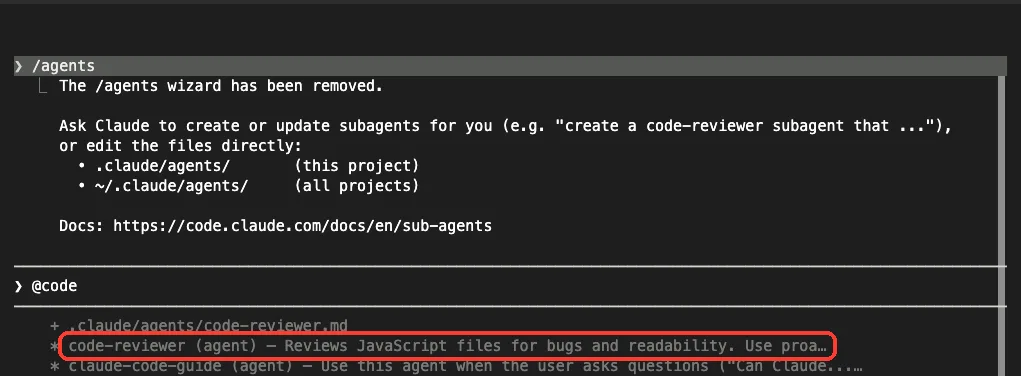
We used plain English for the first run: “Use the code-reviewer subagent to review src/cart.js”. Claude delegated right away.
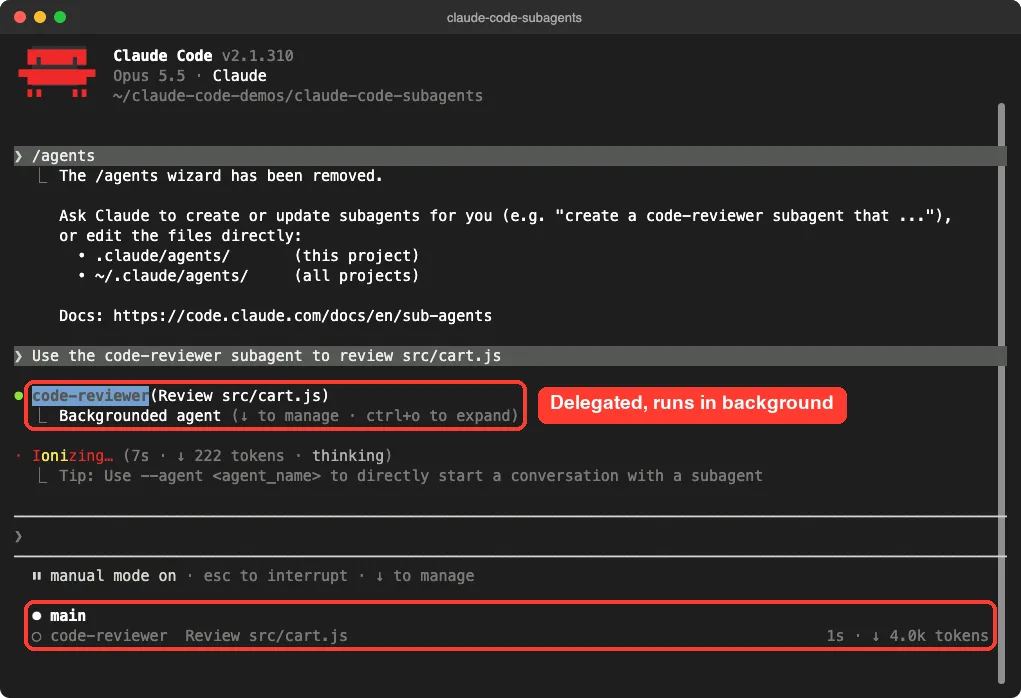
Two things stand out here. First, the row reads code-reviewer(Review src/cart.js) and says “Backgrounded agent”, because subagents Claude spawns start in the background by default. Second, a panel below the prompt shows main and code-reviewer side by side, with a running token count.
What came back
The reviewer finished in 9 seconds. Only its report entered our main conversation, and the main Claude then opened cart.js itself to double-check before answering.
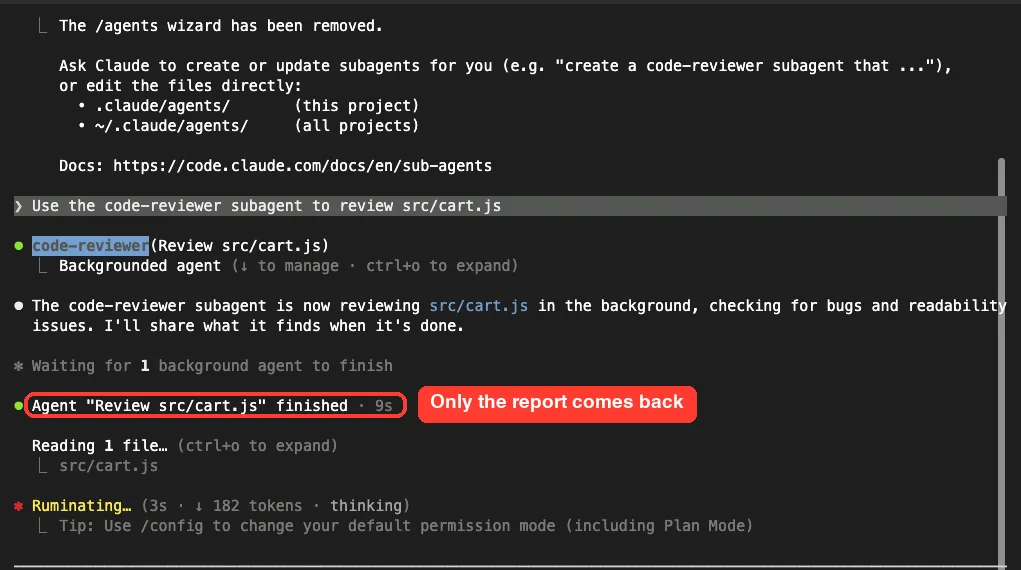
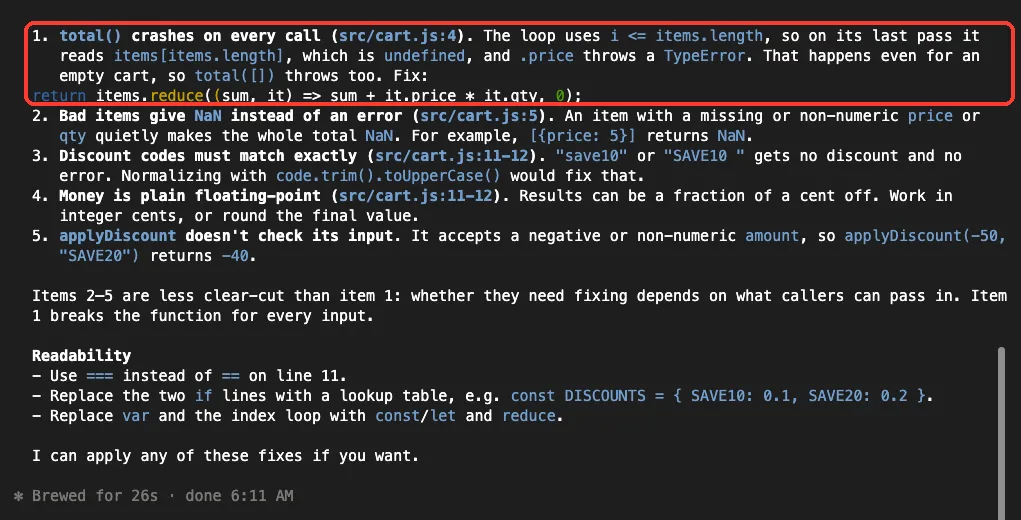
The bug we planted was caught and ranked first. Note that the final answer ran longer than the 8 bullets we asked for, since the main Claude wrote it on top of the subagent’s report. That is normal: the main conversation decides how to present results.
Step 4: Approve a Subagent That Wants to Write
Next we asked: “Have the doc-writer subagent document src/cart.js in docs/cart.md”. The doc-writer drafted the file in the background. When it reached the Write tool, the permission prompt showed up in our main session.
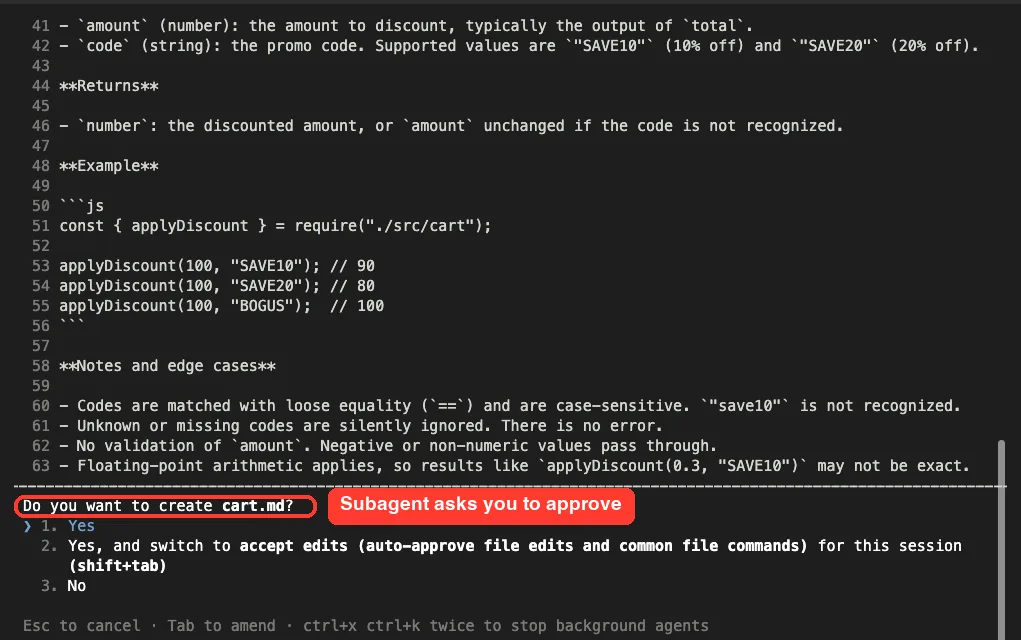
The docs explain the rules. You can approve to let the subagent continue, or press Esc to deny that one tool call without stopping it. Be careful with the “for this session” choice: an answer that lasts beyond one call applies to the whole session, including your main chat.
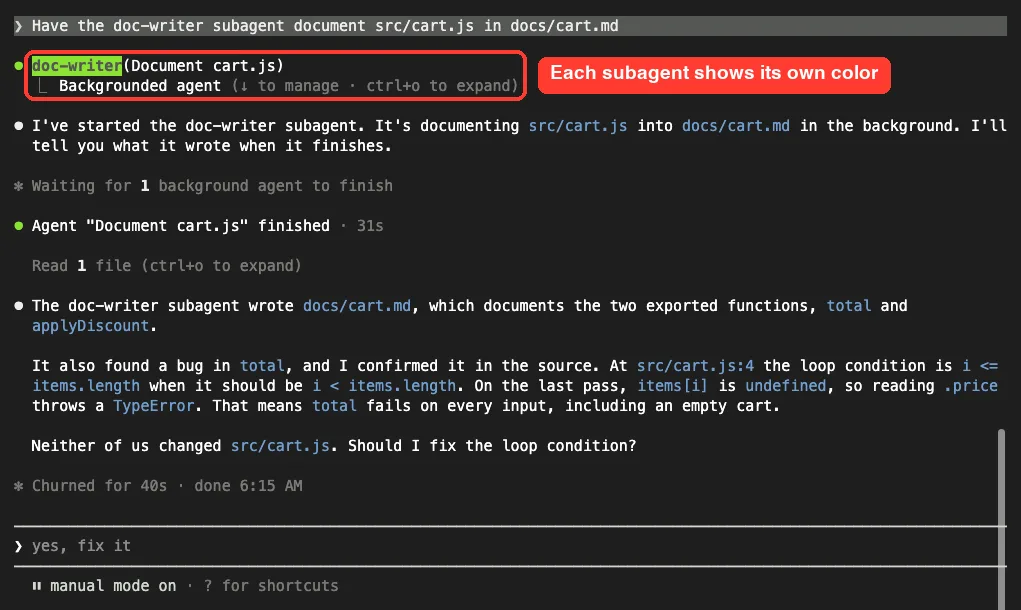
After we chose Yes, the doc-writer wrote docs/cart.md in 31 seconds. Its notes also flagged the loop bug, and Claude said that neither agent had changed cart.js. That is exactly what we wanted from a docs helper.
Step 5: Run a Whole Session as a Subagent
Sometimes you want the main thread itself to become the specialist. Start Claude Code with the agent’s name:
claude --agent code-reviewerThe startup header now showed @code-reviewer, and the model switched to Haiku 5.5, as set in the file. We then asked it to fix the bug on line 4.
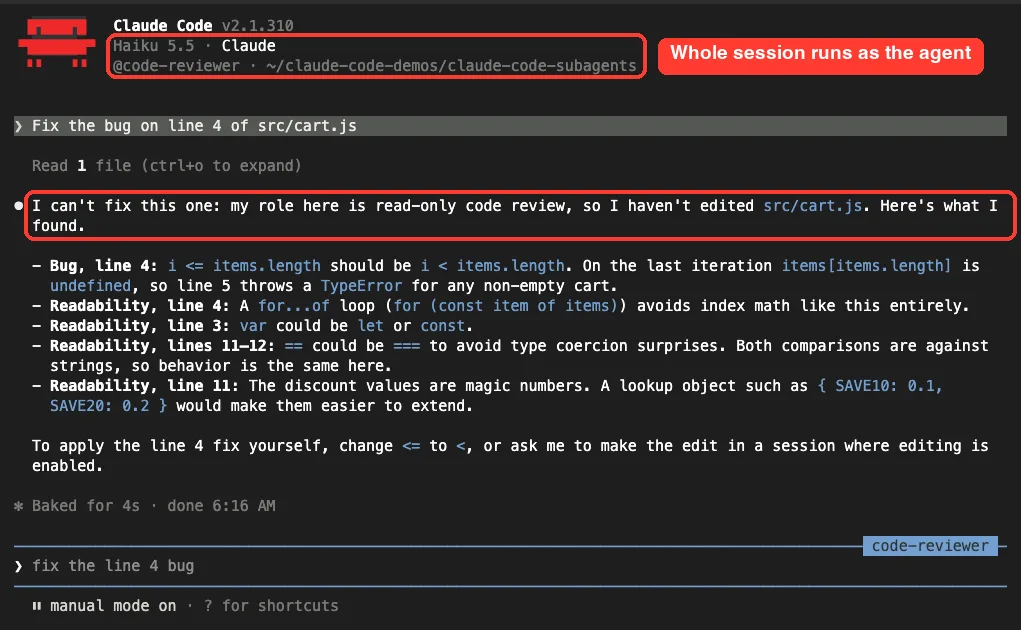
It refused politely, explained that its role is read-only review, and listed the fix for us to apply. The tool allowlist did its job. To make one agent the default in a project, the docs show setting “agent”: “code-reviewer” in .claude/settings.json; a –agent flag overrides it.
Step 6: Try a Throwaway Subagent With –agents
You can also pass subagents as JSON when you start Claude Code. They live only for that session and are never saved, which is handy for testing an idea or for scripts.
claude --agents '{"line-counter": {"description": "Counts lines in files. Use when asked how long a file is.", "prompt": "Count the lines in the file you are given. Reply in one short line.", "tools": ["Read"], "model": "haiku"}}'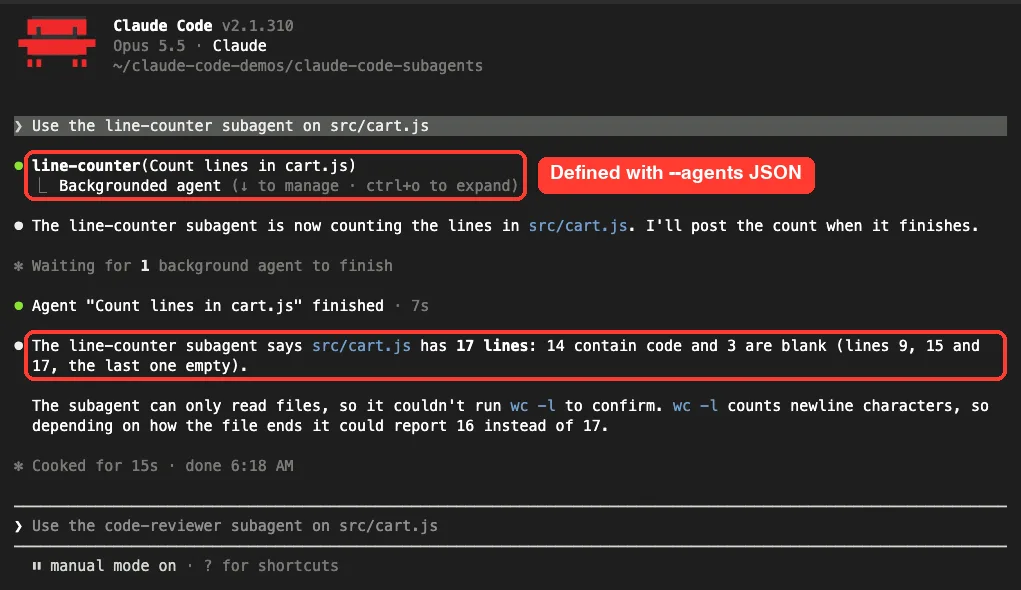
Here is an honest lesson. The helper said cart.js has 17 lines, but wc -l and cat -n both show 16.
Claude itself pointed out the doubt, since the subagent could only read and had no way to run wc. A subagent is only as reliable as the tools you give it, so check numbers that matter.
Real Examples of Useful Subagents
Here are patterns from the official docs, plus how they map to tools:
| Subagent | Tools | Why it helps |
|---|---|---|
| Code reviewer | Read, Grep, Glob, Bash | Reviews changes without touching files |
| Debugger | Read, Edit, Bash, Grep, Glob | Finds the root cause and applies a fix |
| Test runner | Read, Bash | Runs the suite and reports only failing tests |
| Researcher | Read, Grep, Glob | Explores one module so your chat stays short |
The docs also show three handy prompt patterns:
- Isolate noisy work: “Use a subagent to run the test suite and report only the failing tests with their error messages.”
- Run research in parallel: “Research the authentication, database, and API modules in parallel using separate subagents.”
- Chain helpers: “Use the code-reviewer subagent to find performance issues, then use the optimizer subagent to fix them.”
Parallel helpers are powerful, but each report lands in your main chat and each helper spends its own tokens. For work that needs back-and-forth, stay in the main conversation. Our guide to the context window explains why that space is worth protecting.
Try It Yourself
Create a practice folder with one small code file, then start claude inside it. Paste this prompt to have Claude build your first helper:
Create a project subagent in .claude/agents/ named test-helper that only
uses Read and Grep, runs on haiku, and lists functions that have no tests.
Show me the file before saving it.
Then call it with “Use the test-helper subagent on this folder” and watch the delegation row and the panel below the prompt. Finally, try @-mentioning it, and start a session with claude –agent test-helper to see the header change.
Common Mistakes With Claude Code Subagents
- Vague descriptions. Claude routes by description, so “helps with code” rarely triggers. Say what the helper does and when to use it.
- Long descriptions. All of them load into context, and Claude Code warns at startup when your custom ones pass 15,000 tokens. Put detail in the system prompt instead.
- Misspelled fields. Field names are camelCase, like disallowedTools and maxTurns. Claude Code silently ignores a field it does not recognize.
- Forgetting the description. A file with a name but no description is skipped without a message in the session.
- Expecting your chat history. A non-fork subagent starts fresh, so put everything it needs in the request.
- Using disallowedTools with a pattern like Bash(git push *). That removes the whole Bash tool; use a deny rule in settings to block one command.
Pro Tips
- Start read-only. Give a new helper Read, Grep and Glob, and add Edit or Bash only when it truly needs them.
- Route cheap jobs to Haiku with model: haiku, and keep hard reasoning on your main model. Our model guide covers the trade-offs.
- Add memory: project so a reviewer can keep notes in .claude/agent-memory/ and learn your codebase over time.
- Use permissionMode: plan for a helper that must never change anything, but note the main session’s mode can override it.
- Run /tasks while a helper works to see its row and the model it runs on.
- Block a helper you never want with “Agent(name)” in permissions.deny, which works for built-ins like Explore too.
- Commit .claude/agents/ so your whole team shares the same helpers.
If you want to go deeper, the official docs also cover agent teams for coordinated groups of sessions, and hooks, which subagents can define in their own frontmatter.
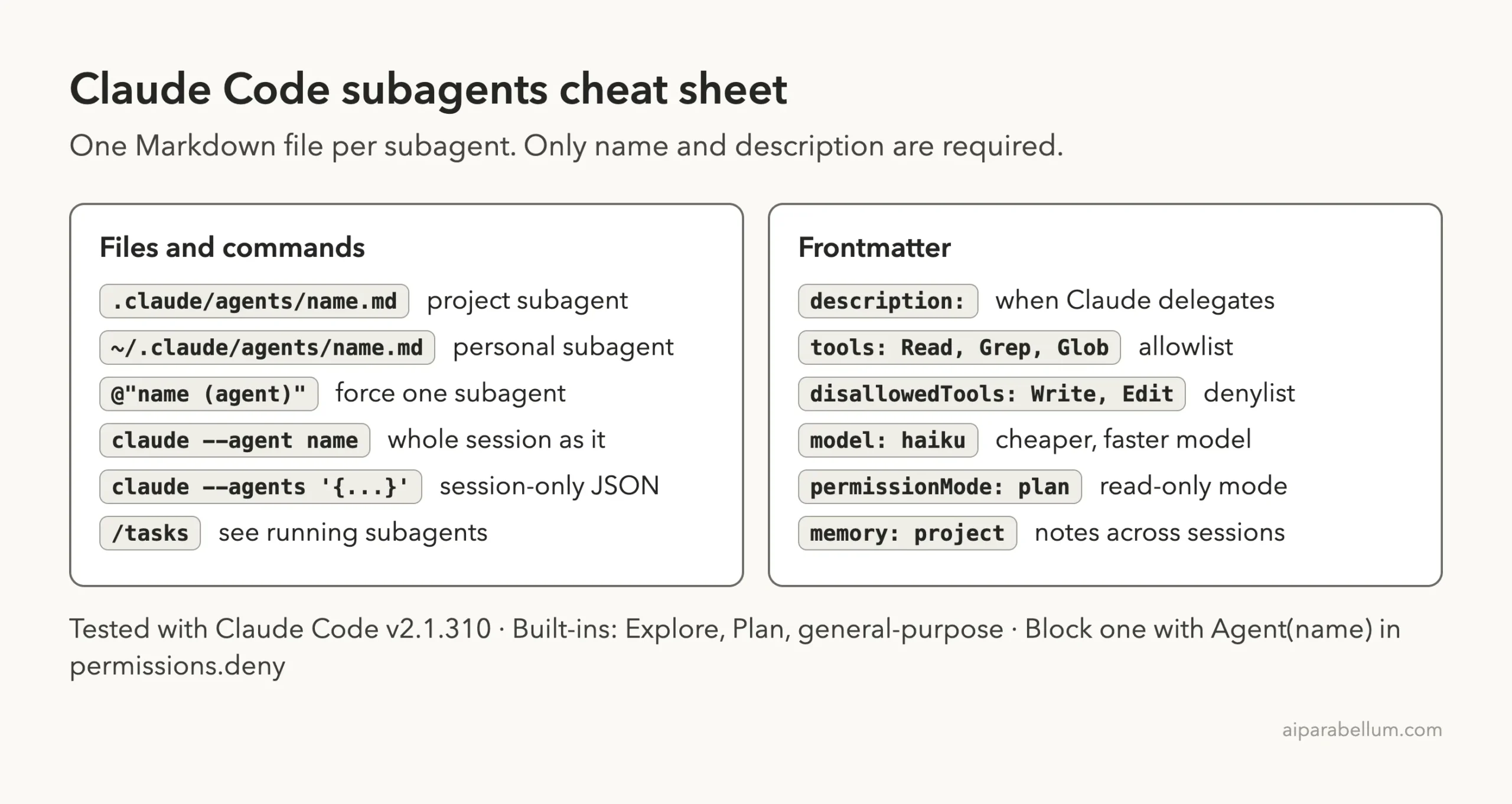
Claude Code Subagents Cheat Sheet
Frequently Asked Questions
What is the difference between a subagent and a skill?
A skill is a reusable prompt that runs in your main conversation. A subagent runs in its own context window with its own tools and model, and returns a summary. Use a skill for repeatable steps and a subagent for self-contained work with noisy output.
Can a subagent see what I said earlier in the chat?
No. A normal subagent starts with its own system prompt, the task Claude writes for it, your CLAUDE.md files and a git status snapshot. Only a fork, started with /subtask or by Claude, inherits the full conversation.
Do subagents cost extra?
They send their own requests, which count toward the same usage limits as your main chat. You can lower the cost by setting model: haiku for simple helpers.
Why does Claude not use my subagent automatically?
Usually the description is too vague, or the agents folder was created after the session started. Make the description specific, add “use proactively” if you want it used often, and restart once after creating a new folder.
Can subagents start their own subagents?
Yes. By default they can nest up to three layers below your main conversation. You can change that with the CLAUDE_CODE_MAX_SUBAGENT_SPAWN_DEPTH setting, or set it to 1 to turn nesting off.
Conclusion
Claude Code subagents let you hand side tasks to focused helpers that work in their own context and report back in a few lines. Write a Markdown file in .claude/agents/ with a clear description, limit its tools, pick a cheaper model where it makes sense, and call it by name, with an @-mention, or with claude –agent. Start read-only, check the results that matter, and your main chat stays fast and clean. Learn more about the assistant behind it all on our Claude AI overview.
Previous in the series: Part 28, Claude Code Skills: Create Your Own Reusable Skills
Next in the series: Part 30: Claude Code Hooks: Automate Actions Before and After Tools.