If you see Claude Code unable to connect to API, the request never reached Anthropic’s servers. Something on your side stopped it: no internet, a VPN, a firewall, a proxy setting, or a leftover variable that sends Claude Code to the wrong address. Your account, your plan and your prompt are almost never the cause.
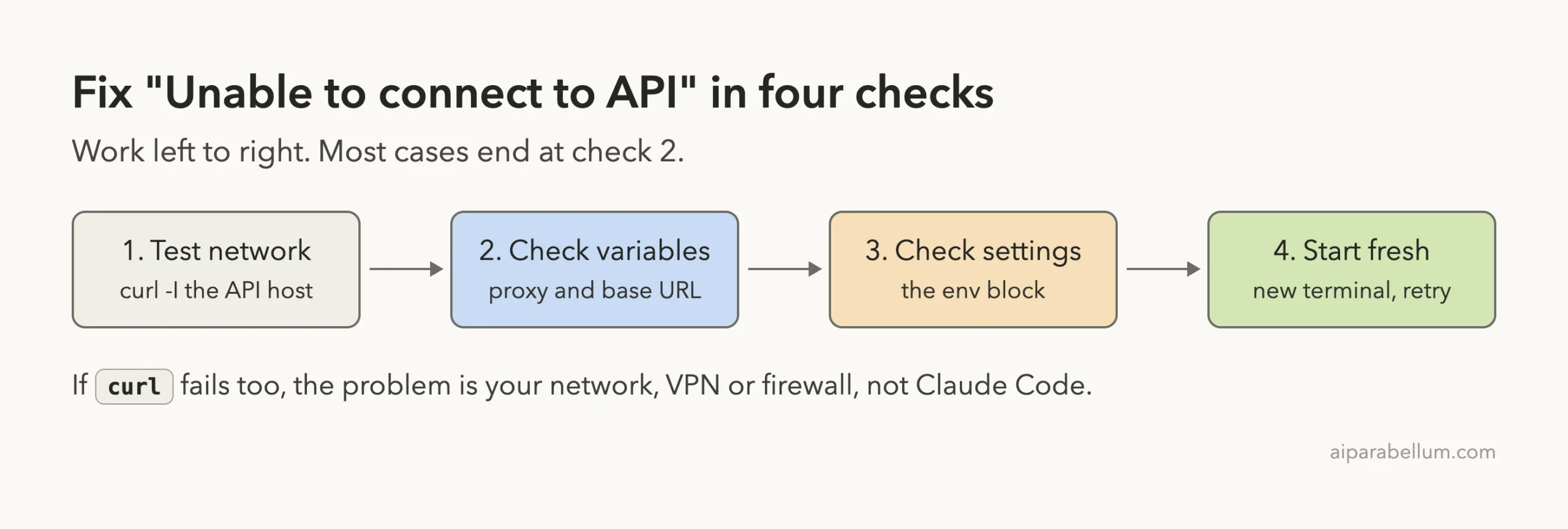
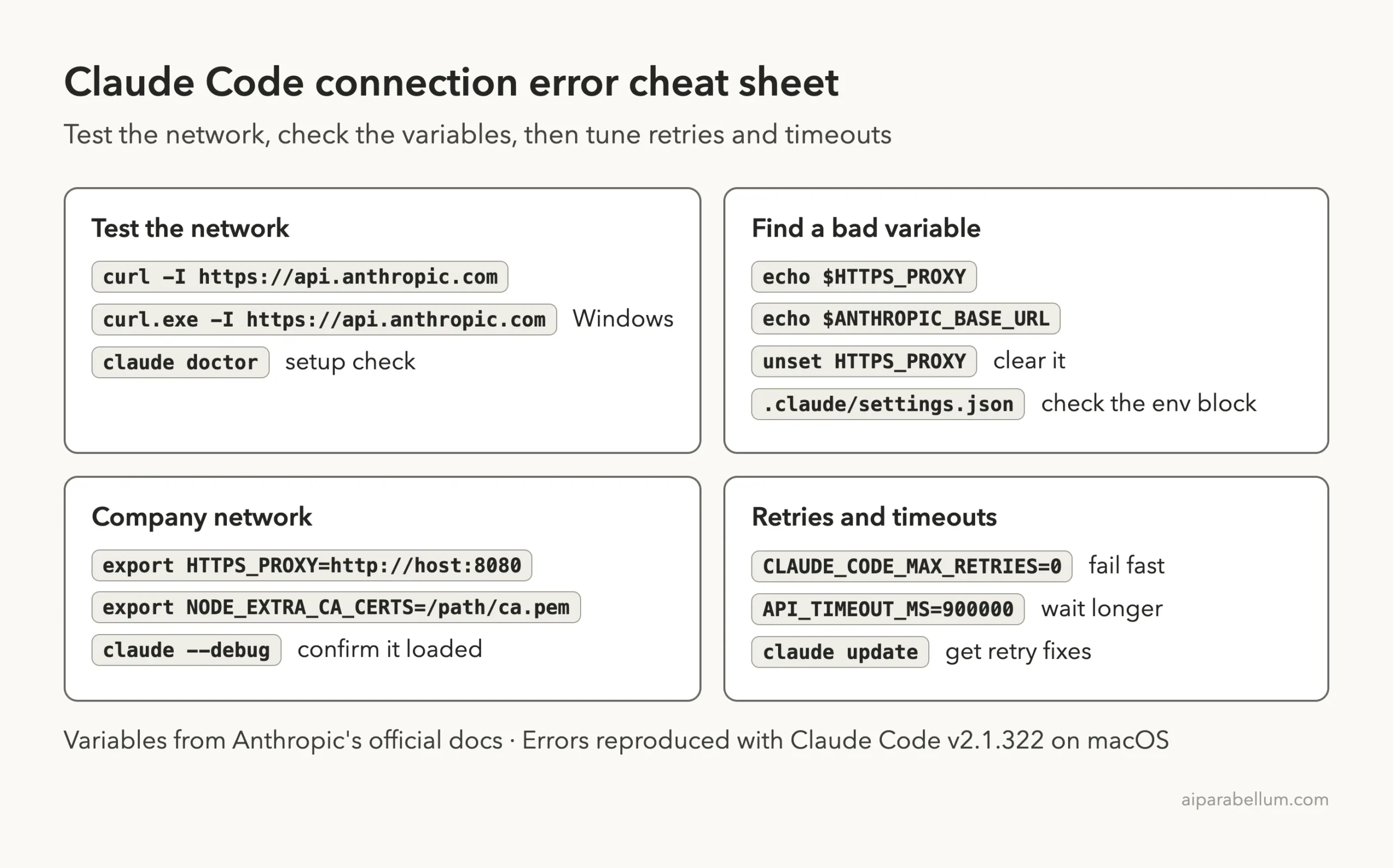
The short fix: run curl -I https://api.anthropic.com in the same terminal. If that fails, fix your network, VPN or firewall first. If it works but Claude Code still fails, run echo $HTTPS_PROXY and echo $ANTHROPIC_BASE_URL, clear any stale value with unset, and check the env block of your settings files.
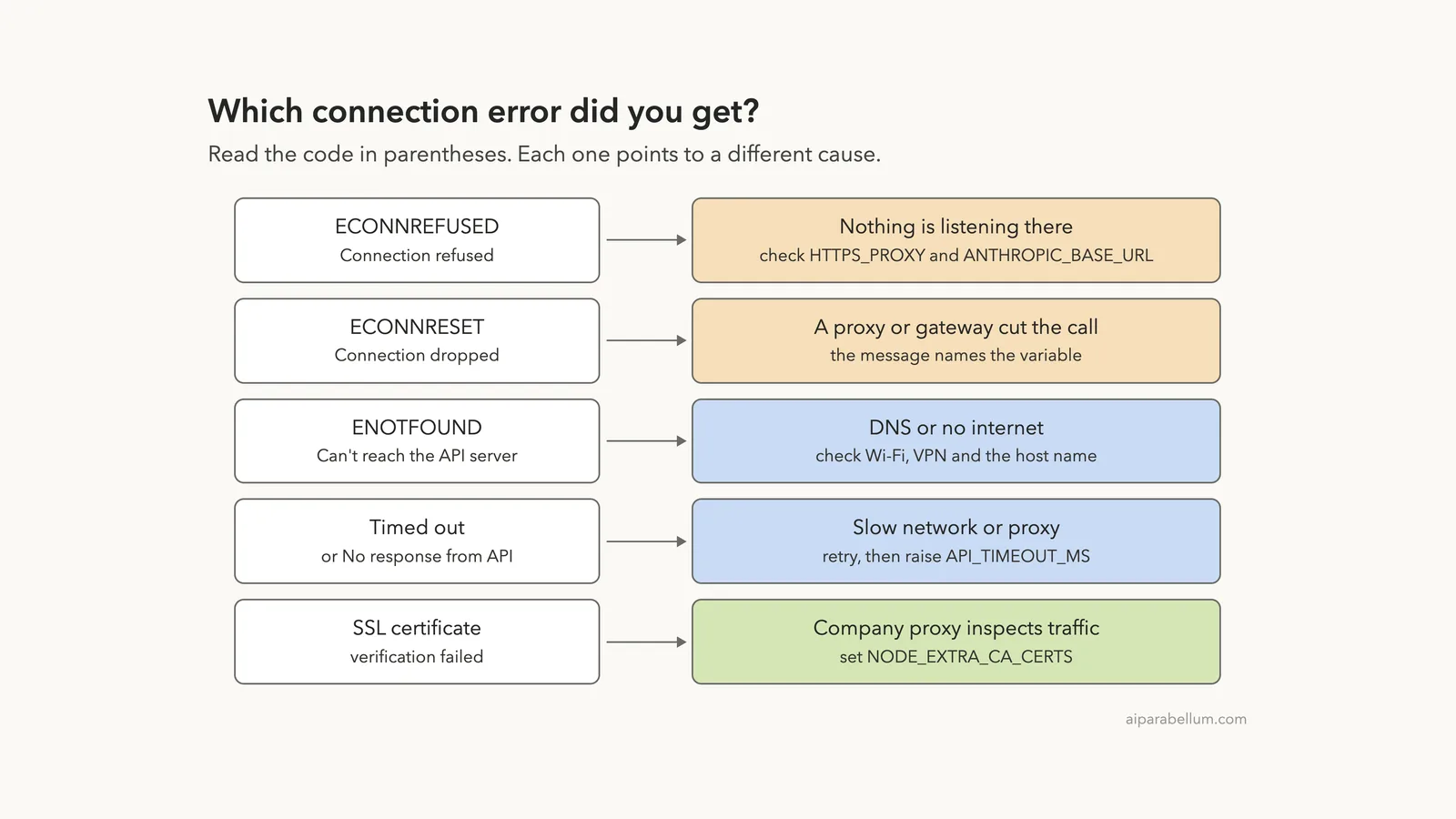
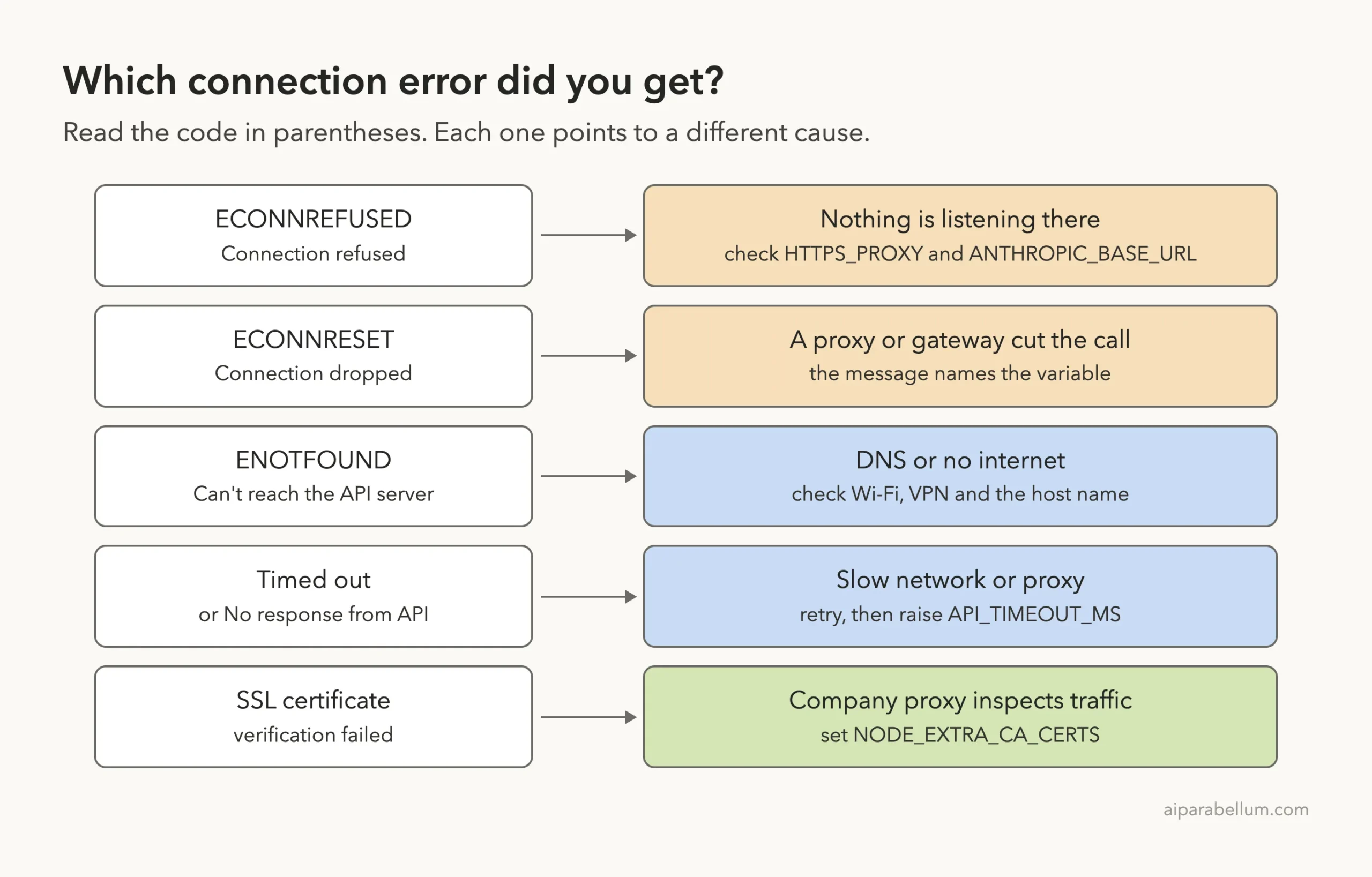
The code in parentheses tells you which case you have. ECONNREFUSED or ConnectionRefused means nothing answered at the address, ECONNRESET means the connection was cut, ENOTFOUND means a DNS failure, and a timeout means a slow or silent network path.
This guide is part of our help series. Browse all our Claude Code tutorials for more fixes and how-tos.
Tested with Claude Code v2.1.322 on macOS on November 14, 2026. We reproduced the refused, dropped, DNS and timeout errors on a Mac by pointing Claude Code at closed or silent local ports, inside a throwaway folder. The certificate errors and the Windows and Linux steps follow Anthropic’s official instructions.
Claude Code Unable to Connect to API: Quick Summary
Match the message on your screen to a row. The first three rows are errors we triggered ourselves, so the wording is exactly what Claude Code v2.1.322 prints.
| Message you see | What it means | First thing to try |
|---|---|---|
Connection refused (ECONNREFUSED) or (ConnectionRefused) | Nothing is listening at the address Claude Code called | Check HTTPS_PROXY and ANTHROPIC_BASE_URL |
Connection dropped (ECONNRESET) | A proxy, gateway or firewall cut the connection | Check the variable the message names |
Can't reach the API server (ENOTFOUND) | The host name could not be looked up | Check Wi-Fi, VPN and DNS |
Request timed out or No response from API | The request left but no answer came back in time | Retry, then raise API_TIMEOUT_MS |
SSL certificate verification failed | A company proxy is inspecting traffic with its own certificate | Set NODE_EXTRA_CA_CERTS |
Invalid proxy URL in HTTPS_PROXY | The proxy value is missing http:// | Write the full URL |
What the Unable to Connect Error Looks Like
Anthropic’s error reference says this family of messages means the TCP connection to the API failed or never completed. In current versions the message names the kind of failure in plain words and keeps the code in parentheses.
Older versions looked different. Before v2.1.227, every one of these read Unable to connect to API followed by the code, for example Unable to connect to API (ECONNREFUSED). So if you searched for that exact phrase, you may be on an old version, and claude update gives you clearer messages.
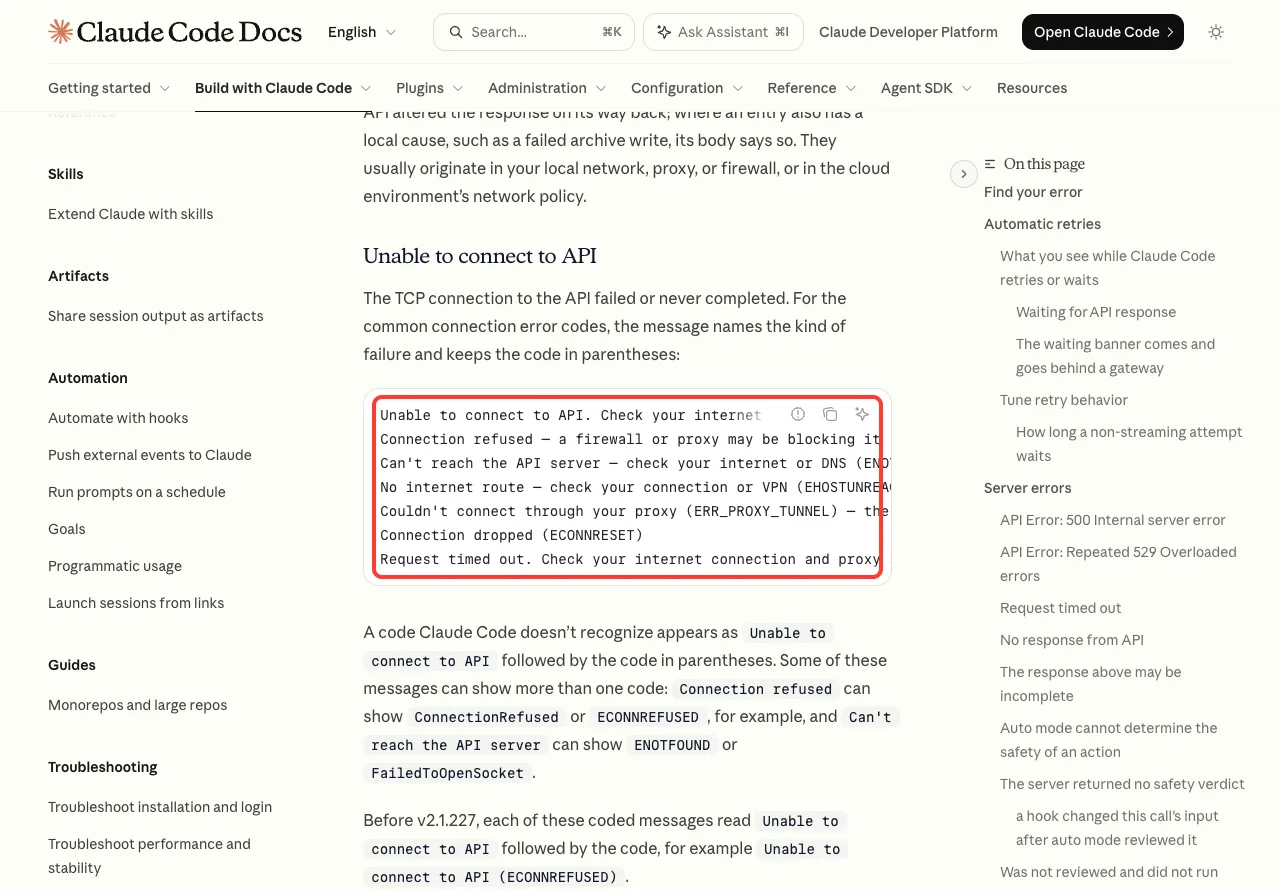
The docs also note that one message can carry more than one code. Connection refused can show ConnectionRefused or ECONNREFUSED, and the DNS message can show ENOTFOUND or FailedToOpenSocket. In our test on macOS we got ECONNREFUSED, but the fix is the same for both.
We Reproduced the Connection Refused Error
To see the real message safely, we set HTTPS_PROXY to a local port with nothing running on it, for one terminal session only. Claude Code then tried to send its request through a proxy that does not exist.
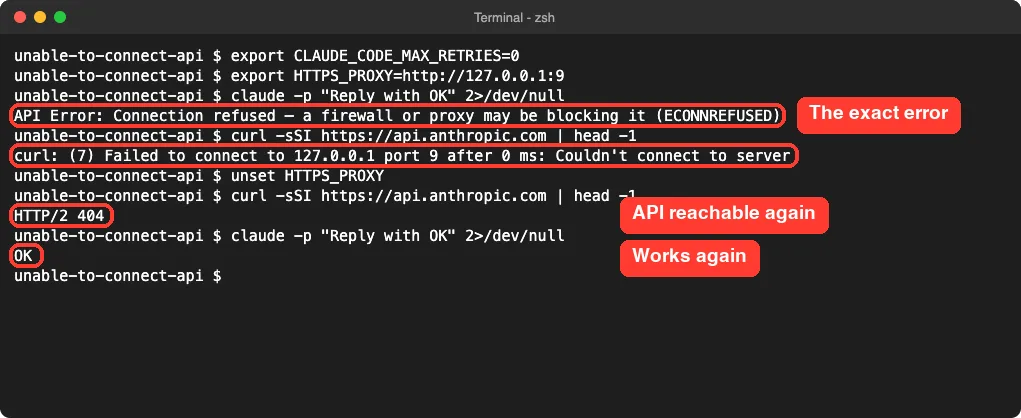
Notice the second box. With the bad proxy set, curl fails too, and its message names the local address it tried, which is the clue.
After unset HTTPS_PROXY, curl gets an answer from the API host and Claude Code replies normally.
A note on the HTTP/2 404 line: that is a good result here. It means the API host answered. You are testing whether the server is reachable, not asking for a real page.
Why It Can Take Minutes to Show Up
Claude Code does not give up on the first failure. The docs say it retries transient failures up to 10 times with growing pauses before it shows you an error. While that happens, you see a countdown next to the reason.
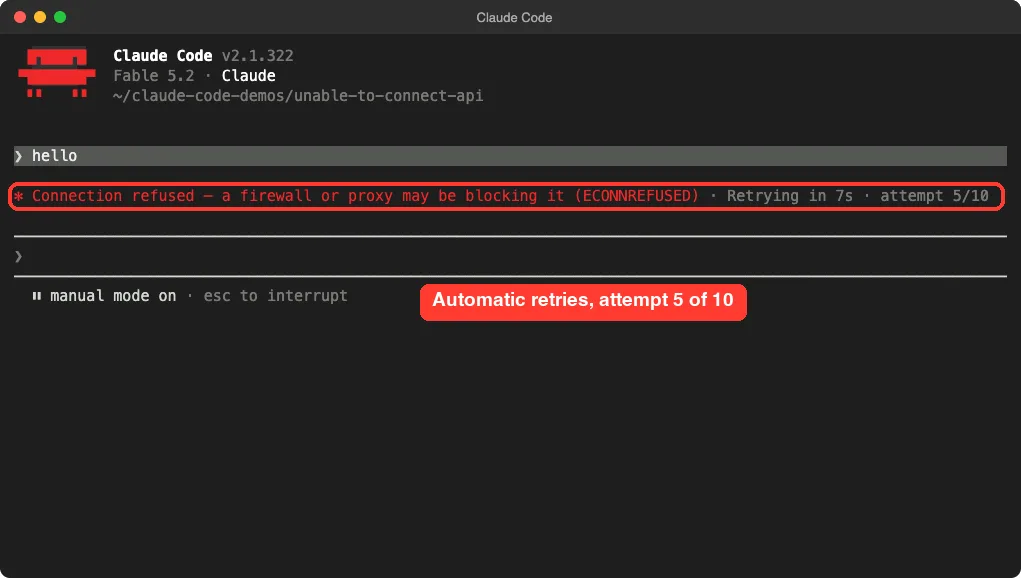
In our run, the final error appeared after 2 minutes and 57 seconds. That was one test on one machine, but it explains why the tool can seem frozen before it reports anything.
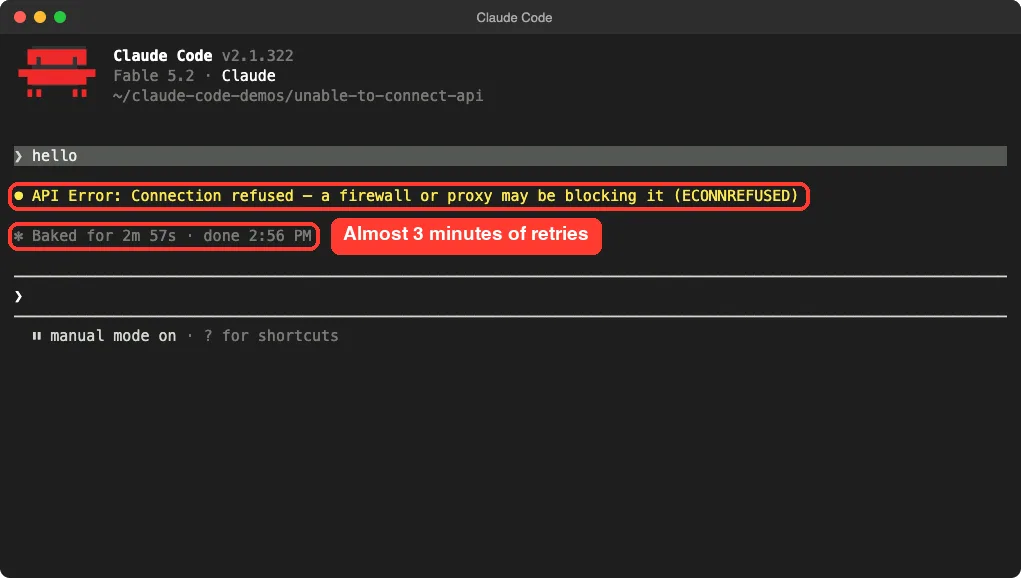
You do not have to wait that long while you are testing fixes. Press Esc to stop the retries.
Or set CLAUDE_CODE_MAX_RETRIES=0 for the session, which the docs suggest for surfacing failures faster. With that set, our failing command returned in about 4 seconds.
A long pause followed by a connection error usually means ten quiet retries, not a frozen app.
Fix 1: Test the Network From the Same Terminal
This is the first step in the official docs. Run the check in the same shell where you start Claude Code, because that shell holds the same variables.
curl -I https://api.anthropic.comOn Windows PowerShell, the docs say to use curl.exe -I https://api.anthropic.com so the built-in alias is not used. Any HTTP status line in the reply means the host is reachable.
If curl fails, the problem sits outside Claude Code. Work through this list:
- Open any website to confirm you are online.
- Turn your VPN off and on, or try without it. The docs name a VPN that blocks
api.anthropic.comas a common cause. - On guest Wi-Fi, open a browser and finish the sign-in page first.
- On a company network, ask whether a proxy is required and whether the firewall allows the hosts Claude Code needs.
Fix 2: Clear a Leftover ANTHROPIC_BASE_URL or Proxy Variable
This is the sneaky case: curl works, yet Claude Code still says connection refused. The docs explain why. When ANTHROPIC_BASE_URL is set, Claude Code sends model requests to that address instead of api.anthropic.com.
So a value left over from a local proxy or gateway you no longer run breaks Claude Code while everything else on your machine looks fine. We reproduced exactly that.
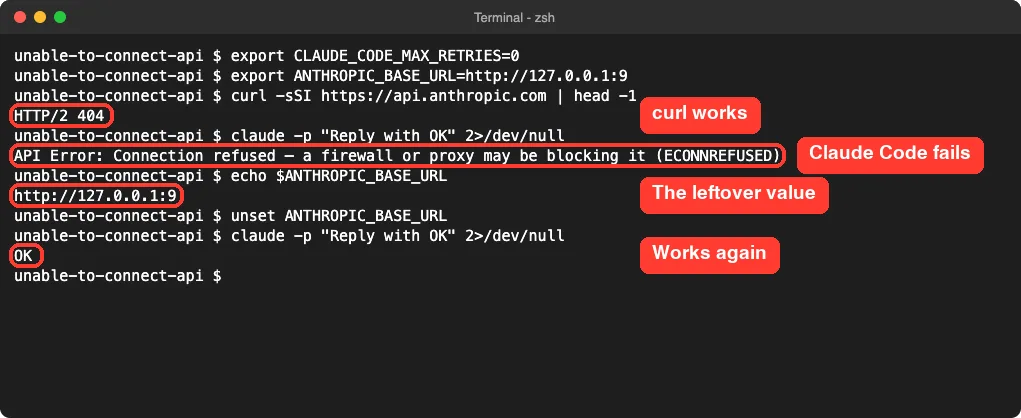
Check both kinds of variable, then clear whatever you did not mean to set:
echo $ANTHROPIC_BASE_URL
echo $HTTPS_PROXY $HTTP_PROXY
unset ANTHROPIC_BASE_URL HTTPS_PROXY HTTP_PROXY
In PowerShell, the docs give echo $env:ANTHROPIC_BASE_URL for the same check. Lowercase names count too: Claude Code uses the first one set in the order https_proxy, HTTPS_PROXY, http_proxy, HTTP_PROXY.
The unset command only fixes the current terminal. If the value comes back in a new window, it lives in your shell profile, such as ~/.zshrc or ~/.bashrc. Remove the line there and open a new terminal.
Our guide to environment variables covers how Claude Code reads them.
Fix 3: Look in Your Settings Files
The shell is not the only place these values hide. The network docs say every variable on that page can also be set in settings.json, inside an env block. That means your terminal can look clean while a settings file still points Claude Code at a dead proxy.
We tested this with a project file. The shell had no proxy variable at all, but a .claude/settings.json in the folder did, and the request failed the same way.
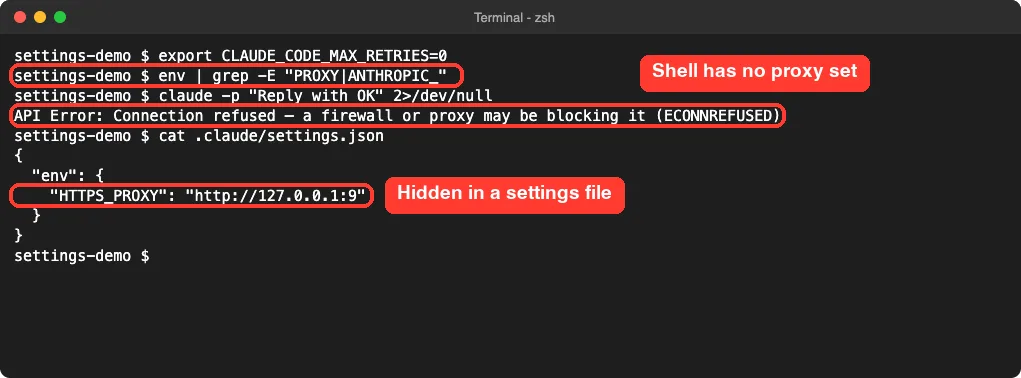
Check these files for an env block with a proxy or base URL entry:
~/.claude/settings.jsonfor your user settings.claude/settings.jsonin the project folder.claude/settings.local.jsonin the project folder
If the error only happens in one project, a project file is the likely source. Not sure where each file lives? See our guide to the settings.json locations.
Fix 4: ECONNRESET and “Connection Dropped”
A reset is different from a refusal. Something accepted the connection and then cut it. To trigger it, we ran a tiny local test server that drops every connection, and pointed Claude Code at it for one command.
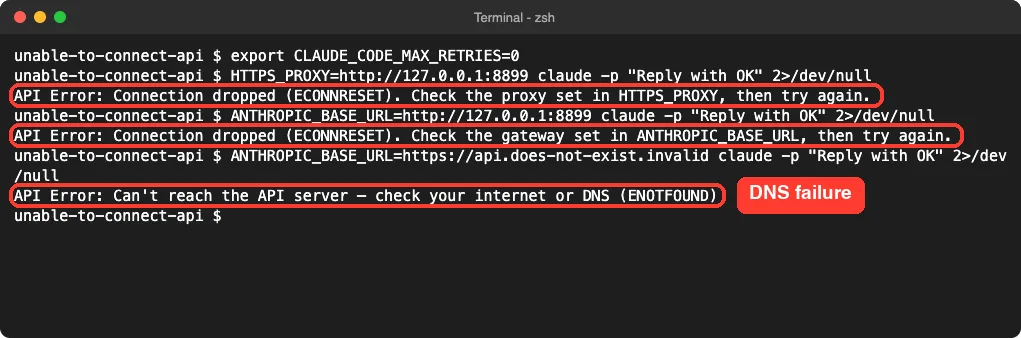
The helpful detail is in the message itself.
When a proxy was set, it said to check the proxy set in HTTPS_PROXY. When a base URL was set, it said to check the gateway set in ANTHROPIC_BASE_URL. Start with whichever one it names.
The docs add a few causes we could not test here:
- If every request through your gateway ends in a dropped connection, the gateway may reject the tool search fields Claude Code sends by default.
- On Windows, a company proxy that drops a tunnel mid-response used to end the turn with
Socket is closed. Since v2.1.214 Claude Code retries it, so update first. - Docker Desktop and similar tools can intercept outbound traffic. Quit them and retry to rule this out.
A single reset on a shaky connection is normal and gets retried for you. Repeated resets point to a proxy, gateway or firewall.
Fix 5: Timeouts and “No Response From API”
Timeouts mean the request left your machine but no answer came back in time. We tested this with a local port that accepts connections and then stays silent, and a short 12-second limit so we did not have to wait.
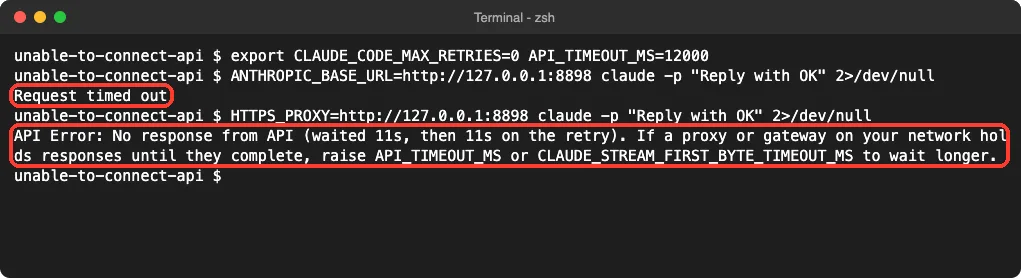
Two different messages appeared. Through a base URL, we got a plain Request timed out after about 13 seconds. Through a proxy, we got No response from API (waited 11s, then 11s on the retry) after about 29 seconds, because Claude Code tried once more before stopping.
With default settings the waits are much longer. Per the docs, the request timeout is 10 minutes, and on a direct connection the first attempt gives up after about 3 minutes with no reply. Here is what to do:
- Send the message again. The docs say your original message stays in the conversation, so you can type
try again. - If it repeats, treat it as a network or proxy problem and go back to Fix 1.
- If a slow proxy holds responses until they finish, raise
API_TIMEOUT_MS. The value is in milliseconds and the default is600000.
One documented trap: if you set API_TIMEOUT_MS to 0 on a version before v2.1.305, every request can fail with a timeout. Update Claude Code or use a positive number.
Fix 6: Company Proxy and Certificate Errors
On a work network, you may need a proxy to reach the internet at all. The official setup is one line before you start Claude Code. This section follows Anthropic’s network docs; we did not test it against a real company proxy.
export HTTPS_PROXY=https://proxy.example.com:8080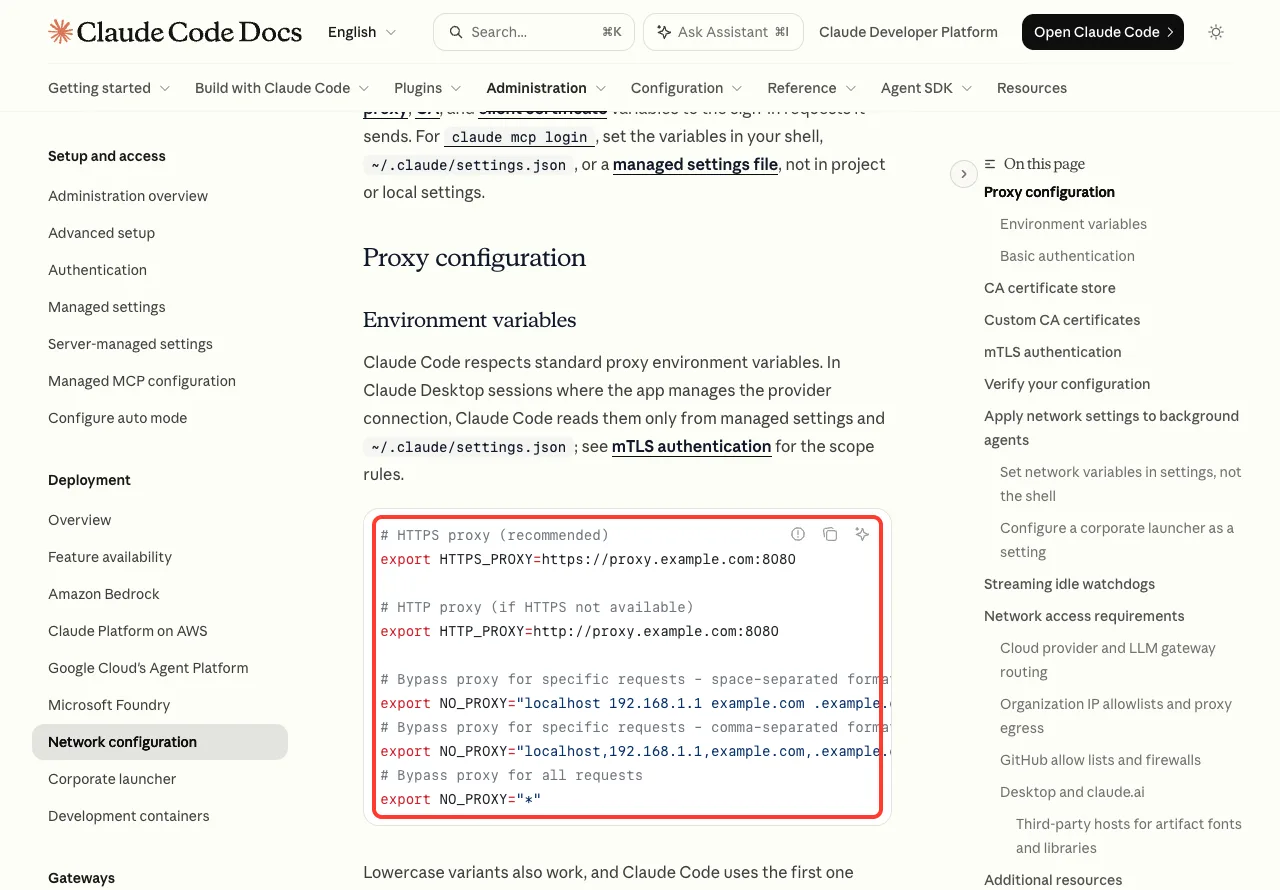
Three details from the docs matter here:
- Variables are read once at startup, so restart Claude Code after any change.
- SOCKS proxies are not supported.
- If your proxy needs a username and password, they go inside the URL.
The value must be a complete URL. We left off the http:// part to see what happens, and Claude Code refused to start, with a message that names the variable to fix.
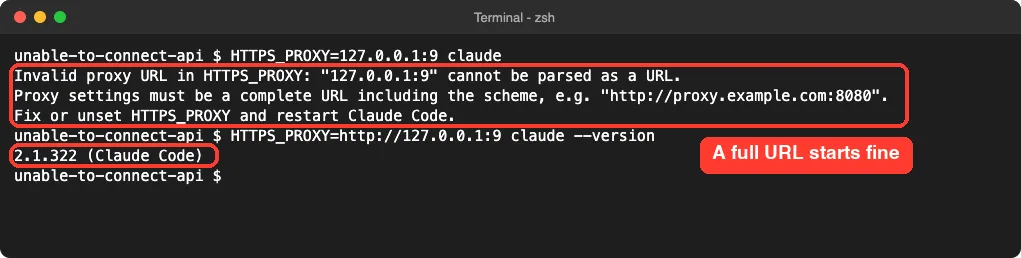
SSL Certificate Verification Failed
Some company networks open and inspect encrypted traffic using their own certificate. Claude Code does not trust that certificate by default, so you get an error that starts with Unable to connect to API: SSL certificate verification failed or Self-signed certificate detected.
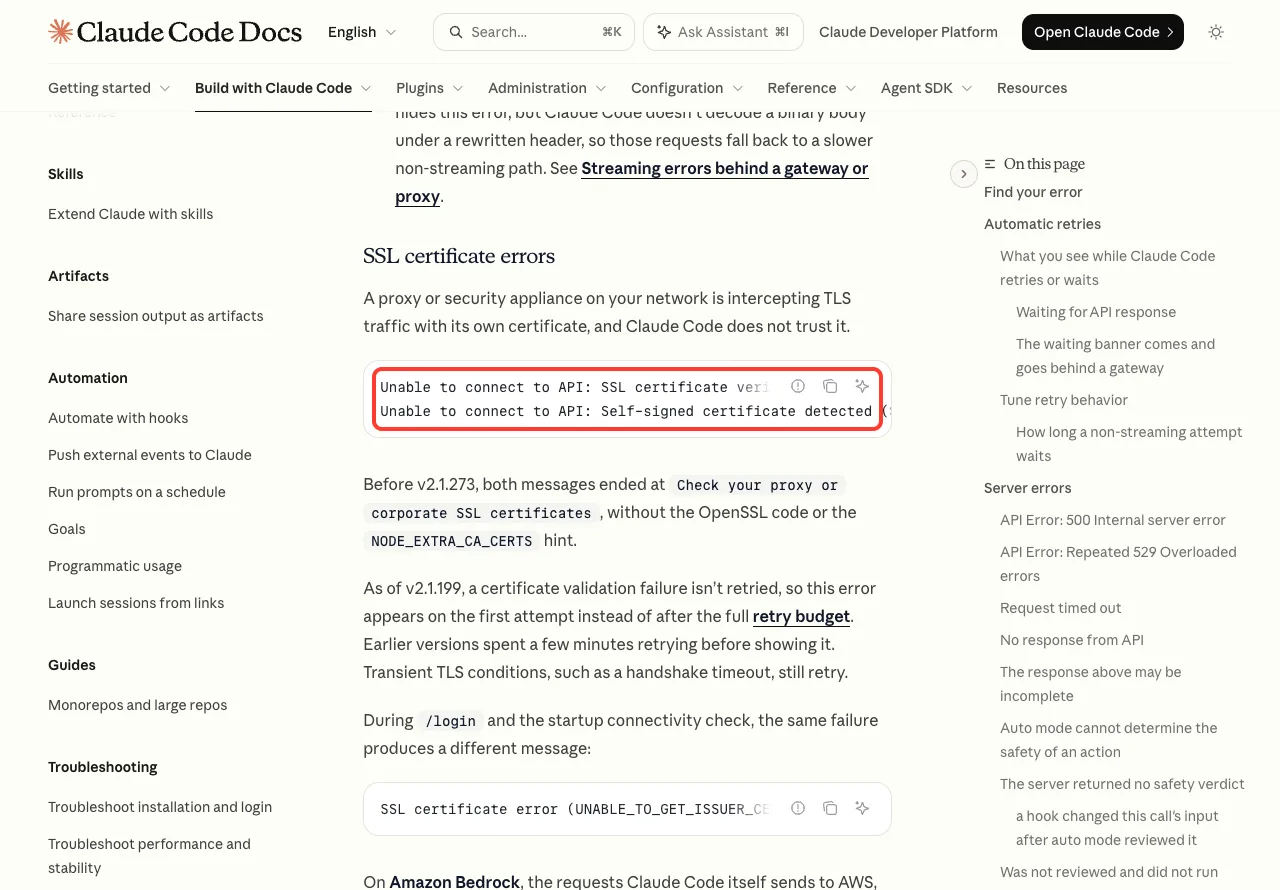
The documented fix is to get your organization’s CA bundle from IT and point Claude Code at it:
export NODE_EXTRA_CA_CERTS=/path/to/ca-bundle.pemThe docs warn against one popular shortcut. Do not set NODE_TLS_REJECT_UNAUTHORIZED=0, because it turns off certificate checks entirely. Since v2.1.199, certificate failures show on the first attempt instead of after minutes of retries.
Hosts Your Firewall Must Allow
If your IT team manages an allowlist, send them the official list. The two that matter most for sign-in and requests are api.anthropic.com and platform.claude.com, plus claude.ai and claude.com for account sign-in.
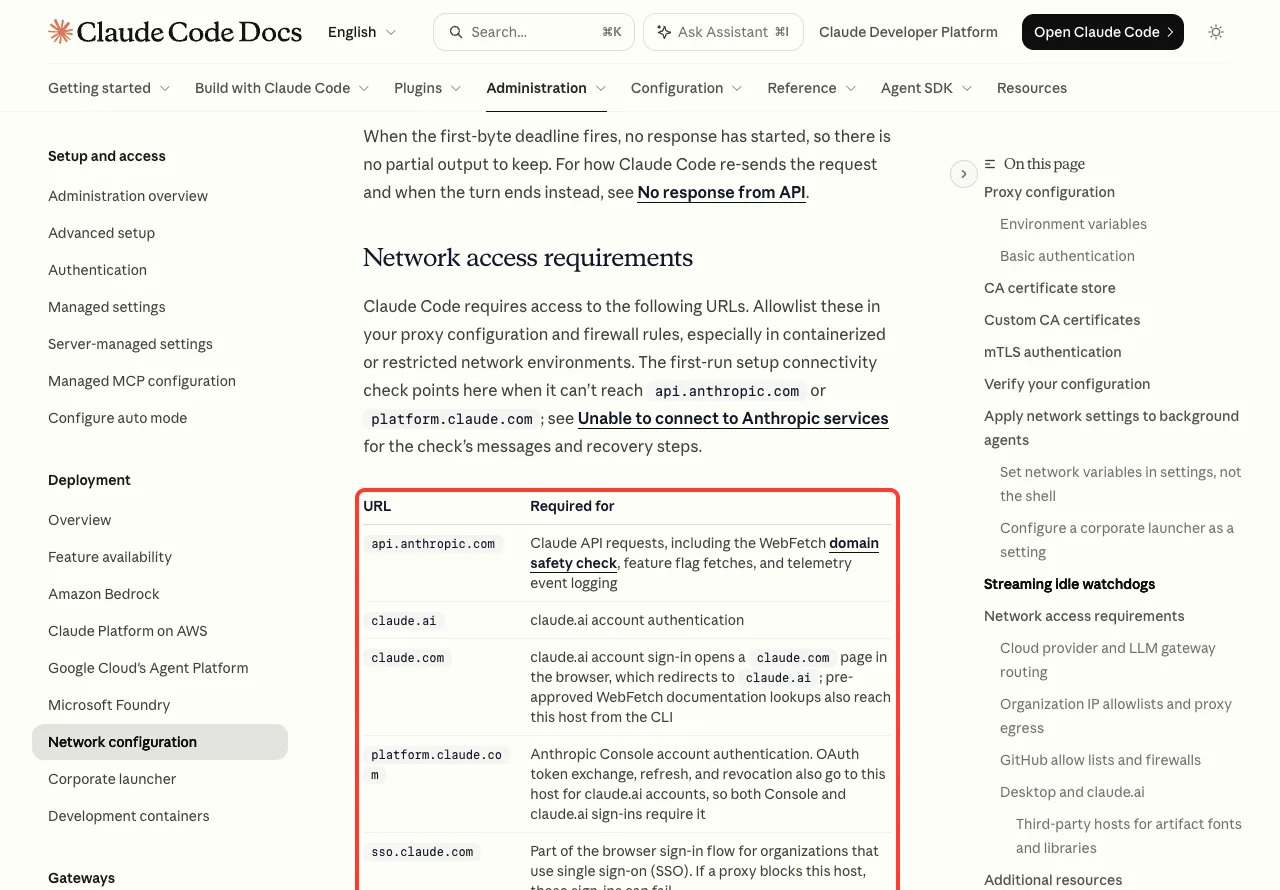
A blocked host during first-run setup gives a close cousin of this error: Unable to connect to Anthropic services. The same checks apply. If sign-in itself is the trouble, our guide to login problems goes deeper.
More Causes From the Official Docs
When curl succeeds and your variables are clean, the docs list a few system-level causes. We did not reproduce these, so treat them as a checklist.
| System | What to check |
|---|---|
| macOS | A removed VPN can leave a tunnel behind. Check ifconfig for stale utun interfaces and remove the VPN’s network extension in System Settings. |
| Linux and WSL | Check /etc/resolv.conf for a nameserver that cannot be reached. WSL can inherit a broken one from Windows. |
| Any | Quit Docker Desktop or similar container tools and retry. |
| Any | If your network is open and it still fails, check that Claude Code is available in your country. |
How to Tell It Apart From Other Claude Code Errors
Connection errors are easy to mix up with server errors, and the difference is who failed. With this error, your request never arrived. With a 529 or 429, it arrived and the server said no.
- A message with
529or “Overloaded” is a server capacity issue. See our error 529 guide. - A message with
429is a rate limit. See the error 429 guide. - For a wider list, see our roundup of common errors in Claude Code.
The built-in checkup also helps. Run claude doctor from your shell, or /doctor inside a session, as shown in our doctor walkthrough.
Try It Yourself
You can see this error safely in one minute, without changing any system setting. The variables below apply to a single command only, and port 9 on your own machine has nothing listening.
CLAUDE_CODE_MAX_RETRIES=0 HTTPS_PROXY=http://127.0.0.1:9 claude -p "Reply with OK"You should get the connection refused message within a few seconds. Run claude -p "Reply with OK" again without the variables and it works. The -p flag runs one prompt and exits, as covered in our headless mode guide.
Common Mistakes
- Testing
curlin a different terminal. A new window may not have the same variables, so the test tells you nothing. - Changing a variable while Claude Code is running. It reads them once at startup.
- Fixing only the shell. A value in the
envblock of a settings file keeps the error alive. - Writing the proxy as
host:8080. It needshttp://orhttps://in front. - Turning off certificate checks to get past an SSL error. Use the CA bundle instead.
- Blaming your plan or usage. A connection error means the request never reached the server.
Pro Tips
- Use
CLAUDE_CODE_MAX_RETRIES=0while you test fixes, then remove it so normal retries protect you from brief drops. - Run
claude --debugto write a log under~/.claude/debug/. The docs say it confirms which certificate files loaded. - Run
/statusin a session to see the active proxy. It marks a value it cannot parse as invalid and ignored. - If you use background agents, the docs advise putting network variables in
~/.claude/settings.jsonrather than only in the shell. - Keep Claude Code current with
claude update. Several retry and message fixes landed in recent versions.
Frequently Asked Questions
Why does Claude Code say unable to connect to API when my internet works?
Usually a variable is sending it somewhere else. A leftover ANTHROPIC_BASE_URL or HTTPS_PROXY, in your shell or in a settings file, points Claude Code at an address that no longer answers. Clear it and start a new terminal.
What is the difference between ECONNREFUSED and ECONNRESET?
Refused means nothing was listening at the address, so the connection never opened. Reset means the connection opened and was then cut, often by a proxy, gateway or firewall. In our tests the reset message also named the variable to check.
Does Claude Code retry connection errors on its own?
Yes, the docs say it retries transient failures up to 10 times with growing pauses. In our test with a dead proxy, that took almost 3 minutes before the final error appeared. Certificate failures are the exception and show right away.
Should I raise API_TIMEOUT_MS?
Only if a slow network or a proxy that holds responses is the cause. The default is already 10 minutes. For a connection that is refused or dropped, a longer timeout does nothing.
Is a connection error a problem with my Claude account?
No, account, plan and usage problems come back as other errors, such as 401, 403 or 429, after the server has been reached. A connection error means the request did not get that far. You can check your plan details on the Claude AI page.
Conclusion
The “Unable to connect to API” error in Claude Code is a network path problem, and the code in parentheses tells you where to look. Test with curl -I https://api.anthropic.com in the same terminal, then check HTTPS_PROXY and ANTHROPIC_BASE_URL in both your shell and the env block of your settings files. On a company network, set the proxy as a full URL and add your CA bundle with NODE_EXTRA_CA_CERTS. For timeouts, retry first and raise API_TIMEOUT_MS only when a slow proxy is the cause. For the full list of messages, see the official error reference and the network configuration page.