If you see Claude Code usage limit reached, or a line such as You've hit your session limit · resets 3:45pm, your subscription’s included usage has run out for now. Nothing is broken. Claude Code blocks new requests until the reset time printed in the message, and then it works again.
The short answer on timing: paid plans have a five-hour session limit and a weekly limit. A session limit clears within hours, while a weekly limit can be days away. The exact time is always in the message, and /usage shows every limit with its own reset time.
You have four ways forward: wait for the reset, switch models with /model if only the Opus or Sonnet limit is hit, turn on usage credits with /usage-credits, or upgrade your plan. The rest of this guide shows each one.
This guide is part of our help series. Browse all our Claude Code tutorials for more fixes and how-tos.
Tested with Claude Code v2.1.322 on macOS on November 14, 2026. We ran /usage, /rate-limit-options, /config and a usage status line in a throwaway folder on a subscription sign-in. The limit messages themselves, the reset rules and the plan options follow Anthropic’s official docs and support pages.
Claude Code Usage Limit Reached: Quick Summary
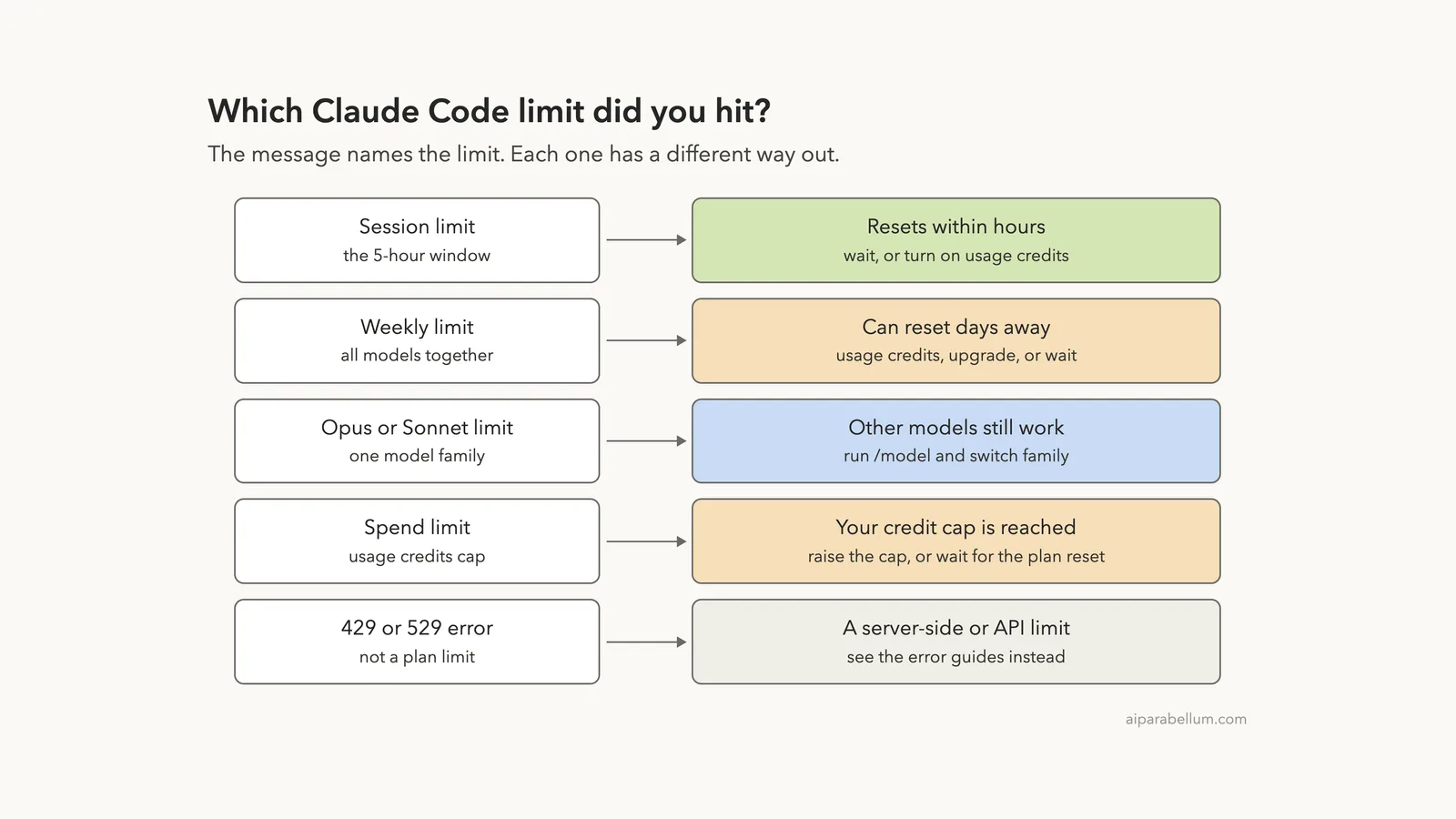
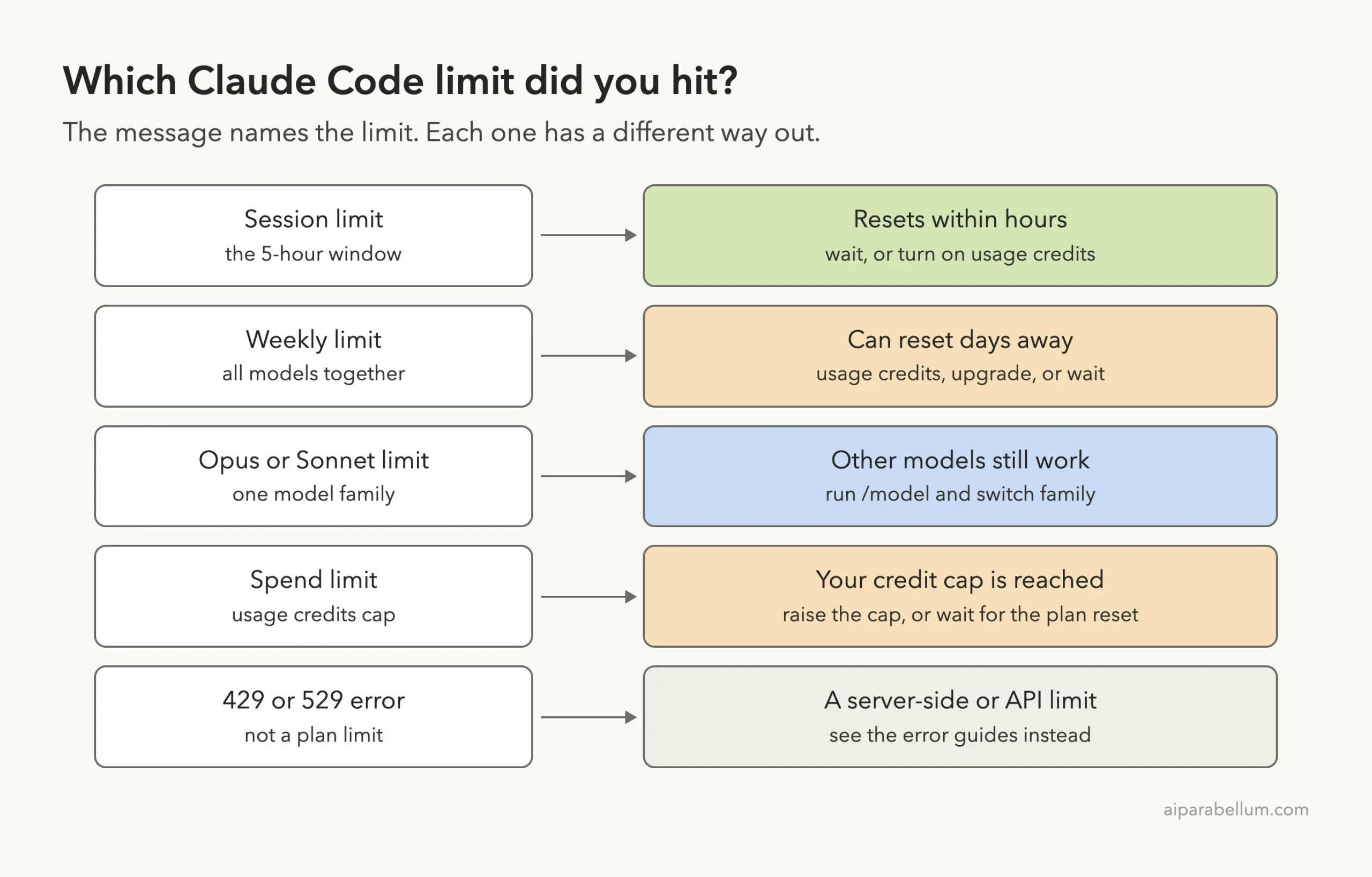
Match the message on your screen to a row. The wording in the first column comes from Anthropic’s error reference.
| Message you see | What it means | What to do |
|---|---|---|
You've hit your session limit | The five-hour window is used up, for all models | Wait for the time shown, or use usage credits |
You've hit your weekly limit | The weekly allowance is used up, for all models | Usage credits, a bigger plan, or wait |
You've hit your Opus limit or Sonnet limit | Only that model family is capped | Run /model and pick another family |
Usage limit reached · limit resets 3:45pm | Claude Code is waiting and will continue the task itself | Keep the session open, or press Esc to cancel |
Usage limit reached · wrapping up | Claude is finishing the step in progress | Nothing, let it finish |
You've hit your monthly spend limit | Your usage credits reached the cap you set | Raise the cap, or wait for the plan reset |
What the Usage Limit Message Means
Anthropic’s error reference puts it simply: subscription plans include a rolling usage allowance, and when it runs out you see one of four messages. Each one ends with the reset time.
You've hit your session limit · resets 3:45pm
You've hit your weekly limit · resets Mon 12:00am
You've hit your Opus limit · resets 3:45pm
You've hit your Sonnet limit · resets 3:45pm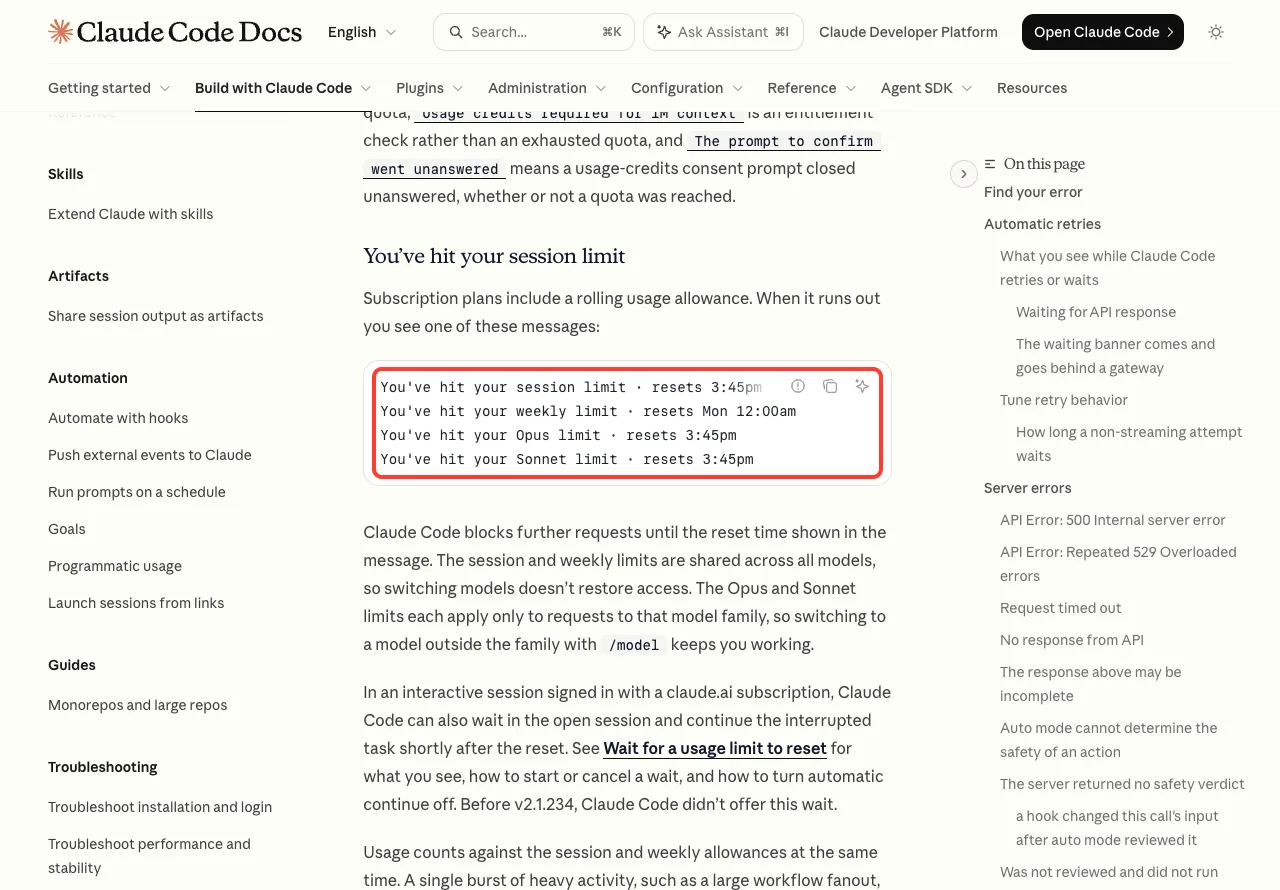
Two details in that section matter a lot. First, the session and weekly limits are shared across all models, so switching models does not bring access back. Second, the Opus and Sonnet limits apply only to that model family, so a switch does help there.
The docs also say usage counts against the session and weekly allowances at the same time, so one burst of heavy work can use up the weekly allowance before the session window resets.
This Is Not Error 429 or 529
A plan limit is about your subscription. It is different from an API rate limit, which shows up as a 429, and from a busy server, which shows up as a 529. The docs state that a 529 is not your usage limit and does not count against your quota.
If your message has a number in it, read our guides to Error 429 and Error 529 instead. For everything else, our list of common errors is the place to start.
A usage limit message is a timer, not a fault. The reset time is printed right in it.
When Does the Claude Code Usage Limit Reset?
Anthropic’s support page for Pro and Max plans gives the rules by plan. Pro and Max plans have a five-hour session limit and a weekly limit. Ultra plans have a weekly limit, and verified Ultra accounts don’t have a five-hour session limit.
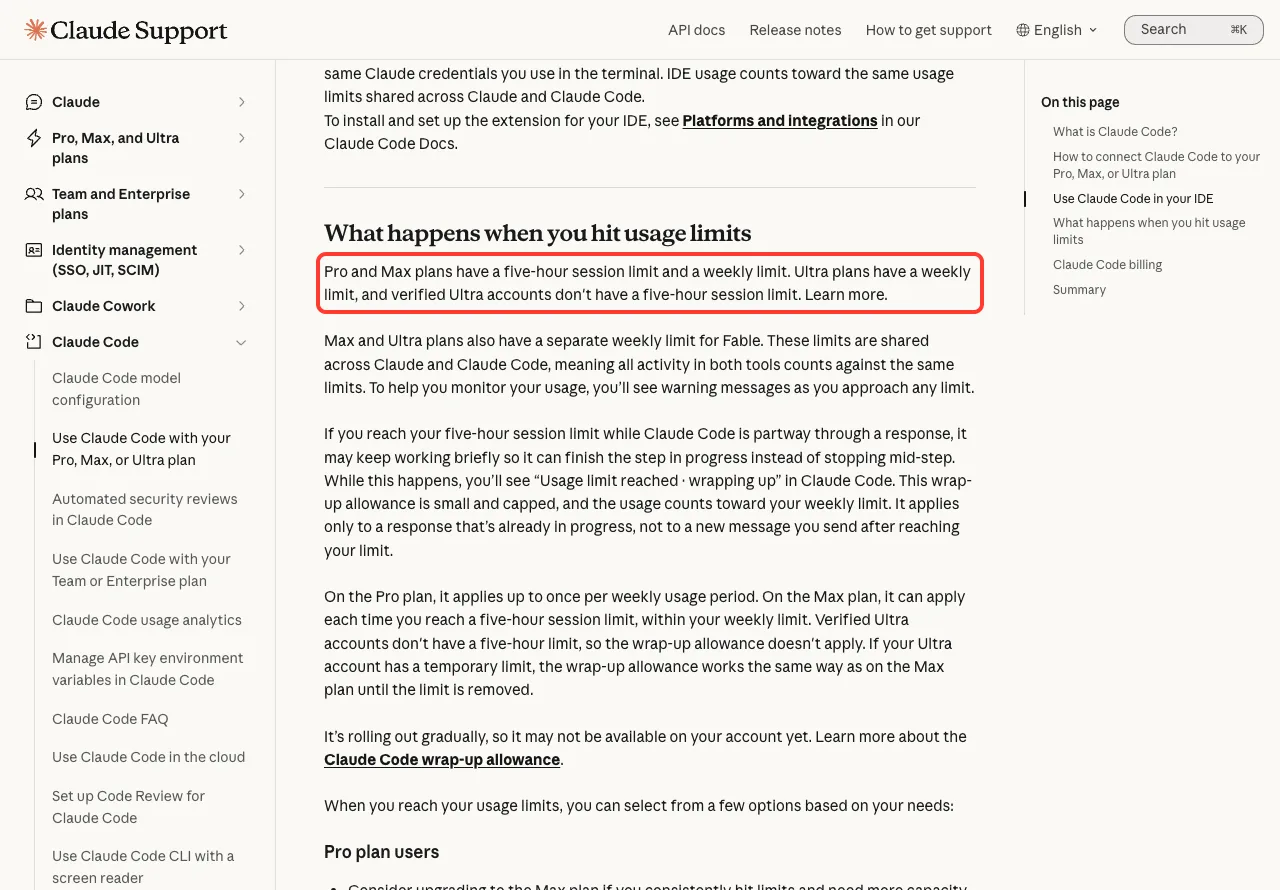
The same page adds three points that explain most surprises:
- Max and Ultra plans also have a separate weekly limit for one model, shown on that page as a weekly limit for Fable.
- The limits are shared across Claude and Claude Code. Chat in the app, work in the terminal and work in your IDE all draw from the same allowance.
- You see warning messages as you get close to a limit.
That shared pool is the usual reason a limit arrives sooner than expected. A long morning in the Claude app counts against the same session window as your coding.
Anthropic does not publish one fixed clock time for resets, because the windows roll. So do not guess. Read the time in your message, or open /usage.
The Wrap-Up Allowance
Sometimes you see Usage limit reached · wrapping up. The support page explains it: if you hit the five-hour limit while Claude Code is partway through a response, it may keep working briefly so it can finish the step in progress.
The allowance is small and capped, and it counts toward your weekly limit. It applies only to a response already in progress, not to a new message you send afterward.
The page also says it is rolling out gradually, so your account may not have it yet.
How to Check Your Remaining Usage With /usage
Run /usage inside Claude Code. The costs docs say subscribers see plan usage bars, activity stats and a usage breakdown on that screen. We ran it on v2.1.322 to see the real thing.
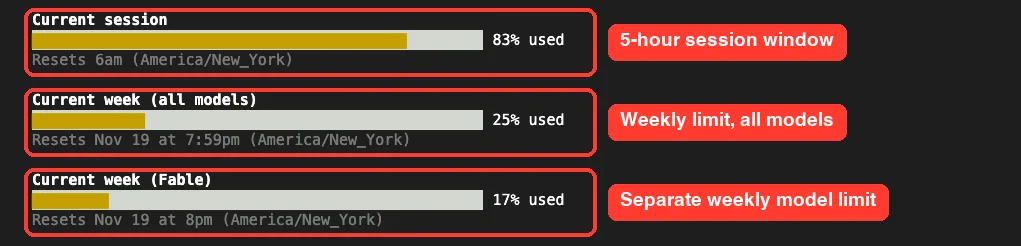
/usage screen: one bar per limit, each with the percent used and its own reset time.In our session there were three bars. Current session is the five-hour window, and it showed a reset time later the same day. Current week (all models) and a second weekly bar for one model each showed a reset date several days out.
Below the bars, the screen lists what is contributing to your usage, with suggestions such as starting fresh when you switch tasks. The docs note those figures are approximate and come from sessions on this machine only, so usage from other devices or the Claude app is not in that breakdown.
One message can confuse people here. If /usage says something like rate limited until 3:14am, the docs say Claude Code just can’t fetch your plan limits again until then. It does not mean your work with Claude is limited.
For the token side of this screen, see our guide on how to monitor usage.
Keep Your Limits Visible in the Status Line
Checking /usage by hand is easy to forget. A custom status line can show both windows all the time. The status line docs describe a rate_limits object with a rolling five_hour window and a weekly seven_day window, each with used_percentage and resets_at.
We saved the docs’ example script in the demo project and pointed the project settings at it:
#!/bin/bash
input=$(cat)

MODEL=$(echo "$input" | jq -r '.model.display_name')
FIVE_H=$(echo "$input" | jq -r '.rate_limits.five_hour.used_percentage // empty')
WEEK=$(echo "$input" | jq -r '.rate_limits.seven_day.used_percentage // empty')

LIMITS=""
[ -n "$FIVE_H" ] && LIMITS="5h: $(printf '%.0f' "$FIVE_H")%"
[ -n "$WEEK" ] && LIMITS="${LIMITS:+$LIMITS }7d: $(printf '%.0f' "$WEEK")%"

[ -n "$LIMITS" ] && echo "[$MODEL] | $LIMITS" || echo "[$MODEL]"
{
"statusLine": {
"type": "command",
"command": ".claude/statusline.sh"
}
}The script goes in .claude/statusline.sh and the JSON goes in .claude/settings.json. Make the script executable with chmod +x .claude/statusline.sh. It needs jq installed.
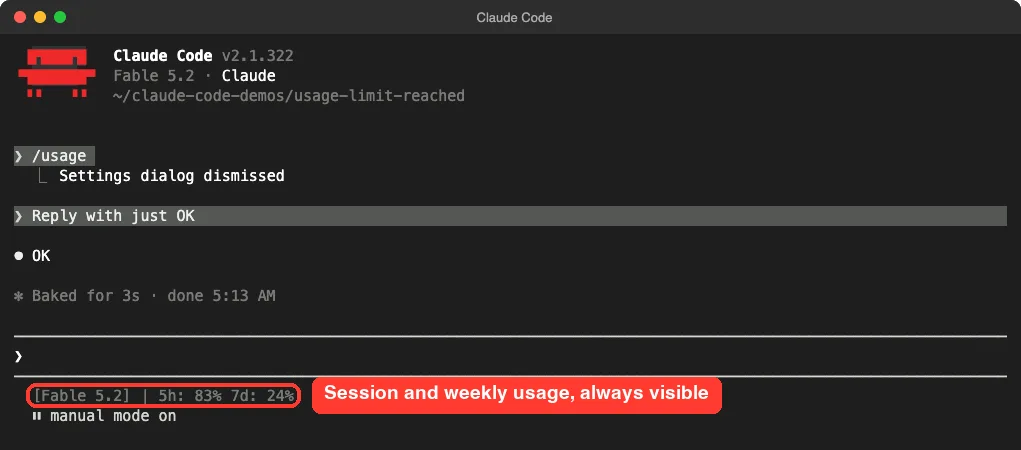
Two things we noticed. The numbers appeared only after the first reply, which matches the docs: rate_limits is present only for Pro, Max and Ultra subscribers, and only after the first API response. And the weekly figure was within a point of the /usage bar we had opened a minute earlier.
Our full guide to the status line covers colors, more fields and other layouts.
What to Do When You Hit the Limit
Here are the options in the order most people should try them. Options 1 to 4 come from the official error reference and support page. We opened the menus ourselves, but we did not push an account past its limit for this guide.
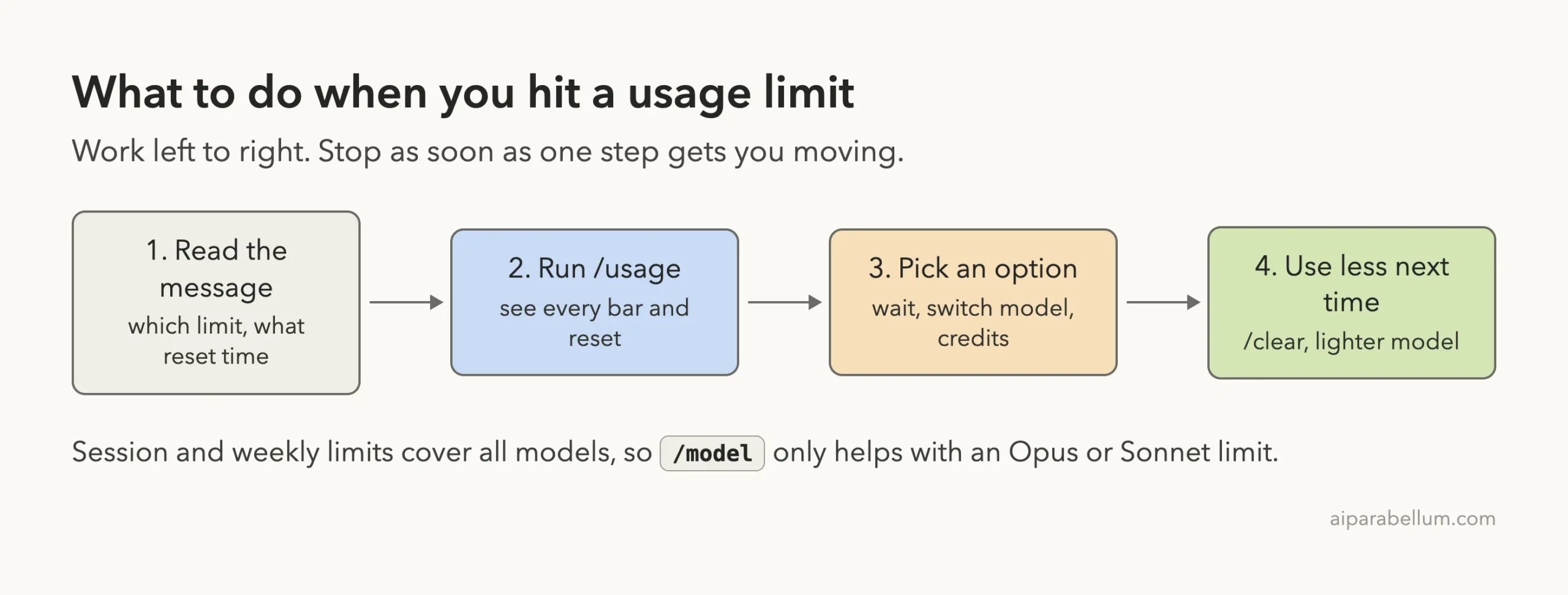
/usage, pick an option, then trim your usage for next time.Option 1: Wait and Let Claude Code Continue on Its Own
Since v2.1.234, you do not have to babysit the clock. The docs say that when a usage limit stops Claude mid-task, Claude Code waits in the open session and continues the task on its own after the limit resets. This is on by default in interactive sessions signed in with a subscription.
While it waits, two lines sit at the bottom of the session:
Usage limit reached · limit resets 3:45pm
Continuing automatically at 3:45pm · Esc to cancel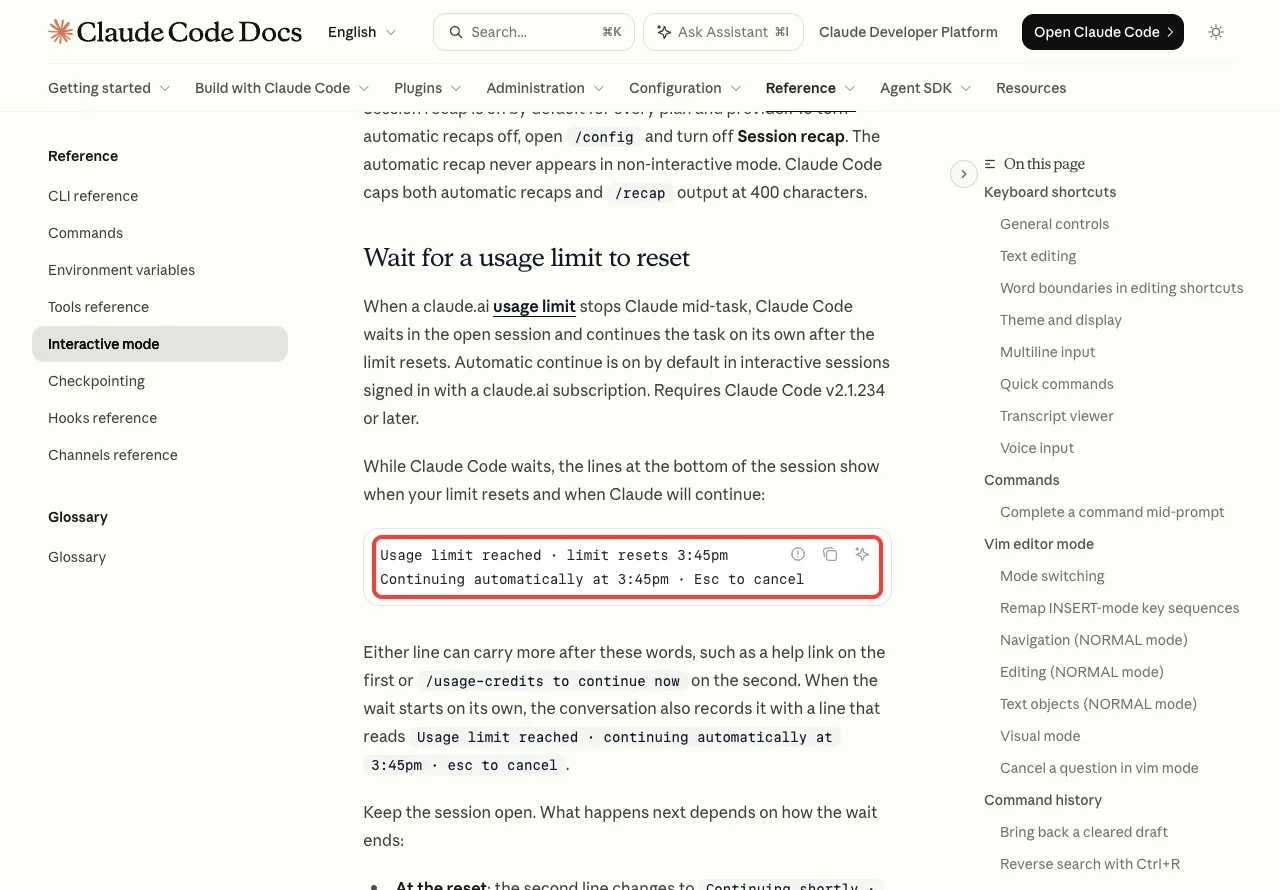
Keep the session open and this is what happens next, according to the docs:
- At the reset, the second line changes to
Continuing shortly · Esc to cancel, and Claude picks the task up where it stopped. It does not resend your last message. - If your computer slept for more than about 30 minutes and the limit reset in that time, you see
Press enter to continue. PressEnter. - Claude Code still asks for permissions as usual, so the task can pause on a prompt while you are away.
- After three automatic continuations, it stops and tells you so.
The wait ends without continuing if you exit Claude Code, clear the conversation or switch accounts.
When the Wait Does Not Start by Itself
There are cases where Claude Code will not start the wait on its own. The big one for this topic is a weekly limit, because the docs exclude a reset more than 24 hours away.
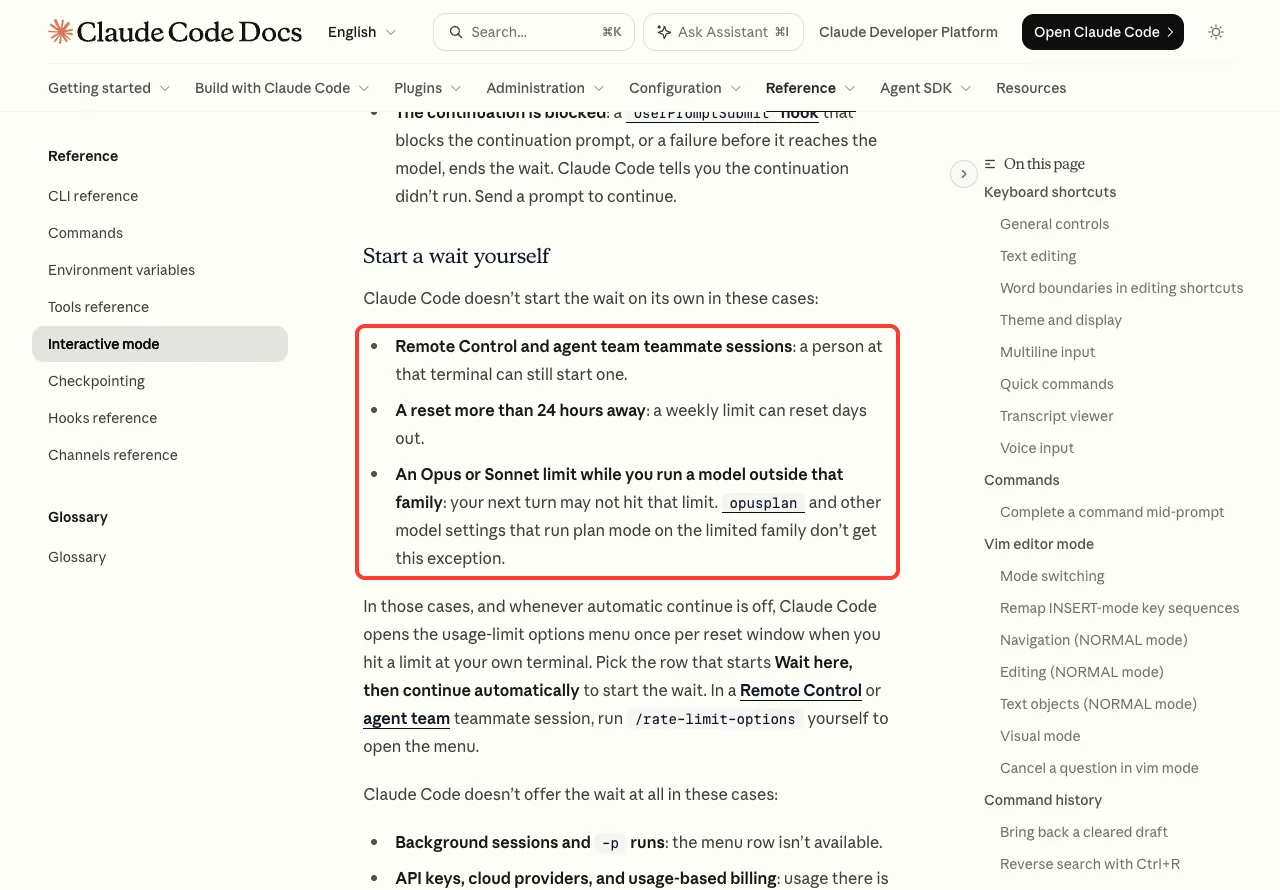
In those cases Claude Code opens a usage-limit options menu once per reset window. You can open it yourself any time with /rate-limit-options. We ran that command on v2.1.322 to see the menu.
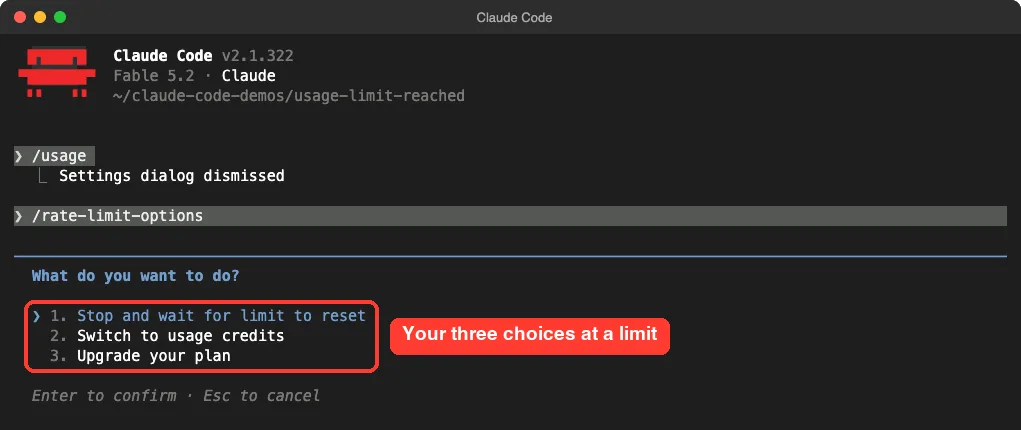
/rate-limit-options menu in our session: wait, switch to usage credits, or upgrade.Our account was not at a limit when we opened it, so your rows may read a little differently. The docs describe a row that starts with Wait here, then continue automatically when a limit is active.
The wait is not offered at all for background sessions, -p runs, API keys or cloud providers. With API billing there is no reset to wait for, because usage is metered per request.
Turn Automatic Continue Off
Maybe you do not want a task to restart while you are away. Open /config and turn off Continue automatically at usage limit. We searched for it in /config and found it set to true, which is the default.
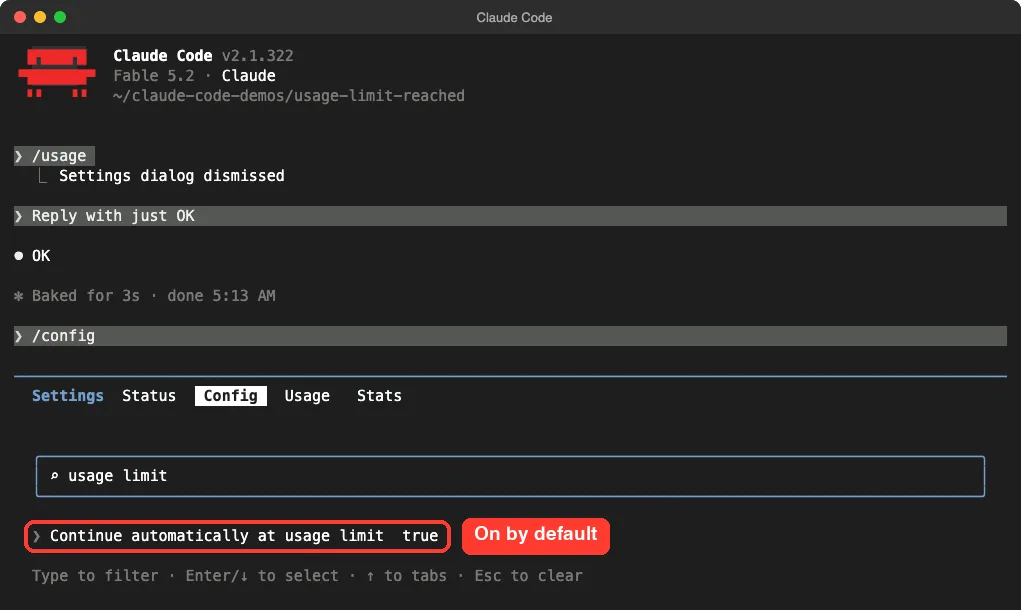
/config to find the setting. It is on by default.You can also set autoContinueAtUsageLimit to false in your user settings. To cancel a single wait, press Esc at an empty prompt or Ctrl+C while the lines show.
Option 2: Switch Models With /model
This works for one case only. If the message says Opus limit or Sonnet limit, run /model and pick a model outside that family, and you keep working.
For a session or weekly limit it does nothing, because those cover all models. The docs add one cost to know about: each model has its own prompt cache, so the first request after a switch re-reads the whole conversation.
Our guide to choosing a model explains the picker and the model families.
Option 3: Turn On Usage Credits
Usage credits let you keep working past your plan’s limit, billed on top of your subscription. Run /usage-credits to manage them. The command is not available with API key sign-in.
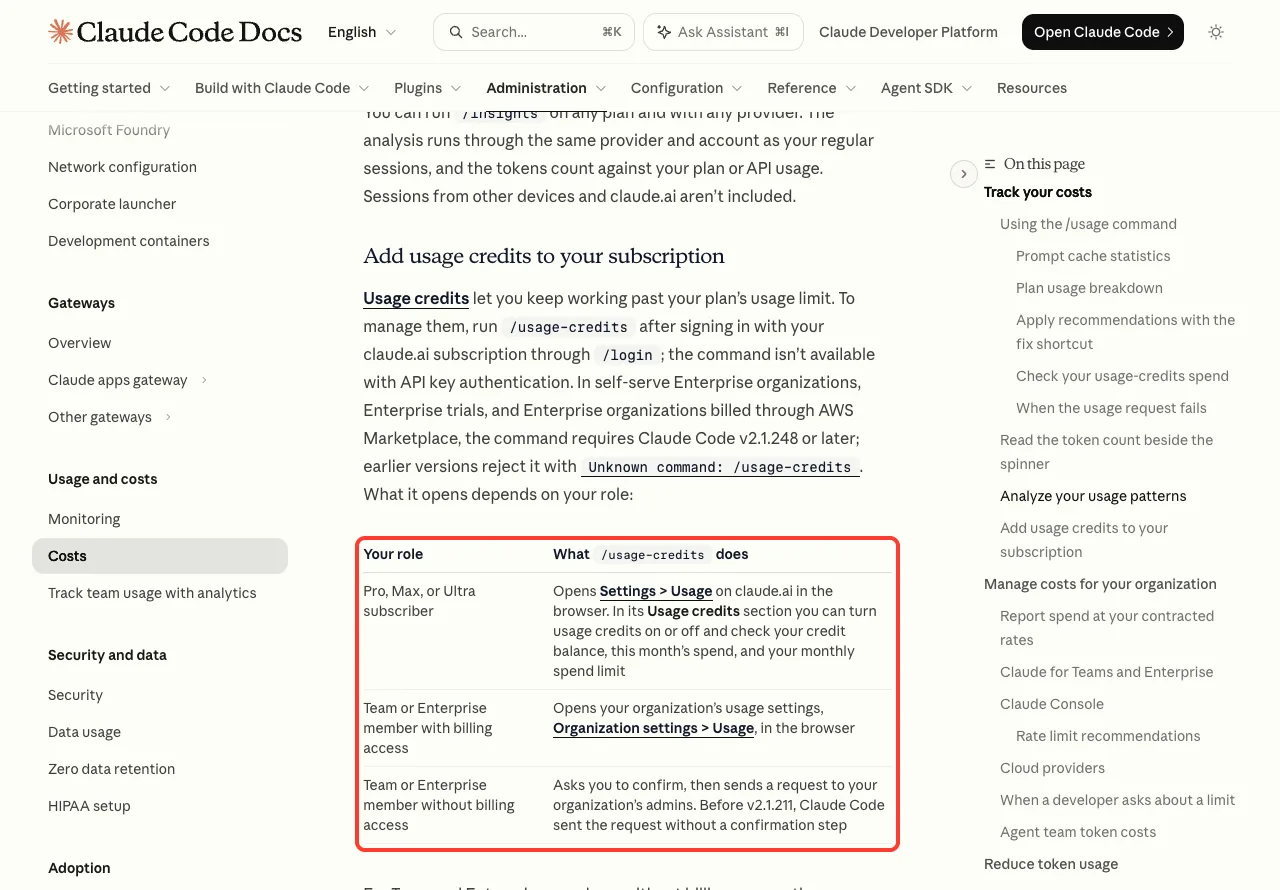
/usage-credits does depends on your plan and whether you have billing access.What it does depends on who you are:
- Pro, Max or Ultra subscriber: it opens Settings > Usage on claude.ai, where you turn credits on or off and set a monthly spend limit.
- Team or Enterprise member with billing access: it opens your organization’s usage settings.
- Team or Enterprise member without billing access: it asks you to confirm, then sends a request to your admins.
Once credits are on, /usage shows a usage-credits row with your spend for the month. In our session that row read Usage credits are off, with a pointer to /usage-credits.
If you later see You've hit your monthly spend limit, your credits reached the cap you set. On Pro, Max and Ultra, Claude Code prompts you to raise or remove the cap without leaving the terminal.
Option 4: Upgrade, or Use an API Account
The support page lists the choices by plan. For Pro, it suggests the Max plan if you consistently hit limits and need more capacity for larger repositories. For Max, it suggests Ultra.
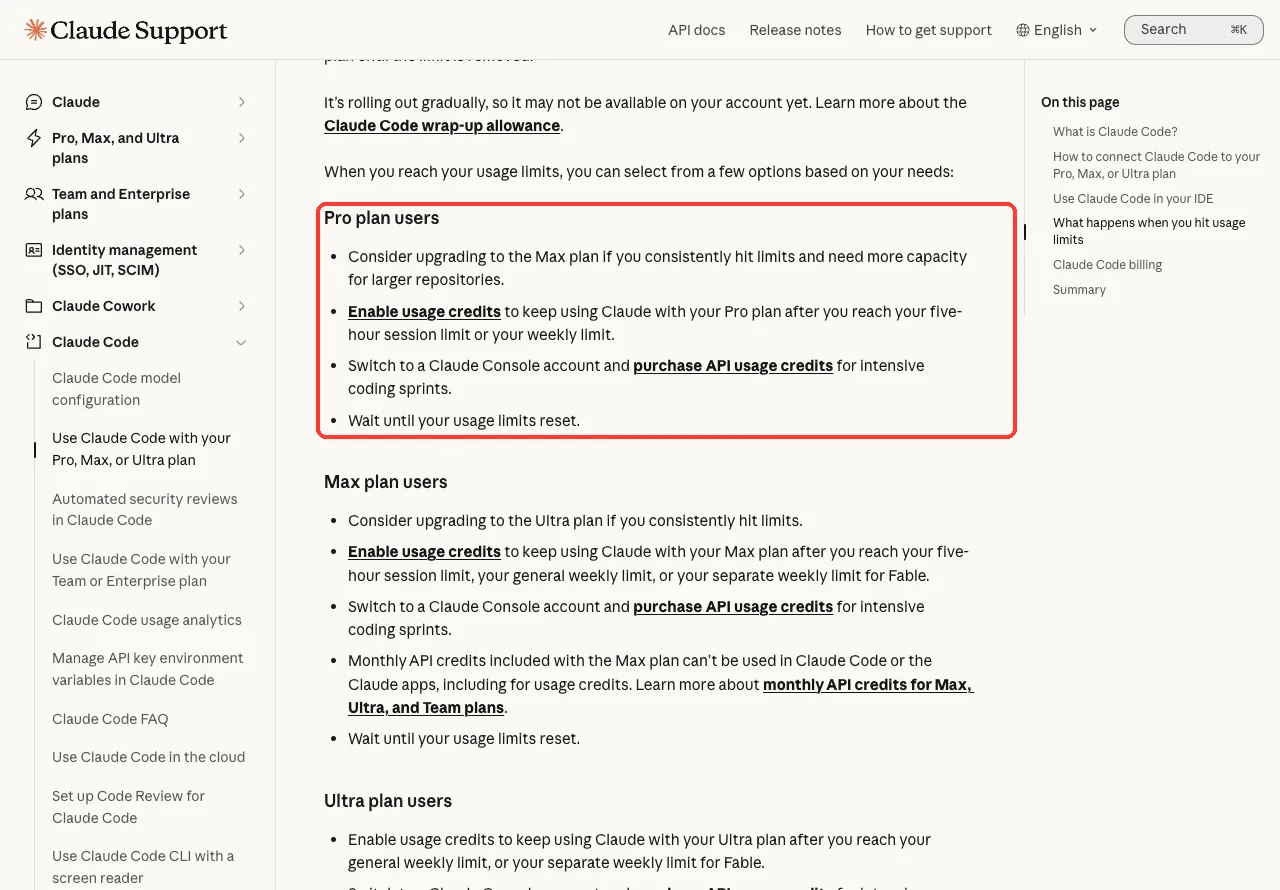
Every plan also has the same last resort for heavy sprints: switch to a Claude Console account and buy API usage credits. That usage is billed at standard API rates, separate from your plan price.
Two warnings from the same page. Monthly API credits included with Max and Ultra can’t be used in Claude Code. And if an ANTHROPIC_API_KEY variable is set on your system, Claude Code uses that key instead of your subscription, which means API charges.
Want to stay strictly inside your plan? The support page says to decline the API credit option when it is offered and let your usage period reset. Our guide to plans and login compares the sign-in methods.
How to Hit the Limit Less Often
You cannot raise a plan limit with a setting, but you can make each hour of it go further. The costs docs explain why: the more context Claude processes, the more tokens you use on every message.
- Run
/clearwhen you switch to unrelated work. Stale context is paid for again on every message. - Use
/compacton a long conversation, and/contextto see what is filling the window. - Match the model to the job. The docs say Sonnet handles most coding tasks well and costs less than Opus.
- Run
/mcpand turn off servers you are not using. - Keep agent teams small. Each teammate has its own context window, so usage grows with team size.
- Watch the warning. Claude Code can tell you when you have used most of a window, for example
You've used 85% of your session limit · resets 3:45pm.
For more ideas, see our 12 tips to reduce token usage and our guide to the context window.
Try It Yourself
You do not need to be at a limit to practice. Open Claude Code in any small project and run these three commands, one at a time:
/usage
/rate-limit-options
/config
In /usage, find the reset time for each bar. In /rate-limit-options, read the choices and press Esc. In /config, type usage limit and check the automatic continue setting.
Then ask Claude to add the usage status line for you with this prompt:
Add a project status line that shows my 5-hour and 7-day plan usage percentages from the rate_limits fields. Save the script in .claude/statusline.sh and wire it up in .claude/settings.json.Common Mistakes
- Switching models at a session or weekly limit. Those limits cover every model, so
/modelonly helps with an Opus or Sonnet limit. - Closing the terminal during the wait. The wait does not restart when you resume the session.
- Forgetting the shared pool. Chat in the Claude app and work in your IDE use the same allowance as the terminal.
- Leaving an
ANTHROPIC_API_KEYvariable set. Claude Code then bills the API instead of using your plan. - Reading
rate limited untilinside/usageas a work limit. It only means the usage screen can’t refresh yet.
Pro Tips
- Before a big task, check
/usage. If the session bar is nearly full, a short break may beat a stop halfway through. - If you turn on usage credits, set a monthly spend limit at the same time so there are no surprises.
- Press
dorwin/usageto switch the breakdown between the last 24 hours and the last 7 days. - On Claude Code older than v2.1.234, the automatic wait does not exist. Run
claude updatefirst.
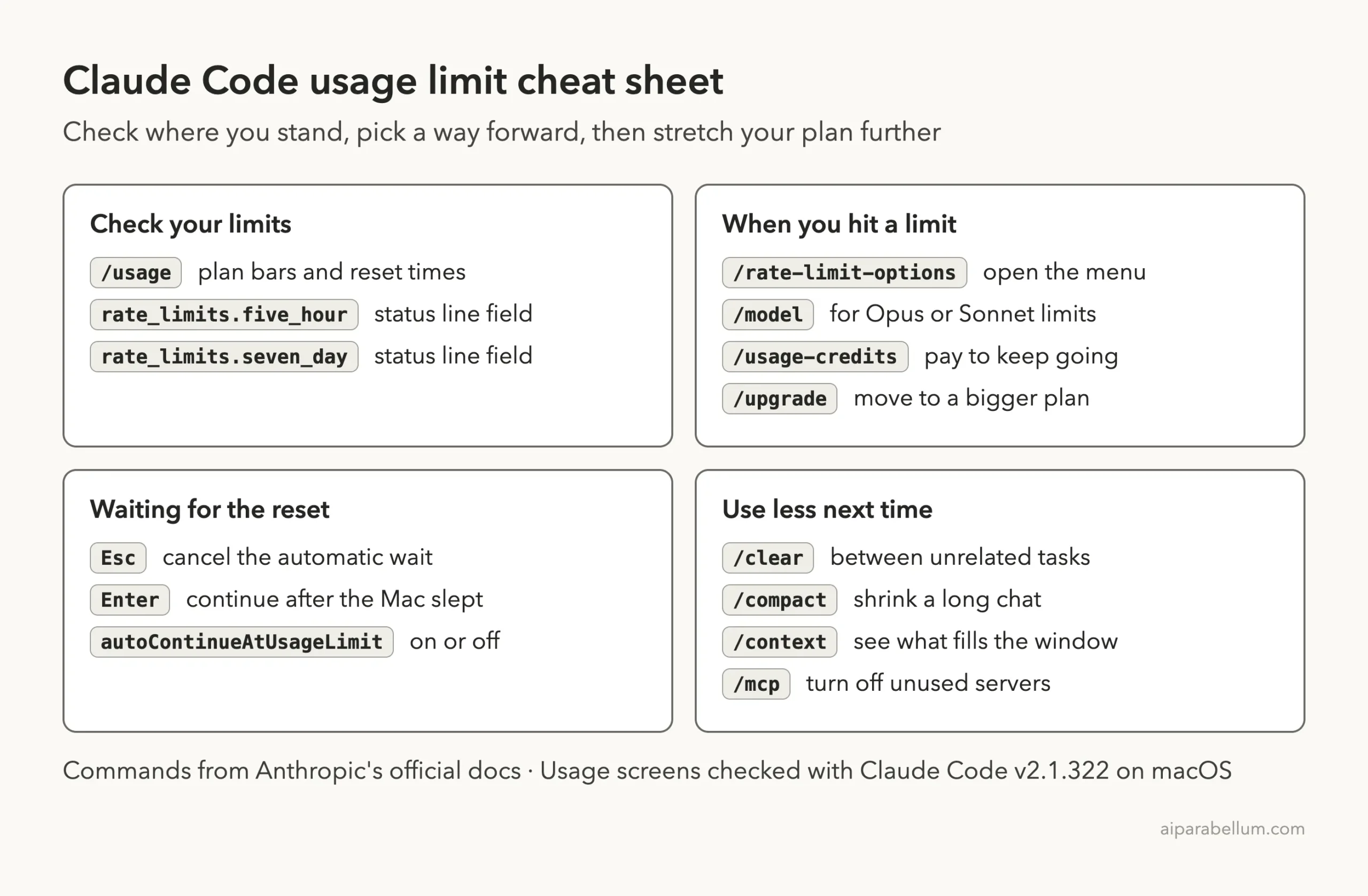
Usage Limit Cheat Sheet
Frequently Asked Questions
How long until my Claude Code usage limit resets?
It depends on which limit you hit. A session limit is a five-hour window, and a weekly limit resets once a week. The exact time is printed in the message and in /usage.
Why did I hit the limit so quickly?
The limits are shared across Claude and Claude Code, so chat, terminal and IDE work all count. Long conversations, larger models and several sessions at once also use the allowance faster.
Does switching to another model fix it?
Only for an Opus or Sonnet limit. Session and weekly limits are shared across all models, so a switch does not restore access.
Will Claude Code continue my task after the reset?
Yes, in an interactive session on v2.1.234 or later, signed in with a subscription, if you keep the session open. It does not start by itself when the reset is more than 24 hours away.
Is this the same as Error 429?
No. A plan limit names the limit and a reset time. A 429 is an API rate limit, which is a different system with different fixes.
Conclusion
When Claude Code says the usage limit is reached, read the message first, because it names the limit and the reset time. Run /usage to see every bar, then pick your way forward: wait and let Claude Code continue by itself, switch models for an Opus or Sonnet limit, turn on usage credits, or move to a bigger plan. A status line with the rate_limits fields keeps both windows in view so the next limit is not a surprise. For the full wording of every message, see Anthropic’s error reference, its guide to managing costs and the section on usage limit waits.