
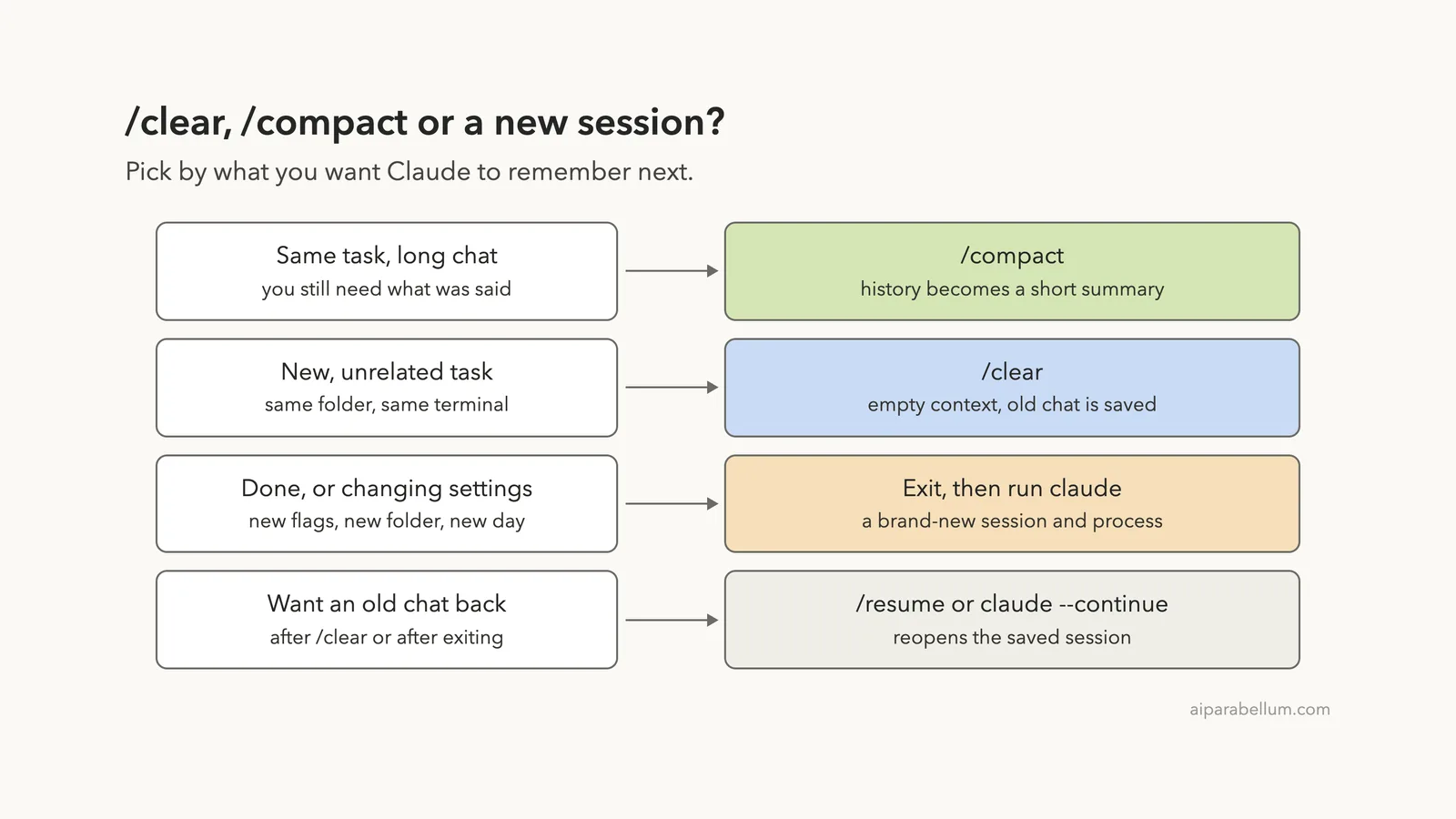
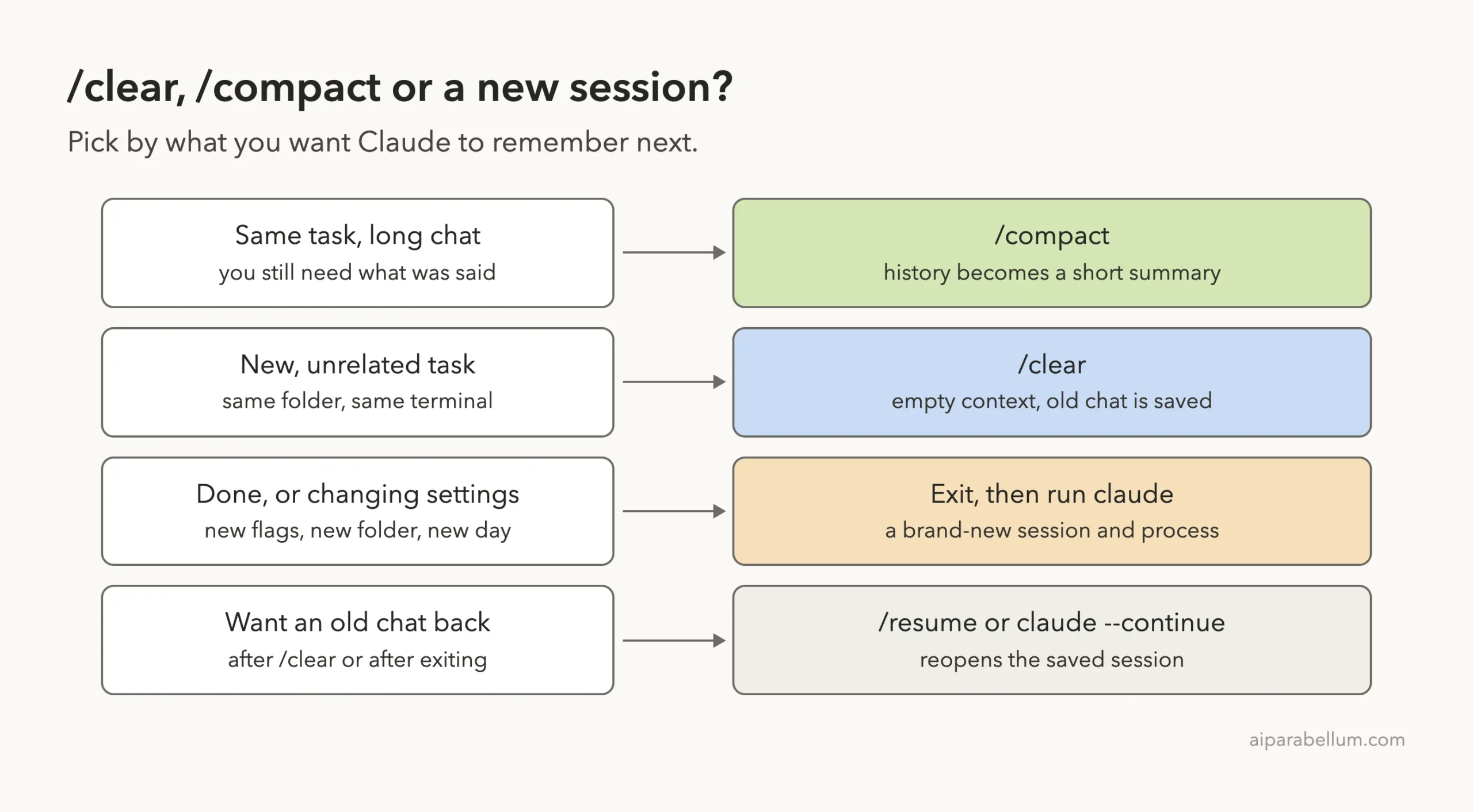
The Claude Code clear vs compact choice comes down to one question: does Claude still need what you talked about? Use /compact when you are staying on the same task and want to keep the gist of the conversation. Use /clear when you are moving to unrelated work and want an empty context.
A new session, where you exit and run claude again, gives you the same empty context as /clear. Pick it when you are done for now, or when you want different launch options such as another model or folder. None of the three deletes your old conversation, so you can get it back with /resume.
In our test, the chat history took 31.7k tokens before we did anything. After /compact it took 8.4k, after /clear it took 130, and in a brand-new session it took 10.
This guide is part of our help series. Browse all our Claude Code tutorials for more fixes and how-tos.
Tested with Claude Code v2.1.322 on macOS on November 15, 2026. We ran every command in this guide in a throwaway practice folder and read the numbers from /context. Details about what survives a summary come from Anthropic’s official documentation, and each section says which is which.
Claude Code Clear vs Compact vs New Session: Quick Summary
Here is the whole comparison in one table. The token figures are from our own run, so yours will differ, but the pattern will be the same.
| Question | /compact | /clear | New session |
|---|---|---|---|
| What happens to the chat in context | Replaced with a summary | Removed | Starts empty |
| Does Claude remember the task? | Yes, the main points | No | No |
| Chat history in our test | 31.7k down to 8.4k tokens | 130 tokens | 10 tokens |
| Is it a new saved session? | No, same session | Yes | Yes |
| Can you get the old chat back? | It never left | Yes, with /resume | Yes, with claude --continue or claude --resume |
Does it reload CLAUDE.md? | Yes, from disk | Yes | Yes |
| Best for | Long work on one task | Switching tasks | Stopping, or changing launch options |
Why These Three Options Exist
Everything Claude Code knows during a conversation sits in its context window. That includes the system prompt, tool definitions, your CLAUDE.md, and every message, file read and command output so far. Our guide to the context window covers this in depth.
The chat history is the part that grows. Anthropic’s docs put the cost plainly: old conversation crowds out the files you need next and costs tokens on every message. So at some point you need to shrink it.
You have three ways to do that. You can squeeze the history into a summary, throw it out of context, or walk away and start over. Each one fits a different moment.
Same task, use /compact. New task, use /clear. New setup, start a new session.
Our Test Setup
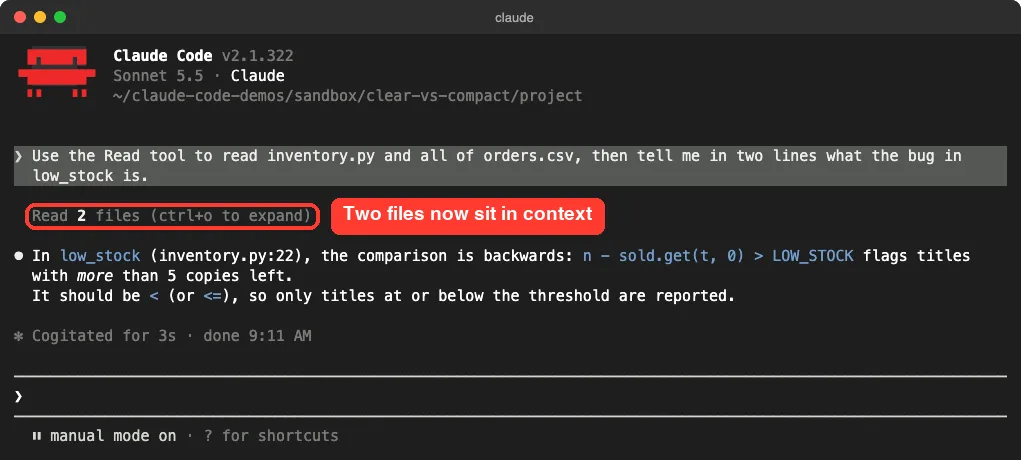
We made a tiny practice project: a 28-line Python stock checker with one planted bug, a 700-row orders file, and a five-line CLAUDE.md. Then we asked Claude Code to read both files and name the bug. That put two files and one answer into the conversation.
Next we ran /context, which shows what is filling the window. The whole context came to 61.5k tokens, and the Messages line, which is the chat history, held 31.7k of that. The rest was the system prompt, tools and skills that load in every session.
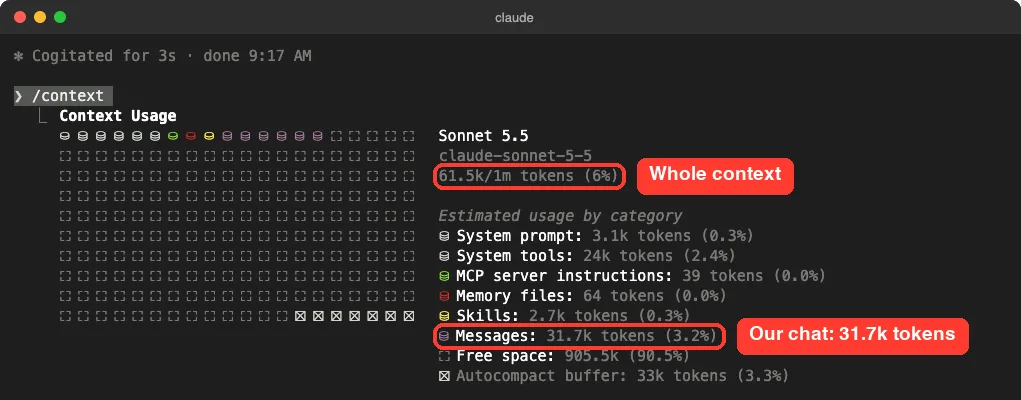
Watch the Messages line in the next screenshots. It is the only number these commands are meant to change. If you want other ways to read it, see our guide on how to see token usage.
What /compact Does in Claude Code
The official command reference says /compact frees up context by summarizing the conversation so far. You stay in the same conversation. Claude Code swaps the long history for a structured summary and keeps going.
You can add instructions after the command to steer what the summary keeps. We ran this:
/compact keep the low_stock bug and the file names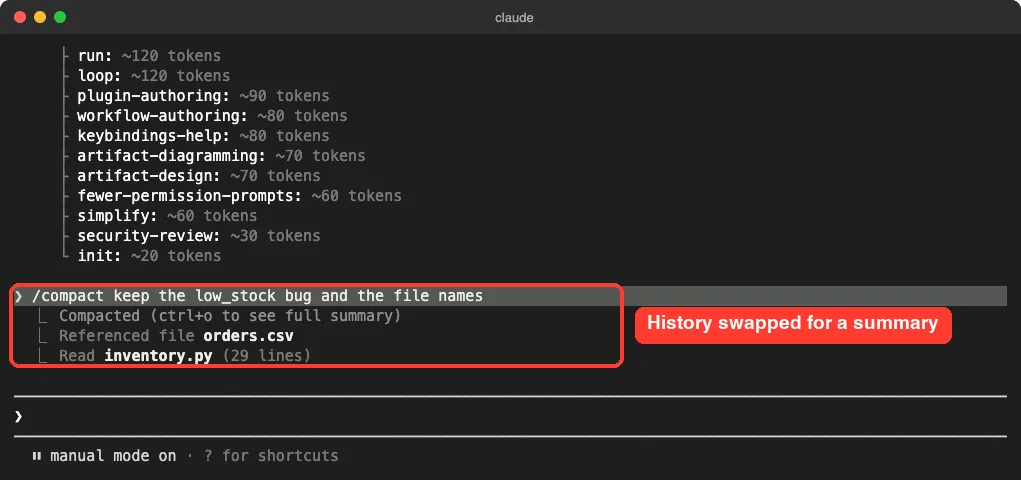
/compact, the history is replaced by a summary. Claude Code also notes the files it read.Then we ran /context again. The chat history dropped from 31.7k to 8.4k tokens, and the whole context fell from 61.5k to 37.6k. That is roughly a 73 percent cut in history for this one small session.
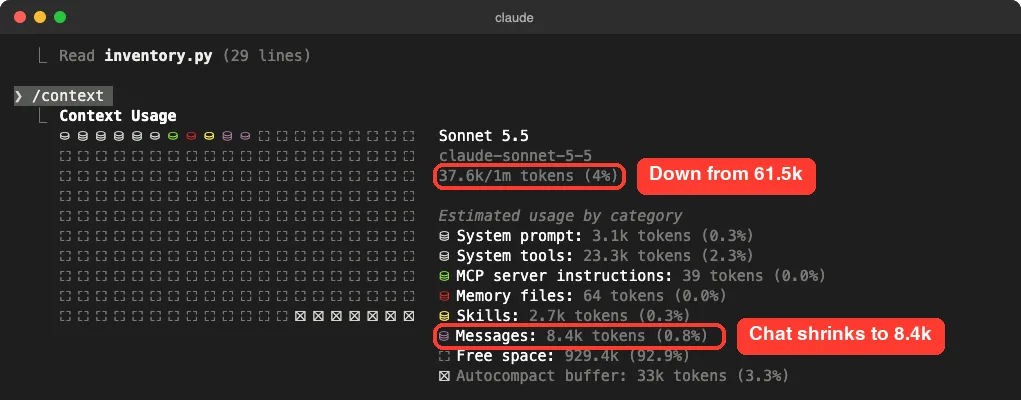
/compact: messages shrink to 8.4k tokens and the total drops to 37.6k.The real test is whether Claude still knows what happened. We asked it, without letting it re-read anything, which bug we found and where. It answered correctly, down to the function name and the wrong comparison sign.
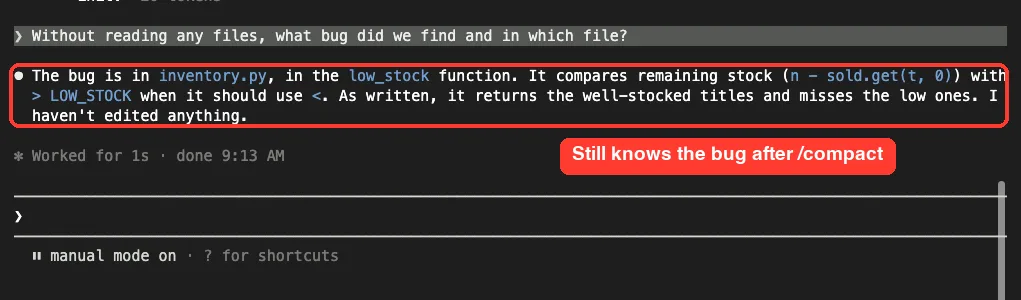
What Survives a /compact
This part comes from Anthropic’s documentation, not our test. According to the context window docs, most startup content comes back by itself after compaction:
- The system prompt and output style still apply.
- The project-root
CLAUDE.md, unscoped rules and auto memory are re-injected from disk. - Claude Code re-reads up to five files that Claude read or edited, most recently modified first.
- A plan written in plan mode is re-injected from disk.
- Background commands and background subagents keep running.
- Context that hooks added earlier is summarized with the rest of the conversation.
What you lose is detail. Exact wording, long command outputs and small side decisions get boiled down. If a detail matters, name it in your /compact instructions, or put it in your CLAUDE.md file so it reloads every time.
Auto-Compact and Partial Summaries
Claude Code also compacts by itself when the conversation nears the auto-compact window. The docs describe /autocompact, which sets how full the window gets before that happens, for example /autocompact 500k. It needs Claude Code v2.1.221 or later.
You can also summarize only part of a chat. Run /rewind, pick a message, and choose Summarize from here or Summarize up to here. Our guide to checkpoints and rewind walks through that menu.
What /clear Does in Claude Code
The command reference describes /clear as starting a new conversation with empty context. It has two aliases, /reset and /new. The screen wipes and you are back at the welcome banner.
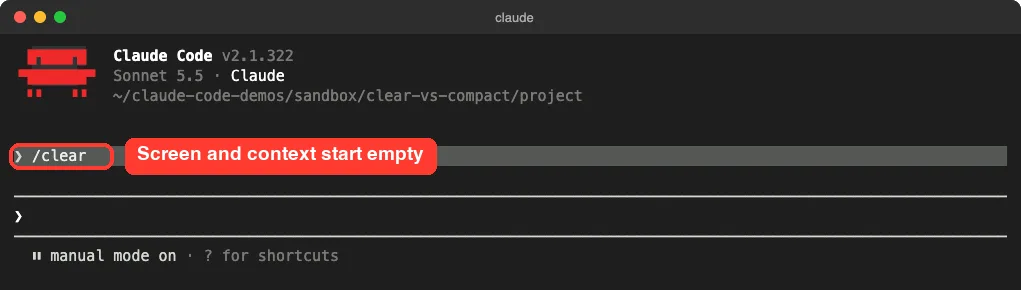
/clear, the screen and the context both start over, in the same terminal.We ran /context again. The chat history was down to 130 tokens and the whole context sat at 29.3k. That 29.3k is the baseline: system prompt, tools, skills and our small CLAUDE.md, which loads again in the new conversation.
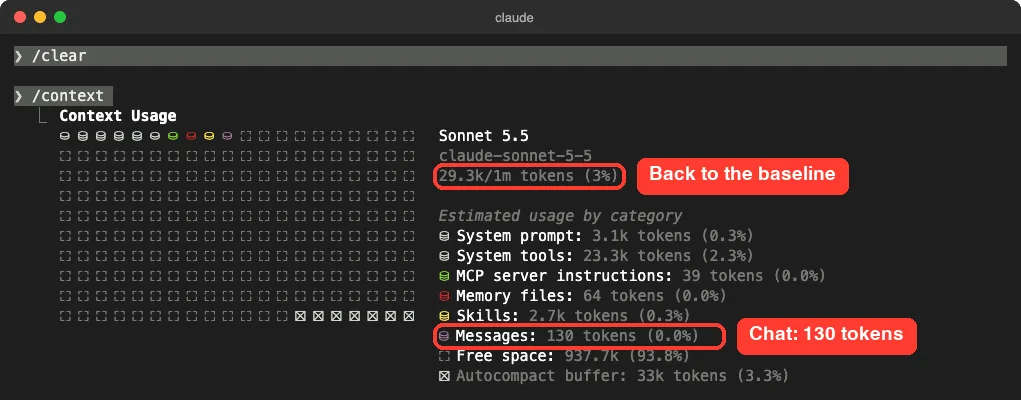
/clear: only 130 tokens of messages remain, and the total is back to the 29.3k baseline.Then we asked the same question as before. This time Claude had nothing to go on. It told us the conversation had just been cleared and asked us to point it at a file.
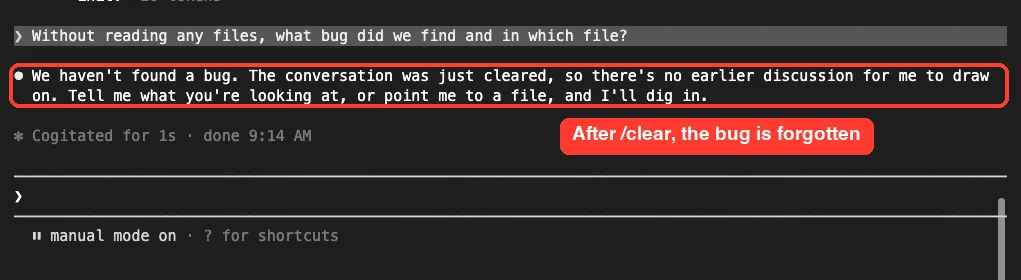
/clear, Claude no longer knows about the bug. That is the point of the command./clear Does Not Delete Anything
This is the part many people miss. The docs state that Claude Code saves the previous session when you run /clear, and that you can resume it with /resume. In the same Claude Code process, you can also restore it from the rewind menu’s previous-session entry.
We checked it. After clearing, we ran /resume, picked the old conversation, and asked nothing new. The earlier answer about the bug was back on screen, and /context showed 9.6k tokens of messages, which is the compacted history plus our follow-up question.
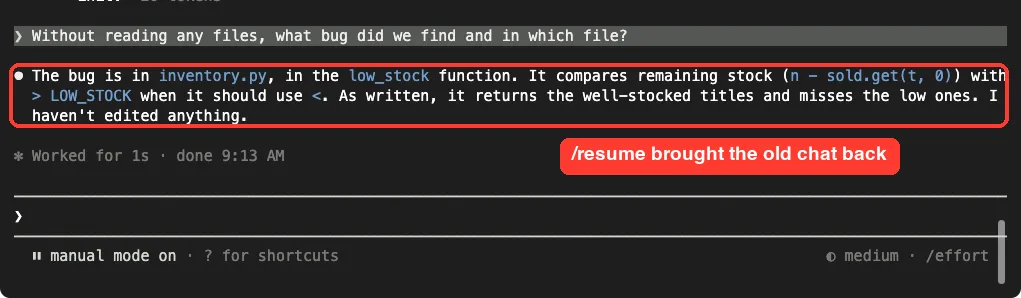
/resume after /clear brought the old conversation back, summary and all.Two naming details from the sessions docs are worth knowing. Run /clear release-prep and that name goes on the conversation you are leaving, which makes it easy to find later. With no argument, the new session keeps a name you set with /rename, but not an auto-generated title.
If you really want old conversations gone from your disk, that is a separate job. Our guide on how to delete session history covers it.
What a New Session Does
A new session means leaving Claude Code with /exit and running claude again. We did that in the same folder and ran /context before typing anything else.
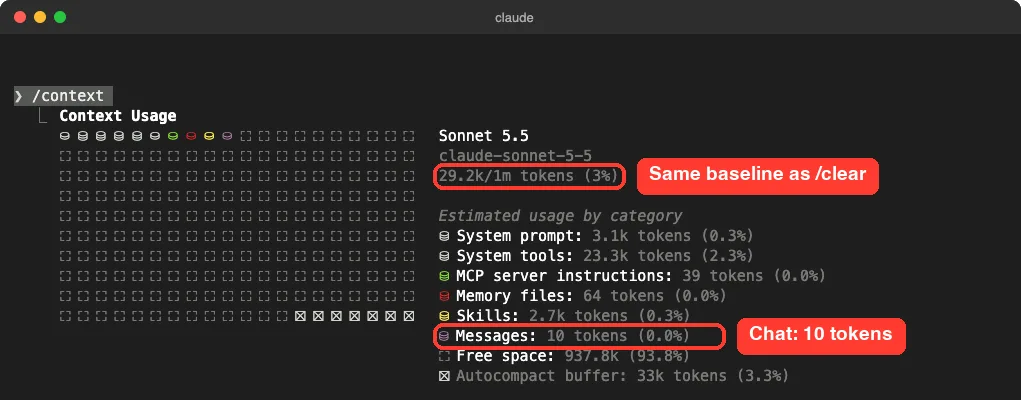
/clear.The total was 29.2k tokens, against 29.3k after /clear. For context purposes, the two are the same thing. The docs back this up: running /clear starts a new session.
So why ever restart? Because a restart is a new process. It reads your launch options again, so it is the moment to change things you pass on the command line, such as --model, --permission-mode or the folder you start in.
Getting an Old Session Back From the Shell
From your terminal, claude --continue reopens the most recent session in the current directory, and claude --resume opens a picker. We ran the picker after our tests, and it listed every conversation as its own entry.
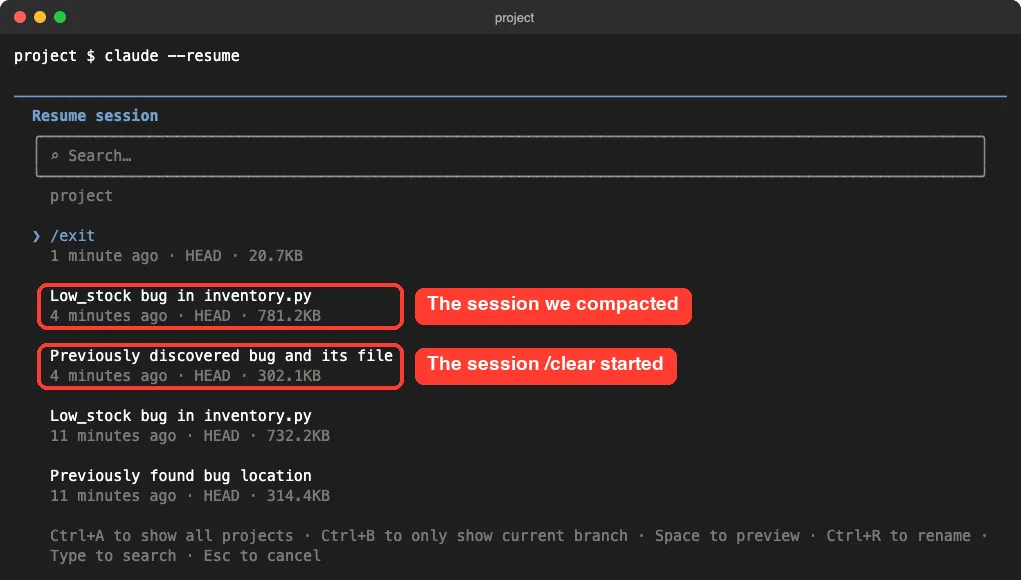
/clear started are separate entries.Notice that the session /clear started sits in the list as its own item, right below the one we compacted. That is the proof that /clear splits your work into separate saved sessions instead of erasing it.
One thing we noticed: claude --continue reopened the session we had most recently had open, which was a nearly empty one. When you want a specific older conversation, use claude --resume and pick it. Our guide to resuming sessions has more on names and IDs.
The docs add one more detail about compacted sessions. When you resume one, it opens at a Conversation compacted row, and the messages that were summarized are not loaded again. Our resumed session matched that: it came back at 9.6k tokens of messages, not the original 31.7k.
The Numbers Side by Side
These are the readings from one test session and one fresh start, all on the same practice project.
| Moment | Messages | Whole context | Remembered the bug? |
|---|---|---|---|
| After reading two files | 31.7k tokens | 61.5k tokens | Yes |
After /compact | 8.4k tokens | 37.6k tokens | Yes |
After /clear | 130 tokens | 29.3k tokens | No |
After /resume of the old chat | 9.6k tokens | 39.5k tokens | Yes |
| Brand-new session | 10 tokens | 29.2k tokens | No |
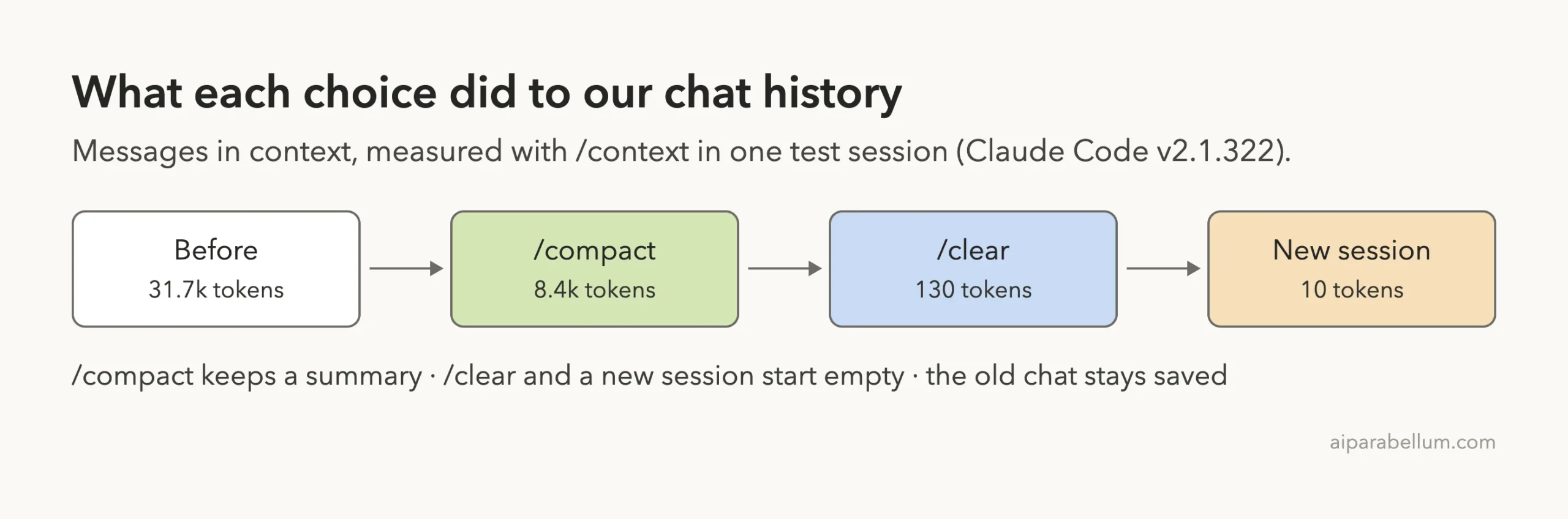
This was a short conversation on a small project. A long working session will show much bigger numbers, and the summary will be a larger share of what is left. The direction stays the same.
Which One Costs Less?
Anthropic’s cost docs make a point that is easy to overlook. /compact has to read the conversation it summarizes, so compacting a large context is itself a large request. When you want a fresh start instead of continuity, /clear costs nothing.
That gives you a simple rule. If you do not need the old conversation for the next task, do not pay to summarize it. Clear it, and resume it later only if it turns out you need it.
The same docs suggest running /rename before you clear, so the session is easy to find again. For more ways to trim spending, see our token saving tips and our guide to managing costs.
Try It Yourself
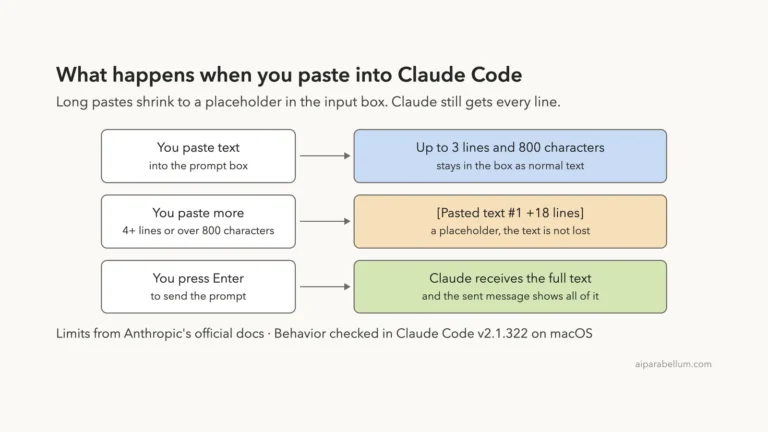
You can repeat our test in about five minutes. Make an empty practice folder, add any two small files, start claude there, and paste this prompt:
Read both files in this folder and tell me in two lines what each one does.Then run these steps in order and watch the Messages line each time:
- Run
/contextand note the Messages number. - Run
/compact keep the file names, then/contextagain. - Ask: what did we just look at? Claude should still know.
- Run
/clear, then/context, then ask the same question. - Run
/resumeand pick the first conversation to bring it back.
Common Mistakes
- Using
/clearin the middle of a task. Claude forgets the plan, the files and the decisions, and you spend tokens rebuilding them. Use/compactthere. - Using
/compactwhen switching tasks. You pay for a summary of work the next task does not need. - Thinking
/cleardeletes your history. It only starts a new session. The old one stays saved. - Quitting and restarting just to get a clean context.
/cleargives the same result without leaving the terminal. - Expecting
/compactto keep every detail. It keeps the main points. Name the details you need in the instructions. - Assuming instructions were lost after a compact. The docs say the project-root
CLAUDE.mdis re-injected from disk, so check that the instruction was in that file and not only in the chat.
Pro Tips
- Compact at a natural break, such as right after a feature works, and before starting a long new step.
- Pass a name when you clear, as in
/clear auth-refactor, so the old chat is easy to spot in the picker. - Check
/contextfirst. If Messages is small, you may not need either command yet. - Keep lasting rules in
CLAUDE.md, not in the conversation, so all three options reload them. - If a compact seems to hang, see our fix for stuck compacting.
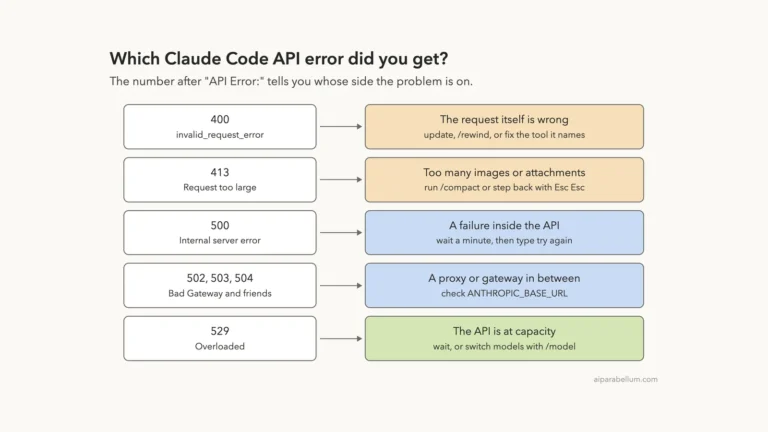
- For other messages you may hit along the way, our list of common errors has the fixes.
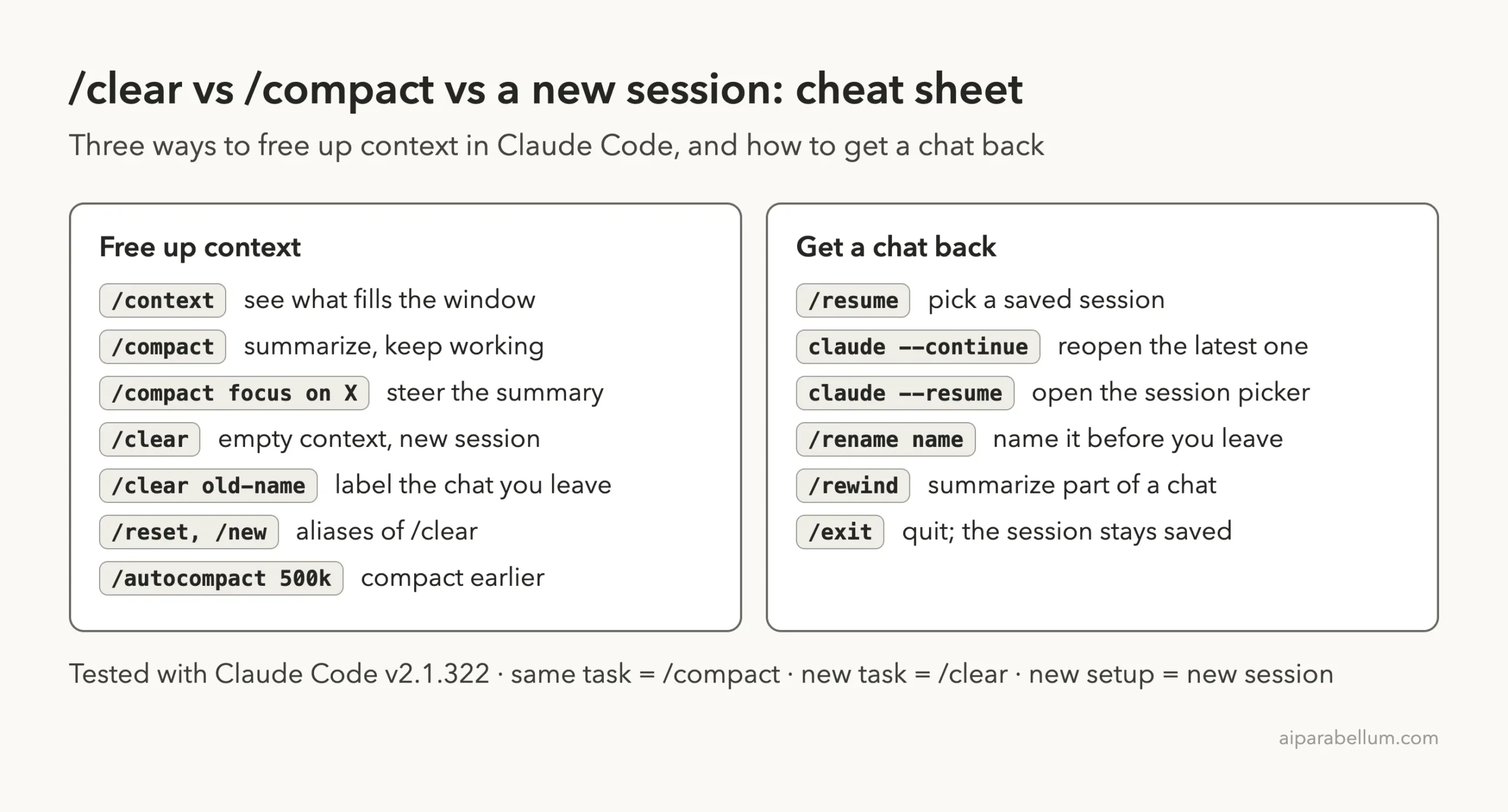
Cheat Sheet
Save this card for the commands in this guide. Our full commands cheat sheet covers the rest, and the official command reference lists every option.
Frequently Asked Questions
What is the difference between /clear and /compact in Claude Code?
/compact replaces the conversation with a summary and keeps you in the same session, so Claude still knows the task. /clear starts a new conversation with empty context, so Claude knows nothing about the earlier work. In our test, compact left 8.4k tokens of history and clear left 130.
Does /clear delete my conversation?
No. Claude Code saves the previous session when you run /clear. You can reopen it with /resume, and we confirmed the old conversation came back intact.
Is /clear the same as starting a new session?
For context, yes. We measured 29.3k tokens after /clear and 29.2k in a brand-new session. The difference is that a restart is a new process, so it picks up new command-line options, while /clear keeps you in the running one.
Does /compact lose my CLAUDE.md instructions?
According to Anthropic’s docs, no. The project-root CLAUDE.md, unscoped rules and auto memory are re-injected from disk after compaction. Instructions you only typed in the chat are summarized with everything else, so they can lose detail.
Which should I use when Claude Code warns that context is running low?
If you are still on the same task, run /compact with a short note about what to keep. If the task is done, run /clear and start the next one fresh. A general helper like Claude AI works the same way: shorter, focused conversations give better answers.
Conclusion
The Claude Code clear vs compact decision is simpler than it looks once you see the numbers. /compact cut our chat history from 31.7k to 8.4k tokens and Claude still remembered the bug, so it is the right pick while you stay on one task. /clear and a new session both dropped the history to almost nothing and Claude forgot the task, so they fit a change of topic, with a restart reserved for when you want new launch options. In every case the old conversation stayed saved, and /resume brought it back.