If Claude Code says “File content (117074 tokens) exceeds maximum allowed tokens (25000)”, the Read tool tried to pull more text into one call than it allows. This Claude Code maximum allowed tokens error is not a crash: nothing was read, your file is fine, and Claude can still get what it needs by reading smaller pieces or by searching instead.
By default, one Read call returns at most 25,000 tokens, and a whole file over 256 KB is refused outright. A token is a small chunk of text, often a few characters, so a 228 KB log file can easily turn into over 100,000 tokens.
Here is the short fix list:
- Ask Claude to search the file with Grep for the lines you care about, instead of reading all of it.
- Ask Claude to read the file in smaller pages, for example 500 lines at a time, using
offsetandlimit. - If you really need the whole file, say so plainly. On v2.1.296 or later, Claude can read past the default limit with
allow_largewhen the context window has room. - If you hit the cap all the time, raise it with the
CLAUDE_CODE_FILE_READ_MAX_OUTPUT_TOKENSenvironment variable, or split the file into smaller files.
This guide is part of our help series. Browse all our Claude Code tutorials for more fixes and how-tos.
Tested with Claude Code v2.1.328 on macOS on November 19, 2026. We made a 228 KB server log and a 515 KB CSV export in a throwaway demo folder and triggered every large-file message in a real session. All terminal captures below are genuine.
Claude Code File Too Large: Quick Summary
| Question | Short answer |
|---|---|
| Exact error text | File content (N tokens) exceeds maximum allowed tokens (25000) |
| Related size error | File content (515.2KB) exceeds maximum allowed size (256KB) |
| Default token limit per read | 25,000 tokens |
| Default size limit for a whole file | 256 KB |
| Is anything broken? | No. The read was refused, and Claude can try again a smarter way |
| Best everyday fix | Grep for what you need, or read in smaller pages |
| Setting that raises the limit | CLAUDE_CODE_FILE_READ_MAX_OUTPUT_TOKENS |
Why Claude Code Limits How Much of a File It Reads
Everything Claude reads goes into its context window, the working memory for your session. A single huge read could fill most of that space, push out your earlier conversation and make every later reply slower and more expensive.
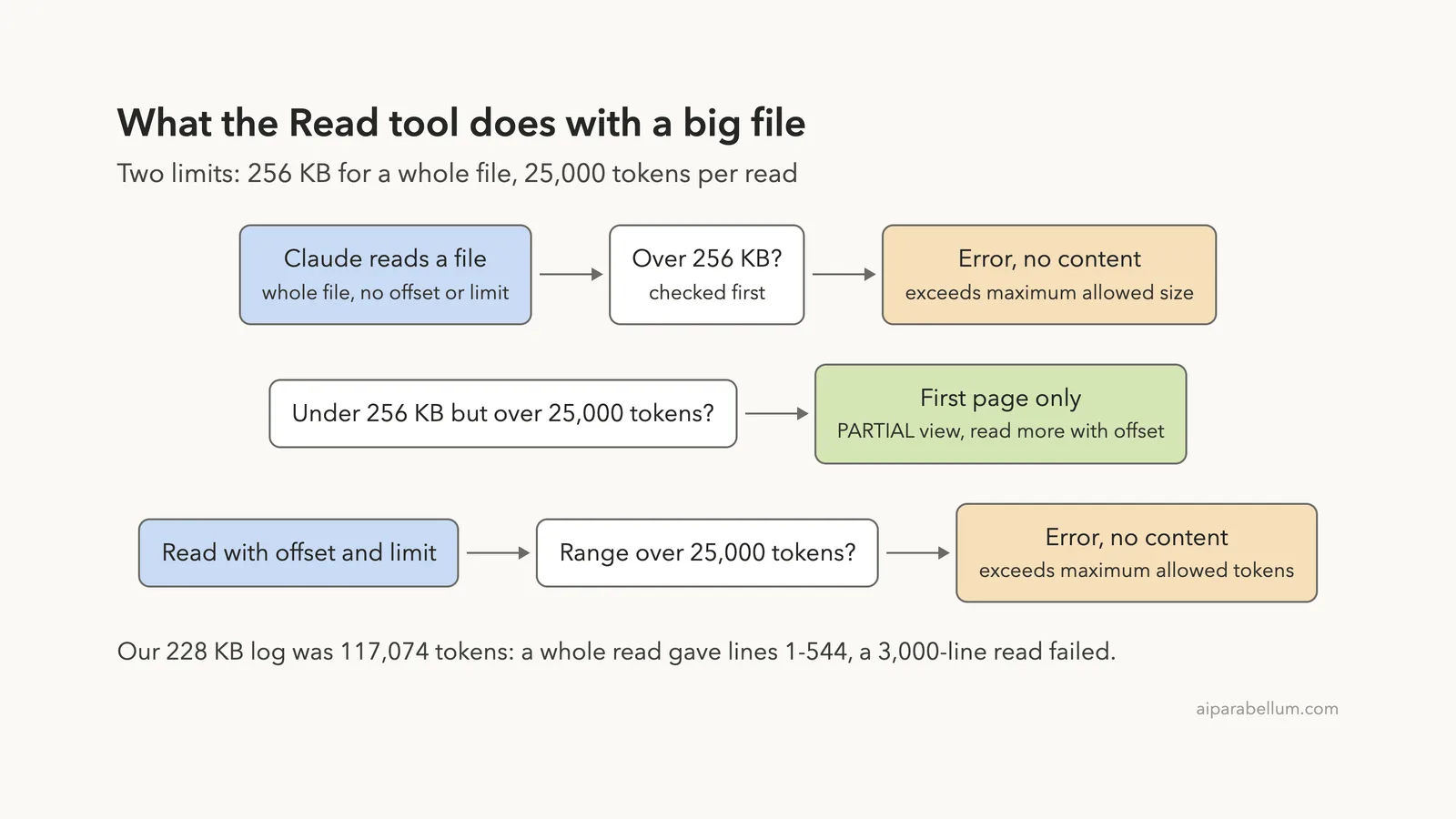
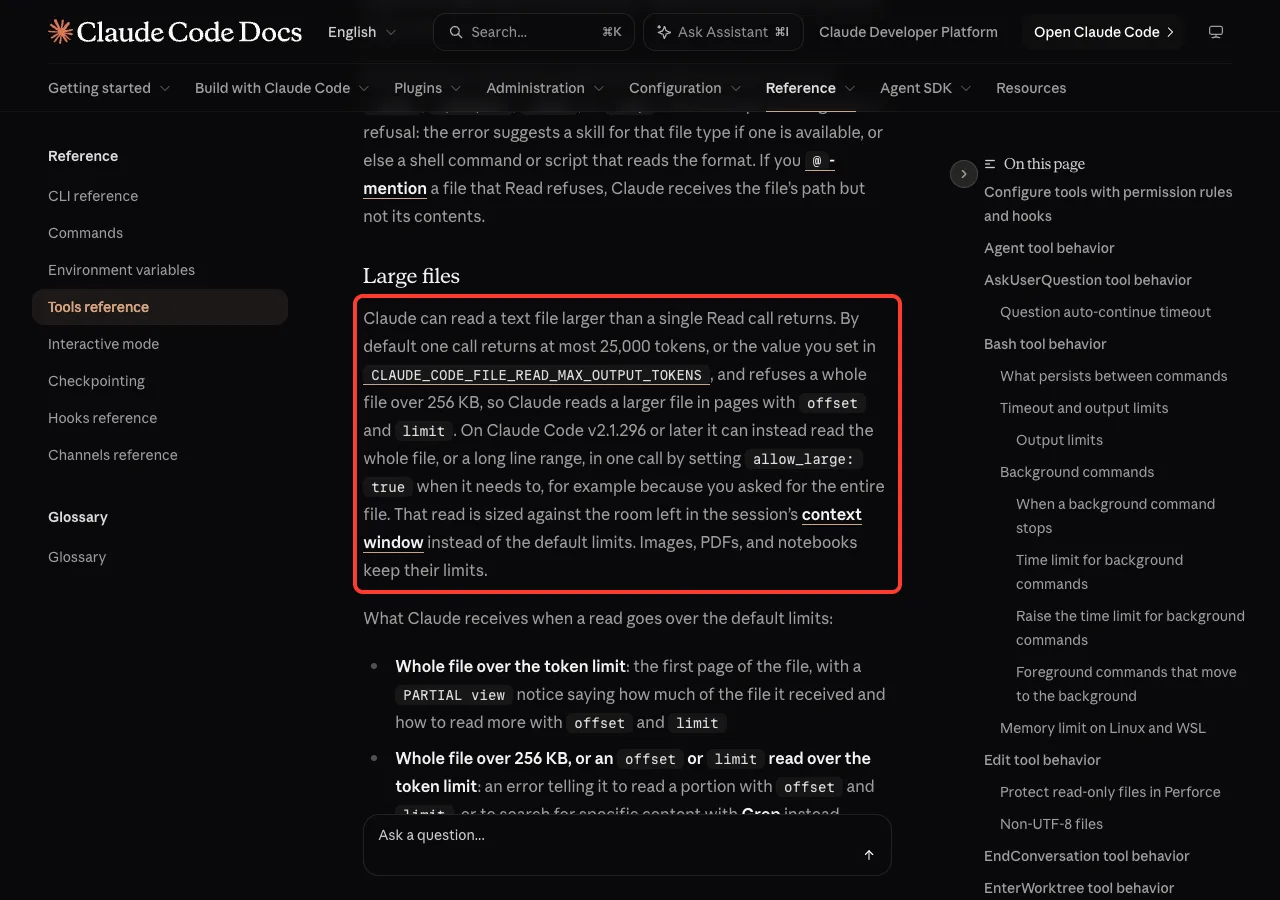
So the Read tool has two guard rails. Anthropic’s tools reference says one call returns at most 25,000 tokens by default, and that a whole file over 256 KB is refused. Claude is expected to read bigger files in pages.
Our guide to the context window explains why this space matters so much. In short, a lean context gives you better answers.
Three outcomes when a read is too big
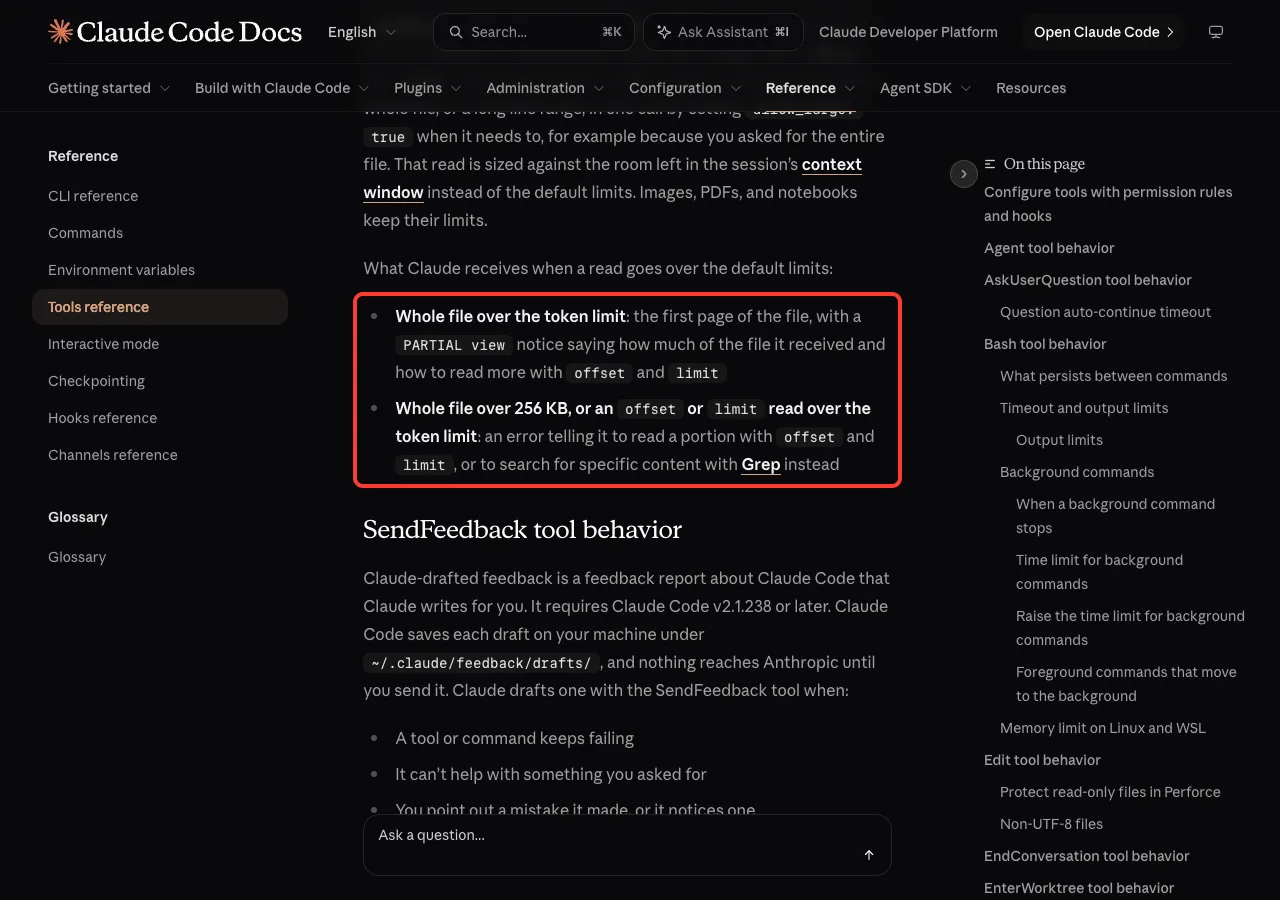
The docs list what Claude receives when a read goes over the default limits. There are really three cases, and only two of them show an error.
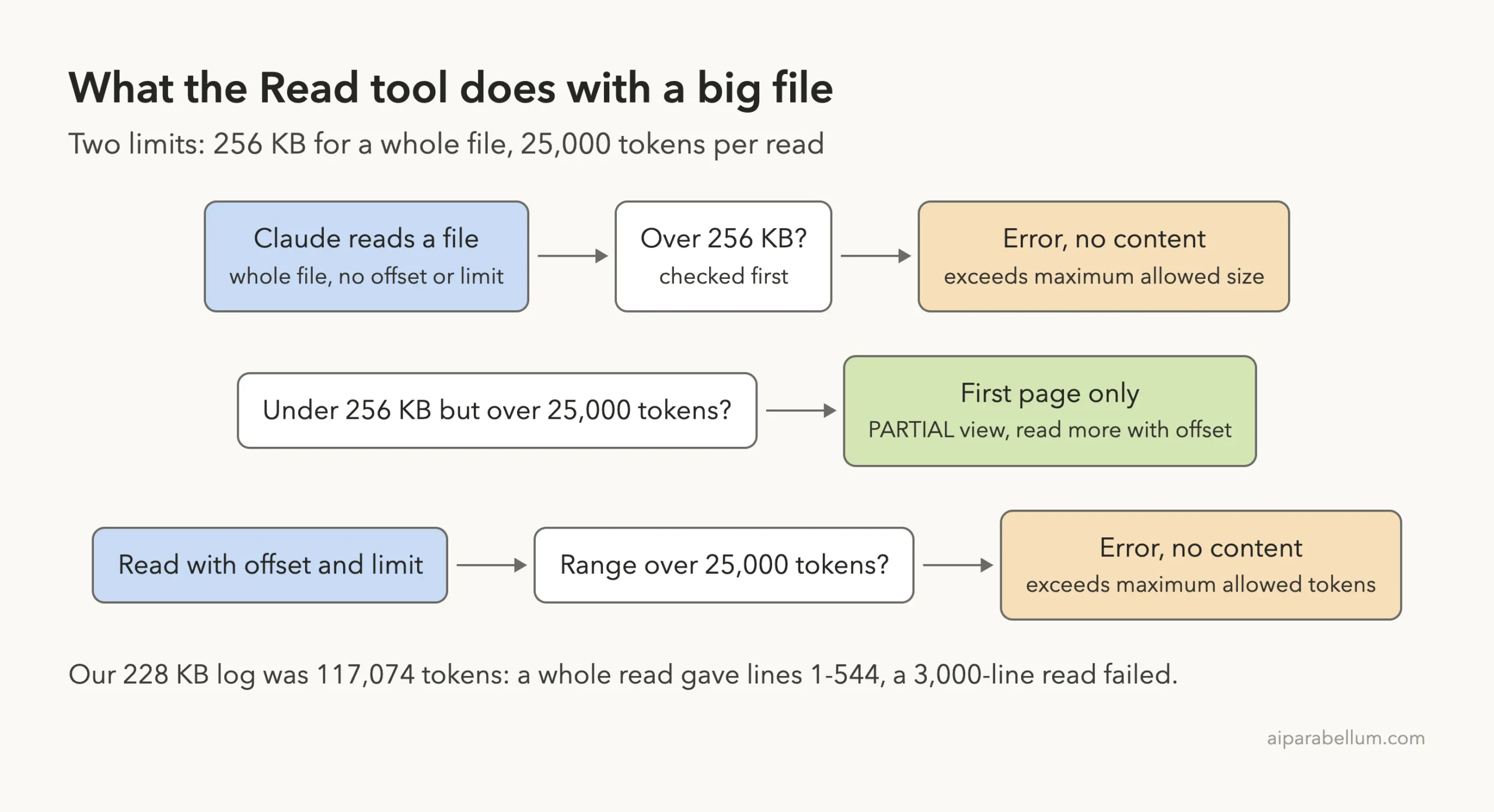
- A whole file over 256 KB: an error, and no content comes back.
- A whole file under 256 KB but over the token limit: Claude gets the first page, plus a
PARTIAL viewnotice telling it how to read more. - A read with
offsetandlimitwhose range is over the token limit: the “exceeds maximum allowed tokens” error, with no content.
We Reproduced the Claude Code Maximum Allowed Tokens Error
To see each message for ourselves, we built two test files in an empty demo folder. One is a 3,000-line server log at 228 KB, and the other is a 9,001-line orders CSV at 515 KB.
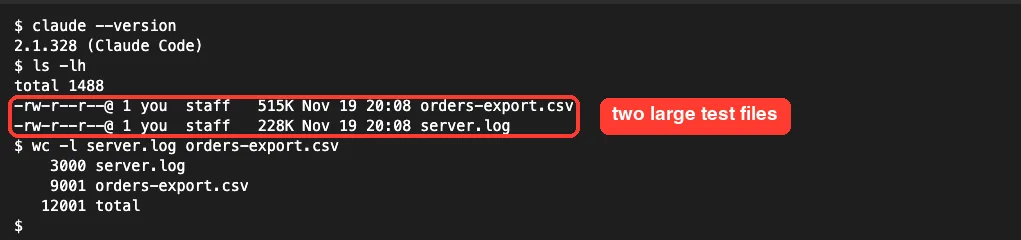
We then opened a Claude Code session in that folder and asked for one read at a time, telling Claude not to retry. That way each limit showed up on its own.
Test 1: the 515 KB CSV was refused by size
We asked Claude to read orders-export.csv in one call, with no offset or limit. The read failed right away because the file is over 256 KB.

We also ran the same read in a headless session to see the full tool text. The Read tool returned this:
File content (515.2KB) exceeds maximum allowed size (256KB). Use offset and limit parameters to read specific portions of the file, or search for specific content instead of reading the whole file. To read it anyway, up to what still fits in your context, call Read again with allow_large: true — only if you genuinely need all of it or the user asked for the whole file.Notice the last sentence. The tool itself tells Claude that allow_large exists, but only for when you really want the whole file.
Test 2: a 3,000-line range triggered the token error
Next we asked Claude to read server.log with offset 1 and limit 3000. That range is the whole log, and it came to 117,074 tokens, far over the 25,000 cap.
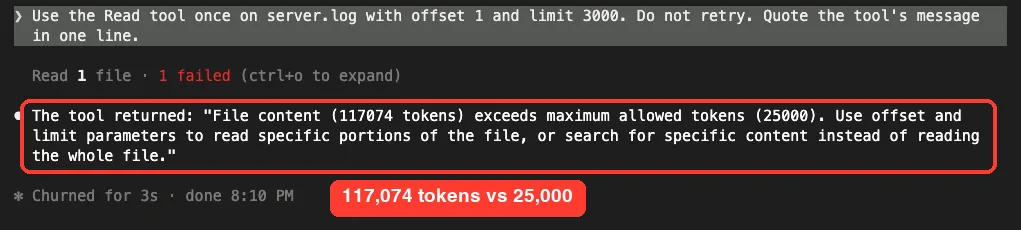
This is the error most people search for. The message is the same each time, with only the token count changing:
File content (117074 tokens) exceeds maximum allowed tokens (25000). Use offset and limit parameters to read specific portions of the file, or search for specific content instead of reading the whole file.Log files are token heavy. Timestamps, IDs and numbers split into many small tokens, so 228 KB of logs became more than 117,000 tokens.
Test 3: a plain read returned only the first page
Then we asked Claude to read server.log with no offset or limit. Because the file is under 256 KB, there was no error this time. Claude got lines 1 to 544 of 3,001, about 18 percent of the file.

This is the quiet version of the same limit, and it can catch you out. If you ask “summarize this log” and Claude only reads the first page, the summary covers only the start of the file. (Read counted 3,001 lines because it includes the empty line after the final newline.)
How to Fix the Claude Code Maximum Allowed Tokens Error
All the fixes below come down to one idea: get Claude the part of the file it needs, not the whole thing. Pick the one that matches your goal.
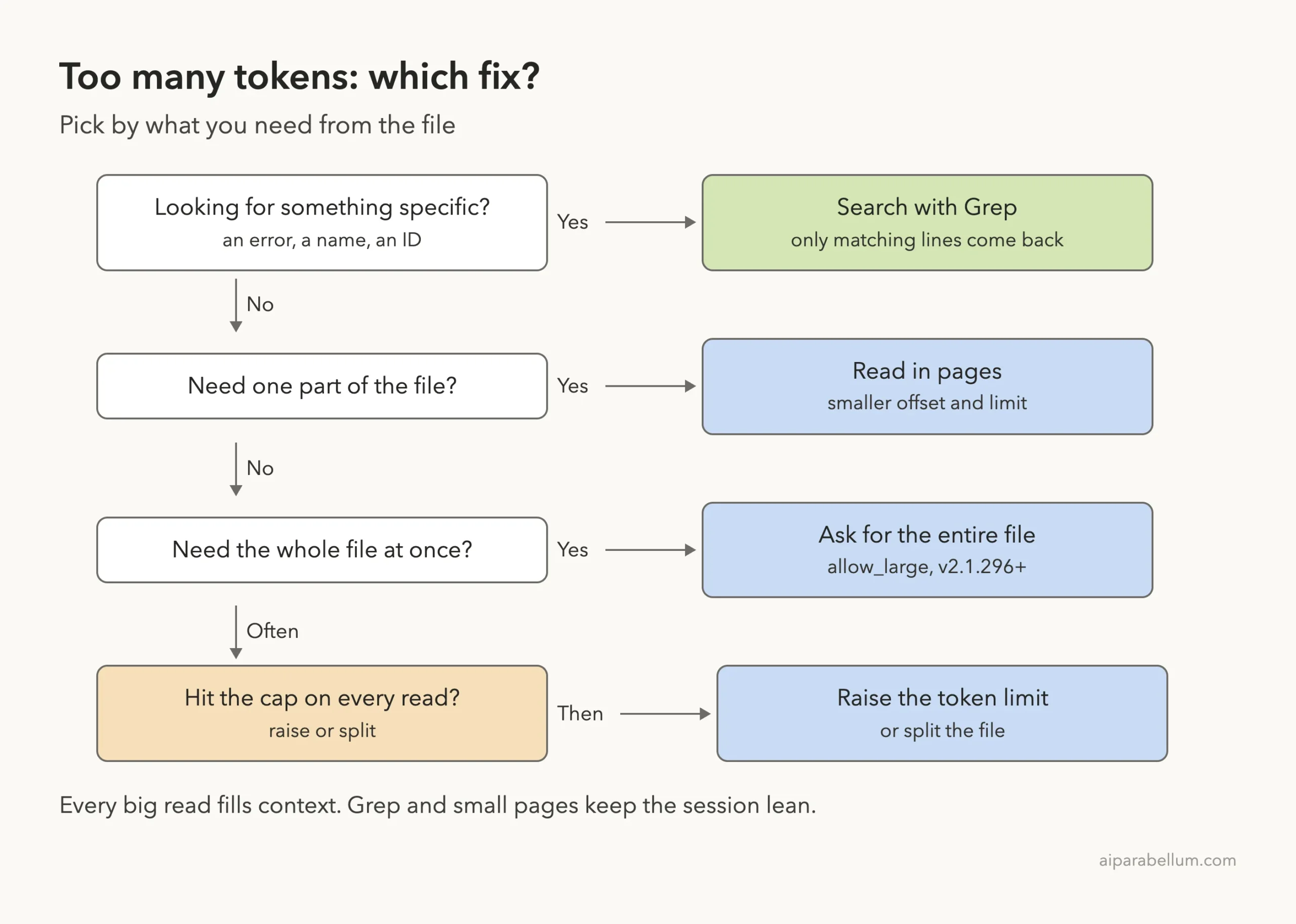
Fix 1: search with Grep instead of reading
Most of the time you don’t need every line. You need the errors, a function name or one customer ID, and Grep returns just the matching lines.
We asked Claude to count the ERROR lines in server.log and list the top three messages. It used Grep, found 175 errors and grouped them, all without reading the full file.
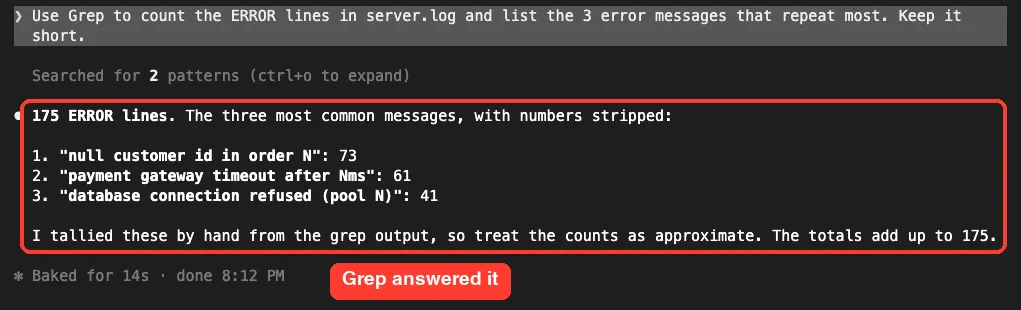
We checked the counts with grep -c in the shell, and all three numbers (73, 61 and 41) were correct. A prompt like this works well:
Search server.log for ERROR lines and tell me which errors repeat most.Fix 2: read the file in smaller pages
If you need one section, tell Claude which part. “Read lines 1 to 500 of server.log” keeps each call well under the cap, and Claude can move on to the next page when it’s ready.
Claude often does this on its own after the error, since the message tells it to use offset and limit. If it keeps asking for too much at once, give it a smaller page size in your prompt.
Fix 3: ask for the entire file when you truly need it
Sometimes you really do need the whole thing, such as a config file you want reviewed end to end. The docs say that on Claude Code v2.1.296 or later, Claude can set allow_large: true to read the whole file, or a long range, in one call.
That read is sized against the room left in your context window instead of the default limits. Images, PDFs and notebooks keep their own limits. We did not run an allow_large read in our test, so this part comes from the official docs and the tool message we captured.
Just say it clearly, for example “read the entire config file, I need all of it”. Expect that read to use a big slice of your context.
Fix 4: raise the read token limit
If your files are often a bit too big, you can raise the cap. The environment variables reference lists CLAUDE_CODE_FILE_READ_MAX_OUTPUT_TOKENS, which overrides the default 25,000-token limit for file reads.
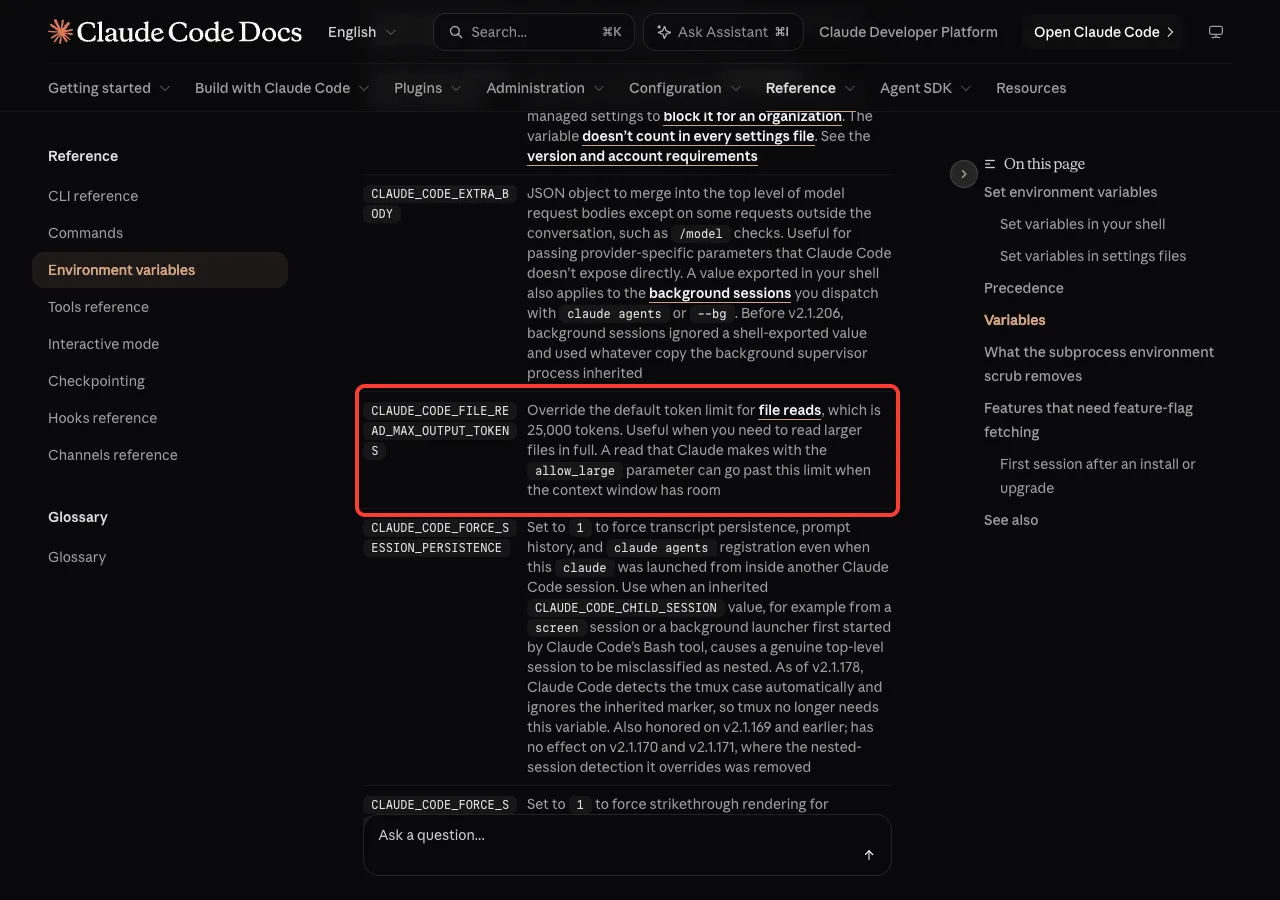
We tested it. With the variable set to 70000 in the shell, a 1,500-line read of server.log worked in one call, where a similar ranged read had failed before.
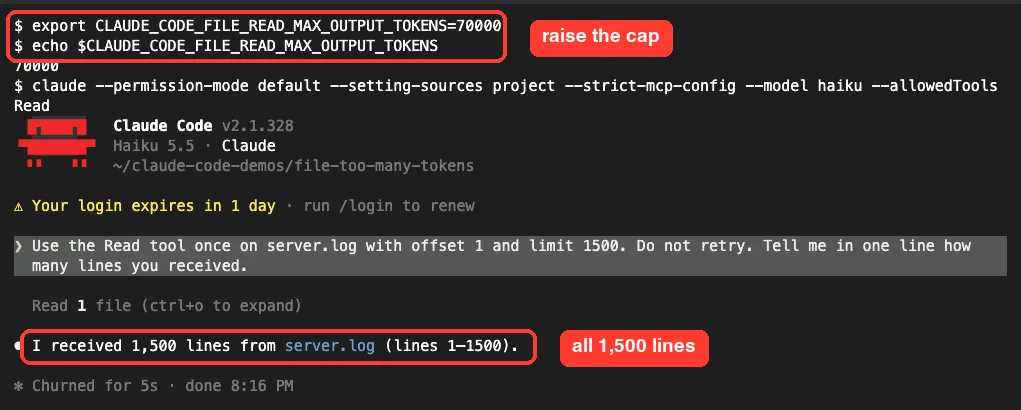
To set it for one terminal session, export it before you start Claude Code:
export CLAUDE_CODE_FILE_READ_MAX_OUTPUT_TOKENS=50000
claude
To keep it for one project, the docs show an env block in a settings file. Put this in .claude/settings.json inside the project:
{
  "env": {
    "CLAUDE_CODE_FILE_READ_MAX_OUTPUT_TOKENS": "50000"
  }
}
Raise it with care. A higher cap means each read can eat more of your context and more of your usage, so a modest bump beats a giant one. Our guide on how to check token usage helps you see the cost.
Fix 5: split or trim the file yourself
For one-off giant files, a quick shell command can help. split -l 1000 server.log part- cut our log into three 76 KB pieces that each fit easily.
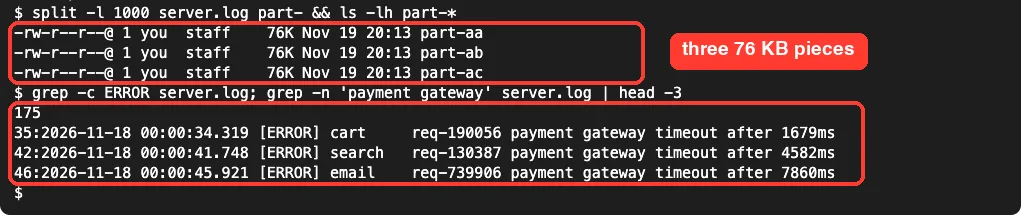
You can also cut out only what matters, such as the last day of a log or just the error lines, and save that to a smaller file. Then point Claude at the small file.
Real Examples of When This Error Shows Up
The error mostly appears with a few kinds of files. Knowing them helps you pick the right fix before you even ask.
| File type | Why it gets big | Best fix |
|---|---|---|
| Server and app logs | Thousands of lines, token-heavy numbers | Grep for errors or a time window |
| CSV and data exports | Many rows, often over 256 KB | Ask for a script that summarizes it |
| Minified JS or JSON bundles | Huge single lines | Grep for the key, or read the source file |
| Lock files and generated code | Machine-written and long | Usually skip; search only if needed |
| Long docs or transcripts | Lots of plain text | Read by section with smaller pages |
For a CSV, asking Claude to write and run a short script to total or filter the data is often smarter than reading rows at all. If you work in big repos every day, our guide on large codebases covers more habits that keep reads small.
How this differs from other “too large” errors
Claude Code has a few size errors that sound alike. This one is about a single file read, not the whole request or Claude’s reply.
- API Error 413 means the full request sent to the API was too big, often from pasted content or attachments.
- The 32000 output token error is about how much Claude writes back, not what it reads.
- Image errors follow their own pixel rules, covered in our image too large fix.
For a wider list of messages and what they mean, see our roundup of the most common errors.
Try It Yourself
Make a demo folder with a big text file, then open Claude Code there. A quick way to create a large log on a Mac or Linux machine is seq 1 200000 | sed 's/^/line /' > big.log.
Then paste this prompt to practice the smart way of reading it:
big.log is too large to read in one go. First tell me how many lines it has
and how big it is. Then search it for lines ending in 777 and show me the
first five matches. Do not read the whole file.
Watch which tools Claude picks. You should see it use a quick command or Grep rather than one huge Read call.
Common Mistakes
- Pasting a big file into the prompt. The docs advise referencing large files by path so Claude can read them in chunks. Use
@server.logor just name the file. - Trusting a summary of a partial read. If the file is under 256 KB but over the token cap, Claude may only see the first page. Ask “did you read the whole file?” when it matters.
- Setting the token limit sky high. A huge cap lets one read flood your context and can lead to compaction sooner.
- Asking for a giant range again and again. If a 3,000-line read fails, a 2,900-line read will too. Go much smaller or search instead.
- Reading generated files you don’t need, like lock files or minified bundles. They are big and rarely helpful.
Pro Tips
- Check size first with
ls -lhandwc -l, so you know whether a file is near 256 KB before Claude touches it. - Ask for a count before details. “How many ERROR lines are there?” is cheap and tells you if a deeper look is worth it.
- For data files, ask Claude to write a small script that reads the file and prints only the summary you need.
- Run
/contextafter a big read to see how much room it took. Our token saving tips have more ways to keep sessions lean. - Press
Ctrl+Oto open the detailed view if you want to see the exact tool result behind a short “1 failed” line.
Search first, read second. Most large-file questions only need a few matching lines.
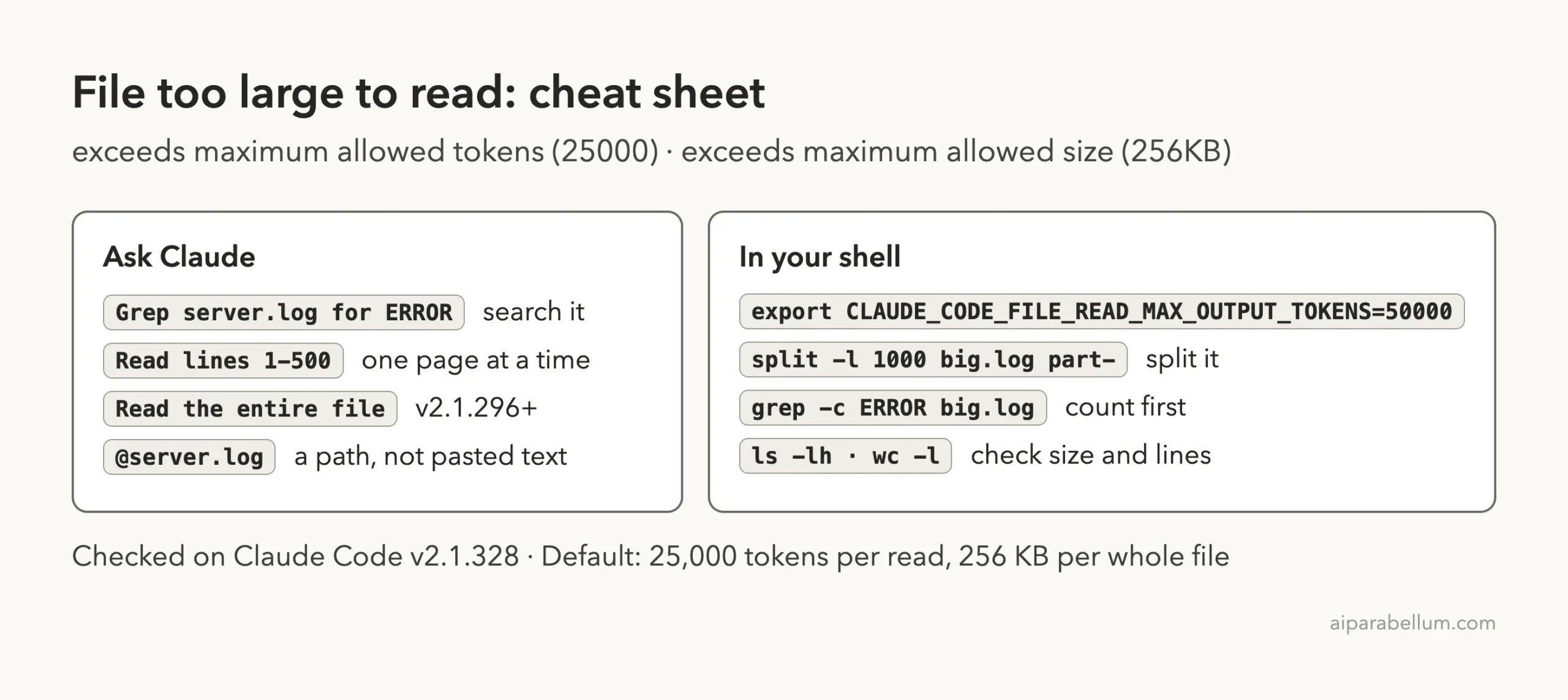
Large File Reading Cheat Sheet
Keep this card handy for the next time a read gets refused.
Frequently Asked Questions
What is the default file read limit in Claude Code?
One Read call returns at most 25,000 tokens by default, and a whole file over 256 KB is refused. Claude reads larger files in pages with offset and limit.
How do I increase the maximum allowed tokens for file reads?
Set the CLAUDE_CODE_FILE_READ_MAX_OUTPUT_TOKENS environment variable, either in your shell or in the env block of a settings file. We confirmed that a value of 70000 let a 1,500-line read go through in one call.
Does the error mean my file is damaged?
No. The file is untouched. The Read tool just refused to load that much text at once, and Claude can still read it in pieces or search it.
Why did Claude only read part of my file without an error?
When a whole file is under 256 KB but over the token limit, Claude gets the first page with a PARTIAL view notice instead of an error. In our test that was lines 1 to 544 of a 3,001-line log.
Can Claude Code read a whole large file in one go?
Yes, on v2.1.296 or later, if you ask for the entire file. Claude can then use allow_large, which is sized against the room left in your context window. Images, PDFs and notebooks keep their own limits; our guide on whether Claude can read PDFs covers those.
Conclusion
The “file content exceeds maximum allowed tokens” message simply means one Read call asked for more than 25,000 tokens, or a whole file was over 256 KB, and our tests on a 228 KB log and a 515 KB CSV showed each case clearly. The fastest fixes are to let Claude search with Grep or read in smaller pages, ask for the entire file only when you need it, and raise CLAUDE_CODE_FILE_READ_MAX_OUTPUT_TOKENS or split the file when big reads are part of your daily work. To get more out of Claude itself, see our overview of Claude AI.