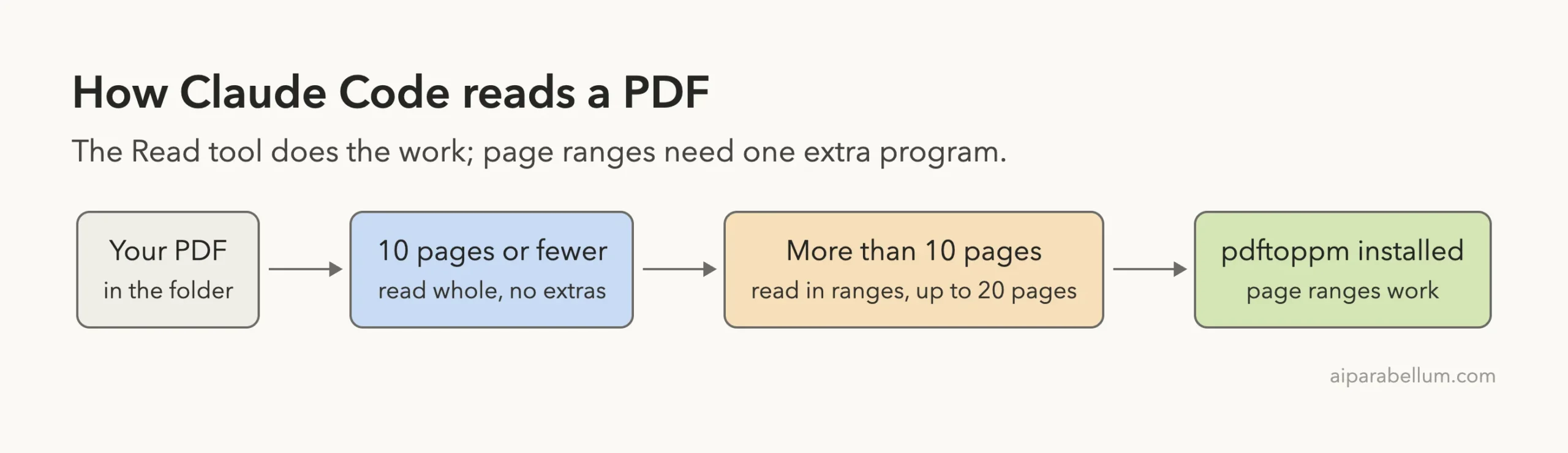
Yes, Claude Code can read PDFs. Ask it to read a short PDF in your folder, and it opens the file and answers questions about the text. For PDFs longer than 10 pages, it reads in page ranges, and that part needs one small extra program on your computer.
We tested both cases on a Mac, with real output. A one-page invoice worked right away. A 14-page report hit a missing tool, and we show exactly what Claude Code did about it and how to fix it.
We read the official tools reference first, then ran Claude Code in a throwaway demo folder with two made-up PDFs. Browse all our Claude Code tutorials for more.
Tested with Claude Code v2.1.312 on October 31, 2026. We tested on macOS; the Windows and Linux steps follow Anthropic’s official instructions.
Quick Answer: How Claude Code Handles PDFs
The official tools reference describes PDF reading in a few lines. The table turns those lines into a quick guide.
| Your PDF | What happens | Do you need anything extra? |
|---|---|---|
| Short, up to 10 pages | Claude reads the whole file | No |
| Longer than 10 pages | Claude reads in ranges such as 1-5, up to 20 pages at a time | Yes, pdftoppm from poppler |
| Page range without poppler | The range read fails with pdftoppm is not installed | Install poppler |
| Scanned PDF (a photo of a page) | We did not test this | Unknown |
Why You Might Want Claude Code to Read a PDF
PDFs hold the boring but important things: invoices, contracts, reports, manuals. Reading them by hand takes time, and copying text out of them is messy.
When Claude Code can read the file directly, you can ask for a total, a deadline or a summary in plain English. You do not have to paste anything into the chat.
If you have a whole folder of documents, our guide to summarizing a folder shows how to do it at scale. If you need to join or split files instead, see how to merge PDFs.
Short PDFs just work; long PDFs need poppler for page ranges.
Our Test Setup
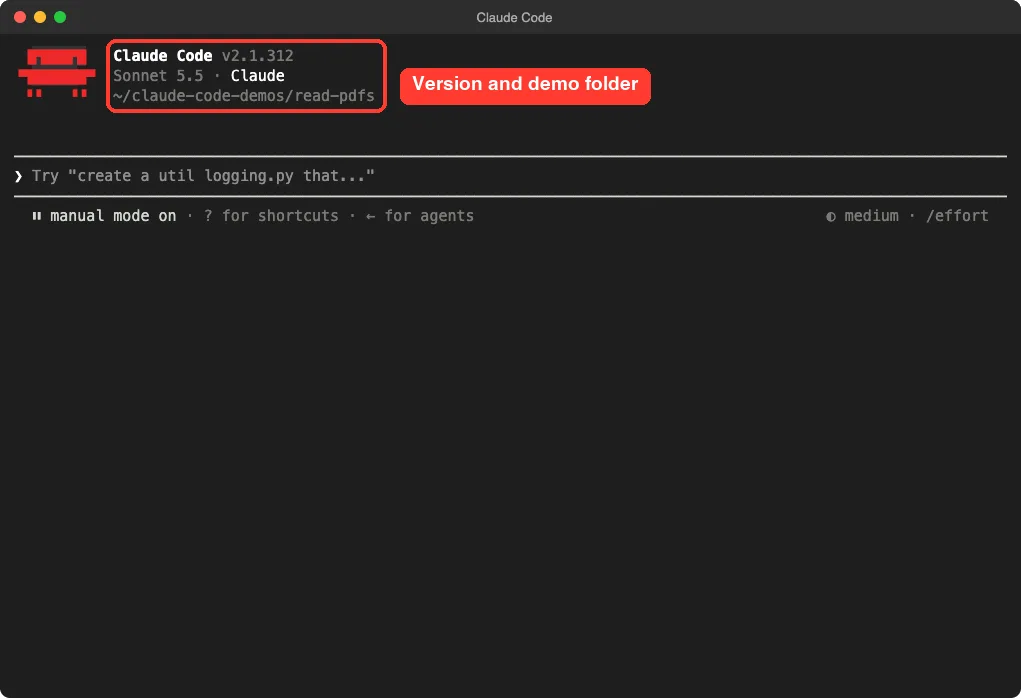
We made a demo folder at ~/claude-code-demos/read-pdfs with two PDFs we created ourselves. No real documents were used.
invoice.pdf: a one-page invoice from a made-up print shop to a made-up bakery.report.pdf: a 14-page set of made-up quarterly notes, with one section per page.
Then we opened Claude Code inside that folder by typing claude. Always work in a demo folder or on copies, never on the only copy of an important file.
Step 1: Read a Short PDF
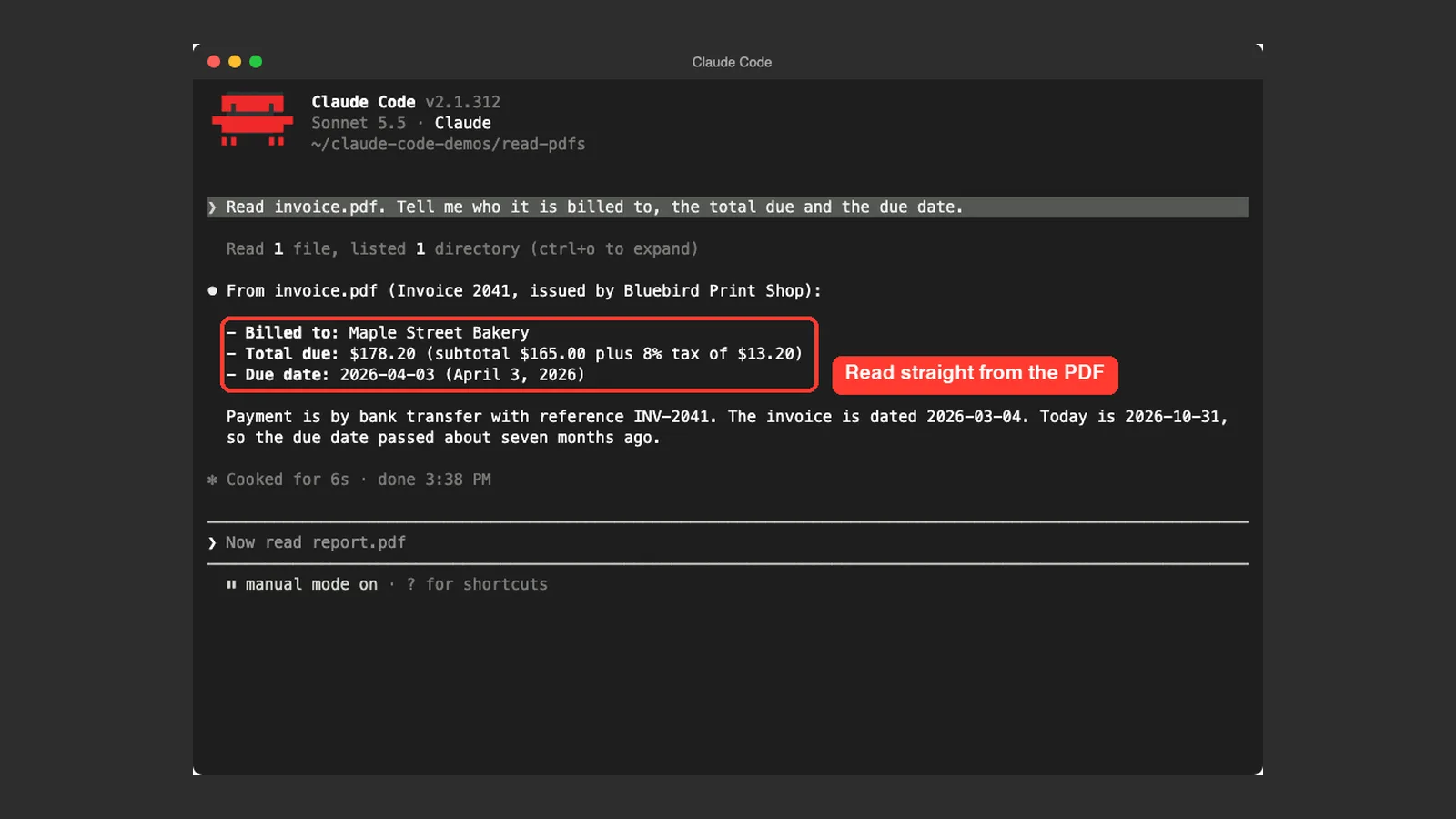
We started with the invoice. Our prompt was simple: Read invoice.pdf. Tell me who it is billed to, the total due and the due date.
Claude Code used its Read tool on the file. The screen showed the line “Read 1 file”, and then the answer.
It reported that the invoice was billed to Maple Street Bakery, the total due was $178.20 (a $165.00 subtotal plus $13.20 tax), and the due date was April 3, 2026. All three matched what we had written into the PDF.
It also noticed the date on its own. It added that the due date had passed about seven months ago, which was a helpful extra.
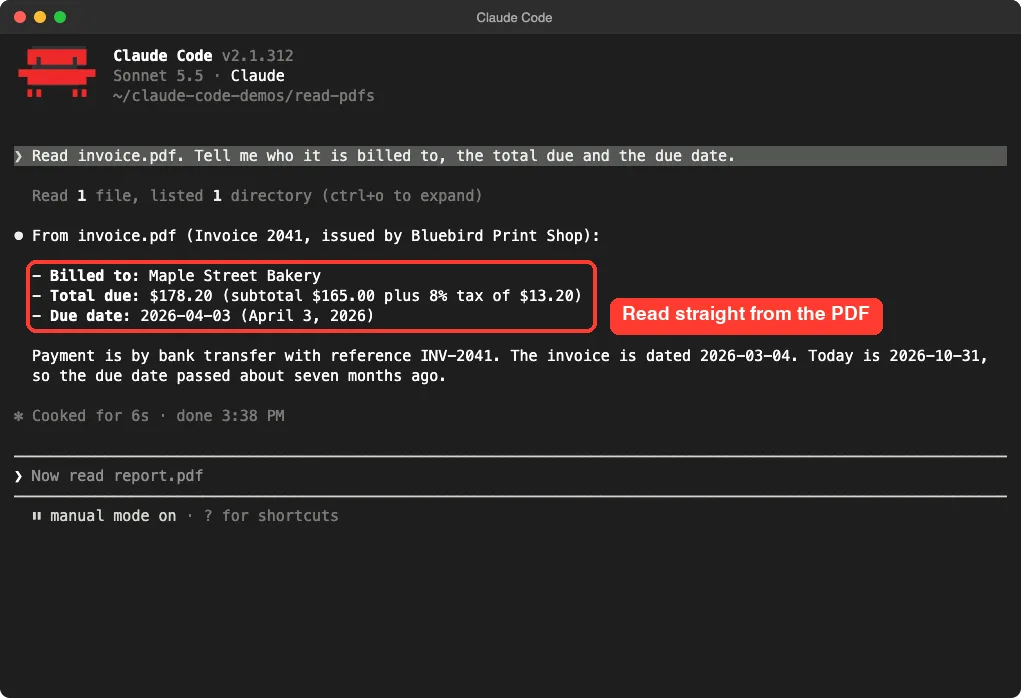
Nothing needed to be installed for this step. The docs say short PDFs are read whole, and our test agreed.
Step 2: Read a Page Range of a Long PDF
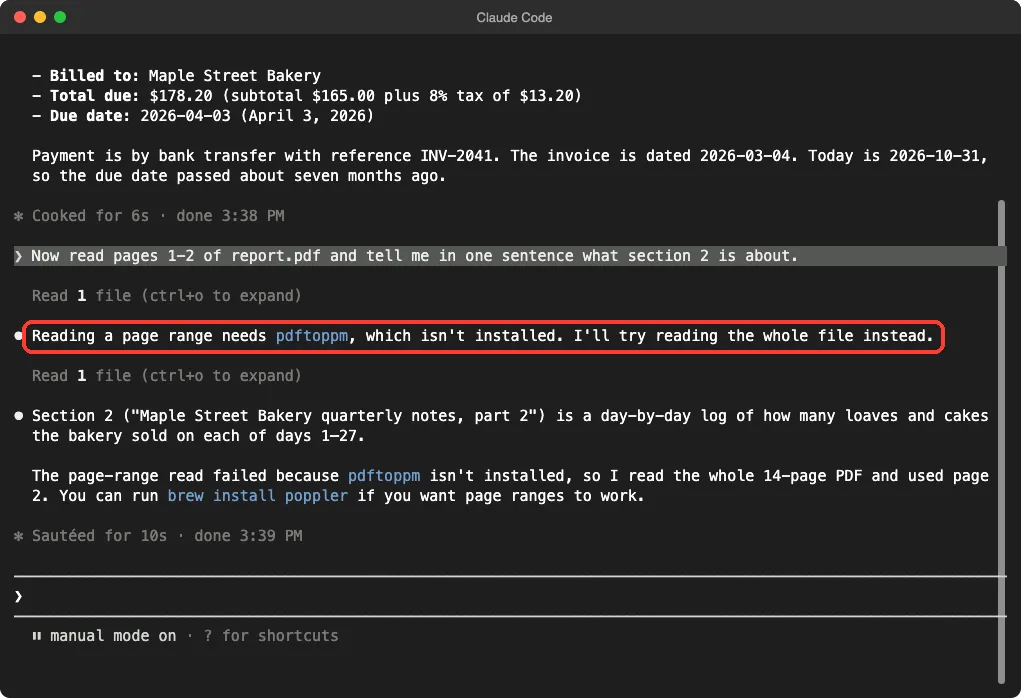
Next we tried the 14-page report. We asked: Now read pages 1-2 of report.pdf and tell me in one sentence what section 2 is about.
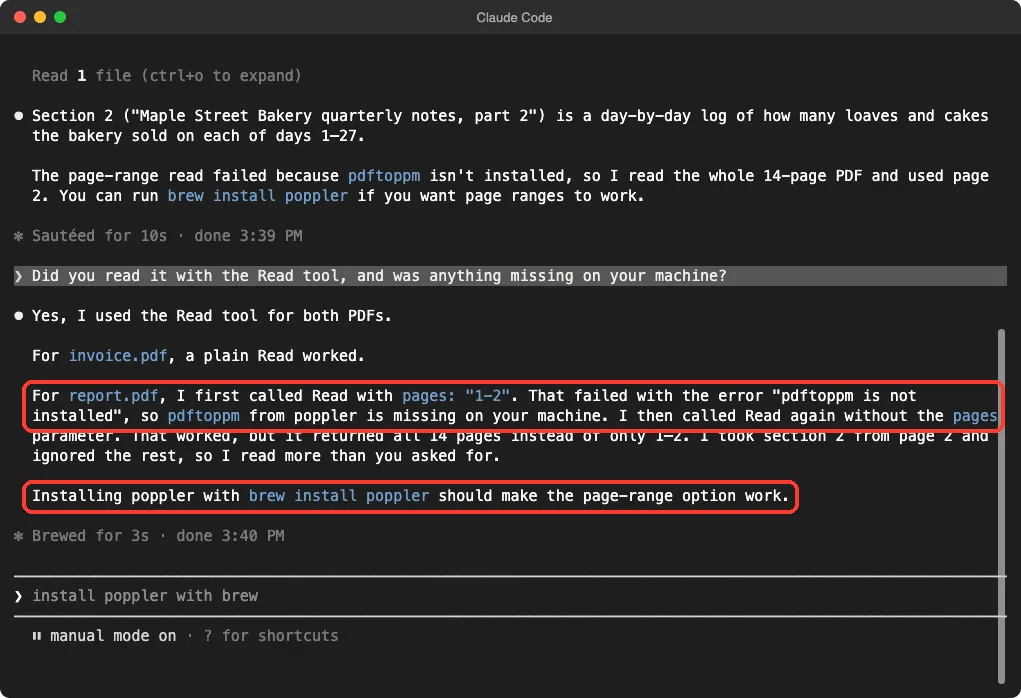
This is where something went wrong, and that is exactly why we ran the test. Claude Code first tried a page-range read. Then it told us that reading a page range needs pdftoppm, which was not installed on our Mac.
The official docs say the same thing: page-range reads render pages with pdftoppm from poppler-utils. Without it, a range read fails with the message pdftoppm is not installed.
What Claude Code Did Next
Claude Code did not stop. It fell back to reading the whole file instead, then answered from page 2.
The answer was right: section 2 was a day-by-day log of how many loaves and cakes the bakery sold. It also told us to run brew install poppler if we wanted page ranges to work.
That fallback worked for our small test file. For a huge PDF it could be a problem, because reading everything uses more of your context window than reading five pages would.
Step 3: Ask Claude What Happened
We asked a follow-up question to see the details: Did you read it with the Read tool, and was anything missing on your machine?
Claude explained that it used the Read tool for both PDFs. For the report, it first called Read with the pages setting 1-2, got the error, and then called Read again without the pages setting.
It also admitted that this returned all 14 pages instead of only the two we asked for. That honesty is useful, because it tells you the cost of the fallback.
How to Fix the pdftoppm Is Not Installed Error
The fix is to install poppler, which includes pdftoppm. The official docs list these options:
- macOS:
brew install poppler - Debian and Ubuntu:
apt-get install poppler-utils - Windows and other systems: install a poppler build that puts
pdftoppmon your PATH.
We did not install poppler during this test, because we wanted to show the real error. We tested on macOS; the Windows and Linux steps follow Anthropic’s official instructions.
After installing, check that it works by running pdftoppm -v in your terminal. If it prints a version, Claude Code can use it. Then restart Claude Code and ask for a page range again.
Ten Pages, Twenty Pages: What the Limits Mean
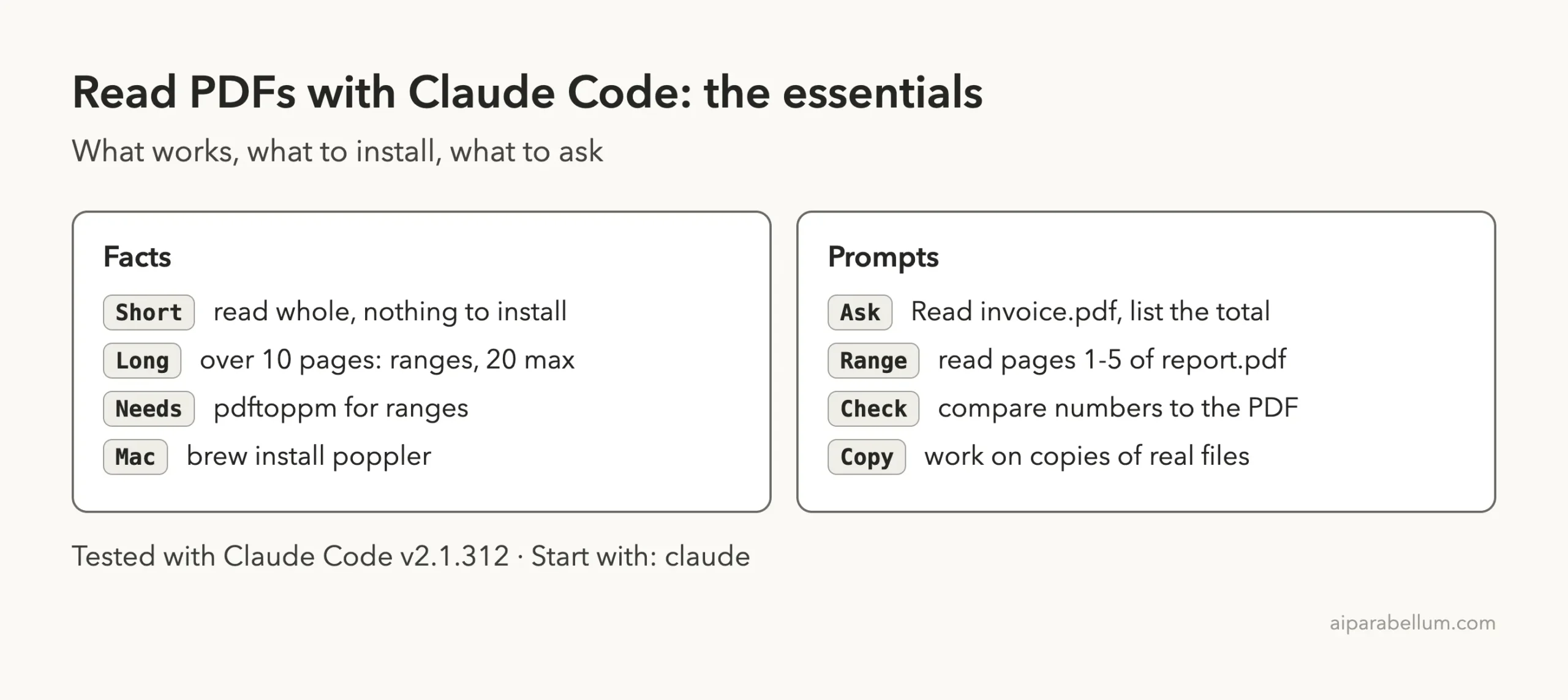
The docs set two numbers. PDFs up to 10 pages are read whole, and longer PDFs are read in ranges of at most 20 pages at a time.
So for a 100-page manual, Claude Code needs several range reads. You can guide it by asking for specific pages, such as the table of contents first, then the chapter you care about.
Here is a simple way to keep it efficient:
- Ask for pages 1-3 and the table of contents.
- Pick the chapter you need.
- Ask for just that page range.
- Ask your question about those pages only.
This also protects your context window. Our guide to the context window explains why that matters.
Real Examples You Can Try
These prompts worked well for the kind of file we tested. Change the file names to your own.
- Pull facts:
Read invoice.pdf and list the total, tax and due date. - Summarize:
Read report.pdf and summarize each section in one line. - Compare:
Read both PDFs and tell me which one mentions a deadline. - Save the result:
Write the key facts from invoice.pdf into facts.md.
When Claude writes a file, it asks you to approve it first. Read it before you press Yes. Our permissions guide explains those prompts.
What About Images and Scanned PDFs?
The same tools reference says Claude can see PNG, JPEG, GIF and WebP images as visual content. Our guide on pasting images shows how that looks in practice.
We did not test a scanned PDF, which is a photo of a page with no real text inside. The docs do not say how those are handled, so we will not guess. If you rely on scans, test one small file first and check the answer against the page.
Why Reading a PDF Costs Context
Every page Claude reads becomes part of the conversation. That text stays in your session, and Claude Code sends the whole conversation with each new request.
A one-page invoice is tiny. A 14-page report of repetitive notes is bigger, and a 200-page manual could fill a large share of your window if read whole.
That is the real reason to install poppler even if the fallback works. Page ranges let you read only what you need, which keeps answers faster and your session roomy.
How to Check the Cost
After a big read, type /context to see how much of the window is used. If it looks high and you are done with that file, type /clear to start fresh, or /compact to summarize the conversation and keep going.
Our guide on prompt too long shows what happens when a session fills up, and how to recover from it.
When a PDF Answer Looks Wrong
Claude Code reads the text it is given, and any reader can slip. Before you use a number from a PDF in a payment, a report or an email, open the original and compare.
These checks take under a minute and catch most problems:
- Ask Claude to quote the exact line from the PDF that holds the number.
- Ask which page the answer came from.
- Ask it to say plainly when the file does not state something.
- Re-read the specific page yourself in a PDF viewer.
In our invoice test, every figure matched. That is one small, clean, made-up file, so treat it as a good sign and not a guarantee for messy real-world documents.
Try It Yourself
Make a copy of any short PDF, such as a receipt, into a new folder. Open Claude Code there and paste this prompt.
Read receipt.pdf. Tell me the store name, the date and the total.
Then tell me how sure you are about each answer.
Compare the answer with the real PDF. If it matches, try a longer file with a page range. If you see the error, install poppler and try again.
Common Mistakes
- Pointing Claude at the only copy of an important PDF. Use copies.
- Asking for a page range on a long PDF and not knowing why it failed. Install poppler first.
- Trusting numbers without checking them. Compare totals and dates with the original.
- Letting the whole 14-page fallback happen on a huge file. Install poppler so ranges work.
- Assuming a scanned PDF will read as well as a text PDF. Test it first.
Pro Tips
- Name the file and the exact facts you want, so the answer stays short.
- Ask Claude to say when something is not in the file, instead of guessing.
- Run
/contextafter a big read to see how much space it used. - Ask for page ranges by section, not the whole document, when the file is long.
- Ask Claude to save results to a file so you can reuse them later.
Cheat Sheet
Frequently Asked Questions
Can Claude Code read PDF files?
Yes. The Read tool opens PDFs. Short ones are read whole, and longer ones are read in page ranges, as the official tools reference describes.
Do I need to install anything to read a PDF?
Not for short PDFs. In our test, a one-page invoice worked with nothing extra. For page ranges on long PDFs you need pdftoppm from poppler.
What does “pdftoppm is not installed” mean?
It means a page-range read could not run because poppler is missing. Install it with brew install poppler on a Mac, or use the options in the docs for other systems.
How many pages can Claude Code read at once?
The docs say PDFs over 10 pages are read in ranges, up to 20 pages at a time. Our test used a 14-page file and one range request.
Can Claude Code read scanned PDFs?
We did not test that, so we cannot say. Try one small scanned file and check the result against the page before you rely on it.
Conclusion
Claude Code can read PDFs: a short file worked right away on our Mac, and a long file needed poppler for page ranges, which Claude Code told us to install. Claude fell back to reading the whole file, which worked for our small test but could be costly for a big document. This is one demo on one machine, so check important answers against the original. For more on the assistant behind it, visit our Claude AI page, and read the official tools reference for the full list of what the Read tool supports.