If Claude Code hangs, keeps retrying, or says it can’t connect at work, the cause is usually your company network. To fix your Claude Code proxy settings, set HTTPS_PROXY to your proxy’s full URL, including the http:// part. Then trust your proxy’s root certificate if it inspects HTTPS traffic, the way Zscaler does.
The quick version is two lines. Run export HTTPS_PROXY=http://proxy.example.com:8080, and if you see certificate errors, add export NODE_EXTRA_CA_CERTS=/path/to/zscaler-root.pem. To make it stick, put both values in the env block of ~/.claude/settings.json instead of your shell.
Below, we set up a real test proxy on a Mac and broke the connection on purpose in four different ways. You’ll see the exact error for each one and the fix that cleared it.
Browse all our Claude Code tutorials for more fixes and guides.
Tested with Claude Code v2.1.325 on November 18, 2026. We tested on macOS; the Windows and Linux steps follow Anthropic’s official instructions.
Claude Code Proxy Settings: Quick Summary
| Symptom or need | What to set | Example |
|---|---|---|
| Your network forces a proxy | HTTPS_PROXY | http://proxy.example.com:8080 |
| “Invalid proxy URL” at launch | Add the scheme | http:// at the start |
| Proxy needs a login | Credentials in the URL | http://user:pass@proxy:8080 |
| Some hosts must skip the proxy | NO_PROXY | localhost,.corp.example.com |
| Zscaler or TLS inspection | NODE_EXTRA_CA_CERTS | /path/to/root-ca.pem |
| Settings that always apply | env in settings.json | ~/.claude/settings.json |
| Check what’s active | /status, --debug-file | Proxy row, debug log |
Why Claude Code Needs Proxy Settings at Work
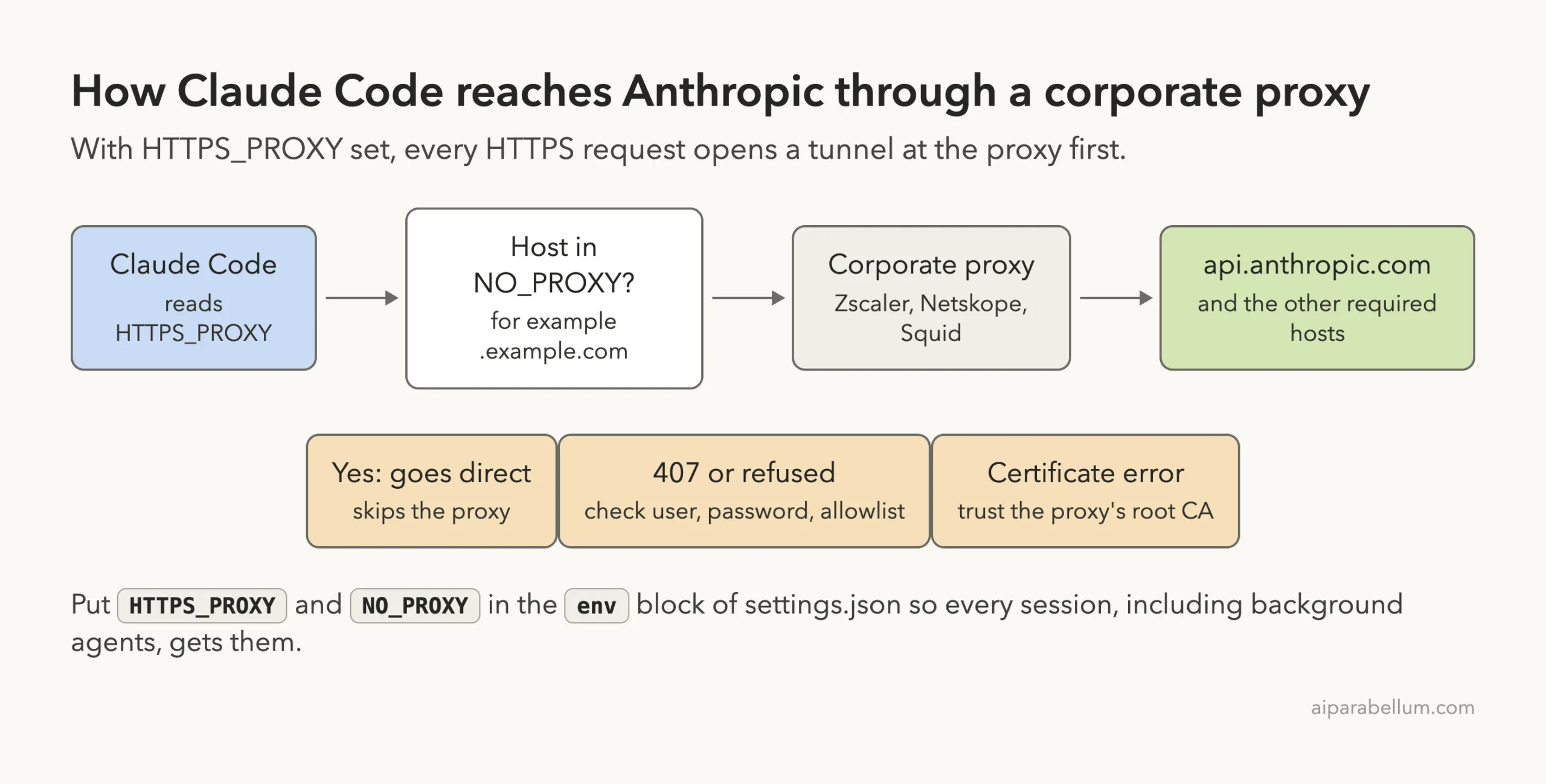
Many companies don’t let laptops talk to the internet directly. Every web request has to go through a proxy server, such as Zscaler, Netskope, Squid, or a Blue Coat box. Your browser usually learns about this proxy automatically, but a command-line tool like Claude Code doesn’t.
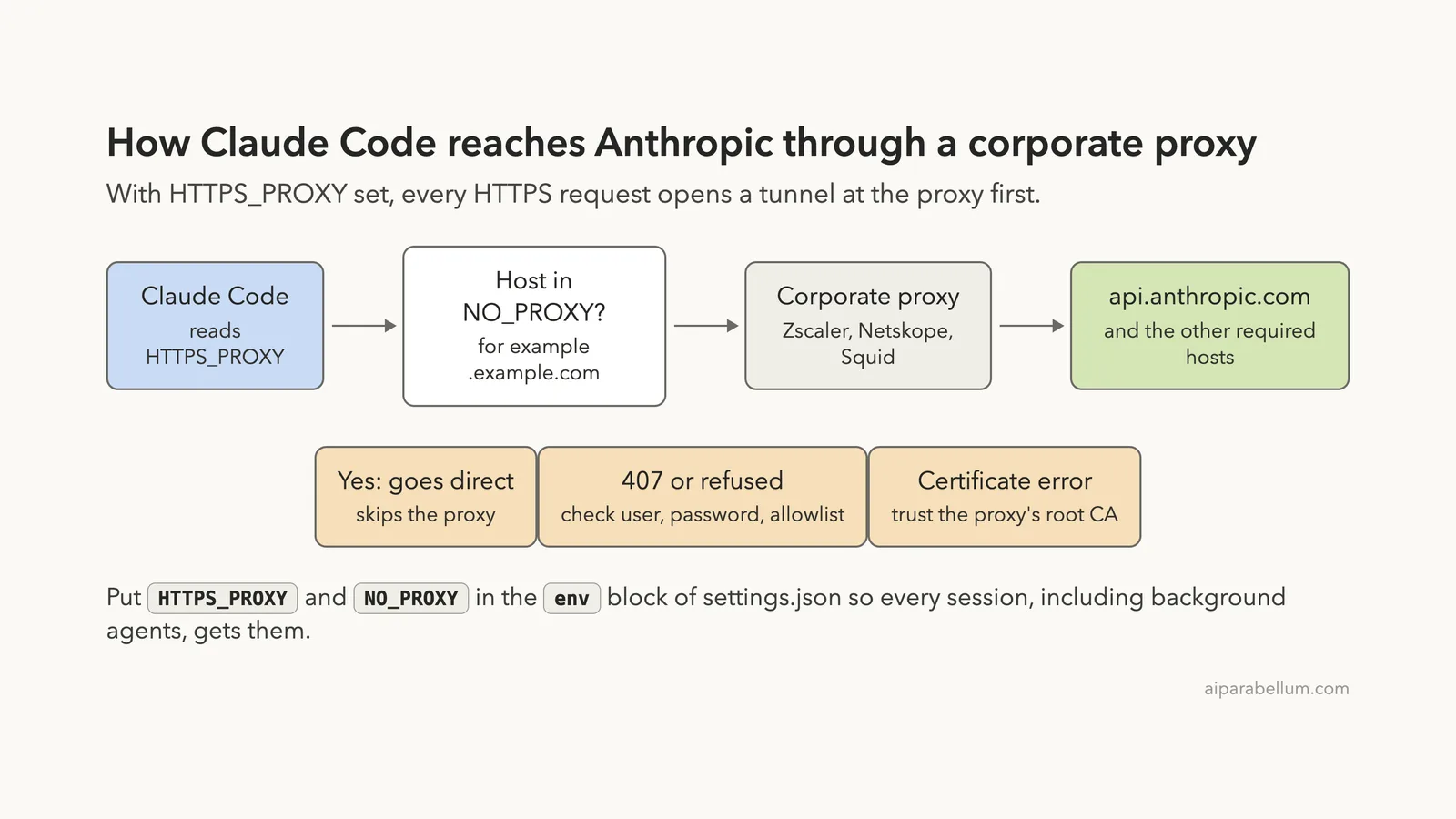
Claude Code reads the standard proxy environment variables that most developer tools use. If those aren’t set, it tries to reach api.anthropic.com directly, the firewall drops the request, and you get timeouts or connection errors.
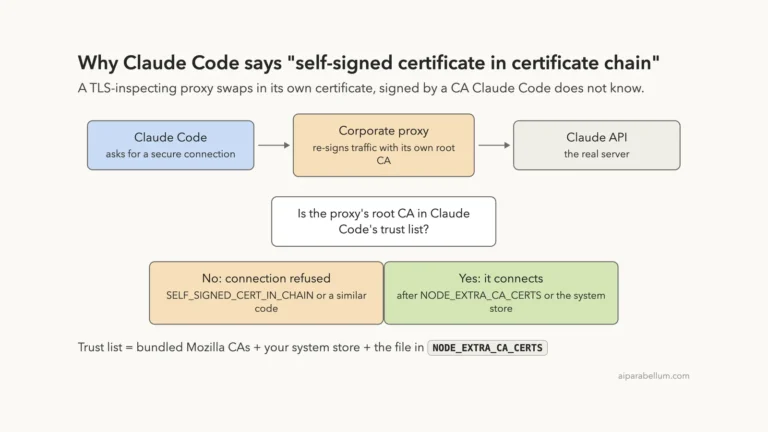
There’s a second layer on networks like Zscaler. These proxies open your HTTPS traffic to scan it, then re-sign it with the company’s own certificate. If Claude Code doesn’t trust that certificate, you see SSL errors even when the proxy itself works.
Our Test Setup
We didn’t want to rely on guesses, so we built a tiny proxy in Python on a Mac. It uses only the standard library and logs every host Claude Code connects to. We ran two copies: one open proxy on port 8899 and one on port 8898 that demands a username and password.
Everything ran in a throwaway demo folder with short one-line prompts. That let us see exactly which requests went through the proxy, which ones skipped it, and what each failure looks like.
How to Set Up HTTPS_PROXY for Claude Code
Step 1: Find Your Proxy Address
Ask your IT team for the proxy host and port, or check your system network settings. On a Mac, open System Settings, then Network, pick your connection, and open Details, then Proxies. If your company uses a PAC file, the proxy address is inside it.
Anthropic’s docs describe proxy setup only through environment variables, so give Claude Code a plain proxy URL. If your company uses a PAC file, take the host and port from it, like proxy.corp.example.com:8080.
Step 2: Export HTTPS_PROXY With the Scheme
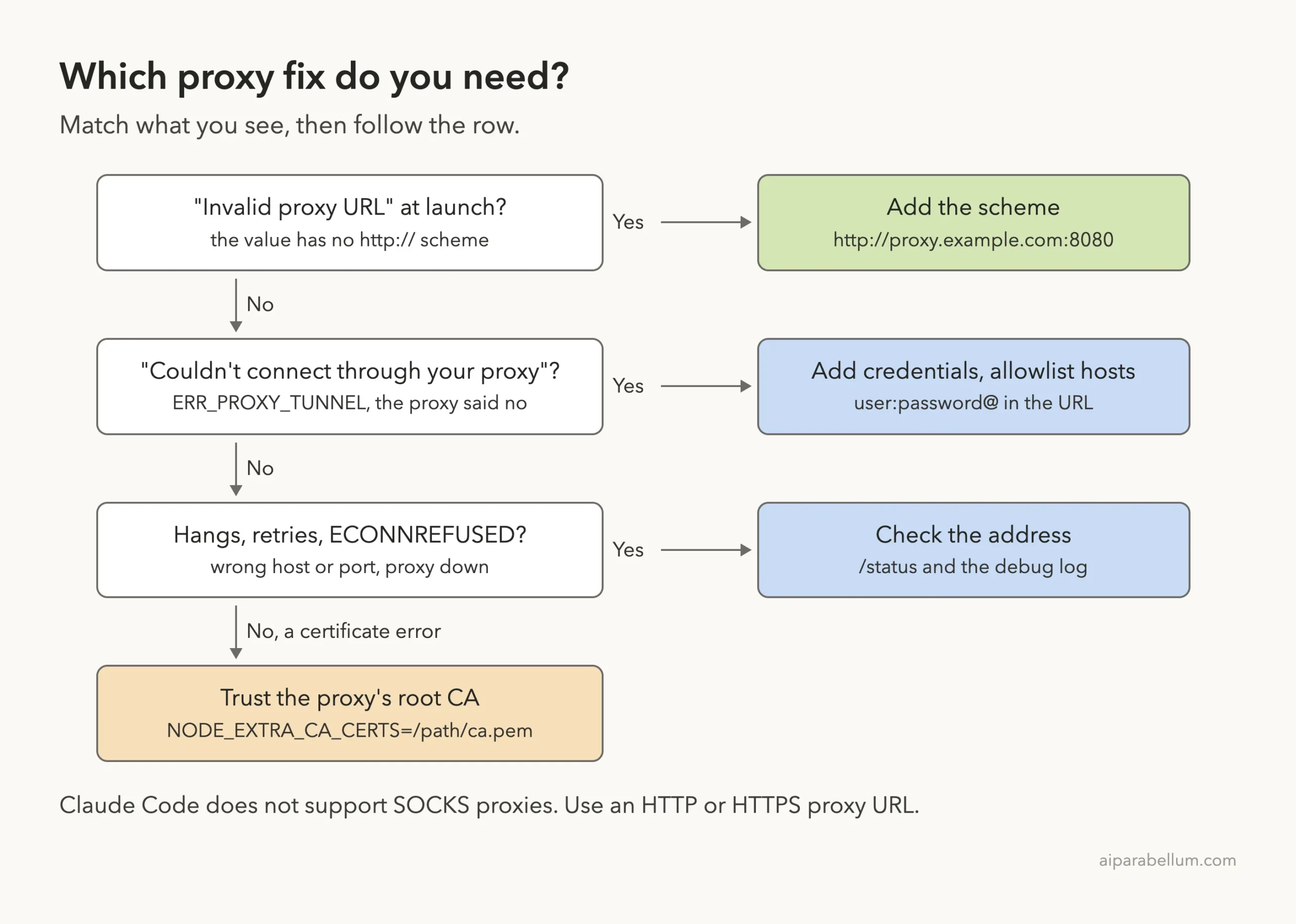
This is where most people slip. Claude Code checks the proxy URL when it starts. If you leave out http://, it refuses to launch and tells you which variable to fix.
# Wrong: no scheme
export HTTPS_PROXY=proxy.example.com:8080

# Right
export HTTPS_PROXY=http://proxy.example.com:8080
export NO_PROXY="localhost,127.0.0.1,.corp.example.com"
In our test, the version without the scheme stopped right away with “Invalid proxy URL in HTTPS_PROXY”. With the scheme added, our prompt came back, and the proxy log showed Claude Code tunneling to api.anthropic.com, mcp-proxy.anthropic.com, and a telemetry host.
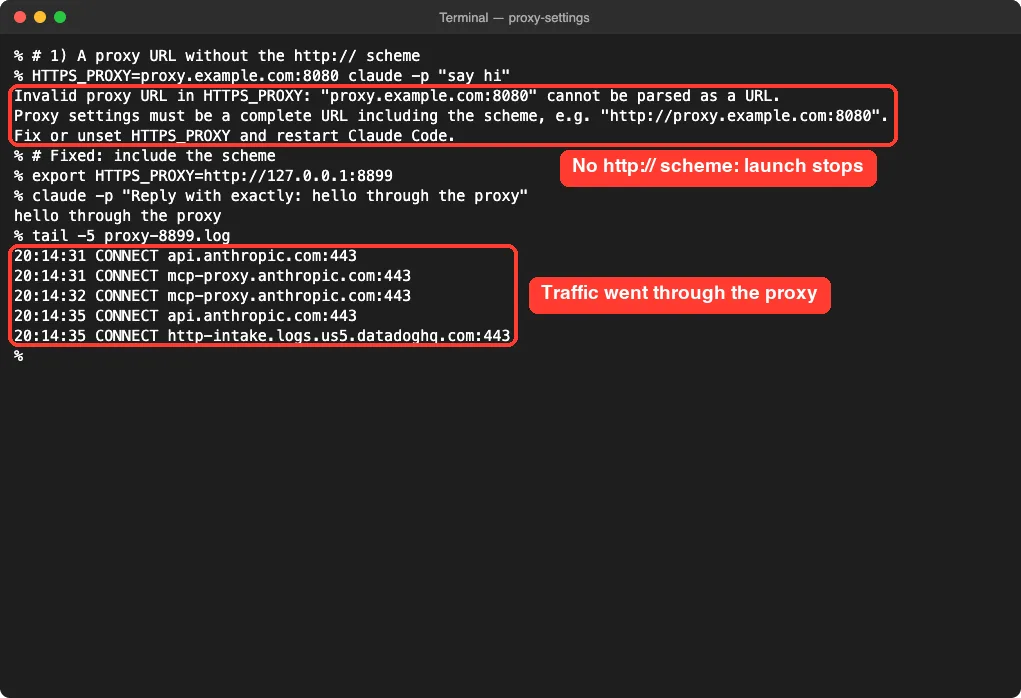
The proxy URL usually starts with http:// even though it carries HTTPS traffic. That’s normal: Claude Code asks the proxy to open a tunnel, and the encrypted traffic flows inside it. Use https:// only if your IT team says the proxy itself listens over TLS.
Step 3: Know Which Variable Wins
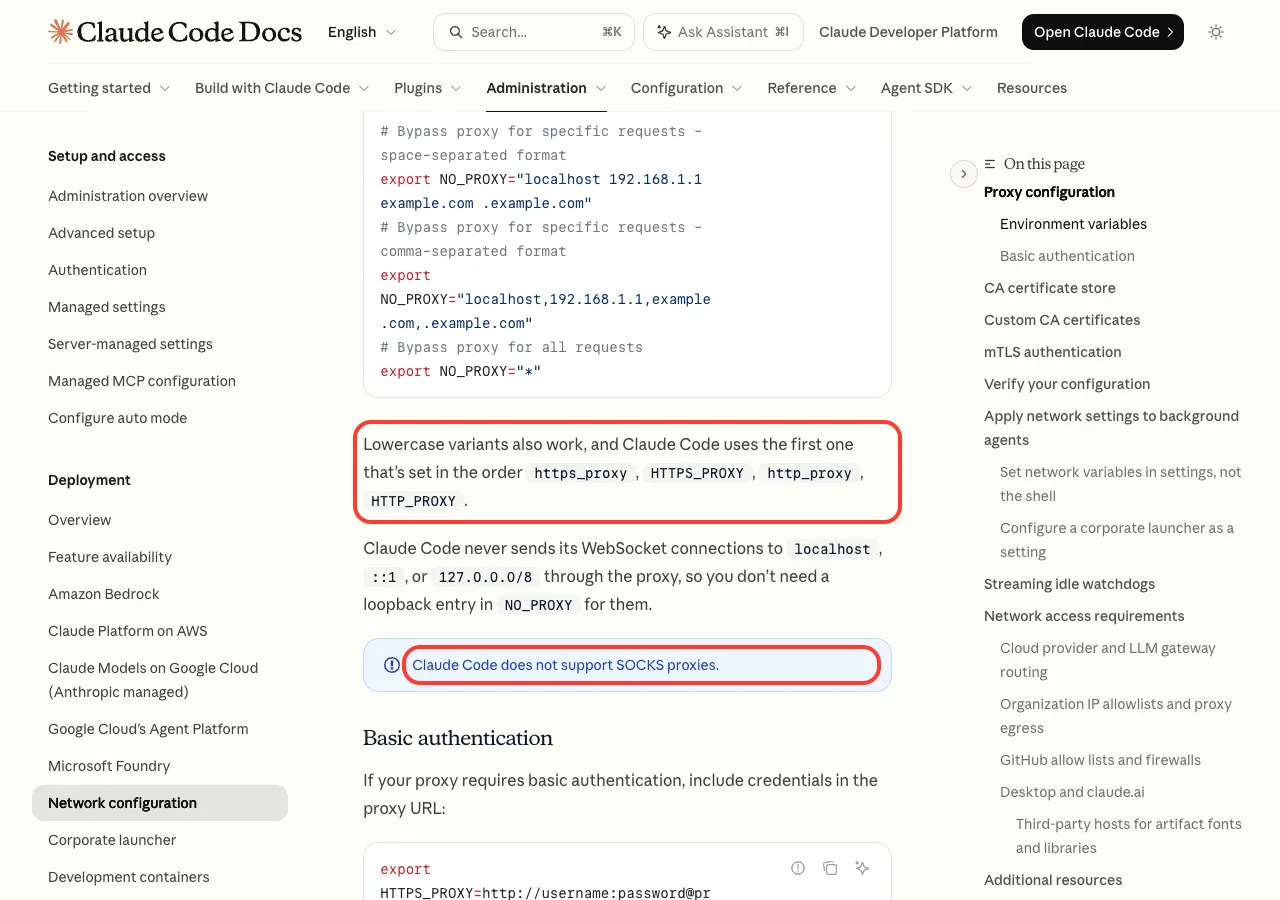
Anthropic’s network configuration docs say lowercase names work too. Claude Code uses the first one it finds in this order: https_proxy, HTTPS_PROXY, http_proxy, HTTP_PROXY.
That matters if an old lowercase https_proxy sits in your shell profile. It beats the uppercase value you just set, so check both with env | grep -i proxy.
Step 4: Add Credentials if the Proxy Asks for Them
Some proxies want a username and password. Without them, Claude Code can’t open its tunnel. In our test, it printed this error and exited:
API Error: Couldn't connect through your proxy (ERR_PROXY_TUNNEL) — the proxy
refused the tunnel: check its credentials and that it allows this host
Our proxy log showed a 407 response, which means “proxy authentication required”. Putting the login in the URL fixed it on the next run:
export HTTPS_PROXY=http://username:[email protected]:8080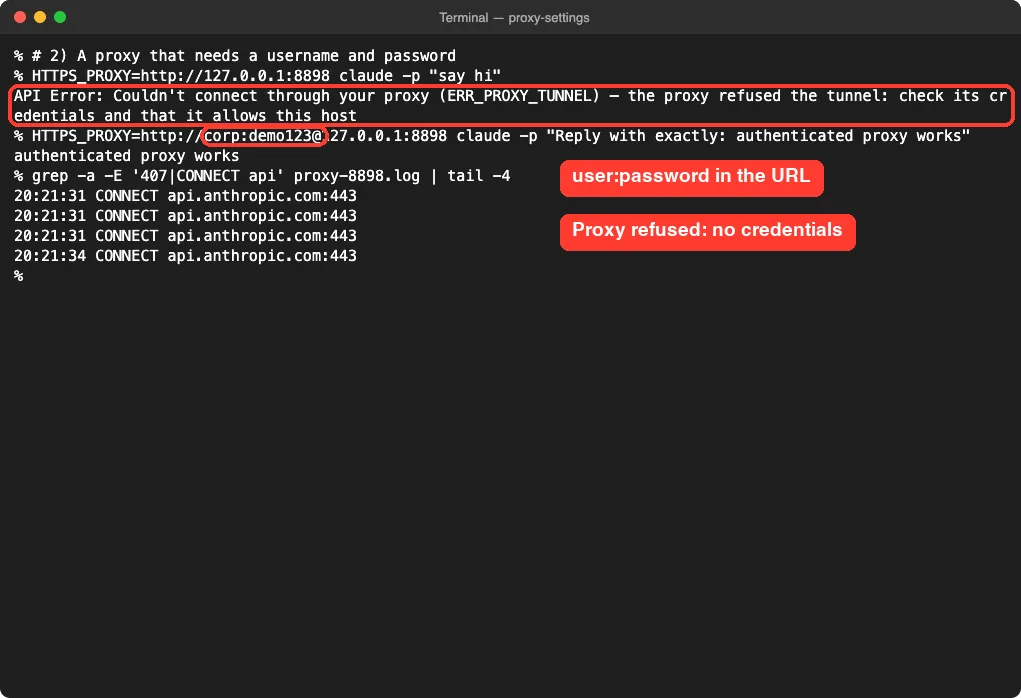
Two cautions here. Don’t hard-code a real password in scripts you share, and if your password has symbols like @ or :, URL-encode them (for example, @ becomes %40).
Claude Code supports basic authentication in the URL. For NTLM or Kerberos proxies, the docs suggest putting an LLM gateway in front that supports your company’s login method.
Step 5: Use NO_PROXY for Hosts That Should Skip the Proxy
NO_PROXY lists hosts that go direct. It accepts commas or spaces, a leading dot covers subdomains, and * skips the proxy for everything.
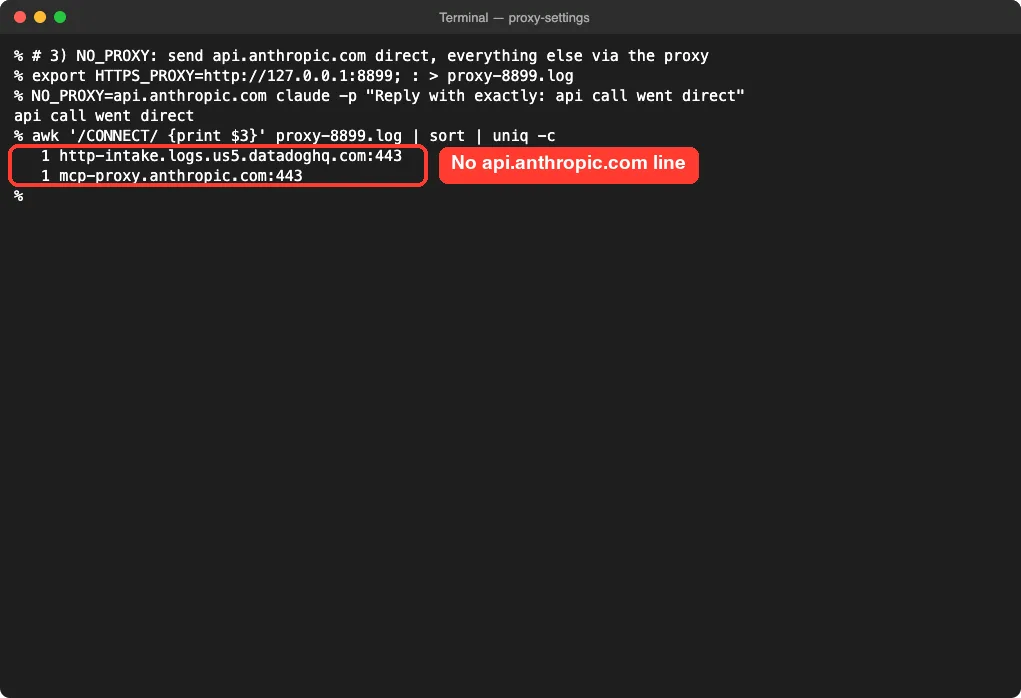
To prove it works, we told Claude Code to send api.anthropic.com direct while the proxy stayed on. The reply came back, and the proxy log had no line for api.anthropic.com at all. Only the other hosts went through the proxy.
At work, you’d normally list internal hosts in NO_PROXY, such as your Git server or an internal package mirror. The docs also note that Claude Code never sends its WebSocket connections to localhost or 127.0.0.0/8 through the proxy, so you don’t need loopback entries for those.
Make the Proxy Settings Permanent in settings.json
Shell exports vanish when you close the terminal, and they don’t always reach every Claude Code process. The safer home is the env block of a settings file. You can learn where each file lives in our guide to settings.json locations.
{
  "env": {
    "HTTPS_PROXY": "http://proxy.example.com:8080",
    "NO_PROXY": "localhost,127.0.0.1,.corp.example.com",
    "NODE_EXTRA_CA_CERTS": "/Users/you/certs/zscaler-root.pem"
  }
}
We tested this with a twist. Our shell pointed HTTPS_PROXY at a dead port, while .claude/settings.local.json pointed at the working proxy. The prompt still worked, and all 11 connections showed up in the working proxy’s log.
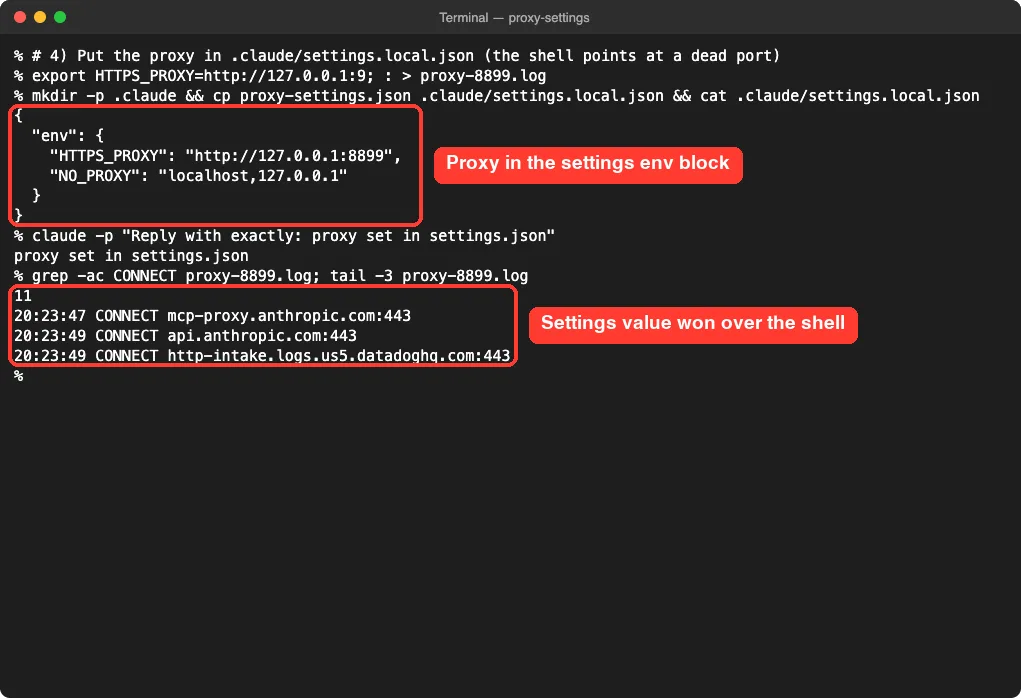
That matches the environment variables reference: when both your shell and a settings file set a variable, the settings value applies in most sessions. So if you change your proxy in the shell and nothing happens, check your settings files first.
If you change the proxy in your shell and nothing happens, a settings file is probably still setting the old value.
Which Settings File to Use
| File | Best for | Notes |
|---|---|---|
~/.claude/settings.json | Your own laptop | Applies to every project and background agent |
.claude/settings.local.json | One project, just you | Not shared; values wait until you trust the folder |
| Managed settings | Whole company | IT pushes it; overrides user and project files |
For a proxy, user settings are usually right, because the proxy belongs to your network, not a repo. Our settings.json examples show more blocks you can copy.
Background Agents Need Settings, Not Shell Exports
Background sessions started with claude agents, --bg, or /background run under one shared supervisor process. The docs explain that it inherits the environment of whichever shell starts it first. If your proxy lives only in one shell, background agents may silently miss it.
Putting the proxy in ~/.claude/settings.json or managed settings fixes this. If you change the setting while a supervisor is already running, the docs say to run claude daemon stop --any so the next one picks it up.
Zscaler and TLS Inspection: Trust the Root Certificate
Zscaler, Netskope, and similar tools decrypt and re-sign HTTPS traffic. Claude Code trusts its bundled Mozilla certificates plus your operating system’s certificate store by default. So if IT has already installed the Zscaler root in your system store, it often just works with the native installer.
If you still see errors like “self signed certificate in certificate chain”, point Claude Code at the root certificate file:
export NODE_EXTRA_CA_CERTS=/path/to/zscaler-root.pemWe covered certificate errors in depth, including how to find the right file, in our certificate error guide. Two proxy-specific notes from the docs are worth knowing:
- npm installs only read the system store on Node 22.15 or later. On older Node, only the bundled set and
NODE_EXTRA_CA_CERTScount. - If your inspection proxy mishandles compressed request bodies, set
CLAUDE_CODE_GZIP_REQUEST_BODIES=0to turn compression off.
Check Your Claude Code Proxy Configuration
Use /status to See the Active Proxy
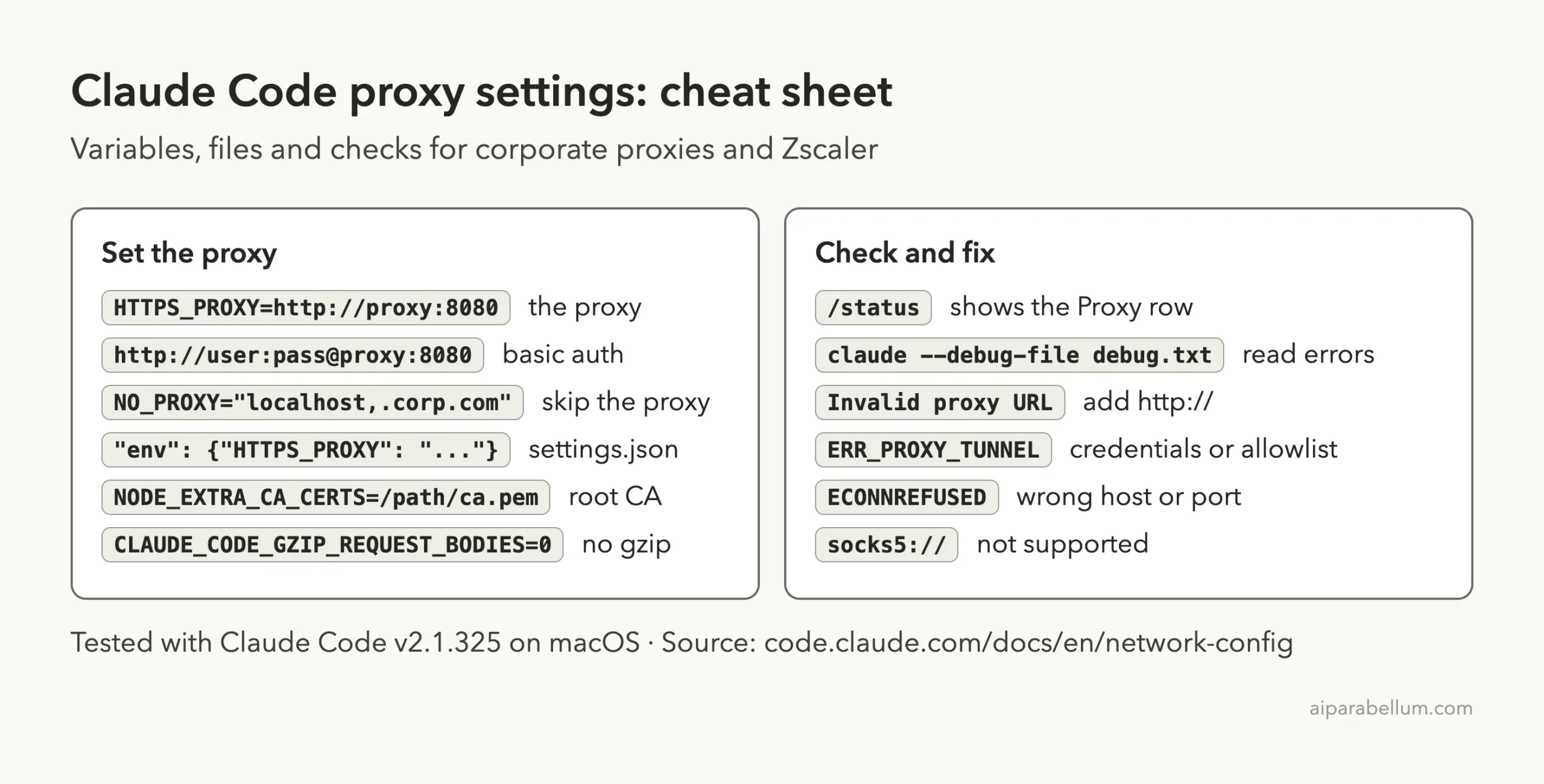
Start Claude Code and run /status. The Proxy row shows the URL it’s using. The docs say this row also marks a value it can’t parse as invalid and ignored, which makes it a quick sanity check.

Read the Debug Log When It Hangs
A wrong proxy port doesn’t always fail fast. When we pointed Claude Code at a closed port, it didn’t print an error right away; it kept retrying in the background. The debug log told the real story within seconds.
claude -p "say hi" --debug-file debug.txt
grep ECONNREFUSED debug.txt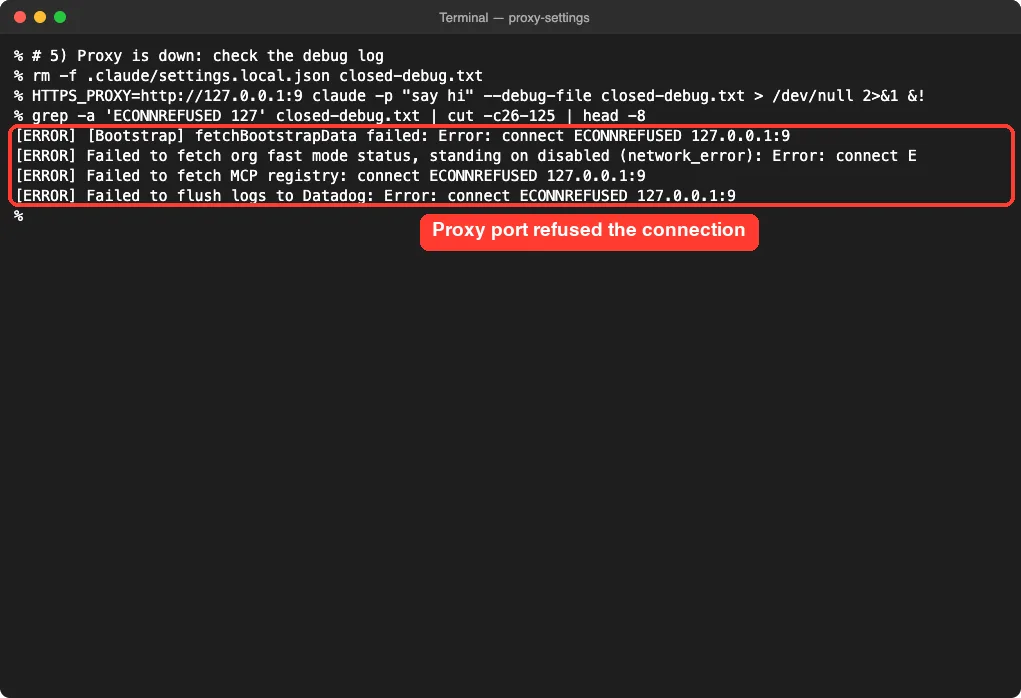
If you see ECONNREFUSED with your proxy’s address, the host or port is wrong, or the proxy is down. If you see it with api.anthropic.com instead, the proxy isn’t being used at all. Our connection error fix covers that second case in detail.
Hosts to Allowlist in Your Proxy or Zscaler
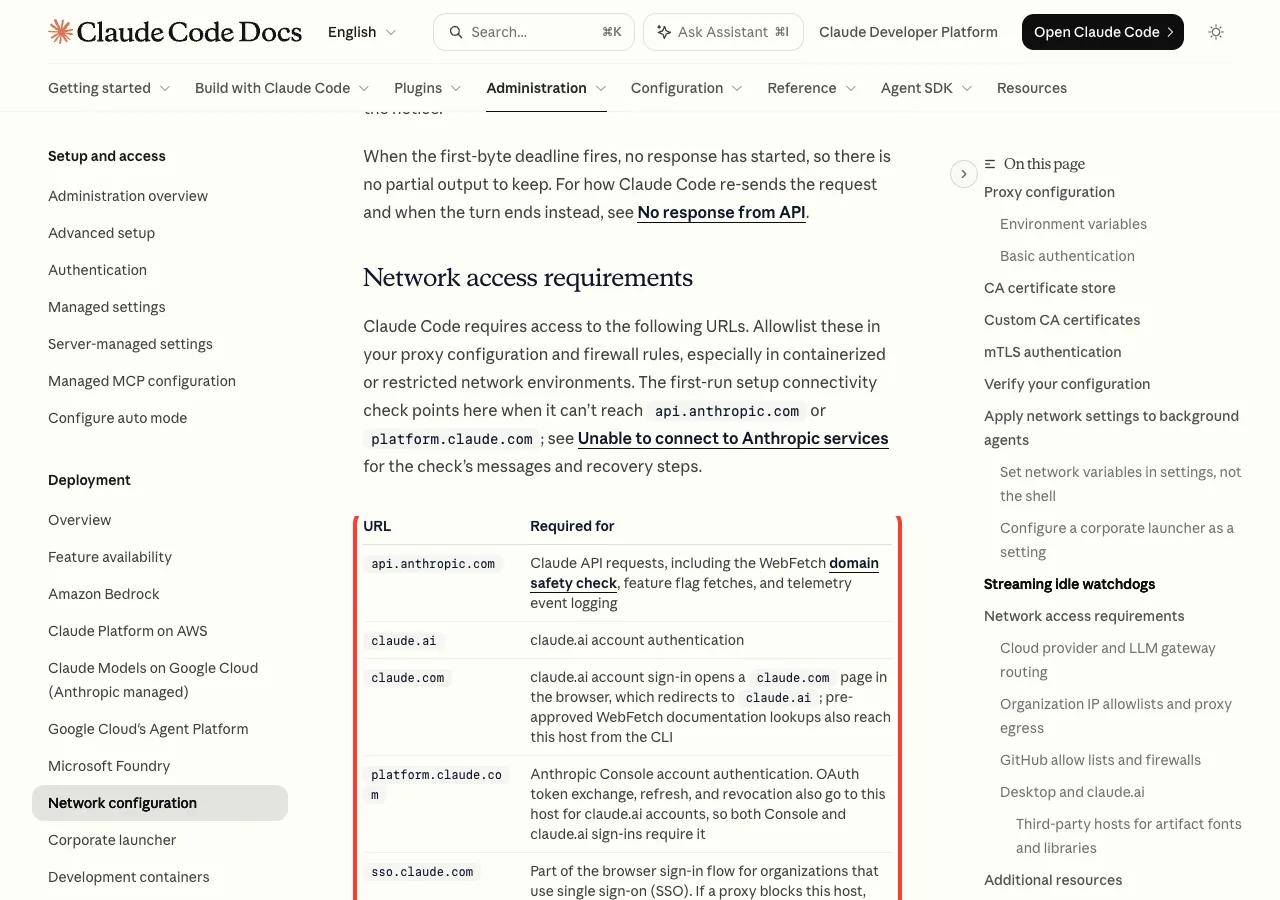
Even with the proxy set, your IT team may block hosts Claude Code needs. Our own proxy log showed traffic to api.anthropic.com, platform.claude.com, mcp-proxy.anthropic.com, and a Datadog telemetry host during a simple prompt.
| Host | Needed for |
|---|---|
api.anthropic.com | Model requests, feature flags, telemetry events |
claude.ai, claude.com | claude.ai account sign-in |
platform.claude.com | Console sign-in and token refresh for all accounts |
sso.claude.com | Single sign-on organizations |
mcp-proxy.anthropic.com | MCP connectors from claude.ai |
downloads.claude.ai | Native installer and auto-updates |
registry.npmjs.org, github.com | Plugins, npx MCP servers, npm installs |
The full list in the network access requirements also covers optional hosts. If your organization uses IP allowlisting for Claude, the docs recommend routing bridge.claudeusercontent.com through the same Zscaler app segment as claude.ai.
Which Proxy Fix Do You Need?
Try It Yourself
Want to see the proxy at work before touching your company setup? Ask Claude Code to build a tiny logging proxy in an empty demo folder, then route a test run through it.
In this empty folder, write proxy.py: a minimal HTTPS CONNECT proxy using only
the Python standard library. It listens on 127.0.0.1:8899 and prints one line
per CONNECT with the time and target host. Keep it under 50 lines. Don't run it.
Start it with python3 proxy.py, then in another terminal run HTTPS_PROXY=http://127.0.0.1:8899 claude -p "say hi". Watch the hosts appear in the first window.
Common Mistakes
- Leaving out
http://. Claude Code stops at launch with “Invalid proxy URL”. - Using a SOCKS proxy. A
socks5://URL won’t work, because Claude Code doesn’t support SOCKS. - Forgetting an old lowercase
https_proxyin your shell profile. It wins overHTTPS_PROXY. - Changing the shell value while a settings file still sets the old one. The settings value usually applies.
- Putting special characters in the password without URL-encoding them.
- Turning off certificate checks with
NODE_TLS_REJECT_UNAUTHORIZED=0instead of trusting the right root certificate.
Pro Tips
- Exported variables are read once at startup, so restart Claude Code after any change.
- Run
/statusfirst; it’s faster than reading logs. - Keep your proxy in
~/.claude/settings.jsonso background agents always get it. - For
claude mcp login, set proxy variables in your shell, user settings, or managed settings, not project settings. - If a slow proxy causes timeouts, the docs mention raising
API_TIMEOUT_MS. - Run
/doctorfor a broader health check; our doctor guide explains its output.
Claude Code Proxy Cheat Sheet
Frequently Asked Questions
Does Claude Code use my system proxy settings automatically?
Don’t count on it. Anthropic’s docs describe proxy setup through environment variables like HTTPS_PROXY, so set those yourself. Claude Code does read the system certificate store by default, which helps with Zscaler.
Why does Claude Code fail with Zscaler when my browser works?
Your browser is usually set up by IT to use the proxy and trust the Zscaler certificate. Claude Code needs HTTPS_PROXY if traffic must go through an explicit proxy, and the root certificate if it isn’t in your system store.
Does Claude Code support SOCKS proxies?
No. The official docs state that SOCKS proxies aren’t supported. Use an HTTP or HTTPS proxy URL instead.
Can I use an NTLM or Kerberos proxy?
Not directly. Claude Code supports basic authentication in the proxy URL. For NTLM or Kerberos, Anthropic suggests an LLM gateway that handles your login method.
Where should I put HTTPS_PROXY so it always works?
In the env block of ~/.claude/settings.json, or in managed settings for a whole company. That reaches every session, including background agents.
Conclusion
Getting your Claude Code proxy settings right comes down to a few steps: set HTTPS_PROXY with the full http:// URL, add credentials if the proxy asks, list internal hosts in NO_PROXY, and trust your Zscaler root certificate with NODE_EXTRA_CA_CERTS when TLS inspection gets in the way. Our tests showed each failure has a clear message, and /status plus the debug log tell you which one you hit. Keep the values in the env block of settings.json so they apply everywhere, check our list of common Claude Code errors if a new message appears, and visit our Claude AI overview to learn more about the assistant behind it.