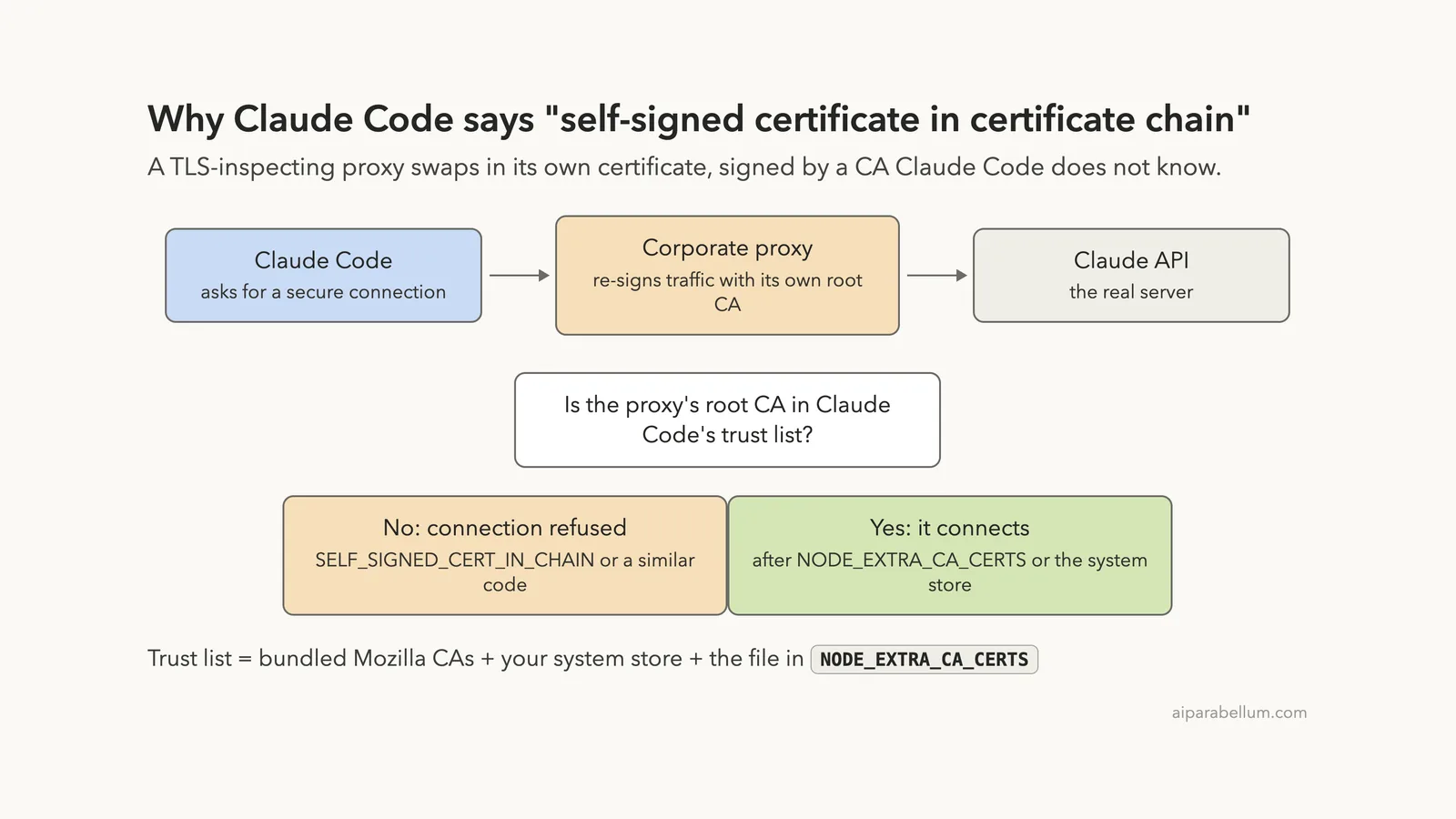
If you hit the Claude Code self signed certificate in certificate chain error, something between your computer and the Claude API is handing Claude Code a certificate it does not trust. Nine times out of ten, that something is a corporate proxy or firewall that inspects encrypted traffic and re-signs it with your company’s own root certificate.
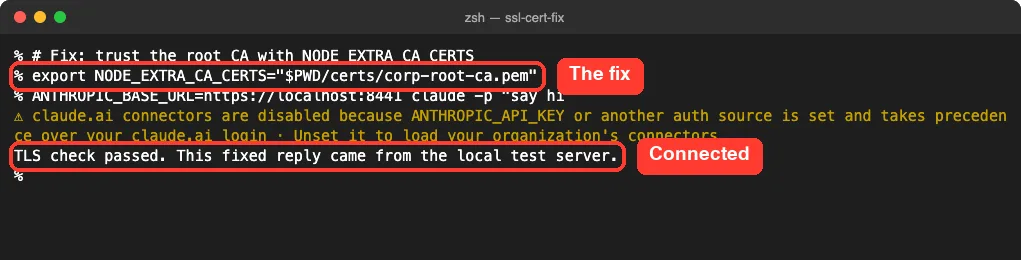
The fix is to give Claude Code that root certificate. Save it as a PEM file and point the NODE_EXTRA_CA_CERTS environment variable at it:
export NODE_EXTRA_CA_CERTS=/path/to/corporate-ca.pem
claude
The same fix covers the two close cousins people search for, “unable to get local issuer certificate” and “unable to verify the first certificate”. The second one has a twist: you usually need the intermediate certificate in the file as well, not just the root. Below, we reproduce all three errors for real and fix each one step by step.
This guide is part of our help series. Browse all our Claude Code tutorials for more fixes and how-tos.
Tested with Claude Code v2.1.325 on macOS on November 18, 2026. To trigger the errors safely, we ran a tiny HTTPS test server on localhost with our own made-up certificate authority, pointed Claude Code at it for single runs, and used a fake API key, so no real account or traffic was involved. Every terminal capture below is real.
We tested on macOS; the Windows and Linux steps follow Anthropic’s official instructions.
Self Signed Certificate Error: Quick Summary
Here is the message as Claude Code v2.1.325 printed it in our test:
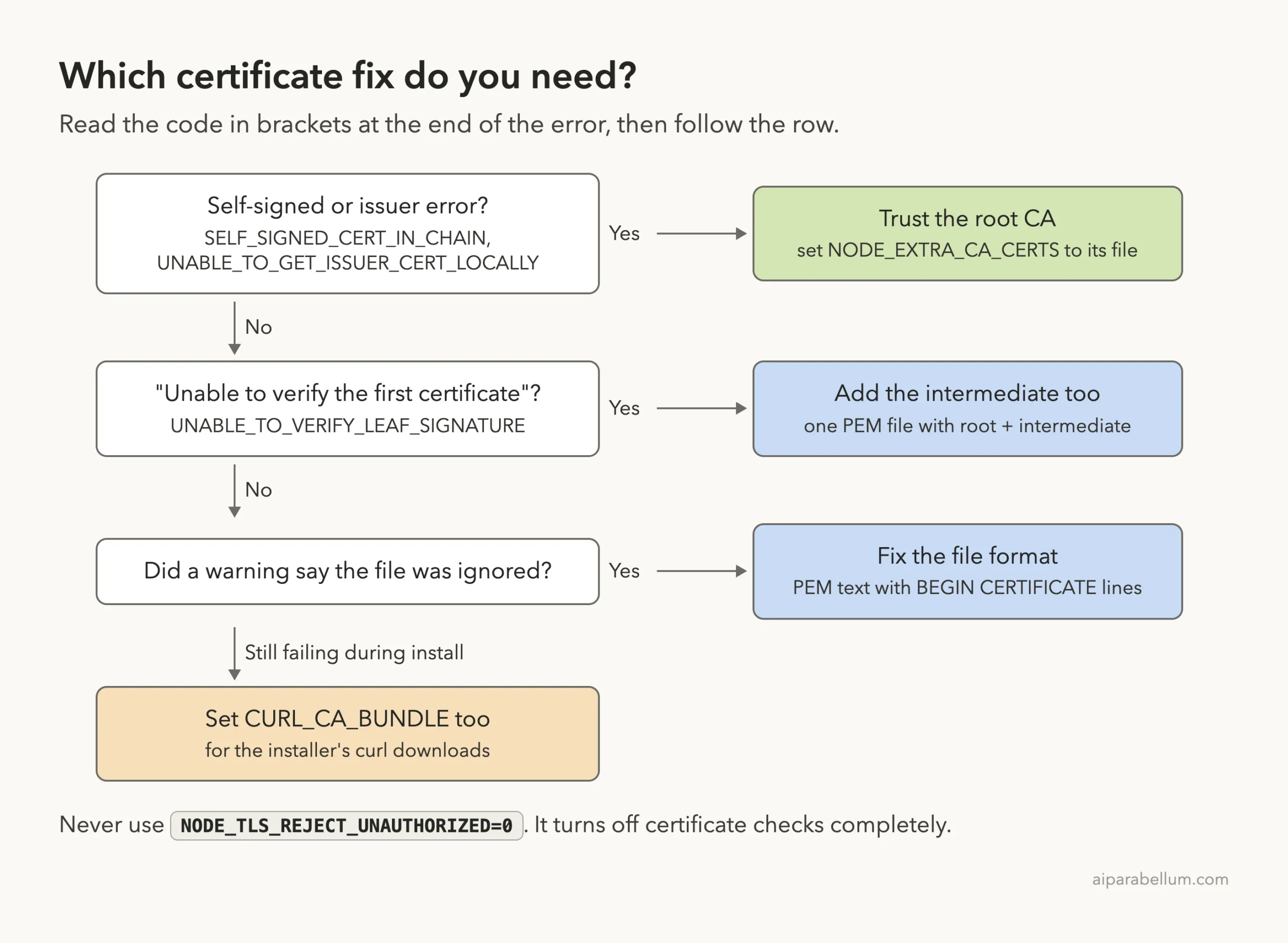
API Error: Unable to connect to API: Self-signed certificate detected (SELF_SIGNED_CERT_IN_CHAIN). The certificate comes from an authority Claude Code doesn't trust, usually a TLS-inspecting corporate proxy or a gateway signed by a private CA: set NODE_EXTRA_CA_CERTS to that CA bundle, or add it to the system certificate store · see https://code.claude.com/docs/en/network-configThe code in brackets tells you which fix you need.
| Error code | Plain-English meaning | Fix |
|---|---|---|
SELF_SIGNED_CERT_IN_CHAIN | The chain ends in a root certificate Claude Code doesn’t know | Point NODE_EXTRA_CA_CERTS at that root |
UNABLE_TO_GET_ISSUER_CERT_LOCALLY | The server sent part of the chain, but the root isn’t trusted here | Same: trust the root CA |
UNABLE_TO_VERIFY_LEAF_SIGNATURE | The server sent only its own certificate, with no intermediate | Put root and intermediate in one PEM file |
| Warning: “ignored all of the NODE_EXTRA_CA_CERTS file” | Your certificate file isn’t readable PEM | Replace it with a PEM text file |
curl: (60) during install | The installer’s download hit the same proxy | Also set CURL_CA_BUNDLE |
What the Error Means and Why It Happens
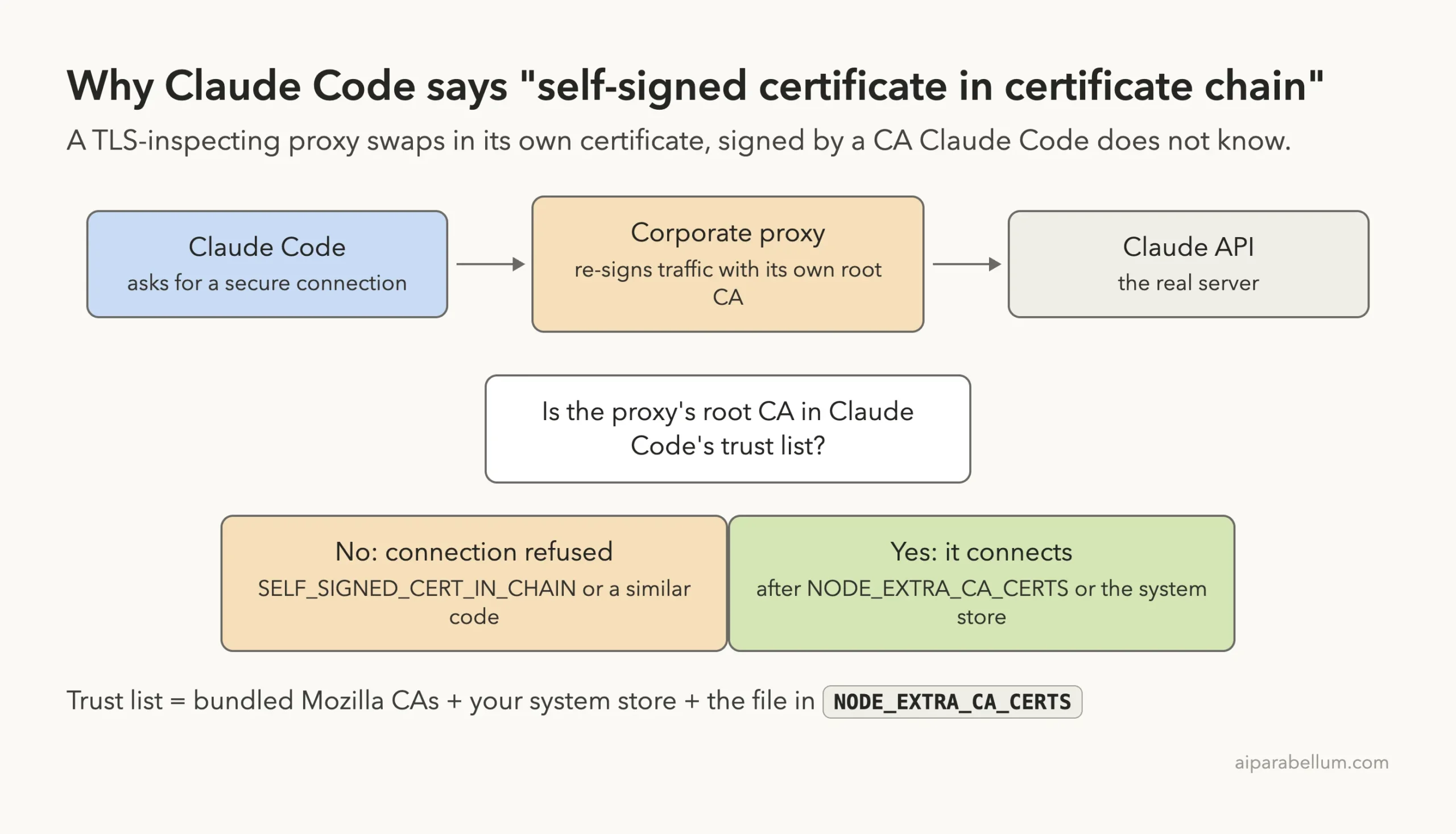
Every HTTPS connection starts with a certificate check. The server shows a certificate, that certificate was signed by another one, and the chain ends at a root certificate authority (CA). Claude Code connects only if that root is on its trusted list.
Anthropic’s network configuration docs say Claude Code trusts two sources by default: the Mozilla CA set bundled with it, and your operating system’s certificate store. A file you name in NODE_EXTRA_CA_CERTS gets added on top.
Many companies run a TLS-inspecting proxy. It opens your encrypted traffic, checks it, and re-encrypts it with a certificate signed by the company’s private root CA.
Your browser is fine because IT installed that root on your laptop. Claude Code fails when it can’t see that root, and the official error reference names exactly this cause.
The error is not about your Claude account. It is about who signed the certificate your network hands to Claude Code.
Common Situations That Trigger It
- You work behind a corporate proxy or a security tool such as a secure web gateway.
- Your company routes Claude Code through an internal LLM gateway signed by a private CA.
- You set
ANTHROPIC_BASE_URLto a self-hosted endpoint with a homemade certificate. - You installed Claude Code with npm on an older Node.js version that can’t read the system store.
That last point matters. The docs say reading the OS store needs Node 22.15 or later for npm installs, while the native installer always has it. On older Node, only the bundled set and NODE_EXTRA_CA_CERTS count.
We Reproduced All Three Certificate Errors
We built a fake company CA with openssl: a “Demo Corp Root CA”, a “Demo Corp Inspection CA” intermediate, and a certificate for localhost. Then we started three small Python HTTPS servers on our Mac that send the chain in three different ways, just like real proxies sometimes do.
For each run we set ANTHROPIC_BASE_URL to one of those servers and a fake ANTHROPIC_API_KEY. The yellow warning in the shots below is Claude Code noting that the API key takes priority over the normal login, which is what we wanted for a safe test.
Error 1: Self-Signed Certificate in Certificate Chain
The first server sends its full chain, including the self-signed root. Claude Code refused it on the very first attempt.
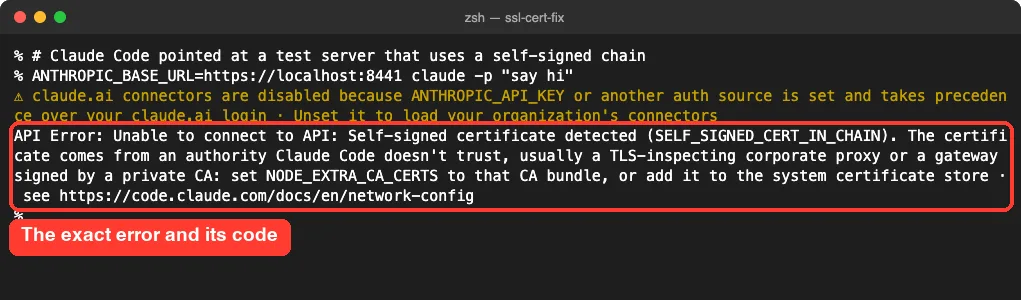
Per the docs, since v2.1.199 Claude Code doesn’t retry certificate failures, so you see this error at once instead of after minutes of retries.
Error 2: Unable to Get Local Issuer Certificate
The second server sends its certificate and the intermediate, but not the root. Claude Code can’t find the issuer of that intermediate, so it reports UNABLE_TO_GET_ISSUER_CERT_LOCALLY.
Error 3: Unable to Verify the First Certificate
The third server sends only its own certificate. Claude Code shows UNABLE_TO_VERIFY_LEAF_SIGNATURE, which is the code behind the “unable to verify the first certificate” message you may see from Node.js tools.
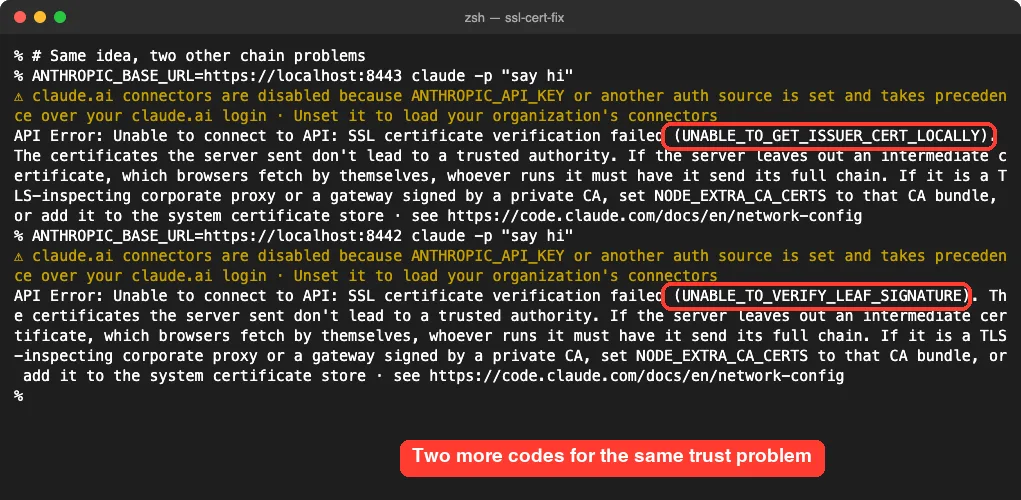
Notice the newer hint in both messages. It says a server that leaves out an intermediate certificate must be fixed to send its full chain. Browsers quietly fetch missing intermediates, which is why a site can look fine in Chrome yet fail in Claude Code.
How to Fix the Claude Code Self Signed Certificate Error
Work through these fixes in order. Most people are done after step 2.
Step 1: Find Out Who Signed the Certificate
Ask openssl which certificates the server sends. Replace localhost:8441 with the host that fails, such as api.anthropic.com:443, when you are behind your real proxy.
openssl s_client -connect api.anthropic.com:443 -showcerts </dev/null 2>/dev/null | grep -E "^ *[0-9] s:|^ *i:"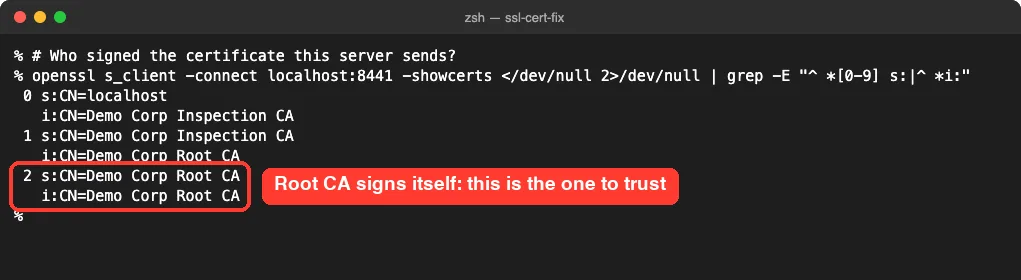
If the last issuer is your company’s name, or a security vendor’s name, rather than a public CA, you have found the cause. That root is the certificate you need.
Step 2: Get the Root CA File and Set NODE_EXTRA_CA_CERTS
The docs recommend asking your IT team for a PEM file with the proxy’s root CA certificate. Save it somewhere stable, such as your home folder, and point Claude Code at it:
export NODE_EXTRA_CA_CERTS="$HOME/certs/corporate-ca.pem"
claude
On Windows PowerShell, the docs use this form:
$env:NODE_EXTRA_CA_CERTS = 'C:\path\to\corporate-ca.pem'In our test, the same command that failed a moment earlier now went through. The reply below came from our local test server, which proves the certificate check passed.
Step 3: Add the Intermediate for “Unable to Verify the First Certificate”
Trusting only the root did not fix our third server. It still showed UNABLE_TO_VERIFY_LEAF_SIGNATURE, because Claude Code had no way to link the server’s certificate to the root.
Putting the root and the intermediate in one file fixed it:
cat corp-root-ca.pem inter.pem > corp-ca-bundle.pem
export NODE_EXTRA_CA_CERTS="$PWD/corp-ca-bundle.pem"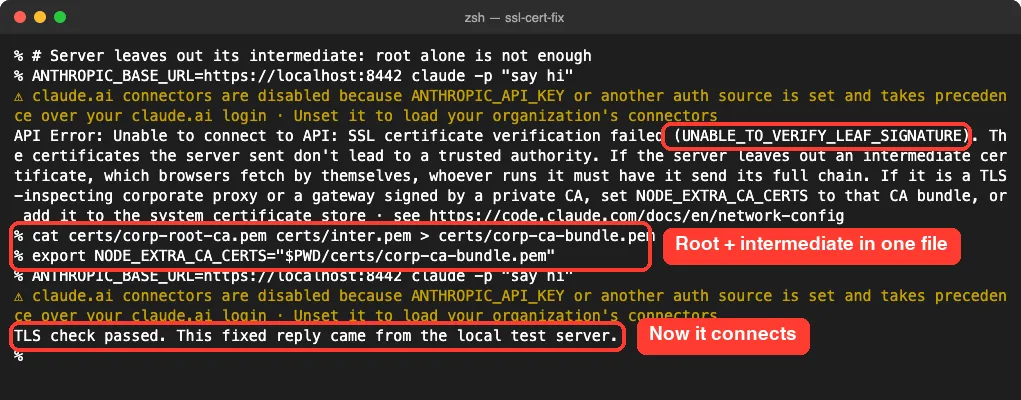
The troubleshooting docs give the same advice for installs: if one CA file isn’t enough, ask IT for a file with the public roots and the proxy’s full CA chain.
Step 4: Check That Claude Code Loaded the File
Claude Code doesn’t validate the certificate path when it starts. The docs suggest starting with debug logging and looking for the CA lines. We used --debug-file to write the log next to us:
claude --debug-file debug.txt
grep "CA certs" debug.txt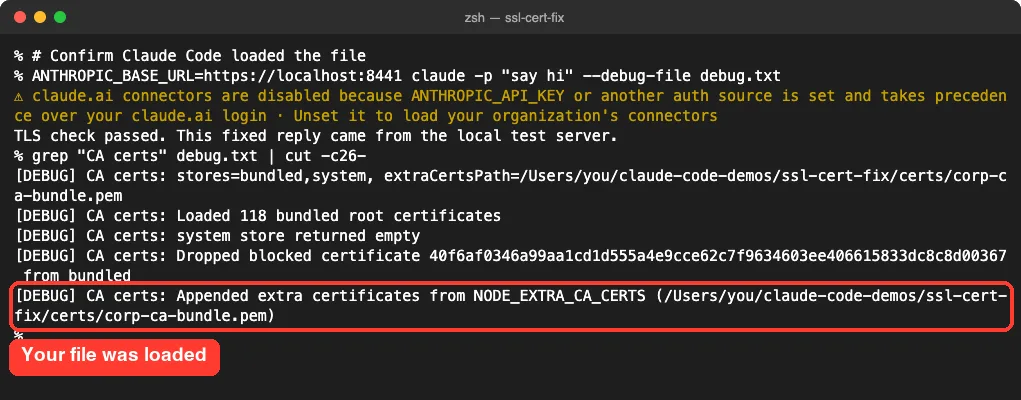
Without --debug-file, the docs say the log goes to ~/.claude/debug/<session-id>.txt. The /status screen also shows an Additional CA cert(s) row, but it shows the path without checking that the file loaded, so the debug log is the better proof.
Step 5: Fix a File Claude Code Ignores
A wrong file is a common trap. We pointed NODE_EXTRA_CA_CERTS at a plain text file, and Claude Code printed a clear warning before the same certificate error.
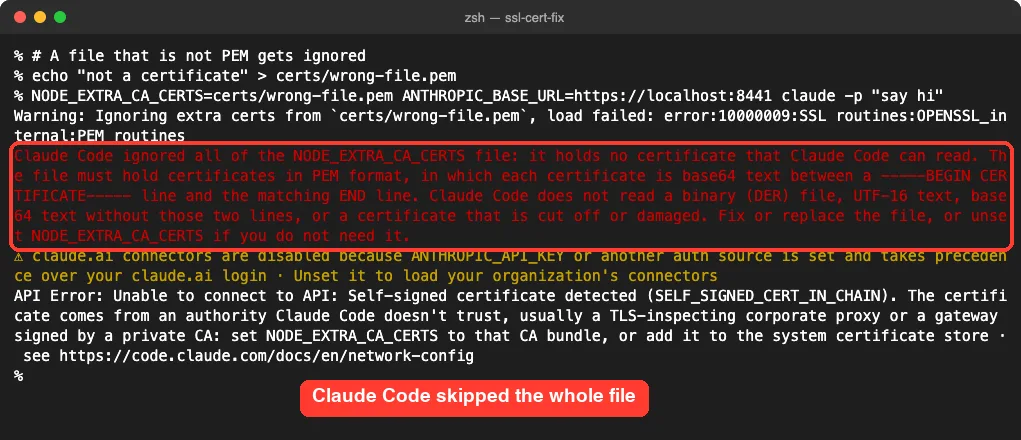
The warning says the file must hold PEM text, with each certificate between a -----BEGIN CERTIFICATE----- line and an END line. It also says Claude Code doesn’t read binary DER files, UTF-16 text or bare base64. If IT sent a .cer or .der file, convert it with openssl x509 -inform der -in corp.cer -out corp.pem.
Step 6: Make the Fix Permanent
An export lasts only for that terminal window. You have two lasting options:
- Add the
exportline to your shell profile, such as~/.zshrcor~/.bashrc. - Put it in the
envblock of a Claude Code settings file, such as~/.claude/settings.json.
{
  "env": {
    "NODE_EXTRA_CA_CERTS": "/Users/you/certs/corporate-ca.pem"
  }
}
We tested this with a project .claude/settings.json in our demo folder and no variable in the shell, and Claude Code connected. Use a full path, since a relative one depends on where you start Claude Code. The docs add that background agents share one process, so network variables belong in settings rather than only in your shell.
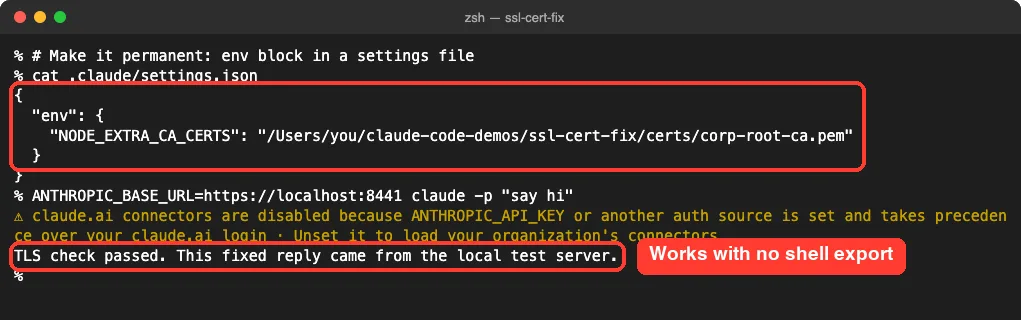
If the variable is already set in your shell, the docs say Claude Code ignores the settings value and notes it in the debug log. Our environment variables guide covers that order in detail, and our settings.json examples show where each file lives.
Step 7: Fix the Same Error During Installation
The native installer downloads with curl, which has its own trust list. Behind an inspecting proxy it fails with curl: (60) SSL certificate problem: self signed certificate in certificate chain. We saw that same line from our test server.
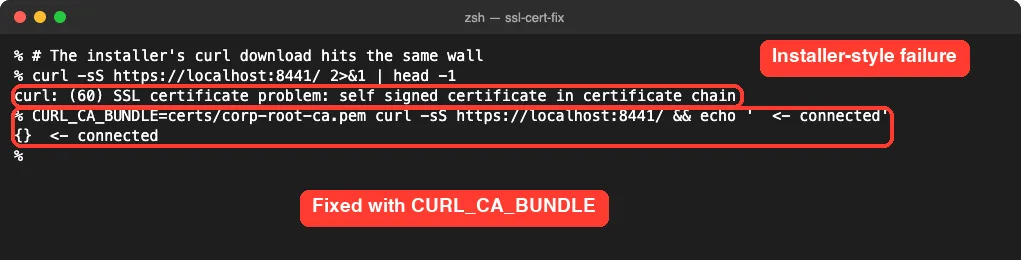
Anthropic’s install troubleshooting page sets both variables before running the script on macOS and Linux:
export CURL_CA_BUNDLE=/path/to/corporate-ca.pem
export NODE_EXTRA_CA_CERTS=/path/to/corporate-ca.pem
curl -fsSL https://claude.ai/install.sh | bash
On Windows, the PowerShell installer downloads through .NET and checks the Windows certificate store, so the docs say to ask IT to add the proxy’s CA there.
Other Options: The System Store and CLAUDE_CODE_CERT_STORE
If IT already installed the proxy’s root in your operating system, Claude Code may work with no extra setup. The docs say TLS-inspecting proxies work when their root is in the OS trust store and the runtime can read it.
The CLAUDE_CODE_CERT_STORE variable controls which sources Claude Code trusts. It takes bundled, system or both, and the default is bundled,system. The docs note it has no dedicated settings key, so you set it in the env block or your shell.
One detail from our debug log: on this Mac it printed “system store returned empty” for that run. So don’t assume the system store is being read; check the debug log, and fall back to NODE_EXTRA_CA_CERTS, which worked every time in our tests.
Never Use NODE_TLS_REJECT_UNAUTHORIZED=0
You will find forum answers that suggest NODE_TLS_REJECT_UNAUTHORIZED=0. Anthropic’s error docs say plainly not to use it, because it disables certificate validation entirely.
With checks off, anyone on the network path could read or change your code and API traffic without a warning. Trusting your company’s specific CA fixes the error and keeps the protection on.
Trust the one certificate you need. Don’t switch off trust for everything.
Try It Yourself
Once the fix is in place, open a new terminal and run a quick check. This prompt asks Claude Code to confirm the setup without touching any files:
claude -p "Reply with the single word: connected"If it prints “connected”, your certificate setup works. If you still see an error, compare the code in brackets with the summary table above and run the debug log check from Step 4.
Common Mistakes
- Using a relative path in
NODE_EXTRA_CA_CERTSand starting Claude Code from a different folder. - Pointing at the proxy’s server certificate instead of the root CA that signed it.
- Trusting only the root when the server leaves out its intermediate certificate.
- Using a binary DER or
.cerfile without converting it to PEM. - Setting the variable in one terminal and launching Claude Code from another.
- Forgetting
CURL_CA_BUNDLEwhen the installer, not Claude Code, is the one failing.
Pro Tips
- Keep one bundle file with your corporate root and intermediates, and reuse it for curl, Node.js and Claude Code.
- Store the file outside any project folder so it never gets committed to a repository.
- Run
claude --debug-file /tmp/claude-debug.txtonce after any change and look for the “Appended extra certificates” line. - If the error appears only on some networks, such as office Wi-Fi but not home, the proxy is the cause.
- If certificates look fine but connections still drop, see our connection error fix.
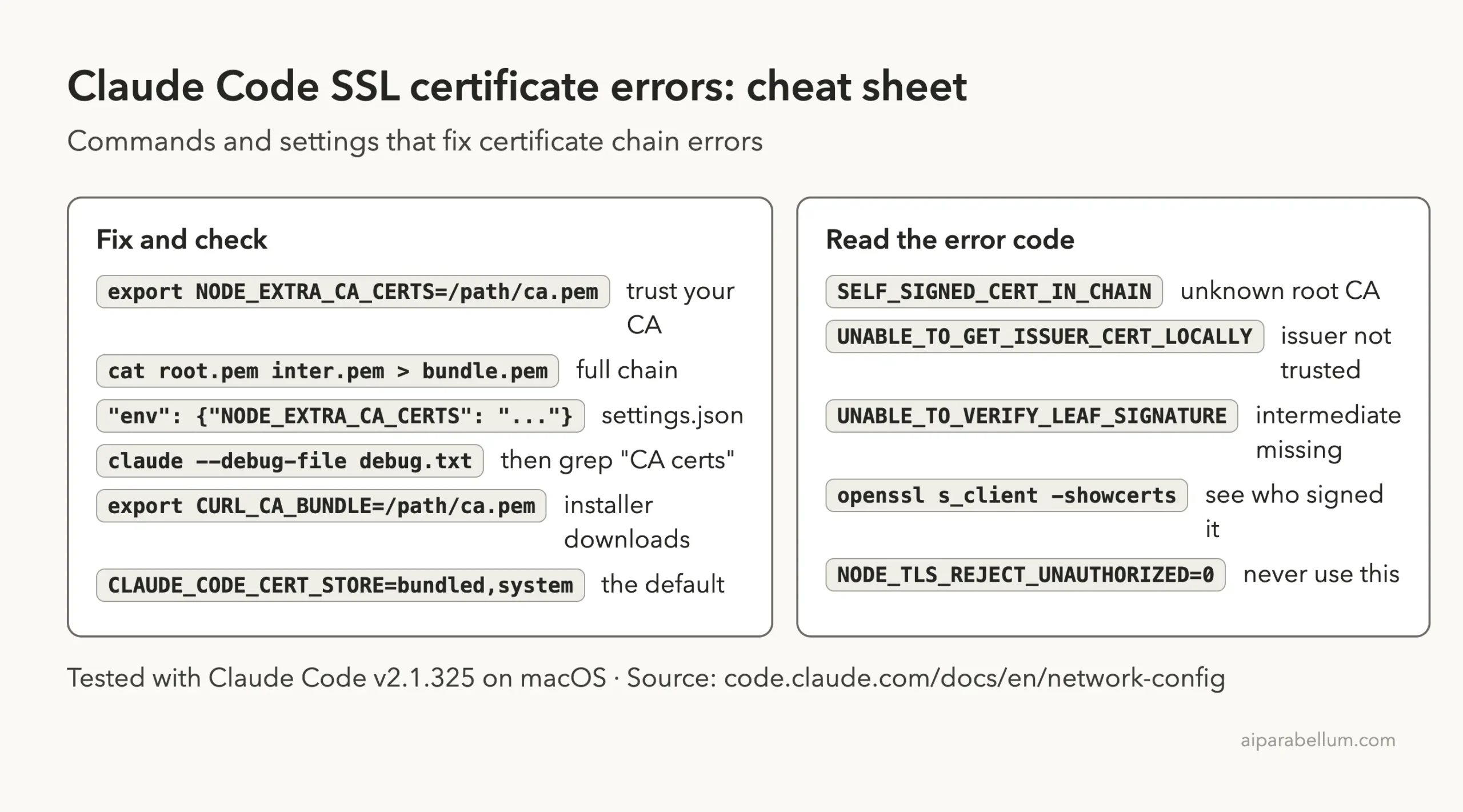
Claude Code SSL Certificate Cheat Sheet
Frequently Asked Questions
Why does Claude Code fail when my browser works fine?
Your browser uses the system store that IT set up, and it fetches missing intermediate certificates by itself. Claude Code may not see the same root, and it won’t fetch missing intermediates, so you need to hand it the file.
Where do I get my company’s root CA certificate?
Ask your IT or security team for the proxy’s root CA in PEM format, as Anthropic’s docs suggest. The openssl s_client command above shows the issuer’s name, which helps IT find the right file.
Is “unable to get local issuer certificate” the same problem?
Yes, it has the same cause and the same fix. The chain leads to a root Claude Code doesn’t trust, so point NODE_EXTRA_CA_CERTS at that root.
Does NODE_EXTRA_CA_CERTS replace the normal certificates?
No. It adds your file on top of the bundled Mozilla set and the system store. Public sites keep working normally.
Do I need this in Claude Code on the web?
No. The docs say cloud sessions manage the API connection themselves and ignore NODE_EXTRA_CA_CERTS from a settings file. The fix is for Claude Code running on your own machine.
Conclusion
The Claude Code self signed certificate in certificate chain error means your network, usually a TLS-inspecting proxy, signs traffic with a CA Claude Code doesn’t trust. In our tests, pointing NODE_EXTRA_CA_CERTS at the root CA fixed both the self-signed and local issuer versions, adding the intermediate fixed “unable to verify the first certificate”, and a settings env block made it stick. Skip NODE_TLS_REJECT_UNAUTHORIZED=0, confirm the fix in the debug log, and see our list of common Claude Code errors for other messages. To learn more about the assistant itself, visit our Claude AI overview, and if a proxy also blocks your sign-in, read our fix for OAuth timeout errors.