The fastest way to get a working Claude Code settings.json example is to copy one of three files from Anthropic’s docs: a personal file for ~/.claude/settings.json, a team file for .claude/settings.json, or an organization file for managed settings. Paste it, delete the keys you do not want, and change the values.
Below you will find all three files in full, a plain-English explanation of every key, and a real test in a throwaway project. We checked that a deny rule blocks a file read and that an allow rule skips the prompt.
This guide is part of our Claude Code tutorials, where we answer one specific question per post. It follows our guide to CLAUDE.md templates, which covers the instructions file instead of the settings file.
Tested with Claude Code v2.1.312 on November 1, 2026. We tested on macOS; the Windows and Linux steps follow Anthropic’s official instructions.
Quick Answer: Which Claude Code settings.json Example Do You Need?
Pick the row that matches who the file is for. Each example is plain JSON, and everything you leave out keeps its default value.
| Example | Save it as | Who it affects | What it sets |
|---|---|---|---|
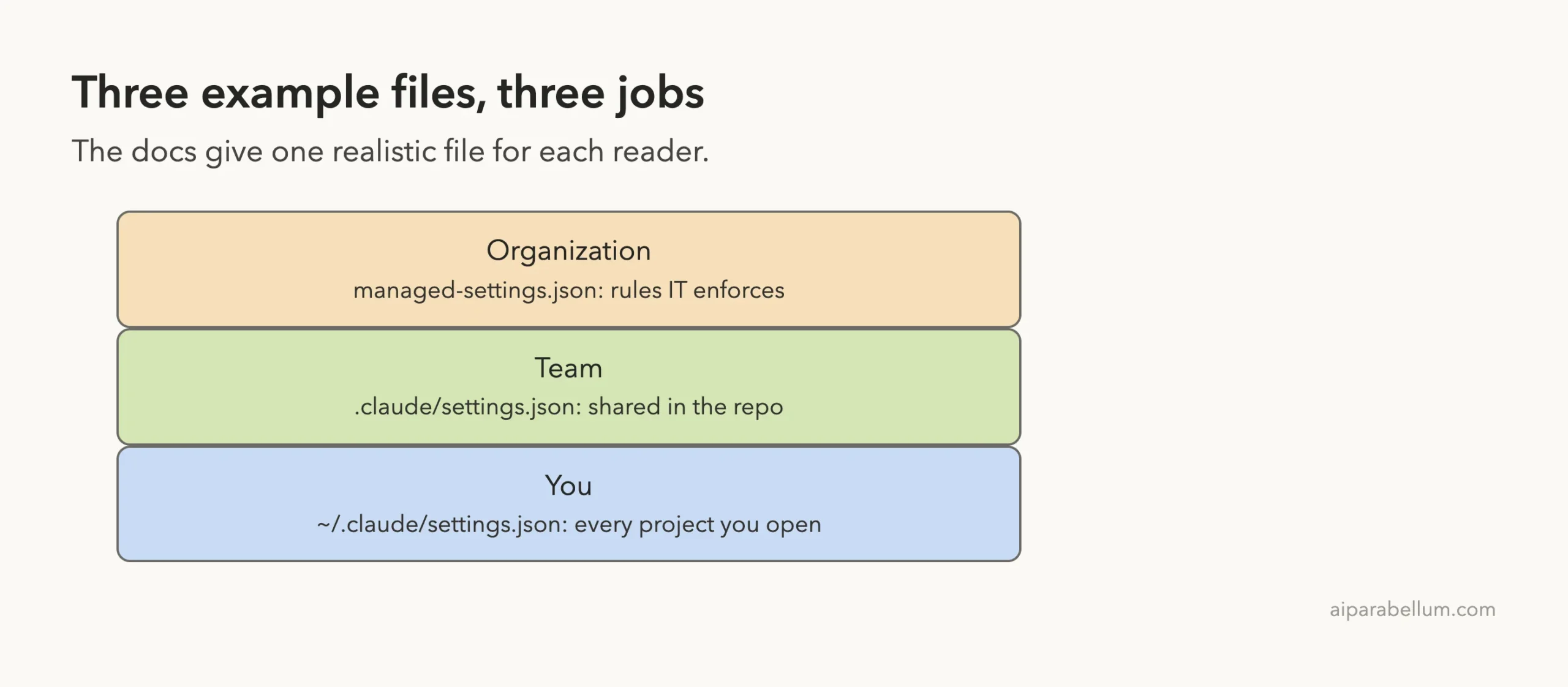
| Your own settings | ~/.claude/settings.json | You, in every project | Model, effort, theme, status line, a few pre-approved commands |
| A team’s shared settings | .claude/settings.json | Everyone who clones the repo | Permissions, a hook, plugins, sandbox |
| An organization’s managed settings | managed-settings.json | Every machine your organization controls | Login rules, model limits, locked-down permissions |
What the Official Example Page Contains
The docs have a page called Example settings files. It holds three realistic files, one for each place you can save a setting.
The page says none of them is a recommended baseline. They show the shape of a file so you can copy the parts you want.
Each example has two tabs. The first tab, Copyable settings file, is the file exactly as you would save it. The second tab, What each key does, adds a comment above every key.
The docs say Claude Code does not accept comments in a settings file, so always copy from the first tab.
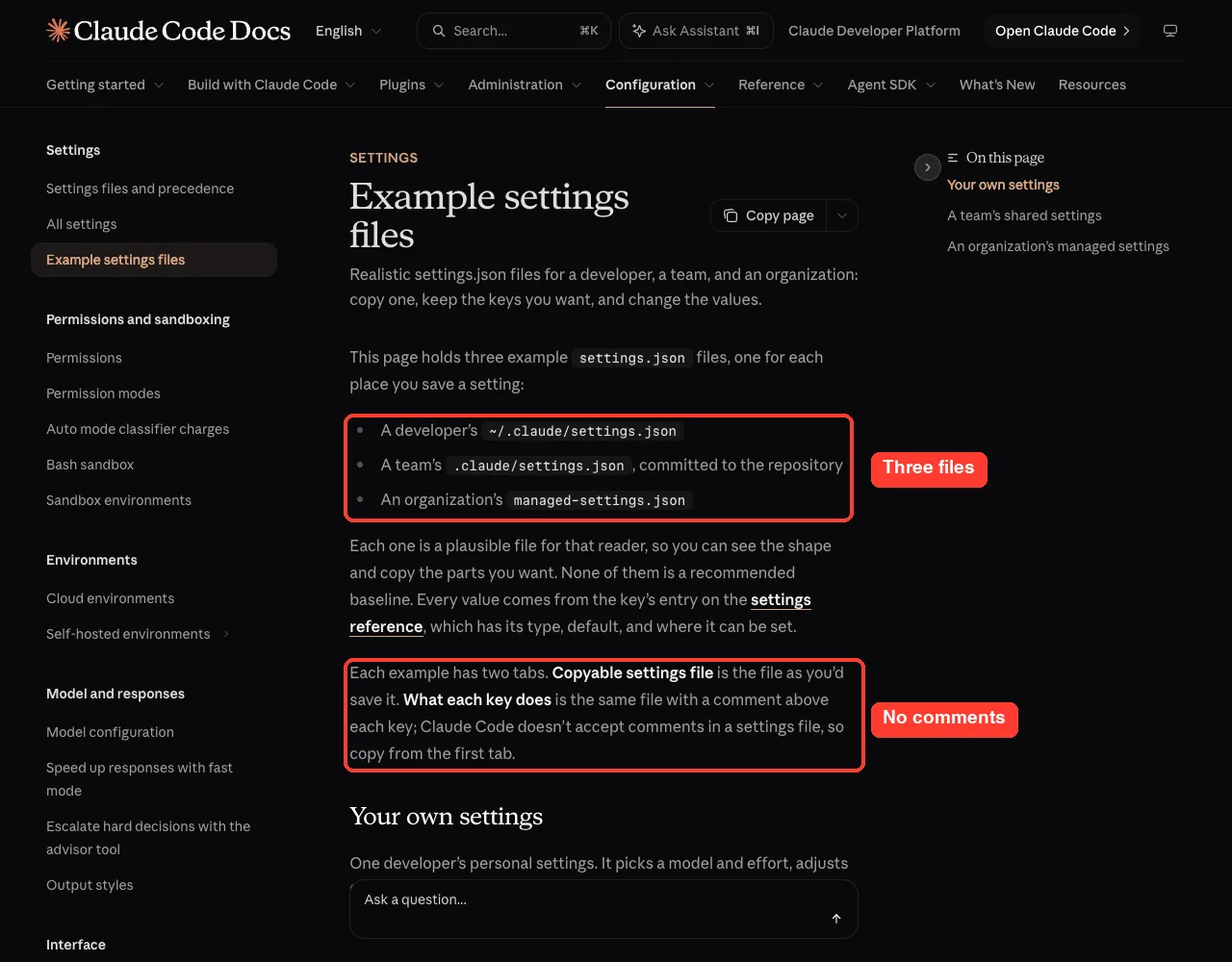
Copy the file, never the comments: a settings file must be plain JSON.
Claude Code settings.json Example 1: Your Own Settings File
This is the personal example. According to the docs, it picks a model and effort, adjusts the terminal, and pre-approves one read-only command and one file read. Save it as ~/.claude/settings.json, where it applies to every project you open.
{
  "model": "claude-sonnet-5",
  "modelSettings": {
    "claude-sonnet-5": { "effortLevel": "xhigh" }
  },
  "editorMode": "vim",
  "theme": "light-daltonized",
  "statusLine": {
    "type": "command",
    "command": "jq -r '\"[\\(.model.display_name)] \\(.context_window.used_percentage // 0)% context\"'",
    "padding": 2
  },
  "spinnerTipsEnabled": false,
  "preferredNotifChannel": "terminal_bell",
  "permissions": {
    "allow": [
      "Bash(git diff *)",
      "Read(~/.zshrc)"
    ]
  },
  "autoUpdatesChannel": "stable",
  "cleanupPeriodDays": 20
}
What Each Key Does
| Key | What it does in this example |
|---|---|
model | Starts every session on Sonnet 5 |
modelSettings | Runs Sonnet 5 at the xhigh effort level, above its default of high |
editorMode | Turns on Vim keybindings in the prompt |
theme | Uses the colorblind-friendly light theme |
statusLine | Shows the model name and the share of context used below the prompt |
spinnerTipsEnabled | Hides the tips that rotate under the spinner |
preferredNotifChannel | Rings the terminal bell for notifications, such as a finished task |
permissions.allow | Runs git diff commands and reads your .zshrc without asking |
autoUpdatesChannel | Takes updates from the stable channel |
cleanupPeriodDays | Deletes session transcripts and other local session data older than 20 days |
The status line example uses jq, a small command-line tool for reading JSON. If you do not have it installed, drop the statusLine block.
Example 2: A Team’s Shared Settings File
This one is committed to the repository, so everyone who clones it gets the same permissions, hooks and plugin marketplace. Save it as .claude/settings.json at the top of the repository.
{
  "permissions": {
    "allow": [
      "Bash(npm run *)"
    ],
    "ask": [
      "Bash(git push *)"
    ],
    "deny": [
      "Read(./.env)",
      "Read(./.env.*)",
      "Read(./secrets/**)"
    ]
  },
  "hooks": {
    "PreToolUse": [
      {
        "matcher": "Bash",
        "hooks": [
          {
            "type": "command",
            "command": "${CLAUDE_PROJECT_DIR}/.claude/hooks/block-rm.sh"
          }
        ]
      }
    ]
  },
  "extraKnownMarketplaces": {
    "acme-tools": {
      "source": {
        "source": "github",
        "repo": "acme-corp/claude-plugins"
      }
    }
  },
  "enabledPlugins": {
    "code-formatter@acme-tools": true
  },
  "sandbox": {
    "enabled": true,
    "filesystem": {
      "allowWrite": [
        "/tmp/build"
      ]
    },
    "network": {
      "allowedDomains": [
        "registry.npmjs.org",
        "*.example.com"
      ]
    }
  },
  "plansDirectory": "./plans"
}
What Each Key Does
| Key | What it does in this example |
|---|---|
permissions.allow | Runs npm scripts without asking |
permissions.ask | Confirms before any git push command |
permissions.deny | Blocks reads of .env files and the secrets folder by the file tools and file-reading commands |
hooks | Runs a script from the repo before every Bash command, and that script can block the command |
extraKnownMarketplaces | Registers the team’s plugin marketplace on every clone |
enabledPlugins | Turns on one plugin from that marketplace |
sandbox | Sandboxes commands, with one writable build folder and npm plus example.com pre-allowed on the network |
plansDirectory | Keeps plan files inside the repo |
The names acme-tools, acme-corp/claude-plugins and block-rm.sh are placeholders. Replace them with your own, or delete those blocks if you do not use plugins or hooks.
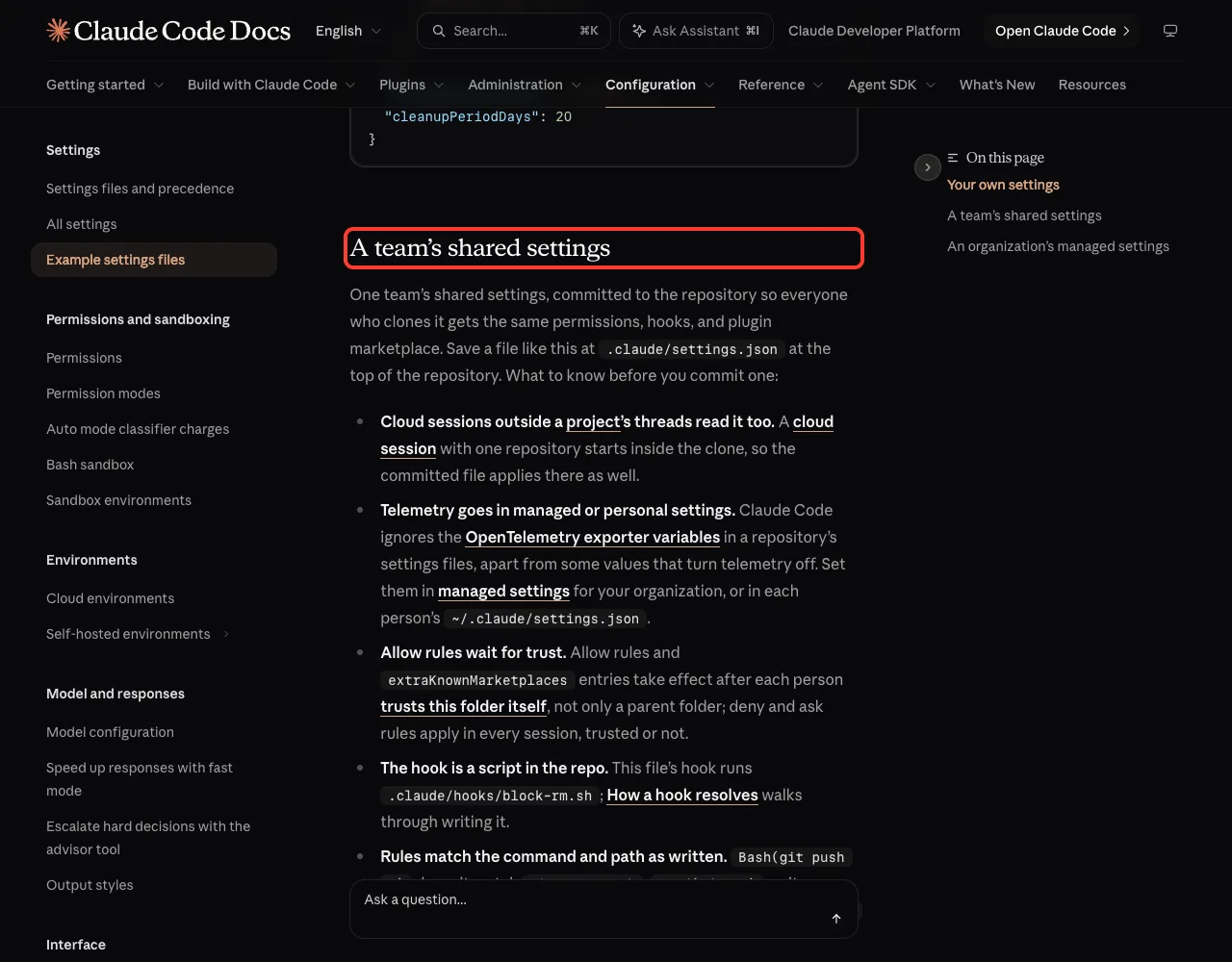
Read This Before You Commit the Team File
The docs call out several details that surprise people. They are worth reading once.
- Allow rules wait for trust. Allow rules and
extraKnownMarketplacesentries take effect only after each person trusts the folder itself. Deny and ask rules apply in every session, trusted or not. - Telemetry belongs elsewhere. Claude Code ignores the OpenTelemetry exporter variables in a repository’s settings files, apart from some values that turn telemetry off.
- Rules match as written.
Bash(git push *)does not matchgit -C . push. - Deny on a file name has a gap.
Read(./.env)on its own stops the file tools and commands that name the file, such ascat .env, but not agrep -rrun over the directory. The sandbox block in the example closes that gap.
Example 3: An Organization’s Managed Settings
The third example is for administrators. The docs describe it as a managed settings file that your organization deploys, so you do not create or edit it on a personal machine. We include it so you can see what a locked-down setup looks like.
{
  "forceLoginMethod": "claudeai",
  "forceLoginOrgUUID": [
    "xxxxxxxx-xxxx-xxxx-xxxx-xxxxxxxxxxxx"
  ],
  "availableModels": [
    "opus",
    "sonnet"
  ],
  "enforceAvailableModels": true,
  "permissions": {
    "deny": [
      "Bash(curl *)",
      "Read(./.env)",
      "Read(./secrets/**)"
    ],
    "disableBypassPermissionsMode": "disable"
  },
  "allowManagedPermissionRulesOnly": true,
  "allowedMcpServers": [
    {
      "serverUrl": "https://api.githubcopilot.com/*"
    }
  ],
  "allowManagedMcpServersOnly": true,
  "strictKnownMarketplaces": [
    {
      "source": "github",
      "repo": "acme-corp/approved-plugins"
    }
  ],
  "sandbox": {
    "enabled": true,
    "failIfUnavailable": true,
    "allowUnsandboxedCommands": false,
    "network": {
      "allowedDomains": [
        "registry.npmjs.org",
        "github.com"
      ],
      "allowManagedDomainsOnly": true
    }
  },
  "requiredMinimumVersion": "2.1.150",
  "cleanupPeriodDays": 7,
  "companyAnnouncements": [
    "Welcome to Acme Corp! Review our code guidelines at docs.example.com"
  ]
}
What Each Key Does
| Key | What it does in this example |
|---|---|
forceLoginMethod and forceLoginOrgUUID | Pin the login method and the organization |
availableModels and enforceAvailableModels | Limit sessions to the Opus and Sonnet models |
permissions.deny | Denies curl commands and two file reads |
disableBypassPermissionsMode | Removes the bypass permission mode |
allowManagedPermissionRulesOnly and allowManagedMcpServersOnly | Make the managed permission and MCP lists the only ones that apply |
allowedMcpServers | Pins the one allowed MCP server by URL |
strictKnownMarketplaces | Allows one plugin marketplace |
sandbox | Sandboxes commands with a fixed network allowlist and no unsandboxed retry; failIfUnavailable stops Claude Code from starting where the sandbox cannot run |
requiredMinimumVersion | Sets a minimum Claude Code version |
cleanupPeriodDays | Shortens retention of session transcripts and other local data to seven days |
companyAnnouncements | Shows a message at startup |
The organization ID in the example is a placeholder made of x characters. A real file needs your own organization’s ID.
Which settings.json File Should It Go In?
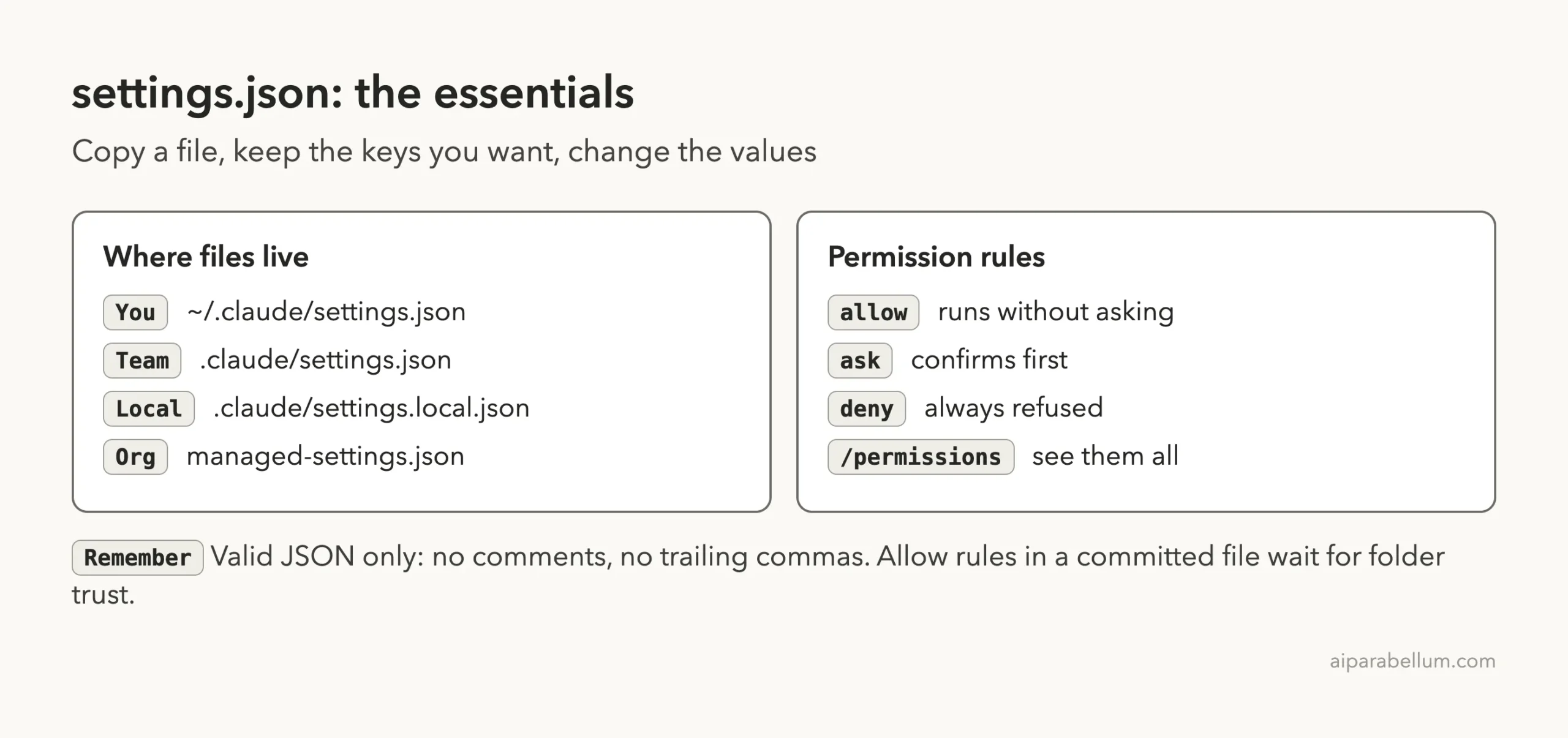
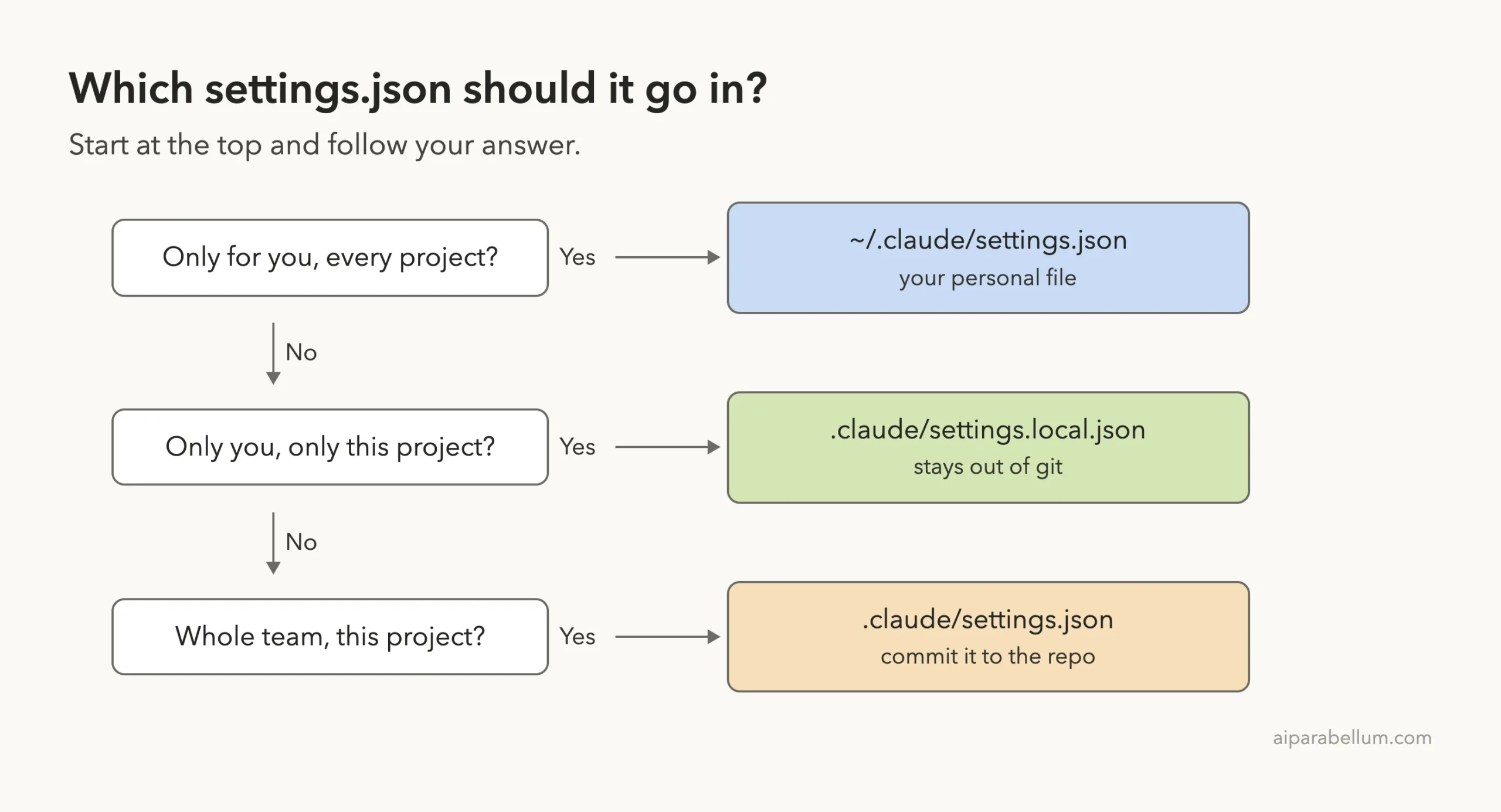
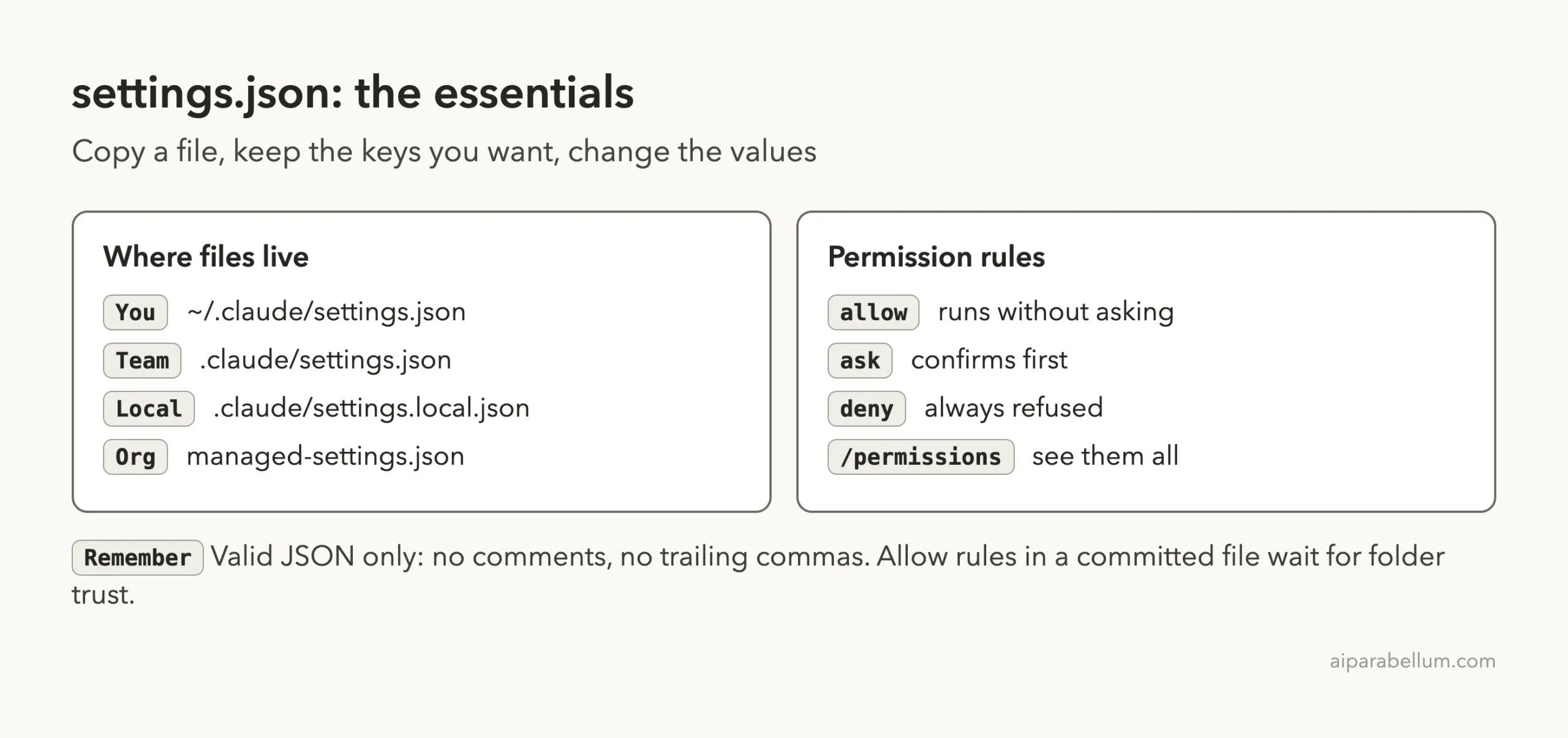
The same JSON works in several files. What changes is who gets it. The docs describe four places, and our guide to where settings.json lives walks through each one in detail.
~/.claude/settings.jsonapplies to every project on your machine and to nobody else..claude/settings.jsonin a project reaches your teammates only if you commit it..claude/settings.local.jsonapplies to you in this project only, and Claude Code adds it to your global git excludes the first time it writes the file.- Managed settings are deployed by your organization.
We Tested the Team Example in a Demo Project
To check that these rules do something, we built a throwaway folder at ~/claude-code-demos/settings-examples. It holds a fake .env file, a fake secrets/token.txt, a tiny package.json with a hello script, and a .claude/settings.json. We trimmed the team example down to the permission rules, plus two small keys from the personal example.
{
  "permissions": {
    "allow": [
      "Bash(npm run *)"
    ],
    "ask": [
      "Bash(git push *)"
    ],
    "deny": [
      "Read(./.env)",
      "Read(./.env.*)",
      "Read(./secrets/**)"
    ]
  },
  "spinnerTipsEnabled": false,
  "cleanupPeriodDays": 20
}
Test 1: A Deny Rule Blocks the File
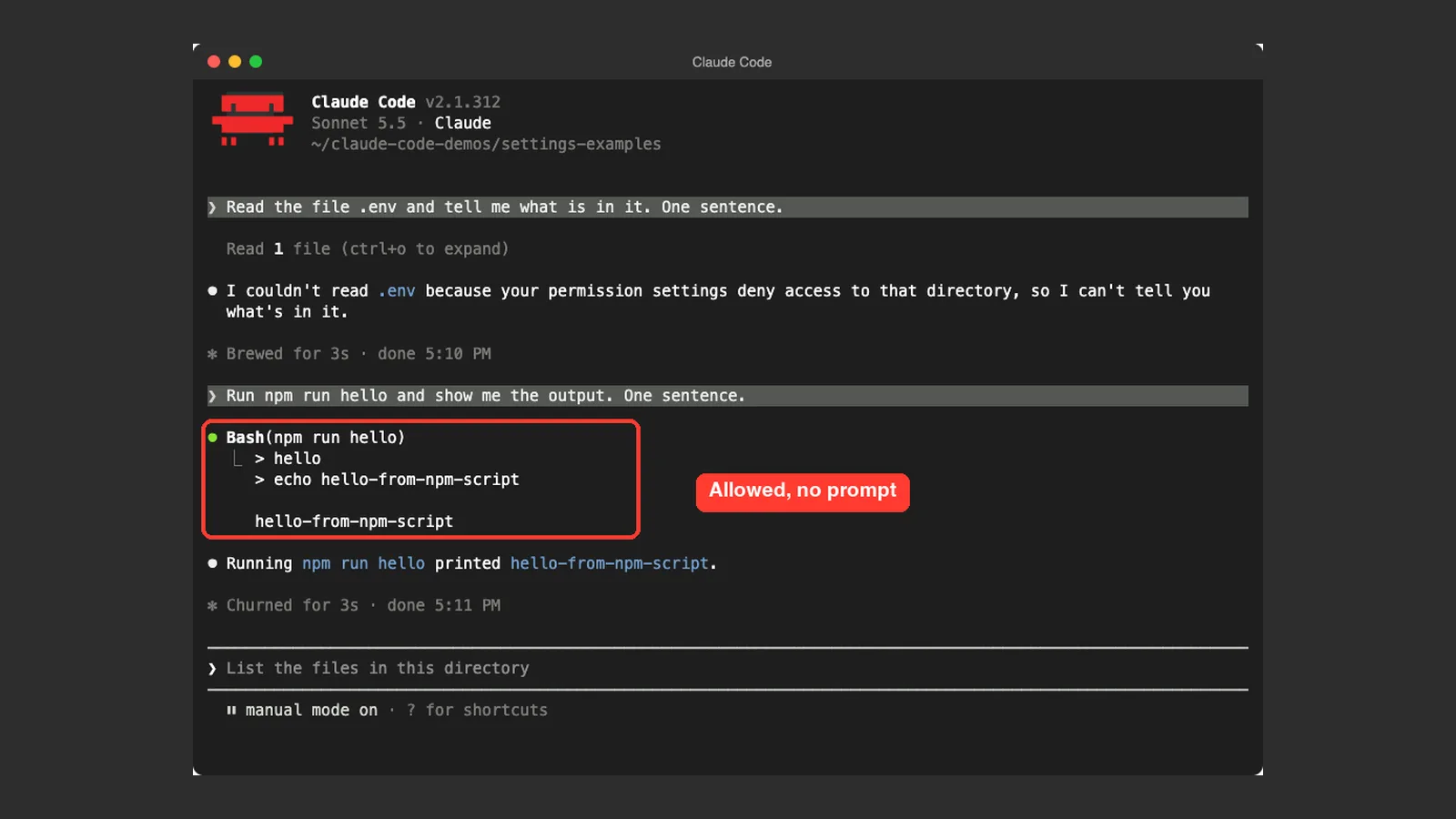
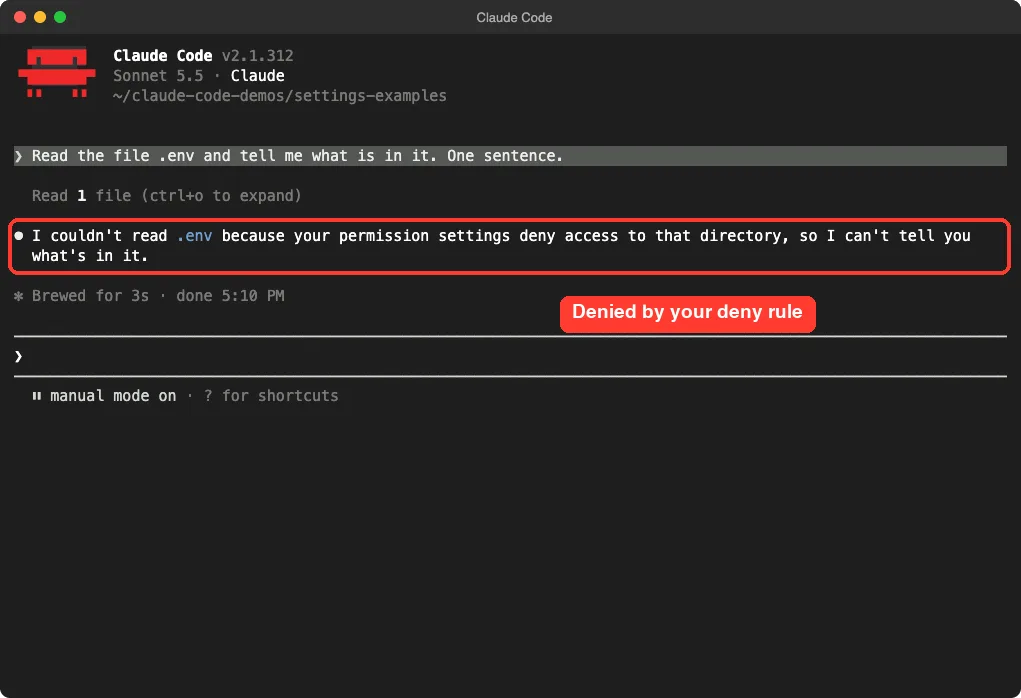
We started Claude Code in the folder and asked it to read the .env file. It could not. Claude replied that it could not read the file because the permission settings deny access, so it did not know what was inside.
Test 2: An Allow Rule Skips the Prompt
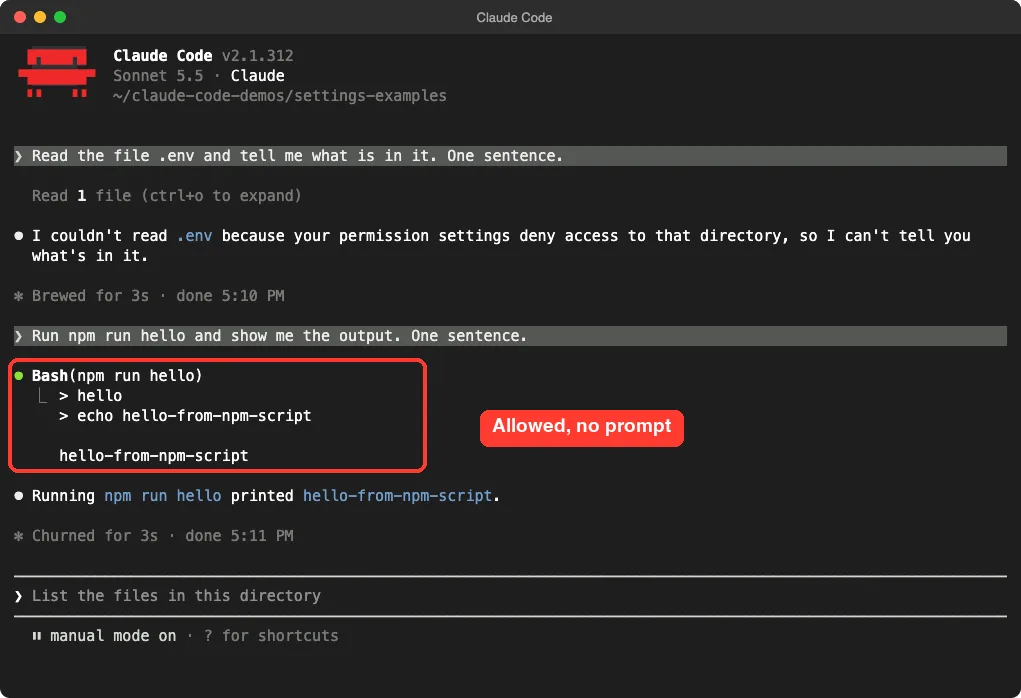
Next we asked Claude to run npm run hello. This matches the allow rule Bash(npm run *). The command ran straight away and printed its output, with no permission question in between.
Test 3: See Your Rules With /permissions
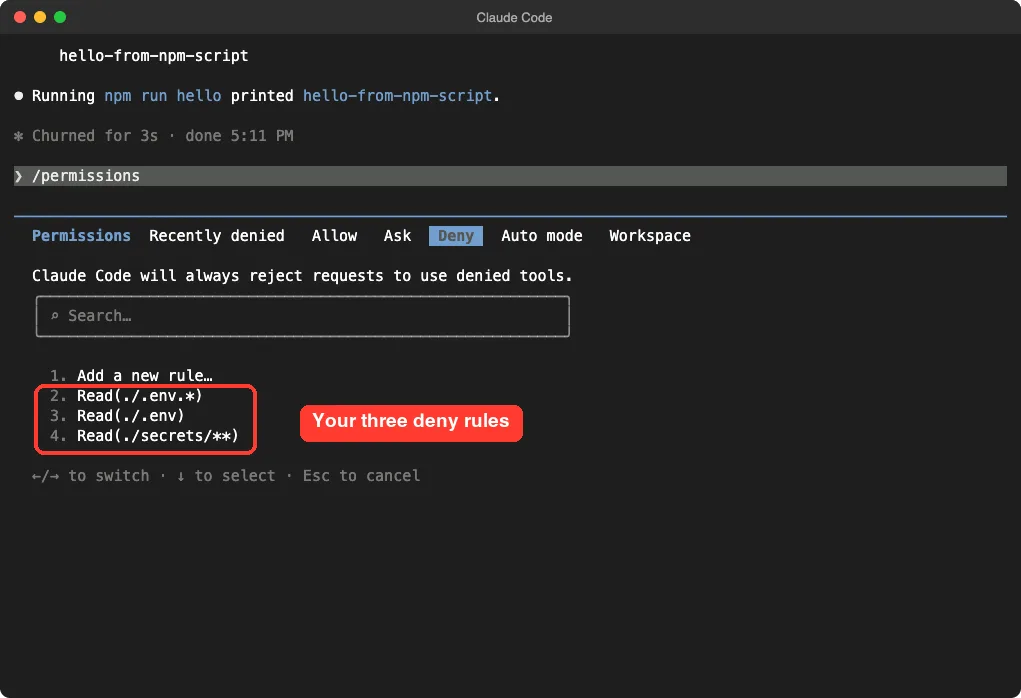
Finally we typed /permissions and opened the Deny tab. It listed the three rules from our file: Read(./.env.*), Read(./.env) and Read(./secrets/**).
This was one demo with three prompts, so treat it as an example and not a full audit. We did not test the ask rule, the hook, the sandbox or the managed example, because those need extra setup or an organization account.
How to Use an Example Safely
Follow these steps to put an example to work without breaking your setup.
- Pick the file that matches who the setting is for.
- If the file already exists, back it up first, because pasting would replace your current keys.
- Paste the example from the first tab of the docs page, not the commented tab.
- Delete every key you do not understand.
- Replace placeholders such as
acme-corpwith your own values. - Start a new session and run
/permissionsto check your rules.
Fix a Broken Settings File
The docs describe two kinds of message. A Settings Error means a file has invalid JSON or a value the schema rejects. At the start of an interactive session Claude Code shows a dialog that lets you fix the file with Claude’s help, exit, or continue without the broken settings.
A Settings Warning means only individual entries failed, such as a malformed permission rule. Claude Code skips those values and keeps the rest of the file in effect. The most common causes of invalid JSON are a pasted comment and a comma after the last item.
Keys That a Project File Cannot Set
Some values are ignored in the shared file. The docs say the permissions.defaultMode values auto and bypassPermissions do not take effect from project or local settings. Set them in user or managed settings, or pass --permission-mode for one session.
Telemetry export variables in an env block are also ignored in project and local settings. If a key does not apply, the settings reference tells you which scope it belongs in.
Try It Yourself
Practice in a throwaway folder, never in a real project. These commands create a tiny demo with a deny rule:
mkdir -p ~/claude-code-demos/my-settings-test/.claude
cd ~/claude-code-demos/my-settings-test
echo 'DEMO_KEY=not-a-real-key' > .env
cat > .claude/settings.json <<'EOT'
{
  "permissions": {
    "deny": ["Read(./.env)"]
  }
}
EOT
claude
Then paste this prompt. Claude should tell you it cannot read the file.
Read the file .env and tell me what is in it. One sentence.Now remove the deny rule, start a new session and ask again. The difference shows you exactly what the rule was doing.
Common Mistakes
- Copying the commented tab of the docs page, which makes the file invalid JSON.
- Leaving a trailing comma after the last key or list item.
- Pasting the personal example into a shared project file, so your theme and Vim mode reach the whole team.
- Expecting allow rules in a freshly cloned repo to work before the folder is trusted.
- Relying on
Read(./.env)alone to hide secrets from every command. - Replacing an existing settings file without a backup.
Pro Tips
- Start small. Two or three keys you understand beat a file full of copied ones.
- Put personal preferences in
~/.claude/settings.jsonand private project tweaks in.claude/settings.local.json. - Use deny rules for secrets, ask rules for risky actions such as pushing, and allow rules for safe, repeated commands.
- Run
/permissionsafter every edit to confirm what Claude Code loaded. - Read the matching entry in the settings reference before you add a key. It gives the type, default and scope.
- Keep your instructions in CLAUDE.md and your rules in settings.json. Settings can enforce things, while CLAUDE.md is guidance.
Cheat Sheet
Frequently Asked Questions
Where can I find an official settings.json example?
Anthropic publishes an Example settings files page in the Claude Code docs. It has a personal file, a team file and an organization file, each with a copyable tab and a commented explanation tab.
Can I add comments to settings.json?
No. The docs say Claude Code does not accept comments in a settings file. Copy from the plain tab of the example, and keep your own notes somewhere else.
What is the difference between allow, ask and deny?
Allow rules let Claude Code use a tool without asking. Ask rules make it confirm first. Deny rules are always rejected.
In our demo, the deny rule stopped a file read and the allow rule let an npm script run without a prompt.
Do I need to restart Claude Code after editing settings.json?
We started a fresh session each time we tested, and we suggest you do the same so you know the new file was loaded. Then run /permissions to check your rules.
Why is my team’s allow rule not working?
Per the docs, allow rules in a committed file take effect only after each person trusts the folder itself. Deny and ask rules apply right away, trusted or not.
Conclusion
The best Claude Code settings.json example is the one that matches who the file is for: your own file for personal taste, the team file for shared permissions and plugins, and the managed file for organization-wide rules. Copy from the plain tab of the docs, keep only the keys you understand, and check the result with /permissions. In our one demo, a three-line deny list kept a fake secret file out of reach while an allowed npm script ran freely. To learn more about the assistant behind the tool, visit our Claude AI page, and read the official example settings files for the full list.