The Claude Code “unable to verify if domain is safe to fetch” error means the WebFetch tool could not finish its domain safety check, so it refused to download the page; unable to verify domain means the check failed, not the site. Before every new site, WebFetch sends just the hostname to api.anthropic.com and asks if it is on Anthropic’s blocklist. If that request is blocked, times out or fails, you get this message instead of the page.
It almost always shows up on corporate networks, behind a strict proxy or firewall, or on setups that use Amazon Bedrock, Google Cloud’s Agent Platform or Microsoft Foundry with locked-down outbound traffic. The website you asked for is usually fine. The check in front of it is what fails.
You have two real fixes. Allowlist api.anthropic.com in your proxy or firewall, or skip the check by adding "skipWebFetchPreflight": true to a Claude Code settings.json file. If you skip it, add WebFetch domain rules so you still control which sites Claude can reach.
Browse all our Claude Code tutorials for more fixes and how-tos.
Tested with Claude Code v2.1.328 on macOS on November 20, 2026. To trigger the error safely, we used a throwaway demo folder, a proxy address that is switched off, and a tiny local test server we wrote that stands in for the model, so no real model calls were made.
Quick Summary
| Question | Short answer |
|---|---|
| Exact message | Unable to verify if domain example.com is safe to fetch. This may be due to network restrictions or enterprise security policies blocking claude.ai. |
| What failed | The WebFetch domain safety check, not the website |
| Host the check uses | api.anthropic.com (only the hostname is sent) |
| Fix 1 | Allowlist api.anthropic.com in your proxy or firewall |
| Fix 2 | "skipWebFetchPreflight": true in settings |
| Keep control | Add WebFetch(domain:...) allow and deny rules |
| Similar message | The safety check for domain ... is rate-limited (HTTP 429) |
What the Domain Safety Check Does
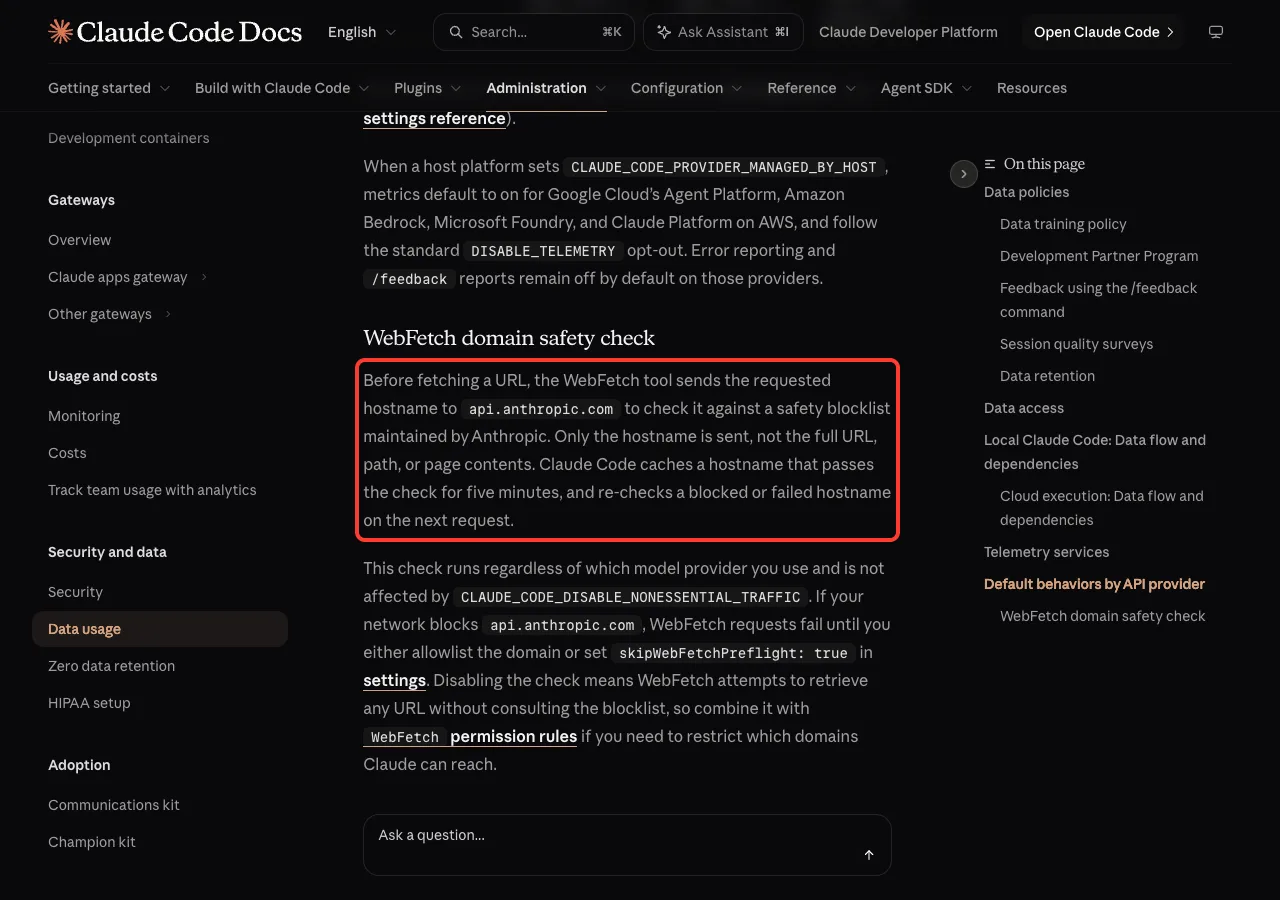
WebFetch is the built-in tool Claude uses to read a web page. Before it requests any page, it checks the site’s hostname against a safety blocklist that Anthropic maintains. Only the hostname goes out, not the full URL, the path or the page contents.
A hostname that passes is cached for five minutes, so you won’t see a check on every fetch. A failed or blocked check is not cached, so the next fetch to that site runs the check again.
Two details surprise most people. The check runs no matter which model provider you use, and the CLAUDE_CODE_DISABLE_NONESSENTIAL_TRAFFIC switch does not turn it off. That is why Bedrock and Foundry users see this error even when everything else works.
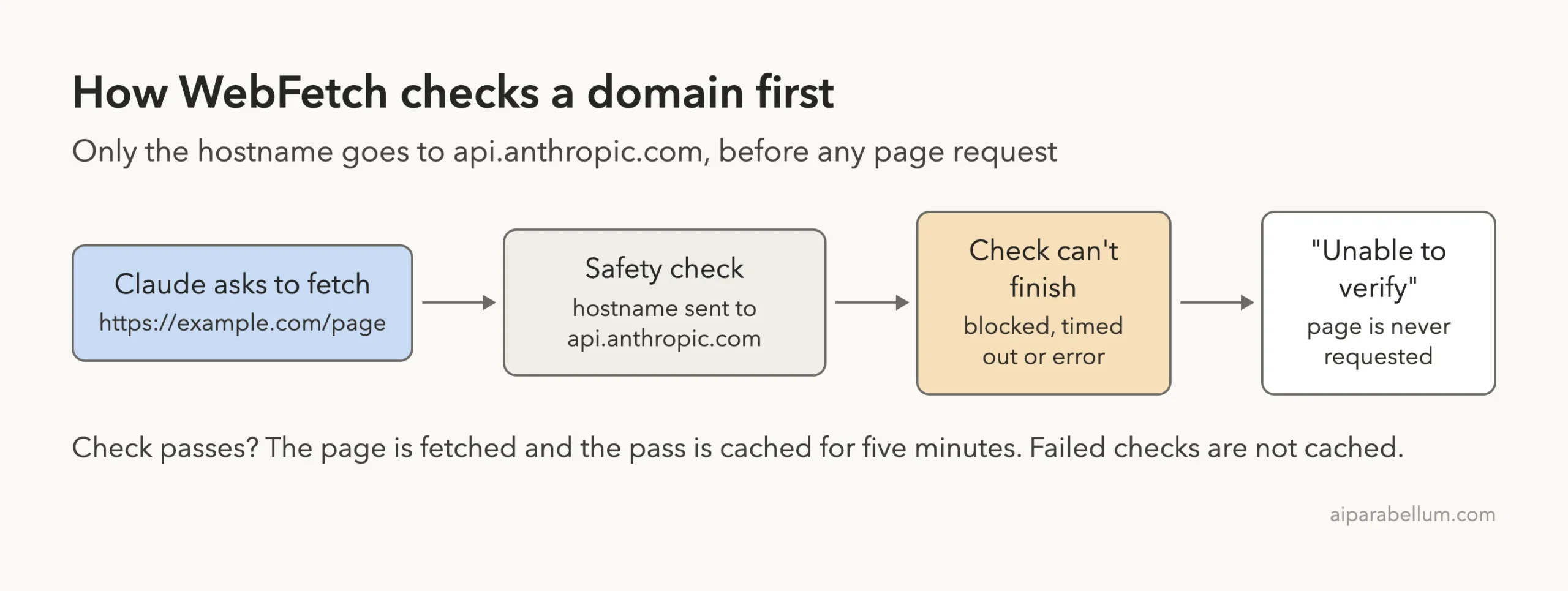
One more thing about the wording. The message mentions claude.ai, but the official docs say the check itself goes to api.anthropic.com. So when you talk to your IT team, ask about api.anthropic.com first.
We Reproduced the Unable to Verify Domain Error
You can’t safely break a real company network to test this, so we built a small copy of one. In a demo folder, we pointed HTTPS_PROXY at a local address where nothing is listening. Every request to api.anthropic.com now fails, just like on a network that blocks it.
We also pointed ANTHROPIC_BASE_URL at a tiny local test server. It plays the model’s part: it asks for one WebFetch call, then reports what came back. Its replies start with “[test server]” so you can tell them apart from real Claude output.
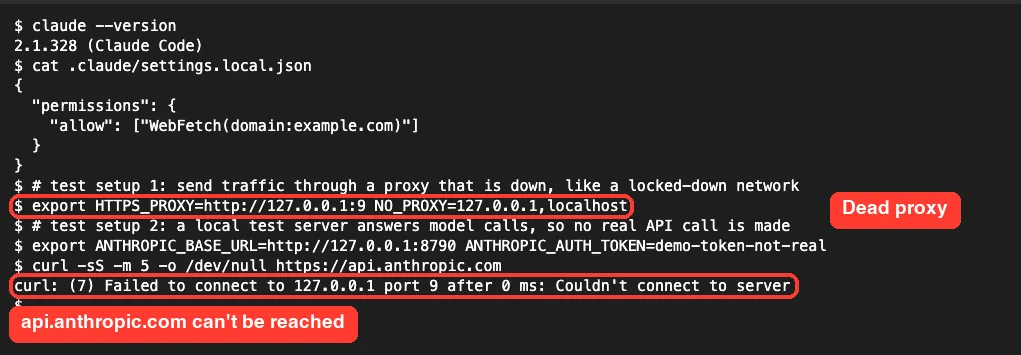
The project’s .claude/settings.local.json already allows WebFetch(domain:example.com). That matters: it proves the permission was fine, and the fetch still failed. Permission rules decide whether Claude may fetch; the safety check runs on top of them.
What You See in the Session
We started Claude Code in manual mode and typed “Fetch https://example.com and tell me its title”. The tool line came back as “Not fetched”, which is the first sign of this error.
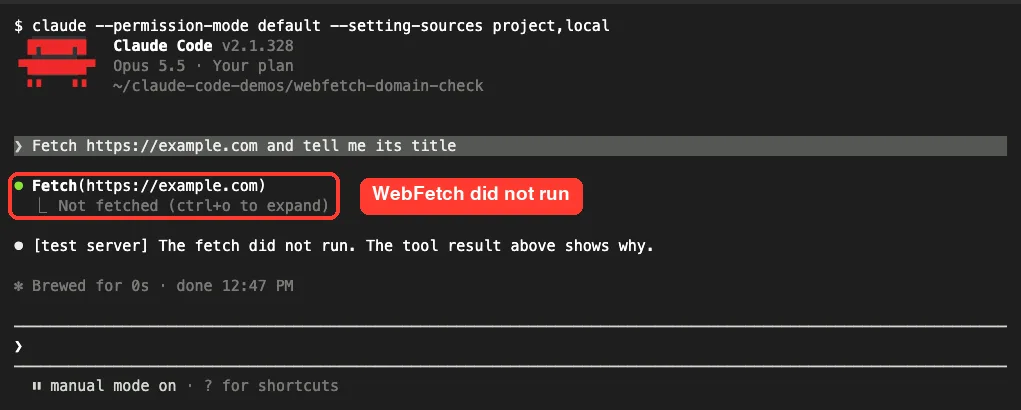
Press ctrl+o to open the detailed transcript. Now the red error line shows the real reason, and the tool result carries the full message word for word.
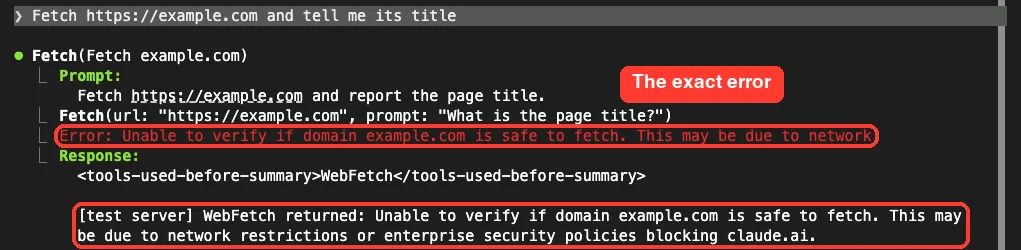
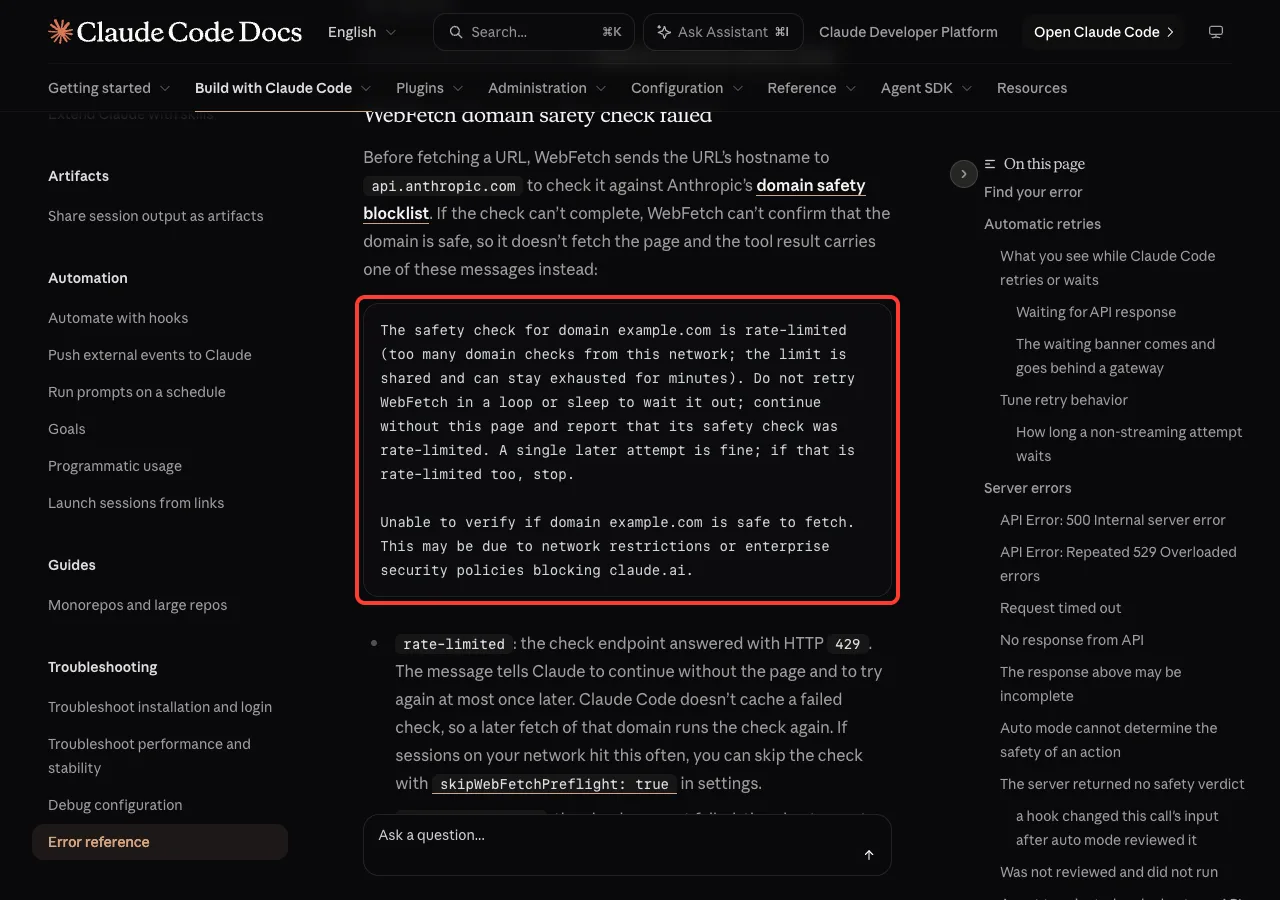
In our session the fetch ran inside a small helper step, which is why you see a nested Fetch line. The error text is the same either way, and it matches Anthropic’s error reference exactly.
Why Claude Code Can’t Verify the Domain
The docs say this message appears when the check request failed, timed out or got an unexpected status. In practice, that comes down to a short list of causes.
- A corporate firewall or web filter blocks
api.anthropic.com. - A proxy is set in
HTTPS_PROXYbut is down, wrong or needs a login. - A TLS-inspecting proxy uses a root certificate that Claude Code doesn’t trust.
- You run Claude Code through Bedrock, Agent Platform or Foundry, and outbound traffic to Anthropic is closed.
- A VPN or container network has no route to the internet at all.
- A short network blip, which a single retry clears.
Don’t confuse it with two close cousins. “Claude Code is unable to fetch from example.com” means the check worked and said that host can’t be fetched. “The safety check for domain example.com is rate-limited” means the check endpoint answered with HTTP 429, so wait a few minutes and try once.
How to Fix “Unable to Verify if Domain Is Safe to Fetch”
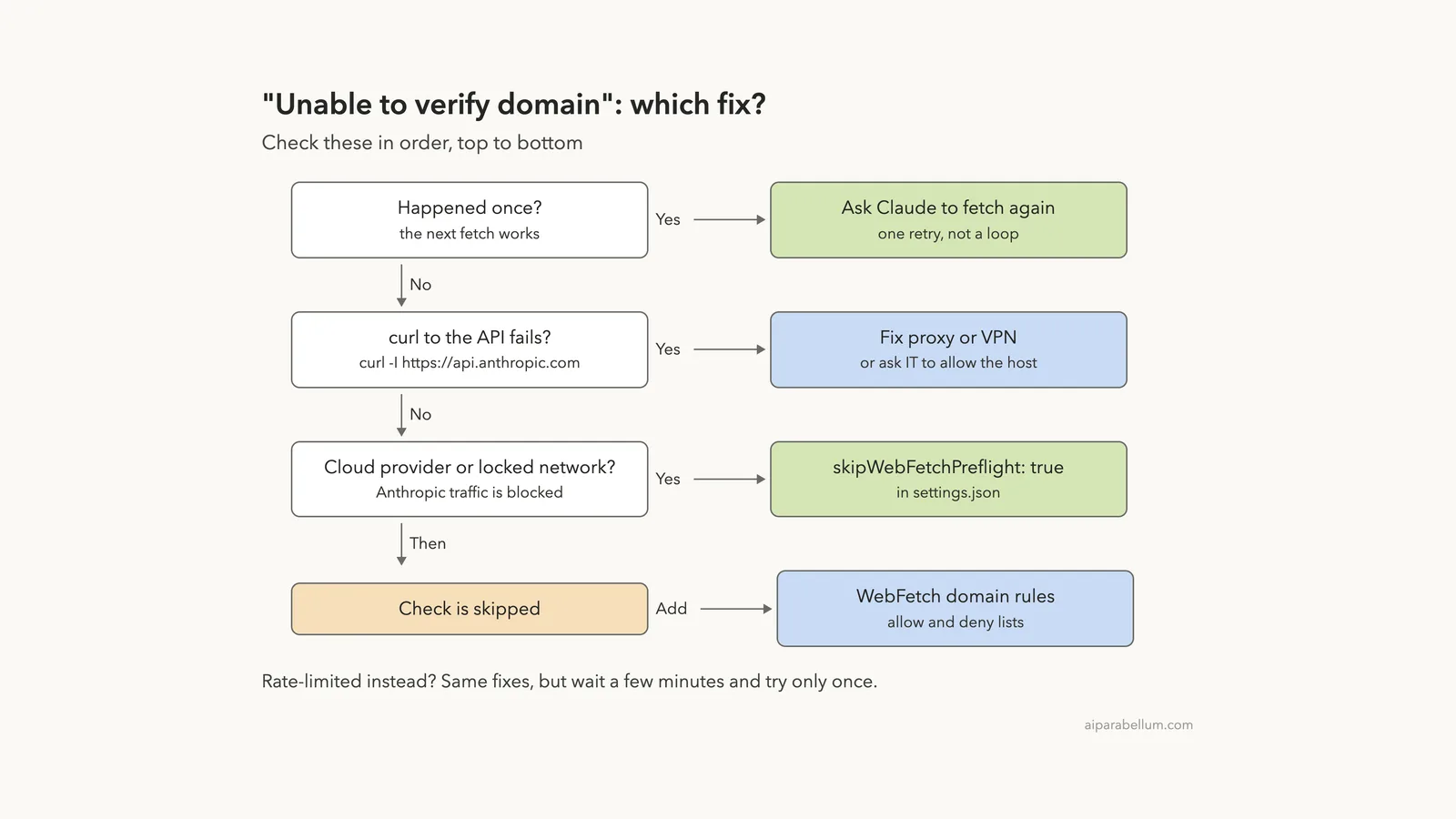
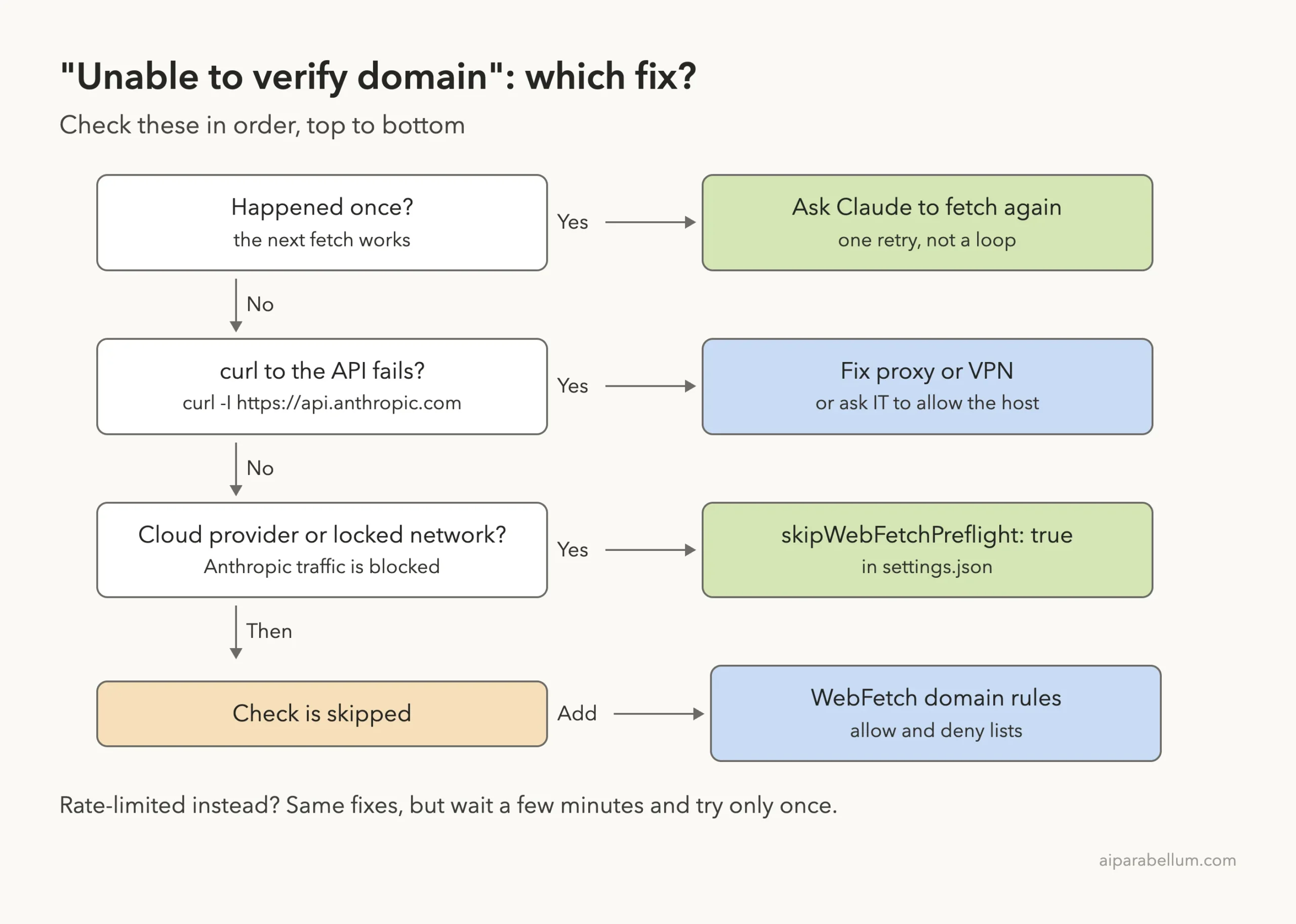
Work through these in order. The first fix that applies is usually the last one you need.
Fix 1: Retry Once
If it happened a single time, ask Claude to fetch the page again. Failed checks aren’t cached, so a second try runs a fresh check. Don’t let Claude loop on it, though; if the second try fails, the problem is your network.
Fix 2: Check That api.anthropic.com Is Reachable
Run a quick curl to the host the check uses, then look at your proxy variables. Any HTTP status code means the host is reachable; a connection error means something is in the way.
env | grep -i -E '^(https?_proxy|no_proxy)='
curl -sS -m 10 -o /dev/null -w 'HTTP %{http_code}\n' https://api.anthropic.com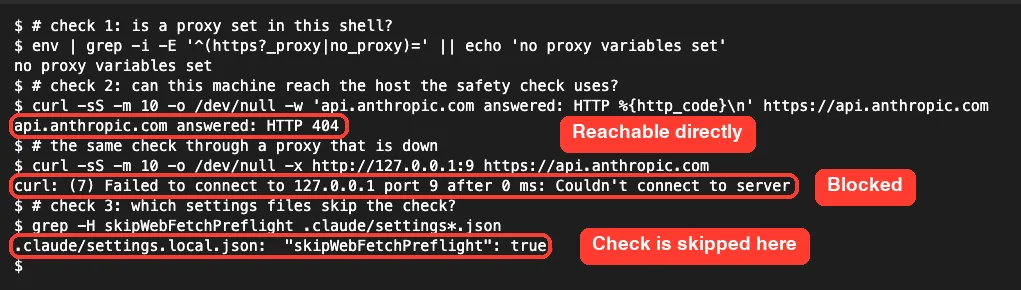
The 404 is fine here, since we only asked for the root page. What matters is that an answer came back.
Fix 3: Allowlist api.anthropic.com
On a managed network, ask your IT team to allow api.anthropic.com through the proxy and firewall. Anthropic’s network page lists it as required for Claude API requests, including the WebFetch domain safety check. Our guide to running Claude Code behind a proxy covers the full host list.
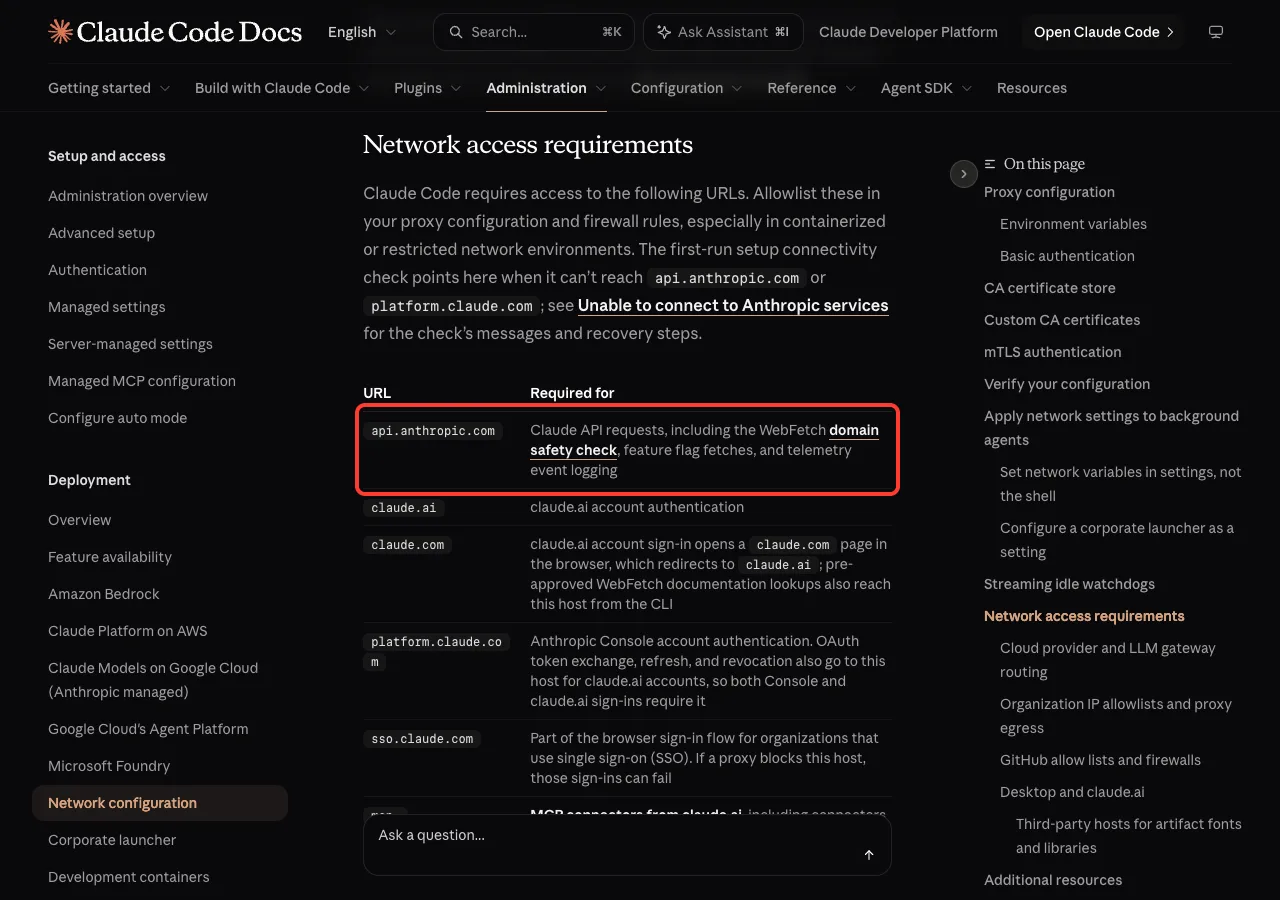
If you use a proxy, set it as a full URL, such as HTTPS_PROXY=http://proxy.example.com:8080. If the proxy inspects TLS, install its root certificate in your system store or point NODE_EXTRA_CA_CERTS at it, as the network configuration docs explain.
Fix 4: Skip the Check With skipWebFetchPreflight
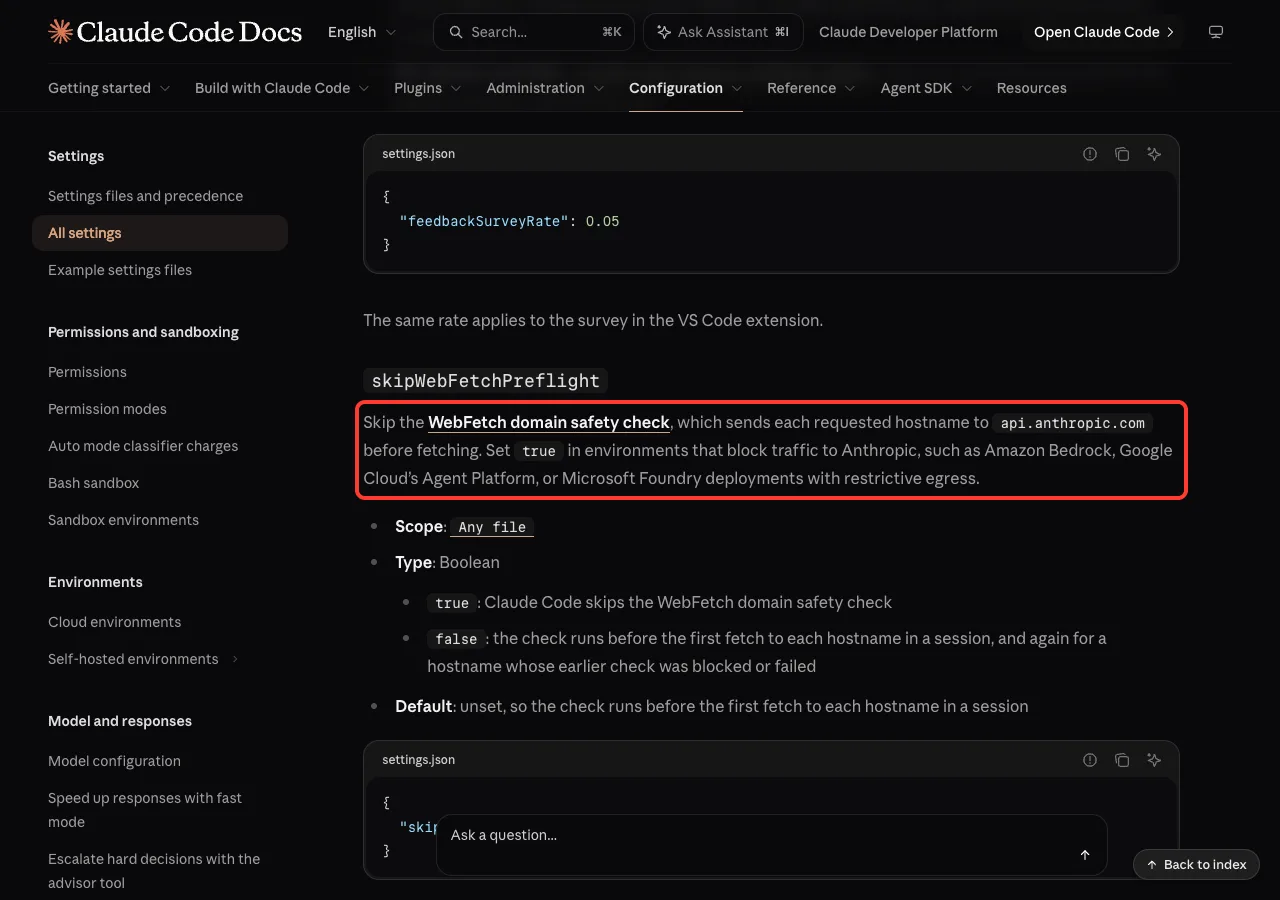
When Anthropic traffic must stay blocked, turn the check off. The official setting is skipWebFetchPreflight, a true/false value that works in any settings file.
{
  "skipWebFetchPreflight": true
}
We added it to the demo project’s .claude/settings.local.json and ran the same prompt. The proxy still blocked api.anthropic.com; we only let example.com through, like a network where the site works but Anthropic is closed. This time the page came back: “Received 660 bytes”.
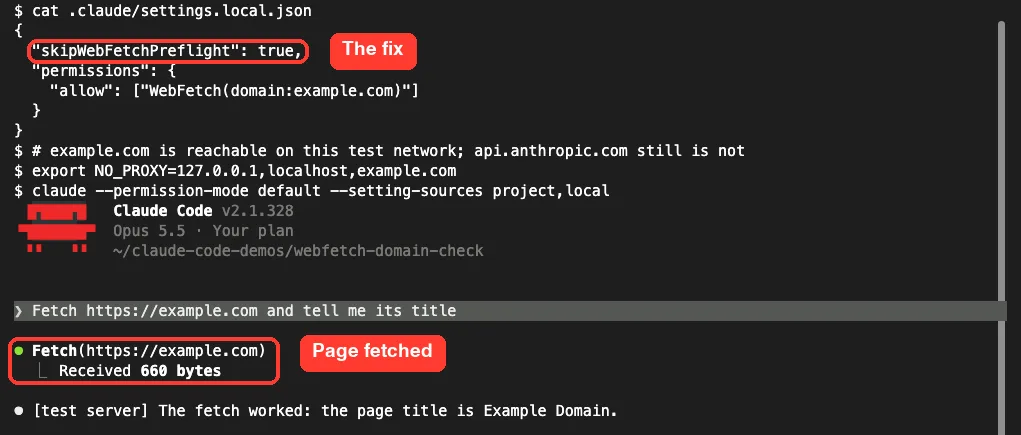
Pick the file that fits your case:
| File | Who it affects | Use it when |
|---|---|---|
~/.claude/settings.json | You, in every project | Your whole network blocks Anthropic |
.claude/settings.json | Everyone on the repo | The team shares the same locked network |
.claude/settings.local.json | You, in one project | Testing, or one odd setup |
| Managed settings | The whole organization | IT rolls it out to all users |
Not sure where these files live? See where settings.json is, or copy a working layout from our settings.json examples.
Fix 5: Add WebFetch Domain Rules After Skipping
With the check skipped, WebFetch will try any URL without the blocklist. Anthropic’s docs recommend pairing the setting with WebFetch permission rules, so you decide which sites Claude may read.
{
  "skipWebFetchPreflight": true,
  "permissions": {
    "allow": [
      "WebFetch(domain:docs.python.org)",
      "WebFetch(domain:*.github.com)"
    ],
    "deny": ["WebFetch(domain:pastebin.com)"]
  }
}
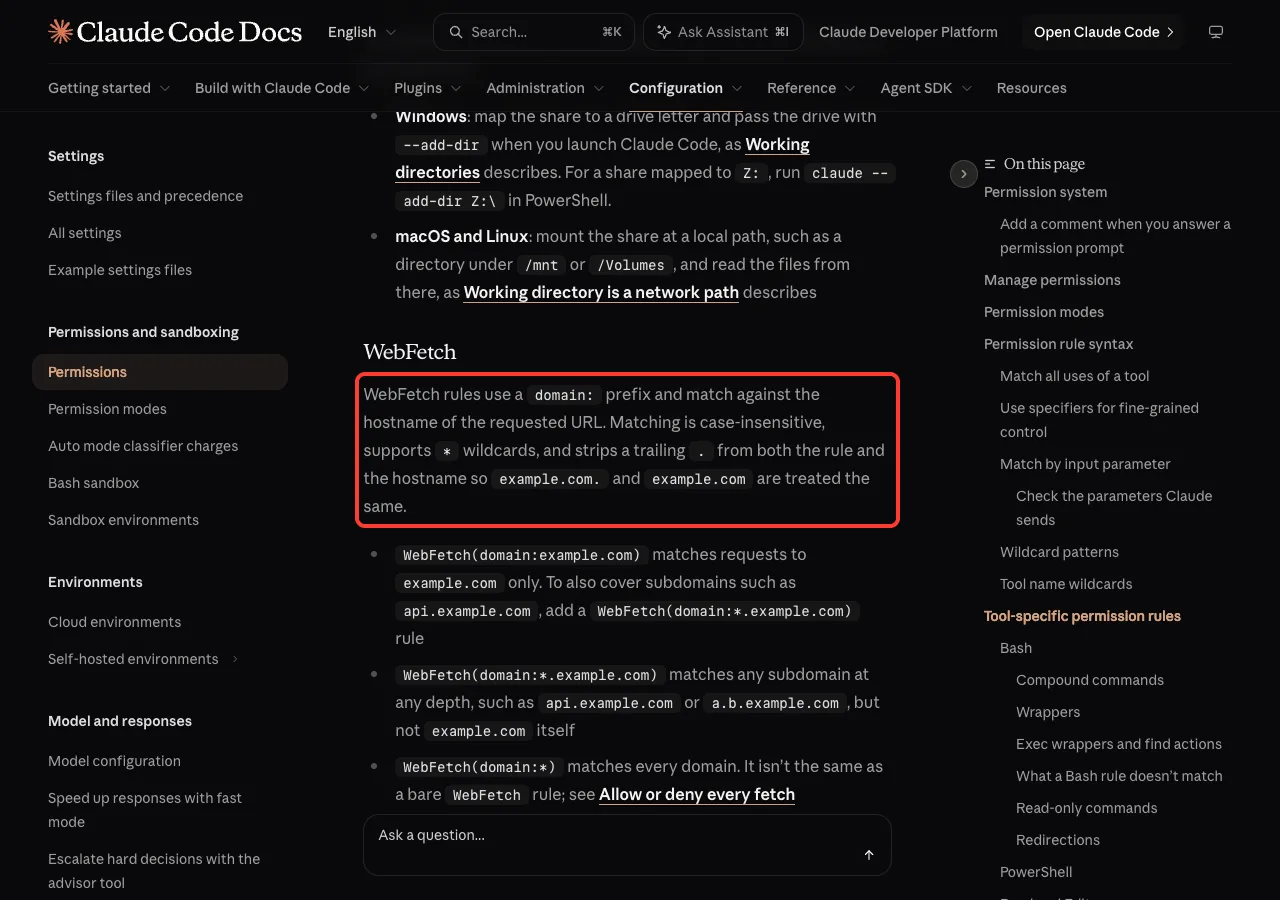
A rule like WebFetch(domain:example.com) matches only that host. Add WebFetch(domain:*.example.com) to cover its subdomains. Our permissions guide explains allow, ask and deny in more depth.
Fix 6: Turn WebFetch Off Instead
Some teams don’t want web fetching at all. Set CLAUDE_CODE_DISABLE_WEB_FETCH=1 (v2.1.285 or later) to remove the tool, or add a bare WebFetch deny rule. WebSearch stays available with the environment variable.
Unable to Verify vs Related WebFetch Errors
| Message | What it means | What to do |
|---|---|---|
| Unable to verify if domain … is safe to fetch | The check failed or timed out | Allowlist api.anthropic.com or skip the check |
| The safety check for domain … is rate-limited | The check returned HTTP 429 | Try once later; skip it if it keeps happening |
| Claude Code is unable to fetch from … | The check said this host is blocked | Use another source; the host was never contacted |
| WebFetch cannot fetch localhost … | Hostname has no dot | Use curl through Bash for local servers |
If the whole session fails to reach Anthropic, not just WebFetch, you have a bigger network problem. Start with our fix for the “unable to connect” API error.
Try It Yourself
Want to see whether your network blocks the check? Open Claude Code in an empty test folder and paste this prompt. It only reads one public page.
Use WebFetch to read https://example.com and tell me the page title.
If the fetch fails, show me the exact error text from the tool result.
If you get the “Unable to verify” message, run the curl check from Fix 2. Then add "skipWebFetchPreflight": true to .claude/settings.local.json in that folder, start a new session and try again.
The website is rarely the problem. The safety check in front of it is.
Common Mistakes
- Allowlisting claude.ai only. The message names it, but the check goes to
api.anthropic.com. - Expecting
CLAUDE_CODE_DISABLE_NONESSENTIAL_TRAFFICto stop the check. It doesn’t; onlyskipWebFetchPreflightdoes. - Adding a WebFetch allow rule and expecting the error to go away. Rules don’t skip the check.
- Adding the site to the sandbox
allowedDomainslist. WebFetch never reads the sandbox allowlist. - Skipping the check with no domain rules at all on a shared or sensitive machine.
- Letting Claude retry in a loop. One retry is enough to rule out a blip.
Pro Tips
- Put
skipWebFetchPreflightin the same file as your provider settings, so the two always travel together. Our cloud provider guide shows those files. - For a team, commit the setting and the domain rules to
.claude/settings.json, so everyone gets the same behavior. - Keep a short allow list of trusted docs sites and use
askfor the rest. - Remember the
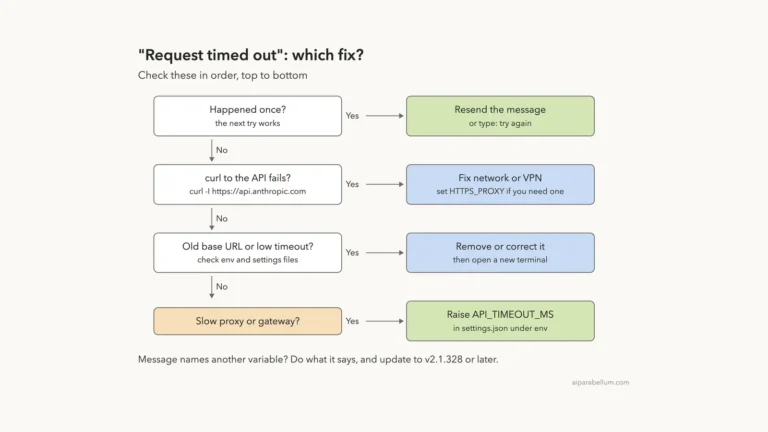
ctrl+oview. “Not fetched” alone tells you little; the detailed view shows which message you hit. - If you also see slow or failed model calls, check our post on the request timeout error.
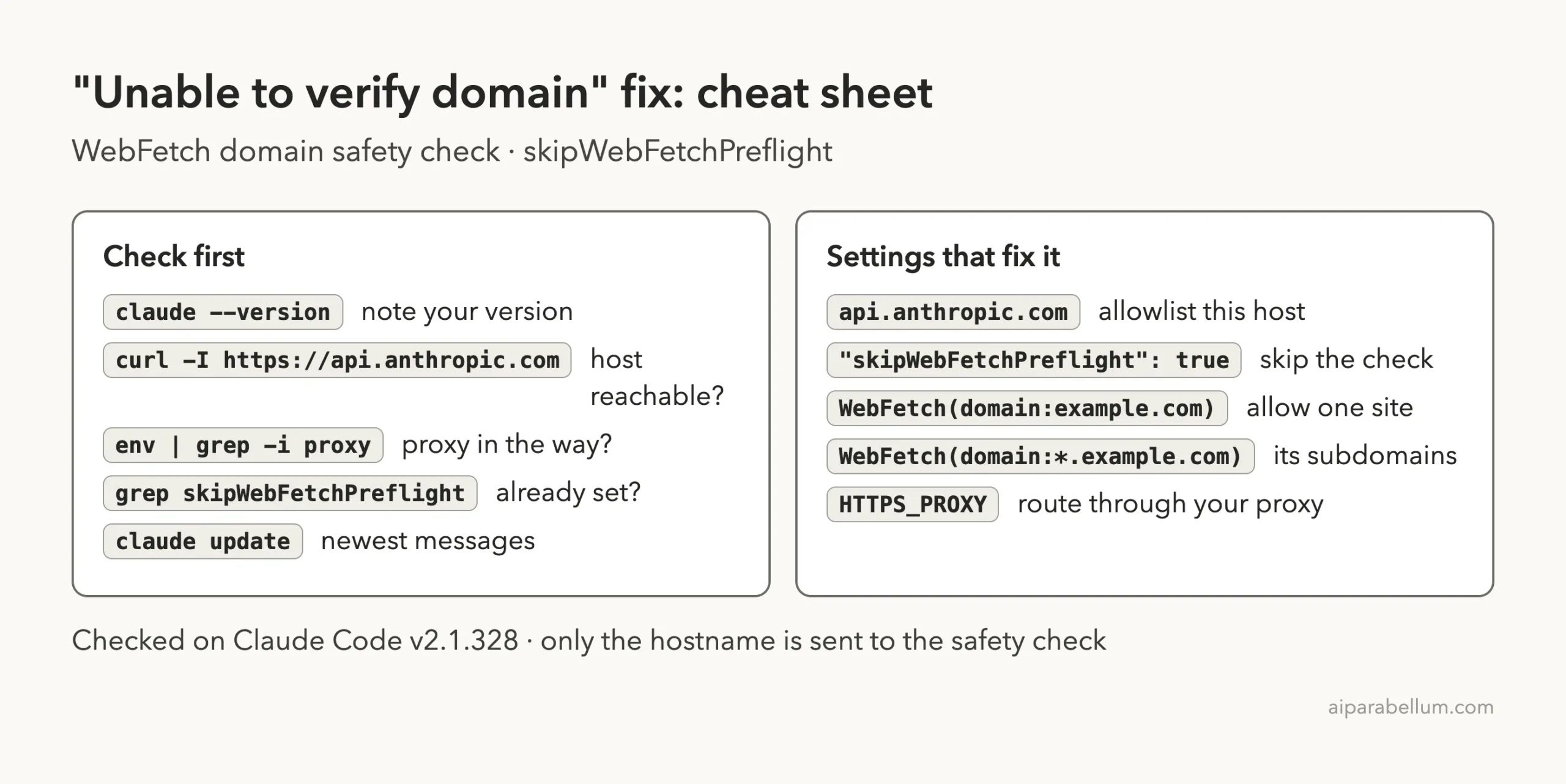
Cheat Sheet
Frequently Asked Questions
Is it safe to set skipWebFetchPreflight to true?
It removes one safety net, the blocklist check, so WebFetch will try any URL. Anthropic suggests pairing it with WebFetch domain rules. With a sensible allow and deny list, most teams on locked networks use it.
What data does the domain safety check send?
Only the hostname, such as example.com. The docs say the full URL, path and page contents are not sent.
Why do I get this error with Bedrock or Foundry?
The check runs no matter which provider you use, and it always goes to api.anthropic.com. If your cloud setup blocks Anthropic, set skipWebFetchPreflight to true.
Does a WebFetch allow rule skip the check?
No. Allow rules only remove the permission prompt. Every fetch still passes the safety check first, unless you skip it in settings.
Where can I see other Claude Code error messages?
Our list of common Claude Code errors covers the usual ones, and Anthropic keeps an official error reference. You can also read more about the Claude AI assistant itself.
Conclusion
The Claude Code “unable to verify if domain is safe to fetch” error means WebFetch couldn’t reach its safety check at api.anthropic.com, so it refused to fetch the page, even when your permission rules allowed it. Retry once, then check the host with curl and your proxy settings. If you can, allowlist api.anthropic.com; if Anthropic traffic must stay blocked, add "skipWebFetchPreflight": true to your Claude Code settings and pair it with WebFetch domain rules. In our test on a blocked network, that one setting turned “Not fetched” into a working page in the very next session.