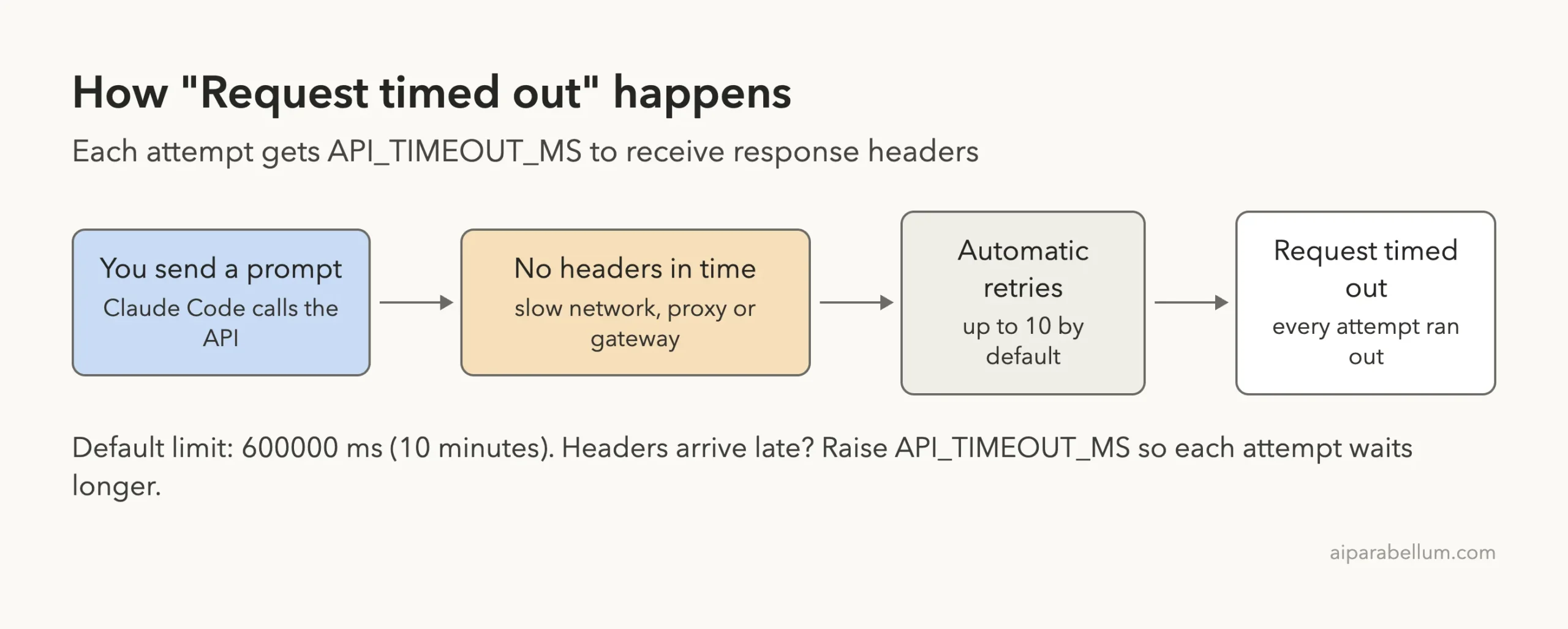
The Claude Code request timed out error means the API did not send back response headers before the time limit ran out, even after Claude Code retried. The default limit is 10 minutes per attempt (API_TIMEOUT_MS = 600000). If you see it once, just resend your message.
If you see it again and again, the cause is almost always your network, a VPN, a proxy, a gateway that holds responses, or an old setting that lowered the limit.
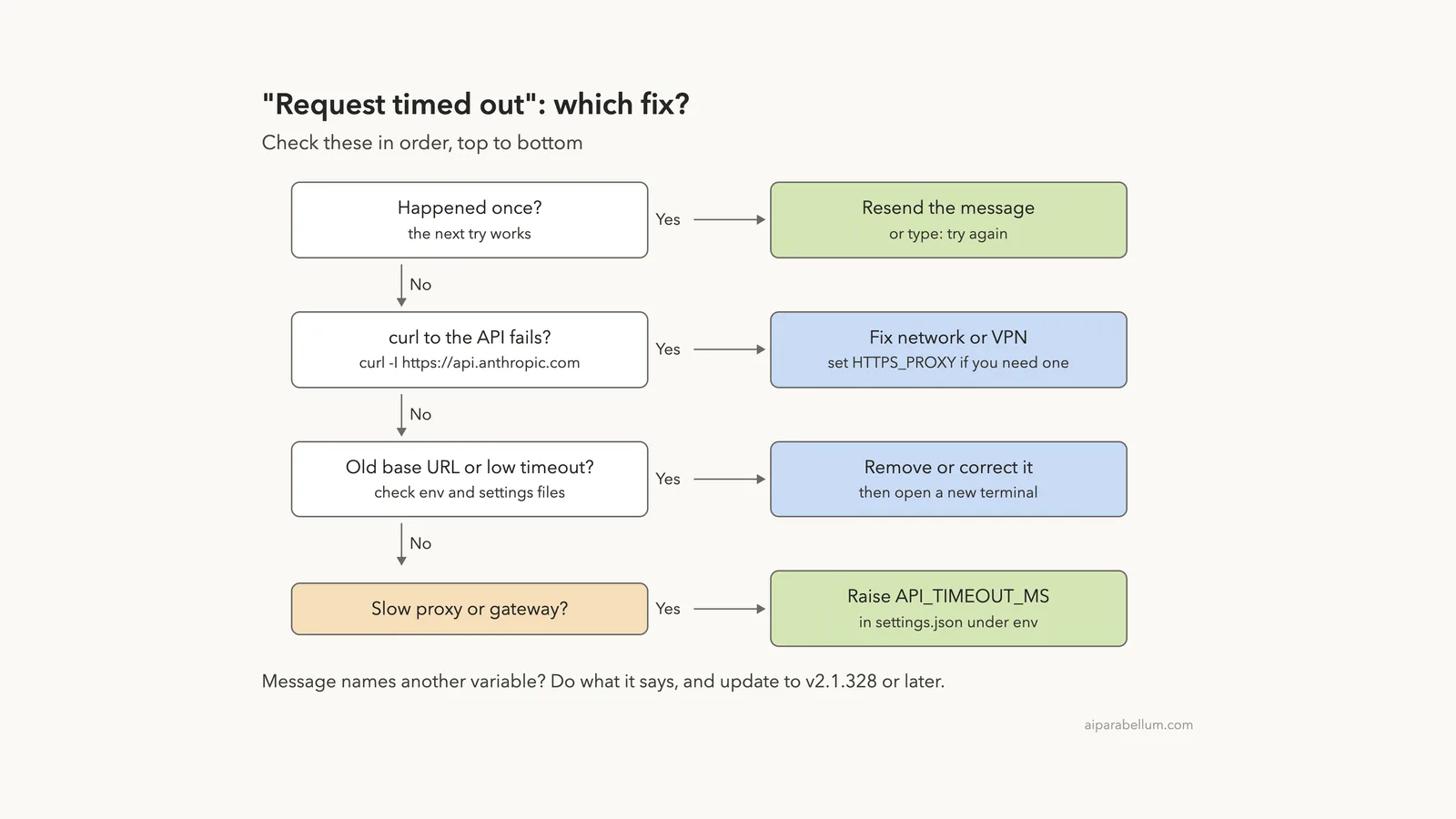
The direct fix for a slow proxy or gateway is to raise API_TIMEOUT_MS. Put it in the env block of ~/.claude/settings.json, for example "API_TIMEOUT_MS": "1200000" for 20 minutes, or export it in your shell before you start claude. Newer versions even print the variable to change, such as “set API_TIMEOUT_MS above 10000”.
Before you raise anything, run curl -I https://api.anthropic.com and check that ANTHROPIC_BASE_URL isn’t pointing at an old gateway. A bigger timeout can’t fix a connection that never works.
Browse all our Claude Code tutorials for more fixes and how-tos.
Tested with Claude Code v2.1.328 on macOS on November 20, 2026. To trigger the error safely, we pointed Claude Code in a throwaway demo folder at two tiny local test servers we wrote: one that never answers and one that answers after 15 seconds.
No real API traffic was slowed, and our normal setup was never changed. All terminal captures below are genuine.
Quick Summary
| Question | Short answer |
|---|---|
| Exact message | Request timed out (newer versions add which variable to raise) |
| What it means | No response headers arrived before the limit, on every attempt |
| Default limit | API_TIMEOUT_MS = 600000, or 10 minutes per attempt |
| One-off timeout | Resend the message or type “try again” |
| Slow proxy or gateway | Raise API_TIMEOUT_MS in settings.json under env |
| Every request fails | Check the network, VPN, proxy and ANTHROPIC_BASE_URL |
| Retries | Up to 10 by default (CLAUDE_CODE_MAX_RETRIES) |
| Recommended version | v2.1.328 or later, which names the variable to change |
What the Claude Code Request Timed Out Error Means
Each time Claude Code sends your prompt to the model, it waits for the server’s response headers. Anthropic’s error reference sums it up in one line: the API didn’t respond before the connection deadline.
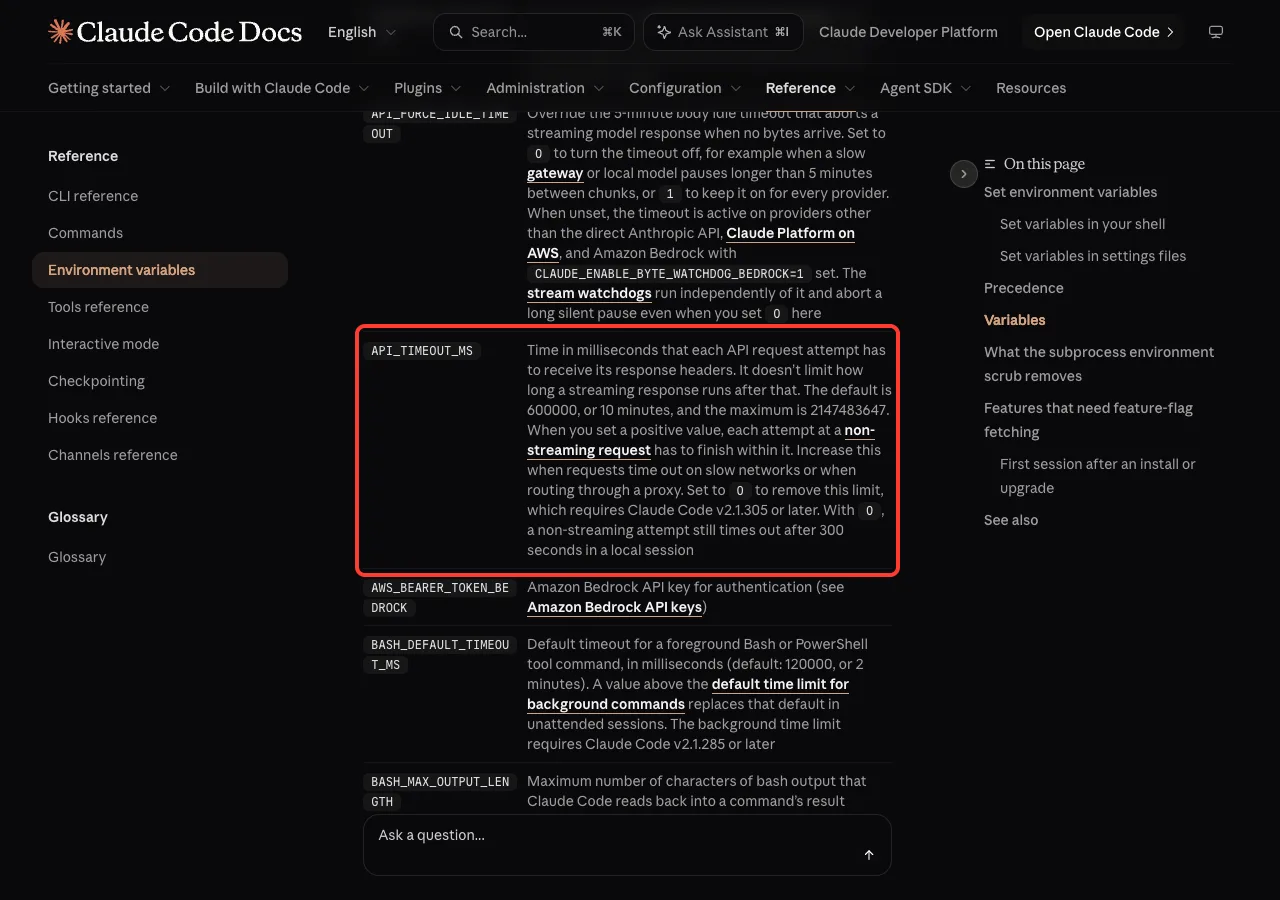
The wait is controlled by API_TIMEOUT_MS. The environment variables reference says it is the time each request attempt has to receive its response headers. It does not limit how long a streaming answer runs after the headers arrive.
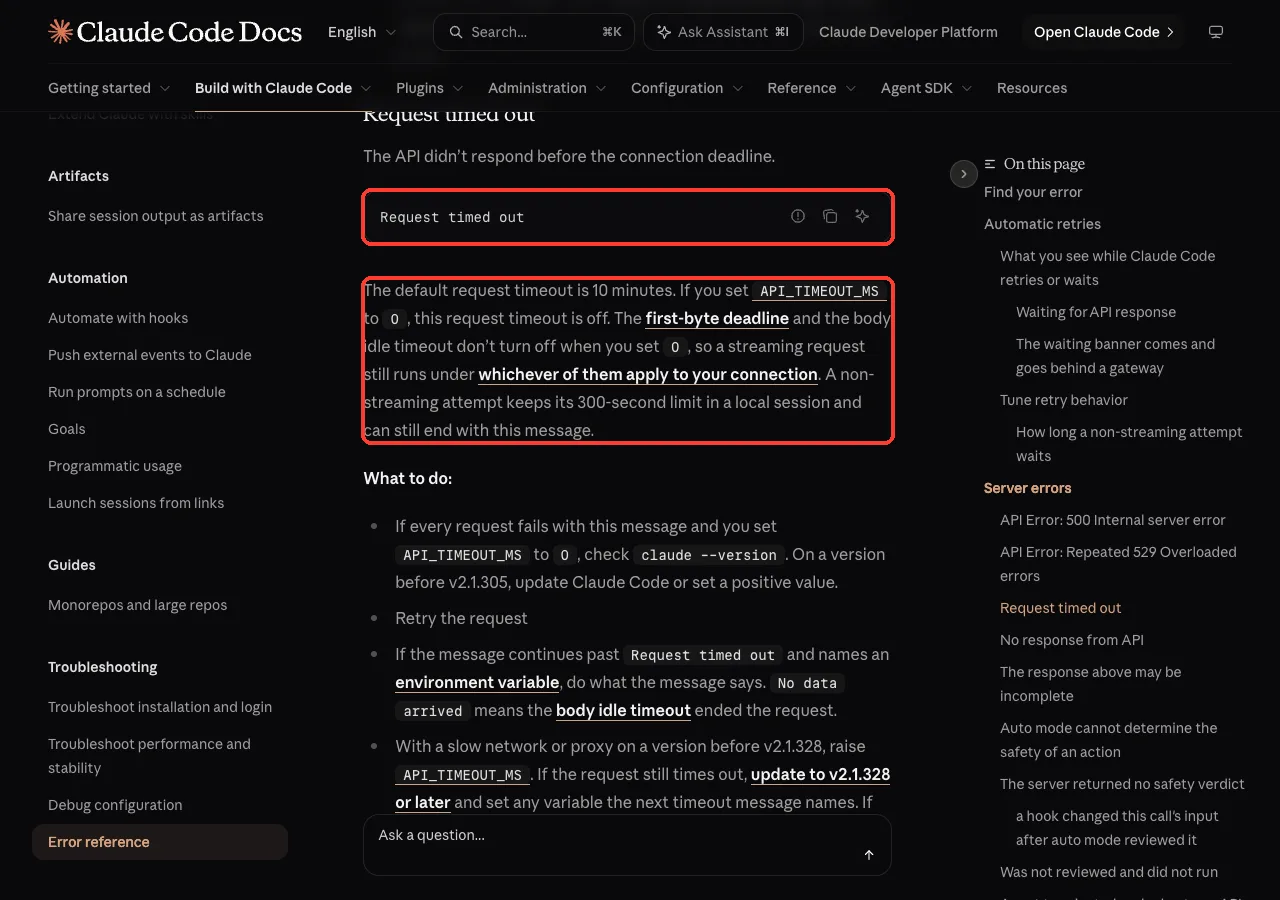
So the message is not about your plan, your usage limit or your prompt. It means the answer never started arriving in time. That points at the path between your computer and the API.
We Reproduced the Request Timed Out Error
We didn’t want to break a real connection, so we wrote a 10-line Python server that accepts a request and never answers. Then we pointed Claude Code at it with ANTHROPIC_BASE_URL, used a fake ANTHROPIC_AUTH_TOKEN so no real login was sent, and set a short 10-second limit so the test didn’t take 20 minutes.
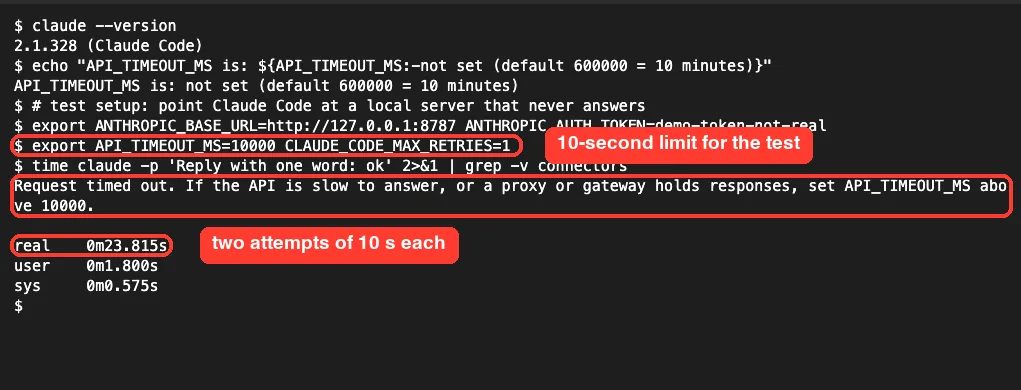
With CLAUDE_CODE_MAX_RETRIES=1, Claude Code made one attempt plus one retry. Each waited 10 seconds, so the whole run took about 23 seconds. Then it printed the full message on v2.1.328:
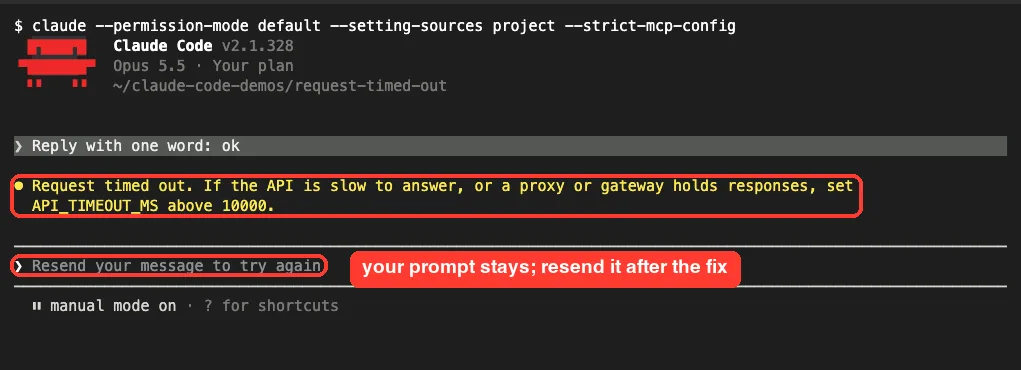
Request timed out. If the API is slow to answer, or a proxy or gateway holds responses, set API_TIMEOUT_MS above 10000.That hint is new and very useful. It tells you the limit you are on right now, so you know exactly what value to beat.
What You See Inside a Claude Code Session
In an interactive session, the same failure looks a little different. While Claude Code retries, the spinner line shows “API error · retrying… · attempt 1/3”. It stays there until it runs out of attempts.
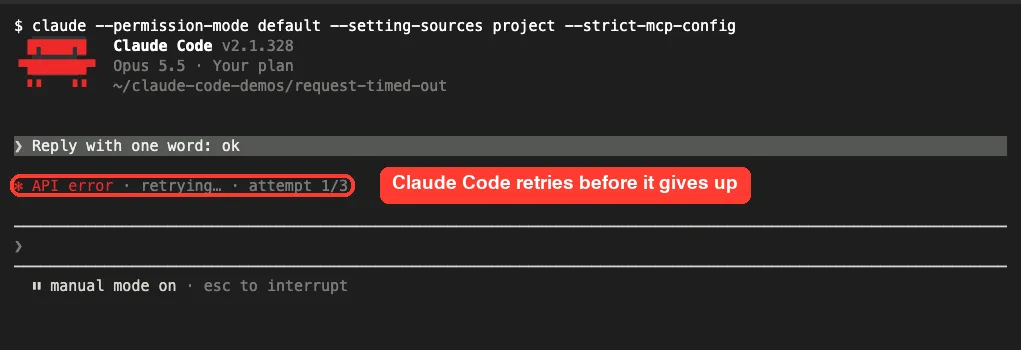
When the last attempt times out, the yellow error appears and the input box suggests “Resend your message to try again”. Your prompt is still in the conversation, so you don’t have to retype it.
Why Claude Code Requests Time Out
The docs and our test point to a short list of causes. Most people hit one of the first three.
- A slow or flaky connection, such as hotel Wi-Fi, a phone hotspot or a congested office network.
- A corporate proxy or LLM gateway that holds the response until the whole answer is ready, so headers arrive late.
- A VPN that slows or blocks traffic to
api.anthropic.com. - A leftover
ANTHROPIC_BASE_URLpointing at a gateway or local proxy that is slow or no longer running. - An old
API_TIMEOUT_MSvalue in your shell profile or settings that is set too low. - A real service problem on Anthropic’s side, which you can check on the status page.
One more case from the docs: if you set API_TIMEOUT_MS to 0 to remove the limit on a version before v2.1.305, every request can fail with this message. Update Claude Code or use a positive value.
How to Fix “Request Timed Out” in Claude Code
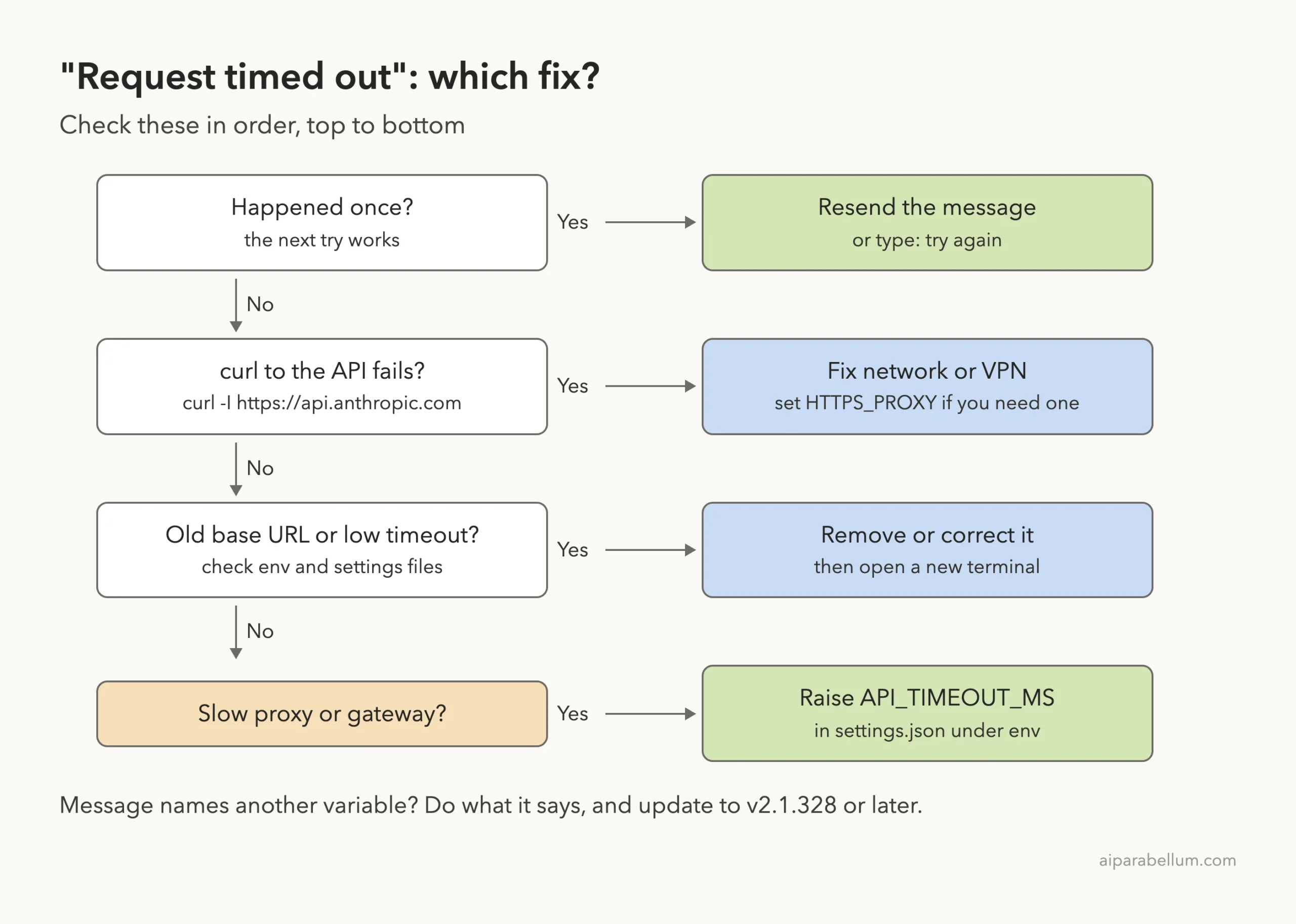
Work through these fixes in order. The first ones are quick and catch most cases.
Fix 1: Resend the Message
A single timeout is often just a bad moment on the network. Send the message again, or type “try again”, since your original prompt is still in the conversation. This step comes straight from Anthropic’s own fix list.
Fix 2: Check Your Network and Base URL
Run these three checks in the same terminal where you start Claude Code. We ran them on our test Mac to show what healthy output looks like.
curl -I https://api.anthropic.com
echo $ANTHROPIC_BASE_URL
env | grep -i -E '^(https?_proxy|no_proxy|api_timeout_ms)='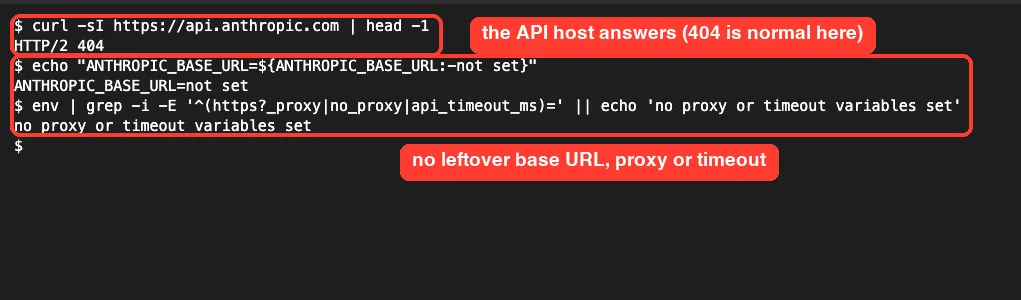
Any HTTP status line from curl, even a 404, means you reached the host. If curl hangs or fails, fix the network, VPN or proxy first, as covered in our guide to the Unable to Connect error. If ANTHROPIC_BASE_URL shows a value you don’t use anymore, remove it from your shell profile and settings, then open a new terminal.
Fix 3: Raise API_TIMEOUT_MS for a Slow Proxy or Gateway
If the network works but answers come slowly, give each attempt more time. We tested this with a second local server that answers only after 15 seconds.
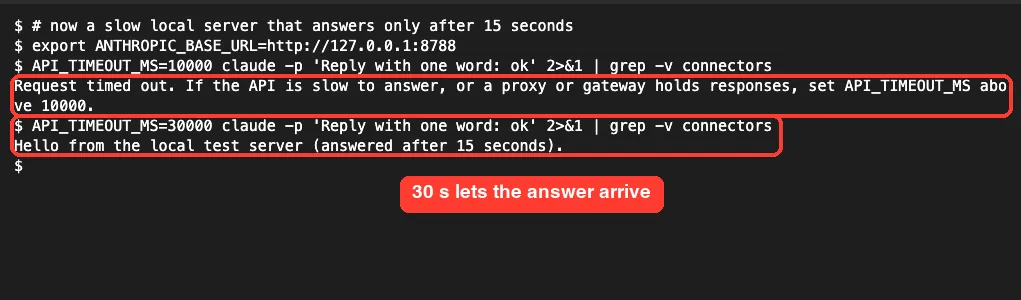
With a 10-second limit, the request timed out. With 30 seconds, the reply came through. The docs say to keep API_TIMEOUT_MS above the longest wait for headers you expect, because a request that needs longer times out again on every retry.
To try it for one session, export it first:
export API_TIMEOUT_MS=1200000
claude
The value is in milliseconds, so 1200000 is 20 minutes. The maximum the docs list is 2147483647.
Fix 4: Make the Timeout Permanent in settings.json
A shell export lasts only for that terminal. To apply it every time claude runs, add it to the env block of a settings file. This is the example from the official docs:
{
  "env": {
    "API_TIMEOUT_MS": "1200000"
  }
}
Use ~/.claude/settings.json for every project, or .claude/settings.local.json for one project only. Our settings.json examples show where each file lives.
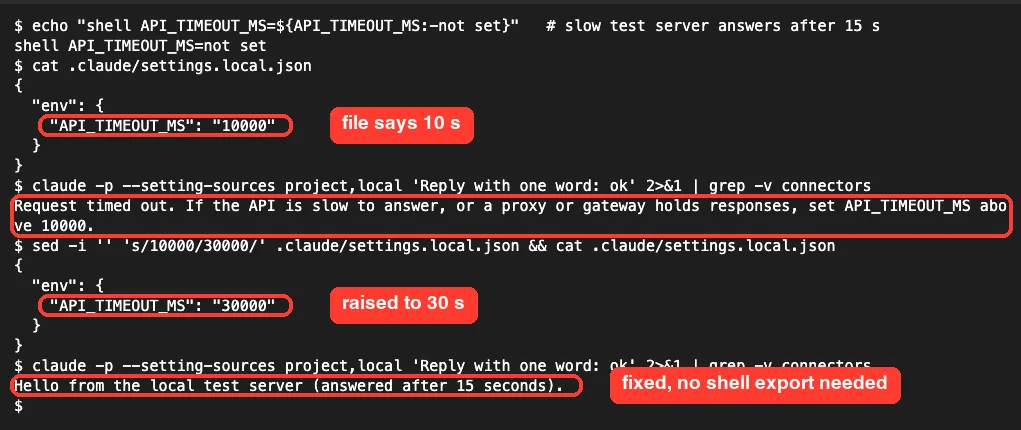
We proved the file is really read. With the shell variable unset and the file saying 10000, the slow server timed out. After changing the file to 30000, the same command worked.
Fix 5: Update Claude Code and Follow the Message
Run claude --version, then claude update if you are behind. The docs say that on versions before v2.1.328 you should raise API_TIMEOUT_MS, and if timeouts continue, update and set any variable the next timeout message names.
If the message mentions “No data arrived”, the body idle timeout ended the request instead. If you can’t update, the docs suggest setting API_FORCE_IDLE_TIMEOUT to 0.
Fix 6: Tune Retries for Scripts
Claude Code retries failed requests up to 10 times with backoff before it shows an error. You can change that count with CLAUDE_CODE_MAX_RETRIES. Lower it in scripts so failures show up faster.
For unattended CI jobs, the docs describe CLAUDE_CODE_RETRY_WATCHDOG=1, which keeps retrying capacity errors and raises the retry count for timeouts and dropped connections.
Request Timed Out vs Similar Timeout Errors
Claude Code has a few timeout messages that look alike. Each points to a different setting, so match the exact wording first.
| Message | What it means | Main setting |
|---|---|---|
| Request timed out | No headers before the request limit | API_TIMEOUT_MS |
| Request timed out. Check your internet connection and proxy settings | A network-level failure | Network, VPN, HTTPS_PROXY |
| API Error: No response from API | The first-byte deadline passed on a streaming request | CLAUDE_STREAM_FIRST_BYTE_TIMEOUT_MS and API_TIMEOUT_MS |
| Stream idle timeout – no chunks received | An answer started, then went silent | Streaming idle watchdogs |
| Waiting for API response banner | 20+ seconds with no data, not failed yet | Usually the network |
The “No response from API” message is different from this one. On the direct Anthropic API, Claude Code gives up on the first attempt after a first-byte deadline of 180 seconds by default, then retries with a wait just under API_TIMEOUT_MS. The network configuration docs explain these timers in detail.
If the reply starts and then breaks, see our post on the connection lost error. For timeouts from tools rather than the model, read our MCP timeout fix.
Try It Yourself
You can see how the limit works without touching your real setup. Make a test folder, add a local settings file, and check that Claude Code picks it up.
mkdir -p ~/timeout-test/.claude && cd ~/timeout-test
cat > .claude/settings.local.json <<'EOF'
{
  "env": {
    "API_TIMEOUT_MS": "1200000"
  }
}
EOF
claude
Then ask Claude Code a simple question that it can answer from its own environment:
Run: echo $API_TIMEOUT_MS and tell me the value in minutes.Delete the folder when you are done. Your normal projects keep the default 10-minute limit.
Common Mistakes
- Writing the value in seconds.
API_TIMEOUT_MS=600means 0.6 seconds, not 10 minutes. - Setting the variable in one terminal and starting
claudein another one. - Raising the timeout when
curlcan’t reach the API at all. Fix the connection first. - Leaving an old
ANTHROPIC_BASE_URLin your shell profile after you stop using a gateway. - Forgetting that numbers in the
envblock go in quotes, like"1200000". - Setting
0on an old version. Before v2.1.305, that can make every request fail.
Pro Tips
- Read the whole error line. On v2.1.328 it names the variable and the current value to beat.
- Put network settings in
settings.json, not just your shell, so background agents get them too. - Behind a proxy, set
HTTPS_PROXYand see our corporate proxy guide. - Check the status page when timeouts start suddenly for everyone on your team.
- Keep a list of every variable you have set. Our environment variables guide covers the common ones.
A bigger timeout helps a slow path. It can’t fix a broken one.
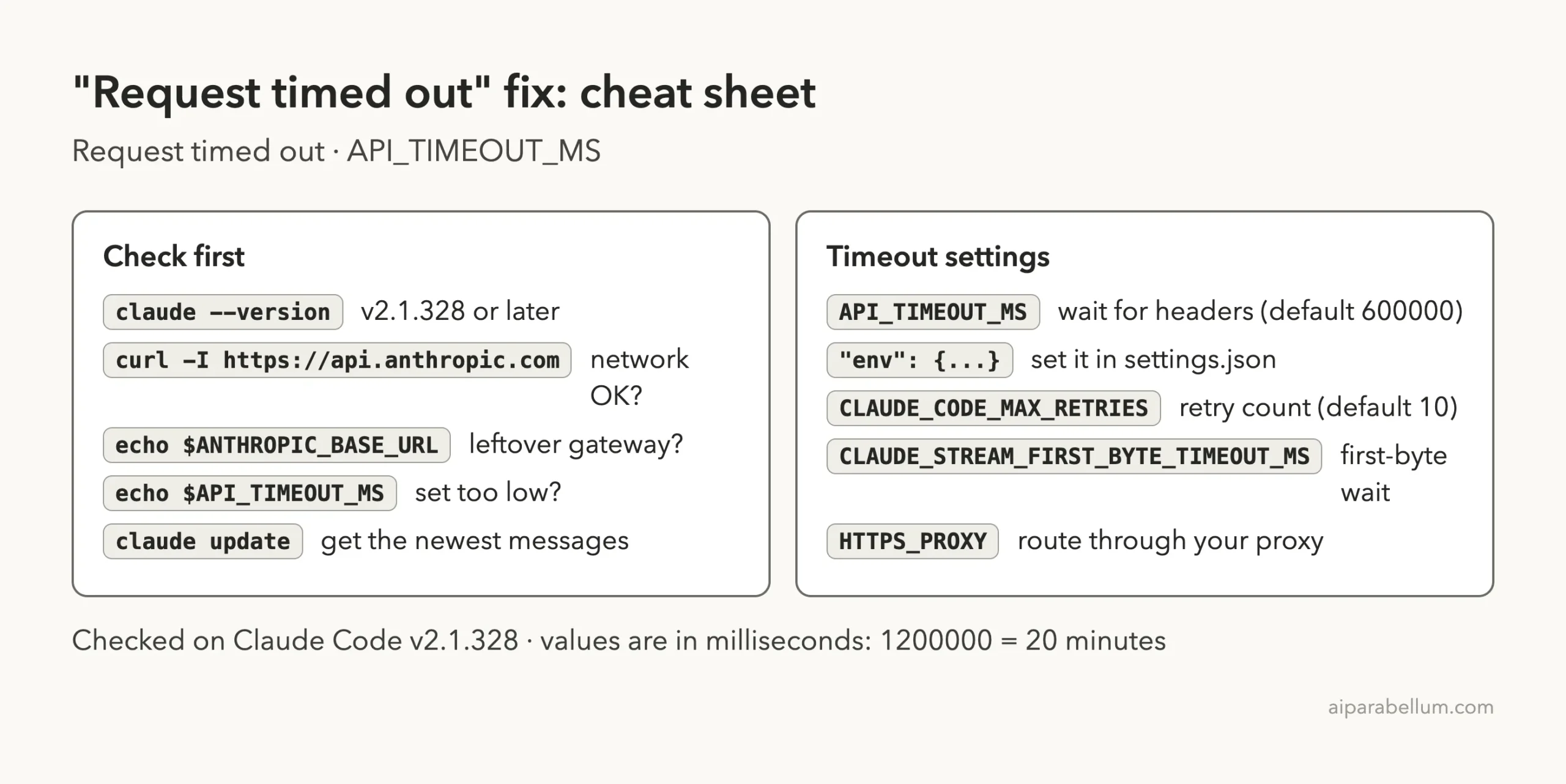
Cheat Sheet
Frequently Asked Questions
What is the default API_TIMEOUT_MS in Claude Code?
The default is 600000 milliseconds, or 10 minutes, for each request attempt to receive its response headers. The maximum value is 2147483647.
Where do I set API_TIMEOUT_MS?
Export it in your shell before running claude, or add it under env in ~/.claude/settings.json. The settings file applies no matter how Claude Code was started.
Does API_TIMEOUT_MS limit how long Claude can write an answer?
No. It limits the wait for response headers. Once a streaming answer starts, it can run longer than that limit.
Can I turn the request timeout off?
Yes, on v2.1.305 or later you can set API_TIMEOUT_MS to 0. Other timers, such as the first-byte deadline and body idle timeout, still apply, and a non-streaming attempt keeps a 300-second limit in a local session.
Why does Claude Code keep timing out on good Wi-Fi?
Check for a VPN, a corporate proxy or a leftover ANTHROPIC_BASE_URL. If those are clean, check the Anthropic status page and our list of common Claude Code errors.
Conclusion
The Claude Code request timed out error means no response headers arrived before the limit on any attempt, so start by resending, then check your network, VPN, proxy and any leftover ANTHROPIC_BASE_URL. When the path works but is slow, raise API_TIMEOUT_MS, ideally in the env block of settings.json; in our test, a server that answered after 15 seconds failed at a 10-second limit and worked at 30 seconds, from both the shell and a settings file. Keep Claude Code updated so the message tells you exactly which variable to change, and learn more about the tool behind it in our Claude AI overview.