If Claude Code says “Credit balance is too low” even though you pay for a Claude Pro, Max, Ultra, Team or Enterprise plan, Claude Code is almost certainly using an API key instead of your subscription. An ANTHROPIC_API_KEY environment variable outranks your subscription login, and once you approve it, every request is billed to that key’s prepaid Console credits. When those credits run out, you see the credit balance error, even though your plan still has room.
The fix takes a minute. Run /status inside Claude Code and look at the API key row. If it shows ANTHROPIC_API_KEY, run unset ANTHROPIC_API_KEY, remove the line that sets it from your shell profile, and start claude again.
Only add credits at the Claude Console if you really meant to pay per token with an API key. If you have a subscription, you don’t need Console credits for Claude Code at all.
Browse all our Claude Code tutorials for more fixes and how-tos.
Tested with Claude Code v2.1.328 on macOS on November 20, 2026. We set an obviously fake ANTHROPIC_API_KEY in a throwaway demo folder while signed in with a subscription, watched it take over every request, approved it in a separate throwaway config to read /status and /config, then unset it and confirmed the subscription worked again. All terminal captures below are genuine.
Because a fake key is rejected before billing, the exact credit message itself comes from Anthropic’s official error reference.
Quick Summary
| Question | Short answer |
|---|---|
| Exact message | Credit balance is too low, or Credit balance too low · Add funds: platform.claude.com/settings/billing |
| Real cause for subscribers | An approved ANTHROPIC_API_KEY is billing requests to a Console account with no credits left |
| How to confirm | /status shows ANTHROPIC_API_KEY in the API key row |
| Quick fix | unset ANTHROPIC_API_KEY, then relaunch claude |
| Lasting fix | Delete the key from your shell profile, .env file or settings |
| Inside a session | Turn off “Use custom API key” in /config |
Scripts with claude -p | Always use the key when it is set, with no prompt |
| API users | Add credits in the Console and turn on auto-reload |
What “Credit Balance Is Too Low” Means in Claude Code
Claude Code can bill your work in two very different ways. A Claude subscription gives you plan usage that resets on a schedule. A Claude Console account bills every token against a prepaid credit balance.
The “Credit balance is too low” message only comes from the second kind. Anthropic’s error reference gives two causes: your Console organization ran out of prepaid credits, or Claude Code is sending your requests with a Console API key when you meant to use your subscription.
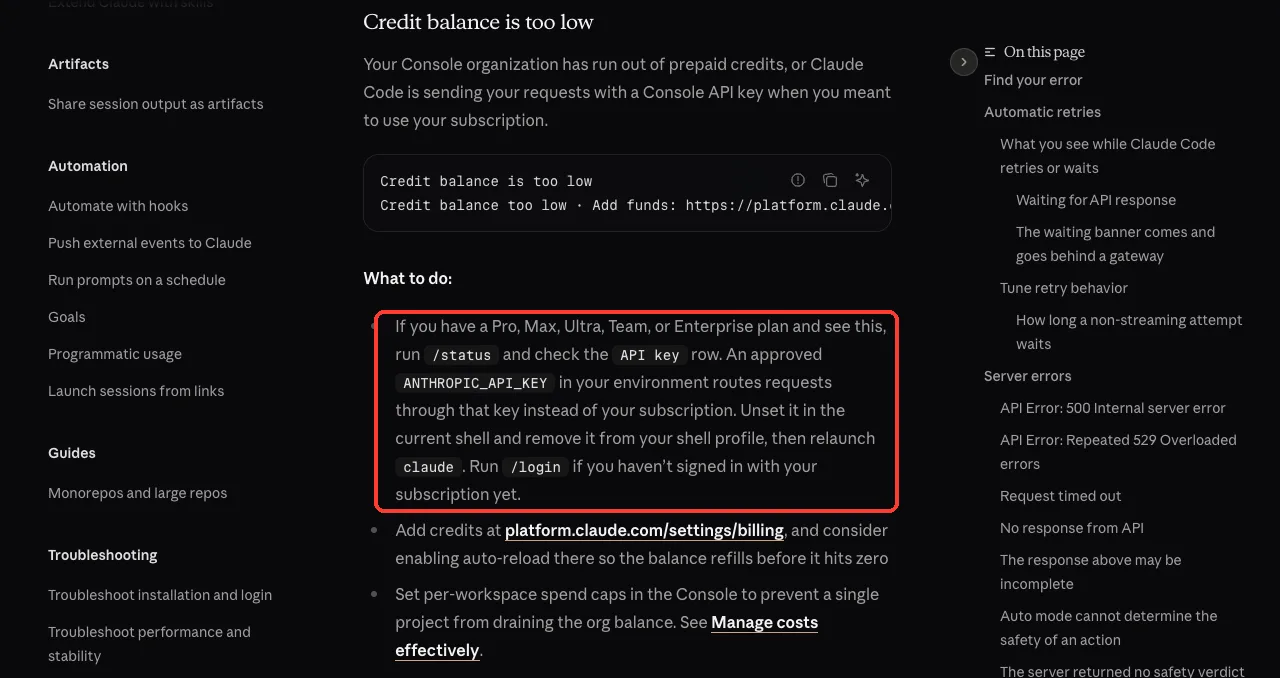
So if you pay for a plan, the message is a clue rather than a bill. It tells you Claude Code isn’t using your plan at all. Something handed it an API key, and that key’s account is empty.
A subscriber who sees a credit balance error is not out of usage. They are on the wrong login.
Why Claude Code Uses Your API Key Instead of Your Subscription
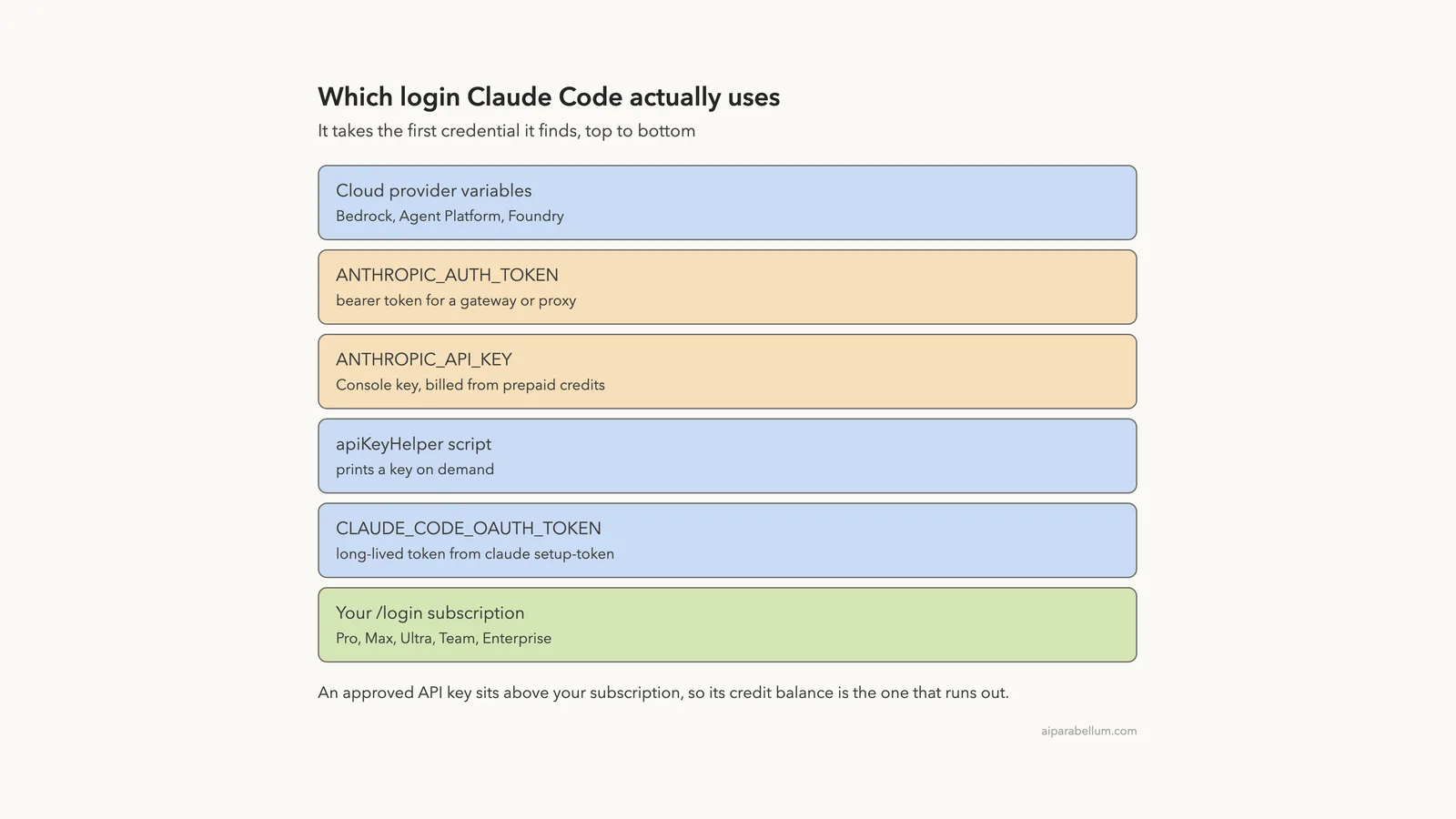
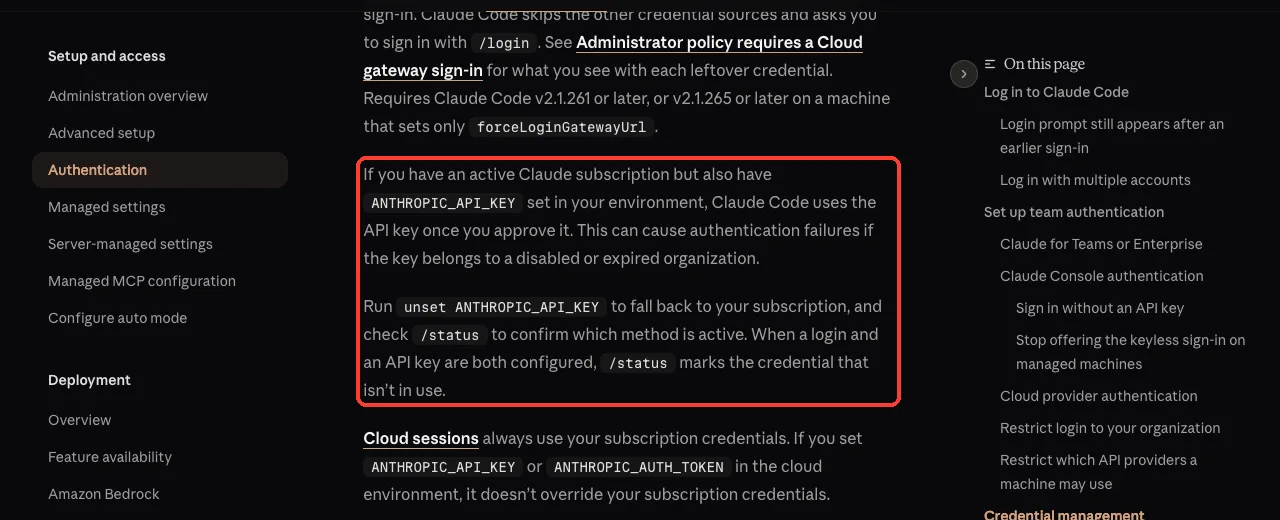
When more than one credential is available, Claude Code picks one in a fixed order. The authentication docs list it, and your /login subscription sits at the very bottom.
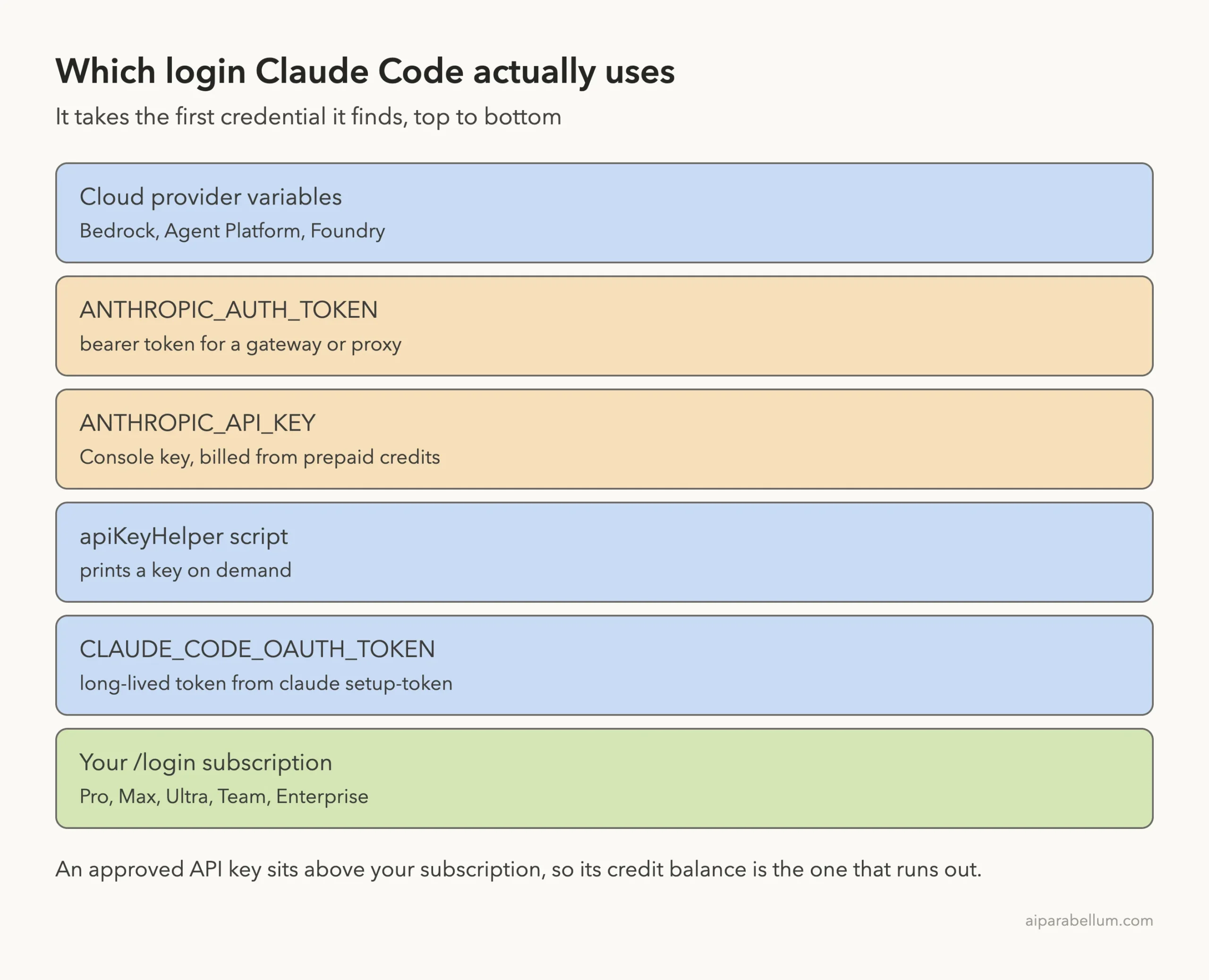
Here is the order from the docs, simplified:
- Cloud provider variables such as
CLAUDE_CODE_USE_BEDROCK,CLAUDE_CODE_USE_VERTEXorCLAUDE_CODE_USE_FOUNDRY ANTHROPIC_AUTH_TOKEN, a bearer token for a gateway or proxyANTHROPIC_API_KEY, a key from the Claude Console- An
apiKeyHelperscript that prints a key CLAUDE_CODE_OAUTH_TOKEN, a long-lived token fromclaude setup-token- Anthropic profile and federation credentials (only when named in
ANTHROPIC_PROFILE) - Your subscription login from
/login
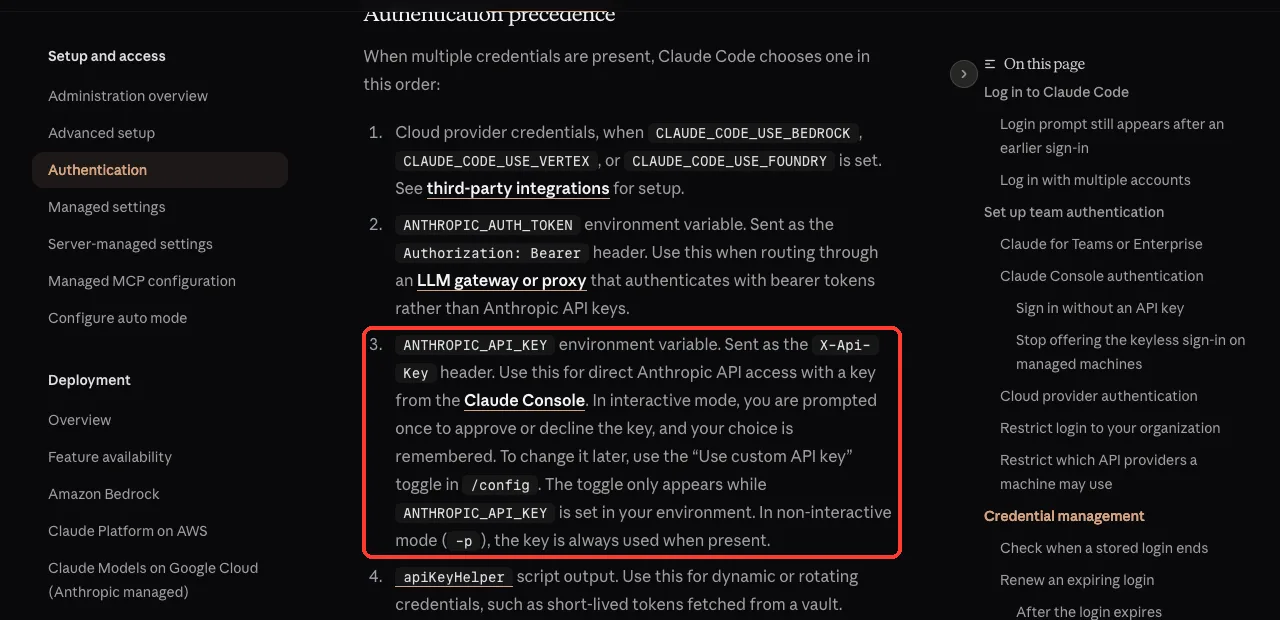
The docs say it plainly: if you have an active Claude subscription and also have ANTHROPIC_API_KEY set, Claude Code uses the API key once you approve it. In non-interactive mode with -p, it uses the key whenever it is present, with no question asked.
Where the stray key usually comes from
- An
export ANTHROPIC_API_KEY=...line you added to~/.zshrcor~/.bashrcfor another project or the Anthropic SDK - A
.envfile in your project that direnv, a dotenv shell plugin or your IDE terminal loads for you (the error docs name these tools) - An old free-trial or work Console key you forgot about
- Clicking Yes on the “Detected a custom API key” prompt months ago without noticing what it meant
We Reproduced It: An API Key Takes Over a Signed-In Session
We started in a small demo folder while signed in with a subscription. First we checked that no ANTHROPIC_ variables were set and ran a one-word prompt with claude -p. It answered “ok” on the subscription.
Then we exported an obviously fake key and ran the same prompt. The result changed at once.
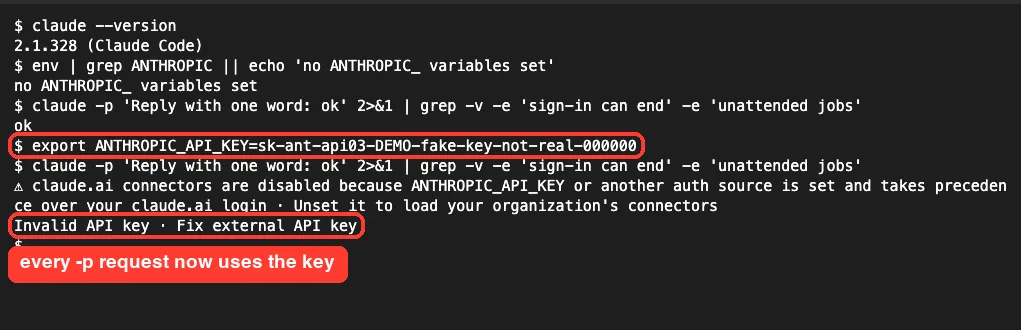
Claude Code even printed a warning that ANTHROPIC_API_KEY “takes precedence over your claude.ai login”. Our fake key failed with “Invalid API key”. A real key from an empty Console account would fail with “Credit balance is too low” instead, which is the same problem with a different symptom.
If you see “Invalid API key” rather than the credit message, the cause and fix are the same. Our guide to 401 login errors covers the other variants.
How to Fix “Credit Balance Is Too Low” With a Claude Subscription
Work through these fixes in order. Most people are done after the second one.
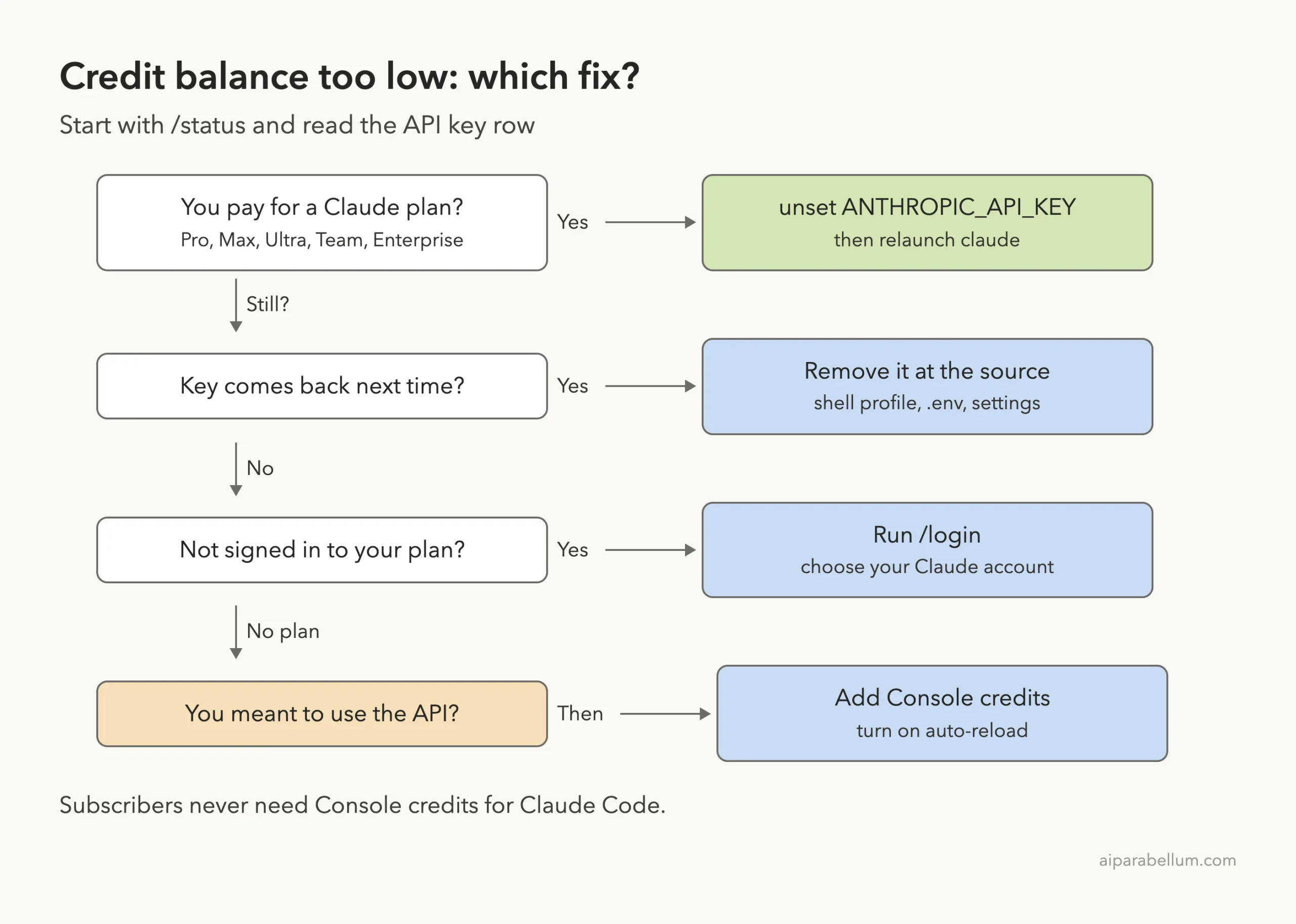
Fix 1: Check /status to see which credential is active
Inside Claude Code, run /status. Look at two rows: Auth token and API key. If the API key row shows ANTHROPIC_API_KEY, that key is paying for your requests.
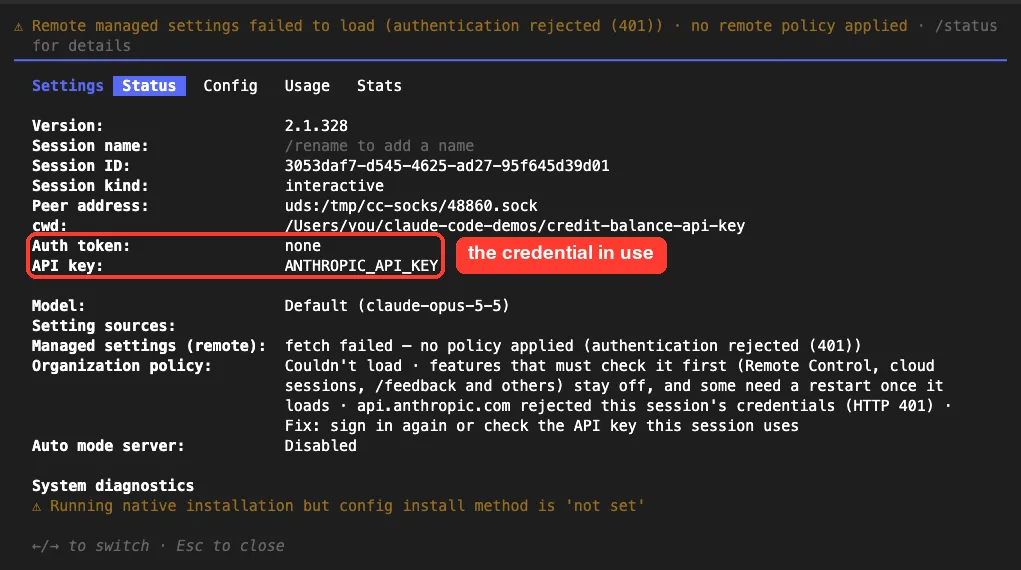
According to the docs, when a login and an API key are both configured, /status also marks the one that isn’t in use. That makes it the quickest way to settle the question.
Fix 2: Unset ANTHROPIC_API_KEY and relaunch
Exit Claude Code, then clear the variable in your current shell:
env | grep ANTHROPIC
unset ANTHROPIC_API_KEY
env | grep ANTHROPIC_API_KEY || echo 'ANTHROPIC_API_KEY is not set'
claude
In our test, the very next claude -p call answered normally on the subscription.
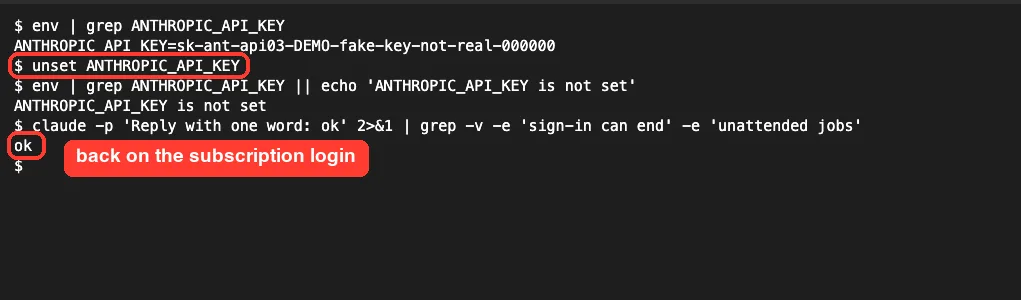
On Windows PowerShell, the docs suggest Get-ChildItem Env:ANTHROPIC* to find the variable. We tested on macOS; the Windows steps follow Anthropic’s official instructions.
Fix 3: Remove the key where it is set
unset only lasts until you close the terminal. To stop the key from coming back, find the line that sets it:
grep -n ANTHROPIC_API_KEY ~/.zshrc ~/.bashrc ~/.bash_profile ~/.profile 2>/dev/null
ls -a | grep -i env
Delete or comment out the export ANTHROPIC_API_KEY=... line, then open a new terminal.
If a project .env file holds the key, remove it there or stop your tools from loading it in that folder. Also check any env block in your Claude Code settings files.
Fix 4: Turn off “Use custom API key” in /config
The first time Claude Code sees ANTHROPIC_API_KEY in an interactive session, it asks whether to use it. The default answer is “No (recommended)”, and Claude Code remembers your choice.
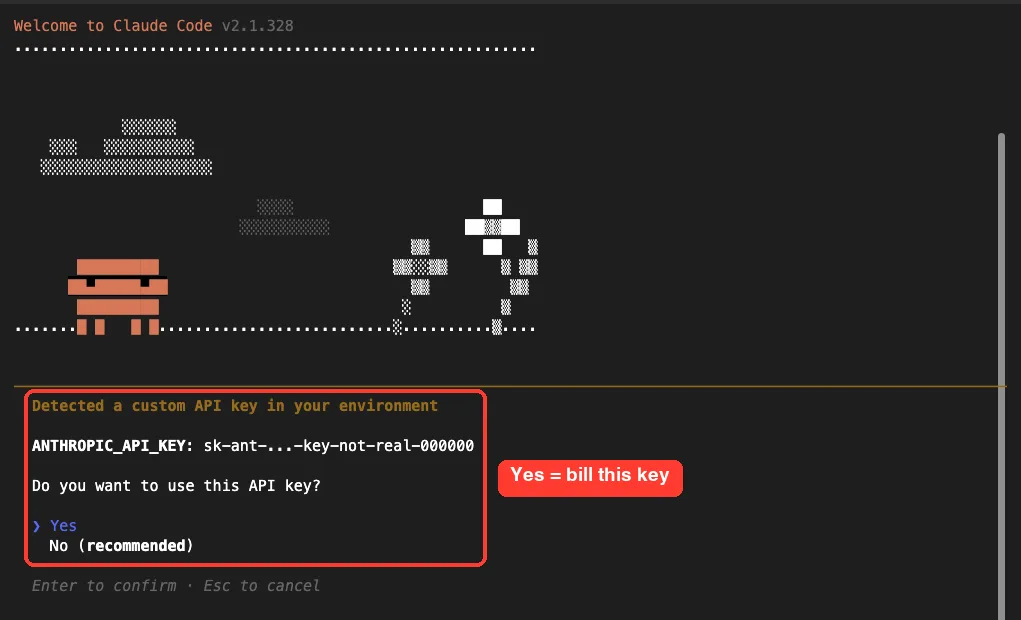
If you clicked Yes once, you can undo it without touching your shell. Run /config, search for “custom API”, and switch “Use custom API key” off. The docs note this toggle only appears while ANTHROPIC_API_KEY is set.
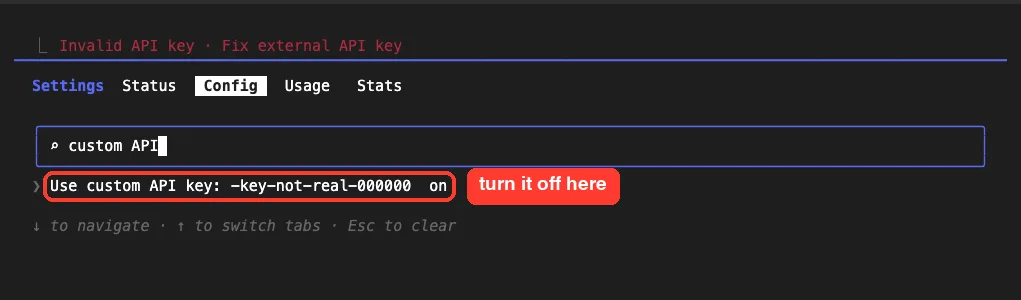
Keep in mind this toggle doesn’t help scripts. claude -p uses the key whenever it is present, so unsetting it is still the cleaner fix.
Fix 5: Sign in with your subscription
If /status shows no subscription login at all, run /login and choose your Claude account rather than a Console account. Our guide to Claude Code plans explains which sign-in goes with which plan.
Watch for the other environment credentials from the list too. ANTHROPIC_AUTH_TOKEN and an apiKeyHelper script also rank above your subscription.
Fix 6: Add Console credits, only if you meant to use the API
Some people really do want pay-per-token billing, for example in CI or for a team workspace. In that case, add credits on the Console billing page. The docs also suggest turning on auto-reload so the balance refills before it hits zero, and setting per-workspace spend limits so one project can’t drain the whole balance.
What It Looks Like Inside an Interactive Session
In a normal claude session with an approved key, nothing looks wrong at startup. The first message fails, and Claude Code asks you to fix the key and resend.
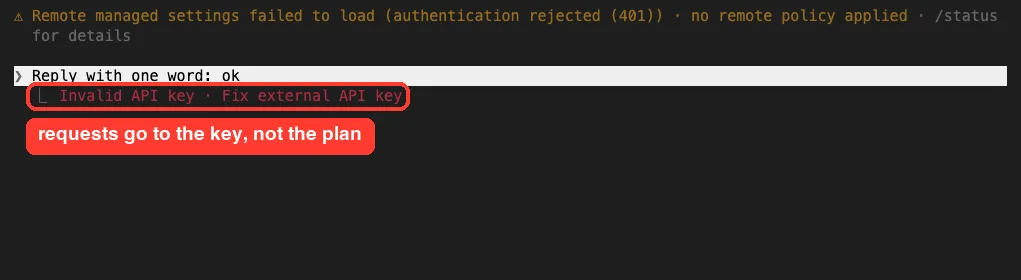
Your work is safe when this happens. The request never reached a model, so no files changed. Fix the credential and send the message again.
Credit Balance vs Other Usage Errors
Several Claude Code messages sound alike but mean different things. Use this table to make sure you are fixing the right one.
| Message | Who sees it | What to do |
|---|---|---|
| Credit balance is too low | API key or Console users | Remove the key if you have a plan; add credits if not |
| Invalid API key · Fix external API key | Anyone with a bad or revoked key set | Unset the key or fix it in the Console |
| You’ve hit your session limit or weekly limit | Subscribers | Wait for the reset or use usage credits |
| You’ve hit your monthly spend limit | Plans with usage credits on | Raise the limit the message names |
| Request rejected (429) | Everyone | Slow down and retry; see our rate limit guide |
A useful tell: the costs docs say /usage-credits only works after signing in with your claude.ai subscription and isn’t available with API key authentication. If that command refuses to run, you are on a key. Our full list of common Claude Code errors and fixes covers the rest.
Try It Yourself
You can safely see the takeover with a fake key in a throwaway folder. A fake key is rejected before any billing, so nothing is charged:
mkdir -p ~/claude-key-test && cd ~/claude-key-test
claude -p 'Reply with one word: ok'
export ANTHROPIC_API_KEY=sk-ant-api03-DEMO-fake-key-not-real
claude -p 'Reply with one word: ok'
unset ANTHROPIC_API_KEY
claude -p 'Reply with one word: ok'
The first and last calls should answer on your subscription, and the middle one should fail with “Invalid API key”. Don’t add the fake key to your shell profile.
Common Mistakes
- Buying Console credits to fix a subscription account. The plan is fine; the key is the problem.
- Running
unsetin one terminal and launching Claude Code from another one, or from an IDE that still has the variable. - Only flipping the
/configtoggle, then wondering why scripts usingclaude -pstill fail. - Forgetting a project
.envfile that reloads the key every time you open that folder. - Logging out and back in over and over. A new login doesn’t help while the key still outranks it.
Pro Tips
- Keep API keys for SDK projects in that project’s own environment, not in your global shell profile.
- Make
/statusyour first check whenever billing or login errors appear. - Answer “No” to the custom API key prompt unless you really want per-token billing.
- Cloud sessions on the web always use your subscription, according to the docs, so a stray key there doesn’t override it.
- If you track spend with a tool like CodeBurn, check which login the numbers come from.
- If everything is tangled, our guide to reset Claude Code walks through config and login cleanup.
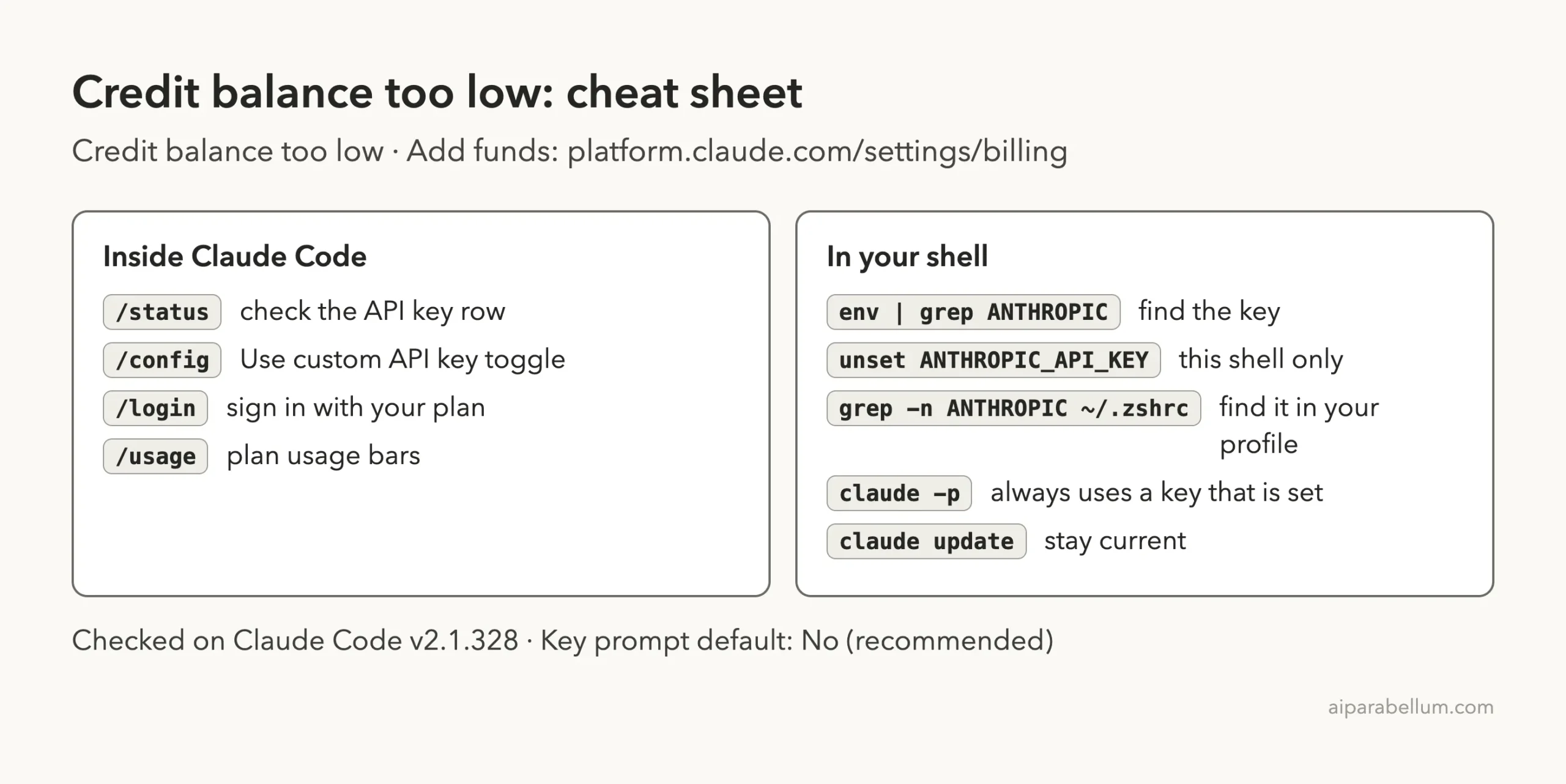
Cheat Sheet
Frequently Asked Questions
Why does Claude Code say my credit balance is too low when I pay for Max?
Because it isn’t using your Max plan. An ANTHROPIC_API_KEY in your environment outranks the subscription, and that key’s Console account has no credits. Unset the key and relaunch.
Do I need to buy API credits to use Claude Code with a subscription?
No. Pro, Max, Ultra, Team and Enterprise plans include Claude Code usage. Console credits only matter if you sign in with a Console account or use an API key.
How do I check if Claude Code is using my API key or my subscription?
Run /status and read the API key and Auth token rows. If the API key row names ANTHROPIC_API_KEY, the key is in use.
I unset the key but the error came back. Why?
Something sets it again in each new shell, usually your shell profile or a .env file. Find the line with grep -n ANTHROPIC_API_KEY ~/.zshrc and remove it, then open a new terminal.
Does the /config toggle fix claude -p scripts?
No. The docs say non-interactive mode always uses the key when it is present. Remove the variable from the script’s environment instead.
Conclusion
The Claude Code “credit balance is too low” error on a paid Claude plan means Claude Code is billing a Console API key, not your subscription, because ANTHROPIC_API_KEY sits above your login in the credential order. In our test, a fake key took over a signed-in session the moment we exported it, and unset ANTHROPIC_API_KEY brought the subscription back on the next call. Check /status, unset the key, remove it from your shell profile or .env file, and only add Console credits if you truly want pay-per-token billing. For more on the plans behind Claude Code, see our overview of Claude AI.