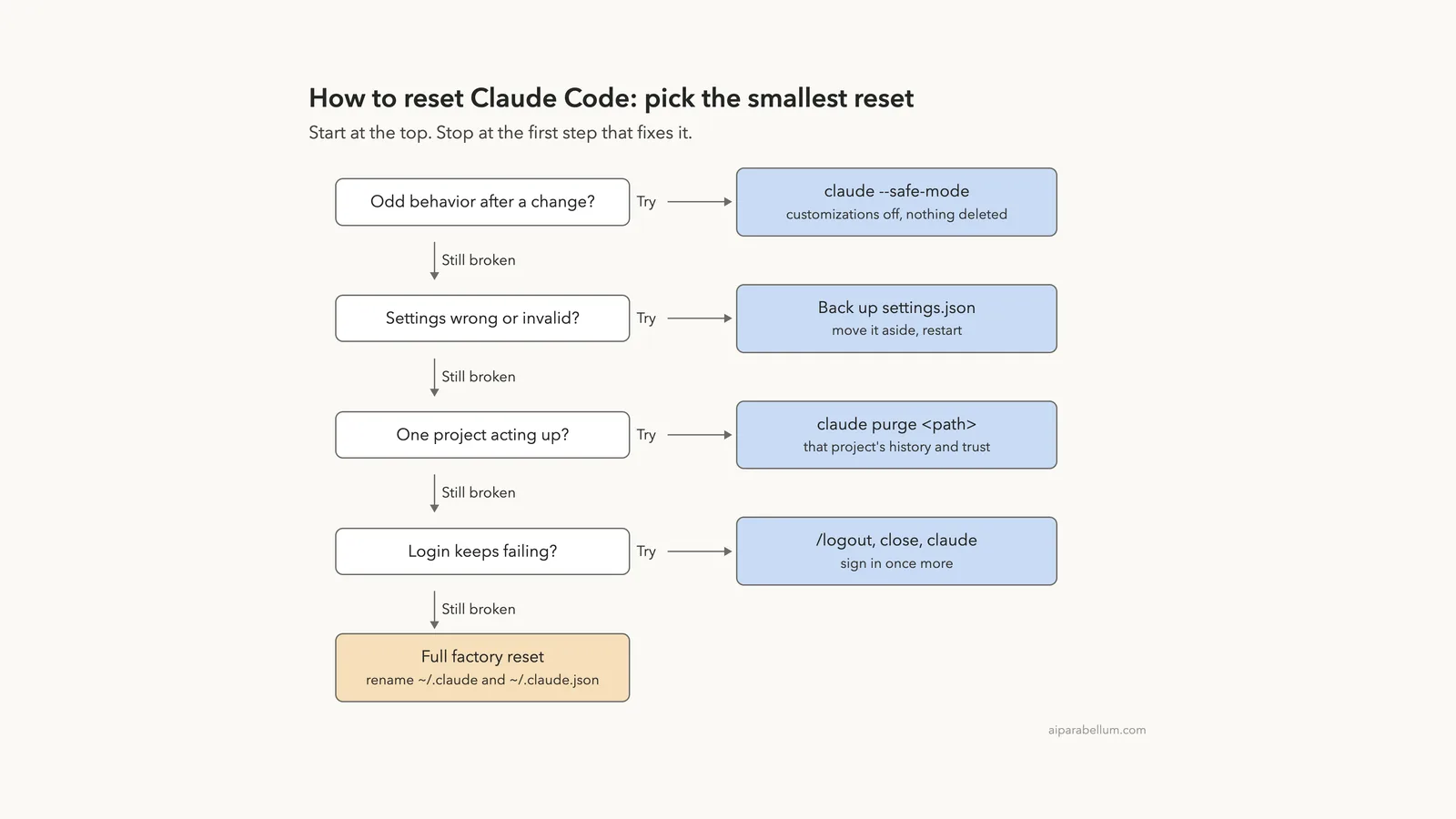
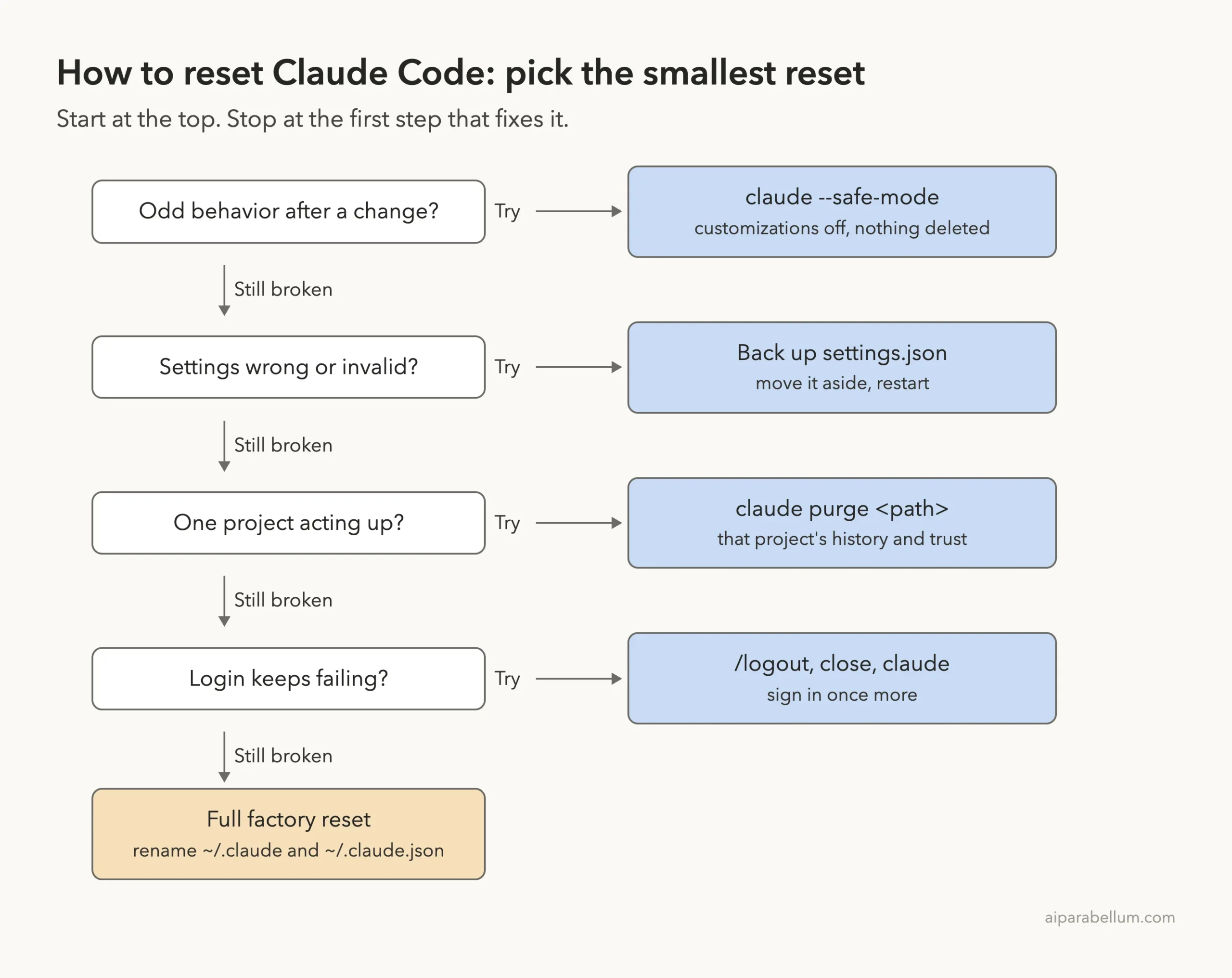
If you want to know how to reset Claude Code, the short answer is that there is no single “factory reset” button. Claude Code keeps your settings, login and saved data in a few separate places, so you reset each one on its own, from the smallest step to the biggest.
To get default settings back, move ~/.claude/settings.json aside (rename it to settings.json.bak) and restart. To clear one project’s history and trust, run claude purge <path>. To reset your login, run /logout, close Claude Code and start it again.
For a full factory reset, log out, then rename ~/.claude and ~/.claude.json. Before any of that, try claude --safe-mode, which turns off your customizations for one session without deleting a thing.
- Test first:
claude --safe-modeor a cleanCLAUDE_CONFIG_DIRfolder. - Reset settings: rename
~/.claude/settings.json, and the project’s.claude/settings.local.jsonif needed. - Reset one project:
claude purge <path> --dry-run, thenclaude purge <path>. - Reset login:
/logout, close, runclaude, sign in. - Full reset:
/logout, then rename~/.claudeto~/.claude.bakand~/.claude.jsonto~/.claude.json.bak.
This guide is part of our help series. Browse all our Claude Code tutorials for more fixes and how-tos.
Tested with Claude Code v2.1.325 on macOS on November 18, 2026. Every reset step we show was run for real, but only on a throwaway demo project and a throwaway config folder, never on a working setup. The login reset comes from Anthropic’s official documentation.
We tested on macOS; the Windows and Linux steps follow Anthropic’s official instructions.
How to Reset Claude Code: Quick Summary
| What you want to reset | Command or step | What you lose |
|---|---|---|
| Nothing yet, just test | claude --safe-mode | Nothing; customizations are off for one session |
| Your user settings | Rename ~/.claude/settings.json | Theme, model, permission rules, hooks you set there |
| One project’s settings | Rename .claude/settings.local.json | Your personal approvals for that project |
| One project’s saved data | claude purge <path> | Its transcripts, auto memory, prompt history and trust entry |
| Project MCP approvals | claude mcp reset-project-choices | Your yes or no answers for project MCP servers |
| Your login | /logout, then claude | The saved sign-in and first-launch setup state |
| Everything (factory reset) | Log out, rename ~/.claude and ~/.claude.json | All settings, history, skills, agents, plugins and MCP servers |
Why Claude Code Has No Single Reset Button
Claude Code splits its setup across several files, each with its own job. Some hold settings you wrote, some hold data Claude Code writes for itself, and your login lives somewhere else again.
That’s good news. It means you can fix a broken setting without losing your chat history, or clear one project without signing out. Our guide to the .claude folder covers each file in depth, and here is the short map.
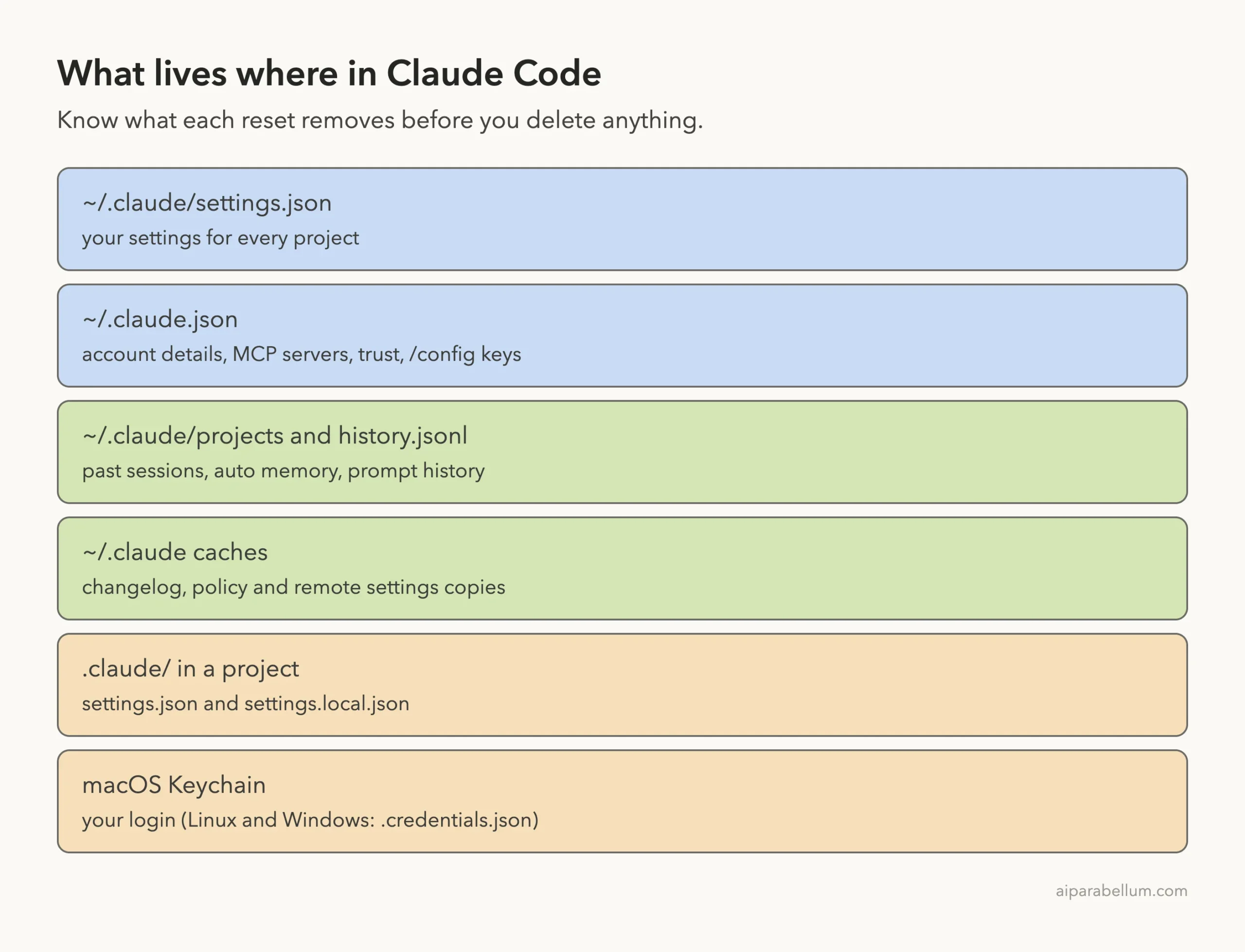
The files that matter for a reset
| Location | What it holds |
|---|---|
~/.claude/settings.json | Your user settings for every project on the machine |
~/.claude.json | Account details, MCP servers, per-project trust and the global keys /config writes |
~/.claude/projects/ | Past session transcripts and auto memory |
~/.claude/history.jsonl | Prompts you typed, used for up-arrow recall |
.claude/settings.json in a project | Shared team settings for that project |
.claude/settings.local.json in a project | Your personal settings for that one project |
| macOS Keychain | Your login on a Mac |
~/.claude/.credentials.json | Your login on Linux and Windows (and the Mac fallback) |
One more thing to know: installing Claude Code doesn’t create any settings file. So “default settings” simply means no user settings file at all, and that is exactly what the settings reset below gives you. If you’re not sure where your files are, see our list of settings file locations.
Your organization can also push managed settings. No reset on your side removes those, because they always win over your own files, as the official settings docs explain.
Step 1: Test With Safe Mode Before You Delete Anything
Most “reset” searches start with Claude Code acting strangely after you added a plugin, hook, skill or MCP server. Before you delete files, start a session with claude --safe-mode.
Safe mode turns off CLAUDE.md, skills, plugins, hooks, MCP servers, custom commands and agents, output styles and keybindings. Your login, model choice, built-in tools and permissions keep working.
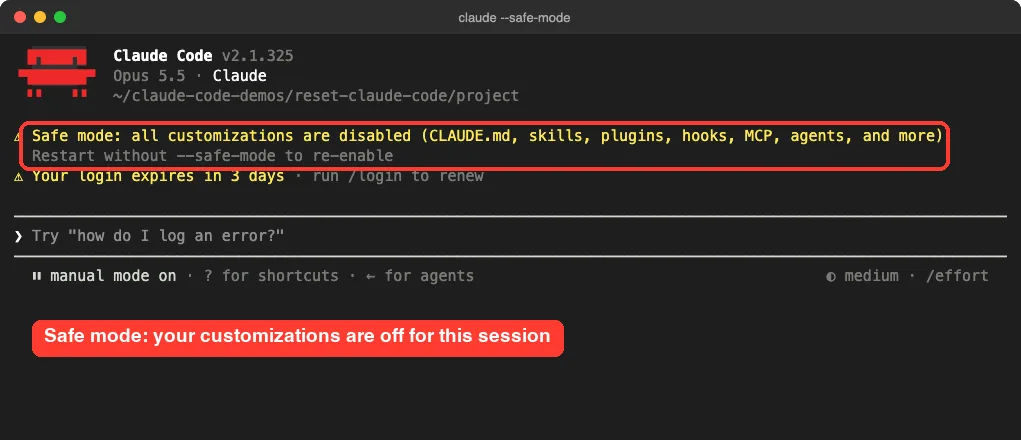
If the problem goes away in safe mode, one of your customizations is the cause, and you don’t need a full reset. Remove or fix that one item. The debug your configuration page shows how to check each one.
Safe mode is a free test. It changes nothing on disk, so always try it before you rename a single file.
Safe mode doesn’t skip project settings files
When we opened our demo project in safe mode, the trust prompt still warned that .claude/settings.local.json pre-approves a command. Permission rules in settings files still apply in safe mode, so a bad rule there needs the settings reset in Step 2.
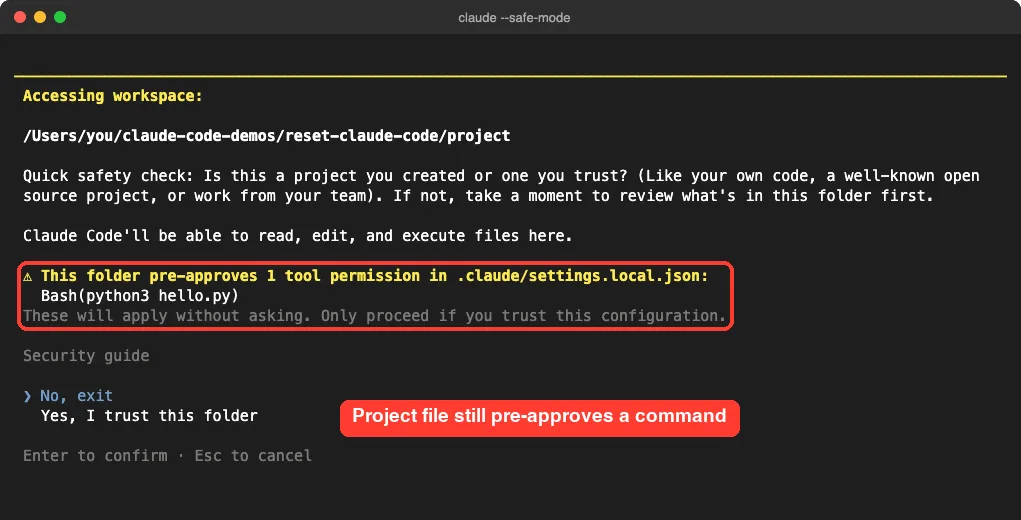
Step 2: Reset Claude Code Settings to Default
To reset your settings, don’t delete the file. Rename it, so you can copy back the parts you want later.
Find what’s wrong with claude doctor
Run claude doctor in your terminal first. Among other checks, it lists settings files it couldn’t read and the entries it rejected.
For our test, we pointed Claude Code at a throwaway folder with CLAUDE_CONFIG_DIR and saved a deliberately broken settings.json there. Doctor caught it right away.
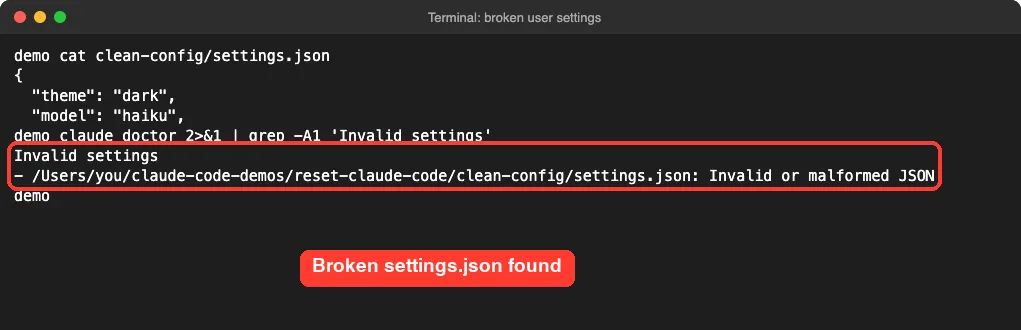
Move the user settings file aside
On macOS or Linux, run this with Claude Code closed:
mv ~/.claude/settings.json ~/.claude/settings.json.bak
claude doctor
On Windows PowerShell, the same file is %USERPROFILE%\.claude\settings.json:
Rename-Item "$env:USERPROFILE\.claude\settings.json" settings.json.bakIn our test, after moving the broken file aside, doctor found zero invalid settings. The folder kept the .bak copy, so nothing was lost for good.
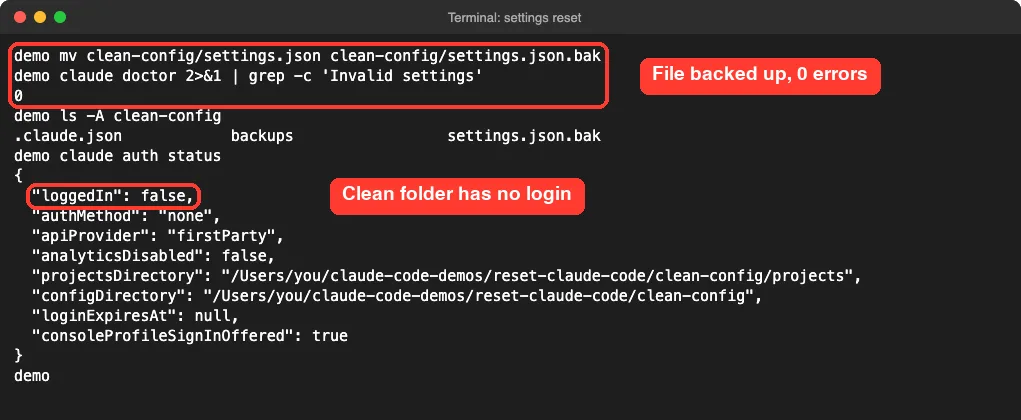
Claude Code writes a new settings.json the first time you change an option it stores there, such as the theme. When we picked a theme in the clean folder, the file came right back with just that choice.
Reset project settings too
If one project still misbehaves, rename that project’s .claude/settings.local.json the same way. Leave .claude/settings.json alone if your team shares it through git; talk to your team before changing it.
Need ideas for a fresh, tidy file afterward? Our settings.json examples are a good starting point.
Step 3: Test a Fully Clean Claude Code Config
If safe mode didn’t help and you suspect your whole setup, Anthropic’s docs describe a clean test that doesn’t touch your real files. You start Claude Code with an empty config folder and without project settings.
mkdir -p ~/claude-clean/empty && cd ~/claude-clean/empty
CLAUDE_CONFIG_DIR=~/claude-clean/config claude --setting-sources user
The variable applies to that one launch only. Your normal ~/.claude stays exactly as it was.
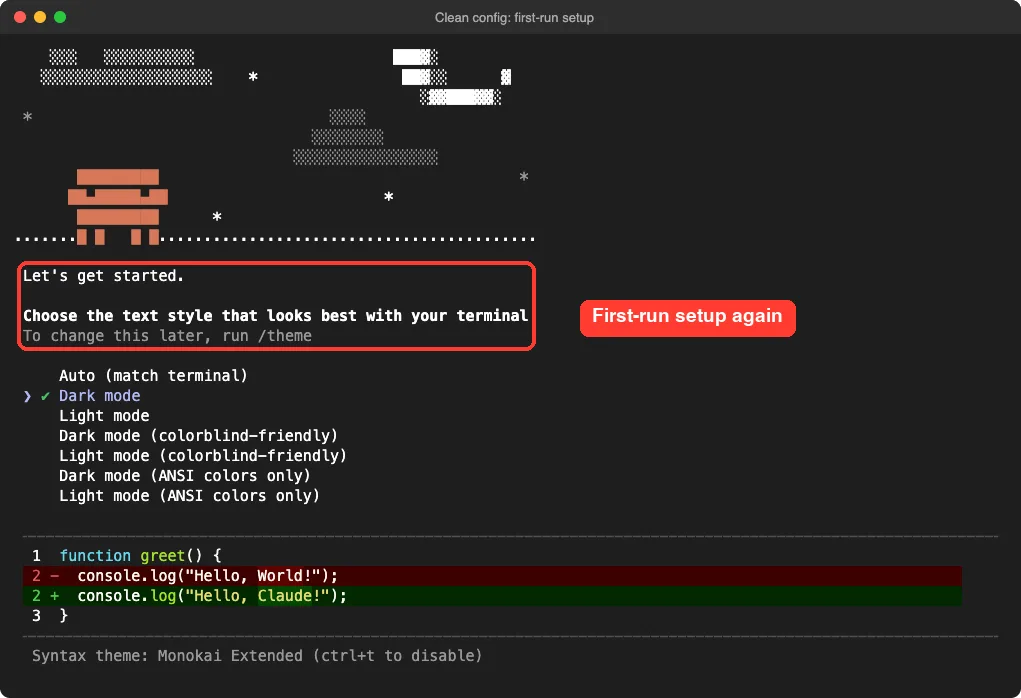
You’ll see the first-run screens and need to sign in, because the clean folder has its own login slot. Our test showed "loggedIn": false for the clean folder while the normal setup stayed signed in.
- Problem gone: the cause is in your user or project setup. Copy files from
~/.claudeinto the clean folder one at a time until it comes back. - Problem stays: the cause is outside your files. Check managed settings with
/status, your shell’s environment variables, and the troubleshooting guide.
When you’re done, delete ~/claude-clean yourself. It is just a normal folder.
Step 4: Reset One Project With claude purge
Sometimes only one project is the problem, or you want Claude Code to forget it. The built-in claude purge command removes the state Claude Code keeps for a single project.
It deletes that project’s transcripts and auto memory, its task, debug and file-history entries, the matching lines in history.jsonl, and the project’s entry in ~/.claude.json. Always preview it first:
claude purge ~/work/my-repo --dry-run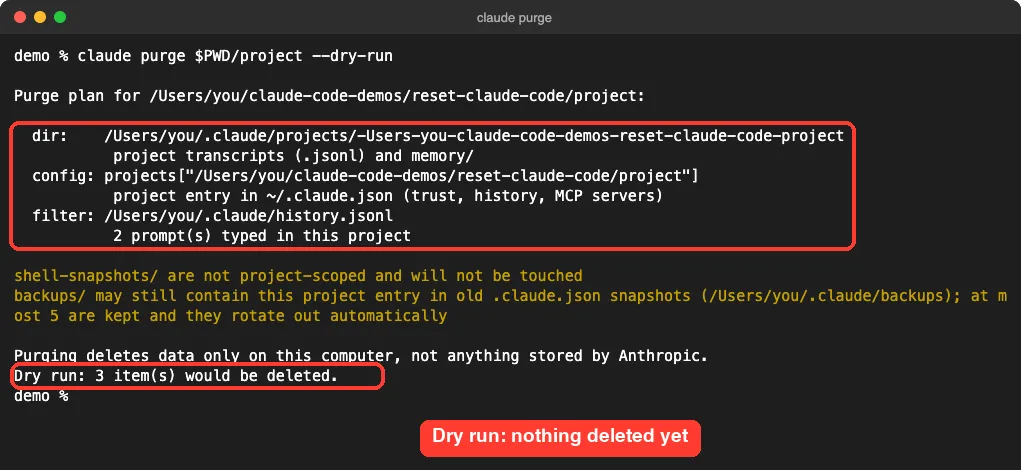
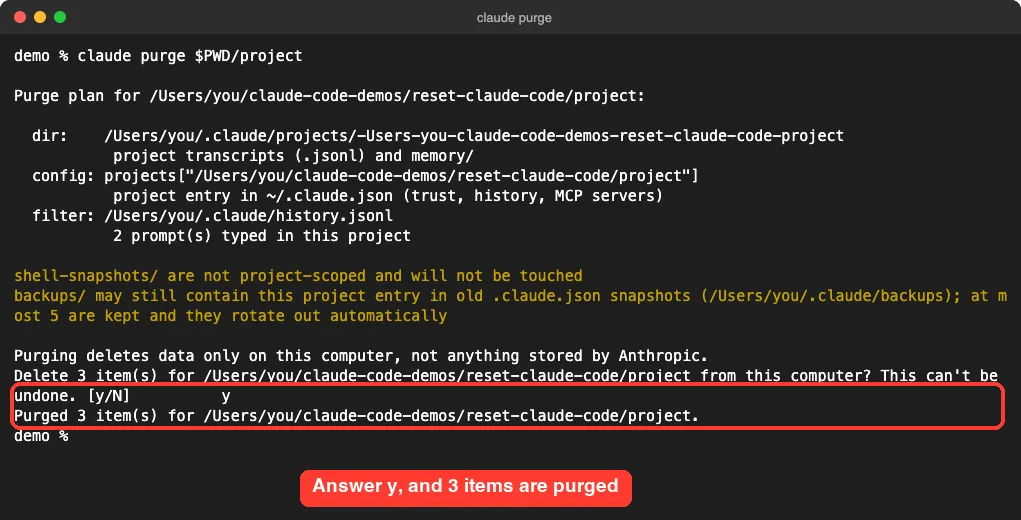
Then run it without --dry-run. It prints the same plan and asks you to confirm with y.
A few useful options from the .claude directory docs:
--allinstead of a path purges every project and deleteshistory.jsonloutright.-isteps through the plan one item at a time.--yesskips the confirmation, for scripts.- Leave out the path to pick a project from a list.
Purge only deletes data on your computer, as its own output says. It also leaves shell-snapshots/ and backups/ alone. If you only want old chats gone, our guide on how to delete session history goes deeper.
Reset project MCP approvals
Did you dismiss the approval prompt for a server in a project’s .mcp.json? That server stays off. Run claude mcp reset-project-choices and restart, and Claude Code asks again for every project server.
Step 5: Reset Your Claude Code Login
When sign-in keeps failing and the cause isn’t clear, Anthropic’s reset your login steps are simple:
- Type
/logoutinside Claude Code to sign out completely. - Close Claude Code.
- Run
claudeagain and finish the sign-in.
Per the authentication docs, logging out also resets your first-launch setup, so you’ll see the welcome screens again. We didn’t log out of a working account for this guide; these steps come straight from the docs.
On a Mac, your login lives in the Keychain, not in a file you’d normally see. On Linux and Windows it’s .credentials.json inside your .claude folder. Use /logout rather than deleting these by hand.
Stuck in a loop where it keeps asking you to sign in? Read our login loop fix, or the wider guide to login problems.
Step 6: Clear the Claude Code Cache
Claude Code doesn’t have one big cache folder. The docs list a few cached files under ~/.claude that are safe to delete because Claude Code fetches them again:
| Cached file | What happens if you delete it |
|---|---|
cache/changelog.md | Nothing; refreshed in the background |
remote-settings.json | Nothing; fetched again on next launch |
policy-limits.json | Nothing; refreshed automatically |
paste-cache/ | Pasted text in recalled prompts is lost |
debug/, plans/, shell-snapshots/ | Nothing user-facing |
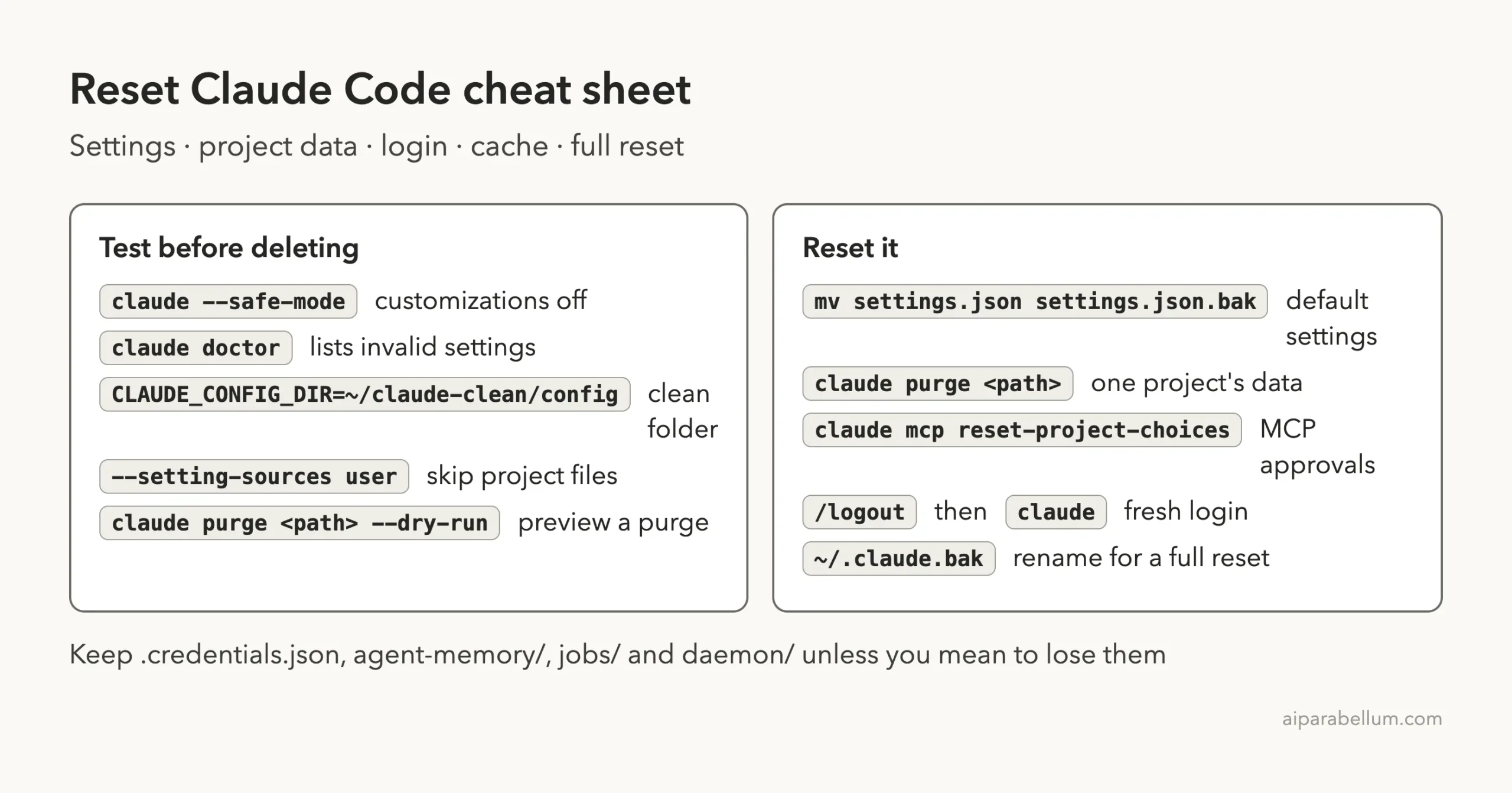
The docs say caches and lock files are safe to delete, but keep these state files: .credentials.json (your login), agent-memory/ (subagent memory), and jobs/ and daemon/ (background sessions).
The native installer also keeps staged downloads in ~/.cache/claude/ on macOS and Linux. Clearing that only matters for install or update problems, which our common errors guide covers.
Step 7: Full Factory Reset of Claude Code
Only go here when every smaller step failed. A full reset gives you the same blank start as the clean test in Step 3, but for real.
On macOS or Linux:
# 1. Inside Claude Code, sign out first
/logout

# 2. Close Claude Code, then in your terminal
which claude
mv ~/.claude ~/.claude.bak
mv ~/.claude.json ~/.claude.json.bak

# 3. Start fresh
claude
On Windows PowerShell:
Rename-Item "$env:USERPROFILE\.claude" .claude.bak
Rename-Item "$env:USERPROFILE\.claude.json" .claude.json.bak
Run which claude before renaming. The recommended native install lives in ~/.local/bin, but the old local npm install lived in ~/.claude/local, so renaming the folder would hide that copy of Claude Code too.
What a full reset loses
- All user settings, permission rules and hooks.
- Your personal
CLAUDE.md, skills, agents, commands and output styles. - Installed plugins and MCP servers you added at user scope.
- Session history, auto memory and the ability to resume old chats.
- Usage totals shown by
/usageand old/insightsreports.
Because you renamed instead of deleting, you can copy back anything you miss from ~/.claude.bak. Once you’re happy, delete the backup. If you want Claude Code gone entirely rather than reset, follow our full uninstall guide.
Rename, don’t delete. A backup folder turns a scary reset into an undo button.
Try It Yourself
Practice the clean test without any risk. Open a terminal and run:
mkdir -p ~/claude-clean/empty && cd ~/claude-clean/empty
CLAUDE_CONFIG_DIR=~/claude-clean/config claude doctor
Then save a broken ~/claude-clean/config/settings.json (leave off the closing brace) and run doctor again. You’ll see the “Invalid settings” line, just like our test. Rename the file to settings.json.bak, run doctor once more, and the warning is gone.
Common Mistakes
- Deleting
~/.claudefirst. Try safe mode and the settings rename before anything else. - Forgetting
~/.claude.json. It sits next to the folder, not inside it, and holds your MCP servers and trust choices. - Deleting files while Claude Code is running. Close every session first so nothing writes them back.
- Skipping
/logoutbefore a full reset. Your Mac Keychain login isn’t in the folder you renamed. - Expecting a reset to remove managed settings. Your organization’s policy still applies.
- Setting
CLAUDE_CONFIG_DIRin a project settings file. Claude Code ignores it there; set it in your shell.
Pro Tips
- Run
claude purge <path> --dry-runbefore every purge. It costs nothing and shows exactly what goes. - Keep a dated backup:
cp ~/.claude/settings.json ~/.claude/settings.$(date +%F).jsonbefore big changes. - If
~/.claude.jsonbreaks, Claude Code keeps earlier copies in~/.claude/backups/you can restore from. - Use a named alias such as
alias claude-clean='CLAUDE_CONFIG_DIR=~/claude-clean/config claude'for repeat tests. - After a reset, run claude doctor once to confirm a clean setup.
Claude Code Reset Cheat Sheet
Frequently Asked Questions
Does Claude Code have a factory reset command?
No. There’s no single command. You combine /logout with renaming ~/.claude and ~/.claude.json, which gives the same blank start as a fresh install.
Will resetting Claude Code delete my chats on claude.ai?
No. Every step here only touches files on your computer. The purge command even says it deletes data only on this computer, not anything stored by Anthropic.
Will I lose my subscription or plan?
No. Your plan belongs to your account, not to your files. After a reset you just sign in again with the same account.
How do I reset Claude Code settings for just one project?
Rename that project’s .claude/settings.local.json, and run claude purge on its path if you also want its history and trust cleared. Other projects stay untouched.
Does reinstalling Claude Code reset my settings?
No. Reinstalling replaces the program, but your ~/.claude folder and ~/.claude.json stay where they are. You still need the steps above.
Conclusion
Knowing how to reset Claude Code comes down to picking the smallest step that fixes your problem: test with claude --safe-mode, rename ~/.claude/settings.json for default settings, use claude purge for one project, run /logout for login trouble, and save the full rename of ~/.claude and ~/.claude.json for last. Rename instead of delete at every step, close Claude Code before you touch its files, and you can always undo a reset. For more on the tool itself, visit our Claude AI overview.