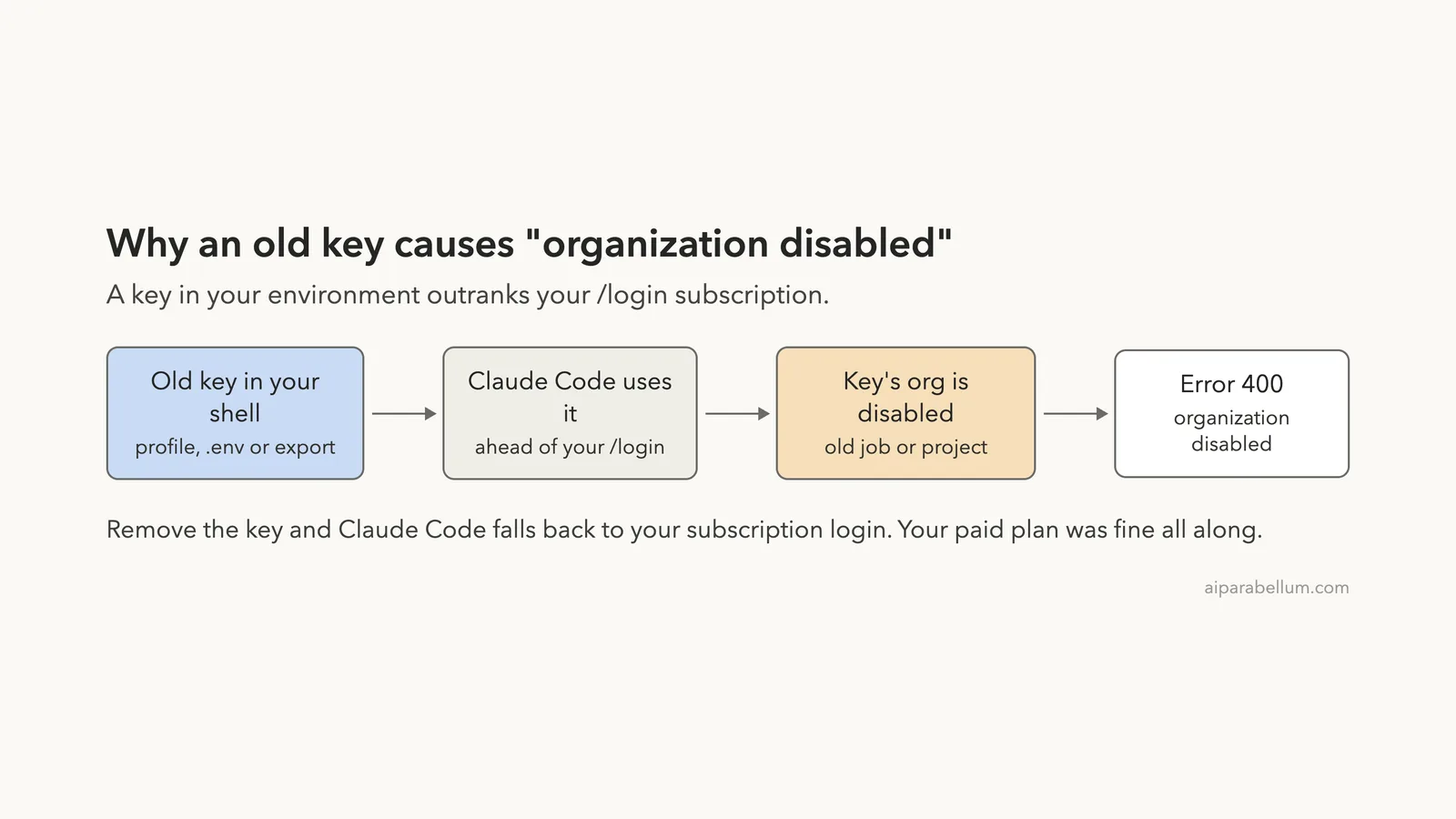
If Claude Code stops with “API Error: 400 … This organization has been disabled”, it almost always means Claude Code is sending an old Anthropic API key, not your current subscription login. When people search for claude this organization has been disabled, the usual story is an ANTHROPIC_API_KEY left in a shell profile or .env file from a previous job or project, and the Console organization behind that key is no longer active.
Your Pro, Max, Ultra, Team or Enterprise plan is usually fine. Claude Code simply picks the API key ahead of your /login credentials, so the request goes to the wrong organization. Here is the short fix list:
- Run
env | grep ANTHROPICin the terminal where you start Claude Code to see whether a key is set. - Run
unset ANTHROPIC_API_KEY, then startclaudeagain. - Delete the
export ANTHROPIC_API_KEY=...line from~/.zshrc,~/.bashrc,~/.profileor your project’s.envfile so it doesn’t come back. - Run
/statusinside Claude Code to confirm it now uses your Claude account. - If no key is set and the error stays, sign in again with
/loginand contact Anthropic support or your organization admin.
This guide is part of our help series. Browse all our Claude Code tutorials for more fixes and how-tos.
Tested with Claude Code v2.1.325 on macOS on November 17, 2026. We can’t safely trigger a disabled organization, so the exact error text comes from Anthropic’s official documentation. We did reproduce the cause for real in a demo folder with a made-up key, and every terminal capture below is real.
We tested on macOS; the Windows steps follow Anthropic’s official instructions.
This Organization Has Been Disabled: Quick Summary
| Question | Short answer |
|---|---|
| Exact message | API Error: 400 ... This organization has been disabled. |
| Newer wording | Your ANTHROPIC_API_KEY belongs to a disabled organization |
| Most common cause | A stale ANTHROPIC_API_KEY from a disabled Console organization |
| Is my subscription cancelled? | Usually no; the key overrides your saved login |
| Fastest fix | unset ANTHROPIC_API_KEY, then relaunch claude |
| Permanent fix | Remove the key from your shell profile or .env file |
| How to check | /status shows which credential is active |
| Still failing with no key? | Contact Anthropic support or your organization admin |
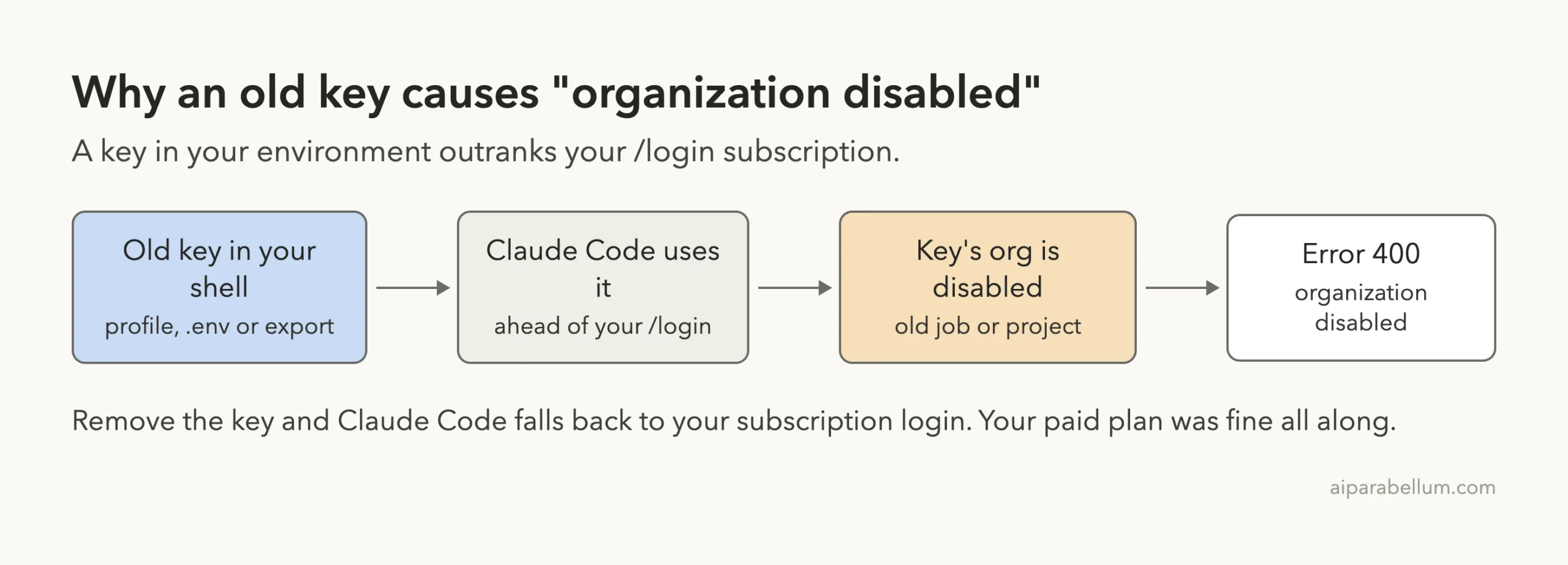
What “This Organization Has Been Disabled” Means
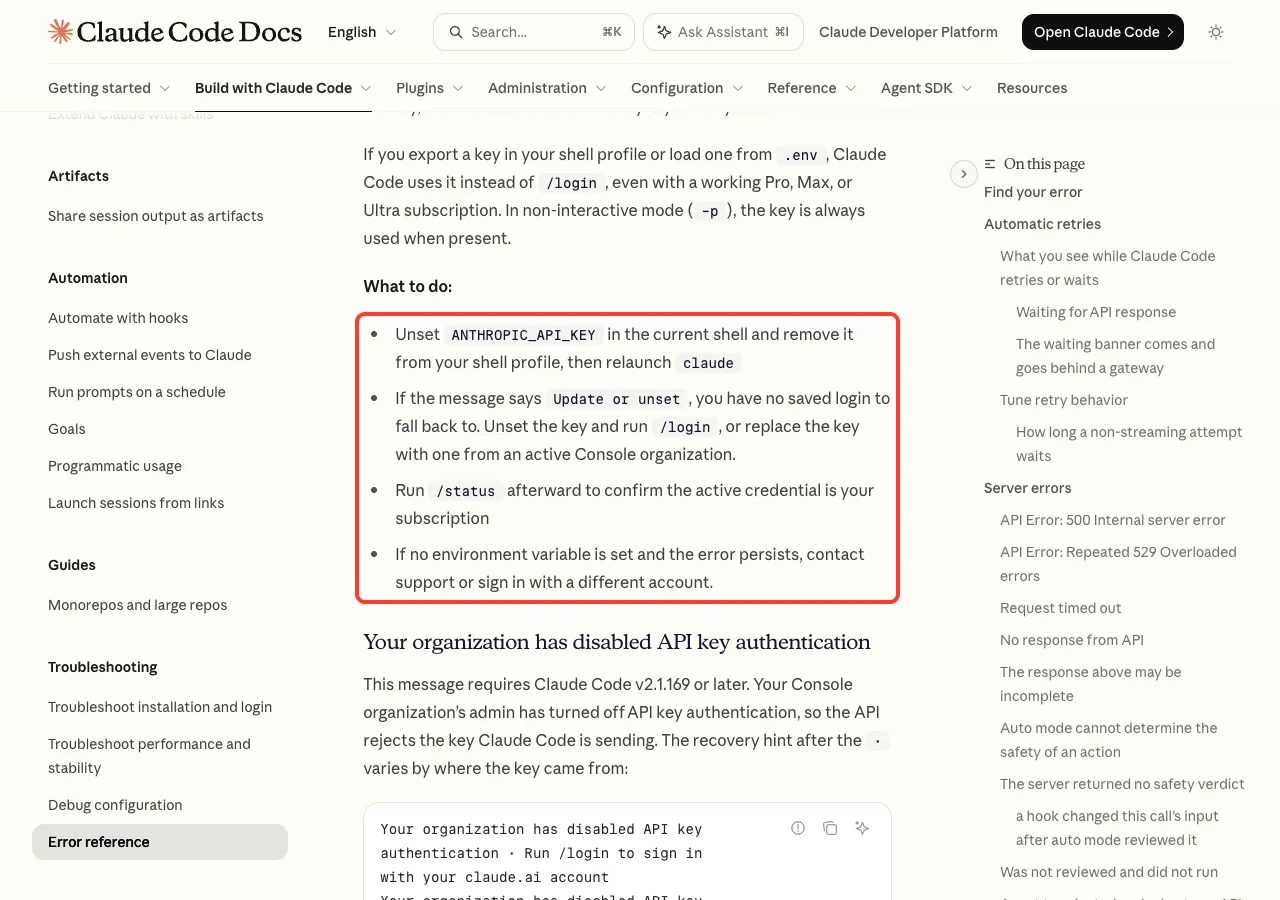
Anthropic’s error reference describes this message plainly. Claude Code is using a stale ANTHROPIC_API_KEY from a disabled Console organization, and when you also have a saved subscription login, the key overrides it.
Newer versions of Claude Code show one of two hints after the dot. “Unset the environment variable to use your subscription instead” appears when a stored /login can take over once the key is gone. “Update or unset the environment variable” appears when the key is your only credential.
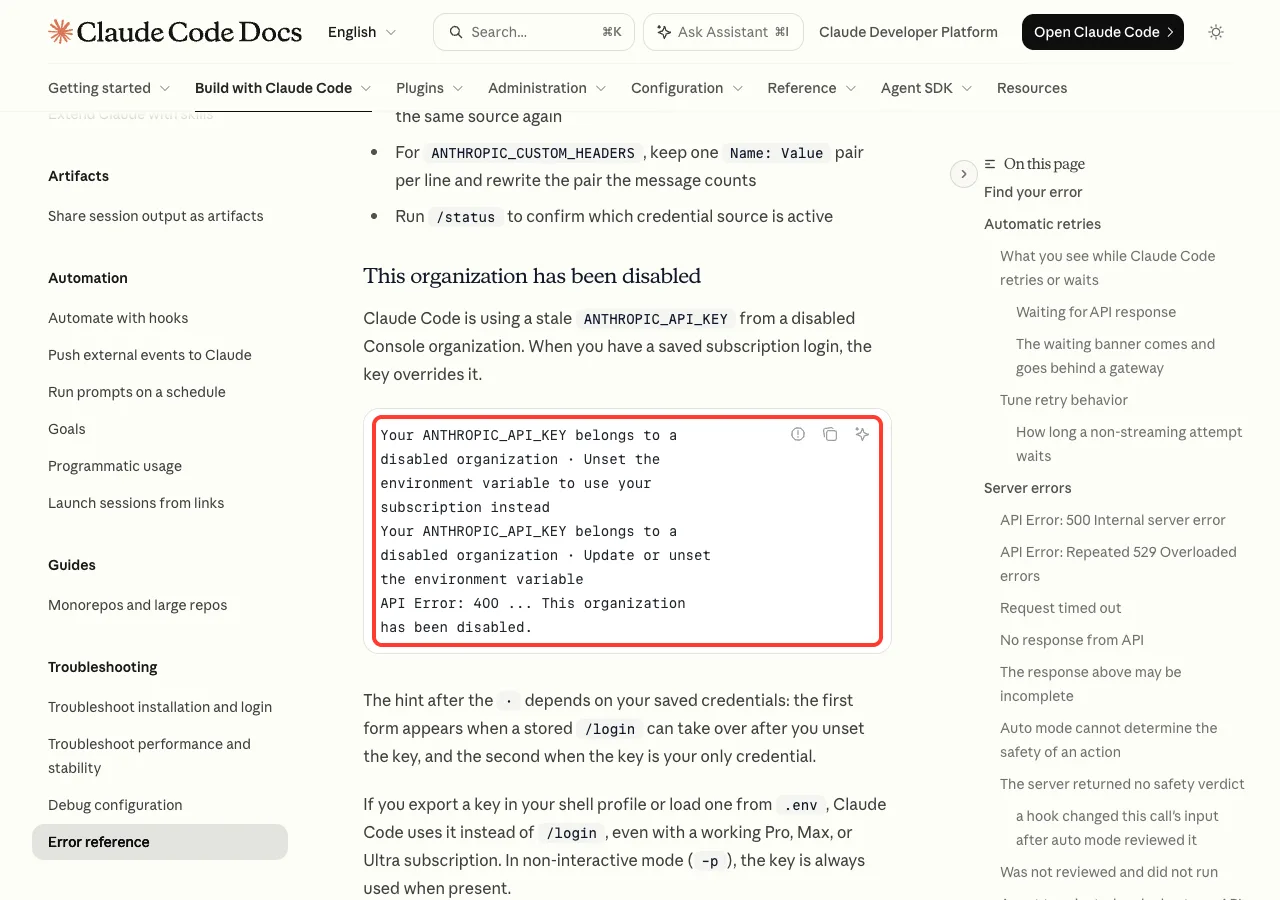
The “organization” here is a Claude Console account, the one used for pay-as-you-go API keys. It is separate from your claude.ai subscription. An organization can be disabled because a company closed its account, removed your access, or stopped paying, and any key it issued stops working at that point.
Why your paid plan doesn’t help
Claude Code picks one credential when several are present. The authentication precedence list puts the ANTHROPIC_API_KEY environment variable above your subscription login from /login, which sits last.
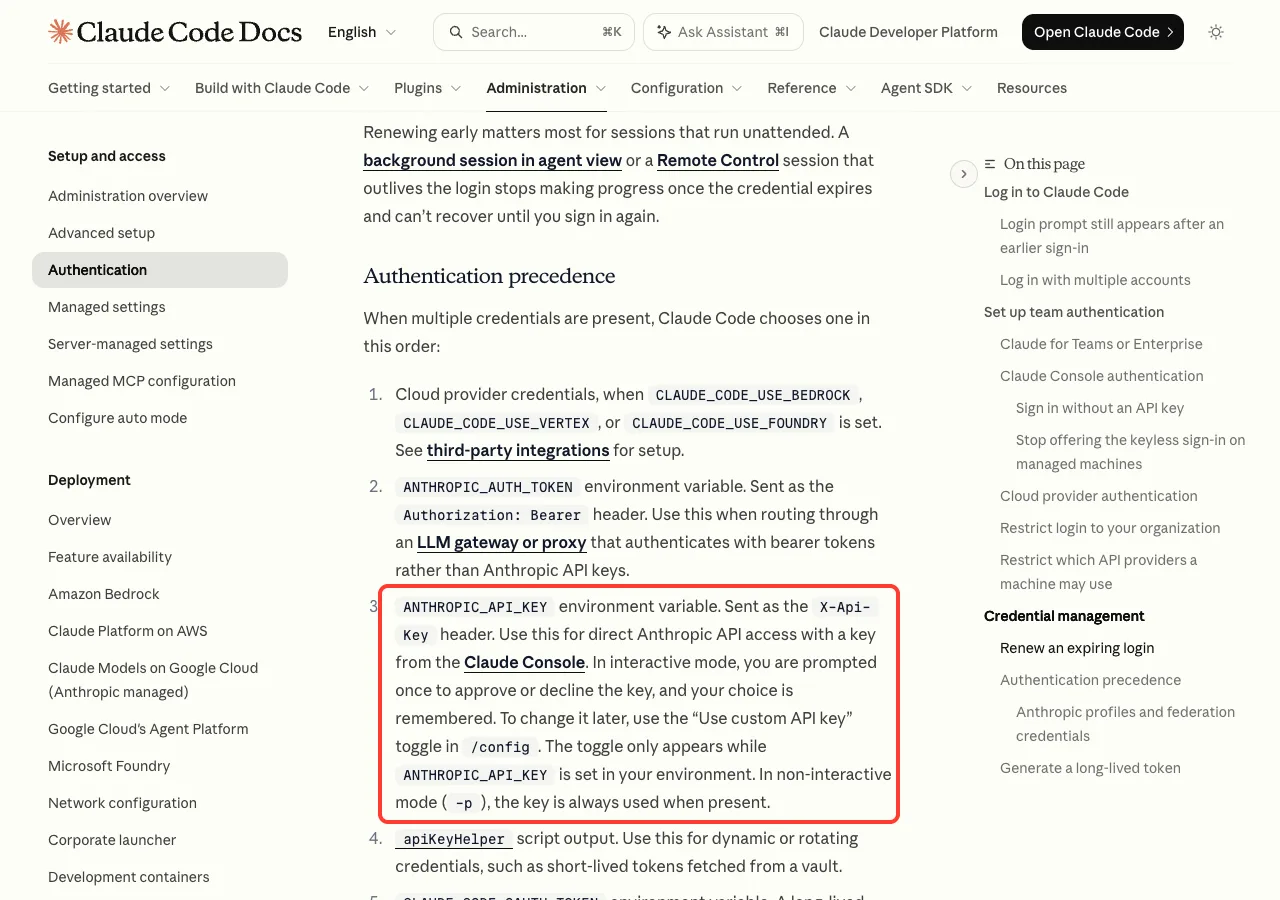
In an interactive session, Claude Code asks you once whether to use a key it finds, and it remembers your answer. In non-interactive mode with claude -p, the docs say the key is always used when present, with no question asked. That is why scripts and CI jobs often hit this error even when the interactive app works.
Why Claude Code Uses the Old Key: We Reproduced It
To show the cause without touching a real account, we exported a made-up key in a demo folder and asked Claude Code for a one-word reply. A fake key gives “Invalid API key” rather than the disabled-organization text, but the mechanism is identical: the key wins over a working login.
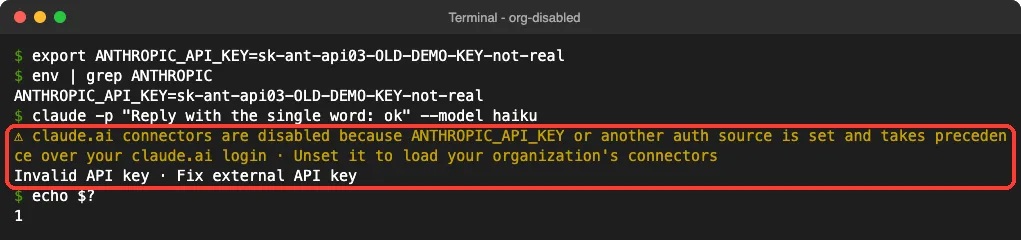
Notice the yellow warning. Claude Code says the API key “takes precedence over your claude.ai login”, which is exactly the situation behind the organization disabled error. With a real key from a disabled organization, the last line would be the 400 error instead.
We also started an interactive session with the same key set. Claude Code showed the “Detected a custom API key in your environment” prompt and recommended No.
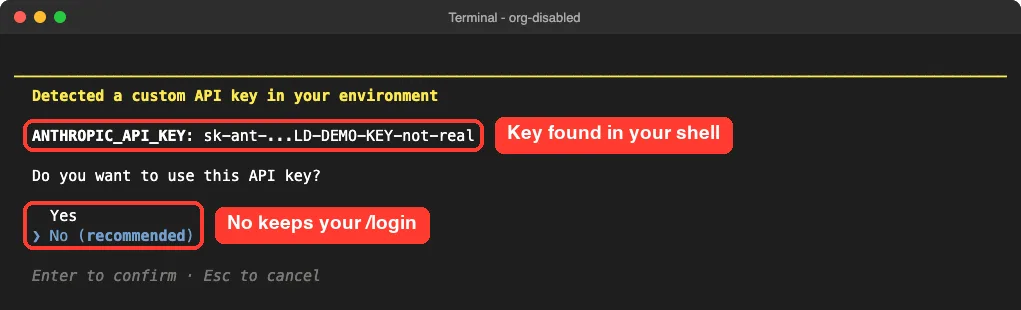
If you ever answered Yes to this prompt months ago, that old choice can be the whole reason your subscription seems broken today.
Fix 1: Unset the Old API Key
This is the fix Anthropic’s troubleshooting guide gives first. Remove the variable from the current shell and start Claude Code again.
unset ANTHROPIC_API_KEY
claude
On Windows PowerShell, the official command is:
Remove-Item Env:ANTHROPIC_API_KEY
claude
Here is the same demo folder after unset. env | grep ANTHROPIC finds nothing, and the same one-word prompt now answers through the subscription login.
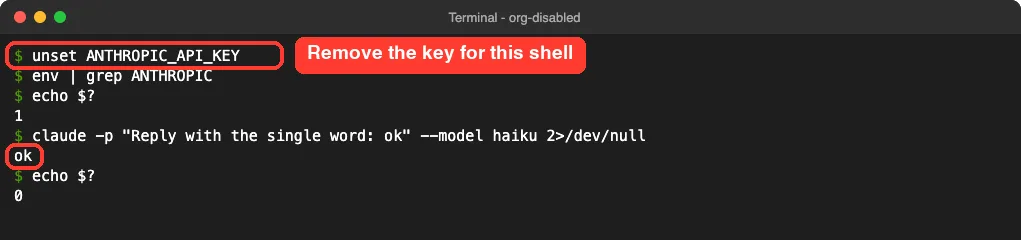
unset only affects the terminal window you type it in. Open a new terminal and the key comes back if your shell profile sets it, which leads to Fix 2.
Fix 2: Remove the Key From Your Shell Profile or .env File
The docs point to ~/.zshrc, ~/.bashrc and ~/.profile as the usual places for a forgotten export ANTHROPIC_API_KEY=... line. On Windows, check your PowerShell profile at $PROFILE and your User environment variables.
Don’t forget project files. The error reference warns that tools like direnv, dotenv shell plugins and IDE terminals can load a stale key from a .env file without you setting it yourself. We used a made-up profile and .env in the demo folder to show the search and cleanup.
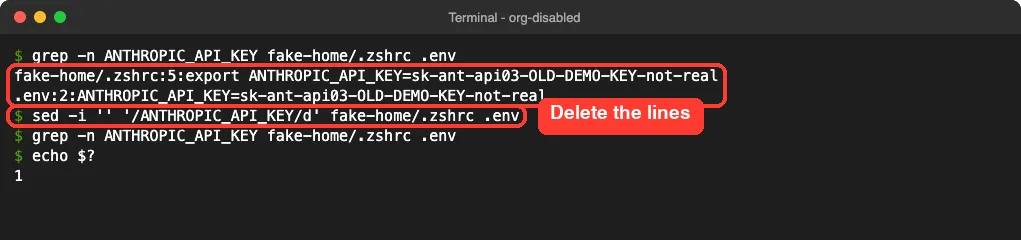
On your own machine, the search looks like this:
grep -n ANTHROPIC_API_KEY ~/.zshrc ~/.bashrc ~/.profile .env 2>/dev/nullOpen the file that matches in a text editor and delete the line, or comment it out with #. Then close the terminal, open a new one, and start claude.
Check settings.json and apiKeyHelper too
A key can also come from the env block in a settings file or from an apiKeyHelper script. Our settings guide shows where those files live. If /status mentions apiKeyHelper, remove that setting from your settings.json.
Fix 3: Confirm the Active Login With /status
Run /status inside Claude Code after the cleanup. The Login method row should show your Claude account, and the docs say /status marks the credential that isn’t in use when both a login and an API key are configured.
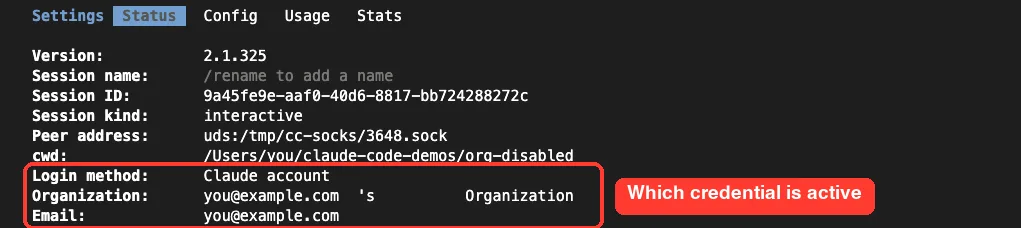
If you chose Yes at the API key prompt in the past, open /config while the key is still set. The docs describe a “Use custom API key” toggle there, which only appears while ANTHROPIC_API_KEY is in your environment.
Fix 4: Replace the Key or Contact Support
Sometimes you really do need API key access, for example in a CI pipeline. In that case, the docs say to replace the key with one from an active Console organization. If the organization belongs to your company, ask its admin whether it was closed or whether your access was removed.
For automation without a key, our guide to headless authentication covers claude setup-token, which creates a long-lived token from your subscription.
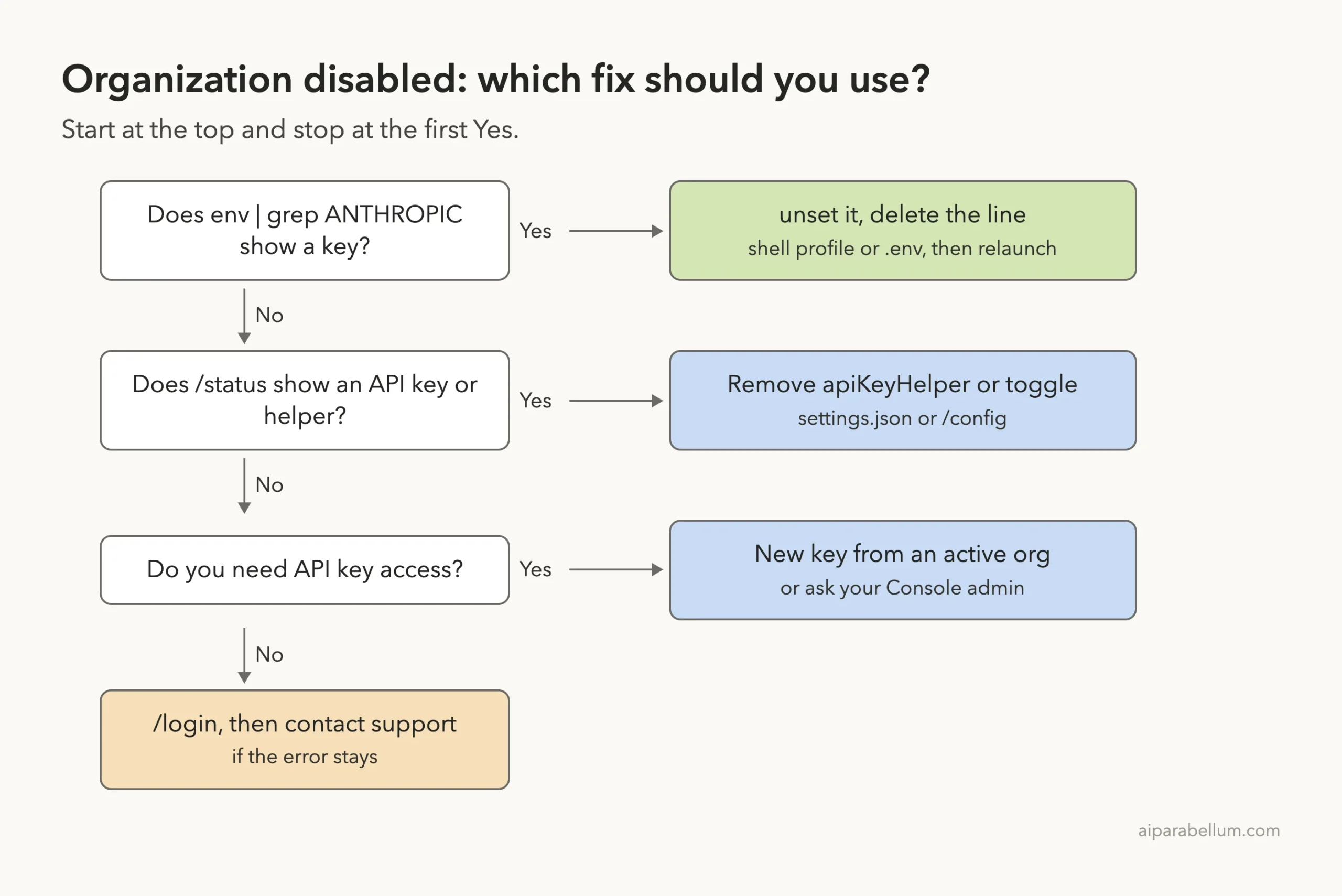
If no environment variable is set and the error persists, the official advice is to contact support or sign in with a different account. The troubleshooting page says to sign in at claude.ai, click your initials in the lower left, and choose Get help.
Related Errors That Look Similar
Several messages mention your organization but mean different things. Our common errors guide covers many of them, and this table sums up the closest ones from the error reference.
| Message | What it means | What to do |
|---|---|---|
This organization has been disabled | Stale key from a disabled Console org | Unset the key, use /login |
Your organization has disabled API key authentication | Your Console admin turned off API keys | Remove the key or apiKeyHelper, then /login |
Your organization has disabled Claude subscription access | Your Claude org blocks subscription sign-in for Claude Code | Ask your admin, or use a Console API key |
API Error: 401 Invalid authentication credentials | Credential revoked, or account or org no longer active | Check /status, then /login |
Invalid API key · Fix external API key | The key itself is wrong or revoked | Unset or replace the key |
If you see a 401 or 403 instead, our authentication error fix walks through those codes. For sign-in trouble in general, see login problems.
Try It Yourself
You can check your own setup in under a minute without changing anything. Paste this into the terminal you normally use to start Claude Code:
env | grep ANTHROPIC
grep -n ANTHROPIC_API_KEY ~/.zshrc ~/.bashrc ~/.profile .env 2>/dev/null
If both commands print nothing, no key is hiding in your shell. Then start Claude Code and ask it to explain what it sees, using this prompt:
In two short paragraphs, explain how Claude Code decides between an ANTHROPIC_API_KEY and my /login subscription, and list the files where a forgotten key could be set on this machine. Do not read or print any key values.Then type /status yourself and compare its Login method row with what Claude described.
Common Mistakes
- Running
/loginagain and again. While an approved key is set, it still takes priority, so a fresh login doesn’t change anything. - Unsetting the key in one terminal, then starting Claude Code from another window or an IDE terminal that still loads it.
- Forgetting the project’s
.envfile, which some shell plugins load automatically. - Assuming your subscription was cancelled and contacting billing first, when the problem is a local variable.
- Fixing the interactive app but not the CI job, where
claude -palways uses a key that is present.
Pro Tips
- Keep API keys out of your global shell profile. Load them only in the project or job that needs them.
- Answer No at the “Detected a custom API key” prompt unless you mean to bill that key’s organization.
- After any change, run
/statusonce. It is the quickest way to see which credential is active. - Rotate or delete keys from old jobs in their Console as soon as you leave, so nothing stale lingers.
- Keep our environment variables guide handy to know which variables Claude Code reads.
Organization Disabled Error Cheat Sheet
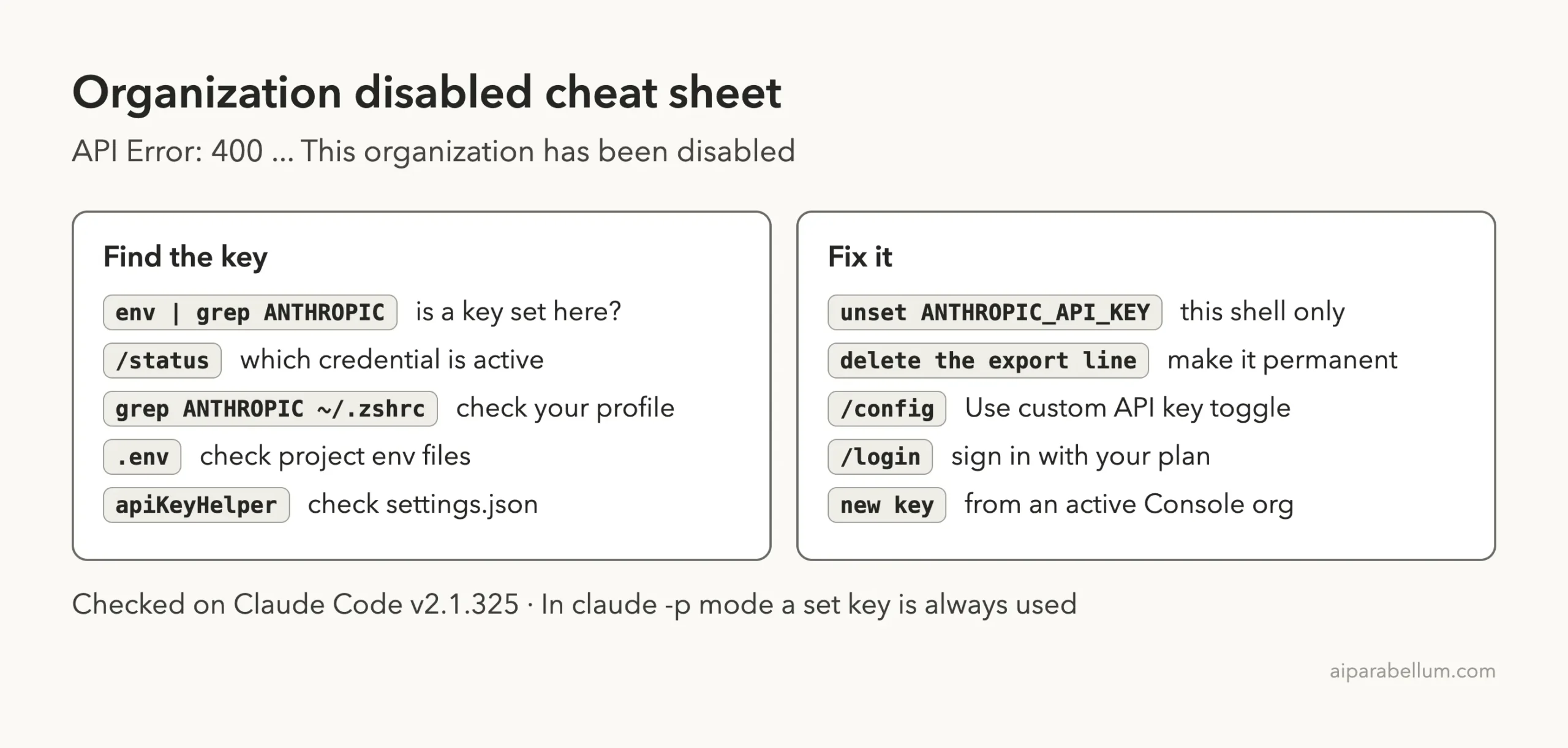
Frequently Asked Questions
Does “this organization has been disabled” mean my Claude account is banned?
Usually not. The docs tie it to an old ANTHROPIC_API_KEY from a disabled Console organization. Remove the key and your subscription login normally works again.
I never set an API key. Why do I see this?
Something may set it for you, such as a line added to ~/.zshrc years ago, a project .env file loaded by direnv, or the env block in a settings file. Run env | grep ANTHROPIC to check.
Why does claude -p fail when the interactive app works?
In non-interactive mode, Claude Code always uses ANTHROPIC_API_KEY when it is present. The interactive app may be using your login because you once answered No at the key prompt.
Can I re-enable the disabled organization myself?
Only the organization’s admin or Anthropic support can restore it. If you just want Claude Code working, switch to your own subscription or a key from an active organization.
Is this the same as “Your organization has disabled API key authentication”?
No. That message means an admin turned off API keys for an organization that is still active. The fix is similar, though: remove the key and sign in with /login.
Conclusion
The “API Error: 400 … This organization has been disabled” message in Claude Code nearly always comes from a leftover ANTHROPIC_API_KEY that points to a Console organization that is no longer active, and because that key outranks your /login credentials, a perfectly good subscription looks broken. Find the key with env | grep ANTHROPIC, run unset ANTHROPIC_API_KEY, delete the line from your shell profile or .env file, and confirm the result with /status. In our demo, removing the key was all it took for the same prompt to succeed through the subscription login. To learn more about Claude AI and its tools, browse the rest of our guides.