If you see the Claude Code process exited with code 1 error, the claude program stopped with a failure, and the app that started it is only passing the news along. Code 1 is a general “something went wrong” signal. The number does not tell you what failed.
The real reason is in the text Claude Code printed before it stopped. Here is where to find it:
- In VS Code, click the View output logs link under the error.
- In an Agent SDK app, read the text after
stderr:in the message. - In a script, run the same
claudecommand in a terminal and read what it prints.
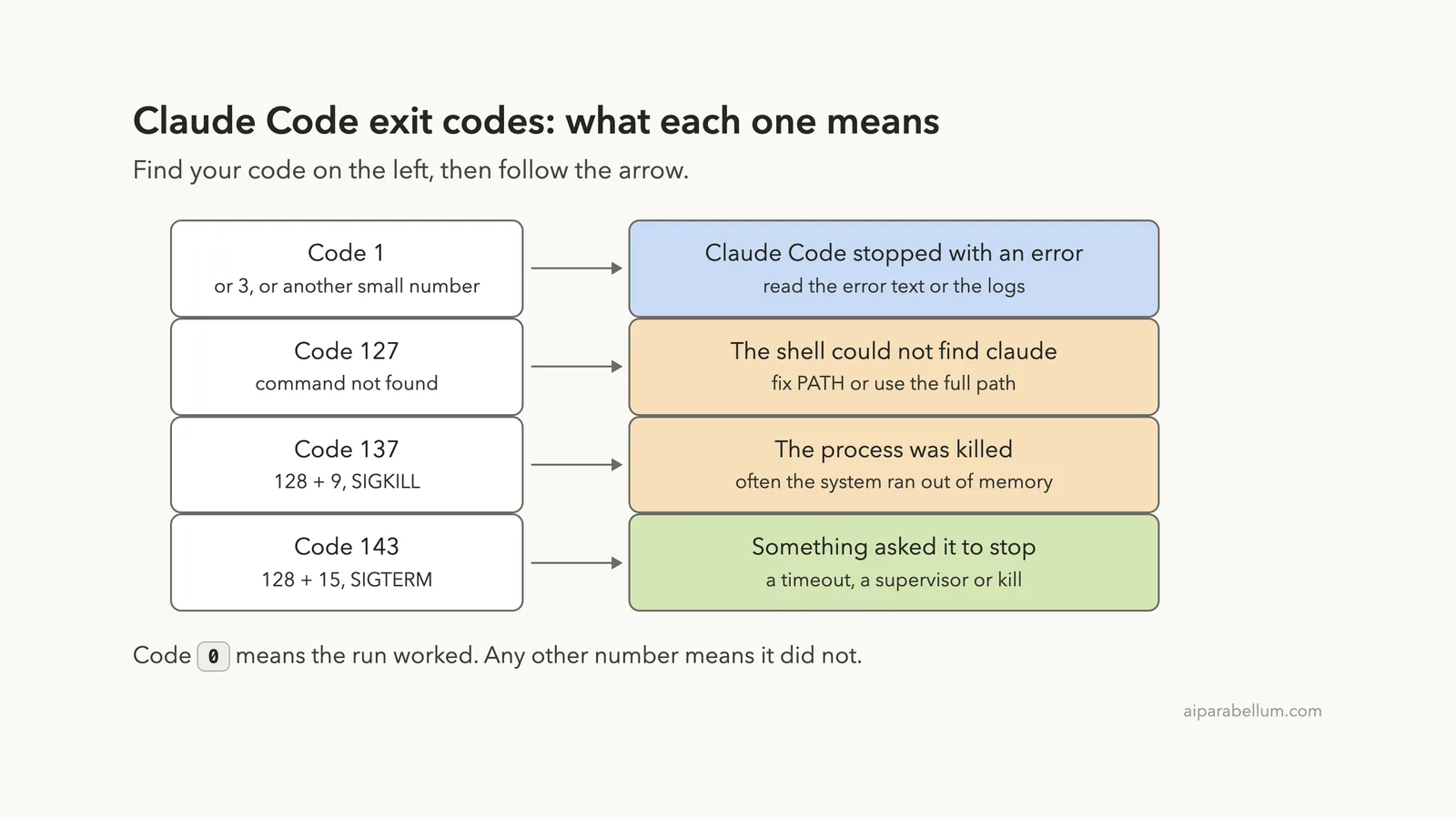
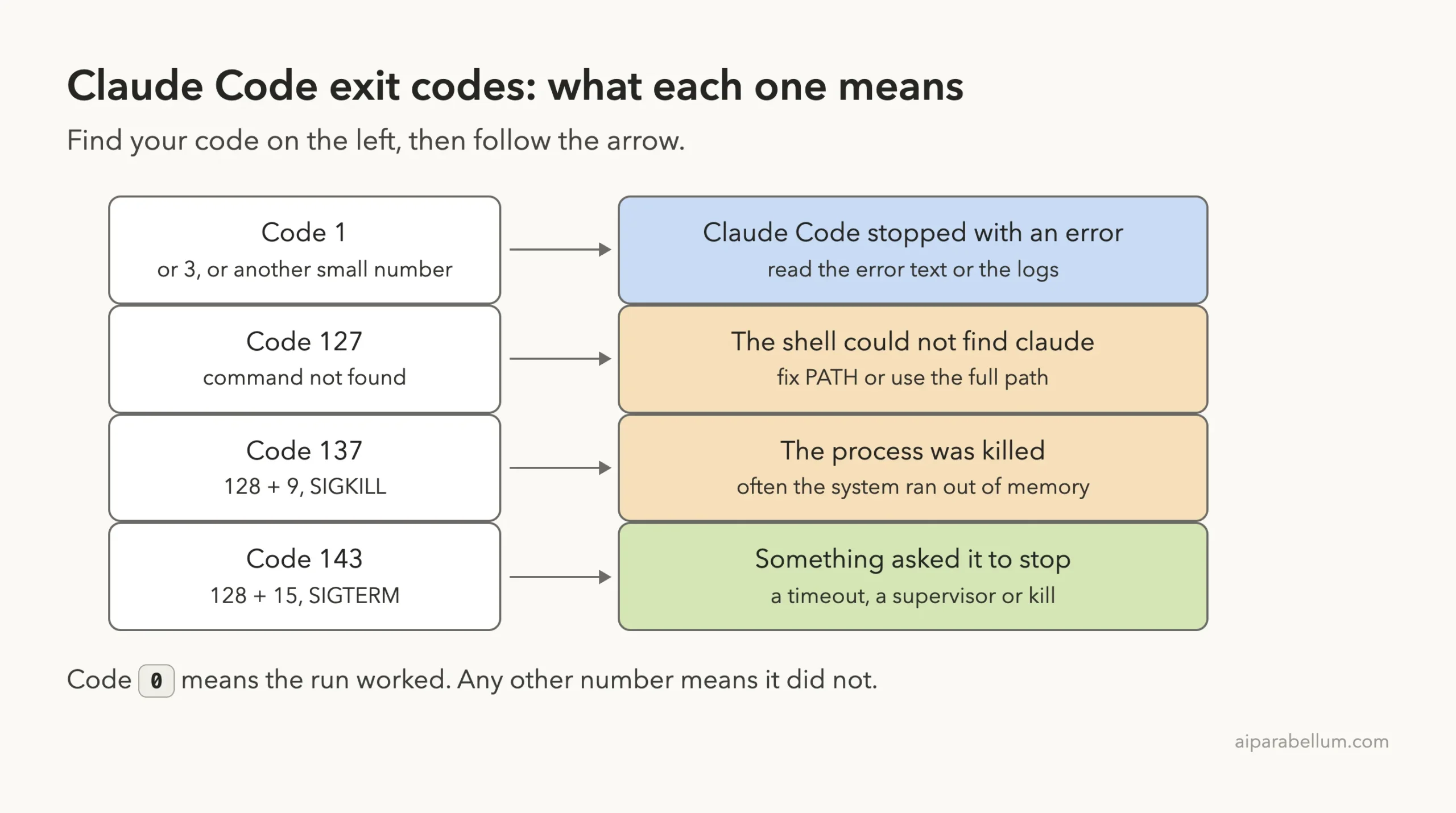
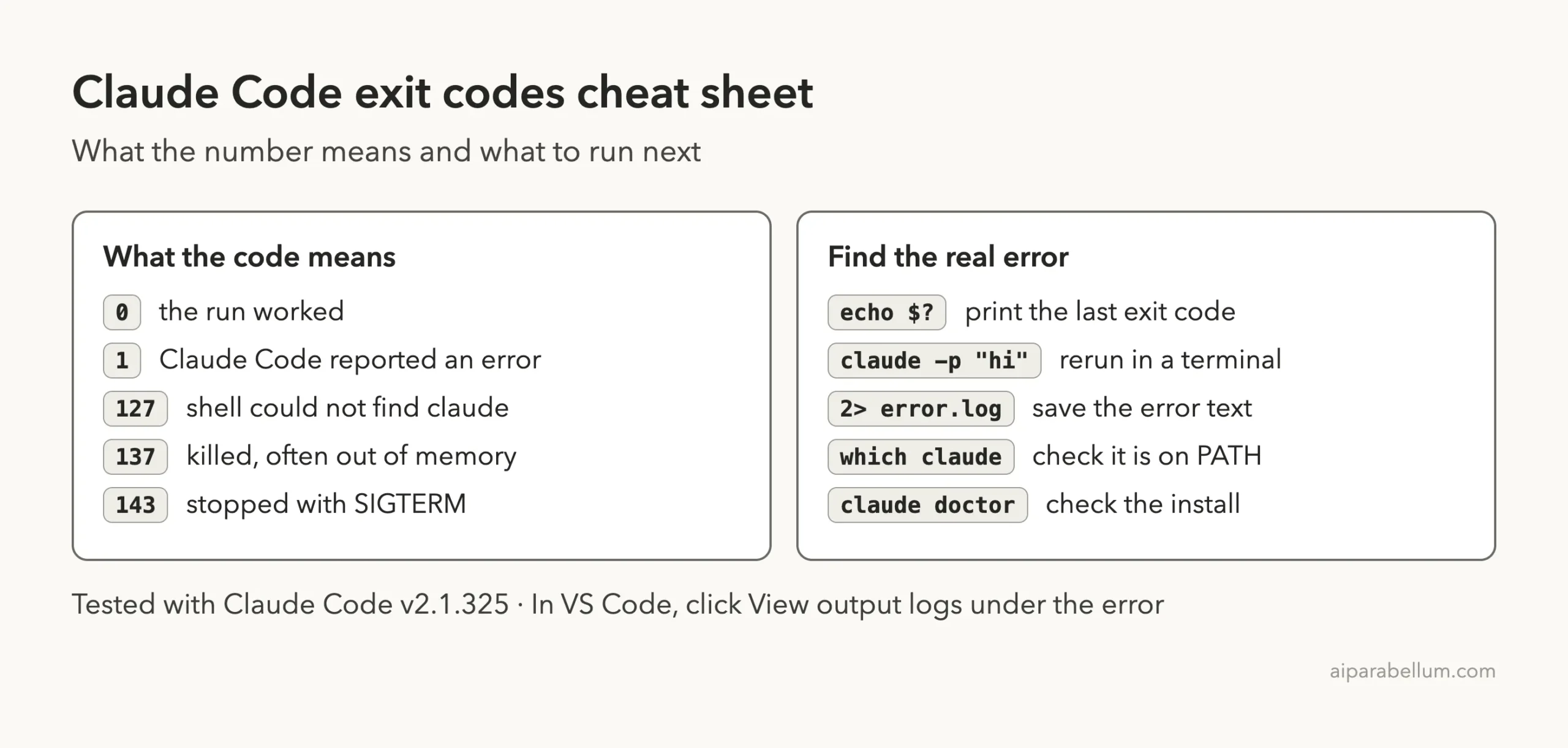
The other codes are more specific. Code 127 means the shell could not find the claude command, 137 means the process was killed (often because memory ran out), and 143 means something asked it to stop with SIGTERM. Code 3 has no special meaning in Anthropic’s docs, so treat it like code 1.
This guide is part of our help series. Browse all our Claude Code tutorials for more fixes and how-tos.
Tested with Claude Code v2.1.325 on macOS on November 17, 2026. We produced codes 0, 1, 127, 137 and 143 for real in a small throwaway demo folder, and every terminal capture below is real.
We tested on macOS; the Windows and Linux steps follow Anthropic’s official instructions.
Claude Code Process Exited With Code 1: Quick Summary
Here is the message, word for word, as an Agent SDK app printed it in our test:
Claude Code process exited with code 1. stderr: error: unknown option '--no-such-flag'And here is what each exit code means at a glance.
| Exit code | What it means | Who sets it | First thing to do |
|---|---|---|---|
| 0 | The run worked | Claude Code | Nothing |
| 1 | Claude Code stopped with an error | Claude Code | Read the error text or the logs |
| 3 | Not documented; treat it as a general failure | Unclear | Same as code 1 |
| 127 | Command not found | Your shell | Run which claude and fix PATH |
| 137 | Killed with SIGKILL, often out of memory | The operating system | Check free memory |
| 143 | Stopped with SIGTERM | Whatever sent the signal | Find the timeout or supervisor that stopped it |
What an Exit Code Is and Why Claude Code Has One
Every program hands a small number back to whatever started it when it ends. That number is the exit code. By long tradition, 0 means success and anything else means failure.
Claude Code follows the same rule. Anthropic’s non-interactive mode docs say it exits with code 0 on success and a non-zero code when the run fails, so your scripts can branch on the result.
You rarely see this number when you type in the terminal yourself. You see it when another program runs Claude Code for you. That program is the wrapper, and it could be the VS Code extension, an Agent SDK app, a CI job or your own shell script.
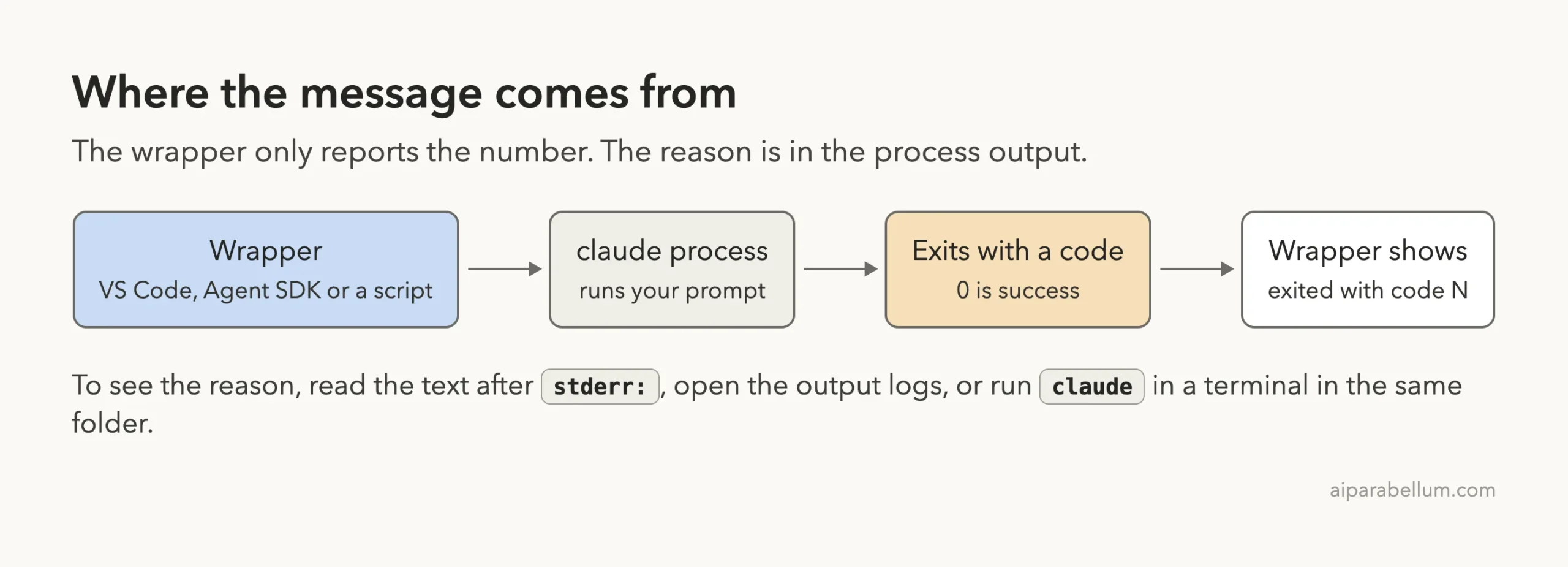
The exit code tells you that a run failed. The output tells you why.
Exit Code 1: The General Error
Code 1 is the one you will meet most. The official error reference puts it plainly: the underlying claude process exited with a non-zero code, and the code alone doesn’t say what failed.
We Reproduced It in an Agent SDK App
To see the exact wording, we wrote a tiny TypeScript Agent SDK script (SDK version 0.3.326) that starts Claude Code with a flag it does not know. The flag is wrong on purpose, so the process fails before it sends anything to the model.
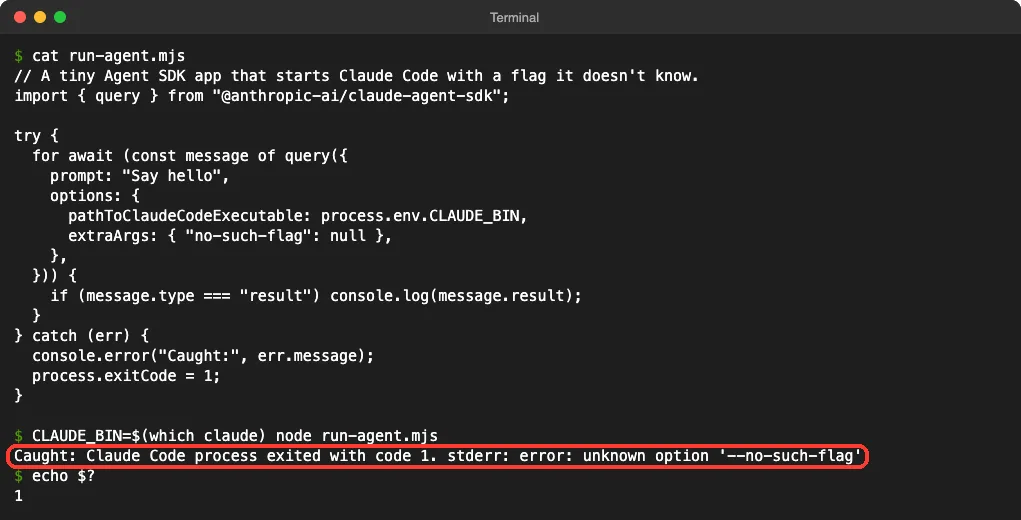
Look at the boxed line. The first half is the wrapper talking, and the second half, after stderr:, is what Claude Code itself said. That second half is the part you fix.
The Same Failure in a Plain Terminal
Next we ran the same bad flag straight in the terminal with claude -p, then printed the exit code with echo $?. We followed it with one good run for contrast.
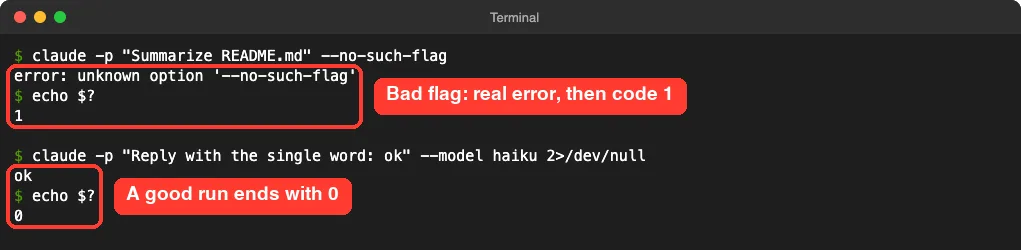
In the terminal there is no wrapper in the way, so you get the plain error first. This is why Anthropic suggests running claude in a terminal in the same project when a wrapper shows only the number.
Common Causes of Code 1
We triggered code 1 four different ways in our session. Each one printed a different message, and each one ended with the same number.
| What we ran | Message Claude Code printed | Exit code |
|---|---|---|
| An unknown flag | error: unknown option '--no-such-flag' | 1 |
A broken --json-schema value | Error: --json-schema is not valid JSON | 1 |
--resume with a session ID that doesn’t exist | No conversation found with session ID | 1 |
| A prompt with only spaces | Error: Input contained only whitespace | 1 |
The docs list more cases that end the same way. A ~/.claude.json file that can’t be parsed, a working folder that was deleted after your shell entered it, and a settings file passed with --settings that is over 2 MiB all exit with code 1.
Sign-in problems land here too. The docs note that claude auth status exits with 0 when you are logged in and 1 when you are not. If the logs point to sign-in, our guide to login problems walks through the fixes.
How to Fix Code 1, Step by Step
These four steps come from the official error reference. We ran steps 3 and 4 ourselves; steps 1 and 2 follow the docs.
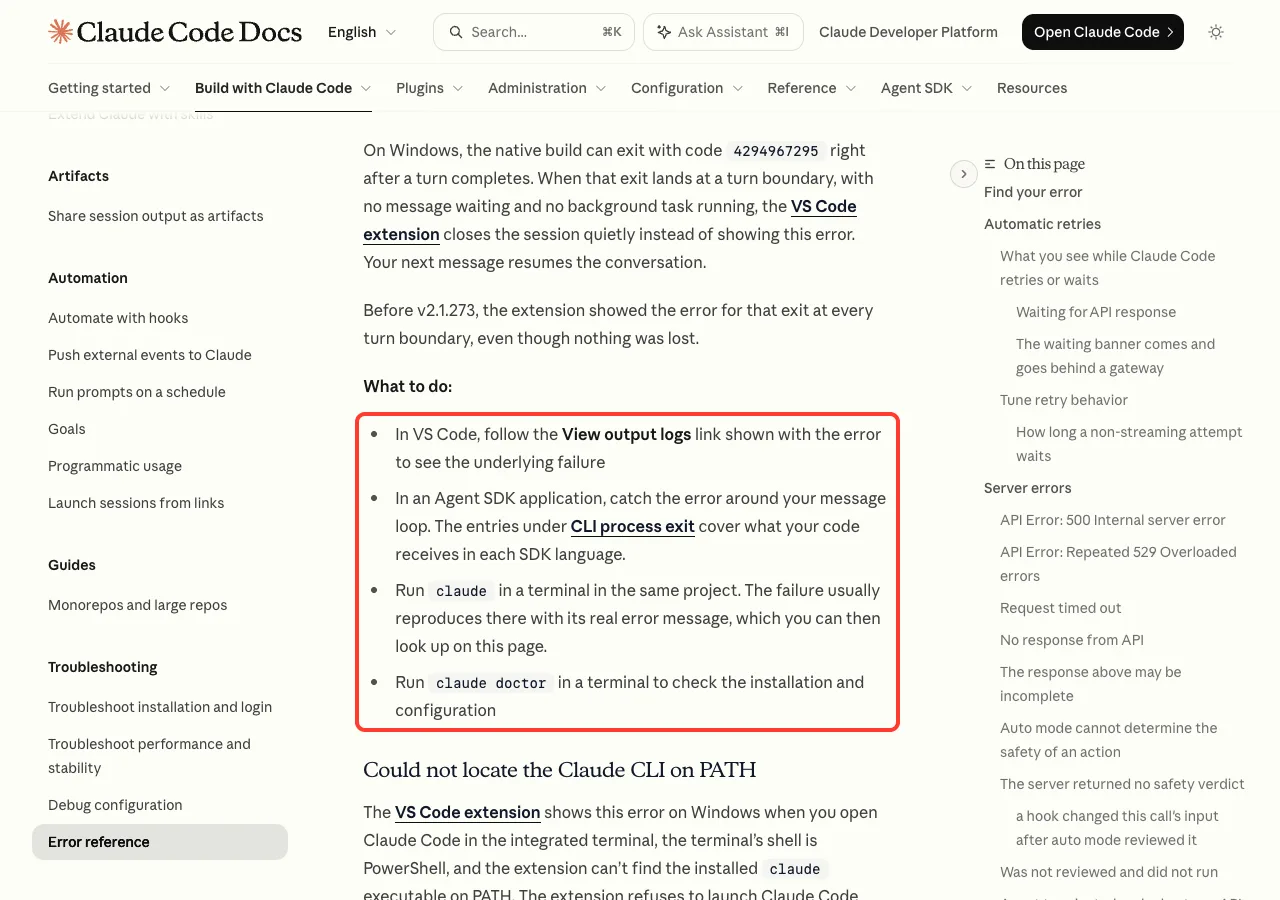
- In VS Code, click the View output logs link shown with the error. You can also run Claude Code: Show Logs from the Command Palette.
- In an Agent SDK app, catch the error around your message loop and print it. The text after
stderr:is the real cause. - Run
claudein a terminal in the same project. The failure usually shows up there with its full message. - Run
claude doctorto check the installation and configuration.
Here is what claude doctor printed on our machine. It confirms which version is running, where it lives and how it was installed.
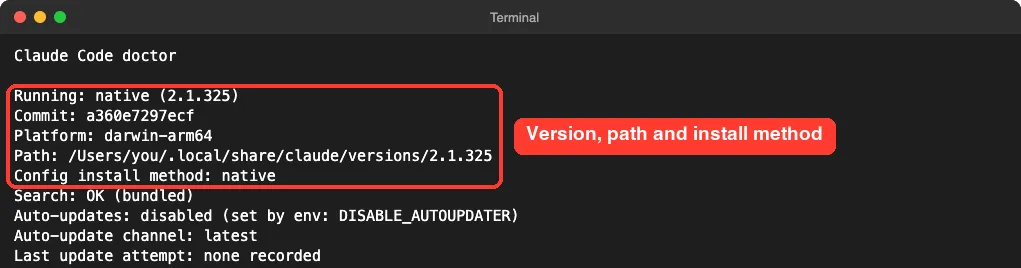
claude doctor shows the version, path and install method in a few secondsFor a deeper setup check inside a session, see our walkthrough of the /doctor command. If the error only shows in your editor, our list of VS Code fixes covers the extension side.
A Windows Note: Code 4294967295
The error reference mentions one odd number. On Windows, the native build can exit with code 4294967295 right after a turn completes.
When that happens with no message waiting and no background task running, the VS Code extension now closes the session quietly, and your next message resumes the conversation. Before v2.1.273 the extension showed the error each time, even though nothing was lost, so updating is the fix. We could not test this one on macOS.
Exit Code 3: No Official Meaning
People search for “exited with code 3” too, so we looked for it. Anthropic’s error reference, troubleshooting pages and non-interactive mode docs give no special meaning for code 3.
None of our tests produced it either. So the honest answer is that the number 3 on its own tells you nothing more than “the run failed.”
Handle it exactly like code 1. Open the logs, read the text after stderr:, and run the same command in a terminal to see the full message.
Exit Code 127: Command Not Found
Code 127 does not come from Claude Code at all. Your shell sets it when it cannot find a program called claude, which means Claude Code never started.
To reproduce it safely, we shrank PATH inside one terminal window so the shell could no longer see the install folder. Nothing was uninstalled.
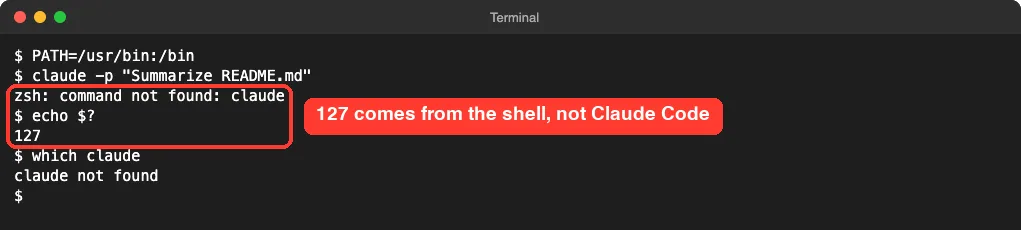
This is common in cron jobs, CI runners and scripts started by other apps. They often run with a shorter PATH than your normal terminal, so a command that works when you type it fails when the job runs it.
How to Fix Code 127
- Run
which claudein a normal terminal. If it prints a path, Claude Code is installed and the job’s PATH is the problem. - Check the install folder. The docs say the installer places
claudein~/.local/binon macOS and Linux. - Add that folder to PATH inside the script or job, or call
claudeby its full path. - If
which claudeprints nothing anywhere, install it. Our guide shows how to install Claude Code on each system.
One detail from the docs trips people up. The VS Code extension bundles its own private copy of the CLI and does not add it to PATH, so having the extension does not mean the claude command works in your terminal. The official PATH check has the exact commands for each system.
Exit Code 137: The Process Was Killed
Codes above 128 mean a signal ended the process. Subtract 128 to get the signal number. 137 minus 128 is 9, and signal 9 is SIGKILL, the one a program cannot catch or refuse.
We sent that signal ourselves to a running claude -p job, four seconds after it started.

kill -KILL ends the run at once, and the shell reports 137In real life, you rarely send SIGKILL yourself. The usual sender is the operating system when memory runs out, or a container platform enforcing a memory limit.
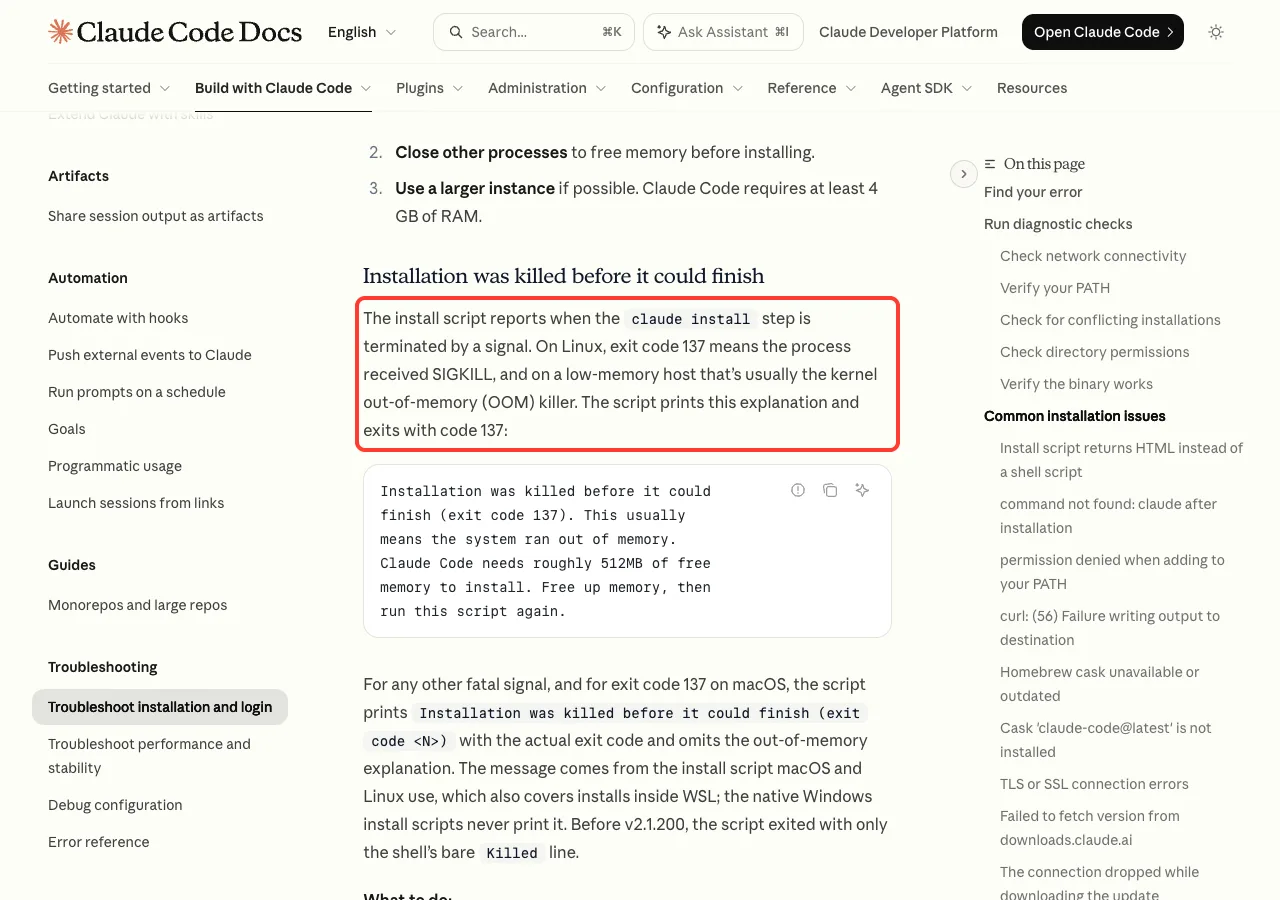
Anthropic’s install troubleshooting page says the same about its installer. On Linux, exit code 137 means the process received SIGKILL, and on a low-memory host that is usually the kernel out-of-memory killer.
How to Fix Code 137
These fixes come from the official docs; we did not run a machine out of memory to test them.
- Close other programs to free memory, then run it again.
- On a small Linux server, add swap space. The docs show a 2 GB swap file as the example.
- Use a larger machine or raise the container’s memory limit. The docs say installing needs roughly 512 MB of free memory, and Claude Code requires at least 4 GB of RAM.
- If nothing is short on memory, look for a watchdog or job runner that force-kills long tasks.
On macOS, the docs note that the installer prints the 137 message without the out-of-memory explanation, because the cause is less certain there.
Exit Code 143: Stopped With SIGTERM
143 minus 128 is 15, and signal 15 is SIGTERM. This is the polite “please stop” signal that kill, process supervisors, CI timeouts and container shutdowns send by default.
We sent it to a running job the same way as before.

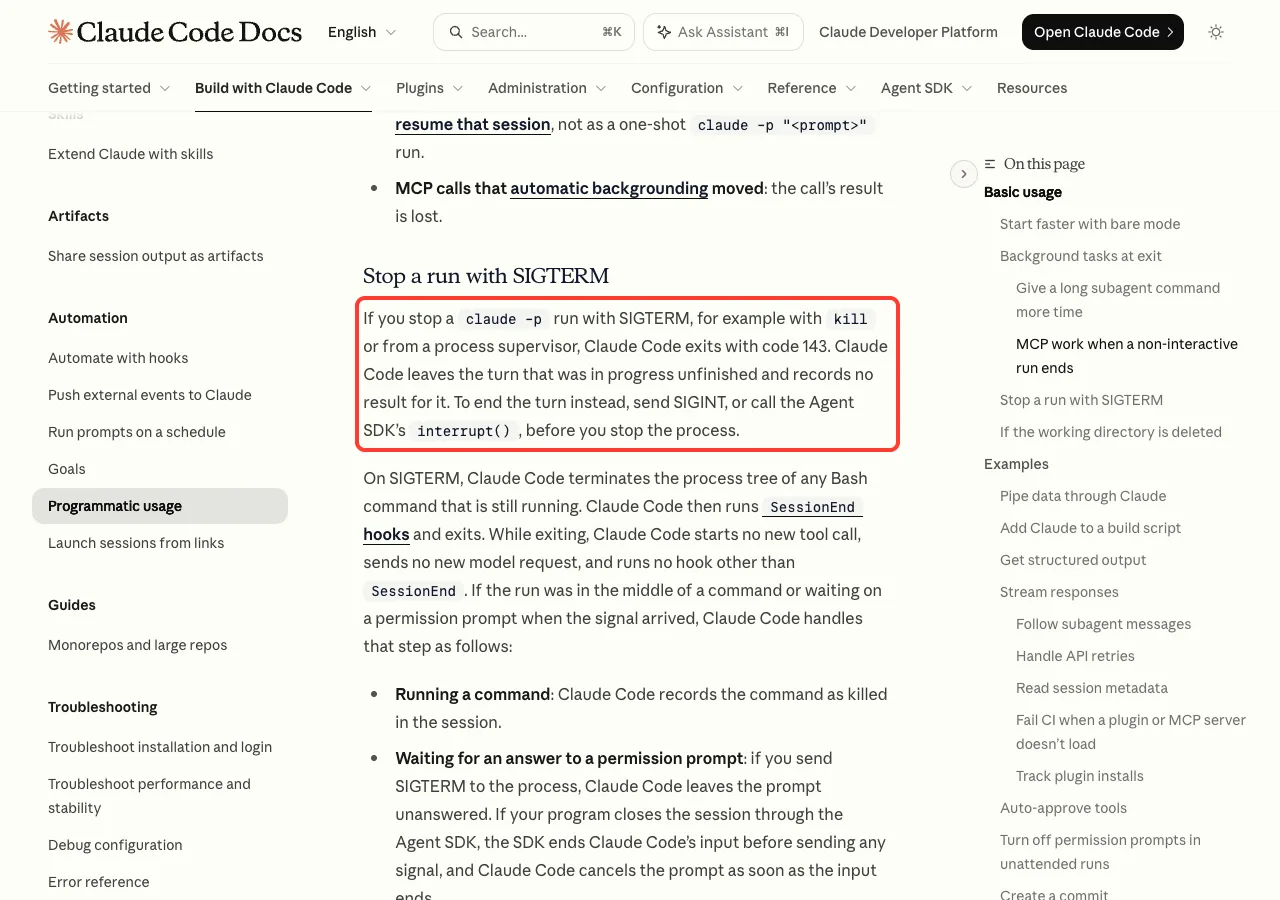
kill (SIGTERM) gives exit code 143, exactly as the docs describeThis matches the docs word for word. If you stop a claude -p run with SIGTERM, Claude Code exits with code 143, leaves the turn that was in progress unfinished and records no result for it.
What Claude Code Does on SIGTERM
According to the docs, it stops any Bash command that is still running, runs your SessionEnd hooks and exits. It starts no new tool call and sends no new model request on the way out.
So 143 is not a crash. It means something outside Claude Code decided the run was over.
How to Fix Code 143
- Check the job’s time limit. A CI step or scheduler that times out sends SIGTERM first.
- Check for a supervisor or container restart at the same moment.
- If your own code stops the run, the docs suggest sending SIGINT or calling the Agent SDK’s
interrupt()first, so the turn ends cleanly. - Resume the session afterward. Your next prompt continues the conversation, and the docs list
CLAUDE_CODE_RESUME_INTERRUPTED_TURN=1if you want the interrupted turn picked up on resume.
Where You See These Codes: VS Code, the Agent SDK and Scripts
The same exit looks a little different in each wrapper. Knowing the shape helps you find the real error faster.
| Where | What you see | Where the real error is |
|---|---|---|
| VS Code extension | Error: Claude Code process exited with code 1 | The View output logs link under the error |
| TypeScript Agent SDK | Claude Code process exited with code 1. stderr: ... | The text after stderr: |
| Python Agent SDK | Command failed with exit code 1 (exit code: 1) | A stderr callback in your options |
| Shell script or CI | The number in $? | Whatever the command printed to stderr |
The SDK details come from Anthropic’s Agent SDK troubleshooting page. In TypeScript the failure is a plain Error, so you wrap the loop in try/catch and match on the message. In Python it is a ProcessError whose exit_code attribute carries the number.
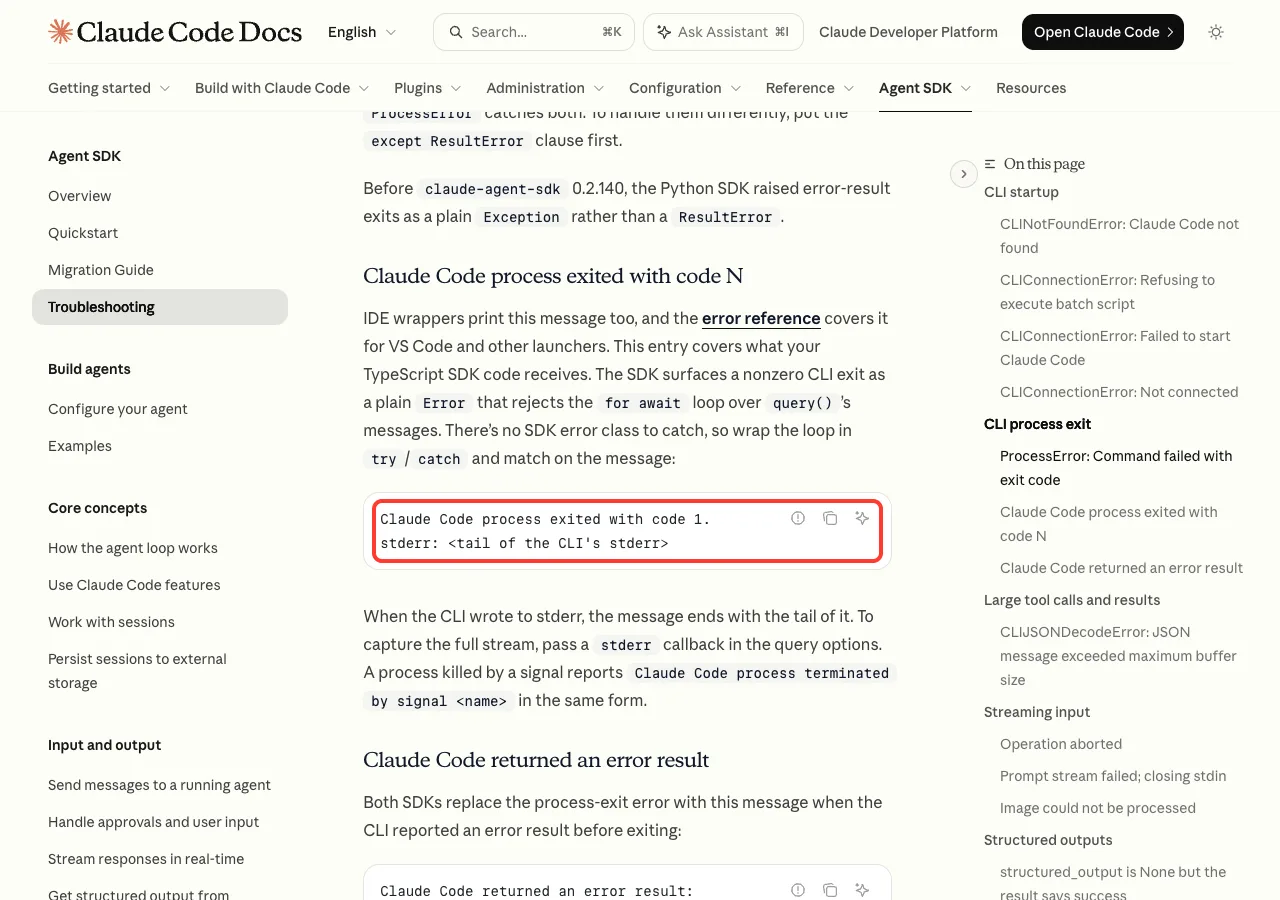
The same page adds two useful details. A process killed by a signal reports Claude Code process terminated by signal with the signal name, and when the CLI reported an error result before exiting, both SDKs show Claude Code returned an error result instead.
If you are new to the SDK, our tutorial on building a small TypeScript agent shows the message loop this error comes from.
Real Example: A Script That Explains the Exit Code
In a script, you can turn the number into a plain sentence. We wrote this small wrapper in the demo folder and ran it twice, once with a bad flag and once with a short PATH.
#!/bin/bash
# Run Claude Code once and explain the exit code in plain words.
claude -p "$1" "${@:2}" > answer.txt 2> error.log
code=$?
case $code in
  0)   echo "OK: answer saved to answer.txt" ;;
  127) echo "Exit 127: the claude command was not found on PATH" ;;
  137) echo "Exit 137: the process was killed (SIGKILL), often out of memory" ;;
  143) echo "Exit 143: the process was stopped with SIGTERM" ;;
  *)   echo "Exit $code: Claude Code failed. First line of error.log:"
       head -1 error.log ;;
esac
exit $code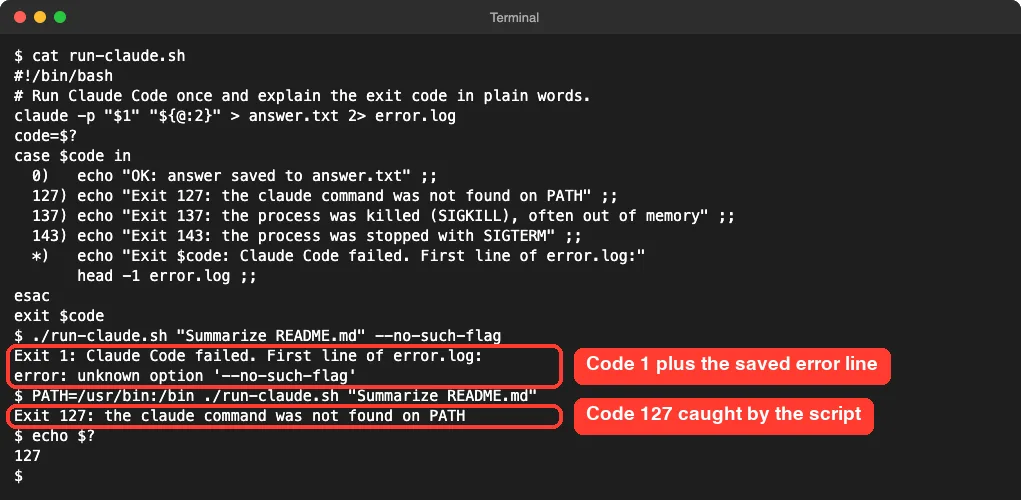
The key habit is the 2> error.log part. It saves the error text, so when a job fails overnight you have the reason and not just the number.
For more on running Claude Code this way, see our guides to headless mode and a working CI/CD pipeline.
Try It Yourself
You can see codes 1 and 0 in under a minute. Make an empty folder, open a terminal in it and run these lines one at a time. The first command fails before it reaches the model, so it costs nothing.
claude -p "hello" --no-such-flag
echo $?
claude -p "Reply with the single word: ok"
echo $?
You should see the unknown option error and a 1, then the word ok and a 0. Once that works, try saving the error with 2> error.log and opening the file.
Common Mistakes
- Searching for the number alone. Code 1 covers dozens of different failures, so search for the error text instead.
- Reinstalling right away. Most code 1 exits are a bad flag, a broken config file or a sign-in problem, not a broken install.
- Blaming Claude Code for 127. That code means the shell never found the program.
- Treating 143 as a crash. It means something asked the run to stop, usually a timeout.
- Throwing away stderr in scripts. A line like
2>/dev/nullhides the one message that explains the failure.
Pro Tips
- Print
echo $?right after the command. Any other command in between replaces the value. - For codes above 128, subtract 128 to get the signal number: 137 is signal 9 and 143 is signal 15.
- In CI, save stderr to a file and upload it with the job’s logs.
- Keep the VS Code extension and the CLI up to date. Several of the fixes in the error reference arrived in recent versions.
- When a wrapper shows only a number, run the same command by hand in the same folder. It is the quickest way to the real message.
Exit Code Cheat Sheet
Frequently Asked Questions
What does “Claude Code process exited with code 1” mean?
It means the claude program ended with a general error, and the app that started it is reporting the exit. The number does not name the cause. Open the output logs or run claude in a terminal to read the real error message.
Is exit code 1 a bug in Claude Code?
Usually not. In our tests a wrong flag, a broken JSON schema, a missing session ID and an empty prompt all ended with code 1. It is the normal way a command-line program says the run did not succeed.
Why do I get exit code 127 in a script when claude works in my terminal?
The script runs with a different PATH, so the shell cannot find claude. Add the install folder, ~/.local/bin on macOS and Linux, to PATH inside the script, or call the program by its full path.
Does exit code 137 always mean out of memory?
No. It means the process got SIGKILL. Running out of memory is the most common reason on Linux servers and in containers, but anything that force-kills the process gives the same code, as our kill -KILL test showed.
Did I lose my conversation when the process exited?
Usually not. The docs say a run stopped with SIGTERM can be resumed, with your next prompt driving the conversation. For the Windows exit described above, they also say your next message in VS Code resumes the conversation.
Conclusion
The Claude Code process exited with code 1 message is a wrapper telling you that the claude program failed, not why. In our tests a wrong flag, a bad schema, a missing session and an empty prompt all produced code 1, while 127 came from the shell not finding the command, 137 from a SIGKILL and 143 from a SIGTERM. So read the text after stderr:, open the output logs in VS Code, or rerun the command in a terminal, and fix what that message says. For other messages, see our roundup of common errors, learn more about Claude AI, and keep the official troubleshooting guide handy for the newest wording.