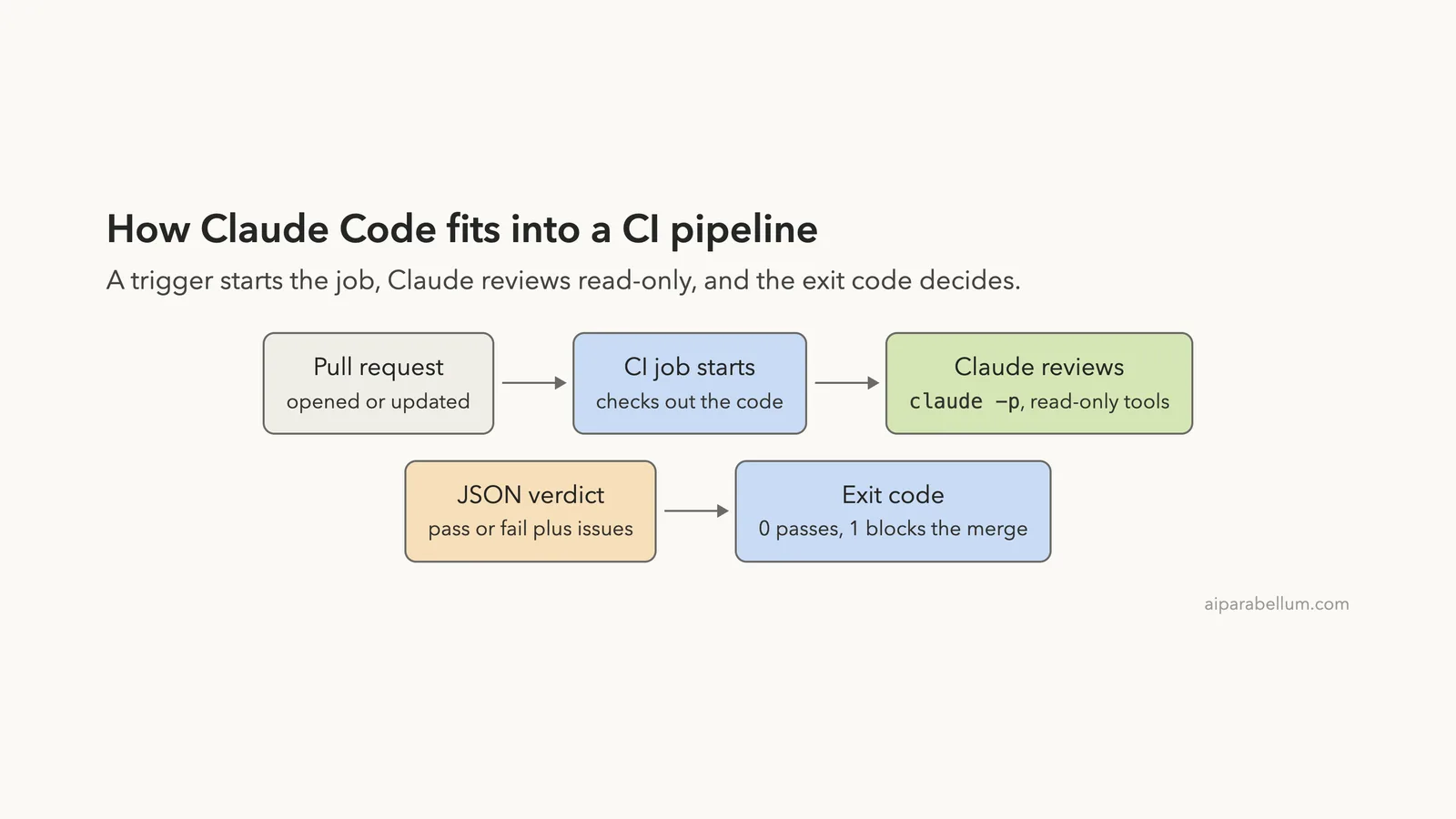
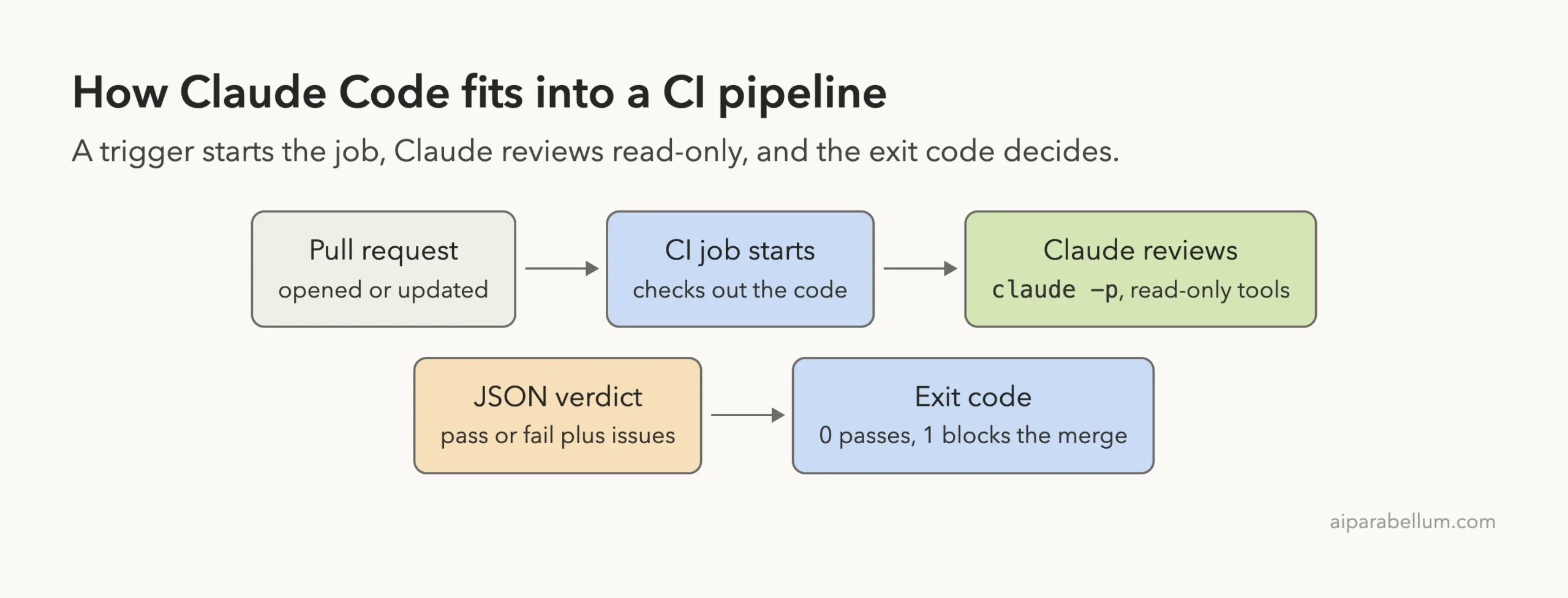
Running Claude Code in a CI/CD pipeline means a build server, not a person, starts Claude, gives it a task and reads the answer. That sounds fancy, but the core is one command and one exit code. In this guide you will build a small pull request review gate, run it for real, watch it block a risky change, and then watch it pass after the fixes.
This is Part 43 of 45 in our Claude Code Deep Dives, part of our Claude Code tutorials. In Part 42 we built an agent with the TypeScript SDK, and here we put Claude Code inside the automation that checks your code.
Tested with Claude Code v2.1.322 on November 13, 2026, on macOS. We ran the review step as a script in a throwaway Git repository. We did not run the GitHub workflow on GitHub itself, because that needs a hosted repository and a secret key, so that part follows Anthropic’s official docs.
| Question | Short answer |
|---|---|
| What is it? | Claude Code running unattended as one step of a CI job |
| Two ways to do it | The Claude Code GitHub Action, or claude -p inside any CI system |
| How the job passes or fails | Claude returns JSON, and a shell test turns the verdict into an exit code |
| Safety flags we used | --permission-mode dontAsk, --allowedTools "Read", --max-turns 6, --max-budget-usd 0.50 |
| What we ran for real | A failing review (exit 1) and a passing review (exit 0) |
| Cost in our test | About $0.08 to $0.18 per review of a 25-line diff |
What Claude Code in CI/CD Means
Continuous integration, or CI, is the robot that runs checks every time someone opens or updates a pull request. Usually those checks are tests and linters. With Claude Code, you can add a check that reads the change and gives a judgment, like a quick first reviewer.
Anthropic’s docs describe two main routes. The first is the Claude Code GitHub Action, which responds to @claude mentions and can run your own prompts on GitHub events. The second is headless mode, where you call claude -p from any script, so it works in GitHub Actions, GitLab CI or a plain shell.
We cover the basics of headless mode in our headless guide, and the sign-in options in headless auth guide. This post puts those pieces into a pipeline.
Two Ways to Run Claude Code in CI
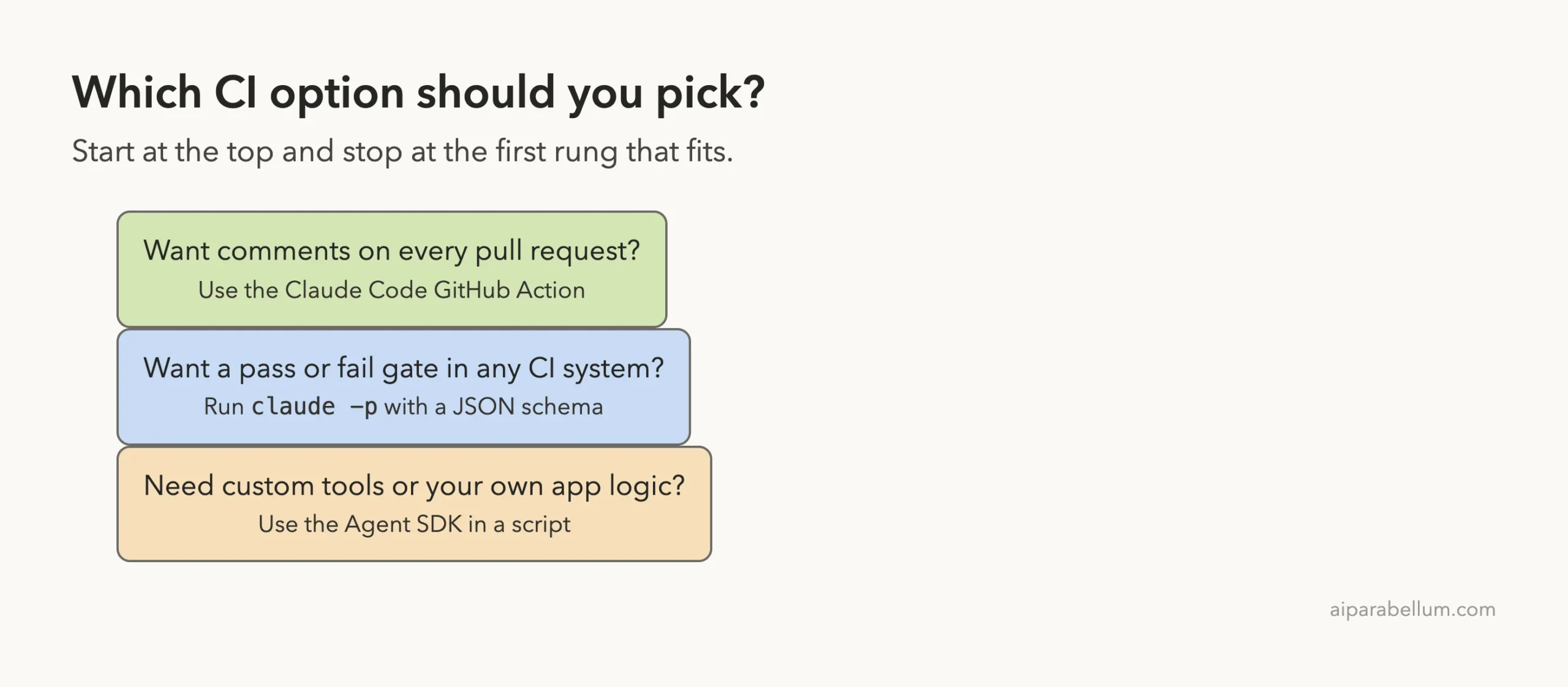
Before you write anything, choose the route that fits your team. The table compares them.
| Option | Best for | How results appear | Where it runs |
|---|---|---|---|
| Claude Code GitHub Action | Comments on pull requests and issues | A comment, or the workflow log in automation mode | GitHub Actions |
claude -p in a script | A pass or fail gate | JSON you parse, plus an exit code | Any CI system |
| Agent SDK in a script | Custom tools and your own logic | Messages your code handles | Any CI system |
The action has two modes, according to the GitHub Actions documentation. In interactive mode, when the workflow gives no prompt, Claude waits for the trigger phrase @claude. In automation mode, when the workflow provides a prompt input, Claude runs without waiting for a mention.
Step 1: Set Up a Safe Demo Repository
We made a tiny Python project with two branches. The main branch holds a working total_price function and a test. A feature/discounts branch adds a discount, an average function and a report function, and it hides several problems on purpose.
def total_price(items, tax_rate, discount=0):
    subtotal = sum(i["price"] * i["qty"] for i in items)
    total = subtotal * (1 + tax_rate) - discount
    return round(total, 2)

def average_price(items):
    return sum(i["price"] for i in items) / len(items)

def run_report(name):
    os.system("echo Report for " + name)
The branch also contains a fake payment key written straight into the source, PAYMENT_KEY = "sk_live_...". It is not a real key. We planted it so that the reviewer has a real security problem to find.

Step 2: Write the Review Script
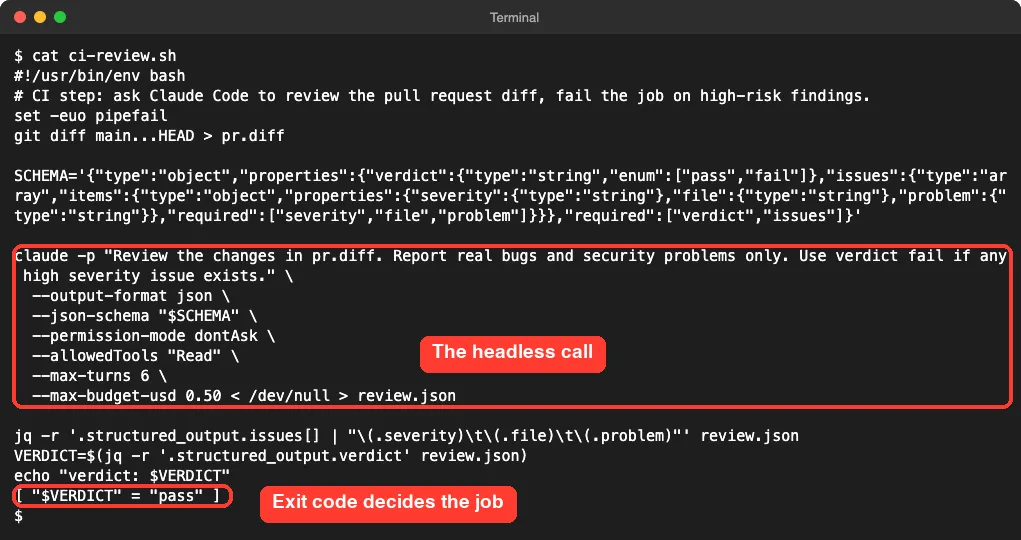
The heart of the pipeline is a small shell script named ci-review.sh. It saves the branch diff to a file, asks Claude to review it, and turns the answer into an exit code. Here is the full file.
#!/usr/bin/env bash
set -euo pipefail
git diff main...HEAD > pr.diff

SCHEMA='{"type":"object","properties":{"verdict":{"type":"string","enum":["pass","fail"]},"issues":{"type":"array","items":{"type":"object","properties":{"severity":{"type":"string"},"file":{"type":"string"},"problem":{"type":"string"}},"required":["severity","file","problem"]}}},"required":["verdict","issues"]}'

claude -p "Review the changes in pr.diff. Report real bugs and security problems only. Use verdict fail if any high severity issue exists." \
  --output-format json \
  --json-schema "$SCHEMA" \
  --permission-mode dontAsk \
  --allowedTools "Read" \
  --max-turns 6 \
  --max-budget-usd 0.50 < /dev/null > review.json

jq -r '.structured_output.issues[] | "\(.severity)\t\(.file)\t\(.problem)"' review.json
VERDICT=$(jq -r '.structured_output.verdict' review.json)
echo "verdict: $VERDICT"
[ "$VERDICT" = "pass" ]
The last line is the trick. A shell test returns exit code 0 when it is true and 1 when it is not, and CI systems treat any non-zero exit as a failed job. So the verdict is the gate.
What each flag does
-pruns one prompt and exits, which is what a CI job needs.--output-format jsonreturns structured JSON with the result, session ID and metadata, as the headless docs describe.--json-schemaasks for a fixed shape. Our run put the answer in astructured_outputfield.--permission-mode dontAskdenies every call that would otherwise prompt, which the docs call useful for locked-down CI runs.--allowedTools "Read"pre-approves reading files. Nothing else can run.--max-turns 6and--max-budget-usd 0.50cap how long and how much one review can run.< /dev/nulltells Claude there is no piped input. Without it, our first test printed a warning that it waited three seconds for stdin.
If you want to understand permission modes better, read permission modes guide. In CI you almost never want a mode that can wait for a human, because nobody is there to answer.
Step 3: Run the Pipeline and Watch It Fail
Now run the script on the risky branch. We piped the output through cut only so each line fits in the screenshot.
./ci-review.sh; echo "exit code: $?"Claude read the diff and returned four issues. Two were high severity, a hardcoded live payment key and a command injection in run_report. Two were medium, a discount that can push the total below zero and an average that crashes on an empty list.
The verdict was fail, and the script exited with code 1.
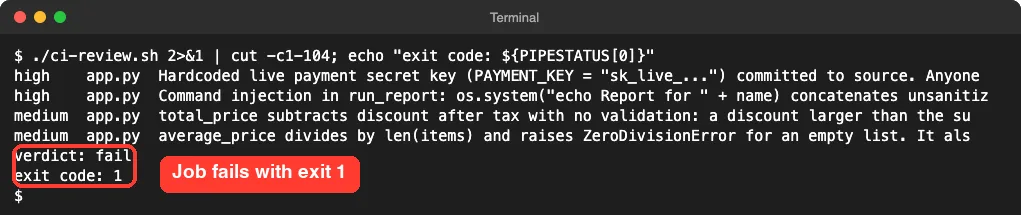
In a real pipeline, that exit code 1 would turn the check red and block the merge until someone fixes the problems. The review ran in about ten seconds in our first test.
Step 4: Fix the Findings and Watch It Pass
We rewrote app.py by hand to address the findings. The key moved to an environment variable, the shell call became subprocess.run with a list of arguments, and the discount and average functions got guards. Then we committed and ran the same script again.
def run_report(name):
    subprocess.run(["echo", "Report for", name], check=True)

def average_price(items):
    count = sum(i["qty"] for i in items)
    if count == 0:
        return 0.0
    return sum(i["price"] * i["qty"] for i in items) / count
This time Claude returned only two low-severity notes, the verdict was pass, and the exit code was 0. The job would turn green.
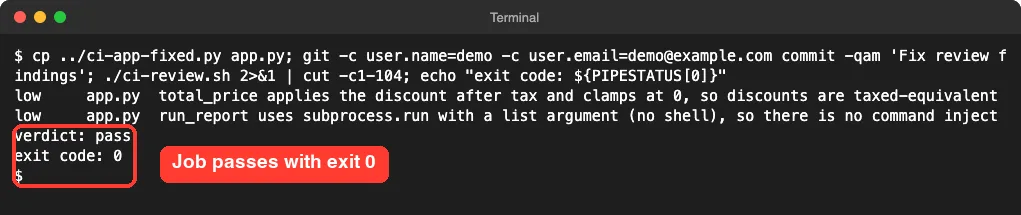
Notice that the model’s wording is not identical between runs. Our passing run even listed a low note about how the discount interacts with tax. A review is a judgment, not a unit test, so keep your human reviewers in the loop.
Check the cost and turns
The JSON result carries useful numbers. We printed a few fields with jq, and the passing run used 3 turns and cost about $0.08. Our earlier failing test run used 3 turns and cost about $0.18.
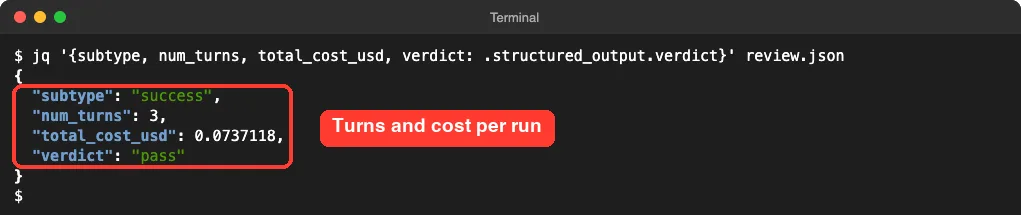
Those figures come from a 25-line diff on one Mac. A bigger pull request will use more tokens, so keep your caps in place. Our Claude Code costs explains how to track usage over time.
Step 5: Move It Into GitHub Actions
The script above is portable. To run it on GitHub, you install Claude Code on the runner and provide a key as a secret.
Anthropic also offers an action that does the setup for you, which is the simpler path on GitHub. This is the workflow we wrote from the docs, and its YAML parses cleanly, but we did not run it on GitHub.
name: Claude PR Review
on:
  pull_request:
    types: [opened, synchronize]
jobs:
  review:
    runs-on: ubuntu-latest
    timeout-minutes: 10
    permissions:
      contents: read
      pull-requests: write
      id-token: write
    steps:
      - uses: actions/checkout@v6
        with:
          fetch-depth: 1
      - uses: anthropics/claude-code-action@v1
        with:
          anthropic_api_key: ${{ secrets.ANTHROPIC_API_KEY }}
          prompt: "Review this pull request for bugs and security problems. Report only real issues."
          claude_args: |
            --max-turns 6
            --allowedTools "Read,Grep"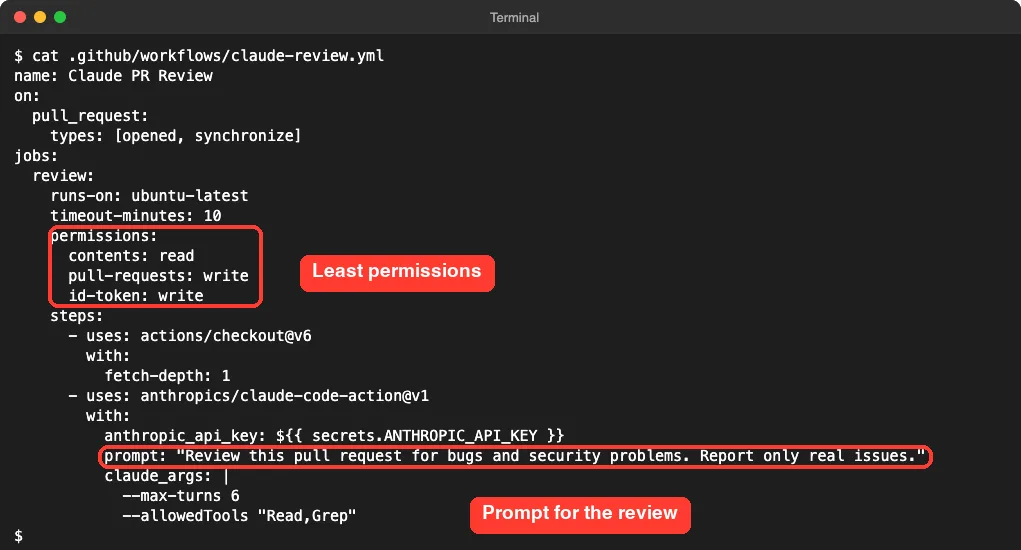
The lines that matter
on: pull_requeststarts the job when a pull request opens or gets new commits.permissionsgives the job only what it needs. The docs listid-token: writeas required for the action’s default GitHub App authentication.timeout-minutes: 10is a workflow-level timeout. The docs recommend one, so a stuck job cannot run forever.anthropic_api_keyreads the key from a repository secret. Never paste a key into the file.promptswitches the action into automation mode.claude_argspasses command line flags, such as--max-turnsand--allowedTools.
The fastest way to install the app and secret is to run /install-github-app inside Claude Code, which the docs describe as the quick setup. If you want a longer walkthrough of that route, see our GitHub Actions setup.
Safety Rules for Unattended Runs
A CI job runs without you watching, so treat it like a new teammate with a narrow job. The official docs and our run suggest these rules.
- Store keys as GitHub Secrets. The docs warn never to commit API keys or OAuth tokens to your repository.
- Give the job the least permissions it needs, and review any changes Claude makes before merging.
- Allow only the tools the task needs. A reviewer needs
Read, notBash. - Cap turns, budget and time. The docs suggest
--max-turns, workflow timeouts and GitHub concurrency controls. - Know who can trigger runs. On issue and pull request events the triggering user needs write access, and the action rejects bot actors unless you list them in
allowed_bots. - Keep your
CLAUDE.mdshort, because Claude reads it on every run.
The docs also note that runs use GitHub Actions minutes and API tokens, so both bills grow with usage. On public repositories, GitHub withholds secrets from runs triggered by fork pull requests, so the review works only for branches in the same repository.
Real Examples You Can Copy
Fail the build only on high severity
Our script fails whenever the verdict is fail. If you would rather count issues yourself, use jq to check severity directly.
jq -e '[.structured_output.issues[] | select(.severity == "high")] | length == 0' review.jsonThe -e flag makes jq exit non-zero when the result is false, so the same gate works in one line.
Run on a schedule
The docs show a scheduled workflow that writes a daily report to the run log at 09:00 UTC. GitHub runs scheduled workflows only from the default branch, and in public repositories it disables the schedule after 60 days without repository activity. If you want a recurring task that does not need GitHub, compare options in routines versus loop.
Run a skill in the pipeline
The prompt input accepts a skill invocation as well as plain text. For a skill in your repository’s .claude/skills/ folder, run actions/checkout first, then pass /skill-name as the prompt. Our code review skill shows how to build one.
Try It Yourself
Make a throwaway Git repository, add a small file with one obvious bug on a feature branch, and run the review script. Then ask Claude to write the script for you with this prompt.
Write a shell script named ci-review.sh that saves git diff main...HEAD to pr.diff, runs claude -p to review it with a JSON schema that returns a verdict and a list of issues, allows only the Read tool, caps turns and budget, and exits 1 when the verdict is fail.Treat the review as a gate with limits, and let people keep the final say.
Common Mistakes
- Letting Claude use shell tools in CI when it only needs to read files.
- Forgetting
--max-turnsand a workflow timeout, which lets a stuck run burn minutes. - Trusting the verdict without human review. Our two runs gave different low-level notes on similar code.
- Passing
github_token: ${{ secrets.GITHUB_TOKEN }}to the action. The docs say GitHub does not trigger workflows on commits made with the default token, so remove it unless you need it. - Writing
@claude-botor/claudein a comment. The trigger must be the whole word@claude. - Putting keys in the workflow file instead of Secrets.
- Skipping the local test. Run your script on your own machine first, as we did, before you wire it into CI.
Pro Tips
- Print
total_cost_usdandnum_turnsinto the job log, so you notice a review that suddenly costs more. - Use
--json-schemaso you parse fields, not free text. - Add your review rules to
CLAUDE.md, such as “flag any hardcoded secret”. - Use issue templates, since the docs say specific requests need fewer turns.
- Pair the review with your normal tests. Claude reads code, and your test suite runs it.
- For a local version before you push, try the /code-review command, and add hooks for checks on your own machine.
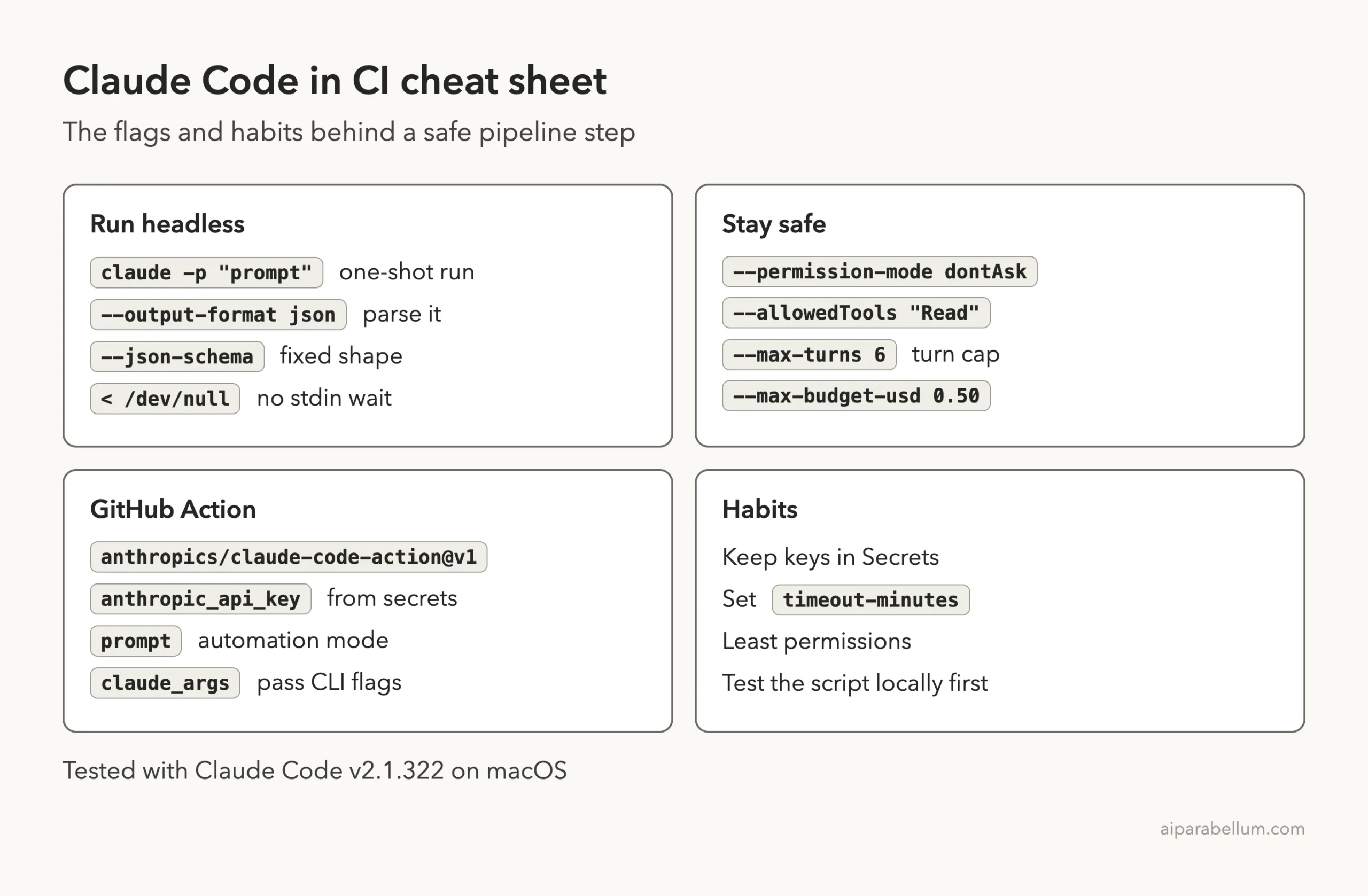
Cheat Sheet
Frequently Asked Questions
Can Claude Code run in any CI system?
Yes, if it can run the command line. The headless docs say you can run Claude Code programmatically from the CLI, Python or TypeScript, and they link a separate guide for GitLab CI/CD. The GitHub Action is only for GitHub.
How does a CI job authenticate?
The action docs list ANTHROPIC_API_KEY for a Console key, or CLAUDE_CODE_OAUTH_TOKEN for a Claude subscription token made with claude setup-token. Our local demo used an existing sign-in on one Mac, and we did not create a token.
Will Claude change my code during the review?
Not in our script. We allowed only the Read tool and used dontAsk, so any write would be denied. If you want Claude to push fixes, grant tools on purpose and review the result.
How much does a review cost?
Our two test reviews of a 25-line diff cost about $0.08 and $0.18. Your cost depends on diff size, repository size and prompt length, so set --max-budget-usd and watch the logs.
What happens when no one is there to approve a permission?
With dontAsk, Claude Code denies every call that would otherwise prompt. Tools you list in --allowedTools still run, so the job never hangs waiting for an answer.
Conclusion
Claude Code in a CI/CD pipeline comes down to a headless call, a JSON verdict and an exit code. In our test, a read-only review blocked a branch with a leaked key and a command injection, then passed after the fixes, at a cost of cents per run. Start with the script on your own machine, add limits for tools, turns and budget, store keys as secrets, and move to the GitHub Action when you want comments on pull requests. You can find more guides in our Claude Code tutorials and read about the model behind it on our Claude AI page.
Previous in the series: Part 42: Claude Agent SDK in TypeScript: Build a Small Agent
Next in the series: Part 44: Claude Code Worktrees: A Daily Workflow That Works.