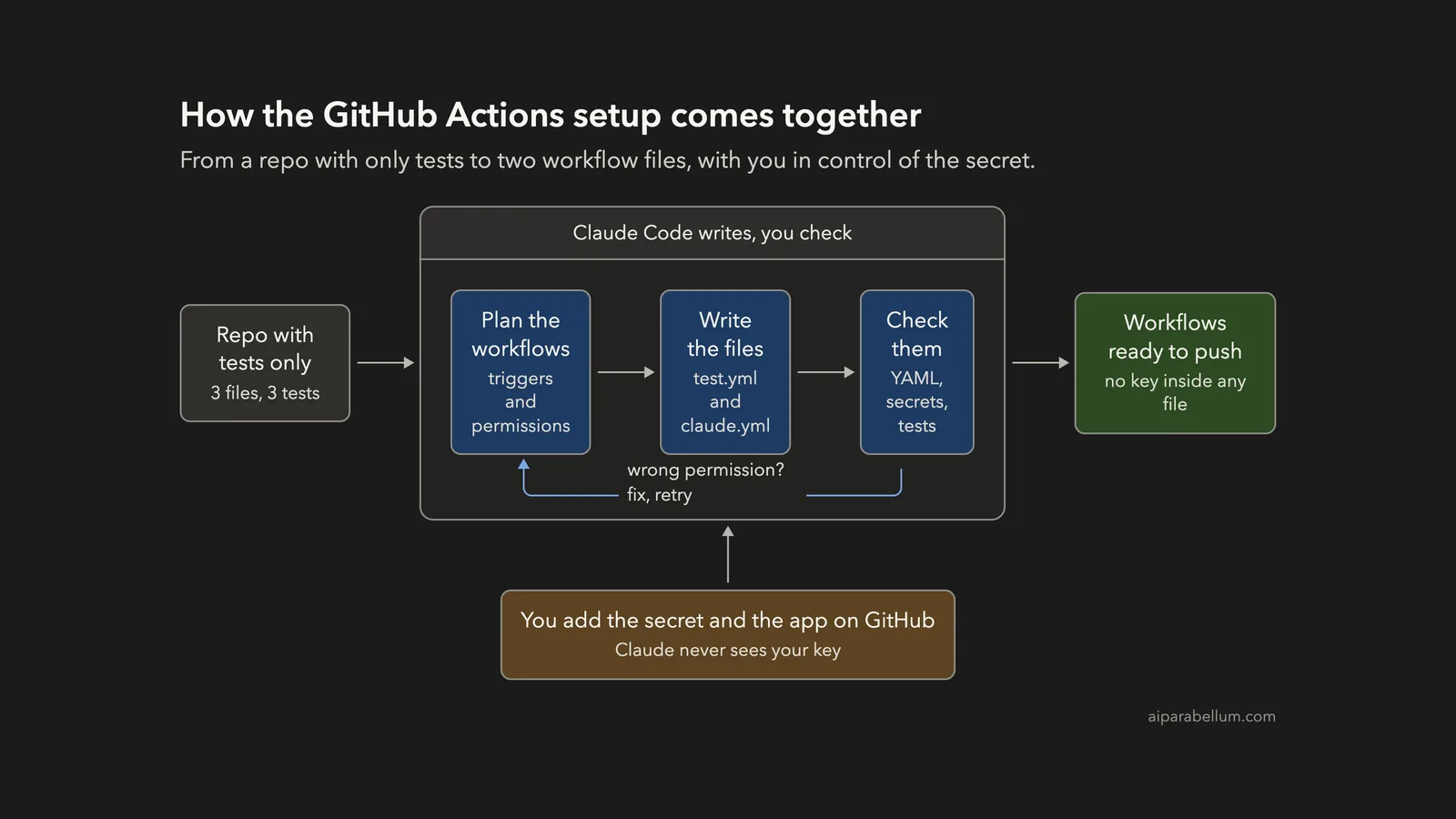
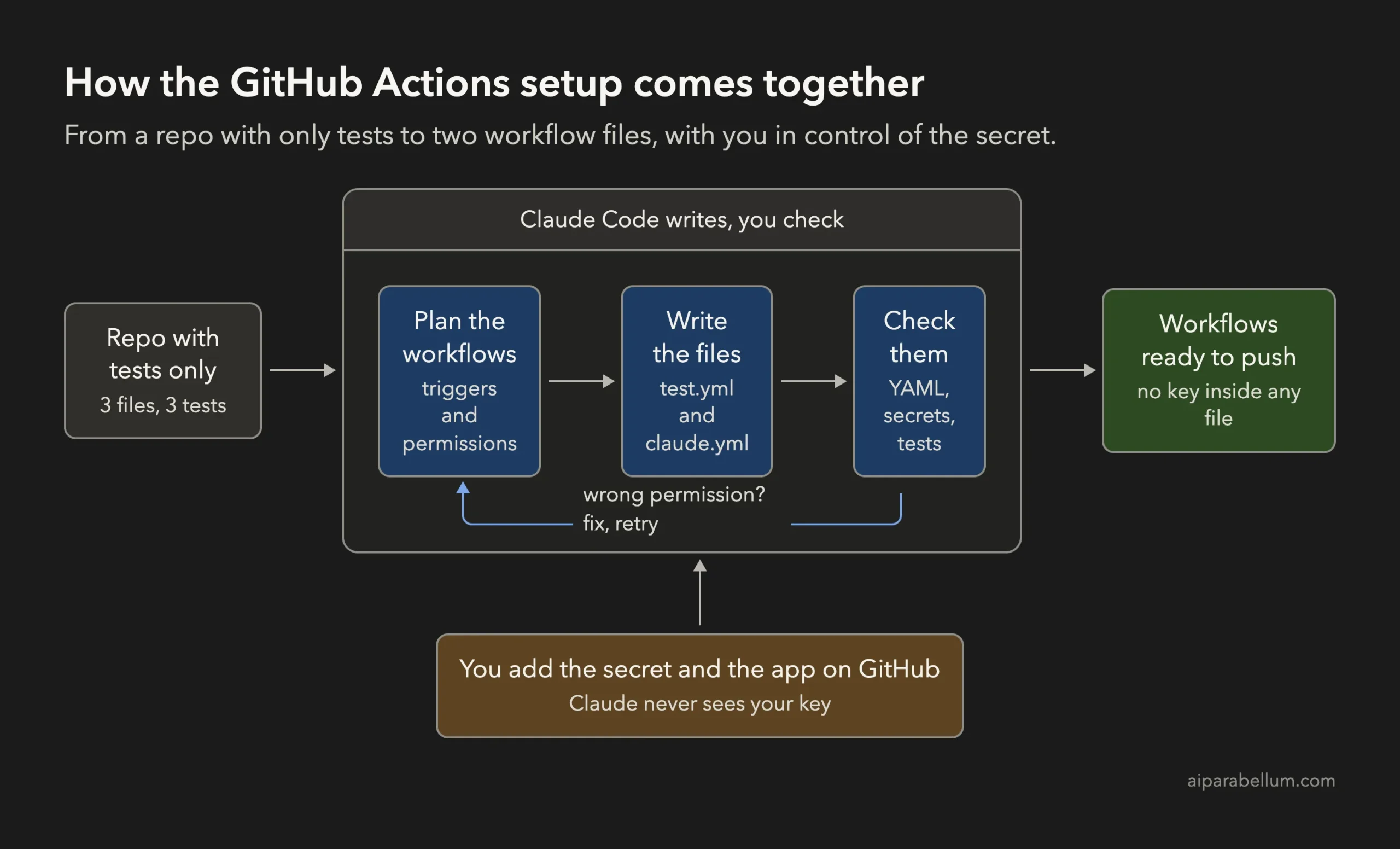
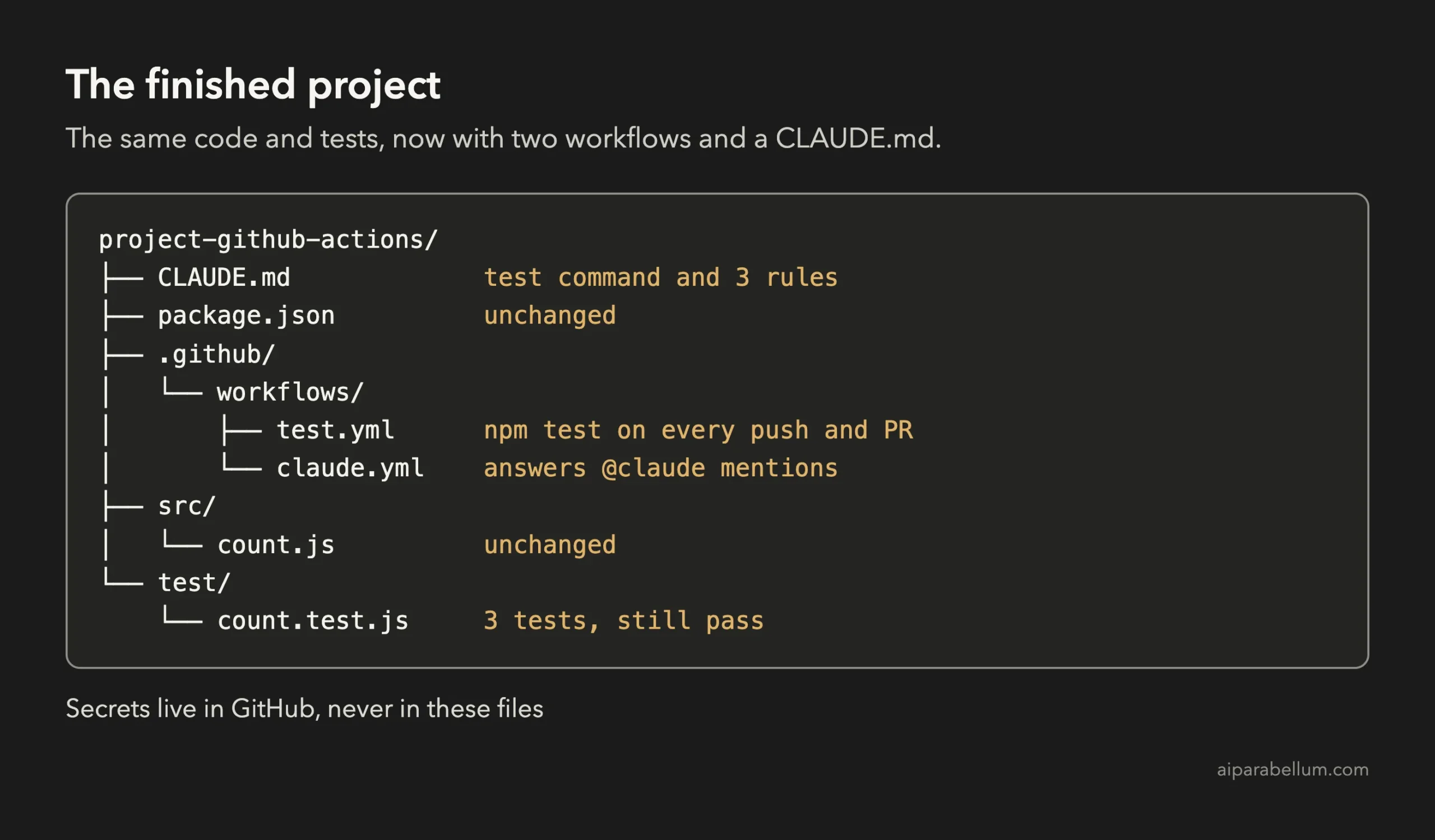
Do you want Claude to answer questions and make changes right inside your GitHub issues and pull requests? You can set up GitHub Actions with Claude Code in four small steps: plan the workflow files, let Claude write them, check them for mistakes, and then add your secret key on GitHub yourself. In this project we took a tiny word-counting library and ended with two workflow files, a short CLAUDE.md, and three passing tests.
This is Project 17 of 20 in our Build with Claude Code series, part of our Claude Code tutorials. In Project 16 we learned to write docs. Here we use the same habits again: plan first, one job per prompt, and a check at the end.
Tested with Claude Code v2.1.310 on October 27, 2026, on macOS. We tested on macOS; the Windows and Linux steps follow Anthropic’s official instructions.
What We Built
A workflow file is a promise about who can do what in your repository. Claude Code can write it in seconds, but you decide what the promise allows.
| Item | Details |
|---|---|
| Project | Add automated tests and an @claude helper to a small repository |
| Input | A made-up word counter: src/count.js and 3 tests, with no workflows at all |
| Output | .github/workflows/test.yml, .github/workflows/claude.yml and an 11-line CLAUDE.md |
| Tools | Node.js and its built-in test runner, plus the official anthropics/claude-code-action@v1 |
| Result | Both files parse as valid YAML, no key value in any file, and 3 of 3 tests passing locally |
| Prompts used | 3 short prompts |
What Are GitHub Actions With Claude Code?
GitHub Actions is GitHub’s built-in way to run tasks when something happens in your repository, such as a new push or a new comment. A file in the .github/workflows folder describes the task. GitHub then runs it on a temporary machine called a runner.
According to Anthropic’s GitHub Actions documentation, the Claude Code GitHub Action runs Claude Code inside those workflows. You mention @claude in an issue or pull request comment, and Claude can analyze code, implement changes and push commits. It can also run with a fixed prompt on any GitHub event.
If you are new to this, our beginner guide explains the idea in more detail. This post is the hands-on version, where we build the files. For the bigger picture of Claude itself, see our Claude AI overview.
What We Could Test and What We Could Not
We want to be clear about this part. Running the action for real needs a GitHub repository, an installed GitHub App and a paid API key. We did not create accounts or touch any real repository for this tutorial.
So everything below happened on a local demo folder. Claude Code wrote the files, we checked them, and we ran the tests on our Mac. We did not watch @claude answer an issue on GitHub, and we will not claim that we did.
Anthropic’s docs cover the GitHub side, and we show the key pages later with screenshots. Think of this project as the part you can safely rehearse on your own computer.
The Project We Started With
Everything here is made up. The library counts words in a piece of text and finds the longest word.
| File | What it does |
|---|---|
| package.json | One script: npm test runs node –test |
| src/count.js | countWords and longestWord, 11 lines |
| test/count.test.js | Three tests that use Node’s built-in test runner |
The project has no dependencies, so the tests need no install step. That keeps the workflow short, which is perfect for a first try.
Step 1: Plan the Workflows in Plan Mode
We started Claude Code in plan mode, where it can read files but cannot change anything.
claude --permission-mode planThe prompt asked for two files and a short answer: one that runs the tests, and one that lets teammates mention @claude.
Read package.json, src/count.js and test/count.test.js. Do not change any file. Keep the answer short: plan the GitHub Actions setup for this project as two workflow files under .github/workflows/. One runs npm test on every push and pull request. The other lets teammates mention @claude in issue and pull request comments, using the official anthropics/claude-code-action@v1 and a secret named ANTHROPIC_API_KEY. For each file give its triggers and the permissions it needs, one line each.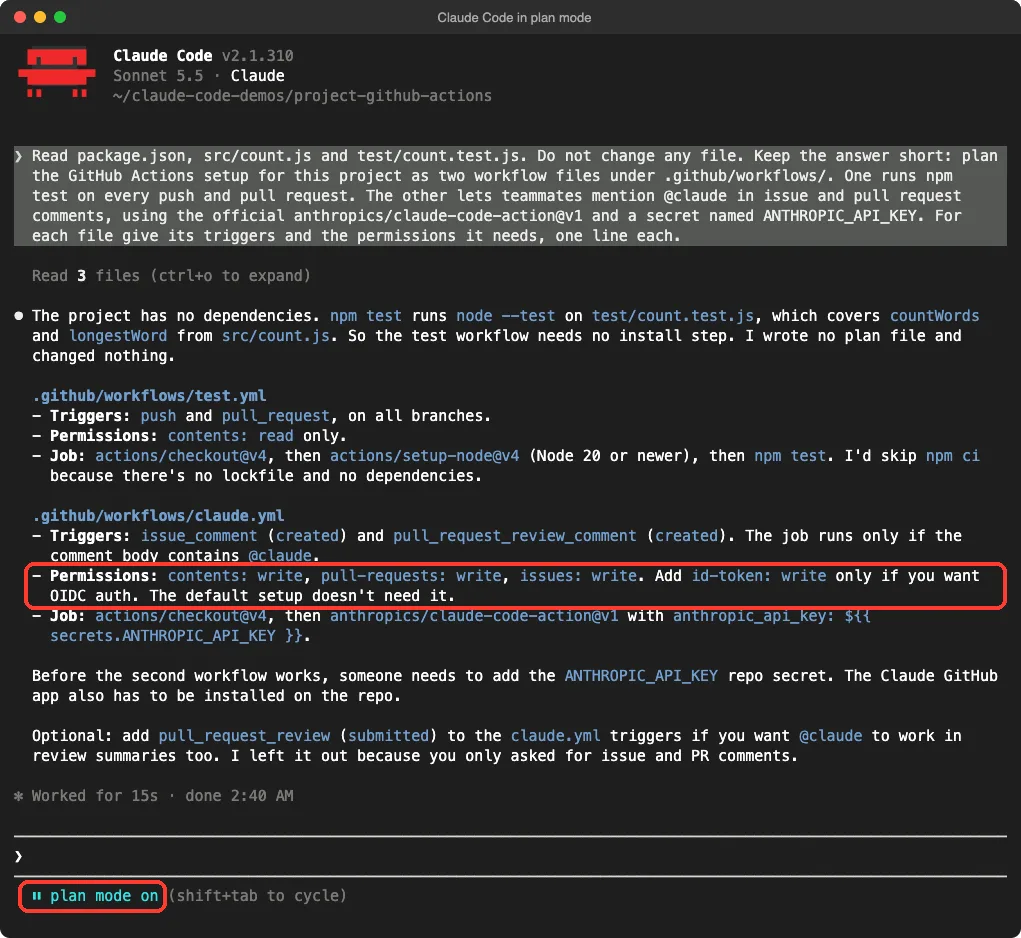
The plan was good. The test workflow got push and pull request triggers and read-only access. The Claude workflow got comment triggers, an if check for the word @claude, and write access for contents, pull requests and issues.
It also said what we still had to do ourselves: add the ANTHROPIC_API_KEY secret and install the Claude GitHub App on the repository.
The Line We Had to Correct
Look at the highlighted line. Claude said that id-token: write is only needed for OIDC authentication and that the default setup does not need it. Anthropic’s docs say something different: id-token: write is required for the action’s default GitHub App authentication.
The plan also used actions/checkout@v4, while Anthropic’s example uses @v6. Neither is a disaster in a plan, but both would have caused trouble or drift in a real repository. This is why we read the official page before we let Claude write anything.
A plan from a model is a draft. Check every permission against the official docs before you approve it.
Step 2: Write the Two Workflow Files
Now we continued the session in the normal mode where Claude asks before it acts. The prompt fixed the two problems and added two safety limits.
Now create both files. Use contents: read for test.yml. In claude.yml use these permissions: contents write, pull-requests write, issues write, id-token write and actions read, because Anthropic's docs say id-token: write is required for the default GitHub App authentication. Use actions/checkout@v6 as in Anthropic's example. Never write a key into a file, only the secret reference. Add timeout-minutes: 10 to both jobs and pass --max-turns 5 in claude_args.Claude showed each file before it created it. This is the moment to read, not to click yes.
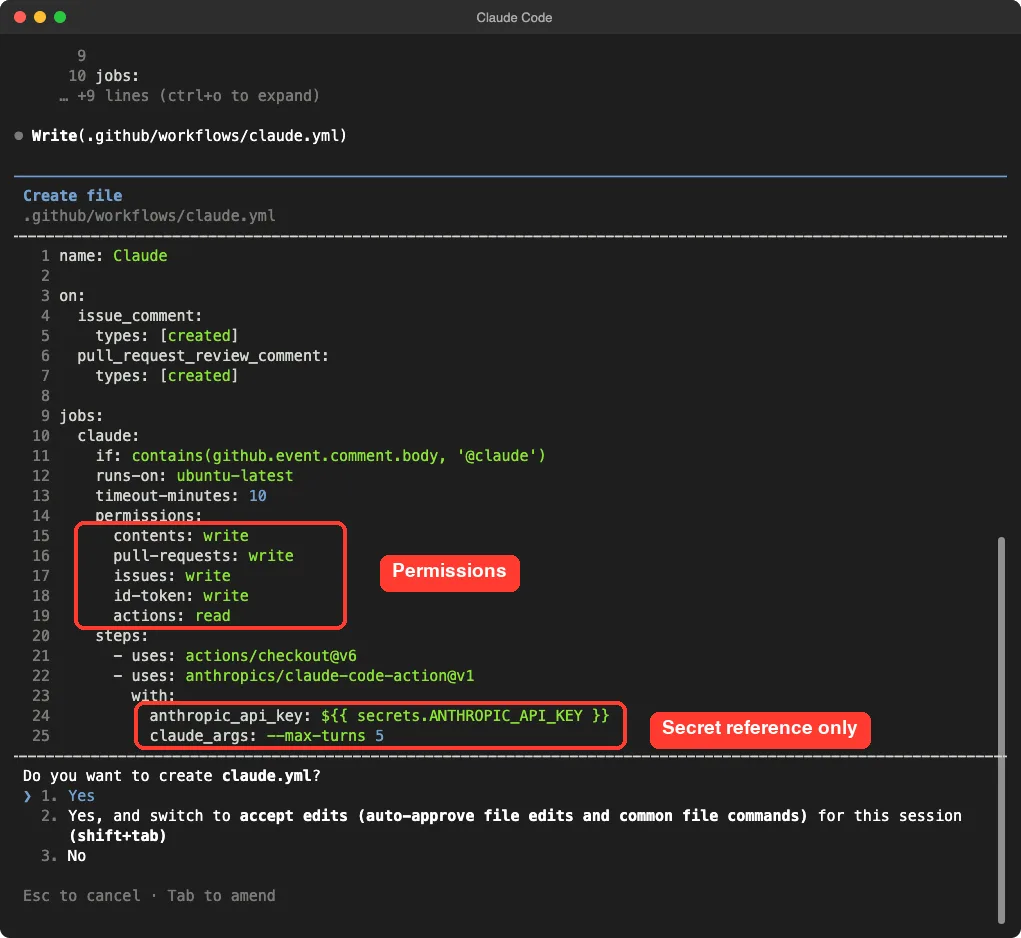
Here is the finished claude.yml, exactly as Claude wrote it.
name: Claude

on:
  issue_comment:
    types: [created]
  pull_request_review_comment:
    types: [created]

jobs:
  claude:
    if: contains(github.event.comment.body, '@claude')
    runs-on: ubuntu-latest
    timeout-minutes: 10
    permissions:
      contents: write
      pull-requests: write
      issues: write
      id-token: write
      actions: read
    steps:
      - uses: actions/checkout@v6
      - uses: anthropics/claude-code-action@v1
        with:
          anthropic_api_key: ${{ secrets.ANTHROPIC_API_KEY }}
          claude_args: --max-turns 5
It matches the example in Anthropic’s docs, plus our two limits. If you use a Claude subscription instead of an API key, the docs say to replace the anthropic_api_key line with claude_code_oauth_token and a CLAUDE_CODE_OAUTH_TOKEN secret.
The Test Workflow
The second file runs your tests whenever code changes. It is short on purpose.
name: Test

on:
  push:
  pull_request:

permissions:
  contents: read

jobs:
  test:
    runs-on: ubuntu-latest
    timeout-minutes: 10
    steps:
      - uses: actions/checkout@v6
      - uses: actions/setup-node@v4
        with:
          node-version: 20
      - run: npm test
This file is our own choice, not something from Anthropic’s page. The setup-node step comes from GitHub’s own actions, and we did not verify that version against any documentation. Claude itself said in its summary that it had not run the files or checked them with a workflow linter, which is an honest and useful warning.
What Each Part of claude.yml Does
| Line | What it does |
|---|---|
| on: issue_comment, pull_request_review_comment | Wakes the workflow when someone writes a new comment |
| if: contains(… ‘@claude’) | Stops runners from starting on comments that do not mention @claude |
| timeout-minutes: 10 | Stops a run that goes on too long |
| id-token: write | Required by the action’s default GitHub App sign-in |
| actions: read | Lets Claude read CI results on pull requests |
| anthropic_api_key | Reads your key from a GitHub secret |
| claude_args: –max-turns 5 | Limits how many steps Claude may take in one run |
Because there is no prompt input, the action runs in what the docs call interactive mode. It waits for the trigger phrase, @claude by default, and answers in a comment on the same issue or pull request. If you add a prompt input, it switches to automation mode and runs on its own.
Step 3: Add a CLAUDE.md and Check Everything
The docs say Claude follows the guidelines in a CLAUDE.md file when it creates pull requests, and that it reads the file on every run. So a short, clear file pays off here. Our CLAUDE.md guide explains the file in depth.
The third prompt did three jobs: write the file, search for leaked keys, and run the tests.
Add a short CLAUDE.md, under 12 lines: how to run the tests, and 3 code rules (CommonJS only, no dependencies, add a test with every change). The Claude action reads this file on every run. Then check both workflow files: does any file contain an API key value instead of a secret reference? Finally run npm test.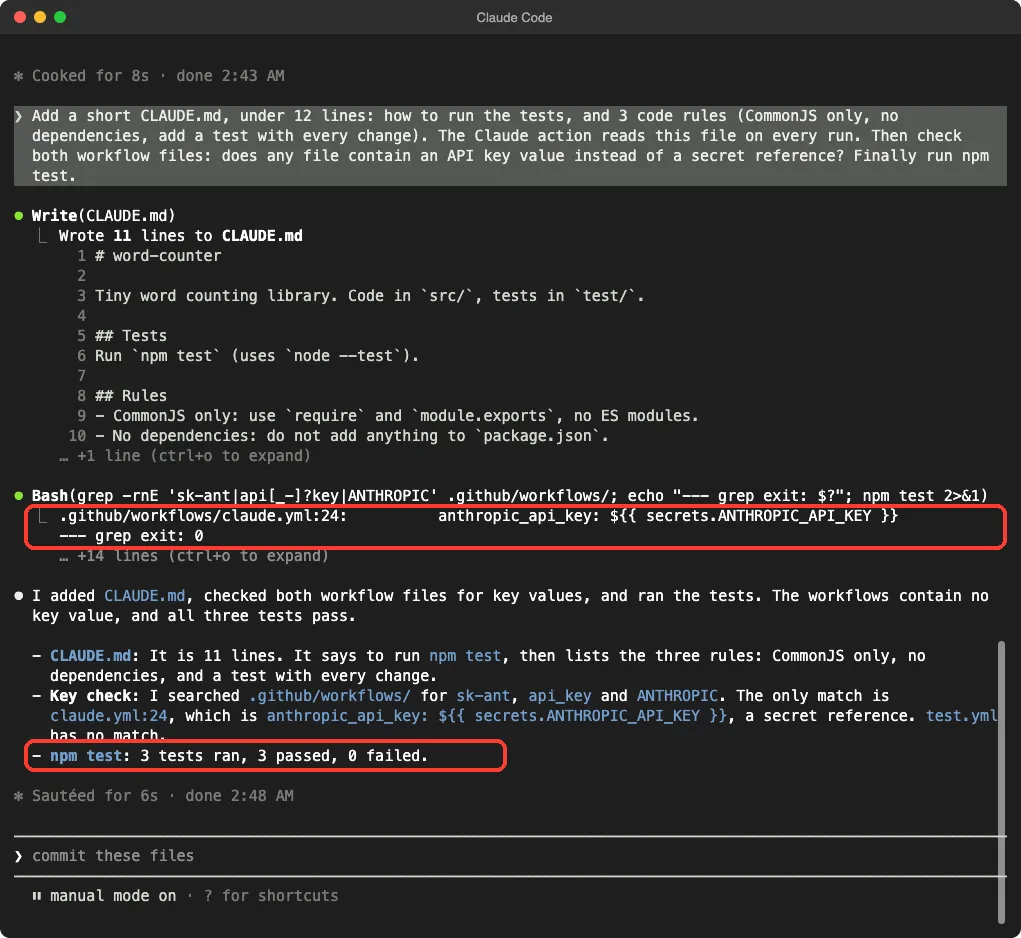
The search found one match: the anthropic_api_key line in claude.yml, which is a secret reference and not a key. The test workflow had no match. The three tests passed.
Do Not Trust the Check Alone
A search for sk-ant only finds keys that look a certain way. So we added a second, separate check in a plain terminal: parse both files as YAML, count key-like strings, and run the tests again.
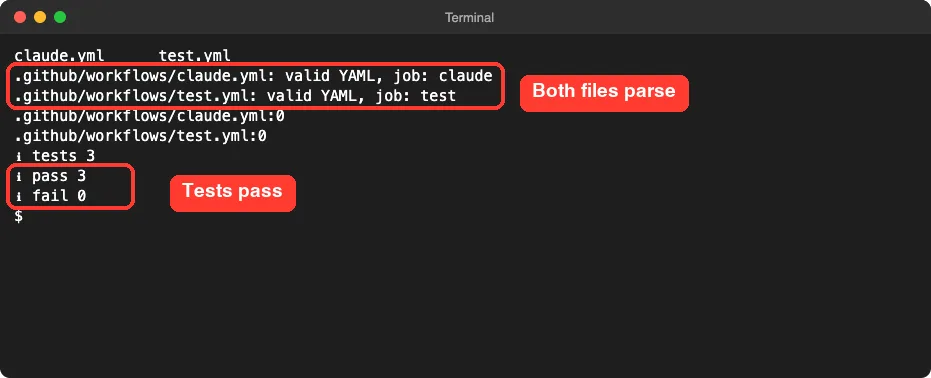
This proves the files are well formed YAML and the tests work on our machine. It does not prove GitHub will accept every permission or that the action will answer a comment. Only a real run on GitHub can show that.
The Finished Project
Step 4: Finish GitHub Actions With Claude Code on GitHub
These steps are for you, not for Claude, and they need admin access to the repository. Here is what Anthropic’s docs describe.
- Install the Claude GitHub App on your repository. It needs Contents, Issues and Pull requests permissions for this action.
- Add a secret named ANTHROPIC_API_KEY to the repository, using a key from the Claude Console.
- Commit the workflow files and push them.
- Write a comment that contains @claude in an issue or pull request.
There is also a quick path: open Claude Code in your repository and run /install-github-app. Claude Code installs the app, saves the secret and opens a pull request with the workflow files.
It works only with github.com repositories and needs the GitHub CLI signed in with gh auth login.
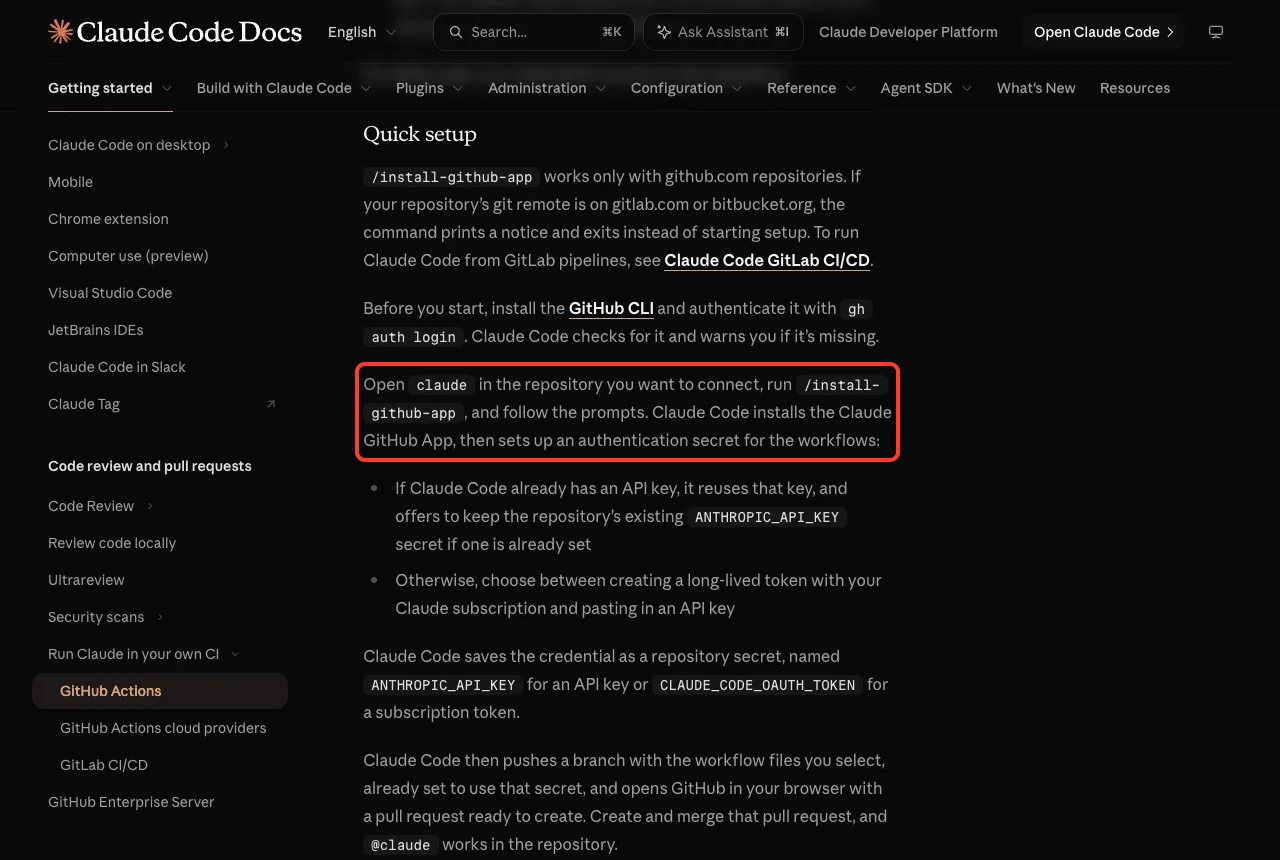
We did not run that command, because it would have changed a real GitHub account. The manual route above gives you full control of the files, which is why we wrote them with Claude Code first.
Who Can Trigger Claude, and What Can Go Wrong
The action checks the person who triggers it. On issue and pull request events, that person must have write access to the repository. Bots are also rejected unless you list them, which keeps bots from setting off Claude in a loop.
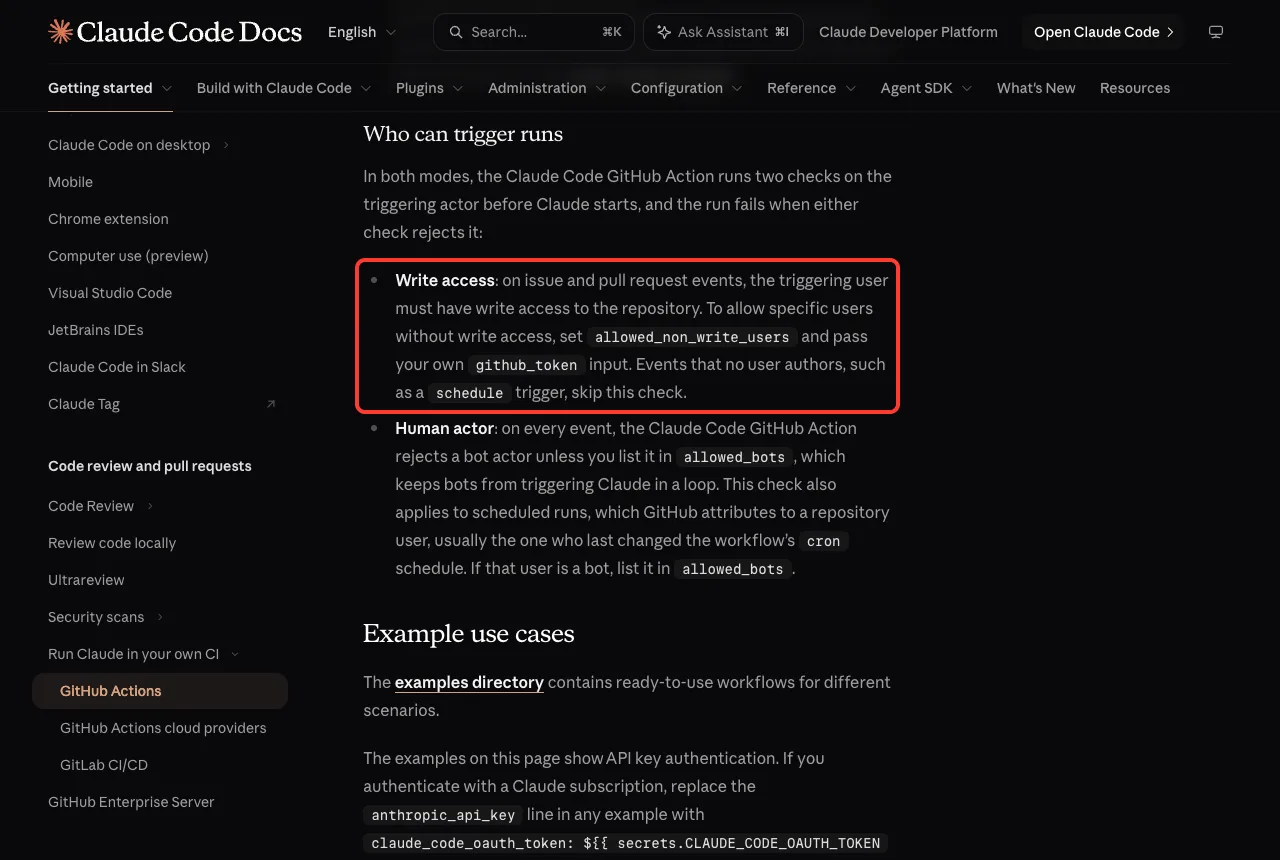
If Claude does not answer, the docs list these checks first.
- The GitHub App is installed on the repository.
- Workflows are enabled for the repository.
- The API key or token is set in the repository secrets.
- The comment contains @claude as a whole word, not /claude or @claude-bot.
- The person commenting has write access.
Keep Costs Under Control
Every run uses two things: GitHub Actions minutes and Claude API tokens. If you sign in with an OAuth token, runs use your Claude subscription instead of API billing. Our Claude Code costs explains how usage adds up.
The docs suggest several ways to lower both costs. We used two of them: a workflow timeout and –max-turns.
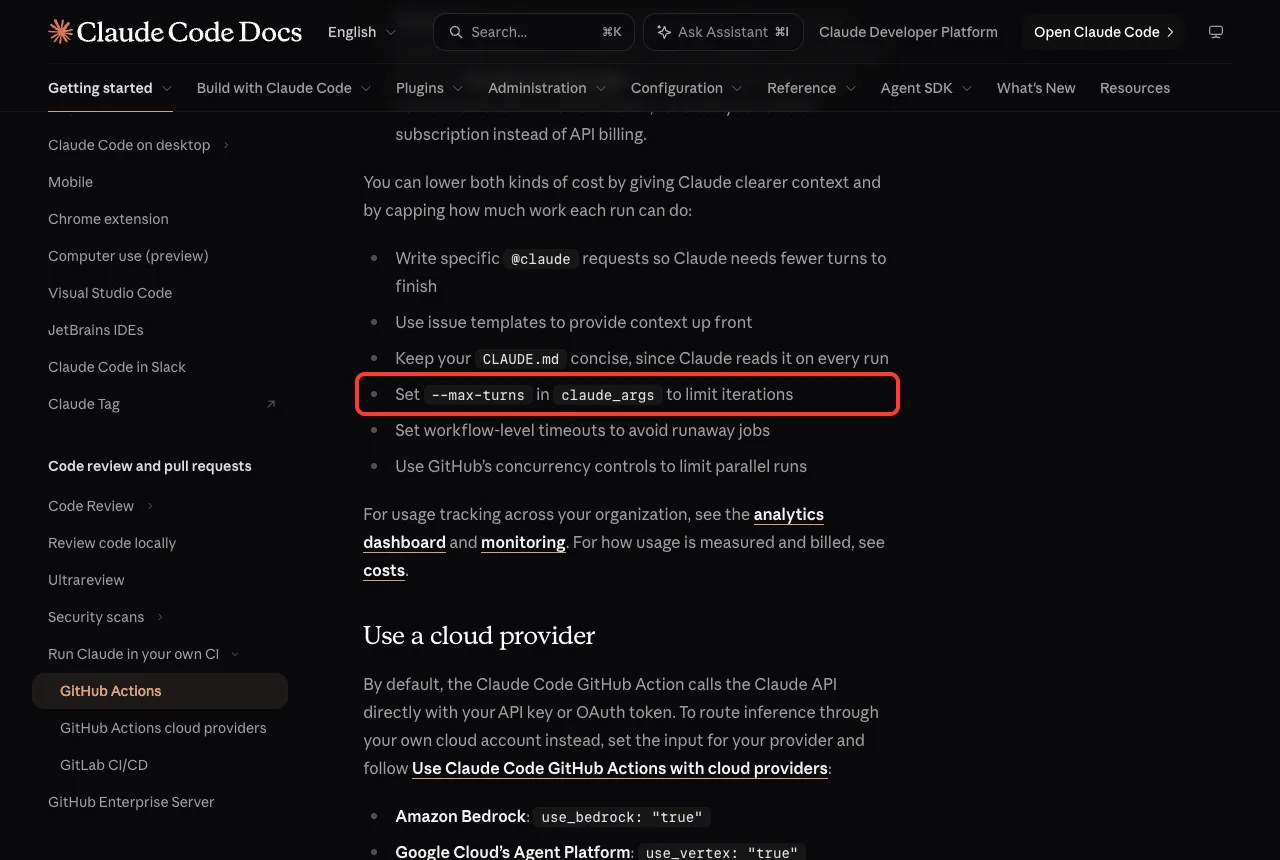
The same list also recommends specific @claude requests, issue templates, a concise CLAUDE.md and GitHub concurrency controls to limit parallel runs.
Protect Your Key
The most important rule is a short one. Never put an API key or token directly in a workflow file. Store it as a GitHub secret and point to it, exactly as we did.
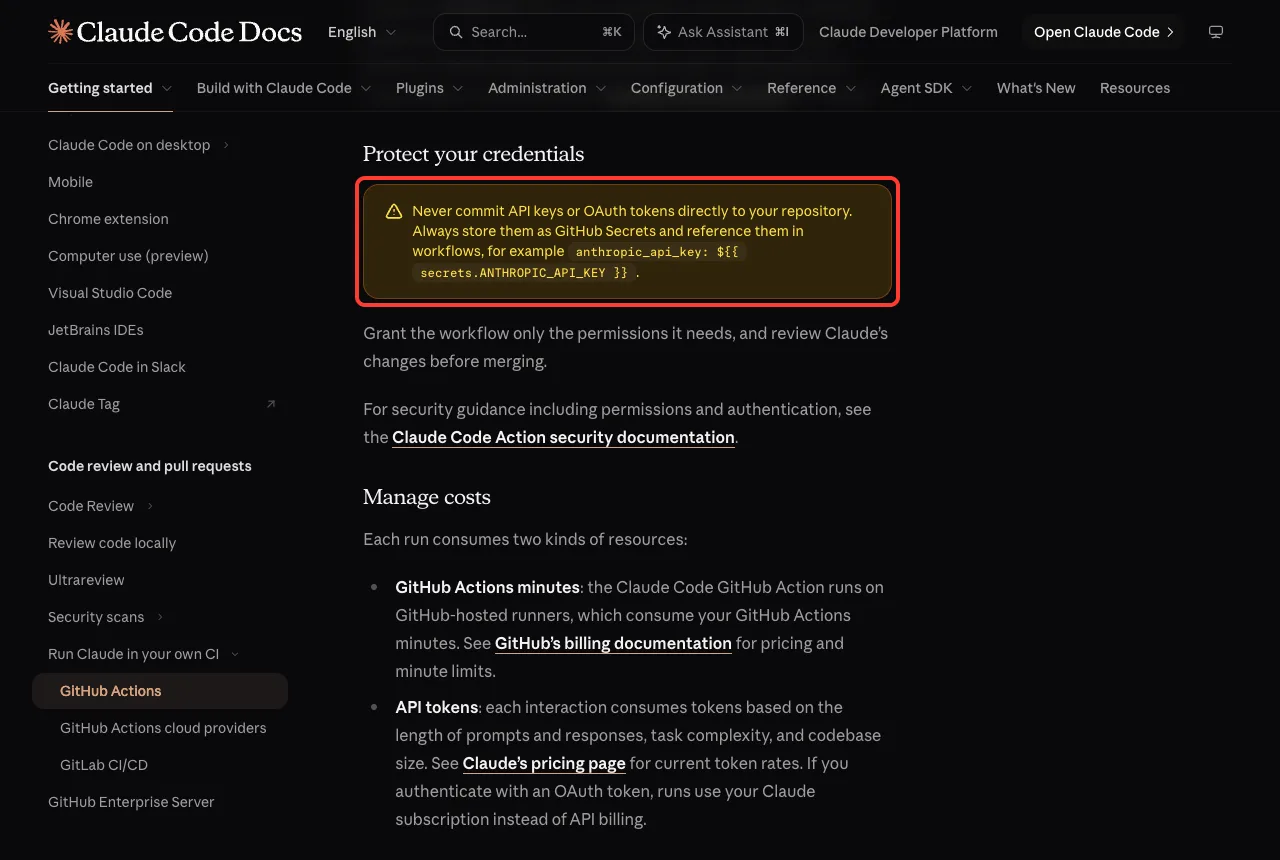
Also grant the workflow only the permissions it needs, and review Claude’s changes before you merge them. For a wider look at safety, read our post on privacy and security.
Try It Yourself
Practice on a throwaway folder, not a real project. Make a new folder, run git init, add a package.json with a test script and one test, and start Claude Code in plan mode. Then paste this prompt.
Do not change any file. Look at this project and plan a GitHub Actions workflow that runs my tests on every push and pull request. List the file name, the trigger, the permissions and the steps, one line each.When the plan looks right, switch to the normal mode and ask Claude to create the file. Then ask it to check the file for any key value, and parse it with a YAML tool of your own. Our post on permission modes shows how to switch between the modes safely.
Some variations to try next:
- Add a schedule trigger with a prompt that writes a daily summary, as in Anthropic’s scheduled example.
- Add a review step that posts comments on pull requests.
- Change the test workflow to run on two Node versions.
Common Mistakes
- Trusting the plan without checking the docs. Our own plan skipped id-token: write.
- Pasting a key into a file to test it. Use the secret reference every time.
- Giving write permissions to a test workflow that only needs to read.
- Forgetting timeouts and –max-turns, which can let a run keep spending.
- Using the default token for a pushed commit and expecting other workflows to start. The docs warn that GitHub does not trigger workflows on commits made with the default GITHUB_TOKEN.
- Assuming that passing local checks means the action works on GitHub. They are different things.
Pro Tips
- Pin the major version, as in anthropics/claude-code-action@v1, and read the docs again when you update.
- Keep CLAUDE.md short, since Claude reads it on every run.
- Write specific @claude requests. Fewer turns means lower cost.
- Start with one workflow in one repository before you roll it out across an organization.
- Use claude -p in your own scripts when you do not need GitHub at all. Our headless mode guide shows how.
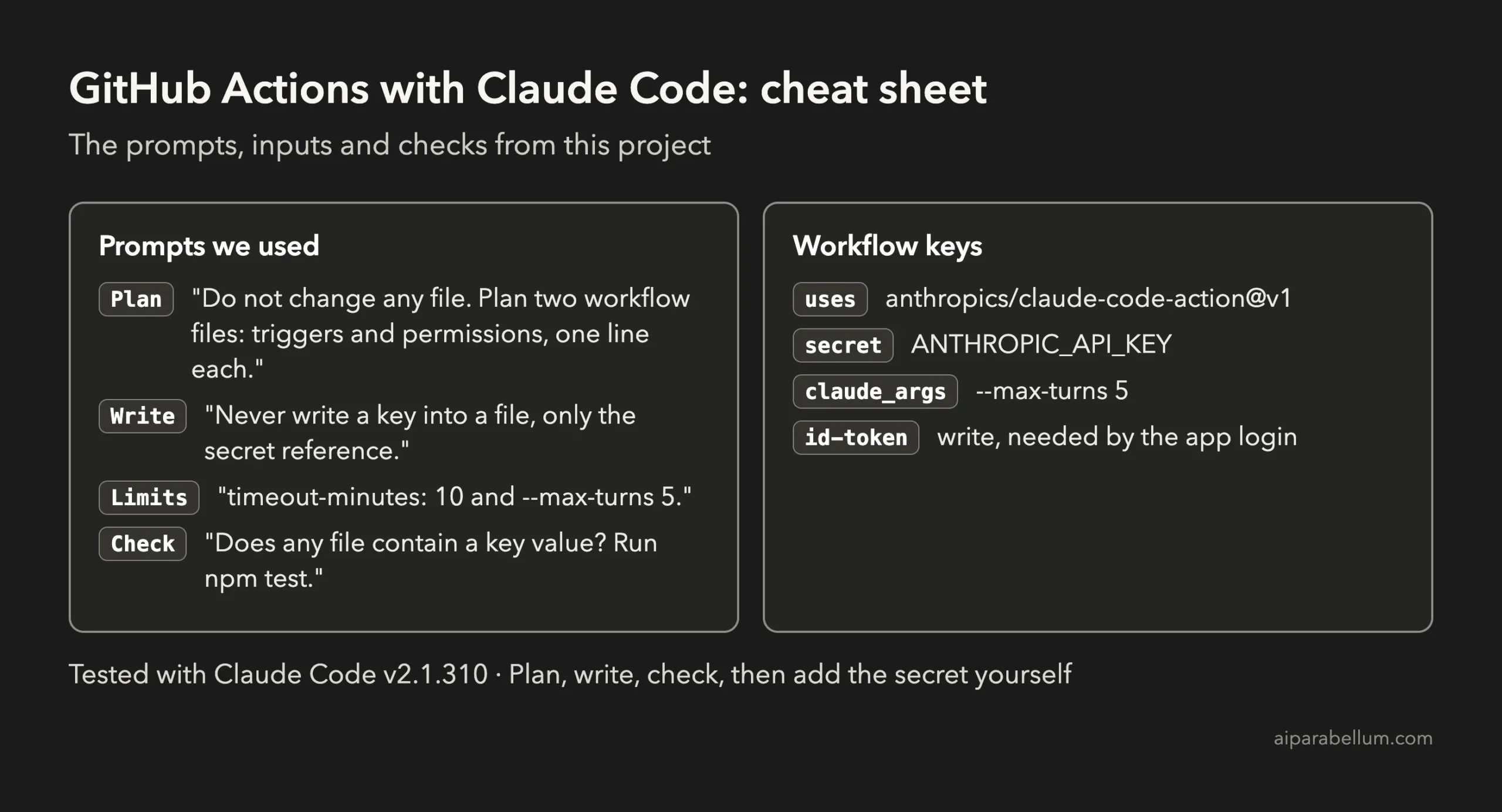
Cheat Sheet
Frequently Asked Questions
Do I need to pay to use GitHub Actions with Claude Code?
Runs use GitHub Actions minutes on GitHub-hosted runners, and they use Claude tokens. With an API key you pay per token, and with an OAuth token from a Claude subscription, runs use that subscription. Check GitHub’s billing page and Claude’s pricing page for current rates.
Is it safe to let Claude push to my repository?
Claude works with the permissions you give the workflow. Keep them as small as you can, store your key as a secret and review every pull request before merging.
What does the quick setup command do?
The /install-github-app command installs the Claude GitHub App, saves an authentication secret and opens a pull request with the workflow files. It works only with github.com repositories.
Can I use it with a Claude subscription instead of an API key?
Yes, on Pro, Max, Team and Enterprise plans, according to the docs. You generate a long-lived token with claude setup-token and save it as CLAUDE_CODE_OAUTH_TOKEN.
Why does Claude not answer my comment?
Check that the app is installed, workflows are enabled, the secret is set and the comment contains @claude as a whole word. Also confirm the commenting user has write access.
Conclusion
You now know how to set up GitHub Actions with Claude Code without handing over your key: plan in plan mode, correct the plan against the official docs, let Claude write the files, and check them twice. In our demo that meant two valid workflow files, an 11-line CLAUDE.md and three passing tests, with the secret and the GitHub App left for you to add. The next step is yours to take on a throwaway repository, where you can see @claude answer for real.
Previous in the series: Project 16: Write Docs and a README Automatically With Claude Code
Next in the series: Project 18: Find and Fix a Security Issue With Claude Code.